
#Legion 7 Slim Amd Gen8 4060 high gpu temp?
37 messages · Page 1 of 1 (latest)
 bitter chasm
 dusty dome
bitter chasm
Hi, I'm having hot GPU temps on my Legion 7 Slim Amd Gen8 with 4060 card.
The b...
dusty dome
bitter chasm
Hi, I'm having hot GPU temps on my Legion 7 Slim Amd Gen8 with 4060 card.
The b...
Have you checked to see if fans and exhaust are clean? Have you repasted at some point? What is your room temperature?
bitter chasm
yes all clean, it's a 4 months old laptop, never opened. Room temp is roughly 19C
dusty dome
bitter chasm
yes all clean, it's a 4 months old laptop, never opened. Room temp is roughly 19...
It’s been this hot since you got it?
bitter chasm
I guess so, I hardly play games on it, I just started
dusty dome
Well if you say it’s clean then it’s 1 of 2 things. Bad paste job on GPU or poor heatsink mount.
bitter chasm
It's normally ok because I hardly use the GPU, I use it plugged and on 'balanced', and when the bottom is raised, the laptop tends to be cool enough. When the keyboard/top of the chassis gets hot I turn on performance to cool it down for a while. But I haven't gamed much
Also, the GPU temp was around 83-85C, but I only discovered about this other temp called hot spot today.
What temps should I see?
dusty dome
I would expect mid 70s at most with what cpu temp you’re seeing. A good paste job will keep the hotspot at 10c or less above core
Anyway, not really anything to do besides trying to repaste
bitter chasm
ok thanks, I suppose I should contact lenovo support
dusty dome
bitter chasm
ok thanks, I suppose I should contact lenovo support
They will honestly not fix it properly. They don’t repaste with PTM. You can only get PTM from Lenovo if you get a brand new heatsink replacement
bitter chasm
what did you mean by poor heatsink mount, just how it's mounted, or defective?
dusty dome
Could be either
bitter chasm
wouldn't I void warranty if I was to repaste it? can I repaste the GPU separately from the CPU?
dusty dome
Most regions no it does not void warranty. No, it’s a shared heatsink. You repaste both if you remove the heatsink
bitter chasm
Ok. I'm based in London and should have on-site assistance, couldn't I request a heatsink replacement?
I'm looking into it. Are you saying that the GPU temps are fine, and the issue is with the hot spot point right?
I found this guide, should it be the first one at the top about PTM (not LM) https://discord.com/channels/761178912230473768/1029086635247284265
dusty dome
bitter chasm
Ok. I'm based in London and *should* have on-site assistance, couldn't I request...
You can try.
dusty dome
bitter chasm
I'm looking into it. Are you saying that the GPU temps are fine, and the issue i...
Both are bad
dusty dome
bitter chasm
I found this guide, should it be the first one at the top about PTM (not LM) htt...
Yes
bitter chasm
so basically just buy the 7950 pads, clean the gpu/cpu die and apply, right?
are there other chips/places that would need repasting after removing the heatsink? I can see lost of chips with white paste in this picture https://postlmg.cc/K3TQxQf6
 dusty dome
bitter chasm
are there other chips/places that would need repasting after removing the heatsi...
dusty dome
bitter chasm
are there other chips/places that would need repasting after removing the heatsi...
The particular machine uses thermal putty for VRM and vram. You should have all thermal pads on those components, but there may be putty.
Heatsink pic pinned in #legion-7slim shows all pads. You should also be able to confirm by looking up pictures of a heatsink replacement on Lenovo support for your machine. Go to Lenovo support, get to the page for your machine, go to parts and find heatsink/fans. Pics should confirm.
bitter chasm
it seems very similar to the one pinned.

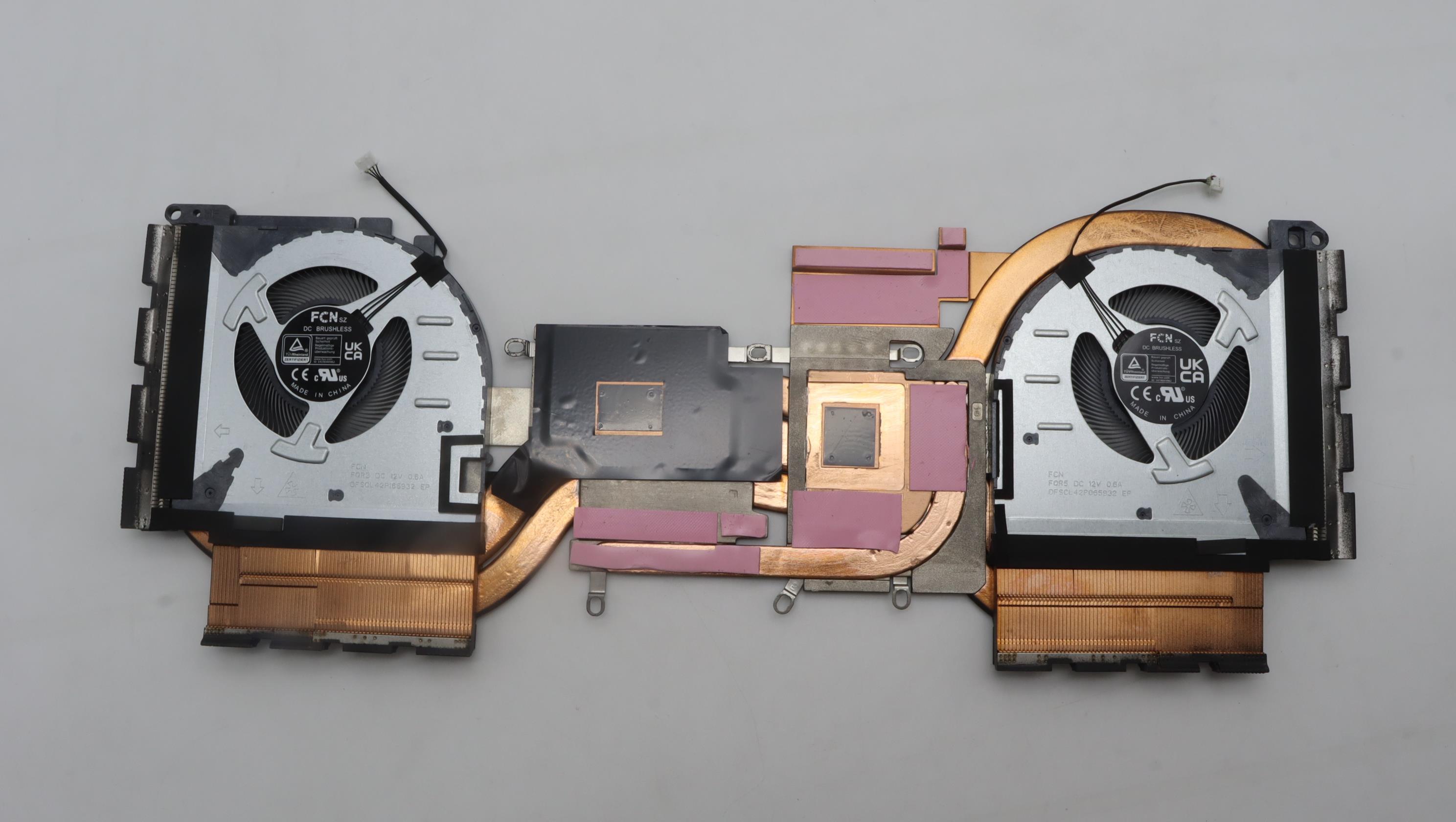
it does have a black frame not present in the pinned image. Also I guess the thin black squares are the TPM pads that just need plastic peeled before applying as a new thermal pad right?
tell me if my thinking is wrong: repaste option using original heatsink: I should be able to retain the original pink pads without replacing them, just clean the gpu/cpu paste and apply the two PTM7950 pads and voila'.
BTW Tunaman, thanks for this crash course in repasting. I'm still not 100% sure about going ahead 🙂
dusty dome
Yes. So you should be fine if you want to repaste with PTM. All pads. They should be ok when you remove the heatsink.
bitter chasm
ok thanks. Honestly I thought you would come back with 83C GPU Temp? that's normal 🙂
dusty dome
Feel try to try and pursue Lenovo for a heatsink
bitter chasm
On this Unreal game in specific, GPU temp and GPU hotspot show a 18-20C increase, pushing hotspot above 100.
Other games are in the 70-80 range actually.
So far it is only one game that pushes hot-spot so high. Can you recommend a benchmark or game I can run so I can compare temps against other users with this machine/gpu specifically?
thx for your support mate!