#K1 Max Issue and Reset to a basic printer so I can build from that.

43 messages · Page 1 of 1 (latest)

prime field
#

Happy 2025! So, I've been away from the 3D printer for some time (took a new day job in a new industry and the curve has been steep these last 7+ months). My frame of reference is from a Voron perspective. I am at a buddy's house for the New Year Holiday and he has a Creality K1 Max and has asked me to get his machine set up to run w/o making use of Creality Print. He 'rooted' it but has been using CP since then. I looked at it and it seems that he has installed a helper script (looks Kiauh-ish). He used that to install Mainsail (and Fluidd). He prefers the latter while Mainsail has been my goto UI.

Anyways, I am seeing an issue with Mainsail where the Toolhead Control panel seems to disappear and requires a restart (sometimes bouncing Klipper brings it back, sometimes I need to bounce the host to get it to come back, and I had one instance where bouncing moonraker seemed to do the trick). Resolution steps have been unpredictable. Has anyone seen anything similar? The printer has the latest version of the Creality FW thereon.

(The other element that I am interested in accomplishing is to start from a bare-bones starting point. Besides the homing macros, what else is suggested to retain and tweak, vs. just obliterating and using Klipper's stock macros?)

digital ploverBOT
#

Ahoi @prime field!
Welcome to the Mainsail support-forum!
There is a problem with the tags you selected for this post. Please fix them to fit your question.
For further information on tags please check the readme: #readme message

To change the tags of this post:

  1. Open the ... menu on the top right corner of this post.
  2. Find Edit tags
  3. Select the checkbox of the correct tags.

Usually you just need to select one tag!
If you still have no idea which one to choose, feel free to ask here.

Note: This is an automated message

Thanks for your cooperation!

#

Ahoi @prime field!
It looks like you did not provide all the necessary information we need to help you.
Please upload your logfiles and a detailed description of your problem.
For further information see: https://docs.mainsail.xyz/faq/getting-help/discord#provide-information
Note: We only accept .log and .txt files as log files.
This is an automated message

We are glad to help and chat with you on our Community Discord, but if you need help and want the best support possible you should, follow a few simple rules:

feral widget
#

About your last section of the post:
No one in the crew got such a machine. We don't know what might be required and what not. That's a pretty crappy OS with custom Klipper and so on. That's why that helper script is needed to get things compatible with the Klipper eco system software

prime field
prime field
feral widget
wraith agate
#

@prime field do you need help to "install" the dev build version until we release it?

prime field
wraith agate
prime field
#

Let me validate and advise.

#

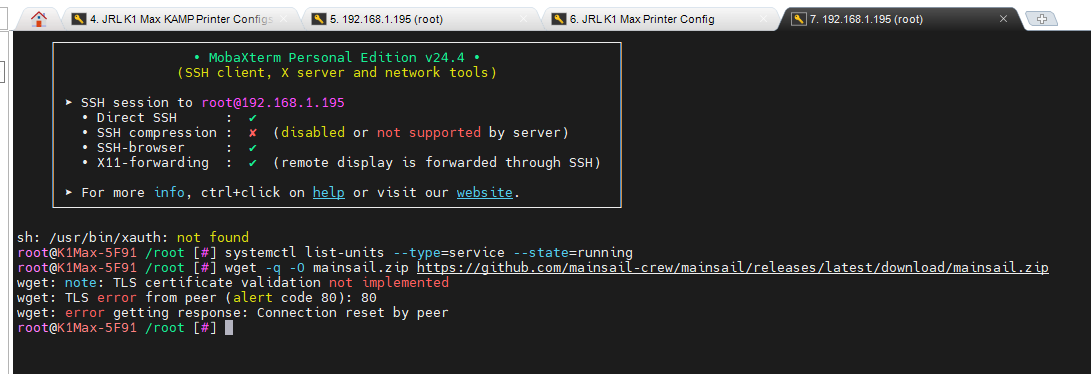
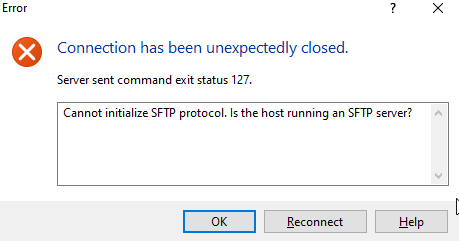
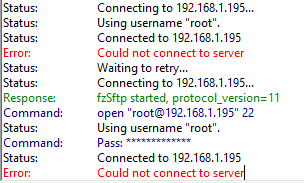
grr - they've a buildroot version of linux - seems to be pretty stripped down - no package manager. SFTP daemon not running, I don't think. I can get a session going with Mobaterm.

#

@wraith agate 👆

wraith agate
#

hmm... the problem is, that github just allows to download the file, when you are logged in. so a wget/curl command would not work in this case

#

are you able to upload somewhere to download it via wget?

#

(pay attension. this is a zip file in a zip file. so you have to unzip 2 times!)

prime field
#

is it just a few files needing to be manually copied over? How can I test a wget instance?

wraith agate
#
wget -q -O mainsail.zip https://github.com/mainsail-crew/mainsail/releases/latest/download/mainsail.zip

this will download the latest release

prime field
wraith agate
#

loool

prime field
#

🙂

wraith agate
#

why creality? why???

prime field
#

IKR

wraith agate
#

maybe the guy in the bug report can help you to install it... it will need some time to review all open PRs that we can relase the next release with this bugfix included...

prime field
#

No worries. Thank you. I'll keep my eyes peeled on the releases. I was actually considering adding a K2 to my fleet. I am reconsidering it, after being spoiled without handcuffs for the last couple of years.

wraith agate
prime field
#

iirc, dropbear has a ftp daemon - breaking out muh giggler to see if I can figureout the cli needed.

wraith agate
#

but why should winscp or filezilla dont work, when you have a SSH connection?

prime field
#

prolly 'cause I am a non-linux gent trying to ack like I know what I am doing. lol

wraith agate
#

ah ok. i personally use filezilla to transfer files like this. just input the ip, username, password and port 22 in the "fast connection toolbar" and hit the "connection" button. this should work, with every ssh connection

prime field
#

is another port common for sftp besides 22?

wraith agate
#

no. should be 22 (the normal SSH port)

prime field
#

let me try filezilla

wraith agate
#

hmm...

prime field
#

prolly some dickey config on their build

wraith agate
#

that would be quite possible, or perhaps even intention...

prime field
#

ok, that didn't help. just changed the server's key...