#Suspense doesnt work on build
88 messages · Page 1 of 1 (latest)
 storm ridge
 modest owlBOT
🔎 This post has been indexed in our web forum and will be seen by search engines so other users can find it outside Discord
🕵️ Your user profile is private by default and won't be visible to users outside Discord, if you want to be visible in the web forum you can add the "Public Profile" role in id:customize
✅ You can mark a message as the answer for your post with Right click -> Apps -> Mark Solution
(if you don't see the option, try refreshing Discord with Ctrl + R)
 storm ridge
anyone has same experience?
<Suspense fallback={<>
                        <div style={{
                            width: '100%',
                            height: '15px',
                            backgroundColor: 'rgba(66,66,66,0.32)',
                            borderRadius: '99999999px',
                            position: 'relative',
                            zIndex: 100,
                        }}>
                            <div className={styles.avatarskeleton} style={{
                                position: 'absolute',
                                width: '100%',
                                height: '100%',
                                backgroundColor: 'rgb(196,127,72)',
                                borderRadius: '99999999px',
                                zIndex: 100,
                            }}>

                            </div>
                            <div style={{
                                fontSize: '25px',
                                color: 'rgb(255,255,255)',
                                position: 'absolute',
                                zIndex: 101,
                                right: 0,
                                top: -40
                            }}>
                                ???/3000
                            </div>

                        </div>
                    </>}>
                        <VoteGoalCard/>
                    </Suspense>
VoteGoalCard -> ```tsx
const response = await fetch("https://blablabla", {
cache: "no-cache",
});
const data = await response.json();
const count = data.vote_count;
fallback works on local devserver
but the moment i push it into production it just stops
appreciatus helpus
helpus
i cannot use suspense if i end up waiting for all fetches to finish before the page renders
storm ridge
help
 austere reef
storm ridge
```tsx
<Suspense fallback={<>
<div style={{
...
austere reef
storm ridge
```tsx
<Suspense fallback={<>
<div style={{
...
what route is this located?
can i see your build log?
storm ridge
austere reef
can i see your build log?
build log for production?
austere reef
Suspense doesnt work on build
so i assume you have donenpm run build
storm ridge
i cannot give u that since i dont have access to it unfortunately
austere reef
you can run npm run build locally
storm ridge
austere reef
> Suspense doesnt work on build
so i assume you have done `npm run build`
yeah they must have done it
oh
yes hold on
this is btw the site if u want to replicate the issue https://www.twerion.net/
if u go on the landingpage
and then switch to "voten" or "vote"
it will only load after server has fetched the data
no suspense
where can i find the log? @austere reef
storm ridge
  ▲ Next.js 14.2.2

   Creating an optimized production build ...
 ✓ Compiled successfully
 ✓ Linting and checking validity of types
 ✓ Collecting page data
 ✓ Generating static pages (6/6)
 ✓ Collecting build traces
 ✓ Finalizing page optimization

Route (app)                              Size     First Load JS
┌ ƒ /                                    5.58 kB         107 kB
├ ƒ /_not-found                          293 B          87.4 kB
├ ƒ /play                                2.33 kB         102 kB
└ ƒ /vote                                1.94 kB        94.1 kB
+ First Load JS shared by all            94.4 kB
  ├ chunks/23-ab4c80193b414b75.js        31.4 kB
  ├ chunks/fd9d1056-bef1823da86e40ac.js  53.7 kB
  └ other shared chunks (total)          9.27 kB


ƒ Middleware                             30.7 kB

ƒ  (Dynamic)  server-rendered on demand
oh nice
austere reef
storm ridge
but the moment i push it into production it just stops
what do you mean by "it just stops"?
austere reef
storm ridge
```
▲ Next.js 14.2.2
Creating an optimized production build ...
✓ Compile...
now that you've done this try npm run start
storm ridge
austere reef
now that you've done this try `npm run start`
yes
hold on let me send u a video
austere reef
okok
storm ridge
ah wait
ill upload it to streamable
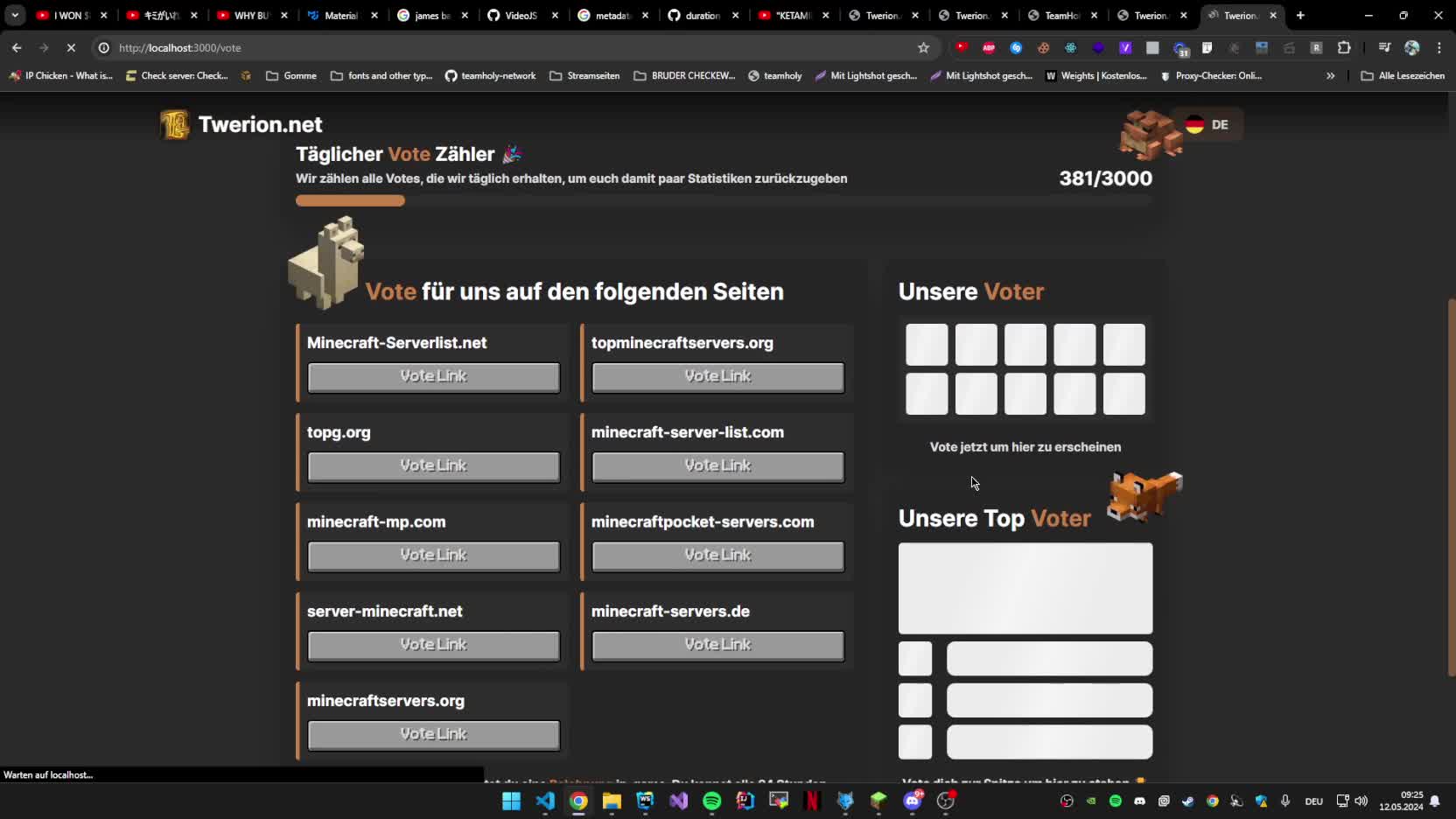

First one is dev and second one is the production
hope u see what i mean
@austere reef
austere reef
kk let me check
austere reef
storm ridge
https://streamable.com/w3fo7m
that looked like its Suspensed correctly for me lol
its just too fast for you to see
storm ridge
austere reef
its just too fast for you to see
no i see it but its not like a waterfall like on the dev
it loads longer and then instantly flashes it for half of a second
austere reef
 storm ridge
and
austere reef
somethings wrong with the fetch() not the suspense
suspense works perfectly
somethings wrong with the <VoteGoalCard/>
storm ridge
its not that long i can give u the full code
"use server";
import {inter} from "@/font";

let styles = {};
import homestyles from "@/components/Home/Home.module.scss";
import votestyles from "./Vote.module.scss";
import playsyles from "@/components/Play/PlayCard.module.scss";
import Image from "next/image";

Object.assign(styles, homestyles, votestyles, playsyles);

export default async function VoteGoalCard() {

    const response = await fetch("https://api.twerion.net/votes/count", {
        cache: "no-cache",
    });
    const data = await response.json();
    const count = data.vote_count;


    return (
        <>

                <div style={{
                    width: '100%',
                    height: '15px',
                    backgroundColor: 'rgba(66,66,66,0.32)',
                    borderRadius: '99999999px',
                    position: 'relative',
                    zIndex: 100,
                }}>
                    <div style={{
                        position: 'absolute',
                        width: `${count / 3000 * 100}%`,
                        height: '100%',
                        backgroundColor: 'rgb(196,127,72)',
                        borderRadius: '99999999px',
                        zIndex: 100,
                    }}>

                    </div>
                    <div style={{
                        fontSize: '25px',
                        color: 'rgb(255,255,255)',
                        position: 'absolute',
                        zIndex: 101,
                        right: 0,
                        top: -40
                    }}>
                        {count}/3000
                    </div>

                </div>
        </>
    )
}
nothing much
yes i like inline styles xD
 storm ridge
then i have to remove the async aswell?
storm ridge
ah i see
i remember something
in the past telling me to use use server
for async components
but works
austere reef
thats weird
coz "use server" is not for making async components at all
nothing to do with them
austere reef
yep
austere reef
you can use await. "use server" is for something else
your component needs to be async and it needs to be imported from a server component
if it doesnt work, install node-fetch and import fetch2 from "node-fetch" and replace your fetch to fetch2 (fetch2 is just a name, use anything you want but not "fetch") and try again
storm ridge
austere reef
your component needs to be async and it needs to be imported from a server compo...
ah i see
yes
since
components are server by default right
austere reef
yes