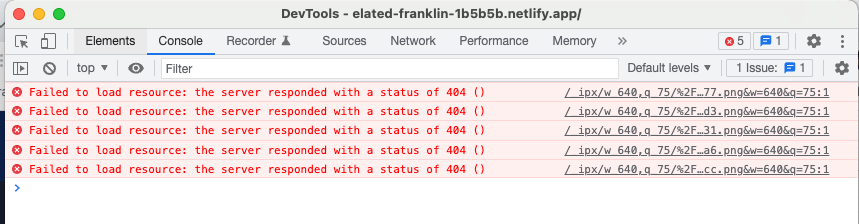
#Image doesn`t shows after reload the page in browser

66 messages · Page 1 of 1 (latest)

maiden spoke
#

my project has many images and for display it I use next/image.
After I reload page in browser many of them does not display.
They shows for a second and then browser display empty parent element.
In dev tools source I see the correct ways for image. But if use application navigation on site its work correctly. Only if I reload the page using browser reload.

my component:

`import { FC } from 'react';
import Image, { StaticImageData } from 'next/image';

export interface IStudioImg {
id: number;
src: StaticImageData ;
alt: string;
backgroundColor: string;
backgroundImage?: StaticImageData;
modifier?: string;
}

interface Props {
image: IStudioImg;
}

const Item: FC<Props> = ({ image }) => (
<div
style={ image.backgroundImage ? { backgroundImage: url(${ image.backgroundImage.src }) } : { backgroundColor: image.backgroundColor } }
className="image__container"

<Image
  src={ image.src }
  alt="alt text"
  priority
  quality={ 70 }
  width="987"
  height="555"
  className="image__item"
/>

</div>
);
export default Item;
`

dense hamlet
#

not sure why netlify return 404 for the image. is it new image or old?

maiden spoke
#

it is firs deploy to netlify^ but yes in project I substitude some images and they doesn`t load corretly

#

locally it is load with 200 status but they does not show

#

receive this absence of image url on reload

#

I use "next": "^13.4.12",
maybe need to update ?

dense hamlet
maiden spoke
#

also tried like this

dense hamlet
maiden spoke
#

all of my images was imported in this way but only new doesn`t shows on netlify and only new on /studio page does not shows after reload

maiden spoke
#

yes

dense hamlet
maiden spoke
#

sure

dense hamlet
#

ok let me try

#

images load fine on local

#

trying to deploy to netlify

maiden spoke
#

try pls on local reload on browser page /studio

dense hamlet
maiden spoke
#

OMG how did you found it? aww

dense hamlet
maiden spoke
#

but on netlify some images still doesn`t load, maybe you know what about properties she add ?https://answers.netlify.com/t/nextjs-build-rendering-404-images/50482/11

Netlify Support Forums

Hi, I’m writing this here in case anyone else comes across this issue and needs a solution. We did some further investigation & found the broken images were indeed related to caching issues – it appears that there are 301 redirects set on these images that were permanently being cached by the browser, so it was redirecting to broken urls. The u...

dense hamlet
#

I got 502 response

maiden spoke
#

some of them return 502 some 404

#

maybe do some redirects?

dense hamlet
#

just installed this and deploying again

#

it works now

#

npm install @netlify/ipx

#

some image 404 now

dense hamlet
#

remove the space

maiden spoke
#

sure

#

that was test import

dense hamlet
maiden spoke
#

do you mean spaces in name ?
Screen Shot 2023-06-01 at 1.15.01 AM.jpg ==>> Screen-Shot-2023-06-01-at-1.15.01 AM.jpg

maiden spoke
#

ok

dense hamlet
#

the function got timeout for loading that image

maiden spoke
#

yep that is our bottle neck

dense hamlet
maiden spoke
#

I`ll check

dense hamlet
#

68mb

maiden spoke
#

yes it`s need to be removed

maiden spoke
#

there are 4 more large files that back 502
I guess it also need to be removed or optimize before load to project

maiden spoke
#

for mobile version looks weird

#

OMG what is going on with this netlify 😭

dense hamlet
maiden spoke
#

it`s alredy filled

#

whose error was returned while cache disabled

dense hamlet
dense hamlet
maiden spoke
#

guess the problem because of huge files

maiden spoke
#

just for info

Netlify's Lambda functions have a default timeout of 10 seconds. This means that if your function takes longer than 10 seconds to execute, it will be terminated and a timeout error will be returned. This limit is in place to ensure efficient use of resources and to prevent long-running functions from blocking other operations.

However, if your function needs more time to execute, you can request an increase in the timeout limit. The maximum execution limit for synchronous functions can be increased up to 26 seconds by contacting Netlify's support team. You can do this by posting in the Admin area of the Netlify forum or directly contacting them through their support page.

For functions that require more in-depth work or to talk to potentially very slow APIs, Netlify also offers background functions which are designed to run asynchronously for up to 15 minutes.

Please note that these limits are in place because Netlify Functions use AWS Lambda, and the same limits apply here.

For more information, you can refer to the following sources:

Netlify Lambda Functions 101 & Debugging
502 error SSE Open AI Application
What is the maximum File size Upload limit in a Netlify Form submission?
How to overcome 10 second limit for Lambda
Is it possible to increase my lambda function time out from 10s to +- 30s?
Functions overview > Custom deployment options

dense hamlet
maiden spoke
#

already ask
and also deployed to vercel and it works much better

#

Thanks a lot for your help, so kind from your side
You are y hero aww