#why does errors show in the console when using packages like axios or googleapi or else?
45 messages · Page 1 of 1 (latest)
 hoary forge
 hardy ingotBOT
🔎 This post has been indexed in our web forum and will be seen by search engines so other users can find it outside Discord
🕵️ Your user profile is private by default and won't be visible to users outside Discord, if you want to be visible in the web forum you can add the "Public Profile" role in id:customize
✅ You can mark a message as the answer for your post with Right click -> Apps -> Mark Solution
(if you don't see the option, try refreshing Discord with Ctrl + R)

 static light
What errors are you getting?
You need to provide a little more information, but typically you should try to keep the console free of any kind of errors/warnings.
hoary forge
static light
You need to provide a little more information, but typically you should try to k...
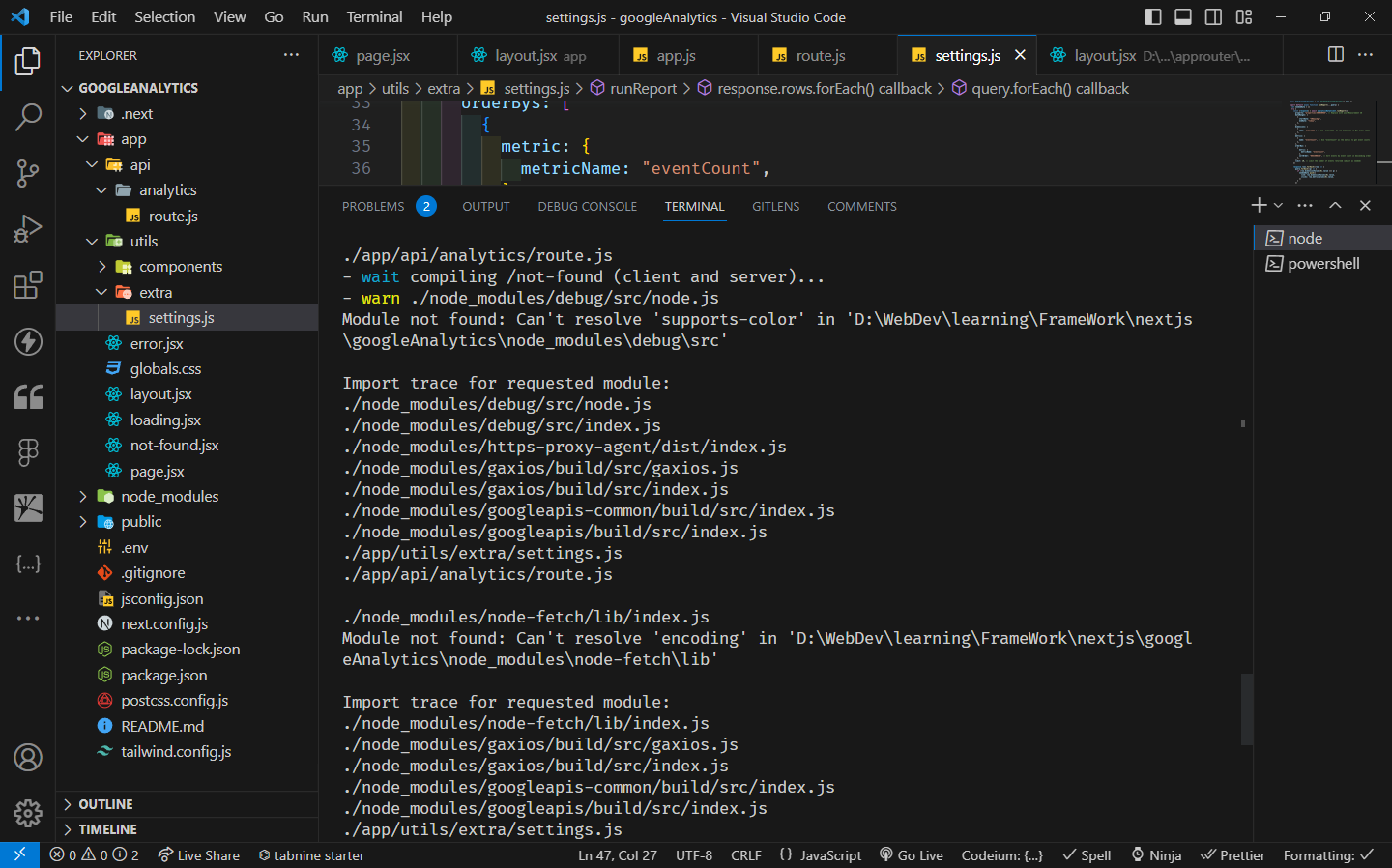
i keep getting different errors with different packages
static light
Have you installed those packages?
Try running npm install encoding and see if the error disappears as it should.
hoary forge
huh i thought stuff like this would be already installed since i got the package
i installed the packages they want and now am getting new error to import the package
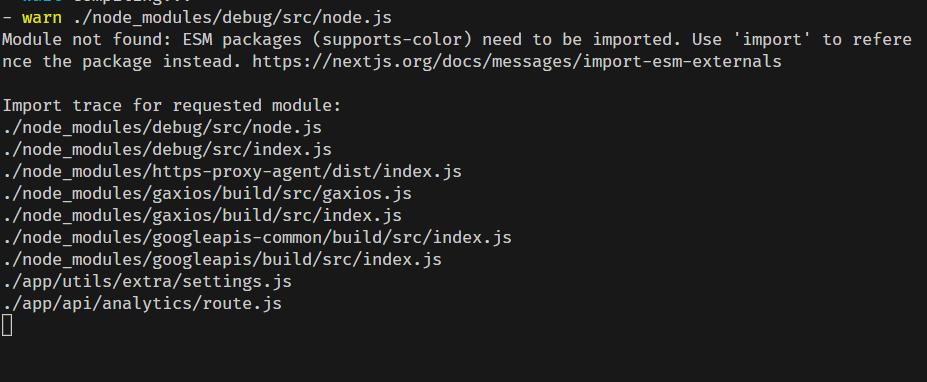
when i just import like
import "supports-color"
it still shows this error

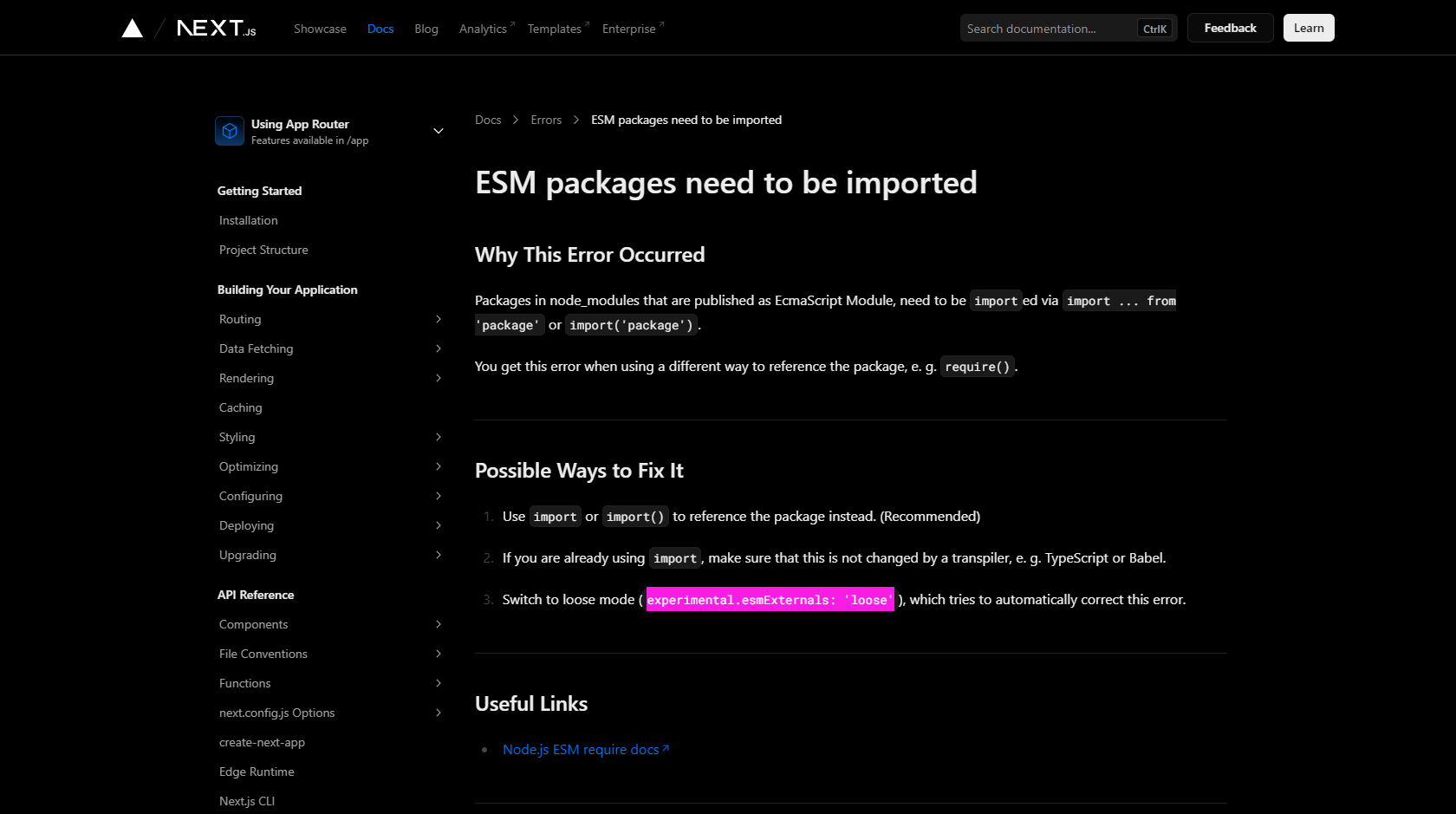
this is the web page they reference
even then i try it it would show the same error
static light
hoary forge
huh i thought stuff like this would be already installed since i got the package
Not all dependencies are installed automatically... If you use Supabase for example, you'll have to install encoding manually for it to work properly
hoary forge
i just asked the AI in #1089389297548931182 and it provided something that works in the next config i added this
/** @type {import('next').NextConfig} */
const nextConfig = {
experimental: { esmExternals: "loose" },
}
module.exports = nextConfig
hoary forge
static light
Not all dependencies are installed automatically... If you use Supabase for exam...
i see thank you for this information!
hoary forge
hoary forge
i just asked the AI in <#1089389297548931182> and it provided something that wo...
would this be idle or will it cause problems later?
static light
hoary forge
i just asked the AI in <#1089389297548931182> and it provided something that wo...
That option does not exist... esmExternal as far as I know is not a thing



 static light
You're not getting this error because you didn't import the package, so that won't help you
hoary forge
Thank you! without your note about installing the package i wouldn't get to that page lol
 formal shoal
Wait
I had those same errors myself a few days ago
The packages were already installed. You dont have to touch anything
Its just ur code that it has maybe hydration problems
hoary forge
formal shoal
Its just ur code that it has maybe hydration problems
and how can i check or test for that?
i tested my code in nodejs and worked perfectly fine
formal shoal
If im honest im not sure. When it happened to me it was because i was calling the models in the component instead of just keeping all the models code in the api side. I was being stupid yea. Also the code was duplicated from my api call so i just deleted some lines and commented a few more and started again
But no packages were needed. I even deleted the node_modules, refreshed everything but nothing helped
hoary forge
my code is in the api side
formal shoal
What does the settings.js look like. And the analytics/route file. Can u send them
hoary forge
formal shoal
What does the settings.js look like. And the analytics/route file. Can u send th...
it's basically all the settings to setup up google apis
import { NextResponse as res } from "next/server"
import Analytics from "@extra/settings"

export async function GET() {
  await Analytics()
  return res.json(await Analytics("facebook",'google'), { status: 200 })
}
this is api/analytics
import "dotenv/config"
let config = JSON.parse(process.env.CONFIG)
import {google} from "googleapis"
import { BetaAnalyticsDataClient } from "@google-analytics/data"

const auth = new google.auth.GoogleAuth({
  credentials: config,
  scopes: ["https://www.googleapis.com/auth/analytics.readonly"],
})
const analyticsDataClient = new BetaAnalyticsDataClient({ auth })

export default async function runReport(...query) {
  let neededData = []
  let socialMedia = []
  try {
    const [response] = await analyticsDataClient.runReport({
      property: "properties/405050966", // Replace with your Measurement ID
      dateRanges: [
        {
          startDate: "30daysAgo",
          endDate: "today",
        },
      ],
      dimensions: [
        {
          name: "eventName", // Use "eventName" as the dimension to get event names
        },
      ],
      metrics: [
        {
          name: "eventCount", // Use "eventCount" as the metric to get event counts
        },
      ],
      orderBys: [
        {
          metric: {
            metricName: "eventCount",
          },
          sortOrder: "DESCENDING", // Sort events by event count in descending order
        },
      ],
      limit: 10, // Limit the number of events returned (adjust as needed)
    })

    response.rows.forEach((row) => {
      let wanted = row.dimensionValues[0].value
      if (wanted === "first_visit") {
        neededData.push({
          first_visit: row.dimensionValues[0].value,
          clicks: row.metricValues[0].value,
        })
      }
      if (wanted === "page_view") {
        neededData.push({
          page_view: row.dimensionValues[0].value,
          clicks: row.metricValues[0].value,
        })
      }
      query.forEach((q) => {
        if (wanted === q) {
          socialMedia.push({
            link: row.dimensionValues[0].value,
            clicks: row.metricValues[0].value,
          })
        }
      })
    })
    neededData.push(socialMedia)
    return neededData
  } catch (error) {
    console.error("Error running report:", error)
  }
}
this is settings.js
hoary forge
formal shoal
What does the settings.js look like. And the analytics/route file. Can u send th...
but the error happen as soon as i do
import {google} from "googleapis"