#Freezing and delay
1 messages · Page 1 of 1 (latest)
 ebon bane
Im using a Logitech C920 1080 HD camera with the following system specs:
Asus Tuf Gaming B650M-E
AMD Ryzen 7 7700
Corsair Vengeance 2x48GB, 5.200MT/s, DDR5, CL 38
Asus TUF Gaming GeForce RTX 3060 V2 OC edition
Samsung Evo 990 EVO Plus 2TB NVME
Samsung Evo 970 500GB NVME
ebon bane

 wooden granite
Is something else using your camera feed? Please close any other apps just to be sure and retry.
Also make sure your always visible and the tracker is not losing your face because of a microphone that might be in front of you or anything else obstructing the view.
ebon bane
I made sure Im always visible and also tried closing all unnecessary apps in the background but same result.
with the eye tracker overlay off and the UI closed it does work fine except there is a significant delay.
My camera is used exclusively with the beam software.
I noticed that whenever I launch the program it works great, no freezes to speak of. Once I start the tracking it works great for up too 20 seconds and then starts freezing like explained above. I think it might have something to do with the calibrations, cus after that it starts to act up.
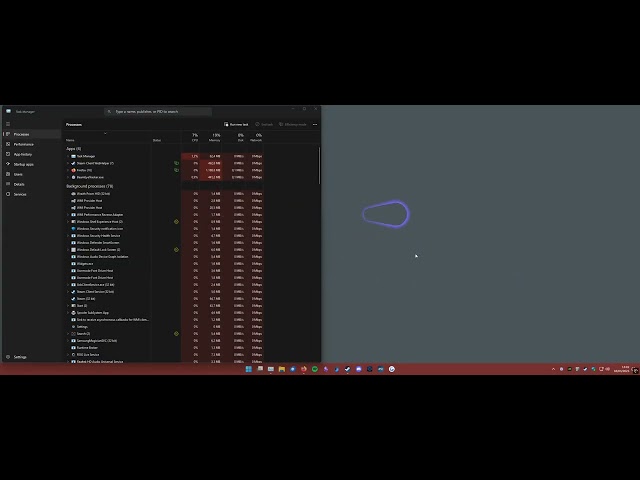
Is there any logs I can take a look at or send to you?
wooden granite
Logs are here: C:\Users\ [Your Windows Username]\AppData\Local\Beam Eye Tracker
Make sure you have the latest Beam installer: v2.4.3
Maybe we see something in there indeed.
We had this user mention Nvidia Broadcast can create problems. Maybe make sure no Nvidia software is running in parallel, just to test if the freezing still appears.
 ebon bane
I have reinstalled the program trough steam and it deleted the logs from the previous install. it in turn did fix the freezing and delay somewhat. I will continue to monitor if it happens again.
ebon bane
well that monitoring has come to an end because demo ran out 😭
wooden granite
ebon bane
well that monitoring has come to an end because demo ran out 😭
sign up here and i'll extend it: accounts.eyeware.tech. provide your email when done.
ebon bane
thank you, I have sent you a DM
 solar edge
Having the same problem with steam demo on Win10. Having freezes. Should i create new theme with my issue?
wooden granite
solar edge
Having the same problem with steam demo on Win10. Having freezes. Should i creat...
Are you saying you have the same exact issue as shown in the video above with the overlay freezing at times?
If so, maybe share your log files with me: C:\Users\ [Your Windows Username]\AppData\Local\Beam Eye Tracker
solar edge
wooden granite
If so, maybe share your log files with me: C:\Users\ [Your Windows Username]\App...
I took a chance and purchased the full version. In it, the issue with the overlay slowing down drastically is no longer present.
I can no longer provide logs from the demo version. However, I can note that the lag specifically affected the overlay and the program window. After restarting, everything worked fine until recalibration; after recalibration, the overlay started lagging severely.
That said, I tested the demo version in Elite Dangerous with opentrack—tracking was fairly smooth despite the overlay lag. Because of this, I decided to purchase the full version. However, if I had judged the demo version only at a surface level, it could have discouraged me from buying it without my deeper investigation and testing in an actual gaming environment.
wooden granite
solar edge
I took a chance and purchased the full version. In it, the issue with the overla...
Ok, thanks for the feedback. We'll keep that in mind if it reappears.
 maiden nacelleBOT
 natsumels has been warned
Reason: Duplicated text
 timid roost
wooden granite
Ok, thanks for the feedback. We'll keep that in mind if it reappears.
timid roost
wooden granite
Ok, thanks for the feedback. We'll keep that in mind if it reappears.
I had the same issue its freeze pretty badly
Honestly its the only issue preventing me from buying it
wooden granite
timid roost
I had the same issue its freeze pretty badly
Honestly its the only issue preven...
Hi, I see you're using the iOS app to test. Ca you check if your connection with the phone is working well? Maybe try using the phone as a webcam, without the iOS app extension, and connect it via Connectivity Camera and USB (https://support.apple.com/en-us/102546), just to see if the connection is the issue.
Page Not Found
timid roost
wooden granite
Hi, I see you're using the iOS app to test. Ca you check if your connection with...
The freezing still happens after the iOS app is disconnected.
I have also tried with my Kinect v2 camera connected via USB 3.
The freezing seems to happen after 10-20 seconds of eye-tracking activation, then it freezes periodically every 5-10 seconds, even if it's not tracking or no camera is connected.
The eye tracking is great and smooth, with slight delay, though when it works.
wooden granite
timid roost
The freezing still happens after the iOS app is disconnected.
I have also tried...
This sounds liek something is accessing your camera. The previous user mentioned he solved it uninstalling Nvidia Broadcast. Did you try that?
Also please try using a regular webcam (or phone as a webcam, but not iOS extension) just to see if that resolves the issue.
timid roost
wooden granite
This sounds liek something is accessing your camera. The previous user mentioned...
I have bought the software now, it only freezes the UI and overlay.
The freezing happens about every few minutes and randomly for 5-10 seconds.
Tracking still sends to OpenTrack just fine, even when frozen.
It happens to both the iOS app and the normal camera.
Logs show nothing useful.
My system resources usage is very low, around 10% CPU and 40% GPU.
The issue still occurs even without any game open.
And, when its not tracking or overlay is off.
timid roost
timid roost
I have bought the software now, it only freezes the UI and overlay.
The freezing...
The fact that it sends tracking data to OpenTrack just fine implies that my capture device is working properly.
Sounds like a UI and overlay issue.
timid roost
wooden granite
This sounds liek something is accessing your camera. The previous user mentioned...
I don't have Nvidia Broadcast installed, and my Nvidia App Overlay is off since I don't use it.
wooden granite
@frigid imp maybe you can help out here