
#Head Coupled Perspective (HCP) configuration?
1 messages · Page 1 of 1 (latest)
 thorny pulsar
 rare hemlock
Thanks for this! Yes, there are ways to go in this direction and autostereoscopic displays are one way to do it, but do require more complex hardware. With the webcam alone there are tweaks, as you're showing, that allow going this direction and create such an illusion of immersion. It's an awesome idea and we've fiddled around with it a bit in the past but decided to focus on our core tech for now. FYI Anyone using the Beam SDK is technically enabled to build an extension on top of Beam to allow for such an effect. Adding @ripe thunder in case he wants to chime in a bit more. He's been digging deep into this in the past.
 ripe thunder
Hi @thorny pulsar , thanks for raising this discussion. My feedback however is that this is essentially what OpenTrack + Beam accomplishes as long as the game supports 6 DOF camera control. The difference between your gif and, lets say, Star Wars Squadrons is that the 3D objects being moved are intentionally rendered with a virtual depth that is very close to the user and their scale is somewhat in sync with the scale of head movements such that you get a better feeling of the object being static in 3D from your perspective. But indeed, the principle is the same. Does that make sense ? Is also your question related to why this isn't implemented in more games ?
You can see a video of me doing much more head translations on Star Wars Squadrons
 urban wing
I built a demo of something like this years ago on a website using webcams, three.js and some rudimentary head/feature tracking. It worked well enough for a single person in the "sweet spot" to sell the idea, but our use-case involved an outdoor installation and when COVID hit... well, "outdoor installation" was no longer in the budget 🙂
But it's definitely doiable.
urban wing
ripe thunder
Hi <@297591855628025856> , thanks for raising this discussion. My feedback howe...
It's not so much the translation tracking of the head in 3d space within the game, as it is creating a psuedo "window" as though the object you're looknig at is behind the monitor.
I think that's what they're getting at, though, I'm not the OP.
There was an old - ancient, in internet terms - demo of someone doing this with a wiimote.
ripe thunder
urban wing
It's not so much the translation tracking of the head in 3d space within the gam...
So to create the "window" then you need to take care of the scale, and camera orientation strongly linked to your actual world 3D, right ?
ripe thunder
urban wing
There was an old - ancient, in internet terms - demo of someone doing this with ...
this one, right ?  https://www.youtube.com/watch?v=Jd3-eiid-Uw&t=4s

Using the infrared camera in the Wii remote and a head mounted sensor bar (two IR LEDs), you can accurately track the location of your head and render view dependent images on the screen. This effectively transforms your display into a portal to a virtual environment. The display properly reacts to head and body movement as if it were a real wi...
urban wing
Yeah - basically, if I remember correctly, it was about offsetting the camera from the static "window" location in 3d space with its translation basically mapping to the location of the tracked user.
urban wing
ripe thunder
this one, right ? <:03GrinningFacewithSmilingEyes:941822501988737055> https://...
Exactly! What was that, like 2004?
ripe thunder
urban wing
Exactly! What was that, like 2004?
A bit later, but feels like it.
ripe thunder
urban wing
Yeah - basically, if I remember correctly, it was about offsetting the camera fr...
Cool. Yeah that makes sense. In a game must be tricky though because then it would be like playing EuroTruckSimulator 2 over a window, or playing Witcher 3 and being forced to make Geralt tiny in order for head movements to mean something.
If you have a super ultrawide display, may be another story
urban wing
Time flies. I did a more recent implementation with AR markers to create virtual "compartments" to display representations of art pieces. I don't think it's really useful in a video game, but it's a neat way to engage with virtual content in AR.
urban wing
ripe thunder
Cool. Yeah that makes sense. In a game must be tricky though because then it wou...
That's exactly the thing - I could see it being really cool in a game that's designed around the concept, but it doesn't have the kind of "drop-in" utility that your current integration does.
A more interesting productized version of a similar concept is the Tilt Five.
ripe thunder
urban wing
That's exactly the thing - I could see it being really cool in a game that's des...
There is this VR game called Moss ( https://www.youtube.com/watch?v=75h1q3ns6cc) . It's could work there because the idea is that you are looking and controlling a small mouse in VR, giving it instructions to solve puzzles in an area that feels tiny. I think that could match the display size of standard desktop.

Toms complete run through of Moss from start to nail biting finish. Enjoy!
About the game:
Meet Quill, a young mouse with dreams of greatness beyond the confines of her quiet forest settlement. One day while exploring the woods, she finds a mysterious Glass Relic and an ancient magic is awakened. Dramatic events quickly unfold as a distant evi...
Tilt Five?
urban wing
Greet game - I haven't played the sequel yet, but yeah - that sort of perspective would work perfectly. Of course, if you're talking about a monitor on a desk, you couldn't really have a top-down perspective.
urban wing
ripe thunder
Tilt Five?

Looking for an augmented reality headset that will take your gaming and experiences to the next level? Look no further than Tilt Five. Our AR headset provides an immersive experience that will make you feel like you're right in the action. Whether you're playing your favorite game or exploring a new world, Tilt Five has something for everyone.
It's clever because it fixes one of the big AR/VR issues - shareability. You can very easily just hand the glasses over to someone else and there's no need for adjusting the fit or anything. Problem is content, as with all of these things - there's not enough of it.
ripe thunder
Yeah, that looks awesome. Lets see if content availability changes with the Apple Vision Pro
This was a very fun exchange! But perhaps lets wait for OP to jump in to see if the discussion fits in line with the request.
urban wing
I'll tell you, devs aren't as willing to jump through Apple's hoops on that one. 180k units moved is alot for a tech demo, but not much for a product :/
urban wing
ripe thunder
This was a very fun exchange! But perhaps lets wait for OP to jump in to see if ...
Fair point! I've got to get back to work anyway.
thorny pulsar
hey! great conversation here, I'm glad the responses.
Yes, I was refering to what you are talking about, it's not a "usefull" mechanic, but an VR/AR middle point kind of way... I think that for racing sims could be interesting to test
Could it be done with only headtracking configuration? or does it need the game for some kind of official render support?
urban wing
thorny pulsar
hey! great conversation here, I'm glad the responses.
Yes, I was refering to wha...
Essentially what you're trying to do is to have the monitor act as a "window" into space. Most head tracking will reposition the camera based on the translation of the tracked object - which, when abstracted, uses the normalized positional data from whatever tracking solution as an input that is handled like any other input.
In the "window" scenario, you need to understand where that "window frame" reference point is, then track the head position in relation to that and use that data to move the camera offset from the window reference.
It's adding complexity and it also requires an additional "anchor" in the game's 3d context.
 tiny mural
thorny pulsar
Is it possible that the head tracking not only moves the camera but do it in syn...
tiny mural
thorny pulsar
Is it possible that the head tracking not only moves the camera but do it in syn...
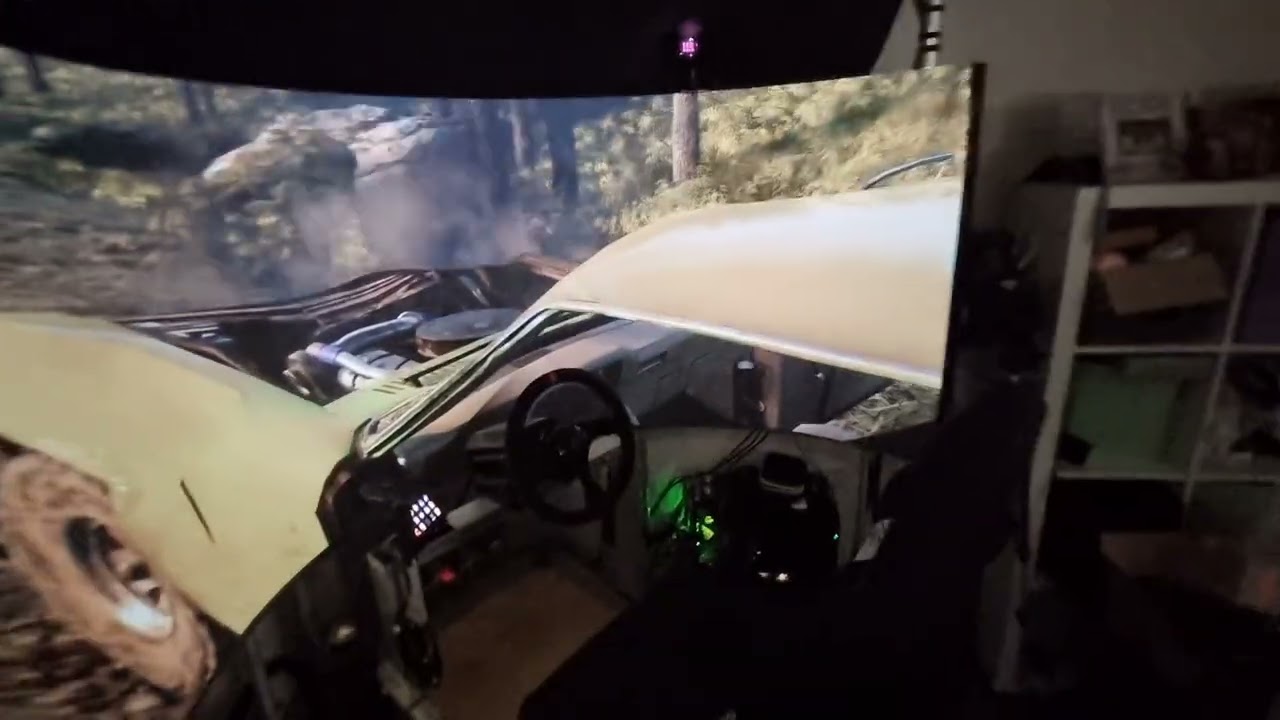
Hey, I've been working on making this a reality for a while now.
I plan to release something eventually, but it's not a simple problem to solve.
All the games that use NPClient (TIR protocol) do whatever they want with the values; some are reversed, remap to different axes, have different scales, different curves. It's kind of a nightmare.
This is not a problem when the hardware is used as intended with vanilla head tracking, but when 1:1 accuracy is needed for this it falls apart.
On top of that the user needs to configure their screen details and rig layout accurately.
Get anything wrong and you're in the situation of ? * ? * ? * ? = this doesn't work and now I feel sick.
It makes sense nobody has bothered, or those that have quickly realised it's a snowball of problems.
With all that said, I have it working with DX11 and DX12 games that support NPClient through OpenTrack.
Here's a BeamNG.drive example.

Quick demo of positional tracking with the trackhat v2.
rare hemlock
tiny mural
Hey, I've been working on making this a reality for a while now.
I plan to rele...
I'm struggling to get a feel for it from the video. Probably requires to actually run it on my device. Happy to try it out when you're ready to share.
tiny mural
rare hemlock
I'm struggling to get a feel for it from the video. Probably requires to actuall...
This is an older video with a 200 degree projection screen using steamvr for the tracker.
Face trackers are pretty limiting but the main problem this software solves is reprojecting the image so that the field of view is life size and perspective correct regardless of the resolution/aspect/curvature/position of the screen/s.
Will let you know when something is available. 🙂
 ripe thunder
That looks amazing, indeed. How did you manage with the curved screen? Is that part of your modeling?
tiny mural
It works with any screen, user just has to input the details of the screen. The screen is modeled in the software and the image is reprojected through that model.
For multiple projectors / screens its a bit more complicated. Usually those curved screens are calibrated by warping uvs but this stuff tries to emulate the projection of the projector. Which works but setup takes patience. I'm really not a fan of projection screens anymore 😄
tiny mural
@ripe thunder @rare hemlock
if you're keen
More docs coming
https://github.com/PHARTGAMES/WibbleWobbleCore
GitHub
Contribute to PHARTGAMES/WibbleWobbleCore development by creating an account on GitHub.
ripe thunder
Interesting. Some questions, if I may:
- For your testing, are you actually using Beam, or you are mostly using trackers embedded in OpenTrack?
- Do you support multiple screens? If so, how do you figure out the relative pose between them?
- I see you using Reshade. Is there any chance something like this could be applied to random games like Witcher 3, Elden Ring, etc. to just give a feeling of 3d parallax ?
tiny mural
I have tried Beam with opentrack just briefly and it worked but the eye tracking was super sensitive and I haven't had a chance to mess with it further. For testing I've just been using the face tracker that's built in to opentrack, or trackhat 2 on my sim rig. For best accuracy tho the steam vr trackers are the way to go. Rotational accuracy doesn't matter as much as positional accuracy. Accuracy matters less the bigger your screen is 🙂
Yes multiple screens are supported, turn on nvidia surround, and add extra screens in the rig config. There's a visualiser in there so you can see the screens. I'll probably do the doc for triple screens today.
yeah it uses reshade so will work with dx11//12 games that support reshade. For ones that don't support head tracking it can still be used to position the projection in front of your head, if that's uncomfortable you can also disable the rotation so it sits parallel with the monitor and just moves with your head.
tiny mural
VR driver is almost done too, there will be a bunch of engine plugins and game mods coming too. GTA, some Unreal mods etc..
ripe thunder
Very nice stuff. For this specific case, where you want to have the accuracy 3D world window from your screen, it makes sense that you would only want head tracking. Probably you know, but in Beam you can turn off the eye tracking for this, and just use the head tracking. Although I would ping you and send you the new SDK which is in the works (as mentioned in #🦹│beam-sdk )
In the case of multiple screens, I am aware that Surround enables using all of them, but my question is whether you need the exact geometry of the screens position (meaning physical size, 3D rotation and 3D translation of each screen with respect to a common reference)? At first guess, I would imagine that info is needed if you truly want an accurate positioning of the true head pose with respect to the virtual 3d world being rendered on each screen.
So, you mean that I could potentially use your software and try it on any of those A-RPG games ? Is this a passion project, or you intend to build a product for it ? (or both  )
)
tiny mural
ripe thunder
Very nice stuff. For this specific case, where you want to have the accuracy 3D ...
Yeah, with Beam I'd probably just use head tracking. Send me your sdk and I can have a look.
Yes you need to model the screens. One of the things I may do if people want it is add an FBX importer so they can model their screens in blender or wherever. I think it would only be needed for strangely shaped screens though.
I've just put up the triple screen guide which explains how to setup triple screens; I think it's fairly straight forward. Let me know if you have issues.
You should be able to use it with any DX11/DX12 game that allows Reshade.
I do know though that there's going to be an issue with multisampled frame buffers in DX12, I just need to find a game that does it and fix it... Might be able to force it with nvidia control panel even.
Ohh and it's really just a passion project at this point, the core will be opensourced once I clean up the massive mess.
Then maybe some closed source clients if people want specific things outside of the core.
 sour sonnet
tiny mural
<@706186928021831680> <@749995685293850735>
if you're keen
More docs coming
htt...
sour sonnet
tiny mural
<@706186928021831680> <@749995685293850735>
if you're keen
More docs coming
htt...
would this work properly on a laptop screen with true depth?
i also assume this would no longer work with a game like DCS whenever it switches to vulkan correct?
nevermind it doesn't work well at all
tiny mural
sour sonnet
would this work properly on a laptop screen with true depth?
What is true depth?
Currently no vulkan or opengl support.
I have some test cases lined up to support vulkan tho.
sour sonnet
tiny mural
What is true depth?
Currently no vulkan or opengl support.
I have some test case...
Nevermind, I thought I'd be able to get a 3d image like you did in your video but it doesn't work well for my screen
tiny mural
It looks 3d in the vid because it's reprojecting the view to real world size, its still a 2d image though. To look like the vid you need a screen that size or bigger, or just sit really close. If you want proper stereoscopic with shutter glasses it can do that too but you need the right kind of screen. Sub 1ms response, 120hz minimum with a black frame insertion feature, oled screens are best, 240hz oled is perfection. Ips has image retention, VA needs bfi, TN are pretty good too.
 arctic plinth
I was able to put my parallax idea in practice by mapping the yaw and pitch axes to x and y movement
[22:16]
And I made the effect fit my monitor by keeping the following parameters:
[22:16]
x movement 1:1
[22:16]
y movement 1:1
RdMracer — gisteren om 22:19
x rotation: horizontal fov / width of monitor :1
[22:19]
y rotation: vertical fov / height of monitor :1
[22:21]
What this does is two things, first the rotation rolls along with the position of the screen that is closest to you. So if you look in the distance you will have a consistent output view.
[22:22]
Because the output view compensasion is consistent, you can set your movement to match real life so the camera matches the position of your head well.
[22:22]
I still race on a narrow screen though, which makes this problematic.
[22:23]
Essentially the magnification on my screen is quite big, enlarging both tracking and calibration errors.
[22:23]
A larger screen with an fov closer to real life will perform better in this.