Hello folks, I have an object that has a string url property, which can either be a web url or a local file path, how can i open the file by using a button in angular? im having trouble since any chromium based explorer will restrict since its unsafe. I have to note that this app its entirely host in local, no internet nor exposed endpoints.
#Open a local file from A button
36 messages · Page 1 of 1 (latest)
 loud prawn
 red trellis
you may to have to run the app in https since browser are getting more difificult and difficult to do development with http because computers dont treat you as a develoepr they treat you as a person
heres how to make you app run on https
MKCert
Resources
- MKcert GitHub Repository: MKcert tool
- Tutorial on running Flask over HTTPS: Running Flask on HTTPS
While you work on your Flask application, you normally run the development web server, which provides a basic, yet functional WSGI complaint HTTP server. But eventually you will want to deploy your…
GitHub
A simple zero-config tool to make locally trusted development certificates with any names you'd like. - FiloSottile/mkcert
1. Update Your Hosts File
First, add an entry for your local domain in your system's hosts file to redirect the domain to your local machine.
-
File Location:
- Windows:
C:\Windows\System32\drivers\etc\hosts - Linux and macOS:
/etc/hosts
- Windows:
-
Required Entry:
127.0.0.1 example.com
Note: Editing /etc/hosts requires root access. Use sudo nano /etc/hosts to edit.
2. Install MKcert
MKcert is a tool that simplifies the process of creating locally trusted development certificates.
- Installation Guide: Install mkcert
GitHub
A simple zero-config tool to make locally trusted development certificates with any names you'd like. - FiloSottile/mkcert
3. Generate and Install Local CA
With MKcert installed, generate and install a local CA.
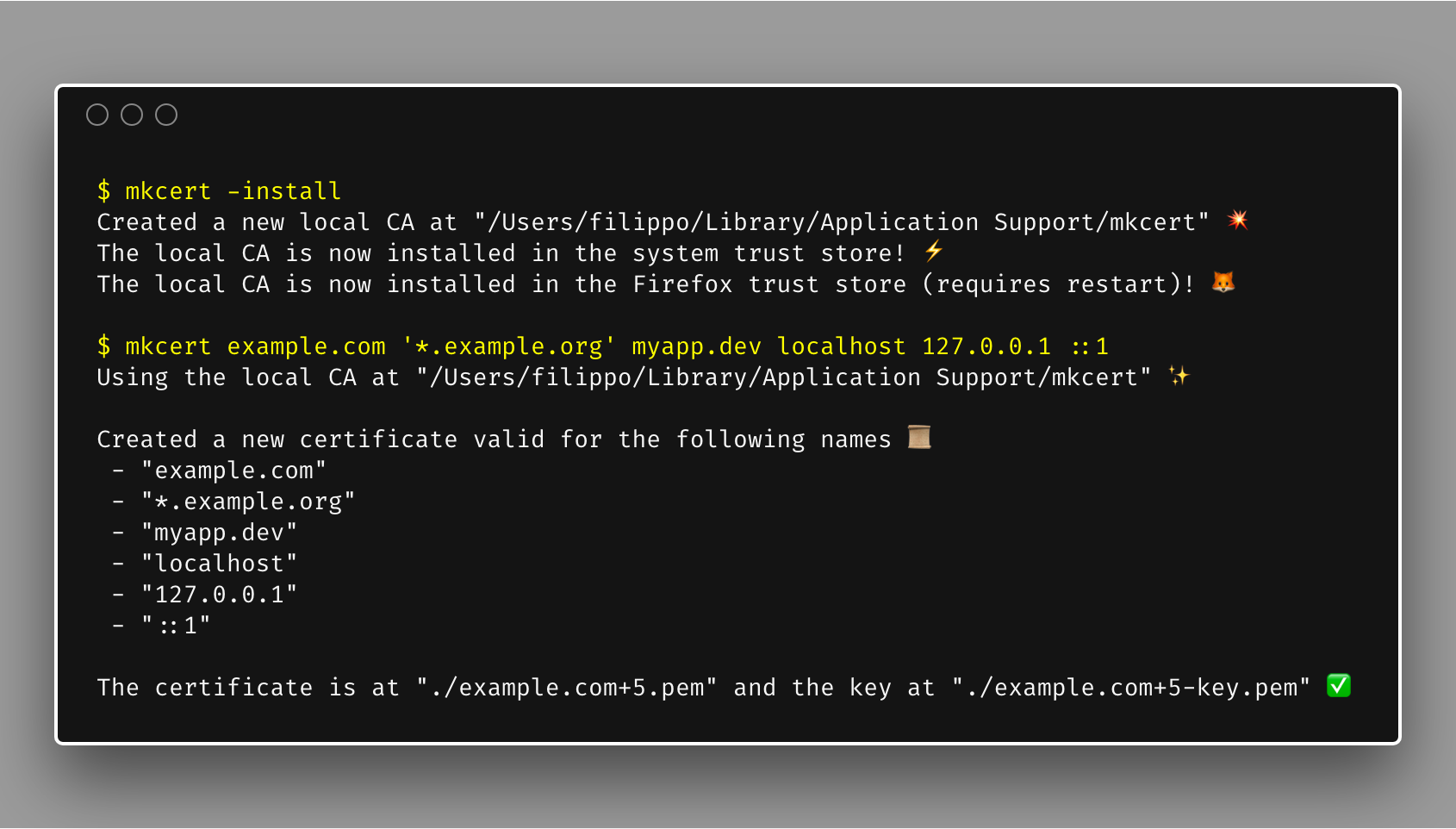
- Run in Terminal:
mkcert -install # Installs the local CA
mkcert example.com "*.example.com" example.test localhost 127.0.0.1 ::1 # Generates certificates
4. Prepare Certificates
Move the generated .pem to a secure location on your system. (preferrably a folder called "system_mgn" in your home folder) usually You can also rename the certificates for easier reference.
- Rename Certificates:
example.com+5.pemtocert.pemexample.com+5-key.pemtokey.pem
6. Set Environment Variables for Certificates
Optionally, set environment variables to store paths to your certificates and keys. This can be useful for production environments or to reference the certificates in your code.
run "npx ng serve --ssl=true --ssl-key=$env:[KEY ENV VAR] --ssl-cert=$env:[CERT ENV VAR]"
 edgy spindle
HTTP and HTTPS doesn't really matter here. A website will never have access to local files in this way due to security.
loud prawn
then what could be a different approach in order to open a file?
red trellis
Im trying to understand what you are trying to do but might as well serve the local files you want to show on a local server
edgy spindle
loud prawn
then what could be a different approach in order to open a file?
Where does this file come from? How does your App get to know about this file?
loud prawn
this object has a string url path property, which will be in a folder either local or shared folder whenever we press a button we should get this url from the object and open it or visualize it
i thought i could open them in a new tab
but if thats restricted
i don't know what more options could there be
edgy spindle
"local" meaning something like file:///home/foo/bar/baz.pdf?
edgy spindle
In that case that is impossible to do from a webpage due to security. A website running on http(s) is not allowed to link to file:/// URLs
loud prawn
thanks for the answer! what would you suggest as any solution?
edgy spindle
That depends on your use-case. I again ask my question: How does your app get to know about these files? A website has no idea about local files, so something has to feed these file:/// URLs to your App. What is that something?
loud prawn
in the ddbb we store the path of the file
edgy spindle
Is this like an electron app or something?
loud prawn
so if back serves the file, it might allow it to open in browser?