#M1.1 Build Log
1 messages · Page 2 of 1
 modest crane
 lone hill
...or you can decrease the PA increments on the tool, whichever works for you
modest crane
lone hill
...or you can decrease the PA increments on the tool, whichever works for you

yeah that's what Im doing no/
?
lone hill
220 bed can fit 0.002 increments
It'll be quite tough to differentiate with 0.01 anyway
modest crane
lone hill
It'll be quite tough to differentiate with 0.01 anyway
I can barely differentiate them now
doesn't help that im blind
lone hill
Send a few photos and I'll try to help
modest crane
lone hill
Send a few photos and I'll try to help
got the new test printing rn, please hold 🙂
gonna have to head to bed after this one, gotta wake up for work in... 3hrs
lone hill
No point, how can one wake up on time when he slept less than 3 hours?? 🤣
Leave it man... You're melting plastic so mission accomplished. TomorrowTonight is another day
modest crane
lone hill
Leave it man... You're melting plastic so mission accomplished. ~~Tomorrow~~Toni...
yeah but is this 10m print really gonna make a difference


What do we think @lone hill
now makes me think 0.04 is the best, and could go higher 😡
modest crane
JOB FOR TMRW GN
lone hill
By the looks if it, 0.032 or 0.033 seems correct to me
modest crane

anything wrong with this part? @lone hill

It is strong and the hardware fits pretty nice
could use some tuning yet but it seems functional
modest crane

This should be enough for a SINGLE hydra build
@deft fog even -I- shouldn't be able to lose enough hardware to not finish the build
lone hill
modest crane
anything wrong with this part? <@846482013060988969>
Looks ok to me, though can be refined to look even more appealing. Black makes imperfections easy to spot especially with lighting conditions..
modest crane
lone hill
Looks ok to me, though can be refined to look even more appealing. Black makes i...
yea visually iffy but it seems like a strong and functional part so I’m gonna live with it for now
gonna keep tuning though when I get home from work
lone hill
I was looking at the part again, are you sure it didn't warp? Is the bottom completely flat? It looks like it on the side close to your index finger
Though maybe it's only from this angle...
 deft fog
mini tanks are pretty forgiving, even if they have flaws they will still work
modest crane
lone hill
I was looking at the part again, are you sure it didn't warp? Is the bottom comp...
Bottom is perfectly flat, it’s the best part of the print since it has that sexy PEI texture 😂😂
lone hill

I used to love printing on a mirror without any adhesion stimulants) when I started. Didn't like the texture of PEI sheet in photos of seen, but then I got one. And I started loving myself and threw the mirror to the garbage, because only people who hate themselves use flat glass as build surface and with nothing on to increase adhesion.
modest crane
lone hill
I used to love printing on a mirror without any adhesion stimulants) when I star...
On my ELF I use a mirror with nothing to increase adhesion
lone hill
I kept printing stuff upside down because the finish you get when printing on a flat piece of glass/mirror is second to none, assuming your first layer is laid down properly, with a nice squish. But it's a hassle.
modest crane
Nice, free sandpaper

Good thing I always ignore warnings

I’m a sucker for branded products


 modest crane
functional should finish tuning and THEN print these but the parts arriving faster than I can tune lol

I did crack that mini tank even though the docs say not to overtighten lol
modest crane
Working on Hydra install 🙂
 deft fog
how did the cutting go
modest crane
deft fog
how did the cutting go
cut the extrusion a bit short since I didn't have a metric tape measure lol
but I just added a 1mm shim and its p good now
debating running my DIN rails front to back vs side to side
deft fog

The Home Depot
Milwaukee is expanding its tape measure offerings with this 6 ft. keychain tape measure. It features unique functions, such as dual printing with both metric and imperial markings, a five-point reinforced
go buy a couple
modest crane
I have one at my house I just couldn't find one at the shop and didn't feel like going back lmao
deft fog
 modest crane
if it works it works
I used a piece of extrusion that has like 100 tapped holes in it all over the place
I have a brand new one I might swap too later, if I do that one will be pretty exact
deft fog
lead screws?
modest crane

 lone hill
Jumpers below the driver set how? Obviously disconnect the power if you need to remove the driver or change anything
@modest crane
modest crane
lone hill
Jumpers below the driver set how? Obviously disconnect the power if you need to ...
In the UART slot like the rest
deft fog
Need to have motors plugged in
modest crane
deft fog
Need to have motors plugged in
Same thing with or without
deft fog
post config again
modest crane
deft fog
post config again
It’s the same as before, but I can post it again after work. I don’t even have my third z defined yet, wanted to jog my toolhead to figure out my z tilt values
deft fog
So only 2 z steppers defined currently?
modest crane
deft fog
So only 2 z steppers defined currently?
Yes, it’s throwing on my first z stepper
lone hill
Can you try using the board pins and the spot for another motor?
modest crane
lone hill
Can you try using the board pins and the spot for another motor?
Trying connecting a different motor to that slot, or try a different slot on the board?
lone hill
You mentioned that error comes up regardless of whether a motor is connected or not, correct? If so, I'd suggest trying a different slot.
modest crane
lone hill
You mentioned that error comes up regardless of whether a motor is connected or ...
Yeah, your wording had me confused a little. Yeah I plan to try a different slot when I get home because I already tried swapping stepper drivers, no change. And I’m pretty sure my z1 motor moves before it crashes
probably broke another octo 😂

 copper swallow
modest crane
I’m a sucker for branded products
copper swallow
modest crane
I’m a sucker for branded products
what cable size are those? I realised I have no suitable main cables… However mine it’s stuck in the Netherlands somewhere
modest crane
copper swallow
what cable size are those? I realised I have no suitable main cables… However mi...
not big at all, I can’t imagine it’s bigger than 14-16 under the braid
modest crane
lone hill
https://tenor.com/view/ohno-smh-wrong-no-gif-20802904
alright good progress, I shifted my z motors over by 1 slot, and also just plugged in the wires that came with the motors in, and it seems to be moving fine 🙂
The stock motor wires don't have a positively latching board side connection though, so I'll reterminate those
prolly throw some nice sleeving on em while Im at it
lone hill
It’s good to know you’re making progress!
modest crane
@deft fog do you happen to know the z tilt positions for a 5 pro?
deft fog
modest crane
<@297139232533774338> do you happen to know the z tilt positions for a 5 pro?
if you turn on my 5 pro for me, I can look at the numbers
deft fog
modest crane
<@297139232533774338> do you happen to know the z tilt positions for a 5 pro?
[z_tilt]
z_positions: 8, 8 #stepper_z Mini Tank
  126, 245 #stepper_z1 Mini Tank
  245, 8 #stepper_z2 Mini Tank
points: 235,205  #132.5,205  #probe location stepper_z (rear)
  #132.5,205
  15,205
  15,0 #probe location stepper_z (left)
  235,0 #probe location stepper_z (right)
speed: 400
horizontal_move_z: 20
retries: 5 # Number of times to retry if the probed points aren't within tolerance.
retry_tolerance:0.150
managed to walk past it and flip the power switch on
modest crane
deft fog
```
[z_tilt]
z_positions: 8, 8 #stepper_z Mini Tank
126, 245 #stepper_z1 Mini ...
LMAOO
I should have checked this a second earlier
I broke my printer
deft fog
if you would have turned my printer on for me, you could have had this sooner
the points are for klicky though, not bltouch
modest crane
deft fog
the points are for klicky though, not bltouch
i have an inductive probe on the SB rn
deft fog
ohhyeah sb
might be similar then
since my klicky is behind nozzle
also this assumes home is 2mm in from the left and front edges
deft fog
modest crane
I broke my printer
need pictures of damage
modest crane
deft fog
need pictures of damage
just broke one of the mini tanks in half
its fine magnet power will hold the bed on
modest crane
I mean something was bound to break
the nozzle pushed down on the rigfht corner and forced the other corner up
deft fog
better the tank then the arm
modest crane
@lone hill do you run klicky/unklicky?
lone hill
Klicky NG. Happy with it. Haven't tried anything else than that (counting out the Omron inductive probe which was a waste of good money and energy)
modest crane
lone hill
Klicky NG. Happy with it. Haven't tried anything else than that (counting out th...
Yes I have an Omron inductive probe right now and want to make the switch. The NG says it’s a drop in replacement for the omron, does that mean it permanently attaches inside the tool head where the omron is, or does it still grab the klicky off of the frame
lone hill
It acts the same way as the Klicky probe - a part of 3 magnets (or 4? can't remember...) on the toolhead, and a slightly different probe that is docked and undocked.
The advantage is that it uses No Glue
modest crane
lone hill
It acts the same way as the Klicky probe - a part of 3 magnets (or 4? can't reme...
Ah okay so drop in replacement just means it serves the exact same functions as the omron, cool
Do you just use the Voron spec parts for your klicky, frame mount and all or do we need different offsets for the merc?
deft fog
there is a mount for the merc on the klicky github
lone hill
95% klicky-spec, slightly modified the Dock_mount_Ender5.stl from on the "Printers/Mercury_One/Voron_Toolhead_STL" section on the klicky repo
I just converted to UHF Rapido (some conversion... Needed to reprint half of the toolhead), needed it to drop lower
I give @deft fog one guess which color is the reprint
deft fog
gold
deft fog
rose gold
modest crane
deft fog
there is a mount for the merc on the klicky github
Is this gonna cause me problems with the SB?
modest crane
thanks for answering all my questions boys, I just like to understand what I’m about to build before I tackle it haha
nice, thanks
deft fog
With my EVA mount, I made all of the mounts fixed height and lengths... I didnt like the adjustable mount look
modest crane
oh KLICKY GitHub I missed that part
Do you run kilicky too turtle? Was thinking about doing an unklicky lol
deft fog
yes I run klicky, and I am happy with it
so have not tried unklicky
the unklicky docs on how to set it up are not the best, dutch had a hard time putting his together following their instructions
eventually he figured it out
modest crane
yes they have a “how does it work section”
lone hill
I felt the same - that's why I didn't continue with building it
modest crane
which took me like a day to understand
I read it in the morning and it wasn’t until leaving work that day that it clicked
or unclicked 😛
lone hill
 deft fog
I still cannot wrap my head around how the unklicky remains accurate after reading the docs on it.
I am sure if I built one, it would make more sense. But the standard klicky works fine for me still.
modest crane
My inductive price doesn’t want to play nice with my hydra, I think it would work if had the config perfect already
but as it is it wants to smash stuff
deft fog
so to start off with z tilt, bring the probe points in further than needed
lone hill
deft fog
I still cannot wrap my head around how the unklicky remains accurate after readi...
I could understand the basic concept, but that's where it ended for me. It simply breaks open the connection (which is held by the opposing forces of magnets), that's why it's accurate
modest crane
Oh it’s an NC probe
deft fog
points: 235,180 #132.5,180 #probe location stepper_z (rear)
#132.5,205
30,205
30,20 #probe location stepper_z (left)
200,20 #probe location stepper_z (right)
start with something like that
modest crane
will do
deft fog
so the points are well within the bed
modest crane
My endstop may have been too far back
deft fog
then adjust the points out
lone hill
modest crane
Oh it’s an NC probe
Any endstop built as N/O is calling for trouble 😬
lone hill
Reduce Z motor current
deft fog
that too
modest crane
I would have just jogged to get the first positions but klipper kept complaining about having to home first even though I did 😡
deft fog
safe settings to get the config dialed in
lone hill
No heat on the hotend also
modest crane
what’s the lowest current a 1.5a motor will lift the bed at?
deft fog
set the z currents to like .3
lone hill
The first scratch shall not be today!
deft fog
.6 is more than enough on any standard z setup for normal use
modest crane
lone hill
The first scratch shall not be today!
yesterday
deft fog
lone hill
The first scratch shall not be today!
your right, it was last night when he crashed it and broke a mini tank
lone hill
🤦🏻♂️
lone hill
Oh yeah, I even responded on this I think
deft fog
this was later
modest crane
Nozzle marked its territory already
 lone hill
Last mark!!
deft fog
he wanted to see my z tilt settings, but I was to lazy to power up the 5 pro
lone hill
...ever
modest crane
turtles fault !!!
deft fog
finally powered it up and posted, and he came back saying he just crashed it lol
modest crane
If klipper wasn’t being annoying I would have done it the smart way
deft fog
Ohh is that just the magnet?
lone hill
I call it the fault of the one who was too anxious
deft fog
the magnet will look much uglier with time
modest crane
yeah I’m not testing with the bed on 😄
wait
…
aluminum is non ferrous
would my probe trigger on the magnet sheet or is that why my probe wasn't working ..
....
deft fog
steel sheet might help lol
deft fog
those probes to trigger on aluminum
not sure about over magnets
I used to use an inductive probe on a aluminum bed, back when we just put blue tape over the bed
no magnets or pei sheets back then
modest crane
huh omron data sheet lied to me
deft fog
they are not as accurate over aluminum if I remember correctly
and needed to be closer to trigger?
deft fog
there is a reason nobody runs the omrons
 modest crane
ok homing z went fine
first probe points were off but I adjusted them and z tilt probed fine, motors are in the wrong spots atm tho
swapped em I think correctly? running z tilt now let's see what happens
I can't wait until my speed ab motors get here and I can start breaking stuff even more
seems to be working... ish
won't get within my tolerance tho
of .15 lol
deft fog
post the results
modest crane
1 sec it's running rn
deft fog
now
lone hill
POST IT NOW!
deft fog
 modest crane
 lone hill
🤣
modest crane
this is before it had time to adjust
deft fog
I need to see the z moves
modest crane
it hadn't done that yet lol

 modest crane
should probably have the printer on a flat surface then huh
deft fog
looking at those results, the + numbers are very close, and the - are also close. But oposite corners
unflat surface will twist the frame
I use the 4 point as a tool to check frame flatness
modest crane

one of the feet was sitting on something, this is with all 4 feet flat
same thing huh?
deft fog
looks like it
shim the feet on the high corners
I just shim the front, cause its easier
and use printer paper.... fold it a few times
though on my 5 plus, I finally ordered some wide shim washers
 deft fog
maybe your bed isny heavy enough, and you need to adjust the frame
modest crane
could be
deft fog
I am used to my heavy fabreeko beds, and didnt notice a change in my ztilt when I moved to the Fysetc bed
modest crane
I gotta go to work so this will be when I get home tn, but what do I need to check to ensure the frame is good
deft fog
might be able to check it with a square?
or just figure out a way to shim a corner of the frame up, not sure how to best shim it right now...
modest crane
deft fog
or just figure out a way to shim a corner of the frame up, not sure how to best ...
cool, will run though it with a square
Hm, my printed corners could affect this right?
Anything besides frame squareness that could cause these symptoms?
modest crane
@lone hill garg you’re smart, any thing I should check after frame ?
lone hill

Y Rails being parallel, deracking the x gantry - both check fine out?
What's the status at this moment?
modest crane
will be home in 5 minutes or o start the fun
Z tilt with dual z didn’t have any issues,, mesh looked good
lone hill
Tell me about it... I used to see 0.06-0.07 variance on my dual-z pro before Hydra, now I'm at about double that mainly due to one corner going lower than the others. But I don't stress myself over this, since in my case bed mesh compensates fine - I test printed a 260x260 single layer rectangle and it was 95% perfect, the non perfect was seemingly bed adhesion issue and unrelated to bed mesh
modest crane
My tolerance is at .15 and I can’t get it to pass 😦
lone hill
You do 4 points as suggested by turtle, correct?
lone hill
With 3 points I can reach 0.01 on my 275 bed, with 4 points my best would be something like 0.035 or so
modest crane
let me live in denial for like 5 more minutes
modest crane
deft fog
you get 5 seconds
so a twisted frame is the only thing this could be?
deft fog
From my own testing, yes
modest crane
not something like off center/slanted rear extrusion, wobble z rod etc ?
deft fog
as I have been able to fix it with the frame every time
when it is 2 corners high, and 2 low
modest crane
happy to try any suggestions, don't care if they are sketchy
rather, I prefer sketchy
modest crane
im outta ideas
I tried shimming every corner combination lol
if i shim the 2 high corners one of the feet comes of the ground
frame seems square
deft fog
shim the top frame up
modest crane
like pull the extrusions and shim it on top of the verticals?
deft fog
yeah
modest crane
probably
there is like 100 screws down ther
wekk
i could just pull thge corners off
deft fog
I still have not tensioned my 5 plus after I shimmed the front left up
I went to do it the other night, but the bambu was printing... to much noise for the app to work
modest crane
hm I actually think the bottom will be easier to shim
ah shit the shims that come with the m1.1 are too small :<
im using mil spec stainless washers from mcmaster, tolerances should be close enough
deft fog
modest crane
im using mil spec stainless washers from mcmaster, tolerances should be close en...
any luck?
I was in the garage silently cursing my tacoma's stater, which is impossible to fish out once unbolted.....
modest crane
I shimmed one corner and it didn't change, need better shims
deft fog
double shim?
modest crane
I did a .30
deft fog
this is my 5 plus

that was a .5 shim, which happened to be perfect for my frame
double or tripple shim
hell quad shim full send
go big, dial back if needed
deft fog
yup
modest crane
hm, may need to ditch the shims and just get some bigger washers
my shims keep trying to slip into the extrusion it seems
modest crane
deft fog
this is my 5 plus
Think I’m gonna need more shim than this to see a difference?

I gotta fix that left one still but
ill just add another fuck it
modest crane
deft fog
yup
I only have one corner shimmed and it passed with .113 tolerance
should I shoot for better u think?
nvm ran it again got to 0.8
happy with that
modest crane
alright, time to fix this wiring disaster
modest crane
hm, somehow misplaced my entire hotend
modest crane
I got some wiring cleanup to do but imma just send it on a print and see what happens
modest crane
test print looks very very nice... gonna send it on 2 need electronics bay feet and see what happens, wish me luck 😄
copper swallow
It’s maybe the most entertaining build log 😃. could you rewind a little and summarise how it was found that culprit was the frame and it needed shims? (and where/which side?)
modest crane
copper swallow
It’s maybe the most entertaining build log 😃. could you rewind a little and sum...
once I got everything installed and working, I ran z tilt but it kept failing because the bed was too far out of tolerance
then we (turtle) noticed 2 opposite corners were high but had very little deviation (4.56 and 4.59) while the other 2 corners were low but were still very close together (4.10 and 4.09)
the high sides are the corners that need shims
copper swallow
so you’ve put shims in both corners?
modest crane
I only shimmed one corner, was planning to do both but after I shimmed one it was "good enough". will probably shim the other eventually, but got some parts I want to print first
copper swallow
right! thanks that’s explains it all. I didn’t know the z-tilt “failed”. how does it work, does it try to converge to a solution but gives up after some try or does it thing, report the variation and you decide if it’s failed?
well.. hopefully I’ll find out soon
modest crane
copper swallow
right! thanks that’s explains it all. I didn’t know the z-tilt “failed”. how doe...
you set the tolerance that the 4 points have to be within. so if the standard deviation is greater than your tolerance it will fail
copper swallow
jeez, my current setup, my variance is around 0.3 in the good days, 0.4 the norm… really looking forward to have those tolerance as well. waiting to see some test prints \o/ !!
modest crane
Prints are getting better after some tuning but started getting some layer shirt


And now my bed is tucked again: 2 high corners, 2 low. Can’t get below .28 tolerance anymore 😭
 modest crane


wiring hellscape has got to be fixed
gonna try to print the new revision of the electronics bay with the 38mm feet then grind hard on the wiring
huge fan of these z drop brackets though, they look great. nice being able to see what the nozzle is doing too lol
copper swallow
modest crane
where are those brackets?
modest crane
copper swallow
where are those brackets?
Somewhere in enclosure, I ripped them from a step file in fusion
I can send you the STLs
copper swallow
modest crane
I can send you the STLs
that would be great! I have some metal brackets, but I don’t like the idea of installing the tensioner on top of the brackets, this seems like a good mod, plus it addresses the bar lowering thing, that I’m tempted since forever
modest crane
copper swallow
that would be great! I have some metal brackets, but I don’t like the idea of in...
yeah being able to actually see what’s going on (especially for first layers) is great
When I get home from work I’ll shoot them to you in a DM
copper swallow
great, I’m not in a hurry, I’ll be able to print them only tomorrow, maybe , anyway
modest crane
Slowly but surely coming along 😎

 modest crane
printed most of a v0 on the merc so far, all been mostly smooth (besides some config and tuning, but not really hardware related)
UNTIL today — set a plate of tri-zero parts to print overnight woke up to… 10% if a first layer and nothing else. The printer did think it was printing the entire time though
Heater cart failed I believe — went to run some cleaning filament through since I figured extruder clog was the culprit — “heater not heating at expected rate”
Reterminated my thermistor and cartridge with no change. I do have extra heaters but used my last two connector pins in my futile termination attempt. When I get home from work today I’ll cut the leads off of my bum heater and solder to one of my spares while I source some pins (might as well get an assortment kit, the monstrous parts archive grows)
deft fog
Those skirts are not white?
modest crane
deft fog
Those skirts are not white?
What do you mean 🤨
 modest crane
deft fog
modest crane
deft fog
I got hate for using white filament, it’s got rocks in it or something idk I skipped geography class
modest crane
deft fog
but I did order a few rolls of white to strength test because the white was growing on me and I do want to go black white for the build
deft fog
I have noticed that it is easier to break, even if the breaks look good
its softer feeling when you break it
modest crane
Plan to see if I can do aesthetic pieces only in white
deft fog
I think white can be used for accent pieces, such as the skirts
deft fog
those centers I printed with dark gray inlays
even feet could probably be white, since they do not see any impact loads
but it's nice to break up the color with black feet
modest crane
Maybe I’ll dye the rubber amp feet white
deft fog
ummm
deft fog
doesnt work that way lol
if you really hate yourself, which I think you do. You could look to see if there is white TPU and print your own feet
white TPU is a thing
lone hill
Transparent TPU feet are a thing, let me tell you this.
modest crane
lone hill
Transparent TPU feet are a thing, let me tell you this.
Like an off the shelf thing or a secret garg experiment
deft fog
RGB back lite TPU feet?
 modest crane
lone hill
Turtle you have excellent ideas!
modest crane
lone hill
Turtle you have excellent ideas!
…I think he just did something…
You could print the base of the feet, pause the print and drop a neopixel in, then continue over it
lone hill
I have 97 neopixel “Jewls” waiting for projects. Can spare 4 for transparent feet
lone hill
modest crane
You could print the base of the feet, pause the print and drop a neopixel in, th...
That’s way too extreme for me!
deft fog
If you need bad ideas, I am your man!
lone hill
deft fog
If you need bad ideas, I am your man!
As you saw yesterday I can come up with dumb idea of my own
If it diffuses light nicely I’m going for it!
 modest crane
lone hill
If it diffuses light nicely I’m going for it!
modest crane
lone hill
If it diffuses light nicely I’m going for it!
Howd u print that so quick damn he’s good
lone hill
It was there since... I didn't think spending $7 on rubber feet is correct, but then ordered two sets. Never changed them! These will stay!
deft fog
we are able to get a 8 pack of feet here, for $4
 lone hill
deft fog
we are able to get a 8 pack of feet here, for $4
lone hill
deft fog
we are able to get a 8 pack of feet here, for $4
You also don't pay 105% tax on your cars, that's unfair

 modest crane
lone hill
Transparent….mmmmmmm
modest crane
lone hill
Transparent….mmmmmmm
Is this really what your vorons feet look like 🤨
modest crane
lone hill
I modified those from 247 printing's super speedy v0
oh that’s your v0?
Hm I want a super speedy one
lone hill
Yes it is! Another souped-up project! I don’t push it very fast though
 onyx snow
aint white the worst colour to print functional parts with. cause of all the pigment needed that is has a negative affect on layer adhesian?
modest crane
got the slave back up and running, more t0/box zero parts printing
modest crane
printed warped on the last layers only affected 2 of about 8 parts though - think I had some cooling fans still running
sliced the re prints and new plate and sent it to the printer and was just watching it as I was leaving for work and watched my bed jump off of the printer lol
don't really know why it did that -- sensor seems good, running another z tilt now and no weird sensor issues or anything. broke another mini tank (now I have 2 broken mini tanks on the merc)
but I do have 2 extra printed and ready for install, just haven't had time to pull the bed. Will probably do a partial teardown today to swap my AB motors to the speedy ones, swap hydra motors to 3 HB motors, do some mini tank replacement, maybe install new skirts and my bottom panels, but that would mean wiring so who knows 😄
modest crane
@lone hill what hot end do you like ?
lone hill
I like my Rapido.
Recently found a modded front cover and front hotend mount half for “UHF” volcano nozzles.
…You can imagine what I was pouring some money on recently
modest crane
lone hill
I like my Rapido.
Was considering a Rapido, do you have the UHF version?
Not that I can give a good picture of the differences lol
lone hill
Yeah, I do have the UHF. For a long time I had no idea what purpose it’ll serve until I found the modified toolhead
Don’t fall for the high flow marketing numbers - these are total rubbish
They test with 1.0mm nozzle with PLA @ 280c
lone hill
Manufacturers? I don’t know, doubt it.
But you do, and I do.. I get my max volumetric flow rate and know my hotend’s limits. It’s fine if it isn’t as advertised, I don’t expect them to provide real life conditions in their marketing
modest crane
 velvet badge
does anyone test with realistic numbers?
velvet badge
does anyone test with realistic numbers?
any company? Doubtful. They’d kinda be shooting themselves in the foot if they played fair considering they’re competing against other inflated results
velvet badge
But you do
There you go, assuming I test 😂
modest crane
hey garg that’s what I was saying 😡
velvet badge
modest crane
any company? Doubtful. They’d kinda be shooting themselves in the foot if they p...
I mean, ostensibly eventually people would pick up on "oh, Zoid Engineering has actual realistic numbers"
but also I am not a successful business person
perhaps do 1mm nozzle at 280C for PLA, and wave that all around, but also say "hey, these are selection biased marketing numbers, the real numbers are X"
modest crane
velvet badge
perhaps do 1mm nozzle at 280C for PLA, and wave that all around, but also say "h...
Yeah, this would be a good way
You seen the Takoto HE50 @lone hill ?
 velvet badge
"Zoid Engineering encourages users to perform their own independent testing to validate reasonable flow rates for their own individual use cases"
lone hill
There used to be times where manufacturers (in any area) used to put a * and tiny letters to explain the caveats and the test conditions. They stopped.
velvet badge
now half the time there's an asterisk, but I can't find the actual caveat
modest crane
Those guys tell you how they test !! ^
 deft fog
miragec had started to collect data on hotend flow with various nozzles and extruders.... He tried a few testing methods to collect data and changed some stuff for the second video.
modest crane
The HE50 has me tempted but I gotta look into it more.. seems like a monster
lone hill
Several years ago I worked for a company that manufactured wireless links. One of the products was advertised as being capable to provide a link up to 120km. This was a total bullshit, and worked only in theory, it’s next to impossible to achieve this in real life due to the requirement of clear Fresnel zone throughout the span of the link.
Marketing numbers should not be a large portion of the decision whether to buy product A or product B.
modest crane
lone hill
Several years ago I worked for a company that manufactured wireless links. One o...
Agree with you, that’s why I ignore numbers and buy whatever looks better
velvet badge
I mean, almost any frequency in the RF spectrum can manage 120km in a straight line as long as there's nothing in the way like say the curvature of the earth
lone hill
Yeah, but as a pre-sales engineer I dealt with customers who didn't know that and expected otherwise.
velvet badge
yes
"look OK if the tropospheric conditions are just right, there's this phenomenon called tunneling, see, and ..."
modest crane
at my work it’s “this can stay in the air for 2 weeks continuously”
wow you got two weeks flight time ?!
lone hill
And you know, not only that.. Considering the meager signal you get at that distance you're left with.. Idk, 5Mbps aggregated throughput? Can't remember the exact number, but you get the idea
modest crane
“Well no but if you…”
velvet badge
lone hill
And you know, not only that.. Considering the meager signal you get at that dist...
I'm guessing this is in GHz broadband comms? Hope it's not raining I guess?
also, we should probably stop hijacking BBL's build thread
lone hill
velvet badge
I'm guessing this is in GHz broadband comms? Hope it's not raining I guess?
als...
Yup, sub-6Ghz
modest crane
I hijack my own build thread all the time, I don’t mind
lone hill
BBL likes this activity, don't worry
modest crane
yeah I can slip my questions into the mix and nobody can tell if they’re stupid
deft fog
modest crane
yeah I can slip my questions into the mix and nobody can tell if they’re stupid
keep telling yourself that 🤣
modest crane
deft fog
keep telling yourself that 🤣
I’ll invent a way to dye rubber white and then it will be you who looks foolish!!
onyx snow
to add to the pile of stupid questions. when you work with a heatblock that big as an HE50. don't you need water cooling to get get rid of heatcreep?
also didn't CNC kitchen made a video about propperly testing the flow of a hotend?
onyx snow
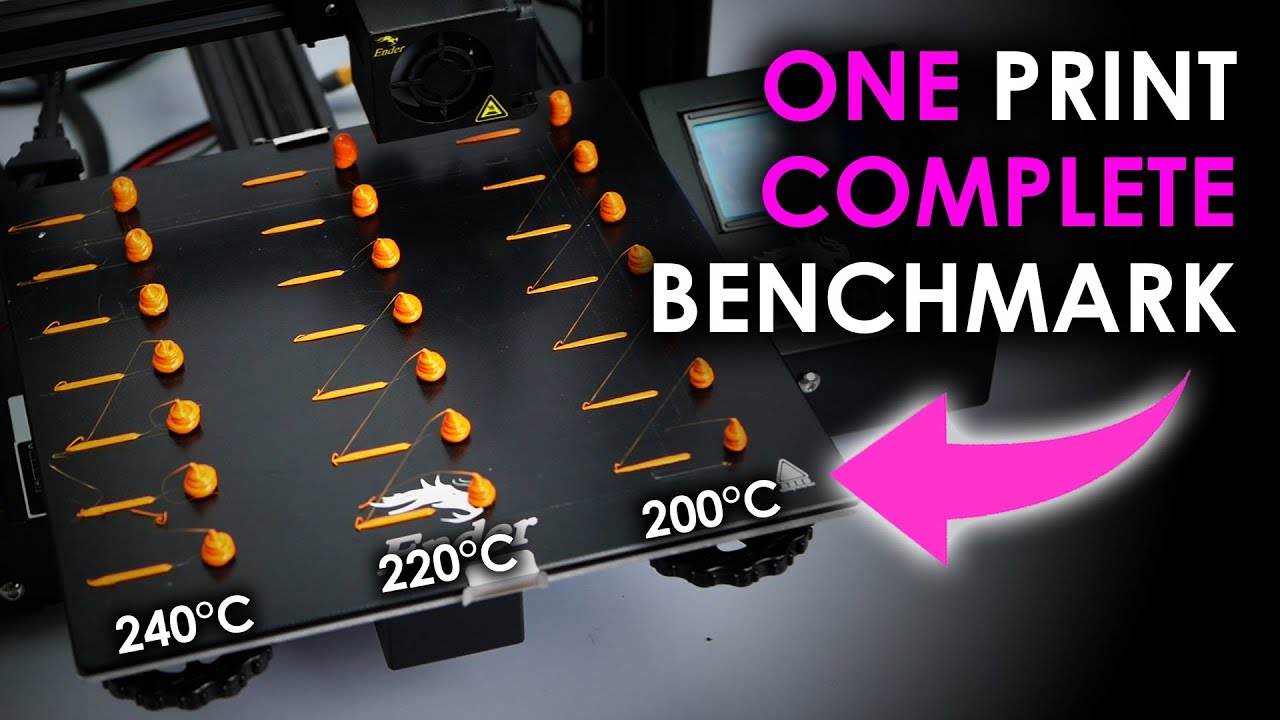
Get 50% off a 2-year NordPass premium plan at https://nordpass.com/cnckitchen or use code CNCKITCHEN. Plus you get an additional month for FREE!
If you want to print fast, you need to benchmark your hotend! I made this super simple by creating a simple tool that you can use to create a test G-Code that will help you to find out what the perform...
modest crane
onyx snow
to add to the pile of stupid questions. when you work with a heatblock that big ...

that’s what they say about it in their specs. The HE50 does have that crazy looking coating on it though — and it does support water cooling

 severe crown
modest crane
I’ll invent a way to dye rubber white and then it will be you who looks foolish!...
severe crown
modest crane
I’ll invent a way to dye rubber white and then it will be you who looks foolish!...
Paint?
severe crown
modest crane
Was considering a Rapido, do you have the UHF version?
I run the uhf version and by run I mean I like how big it looks as it sits in the corner unused until I finish building my voron and then I can tune both
modest crane
@lone hill my extruder keeps breaking 😂😂
lone hill
Time for an LGX lite and a Rapido my friend, excellent combo
modest crane
lone hill
Time for an LGX lite and a Rapido my friend, excellent combo
Rapidos on the way!! LGX lite seems so expensive (mostly bc I’m impatient and wan to get it from a domestic source haha)
I’ll drop $200 in a day on parts I might use but $70 for an extruder?!
$70 for one of the most important components of the printer?! I could use that $70 on other things like uh
lone hill
Awesome! But you will get to that eventually
deft fog
That's $70 that could go towards simplify 3d
modest crane
deft fog
That's $70 that could go towards simplify 3d
🙄🙄🙄
lone hill
Just hoping you won’t go through every other option before you get to the “correct” one 😝
modest crane
obviously I’m gonna just PayPal @dusky linden the $70 to tune my prints to look like his
deft fog
It just takes a few weeks of tuning
modest crane
I should have just put one on my last order

@lone hill are you running genuine bondtech lgx?
deft fog
Gargamel spent more on rails than most spend on their merc conversions
lone hill
Yeah, sure. However I think I’m not running the LDO motor that came with it though, didn’t feel like cutting its wires
deft fog
I wish those pancake motors would use plugs rather than harnesses
modest crane
alright lgx lite gets here Thursday
lone hill
I want wireless everything when can I have that??
modest crane
Revive Tesla and if he was right about his wireless power you’ll have it
so… never
I need autoz offset my shit is all over the place
deft fog
mine is as well, with autoz lol
lone hill
Wait a minute, you use a sb2040 board?
lone hill
deft fog
Gargamel spent more on rails than most spend on their merc conversions
🤦🏻♂️
Yet my prints sometimes come out poorer than a stock Ender 3
lone hill
modest crane
Yes why
Oy…
modest crane
lone hill
Oy…
WHAT ?!
 modest crane
gulp
lone hill
Not sure if the sb2040 will fit the cavity left after mounting the LGXl, and don’t know about mounting holes
lone hill
Sorry…
modest crane
lone hill
Sorry…
This will work I imagine

If not I’ll make it work.
aka floating pcb maybe some tape if im feeling real professional
had me thinking sb2040s were causing fires or something
well they probably do when I use them but
deft fog
I figured gargamel was just upset with you for not using canbus yet.
modest crane
deft fog
I figured gargamel was just upset with you for not using canbus yet.
who do you think set my CANBUS up?!
deft fog
ohh wait you are, I was looking at the cad and lack of canbus
modest crane
yeah that’s just the hartk toolhead board
the can board has the same screw holes tho
@lone hill hello kitty v0 is getting closer tho
 lone hill
That’s awesome dude!!!
modest crane
I would have started building already but the 0.2 has slowed me down, gotta see what parts I want to steal
modest crane
deft fog
whats with the black mark on that one piece?
too lazy to clean PEI sheet
modest crane
deft fog
just go full 0.2
I’m going t0 (3 point bed leveling) and all the parts aren’t updated yet
deft fog
wasnt sure if it was a random burn in the plastic
lone hill
Natural color extrusions hope?
deft fog
I find that white likes to randomly burn in places
deft fog
lone hill
Natural color extrusions hope?
chrome plated???
modest crane
lone hill
Natural color extrusions hope?
gold atm, I couldn’t find any natural color 😢
lone hill
That’s not hello kitty then.
Turns out you are just like maze
You’re backtracking from your promise
modest crane
lone hill
That’s not hello kitty then.
find them for me and I’ll source them
Money is no object
He says, seconds after complaining about a $70 extruder 😂
@lone hill is this the color in question?
 deft fog
clear or silver, yes
deft fog
ideally smooth, without the grooves
modest crane
I’ll see what I can drum up
Might have to fire up the anodization setup
Or get some sodium hydroxide
lone hill
Not sure abou 1515s, silver 2020 are easy to source
lone hill
modest crane
Or get some sodium hydroxide
Don’t go through that hassle…
modest crane
Yea but I’d it’s not overly complicated what’s the point
deft fog
byebye anodizing
modest crane
Will my ultra sonic speed it up 😂
deft fog
will they fit?
modest crane
Yeah
deft fog
can try
modest crane
I got a big one so I can fit 4 racks of carbs
deft fog
its been a long time since I have stripped ano off parts
might not be 1 hour
that was just a number I made up, sounded good
deft fog
ez-off also removes it
white frame would be baller
and more pink accent parts
white belts
modest crane
Gonna see about remixing the new mini sb
Put a backlit hello kitty on the front in place of Voron logo
lone hill
Too much chatter, someone in this server will beat us to this kitty builds
deft fog
I made a hello kitty badz maru acrylic edge lit thing for my sister for christmass a few years ago, never took pictures of that one for some reason
velvet badge
deft fog
I figured gargamel was just upset with you for not using canbus yet.
He might not have meant to, bit Gargamel talked me out of getting canbus just yet 🤣
lone hill
velvet badge
He might not have meant to, bit Gargamel talked me out of getting canbus just ye...
Did i?? I must resign here and now!
modest crane
deft fog
start with a vector program, draw the outline
you mean google “hello kitty vector” right??
modest crane
lone hill
Did i?? I must resign here and now!
Security is on its way up to escort you out. How could you?!
deft fog
I only do things the hard way
modest crane
CAD at all is the hard way for me
The easy way is to sketch the logo and dremel it out
deft fog
I even made myself a turtle sign
 modest crane
or throw it on the CNC router
modest crane
deft fog
I even made myself a turtle sign
Engraved acrylic face lit?
deft fog
laser engraved
modest crane
Yeah thought about trying to get my top bay panel to do this
deft fog
actually if you can find a SVG, you could use bambu softfever to extrude a STL, and I think use that in the slicer to cut the logo in
velvet badge
lone hill
Did i?? I must resign here and now!
I mean not really, but you reminded me that things like that can be an exercise in frustration, and I realized I needed to focus on getting back to printing first
Also @deft fog neat turtle!
modest crane
velvet badge
I mean not really, but you reminded me that things like that can be an exercise ...
we print stuff here?
I missed that memo
lone hill
modest crane
we print stuff here?
Do we?
modest crane
lone hill
Do we?
I sure don’t !!
lone hill
Eh. 3D printing is overrated. Tinkering is the thing!!
modest crane
lone hill
Eh. 3D printing is overrated. Tinkering is the thing!!
Couldn’t agree more
Which is why I went triple z for my v0
I’ve never even used a stock v0 but gotta have all the new hotness I see
lone hill
I think the klicky with servo mount dock is enough of an overkill for my v0.1 😄
deft fog
do not believe you
lone hill
You don’t?? I’ll show later
 lone hill
This is one of the more stupid things I’ve added, but was amazed by my incompetence of leveling a tiny 120 bed after the first time I meshed it 😝
It’ll have a piezo soon, I’m waiting for some CAD assistance from good soul
modest crane
@lone hill
 modest crane
Does anyone see a problem here …
 velvet badge
Microfit is totally compatible with JST-XH, right?
Whats that helping hands, and what are those pylon things?
lone hill
Microfit 3.0 is, well.. 3mm pitch.
And that’s a JST-PH, 2mm pitch.
lone hill
modest crane
<@846482013060988969>
Lovely! I hope you noticed the mounting orientation instructions document…
velvet badge
Oh is that PH? I can't tell by eye. Or by caliper, but that's a separate problem
modest crane
lone hill
Lovely! I hope you noticed the mounting orientation instructions document…
4I DIDN'T
theres a document?
lone hill
Well.. turns out it’s just one image

GitHub
Contribute to VoronDesign/Voron-Stealthburner development by creating an account on GitHub.
modest crane
lone hill
Well.. turns out it’s just one image
why does this matter
lone hill
Because someone clever realized that a 3 screws and 4 screws may not match
modest crane
i bolted mine up no problem did i do it wrong
lone hill
The Rapido is mounted with 4 screws, where’s the heater core is with 3, so the direction of wiring of the heater core may not match
But it’s ok, if I’m your case it was fine, then cool! I believe its built in the factory totally random
modest crane
oh had me worried
I think it might be touching something though, smells a little crispy
I just soldered a microfit header to my sb2040 to fix the issue btw
modest crane
Reprinted my mini SB with the rapido and the parts actually fit together
didn’t know parts could just work right off the print bed, who knew 🤷♀️🤷♀️
lone hill
This is the first print after bringing this machine up again…
 modest crane
lone hill
This is the first print after bringing this machine up again…
modest crane
lone hill
This is the first print after bringing this machine up again…
testing sb colors?
I got some z issues for sure, gotta re adjust z offset every print :<
modest crane
hm now my sb2040 is having communication timeouts
modest crane

GitHub
Collection of mods for Voron printers. Contribute to nhchiu/VoronMods development by creating an account on GitHub.
Saving for later
deft fog
I like the tension lever on the stock lgx lite to much to use a printed extruder like that
makes for changing filament quick and easy
 velvet badge
Looking for a new angle on things?
modest crane
Non planar printing
modest crane
no gantry bolts no problem
 deft fog
fixed it with a little duct tape and shoe goo?
modest crane
less than that
I just took the front 2 bolts out and sat it level
then pressed print
deft fog
lol
The last time I did something similar, I melted the handle grip on a pair of side cutters and pushed the cutters around the bed for a minute or 2 before I realized something was wrong
lone hill
You need to tell me how this happened, because I want to tell you that with TAP it wouldn't have happened.
modest crane
lone hill
You need to tell me how this happened, because I want to tell you that with TAP ...
Forgot to take Dutch’s calibration print off the bed before queuing up a plate of parts
velvet badge
Oh I see, blame Dutch
lone hill
modest crane
Forgot to take Dutch’s calibration print off the bed before queuing up a plate o...

 dusky linden
copper swallow
dusky linden
copper swallow
some fantasy features: end print macro; lower the bed close to bottom, than tilt it ~30 degrees downhill toward the front, driven by one of the an extra driver + motor, a rod/extrusion act as a print bed wiper (same movement as a car windshield wiper, same slope as the bed). than whitin the print start macro, the camera scans the bed for objects, and throws an error if it seems busy (hmm this one cold actually be possible, does it exist already something like that?)
deft fog
maybe you could play with making a macro for hydra to shake the bed?
modest crane
copper swallow
some fantasy features: end print macro; lower the bed close to bottom, than tilt...
kinda? https://youtu.be/GHoWeC9ilSc
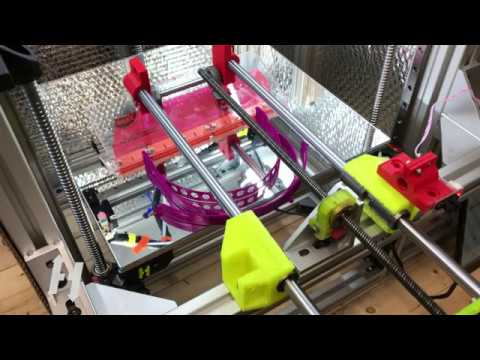
A small scraper arm matched with a Gcode routine to cool off the part and scrape it off the print bed automatically. A new print job can then be started.
By using the Tripple Z Self Levelling function from the HevORT you will obtain a perfect 1st layer, even after a sticky part removal.
You want to know more about the HevORT advanced DIY 3D ...
copper swallow
modest crane
kinda? https://youtu.be/GHoWeC9ilSc
wow!! it wasn’t that far fetched as I thought!
however I also like turtle idea to shake the bed, we can study dogs movements when they scroll the rain off 😅… hopefully no delicate parts are printed
modest crane
my prints will probably slide right off the bed once they’re fully cooked
lone hill
 modest crane
otw home from work rn 😎
lone hill
We do this PIS thing or I finish this beer and go to sleep???
modest crane
@lone hill u sleep ???????
lone hill
not yet but became tired half way through this beer
modest crane
heh, feel free to go to sleep fi you prefer, i dont even know where I put this POS
i meant PIS ofc ...
lone hill
Try to find this PIß, ping me let's see what state I'm at
 lone hill
Tidy!
modest crane

lsusb with PIS plugged in
light is on

imma update klipper and reflash maybe that helps
lone hill
button pressed?
 modest crane
bootloader offset?
lone hill
huh.. show?
modest crane
 modest crane
 lone hill
Ok.. we have different klipper version I see. Never mind - no bootloader
lone hill
save, make clean && make flash FLASH_DEVICE=2e8a:0003
modest crane
................
how did i not try the no bootloader option
it works now
lo;
bc I know you're gonna wanna see proof:
 lone hill
Heh. good.

GitHub
Portable Input Shaper(PIS) . Contribute to FYSETC/FYSETC-PortableInputShaper development by creating an account on GitHub.
modest crane
is there an nozzle mount for sb or is the front face good enough ?
lone hill
No man, don't be crude! Use dutch's mount
modest crane
dutch has a mount for SB?
deft fog
its nozzle mount
deft fog
it should fit any tool head that uses a nozzle
modest crane
do i gotta take the nozzle off? 😢
deft fog
yes
modest crane
i will be using a pair of pliers to do this.
lone hill
modest crane
do i gotta take the nozzle off? 😢
Can use a chewing gum, possibly?
modest crane
i dont own a nozzle wrench :/
deft fog
this thread makes me cry
modest crane
well
lone hill
Use your teeth
modest crane
deft fog
this thread makes me cry
IM STRESS TESTING
modest crane
i found one of those the other day 😄
no idea where it is now but I remember seeing it
deft fog
well that is where your nozzle wrenches are
modest crane
deft fog
well that is where your nozzle wrenches are
WHILE YOU'RE HERE HOW DO I MAKE A SLOPE BETWEEN THE CIRCLE AND THE SQUARE

cad is hard
 modest crane
yeah or any type of good looking transition
ur feet look good u know what you're doing
this is for my v0 to use 38 feet :<
lone hill
You want a fillet I suppose?
lone hill
OK never mind this man, what's up with the FYSTEKCKDCKK
Are you gonna print the nozzle mount or what?
#1012073941390598175 message
lone hill
good lord
OK mate
Read the instructions carefully and adjust your config
don't let the thing crash into the bed!
deft fog
probably a topic we can pick back up after you figure out PIS, so Gargamel can pretend to sleep
modest crane
i did figure out PIS
it's done 😄
and I already know how to do input shaping
I did it w my sb2040 already
deft fog
but quick run down of what I would do, sketch on the face with the arrow, makethe green line, move face and use said line for rotate axis
 modest crane
ah I see
so im just gonna keep it like it is in that case
because that seems a bit beyond me
on a side not, this is a good time to add a second set screw to my stepper 🙂
lone hill
Bro, check probe_points: under [resonance_tester]. Confirm last number (z height) will clear the nozzle and PIS mount
lone hill
Because you print on a bed, perhaps? You want to simulate the condition of the frame as it prints, but don't use 1mm or you are going to have another #demolition_derby material
modest crane
@deft fog is there supposed to be washers on top of stepper tower m5s
imma put washers bc mine towers are crunched
 modest crane
bro remade the whole model just to demonstrate
it took me like an hour to make that 😂
deft fog
lol
lone hill
My Z probe point is 20 and it clears it fine, home the thing before you remove the nozzle
Yalla, I'm gone...
lone hill
 modest crane
ill even threadlock my set screws
deft fog
with auto z, I can home PIS off my sex bolt
modest crane
bc im feeling generous
lone hill
good brother
lone hill
I tap on it, works fine
modest crane
i have a sexbolt pcb in one of my bins
and 2 tap kits
and im still using inductive
deft fog
I just ordered this stuff last week, heard its better than loctite for printers
 lone hill
I read vibra-tit. uhhh...
modest crane
im using green loctite
deft fog
I tried using purple on my sex bolt, didnt have the patience to wait for it to set
so changed it to blue
lone hill
Hmm the blue pill?
modest crane
man my other pulley was missing a set screw too
i cant wait to see gargamels reaction when i start building my ac servo stepper annex k3
ok i put blue loctite on my belts so they don't slide off of the pulleys 😄
lone hill
Dude, do you have even 1 printer completely finished??
Looks like you’re running 7 projects in parallel
modest crane
errrm
I never have one project finished
that sounds boring
I got my v0, merc, my creativity elf im probably gonna put a voron gantry on, a few ender 3s that need some love
lone hill
Uh, ok I won’t judge
modest crane
and the annex k3 when my tax return hits 😄
modest crane
lone hill
Uh, ok I won’t judge
I also bought a pink frame for the v0 so that's gonna get a rebuild eventually too
LOL
deft fog
wait, people finish printer projects????
deft fog
my only printer that is finished, is my Bambu
so at least I have one printer I will not break from modding
lone hill
Ok so not finish-finish, but at least finish between orders
modest crane
my merc prints stuff all the time !!!!!!!
modest crane
(x) Doubt
modest crane
i gotta get klicky or tap set up soon
I can see my inductive deforming from the heat
In other news this was gonna be a great print before i accidentally hit my power switch while shimming a foot 😂
 deft fog
modest crane
In other news this was gonna be a great print before i accidentally hit my power...
deft fog
modest crane
In other news this was gonna be a great print before i accidentally hit my power...
why were you live shimming????
modest crane
it was wiggling LOL
i wasn't shimming for z reasons just because it wasn't sitting flat
which causes z issues but
deft fog
Attempt #2 sent yet?
velvet badge
Well catching up on this thread today was a whole trip
velvet badge
I thought you were already running ERCF?
 modest crane
 severe crown
lone hill
Dude, do you have even 1 printer completely finished??
severe crown
lone hill
Dude, do you have even 1 printer completely finished??
This is why I bought an x1c, my merc was in the process of being calibrated when I started hydra.
My voron 2.4 with tap is physically complete and in the process of being calibrated and I just ordered an sb2040 this morning.
lone hill
severe crown
This is why I bought an x1c, my merc was in the process of being calibrated when...
SB2040? Fly or BTT?
severe crown
lone hill
SB2040? Fly or BTT?
Fly
lone hill
The BTT thing is impossible to use if you're above 30y/o
severe crown
28, I'm cutting it close
lone hill
This is the reason. It took me several good minutes to make a single test crimp
 deft fog
You should try wiring a adxl connector to a fly Gemini board, I think it was 1.4 pitch?
lone hill
It's the same pin type
Impossible to crimp
It's hopeless
1.25mm, the smallest JST type, known to be extremely difficult to crimp "at home". I bought 2 of these boards but will not attempt to use them
severe crown
lone hill
This is the reason. It took me several good minutes to make a single test crimp
I have bad eye sight, and bad dexterity in my hands due to nerve damage from a motorcycle accident. my solution was to use a magnifying glass to line up the wire and have a few marks on my stripper for different connectors. And tweezers to put the pins into the crimper
@deft fog I saw you mentioned lgx lite lever somewhere. I printed the cw2 and it will most likely be replaced by an lgx lite soon. I no likey
lone hill
Sorry to hear that!
These connectors are a very poor choice, I wish they supplied "pigtails". I doubt it can even accept something thicker than 28AWG
severe crown
@lone hill I'm on mobile and my signal is poor, google is taking forever. Since I'll probably be seeking your help anyway when I canbus my merc, what's your recommendation for canbus with the mercury one.1? Using the eva2.4 toolhead,. Rápido, lgx lite, octopus v1.1
And any cabling/ quick disconnect you would use
modest crane
severe crown
<@846482013060988969> I'm on mobile and my signal is poor, google is taking fore...
I’d get an rj11 screw terminal adapter for your CANH/CANL connections
lone hill
Agree with OP for the board's side, as for the toolhead side you're all set since the fly board is supplied with the special XT30+2 connector and pre-fab cable
severe crown
Yes
lone hill
😬
GRRR
severe crown
modest crane
I think sb2040 went on a Voron
You're right
lone hill
Which CAN toolhead board?
modest crane
36 I bet 😂
severe crown
lone hill
Which CAN toolhead board?
Whichever you tell me to buy
lone hill
WHICH 36?? There are 3 in the market!
severe crown
I know enough to know I know nothing, best to defer to the expert
lone hill
BTT EBB36, Fly SHT36 or MKS THR36
modest crane
can’t be wrong if you’re vague enough 😎
modest crane
I could get rich pre making harnesses for BTTs sb boards honestly
lone hill
It uses Molex Microfit 3.0 which sucks hard, but I find its connectors and I/Os to be just slightly better the Fly's SHT36
severe crown
lone hill
😬
GRRR
Let me clarify as I'm sure I communicated poorly. I want to can my Merc, I will use whatever parts you tell me to as I will be most likely asking you for help.
lone hill
SHT36v2 uses XT30+2, which is an excellent connector
lone hill
See... I have both the SHT36v2 (unused) and the EBB36. As I said, I love the EBB36, but its drawback is the connector. The SHT36 is almost equally as good, it uses a better inlet power/communication connector but the I/Os are mostly JST-PH which I dislike.
Then.. there's the THR36 which I have no 1st hand experience, it uses JST-XH and proper screw terminals (awesome) but has a very peculiar large round footprint. On the plus side, it uses an excellent MCU, the Raspberry Pi 2040...
It's a tough choice
severe crown
@modest crane I fried an octopus mainboard building my voron. Cheap multimeter where the probes didn't get a reading on the very tips. Cough, Zap, pop, smoke, f##k. Half my motors stopped working
lone hill
I think the EVA has strain relief on the side? If that's the case, take your pick between EBB and THR.
If you use strain relief from the top and don't mind crimping JST-PH (2.0mm) - SHT is probably a good choice
Again the THR gets bonus points for the Pi2040 MCU. It's good and impossible to brick unless you burn it.
severe crown
Eva has strain relief
lone hill
severe crown
Eva has strain relief
On the side, not on the top of the motor, correct?
severe crown
lone hill
On the side, not on the top of the motor, correct?
I will use whichever you tell me to. yes here's a photo
 deft fog
EBB36 works well, I have a THR36 I need to test, which I like its connectors better... but have not used it yet
the fly36 can be a hit or miss
also you should bring your drunken build thread back from the dead 🙂
lone hill
severe crown
I will use whichever you tell me to. yes here's a photo
Go for the EBB then. You won't suffer any of the possible issues from microfit 3.0 connector as the strain relief is separate and the pins will suffer no movement
If Turtle approves his THR - it's definitely a viable option. Would be much easier to use due to the use of easy-to-crimp JST-XH 2.5mm pitch pins and screw terminals
It's also super cheap!
deft fog
yeah, I hope it works well because of the full size connectors
its cheap enough to order one to try, even if its trash 🤣
lone hill
Almost half price of the other two
Oh - I now remember that @copper swallow has one as well, and successfully bench-tested it
deft fog
he has moved to his drunk thread 🙂
lone hill
@modest crane want me to clean this up for you?? 😆 My apologies, you know I'm not good at keeping stuff tidy, threads included
deft fog
he likes the chaos
lone hill
@copper swallow the action moved to #1028173296241475654 😆
copper swallow
here I am… ohh there i go
lone hill
deft fog
highlight the sins you say?
Make it the thread's thumbnail
I give it a score of 10/10 in demo derby contest
...because he printed despite any damage!
modest crane
quick release gantry mod ..
modest crane
@lone hill might be your lucky day …

Just got delivered, might have to finish the merc
lone hill
What the heck is wrong with you?? What's with this silly consumerism??
I just bought 7 sizes of white split loom and 8 sizes of regular sleeves - that's the way it should be done!
modest crane
COLORS
modest crane
lone hill
I just bought 7 sizes of white split loom and 8 sizes of regular sleeves - that'...
split loom 🤮
lone hill
I size of ping loom also...
modest crane
what is that
modest crane
oh
modest crane
Triangle labs is deranged.
 velvet badge
modest crane
Triangle labs is deranged.
velvet badge
modest crane
Triangle labs is deranged.
They want you to have the fun of sorting them yourself!
modest crane
think I might have to get a serial soon, got almost all the parts printed for a cohesive color scheme, and even for my matching cable sleeving
but what if instead I find something else to mod on the merc 😮
modest crane
reprinting hydra arms and motor mounts in my accent color
Might also reprint them in black just to compare 🤷♀️
I sure do love wasting “plastic string” as people on Facebook marketplace call it
deft fog
whats the overall look currently?
deft fog
so new front towers and motor mounts?
modest crane
yes I have tension tower, din drops, and the various din brackets done already
And I built a third sb … but this has the ZeroG logo and the tension arm for CW2 is beefed up
because my previous tension latch broke in half

It’s superglued together and still currently in use 😂
deft fog
thats not a very strong lension arm
 mossy heart
modest crane
because my previous tension latch broke in half
mossy heart
modest crane
because my previous tension latch broke in half
thats bald
modest crane
mossy heart
u must repent
why? working as intended.
mossy heart
My creality bed is as straight as that
 modest crane
got beacon installed and working, first layers are looking sexy
Just bed meshed in 20 seconds and it probed 30k points ._.
 old hamlet
Does it add all those points in klipper?
deft fog
modest crane
That’s… not ideal 😛
Thats what you get for using mismatched bolts

 velvet badge
Sir that is a flag waving in the breeze
mossy heart
modest crane
That’s… not ideal 😛
wtf
mossy heart
modest crane
got beacon installed and working, first layers are looking sexy
nice. i want 1 ngl
I could see it being super useful. I think that dual using it could be a thing. beacon to get ur bed info then u use an actual probe. so u can get more accurate meshes without losing the detail
modest crane
mossy heart
I could see it being super useful. I think that dual using it could be a thing. ...
more accurate
probe accuracy results: maximum 1.990112, minimum 1.989587, range 0.000525, average 1.989855, median 1.989869, standard deviation 0.000079
mossy heart
modest crane
> more accurate
they updated their website again...
the only thing with beacon is the priec
modest crane
mossy heart
standard deviation
Yeah that’s my beacon with my iffy z
I have seen smaller
modest crane
mossy heart
gotta see the range
Like distance from bed ?
mossy heart
modest crane
Like distance from bed ?
nope I meant what ever number thing where make different
modest crane
mossy heart
nope I meant what ever number thing where make different
WHAT
mossy heart
modest crane
WHAT
idk the name anymore. just wanted to see when converted to smaller form.
modest crane
idk what that means tbh 😂
mossy heart
ik that micrometers, millimeters
and more
0.079um (micrometer) is beacon precision
modest crane
nanometers
mossy heart
tap is 0.4μm
I think that i did math wrong too
Extreme precision 0.4μm (0.0004mm)
0.000079
lol
modest crane
I got 4GB ram on the sbc that’s in my merc
deft fog
being that he has already run this, I do not think the board is going to be an issue
mossy heart
deft fog
being that he has already run this, I do not think the board is going to be an i...
I mean if u have multiple machines on one board. Also if u try and speed do a good mesh.
velvet badge
modest crane
100x100 mesh took 30 seconds
Wait how does this work? That's 0.003 seconds per point
mossy heart
modest crane
mossy heart
I mean if u have multiple machines on one board. Also if u try and speed do a go...
I scan the bed with speed set to 300
modest crane
This is on my slower settings as well
I think this was a 250x250
don’t mind the electrical tape I was testing what it would probe through lol
mossy heart
modest crane
This is on my slower settings as well
lick the wires
velvet badge
The tickle is how you know it's working
old hamlet
I want one now