#R36S
1 messages · Page 2 of 1
 celest stone
 wary root
Ok, so...
Any tips for getting good performance with N64 and dreamcast?
I'm almost done curating the games list.
And then I gotta flash the SD card with Ark.
 cold siren
Excited

 shut pumice
Does anyone have a MiyooMiniPlus and the R36S? Just want to know if R36S will fit on a case made for MM+, can’t find a pic of both side by side 😅
cold siren
What kind of case though
 royal elm
shut pumice
Does anyone have a MiyooMiniPlus and the R36S? Just want to know if R36S will fi...
royal elm
shut pumice
Does anyone have a MiyooMiniPlus and the R36S? Just want to know if R36S will fi...
if the case fits exactly on the mm+ size wise then r36s wont fit on it, since r36s design are more taller than the mm+ because of the additional analog sticks


 dim ermine
wary root
Any tips for getting good performance with N64 and dreamcast?
dim ermine
wary root
Any tips for getting good performance with N64 and dreamcast?
Update to the Sept build for the RG351MP from the arkos wiki, then set emulator settings for N64 to standalone rice, and for DC to retrorun (I think)
Taki Udon shows how in his review video
For me, running the updater built-in when on wifi broke N64 standalone rice, dunno why
cold siren
so downloading RG351MP is still the way to go for updated builds?
 wanton escarp
dim ermine
Taki Udon shows how in his review video
wanton escarp
dim ermine
Taki Udon shows how in his review video
Did you update from the stock firm or from the 351MP image?
dim ermine
wanton escarp
Did you update from the stock firm or from the 351MP image?
I first tried updating from stock, it got me an 11/4 build which worked fine except for standalone N64 emulators. So I flashed the Sept build of rg351mp version to a spare 32gb card and am using that instead, the boot logos are all generic arkos now and it has different themes, but otherwise works great
My wifi is wonky but idk if that is due to the build. Sometimes it just refuses to connect and the adapter and dongle get really hot. After a few reboots and reconnections it'll work eventually though
wanton escarp
dim ermine
I first tried updating from stock, it got me an 11/4 build which worked fine exc...
Thank you I was planning to update the 351MP installation when my wifi dongle arrives but now I'm not sure if I should
dim ermine
I haven't attempted an update to the 351mp build, I'm happy with performance as-is so probably won't monkey with it yet. It also may just not have something to update to, idk if the updater only validates a version compatible with the existing build
shut pumice
 barren willow
Wow, thanks, that’s what I was looking for! 💚
wary root
dim ermine
Update to the Sept build for the RG351MP from the arkos wiki, then set emulator ...
So use the 351 mp image and not the r35 image?
dim ermine
wary root
So use the 351 mp image and not the r35 image?
Correct
wary root
That's weird and counterintuitive. I'm glad I asked about this.
dim ermine
wary root
That's weird and counterintuitive. I'm glad I asked about this.
If you check the device ID, it reports itself as a 351mp, actually
But yeah it is weird
wary root
dim ermine
If you check the device ID, it reports itself as a 351mp, actually
Right... But but it doesn't make it less weird that the ark OS site has an r35 image that is less performant.
dim ermine
The one they have for the r35s/36s is the original OEM image
Older than the 351mp. It just needs to be updated
 small fern
dim ermine
I haven't attempted an update to the 351mp build, I'm happy with performance as-...
small fern
dim ermine
I haven't attempted an update to the 351mp build, I'm happy with performance as-...
i'm trying that now, didn't even think about it before.
worst case scenario I have to flash it again, got my theme/boot logo/loading logo saved and i run roms2 so nothing really on tf1 but os
small fern
well a buncha linux happened and it said i was updated but it doesn't appear to be a new build date or version of ES. I'll have to make sure everything still works and nothing is wonk now.
small fern
Actually ArkOS 1104 now
dim ermine
small fern
Actually ArkOS 1104 now
That's the build I had problems with N64 standalone emus on, would immediately close back to rom list
small fern
I’ll check dat first, tanks mucho
Standalone rice 64 loaded right up but resolution is zoomed/off alignment
wanton escarp
dim ermine
Older than the 351mp. It just needs to be updated
Weirdly enough the old PSP emulator build from the stock firm runs Ridge Racer at a better framerate than the 351MP or the latest update available. It has a weird glitch were half of the screen looks darker however
dim ermine
small fern
Standalone rice 64 loaded right up but resolution is zoomed/off alignment
I had the same issue, I think I had to use the boot files from the boot partition from the Sept 351mp build
wanton escarp
1104 also removed the ability to close the PSP emulator with start and select. You have to exit from the emulator menu
dim ermine
I haven't found a Windows disk imager which will take a full image of the SD card with all partitions included, kinda want to back up my image. I guess I could do it on my steam deck
small fern
wanton escarp
1104 also removed the ability to close the PSP emulator with start and select. Y...
Works for me
wanton escarp
small fern
Works for me
Did you update from stock or 351MP? It did work for me until I updated.
Also the joystick directions are inverted
small fern
I flashed a new sd from mp then updated.
wanton escarp
Ok thanks I will download the 351MP image again, maybe it wasn't ok
small fern
Inverted controls is a thing period. Easy to reset/fix.
 river coral
is there any promo code for the aliexpress black friday sale?
wanton escarp
river coral
is there any promo code for the aliexpress black friday sale?
There is a $6 code, it depends of the country where you are

 sonic lodge
So I'm trying to play legend of Zelda ocarina of Time though it says there's no controller. How do I fix that?
dim ermine
sonic lodge
So I'm trying to play legend of Zelda ocarina of Time though it says there's no ...
What emulator is it set to use?
 hollow cairn
Playing in a dark room on a white R36S I find this light bleed from the LCD distracting - any idea what’s causing it? It goes away when the screen is off in sleep but the power LED is still on.

 grave heart
hollow cairn
Playing in a dark room on a white R36S I find this light bleed from the LCD dist...
grave heart
hollow cairn
Playing in a dark room on a white R36S I find this light bleed from the LCD dist...
open it and go ahead and tape off at that area on the inside
cold siren
Might be a bubble when the shell was cast. It couldve been that part has thinner plastic.
So yes I think electrical tape would work
hollow cairn
So likely a shell defect vs a screen defect. I’ll hit it with some tape, then. Thanks!
sonic lodge
dim ermine
What emulator is it set to use?
No idea I don't know how to check it. It's running stock os
 eager beacon
Hello, how durable is the r36s? Does it feel like it can withstand button mashing?
barren willow
i havent hat mind long enough to definitively say though it feels pretty good in use. certainly not fragile
grave heart
eager beacon
Hello, how durable is the r36s? Does it feel like it can withstand button mashin...
you could safely play those olympic type button mashers no problem ahha
wary root
Do you guys know if there's any way to get GZ doom installed on this device? I assume that Ark OS is Linux, yeah?
wary root
also, does anyone know if the ppsspp build on this device supports chd format?
It'll help me out a bunch if it does.
 reef cape
has anyone tried goldeneye 64 on this
 sinful inlet
its going to suck
 autumn plaza
is it possible to run 351droid on r36s?
grave heart
autumn plaza
is it possible to run 351droid on r36s?
I think the main difference or issue is the screen settings 4:3 vs 16:10 for example
autumn plaza
Can this be changed in the configuration files?
grave heart
autumn plaza
Can this be changed in the configuration files?
Current firmware for the R36S
Google Docs

either link
original stock firmware for the device https://drive.google.com/file/d/1agOAKg52lPL_ZfjTORfQF68rT6t0WnOA/view?usp=sharing
Google Docs
these firmware links have been pinned for everyone, top right icon of the drawing pin so we can all retrieve them at any time without asking
 nova idol
Hey guys ! So from what I understand the arkos version from r35s wont work with the r36s ?
nova idol
hollow cairn
Playing in a dark room on a white R36S I find this light bleed from the LCD dist...
I think thats a general issue, I have a R35S and it bleeds light in the exact same spot. For less distraction, I would recommend changing the LED light to red in the settings, its not as strong as the blue one
grave heart
nova idol
I think thats a general issue, I have a R35S and it bleeds light in the exact sa...
The leak is from the screen buddy , taping the inside will solve the issue leaving no damage and reversible if needs be
nova idol
grave heart
The leak is from the screen buddy , taping the inside will solve the issue leavi...
I know the bleeding is from the screen, but have you seen that blue LED in a dark room? Its blinding
Changed it to red and its a lot more comfortable, at least for me.
grave heart
nova idol
I know the bleeding is from the screen, but have you seen that blue LED in a dar...
Yep , i topped the led off one layer allows you to see the light through it two layers stops all light so you can dim it with a single layer
nova idol
Of tape ?
 oak wren
Does the r36s have rtc?
grave heart
nova idol
Of tape ?
Yeah bud
nova idol
oak wren
Does the r36s have rtc?
Since r35s doesnt i dont this one does
Would be cool yeah
 sour knot
What’s the rtc good for on retro handhelds
oak wren
nova idol
Since r35s doesnt i dont this one does
Do you know if there is a way to set the clock manually either on the stock firmware or in arkos
grave heart
oak wren
Do you know if there is a way to set the clock manually either on the stock firm...
You can check if the emulator supports emulating rtc
nova idol
I heard about modifying a file on the console to set the exact fime, you can also change the time zone in the settings
But i didnt see a way to set it manually, I would like to know that as well
oak wren
grave heart
You can check if the emulator supports emulating rtc
Thank you. I'll try to look. This will be my first retro device. I didn't realize it didn't have rtc until after I ordered it and I tried to cancel but it already said shipped
oak wren
nova idol
But i didnt see a way to set it manually, I would like to know that as well
I definitely wouldn't mind setting it Everytime for games that's need it as long as it's not a lengthy process
nova idol
I am playing pokemon without issues, I just havent used save states with it, only in game saves
Works fine for fire red
oak wren
That's good to know. I was reading you don't need it for certain rom hacks as well.
dim ermine
Mine holds time after connecting to Wi-Fi and setting the time zone
But I guess I haven't tested it with games with a time feature
oak wren
dim ermine
Mine holds time after connecting to Wi-Fi and setting the time zone
What do you use for wifi?
dim ermine
oak wren
What do you use for wifi?
USB wifi dongle with otg adapter
I only used it to get things set up and scraped
grave heart
Which model did you buy i bought one to do the internal mod and got the wrong one wasnt supported
 sleek venture
Got mine yesterday
sleek venture
Does red light when charging the r36s change when it's fully charged ?
wanton escarp
It turns off for me
sleek venture
Ok cool thanks
grave heart
Okay tomorrow is the day of the internal wifi for R36S
Had to find a rtl8188eus version i bought previous wasnt compatible
Just doxxed myself lol oops

Cnnot freaking wait for retroarch achievements
wanton escarp
Yeah it's that one.
I already had another dongle with a RTL8188FTV chipset but that one didn't work. It has to have the EUS
grave heart
Yeah i had bought an 8188 also alternative end code and just doesnt work i could only assume the firmware has only the driver for that eus chipset , i bet its simple to add drivers for others aswell linux drivers are easy found
@small fern finally the wifi mod is tomorrow ! Might actually record it
small fern
Good luck
OTG dongle works well enough but with the mod you could use internal and otg port with a keyboard for scraping/editing.
autumn plaza
grave heart
I think the main difference or issue is the screen settings 4:3 vs 16:10 for exa...
I did some research and I'll probably have to write a DTB file to run 351droid on r36s
sleek venture
If I get a wifi dongle would it be easier to update my ark os on it ?
small fern
You can update with a dongle but it’s easier/quicker to flash the pinned image to a microSD
sleek venture
Ok so no use in buying the wifi dongle then
small fern
Only for scraping images/videos for your games imo
I mean you can online play, retro-achievements, update, and more
grave heart
small fern
OTG dongle works well enough but with the mod you could use internal and otg por...
Yup your otg port will be free reign whilst wifi is on its own internal port no hijacking
Only reason im doing this internal mod putting wifi on the device is easy updates after initial mp flash and achievements
sleek venture
I need to go buy some new micro SD cards
grave heart
Dont go wild on the os card but the games card you can splash out on dependong on the game library you hope to obtain
sleek venture
Ok thanks
grave heart
On the wifi mod i shall be replacong the ceramic antenna with a real one which has a copper board which will sot internally on the top rear of the device behind the screen
cold siren
grave heart
On the wifi mod i shall be replacong the ceramic antenna with a real one which h...
Isn’t that gonna be janky haha R36s with antenna like an old cellphone 🤣
grave heart
cold siren
Isn’t that gonna be janky haha R36s with antenna like an old cellphone 🤣
This thin sheet is the antenna inc wire , it sticks to the back plastic casing on the inside , not a long solid antenna 🤪😁
 cold siren
Oh haha I was thinking something like this
 grave heart
cold siren
Oh haha I was thinking something like this
grave heart
cold siren
Oh haha I was thinking something like this
That would beat the ones i showed you but would indeed be ugly aha
wanton escarp
🤪
 grave heart
Did tht come with digimon ? Whats it for exactly
wanton escarp
Keitai Denjū Telefang
It's a game of battling monsters similar to Pokémon but instead of Pokéballs you summon them with a phone call
It was hacked and poorly translated as a Pokémon bootleg (Pokémon Jade/Diamond)
grave heart
Ah i see i just seen a janky looking pokemon and thought digimon 🤪
small fern
Jankemon?
small fern
 barren willow
small fern
barren willow
small fern
man, with the recent editions to pokemon the bolognose, pastafarian and gnocch-out actually seem reasonable.
 molten solstice
I updated the operating system to Arkos
But when I try to load save states I get an error message that says "failed to load savestate"
I can't find anyone else who had run into this problem but me
I thought maybe it was the memory card so I bought a new one and put Arkos on it and all that and still had the same problem on a new memory card
I seem to lose the save states if the battery is low so maybe it might be the battery
I can't use the stock memory cards anymore because I accidentally formatted them
grave heart
Flash them with etcher
Go to the top right youll see a drawing pin icon click it click the 351mp link download it and flash it with etcher
@molten solstice
molten solstice
Because thats the download I used last time but I flashed it with rufus
barren willow
either rufus or balena etcher should work fine though ive had more luck with etcher personally. i know thats different with other people though.
grave heart
molten solstice
Can I flash it with rufus or does it have to be etcher?
use etcher , it will validate files after aswell to make sure there are no bugs
molten solstice
Okay I'll try it. Thanks mate
grave heart
no worries report back with results bud
oak wren
If you get a wifi dongle will the clock set itself?
oak wren
dim ermine
Mine holds time after connecting to Wi-Fi and setting the time zone
So if I connect to wifi it will automatically set time. Then I could disconnect and it stays the same time?
sleek venture
grave heart
On the wifi mod i shall be replacong the ceramic antenna with a real one which h...
So if you just replace the antenna the wifi should work on it ?
dim ermine
oak wren
So if I connect to wifi it will automatically set time. Then I could disconnect ...
Yep
oak wren
dim ermine
Yep
Awesome thank you. I have some USB c to A connectors that used to come with phones and I ordered a wifi dongle.
grave heart
sleek venture
So if you just replace the antenna the wifi should work on it ?
You have to have wifi already in it thw r36s does not gave it thats why I'm essentially creating this mod for the community
Finally we will very likely have the internal wifi mod today\night ! I atleast hope if all goes well it actually benefits people , though i know not alot of people in here actually have soldering irons or into deeper modding and just like to hang out and see whats happening in the community yknow but ah well :p if it helps atleast one other person hahaha
 small fern
tonight the 3 year limited warranty is blown
molten solstice
Didn't work. I got an error message saying the flash failed and when I insert the SD card back into the handheld I get a white screen
@grave heart

32GB SD Card - https://amzn.to/3YuZVHq
128GB SD Card - https://amzn.to/3DQ5rLt
SD Card Reader - https://amzn.to/3DUnKPm
Rufus - https://rufus.ie/en/
7-Zip - https://www.7-zip.org/
ArkOS Wiki - https://github.com/christianhaitian/arkos/wiki
Minitool Partition Wizard - https://www.partitionwizard.com
DTB File - https://www.mediafire.com/file/q8mf...
I followed the steps in this video last time. I got it up and running but I still have the problem where my savestates eventually won't load
small fern
there are a handful of files you need to save from the original sd card, flash a quality better card, delete the files from boot it says to, replace them with the saved files it says to. That's it nothing complicated here:


those screenshots are from the Taki video not the Joey's video:
https://youtu.be/myeSuR5mNCc?t=528
no gotchas, no surprises, just flash, copy needed files, boot
grave heart
molten solstice
Didn't work. I got an error message saying the flash failed and when I insert th...
maybe card is dead
molten solstice
Tried two different cards, both branded ones
small fern
download the image again?
i mean it was pretty fool proof for the 3 devices i've done
grave heart
a bad download would cause the hash to be different and always fail tbh
molten solstice
I downloaded the file that was pinned
small fern
i got mine from ArkOS site, only @grave heart knows whats in that stuff he pinned here 😂
molten solstice
Yeah that one
grave heart
small fern
i got mine from ArkOS site, only <@313372819582877708> knows whats in that stuf...
original os, mp os and alt link to mp os
just click the pin and see 😛
try the alt link https://mega.nz/file/nQww1SgI#Uhi6dDRtK16R-12Fq7Hykh6b8G9jp_xUN0VfGc4KiUw @molten solstice
run etcher as admin
molten solstice
Alright, I'll download this and try it later. I gotta head out
Thanks for the help guys, I'll let you know how it goes
Oh, one question! When I download this file do I unzip it after?
barren willow
I did get the wifi working momentarily on the r36s with an odroid wifi dongle. it could see the wifi, it connected, then proceeded to decide that wifi no longer existed. so clearly something is a bit buggy here.
dim ermine
barren willow
I did get the wifi working momentarily on the r36s with an odroid wifi dongle. i...
Mine is flaky, sometimes requires multiple reboots and reinserts, I also removed and readded my wifi. Dunno what fixes it but eventually it works
Caution though, for me, my dongle and adapter got very hot when it was in that limbo state
dim ermine
grave heart
Finally we will very likely have the internal wifi mod today\night ! I atleast h...
I might give it a shot, looks like between the back buttons and the battery may be the best location
grave heart
small fern
tonight the 3 year limited warranty is blown
no such thign as warranty in this line of work you know it brother
grave heart
dim ermine
Caution though, for me, my dongle and adapter got very hot when it was in that l...
soudns like its scanning constantly
barren willow
dim ermine
Mine is flaky, sometimes requires multiple reboots and reinserts, I also removed...
Mine didn't get hot. and after it disappeared it never came back after reboots. works in other devices though so i expect, as you say, its very flakey on the r36s
grave heart
so I have a big blooper, I overseen the fact the pin out ports on the main board ground rt rx and vcc , are serial lines and not directly transferable with usb data lines, thus I will have to work out the usb c pin out and then solder to the usb c OTG from inside, as i dont plan on using OTG for anything other than the dongle
i've made the whole video but to no avail 😦
dim ermine
grave heart
so I have a big blooper, I overseen the fact the pin out ports on the main board...
I figured that was your plan from the start
grave heart
I got it hijacking the usb c port with a resistor to cc1 to ground , just means you wont have the use of OTG for anything else as wifi will be using it at all times
You can obtain the resistor by tearing down a usb c to to usb dongle


 small fern
Now put a power cord in there. Preferably a fast charge one. Lemme know what happens 🙂
J/K don’t do that. Awesome can’t wait to see it in motion.
grave heart
think i reversed the -+ data hold up
i forget i have to reverse these


or rotate them as im looking other way
small fern
grave heart
think i reversed the -+ data hold up
That’s fine you’ll just have upload speeds instead of download speeds 🙃
 sleek venture
Finally got my SD cards woot woot
molten solstice
Flashed it again with the file you recommended. I got a got a flashing white screen after inserting the SD card back into the handheld. Is there anything else I need to do to get this up and running?
@grave heart
I've got the roms and operating system on the same memory card. I suppose I could try put them on two different cards, one for the operating system, one for roms, because there are two memory card slots
wanton escarp
You have to replace the dtb files from the BOOT partition
molten solstice
Yeah, I replaced one of the files with a different one and can get it running okay but I'm having an issue with my device forgetting my save states
Seems to happen almost randomly too
wanton escarp
That's weird, I don't have that problem but I remember reading someone with a similar problem and it was the sdcard
wanton escarp
Try using both sdcard slots, just to discard the OS one being the culprit. That's how I have it configured
molten solstice
Yeah, me
So I did the 2 memory card method. It's working okay save states just fine, loads them just fine. BUT I've gotten this point before, got 1hr 30min into Suikoden 2 and my save state suddenly decided it doesn't want to load
So I'll have to play around with it to see if it's actually working
Tried it with other games too, just to make sure it wasn't Suikoden, had the same problem with other games soooo I'll just have to muck around with the thing and see if the problem again as the handheld has a bad habit of forgetting my save states
molten solstice
Are you running into the same problem I am?
sleek venture
Right now I'm just downing the roms to a 128 gig SD card and then I'm gonna download the arkos to a 64gig SD card
My laptop is kinda slow at downloading these roms lol but I'll let you know how it goes
molten solstice
I suppose if this is up and running okay, I'll want to play chrono cross on it. Do I have to do anything special if the game requires multiple disks like some PS1 game do?
I just don't want to get to the part where you change disks and realize I did something wrong
wary root
So I flashed that rg351mp file onto a Samsung SD card and when I put it into my device, it kinda just... The screen is yellow with a black bar to the left.
It didn't reboot twice and then go into emulations station like the ark OS site said it would.

Idk what to do. 😦
I used win32diskimager to flash the card.
Should I try reflashing or something?
sour knot
Did you copy over the files from the original micro sd's /boot partition?
wary root
sour knot
Did you copy over the files from the original micro sd's /boot partition?
Nah. But I followed this crazy Slavic guy's guide, replaced one file, and now it works.
Idk why the default image doesn't work, but at least I know what to do now.
It was a Linux dtb file.
sour knot
yea the dtb is in /boot typically
glad it worked out
the default image doesn't work becuase it has the dtb for the rg351mp device which doesn't match the hardware on your r36s. by copying over your device's dtb, the system then knows how to talk to your hardware
wary root
Ah. Idk why the ark OS site recommends using the 351mp image, but leaves out that crucial detail.
sour knot
It's becuase the 351mp and the r35/36s are pretty similar
from a hardware perspective
and the dev has done an awesome job making it avail for our system
 scarlet bobcat
wary root
Nah. But I followed this crazy Slavic guy's guide, replaced one file, and now it...
scarlet bobcat
wary root
Nah. But I followed this crazy Slavic guy's guide, replaced one file, and now it...
Crazy Slavic guy? 🤔
oak wren
When I flash arkos to a new sd card week it already have the emulators and I just need to add roms?
wary root
scarlet bobcat
Crazy Slavic guy? 🤔<:doggylol:908803097319579659>
I'm only calling him crazy because he used balena etcher when the ark os site says not to. XD
guy has also been doing performance showcases for the device, which is actually pretty cool.
Jacek Rusin. that's the guy.
sour knot
oak wren
When I flash arkos to a new sd card week it already have the emulators and I jus...
Yes. I can’t recall if you’ll need bios for ps1 etc
wanton escarp
Some PSX games won't boot without the bios file. It must be placed in the easyroms partition /bios
sour knot
Likely prolly yea
wary root
man, I was expecting dreamcast to run way better.
what a buzzkill.
ah, well. Time to test out psp once the games transfer over I guess.
anyone have any tips for getting better n64 performance?
my solution right now is to load it up with pal roms and pray that they go full speed.
I heard something about a standalone emulator or something?
grave heart
corret pin out for the usb c port on r36s , i now know why I couldnt get it working I was using pin out for normal two way pin out, work on it after some ZZZZZ
 wary root
man, I was expecting dreamcast to run way better.
wary root
wary root
man, I was expecting dreamcast to run way better.
Actually, I just rewatched taki's video on the r35. His performance seems to be better than mine. Idk what he does different to make the DC games run better.
wary root
Wait, this thing has GZ doom pre installed? 😂
Also, I got the half life port up and running.
scarlet bobcat
wary root
Jacek Rusin. that's the guy.
Interesting content, subscribed already to his channel 🙂
wary root
wary root
Actually, I just rewatched taki's video on the r35. His performance seems to be ...
Specifying what the issue is, the system crawls when it gets to an FMV.
dim ermine
wary root
Actually, I just rewatched taki's video on the r35. His performance seems to be ...
In his R36S video he suggests to flash the Sept build of arkos for the rg351mp, copy over some original boot files, and for DC I believe he uses the retrorun emulator option
sleek venture
dim ermine
In his R36S video he suggests to flash the Sept build of arkos for the rg351mp, ...
Could you put the link to that video on here please?
dim ermine
sleek venture
Could you put the link to that video on here please?
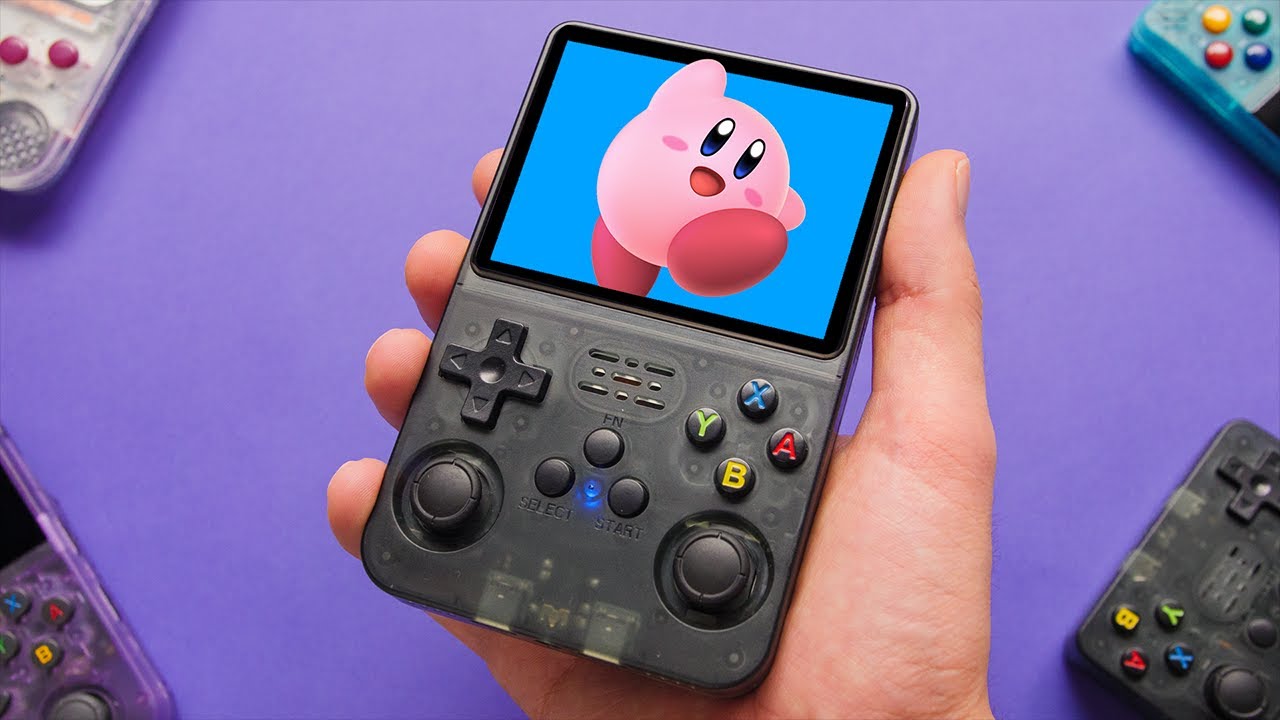
The budget handheld segment is heating up. In this video, we review the new R36S gaming handheld.
Available Here: https://s.click.aliexpress.com/e/_DeARecn
R35S Review: https://youtu.be/sM7tBkRTWUY
Camera: https://amzn.to/3REWpcj
Join Discord: https://discord.com/invite/AX2XdFk
Follow me: https://www.instagram.com/takiudon/
Disclaimer: This r...
sleek venture
Thanks
 fervent tusk
How do I find the latest build of ArkOS on the github that I should use for the R36S? https://github.com/christianhaitian/arkos

GitHub
Another rockchip Operating System. Contribute to christianhaitian/arkos development by creating an account on GitHub.
 quasi ferry
go to the wiki tab
fervent tusk
quasi ferry
go to the wiki tab
I searched for R36S on the wiki tab, didn't see anything?
quasi ferry
look for 35s, then use taki vid or this chan and scroll up for instructions on what files to keep and transfer, or just do the wifi/nic USB update.
sour knot
Follow the link on the link you provided to the Wiki
sinful inlet
https://www.youtube.com/watch?v=1JazW_Rf0Ko Review by Russ on RGC

The R36S is a budget handheld that packs some impressive quality for its $40 price point. Plus it rests on the shoulders of other RK3326 devices, making it good for either plug-and-play gaming or testing out a variety of custom firmware possibilities.
Buy one here:
https://s.click.aliexpress.com/e/_DFnNfUT
https://s.click.aliexpress.com/e/_DcI...
 visual whale
wifi problem might be the outdated arkos
sleek venture
Is there an alternative to 7zip that I could use on my chromebook
visual whale
Does using only 1 large sd card for roms better than having 1 small card and 1 bigger card for roms? I've read somewhere it's faster.
grave heart
fervent tusk
How do I find the latest build of ArkOS on the github that I should use for the ...
its pinned up top rtight
 fervent tusk
grave heart
its pinned up top rtight
fervent tusk
grave heart
its pinned up top rtight
Thank you, forgot to check the damn pins... rookie move! 😉
https://www.youtube.com/watch?v=1JazW_Rf0Ko Also, like always Russ swoops in with the save... what a badass.
small fern
sinful inlet
https://www.youtube.com/watch?v=1JazW_Rf0Ko Review by Russ on RGC
long but worth watching. it helps temper expectations.
and with Black Friday sales and Ali coupons if you did a group buy with 8 friends (at least for my address) you could have picked them up for less than 33$ each shipped with tax to the door. No i didn't place this order (but i considered it.)

$33 would have been a steal for this retrohandheld
sour knot
Oh heck yes. I’d buy someone’s at $33 if they wanted to sell it 🙂
barren willow
the r36s is outstanding value. i do have to replace a joystick though. the right one has some kind of weird movement i dunno how to explain. i also had to shave down the L1 trigger a bit so it wouldnt stick. bit for the price, i dont even care.
wanton escarp
The coupons from the Aliexpress game also help. I got another 5€ worth of credit, I coul've bought my black unit for 27€
wanton escarp
wary root
anyone have any tips for getting better n64 performance?
I use Parallel n64, dynamic recompiler, gfx accuracy low, resolution 640x480, framerate fullspeed
In some games that run very slow changing gfx plugin to gln64 helps with the 3d stuff but it causes missing images or texts in menus
small fern
oh if anyone is looking for Commodore 64 collection that load fast and just work you should be searching google for:
OneLoad64-Games-Collection-v4. Lots of great memories in this set.
river coral
small fern
$33 would have been a steal for this retrohandheld
yeah id get it for that price
celest stone
small fern
oh if anyone is looking for Commodore 64 collection that load fast and just work...
awesome set, use it in all my devices, including a real C64 😄
I love playing C64 on my RG35XX, I assume it'll be equally as awesome on my R36S when it arrives, maybe even better due to analog sticks
small fern
celest stone
I love playing C64 on my RG35XX, I assume it'll be equally as awesome on my R36S...
for some reason i don't recall the analog sticks being mapped at all in retroarch/vice i'll have to check
they work though cause i recall setting up L3 to switch joystick ports and R3 as F1 since quite a few games use that to start
you'll want to swap start/select for bringing up the virtual keyboard though. or else every time you try to hotkey retroarch you bring up the virtual keybaord (ugh)
celest stone
ah damn, yeah don't have my R36S yet. So start and select brings up the retroarch menu?
that's where the RG35XX is kinda cool because it has that extra menu button
oak wren
I seen on the arkos wiki it says about using retroarch as the main front end or emulation station. Which do most prefer?
grave heart
celest stone
ah damn, yeah don't have my R36S yet. So start and select brings up the retroarc...
select and X
celest stone
ah
grave heart
celest stone
ah
start and select together twice to close current game exit retroarch ect
select and left stick click or L3 if you will for fast forward in games
celest stone
thanks. Hopefully mine arrives soon
oak wren
Do we flash the firmware under the wiki that says updated in Sept or under releases that says updated this month?
small fern
so, i flashed the Sept one but i also recently used the update function on the device with wifi to go to the Nov one.
majority of people did Sept one, not sure many flashed or updated to the Nov one
It has ES as the main front end out of the box, it's what most use i suspect.
oak wren
small fern
so, i flashed the Sept one but i also recently used the update function on the d...
Ok I'll just flash the Sept then update with wifi if I can get it working
 prisma sandal
I couldn't get the wifi working with either one of my dongles.
 sterile zodiac
hey guys any reccomendations for sd cards for this device? I hear the stock ones are not that great but Im new to this retro handheld thing.
small fern
it's been very staightforward for me here just tweaks no delays/issues
small fern
sterile zodiac
hey guys any reccomendations for sd cards for this device? I hear the stock one...
it's only a matter of time til the stock ones will give up the ghost.
get a name brand 16/32/64max if you are using both SD's and get a nice branded 256/512 for slot b.
I use two SD's so if the OS ever needed flashed again i don't have to diddledick with roms
i'm running an Amazon Basics 64 in TF1 and a Sandisk Pro 512 in TF2
you can use the stock cards if you want (don't have to wait for better ones)
and i suspect if you're not updating/moving things to and fro they'll last a good while
sterile zodiac
perfect answer, trying to get one set up for my pops before christmastime... kind of on a budget 😛 thye got some great deals on amazon rn
man i bet you could really stock this thing up with a 512 card
sleek venture
grave heart
select and left stick click or L3 if you will for fast forward in games
Thank you didn't know this lol
sour knot
sterile zodiac
man i bet you could really stock this thing up with a 512 card
Every single game it can play
lol
small fern
Well CD games take up space. And if you scrape videos for every game that’s adding up some space too. I’m sure 512 is just right.
I’d guess every 2k games fully scraped is a 1gb of image/video
sour knot
Really wow that’s way more than my brain estimated
grave heart
sleek venture
Thank you didn't know this lol
great for pokemon on the way to work hahaha, get that grind in
celest stone
The entire PSX library probably doesn't fit in 512GB, even as CHDs
then you have other CD based systems like SegaCD, Neo Geo, PCE CD
Dunno if it can play arcade CHD based gamed
But there's a heap of those as well 😆
reef cape
sterile zodiac
hey guys any reccomendations for sd cards for this device? I hear the stock one...

Your new go-to card + adapter combo, the Micro SD PRO Plus + Adapter makes capturing seamless 4K video¹ on compatible phones or drones a breeze. Plus, the expanded storage provides you the freedom to play more high-performance and intensive games on your tablet or gaming device. It’s all the extr...
pretty good price on this one
small fern
that's what i got in the 512 flavor
grave heart
FIY folks, dont pay premium on sd cards, these devices do not need fast read write speeds, sure buy branded, but dont buy their top range cards unless youre simply flaunting that you could then by all means burn the dolla haha
small fern
It was like the same price as the evo maybe 2$ more
reef cape
yeah this one is 50 cents more than the amazon basics card
$1 cheaper than the evo, $2 cheaper than the extreme
small fern
reef cape
yeah this one is 50 cents more than the amazon basics card
Flaunt it 😉
reef cape
if i could flaunt i would get one of those nintendo switch 1TB SD cards with the mario mushroom on it haha
and stick it in my datafrog

small fern
Do frogs eat mushrooms?
reef cape
yoshi does
cold siren
My R36s just arrived
 elder mortar
Hey everyone question-- is this the R36s or the R35s? Both names are in the title and I want to make sure I got the better one
 prisma sandal
elder mortar
Hey everyone question-- is this the R36s or the R35s? Both names are in the titl...
prisma sandal
elder mortar
Hey everyone question-- is this the R36s or the R35s? Both names are in the titl...
The picture is of the R36S.
celest stone
I hope it's the R36S because I ordered one a few days ago
what does the Function button do? I didn't realise it had an extra button. I wonder why it uses stuff like SELECT + X to bring up Retroarch menu
thought it would be better to use the function button
sour knot
It does nothing
sour knot
You can but the system will only read them off one card
celest stone
have to keep switching between from the OS?
so no point having a big card in the os slot then
the smallest cards I have are 64GB. I guess if I use the included card for the OS it's not big deal if it dies if it only has the OS on it
cold siren
damnit arkos wont let me use my sdxc 128gb card on tf slot 2
dim ermine
elder mortar
Hey everyone question-- is this the R36s or the R35s? Both names are in the titl...
R35S+ and R36S are the same thing
wary root
Does anyone know why the select key is the main button used for hotkeys? Shouldn't it be the function button instead?
Is there any way to change that?
If I could set a few of my own hotkeys, I'd love to have the option to turn screen brightness up or down using the function button + the volume rocker.
celest stone
wary root
Does anyone know why the select key is the main button used for hotkeys? Shouldn...
that's what I was asking earlier. I don't actually have the device yet though 😄
sour knot
On the r35s I recall the ArkOS dev saying that button wasn’t even recognized by the system when pushed so it wasn’t used.
prisma sandal
cold siren
damnit arkos wont let me use my sdxc 128gb card on tf slot 2
You have to go in the menu somewhere and change an option to read SD card slot 2.
royal elm
guys, is there any coupon or code that i can use to get the r36s cheaper on aliexpress?
celest stone
royal elm
guys, is there any coupon or code that i can use to get the r36s cheaper on alie...
how much cheaper do you want it?
it's already a steal from there
looks like only black is that price now. I got black anyway
sour knot
Still a great price tho
wanton escarp
There is a 6 off code for 45 spent, if you find something else you like
grave heart
wary root
Does anyone know why the select key is the main button used for hotkeys? Shouldn...
You can change it in settings
molten solstice
Is there a way to change disks when you have to? Like playing a playstation game like final fantasy for example? How does that work on this handheld?
elder mortar
dim ermine
R35S+ and R36S are the same thing
Thank you
small fern
grave heart
You can change it in settings
You can change it to Function?
please show/say where. i haven't been able to find that.
so far the function button hasn't been usuable as anything in anything i've found
so far my FN button has been 100% useless, would love to employ it
grave heart
small fern
You can change it to Function?
yeah dude, last time i did it was on a rgb10 youll have to bare with me on that but 100% doable
load retroarch or any game, go into retroarch with select and X
then go back once to retroarch menu , then into settings , then input
then hotkeys
then menu toggle im sure it is
okay actually
small fern
so i tried that before and just now again and it doesn't seem to pickup the function button for me. in fact i can't set anything to the function
grave heart
the FN key is disabled
must be a firmware issue for this device, that is the correct method it is infact a disabled key
small fern
bummer, it's a perfect key for it and no stepping on start/select
small fern
in the Adventures of Lolo game select is suicide cause you're stuck, i killed myself a handful of times
 small fern
it would be great to find a way to unlock that key... i'm gonna grab my stock card but i bet it's locked there too
grave heart
i think it was still select on that too
weird that its not working
like why make a board with those three buttons and have it not work , traces not going anywhere, or its disabled somewhere deep in settings but i wouldnt see reason as to why
small fern
i have one of those two pack of SD card holder cases, i keep my stock system and stock roms card in it with it's own adapter with a R36S sticker on the case. It's nice to have a frame of reference to fall back to.
yes in stock hotkey is still select and FN doesn't register as a button to map.
small fern
wonder what it would take to have it be seen as a button, perhaps a dev will buy this system and figure it out how to unlock it for us.
grave heart
will be in the script somewhere, only other way to check is using a fiber pen and scratch the layer protecting the traces to see if the traces actually go anywhere , if they do then its 100% software lock out for what ever reason
not sure if its a button limitation like max amount of keys or what, but ark os is supported with keyboard im sure, so wouldnt make sense there
cold siren
prisma sandal
You have to go in the menu somewhere and change an option to read SD card slot 2...
I did and it said it didn’t recognize my sd card. Only happens with a lexar 128gb. My samsung evo works though.
cold siren
wary root
Does anyone know why the select key is the main button used for hotkeys? Shouldn...
the Function Button is not even functional if you open it up and trace it so there is that
cold siren
cold siren
the Function Button is not even functional if you open it up and trace it so the...
Someone in my country literally traced it on the R36s and it’s a faux button.
celest stone
That's a shame. Using select as a function key is going to be annoying
small fern
celest stone
That's a shame. Using select as a function key is going to be annoying
not really you get used to it quick, that said it does stink when you add a coin in an arcade game or whatever other function select has in that game.
what's a shame is having a dedicated FN button that can't be used, the waste + inconvenience is what is annoying.
grave heart
cold siren
Someone in my country literally traced it on the R36s and it’s a faux button.
im guna be checking that statement
it does indeed have traces
Please dont spread misinformation :p

Does more harm than good
left side is ground
9kohm resistors to the right
rg351 doesnt have a function key and og formware for 36s likley was also ripped from an old firmware based on a device also without a function key
@small fern maybe flashing 351v as it has a function key ?
grave heart
@worthy copper hello sir, Im curious, Is there a way to add functionality to the FN key for the R36S , we here in this bubble have flashed the 351mp to the device and thus have no FN registration due to the MP not having an FN key at all, or atleast thats what I've come to make the most sense, Is there by chance a way for the user to add to the os the functionality of the key that isnt showing when pressed , or IF its not a huge thing, if you could add this and upload the firmware as modded OS it would be greatly apreciated and would be happy to buy you a coffee for your efforts
 worthy copper
grave heart
<@507565891228139526> hello sir, Im curious, Is there a way to add functionality...
worthy copper
grave heart
<@507565891228139526> hello sir, Im curious, Is there a way to add functionality...
If it's similar to the R35, that FN button doesn't register at all
could be a simple switch is missing in the dts though
grave heart
it taken a picture of the button above , and its traces are intact, and not just a place holder, can I ask , is it the OS with inputs manualy added, or does it scan for all possible keys and buttons , and forgive me i dont know what a dts is
worthy copper
In this case, it could very well be the kernel is not registering that button at all
grave heart
are you capable of a fix by chance
worthy copper
If we know what the gpio address is, probably
grave heart
do you suggest flashing the droid 3 ?
worthy copper
rg351mp is an odroidgo3 clone
grave heart
i see
worthy copper
so the r35 and r36 are ogo3 clones as well
grave heart
i think start select are simply button 1 button 2 in retroarch
worthy copper
if you ssh into the unit, you can do evtest and go to the odroidgo3 input and push the buttons and see what they report as
On the R35s, the FN buttons doesn't register at all
grave heart
id have to ask @small fern to do this as i mcurrently woerking on internal wifi thus dont have wifi available for the forseeable
reef cape
has anyone tried Sega Saturn on this device?
worthy copper
do you have a usb ethernet adapter?
grave heart
reef cape
has anyone tried Sega Saturn on this device?
it works with a hand full of titles
worthy copper
on the rg351mp, yes and as said, some titles are "playable"
grave heart
worthy copper
do you have a usb ethernet adapter?
the usb c otg port is not attached currently so i could have full access to pads
reef cape
i'm wondering what i'm gonna do with this thing now
since i have a MM+ coming as well and it seems like they can mostly play the same consoles
grave heart
reef cape
i'm wondering what i'm gonna do with this thing now
just enjoy it if you have something better to replace it sell it on i guess
worthy copper
MM+ won't do Dreamcast or PSP
This can do a few of those
Even N64
again, a few
cold siren
grave heart
im guna be checking that statement
idk man he just said it in his socials. I'll have to call him out then.
grave heart
dont call it calling him out
just maybe say its been confirmed otherwise and you can use my image above that shows it does have traces
cold siren
my stock firmware seems to be an old version of arkos so couldn't confirm it works there too
cold siren
do you think the tf slot 1 is different than tf slot 2 in this device? my 128gb doesn't work as a game drive but works as an os drive so in the meantime I have all my roms and os in the tf1 slot xD
I thought maybe they used a cheaper one on the tf2
wanton escarp
worthy copper
MM+ won't do Dreamcast or PSP
Is it possible to replace the ppsspp standalone from an upgraded OS with the old one from the R36S stock build? It seems to run Ridge Racer at a better framerate, even if it has graphical glitches
grave heart
think you probably could with sd card or ssh into it with wifi
worthy copper
wanton escarp
Is it possible to replace the ppsspp standalone from an upgraded OS with the old...
yes but some fonts may not work right. Best to copy the whole /opt/ppsspp folder
wanton escarp
worthy copper
yes but some fonts may not work right. Best to copy the whole `/opt/ppsspp` fol...
Oh ok thank you! It my first console of this type and I didn't know where to look for tye standalone emulator files. I guess keeping both versions and choosing from Emulationstation would be more difficult.
small fern
worthy copper
if you ssh into the unit, you can do `evtest` and go to the odroidgo3 input and ...
are there steps for this process posted in github? i'll happily confirm R36S FN button registering anything or not.
i found this but this looks more like results than steps to get results:
https://forum.odroid.com/viewtopic.php?t=37378
worthy copper
wanton escarp
Oh ok thank you! It my first console of this type and I didn't know where to loo...
Actually it's not. I've done this before as well.
you can have a ppsspp2 folder for instance and add an additional entry for it to /etc/emulationstation/es_systems.cfg
small fern
ssh [email protected]
[email protected]'s password:
admin, password, 123... none of those work, any ideas?
wanton escarp
worthy copper
you can have a ppsspp2 folder for instance and add an additional entry for it to...
Oh I see thank you!
wanton escarp
small fern
ssh [email protected]
[email protected]'s password:
admin, password, 123......
I connected a keyboard using OTG and the user and password were both ark
worthy copper
small fern
are there steps for this process posted in github? i'll happily confirm R36S FN...
What you found there is what you need to do. I suspect if the button is supposed to be functional, the kernel just doesn't know how to report the button. Probably doesn't know about the gpio
Alot of info related to ArkOS for the RG351MP and it's clones can be found here: https://github.com/christianhaitian/arkos/wiki/Frequently-Asked-Questions---RG351MP
global hotkey information may be different though
small fern
progress:
Welcome to ArkOS 2.0 (11042023)
Based on Ubuntu 19.10 (GNU/Linux 4.4.189 aarch64)
- ArkOS Documentation: https://github.com/christianhaitian/arkos/wiki
- Ubuntu 19.10 Docs: https://wiki.ubuntu.com/EoanErmine/ReleaseNotes
- Ubuntu Documentation: https://help.ubuntu.com
- Ubuntu Management: https://landscape.canonical.com
- Ubuntu Support: https://ubuntu.com/advantage
Last login: Sat Sep 30 11:36:52 2023 from 192.168.254.22
ark@rg351mp:~$
FN button does not give a SYN_REPORT when pressed when testing GO-Super Gamepad after running evtest, all other buttons report in
Input driver version is 1.0.1
Input device ID: bus 0x19 vendor 0x484b product 0x1100 version 0x100
Input device name: "GO-Super Gamepad"
Supported events:
Event type 0 (EV_SYN)
Event type 1 (EV_KEY)
Event code 304 (BTN_SOUTH)
Event code 305 (BTN_EAST)
Event code 307 (BTN_NORTH)
Event code 308 (BTN_WEST)
Event code 310 (BTN_TL)
Event code 311 (BTN_TR)
Event code 312 (BTN_TL2)
Event code 313 (BTN_TR2)
Event code 544 (BTN_DPAD_UP)
Event code 545 (BTN_DPAD_DOWN)
Event code 546 (BTN_DPAD_LEFT)
Event code 547 (BTN_DPAD_RIGHT)
Event code 704 (BTN_TRIGGER_HAPPY1)
Event code 705 (BTN_TRIGGER_HAPPY2)
Event code 706 (BTN_TRIGGER_HAPPY3)
Event code 707 (BTN_TRIGGER_HAPPY4)
Event type 3 (EV_ABS)
Event code 0 (ABS_X)
Value 0
Min -1800
Max 1800
Fuzz 32
Flat 32
Event code 1 (ABS_Y)
Value 0
Min -1800
Max 1800
Fuzz 32
Flat 32
Event code 3 (ABS_RX)
Value 0
Min -1800
Max 1800
Fuzz 32
Flat 32
Event code 4 (ABS_RY)
Value 0
Min -1800
Max 1800
Fuzz 32
Flat 32
Event type 21 (EV_FF)
Event code 80 (FF_RUMBLE)
Event code 81 (FF_PERIODIC)
Event code 88 (FF_SQUARE)
Event code 89 (FF_TRIANGLE)
Event code 90 (FF_SINE)
Event code 96 (FF_GAIN)
@worthy copper happy 1 and 2 are start/select and happy 3 and 4 are l3/r3 it seems like all the supported events are accounted for so i guess that means that the .dtb doesn't have the FN factored in as an event type?
grave heart
@worthy copper last question if you dont mind, can we run this on ark os by chance 1. sudo apt-get update
2. sudo apt-get install build-essential git dkms linux-headers-$(uname -r)
3. git clone https://github.com/kelebek333/rtl8188fu
4. sudo dkms add ./rtl8188fu
5. sudo dkms build rtl8188fu/1.0
6. sudo dkms install rtl8188fu/1.0
7. sudo cp ./rtl8188fu/firmware/rtl8188fufw.bin /lib/firmware/rtlwifi/
GitHub
RTL8188FU driver for Linux 4.15.x ~ 6.4.x. Contribute to kelebek333/rtl8188fu development by creating an account on GitHub.
worthy copper
small fern
<@507565891228139526> happy 1 and 2 are start/select and happy 3 and 4 are l3/r3...
Correct.
small fern
thank you
worthy copper
grave heart
<@507565891228139526> last question if you dont mind, can we run this on ark os ...
To build packages and modules in ArkOS, do this first: https://github.com/christianhaitian/arkos/wiki/Building-packages-and-modules-on-your-device
grave heart
ah happy days, so we can support other wifi adapters, cheers
worthy copper
If you build the module for it, yes
wary root
grave heart
Please dont spread misinformation :p
Oh, ok.
grave heart
wary root
Oh, ok.
 wary root
Question... Is there a way to make the GZ doom installation read my pk3 mod files?
I wanted to set up golden souls and the Castlevania total conversion mod for the cousin I'm gifting the unit to.
grave heart
Oh boy oh boy oh boy
So

This 8 pin slot actually goes from right top side to right bottom side GROUND , DATA , DATA , 3.3V
WHICH CAN ONLY MEAN ONE THING ! ITS WHERE THE BLUETOOTH RECEIVER WOULD GO , IM ON IT, WISH ME LUCK
grave heart
I may have over hyped that lol , readings are going weird
cold siren
damnit I have 3 wifi dongles and none of it worked on my otg haha gotta check if my ethernet usb would
cold siren
grave heart
<@507565891228139526> last question if you dont mind, can we run this on ark os ...
oh interesting might try this when I get my internet to work
grave heart
this craps stressing me out, on both revisions top right or top center is a 8 pin placeholder and i really cant work out what its for or if i can hijack it
 cold siren
my usb to ethernet is not detected as well 😦

 sleek venture
I don't even need 7zip to unzip files on my chromebook I found out lol butttt idk why the file doesn't say .img it just says file lol
Think it will still work if i flash it ?
oak wren
Has anyone got wifi to work on their r36s with a wifi dongle? Is there a certain one that works. I just ordered a cheap one from Amazon. And the only otg I have is a USB C to A that came with a phone I have. Will that work?
wanton escarp
The TP-Link TL-WN725N works
small fern
These two worked for me:

USB C to USB Adapter, Type C Thunderbolt 4 OTG Converter, USB C Male to USB 3.0 Female Adapter (3-Pack) for Apple MacBook Pro, Mac Book, iPad, Samsung Galaxy S20-S23 and More (Black/Grey/Silver)

TP-Link Nano AC600 USB Wifi Adapter(Archer T2U Nano)- 2.4G/5G Dual Band Wireless Network Transceiver for PC Desktop, Travel Size, Supports Windows 11,10, 8.1, 8, 7, XP / Mac OS X 10.9-10.14
grave heart
Almost there just need these cables to never move so curing them , then just got the wifi to solder on and the 56k ohm resistor and it has no reason not to work

they say , the definition of insanity is doing the same thing over and over and expecting a different result, well , Im guna break that chain , I can feel it haha
if only someone could print a tiny board with the lay out and usb points on the other so its a simple solder on board
small fern
grave heart
if only someone could print a tiny board with the lay out and usb points on the ...
good luck!
 cold siren
grave heart
<@507565891228139526> last question if you dont mind, can we run this on ark os ...
cold siren
grave heart
<@507565891228139526> last question if you dont mind, can we run this on ark os ...
does 88fu not work on your device?
cold siren
rtl8188fu
grave heart
oh im not sure what the one was that i bought first
had to go out my way to get the eus
cold siren
mine is eus not working xD local youtuber adviced getting the fu xD
it's $3 so i might try to get one
grave heart
my eus worked before i tore it down to make internal wifi which as you can see ive failed miserably
cold siren
that will be my 4th wifi dongle haha
grave heart
what you connecting with
cold siren
a no brand usb otg adapter
cold siren
Comfast CF-WU815N
TP LINK TL-WN823N
and one no branded wifi dongle that works on my old systems
Does yours light up when you connect it in otg?
What's weird is my otg adapter works for sure because i tried it with a usb flash drive and mount in arkos system
grave heart
it showed me abotu ten wifis and all full bars lol
again before i took it apart along with the adapter i used
cold siren
TP LINK TL-WN823N RTL8192EU
Comfast CF-WU815N RTL8188GU
wanton escarp
The *fu was the driver recommended for the *ftv I had too, but I gave up and bought a an already proven model
Mine lights up a green led that blinks. It also causes interference to the speaker 🤔
grave heart
anyone with a multimeter able to test ohms of these resistors please
circled in green

 cold siren
what software is that
sleek venture
Using 7zip to extract the arkos
cold siren
why are you extracting though
sleek venture
To get the .img file on it to flash the arkos on the SD card
sleek venture
Oh I was gonna use rufus
Thanks I think I'll just install balena etcher then if that's the case
 grave heart
decided in my venture of modding my r36s , that i should go ahead and buy another to keep 'clean' so got the white/grey one for £36 inc taxes 7 day delivery , couldnt resist
grave heart
 oak wren
small fern
https://www.amazon.com/dp/B07PB1X4CN?psc=1&ref=ppx_yo2ov_dt_b_product_details
oak wren
small fern
https://www.amazon.com/dp/B07PB1X4CN?psc=1&ref=ppx_yo2ov_dt_b_product_details
Thank you that's the WiFi adapter I ordered. Hopefully my USB c to a works right. It came with my phone
cold siren
One for playing and one for “playing”
grave heart
cold siren
One for playing and one for “playing”
modding is so adictive, especially when its a hyper focus of mine , I have lost days on this internal wifi mod and no avail , yet im still fighting myself to stop trying and give myself a rest , I havnt slept from yesterday either 🥲
grave heart
oak wren
Thank you that's the WiFi adapter I ordered. Hopefully my USB c to a works right...
it should no problem, is the wifi module a eus model , the N nano has this chipset
oak wren
grave heart
it should no problem, is the wifi module a eus model , the N nano has this chip...
It's the tu2 nano
grave heart
not sure its compatible bud, people requested support in 2016 maybe it was added
the tp link N nano is a RTL8188EUS which is 100% compatible out the box
you ordered the RTL8811AU
never mind, sorry to scare you , seems its been supported since 2021
oak wren
grave heart
never mind, sorry to scare you , seems its been supported since 2021
Awesome thank you
small fern
two sd cards, wifi adapter, usb to c, silent buttons on order, and now a case. I've spent more on accessories than the device.
grave heart
small fern
two sd cards, wifi adapter, usb to c, silent buttons on order, and now a case. ...
Might dye my white case :p
oak wren
small fern
two sd cards, wifi adapter, usb to c, silent buttons on order, and now a case. ...
Where do you get silent buttons?
small fern
sorry i mean the switches you installed
grave heart
google pi hut
small fern
i might dye the inside of the case i got:
https://www.amazon.com/dp/B075XLN5KC?ref=ppx_yo2ov_dt_b_product_details&th=1

Lacdo Hard Drive Carrying Case for Western Digital WD My Passport Ultra WD Elements SE WD P10 Game Drive Portable External Hard Drive 1TB 2TB 3TB 4TB 5TB USB 3.0 2.5 inch HDD Travel Storage Bag, Black
inside measurements felt spot on
grave heart
Hope so 2.5 inch drives are really thin
small fern
well i want it snug in there with the padding
small fern
grave heart
Hope so 2.5 inch drives are really thin
i'll be sure to post back here on it so anyone looking knows
cold siren
anyone know what folder the boxarts are
sleek venture
cold siren
rufus does too
Oh didn't know
 regal nova
The server rules (#2) prohibits discussion of how or where to acquire ROMs. So google is your best friend.
cold siren
Those large games are optional anyways might as well get them individually
 past crown
Has anyone actually updated their OS via wifi?
wanton escarp
past crown
Has anyone actually updated their OS via wifi?
I did
past crown
oh phew
I got a Comfast adapter that works fine with rk2020 and ArkOS
but I need to use a usb-micro to usb-c-adapter and a usb-micro-usb-a-adapter, hopefully that won't fuck it up
worthy copper
small fern
two sd cards, wifi adapter, usb to c, silent buttons on order, and now a case. ...
Welcome to the niche
worthy copper
cold siren
anyone know what folder the boxarts are
usually images folder within respective roms folders for each system
cold siren
i tried images, downloaded_images, and boxart didn't work for me. Or do i need to configure it on settings on my theme?
 open elbow
It all depends on where the gamelist.xml points it towards
I personally use /media/images for boxart, but some just use /images/ or others use downloaded_images. If theres no gamelist.xml it wont search anywhere
cold siren
this is what my gamelist.xml looks like
 open elbow
I assume thats a ES generated one. Its not pointing towards any boxart.
A proper one would look like:
 cold siren
I found the settings in skraper thanks for giving me the idea
apparently my skraper is generating .dat instead of xml
open elbow
Yeah use Skraper if you want it done properly, you can use the built in one but I'd only do that on smaller lists, it takes long enough on a PC!
cold siren
What I do is I scrape per console
open elbow
Yeah no harm in doing that, theres lots you can play with too
You may prefer the 'mix' art, you can have a screenshot, boxart, cartridge and logo instead of just a box
cold siren
yea this looks awesome

damnit still didn't work maybe i'll just wait for my new wifi dongle
open elbow
It should work with the right settings. Make sure you got a screenscraper acct as you need to scrape all the artwork etc
after that make sure your gamelist tab looks similar to this:

things like auto favourite you can change to your pref
cold siren
That's my exact settings
 rapid raven
wary root
I'm only calling him crazy because he used balena etcher when the ark os site sa...
rapid raven
wary root
I'm only calling him crazy because he used balena etcher when the ark os site sa...
omg lmao i used it last night, i think it went over well
small fern
versions change, individual user experiences vary, i say take all feedback like and apply it when it fits best for you. it's fairly easy to reflash something if it didn't work or caused you issues down the road.
cold siren
I’ve flashes sd cards 4 times already with balena etcher no problems here
dim ermine
I have been having problems with sticky back buttons, so I finally got around to opening it up today to fix. I used a bit of sandpaper, did just a few light passes along all the surfaces of the case where the triggers may rub against the case. Including near the pivot nubs, that area was tight on my outside triggers. Gotta be careful to avoid sanding down the nubs. They work great after that. The micro switches are still loud and a little stiff, but no more sticking and feel more responsive.
sleek venture
I finally got mine updated im So happy lol
grave heart
You guys should check this game out , it looks really good tbh

 torn ridge
grave heart
You guys should check this game out , it looks really good tbh
torn ridge
grave heart
You guys should check this game out , it looks really good tbh
just watched a bit of a play through, that game looks awesome
grave heart
torn ridge
just watched a bit of a play through, that game looks awesome
right ?
bosses look decent too
torn ridge
the first boss intro when they turn into the monster is seriously fantastic
i'm surprised I haven't heard of this game before
grave heart
i watch this i think we would all benifit from it

YouTube
I'm Joe. Here I talk about video games I find interesting and a few that may not be so great. Long new episode every other Sunday (at minimum) released at 12:00am mountain time (US). Thanks for checking out Game Sack!
Game Sack
PO Box 150366
Denver, CO 80215
USA
wanton escarp
I was browsing the 2 bucks stuff on AliExpress and seen this. It is supposed to be 286mbps adapter but in a review someone complained that it was only wifi n 150mbps but I noticed the hardware id
Just found this amazing item on AliExpress. Check it out! 1,99€ 77%OFF | WIFI 6 Network Signal Reception Mini Driver-free Wi-Fi Adapter for PC Deskop Computer 2.4G Network Card USB Plug and Play
https://a.aliexpress.com/_ExQrwMH
In the screenshot the buyer posted

It's an RTL8188EUS
For 2 bucks
So it should work with the R36S too
grave heart
EUS 100% compatible @wanton escarp
 upbeat lagoon
What's IA?
 flat plaza
upbeat lagoon
What's IA?
flat plaza
upbeat lagoon
What's IA?
IA the great repository of secret knowledge
grave heart
recieved usb C ports from amazon today, states 5x ports, and it came as 4x and the pack was opened folded then glued down haha , got full refund so bought another usb C to usb dongle ordered since im not out of pocket for my loss, and also ordered another r36s lol, got the white one so im guna probably dye it eventually, im thinking of maybe even doing a grey to try make a it a bit more like the OG GB , if not maybe something with more of a pop , maybe a dark green would be sick , what do ya think
grave heart
flat plaza
IA the great repository of secret knowledge
be careful what ya say, even if youre just emphasizing what someone meant , not sure what admin are like for rule breaking, as its bordering on it, dont wana see anyone getting banned or kicked for something silly
flat plaza
Eep. Noted
wanton escarp
grave heart
EUS 100% compatible <@983525548041056356>
Yeah I know it is the same chipset & hardware id as my TP-Link. I tought people would be interested in a cheap alternative

 rustic turtle
Anyone else suffering from weird audio when using earphones?
grave heart
oh lemme try i have a nice pair of phillips shp2000s brb
its actuallly sooooo good very immerisive do you have any dongles in at teh same time
@rustic turtle
teh audio is super clean
you could go ahead and change the audio in core options
cold siren
grave heart
You guys should check this game out , it looks really good tbh
Nice found another gem, I also found gamefreak's gem PulseMan the other day and been playing it since. Also Earthworm Jim, I like these megadrive games
grave heart
Earthworm jim is a classic aha it was wild for its time
rustic turtle
grave heart
its actuallly sooooo good very immerisive do you have any dongles in at teh same...
Awesome! I don't have any dongle and I tested various headphones with different audio in core options. It must be a problem with my unit 😦
grave heart
rustic turtle
Awesome! I don't have any dongle and I tested various headphones with different ...
Maybe. Semi soldered joint on 3,5 jack
rustic turtle
grave heart
Maybe. Semi soldered joint on 3,5 jack
Maybe, later today I will take a good look at it, thanks 🙂
shut pumice
Just got my second R36S from the same shop I got the first one week ago. They look the same, but feel like totally different devices: one has super hard dpad & buttons, while the other one has them super soft & mushi. Start & Select have different feel too, they feel kinda loose on the new one. Even back buttons are more “silent” on the new one. Need to run more tests, but I’d say screen looks different too. Ah! And the new one has a much higher max volume on the built in speaker.
Wouldn’t be able to say which is “best” (as I’m gifting the other one); but for sure QC on this devices is… lousy to say the least.
small fern
wonder how many different workshops there are making the same thing perhaps with different source materials...
i have two from the same shop one purple one black and the dpad, sticks, buttons, all of it look feel the same. I only powered the purple one on to make sure it booted and put it back in the box so i can't speak to display/volume but they looked/felt the same.
they came about a week or two apart from each other (not ordered at the same time)
shut pumice
Yeah, same here, ordered 1 week apart, from same store. Both purple. Curious thing: on YouTube videos I’ve seen, the screen protector that comes with the device is kind of tempered glass… mine are super flimsy plastic sheets (talking the protector that comes in the box, not the sticker on top of the screen to avoid scratches during manufacturing/packaging)
small fern
Mine both plastic film with red pull tab.
shut pumice
Production line consistency is expensive, these devices are cheap… I guess we can’t really ask for more 🤷♂️
grave heart
shut pumice
Just got my second R36S from the same shop I got the first one week ago. They lo...
Do they audibly click when pressed
grave heart
shut pumice
Yeah, same here, ordered 1 week apart, from same store. Both purple. Curious thi...
theres no tempered glass screen protectors for the device, the screen has rounded edges thus thin film is all youll really get bud
grave heart
shut pumice
Production line consistency is expensive, these devices are cheap… I guess we ca...
youre getting extreme value for money , the screen is untouchable compared to most rk3326 devices noone else on the market is giving that quality for price, clip your buttons and sand the back triggers and youre good to go
shut pumice
grave heart
Do they audibly click when pressed
Yeah, they do, but less than on the other unit
Btw, was not complaining about the quality; it’s way more than enough for the price! Just that “consistency” wise, they’re not really consistent… for being the same product
Super happy with the devices; also I bought an RG351MP when launched… this is same value for 25% the price. Not metal, not Anbernic dpad, but for 40€… you can’t really get anything better.
flat plaza
Even my r35s have also different feels. One softer, the other the buttons are hard
grave heart
shut pumice
Yeah, they do, but less than on the other unit
i ordered the white one as my second unit will let ya know how that turns out on terms of triggers ect , maybe a new revision , can you open the back and read us the bottom text on the board please ?
grave heart
shut pumice
Btw, was not complaining about the quality; it’s way more than enough for the pr...
for sure, didnt mean to step on your toes about that
honestly personally, the whole metal chasis was for sure just a extra money maker, there really wasnt much need in it other than personal wants , as you say spec is the same just a little less flimsy and seeing as its alu metal its hella cheap to make
small fern
small fern
i might dye the inside of the case i got:
https://www.amazon.com/dp/B075XLN5KC?r...
It fits snugly I’m pleased less the cream colored inside.


 oak wren
grave heart
youre getting extreme value for money , the screen is untouchable compared to mo...
oak wren
grave heart
youre getting extreme value for money , the screen is untouchable compared to mo...
You clipped that price of plastic holding the buttons together? It worked out good?
When flashing a new card with arkos, does the file have bios files for the emulators or do you need to source them and put them in the correct folder yourself?
small fern
yeah, i didn't take the whole plastic ring out, just a snip. tbh it was probably unnecessary the A never pressed the X and the Y never pressed the B, the one would just move when the other was pressed.
cold siren
That’s why I haven’t bothered to open mine up yet. I don’t think my unit needs it.
small fern
i don't think even stock comes with all the bios needed tbh, i have my own roms/bios sources
small fern
small fern
It fits snugly I’m pleased less the cream colored inside.
with enough room left over for a charging cable, the wifi dongle, and usbc adapter. i'm not sure i would feel comfortable putting an outlet for the charging cable in with it though.
small fern
small fern
It fits snugly I’m pleased less the cream colored inside.
i'll probably never dye the cream black just complain when/if it gets dingy, lol
small fern
cold siren
That’s why I haven’t bothered to open mine up yet. I don’t think my unit needs i...
to do the cuts you have to pretty much disconnect the lcd ribbon cable as well as the small ribbon cables for the joycons, as well as the speaker/battery, make sure you have your sd cards out, and then make sure it all goes back together again right. it's not 'challenging' but that said i wouldn't recommend it for someone not comfy tearing stuff down.
oak wren
small fern
i don't think even stock comes with all the bios needed tbh, i have my own roms/...
Thank you. I'm building my own rom Library but wasn't sure if I need bios or not after flashing the new arkos. But I'll look for bios for all the systems. Or do only certain systems need bios files?
small fern
only certain, i think you can search for libreto biosset or something like that to find all systems that are retroarch covered
oak wren
small fern
only certain, i think you can search for libreto biosset or something like that ...
Ok thank you I appreciate the info. I don't have the device yet. It will be here soon. But I flashed arkos and have the games I want.
grave heart
@small fern ypu need some dylon or rit
Im thinkong of dying the white r36s

What colours would everyone pick to dye their systems if they could @here
small fern
grave heart
What colours would everyone pick to dye their systems if they could @here
a white one i would enjoy a blue marble
 grave heart
you could prbably achieve that
alot of work
@small fern you could dye your smoke black solid if you cook it up it some black dye
small fern
bald is beautiful, i'd shave it before i dyed it
oak wren
Does the storage amount on the card show the correct amount after it's put into the device? I installed arkos on a fresh card but only shows a small amount of storage on the partitions
grave heart
Erm if you get a bad flash it might not do the formatting process
Might have to go into options and create the roms part , @small fern may advise when free
oak wren
grave heart
Erm if you get a bad flash it might not do the formatting process
Do you think I should wait till I install it into the device to see what it looks like after
grave heart
You're supposed to flash it then put it directly into the console and boot it then it formats the space for you 🤦
@oak wren
Didnt think you flashed it then tried to get into the sd card before the hand held does the initial boot
cold siren
People should really start reading the arkos wiki
DO NOT MANUALLY EXPAND THE EASYROM PARTITION AS THIS WILL BE DONE AT FIRST BOOT OF THIS IMAGE. Manually expanding the partition prior to the first boot of this distro will cause the distro to hang and not complete the boot up process. If the partition expansion fails for some reason, you can use tools such as Gparted for linux or Minitool Partition Wizard for Windows to expand the partition.
GitHub
Another rockchip Operating System. Contribute to christianhaitian/arkos development by creating an account on GitHub.
celest stone
ok, my R36S should be arriving Monday
and now I've got an RGB30 on the way as well 😄
oak wren
grave heart
Didnt think you flashed it then tried to get into the sd card before the hand he...
I think I'll be good. All I did was replace that mp file then was just clicking properties and stuff. I didn't try to partition anything.
 dark saddle
anywhere i can get the original boot files? i flashed MP Arkos over the original SD card, and now getting blank screen
grave heart
oak wren
I think I'll be good. All I did was replace that mp file then was just clicking ...
I forgot yes copy the original 36s files then into the handheld ao it can partition itself ***
grave heart
dark saddle
anywhere i can get the original boot files? i flashed MP Arkos over the original...
Someone may upload them if you ask nicely dude , ive gotta get ready for work or id have done it for you sorry , alternatively click the pinned section and download the original firmware and then copy the files again once installed
small fern
dark saddle
anywhere i can get the original boot files? i flashed MP Arkos over the original...
did you get the files you needed?
past crown
Could someone just insert the files into the image so there would be no need to copy things around?
 urban steeple
My r36s is not detecting my sd card 😞
urban steeple
Lexar 64gb
small fern
is this for the OS
small fern
so you put it in and tried to switch to tf2 for roms in menu and it balks about format
urban steeple
small fern
so you put it in and tried to switch to tf2 for roms in menu and it balks about ...
It says that no sd card in formats fat, fat32, etc was detected
small fern
yeah, i had that too for an amazon basics card i had. i reformatted the card and then it worked
urban steeple
I've already reformatted it several times
small fern
hmm, not sure i don't have an lexar brand cards to test... perhaps a different computer to format it, program, or type like fat32 vs exfat
urban steeple
But, im doing it on my cellphone, maybe that's the problem
small fern
it could be adding something to it, dunno i never used a phone to format an sd card i wasn't using in that phone
urban steeple
What i don't understand, is that the sd card that came with it, after i formatted it worked normally
But this sd is only working in my cellphone
small fern
Okay so I just tried my headphones and they sound great but then I took them off and realized my speaker was still playing with the headphones plugged in. I don’t know if that is hardware or software issue.
I can only imagine sitting in the doctors office, jamming out to my commodore 64 sid soundtrack while playing a game, thinking that it was just me, but sharing with all.
sour knot
Sharing is caring
small fern
i'm glad i know, now i want to fix
small fern
barren willow
question, so one of the joysticks on my r36s is wonky. i just replaced the sticks with hall sticks on my switch lite. is it possible to install those on my r36s?
itll look weird because theyre white but thats what i have
small fern
i'm guessing it might be hardware, like a cold solder joint on the plug or just a loose hole
hey cap, from what i know the sticks used are switch joycons and you should be able to just swap em
barren willow
roger that. that will be task for today.
small fern
barren willow
THAT is bloody awesome
small fern
i have lightning, C, and the older micro usb tips, so i can use the same cable for dif devices
barren willow
that is so cool
small fern
 grave heart
small fern
grave heart
small fern
Reolder the joints bro , or take tweezers inside and pull them more central so the pins touch well
barren willow
small fern
that's just one of those easy to use mute buttons!😂
barren willow
Authentic switch lite sticks installed and working. That was sooooo easy.

Now i need some white buttons
small fern
that's fun, glad it worked out easy for you.
 small fern
yup, 4 screws, two small but easy to manage ribbons
great that you don't have to pull mainboard out, i couldn't remember
pulling the main board out means chances of mucking up side switches/ports and needing to undo lcd ribbon cable too. plus if you don't have the SD cards out. you can break them or the slots. lots of little gotchas for a noob to get in there and do the taki button/dpad improvments.
barren willow
Yeah for sure.
small fern
you can get switch sticks so cheap and everywhere too so if you end up with drift you can send it driting off to a landfill
barren willow
These are way nicer than the ones installed from the factory
small fern
right out of your switchlite right? so nintendo's supplier/choice.
barren willow
Yeppers
And to qualify, me saying that is quite a thing because i already dont like switch style sticks
grave heart
barren willow
Authentic switch lite sticks installed and working. That was sooooo easy.
Would look sick with white model
barren willow
grave heart
Would look sick with white model
Yeah it would. Add in white dpad and face buttons...
Took the joystick apart that was the problem. Thought i may have fixed it but now it wont centre and still has the previous problem. So in the trash it goes
Ill keep the other as a part
These sticks control way better in cruisin world too
grave heart
The ones installed are just the £$ 3 ones they work fine , but indeed the rubber is better on offical switch sticks
barren willow
Oh i absolutely understand that. I just wasn't expecting THIS big of a difference.
Guess i should do the custom firmware on here now
grave heart
barren willow
Oh i absolutely understand that. I just wasn't expecting THIS big of a differenc...
I wasnt tryna state like you didnt know sorry it was like agreeing but also going in depth to inform others that didnt know why you chose to do so 😄
grave heart
barren willow
Guess i should do the custom firmware on here now
Its in the pinned section be sure to back up your files first from os sd 1
barren willow
Yeppers, always do
barren willow
grave heart
I wasnt tryna state like you didnt know sorry it was like agreeing but also goin...
I know you werent, im just blown away by the difference
cold siren
urban steeple
Lexar 64gb
You’re Sol bro, I have 256 and 128 lexars both don’t work on tf2 🤣
barren willow
grave heart
Its in the pinned section be sure to back up your files first from os sd 1
was there something else i had to do to get the r36s to boot? all im getting is a white offset screen.
was there some kind of different boot file?
found it. some kind of dtb file. anyway it must have failed for me shows ther ArkOS startup then just sites a a flashing cursor
grave heart
Reflash bad flasg @barren willow
barren willow
roger
grave heart
Use etcher and le it validate after flash
wanton escarp
Here, all my .dtb files from my BOOT partition already renamed and working with the 351MP image
barren willow
wanton escarp
Here, all my .dtb files from my BOOT partition already renamed and working with ...
thanks!
wanton escarp
You are welcome 🙂
barren willow
wanton escarp
You are welcome 🙂
do i copy all of those or just the rk3326-rg351mp-linux.dtb?
wanton escarp
In theory it's only that one but you can copy them all.
barren willow
wanton escarp
In theory it's only that one but you can copy them all.
thanks
and of course this time my windows machine is being a dick and wont eject the stupid sd card
but its booting this time!
small fern
yippie
barren willow
its a good day. two whole things accomplished and time for more!
small fern
you deserve a good retrogaming session, not just playing a game until you die and exiting but really kicking your feet back and playing a chunk of a title
barren willow
its probably a good idea to that every once in a while instead of just tinkering with these things for sure. maybe pull out my case swapped GBP and play some pokemon
cold siren
Having one of these devices gave me another problem
I now don’t know which games to play there’s just too much good stuff. Good thing arkos has this random feature so I do it sometimes 🤣
barren willow
yeah i gotta cut the roms down on it. i dont mind having an assortment but there are way too many that come with. a good repository to hold on to however
small fern
i used to be an uncompressed roms guy, but now i'm not seeing the value... chd, zip, whatever compression the emulation allows
i used to have this purist mentality where things would be faster/more accurate when not compressed. the other school of thought was if a game didn't work well in one emu well it would have to go to another one and if that one didn't allow compression then i would be sol if compressed.
small fern
how do you guys do your roms?
barren willow
i typically unzip roms that are zipped but otherwise i use them all as i get them. lazy i know but compressing stuff stuff is really a waste of my limited time
wanton escarp
I used to always unzip them but since they are all already compressed in the stock sd card I just copied mine that way too.
wary root
Anyone have any good suggestions for fixing the power LED without opening up the case?
Probably just a small amount of electrical tape or something, yeah?
dim ermine
wary root
Anyone have any good suggestions for fixing the power LED without opening up the...
I used a hole puncher to cut out a circle piece of this black grippy tape stuff I have
wary root
Ohhh.
dim ermine
Put it over the LED and now it doesn't shine right in my eyes
small fern
i haven't found it bothersome tbh
grave heart
wanton escarp
Here, all my .dtb files from my BOOT partition already renamed and working with ...
renamed ? dont recall having to rename anything
grave heart
small fern
i used to have this purist mentality where things would be faster/more accurate ...
yeah thing is , when it loads the game, it caches the entire title, thus same speed 😛
small fern
hehe, i knows this
grave heart
wary root
Anyone have any good suggestions for fixing the power LED without opening up the...
if you have some paint, or even a marker that can give out some ink if pressed, you could drop it in the tiny hole and clean up the casing and should dim or totally black out the led
grave heart
small fern
hehe, i knows this
I get your thought process though , that is or was the case at one point for many emulators
wary root
grave heart
if you have some paint, or even a marker that can give out some ink if pressed, ...
Guess I could try a whiteout pen.
grave heart
if you have a white console indeed
wanton escarp
grave heart
renamed ? dont recall having to rename anything
They are taken from my original R36S firm so the file name was r35s-linux.dtb
grave heart
if you really dont want to open the device its a god send for you that there is a hole right through haha, just turn it off remove battery first and give it a little bit to dry
grave heart
wanton escarp
They are taken from my original R36S firm so the file name was r35s-linux.dtb
@small fern and I are currently working getting the andorid firmware working on the R36s , hope to share it with the community if or when that boots
wanton escarp
Android 8.1? It's the only version I've seen used for this chip
small fern
shiiit, the only thing i'm working on is 12ounce curls
grave heart
wanton escarp
Android 8.1? It's the only version I've seen used for this chip
which ever was used on the chip set yes, I've not started on it my self yet just got home from work and without a spare sd card atm
small fern
tbh i'm more interested in unlocking that FN button and getting our files we have to copy over into what we flash
wanton escarp
That would be awesome. I have seen another handheld that seems to be made by the same manufacturer and that comes with Android installed. It has the same rk3326 but the OS is locked down to their launcher. It's called D007
If only there was a way to remove that launcher and scripts to free the UI...
People have been attempting it already
grave heart
small fern
tbh i'm more interested in unlocking that FN button and getting our files we hav...
thats exactly what i just stated with android bro lol , thats the exact same process just also along side arkos that we fork for our own console, and because we changed the files ect, its essentially free reign to rename from arkos to what ever fork name we want, just how you get all these emuelec forks with peoples names and such , but i think we should be straight to the point with it and just name it something like 36Sos or relevant to the console its self as it will only be useable on 36s and probably 35s but thats up for full debate but it seems catching IMO lol
Does anyone actually have a usb C to HDMI , willing to make a video on the r36s to tv or monitor , id like to see how that looks please
 fervent bridge
Need help, I use my old authentic micro SDC (2nd slot GAMES) and now it f*cked up, is there a way I can switch to main sd card, like a hotkey when turning ON or safe mode so I can use and access the main SD Card? Its just a black screen and blinking underscore "_". Thanks in advance
grave heart
put your card into your pc or laptop with sd slot, and open it and open a few folders, and then put it back into the hand held, i found this as a fix for sometimes not being seen by the hand held, not sure as to why , but try it
@fervent bridge
fervent bridge
grave heart
put your card into your pc or laptop with sd slot, and open it and open a few fo...
will try tnx
fervent bridge
grave heart
put your card into your pc or laptop with sd slot, and open it and open a few fo...
totally can't access the 2nd sd card with games, my pc can't read it anymore
grave heart
okay, it that case, it seems like you either have a dead card due to being cheap nasty cards, OR you may be able to format it again, how ever you will need to find out how to make it be readable on the handheld or pc
can you go to START , then right click MY COMPUTER or COMPUTER or THIS PC and then click MANAGE
then go ahead and click DISK MANAGEMENT
plug your sd card in , and see if it appears
fervent bridge
grave heart
can you go to START , then right click MY COMPUTER or COMPUTER or THIS PC and th...
it's authentic but OLD sd card, not showing up on Disk Management & partition wozard
grave heart
chkdsk F: /f /r /x (replace F with the drive letter of the SD card this will only work if you can actually get the drive to show :/
I wonder , if you boot into bios, will the sd card show in bios list of harddrives
grave heart

ViaScreens
Powkiddy RGB20S clear screen protector film with a glossy surface that protects against scratches.
guess we can just grab these

BROTECT Screen Protector, the powerful mate for your Powkiddy RGB20S! Do you often use your Powkiddy RGB20S and need to take it with you on the go? The BRO offers perfect screen protection without being noticeable thanks to the protective film’s super clear material. You still have a crystal-cl...
cold siren
grave heart
https://viascreens.com/screen-protector/powkiddy/rgb20s/vivid
I bought ones for camera lcd screens xD
grave heart
can i see a picture of how that went
cold siren
Will send when it comes, still on shipping
grave heart
ah okaydokey
cold siren
wary root
Probably just a small amount of electrical tape or something, yeah?
Stickers? 😄
 cold siren
fervent bridge
Need help, I use my old authentic micro SDC (2nd slot GAMES) and now it f*cked u...
cold siren
fervent bridge
Need help, I use my old authentic micro SDC (2nd slot GAMES) and now it f*cked u...
Try this: Go to options and using one of the two file explorers edit these 2 files:
/etc/fstab
/etc/fstab.ntfs
In those 2 files edit the line that mounts “/roms”, in my console i used the following:
/dev/mmcblk0p1 /roms (keep remaining options intact)
mmcblk0p1 = SD Card Block 1 Partition 1
Reboot
use “lsblk” or “lsblk-fs” to see which block you want to mount roms
“gdisk” to check partitions
cold siren
Faaaaaaaaaak
Bought for FU chip

and it says Brand new chip. When I connect to pc it says FTV chip 🤣🤣🤣
I’m scared to test in my R36s

That sucks.
grave heart
cold siren
Bought for FU chip
not sur eit will work , eus does work
cold siren
yea im waiting for new otg connector i ordered 2 xD
wanton escarp
FTV doesn't work, I have one
sleek venture
Could anyone explain to me how .m3u files and .chd files work ?
Well more particularly how do they work on arkos lol
I just put both files in the game system file and the game works but not sure if there is more steps I need to take with it
grave heart
Erm guys
I ordered a usb c to usb adapter and i got four from amazon for £6 i thought it was four images of it as it was different angle shots and then just opened the package to this
 sleek venture
Nice
small fern
They’re petty micro
Looks like an 1/8 to a 1/4 inch shorter than the ones I post links to.
grave heart
small fern
Looks like an 1/8 to a 1/4 inch shorter than the ones I post links to.
id link them but they are uk amazon , not sure if it would be same listing on us

USB C to USB Adapter: USB-C male to USB-A 3.0 female, compatible with USB flash drive, USB cable, USB keyboard, mouse, USB card reader, and other computer peripherals. Mepsies USB-C to USB OTG adapter works with phones, tablets and laptops with USB Type-C ports. Plug and Play, support USB OTG (On...
oh shit was £4 not even £6 , thats legit so cheap, £1 per unit wtf
yeah i see the other lengths there
 small fern
I found a 2white and 2black 4 pack for 4.99$ usd same size/maker on US Amazon
grave heart
good shit bro
small fern
I don’t currently need to replace mine so I’m good but nice to know there are cheaper and smaller out there
grave heart
yeah its legit just a straight through adapter with a 56k ohm resistor bridge
to tell the vcc to drop
 cold siren
sleek venture
Could anyone explain to me how .m3u files and .chd files work ?
cold siren
sleek venture
Could anyone explain to me how .m3u files and .chd files work ?
.m3u files are like playlists they contain links to multi disc games. chd are like regular roms, some multidisc roms can also be packaged into one single chd file so you won't need 2 bin files and an m3u file, think of it as like a folder to keep all files needed to play multidisc games.
small fern
thanks for responding to that Aeolus, i totally missed his question
cold siren
wanton escarp
FTV doesn't work, I have one
question, does it light up even if it's not compatible? cause all of mine doesn't. starting to think the problem is my otg connector.
small fern
i only have two compatible wifi's and two identical adapters so i can't help you there
cold siren
It worked on my usb drive the first time i tried it so i assumed it was working. I tried to use a usb light just now and it seems loose. I'll wait for my two new otg adapters to try then
Honestly it's to be expected I bought it for like 40 cents
wanton escarp
cold siren
question, does it light up even if it's not compatible? cause all of mine doesn'...
Nope they don't show any sign
You can test the connector by mounting a usb stick
cold siren
It's a hit or miss with the USB stick for me sometimes it mounts sometimes it doesnt
wanton escarp
That also happened to me a few times
small fern
i mean if it mounts/sees the drive i'm sure it's not the OTG being the problem. Data and Power are getting through.
 wanton escarp
The hardware id for the FTV is 0bda:f179. When I tried to make it to work all the info of how to install its driver required an online connection already established so I gave up. It seems to use the same driver as the rtl8188fu
https://github.com/corneal64/Realtek-USB-Wireless-Adapter-Drivers

GitHub
Realtek USB Wireless Adapter Drivers [0bda:f179] (Kernel 4.15.x ~ 5.9.x) - GitHub - corneal64/Realtek-USB-Wireless-Adapter-Drivers: Realtek USB Wireless Adapter Drivers [0bda:f179] (Kernel 4.15.x ~...
sleek venture
cold siren
.m3u files are like playlists they contain links to multi disc games. chd are li...
Ok thank you for responding so say I have a .chd file for each disk and one .m3u am I able to keep my save from the first disk to move on to the next disk on a game
cold siren
Honestly you don't need to worry about those kind of things the emulator takes care of that.
small fern
oak wren
Printing a cover for my r36s
looking forward to seeing how it works out and would love any STL's you make for the R36S
reef cape
my r36s arrived!
oak wren
small fern
looking forward to seeing how it works out and would love any STL's you make for...
This file I got from thingiverse.
small fern
cool, i haven't checked the usual places yet for R36S stuff, thought it might be too early
reef cape
a lot of people's r36s say "r35s+" on the back right?
wondering if i got a newer version or smth
small fern
Mine came boxed and labeled R36S but I’ve seen the + out there too. Believe they are one and the same. If you open it up to do anything take a picture of your main board with the label and rev number
small fern
your label, instructions, and box might say R35S+ but i am certain your board is stamped R36S inside
reef cape
so i'm gonna flash a new sd card with the os from the pins
then i have another fresh sd card which i'm gonna put roms on
i noticed that it has an option to mount SD card
does it matter which usb-c port you use for that?
also are there any PSP games that don't run well on this?
regal nova
Depends on your definition of 'runs well'
There's a lot of games that can run and be still playable with frameskip. But some will argue that's not the case.
wary root
reef cape
also are there any PSP games that don't run well on this?
From my testing, detailed 3D games don't run too terribly well. Some simple ones run ok, I guess. I'd say stick to turn based games or more primitive 3D titles. And of course, turn on that auto frame skip.
Persona 3 portal runs great, from my testing. Probably because it doesn't render a whole lot at a time.
Star Ocean 1 and 2 and some of the US games also ran ok. (From my brief testing.)
wanton escarp
The only difference I have seen is that the ones with a R35S+ label have a silver battery rated as 3200mAh instead of 3500mAh
grave heart
cold siren
question, does it light up even if it's not compatible? cause all of mine doesn'...
Non compatible wifi shouldnt flash as it needs a driver to initialize it , buy an eus based chipset bud whom ever wrote the fork of the OS only added the drivers for the usb dongles they had on hand
sleek venture
cold siren
Honestly you don't need to worry about those kind of things the emulator takes c...
Ok awesome thanks
small fern
reef cape
does it matter which usb-c port you use for that?
OTG for thumbdrives
fervent tusk
Does anyone know how to make ArkOS look at sd card 2 for themes?
I put a bunch of themes on there, but it seems arkos wants to use sd1 instead
small fern
i ended up using 351 files and cut/pasted them to tf1
oak wren
small fern
cool, i haven't checked the usual places yet for R36S stuff, thought it might be...
Yeah the only 2 files I have found are a grip and that case. The case is done and turned out good.
reef cape
just spent a bunch of time downloading, extracting, and almost flashing the stock OS on a new sd card lol
got the right one now
might be worth fixing the pins to put the stock at the bottom
reef cape
hmm
for some reason it's not finding my SD card in slot 2
when i try hitting switch to SD2 for roms
the sd card appears on my computer so it's not a faulty sd card
and the stock card appeared when i first got it, so it's not a faulty slot
🤔
it appears I have to use Rufus to make it “non bootable”
but, I’m on Mac
anyone have any ideas?
cold siren
It might not be compatible lol
cold siren
cold siren
Try this: Go to options and using one of the two file explorers edit these 2 fil...
Or try this
 arctic oxide
Got this device yesterday, flashed with the newest firmware (thanks to all the info ITT), so far so good.
Two questions though:
A) I've noticed rumble settings in different cores, does the R36S come with a rumble motor of some sorts or does that setting apply only when connecting an external gamepad?
B) I've noticed you're experimenting with wi-fi dongles a lot, do any cores support netplay? Would DC Phantasy Star Online with other people technically be a possibility?
dim ermine
arctic oxide
Got this device yesterday, flashed with the newest firmware (thanks to all the i...
About rumble, yes, it has a vibration motor
arctic oxide
Oh wow that is some good news, cheers. Beast of a device for the price! They even included a proper screen protector in the box... 😭❤️
 sage mural
Anyone found any good replacement buttons?
grave heart
you dont need replacements, just cut the plastic between the buttons that are connected and youre good
 grave heart
arctic oxide
Got this device yesterday, flashed with the newest firmware (thanks to all the i...
grave heart
arctic oxide
Got this device yesterday, flashed with the newest firmware (thanks to all the i...
no rumble built in , get an eus chipset
dim ermine
grave heart
no rumble built in , get an eus chipset
Mine absolutely has a vibration motor, tested using dual shock setting playing ridge racer 4 for psx
small fern
dim ermine
Mine absolutely has a vibration motor, tested using dual shock setting playing r...
Is that a 35S+ cause no rumble here labeled 36S
small fern
reef cape
but, I’m on Mac
Use balena etcher
dim ermine
Yeah box says 36s but boot screen 35s+
small fern
So you got less battery and a rumble. Interesting.
If you ever have it open can you show me where your rumble motor connects.
dim ermine
small fern
If you ever have it open can you show me where your rumble motor connects.
Sure, I noticed it the first time I opened it, but don't have any pics. I wonder what all the differences are. These are the first I've heard of
dim ermine
Pretty sure mine is black with silver label. What capacity does yours show?
small fern
3500mAh
grave heart
Im sure the rumble is a small one just above central right side behind the screen as thats the only place ive seen it on older revisions
small fern
knowing the size and placement could be a fun mod. it's not like i dont have a crappy rumble controller sitting around to gut
 dim ermine
small fern
Supposedly 500ma smaller than ours.
dim ermine
small fern
Supposedly 500ma smaller than ours.
Mine is actually silver with black label (oops) 3200mah
small fern
it's all very interesting...
cold siren
dim ermine
Mine has the circle but no motor xD
wary root
Does anyone have any ideas on how to get other linux apps working on ark?
wanton escarp
Same, my purple unit has that spot empty. I have two black units shipped (one from the Data Frog Store that is supposedly going to be a r35s+ unit). I'll check when they arrive
cold siren
wary root
Does anyone have any ideas on how to get other linux apps working on ark?
What for though
cold siren
I mean why would you want linux apps on your r36s lol
small fern
if someone can work out the FN button and get the files we need into an image to flash i'll be supra content.
wanton escarp
It's based on Ubuntu 19
cold siren
It's not a fork it's based on Ubuntu which is a linux distro
wary root
I don't think you know what a fork is...
A fork is just a different version of existing software.
Ubuntu is a "fork" of Linux.
Just like Android is also technically a "fork" of Linux with heavy modifications.
wanton escarp
Linux is a kernel not an OS
cold siren
Lol
dim ermine
small fern
if someone can work out the FN button and get the files we need into an image to...
Yeah using select as my hotkey is really annoying. At very least I might change that, maybe to a thumbstick, but using FN would be 1000% better
wary root
wanton escarp
Linux is a kernel not an OS
Hate to say it, but you're being pedantic.
But either way, it doesn't change what I was asking or saying.
Which is: does anyone know how to get other Linux apps working on ark os.
To which I was met with "why would you want Linux apps on this system which is based on Ubuntu, which runs Linux."
🤡
cold siren
Nah I'm asking why would you want linux apps on such a small device meant for gaming. Just play your games lol.
wanton escarp
I'm not, I was just pointing out that Ubuntu is not a fork of its kernel. Ubuntu is based on Debian
cold siren
A fork is definitely different from a distro. I just don't have time to type long walls of text like you do to explain. besides there is google so you could search for it yourself.
I myself wouldn't want to play steamdb games on my R36s
wary root
cold siren
Nah I'm asking why would you want linux apps on such a small device meant for ga...
because there are linux ports of games.
what other possible explanation could you come up with? You thought I was going to ask how to install a text editor or something?
This is dumb. I'm outta here. thanks for nothing.

 small fern
nothing like a midday sunday chuckle, thanks guys

 small fern
So this is where the vibration is on the R35S+ and that's the nice empty spot on the R36S. Wonder where it wires in at?
