
#MagicX XU10
1 messages · Page 3 of 1
 oblique thistle
 cyan sequoia
Im trying to install the "official" 2.0
GitHub
This repository serves as the XU10 fixed repository. - MagicXHandheld/XU10
but ty
 hard scroll
cyan sequoia
Im trying to install the "official" 2.0
hard scroll
cyan sequoia
Im trying to install the "official" 2.0
Just reimage the existing card, they don't offer update packages.
cyan sequoia
uh.. guess ill put that update one the back burner. The 64gb images is split into 9.8gb files and the DL rate is comically low
 atomic tree
u can use my copy .... http://cyberio.org/files/
fdscript file download script php directory lister
i have there last 64gb image
oblique thistle
What one?
 oblique thistle
cyan sequoia
Im trying to install the "official" 2.0
oblique thistle
cyan sequoia
Im trying to install the "official" 2.0
What one
 cyan sequoia
atomic tree
u can use my copy .... http://cyberio.org/files/
cyan sequoia
atomic tree
u can use my copy .... http://cyberio.org/files/
tyvm
oblique thistle
Ok where do I load them to?
cyan sequoia
idk, thats why i've been asking. I assume as its a full image you just copy the whole thing over and make the relevant sized partitions
 native solstice
you can use the image to flash it onto your sd card with a tool like rufus. it will create the partitions on it's own
oblique thistle

Well I messed up I was trying to copy & past the RG351V files that work with the 128gb on to my 256 GB card & I forgot to back up the stock files from the 256 gb & now I'm stuck with this
native solstice
I was finally able to change the n64 button mapping on the stock firmware. If anyone else is interested, i will add the config here. The config has to be replaced on the emulator-partition in the following directory ....config\mupen64plussa\ . I swapped out B with X and mapped the C-Buttons on the right analog stick.
If anyone wants to do their own changes, here are the numbers for each button:
0=X
1=A
2=Y
3=B
4=L1
5=R1
6=R2
7=L2
8=Select
9=Start
10=L3
11=R3
12=G-Button
 dusky vault
oblique thistle
Well I messed up I was trying to copy & past the RG351V files that work with the...
dusky vault
oblique thistle
Well I messed up I was trying to copy & past the RG351V files that work with the...
If I am not mistaken, I think you need to copy the bootloop files too
oblique thistle
dusky vault
If I am not mistaken, I think you need to copy the bootloop files too
Yeah but that's what I did was copy & paste the bootloop files from my 128gb card to the 256gb card & that's what I got
I need to the stock bootloop
cyan sequoia
oblique thistle
I had the same issue when I put the 64gb 2.0 image that AcidWhite provided onto a spare 64gb card
cyan sequoia
as far as I can see my original card and the "2.0" card have one file that is a different size, and thats it. But replacing the file on the original card makes no difference at all
no new UI and no difference in performance
i burned the image using rufus, so im not sure what im doing wrong here
oblique thistle
I tried using the reboot on https://coar.ee/XU10/ & still nothing works
Download XU10 CFW
cyan sequoia
I gave up trying with the extra SD card
Nothing works which is annoying so yeah
Ill just use the original SD card
cyan sequoia
oblique thistle
even doing the restart suggested doesn''t fix this error for me
dusky vault
cyan sequoia
even doing the restart suggested doesn''t fix this error for me
Maybe the only way to fix this, it is to delete all partitions of the SD card, let it be only one partition and install the sytem all over again, and let the system create the partitions its own.
cyan sequoia
I tried that too 😦
oblique thistle
So I'm SOL
cyan sequoia
Maybe someone else can chime in and help you out
dusky vault
Is ther some kind of tutorial on youtube about how to install the system on XU10 in a SD card?
dusky vault
cyan sequoia
I tried that too 😦
https://www.youtube.com/watch?v=m3mAJVOU9ZI you can try the same program this guy did

XU10 - NUEVA ACTUALIZACION OFICIAL QUE MEJORA TODO
⚠️MI CANAL DE OFERTAS: https://t.me/retropixelados
Enlace a la actualización: https://github.com/MagicXHandheld/XU10
🖖COMUNIDAD TRIMUI: https://t.me/trimui
🖖COMUNIDAD ANBERNIC: https://t.me/anbernic_esp
00:00 PREINTRO
00:25 INTRO
00:39 NUEVA INTERFAZ
00:58 SEGUNDA RANURA ACTIVA
02:04 COMPATIBL...
 smoky galleon
sorry for the obvious noob question but is there anything special i need to do to create an external sd card or can i just dump all the games to a fat32 sd card and call it a day?
 gritty plume
oblique thistle
gritty plume
oblique thistle
The likely cause I found from this is that they defined their SD card regulator too high and it causes compatibility issues with a lot of SD cards
 willow sparrow
gritty plume
The likely cause I found from this is that they defined their SD card regulator ...
willow sparrow
gritty plume
The likely cause I found from this is that they defined their SD card regulator ...
What is a SD Card regulator? Never heard of it
gritty plume
It's what supplies power to the SD card
willow sparrow
Oh I see, I didn't thought it was something that could be set. I figured it was a standard voltage for all SD cards.
gritty plume
All of the power system is defined in the DTB file which is a device tree for all of the systems on the board
Iirc they set theirs at 3.3v instead of 1.8-3.0v
willow sparrow
Thanks for the answer! I learned something new today
oblique thistle
gritty plume
The likely cause I found from this is that they defined their SD card regulator ...
This all happened when I just copied & pasted my 128gb system files to a 256gb card
cyan sequoia
Is there any solution to this issue?
Can I manually go into the DTB file and modify the value for the SD card regulator?
I know next to nothing about linux related systems 
gritty plume
cyan sequoia
I know next to nothing about linux related systems <:WarioThumbsUp:9703460310594...
Then I'd recommend not as you can fry stuff if you change them incorrectly
gritty plume
If you post the stock dtb I can modify that one and see if it helps you
smoky galleon
how to actually use a secondary sd card, i did literally everything
i did what the word said i formatted sd card to exfat even renamed the card as a good luck charm, created folders
it didnt work
dusky vault
smoky galleon
how to actually use a secondary sd card, i did literally everything
It looks like the second sd card only work on 2.0 version of the firmware
smoky galleon
i even butchered and deleted the roms on original sd card incase sd card was incompatible and onşy deleted the rıms
smoky galleon
dusky vault
It looks like the second sd card only work on 2.0 version of the firmware
i got 2.0
its dope
i can go to tf2 as well
it just doesnt show any game
 near bloom
Did anyone get a large negative used space reported for the partition that holds the roms when flashing the 2.0 OS onto a micro sd card?
I flashed the 64gb iso for 2.0 onto a 128gb sd card and when checking the partitions it looked corrupt
cyan sequoia
I flashed the 2.0 image onto both a 64gb and a 256gb card and just got mount errors
gritty plume
cyan sequoia
I flashed the 2.0 image onto both a 64gb and a 256gb card and just got mount err...
have you had a chance to try replacing the dtb yet
cyan sequoia
Not yet, ive been at work, ill be home in an hour or so and ill give it a try
Tyvm for the file
smoky galleon
Did 2.0 update to default sd card to free up my good quality system card and see if it will work on the tf2 slot but still nothing, it doesnt see the games
At this point tf2 slot is a glorified sd card carrier
cyan sequoia
gritty plume
have you had a chance to try replacing the dtb yet
Just tried it, unfortunately have the same error
Ill just use my stock 64gb. That still works, but no update for me 😅
 dusky vault
cyan sequoia
Ill just use my stock 64gb. That still works, but no update for me 😅
dusky vault
cyan sequoia
Ill just use my stock 64gb. That still works, but no update for me 😅
After that you installed the 2.0 image, did the windows ask you to format an partition and you accepted it?
cyan sequoia
No it didnt
I used belenaetcher (took ages)
And then let it run through and also verify
dusky vault
cyan sequoia
I used belenaetcher (took ages)
Did you installed the SD card in USB adapter?
cyan sequoia
Yes
dusky vault
Try to use the USB image program
cyan sequoia
2 different ones
dusky vault
I installed EmuELEC on my TV box T95 max plus with the USB image program, the EmuELEC with the games is 128GB, and my SD card 256GB, after I installed image on it, I expanded the "Roms" partition with the "Magic Partition Tool" program. And installed games, it is been working well so far
What is you SD card adapter?
Because a generic SD card adapter is bad to install the image
cyan sequoia
So far ive used rufus and balenaetcher, 2 different usb adapters and the image provided by AcidWhite
dusky vault
what is the model of your sd card?
have you tried to test it if it is a real 256GB? I mean there are alot of fake SD cards over there, if your card is fake, this can explain what it is failing to load the system
gritty plume
cyan sequoia
Just tried it, unfortunately have the same error
Darn was just hoping it was that, the mount error can be a number of things unfortunately
dusky vault
cyan sequoia
So far ive used rufus and balenaetcher, 2 different usb adapters and the image p...
Can you send a picture of your SD card and SD Usb adapter?
gritty plume
Out of curiosity does jelos boot for you on that card
cyan sequoia
dusky vault
have you tried to test it if it is a real 256GB? I mean there are alot of fake S...
Its certainly real. Its a samsung pro plus
I forgot to mention, its on 2 cards
A 64gb and a 256gb
Everytime the same mount error with the same uuid
dusky vault
cyan sequoia
Everytime the same mount error with the same uuid
Did you use an 3.0 USB adapter? can you try to install it again with the USB image software?
cyan sequoia
One was usb 3.0, a small key you pop the microsd card into
The other is an unknown, i assume 2.0 (it came with my 3d printer)
cyan sequoia
gritty plume
Out of curiosity does jelos boot for you on that card
Could you link me to the files so I can give it a try, please?
dusky vault
cyan sequoia
One was usb 3.0, a small key you pop the microsd card into
My suggestion to you, it is to install with another program called USB image to see if it works on it.
gritty plume
cyan sequoia
Could you link me to the files so I can give it a try, please?

GitHub
Just Enough Linux Operating System (JELOS) is a community developed Linux distribution for handheld gaming devices. Our goal is to produce an operating system that has the features an...
cyan sequoia
Tyvm
dusky vault
cyan sequoia
Tyvm
Please, report if it works
cyan sequoia
Will do
oblique thistle
gritty plume
i think i have the stock one lying around somewhere. here try this
What one of these doesn't belong?
 gritty plume
those conf files are basically what boot reads from to load the dtb
what the heck is a dtbq 
hard scroll
cyan sequoia
Must be an issue with the 2.0 update, idk?
I tried 2.0, works fine, AmberELEC overwrite as well but JELOS is goat
cyan sequoia
hard scroll
I tried 2.0, works fine, AmberELEC overwrite as well but JELOS is goat
How did you do the update to 2.0? I have a 2.0 image and have burned it to 2 separate cards, yet get a mount error
oblique thistle
cyan sequoia
Yep, Jelos works fine
What jelos did you use?
cyan sequoia
This https://github.com/JustEnoughLinuxOS/distribution/releases/tag/20240222 that Oendaril linked
GitHub
Just Enough Linux Operating System (JELOS) is a community developed Linux distribution for handheld gaming devices. Our goal is to produce an operating system that has the features an...
hard scroll
cyan sequoia
How did you do the update to 2.0? I have a 2.0 image and have burned it to 2 sep...
Balena etcher + some generic card reader on the original noname mSD
cyan sequoia
huh weird, I did the same
any size mismatch between the image file and microsd? So like 64gb on a 128gb?
oblique thistle
cyan sequoia
This https://github.com/JustEnoughLinuxOS/distribution/releases/tag/20240222 tha...
Yes I know that but what system did you use?
cyan sequoia
Magicx XU10?
cyan sequoia
oblique thistle
Yes I know that but what system did you use?

Its the first installation package download
oblique thistle
Cuz there's 2 of them
 oblique thistle
gritty plume
what the heck is a dtbq <:kek:993736782845845504>
oblique thistle
gritty plume
what the heck is a dtbq <:kek:993736782845845504>
That's what downloaded from the link you sent
cyan sequoia
oblique thistle
Cuz there's 2 of them
I only see Magicx XU10 once on that list
gritty plume
it should just be dtb and it should replace the dtb in the root of the partition
cyan sequoia
unless im blind
gritty plume
oblique thistle
That's what downloaded from the link you sent
one is an install package and one is an update package
cyan sequoia
I went with the installation package as the cards were formatted
oblique thistle
cyan sequoia
I only see Magicx XU10 once on that list

 cyan sequoia
Like I said, I just went with the installation package
gritty plume
you only get update package if you have jelos and want to manually update..
oblique thistle
Well I don't have a empty SD card to install this
I just have the card that came with the device
cyan sequoia
Id do the installation package, but backup all of the games to your PC first
then just put them onto the card after you're done
oblique thistle
I don't have a PC to back up anything
gritty plume
yeah get a new sd card regardless, the stock card is very likely to break
oblique thistle
gritty plume
yeah get a new sd card regardless, the stock card is very likely to break
Yeah I know I'm about to buy a few here this month but I can't right now
I don't think I can do the installation anyways seeing all I have is a phone
cyan sequoia
DuHOHB, let me see if I can upload the original contents of my magicx partition, maybe you can dump that onto the card and you'll be good
oblique thistle
I need the 256gb bootloop
cyan sequoia
ahh, ok, yeah, sorry cant provide that
is it actually different between 64/128/256?
oblique thistle
Yeah cuz I just copied & pasted my 128gb bootloop to my 256gb card & didn't save the 256gb bootloop like a dummy & that's when I got the error
gritty plume
you can try deleting those timing fix and oc conf and dtb files
and then replace them with the regular conf and dtb file
oblique thistle
gritty plume
and then replace them with the regular conf and dtb file
Where would I get those
gritty plume
it's right there on your sd card. rk3326-rg351v-linux.dtb in MAGICX and rk3326-rg351v-linux.dtb.conf in MAGICX/extlinux are the two "stock" files. the files with the names -oc, -timing_fix and -oc-timing_fix are all additional files that load if you check certain options in the os
usually if you are bootlooping it is because those are getting loaded
oblique thistle
So you're saying delete everything but rk3326-rg351v-linux.dtb & rk3326-rg351v-linux.dtb.conf


Deleted the timing files still same result
smoky galleon
I noticed that tf1 and tf2 share game data like controller settings for emulators even if you are only using tf1 as system and rom manager or that it doesnt see tf2's roms
If you mess up and lock the settings at emulator level (like unassign dpad up so you can only go down and it remembers the last cursor place so you can never go up on menu to fix it) even if you played the game on tf1 and you reburned the system on tf1 to fix it
If tf2 has system files it still reads tf2's and doesnt fix the problem unless you take tf2 out and restart the device
oblique thistle
This screw up has my anxiety super high
dusky vault
oblique thistle
I need the 256gb bootloop
Where do you get the 256GB bootloop?
 formal flower
oblique thistle
This screw up has my anxiety super high
formal flower
oblique thistle
This screw up has my anxiety super high
Please dont. It can be fixed. Stop worrying. Its a software thing that can be sorted. Others have had the same issue and fixed with a reimage of the SD Card.
formal flower
dusky vault
Where do you get the 256GB bootloop?
On the github. Someone has postedbit before of the place where they put all the files and one being bootloop.
dusky vault
formal flower
On the github. Someone has postedbit before of the place where they put all the ...
I didn't find the bootloop in github, but I found this: https://coar.ee/XU10/ is it this one?
Download XU10 CFW
 past frigate
My suggestion is that you might as well ask questions about 2.0 on github, and you might get a reply.
oblique thistle
dusky vault
I didn't find the bootloop in github, but I found this: https://coar.ee/XU10/ ...
I tried that bootloop and it didn't work
smoky galleon
does anyone know how to get tf2 card to show games in base 2.0?
i tried following word document and formatting the cards to exfat and adding directory folders and i also tried setting up secondary card like how you'd do for anbernic devices since i couldnt get the word file method working
i did all those on the stock card, samsung evo plus sd card and sandisk ultra card
formal flower
dusky vault
I didn't find the bootloop in github, but I found this: https://coar.ee/XU10/ ...
Yes, Sorry. I came back to send you the link but you had already found it
formal flower
oblique thistle
I tried that bootloop and it didn't work
I would start a fresh, Just create a new card using the image from https://coar.ee/XU10/
Download XU10 CFW
 heavy drum
oblique thistle
So you're saying delete everything but rk3326-rg351v-linux.dtb & rk3326-rg351v-l...
heavy drum
oblique thistle
So you're saying delete everything but rk3326-rg351v-linux.dtb & rk3326-rg351v-l...
I think what @gritty plume meant is, first of all, backup the files he mentioned, delete them from the location and create copies of the DTB file indicated by them or the base one, then rename these copies with the names of the removed files
So, even if they changed which files to start, it will always be the same initialization file, I believe it will work, it already saved when I enabled overclocking in amberelec on the R36S, I deleted the -OC.dtb file and created a copy of the base, I gave the same name -OC.dtb and it worked.
oblique thistle
formal flower
I would start a fresh, Just create a new card using the image from https://coar....
I can't start fresh I don't have a PC to do so
formal flower
So how did you get into trouble ?
cyan sequoia
Does the OC option with Jelos actually work on the XU10?
gritty plume
yes
gritty plume
~1.42
cyan sequoia
Not bad at all
formal flower
@oblique thistle How did you managed to get into boot loop without a PC
cyan sequoia
Also, is the DC emulation comparable to the stock DC emulation yet?
past frigate
TF2 switch works fine
gritty plume
cyan sequoia
Also, is the DC emulation comparable to the stock DC emulation yet?
flycast2021 works fine, it can't do retrorun which would be the only other possible performance uplift
mind you jelos is meant as a tinkerer's os so it doesn't do all pre-configured stuff like the amberelec images do
smoky galleon
past frigate
TF2 switch works fine
yeah it does work for me too but it doesnt show the roms in tf2
cyan sequoia
gritty plume
mind you jelos is meant as a tinkerer's os so it doesn't do all pre-configured s...
Thats good, i like doing tinkering
I mean, with the cpu oc and a little tinkering im sure dc emu is totally fine
gritty plume
probably want to try threaded rendering on, mipmapping/fog/volume modifier off, delay frame swapping off and maybe frame skip 1 depending on the game
 sullen dune
if you want to get a rk3326 machine with 5.0INCH screen you can buy the E6 handheld game console
past frigate
smoky galleon
yeah it does work for me too but it doesnt show the roms in tf2
I tried it and it can be displayed. I just put a game called test.zip in mame.
sullen dune

Thank you, @hackaround, for making this happen. It's people like you who keep this industry thriving and so much fun. Even jank can become awesome! I'm enjoying this device a lot more now.
This custom firmware was made possible thanks to @hackaround and the AmberELEC team for allowing him to do this. It is originally a fork of a cfw he develo...
cyan sequoia
gritty plume
flycast2021 works fine, it can't do retrorun which would be the only other possi...
Its there any way/plans to implement retrorun?
Or is it just not possible?
smoky galleon
past frigate
I tried it and it can be displayed. I just put a game called test.zip in mame.
so you just formatted and created directory folders for roms like the word said or is there something more to it?
past frigate
smoky galleon
yeah it does work for me too but it doesnt show the roms in tf2
Just follow the github help guide

I use Toshiba 16G TF card
gritty plume
cyan sequoia
Its there any way/plans to implement retrorun?
basically bsp kernels use a certain kind of compositor that is not available in mainline linux that jelos uses, the rga chipset supports scale/rotate in bsp but in mainline it is essentially only intended for video output instead of compositing so it would have to all be replaced to work
maybe ask rockchip nicely to add rga blit to mainline nicely lol but they likely aren't
past frigate
smoky galleon
so you just formatted and created directory folders for roms like the word said ...
The file system needs to be exFAT
oblique thistle
formal flower
<@1012638276596805633> How did you managed to get into boot loop without a PC
I have two xu10 one is mine & the other for my resale business. I did the firmware swap from coaree for both one is 128gb & the other is a 256gb. It's easy to do with a intuitive file manger app for your phone. Seeing all I had to do was replace two files & not have to flash an image file I could do that from my phone & it would work.
The 128 gb worked the 256gb didn't. It hid a bunch of rom folders. So I had the bright idea to copy the system files from the 128gb card to the 256gb card & this happened. Though like a dimmyi didn't back up the original system files from the 256gb card so now I have this error


Download XU10 CFW
smoky galleon
past frigate
The file system needs to be exFAT
already tried it, i dont know and i dont think so but i might be messing up somewhere in the process or smt

This is how it looks when i switch to tf2
 oblique thistle
heavy drum
I think what <@247923363572482049> meant is, first of all, backup the files he m...
oblique thistle
heavy drum
I think what <@247923363572482049> meant is, first of all, backup the files he m...
I have the bootloop files from coaree. I deleted the system files & started over. I even put the two system files back in that came with the device when I bought it & I'm still getting this.
 past frigate
smoky galleon
already tried it, i dont know and i dont think so but i might be messing up som...
past frigate
smoky galleon
already tried it, i dont know and i dont think so but i might be messing up som...
What is your brand TF card?
past frigate
smoky galleon
already tried it, i dont know and i dont think so but i might be messing up som...
I don’t know why some SanDisk TF cards are like you
smoky galleon
tried both on sandisk ultra 32gb, samsung evo plus 64gb and stock 64gb card
what allocation unit size do i have to pick while formatting, so far i only picked 32k and default
dusky vault
smoky galleon
This is how it looks when i switch to tf2
It looks like the TF2 card only works on 2.0 version of the system
smoky galleon
dusky vault
It looks like the TF2 card only works on 2.0 version of the system
got 2.0
past frigate
smoky galleon
tried both on sandisk ultra 32gb, samsung evo plus 64gb and stock 64gb card
What format are your PSP games in? ISO or zip?
smoky galleon
past frigate
What format are your PSP games in? ISO or zip?
iso but i also had ps1 games in previous formats which didnt show either
these roms when put in system installed sd card work just fine
past frigate
That's weird. I'm using some off-brand cards here that can be installed as well. Because I bought a bunch of finger game consoles, I can use their cards
smoky galleon
yeah, whats also weird is like these cards work just fine with 2.0 installed to them
past frigate
You might as well try Toshiba's TF card. Mine is from Toshiba.
smoky galleon
i might check that out
any formatting app recommendations? i have been using windows disk management's built in tool
maybe thats whats messing it up
past frigate
SD formatter
I use this all the time
2.0 inventory system. I think the performance changes of PSP Tekken 6 are great.
But I haven't been able to get through. too difficult
smoky galleon
2.0 is a blast, psp performance upgrade is really noticable, i hope other emulators get performance updates as well
dusky vault
past frigate
SD formatter
I use this all the time
With the SD formatter it deletes all other partitions of SD card, including the one that can only be seen with Linux OS?
past frigate
dusky vault
With the SD formatter it deletes all other partitions of SD card, including the ...
Yes!
past frigate
smoky galleon
2.0 is a blast, psp performance upgrade is really noticable, i hope other emulat...
But I got the message. The XU10 team is launching a new product called XU ONE.
I saw a message from the store manager and it was posted shortly.
smoky galleon
did they reveal what price range or emulation range is it gonna be?
past frigate
smoky galleon
did they reveal what price range or emulation range is it gonna be?
Don't know yet.
heavy drum
oblique thistle
I have the bootloop files from coaree. I deleted the system files & started over...
You said you don't have a PC to re-image?
But I believe it's the right thing to resolve this issue.
gritty plume
past frigate
But I got the message. The XU10 team is launching a new product called XU ONE.
do you work for a reseller?
heavy drum
smoky galleon
2.0 is a blast, psp performance upgrade is really noticable, i hope other emulat...
It seems so, but on PSP, at least on GoW, the cutscenes are apparently correct, everything is buffered, but in some parts the speed suffers, in others it works really well!
I can't decide whether or not this firmware 2.0 is working well yet.
https://youtube.com/shorts/8LuMTAhZUIo?si=wCud2kf4BtjabiWN
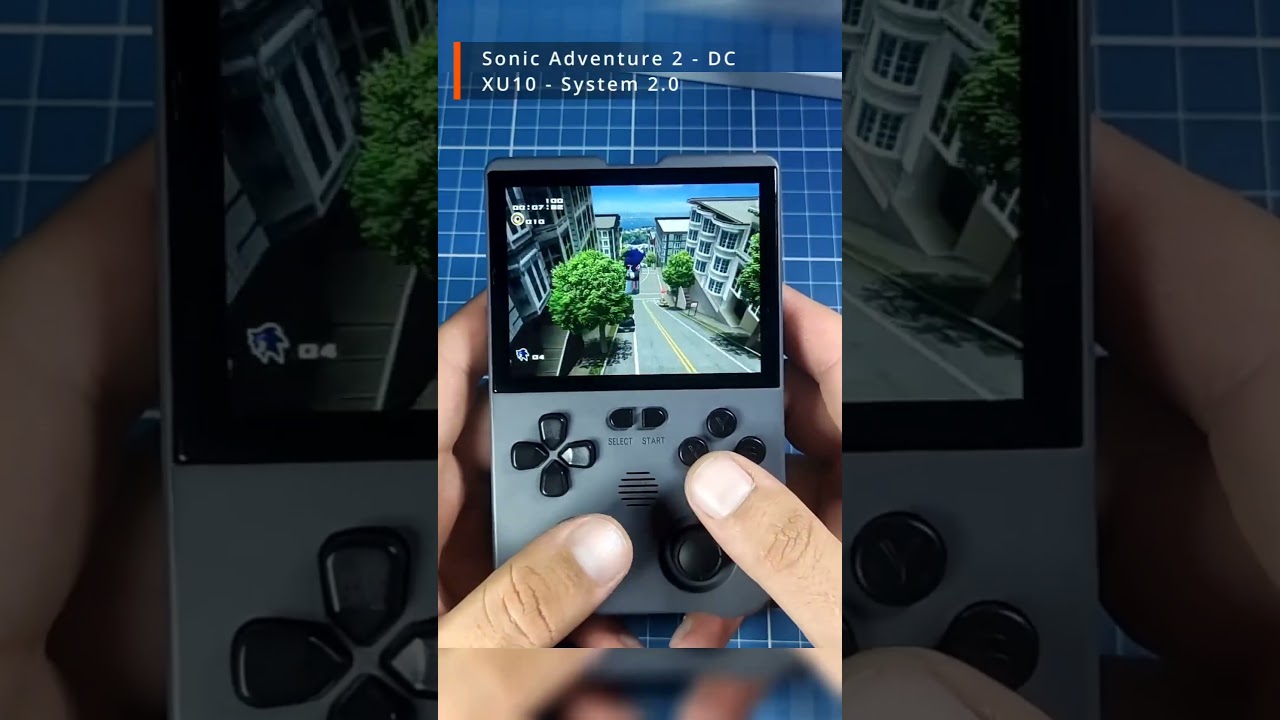
Saiu uma imagem que virá nos consoles Ampown XU10, com título 2.0.
Dentre as principais mudanças temos:
- Interface atualizada;
- Você consegue selecionar jogos de ambos os cartões através do menu;
- Driver OTG para controles reescrito, agora suporta 2 e até 4 jogadores no Retroarch
- Otimização em PSP, segundo o desenvolvedor, terá ganhos d...
smoky galleon
heavy drum
It seems so, but on PSP, at least on GoW, the cutscenes are apparently correct, ...
Yeah, there are still heavy games it cant run like gow or gta's but games that were playable with speed issues or audio delay are emuch better now tekken 6 for instance still gets quick audio cuts time to time but nowhere near what it used to be
heavy drum
One thing I noticed is the delay in control inputs, on Dreamcast and PSP for example, it's a little annoying
dusky vault
heavy drum
One thing I noticed is the delay in control inputs, on Dreamcast and PSP for exa...
On the stock version it was better?
smoky galleon
past frigate
SD formatter
I use this all the time
this solved it for me thanks, i cant believe i spent 2 days formatting whatever sdcards i find with windows and fail while i couldve just used sd formatter
heavy drum
dusky vault
On the stock version it was better?
I need to compare first, I haven't tested it again on Stock 1.0 to check this.
I'll probably make videos, although I noticed so much delay that it was annoying, especially on the Dreamcast, you can see it in the video.
dusky vault
heavy drum
I need to compare first, I haven't tested it again on Stock 1.0 to check this.
I...
I understand, it just the input lag is something really bad, it is something as bad as a bad frame rate in a game for me
formal flower
dusky vault
On the stock version it was better?
In my honest Opinion I would stick with stock until the other CFW get better.
formal flower
oblique thistle
I have the bootloop files from coaree. I deleted the system files & started over...
I have the orignal folder backed up from my 256mb version. you want me to send it over ?
oblique thistle
formal flower
I have the orignal folder backed up from my 256mb version. you want me to send i...
Please & thank you
 dense sparrow
Hi, @gritty plume qq, do you know un jelos how to configure the g button to open the menu?
 severe turtle
formal flower
I have the orignal folder backed up from my 256mb version. you want me to send i...
severe turtle
formal flower
I have the orignal folder backed up from my 256mb version. you want me to send i...
Hi was just about to come on here and ask for the stock OS (I stupidly deleted it)
I only have an 128 card tho so idk if the 256 will work with it
gritty plume
dense sparrow
Hi, <@247923363572482049> qq, do you know un jelos how to configure the g button...
What menu?
severe turtle
severe turtle
Hi was just about to come on here and ask for the stock OS (I stupidly deleted i...
The download link on GitHub for the stock os says it will take 1 day or download 😭
gritty plume
G + start is the common menu or quit hotkey
For retroarch the menu combo is L3 + r3 I believe
severe turtle
gritty plume
For retroarch the menu combo is L3 + r3 I believe
Ya it is l3 & r3
11 hours rip 😭
 dusky vault
severe turtle
11 hours rip 😭
dusky vault
severe turtle
11 hours rip 😭
leave it downloading the whole day
severe turtle
dusky vault
leave it downloading the whole day
I can’t other ppl in the house need to use the wifi
dusky vault
severe turtle
I can’t other ppl in the house need to use the wifi
Leave the download on when everybody is sleeping
 nocturne urchin
Hi guys please suggest link to xu10 128 gb 2.0 is it fully stock loaded with roms so i may delete and reflash my unit is particularly new as it was lying for so long and so no data on it yet
 marsh fern
severe turtle
11 hours rip 😭
marsh fern
severe turtle
11 hours rip 😭
I used a software called file centipede to download the files, was a lot faster than doing it directly, though didn't try with the torrent.
You just copy the address link for the files and add them in the software, it was downloading close to my network speed.
cyan sequoia
I wanted to dl 2.0 from the github but the tranfer rate was so slow, gave up in the end, dont have a million years to wait
past frigate
gritty plume
do you work for a reseller?
I am just one of their Chinese clients, and I have videos introducing XU10 in China. That's all
past frigate
gritty plume
G + start is the common menu or quit hotkey
I have asked why it is so closed, and even the game list cannot be freely added
Their response is as follows: their products have been continuously plagiarized by domestic manufacturers, including the game ROMS, all of which have been copied. They can only use such a bad method
past frigate
gritty plume
G + start is the common menu or quit hotkey
The first time I made a video was with their Y6 product
formal flower
severe turtle
I only have an 128 card tho so idk if the 256 will work with it
I have it here and yes it will work - https://www.dropbox.com/scl/fo/pa0p6uznjwzd0byzw1os4/h?rlkey=xhub2m6oexb6vk0dneuai9wei&dl=0
 gritty plume
past frigate
The first time I made a video was with their Y6 product
gritty plume
past frigate
The first time I made a video was with their Y6 product
Thanks for all the info, so this is powkiddy making them but trying to have a less clone able device? Or do multiple people whitelabel the y6 from this manufacturer and they don't directly sell
nocturne urchin
gritty plume
https://github.com/JustEnoughLinuxOS/distribution/releases/tag/20240222
hi guys, please check now that i try to download jelos, all releases of all devices are gone, is jelos also taken down? i couldn find any os for any device only source codes
GitHub
Home of the JELOS Linux distribution. Contribute to JustEnoughLinuxOS/distribution development by creating an account on GitHub.
gritty plume
nocturne urchin
hi guys, please check now that i try to download jelos, all releases of all devi...
Temporarily removed due to yuzu, will be back once updated packages are ready
severe turtle
formal flower
I have it here and yes it will work - https://www.dropbox.com/scl/fo/pa0p6uznjwz...
tysm
dusky vault
formal flower
I have it here and yes it will work - https://www.dropbox.com/scl/fo/pa0p6uznjwz...
What does it for? 🤔
 split ingot
Anyway to use the otg for a second controller for 2 players
formal flower
dusky vault
What does it for? 🤔
This is the OG boot partition for people struggling with boot loop however it is slightly modified as the annoying boot sound as been removed. I will post a 2.0 boot partition up soon.
dusky vault
formal flower
This is the OG boot partition for people struggling with boot loop however it is...
Oh I understood, that's a good idea, I will be waiting the 2.0 version
dense sparrow
Is anybody having issues with games with more than one CD in psx in jelos?
 sullen dune
 cyan sequoia
severe turtle
Anyone els getting this
cyan sequoia
severe turtle
Anyone els getting this
Yes, me and DuhOHB both got the same issue when flashing the supposed 2.0 update
I got it on both my extra 64gb card and 256gb card (flashing 64gb image)
cyan sequoia
sullen dune
I wonder what the inspiration for the looks was
@severe turtle however, I do not get that with Jelos or the ambernic(?) images
dusky vault
cyan sequoia
Yes, me and DuhOHB both got the same issue when flashing the supposed 2.0 update
Someone should do a correct tutorial about how to install the image on SD card, for avoid this problem
severe turtle
I was trying to get the stock os back on it
severe turtle
cyan sequoia
Yes, me and DuhOHB both got the same issue when flashing the supposed 2.0 update
Did u find away around it ?
Maybe it’s cos I dint flash owt to the sd card I just used the files from s1 els (I tried to download the img ones but they kept failing at like 80%)
formal flower
Downloaded the 2.0 256gb image. twice now. using winrar and it says its corrupt
Dam Chinese
actually its the torrent file thats messed up
let me try again
severe turtle
formal flower
Dam Chinese
Just use a translator
cyan sequoia
dusky vault
Someone should do a correct tutorial about how to install the image on SD card, ...
The thing is that I know how to burn images
severe turtle
Lol how u manage to download it 2 times took 1 and a half day for immune to download to 80% 😭😭
formal flower
I have FTTP. 1.6GB
severe turtle
cyan sequoia
The thing is that I know how to burn images
Innit
severe turtle
formal flower
I have FTTP. 1.6GB
Pretending Ik what that is 💀
formal flower
are there any other downloads for the 256gb 2.0 image
severe turtle
Ima try download it on my laptop this time
severe turtle
formal flower
are there any other downloads for the 256gb 2.0 image
Could u do the smaller on and just make a partition
formal flower
when you got to download the torrent file it only has 7 parts where as in reality it was something like 23 parts
cyan sequoia
severe turtle
Did u find away around it ?
I just reverted to using the original SD card without any updates
I dont want to invest any more time into the device. It's actually too small for me to use comfortably, so I think ill be selling it anyway
severe turtle
Rip
cyan sequoia
I love the form factor, but my hands dont
severe turtle
I wish I dint delete the original os now 💀
formal flower
OK Guys here is 2.0 Update. this is what should be in the folder after update
not sure if it will work for everyone
 austere ruin
 formal flower
Well that sucks
cyan sequoia
It does suck. Thanks nintendo
but
they are still going to develop for RK3326 based dvices
formal flower
I remember when Nintendo first attacked Emuparadise back in the day or at least scared them to take all the Nintendo roms down
 atomic tree
last Jelos for xu10 - r36s http://cyberio.org/files/index.php?dirpath=./Jelos/&order=3
fdscript file download script php directory lister
 raven viper
I never ordered from aliexpress before and I ordered an XU10 a few weeks ago is it normal for there to be long periods of time with no shipping updates or is that concerning
 raven viper
oh my god 
hard scroll
raven viper
oh my god <:joeysretrohandhelds_ohno:1129084670559129610>
jokes aside, it's going to be fine, if it doesn't arrive, you'll get your money back (in my experience at least)
raven viper
hard scroll
jokes aside, it's going to be fine, if it doesn't arrive, you'll get your money ...
yeah it’s just unfortunate i was excited to try it out it will be my first handheld
past frigate
gritty plume
Thanks for all the info, so this is powkiddy making them but trying to have a le...
As far as I know, the magicX team is not involved in sales. They only develop products.
cyan sequoia
raven viper
yeah it’s just unfortunate i was excited to try it out it will be my first handh...
How long is it since you ordered it?
dense sparrow
@gritty plume hi man, do you know if is possible to configure on the next version the psx config to use directly dualahock controllers? Is always configured like an standard dpad
In jelos I mean
Thanks for your work!!
raven viper
cyan sequoia
How long is it since you ordered it?
February 19th it said expected March 4th now it just says logistics delay
gritty plume
dense sparrow
<@247923363572482049> hi man, do you know if is possible to configure on the nex...
no, because this is not going to work for every game. you should be able to configure this at the system level for yourself in retroarch configs
 teal jolt
formal flower
Downloaded the 2.0 256gb image. twice now. using winrar and it says its corrupt
teal jolt
formal flower
Downloaded the 2.0 256gb image. twice now. using winrar and it says its corrupt
same here, but im trying 128mb version
the SD card that came with the xu10 corrupted faster than Max Verstappen, so I'm trying to resurrect him
formal flower
I have managed to download the 2.0 firmware and now have on my SD Card
256gb version
the torrent file is incorrect for the 256gb version and you have to download all parts manually
I used IDM
teal jolt
formal flower
I used IDM
im testing IDM and the download speed is MUCH faster than downloading directly through the browser, thank you
dusky vault
formal flower
256gb version
Does the 64GB image can work in a 256GB SD card, and after expand the games partition? 🤔
formal flower
dusky vault
Does the 64GB image can work in a 256GB SD card, and after expand the games part...
I sent you it directly. Yes will work
oblique thistle
Thanks to the hard work from my new bff @formal flower my XU10 is no longer a brick
 dusky vault
formal flower
https://www.dropbox.com/scl/fo/1a85x6p7zgql2w9i7z4cf/h?rlkey=ea9a9qv4ct7h0qslavh...
dusky vault
formal flower
https://www.dropbox.com/scl/fo/1a85x6p7zgql2w9i7z4cf/h?rlkey=ea9a9qv4ct7h0qslavh...
It says "this item was excluded"
formal flower
dusky vault
It says "this item was excluded"
What does ?
dusky vault
formal flower
What does ?
This link over here says "this item was excluded", but the one you sent me by message it is working, thank you 😄
dusky vault
formal flower
What does ?
Does this version make the N64 and Dreamcast games run bad?
cyan sequoia
@formal flower sorry for tag, but could you DM me the link for the 64gb 2.0? 🙂
cyan sequoia
oblique thistle
Thanks to the hard work from my new bff <@478996676099440642> my XU10 is no long...
Good to see dude. Glad you got it sorted. How do you find the perfomance on 2.0??
gritty plume
 jovial palm
AmberELEC prerelease for XU10 is [here](<https://github.com/AmberELEC/AmberELEC-...
jovial palm
AmberELEC prerelease for XU10 is [here](<https://github.com/AmberELEC/AmberELEC-...
nice work!
oblique thistle
cyan sequoia
Good to see dude. Glad you got it sorted. How do you find the perfomance on 2.0?...
I still don't have a search function. Every time I press X I get a load screen
formal flower
cyan sequoia
<@478996676099440642> sorry for tag, but could you DM me the link for the 64gb 2...
I have the 256gb 2.0 folder not the 64gb one.
I can download and extract the 64gb if you wish
formal flower
dusky vault
Does this version make the N64 and Dreamcast games run bad?
Where have you heard that. On inital test the PSP stuff runs alot better
dusky vault
formal flower
I can download and extract the 64gb if you wish
I heared people saying that when you try to put the Amberelec system inside the XU10, the dreamcast and N64 games runs bad on it. and that the Stock version of XU10 is way much better, I already told this here before
dusky vault
formal flower
Where have you heard that. On inital test the PSP stuff runs alot better
I don't mean the 2.0 version
jovial palm
dusky vault
I heared people saying that when you try to put the Amberelec system inside the ...
Maybe this was the case with the unofficial amberelec. The first image of amberelec for xu10 was made few hours ago
formal flower
dusky vault
I heared people saying that when you try to put the Amberelec system inside the ...
Yes, the stock build is the obvious choice for now and 2.0 is even better from what I have seen so far.
 tiny lichen
Has anyone tested the new amberelec x10 image yet on Dreamcast and N64, I'm planning to buy the XU10 if it runs better
formal flower
tiny lichen
Has anyone tested the new amberelec x10 image yet on Dreamcast and N64, I'm plan...
Do you have a link to the new build?
tiny lichen
formal flower
Do you have a link to the new build?
Sure, right here: https://github.com/AmberELEC/AmberELEC-prerelease/releases/tag/prerelease-20240310_0937

GitHub
Release Notes (Prerelease)
This is a prerelease based on the commit: AmberELEC/AmberELEC@6c6a9e0.
Prereleases and provided for the community to test fixes and explore new functionality. Please DO ...
It should be the one that says AmberELEC/AmberELEC@27a90c8b add powkiddy magicx xu10
formal flower
tiny lichen
Sure, right here: https://github.com/AmberELEC/AmberELEC-prerelease/releases/tag...
What game would you like me to try
tiny lichen
formal flower
What game would you like me to try
Tekken on the PSP, Sonic Adventure on the Dreamcast and Kirby 64 on the n64
I don't expect a full 60 fps, but just playable really
formal flower
PSP on stock 2.0 runs nice but I will try these games
jovial palm
you can enable overclocking as well
formal flower
might have to be tomorrow as its mothers day and I want to cook my beautiful wife a lovely meal.
tiny lichen
Fair enough, I can wait
 tiny lichen
heck yea
teal jolt
already tried installing the 128gb and 64gb version 2.0 img, now I tried 128gb 1.0 and they all gave the same error: Error in mount_flash: mount_common: Could not mount UUID=2710-3838
the latest version of JELOS works normally, i dont understand
cyan sequoia
Welcome to the club 
dusky vault
Does this USB charger is good for recharge the XU10's battery?

 obsidian rapids
5v 2A It s perferct
dusky vault
My XU10 arrived in home today, and didn't have no problem in installing the 64GB 2.0 image inside my Samsung Evo Plus 256GB SD card. This is my report about how I installed it for woking fine.
1 - I used the "Disk Management" inside of the windows 10 to DELETE (not format) all existing partitions inside my 256GB sd card.
2 - After I created a FAT32 format using the same program.
3 - After I used the "SD Card Formatter" program using the "quick format" to format the SD Card.
4 - After I used the "USB image" to install the 64GB 2.0 image inside of my 256GB sd card.
5 - After I used the "DiskGenius" program resize roms/games EXfat partition (I put all the "SPACE NOT ALLOCATED" to the partition of Roms).
I did not get no erros, no looping, no problems at all.
dusky vault
But I have one doubt, how do I change the settings of the buttons on the emulator? which buttons do I have to press to go open the retroarch settings?
obsidian rapids
the 2.0 it s locked, i guess
near bloom
jelos is pretty good, the G button works
interface feels a little laggy but i'm comparing the experience to arkos/amberelec on higher performance chips like rk3566
setting governor to performance helps but retroarch menus still sluggish
hard scroll
RA on Amber is fine
 tired rapids
ive seen some people using retroarch, how can i do this?(im using the 2.0 firmware)
dusky vault
The chinese guy that is on here, he could report to the magicx's team to insert the retroarch to costumize the controller as people wants it alot
on the next update
past frigate
dusky vault
The chinese guy that is on here, he could report to the magicx's team to insert ...
Due to many dealers not being familiar with RetroArch, when players disrupt the button settings of RetroArch, they return the product~
When there are many functions, the novice always messes up.
In addition, the G button should have the function of providing button settings
smoky galleon
past frigate
Due to many dealers not being familiar with RetroArch, when players disrupt the ...
This is true, i have soft locked myself out of psp and had to reinstall 2.0 because i deleted up button from emulator
formal flower
Retroarch is already running but just need the OG firmware to access it.
formal flower
tiny lichen
Tekken on the PSP, Sonic Adventure on the Dreamcast and Kirby 64 on the n64
OK, so tried this new image and theres a big problem. It no longer detects my wifi dongle which the older version did so I am unable to add roms
dusky vault
formal flower
OK, so tried this new image and theres a big problem. It no longer detects my wi...
You mean the 2.0 image?
 vague rune
Just installed JELOS on my XU10, does anyone know how to set the roms to show on tf2?
formal flower
@dusky vault no someone wanted me to try the new ambulec image and it seems they have broken dongle support
I would personally stick to the OG 2.0 image.
tiny lichen
formal flower
OK, so tried this new image and theres a big problem. It no longer detects my wi...
Got it. I guess it is pretty early in the development stage anyway. So OG 2.0 firmware it is then
dusky vault
formal flower
<@802197408288997406> no someone wanted me to try the new ambulec image and it s...
Oh I understand, can you report about the good and bad things about this new amberelec that you have noticed?
near bloom
vague rune
Just installed JELOS on my XU10, does anyone know how to set the roms to show on...
main menu -> system settings -> enable "autodetect games card"
I think it's off by default?
oh then go to main menu -> game settings -> update gamelists
ok, the reliable way to do it seems to be:
- main menu -> system settings -> have "autodetect games card" enabled
- main menu -> system settings -> "eject microsd card"
- remove the micro sd card from tf2 if it is in there
- re-insert the micro sd card
- main menu -> game settings -> update gamelists
oblique thistle
So every time I press X to search it reboots the system
vague rune
near bloom
ok, the reliable way to do it seems to be:
1. main menu -> system settings -> ha...
its on, i tried ejecting it and putting it back in, still cant see the games 😭
near bloom
Did you generate the console folders for the roms?
and put the roms in the right folders
vague rune
near bloom
Did you generate the console folders for the roms?
nah i put the games sd card into the xu10, it was from the r36s running arkos.
shouldnt they use the same file structurs and stuff?
near bloom
yea they do
vague rune
i still dunno why theyre not working 😭
near bloom
updating gamelists didn't work?
vague rune
imma try flashing AmberElec and see if it works
vague rune
near bloom
updating gamelists didn't work?
nope
tired rapids
I flashed jellos on my device, and retroarch dont let me clear the hotkeys binding(I already deactivate the autoconfigure setting on emustation)
dusky vault
Hello there, I was deleting some roms and adding other for Snes, Playstation and Nintendo DS. But now it doesn't appear the icons of them on the screen anymore, someone knows the problem? 😥
 tired rapids
dusky vault
Hello there, I was deleting some roms and adding other for Snes, Playstation and...
tired rapids
dusky vault
Hello there, I was deleting some roms and adding other for Snes, Playstation and...
You changed the folder names?
dusky vault
tired rapids
You changed the folder names?
No, I didn't
nocturne urchin
People are telling me same after updating jelos NDS is no longer available can someone confirm?
dusky vault
tired rapids
You changed the folder names?
I also included some roms for NES, and they appear on the list on the picture. But SNES, PSX and NDS doesn't
nocturne urchin
vague rune
nope
@arthur let the rom names be generated on its own system setting-create game directory and then copy again all roms . It should fix
Do for any one system first to avoid wasting time see if it works
tired rapids
dusky vault
I also included some roms for NES, and they appear on the list on the picture. B...
Which icons are you talking about? For the roms, or for the systems?
dusky vault
tired rapids
Which icons are you talking about? For the roms, or for the systems?
The Systems like on the photo
tired rapids
In the settings menu, you can change which system appears on the list. Maybe something changed in this configuration
dusky vault
tired rapids
In the settings menu, you can change which system appears on the list. Maybe som...
When I see which systems are marked on the list, it doesn't even display the list SNES, NDS and PS1 in there
tired rapids
Lol, no clue what happened, sorry
hard scroll
dusky vault
When I see which systems are marked on the list, it doesn't even display the lis...
Did you do Game settings - Update gamelists?
dusky vault
tired rapids
Lol, no clue what happened, sorry
This is the folders inside my sd card, the names are original
 hard scroll
Or is that stock 2.0?
dusky vault
hard scroll
Or is that stock 2.0?
It is a stock 2.0
hard scroll
I don't remember if the option is there, probably is
dusky vault
hard scroll
I don't remember if the option is there, probably is
No, there isn't. But it was not necessary for GBA, and N64, I put some roms on there, and the system and roms are appearing for them.
hard scroll
Try a reboot
dusky vault
hard scroll
Try a reboot
I already shutdown and turned it on many times, it doesn't appear those systems anymore
If I install the new amberelec on it, do I will lose the Roms's partition? or I just need to download the update file?
tired rapids
Amberelec creates the roms partition
But delete everything as far as i know
But amberelec is rough right now
For me jelos was way better
dusky vault
tired rapids
Amberelec creates the roms partition
I think if I install the amerbelec, it deletes everything, but if I download the update version, it doesn't lose anything? right?
dusky vault
tired rapids
But amberelec is rough right now
What is the good and bad things about this new amberlec?
hard scroll
dusky vault
I think if I install the amerbelec, it deletes everything, but if I download the...
I wouldn't do that, you can't back the roms up somewhere?
tired rapids
I think update is only for whio already flashed amberelec, i could be wrong
tired rapids
dusky vault
What is the good and bad things about this new amberlec?
For me the sound was really messed up, crackling, and when i connected my headphones, the sound was still coming out from the builtin speaker
dusky vault
hard scroll
I wouldn't do that, you can't back the roms up somewhere?
I am doing the back up now
hard scroll
In my experience Amber works better, no issues at all here
dusky vault
tired rapids
For me the sound was really messed up, crackling, and when i connected my headph...
And how about the emulation of N64, dreamcast and PSP, they are better or worse than Stock?
tired rapids
Man i didnt try these yet, because honestly is not that important from me
But ps1 was identical performance
As far as i know n64 is problematic in some games across all formwares
dusky vault
tired rapids
As far as i know n64 is problematic in some games across all formwares
I tested zelda ocarina of time, and donald duck quack attack n64, they were running good
on Stock 2.0
dusky vault
hard scroll
In my experience Amber works better, no issues at all here
Have you been playing games of N64 on it? the emulation is good?
tired rapids
hard scroll
In my experience Amber works better, no issues at all here
Weird
hard scroll
dusky vault
Have you been playing games of N64 on it? the emulation is good?
I haven't tried, the chip itself is not strong enough
jovial palm
it was the first prerelease of amberelec on xu10. so what are the issues encountered?
jovial palm
dusky vault
Have you been playing games of N64 on it? the emulation is good?
depends what are you want to play because there is no N64 emulator good for all.
dusky vault
jovial palm
depends what are you want to play because there is no N64 emulator good for all.
I just wanted to know if it is as good as the stock version of XU10
jovial palm
dusky vault
I just wanted to know if it is as good as the stock version of XU10
stock OS it was made from amberelec. so I don't think stock has made any reald adjustments or code changes to make it work better. they just locked down the system and put a logo, not more.
on amberelec we don't care which card you are using as at the first installation we expand, so you can put amberelec even in 8gb sd card. on stock, they modified the image by had and then they cloned the cards with different options, so there is no installation involved.
and is normal to have some issues on first prereleases of amberelec as is not an official release. but we feedback we can try to improve or fix issues while we go.
dusky vault
jovial palm
and is normal to have some issues on first prereleases of amberelec as is not an...
I see I understood, I installed the amberelec now, how to I make a save state and load state on the game now? the G button is not working anymore, also how do I access the retroarch inside the game for change the controls and check other stuffs?
jovial palm
all amberelec devices they use the same hotkeys and mapping to keep a consistensi across devices. here you can find more about the hotkeys
for accessing retroarch while you are in game you press L3 + R3
to save you have select + R1 and to load the save is select + L1
also it contains quick save and restore. while you are in the game you press R3 + power button and it will shutdown the console. next time when you power on the console will continue from where you left the game
dusky vault
jovial palm
all amberelec devices they use the same hotkeys and mapping to keep a consistens...
Oh interesting, well I just put N64 game for me do a test, I pressed L3+R3 on there, and it didn't open the retroarch though, I am going to test the saves state now
jovial palm
dusky vault
Oh interesting, well I just put N64 game for me do a test, I pressed L3+R3 on th...
the default emulator on N64 is retrorun and there is no menu for retrorun
before you lunch the game you can press select button, gotr to advance system options -> emulator and change the emulator from there, if you wannt retroarch you can change it to retroarch
and from that point on will be normal retroarch for n64. you get access to menu. you have also autosave
but the default emualtor retrorun works better then the one from retroarch
but test all of them and see which one is best for you
 gilded solstice
Hi @dusky vault !!
I'm a dev with AmberELEC too and focus more on userland! By default we use a standalone mupen64 core with the rice video plugin for speed with some accuracy caveats.
Any further questions lemme know! o/
dusky vault
jovial palm
but the default emualtor retrorun works better then the one from retroarch
Thank you alot for the report!
dusky vault
gilded solstice
Hi <@802197408288997406> !!
I'm a dev with AmberELEC too and focus more on use...
Thank you alot alot for the information bro! I will let you now ^^
smoky galleon
I played some psx games yesterday and when i open it today whole psx category was gone both in tf1 and tf2
I looked at the shown emulators from options, and there are 37/37 active with no psx in the list (it should have been 38 i guess)
I restarted emulator, i restarted the device
No change
dusky vault
smoky galleon
I looked at the shown emulators from options, and there are 37/37 active with no...
That how it was for me on the 2.0 update of the game, and also didn't show the SNES and NDS systems too
gritty plume
nocturne urchin
People are telling me same after updating jelos NDS is no longer available can s...
3ds was removed due to citra being gone, drastic is still there
 flat lark
i need help i just formatted the sd card and flash the amberelec onto it, now my screen doesn't wanna boot up.....the light is on when i press the "ON" button, but noting on the display
near bloom
tired rapids
I flashed jellos on my device, and retroarch dont let me clear the hotkeys bindi...
yea I had this issue too, I think it was screenshot key binding? might be just all the preconfigured ones that can't be cleared.
atomic tree
@nocturne urchinNDS is OK, update over wifi ...
cyan sequoia
I FINALLY got 2.0 on my system
I have to admit, I see very little performance improvement, if any, vs the old OS
on the dreamcast**
They system select UI is much nicer though
just a shame that it reverts to the old UI when you go to game selection
tired rapids
near bloom
yea I had this issue too, I think it was screenshot key binding? might be just a...
I found a solution, if you still interested i can teach you how to unbind
gilded solstice
flat lark
i need help i just formatted the sd card and flash the amberelec onto it, now my...
Did you follow the instructions on the website?
near bloom
tired rapids
I found a solution, if you still interested i can teach you how to unbind
Is it manually editing remap files?
Does it change it so you can clear it in the future through the retroarch menu
tired rapids
Kind of
First go to emustation menu->controller and bluetooth settings-> disable autoconfigure retroarch hotkeys
Then go to /tmp/joypads
Open and edit the XU10 Gamepad.cfg
Set everything related to the hotkeys to "nul"
Reboot, and now you can clear the buttons bindings in retroarch
flat lark
gilded solstice
Did you follow the instructions on the website?
yes i did
obsidian rapids
Can anyone who has Jelos installed kindly remember me what is the maximum speed of the processor in overclock mode? thanks
near bloom
obsidian rapids
Can anyone who has Jelos installed kindly remember me what is the maximum speed ...
turning it on sets it to 1416 for me (system settings -> information -> maximum frequency)
1296 with it off
i have the latest build 20240313
obsidian rapids
Thanks
flat lark
anyone here can help me step by step on how to install emberelec on my new sd card for xu10?
I have tried doing it on my own, but my screen still blank display
 whole dome
download image -> flash it onto the sd card with balenaEtcher or whatever program you wanna use -> put it into the right tf card port -> done
flat lark
whole dome
download image -> flash it onto the sd card with balenaEtcher or whatever progra...
i did that, black screen....i did the same for jelos and it work fine, just not amberelec, i use the rg361p as instructed on the webpage....still no changes, did this multiple time on my first sd card and the sd card died, so i got a new one, adn still the same result
same result, as in black screen
near bloom
flat lark
i did that, black screen....i did the same for jelos and it work fine, just not ...
2 of my sd cards died (netac brand) messing with amberelec/2.0 os on the xu10
apparently there's an issue with what voltage is set to for the sd card reader: https://github.com/JustEnoughLinuxOS/distribution/pull/2734/commits/08683ab776855f0a75e779a3f8b5202327073620
jovial palm
flat lark
i did that, black screen....i did the same for jelos and it work fine, just not ...
You need this image of amberelec
jovial palm
near bloom
apparently there's an issue with what voltage is set to for the sd card reader: ...
Dose not have anything to do with it. If that was the case, how a voltage issue on jelos can affect your card with amberelec? Go with more known brands like kingston, is at a similar price and if you card dies you get a replacement in warranty
near bloom
jovial palm
Dose not have anything to do with it. If that was the case, how a voltage issue ...
They use the same dts
And yea I know netac isn't a premium brand, it's just a cheap brand I have because it seems like they at least don't lie about speed/capacity
jovial palm
near bloom
They use the same dts
No. I am not using the same dtb. The one on amberelec was build from 0. Regulators are similar because those are unique made for the device. Go to amberelec server and on xu10 channel there is a new dtb which you can try.
Changes on that dtb are more for the regulators of second sd card as there were reported some issues with the wake up from sleep
jovial palm
near bloom
And yea I know netac isn't a premium brand, it's just a cheap brand I have becau...
True, but if you keep an eye on offers you can get something good. I got kingston 128gb even with 5$
near bloom
I'm trying to remember what exactly I did, the micro sds ended up going into read-only mode
jovial palm
near bloom
I'm trying to remember what exactly I did, the micro sds ended up going into rea...
That happens for two reasons, you reach the number of writes on the sd card…or you pull it out while it was writing and linux didn’t had the time to remove the read-only lock, and the quickest was to fix it is to format it on an android device, or fix it by command line in windows
near bloom
yea it was acting like the write limit was reached, showing up as just having a 2gb raw partition
flat lark
near bloom
2 of my sd cards died (netac brand) messing with amberelec/2.0 os on the xu10
im using kingstonsd card, dueto lifetime warranty,so...yea free replacement 😉
flat lark
jovial palm
You need [this](<https://github.com/AmberELEC/AmberELEC-prerelease/releases/down...
i'll checkthis out
flat lark
near bloom
yea it was acting like the write limit was reached, showing up as just having a ...
probably your sd card is in fat32 format, fat32 has limited space for main partition. while exfat has more capacity. you can read it up online.
please check sd file system type before flashing or copying any roms tho, you dont wanna format the sd card one too many times, or the sd card will die....literally
certain OS are only compatible with certain file type,FYI...
near bloom
yes and when you flash your card with the image it will format it to that file system type
near bloom
jovial palm
That happens for two reasons, you reach the number of writes on the sd card…or y...
I think my issue was not using the official amberelec xu10 but followed steps off coar.ee/xu10
idk might look into it more later
jovial palm
near bloom
I think my issue was not using the official amberelec xu10 but followed steps of...
the new prerelease of amberelec for xu10 is plug and play. just write the image and then put it on your device
whole dome
flat lark
i did that, black screen....i did the same for jelos and it work fine, just not ...
https://github.com/AmberELEC/AmberELEC-prerelease/releases/ maybe use the right image# 
GitHub
AmberELEC prerelease images. Contribute to AmberELEC/AmberELEC-prerelease development by creating an account on GitHub.
dusky vault
I am using the prerelease amaberlec on my xu10, it is working normally
cyan sequoia
Well guys, I sold my XU10, not enough time for it and a little too small for my hands
Cheers for the help that some of you provided me with when trying to update the OS
dusky vault
Does it possible to emulate "Nokia N-Gage" games on the XU10 using amberelec?
jovial palm
dusky vault
Does it possible to emulate "Nokia N-Gage" games on the XU10 using amberelec?
no. I don't think there is any open source OS available which supports N-gage games.
whole dome
Is there even an n-gage emulator?
jovial palm
whole dome
Is there even an n-gage emulator?
EKA2L1
 ebon sand
 weak linden
looks like it has both a linux and android port https://github.com/EKA2L1/EKA2L1/releases
GitHub
A Symbian OS/N-Gage emulator. Contribute to EKA2L1/EKA2L1 development by creating an account on GitHub.
 dim ice
How to fix it?
 dusky vault
dim ice
How to fix it?
dusky vault
dim ice
How to fix it?
It says it doesn't have enough space in your sd card to install the update, how much free space do you have?
dim ice
dusky vault
It says it doesn't have enough space in your sd card to install the update, how ...
40gb
If I add an update to the roms folder nothing happens
jovial palm
dim ice
How to fix it?
is the stock OS or amberelec?
dim ice
jovial palm
is the stock OS or amberelec?
Amberelec
jovial palm
dim ice
Amberelec
you need at least 3-4gb free on sd card
if you have 2 SD cards setup, then this needs to be free on the second sd card. if you put the prerelease image (.tar) in /roms/update this is picked up from second card if that exists, else is picked up from first sd card
 strange tide
Hi, i'm still stuck in "could not mount uuid" some one can help?
dim ice
jovial palm
if you have 2 SD cards setup, then this needs to be free on the second sd card. ...
Hmm, I'll try to throw the image on the second card, when I threw on the first card nothing happened, as I wrote earlier on the first card free 40+ gb
Thanks you
jovial palm
dim ice
Hmm, I'll try to throw the image on the second card, when I threw on the first c...
If you put it on first card, make sure the second one is not inserted
dim ice
jovial palm
If you put it on first card, make sure the second one is not inserted
I apologize wildly, but could you add functionality to the G button, which is on the right side of the console, for example, on the default firmware with the help of it could quickly close the game, which is launched through emulationstation, and also turn off or restart the console being on the main screen. And thanks again, I was able to install the update.
dim ice
strange tide
Hi, i'm still stuck in "could not mount uuid" some one can help?
APPEND boot=UUID=2710-0139 disk=UUID=b4fe27ed-a783-4225-90cd-e28dd2e1df82 quiet console=ttyFIQ0 console=tty0 net.iframes=0 fbcon=rotate:0 ssh consoleblank=0 systemd.show_status=0 loglevel=0 panic=20
change these lines in the files rk3326-xu10-linux.dtb.conf and rk3326-xu10-linux-oc.dtb.conf
jovial palm
dim ice
I apologize wildly, but could you add functionality to the G button, which is on...
to keep a standard, all amberelec devices they use the same layout for the keys and hotkeys, so everything which is extra, like that G button, we add it to the system but we do not mapped to anything, so if you want to remap it in retoarch, you can do it, but that is all you can do from UI. exit from games is start + select. when you are on ES you can press R3 + power and it will shutdown the console
same hotkey R3+power is quick save and shutdown of the console, if the emualtor is retoarch
when you power on the console will restore the same game, same save state
dim ice
jovial palm
to keep a standard, all amberelec devices they use the same layout for the keys ...
Thanks, I just used the amberelec firmware based on the default firmware and it used the G button
jovial palm
dim ice
Thanks, I just used the amberelec firmware based on the default firmware and it ...
because on amberelec website we use one layout and hotkeys for all devices is very hard to make it custom per device and keep a record of each device with extra buttons. also it will be confusing if you use another device with amberelec and then move to another one. at least at this point of time we don't have any way to give the user the liberty to remap controls easily.
dim ice
https://fastupload.io/bTEq9ISuKfMcyiN/file i use this firmware

Fastupload.io
Free File Hosting. Upload and share files for free using a direct download link. No Sign Up Required, Unlimited Space, No download limits.
dim ice
jovial palm
because on amberelec [website](<https://amberelec.org/guides/getting-to-know-amb...
Okay, thanks you anyway
jovial palm
well that is an unofficial amberelec release, which you can use it, but that will get updates based on who made it, so the future updates and support will not be offered as is not made by amberelec team. as long as you use the official firmware, you will get future updates and/or improvements.
also you have the option of OTA update directly from device
jovial palm
dim ice
I mean yours from github)
I am part of the team, so repo is of AmberELEC 😉
I encourage you and everyone to use our suggestions channel for different ideas 💡, like this one with the hotkey.
whole dome
I would rather see some AmberELEC love for the rk3566, which seems to be such a pain in the ass that the JELOS team already abandoned it
strange tide
dim ice
APPEND boot=UUID=2710-0139 disk=UUID=b4fe27ed-a783-4225-90cd-e28dd2e1df82 quiet ...
i was looking the files and Its already in this way, but with different names like "rk3326-rg351v-linux.dtb/ oc,,, i have The original SD booting normal in a old version and these files are the same, really dont know what is the problem, but thanks anyway
gritty plume
whole dome
I would rather see some AmberELEC love for the rk3566, which seems to be such a ...
 whole dome
A man can dream. Especially given how I have 7 devices with that chipset
To be especial evil the rg-arc needs some dedicated love in terms of custom firmware
Tbh what bugs me the most is that I can't just swap around my game card between the different cfw.
Well and maybe the lack of support for rumble on JELOS.
whole dome
wait, I change my mind about what bugs me the most... GB being between NES and SNES instead of sitting right in front of GBC, GBA and DS is just horrid 
split ingot
Hi All, is there a way to make this two player using either plug in controller or Bluetooth dongle?
 faint skiff
Which cfw is the best for this right now
jovial palm
faint skiff
Which cfw is the best for this right now
Amberelec 😜
faint skiff
I trust you @jovial palm xD
jovial palm
test all of them and see which one you think is best
whole dome
I care little between Amber and Jelos, but ArkOS is just not for me
gritty plume
if you wanna tinker, jelos. if you want less tinkering and pre-optimized, amberelec
 tropic idol
faint skiff
Which cfw is the best for this right now
tropic idol
faint skiff
Which cfw is the best for this right now
AmberELEC is amazing on it.
I put some sharpie on the back of the LED diffuser. Much better IMO.

Somewhat hard to photograph but it’s a big difference in person.
 kind blaze

 raven viper
Got it finally delivered
strange tide
dim ice
APPEND boot=UUID=2710-0139 disk=UUID=b4fe27ed-a783-4225-90cd-e28dd2e1df82 quiet ...
I got a solution, Just flash in a larger SD, i flashed a 64 image in a 128 SD, not ideal but functional
smoky galleon
how to put images for the games i add afterwards?
dusky vault
formal flower
Check this guys
what was the command for enter on the retroarch?
atomic tree
changed original FW.
formal flower
dusky vault
what was the command for enter on the retroarch?
I changed the kernel to the latest Amberllec and the combo is G key and X
 low cave
formal flower
low cave
formal flower
use our official firmware and not some stupid hacked thing
raven viper
so I tried to clone the sd card to a name brand one
and when I turn it on it just says it’s unable to mount uuid
oh searching in chat seems like a common issue
low cave
raven viper
and when I turn it on it just says it’s unable to mount uuid
Use our official image from our pre-release page then the error won't happen.
raven viper
low cave
Use our official image from our pre-release page then the error won't happen.
Okay I’ll try it tonight
obsidian rapids
low cave
Use our official image from our pre-release page then the error won't happen.
the pre release it s great! nice performace
dusky vault
I've been using the prerelease version of amberelec, but I noticed that if I use the pararell core in retroarch on N64, the analog just works in diagonal way. and also I noticed that for other systems too.
jovial palm
dusky vault
I've been using the prerelease version of amberelec, but I noticed that if I use...
please, make a video to show us the behaviour
tropic idol
dusky vault
I've been using the prerelease version of amberelec, but I noticed that if I use...
I had this same issue happen to me on 2 of 3 XU10. I swapped the sticks around. One started to work so I can only assume it was my error on the ribbon cable placement. The other unit no matter what I did the stick still would only work diagonal.
low cave
dusky vault
I've been using the prerelease version of amberelec, but I noticed that if I use...
Are you sure it worked before?
Sounds like a hardware issue, see comments by @tropic idol
tropic idol
The stick would only input diagonal top left to bottom right. Both were doing the same behavior. The one stick still only has the bad input and is doing same behavior on right side now. The swapped stick works fine on left. I would agree it is hardware issue.
One of the 3 units had a bad speaker with distortion also. So now there is a unit with a bad speaker and bad right stick.
AND.... one unit had a screen that was very loose. Had to add some adhesive as the screen was coming out. That is also in that unit. I'll keep it around for parts and testing I guess. So maybe XU10 doesn't have the best QC?
I have also found ABXY buttons "tilting" and rubber membranes being more stiff or not from unit to unit.
 pallid thicket
Who has experience with latest jelos (final) and amberelec prerelease on this device?
For the nicest answers I have info for a huge battery upgrade for you guys.
(I'm also the one who measured the anbernic rg35xx inside space, with explaining optional possibilities with cutting 2 tiny unneeded bracings and shaving backpanel thinner, to get biggest battery possible, with and without trimming.)
For Xu10 it's really simple:
Open up, remove battery, remove 4 screws for joystick plastic brace, remove brace (joysticks have their own screws, and it's still study enough, off course 10kg pressure to brake them out of (inside) case will be 3kg orso now. Other devices like rgb30 have the same construction (without brace), it's sturdy enough.
Place 5000mah 955565 battery (should fit with no other trimming than removing joystick brace)
formal flower
low cave
use our official firmware and not some stupid hacked thing
Stupid hacked thing? You need to calm down buddy
tropic idol
pallid thicket
Who has experience with latest jelos (final) and amberelec prerelease on this de...
AmberELEC is great! JELOS I had issues with things and Ports not working. I notice a color difference on games and UI using AmberELEC vs JELOS which I also like a lot better.
pallid thicket
tropic idol
AmberELEC is great! JELOS I had issues with things and Ports not working. I noti...
Thanks, I have experience with jelos and rgb30, and other firmwares for rg35xx. Ports I can figure out, could be an easy fix. Color can be due to another kernel (or display driver) orso. In jelos I know we can set saturation, hue and all things. I might give it a go just to test, and otherwise for sure amberelec!
tropic idol
pallid thicket
Thanks, I have experience with jelos and rgb30, and other firmwares for rg35xx. ...
I have JELOS on my 353VS and everything is working great that I use anyway on 2/2 build including all Ports. I was only comparing the out of box experience with AmberELEC vs JELOS and I would say AmberELEC would the better choice for someone who doesn't know or want to tinker. Of course that could change with updates.
tropic idol
Also... I am a big fan of a single card SD set up with AmberELEC.
tropic idol
Just downloaded latest JELOS to test. I am experiencing very weird behavior in my theme not loading all the artwork. In tools when I exited it brought up a black screen and text saying something about keyboard. Go to menu to adjust brightness and exit to main menu and all black screen for a long time where as AmberELEC is immediately back to menu. Brightness set at same level and AmberELEC noticeably brighter with better colors. No settings to change hue or coloring on either OS. Boot time is 6 seconds longer on JELOS than AmberELEC. From time of trying to leave system settings menu to main menu it takes 40 seconds on JELOS and AmberELEC instant. Yeah.... AmberELEC for XU10 without question. I won't even bother testing games.
Took games card of XU10 with JELOS and now it takes only 6 second to go back to main menu from settings. Still not instant and snappy but much better. But of course not something that matters as we would have a games card installed.
dusky vault
jovial palm
please, make a video to show us the behaviour
You can try it on N64 using the parallel core (retroarch version), I talked with @heavy drum and he also confirmed this problem with him too.
dusky vault
low cave
Sounds like a hardware issue, see comments by <@1041642833800593490>
It is not a hardware issue, as for snes retroarch the analog works pretty well, someone said it is a .dtb issue
jovial palm
dusky vault
You can try it on N64 using the parallel core (retroarch version), I talked with...
I don't have the console. a video will help us to better understand what is happening we can try to make some adjustments.
low cave
dusky vault
It is not a hardware issue, as for snes retroarch the analog works pretty well, ...
How do you explain the error moved from left to right analog when @tropic idol switched the hardware from left to right?
low cave
I guess the hardware of the analogs is bad and our optimized settings trigger that error that's why it's not happening on good analogs and the error moves for @tropic idol from left to right analog
You'll get another dtb with the weird default values please test and report @dusky vault
dusky vault
jovial palm
I don't have the console. a video will help us to better understand what is happ...
I can not record anything right now, but I think later I can do it
jovial palm
dusky vault
I can not record anything right now, but I think later I can do it
then let me send you a new dtb file to test
dusky vault
low cave
How do you explain the error moved from left to right analog when <@104164283380...
The analog directions to up, down, left, right directions they doesn't work. but if you press diagonal inputs up+right, up+left, down+right, down+left it works (that's for rertoarch parallel core in N64) the automatic core the analog works normal in all directions, but I also tried some other systems (don't remember which now) that the analog was only working diagonal directions too
tropic idol
This is a very weird issue. It doesn't make sense to be a dtb issue as swapping around my sticks solved it (kinda)... the one stick with the problem has same issue and same top left to bottom right only movement. And now I have two units that have working sticks on both sides. Either way Would love to test the dtb as well to help figure this out.
tropic idol
dusky vault
The analog directions to up, down, left, right directions they doesn't work. but...
This is not the issue I was having... my issue was the stick only moves from top left to bottom right diagonal and nothing else.
jovial palm
dusky vault
The analog directions to up, down, left, right directions they doesn't work. but...
try this
low cave
dusky vault
The analog directions to up, down, left, right directions they doesn't work. but...
I understand what you're saying but I still insist it's the hardware 😄
There is no software involved in analog controls
dusky vault
Thanks, I am going to test it now
low cave
Except for the driver itself
dusky vault
low cave
I understand what you're saying but I still insist it's the hardware 😄
It is not a hardware issue since the automatic core this problem doesn't happen
low cave
There is no "automatic" core
dusky vault
low cave
There is no "automatic" core
I am sure you understood what I was trying to mean
jovial palm
try the dtb and we will see if the issue is still there
low cave
Another question did you use Jelos before and did it work?
dusky vault
jovial palm
try the dtb and we will see if the issue is still there
It still in there
tropic idol
OK.... I do not play N64 games on the XU10 and just tried what @dusky vault was saying. I am experiencing the same issue using the emulator mentioned
jovial palm
dusky vault
It still in there
on the original OS you have the same issue with the same rom?
dusky vault
jovial palm
on the original OS you have the same issue with the same rom?
The original OS I don't remember if I used the parallel retroarch core in N64
tropic idol
I think we are now talking about potentially 2 different and unrelated issues from my stick issues and what @dusky vault is experiencing?
dusky vault
jovial palm
on the original OS you have the same issue with the same rom?
But I still have the 2.0 OS on the stock SD card, I can test it now
dusky vault
tropic idol
I think we are now talking about potentially 2 different and unrelated issues fr...
Are you having the same problem too?
jovial palm
@tropic idol if you encounter the same issue, can you, please make a video? and not to spam others you can put it on amberelec server
low cave
dusky vault
But I still have the 2.0 OS on the stock SD card, I can test it now
If it unexpectedly works please try jelos where it shouldn't work too then
tropic idol
Elitekr described it perfectly.... diagonals work and not direct up down left or right. No video needed.
Can't even launch a N64 game in JELOS...
dusky vault
jovial palm
on the original OS you have the same issue with the same rom?
I tested the Original 2.0 Stock system, the retroarch N64 core parallel the analog works normally on there.
tropic idol
I don't know if I have a bad install of JELOS or what. Might need to try it again?
jovial palm
then anyone with JELOS if they can test this would be good
low cave
dusky vault
I tested the Original 2.0 Stock system, the retroarch N64 core parallel the anal...
The only difference is the joypad driver which is not open source
The stock OS itself is also AmberELEC
Can you please test it's also not working on jelos
@gritty plume there might be an issue with your joypad driver
gritty plume
low cave
<@247923363572482049> there might be an issue with your joypad driver
i wouldn't be surprised, i had to basically guess what they were doing with a bizarre 2 channel sar mux
i settled on a single bit mux but i shared them between all the bit sets
low cave
Can you try to fix the above described issue, or no idea how to fix that?
Or we ask Powkiddy to share their kernel source 😂
jovial palm
low cave
Or we ask Powkiddy to share their kernel source 😂
or better say ask powkiddy to share our modified sources 
low cave
@still kite do you know someone with contact?
gritty plume
low cave
Can you try to fix the above described issue, or no idea how to fix that?
could tinker with the mux set to see if just setting 1 of the bits works better, i had tested it with sdl-jstest but obviously that doesn't let me swap the sticks
low cave
gritty plume
could tinker with the mux set to see if just setting 1 of the bits works better,...
Sorry that I can't help with that, it's beyond my capabilities 😭
jovial palm
gritty plume
could tinker with the mux set to see if just setting 1 of the bits works better,...
take a look here this uses 4 mux, maybe you get some ideas
gritty plume
yeah there's 4 muxes in the xu10 one too, but the 4 way mux in it is wonky
been a while since i've looked at the driver and been a bit too busy with work to do a lot of tinkering lately sadly so i may not be able to test this right away
 still kite
low cave
<@576856879586738206> do you know someone with contact?
still kite
low cave
<@576856879586738206> do you know someone with contact?
I'll ask around
weak linden
just ordered this fella. $35 from aliexpress after coupon
pallid thicket
With coins shortcut in app some nice prices indeed. Got one for 37 euro and a miyoo mini plus for 38. (still can get more miyoo's, tempting..)
 upper gate
Hello, new here with handhelds. I would like to ask assistance with my XU10. I flashed JELOS OS on an 64gb TF Card, inserted it in the TF1/EXT and the XU10 booted correctly. So I tried adding in a 4gb TF card on the TF2/INT slot and booted XU10. I went into system settings, hardware / storage, and created game directories (with automatically detect games turned on). After completion, I shutdowned XU10 and read the 4gb TF card on my pc and there were no game directories. So I added in a folder named "roms" and inserted it in the TF2/INT and booted the device, did the same steps but still no game directories. However, when I checked the files manager in the XU10, it seems like there were game directories created but I believe its in the 64Ggb TF card. So I tried reading it on my pc and it only shows the JELOS OS partition. How do I add games?
raven viper
low cave
Use our official image from our pre-release page then the error won't happen.
alright I’m on the amberelec prerelease now, turns out the sd card just wasn’t compatible I guess because I couldn’t get amberelec to work on it either it was just a solid black screen upon boot, i flashed it on some random 8gb micro that I had and it works fine
heavy drum
dusky vault
You can try it on N64 using the parallel core (retroarch version), I talked with...
yep
raven viper
upper gate
Hello, new here with handhelds. I would like to ask assistance with my XU10. I f...
I am not sure with jelos but amberelec support for 2nd card game folder worked for me easily
smoky galleon
i used skraper to put boxart on tf2 but it didnt work, what to actually do
 rose pawn
 whole dome
lol what, shame that they are probably 60€ for me
atomic tree
57usd best price for me
weak linden
saw one for $37 on superdeals but not $22
 chilly wigeon
I found that deal and pulled the trigger, even though I really wasn't going to get it
only purple was available, but it's not a bad color
any recommendations for the OS? or should I stick with JelOS that it apparently comes with?
flat lark
Anyone knows how to connect to the internet using a wifi adapter for the XU10?
formal flower
Yes but you need amberlec
atomic tree
on stock fw u can not only jelos ar amberelec
tropic idol
353 buttons fit! Just need to lightly sand the tabs to make shorter.
 whole dome
neat, but I honestly would love nothing more than PS buttons in that thing... if only they would nearly be expensive as the device itself
also 353v, 353p, 353m?
not sure if they all have the same button size tbh
(which is ironic given that I have them)
tropic idol
whole dome
also 353v, 353p, 353m? <:kirbypopcorn:908801924101443605>
not sure if they all ...
Sakura on Etsy lists them all as same size. That is where I got them
whole dome
fair enough, the temptation of getting PS buttons for this is real 😅
tropic idol
whole dome
fair enough, the temptation of getting PS buttons for this is real 😅
That would look great! But yeah... same cost as another XU10. hmm
whole dome
well about 50% of the cost of an XU10 but yeah, was already pretty expensive for the rgb30
tropic idol
This has been my go to vertical though lately... and if I had to have the look and feel of the PSX buttons... I would buy them right away. Big fan of this device.
whole dome
the PS buttons are really nice
tropic idol
Oh I think I am looking at the wrong listing on Etsy
I see buttons and sticker set for $37
Ah found it! $28
whole dome
https://www.etsy.com/de/listing/1329419302/
this one, but v/p/m are listed separately 

Alle Knöpfe sind aus Kunstharz und 3D-gedruckt. Die Tasten sind schwarz mit farbigem PlayStation-Logo. Das Einfügen der Logos erfolgt einzeln von Hand, ebenso wie die Endbearbeitung jedes einzelnen Knopfes. Jeder Knopf erfordert viel Liebe zum Detail und Arbeitszeit, es handelt sich hierbei nicht um
tropic idol
I got my XU10 for $40
whole dome
yeah, Germany is a tad more expensive for the handheld
tropic idol
Makes sense
whole dome
still hard to justify to spend about half of the cost of the device on buttons 😂
just would fit so great that one is tempted
was already pretty insane to put PS buttons on the rgb30, which is 1/4 of the cost of the handheld
tropic idol
I get that... but Sakura is one person and small batch. Not some huge factory in China. Paying a premium on the quality and unique items I fully support.
whole dome
oh all my 3 rgb30 have Sakura buttons
I don't really mind the price
but well, I already opened my XU10 to correct the button placement it originally had, so maybe not again, was already annoying enough
tropic idol
The RGB30 was my go to.... but this thing... I want to play it just because I love the feel of this d-pad so much. I was like a lot spending more time with mods and setting up devices... with the XU10 I just want to sit in my lounge chair and play games. 😀
whole dome
the d-pad is great yeah
tropic idol
whole dome
but well, I already opened my XU10 to correct the button placement it originally...
Yeah... I got the hang of opening it up now. Have done it about a dozen times. Not too bad once you know how. My first time though.... horrible
whole dome
opening it wasn't soooo bad
but placing those tiny stick cables back in if I don't have to, I would rather not
and I don't really plan on switching them out for hall sticks on this device, so nope
flat lark
@formal flower @atomic tree I have Jelos firmware on my device, please help.
strange tide
Hi, i have installed jelos here, but i cant download any Port in portmaster, IP is connected in main menu but unknown in portmaster, someone to help
atomic tree
flat lark
<@478996676099440642> <@384463675785740299> I have Jelos firmware on my device, ...
Is it easy … plug wifi to org port, in menu find network setings select wifi and password and thats all. https://jelos.org/configure/networking/
atomic tree
tropic idol
Oh I think I am looking at the wrong listing on Etsy
For this price i can buy used ps vita… 😂
tropic idol
atomic tree
For this price i can buy used ps vita… 😂
We all have preferences. I’m perfectly happy with the stock buttons swapped around. I was just sharing that 353 buttons can fit with minor modifications. 😎
obsidian rapids
8 euro from AliExpress (rg353v grip)


 strange tide
Hi, i have installed jelos here, but i cant download any Port in portmaster, IP ...
strange tide
strange tide
Hi, i have installed jelos here, but i cant download any Port in portmaster, IP ...
It was my poor wireless adapter 🤦♂️
dusky vault
GitHub
AmberELEC prerelease images. Contribute to AmberELEC/AmberELEC-prerelease development by creating an account on GitHub.
An update of the prerelease amberlec was released 4 days ago, and nobody talked about it on here
obsidian rapids
Thanks for the info
whole dome
The screen isn't bad tho
Not as great as the one the r36s has, but well, I rather take decent controls
weak linden
mine's made it my post office. Should arrive today
whole dome
oh yeah, lot darker than the r36s screen
my stock software never even worked
just tossed it from the card
and that was waaaay before we officially had a bunch of cfw
good thing Oendaril had JELOS running or else my XU10 would have went back
didn't even had the chance to try the stock OS, so I can't really complain 
nope
only issue I had with this thing was the stock OS
but I opened it up anyway to switch the buttons around, Xbox layout is just wrong
weak linden
I was looking at sakura ps buttons to really complete the look but jeez $28 for buttons when I paid $35 for the device is a tough pill to swallow
whole dome
had that discussion here with someone a few days ago
KINDA want that
but yeah 25€ even while the device itself was 45€ is still a tad bit excessive
the rg353 ones apparently fit tho
dusky vault
The problem that I had with the stock OS was the systems disapearing after adding and deleting roms
 cloud ledge
About the screen, I just tell myself that it has imbedded scanlines lol...Like what a retro handheld should be
pallid thicket
The screen might be brighter with change in firmware though, don't know if it's 'capped' at a certain level (voltages could be changed).
pallid thicket
cloud ledge
About the screen, I just tell myself that it has imbedded scanlines lol...Like w...
Just use an overlay or simple fast shader with scanlines?
cloud ledge
I mean...I use none because the screen makes for it
pallid thicket
cloud ledge
I mean...I use none because the screen makes for it
Ah, haven't notice it really, you got a bad screen orso?
cloud ledge
Like we all say it's not the best screen but when you look closely you can see lines...
pallid thicket
cloud ledge
Like we all say it's not the best screen but when you look closely you can see l...
I can't on low or high brightness. Mabey different screens then. If you mean by closely, with a camera making a picture and zooming in you can see most lcd panels 'grids' indeed.
Must say, the screen gets fairly bright, it's comparable to my og rg35xx. (my rgb30 goes eye blinding bright haha, maybe useful for outside)
tropic idol
I’ve personally noticed better colors and screen image when using AmberELEC vs JELOS. For those talking about screen and brightness. I don’t know why that would be the case… but it is.
AmberELEC was the saving grace for me on the XU10. I loved the controls but JELOS wasn’t a good experience (I’m sure Rocknix will get better in time) and the colors/screen just weren’t right.
And I don’t notice lines on my screen. Either I’m too old (40 this year!) or you do have a bad screen or something funky.
pallid thicket
tropic idol
I’ve personally noticed better colors and screen image when using AmberELEC vs J...
I'm on amberelec too, latest pre release is very nice and well working! I have sharp eyes and really can't see those lines. I'm a pretty nitpicker, but the screen is fine (black levels are not the best, but whatever). Let's see what rocknix brings to the table, but for this device amberelec is for doing very well right now. Stock isn't too bad either, but limited in options and shit load on games...
It's actually a gift for a friend, so when 3.5mm jack is being used and speaker is cut off, it's prime time to give away (only 'bug' I experienced till now, both are giving sound).
chilly wigeon
did the stock os get rid of that loud startup music?
pallid thicket
chilly wigeon
did the stock os get rid of that loud startup music?
Don't know, probably not. Using amberelec pre release you won't get that annoying stuff.
 austere sedge
strange tide
austere sedge
strange tide
Same issues with mine too..its happen sometimes after it work fine
chilly wigeon
is there a link to amberelec?
nocturne urchin
GitHub
AmberELEC prerelease images. Contribute to AmberELEC/AmberELEC-prerelease development by creating an account on GitHub.
pallid thicket
strange tide
Is that on lowest brightness? Maybe the voltage for your particular screen is too low orso. Or something with heat, but I haven't seen the device heating up at all here, also not the screen.
Screen might get hot when laying on a pillow orso with lcd side down, at high brightness (heat can't dissappear that way).
dusky vault
Guys I have a problem, my xu10 doesn't charge with the Amberelec system. when I connect the charger on it, it just turns on the device and doesn't charge at all, it only charges when I insert the stock card with the 2.0 XU10's system. Anybody knows to solve this problem?
weak linden
been playing this all weekend and I love it. It feels great
I went with jelos because I like that it uses the real linux cpu scheduler names. The battery meter having zero relation to actual charge level is not as big of a problem as I expected
dusky vault
weak linden
been playing this all weekend and I love it. It feels great
What is the difference between JelOS and AmberELEC? who has better perfomance on emulators?
weak linden
dusky vault
What is the difference between JelOS and AmberELEC? who has better perfomance on...
I have found only tiny differences between the 2. As far as I can tell they're using the exact same emulators so I wouldn't expect meaningful performance differences.
I'm just a nerd who wants to know I'm using 'scheduleutil' or 'powersave' or 'ondemand' and not having them renamed as max performance or w/e.
Also amberelec has a working battery meter
dusky vault
weak linden
I have found only tiny differences between the 2. As far as I can tell they're u...
But I heared that JelOS's team stopped the updates or something, the updates of amberelec are still on
whole dome
naturally AmberELEC is better
weak linden
dusky vault
But I heared that JelOS's team stopped the updates or something, the updates of ...
That will only matter when the next update comes out
formal flower
Any update on a new offical update ?
tropic idol
formal flower
Any update on a new offical update ?
AmberELEC update should be soon. A few issues/bugs have been sorted like sound coming from speaker even with headphones plugged in. I was able to test it. 🙂
 mystic siren
dusky vault
Guys I have a problem, my xu10 doesn't charge with the Amberelec system. when I ...
mystic siren
dusky vault
Guys I have a problem, my xu10 doesn't charge with the Amberelec system. when I ...
Having the exact same issue.
Does not charge with Amberelec card, stock card works.
Tested this with different cable/brick combinations.
jovial palm
mystic siren
Having the exact same issue.
Does not charge with Amberelec card, stock card wor...
what do you mean it dose not charger? is not showing the icon?
because if you are referring to the side LED of the console, that is not implemented yet, so charging the console should work fine even the LEDs are not displaying it.
mystic siren
There is no charging icon whatsoever. Also under system settings-> information it allways says discharging.
dusky vault
mystic siren
There is no charging icon whatsoever. Also under system settings-> information i...
Yes, there is no charging icon, the LEDs turn on, but it doesn't charge at all
dusky vault
weak linden
I have found only tiny differences between the 2. As far as I can tell they're u...
I tested JelOS, and I noticed that the temperature of the CPU gets 65 to 70 degrees by only exploring the menu of emulation station, the amberelec is so much cooler, it gets around 47 to 54 degrees on emulationstation.
weak linden
dusky vault
I tested JelOS, and I noticed that the temperature of the CPU gets 65 to 70 degr...
I don't think I've seen that on my end, but I have turned some power management options on. Do you feel it get warm?
dusky vault
weak linden
I don't think I've seen that on my end, but I have turned some power management ...
Yes, I noticed it gets warm on the back, I already removed JelOS, I just used it for test purpose
jovial palm
on jelos the charging is working?
dusky vault
jovial palm
on jelos the charging is working?
Yes, it appears the thunder symbol on it
atomic tree
i have it too. if i need to charge i swap it to jelos. amberelec dont charge
tropic idol
My device charges with AmberELEC. Just doesn't show it is charging.
I am at 100% fully charged now... I am using an update from @jovial palm that fixes the headphone issue but I don't think it touches or changed anything with charging.
Also... I have opened up my device a few times swapping buttons and have had battery disconnected for many minutes. I have no idea if that would matter?
I do turn all my devices off when I don't use them and do not use sleep. And turn it off then plug it in to charge. Again.. don't know if any of this matters or is helpful info.
jovial palm
the idea is that the device is still charging because the charging circuit is not controlled by the software. so even if is not showing, the device is still charging. the challenge we have is to find the pin which sense the charging, and when we sense the cable is inserted we will show the charging icon
dusky vault
jovial palm
the idea is that the device is still charging because the charging circuit is no...
So the device can be charged even if it doesn't have a SD card inside?
low cave
weak linden
I have found only tiny differences between the 2. As far as I can tell they're u...
Actually there are huge differences
jovial palm
dusky vault
So the device can be charged even if it doesn't have a SD card inside?
exactly
atomic tree
jelos code is the way?
weak linden
low cave
Actually there are huge differences
could you elaborate and give me pros and cons? Because using the 2 feels very similar
low cave
weak linden
could you elaborate and give me pros and cons? Because using the 2 feels very si...
According to many user reports jelos doesn't run very well on rk3326 because of the mainline kernel which officially doesn't support this chipset
It's slower in many side by side comparisons of different emulators
weak linden
well the speed does matter I might switch. But jelos is running well for me. the only issue I've encountered is the battery meter
jovial palm
maybe at a point we will find the gpio for charging sense and add as we found it for headphone jack.
low cave
weak linden
well the speed does matter I might switch. But jelos is running well for me. the...
Idk I'm only repeating user experiences.
tropic idol
I’ve mentioned this before but JELOS the colors seemed so off on the screen. Can anyone elaborate or confirm? Or.. am I just crazy?!
tropic idol
Just downloaded and installed the last JELOS release again to test. I can see vertical lines or the screen looks pixelated. With AmberELEC there are none. It also took significantly longer for JELOS to boot (20+ seconds longer). Screen is also brighter on AmberELEC. I have 2 devices here and swapped the card set up between the two. It is not the panel as both screens and devices do this same behavior.
The JELOS card colors seem a bit more green and washed out. Hard to really explain and it will not photograph.
Not scientific... but I just went to my 12 year old Son and asked him to pick which device screen he liked better based on the Main menu with the Game Settings highlighted. He chose the AmberELEC device. When I asked him why he said because the other one you can see lines. So it isn't just my eyes going crazy.
He also said JELOS look dark grey and not black. This was a blind test.
Hope this info helps anyone deciding and wanting to know if there is a difference.
Follow up... we use JELOS on his X55 and my 353VS and love it on those devices. I am not bashing that CFW in any way. Just that on the XU10 I am team AmberELEC. 🙂
chilly wigeon
is AmberELEC on xu10 pretty stable?
and to use AmberELEC, just download the image and use something like balena and flash it and plug it in and you're good to go? can I switch from the stock card to AE just by swapping out the cards?
whole dome
chilly wigeon
and to use AmberELEC, just download the image and use something like balena and ...
yes
chilly wigeon
thanks!
past frigate
I should be able to report some issues to the MgaicX team. If you encounter problems during development, you can @ me. I can communicate with engineers via an internal chat room. They also thank the community for their contributions to their equipment.
low cave
past frigate
I should be able to report some issues to the MgaicX team. If you encounter prob...
Can you please ask them for the kernel sources or at least the source for the joypad driver, we have issues supporting it properly as we can only reverse engineer
jovial palm
If the full sources for kernel are not possible, joypad and also the ones for the charger.
past frigate
I'll try to communicate with them and will get back to you later.
They responded and said they can send it to you. Please provide your email address.
low cave
past frigate
They responded and said they can send it to you. Please provide your email addre...
Sent you a PM with my address
past frigate
low cave
Sent you a PM with my address
OK I promise to only send private messages to the MagicX team using your email address.
low cave
past frigate
OK I promise to only send private messages to the MagicX team using your email a...
Thx
hard scroll
My XU10 is charging fine on AmberELEC, battery icon and all, been so since the first pre-release.
dusky vault
hard scroll
My XU10 is charging fine on AmberELEC, battery icon and all, been so since the f...
The battery icon appears, but it doesn't appear charging
chilly wigeon
I got the MagicX version of the OS, the one with lightning startup animation. I'm trying to modify the games on this thing and when I pop it in my Windows computer, it shows several partitions including one that's MAGICX and another labeled GAMES. I can't access GAMES partition though, it says not found when i try to map it to a drive letter. I'm guessing it's a linux partition. Is there another way to add games with the second card? If so, are there directions? Also what is this OS based off of? Is it Amberelec or Jelos?
tropic idol
chilly wigeon
I got the MagicX version of the OS, the one with lightning startup animation. I'...
I recommended getting a new SD card and doing a fresh install of AmberELEC pre-release.
chilly wigeon
Hello, I am new and the xu10 is my first console of this type, I don't know much about the subject but I wanted to know if at the moment there is a cfw that equals (or exceeds the performance) From normal version 2.0 for the console
 rich widget
tropic idol
I recommended getting a new SD card and doing a fresh install of AmberELEC pre-r...
rich widget
tropic idol
I recommended getting a new SD card and doing a fresh install of AmberELEC pre-r...
im getting errors, when i put the micro sd on the console the error is that the image cant be mounted
rich widget
chilly wigeon
Hello, I am new and the xu10 is my first console of this type, I don't know much...
jelos
tropic idol
rich widget
im getting errors, when i put the micro sd on the console the error is that the ...
Using the latest pre-release?
rich widget
yeah
weak linden
chilly wigeon
Hello, I am new and the xu10 is my first console of this type, I don't know much...
both jelos and amerberelec at a minimum equal performance while adding features. I spent like 30 minutes testing each and couldn't find a big difference between them
weak linden
rich widget
im getting errors, when i put the micro sd on the console the error is that the ...
how confident are you in your sdcard reader? I had this same problem until my laptop stopped detecting the drive at all, switched card reader and it worked greated
rich widget
https://coar.ee/XU10/ this other compatible i think is based on the original soft
Download XU10 CFW
im very confident because i use it to flash jelos
tropic idol
What did you use to flash? Balena? Rufus?
Maybe something went wrong there?
But also you can tell the devs the error you are seeing and they will help.
@jovial palm has been amazing and has even sent me versions to test and work on some fixes
rich widget
yeah wai i would try again with other card reader but i dont think that i migth be the error
is sad is not a option to change the contrast and lower the brightness a bit more
error in moth_flash mount flash could not mout uuid 3103-1708
that is the error i have no problem with jelos i tested many sd and adapters
chilly wigeon
weak linden
both jelos and amerberelec at a minimum equal performance while adding features....
So at the moment there is no CFW that matches the performance of the original system?
weak linden
chilly wigeon
So at the moment there is no CFW that matches the performance of the original sy...
I was saying both jelos and amerbelec match performance. I don't know if they're have better performance at any thing
chilly wigeon
I understand, as I heard the device performs better in emulation with the stock system
jovial palm
Stock os is a lockdown amberelec. Except for tweaks like G button hotkey and other keys and LED status, the emulators are untouched.
rich widget
the stock system is based on amberlec
@jovial palm hey you know why im getting that error when i flash amberlec?
error in moth_flash mount flash could not mout uuid 3103-1708
jovial palm
Do you have the second sd card in the console when you are trying to install amberelec?
rich widget
oh yeah right now i have one
jovial palm
Usually that happens because of a config from dtb which will be corrected in the next prerelease.
rich widget
can you add lower brightness and screen control in next build?
jovial palm
Lower then in the stock?
rich widget
yeah the stock is high
jovial palm
Try it on amberelec as we didn’t followed the stock one
rich widget
the most lower brightness is kind of high to play at nigh and some contrast and color configurations would be cool too
weak linden
I also wouldn't mind the ability to go even lower on brightness. Not a big deal or anything but my mm+ does get dimmer
jovial palm
Sometimes is a limitation of the screen, as lower then 1 is off completely in some cases.
weak linden
I get that
rich widget
yeah that happens
but i have a rg353ps and do that but the screem was dimmer
and you have contrast and colors configuration
jovial palm
rich widget
but i have a rg353ps and do that but the screem was dimmer
That is a different story as it has a higher kernel which contains the contrast and colors configs
rich widget
sadly that rg353ps is dead 😦 it was soo confy
jovial palm
rich widget
sadly that rg353ps is dead 😦 it was soo confy
Dead like no updates or what?
Because rockchip is hard to kill
rich widget
dead like fukin dead. i dont know what happens i buy to a local youtuber here in argentina, i change the soft to jelos and amberlec with no problem, but it have like a artifact bug in the screen. i decide comeback to stock
and F it die never but again with any os
and the man who sold me give this in exchange something is something it was this or a rg353xx
jovial palm
If you have an artefact on the screen then that is not much you can do. I don’t have a 353ps but arkos should work on it with small changes
rich widget
is bug of the ps because the devs make for the p
in the stock you dont have that problem
but still the console is fucking dead
and well im still having that problem and i have only sd in the magic xu-10
i used balena to flash the image
rich widget
ok
i think the internal lector of sd was dead of the rg353ps the seller it was gonna try to soldering tf2
but who knows
jovial palm
The ports are very low quality especially if you are removing the sd card.
That is why we recommend the OTA, you never need to take out the sd card
rich widget
i remove the sd card like tree time in that shit lol
but thanks that is good to know
hey you can do internet thedering via the otg?
jovial palm
From your phone?
rich widget
from the pc
jovial palm
From pc, no. From phone from next prerelease
rich widget
nope lol im still geting the same error
jovial palm
That is strange. If you have another sd card, try with a different one.
rich widget
one of 8gb would work?
jovial palm
Yes
rich widget
jelos work perfect in that sd lol
well here we comes like for the four time
lol
it work
that was weird not in the 16gb nor the 32gb but in the 8gb yeah
correction it was in the 32gb were it work 😛
how i to make detect my sd2 with games?
jovial palm
It should be detected automatically
jovial palm
It needs to be exfat and the roms directly in the root of the card, not under roms folder or something
rich widget
ohhh
not like the extructure of jelos
shit
wierd chose that dont use folder to the rom 😛 but well
the bios go in folder¿
rich widget
well still i cant see the sd2
gritty plume
low cave
Thx
Hey could you forward that driver to me when they send it to you too?
gritty plume
Awesome thanks
rich widget
anyone is having problem to read the sd2= i cant see the games
 forest gorge
On JelOS?
I tried to convert from one SD card to two SD card and I couldn't get it to work right
rich widget
on amberlec
forest gorge
ah no mine worked when I followed the steps they have on the installation page. Formatted as exFAT and then copied the games over and it seemed to work fine. Though I must say that the amberelec default performance and looks were way worse than jelos
chilly wigeon
is that because jelos uses less resources or is it just tuned differently and you can have them both perform about the same?
pallid thicket
chilly wigeon
is that because jelos uses less resources or is it just tuned differently and yo...
I think the first one. Performance should be about the same. Only when a core/emulator has gained performance updates in a newer version, there could be a difference or when clockspeeds are different.
Rocknix firmware changed to mainline for example and that could bring eventually some performance and fixes to the table (but maybe more for portmaster games, like gl4es/opengl/vulkan/mesa/panfrost and what not, don't know too much about those things myself).
rich widget
i think it would be cool having like onion os for this device D:
pallid thicket
rich widget
i think it would be cool having like onion os for this device D:
While onion os is cool/great on the mini (+), I'm not too big of a fan of it really for other usage. I rather have these ES firmwares for my other devices. Fast (minus boot time), clean, nice boxart/videos/info, also great for emulation pc/boxes/hdmi out on TV..
low cave
forest gorge
ah no mine worked when I followed the steps they have on the installation page. ...
worse? actually it's the other way around the mainline is way slower
forest gorge
Yeah I'm not sure what was up, playing psx ff9 felt way slower on Amberelec vs JelOS but maybe I need to experiment more. The only thing I changed was to set it max performance
rich widget
i may ask somebody have the skill to remixer this grip to the magic ux ? https://www.thingiverse.com/thing:6268150/remixes

Thingiverse
Made a controller grip for my Anbernic RG353V. I'm not sure what other models this would fit. It fits perfectly but the anbernic is not very snug inside so it can slide in and out a little too easily. I might add something as a liner to snug it up a little better, maybe felt or some kind of tape. If you hold it upright, there are no issues but i...
rich widget
pallid thicket
While onion os is cool/great on the mini (+), I'm not too big of a fan of it rea...
yeah you are right
obsidian rapids
rich widget
i may ask somebody have the skill to remixer this grip to the magic ux ? https:/...
#1167106806326239322 message
rich widget
obsidian rapids
https://discord.com/channels/741895796315914271/1167106806326239322/122509507745...
yeah i know but in Argentina that take like two months in shipping
i dont wanna wait that much
weak linden
xu10 is becoming my main on the go device. It's so cheap, it's not a big deal if something happens and buttons rule. Second only to miyoo in the stuff I've tried
rich widget
weak linden
xu10 is becoming my main on the go device. It's so cheap, it's not a big deal if...
what firmaware are you using
weak linden
rich widget
what firmaware are you using
I'm on jelos but I think I'm going to switch to amberelec. In all honesty the main difference I notice it the battery meter but it would be nice to have it working. I also want to try my hand at some development. I think it should be possible to create a storage pool so roms can be on both sdcards, and porting the onion drastic layouts should be possible too
weak linden
also I'm dreaming of an xu11 with rp flip sliders, wifi+bt, and a soc upgrade (A311D 👀 )
low cave
weak linden
I'm on jelos but I think I'm going to switch to amberelec. In all honesty the ma...
it's not possible to use both cards without stupid hacks, ES doesn't support using two cards
weak linden
storage pools in linux let you have multiple physical disks at one mount location
alternatively, a raid0
low cave
thats not an option on a system like we use
 pearl cosmos
Looks like it's on sale on Ali
 hazy crypt
low cave
yes
hazy crypt
low cave
yes
have you achieved anything with this?
low cave
hazy crypt
have you achieved anything with this?
nope not yet, using this driver messed up everything
hazy crypt
low cave
nope not yet, using this driver messed up everything
So, they sent you the kernel sources and you have problems?
low cave
No they sent only the driver but if we replace the current driver with theirs all buttons get scrambled (Idk why) and some didn't work at all.
gritty plume
low cave
No they sent only the driver but if we replace the current driver with theirs al...
When I get a chance to look at it I'll let you know if I can isolate the changes to just how they specifically did the joystick mux
Ooh it has an amux mapping chart in it, assuming that's actually correct
It's.. not. They are always only setting one bit like I thought but they were not resetting the other channel amux bit like I am
So technically could test just changing a few lines on my driver and see if it fixes the issue
gritty plume
the buttons probably get messed up because they do some janky stuff overriding button inputs to hats
low cave
@gritty plume I found out the only diagonal working analog was because RetroArch analog deadzone default is 1.0 on 0.9 it's working
I think your driver is ok
I can reproduce the same problem also on the RG351MP driver
gritty plume
low cave
<@247923363572482049> I found out the only diagonal working analog was because R...
Ah okay that makes sense, I wasn't sure if me setting both mux pins could cause that but my driver looked like it was very close to what they had.
 orchid scarab
Hey, I have installed ambernic but there is no ROMs file on the SD card to transfer games to. How do I add a games file to drag games to?
This is the only file on the SD card. A new 128gb

Sorry, I mean amberelec not ambernic
chilly wigeon
on windows, go to disk management, right click on the partition that says roms or games, then select the option to assign a drive letter
that should open up a folder where you can put your roms
jovial palm
orchid scarab
This is the only file on the SD card. A new 128gb
After flash is normal not to be, because the partition will be created after you insert the card in console and let it expand and install
formal flower
tropic idol
AmberELEC update should be soon. A few issues/bugs have been sorted like sound c...
Any chance we can remove the lightening sound effect from the boot up screen
tropic idol
formal flower
Any chance we can remove the lightening sound effect from the boot up screen
AmberELEC does not have that
You are using stock. Download AmberELEC for XU10 here https://github.com/AmberELEC/AmberELEC-prerelease/releases/download/prerelease-20240331_2102/AmberELEC-RG351MP.aarch64-prerelease-20240331_2102.img.gz
atomic tree
formal flower
Any chance we can remove the lightening sound effect from the boot up screen
Old stock firmware?
I change boot animation for stock fw. But i delete it few days ego. There is new stock fw and dont have this sound problem.
http://cyberio.org/files/index.php?dirpath=./XU10/&order=3 here is original FW
fdscript file download script php directory lister
low cave
atomic tree
http://cyberio.org/files/index.php?dirpath=./XU10/&order=3 here is original FW
Why are you still using that crap, it's just a crippled AmberELEC so just use our official image. 😀
atomic tree
low cave
Why are you still using that crap, it's just a crippled AmberELEC so just use ou...
i dont if someone wont i have link. I use Jelos. AmberElec if full of bugs for now. If u make stable relese i use it 😋
low cave
atomic tree
i dont if someone wont i have link. I use Jelos. AmberElec if full of bugs for n...
That's BS, our images are stable.
atomic tree
low cave
That's BS, our images are stable.
I'm kidding. You have already solved the charge indicator problem?
jovial palm
if there are any volunteers to test a new build which should contains the charge indicator, DM me
 potent wagon
tropic idol
You are using stock. Download AmberELEC for XU10 here https://github.com/AmberEL...
potent wagon
tropic idol
You are using stock. Download AmberELEC for XU10 here https://github.com/AmberEL...
Hello,
so I just happened to check if there is a better costum firmware for the XU10 and followed this link, I thought flashing it to a SD and putting it into the device would do the installation, but I guess not.
Is there a guide?
 jovial palm
potent wagon
Hello,
so I just happened to check if there is a better costum firmware for the ...
jovial palm
potent wagon
Hello,
so I just happened to check if there is a better costum firmware for the ...
try to remove second sd card and try to boot again
potent wagon
jovial palm
try to remove second sd card and try to boot again
oh, thanks
Wait, doesn't this work with 2 sd cards? It did install with only the one, but every time trying to put the second one in, I get the same error massage
atomic tree
i have same problem if i use 16gb sandisk or kingston card. on samsung 64 card no problem, same on stock green card
jovial palm
potent wagon
Wait, doesn't this work with 2 sd cards? It did install with only the one, but e...
this will be fixed on the next prerelease... or you can go to our amberelec discord and on xu10 channel there is a new dtb which will fix the issue with the second card.
potent wagon
ok, thanks for letting me know.
past frigate
I saw the new product after XU10
 chilly wigeon
so they cloned the rg28xx
with analog sticks
not sure if analog sticks makes sense with a screen so small
 charred plank
chilly wigeon
so they cloned the rg28xx
charred plank
chilly wigeon
so they cloned the rg28xx
I don't think they are clones, they look different and the keyboard layout is not exactly the same.
According to what you said, rg28xx is also a clone of miyoo A30
chilly wigeon
neat. more clone wars
i only said rg28xx because they just released a bunch of videos on it
charred plank
rg28xx looks too old for me
atomic tree
chilly wigeon
so they cloned the rg28xx
and rg28 is clone of pocket go, ...... 35xxH is clone of rp2s.... all devices can be clone of something .... but miyoo start idea with a30, anbernic must make it too and now powkiddy ... but miyoo start hype ...
same with flip... miyoo have concept 1y, anbernic 1m... and powkiddy have v90. and there is a big chance that there will be a xu10 flip ... or flip clone of R36s ...
dusky vault
past frigate
I saw the new product after XU10
specs? hdmi? wifi? blutooth?
whole dome
past frigate
I saw the new product after XU10
that's already been called out as a scam by the magicX guy
 silver peak
MagicX XU10
low cave
@silver peak why does this device not getting listed under powkiddy?
silver peak
low cave
<@740981656793645137> why does this device not getting listed under powkiddy?
It's sold by powkiddy but made by magicX
(Correct me if I'm wrong @unique tide )
low cave
thats correct the development was made by magicx
silver peak
whole dome
that's already been called out as a scam by the magicX guy
No, our system tags things as a scam by default, I'm fixing the faulty tag system today. Our bad 😅
 unique tide
This is not wrong.
silver peak

unique tide
Things are more complicated about the XU10.
The product is indeed manufactured by us, powkiddy is one of our sales
low cave
ok thats really confusing as probably everyone is searching for it below powkiddy
and even we do list it on our project mage under Powkiddy
unique tide
It's not a big deal. Ha ha
low cave
so we should probably change that @unique tide ?
unique tide
It doesn't matter
low cave
of course, I just want to credit the right people 😄