
#Error while installing A32NX
40 messages · Page 1 of 1 (latest)
 stray orbit
 rare spearBOT
Stickied Message
If you have an issue with the Installer, prior to posting your issues, please search for similar issues using the text search and tags.
A32NX Support
Use the following channels for support questions with the A32NX:
- #a32nx-support for general support with the A32NX (Stable, Development and best-effort for Experimental)
- #1046906298815488100 for Experimental VNAV and cFMS issues
Useful Links:
Download the latest installer
Install Guide
Known Issues
Beginner Guide
FlyByWire only supports the installer, not the 3rd party add-ons themselves.
 distant thistle
.econreset try with a vpn
rare spearBOT
distant thistle
.econreset try with a vpn
FlyByWire Support | ECONNRESET
To verify that this issue is not caused by your Internet Service Provider, please use a VPN service and try again.
We recommend ProtonVPN* as they offer a free plan.
*ProtonVPN is not associated with FlyByWire Simulations. We only suggest this solution as it has been proven to work in the past.
stray orbit
distant thistle
.econreset try with a vpn
sorry its god now ty
stray orbit
distant thistle
.econreset try with a vpn
but i have an other problem here

the A32NX don't appear
rare spearBOT
distant thistle
.where
FlyByWire A32NX | Where is my aircraft?
The FlyByWire A32NX addon is now separate from the default a320neo. Make sure you are selecting FlyByWire Simulations A320neo (LEAP) in the aircraft selector instead of the default a320neo.
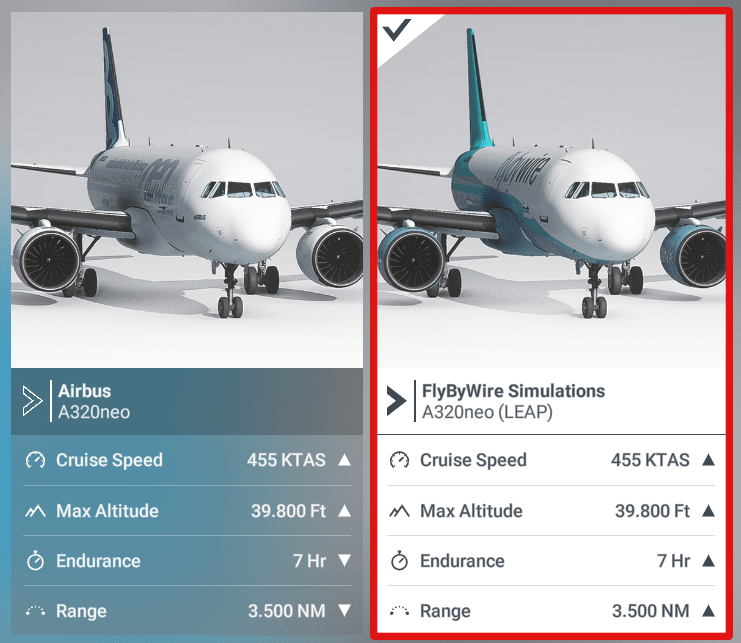
Tip: Click the image to view in full size
 distant thistle
.community That looks like you might not have installed the A32NX into the correct folder. Follow the steps below to find your community folder and select that in the installer
rare spearBOT
distant thistle
.community That looks like you might not have installed the A32NX into the corre...
FlyByWire Support | Identifying your Community folder
To find the Community folder that MSFS is using please follow these steps:
- Go to General Settings in MSFS and activate Developer Mode.
- Go to the menu and select 'Virtual File System'.
- Click on 'Packages Folders' and select 'Open Community Folder'.
This opens the Community folder in a Windows Explorer. Please ensure that your addons are installed in the folder that is opened.

Tip: Click the image to view in full size
 distant thistle
stray orbit
and after ?
distant thistle
stray orbit
and after ?
Set that folder in the installer
 distant thistle
You sent a screenshot of the installer earlier so you already have it installed
In the installer go into the settings and set your install directory to the folder that opened after you followed the steps in the bot message above
stray orbit
distant thistle
In the installer go into the settings and set your install directory to the fold...
that ?
 distant thistle
Yes
stray orbit
distant thistle
Yes
again
 stray orbit
yes
stray orbit
distant thistle
Can you try this now?
i download it and i have to download the a32xn ?
distant thistle
stray orbit
i download it and i have to download the a32xn ?
Did you activate a vpn?
stray orbit
distant thistle
Did you activate a vpn?
yes
 distant thistle
Did it work?
stray orbit
distant thistle
Did it work?
no
 distant thistle
Did you also set "Install directory" to the correct community folder?
stray orbit
distant thistle
Did you also set "Install directory" to the correct community folder?
nooo haaa
that don't wan't to change

its now okay
im reinstall
stray orbit
@distant thistle TY a lot
 lusty vergeBOT
FlyByWire A32NX | Reported Issues
Your issue is in our reported issues list. Please try the possible solutions in the following link(s) and report back if they didn't help. Include all the steps you tried.
Download Issues - FBW Products