#Looked 100 Video's of the installation, Installing it but if i start a flight the tabled is not in
11 messages · Page 1 of 1 (latest)
 warm patio
 lyric flaxBOT
Stickied Message
If you have an issue with the Installer, prior to posting your issues, please search for similar issues using the text search and tags.
A32NX Support
Use the following channels for support questions with the A32NX:
- #a32nx-support for general support with the A32NX (Stable, Development and best-effort for Experimental)
- #1046906298815488100 for Experimental VNAV and cFMS issues
Useful Links:
Download the latest installer
Install Guide
Known Issues
Beginner Guide
FlyByWire only supports the installer, not the 3rd party add-ons themselves.
 rapid horizon
.where - if you have no tablet then you are selecting the Asobo A320 instead of the FlyByWire A32NX
lyric flaxBOT
rapid horizon
.where - if you have no tablet then you are selecting the Asobo A320 instead of ...
FlyByWire A32NX | Where is my aircraft?
The FlyByWire A32NX addon is now separate from the default a320neo. Make sure you are selecting FlyByWire Simulations A320neo (LEAP) in the aircraft selector instead of the default a320neo.

Tip: Click the image to view in full size
warm patio
rapid horizon
.where - if you have no tablet then you are selecting the Asobo A320 instead of ...
Ohno thats true, i was using the wrong plane but i bought the wrong liveries aswel. Those are from te other 320
 paper kiln
warm patio
Ohno thats true, i was using the wrong plane but i bought the wrong liveries asw...
paper kiln
warm patio
Ohno thats true, i was using the wrong plane but i bought the wrong liveries asw...
So all sorted then?
warm patio
yeah it worked thanks
warm patio
but everytime i press Autopilot, my gps fks it up and going to idk where

 mellow thorn
warm patio
but everytime i press Autopilot, my gps fks it up and going to idk where
mellow thorn
warm patio
but everytime i press Autopilot, my gps fks it up and going to idk where
.ss please write in #a32nx-support since this is no problem with the installer. Also send a screenshot there as in the bot message below.
lyric flaxBOT
warm patio
but everytime i press Autopilot, my gps fks it up and going to idk where
FlyByWire Support | How to take a good screenshot
Position yourself in the cockpit using the arrow keys to look straight at the front instrument panel. Then use the Windows Snipping Tool to take a clear screenshot of all screens and the FCU as shown.
Please read the guide here for more information.
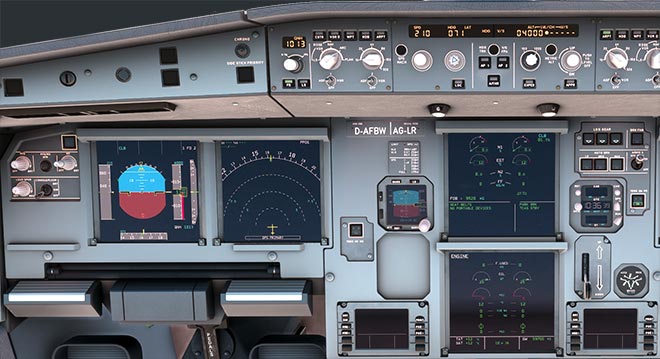
Executed by Slein#8982 - 1037023778091319407
 drowsy lotus
Hey everyone- having livery trouble. Have several in my community folder, but they don't appear to be showing up. Confirmed it's for A32NX