1 messages · Page 1 of 1 (latest)
 gaunt loom
i want to change the app directory from my 500gb ssd to my 2tb ssd but idk how i change the directory so that everything if working and so that nothing is lost? Pls help!
 raven micaBOT
 Modrinth
👋 Hello! Thank you for creating a new thread on Modrinth server
📃 Something went wrong with the game? Make sure to provide logs using mclo.gs
❔ If you're having an issue with Modrinth product, use our dedicated support portal instead
🔔 Don't forget to mark your thread as solved if issue has been resolved by using </solved:1460815060854243411>
 edgy saffron
gaunt loom
i want to change the app directory from my 500gb ssd to my 2tb ssd but idk how i...
edgy saffron
gaunt loom
i want to change the app directory from my 500gb ssd to my 2tb ssd but idk how i...
Just change the app directory from settings and it will transfer the files automatically
gaunt loom
edgy saffron
Just change the app directory from settings and it will transfer the files autom...
so i can just make a file in my 2tb ssd and change the directory?
edgy saffron
gaunt loom
so i can just make a file in my 2tb ssd and change the directory?
Yes just remember to not transfer the files manually
gaunt loom
sooo its my first time doing that, ist it just fine if i set the directory to the D drive
edgy saffron
gaunt loom
sooo its my first time doing that, ist it just fine if i set the directory to th...
You should probably make a folder in there named something like ModrinthApp and set the directory to that, so it doesnt put everything at the root (if it would be just that, it would put for example the profiles in D:\profiles)
gaunt loom
like this?: D:\ModrinthApp
edgy saffron
gaunt loom
like this?: D:\ModrinthApp
Yes
gaunt loom
thx for you help, il try that now! I hope that you have a good morning/evening/night :)
gaunt loom
edgy saffron
Yes
oh and, do i havce to do something now? of will it just do its work by him self?
 edgy saffron
gaunt loom
oh and, do i havce to do something now? of will it just do its work by him self?
edgy saffron
gaunt loom
oh and, do i havce to do something now? of will it just do its work by him self?
When you restart the app, it will start transfering the files
gaunt loom
ah ok thx aggain!
 gaunt loom
edgy saffron
When you restart the app, it will start transfering the files
gaunt loom
edgy saffron
When you restart the app, it will start transfering the files
i can delete the old files afterwards right?
edgy saffron
gaunt loom
i can delete the old files afterwards right?
If it didnt remove them, then probably yes (make sure it completes the transfer first)
gaunt loom
edgy saffron
If it didnt remove them, then probably yes (make sure it completes the transfer ...
how do i make sure?
edgy saffron
gaunt loom
how do i make sure?
Well if it did the transfer and you are in the app. Also make sure the new directory has files such as app.db before deleting the old ones
gaunt loom
oh i see, but all the files got transewerd but in my old ModrinthApp folder are all my instances but without mods in the mods folder? I can delete it right? (I dont want to brerak something so i m just making sure that im not doing something i shouldnt do)
gaunt loom
edgy saffron
Well if it did the transfer and you are in the app. Also make sure the new direc...
oh the app.db didnt get coppied over, is that bad?
edgy saffron
gaunt loom
oh the app.db didnt get coppied over, is that bad?
Then dont delete the old one, as the app.db contains all the settings and profile directories
gaunt loom
on the left side the new one and on the right side the old one
 gaunt loom
edgy saffron
Then dont delete the old one, as the app.db contains all the settings and profil...
gaunt loom
edgy saffron
Then dont delete the old one, as the app.db contains all the settings and profil...
never? or will it transver it self?
edgy saffron
gaunt loom
never? or will it transver it self?
If it at some point transfers itself (maybe after a restart) then you can delete the old one
gaunt loom
edgy saffron
If it at some point transfers itself (maybe after a restart) then you can delete...
ok! im so thankfull that you helped, you would never done it allone 😅
edgy saffron
!solved
 cerulean caveBOT
edgy saffron
!solved
cerulean caveBOT
edgy saffron
!solved
Help others find the solution and keep #1194455551212527696 clean by marking your thread as solved.
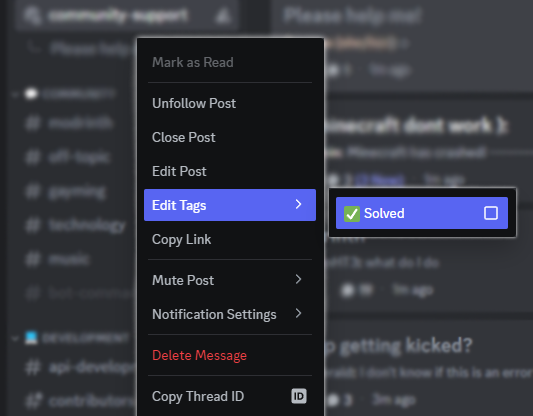
To do this, right-click your thread and select Solved under the Edit Tags submenu, then click Close Post.