#Who can help with the problem?
1 messages · Page 1 of 1 (latest)
 dusky socket
 last nicheBOT
 Modrinth
👋 Hello! Thank you for creating a new thread on Modrinth server
📃 Something went wrong with the game? Make sure to provide logs using mclo.gs
❔ If you're having an issue with Modrinth product, use our dedicated support portal instead
🔔 Don't forget to mark your thread as solved if issue has been resolved by using </solved:1460815060854243411>
 chilly kelp
dusky socket
When I try to open the launcher, I get an error with the DLL library. Is there a...
chilly kelp
dusky socket
When I try to open the launcher, I get an error with the DLL library. Is there a...
What launcher are you using
 split oyster
please provide error
dusky socket
chilly kelp
What launcher are you using
modrinth
chilly kelp
dusky socket
modrinth
please provide error
dusky socket
split oyster
please provide error
 chilly kelp

 modest galeBOT
split oyster
!!purge-cache
modest galeBOT
split oyster
!!purge-cache
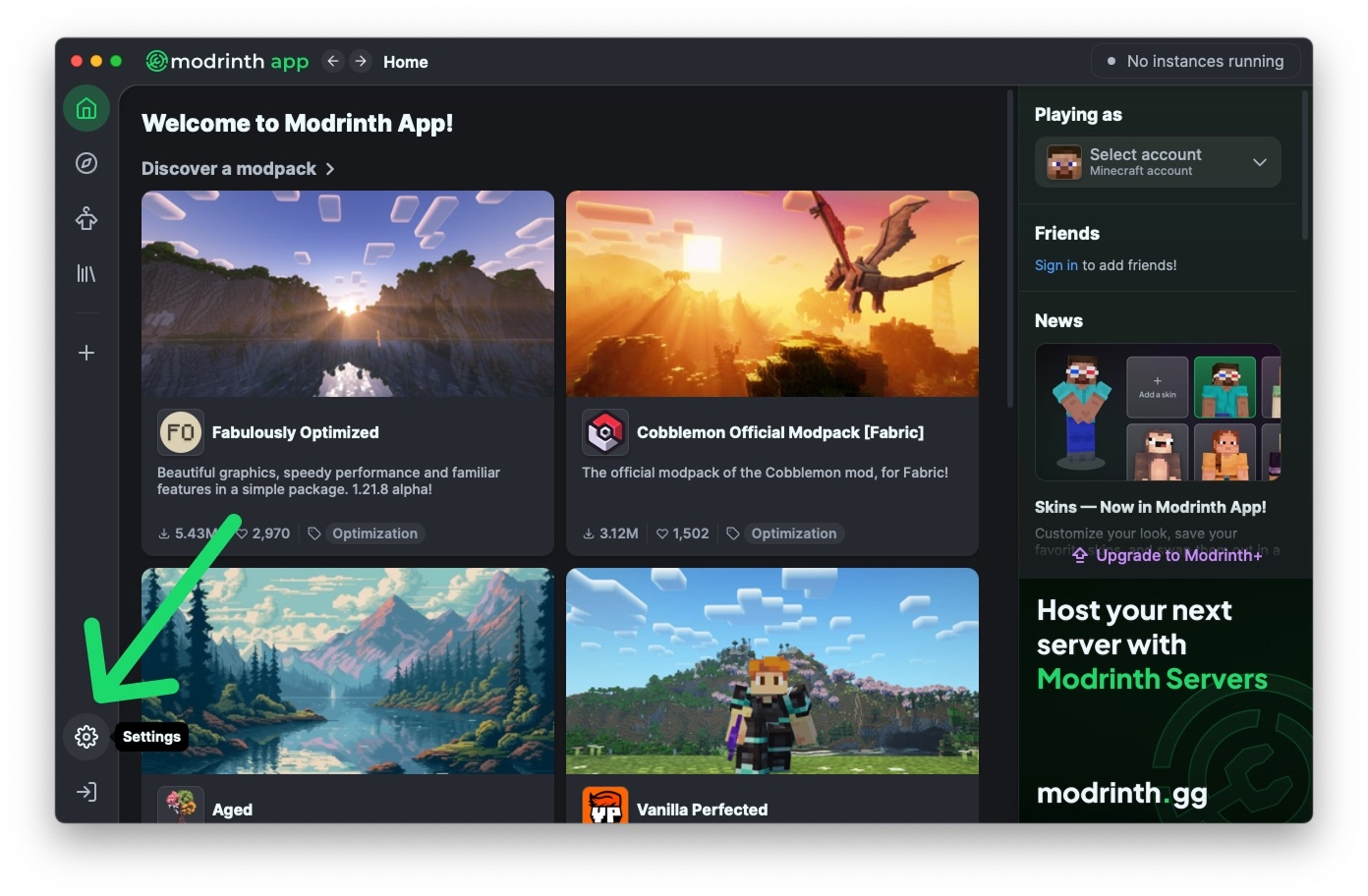
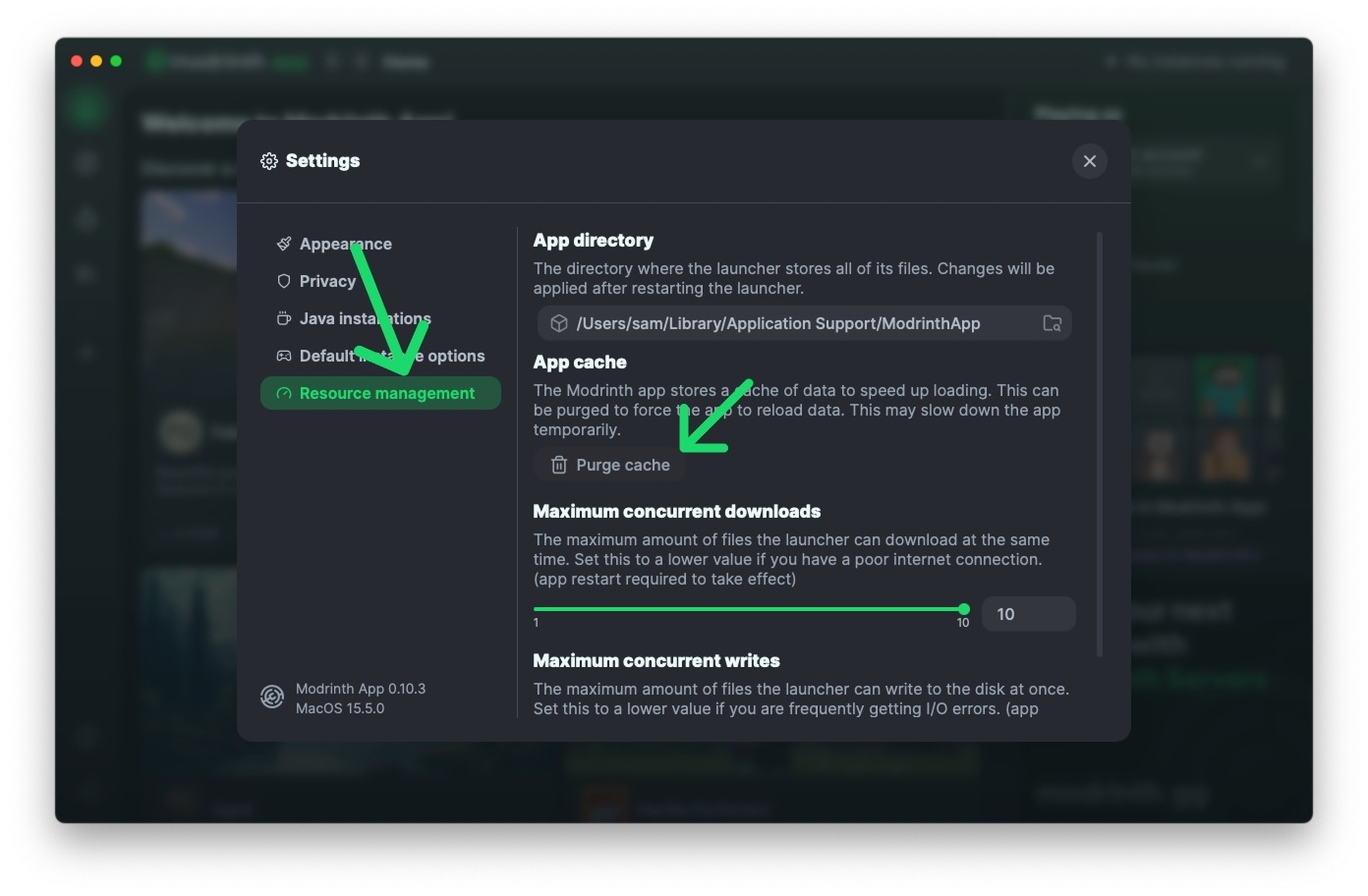
✨ Purge Your Cache ✨
Having issues with new versions are not showing up in the Modrinth App?
Then purge your cache! − by going to Settings → Resource management → Purge cache.
 dusky socket
the launcher just won't open, and when I open it, this error appears
split oyster
are you using windows?
chilly kelp
it is using windows
dusky socket
yes
chilly kelp
windows 10
split oyster
try updating windows to the latest version
dusky socket
It's been updated
chilly kelp
to the very last version?
dusky socket
The latest version is available
chilly kelp
check in windows updates
split oyster
Modrinth App requires Windows 10 21H2+ or Windows 11
chilly kelp
you sure are updated as it says?
 chilly kelp
split oyster
`Modrinth App requires Windows 10 21H2+ or Windows 11`
chilly kelp
split oyster
`Modrinth App requires Windows 10 21H2+ or Windows 11`
then it requires sharing the winver window
chilly kelp
dusky socket
The latest version is available
please run winver (open windows search) or do it with run (win + r) and then share the window
or the version
dusky socket
 chilly kelp
Windows 10 home single language
split oyster
dusky socket
huh than im not sure
windows 22H2 obviously
no thats the nuclear option not yet
dusky socket
The version is worth 22H2
split oyster
indeed
lets see
did you install modrinth through the official modrinth download or did you use an alternative method(such as copying from another computer)
chilly kelp
Вы устанавливали Modrinth через официальный сайт или использовали альтернативный способ (например, копировали с другого компьютера)?
translated
like
just in case
dusky socket
I installed it through the official website


 dusky socket
maybe you need to install a DLL file if you have one
split oyster
possibly but i dont think the dll is broken
dusky socket
the error says that the Entry Point is not found
The Entry Point to the Taskdialoglmdirect procedure is not found in the Dll library
split oyster
i guess you could try to dsim it but i can never remember that command
im really not sure
maybe you installed the x32 version but you need the x64 version
are you using a laptop?
split oyster
if yes does it have an arm cpu?
dusky socket
No, I use a computer.
chilly kelp
o
split oyster
ok
split oyster
chilly kelp
it is Windows 10 Home Single Language
im not sure what does that have to do with it
chilly kelp
split oyster
i guess you could try to dsim it but i can never remember that command
dism /online /cleanup-image /restorehealth
on a elevated command prompt
split oyster
chilly kelp
```
dism /online /cleanup-image /restorehealth
```
on a elevated command prompt
ohhh rightt
oh DSIM*
dusky socket
I'm sorry, I'm using a translator, and I won't be able to keep up with the flow of information.
is this a command for the Windows command line?
dusky socket
chilly kelp
```
dism /online /cleanup-image /restorehealth
```
on a elevated command prompt
.
split oyster
yes
split oyster
Запусти Командную строку от имени администратора и выполни эту команду:
sfc /scannow
Затем выполни:
DISM /Online /Cleanup-Image /RestoreHealth
chilly kelp
 dusky socket
ok
and I've already tried it, and it said I didn't have enough rights.
It was the command sfc/scannow
chilly kelp
dusky socket
and I've already tried it, and it said I didn't have enough rights.
It was the c...
Run it as an administrator
Запустите от имени администратора.
chilly kelp
chilly kelp
.
split oyster
 dusky socket
okay I'm trying it out right now, but it's going to take a long time. I don't know if it's because of Windows or a weak processor and motherboard
split oyster
translate is smol braining ig
split oyster
dusky socket
okay I'm trying it out right now, but it's going to take a long time. I don't kn...
it scans your entire drive for corrupt files
wait we could make it faster
dusky socket
split oyster
it scans your entire drive for corrupt files
It wrote
Windows Resource Protection cannot perform the requested operation.
last nicheBOT
-# ⚠️ Last message in this thread was sent <t:1769442629:R>. It will be automatically archived soon.