
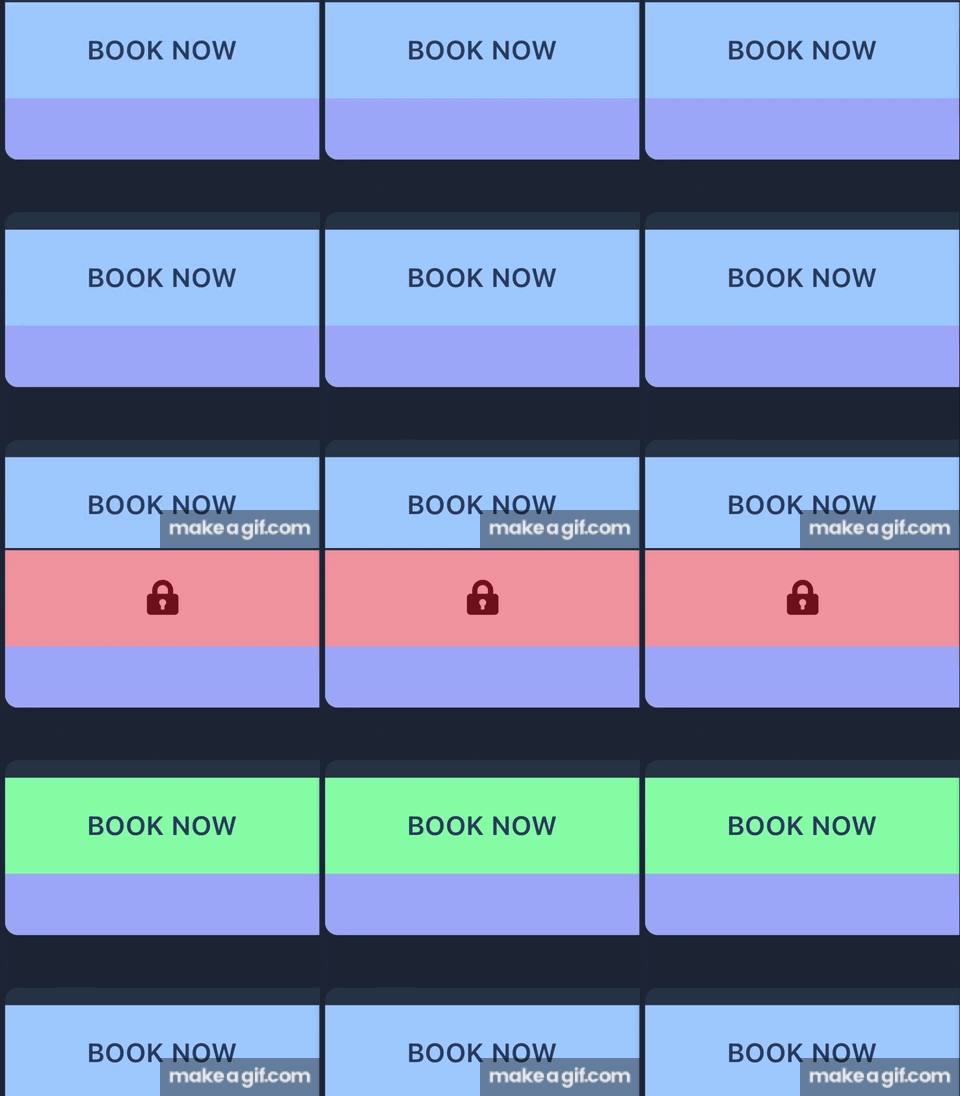
#setStore call is causing weird "re-render" glitch inside Firestore real-time callback function.
28 messages · Page 1 of 1 (latest)
 static minnow
 vital arch
i think it could be solved w reconcile

Solid is a purely reactive library. It was designed from the ground up with a reactive core. It's influenced by reactive principles developed by previous libraries.
(ps you can use triple backticks to format code: like this or with a single backtick it looks like this)
vital arch
vital arch
i think it could be solved w reconcile
I assume the issue is that ur getting a complete new object from onSnapshot, so u wipe out all the signals and recreate them with each update. With reconcile there is a diff that happens between the two objects, and only the properties/signals that have changed will be updated (and not re-created)
static minnow
vital arch
I assume the issue is that ur getting a complete new object from onSnapshot, so ...
Thank you, I'll look into that. I'm not wiping out all the signals though? It's just initially the store is an empty array so on mount I'm setting it to the snapshot value, every further update is done using setStore which should only update the individual object? Unlike React where you have to map over and return a new array. At least that was my understanding. I'll look into reconcile though.
vital arch
very likely i am misunderstanding the issue 🙂
It appears like the list of todos "re-renders" at the same time as the second "click" and so the "click" isn't registered this makes me believe the component is being mounted/unmounted
which would indicate that the signal has been recreated
static minnow
Me too, just picked up Solid for this specific case as React had the same problem. It's definitely not the receiving of the snapshot that is causing the glitch, if I remove the updated Todo code then there is no problem with the click registering.
I don't think it could be unmounting because the listener would be removed with the unsubscribe() call.
vital arch
could u log on onMount in the Todo component to see if the component is being re-created? and in the else { ... } in onSnapshot to make sure it's doing the granular update?
if I remove the updated Todo code then there is no problem with the click registering.
wdym with the updated Todo code?
static minnow
Will try that in a second.
I mean if I remove the else block completely and don't do the granular update so just set the todos onMount then the button clicks work correctly, that was just to discount the onSnapshot firing from causing the issue because it still fires on the updates but doesn't call setTodos and so doesn't update the UI, it's definitely coming from the setTodos call in the else block.
vital arch
mmm yes, that does sound like it should do the proper granular updates then
if u wanna codesandbox it or something I can have a look at it
static minnow
console logging in the onMount of the button works as expected, but it only logs when the list renders initially and then the individual one logs when it is remounted. In the gif when the lock icon is removed the "Book Now" button comes back which is where it is remounted. Not sure why this glitch is happening. Will read up on the reconcile function though.
won't be able to put this out publicly but will try and put up a demo over the weekend.
thanks for your help
vital arch
static minnow
console logging in the onMount of the button works as expected, but it only logs...
the components should only mount on the first render
ooooo yes
i see
setTodos((todo) => todo.id === todoToUpdate.id, todoToUpdate) should become setTodos((todo) => todo.id === todoToUpdate.id, reconcile(todoToUpdate))
i think..
another option would be to use <Index/> instead of <For/>
For does referential checks on the signal, Index only cares about the index
u could also yolo it and just always do setTodos(reconcile(todosFromSnapshot)) but will be a bit less performant
static minnow
Thank you will try that and see.
static minnow
vital arch
the components should only mount on the first render
yeah but they are unmounted when the locked button component is mounted instead and then mounted again when the lock button is unmounted.
The reconcile function didn't fix it, still the same issue. Probably best to build a demo that people can see, will work on it.