#low fps using ALVR-USB + Quest 3
341 messages · Page 1 of 1 (latest)
 fossil hull
 fossil hull
the view resolution?
i have to use medium low?
i tried right now with medium present but still laggy
i mean it dont' change anything
usually i play vrchat
yeah i changed that to addaptive
okie let me try
ah yeah
of this session
yeah i keeped that disabled for now
i was just adjusting the video issue before
gonna reboot for setuping microphone too
reseted steamvr setting too (i touched them in past, now i got 42 fps
but when i was using oculus it was much better 55/60
i think there is something to tweak
there are so many settings to play i see xD

mm fps 36/72 costant
can i send to you the updated log too?
ah plus in steamvr hub i see white sparkies on sky too

 prisma sigil
It's not "weird" imo, it's just the server throttling because of the game
fossil hull
mm switched to oculus steamvr same lag
i believe i messed something on steamvr
cause i reseted

it was per app setting vrchat

72 fps now
let me try with alvr
120 fps


 fossil hull
plus i see random white noises on screen sometimes at steam hub
 trail moss
You're requesting 800Mb/s?!?
Oh wait
Wired
Right
Still, that might be overkill
I'd recommend lowering it for a bit just to see if that's the problem
If you're accidentally using a USB 2.0 cable or port that might be limiting your bandwidth
I would recommend setting it to 30mb/s while you're troubleshooting just to eliminate that variable
 fossil hull
Allright I Will try 30 mb
fossil hull
i tried 100, seem to fix the issue
on bitrate graphic it say it requesting 600 around mb max

gonna compare it with oculus+steam and see
ah i still have that "white smoke" at hub
is noticiable only from vr, tried to recording it
i dont see it
fossil hull
in vrchat 30 room people: oculus steam 35-60 fps in full room (running smooth), in alvr i have 58-fps but i don't feel it smoth like oculus
in hub where i am alone i have 70-72 fps on oculus and in alvr 115-120 fps but i feel oculus is more smooth than alvr (because i fell microlag when moving in alvr)
fossil hull
So there are no other trick to get close to oculus link?
I mean the difference in empty lobby
oculus will do 70-71 fps and alvr 110-120
is not something related with flutuating fps?
fossil hull
well for now i will stick with oculus :c
hope to see some improvement in future also with alvr
also what about the "white noises" in steam lobby?
ohhh
yeah i see that on bottom and top but only at steam lobby, and not in vrchat
 quaint kestrel
setting it this high for me usually causes some pretty bad lag and latency on q3
quaint kestrel
i set mine to
0.420, .400
and set my center shift Y to -0.20
quaint kestrel
will try tomorrow :3
fossil hull
quaint kestrel
setting it this high for me usually causes some pretty bad lag and latency on q3
i noticed that too but i solved by reseting steamvr settings
quaint kestrel
quaint kestrel
will try tomorrow :3
forgor, will try today
quaint kestrel
fossil hull
i noticed that too but i solved by reseting steamvr settings
will also try this.
quaint kestrel

not sure what you mean by strength
though i run at 90 hz
going back to my settings in previously and in steam vr because neither things worked, .450 and .400 with a center y shift of -0.20 is absolutely perfect for q3 i think
not too intrusive
 thats okay though
fossil hull
thats okay though
fossil hull
also a question there is a way to setup a autostart script adb when using alvr?
i see something in github but these are expired

nvm i see it was working now

i tried restarting and fixed it but is unusable
dunno what happened but i tried to use alvr again is unusable
it load the steam and i have a lot of latency that go outside screen similiar to the old issue that i reported


it look something with hz stuff
when switching it mess stuff
i reseted something to default
was super smooth
90 fps
now i wanna try the values that you suggested and sharpness
ok tried again, smooth but a bit darkness and watching blight object you can notice "granular" effect compared to oculus
i am sure that is something with settings
i reseted them to default and moved to 90 hz
and then changed the sharpness and foveeated
also leaving 30 mb is fine
on bitrate
now i wanna increase a bit the resolution (i mean remove granular thing)
using 100 mb + 72 hz it disconect after 2 seconds, leaving 30 mb default work
but it is using usb lol


is a powered usb cable and is good
i should try with a normal cable?
is super smooth
wait


i moved my head and joystick at steam hub
is ok if i use the c-to-c?


i used that
and what is so xD
there is not lag or strutleling
if i was wifi i should have lag and struteling
mmm
and how i verify that is connected by usb so
let me try
disabled wifi on vr while i was in steam, still working fine
disconected the cable, broken connection
is ok the original oculus cable?
ok


this was a usb c port
(i just have one)
meanwhile i use the red port usually
that is SSS


the other is the c port next to it
ok i try another one
blue ones

there is a way to check the latency that i get on oculus?
trail moss
Did you say you were using the original oculus cable?
fossil hull
yeah the one for charging
trail moss
afaik bitrate doesn't affect encode or decode speed very much
that's probably resolution or NVENC parameters
trail moss
no?
fossil hull
can you check my settings?
trail moss
it would just mean that something else was slowing it down
yeah
But it's not related to the bitrate
Unless I misread your message and I'm not understanding what you're saying
trail moss
fossil hull
on 72 was working but dunno
I use mine at 72hz because it acts like this above 72hz
yeah
fossil hull
with 72hz i feel microshuttering
trail moss
fossil hull
yeah the one for charging
I don't think that's USB 3.0
You'll need a USB 3.2 Gen 1 cable to use VR
(AKA USB 3.1, AKA USB 3.0)
(They renamed it twice)
fossil hull
on oculus + steam work fine the cable is blue (the one that i use for play)
i just tested the usb c cable of visor
trail moss
the charging cable?
fossil hull
fps are close to oculus, but definition when watching some object was more blur, like seeing pixels on lens
nope
only in alvr
trail moss
hold on did you remember to set your connection to TCP?
fossil hull
yep
trail moss
Okay good
fossil hull
 trail moss
fossil hull
trail moss
fossil hull
this displays how well frames were rendered on the computer
But ALVR is the thing that gets those frames to your headset
trail moss
It's good to check this to make sure problems aren't just on the game's side
A more advanced video codec that all modern GPUs have support to work with quickly
trail moss
trail moss
A more advanced video codec that all modern GPUs have support to work with quick...
Sometimes I've seen NVIDIA cards complain when it isn't enabled
fossil hull
the star sky one with steamvr menu
i gonna try hevc

i tried it with vrchat hevc i got my screen freezed for 1 second (in vrc)

these are the stuff where that issue is more noticiable
you see them a bit grained around from far (blight objects)
on oculus is smooth
any idea so where can be the issue?


 trail moss
fossil hull
trail moss
fossil hull
Your framerate graph looks horrid
fossil hull
trail moss
Your framerate graph looks horrid
was running that word in vrchat
 fossil hull
Yesterday ALVR and steamvr crashed too while I was just chilling with a friend
fossil hull
And about colours? There is a way to get close to oculus link ones? Like i feel red is much dark
fossil hull
instead on oculus link is blight
trail moss
fossil hull
And about colours? There is a way to get close to oculus link ones? Like i feel ...
There's a "color correction" section that allows you to adjust the image as much as you like
fossil hull
yeah i see
trail moss
fossil hull
Saturation?
You might want to look into the basics of color correction to see what all the terms mean
Just look up what each slider means so you can make the adjustments
trail moss
fossil hull
Which value I should touch?
Because it's 100% up to you what you adjust and how inteensely to get the image you desire
Alternatively you could mess around with the sliders for like an hour but that might take more time
fossil hull
I just want get close to how it look when using oculus link
trail moss
fossil hull
I just want get close to how it look when using oculus link
I don't know how it looks when using Oculus Link
fossil hull
Oculus link + steamvr
I can do some photo with phone if you want
And do the comparation
trail moss
fossil hull
I can do some photo with phone if you want
It's probably best to just change the settings for yourself until you get an image you like
Don't even worry about matching Oculus Link
Just make it look good
fossil hull
Yeah j increased a bit the saturation and I getted close to it
fossil hull
dunno yesterday was all full working and today is super laggy and unplayable
without any reason
nvm something with autoscript
 fossil hull
another weird thing, when using alvr, brave browser crash, when i stop alvr, brave browser work again after a while
fossil hull
edited the colour i just decreased a bit the contrast, it make it close to meta link colours

also using 150 mb bandwitch, 90hz and medium resolution it seem to work fine
quaint kestrel
i temporarily switched back to meta link since they improved it, and i realize 120 hz also struggles on it, not just alvr, though no latency spikes. odd
fossil hull
change the bandwitch more than that wil make the screen flickr
i suggest staying to 90, 120 is a bit overkill
quaint kestrel
i was able to get up to 700mb 90hz on max res you can set, though i still get some issues with lag.
i tune my settings a lot
fossil hull
 quaint kestrel
120 hz looks AMAZING on meta link..... if my computer can keep up with the same amount of frames in games
though i stay on 90 most of the time
fossil hull
also in alvr i disabled the option "addapt to framerate" it seeem to cause more issues than performance and used HEVC driver
fossil hull
depend if you have a nvidia card
quaint kestrel
i do
fossil hull
changed cable and increased 800mb


INIU Cavo Link 5m, Compatibile con Meta/Oculus Quest 3/2/Pro e Pico 4 Steam VR/PC di gioco, Trasferimento Dati ad Alta Velocità, USB A 3.0 a USB C Lnk Cable per VR Headset, Porta USBC separata
is good?
trail moss
that's a random cable
maybe?
But your framerate is terrible
I think
Judging from the graph at least
OMG your latency is crazy high
fossil hull
the older one was struttering at 100+ mb
fossil hull
And how I optimize it?
fossil hull
I was with 40 users
XD
And going smooth in game
I noticed when I put off the vr headset the game is laggy on pc
Is normal?
trail moss
fossil hull
I noticed when I put off the vr headset the game is laggy on pc
As long as it's fine while your headset is on it should be fine
Not sure what that would be though
I don't know of any feature that lowers your FPS when you take the headset off
It would be a nice feature though
fossil hull
Well dunno on vrc it do that sometimes
fossil hull
alto i got few random disconection
sometimes
one time vrchat crashed
other time steamvr crashed
plus few random disconection
fossil hull
Ah Is because I was using the alternative drive
They look the same to me maybe a bit better with h264 because I can use 800 mb limit
fossil hull
I mean the bandwirch and encode driver
fossil hull
Yeah worked at first but after reboot it become unusable
And have to reduce the bandwidth to 100 mb
Also I get a lot of disconnection still not many but like 5/6 times for session
(from adb)
fossil hull
So what you suggest?
fossil hull
Allright
Also another thing that I noticed yesterday
I was using the custom launcher for sidequest and when launching alvr it keep to crashing
I was using this https://sidequestvr.com/app/21783
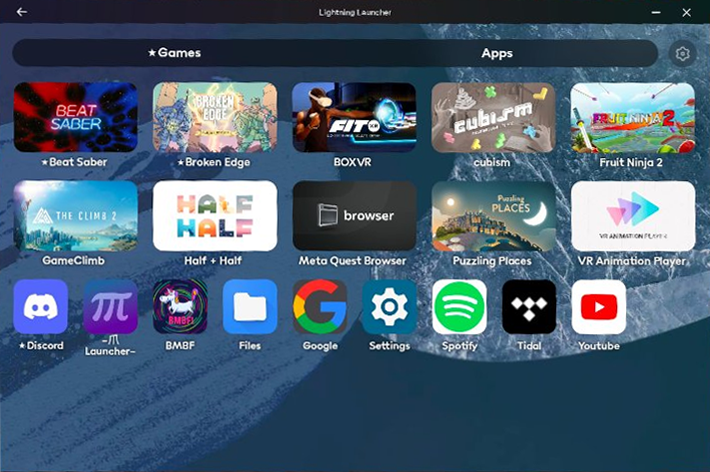
Discord calls function but may currently have issues. You may use https://github.com/threethan/QuestAudioPatcher as an alternative.IF YOU HAVE ANY ISSUES, REPORT THEM ON GITHUB. I DO NOT CHECK THIS PAGE ACTIVELY. THE CONTACT DEVELOPER BUTTON ON SIDEQUEST DOES NOT WORK!LightningLauncher is a launcher designed for Oculus Quest that supports both o...
Is on sidequest
ohh
what you use?
maximum buffering?
nice i will try
i would go with that but since i come with quest 2 i have already a lot of purchased app here, plus the support is close to not-existent
yeah i tried the pico 4 for one week
while i was in covid period
yep i think so
the link was good but i feel the screen where a lot less lighter than quest 2
plus there was few issue with their software
(i believe cable too)
fossil hull
yeah but i don't used it at end
anyway what about this message?

(i dont use audio, just microphone)
 zealous scaffold
fossil hull
zealous scaffold
fossil hull
I have that in my logs a lot, doesn't seem to affect anything
fossil hull
oki
fossil hull
Now the fps are similar to oculus one (still a bitbit bad) you can test it by enable mirror face on vrchat and turning around on a midle heavy world, you will see the mirror moving out instead be smooth, and i still fell the quality of videdo need a bit of improvement
fossil hull
so now is just waiting for new alvr version i believe ^^
fossil hull
i got some random rare disconection with this message
