1 messages · Page 1 of 1 (latest)
 cloud radish
So, I recently built a sofle choc wireless kb
everything else works fine
but the displays don't show anything
I've added everything I can find to the config
https://github.com/Shaderhoth/zmk-config
I've tried adding keybinds to change the backlight and ext_power settings
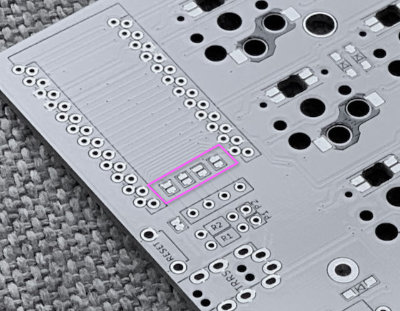
(see pic)
those haven't helped...
any advice?
Another Sofle Choc Wireless config. Contribute to Shaderhoth/zmk-config development by creating an account on GitHub.
also, while I'm at it, any way to disable debounce for encoders?
 rough crest
cloud radish
So, I recently built a sofle choc wireless kb
everything else works fine
but the...
rough crest
cloud radish
So, I recently built a sofle choc wireless kb
everything else works fine
but the...
Did you remember to close the jumpers on the top side?
rough crest
cloud radish
Didn't see any jumpers except charge boost on the nano
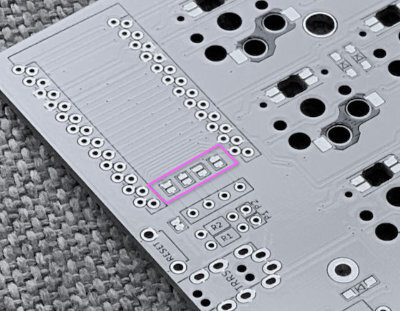
There are a bunch of different Sofle variants. Where did you buy yours? Hopefully that vendor's version doesn't have the jumpers, or you socketed the n!n.
cloud radish
Uh... Thanks
Guess I'll have to go from the bottom
cloud radish
ye, soldered jumpers, still nothing, ~2.7v between vcc and gnd so its defo powered
 fair copper
@cloud radish usually the jumpers need to be bridged on the top side.
You can't just pick one arbitrarily, you need the side the connects the right display pins to the right controller pins.
cloud radish
The top right and bottom left pins are connected
And the top left/bottom right as well
I've already checked that
So it shouldn't matter
I also checked the display pins with a multimeter and there's a potential difference between the vcc and gnd pins so they're defo connected
 stuck nest
It should matter, the order is important?
If it was working, you’d want to see 3.3v and not 2.7 also
cloud radish
Ok, tried again seeing 1 volt
Also the pins are connected before they reach the jumper I believe, as in front pins are connected to back pins and from there connect elsewhere
The battery is supplying 4.2v
stuck nest
If you close the jumpers on the back, the order of the 4 pins will be flipped
As if you installed the display on the back side
cloud radish
Ah...
Since I've soldered in the board already, what are my options...
Cuz I can't reach the top anymore
They don't happen to sell flipped oleds right?
stuck nest
I haven’t seen any :/
cloud radish
Rip kk thx for your help, tried to unsolder the display and solder underneath the nanos, but ended up tearing a bit of connector out from the board for the display pins
Guess imma just see blank screen...
stuck nest
Better battery life :p