

1 messages · Page 1 of 1 (latest)
 olive sand
Hi, just trying my first steps with Needle. I have exported a simple scene where I am using Unity Starter Assets (Kyle robot) and a Cinemachine virtual camera to follow the movements. I have installed Needle and setup the Exporter object as described in Create a new scene from scratch from here https://engine.needle.tools/docs/getting-started/.
My problem is that when I run play and the scene is exported in the Browser by Needle, the controller input does not work (arrow keys or any other controller input key do nothing).
What should I do to export the controller input correctly using Needle?
After following the steps below you will have a fully functional project ready for the web.
Below each tool, you find quick links to download the latest version at the time of writing.
 graceful light
Hi, we don't have builtin support for Unity's Cinemachine package right now - please note that Needle Engine doesnt automatically compile your (or Unity's) C# scripts to webassembly.
To get started with using a character you can download for example our samples via the menu item "Needle Engine/Explore Samples" or https://engine.needle.tools/samples
olive sand
Hi @graceful light , thanks for answering!
So basically all the scripting logic is not exported by Needle right? Only the assets are exported, I have to add all the scripting logic using typescript/threejs manually, correct?
Just to understand what is correct workflow when working with Unity/Needle 🙂
graceful light
Yes basically. We have support for some of Unity's components (e.g. Animator, Timeline, Particles, Unlit ShaderGraph, UI) but not all 🙂 You can find an overview here: https://engine.needle.tools/docs/features-overview.html
Needle Engine is a web-based runtime for 3D apps. It runs on your machine for development, and can be deployed anywhere. It is flexible, extensible, and collaboration and XR come naturally. Needle Exporter for Unity bridges the Unity Editor and the web runtime. It helps you to export your assets, animations, lightmaps and so on to the web. It is...
We automatically export assets (models, materials, meshes, animations and such) and when you have a Needle Engine component in typescript with a matching name for a C# component you get all the data associated with it (including all references etc). That also includes ScriptableObjects. The logic of the component has to be written by you in js/ts tho 🙂
olive sand
Ah very interesting thank you! I am going to read the Needle scripting docs then
graceful light
Alright, feel free to ask if anything else is unclear or missing in the docs
olive sand
@graceful light FYI I have this weird glitch on some of the sample at https://engine.needle.tools/samples
graceful light
Ah yes that was a bug in a few versions back caused by the website zoom (are you on 100%?) - this should be fixed in current versions. But the sample has not been re-deployed yet. cc @wispy yarrow 🙂
 wispy yarrow
Ah, I'll adjust the tests to mark these versions as outdated so we can fix them all asap 👍
olive sand
graceful light
Ah yes that was a bug in a few versions back caused by the website zoom (are you...
125%
graceful light
Ok. good to know - then it should be fine when you change it to 100%?!
olive sand
Yes I can confirm that at 100% the glitch is gone
Is it possible to download the project relative to one of the samples?
wispy yarrow
 graceful light
What do you mean by "Relative to one of the samples" ? You can download either the repository directly containing all the samples + the project we use or you can use the menu item (Needle Engine/Explore Samples) to download and install the samples package
olive sand
Do you mean this? https://github.com/needle-tools/needle-engine-samples

Live: https://engine.needle.tools/samples 🌵 Needle Engine sample scenes - use as examples and as a reference for learning 😊 - GitHub - needle-tools/needle-engine-samples: Live: https://engine.needl...
Tried to open one of the sample but Unity complains it is read only, any idea?
 wispy yarrow
What Unity version do you use?
olive sand
2022.3.11f1
wispy yarrow
Hm, i can open then on 2022.3.4f1 just fine :/ I'll download the latest and try again.
Maybe something specific to MacOS?
olive sand
Trying again in a new project, let's see
wispy yarrow
olive sand
Tried to open one of the sample but Unity complains it is read only, any idea?
You can manually find the scene in Needle engine Samples / Runtime / SAMPLE_NAME and drag it into the Assets folder, it will duplicate the asset, then open it. As a temporary workaround.
Alternative would be to create a new project on 2021.
Any errors in the console, forgot to ask.
Do you have enough space? Is the project in a writable space and such?
I i'm not a mac os user for some time, so bare with me 😄
olive sand
wispy yarrow
Any errors in the console, forgot to ask.
Console showing this error: Instance of ExportInfoEditor couldn't be created. The script class needs to derive from ScriptableObject and be placed in the Assets/Editor folder.
Is it ok to update to 3.21.0?
 wispy yarrow
On Windows 2022.3.11f with the latest samples running on 3.21.0 does work :/ so it is possibly OS X specific.
What OS X version do you have?
wispy yarrow
olive sand
Is it ok to update to `3.21.0`?
Yes, the release is stable 👍
olive sand
wispy yarrow
On Windows `2022.3.11f` with the latest samples running on `3.21.0` does work :/...
Sonoma 14.0
Finally made a sample correctly playing/exporting in Unity 🍻
Stupid question: what if I want to play the sample just in Unity (not exporting to browser)?
wispy yarrow
Needle is prepared for such duality.

If there's some custom logic in the sample it is made in Typescript for the web only, so it won't work in Unity.
But you are able to maintain yours like that 👍 allowing for multiplatform deploy and leveraging Needle for the web.
olive sand
Do you mean that the .ts scripts are ignored when running inside Unity?
wispy yarrow
Yes, those are not utilized.
olive sand
For example I was trying the sample ShootingRange inside Unity. The player falls down as the rigidbody/collider is ignored

Falling 😂
wispy yarrow
The Mesh Collider that is the floor is not set to static, so i would have guess the rigid body refuses to collide with a dynamic complex mesh.
As i said, the samples do not support Unity Runtime.
 lavish stag
Just for clarification, the samples are made for the web - they don't contain matching C# code to run them inside the Unity Editor out of the box. Often when you're porting a project you do have matching code for both worlds though 🙂 (same component name and properties in C# and TypeScript)
olive sand
Thank you for the clarification. What are the benefits of having matching names in C# and Typescript? As far as I understand, Unity runtime and Three.js are quite different, so we can't simply use the same logic between the two
wispy yarrow
olive sand
Tried to open one of the sample but Unity complains it is read only, any idea?
Realized, that you must be interacting with the SampleInfo scriptable objects here. You should interact with the Samples Window instead. Click the "open scene" button to easily open samples 👍

 wispy yarrow
olive sand
Thank you for the clarification. What are the benefits of having matching names ...
wispy yarrow
olive sand
Thank you for the clarification. What are the benefits of having matching names ...
Needle with its API is as much "close to home" as possible, so for a Unity developer it should be quite intuitive to get started. Same components, same principles.
See this guide on what are the key differences: https://engine.needle.tools/docs/getting-started/for-unity-developers.html
Needle Engine provides a tight integration into the Unity Editor. This allows developers and designers alike to work together in a familiar environment and deliver fast, performant and lightweight web-experiences.
The following guide is mainly aimed at developers with a Unity3D background but it may also be useful for developers with a web o...
lavish stag
olive sand
Thank you for the clarification. What are the benefits of having matching names ...
This may have not been super clear so far - one of the main advantages of Needle is that you can do your entire data setup (components on objects, how components interact with each other, calling events between them, ...) the same way as you'd typically do in Unity. No changes there. We automatically bring all that data to the web and your TypeScript components take over, have a similar lifecycle with onEnable/onDisable/update and all that, and can reference and interact with each other
When you create a TypeScript file, we automatically generate a matching C# "stub" that contains all the same properties and (empty) methods, so you can add that component to objects and wire everything together as usual
When you're porting an application you typically already have C# components, so you make matching TypeScript ones that replicate the runtime functionality and they automatically get all the data passed to them
olive sand
Thanks a lot for these useful info, it makes more sense now.
I am trying to add a custom script for rotating a cube, as described here https://engine.needle.tools/docs/scripting.html#creating-a-new-component. I see a stub .cs file is generated in Assets/Needle/Components.codegen, unfortunately when I try to add this script to the cube object I get this error. Missing something?

If you are new to scripting we recommend reading the following guides first:
wispy yarrow
Can you show your console? You might have a compilation error there.
wispy yarrow
But it isn't a compilation error. If you hit clear, it disappears -> It isn't ground breaking.
Perhaps try to restart your Unity, if the issue persists, please file a bug report.
olive sand
After restarting Unity I was able to add the script 👍
Now I am getting this new error when launching: Server is not responding - it could mean that another application is already running on port 3000 at https://192.168.1.13:3000
That's strange because I have nothing running on port 3000. Also it happens only when launching from inside Unity. If I run npm run start from terminal it works
Actually is not an error, is just a warning
But it seems the server is working fine even with that warning, so not a big deal
wispy yarrow
You should see a console application to appear, that's the server and it could display some error.
But, if you run it manually and everything works, that's odd. CC: @lavish stag
 lavish stag
You're on Mac right?
I've seen this file descriptor error a couple of times too but we haven't been able to pin it down really
Is this an M1/M2 Mac?
olive sand
Yes M1 macbook pro
lavish stag
cc @graceful light for visibility
olive sand
Hi again guys! I am plying around with this sample https://engine.needle.tools/samples/custom-hands (I am trying to learn how to setup a VR scene). It works nicely on my Oculus Quest 2, except for the fact that the hands are two green cubes instead of the golden/silver hands, is it normal?
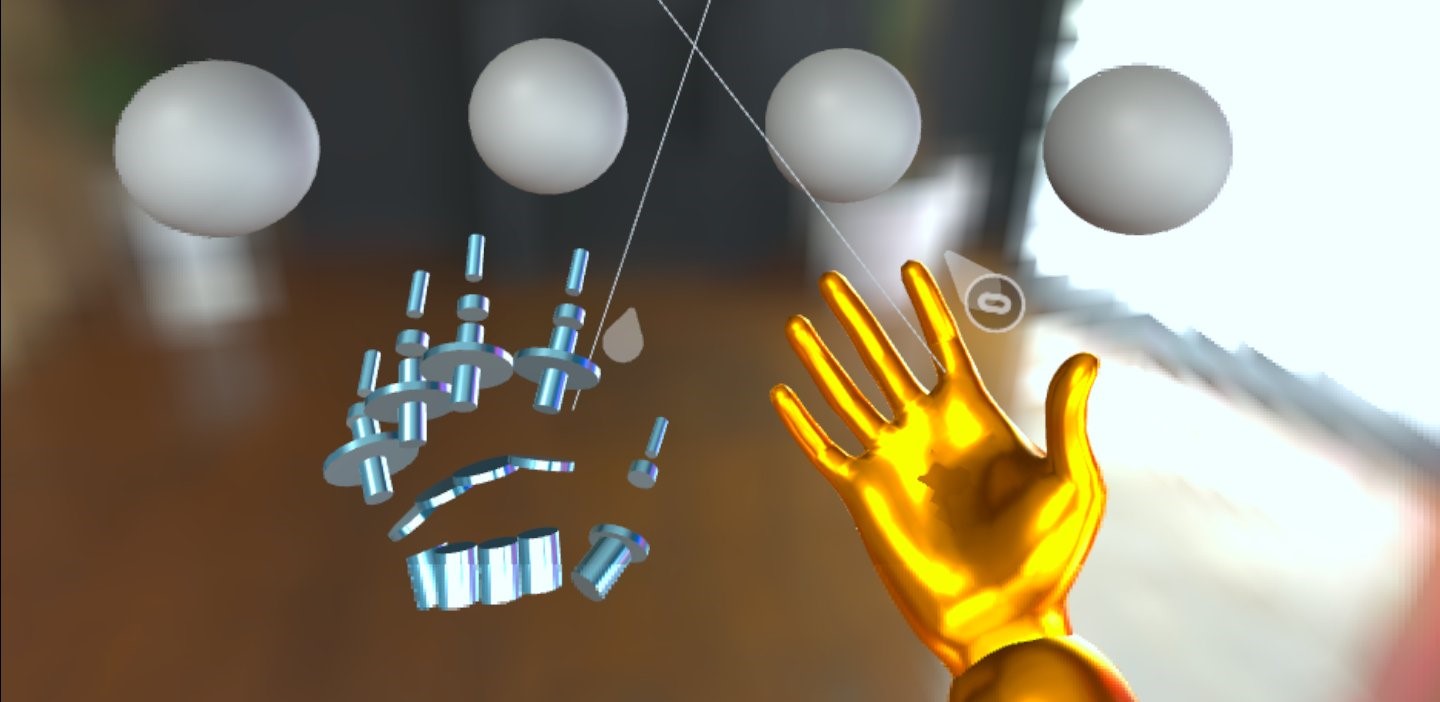
Custom hand models in WebXR
wispy yarrow
Green cubes is the default avatar. On the webxr component, deselect the avatar field.
Also, hands are only visible when you put down your controllers.
wispy yarrow
Just tested the sample, it does work on my end.
Do you have Hands enabled in the Quest settings?
Do you perhaps have a pending update on your device?
olive sand
I had Hands disabled in the Quest, now it works perfectly. Thank you very much sir! 🍻
wispy yarrow
Awesome!
 worn breach
Hi i am new to needle engine is there any way that i can export the glb file from blender which is devloped using needle is there any docs for it
lavish stag
worn breach
Hi i am new to needle engine is there any way that i can export the glb file fro...

In this tutorial we're going to show you how to set up Needle Engine in Blender and how to export a 3D scene to the web!
Our Getting Started guide:
https://engine.needle.tools/docs/blender/
Chapters:
00:00 Intro
00:32 Download Needle Engine for Blender
00:50 Setting up a new Project
01:00 Installing the Needle Blender Add-on
01:22 Generating ...


