I unfortunately,do not have a video or a picture of it as it seems to always do it the moment i look away this is the second time my printer has knocked the print off it’s not a leveling issue or a adhesive problem it builds the supports perfect and it builds about half way then it knocks the print off Any ideals why it does this ?
#elegoo Neptune 3 max help print knocking off
199 messages · Page 1 of 1 (latest)
 deep shell
 wicked sapphireBOT
Hey @deep shell, thank you for contributing to this forum.
Please provide as much information (images, video, description) as you can. This will increase the chance that someone can help you with your issue.
Use the Close button when your issue is resolved.
 fickle igloo
Just making sure the bed is leveled, do you have a picture of the first layer?
A picture of the bottom of your print will do
deep shell
Yeah it should be leveled i printed put three other items and they all came out fine but the last two i did it knocked it off and no i didn’t take a pic of it i al sry i just cleaned it and headed to work
I will try it again and if so i will post the pic
@fickle igloo i can take a pic of it once i get home and show u what it looked like
fickle igloo
no worries, no rush
When prints fall over the most common cause is poor bed adhesion which is usually caused by bed not leveled, just eliminating that before moving on
The other is orientation
deep shell
Ok i will re-level it when i get home again to make sure that’s not the problem and will let you know 🙂
 inner gale
Unless you really messed up the tramming the inductive probe should account for any minor variance at the corners. Have you printed first-layer patterns to check for uniform squish?
https://ellis3dp.com/Print-Tuning-Guide/articles/first_layer_squish.html
deep shell
Yes i did that like i said it did the small ones fine but whenever i do the big helmet it knocks it off
I didnt mess it up my bad
I did the square test on all corners it did it perfectly?
@inner gale
fickle igloo
if you have a picture that'll help
deep shell
I am currently printing them now and i will share them as soon as it finishes but just glancing at it they look great
inner gale
If the problem is on big helmets, does it have a flat edge sitting on the bed and do you have a wide enough brim?
Even a picture of what you're printing now would help. The reason the bot asks for photos is people have a tendency to describe the situation to themselves and leaves out a lot of context for people who AREN'T standing next to them.
deep shell
Sry yes one sec and i will show what i am trying to print

I am trying to print this for my robot
It gets to the button then the printer knocks it off
inner gale
Can you attach a pic of the slicer preview?
e.g. since we don't know your experience-level, are you trying to print this WITHOUT supports?
deep shell
Yes if you give me a few i am currently heading home / i am very new
I stepped out to grab some food but will be home soon
inner gale
Do you remember if you enabled supports? i.e. are there towers / trees from the plate reaching up to the button / bow?
deep shell
I did add supports and i blocked the ones in the middle cause they didn’t attacks to anything
Attach
Mine didn’t do tree it did gyroid is what it was for my basic one
inner gale
Okay, if we've ruled out mid-air printing due to lack of supports causing spaghetti that clogs the nozzle, then next we'll want to see how much contact is on your first layer. A brute force approach is always to stick a giant brim on it.
deep shell
Yeah i can try that as soon as i get home i will send you the preview of it
From my computer
fickle igloo
inner gale
Even a picture of what you're printing now would help. The reason the bot asks ...
i am not a bot
 inner gale
😆 I was talking about K.E.V.I.N.
fickle igloo
yeah i know 🤣
inner gale
Where does Frank get all these wonderful bots?
deep shell
Lol
I am booting up my computer now and will send you the preview in a second
So i did a front video then broke it down from above
fickle igloo
Orientation looks fine, i am doubling down on bed adhesion
Do elegoo printer have eco mode?
Creality had them where it turns off your bed heat mid print to save electrical cost, but it also release the print with certain bed.
Always turn that off
deep shell
Um not that i am aware they don’t
Do you think if i made the infill to 25 or 30 would help it
fickle igloo
I doubt that will make any difference
do you have a pic of the first layer yet?
oh wait, i just watch your video, the bottom are very thin. they can release from the bed easily
for prints like this i like to raise the print 5mm from the bed, have it supported by rafted supports
have better success that way
deep shell
Ok i will try that and send you a vid of it if anything happens
inner gale
That's problematic that the first layer is entirely support (blue), which means there might be a weak interface layer (with an air gap for removal) when it eventually switches to the model (red/yellow). Is it a free model you can link? Might be possible to shift the orientation a bit for better contact.
The raft suggestion also works but removal could be difficult.
If the bottom isn't connecting to another model, then another choice you have is to drag a very small part of the model below the build plate. This'll guarantee the first layer is a thick line and then you can increase the brim as well.
When the model gets knocked off does a footprint remain on the bed? that would lean towards the theory that the support-interface is weak (since it's supposed to be removable) and not layer adhesion.
fickle igloo
inner gale
That's problematic that the first layer is entirely support (blue), which means ...
If your support have weak interface layer then you need to tune your support setting
inner gale
Interface layers are meant to be weak for easy removal and by default there's even a Z-gap of one layer to go along with the low grid density. I don't think they're intended for an entire model to float on them, that would be a raft.
fickle igloo
I have printed plenty models this way, so have others.
Most of the ironman helmets you see in the showroom are printed this way
#wip-printing message
#wip-printing message
#wip-printing message
deep shell
When it knocks it off it pulls all the supports with it like it would do if it were to finish the project but i will video it for y’all as soon as i get home from work
deep shell
And yes i can link the model one sec
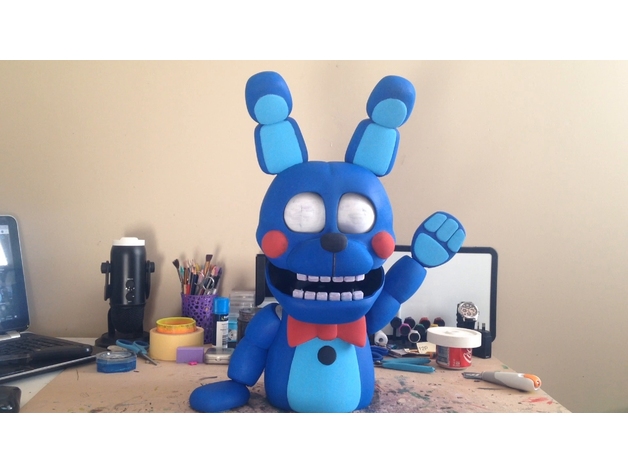
so i made another FNAF character. nothing more to say, just enjoy Bon Bon.
check out the video: https://youtu.be/gjZm5LToSjk
mmmmmmmmmmmmmmmmmmmmmmmmmmmmmmk bye
fickle igloo


print it like this

you can remove the center support if you think it will survive, just showing how the bottom should look like
deep shell
So you think i should use tree ok i can try that
I get off work at 3:30 so as soon as i get home i will start it up and i will video it for you thanks for the help
fickle igloo
normal support works as well, i just prefer trees
deep shell
I will try it i never tried trees before hey i am up to try anything to get this to work lol. I wish i knew why it failed though it made the head and arms perfect but the body gives me trouble
inner gale
That's kinda why what everyone wants to see is a picture of the support's layer adhesion when it fails.
inner gale
fickle igloo
iShiraz: You can see in this last screenshot that there's a hatched interface layer which means the entirety of the model is connected to the trees below it by only the most minimal of contact points so that interface has less strength compared to the actual layers between the model which would be multiple solid wall loops. 🤷♂️ I could see that working if your printer is tuned but it sounds like this printer is having other other precision issues causing it to misbehave on this model.
xkidfusionx: I'm not sure how you arranged the model to require supports on the first layer. It had one thin perimeter (orange) touching the bed when I loaded into Orca, so I was able to just add a 10mm outer and inner brim (blue) to increase adhesion.
 deep shell
I use cura but it did the supports for me i wasnt able to add and for what i saw unless i looked in the wrong spot i arranged the model in the middle of my build plate when i het home i can send you detail video of my settings and when i start it i will video it do y’all can see it as it starts
I don’t know if cura is bad or not it’s the only one i know about
I am about 3 weeks of experience in 3-d printing sooo there’s a good chance i may have missed
deep shell
@inner gale @fickle igloo so mine looks like this i dont know why these are the default settings for it
inner gale
Check if there's any red / yellow on Layer 1. It's hard to tell from the video compression.
I downloaded body.stl and I get one solid line of red/yellow where the model touches the build plate in Orca. Did you disable "drop down model"? Cura should always try to place the model so it touches the bed.
I don't know what's going on with Cura that's causing it to draw so little (only the front) for the first layer compared to Orca (an entire circle):

If iShiraz' tips don't improve the situation. A last resort is to drop the model down 0.4mm (two layer lines) to get a bigger contact area that you can attach a brim to.

 deep shell
Should we use orca instead of cura
I got a new vid i will post soon
Do u have a place i can send vid to its way too big at 5mins to post here -.-
@inner gale
This is the best i could do
inner gale
You can't just post a screenshot? the videos are low res and all we really care about is the first layer.
If you're only 3 weeks into this and only know Cura then switching you to Orca might be too big of a change. Do you have a high res pic of the failed print? that's the big question everyone is still trying to figure out: if it's separation or bad adhesion
cell phone photos of your PC are the worst way to convey this information
deep shell
I can try the best i have is my phone
The only thing i have is the broken one but it was scrapped by my brother as soon as it failed
This is all that’s left of the failed print

No
Is this a problem they are all fine except this one
@inner gale
fickle igloo
inner gale
If iShiraz' tips don't improve the situation. A last resort is to drop the mode...
This is a horrible solution, its cutting the model dimension for little adhesion
deep shell
 fickle igloo
deep shell
<@689593689839763503> <@289792329714237440> so mine looks like this i dont know ...
fickle igloo
deep shell
<@689593689839763503> <@289792329714237440> so mine looks like this i dont know ...
There is no you might want to decrease the support angle so it supports a wider area
fickle igloo
deep shell
This is all that’s left of the failed print
See the problem is the surface that is in contact sith the build plate is so slim, the bed adhesion is weak.
Thats why you want to raise the model Nd have rafted support at the bottom to have good addhsion
deep shell
I raised it 5mm like u said for the new print that going now
The only problem on the whole thing is that pic i just shared with u
inner gale
fickle igloo
This is a horrible solution, its cutting the model dimension for little adhesion
0.4mm, that's barely noticeable
🤷♂️ Handing it off to you. I'm out.
fickle igloo
inner gale
iShiraz: You can see in this last screenshot that there's a hatched interface la...
The half printerld support?
They usually survive
deep shell
Ok yeah everything else looks good i can send you an updated pic if you want
Well i appreciate you both helping sry if my info is bad
fickle igloo
deep shell
<@689593689839763503> <@289792329714237440> so mine looks like this i dont know ...
I worry about the thin support for the bowtie, might be wobbly
deep shell
I agree with that especially since they build off of it
fickle igloo
Whats your support angle?
I think you should decrese it i would hate to ser it fail after printing so high up
deep shell
support angle was 50
fickle igloo
Or if you want to sde if this orintation sorks better befofe changing the settings
deep shell
That was the default
fickle igloo
fickle igloo
This was 50 aswell i think
deep shell
Oh i wonder why they look so different then
I guess i will wait and see if it fails or not
I will keep you posted and this time i will send pics of it gets knocked off
fickle igloo
👍


 fickle igloo
Yeah you need to decrease the support angle
Always preview print first before sending it
Check layer by layer, see if everything is properly supported
deep shell
Do you have any idea why it’s not touching a lot of the supports ?
So i meed to scrap that this one

None of those are touching
@fickle igloo
deep shell
I mean they look good do u mean preview it on the computer

 fickle igloo
They seem to be printing fine, just that your support angle is too high, its barely supporting anything
Try lowering it, get it as close to mine as possible
deep shell
Ok i will do that
fickle igloo
i saw that
 fringe sage
😭
fickle igloo
🤣
fickle igloo
i am always watching
 fickle igloo
means that part will be printed in midair, you will need to support that
deep shell
Dang
Ok thank u

That’s what i am trying
@fickle igloo
This time the supports are touching the build
deep shell
I tried the tree and made it but they still wouldn’t touch the build i made them taller and no they still didn’t connect
Sry if i seem dumb or lost i am just trying to make sense of all of this
fickle igloo
deep shell
I tried the tree and made it but they still wouldn’t touch the build i made them...
what do yo mean?
post a picture
deep shell
I did the normal one so i don’t have the pic of the trees but in preview mode none of the tree supports touched the build i tried to make them bigger but still they wouldn’t touch it
fickle igloo
i cant help you without picture as i dont have any idea what you are talking about
deep shell
Ok one sec
Let me re load it


See they don’t touch it happens last time and it fell off
fickle igloo
what cura version are you on?

 fickle igloo
did you change the support settings?
deep shell
Only the thing i sent you
deep shell
deep shell
This one
fickle igloo
it works fine on my end
 fickle igloo
sending g-code is not a good idea
fickle igloo
deep shell
did you raise the model?
deep shell
Yea i did and ok i dodnt know just thought it would ask
Thank you sooo much for helping me i am gonna call it a night and continue in the morning.
 deep shell
Also i had a question it keeps rubbing the print it makes a grinding noise i have z retraction on yet it still grinds why is that
fickle igloo
You mean z hop?
Nozzle grind usually means you are overextruding
Solutions:
Calibrate e steps
Calibrate flow %
Enable combing or enable zhop
deep shell
@fickle igloo
fickle igloo
Which term you dont understand?
deep shell
All of that i dont know what that is
I tried looking up vids but none really explained it
inner gale
For a combination of written, tutorial, video:
https://teachingtechyt.github.io/calibration.html#esteps
esteps = making sure your extruder moves the expected length of filament under ideal conditions
flow = make sure your extruder moves the expected volume of filament given actual hotend conditions, e.g. maybe it needs to push harder/more than the esteps is configured for
fickle igloo
Well put @inner gale