


1 messages · Page 1 of 1 (latest)
 dull karma
[Patch v0.2.1 live now with new toolbar for simple mode and bug fixes!]
Hello there,
I have released DropStack, my first app I am actually finishing, into public beta today.
Essentially, what the app does is that it gives you a list of files in your downloads folder (or any folder you specify), ordered by date modified, complete with file name, type, size and modified date. You can then drag these files out, open them or copy them with a simple right-click. The app is designed to achieve the simplicity of MacOS' Dock Stacks feature, which basically does the same.
In addition, DropStack also offers an area where you can pin any file for quick access and a more compact view, which always stays on top.
The app is built with with the UWP framework and is open-sourced on GitHub.
Please feel free to check out the GitHub page, give it a try and let me know if there is something you would like to see changed, so I can continue working on the app and making it better. 😊
An emulation of the Dock Stacks feature from MacOS, built with the UWP framework - GitHub - Blindside-Studios/DropStack: An emulation of the Dock Stacks feature from MacOS, built with the UWP frame...
DropStack
 gentle thicket
Its sad that uwp is so closed to C# and XAML
It would have allowed for sandboxing and security features for all applications
dull karma
and that they are deprecating it :(
gentle thicket
And for some reason WinUI looks weird
WinUI3 I mean
UWP looks more native
The rendering I mean
 lone palm
why uwp instead of winui 3?
dull karma
gentle thicket
And for some reason WinUI looks weird
It's also boggling me because there are a lot of unpolished things in there like that there are some scrolling bugs related to overscroll (even on the Windows search flyout), ListView not being able to animate the entrance of multiple things at once, the downgrade of NavigationView, etc. Honestly, WinUI isn't really "good" in the common sense - as in both UWP and WinUI 3.
dull karma
lone palm
why uwp instead of winui 3?
I mean, I like UWP, it's kinda comfy to work with. I would use WinUI 3 if I did anything that actually requires it - like for example if I were to make an app that mimics the MacOS dock trash can, where it would make sense.
Or if I were to add a feature to DropStack that doesn't work with UWP, which I am afraid will happen quite soon.
lone palm
dull karma
I mean, I like UWP, it's kinda comfy to work with. I would use WinUI 3 if I did ...
valid
dull karma
FireCube approves
dull karma
New DropStack patch is live, adding a toolbar to simple mode and mitigating a windowing bug some people had: https://github.com/Blindside-Studios/DropStack/releases/tag/v0.2.1-public-beta

This release makes simple mode more powerful by keeping it just as simple and space-efficient as ever.
Toolbar in simple mode
Behavior
When launching simple mode, you will now be greeted with a pil...
 rugged geode
dull karma
I mean, I like UWP, it's kinda comfy to work with. I would use WinUI 3 if I did ...
rugged geode
dull karma
I mean, I like UWP, it's kinda comfy to work with. I would use WinUI 3 if I did ...
yeh same
I have the same experience w/ Mica Alt background
dull karma
dull karma
New DropStack patch is live, adding a toolbar to simple mode and mitigating a wi...
Reportedly, the issue persists until the app is either reinstalled or the setup is being executed again. Working on a fix rn.
The fix will be part of the next major update. To everyone suffering from this issue, I recommend either compiling the newest source code version, reinstalling the app or manually removing both folder cookies through settings, forcing the app to go through the out of box experience again.
dull karma
New release introduces search and active chromium and firefox downloads to DropStack! https://github.com/Blindside-Studios/DropStack/releases/tag/v0.2.2-public-beta
Search
So far, DropStack has focused on delivering the newest files from your download folder directly to your fingertips, however, with this update, we want to also help you reach all your older f...
If anyone here had the windowing issue, this patch fixes it, I recommend installing it.
lone palm
You released more updates than I have a year
dull karma
Patch v0.3 is out making major changes to the app's layout and interaction 8also updated readme file):
https://github.com/Blindside-Studios/DropStack
https://github.com/Blindside-Studios/DropStack/releases/tag/v0.3.0-public-beta

An emulation of the Dock Stacks feature from MacOS, built with the UWP framework - GitHub - Blindside-Studios/DropStack: An emulation of the Dock Stacks feature from MacOS, built with the UWP frame...

This release fundamentally redesigns the way you interact with pinned files and introduces some quality-of-life improvements. So, let's dive right in, we have a lot to cover today!
Important: ...
 balmy seal
Very useful and productive!
dull karma
💪
 native turret
Very nice stuff!
I would love to use this, but I also use a download manager that sorts downloads into subfolders depending on parameters, so nothing lands in the root folder, and so aren't shown by DropStack.
Would it be possible to add a option to show recursive files in the portal? 🤔
Cheers!
dull karma
Hmmm... I'll try remembering to come back to you
dull karma
native turret
Very nice stuff!
I would love to use this, but I also use a download manager th...
It's working in the latest build (but disabled by default), you just need to wait for v0.4, where it will ship.

Also works in simple mode
 dull karma
Hey, @native turret ,please tell me, how does the folder structure look like? Because I need to find a balance for going enough layers deep and crashing because of a lack of memory.
native turret
Oh wow, that was fast!
Most of the sorted files are only one layer deep, e.g “executables”, “zips”, “videos”, “audio” with only a few execeptions.
For my use case, a layerdepth of 1 is perfect, as I also wouldn’t want the contents of unzipped files to clutter up in DropStack either.
But perhaps the layerdepth should be user configurable?
dull karma
I mean, yeah, the problem is that my downloads folder has 68 files. If you include subdirectories, it's nearly 3000. It's getting messy real fast.
And the problem is the more subdirectories, the longer the app takes to start indexing files, since it has to order them first, so it can list them, for which it needs all of them.
I think I would do 1. I could make it customizable but that could become a problem really quickly.
native turret
Fair, in that case I think 1 sublayer is perfect 💪
dull karma
if I can manage to limit them, I am currently doing this by getting the files by their path, but the Windows App SDK security system prevents it.
native turret
I have no knowledge that would assist with this.
I wish you luck o7
dull karma
Yeah thanks.
dull karma
Okay, there is a problem. Either I load in all the files that are in all subdirectories and then sort out the ones that aren't. This is a problem because it takes long and loads up the memory, since it also loads an icon for each file, if it didn't loading it afterwards would still take kinda long. Or I load the base folder and then get the new files, which is a problem, since I need a folder token to access files, which can only be obtained though the Folder Picker only.
So I am not sure how I would do this. However, depending on how static your folder structure is, I might still be able to make something. Can you describe your folder structure, @native turret ?
native turret
Aight, not at my computer right now, but it looks something like this:
Downloads
\Executeables
- [Lots of installer files]
\Compressed
- [Lots of .zips]
- [Lots of folders from said .zips]
\Images
- [Lots of jpgs and pngs]
\Documents
- [fair amount of PDF's and stuff]
\Assets (3D Assets from different suppliers, this folder is very active with seperate batchprocesses, but if that's an issue I could fairly easily move this process outside of my downloads)
\Poliigon
-Lots and lots of files in movement
\Dimensiva
-Lots and lots of files in movement
\another asset-supplier...
- I think you get the idea...
Most of the structure is only one layer deep, with the expection of the asset folder, but that doesn't have to be in the downloads
dull karma
Okay, so adding Executabled, Compressed, Images, Documents, Assents instead of just Downloads would be fine for you? So the system doesn't create new folders all the time?
Because then there would be a reason for me to finally start working on multi folder support
native turret
I mean yeah, and multifolder support would be even cooler lmao
dull karma
native turret
I mean yeah, and multifolder support would be even cooler lmao
It's working properly. It will be included in the nexg release... whenever that is.
native turret
Yo good job, i’m gonna be looking forward to it 🫶
dull karma
New update just dropped with WinUI 3, a new simple mode, proposed by @heavy kestrel, multi folder support (@native turret), themes, a new app icon by @lofty ginkgo and some bug fixes! Check it out here:
https://github.com/Blindside-Studios/DropStack/releases/tag/v0.4.0-public-beta
Hello, fellow DropStackers,
this release includes a lot of notable feature changes and fixes. Let's go through them...
Migration to WinUI 3
That's right, we are ditching UWP in favor of the...
Oh also, @lone palm, WinUI3!!!
lone palm
dull karma
Oh also, <@736198858912038933>, WinUI3!!!
Yass
native turret
Siiiiiick 🫶
dull karma
Yeah, I am pretty happy with how it turned out.
 lone palm
dull karma
Yeah, I am pretty happy with how it turned out.
lone palm
dull karma
Yeah, I am pretty happy with how it turned out.
Slay
 queen wing
can it be a bit smaller? it gets out of my 1366 x 768 monitor
 dull karma
oh my god
dull karma
queen wing
can it be a bit smaller? it gets out of my 1366 x 768 monitor
@queen wing
I have fixed it. As a proof, here is DropStack running at 1920x1080 and at 800x600. Essentially, if the screen height minus the taskbar height falls below 900, DropStack will automatically assume the height of 90% of the screen and keep a consistent distance between taskbar and app window, as windows shell elements do.
It will be released with the next patch, which will focus on maintenance, adding a couple other bug fixes.

 dull karma
Alright, I got the update out:
https://github.com/Blindside-Studios/DropStack/releases/tag/v0.4.1-public-beta
It also addresses a bug that removed copied contents from the clipboard after the app was closed, a bug that would prevent copying files while other files were being loaded, among other things.
Obligatory mention, since this is a maintenance update I'd recommend to anyone: @native turret, @lone palm (no idea if he uses app), @queen wing

This release does not include any new features, it merely brings some improvements to DropStack.
Behavior changes
Simple mode now closes when you click out of it
Simple mode now closes when copyin...
queen wing
dull karma
Alright, I got the update out:
https://github.com/Blindside-Studios/DropStack/re...
thanks!
dull karma
Some users were reporting scaling issues, where the app would not align to its intended position, if scaling was set to anything but 100%. This should now be fixed in patch v0.4.2 and scaling now also impacts DropStack's decision on whether to reduce its height, further eliminating the problem of it clipping out of screen space.
Furthermore, patch v0.4.2 also addresses a slight misalignment of the pills in simple mode, so text now properly appears centered in them.
Here you go: https://github.com/Blindside-Studios/DropStack/releases/tag/v0.4.2-public-beta

This release fixes the issue that could occur when the user used their Windows install at any scaling setting other than 100%. It would reveal itself through DropStack clipping out of the visible s...
dull karma
New update adds support for dragging and copying multiple files in normal mode, custom settings regarding how many items and thumbnails are being loaded as well as thumbnail resolution, fixes functional bugs, improves performance and finally fixed the visual bugs where the ListView could become too wide for the window and thus got cut off.🙏
https://github.com/Blindside-Studios/DropStack/releases/tag/v0.4.3-public-beta

Welcome back,
this release includes some important bug fixes again, but first, let's talk new features!
Multi-Select
As you can see, multiple files have been selected. This currently works in ...
dull karma
Another update, and that's a large one so it's called v0.5.0 because DropStack is getting file caching. Additionally, a lot of changes were made to make it faster, more intuitive and more powerful, including:
So, please feel free to check it out:
https://github.com/Blindside-Studios/DropStack/releases/tag/v0.5.0-public-beta

Welcome back!
After a month, we are finally back with a new release. The focus of patch v0.5.0 is aligning DropStack's behavior with how you would expect it to react. This includes (but is by f...
 lone palm
dull karma
lone palm
dull karma
Who tf made this i@age
dull karma
lone palm
Who tf made this i@age
me, i made this
lone palm
dull karma
me, i made this
How
dull karma
lone palm
How
Well, I took screenshot, removed background and then aligned in a grid.
dull karma
Ladies and gentlemen,
I give you... new update v0.5.1.
It includes these:
Check it out here: https://github.com/Blindside-Studios/DropStack/releases/tag/v0.5.1-public-beta

Welcome back!
This update includes two major and two minor things. let's dive right in...
Mini Mode
Well, as you could see on the far right of the image above, we brought back old simple mode ...
dull karma
Hey guys, new update!
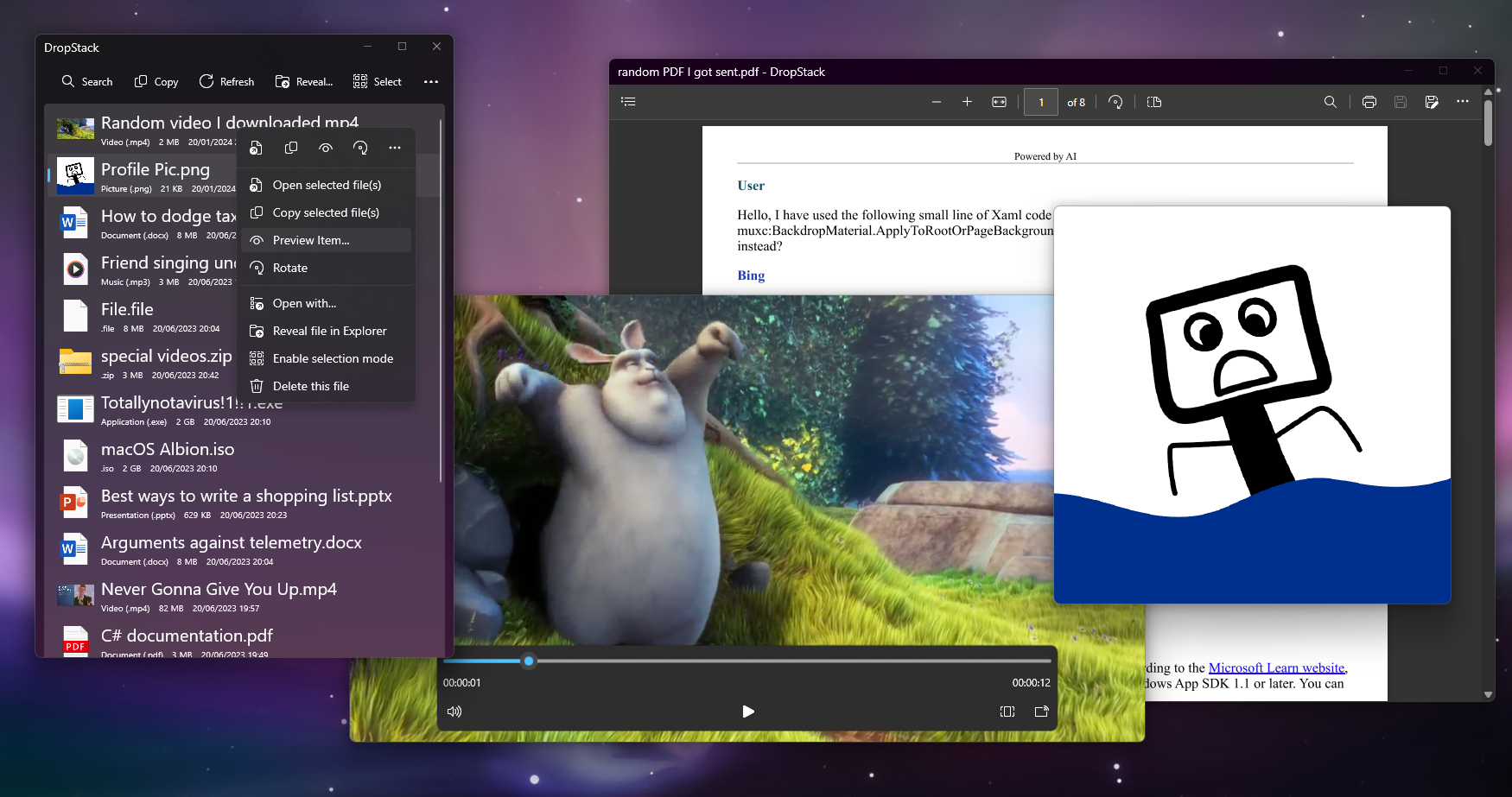
This one adds macOS-like QuickLook for some file types, as well as a lot of performance improvements, better search and an experimental Details Sheet I need feedback for. Please help me gather ideas!
Screenshot
https://github.com/Blindside-Studios/DropStack/releases/tag/v0.6.0-public-beta

Good morning!
It's been a while, but now, we're proud to announce a slew of careful refinements and new experiences that will reduce the need and desire to ever leave DropStack, starting wi...
dull karma
dull karma
Hey guys, new update!
This one adds macOS-like QuickLook for some file types, as...
Boyz, there is a hotfix for this release: https://github.com/Blindside-Studios/DropStack/releases/tag/v0.6.1-public-beta

This update includes a hotfix that aims to address soft reload displaying newly added files in the wrong order.
Thank you for using DropStack!
lone palm
dull karma
Boyz, there is a hotfix for this release: https://github.com/Blindside-Studios/D...
real
dull karma
dull karma
Boyz, there is a hotfix for this release: https://github.com/Blindside-Studios/D...
You know this hotfix? Well, I not managed to actually fix the bug. 💀
I also did some other stuff:
Please download 👉👈
https://github.com/Blindside-Studios/DropStack/releases/tag/v0.6.2-public-beta

Welcome back!
This release includes some fixes and improvements:
improved caching reliability
improved search accuracy
soft reload should no longer impact search and filtering
fixed a bug that wou...
