#modding-general
1 messages · Page 15 of 1
 small basalt
 quiet heart
it is for the light bar to emite what glow there but it is allways on an not goes off
 flint charm
edit them in blender bro
flint charm
can anyone help be sort out air suspension for this? pleeeease.

 pliant robin
BeamNG
Hello all,
I m making air suspension for all cars.
And i've been asked and want to have independent controls front/back and possibly left/right....


this one might help.
 acoustic ivy
flint charm
edit them in blender bro
acoustic ivy
flint charm
edit them in blender bro
Yeah but you cant edit some parts in blender
 river forge
Do it in text form then?
 quaint solar
can someone help please
river forge
Have you tested what the Golf_on material looks like on its own? so without the glowmap?
quaint solar
i made it myself and its the same but glowing
river forge
And it has the headlight material assigned to it?
 crystal wraith
pliant robin
https://www.beamng.com/threads/independent-air-suspension.43122/
crystal wraith
pliant robin
https://www.beamng.com/threads/independent-air-suspension.43122/
I get you’re trying to help, but googling and sending the first result isn’t the best option, I mean, the thread is 8 years old
pliant robin
crystal wraith
I get you’re trying to help, but googling and sending the first result isn’t the...
for me it is still work.
quaint solar
river forge
And it has the `headlight` material assigned to it?
uh idk
the model have only one assigned material - Golf and the other is mapped to it
is there an option i can make a model with one material, separate the headlights and taillights from it and it will work?
river forge
The part of the model that needs to light up, needs to have the headlight material assigned to it
It doesn't have to be separate model, it can also just be a different material on the same model
https://www.youtube.com/watch?v=ms89wP8m4ZU
 errant plinth
Is there anyone who can help me to get the hang of the lightbar pattern editing and such?
quaint solar
but what if i have texture putted on the model, can i just send you the model i am working on and you can say what i need to change in it?
river forge
Just select the faces of the headlight, and assign the headlight material to them
The textures will remain the same, as the glowmap will make it show the Golf material whenever the glowmap is in the off state
quaint solar
okay, i will figure out something, thanks
one more question, I need to add 2 material for taillights and headlights or I just can make one for glowmap?


 little portal
acoustic ivy
i want to fix the black spot
little portal
acoustic ivy
i want to fix the black spot
You didnt accidentally select a different material for that triangle?
river forge
quaint solar
one more question, I need to add 2 material for taillights and headlights or I j...
I'd suggest making a different glowmap for those with just the lowbeam function, to prevent the rear lights from getting brighter when you turn on the highbeams
(Though in your case, the on_intense is the same as on, so it wouldn't matter)
quaint solar
river forge
I'd suggest making a different glowmap for those with just the lowbeam function,...
IT WORKED, THANK YOU 😄
 toxic widgetBOT
Gave +1 Reputation to @river forge (current: #2 - 379)
crystal wraith
anyone positive how to alpha clip a material while pbr, ive heard you need an opacity map but last time that didnt work for me
errant plinth
Is there anyone who can help me to get the hang of the lightbar pattern editing? I believe it's called the lightbar controller?
flint charm
pliant robin
https://www.beamng.com/threads/independent-air-suspension.43122/
How i did not find this in my searches has me stumped but thankyou!!
flint charm
acoustic ivy
Yeah but you cant edit some parts in blender
Not sure what you mean. The entire mesh is able to be edited in blender?
acoustic ivy
flint charm
Not sure what you mean. The entire mesh is able to be edited in blender?
no i mean like main body crew jbeam in blender is not editable
flint charm
It sure is man. Are you sure you have the correct plugin
flint charm
acoustic ivy
no i mean like main body crew jbeam in blender is not editable
Every aspect of the car is modifiable in blender. There's just a process to it, if not done in correct sequence it won't work. Ask me how I know 🤣. What are you trying to do exactly that might help us help you a bit better
acoustic ivy
flint charm
Every aspect of the car is modifiable in blender. There's just a process to it, ...
yeah turns out i was using old ver of the plugin im sorry
flint charm
acoustic ivy
yeah turns out i was using old ver of the plugin im sorry
I had the same issue last week. All good man
crystal wraith
Anyone know why this happens
Sorry couldn’t snip it, needed to hold alt for the road tool


 brittle warren
crystal wraith
anyone positive how to alpha clip a material while pbr, ive heard you need an op...
brittle warren
crystal wraith
anyone positive how to alpha clip a material while pbr, ive heard you need an op...
Yes
crystal wraith
brittle warren
Yes
well maybe i didnt make the opacity map right, how do i make one?
i just used some website
thought it would work since i use a website for my normals, metalics, and roughness and thats fine
brittle warren
crystal wraith
well maybe i didnt make the opacity map right, how do i make one?
The stuff you want to be able to see needs to be all white and then the rest either transparent or black
And use just pre muti alpha
crystal wraith
gotcha, so just color the image?
brittle warren
I use gimp to do it because you can just move a couple sliders and your done
crystal wraith
my brain is too tiny to understand gimp atleast atm lol
i have it i just dont know wtf to click
brittle warren
I'll send u a short clip later of how to do it it's really easy
crystal wraith
crystal wraith
only happens with a large decal road, when using a smaller one i can place anywhere


 crystal wraith
crystal wraith
crystal wraith
anyone, please lol
brittle warren
crystal wraith
What's wrong if I may ask idk what your trynna do?
crystal wraith
i need to loop the road around the track for AI to drive on for races
and after 9.3 width the track drops
idk how to explain it

 crystal wraith
shouldnt be though, when i use a road thats smaller, for example, a 9 width road, i can place anywhere
 brittle warren
What are your other decal road settings
 heady trail
crystal wraith
heady trail
crystal wraith
Nvm just saw this
crystal wraith
there's collision

 woeful bone
how can i add collision to this model?
 crystal wraith
woeful bone
how can i add collision to this model?
crystal wraith
woeful bone
how can i add collision to this model?
inspector > Visible mesh final
brittle warren
woeful bone
how can i add collision to this model?
Either make a collision mesh Wich is the right way or the way Gunner said but that way is gonna be glitchy
brittle warren
crystal wraith
Hmm that's odd
woeful bone
crystal wraith
inspector > Visible mesh final
where is inspector?
crystal wraith
brittle warren
Either make a collision mesh Wich is the right way or the way Gunner said but th...
no offense to the poster, but its a huge person, i dont think theyre gonna take time to make a col mesh
crystal wraith
woeful bone
where is inspector?
in world editor, look around
brittle warren
crystal wraith
no offense to the poster, but its a huge person, i dont think theyre gonna take ...
You can make 3 squares?
crystal wraith
brittle warren
You can make 3 squares?
i mean, they dont even know where the inspector is... lol
brittle warren
True true
brittle warren
crystal wraith
in world editor, look around
Should be on the right side in world editor click on your mesh and then in the inspector find collision mesh and set it to visible mesh final


 crystal wraith
spawn it in
woeful bone
creating an object?
brittle warren
crystal wraith
i think im fueling a brain rot youtube short right now
Yes
crystal wraith
brittle warren
I'll send u a short clip later of how to do it it's really easy
when you do this do you mind also explaining the auto on/off lights mainlevel.lua or send a new link to the modding to dummies thread, cant find the one you sent a bit ago
brittle warren
crystal wraith
when you do this do you mind also explaining the auto on/off lights mainlevel.lu...
Yea i can bro
brittle warren
brittle warren
here is the thing i shared the group is dynamic lights or something
somthing like this
 crystal wraith
its weird, i can cover the track horizontally, but not vertial


 noble monolith
crystal wraith
its weird, i can cover the track horizontally, but not vertial
noble monolith
crystal wraith
its weird, i can cover the track horizontally, but not vertial
looks like there is a gap in the middle
crystal wraith
okay, i tried turning the map sideways and it might have fixed it
crystal wraith
noble monolith
looks like there is a gap in the middle
its not just there, its anywhere
im gonna go insane, now i have a NEW issue

and its back to doing it again, ofcourse it is
 median cargo
hi
 minor moth
it worked on 0.33 

now tango wont spawn and you cant buy it
how the fuck does paint break it
are skins a requirement now or what
what

HUH

cursed

why is the game removing a part thats a core slot part
 quasi wave
i got a question how hard is to create ai paths for racing tracks? ive tested a lot of racing mod tracks and all of them have slow ai even on flee whith an average of 90 kmh on wide ass curves.
i ask this because i want to fix it
 warm sphinx
crystal wraith
its weird, i can cover the track horizontally, but not vertial
warm sphinx
crystal wraith
its weird, i can cover the track horizontally, but not vertial
Is the decal road set to over object?
iirc there’s a maximum banking angle but I can’t remember if the over object decal roads or non over object have higher maximums
crystal wraith
Yes
crystal wraith
if anyone has an idea of how to fix it pleasssee let me know
anyone know how to implement a catch fence sorta thing into my beamng map
like how the tirestacks work, just would look like a fence
 keen notch
crystal wraith
if anyone has an idea of how to fix it pleasssee let me know
keen notch
crystal wraith
if anyone has an idea of how to fix it pleasssee let me know
thats beamng bug after 0.32 update if i remember correctly.
and yes, its still not fixed
crystal wraith
crystal wraith
anyone know how to implement a catch fence sorta thing into my beamng map
all this needs to be is one long line, not curved or bent
 ebon nimbus
how do i fix this flimsy problem
pliant robin
do you have any guide of Air SUspension? (This time i think i might update to 4 Corner Air Suspension independent)
crystal wraith
brittle warren
I'll send u a short clip later of how to do it it's really easy
0 rush, just a reminder
brittle warren
crystal wraith
0 rush, just a reminder
Sorry forgot with all the drama in pgd lol
crystal wraith
oh i didnt know there was any lol
brittle warren
crystal wraith
oh i didnt know there was any lol
go to his bug crawler channel lol
crystal wraith
brittle warren
go to his bug crawler channel lol
lol
brittle warren
crystal wraith
0 rush, just a reminder
crystal wraith
gotcha
https://medal.tv/games/beamng/clips/jBXvQ9N53VkIeEs_T?invite=cr-MSwxajIsMTc4NDk3OTkzLAhow do i fix the lights flickering, ignore the skybox lol

Watch BeamNG and millions of other BeamNG videos captured using Medal.
crystal wraith
anyone know why when trying to edit my sunsky, it simply doesnt save nvm just gonna do it manually through json
crystal wraith
still not working manually, anyone know why
json vs ingame

this not working has the potential of ruining my entire map smh
cktodbox ruined this map ugh
whole damn map looks like a blueberry
crystal wraith
i deleted my old sunsky, in attempt of adding a new one, which fixes it until i rejoin, then theres no sunsky, for some reason it doesnt appear (the new one) in my scenetree
god damn finally got it working
ebon nimbus
can someone tell me which nodes and beams is causing the problem or atleast what thing is causing it
little portal
ebon nimbus
can someone tell me which nodes and beams is causing the problem or atleast what...
Put // before a beam and keep on doing that until you found the issue
ebon nimbus
little portal
Put // before a beam and keep on doing that until you found the issue
Ha I found the issues
Its the nodes overwriting getting confused
little portal
ebon nimbus
Its the nodes overwriting getting confused
Like the same node with a different location in a different jbeam?
acoustic ivy
please help me how do i fix this the suspension is not even and this is 3link when i also drive it go to the left

 ebon nimbus
little portal
Like the same node with a different location in a different jbeam?
ebon nimbus
little portal
Like the same node with a different location in a different jbeam?
Yes
But same location
I kinda confused because I have the front shocks with the mounting point in suspension jbeam and frame jbeam
quasi wave
hey does anybody have the bolide gt3 rear bumper? if its possible the spoiler too ive been trying to find it on any website but nothing
 wise fossil
weird question, but I am trying to make a custom garage on the American Road map and I am having some issues. I scaled up one of the hangars at the test track and have successfully applied the lighting and soundfx that I want for the space. I have DSC dynos and lifts that I am trying to make a permanent part of the garage while still maintaining their functionality. The only way I can spawn these is through the vehicle selector, and I am having trouble trying to get them to respawn when reloading the map. Does anyone know how to make it a permanent fixture while still maintaining its physics? TYIA
crystal wraith
Is there a way to allow more than 9 ai racers on an airace, it caps at 9
 olive maple
Right so I am amking a transfercase thing, and for whatever reason it just cuts off when the case reaches >2500 rpm. Any suggestions?
 quick frost
tire spins weird when car is moving, how can i fix that?

 olive maple
Right so I am amking a transfercase thing, and for whatever reason it just cuts ...
olive maple
olive maple
Right so I am amking a transfercase thing, and for whatever reason it just cuts ...
nvm solved
river forge
quick frost
tire spins weird when car is moving, how can i fix that?
Make sure the tires origin point in blender is right in the middle of it
quick frost
so its not the code problem?
river forge
I assume not
 pastel stone
Hi everyone! Im tryng to build a Peugeot 307 mod, but I never done a mod before, so I would like to ask if someone could help me to make it
 unique zealot
pastel stone
Hi everyone! Im tryng to build a Peugeot 307 mod, but I never done a mod before,...
unique zealot
pastel stone
Hi everyone! Im tryng to build a Peugeot 307 mod, but I never done a mod before,...
dont start off with a full car as a first mod and instead start with a part mod
 waxen galleon
I'm trying to do an Belasco engine swap into the pickup and I have everything done but the engine is completely indestructible to to getting smashed into the ground with node grabber and was wondering how I could fix it. I've been looking for documentation on the break Trigger beam because I think that's broken in my mod
ebon nimbus
waxen galleon
I'm trying to do an Belasco engine swap into the pickup and I have everything do...
Can you send the screenshot?
With the nodes

 waxen galleon
okay
ebon nimbus
In beamng

 ebon nimbus
So did you meant the engine doesn't mount to the car right?
Have you check the engine mount nodes?
waxen galleon
no the engine mounts just fine
everything works but the engine is completely immune to physical damage and i cant get the !engine broken notification when i crash
its still running after being ripped out of the truck i had it in

not the truck in the back a different one off screen
brittle warren
Anyone in here know how to use material overide?
 viral juniper
brittle warren
Anyone in here know how to use material overide?
viral juniper
brittle warren
Anyone in here know how to use material overide?
I do
brittle warren
viral juniper
I do
am i doing this right?
 viral juniper
brittle warren
am i doing this right?
viral juniper
brittle warren
am i doing this right?
I don't think it can be used that way, it has to be inside of one of your mesh entries, in the same location you have "pos"
brittle warren
viral juniper
I don't think it can be used that way, it has to be inside of one of your mesh e...
well i coppied it from the nine and this is what it has
 viral juniper
Ah, I guess I am wrong then
I've never used it that way, so I didn't know it was possible
Well then, I guess it should work
Just make sure "rooflights_on" is the same name of the material that would be assigned in blender
brittle warren
viral juniper
Well then, I guess it should work
Just make sure "rooflights_on" is the same nam...
Ok so i cant use it on a glow map then im assuming? ive never tried it i want to be able to change the color of an emmisive material without making 10 dif meshes or a bunch of different keybinds
viral juniper
brittle warren
Ok so i cant use it on a glow map then im assuming? ive never tried it i want to...
Well honestly I've never tried it on a glowmap material, I've only ever used it for static materials
You could try it, I'm willing to be proven wrong again lol
brittle warren
viral juniper
Well honestly I've never tried it on a glowmap material, I've only ever used it ...
Ok lol imma take ten hours to figure it out and hope it works i wanted to just make variables for the emmisive values but i dont think you can do that in a material
waxen galleon
@ebon nimbus any idea?
ebon nimbus
I don't exactly know the problem because I'm not infront of my pc
So maybe need to wait for a long time
waxen galleon
ah okay
 dry cargo
Does anyone know how to make a skin for beamng? It seems that the old videos don't work anymore
river forge
brittle warren
well i coppied it from the nine and this is what it has
The nine has a bit of a complex skin system built into it (replacing with different materials depending on what frame colour option you select elsewhere), if you just wanna simply swap one material to another, something simple like this will do the trick
 flint charm
so i made a C notched frame, moved the frame jbeam accordingly, i then imported the rear axle 4link jbeam and moved it up to match, loaded up the car in game and it shows the frame, frame jbeam and 4link jbeam have all succesfully been modified, but the axle mesh and links/mounting tabs have not moved..... guessing i need to move the axle mesh at the same time as the axle jbeam.....?


 rancid wedge
acoustic ivy
please help me how do i fix this the suspension is not even and this is 3link wh...
rancid wedge
acoustic ivy
please help me how do i fix this the suspension is not even and this is 3link wh...
A bit late, but there is a tuning slider for left/right placement on 3link axles, because they shift from side to side when compressing
So you should be good by just finding the new center and making that the new standard for the slider
river forge
flint charm
so i made a C notched frame, moved the frame jbeam accordingly, i then imported ...
Yeah, you'll need to move the flexbodies too. Easiest will be to add the pos (position) argument in the flexbodies section
https://documentation.beamng.com/modding/vehicle/sections/flexbodies/#pos
 flint charm
river forge
Yeah, you'll need to move the flexbodies too. Easiest will be to add the pos (po...
flint charm
river forge
Yeah, you'll need to move the flexbodies too. Easiest will be to add the pos (po...
thanks mate appreciate the reply. these 4 links are tricky, so many pivot points haha
toxic widgetBOT
Gave +1 Reputation to @river forge (current: #2 - 382)
flint charm
river forge
Yeah, you'll need to move the flexbodies too. Easiest will be to add the pos (po...
okay had a read and i didnt take any on that in , way to dumb to understand any of that haha
river forge
There is an example at the bottom of the page, maybe that can be useful

For the top flexbody, this will move it by -0.5m on the x axis and rotate it 180° on the z axis
You'll just need the pos part
flint charm
river forge
There is an example at the bottom of the page, maybe that can be useful
so i cant just lift the rear end up like this with the j beam?
 flint charm
river forge
Yeah, you'll need to move the flexbodies too. Easiest will be to add the pos (po...
flint charm
river forge
Yeah, you'll need to move the flexbodies too. Easiest will be to add the pos (po...
well im getting somewhere. its not exactly where i want to be but 90% of the rear end is where it needs to be , just no textures now hahahaha
 little portal
flint charm
well im getting somewhere. its not exactly where i want to be but 90% of the rea...
little portal
flint charm
well im getting somewhere. its not exactly where i want to be but 90% of the rea...
Probably because of .001 textures
I use material utilities from blender
Shift q, specials and merge base names
flint charm
little portal
Probably because of .001 textures
shift+q doesnt do anything ? i just tried, its all good man im in over my head here. might try something a bit more simple that moving links and lining them up with their mounts etc, theres alot going on with that 4link. i am learning but..
 valid glade
where do i add my parts to the rear suspension to work in the jbeam
 river forge
valid glade
where do i add my parts to the rear suspension to work in the jbeam
river forge
valid glade
where do i add my parts to the rear suspension to work in the jbeam
What do you want to add? Model, some kind of function, nodes/beams?
olive maple
Is there a way to link glow maps to drive modes?
acoustic ivy
why???
 acoustic ivy
little portal
Just do it in the texteditor of blender
acoustic ivy
little portal
Just do it in the texteditor of blender
thank you
toxic widgetBOT
Gave +1 Reputation to @little portal (current: #868 - 2)
 hard radish
Hi. Is there any way to retrieve the true center of the current vehicle without the veh:getSpawnWorldOOBB():getCenter()? It doesn't work when spawning multiple vehicles at once.
crystal wraith
I’m confused, are you trying to edit this mod without permission?
Pretty sure that’s a paid mod and you basically just leaked it
little portal
crystal wraith
I’m confused, are you trying to edit this mod without permission?
Since when do you need permission to edit a mod for yourself 🤨
little portal
crystal wraith
Pretty sure that’s a paid mod and you basically just leaked it
Ahhahahhaha
If he has it it was probably leaked before
Highly doubt it was a paid mod
crystal wraith
little portal
Highly doubt it was a paid mod
It’s pgp, most of his mods are paid
 merry crystal
Anyone know why my front suspension works for my friend but breaks whenever he sends the mod to me? Ive tried clear cache but it still wont work

this is his video
brittle warren
little portal
Since when do you need permission to edit a mod for yourself 🤨
It's shitty not to ask in the first place
little portal
brittle warren
It's shitty not to ask in the first place
No its not
little portal
So you would be offended if someone changed a few things on a mod you made for himself?
brittle warren
They can't cause I lock my shit
little portal
That doesnt answer my question?
brittle warren
Asking permission is common courtesy if you don't your a jack ass it's not hard to ask I ask plenty of people and always get a yes
brittle warren
Lol ur a crybaby who's mad people want common courtesy everyone here will tell u exactly what I'm telling you
little portal
Yea pff ive never been more mad in my life i am so mad right now
Youre getting mad at the wrong person
brittle warren
Lol no u just think u can do whatever with peoples mods like they are yours no that's not how it works be a decent person and ask permission it's not hard
brittle warren
crystal wraith
It’s pgp, most of his mods are paid
Bro this guy lol
brittle warren
little portal
People editing your mods without permission?
They literally can't lol I already said that it's impossible
Also if someone want something done with my mod I just do it myself for everyone who has it
little portal
Any traumatic experience with people editing your mods in the past causing you to behave like this or is it autism?
little portal
brittle warren
Also if someone want something done with my mod I just do it myself for everyone...
Seems inconvenient
brittle warren
little portal
Any traumatic experience with people editing your mods in the past causing you t...
<@&710084482031550547> bro called me autistic for no reason
little portal
Nah i asked if you were or not
brittle warren
Nah your being a dick cause I said your supposed to ask permission
little portal
Tell that to the brazilian guy
brittle warren
He already been told your the one who has an issue with it that's why I told you. You asked the question I responded to
little portal
seems like youre the only one with issues about it based on your reactions
Couldnt care less if someone wants to tailor a mod to his needs but thats me
And you do tou
olive maple
little portal
seems like youre the only one with issues about it based on your reactions
Well they are right.. it is at least a bit of courtesy to ask anyway
brittle warren
I'm just a decent person lol I don't do shit to stuff that's not mine if I can ask for permission first
little portal
Youre treating it like its your house rather than a text file with a 3d model
Its really not that deep
brittle warren
Nah your probably just a mod theif probably take anything you can from other mods to use in your own bro everyone here has the same opinion as me but you lol. Grow up and ask permission lol. I'm done talking to you since you clearly aren't a decent person who understands common courtesy
 thorn jewel
🤨
brittle warren
thorn jewel
🤨
Am I wrong, in what I've said?
thorn jewel
brittle warren
Am I wrong, in what I've said?
No, I saw it has been handled 🙂
little portal
👏👏👏👏
 hidden gyro
crystal wraith
I’m confused, are you trying to edit this mod without permission?
hidden gyro
crystal wraith
I’m confused, are you trying to edit this mod without permission?
This mod is not paid I will send the link to it on Patreon so you can see
https://www.patreon.com/posts/113869538?utm_campaign=postshare_fan&utm_content=android_share

Patreon
Get more from PhillyGriff Designs on Patreon
crystal wraith
Still shouldn’t edit without permission
He’s already had it happen before and trust me he doesn’t take it so kindly
river forge
eh, as long as the edit stays private, i dont really see the harm in it. obviously if you share it - even to just a few people - asking permission from the original author would be the right thing to do
hidden gyro
Thanks!
brittle warren
Nah asking permission from the start doesn't matter if you share it or not, he is also a nice person and will probably say yes
river forge
fair enough
hidden gyro
I just wanted to show you a mod that I thought was cool since it adds hydraulic steering to the solid axle
brittle warren
hidden gyro
I just wanted to show you a mod that I thought was cool since it adds hydraulic ...
Bro you shared a zip of someone's mod you cant do that anyways. Share a link to the patreon not the actual google drive.
hidden gyro
I did not know
crystal wraith
Everyone makes mistakes just try not to do it again
little portal
river forge
eh, as long as the edit stays private, i dont really see the harm in it. obvious...
Atleast i am not the only one who thinks that way in here
hidden gyro
crystal wraith
Everyone makes mistakes just try not to do it again
thanks
toxic widgetBOT
Gave +1 Reputation to @crystal wraith (current: #281 - 10)
brittle warren
hidden gyro
thanks
Id also delete the link to the zip file since it's still there
hidden gyro
I'm going to do this but I'll leave the Patreon link beautiful
acoustic ivy
brittle warren
try adjusting the window nodes this happend to me because of glass jbeam
 dawn ibex
anybody have some insight into methods of getting the highest point at a certain coordinate?
ie pseudo:
local x, y, z = 432, -736, 53

local alt = getHeightAtPos(x,y,z)
print("Altitude: "..alt)
So I have issues with the liverys/texture works. The colours are the same on the templete yet they look washed out on the car. Any help with it would be great.

 scarlet cedar
olive maple
So I have issues with the liverys/texture works. The colours are the same on the...
scarlet cedar
olive maple
So I have issues with the liverys/texture works. The colours are the same on the...
vivace has all the materials set to a good amount, try tinkering with the clearcoat, metallic and roughness values in the material editor
scarlet cedar
yeah
ebon nimbus
any idea why my downpipe is getting alot of pressure?
 olive maple
ok I feel smth is a tad wrong
 ebon nimbus
any idea why my downpipe is getting alot of pressure?
ebon nimbus
ebon nimbus
any idea why my downpipe is getting alot of pressure?
nvm fixed
 tepid sable
Help I have a texture problem in beam, I took as a base a model with its textures, the textures apply perfectly to the model in other 3d viewer but in beam only two apply correctly the others don't and you can't see the patterns.
How can I solve this problem ?


In beam


 tacit halo
brittle warren
Nah asking permission from the start doesn't matter if you share it or not, he i...
tacit halo
brittle warren
Nah asking permission from the start doesn't matter if you share it or not, he i...
as long as you dont share it you shouldnt need to ask for permission, when you flex it and showcase it then it does become a different thing but still if you keep it to yourself who cares
making it public tho - yeah that you should just ask
tacit halo
ebon nimbus
any idea why my downpipe is getting alot of pressure?
you are using an exhaust mainfold node, which generally is less than 20cm away from most nodes of the engine
little portal
tacit halo
as long as you dont share it you shouldnt need to ask for permission, when you f...
Exactly
ebon nimbus
ah
ebon nimbus
tacit halo
you are using an exhaust mainfold node, which generally is less than 20cm away f...
which node should i put at the end]
 royal crater
is there a way to increase the amount of lines in the debug before it starts forgetting them? I'm printing from a table, and it's too long
ebon nimbus
what is the requirement of exhaust node
like what defines to make it work without the no exhaust end node found error
 dusk glacier
brittle warren
dusk glacier
brittle warren
<@&710084482031550547>
royal crater
ebon nimbus
what is the requirement of exhaust node
you have to have "isExhaust" on a node, and on a beam that connects it to another node. Then it's on every beam all the way to the end.
The first beam is often from 1 engine node to another node that is a part of the default engine nodes.
ebon nimbus
royal crater
you have to have "isExhaust" on a node, and on a beam that connects it to anothe...
I believe i have
I'm now considering is it the node group problem
Because the nodes and beams basically the same thing, didn't change
royal crater
be sure to trace the tree from the very beginning
royal crater
{"isExhaust":"mainEngine"} it does have to be in the mainEngine group, or whatever group it's in
I believe it's in the name used in the powertrain section


 crystal wraith
anyone know how to make a mesh a "soft collision"
ebon nimbus
anyone know how to do lua
i need to combine and remove stuff from a lua file but i dont know how
royal crater
crystal wraith
anyone know how to make a mesh a "soft collision"
I'm not sure what you're asking. Can you clarify?
crystal wraith
sorta how the tire stacks work on west coast, when you hit them you sorta go through them, making a soft impact, not like youre crashing into a wall
royal crater
crystal wraith
sorta how the tire stacks work on west coast, when you hit them you sorta go thr...
oh, you set the ground type. I can look up the specific name, and where to find it, or is that enough to help you for now?
crystal wraith
is that really it lol? ive alawys seen it ans swore it didnt do anything, ill try in a sec and get back
i know the name
royal crater
it refers to many things like grass, and how deep you sink into it or sand, traction levels, sounds, and particles. I've even made my own custom ones
crystal wraith
royal crater
oh, you set the ground type. I can look up the specific name, and where to find ...
should be this, correct?
 royal crater
not sure, I haven't used it in over a year
crystal wraith
ah
i got a video by TerryMartin, so i should be okay, but i still appricate the help
so, i got how to make the mesh how i want it, but i guess since its so thin nothing happens, is there a way to insert just an invisible square from blender into beam so i can just put the square behind it and use that as the soft collision

i know what i need to do for porting assetto maps in blender, plus a miniscule amount more, but little stuff like that im just clueless
royal crater
when making the object in blender, make sure that your Colmesh is nice and thick
oh
crystal wraith
yeaa
crystal wraith
so how does a colmesh work? does it disapear in game or what? lol sorry i dont know much about other than what i do
royal crater
in game you can set a collision thing to be based on visual or the colmesh (and maybe other options too). The colmesh is invisible. Sorry I can't be much more help, I haven't worked on map stuff in a really long time
crystal wraith
its okay, i think i understand
 weak flicker
I have reconstructed the circled area multiple times but when i got to triangle the square i get those lines as shown in the smaller circle
 crystal wraith
royal crater
in game you can set a collision thing to be based on visual or the colmesh (and ...
crystal wraith
royal crater
in game you can set a collision thing to be based on visual or the colmesh (and ...
got it working eventually, thanks again for the help
toxic widgetBOT
Gave +1 Reputation to @royal crater (current: #265 - 11)
royal crater
weak flicker
I have reconstructed the circled area multiple times but when i got to triangle ...
you don't have to triangulate before exporting. But if it's not good in game, just do it manually with the knife tool, because automated processes will often not do what you want it to do
weak flicker
royal crater
you don't have to triangulate before exporting. But if it's not good in game, ju...
I though the whole model had to be triangles for it to work in beam?
royal crater
nah, but when you export it from blender it'll triangulate for you, so be mindful of that. Though beamng can read nontriangulated polygons too
weak flicker
Oh ok ill try and see how it works
crystal wraith
if anyone knows how to setup a drag race with a working christmas tree and time signs please let me know, i know its possible but not sure how
tacit halo
royal crater
is there a way to increase the amount of lines in the debug before it starts for...
You probably could make it a command that you have to type in and just separate it into 2 parts
royal crater
luckily I figured out how to be more precise with sub tables to print, and fixed the issue I was printing for too
royal crater
I want to break all beams of a breakGroup in lua, someone got some quick and nasty code?
 fickle raptor
ebon nimbus
anyone know how to do lua
fickle raptor
ebon nimbus
anyone know how to do lua
if you had made this whole mod yourself
then im confident that you will be able to learn lua all by yourself
lua isn't even that hard its like js from how easy it is
ebon nimbus
fickle raptor
if you had made this whole mod yourself
No i didn't do the lua
It's from automation
I only know how to do jbeam and little modeling
ebon nimbus
Lua feels like something else
Same as js
But i forgot what it is, I already forgot most programming language I've learn
fickle raptor
how do i get people to help me with mods
do i ask them? do i ask for help with certain stuff?
do they come up to me and say im going to help you
because i see a lot of mods with like 5-10+ contributors and i have no idea how they get all of these contributions
river forge
Yeah if you know some other modders, just ask em if they wanna help you with something or contribute to the mod
 onyx osprey
Good afternoon, v0.34 does not show the GroundType option, only in beta 0.23, is there any way to fix this?
 brittle warren
fickle raptor
because i see a lot of mods with like 5-10+ contributors and i have no idea how ...
brittle warren
fickle raptor
because i see a lot of mods with like 5-10+ contributors and i have no idea how ...
They just ask for help and then credit the person for what they helped with
fickle raptor
brittle warren
They just ask for help and then credit the person for what they helped with
ahhhhhh right
brittle warren
fickle raptor
ahhhhhh right
What are you making?
fickle raptor
brittle warren
What are you making?
currently a car mod (i know i jumped into the wrong project) that im probably gonna rework multiple times the more i learn about jbeaming and get sidetracked on until its perfect
 hard harbor
does anyone know where i can find the bastion engine jbeam file? it doesnt exist for me

nevermind
hard harbor
If anyone would be so nice as to tell me whats wrong with this jbeam file i would be greatly appreciative. Im not sure what i did wrong
 inner heart
whats wrong with it💀
 inner heart
flexbody is set to a node group that doesnt exist
hard harbor
i followed a tutorial on how to swap engines, however. i havent been able to follow it because the part where i have to make a new vehicle folder in documents isnt possible, i have no beamng folder in documents
inner heart
how old is your tutorial
hard harbor
inner heart
flexbody is set to a node group that doesnt exist
so how would i fix that in the jbeam?
4 years
inner heart
you cant, you dont even have the nodes section for the engine
atleast copy that back in and replace the bastion_engine to muscle_engine in the flexbody section
 hard harbor
ok ill try. Im not sure what else i was missing, i already moved the .dds files into the folder for the vehicle.
inner heart
you do not need to move the dds
hard harbor
inner heart
you do not need to move the dds
ok so then just delete those, thanks
inner heart
all of the bastion engine model/material exists in common so by design you dont need to move them
also, that goody ahh 4 years old tutorial ask u to do shit in the document folder...
... here, go to uh %appdatalocal%
you should find the beamng folder there
then in there, go to mods folder (you must have it) and create a unpacked folder in there
then, another folder for you mod name (anything, like Cs_muscle_engine)
that folder is now your mod folder where you create the vehicle folder and onward
you will see its structured similar to vanilla vehicle zips
except u dont need to fiddle with zip anymore
hard harbor
alright, made progress as now i can select the engine. It doesnt appear however and the parts are very jello like💀
 hard harbor
inner heart
you should find the beamng folder there
hard harbor
inner heart
you should find the beamng folder there
i did not, only beam thing there is beamMP
inner heart
hard harbor
i did not, only beam thing there is beamMP
you in appdata/roaming
hard harbor
yes my bad lmao, i got it. Bear with me as im slow, appreicate the help
inner heart
hard harbor
alright, made progress as now i can select the engine. It doesnt appear however ...
likely the missing beam section for the engine
so all th nodes just falls to the ground
and confuse other flexbodies thats supposed to follow the engine nodes
hard harbor
inner heart
likely the missing beam section for the engine
i see, so in the beam directory. In the vehicle folder for "muscle" do i still copy my engine jbeam file into that? I created a new folder and then another inside of that under this path. Or am i moving/copying the muscle vehicle folder over to this new one.
 inner heart
New folder needs to be named unpacked
then in Engine_swaps you replicate the vehicle/muscle folder structure
then u can put your jbeams in there
was vehicle plural there, i forgor
hard harbor
it works and drives etc, the only issue i see now is the model isnt there. Is this correct so far?
 inner heart
your insane for modding without turning on file extension
inner heart
inner heart
then in `Engine_swaps` you replicate the `vehicle/muscle` folder structure
this plz
hard harbor
inner heart
your insane for modding without turning on file extension
ive got no clue what that even is
Alright well so far ive got it working enough for me, i appreciate the help. This is all the time ive got for this but i suppose another day i will try and see if i can get the actual model into the car, im sure ill need blender or something.
crystal wraith
if anyone knows how to incorporate a working drag strip (light tree, time signs) PLEASE lmk, i tried copying from west coast but that just didnt work
 dull vigil
hard harbor
alright, made progress as now i can select the engine. It doesnt appear however ...
dull vigil
hard harbor
alright, made progress as now i can select the engine. It doesnt appear however ...
If it doesnt appear put the DAE folder with the jbeamn engine
 uncut pine
Hey...
I have a ramp object (dds)
with complete textures.
However theres a white patch on it,
almost feels like another object,
and its supposed to be a texture image
of a arrow on this ramp
But i cannot figure out where or how to find this to apply it.. ive looked everywhere, material editor etc ive tried the obvious.
Its a Stunt Constructor Arena Map from the video game Stuntman PS2 (2002). The map was made it 2014!!! And theres a lot of issues with it so im trying to fix it but i know little about world editor lol
royal crater
I'm having trouble with the print function in lua, why won't it print beyond the first comma?
oh, you use .. instead of ,
 worldly rain
im trying to make custom exhausts for the fullsize grand marshall, i made the exhaust and i exported it to a unpacked folder with the exhaust jbeam in it, i changed the names to patch the ones in blender but its not appearing for me in beam
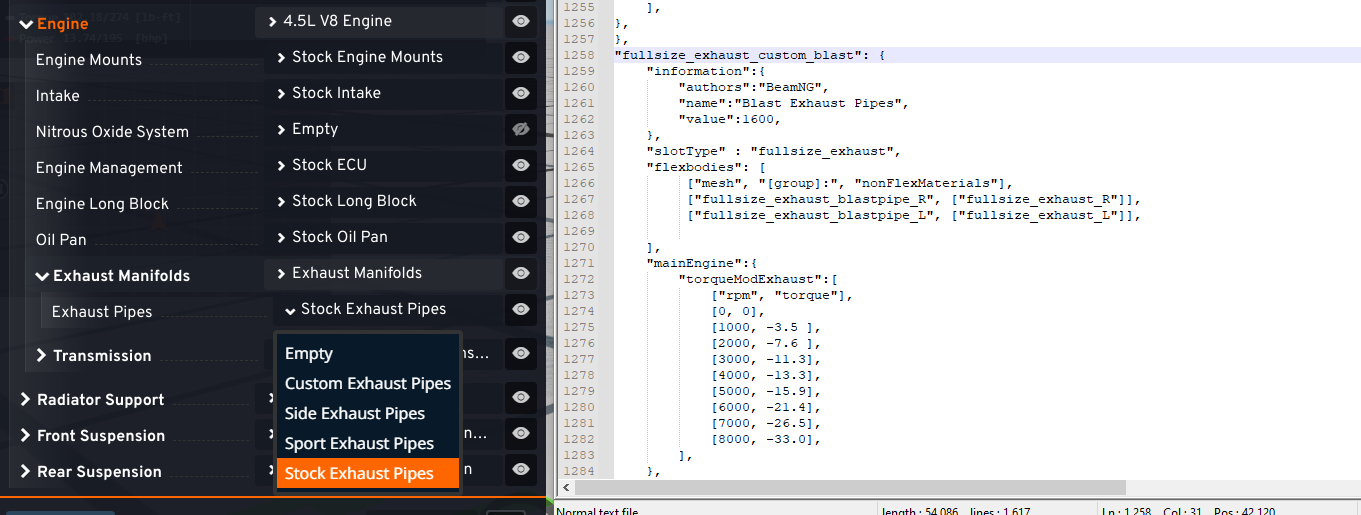
i also tried editing the body aswell by cutting out the fenders but that also doesnt appear for me
brittle warren
worldly rain
im trying to make custom exhausts for the fullsize grand marshall, i made the ex...
you need in your unpacked folder a folder you want your mod to be called then inside of it one called vehicles then inside of it one called fullsize so like this unpacked/nameofmod/vehicles/fullsize/yourfiles
 jolly berry
Hi, may I ask how one can add code into the file of an other mod?
I made an add on to an existing map mod that needs one line in the existing items.level.json to run the other files. Currently I'm overwriting the whole file but that causes a lot of issues
Maybe there is a way to solve this with a script?
 storm hound
Hey @vital robin , so, does your tacho work ?
I would like to recreate the DRIVECLUB's tachomter, but the UI doc is not very helpful...
 solid granite
Hey guy I need some help I just downloaded a mod It's fine just I need is to fix the colour it's showing orange colour is there any way to make it black just that only that it's gonna be a great help
river forge
Ask the mods author to fix it
solid granite
river forge
Ask the mods author to fix it
He's new to this stuff he made the car mods thts suprising
river forge
Then he has no idea what he's doing
solid granite
Literally 😭hey sorry but can you tell me what should I change in the j beam to make the suspension soft
 tardy lagoon
Does anyone know if there's a UV available for the xcSport Front Bumper for the ETK 800?
dull vigil
how do I publish my own mods on beamng because I've already tried but I don't want it when I put the file ?
 primal sundial
guys, sometimes when I'm debugging things, I press ctrl+t, ctrl+b, and ctrl+n, to check the nodes
but sometimes the node I'm modifying turns red like in the picture and I have no idea why.
Does anyone know?
 brittle warren
primal sundial
guys, sometimes when I'm debugging things, I press ctrl+t, ctrl+b, and ctrl+n, t...
brittle warren
primal sundial
guys, sometimes when I'm debugging things, I press ctrl+t, ctrl+b, and ctrl+n, t...
It's just the node you have selected in vs code it's like that so you can see it better
primal sundial
ohh i didn't know that, wow this will help a lot, thanks @brittle warren
river forge
dull vigil
how do I publish my own mods on beamng because I've already tried but I don't wa...
For the repo

For the forums
(Go into whatever topic you want first though)
 dull vigil
In fact is about my mod folder I don't know how to make my file work correctly
river forge
Your mods file structure should be
/mods/modname.zip/vehicles/carname/ files go here
or
/mods/modname.zip/levels/levelname/ files go here
For working on mods you can also have an unpacked version in /mods/unpacked/, but the version that you share should always be the packed (zipped) version
dull vigil
river forge
Your mods file structure should be
/mods/*modname*.zip/vehicles/*carname*/ files...
thank
toxic widgetBOT
Gave +1 Reputation to @river forge (current: #2 - 385)
 gleaming cipher
How do i fix this
 brittle warren
You broke dudes mod
 hard gyro
Ok so I’m messing with getting engines from one mod to work on another mod.
It’s all within the Nine.
So I got the engines to show up in the part selector, on the frame I want them on.
But when I pick them, it auto switches back to the default engine for that frame
gleaming cipher
brittle warren
You broke dudes mod
by adding skins? and making configs for the skins?
Not sure how that makes sence cause i have never touched the Wheels
brittle warren
You did something lol noone else has the issue as far as I can see
gleaming cipher
brittle warren
You did something lol noone else has the issue as far as I can see
So me makin skins & configs is me doing something wrong... GOT It
it also is the same with a fresh install... so
idk stright from the repo install
brittle warren
gleaming cipher
So me makin skins & configs is me doing something wrong... GOT It
What wheel and tire combo?
gleaming cipher
brittle warren
What wheel and tire combo?
im gonna try it again rq...
its making me lag at the Showroom map
brittle warren
works just fine for me
 hard gyro
Why is this happening.
All i did was move engines from one frame to another
brittle warren
hard gyro
Why is this happening.
All i did was move engines from one frame to another
Try restarting the game ive had that happen before
hard gyro
Ok. And if it doesn’t work? I’m trying to make a mod that lets me merge two of my fav mod parts together
brittle warren
hard gyro
Ok. And if it doesn’t work? I’m trying to make a mod that lets me merge two of m...
Hmm did you make surre all the slot types were corrects and do you have any errors in the console
hard gyro
Ok so it appears when I have the mod the parts come from activated, it doesn’t work, but when I deactivate the mod, the parts show up but the engines don’t wanna work
brittle warren
hard gyro
Ok so it appears when I have the mod the parts come from activated, it doesn’t w...
Are there any cusytom lua files or anything in the mod?
hard gyro
Not sure what that is
I’m trying to take the engines and slanted radiator from the rod shop nine mod, and put them on the frame of the 4wd nine mod, while still having the 4wd nine transmissions available for those added engines
brittle warren
i would try asking the mod authors and maybe they can help you out
does the mod have a lua folder?
 brittle warren
hard gyro
No
brittle warren
hard gyro
No
this mod?
 hard gyro
Yes
Ok, so the rod shop stuff has channeled and sectioned pickup.
I wanna put it on the 4wd chassis.
However, the radiators and engines on that chassis clip the hoods from the rod shop mod.
So I’m trying to move the engines and radiators from the rod shop to that frame so it doesn’t clip, while also keeping it 4wd, hence needing to swap the transmissions too.
I figured it’s easier to explain it fully than blindly ask about problems with no context

 brittle warren
yea probably just deleted what you did and cleared your cache
brittle warren
hard gyro
Ok, so the rod shop stuff has channeled and sectioned pickup.
I wanna put it on...
well this is the error im getting when trying it

 brittle warren
dull vigil
brittle warren
dull vigil
use the in gmae prop transformer and then copy those values to the jbeam in the props section
open it with shift f11 then click live editor then apps and prop transformer
This isnt the place to ask people to make mods
hard gyro
brittle warren
well this is the error im getting when trying it
I had to restart making the mod. Bunch of BS happened and it all got screwed
 waxen ridge
brittle warren
This isnt the place to ask people to make mods
waxen ridge
brittle warren
This isnt the place to ask people to make mods
ok hwere do i then
brittle warren
waxen ridge
ok hwere do i then
You dont
brittle warren
people make what they want most dont do commisions and if they do it cost a lot because it takes time
dull vigil
brittle warren
open it with shift f11 then click live editor then apps and prop transformer
wich one ?
 brittle warren
are you in live view?
dull vigil
no
dull vigil
i found thank
hard gyro
brittle warren
well this is the error im getting when trying it
What does this mean?
gleaming cipher
brittle warren
yea probably just deleted what you did and cleared your cache
Cache didn't do anything...
I deleted the version that's broken then I again reinstalled it then I put everything that needs to be in there in there
dull vigil
brittle warren
use the in gmae prop transformer and then copy those values to the jbeam in the ...
i copy the value where ?
 brittle warren
dull vigil
i copy the value where ?
brittle warren
dull vigil
i copy the value where ?
well they have names in the prop transformer copy them to the corresponding name
dull vigil
ok
hard gyro
Ok I went through the two engine files and can’t find wtf that error code is talking about
What could I possibly be missing?
brittle warren
hard gyro
Ok I went through the two engine files and can’t find wtf that error code is tal...
I couldnt figure it out either lol
dull vigil
i have a problem when i make the good folder structure the mod doesn't work
hard gyro
brittle warren
I couldnt figure it out either lol
Ok so I figured it out. In those engine jbeam files from the nine, the name at the very very top of the txt file didn’t match what it was saved as. Changing that fixed everything (once I also changed the transmission slot types)
brittle warren
dull vigil
i have a problem when i make the good folder structure the mod doesn't work
Because thats not your mod folder
 distant pendant
are we able to edit ai script paths?
dull vigil
brittle warren
Because thats not your mod folder
ah 🤣 🤣 🤣
new problem doesn't work agaon
hard gyro
Ok I found a NEW problem.
How do I make 1 part able to go to two slot types?
Like, the radiator slot for two different frames
viral juniper
hard gyro
Ok I found a NEW problem.
How do I make 1 part able to go to two slot types?
"slotType" : ["slot1","slot2"]
hard gyro
So the problem now is that when I have MY mod activated, the base mod that I’m working with no longer uses the part that I moved to another frame even though I didn’t edit the base mod
brittle warren
viral juniper
"slotType" : ["slot1","slot2"]
Yo thats sick i wish i knew that lol
hard gyro
I hate this shit.
If I use the rod shop tilted radiator in my mod thing, it disappears from the normal rod shop stuff. Idk why it won’t just go to BOTH things
brittle warren
hard gyro
I hate this shit.
If I use the rod shop tilted radiator in my mod thing, it dis...
make acopy of the jbeam and rename it
hard gyro
I tried. It breaks
Everything I’ve used I renamed with a 1 at the end. Then they don’t show up at all
brittle warren
hard gyro
Everything I’ve used I renamed with a 1 at the end. Then they don’t show up at a...
cant use numbers
hard gyro
slams head into desk
That didn’t work either
Now it just doesn’t show up at all
@brittle warren if i change the name at all, it doesn’t show up
brittle warren
hard gyro
<@1067568598542979205> if i change the name at all, it doesn’t show up
Hmm send me your jbeams in either dms or in here it dont matter
hard gyro
Now the goddamn engines disappeared.
 livid egret
Guys, I'm trying to put an emblem on the steering wheel but it doesn't appear even though the 3d model and textures are perfect.
What could it be?


 dull vigil
brittle warren
well they have names in the prop transformer copy them to the corresponding name
dull vigil
brittle warren
well they have names in the prop transformer copy them to the corresponding name
it doesn't work i tried
royal crater
you can you export a crashed car from beamng right? can you also include the node - beam - triangle structure too with it?
brittle warren
royal crater
you can you export a crashed car from beamng right? can you also include the nod...
The gltf exporter but I don't think so for the beam stuff
royal crater
bummer, thanks though. I tried using the world editor exporter for dae, but didn't seem to be able to open it
brittle warren
The world editor exporter always crashes for me
royal crater
doesn't for me, but the file is unopenable, and looking at the code of the exported file.... yeah I dunno what I'm looking for lol
I just used gltf with jbeam ticked, and it opens fine, but no collision mesh
 warped sun
i ask upon thee modders for help with my dumb idea
I want to take the MD series extended cab and drop it on the T series, so it'd be an extended cab and a sleeper cab on the same frame. I also want to engine options of the T series.
where do i even start to pull out the models and stitch them together
royal crater
warped sun
i ask upon thee modders for help with my dumb idea
I want to take the MD series ...
there's more than just putting models over. If you don't care about collisions being any good, it'll be a little easier.
here you'll get basic info about models and how to import/export them
though if this is your first mod, you'll probably want to start with something a little simpler
 cunning zealot
is there anyway to add something like airbag suspension to an automation vehicle? its for this storm chasing car that drops down to the ground using airbags. Example of what im trying to do is in the images attached.

 cunning zealot
Alr thanks
 pine skiff
Is their any way about making assets (buildings and such) for maps? I have extensive experience in blender so just need to know the process of exporting and importing into the world editor:D
 little cedar
pine skiff
Is their any way about making assets (buildings and such) for maps? I have exten...
little cedar
pine skiff
Is their any way about making assets (buildings and such) for maps? I have exten...
This is the most up to date I can find
https://documentation.beamng.com/modding/levels/export_dae/
BeamNG Documentation
Information and support for BeamNG.drive and BeamNG.tech
As far as I can remember, its like that
pine skiff
little cedar
As far as I can remember, its like that
Alright, thanks. I’m illiterate but I’ll do my best to follow them, might find a YouTube tutorial somewhere but thanks for the help 😄
toxic widgetBOT
Gave +1 Reputation to @little cedar (current: #415 - 6)
little cedar
pine skiff
Alright, thanks. I’m illiterate but I’ll do my best to follow them, might find a...
I was going to link this tutorial too but I didnt know if youd be quicker just by reading the text
https://youtu.be/49rOdSBpuSs?si=VXZLC_Hc4ff_avZP
Hello, this is a quick and simple tutorial on how to export a blender file to BeamNG Drive WITH a working collision mesh. If you have any question please leave them down in the comments or contact me at StingingGamer@gmail.com
Links:
(DECRYTION KEY) - 4srI0ZfzE_WXsmIHVwVL9Q
Incase that doesn't work here is the...
pine skiff
little cedar
I was going to link this tutorial too but I didnt know if youd be quicker just b...
I’ll try both, thanks a lot. This will make me actually have a chance of making my map. I’m a perfectionist and I’m making a replica map soo. Thanks again🙏
little cedar
pine skiff
I’ll try both, thanks a lot. This will make me actually have a chance of making ...
No problem. It's good to see map creators using their own custom assets compared to stock BeamNG assets. Not saying that beamNG assets are bad, but theres only a small amount, and many maps use the same assets etc.
Whats the replica map youre working on?
pine skiff
little cedar
No problem. It's good to see map creators using their own custom assets compared...
A small little town in the north of Sweden 😄
might be ambitious for a first project but we power through
little cedar
pine skiff
A small little town in the north of Sweden 😄
might be ambitious for a first pro...
Sounds good. How many KM squared?
pine skiff
Id really like to make it a snowy version, but first I’ll make the summer version 😄
pine skiff
little cedar
Sounds good. How many KM squared?
Not too sure just yet how big I want it, but at least 3 I think. Need to take a look at the actual area
little cedar
pine skiff
Not too sure just yet how big I want it, but at least 3 I think. Need to take a ...
I was working on a 4km squared map in Beam from PTS, and then I realised how long its going to take for all the roads to be dpne, let alone houses, trees, signs etc
Its a big project, but always remember that when its done itll be worth it
pine skiff
little cedar
Its a big project, but always remember that when its done itll be worth it
Yeah, I get that. But for this project I’m not making it for only me 😄 me and my cousins love blasting around in beamng and then I got the brilliant idea of making the actual area we grew up in, so if I lose motivation they can just call me out on it lmao
little cedar
pine skiff
Yeah, I get that. But for this project I’m not making it for only me 😄 me and m...
Wow, that is actually amazing. Your actual location in BeamNG, where you can do whatever you want. It sounds so fun! Good luck!
pine skiff
little cedar
Wow, that is actually amazing. Your actual location in BeamNG, where you can do ...
Thank you 😄
little cedar
No problem!
pine skiff
Do you have any tips on ”pausing” the side walk on one side for access roads and such? I’m Using the road architect tool 😄
little cedar
pine skiff
Do you have any tips on ”pausing” the side walk on one side for access roads and...
No I do not. I think you can disable one side, but not remove a portion
So the only thing you can do is create a road until the access road, create a smaller road with no sidewalk, and continue the previous road
pine skiff
little cedar
No I do not. I think you can disable one side, but not remove a portion
Aaah okey 😄 can I maybe use a T section and modify it somehow?
little cedar
I think
little cedar
pine skiff
Aaah okey 😄 can I maybe use a T section and modify it somehow?
T sections for me atleast have sidewalks on all sides
It could be possible though
pine skiff
I’ll have to investigate more when I’m at the pc 😄
royal crater
if you're making roads with beamng's inbuilt road maker, you can export it as a .dae from the top left file menu
pine skiff
royal crater
if you're making roads with beamng's inbuilt road maker, you can export it as a ...
How would that help me?
royal crater
if you make the road in beamng, but it's not quite right, you can export it, delete it, edit it in blender, then re-import it into beamng
pine skiff
royal crater
if you make the road in beamng, but it's not quite right, you can export it, del...
Aaah, I see. Thanks for the tip👍
toxic widgetBOT
Gave +1 Reputation to @royal crater (current: #254 - 12)
tacit halo
royal crater
you can you export a crashed car from beamng right? can you also include the nod...
the gltf exporter does export crashed cars
royal crater
the hope was to get the node/beam/triangle stuff to use in blendeer, not the model
tacit halo
royal crater
the hope was to get the node/beam/triangle stuff to use in blendeer, not the mod...
oh does it even export jbeam at all? i dont think so really
your only option really is just imporiting the crashed model, then adjusting the jbeam to fit it
little cedar
Is there any way to make these links clickable in an info.json file for a configuration?

 slow glen
Help. JBeam wrote it correctly. Why does the body stand like this

 hybrid dune
slow glen
Help. JBeam wrote it correctly. Why does the body stand like this
hybrid dune
slow glen
Help. JBeam wrote it correctly. Why does the body stand like this
in blender select the body
CTRL A, select all transforms and re-export
slow glen
hybrid dune
in blender select the body
CTRL A, select all transforms and re-export
Thank you
toxic widgetBOT
Gave +1 Reputation to @hybrid dune (current: #108 - 30)
hybrid dune
Np
hybrid dune
little cedar
Is there any way to make these links clickable in an info.json file for a config...
i dont believe so for security reasons
little cedar
hybrid dune
i dont believe so for security reasons
Makes sense. People could exploit it to run external code
Thanks for the help!
hybrid dune
np
pine skiff
Is there a way to get accurate height info into world creator?
pine skiff
pine skiff
Is there a way to get accurate height info into world creator?
Like from real life, satellite image or some
 past basin
Hi guys, since update 0.34, only the "Bruckell Nine" got the smooth halogens light. Because of that I´m making a mod that almost every vanilla car got smooth halogens light. Headlight, Highbeam, Lowbeam, indicators, reverselight etc. Though it is just a small changes, it´s still looks very cool and realistics.
you can be my tester via this link : https://www.beamng.com/threads/realistic-halogens-lights-for-all-vanilla-vehicle-v0-34-2.102885/#post-1808948
Oh and some feedback will be helpfull. thanks
BeamNG
Hi guys, the update v0.34 brings a new vehicle light mechanic in the "Nine". Highbeam, foglight, brakelight, turn signal etc. .All have a new smooth...
 little cedar
pine skiff
Like from real life, satellite image or some
little cedar
pine skiff
Like from real life, satellite image or some
You can use LiDAR data, such as a point map I believe its called, and use a GIS program to convert it to a heightmap to then import into BeamNG
dull vigil
how i can resolve this ?
little cedar
dull vigil
how i can resolve this ?
Nodes arent connected by the looks of it. I am not sure how to fix though, but I do know that smoke and flames are projected at the node at the end of the exhaust
slow glen
how can I fix transparency?

 unique zealot
slow glen
how can I fix transparency?
unique zealot
slow glen
how can I fix transparency?
You need to add a solidify modifier because it’s only 1 sided, that being the outside
slow glen
unique zealot
You need to add a solidify modifier because it’s only 1 sided, that being the ou...
Thank you
toxic widgetBOT
Gave +1 Reputation to @unique zealot (current: #74 - 42)
dull vigil
what i do after copy the base translation ?

 glacial tundra
Dude is live
unique zealot
this is baking the lighting into the render, at least from the preview, how do I not do it?


this isnt technically for a mod, although it would be related in a sense
pine skiff
little cedar
You can use LiDAR data, such as a point map I believe its called, and use a GIS ...
That would be great, do you know of some tutorial or anything about that? At least lidar data to height map part 😄
 novel wagon
how do i add more Nm to my engine without increasing horsepower??
if that is possible
inner heart
are you looking for replicating irl engines that have high torque but low horsepower?
if so you are looking for low end torque
else you are looking for the relation between torque and power
novel wagon
yeah, its a diesel engine ive got but it feels very weak for what it is
low revving and i need more nm
acoustic ivy
what car are you tryna make?
inner heart
generally the easiest thing is find the torque curve for your engine
acoustic ivy
is it inline 4?
inner heart
or just remember that power=torque*rpm across the full rpm range
novel wagon
acoustic ivy
what car are you tryna make?
just making a 6 cylinder diesel engine
acoustic ivy
novel wagon
just making a 6 cylinder diesel engine
cool
inner heart
so high torque at low rpm produce average power
novel wagon
alright ill tweak a little thx 🔥
acoustic ivy
where can you tweak it tho?
novel wagon
acoustic ivy
where can you tweak it tho?
engine jbeam 👍
acoustic ivy
i thought automation
novel wagon
made this badboy in automation but theres still a lot of stuff i need to fix just that i dont have motivation
 acoustic ivy
try this line for tweaking
 novel wagon
acoustic ivy
i never tried that is it good?
novel wagon
acoustic ivy
i never tried that is it good?
id say its pretty fun
acoustic ivy
im not sure tho
novel wagon
acoustic ivy
try this line for tweaking
yessir thats right
acoustic ivy
novel wagon
made this badboy in automation but theres still a lot of stuff i need to fix jus...
cool
 twilit python
crystal wraith
twilit python
crystal wraith
Use just one road, loop it all around the track. I made a track relatively similar to that and that's what I had done. I should be able to help. Give me a second and I'll send some photo's.
crystal wraith
twilit python
Use just one road, loop it all around the track. I made a track relatively simil...
That was almost a week ago.. track is already done and released
twilit python
Oh, lol.
crystal wraith
I don’t think you understand that it’s impossible to put a large track on it, it needed to be the inside loop only
crystal wraith
Decal is for ai
weak flicker
So i have a question regarding testing stuff in game, Say i need to see how headlight or a dashboard or something looked in game before the vehicle was done, Could i just give it a Jbeam and Spawn it or how would i go about that?
 restive violet
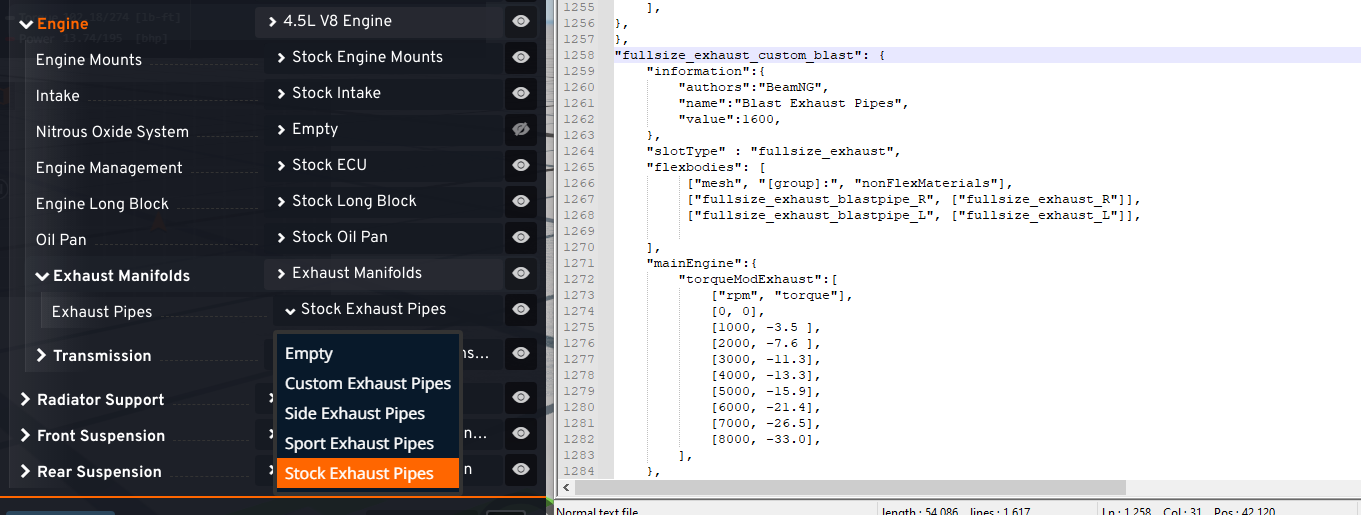
hello i want help for learning how to create mods or codind an interface ui for create a rp server with a lot of things but i have no help in the doc and nothings is explain for me because i don't understand and when i made the things they tell nothing is functionnal

 keen notch
?
brittle warren
keen notch
?
?
little cedar
pine skiff
That would be great, do you know of some tutorial or anything about that? At lea...
Hey, sorry for not responding earlier. This should help
https://www.beamng.com/threads/tutorial-level-building-with-lidar.39370/
BeamNG
Here's my method of getting 3D map data in-game. This method is geared to rFactor's workflow, where its loaded and reoriented in a 3D modeling program...
 twilit python
I'm looking at the files right now and can't quite figure it out. Some help would be appreciated.
 stuck willow
Hey guys, so I'm not to familiar with how modding sounds work, but i have Hellraiser's RB25 sound mod that i really wanna put into this super sick Nissan Stagea mod. Could someone explain to me the process of going about that? I don't need the engine model itself, just the sound. Thanks in advanced. DMs open btw.
brittle warren
stuck willow
Hey guys, so I'm not to familiar with how modding sounds work, but i have Hellra...
just open both jbeams for then engines and look for the sound config section and copy it from the one you want and replace the one you want to put it into
stuck willow
oh ok, thanks. so do i have to unzip the mod folder? and then open in my notepad++? sorry, like i said, im kinda new to all this
brittle warren
you need to unpack it in the beam ng mod manager then yest you can use notepad but if your going to want to continue modding i suggest you get vs code and download the jbeam addon for it
stuck willow
ok good to know. do i need to unpack both mods?
brittle warren
yes
stuck willow
ight. and then copy the sound config and paste it in the config slot of the nissan?
brittle warren
stuck willow
ight. and then copy the sound config and paste it in the config slot of the niss...
yep
stuck willow
then repack it when im done? do i need to do any special saving techniques?
brittle warren
yea just repack it'
stuck willow
ok cool ,thanks. Lets ee how this goes lol
oh and can i leave beam open for this? or do i need to close it?
brittle warren
it can be open
brittle warren
yea
stuck willow
brittle warren
yea
hell yeah bro, that worked. Thanks a bunch. Easy enough
toxic widgetBOT
Gave +1 Reputation to @brittle warren (current: #16 - 113)
pine skiff
little cedar
Hey, sorry for not responding earlier. This should help
https://www.beamng.com/t...
no scans are available for this high north 😦 imma cry fr
ive checked basically all known sites
little cedar
Damn
Yeah thats the thing about LiDAR data
Its expensive and some areas dont have it
So they only do important areas
pine skiff
my shitty small town in the north is important😡
little cedar
If you have blender you can use BlenderGIS and maybe get a heightmap on a displaced plane
That you can use for BeamNG
But its resolution could be better
I think its 10m/pixel or something
Depends on your scale
pine skiff
hmm..
Damn
might jusat ahve to make it for hand. but the tools in world editor isnt the best
little cedar
pine skiff
might jusat ahve to make it for hand. but the tools in world editor isnt the bes...
That would take forever, surely theres a heightmap somewhere
Maybe this would work
https://tangrams.github.io/heightmapper/
pine skiff
i doubt it.. iots not really a well known plave. thers like 3k inhabitants
little cedar
It seems that there is heightmap for everywhere
pine skiff
little cedar
Maybe this would work
https://tangrams.github.io/heightmapper/
this just broke as soon as i try and zookm in
little cedar
pine skiff
this just broke as soon as i try and zookm in
It works fine for me. Maybe your internet isnt fast enough to load the tiles quick enough?
pine skiff
honestly might put project on hold (before it even starts) and do some simpler to first understand the world editor
wait wait wait i got this

how do i get a heightmap into beam :0
dull vigil
i have a problem , i made piping for my engine mod but he doesn't appear in the game
pine skiff
pine skiff
how do i get a heightmap into beam :0
ive gotten herer but whn i press import nothing happends
 little cedar
pine skiff
ive gotten herer but whn i press import nothing happends
little cedar
pine skiff
ive gotten herer but whn i press import nothing happends
Is it a 16bit grayscale file?
pine skiff
little cedar
Is it a 16bit grayscale file?
yeap
little cedar
There isnt already a terrain block in the map or scenetree?
pine skiff
little cedar
There isnt already a terrain block in the map or scenetree?
removed it, still wouldnt work
little cedar
Only thing I can think of is to relaunch
It always fixes an issue
Dont know why though
¯_(ツ)_/¯
pine skiff
ill give it a try
pine skiff
little cedar
Only thing I can think of is to relaunch
now the file dialog wont rtead them
little portal
If i wanted to make a strut, can it be the same 2 nodes for the spring and shock or do i have to make a seperate node next to the spring f.e.
pine skiff
little cedar
Dont know why though
a normal just flat map works, but not my downloaded one. so its something wrong with that one :/
little cedar
pine skiff
now the file dialog wont rtead them
Hmm
little cedar
pine skiff
a normal just flat map works, but not my downloaded one. so its something wrong ...
Youre working in an umpacked folder right?
pine skiff
yes
pine skiff
yeah i guess so, where can i get just a genereic heightmap that will work for sure=
little cedar
Not sure
Last time I use tangram mapper it worked fine
Maybe re-convert the image
pine skiff
real bummer :/ damn
pine skiff
little cedar
Sorry about that
not really your fault 😄 just wont work :/
im gonna give some tutorials a watvh lmao
little cedar
Might be a good idea
pine skiff
little cedar
Might be a good idea
yhanks for al lthe help 😄 im sure youll see me asking more questions in here in about 30 mins but still hahahah
little cedar
pine skiff
yhanks for al lthe help 😄 im sure youll see me asking more questions in here in...
Ah thats ok. Hopefully you can find a good tutorial
pine skiff
little cedar
Ah thats ok. Hopefully you can find a good tutorial
learning LT3D rn which ive read is useful 😄
little cedar
pine skiff
learning LT3D rn which ive read is useful 😄
Yeah it is pretty good. Ive used it before too, but I couldnt get the terrain I wanted
Gaea is another terrain tool. Dont know if youve heard of it
Its node based so you can control more
Kind of like World Machine
pine skiff
little cedar
Gaea is another terrain tool. Dont know if youve heard of it
i have in my blender days 😄 ill have to try it out aswell. im quite aq big fan of nodes ahahah
gleaming cipher
What map is Hirochi speedway on?
little cedar
gleaming cipher
What map is Hirochi speedway on?
What do you mean. The racetrack is either on Hirochi Raceway in the map selector, or the West Coast USA Raceteack, which is in the middle of West Coast USA?
gleaming cipher
little cedar
What do you mean. The racetrack is either on Hirochi Raceway in the map selector...
Thanks
toxic widgetBOT
Gave +1 Reputation to @little cedar (current: #306 - 9)
little cedar
No problem
Hirochi raceway is the full racetrack map, the racetrack on west coast is in the middle and has a drag strip and rally track too
dull vigil
how i can install a txt ?
 river forge
dull vigil
how i can install a txt ?
river forge
dull vigil
how i can install a txt ?
Apply a material to the model in Blender, it's just the name that matters. As for how the material will look, either use the name of an exising material, or create a new one yourself
https://documentation.beamng.com/modding/materials/vehicle/typicalmaterials/
dull vigil
river forge
Apply a material to the model in Blender, it's just the name that matters. As fo...
ok
gleaming cipher
Im having a issue where my new skin materials is not being read in Game. AgentY said theres nothing wrong (That he can see). The JSon is validated through the Validater.
Can Anyone one Help?
Even after a cache clear nothing


 pine skiff
does anyone know of where to find good textrures for decal roads for beamng?
pine skiff
whenever i try to change the mesh of anything, in this case a barrier no list comes up where i can choose mesh. it used to come up but not anymore
 little cedar
pine skiff
does anyone know of where to find good textrures for decal roads for beamng?
little cedar
pine skiff
does anyone know of where to find good textrures for decal roads for beamng?
Usually the stock textures are good enough, you just need to do some searching
I know when I was getting the textures for my Endeavour, I actually took photos with my phones camera and edited them
pine skiff
little cedar
Usually the stock textures are good enough, you just need to do some searching
yeah i think ill make do and just do details with decal roads 😄
pine skiff
pine skiff
whenever i try to change the mesh of anything, in this case a barrier no list co...
but do you know a way around this issue?
little cedar
No, I am not experienced with RA
I tried to use it but it was too buggy so I stopped working on it and waiting until theres some updates
I had to restart Beam multiple times when using RA just to get a road and an intersection done
So maybe just restart
pine skiff
little cedar
So maybe just restart
tried that :/
i myself cant get mesh roads to work and i need the terrain deform option
pine skiff
little cedar
No, I am not experienced with RA
do you know how i can modify the grippyness of some textures? asphalt prepped is way to grippy
little cedar
pine skiff
do you know how i can modify the grippyness of some textures? asphalt prepped is...
I believe its in the material settings
GroundType or something
pine skiff
little cedar
I believe its in the material settings
Yes indeed, is that also where I’d change it for like snow maps?
pine skiff
little cedar
I remember seeing a snow groundmodel somewhere
Alright 😄
These roads are so annoying? Why does the side effect on it dissapear, and the white lines sometimes 2
cunning zealot
Is there any way to swap from the default automation suspension to hydraulic suspension from the grand marshal on my automation car? I'd like to keep the same wheels and tires as the automation export though. This is my first mod so idk anything tbh.
slow glen
How can I fix this warning? If you look at the trunk, you can see how these dots "dangle left to right"
 brittle warren
slow glen
How can I fix this warning? If you look at the trunk, you can see how these dots...
brittle warren
slow glen
How can I fix this warning? If you look at the trunk, you can see how these dots...
Well it says zero size beam meaning you have a beam between 2 nodes that are in the same exact position
slow glen
brittle warren
Well it says zero size beam meaning you have a beam between 2 nodes that are in ...
Okay. Thank you!
toxic widgetBOT
Gave +1 Reputation to @brittle warren (current: #16 - 114)
pine skiff
anyone know why one side of the road is not showing up? it goes ther WHOLE road

well, it switches?

 terse dawn
Help please! Im trying to make a map but i don't want to make terrain all by hand, i have DAE file of terrain but idk how to convert it to TER or something that can bring my terrain to beamng
 river forge
terse dawn
Help please! Im trying to make a map but i don't want to make terrain all by han...
river forge
terse dawn
Help please! Im trying to make a map but i don't want to make terrain all by han...
Try looking at how the island (with the harbour and refinery) on West Coast USA is set up, if I remember correctly that also uses a 3d model instead of traditional terrain
terse dawn
river forge
Try looking at how the island (with the harbour and refinery) on West Coast USA ...
yeah you're right, but my main problem that im not good at 3d modeling so yeah im searching for alternative, i wanted to do height map but yeah i can't generate heightmap of area i want
pine skiff
i really cant figure out why the sides arent showing up.. anyonje know? im using RA
 terse dawn
pine skiff
i really cant figure out why the sides arent showing up.. anyonje know? im using...
terse dawn
pine skiff
i really cant figure out why the sides arent showing up.. anyonje know? im using...
here

fix that bend and it will work
if you will bend road to much the texture doesn't load correctly
pine skiff
terse dawn
here
but its weird this looks correct
 terse dawn
pine skiff
but its weird this looks correct
terse dawn
pine skiff
but its weird this looks correct
too bendy
 terse dawn
pine skiff
but its weird this looks correct
terse dawn
pine skiff
but its weird this looks correct
it doesn't always clip/cut texture
pine skiff
terse dawn
it doesn't always clip/cut texture
ooh :/ ill try and fix
pine skiff
terse dawn
too bendy
dosent fix it:/ maybe ill add them by hand
 cunning zealot
Is there any way to swap from the default automation suspension to hydraulic sus...
cunning zealot
cunning zealot
Is there any way to swap from the default automation suspension to hydraulic sus...
i also have notepad++ so i can edit jbeam files because ill need to
crystal wraith
terse dawn
Help please! Im trying to make a map but i don't want to make terrain all by han...
You can bring terrain to mesh in terrain editor
terse dawn
crystal wraith
You can bring terrain to mesh in terrain editor
im not sure if it will work
terse dawn
terse dawn
im not sure if it will work
nvm it works, but i needed to change max height of terrain modifier
 vital osprey
Hey guys,ive got an issue with a part im editing
The part shows up ingame,and i want it to be positioned like this

But its like this regardless what i put in the JBEAM
 river forge
vital osprey
The part shows up ingame,and i want it to be positioned like this
river forge
vital osprey
The part shows up ingame,and i want it to be positioned like this
Select the part in Blender and do Ctrl+A > All Transforms
Then reexport
That will reset its transforms (position, rotation, etc.) back to 0 without actually moving it, hopefully that fixes it
vital osprey
river forge
That will reset its transforms (position, rotation, etc.) back to 0 without actu...
Okay!
Thanks @river forge
toxic widgetBOT
Gave +1 Reputation to @river forge (current: #2 - 388)
merry crystal
Anyone know why my textures get messed up when i duplicate the signal model? I use the same textures. I needed to change the postiion of the signals because they were positined different on the new bumper.
(Left is correct Right is broken)

 dull vigil
i habe a problem when i want to put material and texture its do this and after that rename all props like that as a result i have no texture in game
 river forge
dull vigil
i habe a problem when i want to put material and texture its do this and after t...
river forge
dull vigil
i habe a problem when i want to put material and texture its do this and after t...
just select the little drop down menu here and click the same material but without the .001
 dull vigil
river forge
just select the little drop down menu here and click the same material but witho...
dull vigil
river forge
just select the little drop down menu here and click the same material but witho...
okay thank you
toxic widgetBOT
Gave +1 Reputation to @river forge (current: #2 - 390)
dull vigil
I don't know how i can resolve the problem pls help me

 river forge
UV map issue, check out some YouTube tutorials about UV maps and how they work
dull vigil
ok
little portal
river forge
just select the little drop down menu here and click the same material but witho...
Ive always used material utilities for that, didnt know it could be done like this
gleaming cipher
I need help making base scheme pack for a mod. I have tried. But I can't do it to save my life. It's confusing cause the Skins in the main (info I think it is) JBeam..
And when I tried to copy/paste it was wouldn't work or read the new materials in the new file
I have cleared cache, read and went through the docs, Restarted several times, ran both Materials &Jbeam in the validater. It's saying both are fine.


 dull vigil
i put a texture in blender but in game it doesn't work
 river forge
Beamng uses its own material system, all that matters in blender is the name of the material
little portal
river forge
Beamng uses its own material system, all that matters in blender is the name of ...
And mapping of the material ofcourse
merry crystal
merry crystal
Anyone know why my textures get messed up when i duplicate the signal model? I u...
Anyone know?
brittle warren
merry crystal
Anyone know?
What's broken it looks just like the outer mesh is missing?
merry crystal
brittle warren
What's broken it looks just like the outer mesh is missing?
All the parts are there its the texture that looks weird
even though i used the same textures i just duplicated the moel
brittle warren
Did u make sure your normals aren't backwards
merry crystal
brittle warren
Did u make sure your normals aren't backwards
Yep normals are fine
brittle warren
merry crystal
Yep normals are fine
so the orange material just isnt showing up?
merry crystal
brittle warren
so the orange material just isnt showing up?
No it showing up but is not coloured the same. It just looks weird and the glowmaps don’t work correctly. They just flash white
Instead of orange like normal
brittle warren
oh well in the pics u sent it doesnt look like its there at all um did u use control c to copy or shift d?
merry crystal
brittle warren
oh well in the pics u sent it doesnt look like its there at all um did u use con...
Control c
brittle warren
use shift d so it doenst make new materials and have .001 at the end its just a better way to do it idk if it messes other things up but id do it that way
little portal
Or enable the material utils, shift q, specials and merge base names
merry crystal
Ok thanks guys I’ll try this later 👍
 wintry sigil
anyone able to give me a hand creating a mod to put standard wheels (4,5,6 lug) onto a semi? spent hours messing around but could never get my wheel adapters to show up in the semi parts list?
 hushed mulch
wintry sigil
anyone able to give me a hand creating a mod to put standard wheels (4,5,6 lug) ...
hushed mulch
wintry sigil
anyone able to give me a hand creating a mod to put standard wheels (4,5,6 lug) ...
Wouldn't that just be an issue of setting the correct slotType?
wintry sigil
hushed mulch
Wouldn't that just be an issue of setting the correct slotType?
Tried that, went through the files to find what a semi wheel slot type is, that didn't work, so I adjusted the directory, that didn't work, found a semi wheels mod and added another modders wheel adaptors to that same dir with ajusted slot types and that didn't work either
There's no existing mod for wheel adaptors and very few semi wheel mods, so not heaps to base anything on.
I think there's more to the semi wheels than just the slot type for some bizarre reason
hushed mulch
wintry sigil
There's no existing mod for wheel adaptors and very few semi wheel mods, so not ...
How used to modding are you? Are your folders set up so parts get placed into the US_SEMI folder?
wintry sigil
Not used to modding at all, I've got very basic experience playing with jbeam but quite a bit more with other languages ect
Pretty sure I followed all the directories, tried a few different locations too
hushed mulch
wintry sigil
Pretty sure I followed all the directories, tried a few different locations too
So if it's for the vanilla semi the path for your mod should be:
C:\Users${USER}\AppData\Local\BeamNG.drive\0.34\mods\unpacked${MOD_NAME}\vehicles\us_semi
or
C:\Users${USER}\AppData\Local\BeamNG.drive\0.34\mods${MOD_NAME}\vehicles\us_semi
Depending on how you're doing it.
And for making sure that you're using the correct slotType you can see what it's set to by going to "More options" > "Display names".
gleaming cipher
 jaunty panther
does someone have beammp now? i want to test my mod rq
jaunty panther
does someone have beammp now? i want to test my mod rq
How soon do you need it tested? I got MP & a Server
jaunty panther
gleaming cipher
How soon do you need it tested? I got MP & a Server
my server is running just join
gleaming cipher
jaunty panther
my server is running just join
I'm not home. I'll hop on this afternoon
jaunty panther
im testing it with a friend now
 deft stone
guys, is here anyone knows about how do I put modded engines to modded vehicles? like, making Chevelle mod able to select Hellraiser's engines in config menu for example
primal sundial
deft stone
guys, is here anyone knows about how do I put modded engines to modded vehicles?...
you may have to make several changes, but in the example you gave, you would have to put the modified engines you mentioned in the chevelle slots
 silent glade

tried changing the muffler in the tseries to my custom one
idk why it doesnt change the muffling in the exhaust
like it stays the same all the time can someone help me
distant pendant
merry crystal
No it showing up but is not coloured the same. It just looks weird and the glowm...
make sure the uv is correct
 livid hemlock
Can someone tell me how this happens? THe UV a right and the correct texture is applied
 distant pendant
whats wrong?
livid hemlock
the diffusor should be carbon and the spoiler is shaded weird
distant pendant
can you post your materials and uvs?
you've provided no information to give ya any help with lol
river forge
livid hemlock
Can someone tell me how this happens? THe UV a right and the correct texture is ...
Shading issue, which is an issue with the model itself, not with the uv or material
brittle warren
anyone know why my hubs wont move no matter how much offset i use

 normal light
i have an issue that feels super close to one folks were helping with recently; long story short i'm new to modding and have created a cylinder in Blender to bring into Beam as a test. i can load the cylinder and i can see/grab the nodes and hear collisions but not see anything. i assigned a material in Blender but i'm a bit of a noob there too. i suspect i'm doing something wrong with the flexbody stuff but am finally frustrated enough to ask for help
 brittle warren
normal light
brittle warren
normal light
are your node group and the group for the flexbody the same
like that
 livid hemlock
distant pendant
can you post your materials and uvs?
livid hemlock
distant pendant
can you post your materials and uvs?
Im using the vanilla scintilla material
 distant pendant
did you click assign?
livid hemlock
river forge
Shading issue, which is an issue with the model itself, not with the uv or mater...
but i reseted the vectors and in blender it looks normal
distant pendant
 livid hemlock
distant pendant
did you click assign?
livid hemlock
distant pendant
did you click assign?
yeah
normal light
brittle warren
are your node group and the group for the flexbody the same
"flexbodies": [
["mesh", "[group]:", "nonFlexMaterials"],
["missile_placeholder", ["missile_placeholder"]]
that group thing is where i'm scratching my head
unique zealot
is the mesh name the same as the name in blender
normal light
yes
brittle warren
so scroll down to nodes and see what the group name it
normal light
brittle warren
so scroll down to nodes and see what the group name it
there's no group at all as far as i can tell, it's just 1 rectangle basically as far as the jbeam is concerned?
brittle warren
"flexbodies":[
["mesh", "[group]:", "nonFlexMaterials"],
["axleR", ["axleR"]],
["longshockR", ["axleR","buggy"]],
],
//--Nodes--
"nodes":[
["id", "posX", "posY", "posZ"],
{"group":"axleR"},
{"frictionCoef":0.5},
{"nodeMaterial":"|NM_METAL"},
{"collision":true},
{"selfCollision":false},
{"nodeWeight":12},
["axr0",1.2285,1.5483,0.5182],
["axr1",1.2285,1.5483,0.6269],
["axr2",1.2285,1.5483,0.7356],
["axr3",1.2285,1.3492,0.5182],
["axr4",1.2285,1.3492,0.6269],
["axr5",1.2285,1.3492,0.7356],
["axr6",0.614,1.5483,0.5182],
["axr7",0.614,1.5483,0.6269],
["axr8",0.614,1.5483,0.7356],
["axr9",0.614,1.3492,0.5182],
["axr10",0.614,1.3492,0.6269],
["axr11",0.614,1.3492,0.7356],
it should be something like this in the jbeam at the top of the nodes section you have to have a node group
normal light
brittle warren
"flexbodies":[
["mesh", "[group]:", "nonFlexMaterials"],
["axleR...
"nodes": [
["id", "posX", "posY", "posZ"],
["m1", -0.075, -0.075, 0],
["m2", 0.075, -0.075, 0],
["m3", -0.075, 0.075, 0],
["m4", 0.075, 0.075, 0],
["m5", -0.075, -0.075, 1],
["m6", 0.075, -0.075, 1],
["m7", -0.075, 0.075, 1],
["m8", 0.075, 0.075, 1]
],
no group because it's literally just 1 object?
normal light
brittle warren
you have to have a group its just how it works bro
right, not trying to push back at all -- i'm just brand new and looking to understand
brittle warren
copy the stuff from the top of mine and replace the group name with axleR with missile_placeholder
"nodes":[
["id", "posX", "posY", "posZ"],
{"group":"missile_placeholder"},
{"frictionCoef":0.5},
{"nodeMaterial":"|NM_METAL"},
{"collision":true},
{"selfCollision":false},
{"nodeWeight":12},
here i did it for u just replace urs with this right above m1
normal light
brittle warren
"nodes":[
["id", "posX", "posY", "posZ"],
{"group":"missile_plac...
appreciate it, i'm just taking what you told me and using it to identify how it applies to other stuff i've tried -- thank you
toxic widgetBOT
Gave +1 Reputation to @brittle warren (current: #15 - 116)
normal light
i didn't realize that groups were a requirement and i can see in other stuff where i was unintentionally getting it right basically on accident, which goes a long way towards explaining my confusion
much appreciated @brittle warren
brittle warren
normal light
i didn't realize that groups were a requirement and i can see in other stuff whe...
Lmk if it works and we will keep trying to figure out why it isnt if not
normal light
brittle warren
Lmk if it works and we will keep trying to figure out why it isnt if not
that did the trick, which immediately confirmed my suspicion that the invisible object's nodes are also connected wildly incorrectly hahaha. thank you SO MUCH for the help!
just started a day or two ago but i have a pretty strong relevant skillset so here's hoping i can make something fun
brittle warren
Yw theres a lot of weird stuff you learn when you first start out lol and jbeam is also just annoying sometimes so even if you do it right it still just may not work lol
normal light
glad to have found this channel so when i hit the point of "what am i doing with my life" i can at least ask the question somewhere hahaha
brittle warren
normal light
glad to have found this channel so when i hit the point of "what am i doing with...
yea theres always people in here helping there is also a modding for dummies discord in this message #mods-faq message there are a lot of experienced people in there who can usually give more in depth help
normal light
brittle warren
yea theres always people in here helping there is also a modding for dummies dis...
ty, joined that discord! i missed that in the FAQ, thanks
onyx osprey
Hello, does anyone have a script that can randomly activate and deactivate precipitation?
I don't understand anything about programming, I tried to use the dynamiclights and chatgpt script as a base, but it didn't work.
brittle warren
onyx osprey
I don't understand anything about programming, I tried to use the dynamiclights ...
some modded maps use ck map controller for that
rancid wedge
I want to add these bottom two keybinds and input actions, but how do I do that without overwriting the existing file and making the mod incompatible with others?

 onyx osprey
brittle warren
some modded maps use ck map controller for that
onyx osprey
brittle warren
some modded maps use ck map controller for that
I will look into it, thanks
toxic widgetBOT
Gave +1 Reputation to @brittle warren (current: #15 - 117)
brittle warren
rancid wedge
I want to add these bottom two keybinds and input actions, but how do I do that ...
you can make your own by just renaming things and then put it in
rancid wedge
brittle warren
you can make your own by just renaming things and then put it in
you mean renaming the file itself?
the ones I showed are the finished keybinds and stuff, but when I put that into my mod, doesn't that conflict with other mods trying to add other keybinds this way?
brittle warren
rancid wedge
the ones I showed are the finished keybinds and stuff, but when I put that into ...
it would only affect the car your using
rancid wedge
brittle warren
it would only affect the car your using
well it's for the D-series, and before this I just used the rollback's tilt actions to controll it but there seem to be mods that break that, so if I add it this way wouldn't that also conflict?
there are many mods that add keybinds to the D-series
hard gyro
Ok so, I’m trying to put the CNVY long arm suspension on the CNVY LJ hopper frame.
Everything “works” but screen vibrates and parts of the frame are being wobbly almost like it’s clipping.
Unsure why, need help please
@burnt crown (sorry for the ping)
Have you looked into this before?
 burnt crown
hard gyro
<@142257744110419969> (sorry for the ping)
Have you looked into this before?
burnt crown
hard gyro
<@142257744110419969> (sorry for the ping)
Have you looked into this before?
Unless there's a new problem with beam, i use the long arm shocks and springs on the LJ a fair bit and I haven't had those issues yet
hard gyro
Hmm.
I’m not sure what I did wrong then.
Would I be able to send you the jbeam i cobbled together?
I’m 99% sure I added everything required, seeing as the suspension actually functions. It just likes to vibrate wildly rn
burnt crown
Oh you're trying to do the links and stuff too. That idk about. It probably has to do with the beam spring damping
hard gyro
Crap
It seems like the frame is vibrating roughly where the skidplate mounts
One sec
burnt crown
Yeah it's probably cause the rear suspension is so far away from the original mounting points and it doesn't like it
You have to make a whole new frame that moves the suspension points back, if you try and just put the long arm suspension onto the regular frame the beams are going to be super short
hard gyro
What I tried was just making a copy of the LJ frame specifically for this one and it seems like they’re connected at the right points
Yeah this is all that’s happening
It drives and the suspension cycles fine
burnt crown
I'd copy the long arm frame and move the rear jbeam points back like I did for the LJ
hard gyro
Ok just noticed the engine wobbles quite a lot
hard gyro
burnt crown
I'd copy the long arm frame and move the rear jbeam points back like I did for t...
Wouldn’t that make the frame short?
Like, completely too short for the LJ body?
burnt crown
You have to move the entire rear of the jbeam back 10", then the rear bumper part another 5" on top of that
That's all I did to make the LJ in the first place
hard gyro
Ok uh.
What parts would that be?
I’m not knowledgeable on jbeam whatsoever honestly
Just had random idea
burnt crown
https://media.discordapp.net/attachments/1281824546000863262/1306785563847692379/image.png?ex=67abf265&is=67aaa0e5&hm=dea30fbf416e735286a96e133aa1c685d244c12cf8c8e8e1041b1b12fdf0363b& I'm working on a new LJ anyway which includes the long arm

 hard gyro
Oh
If I still wanted to figure this out as a learning experience, what parts should I extend?
burnt crown
Open the LJ frame and the regular frame and you'll see. I'm at work and it's been awhile so I don't exactly remember
hard gyro
Ok. Thanks
Yup that worked perfectly, thank you!!!
HUZZAH
Yes I added the pickup roof, love pickup roofs

 tacit tulip
Ooo that’s cool
hard gyro
I know! I had this idea since 12 hours ago
And now it’s 99% working. (Minus the pickup roof having broken rear glass because the mod I used it from for personal use wasn’t fully finished)
This is just for my own use.
I only say that as it’s literally just two peoples mods meshed
brittle warren
so where my wheels lol?
 hard gyro
Nvm. The long arm suspension doesn’t track straight. Whole thing is ruined
how is that possible that under acceleration it tracks straight but under deceleration it veers left? Solid front axles suck lol
deft stone
primal sundial
you may have to make several changes, but in the example you gave, you would hav...
umm...can u explain more? I have 0 knowledge about modding or programming..
is that like just simply putting files into folder?
brittle warren
deft stone
is that like just simply putting files into folder?
are his engines in common? if so you can just make a copy of your Chevelle frame jbeam and rename it then find the slot type for the engine and change it to the one that hellraiser uses in his slot type
brittle warren
deft stone
maybe visual tutorial would help if you're fine

In this video, I demonstrate the simplest method on how to swap existing engines, from jbeam down to the physical model, to any vehicle.
deft stone
thx
well, since I'm trying to work on this only for sounds, would just replacing sound files would make it easier?
(btw idk how do I swap engine or sounds neither yet)
hard gyro
@burnt crown (last ping I promise)
Would it be at all possible to add the bypass shock suspension to the LJ?
burnt crown
hard gyro
<@142257744110419969> (last ping I promise)
Would it be at all possible to add ...
I mean, it's possible, but I'm not gunna be the one to do it lol
hard gyro
Fair
brittle warren
deft stone
well, since I'm trying to work on this only for sounds, would just replacing sou...
yes sound files is super easy just look for sound config in both engine jbeams and replace the one from the chevelle one with the one from the hellraiser one
deft stone
alright thanks for replying
hard harbor
when i try to edit the jbeam file for an engine, i click save and instead of saving it, it makes a completely new file. If i try to put the new one in and replace the old i get an error for file is invalid or corrupt? is there anyway to fix this?
little cedar
hard harbor
when i try to edit the jbeam file for an engine, i click save and instead of sav...
You extracted the .zip file right?
pine skiff
How do you guys go about making good looking parking lots and such? Cannot for the life figure it out
hard harbor
little cedar
You extracted the .zip file right?
it’s not even a zip, it’s a jbeam file. There shouldn’t be anything to extract. I’m editing through notepad ++ then saving
little cedar
hard harbor
it’s not even a zip, it’s a jbeam file. There shouldn’t be anything to extract. ...
So its in the unpacked mods folder
hard harbor
yes
 stoic raven
if anyone has any idea on how to fix this issue im all ears, ive got it setup the exact same way i did it last time and it works on another car but is broken here
never mind
it fixed itself
tacit halo
stoic raven
if anyone has any idea on how to fix this issue im all ears, ive got it setup th...
well by the look of things the hinge is acting more like a cable and not a solid object that you can hinge something with
inner heart
stoic raven
if anyone has any idea on how to fix this issue im all ears, ive got it setup th...
the trunk "hinge" is not secured properly
rancid wedge
hard gyro
**how is that possible that under acceleration it tracks straight but under dece...
Yes this is a problem with solid front axles, especially if you have a lot of suspension travel, since the steering is not symetrical and the linkage basically applies slight steering input when the suspension goes up and down.
 faint bison
Anyone know how to fix that
Now it doing that
And wheel gets upwoards and making camber idk why
hushed mulch
So, reverse engineering the Wentward destination display has lead me to having a HTML texture as the colormap for a skin that's map onto a placeholder texture. Now the issue is that following documentation and how the in-game display is made, the canvas is 512 x 32 which is a ratio of 16:1, as can be seen on both my display and the Wentward display, they're not 16:1. How do I "correct" the texture so that the 3D model and HTML texture size remain the same, but the texture isn't squished? If I make the 3D model 16:1 the text isn't squished. I've tried figuring out how the in-game version does it, but I'm not that good with textures. I can send files if needed.
 river forge
Either squish or stretch the UV map of the model, I'm too tired to figure out which one of the too 😅 but sounds like editing the UV map is what you're looking for
hushed mulch
river forge
Either squish or stretch the UV map of the model, I'm too tired to figure out wh...
That sounds fair, does Blender automatically export the UV when exporting, since I haven't made a UV unwrap of the model?
Nevermind, after thinking about what I just wrote, anything else wouldn't make sense as I've already been able to map textures to the things 🤦.
I mean that's something

So shrinking the UV seems to work, now I just gotta flip it.
hushed mulch
river forge
Either squish or stretch the UV map of the model, I'm too tired to figure out wh...
Thanks for the help :D
toxic widgetBOT
Gave +1 Reputation to @river forge (current: #2 - 395)
river forge
hushed mulch
Nevermind, after thinking about what I just wrote, anything else wouldn't make s...
Yeah whenever you add a plane or cube or whatever it will come with a basic UV already
hushed mulch
Yeah, found that out. Here it just didn't match to how the plane actually is, so after changing it to match the shape it worked.
pine skiff
anyone know what to do after ive packed my map? i used it in multiplayer but now want to continue working on it. do i unpack the zip i got when i packed it, and then put that into the "unpacked" folder?
river forge
Yep, that'd work
Or you can put the zip in the mods folder, and then let the game unpack it using the pack/unpack feature in the mods manager
But I prefer the manual way personally, way faster
pine skiff
river forge
But I prefer the manual way personally, way faster
okey thanks alot 😄
toxic widgetBOT
Gave +1 Reputation to @river forge (current: #1 - 396)
pine skiff
is there a way to quickly import terrain paints from other maps? feel like the asphalt_prepped is sooo light, its the only one my map has
 scarlet narwhal
Are license plates a special kind of slot? I'm trying to create single license plate part with multiple variants inside, but when I put the actual plate code in a part with a different slot (not licenseplate_design_2_1) it doesn't seem to load anything
tardy lagoon
Is there anything in the platefont.json i need to change to be able to use special characters like * on my license plate?
Edit: Nvm, figured it out
little portal
Is your slot correcy
pine skiff
does anyone know what to do if i want to copy a asset from Westcoast USA into my custom map? i already have gotten the .dae files but it wants me to REPLACE the main.materials.JSON file, but i kinda need both.
 cosmic dome
Remplace name main.materialsv.JSON
pine skiff
cosmic dome
Remplace name main.materialsv.JSON
ooh so it isnt name specific? so i can have 2 json files and itll work?
aah thats good to know 😄 thaxx
cosmic dome
No problem bro 😉
pine skiff
cosmic dome
No problem bro 😉
for some reason it wont read the materials :/