#Handling secret return values in CLI
1 messages · Page 1 of 1 (latest)
 indigo vortex
What error does it fail with?
My guess is nobody seriously thought about what should happen in this scenario (at least I didn't, and didn't read any thoughts from others). So we have some flexibility. First step is to decide what we want 🙂
 paper ridge
Finally got a useful error to come out. Not on our end 😄
Stdout:
┃ WARNING: You are using a deprecated version of the Infisical SDK. Please use the new Inf
┃ isical SDK found here: https://pypi.org/project/infisical-python/
will fix up and retry
 fervent steppe
Since Secret is an object, it'll probably error that you need to select something from the object, in which case you select plaintext and voilá! Well, will probably be scrubbed on screen (to ***), but not if using --output. 😅
Gonna try it quickly to confirm.
paper ridge
yeah, I knew that Infisical folks were going to change their SDK, just didn't know their old was was turned off already 😄
fervent steppe
Not scrubbed from screen:
✔ dagger call snitch plaintext [1.16s]
┃ you're a snitch!
I think it's a valid use case to return a secret in a function. Even to return it in the CLI. You could use dagger to talk to 1Password to get a secret and pipe it into another command.
Maybe just scrub on screen?
indigo vortex
fervent steppe
Not scrubbed from screen:
```
✔ dagger call snitch plaintext [1.16s]
┃ you're a ...
This reminds me of an unresolved CLI issue that got dropped several times...
In your example @fervent steppe , this should be the output:
$ dagger call...
✔ dagger call snitch plaintext [1.16s]
you're a snitch!
$ dagger call ... | wc -l
✔ dagger call snitch plaintext [1.16s]
1
If by "dropped" you mean forgotten, it's not the case. Isn't there something recent from @devout lagoon on improving the TUI?
indigo vortex
fervent steppe
If by "dropped" you mean forgotten, it's not the case. Isn't there something rec...
To my knowledge there is a big push to improve TUI (and Dagger Cloud visualization) to support modules, but this (comparatively very small) detail of stdout "clean up" has not been discussed. So I don't know if anyone is working on it.
fervent steppe
Not at the moment, but that's just due to prioritization.
Unless it's included in https://github.com/dagger/dagger.io/pull/3283
 devout lagoon
fervent steppe
Unless it's included in https://github.com/dagger/dagger.io/pull/3283
devout lagoon
fervent steppe
Unless it's included in https://github.com/dagger/dagger.io/pull/3283
Nope - haven't gotten back to the TUI yet, still focused on Cloud
fervent steppe
This is all tracked in DEV-2992
indigo vortex
I think it's missing a narrowly focused issue on the problem I'm talking about (I don't see it on the list of sub-issues). I should have started there, will find one asap
fervent steppe
DEV-2789 and DEV-2943, isn't it?

GitHub
This was discussed in the zenith dev call today. This was a little bit of a problem before, but with Zenith, it's become a lot more difficult. For example, just with a newly dagger mod init --s...
indigo vortex
I'm guessing you mean 2943
fervent steppe
Yes 🙂
indigo vortex
It's not exactly the same, because 2789 is about the logs being too verbose (which I agree).
My issue is that (regardless of log verbosity), the CLI breaks Unix convention by leaving the terminal in a state where what is actually written to stdout does not match what is visible on the terminal. So an experienced unix user, looking at the terminal after dagger call, will not correctly guess what was actually written to stdout.
fervent steppe
Yes, that's also on my mind since I started the changes in the CLI, I mean visually, not the Unix convention.
indigo vortex
Using --silent fixes that issue, but of course at a steep cost of losing any TUI while the function is running
fervent steppe
In the beginning I tried putting --help after the TUI for example. But I need to close the client connection before showing that so it feels less responsive.
It's tied to Progrock/TUI so I deferred to @devout lagoon for later.
devout lagoon
I dunno if I buy the "it's not Unixy" argument, since that rule also breaks as soon as you have mixed stdout/stderr. What you visually see in the terminal doesn't ever let you guess what was written to stdout or stderr. It's a fundamental difference between TTYs and stdio
still want to clean it up, but that feels like a weird hair to split
indigo vortex
I would be happy with just that leading | + color processing being removed
devout lagoon
definitely, that gets in the way a lot
I figure once the evaluation is complete we can just tidy up the progress UI (maybe hide it entirely) and print whatever the "primary" output was
indigo vortex
For example, this command is supposed to print the list of tags on a repo:
$ dagger call -m github.com/shykes/daggerverse/supergit remote --url https://github.com/dagger/dagger tags name
✔ dagger call remote tags name [1.46s]
┃ helm/chart/v0.1.0
┃ sdk/cue/v0.1.0
┃ sdk/cue/v0.2.232
┃ sdk/elixir/v0.8.2
┃ sdk/elixir/v0.8.4
┃ sdk/elixir/v0.8.5
┃ sdk/elixir/v0.8.6
┃ sdk/elixir/v0.8.7
┃ sdk/elixir/v0.8.8
┃ sdk/elixir/v0.9.0
┃ sdk/elixir/v0.9.1
[...]
┃ v0.9.1
┃ v0.9.2
┃ v0.9.3
┃ v0.9.4
┃ v0.9.5
┃ v0.9.6
┃ v0.9.7
• Cloud URL: https://dagger.cloud/runs/49e003a2-19e9-4666-a781-5665beef6e01
• Engine: e8f4c509b9c8 (version devel ())
⧗ 3.79s ✔ 436 ∅ 10
$
And if I filter it with grep:
$ dagger call -m github.com/shykes/daggerverse/supergit remote --url https://github.com/dagger/dagger tags name | grep '^v0.9.'
⡟ dagger call remote tags name [0.97s]
• Cloud URL: https://dagger.cloud/runs/6acdbdbe-4f83-4835-8d40-4da5b5eabd54
• Engine: e8f4c509b9c8 (version devel ())
v0.9.0s ⡟ 2 ✔ 166 ∅ 10 • tags
      v0.9.1
            v0.9.2
                  v0.9.3
                        v0.9.4
✔ dagger call remote tags name [1.00s]
• Cloud URL: https://dagger.cloud/runs/6acdbdbe-4f83-4835-8d40-4da5b5eabd54
• Engine: e8f4c509b9c8 (version devel ())
⧗ 3.28s ✔ 436 ∅ 10
I realize it's a tricky problem, I don't have a good example of a CLI tool both 1) printing an output to the terminal, and 2) also printing a cool progress bar / dynamic output streaming to the terminal.
For example curl will do one or the other, but specifically not both
Personally I would be fine with the TUI just wiping the whole terminal just before printing the function's result to stdout
(Plus maybe a very small "static" set of metadata to stderr, like total duration, cloud URL..) -> that part could be configurable separately from whether to show the TUI during run
devout lagoon
yeah piping to grep is the really tricky case since it's totally external to the program; grep is printing to the same TTY that the TUI is rendering to. For that to work at all we'll probably have to either completely disable the TUI if we detect stdout is not a TTY, which is sad for some use cases, or buffer stdout and print it all at once after disabling the TUI
indigo vortex
Something like dagger [--viz|--no-viz] [--quiet|--no-quiet]
--> viz: enable visualization when a tty is available (default)
--> no-viz: disable visualization even when a tty is available
--> quiet: only print the raw result of the function
The trick is that you could have eg. dagger --viz --quiet : you get the visualizer while the function runs; then in the end you only see the raw result
indigo vortex
devout lagoon
yeah piping to `grep` is the _really_ tricky case since it's totally external to...
Ah you're right that further complicates things
"What would pv do :-P"
devout lagoon
the buffering option is probably fine tbh, seems similar to what we'd have to do to get one final "clean print", might not even need to be a special case
indigo vortex
@devout lagoon what FD do you write to for viz at the moment?
Trying to find a way to make the | grep use case work without hiding the TUI
devout lagoon
iirc it detects which of the stdio pipes is a tty and uses the first it finds
indigo vortex
either way it will be same tty as grep writes to, like you said, so no incidence on that problem I guess
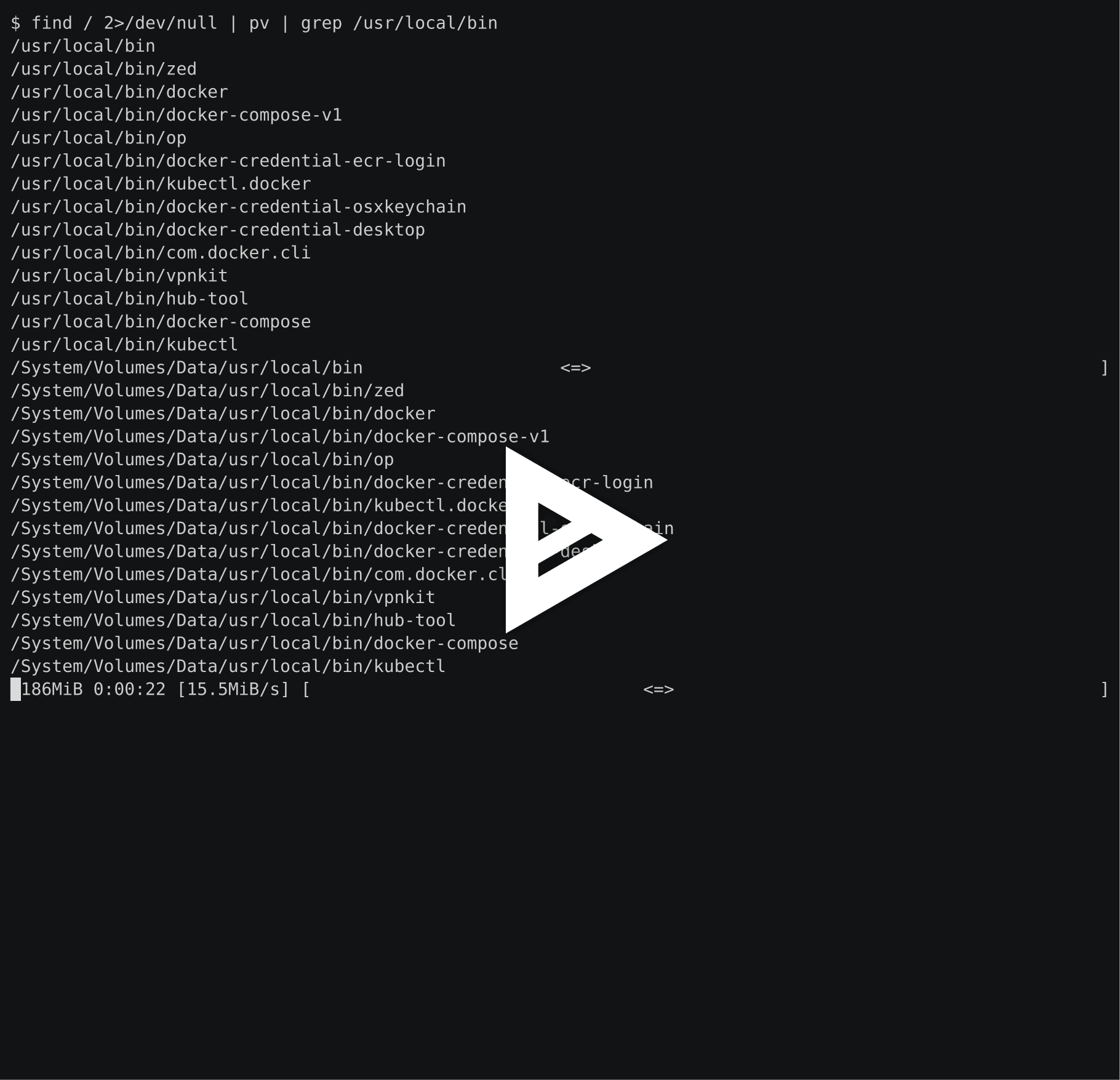
so in a shell pipeline, it's pv-style line acrobatics or nothing I guess?
I honestly don't know how to square this circle
Probably disable tui by default if stdout is not a tty like you said
and later retrofitting pv magic in that case
devout lagoon
I think this should work:
- If a TTY is present on any of stdio, show the progress UI
- When the progress is done, reset the TTY back to normal, identify the "primary" output, and print its raw
stdoutlogs directly tostdout
Unless I'm missing something, that should cover both the 'I just want clean output when all is said and done' and the 'I want to pipe to grep' use cases. Only drawback is not sure how to handle stderr
Seems like that's the endgame, even pv doesn't seem to handle the grep case well (note the progress bar being intermixed with grep output):
[nix-shell:~]$ while sleep 0.5; do echo -n hello:; date; done | pv | grep hello
hello:Mon Jan 29 08:21:48 PM EST 2024
hello:Mon Jan 29 08:21:49 PM EST 2024                                                                                                                        ]
hello:Mon Jan 29 08:21:49 PM EST 2024
hello:Mon Jan 29 08:21:50 PM EST 2024                                                                                                                        ]
hello:Mon Jan 29 08:21:50 PM EST 2024
hello:Mon Jan 29 08:21:51 PM EST 2024=>                                                                                                                      ]
hello:Mon Jan 29 08:21:51 PM EST 2024
hello:Mon Jan 29 08:21:52 PM EST 2024  <=>                                                                                                                   ]
hello:Mon Jan 29 08:21:52 PM EST 2024
^C
but you probably know more pv-fu than me 😛
devout lagoon
devout lagoon
I think this should work:
1. If a TTY is present on any of stdio, show the prog...
ah, I think to handle stderr we can just go over all the VertexLog events we received and print them in the order we received them, printing stdout to stdout and stderr to stderr
indigo vortex

A conversational AI system that listens, learns, and challenges
my refresher 🙂
see last answer
basically the pv trick is: only write to the last line of the terminal
and make sure to stay there with \r
devout lagoon
 why doesn't it work on my machine? can you repro?
indigo vortex
devout lagoon
<a:thinkspin:1090774930536288318> why doesn't it work on my machine? can you rep...
You mean pv co-existing with grep? Seems to work fine for me, I only spotted one small glitch. https://asciinema.org/a/F2A63rRV8BfIltGFo6icNF74e