#Issue with SphereGeometry Texture
100 messages · Page 1 of 1 (latest)
 honest sage
Imagine taking a picture of a globe of the earth.
The countries on the other side aren’t in the photo
You need a proper texture and UVs
 waxen rose
honest sage
What is the actual texture file? You can’t use a photo of a sphere and have it c...
waxen rose
honest sage
What is the actual texture file? You can’t use a photo of a sphere and have it c...
That’s what I got only that as a texture, I reckon it should be more of a whole picture covered
Still new to this but the
Can u show me how approximately it should look
honest sage

Asset 'Metal 007' on ambientCG. Get this asset and 1000+ more PBR materials and textures for free under the Public Domain license.
Go there, choose a size
Download the correct files
It will include the maps for the different material properties but you can see what they look like
You can just use the map or do all the PBR layers too
 cobalt thorn
honest sage
What is the actual texture file? You can’t use a photo of a sphere and have it c...
cobalt thorn
honest sage
What is the actual texture file? You can’t use a photo of a sphere and have it c...
well he sort of can
with a matcap material
but the details will not rotate with the sphere
@waxen rosehttps://jsfiddle.net/7xqLzt83/
waxen rose
cobalt thorn
<@264862981869797377>https://jsfiddle.net/7xqLzt83/
thanks a lot
waxen rose
cobalt thorn
but the details will not rotate with the sphere
so is there a way that I could fiddle my way around to make it rotate properly as well or
honest sage
waxen rose
so is there a way that I could fiddle my way around to make it rotate properly a...
no. not with a matcap. a matcap is a performance optimization to placeholder materials. If you want to actually use it, you need the full material. See the link I sent
waxen rose
honest sage
no. not with a matcap. a matcap is a performance optimization to placeholder mat...
I see, I got another question, for some reason after applying the different textures I get like this weird result

it looks kinda weird
material.map = textureLoader.load('./metal/color.jpg');
material.displacementMap = textureLoader.load('./metal/displacement.jpg');
material.normalMap = textureLoader.load('./metal/normal.jpg');
material.roughnessMap = textureLoader.load('./metal/rougness.jpg');
material.metalnessMap = textureLoader.load('./metal/metalness.jpg');
I got it a bit bette rlooking with colorMap.colorSpace = THREE.SRGBColorSpace;
 waxen rose
honest sage
https://ambientcg.com/view?id=Metal007
waxen rose
honest sage
https://ambientcg.com/view?id=Metal007
But it doesnt look like the preview
waxen rose
Standard
  material = new THREE.MeshStandardMaterial({
    side: THREE.DoubleSide,
    alphaTest: 0.5,
    transparent: true,
  }),
ignore the stuff inside that was something I played with
honest sage
Oh you have the maps but everything is probably turned to 0. start messing with metalness, roughness, etc
get rid of alphaTest, doubleSide and transparent, unless you want to make it transparent. Just know all that makes it heavier
waxen rose
Btw @honest sage what are good sizes for textures that are usually used, 1k or 2k?
honest sage
It all depends on scale and speed
For example, if the ball is small and not close to the camera
1K will do just fine, or even be overkill
If you are up close 2k may be better as it won’t pixelate
cobalt thorn
waxen rose
so is there a way that I could fiddle my way around to make it rotate properly a...
you could, as it supports bumpMap or normalMap - but that's with two textures, not just one. with just one, you cant.
waxen rose
cobalt thorn
you could, as it supports bumpMap or normalMap - but that's with two textures, n...
Could I see how you guys would make this texture set work with a sphere as in a code example
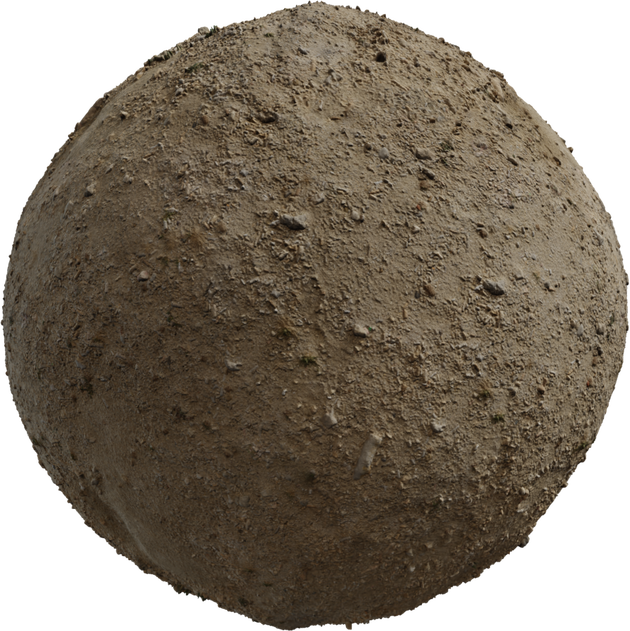
I applied the maps but for some reason

Mine looks like idk what this is hahah
Or even better one with this https://ambientcg.com/view?id=Metal007
Asset 'Metal 007' on ambientCG. Get this asset and 1000+ more PBR materials and textures for free under the Public Domain license.
cos Idk where I am actually making the mistake
I load the stuff
I apply it via the texture loader
I use the 1K size
idk if that is an issue
honest sage
Where are you getting the sphere?
cobalt thorn
waxen rose
Could I see how you guys would make this texture set work with a sphere as in a...
you need to download the texture that looks like a rectangle not the one that looks like a sphere 😔
the round texture only works with matcap material
the any other material needs rectangular texture
honest sage
OH he's still applying the thumbnail?
cobalt thorn
looks like it
waxen rose
No no, I know that the round one is not meant to be used there
I am applying these normal ones that are suppsoed to be used
honest sage
waxen rose
I applied the maps but for some reason
What kind of mesh is this? because I did it on a sphere just to test it and it works fine
 waxen rose
honest sage
What kind of mesh is this? because I did it on a sphere just to test it and it w...
waxen rose
honest sage
What kind of mesh is this? because I did it on a sphere just to test it and it w...
I mean I use a sphere geometry and standard material
What I need is basically two spheres
one golden one and one thats like soil
but for some reason the soil one looks weird
I will try to prepare a codepen or something
so that you guys can see it in code
honest sage
How did you make the sphere?
waxen rose
maybe that works better
honest sage
const sphere = new THREE.SphereGeometry(1,32,32)
waxen rose
// Object
const geometry = new THREE.SphereGeometry(
    1,
    32,
    32,
    0,
    Math.PI * 2,
    0,
    Math.PI
  ),
  material = new THREE.MeshStandardMaterial({
    metalness: 0.9,
    // roughness: 1,
  }),
  mesh = new THREE.Mesh(geometry, material);
ok
theres your problem
why are you setting the phi and theta values?
I'm not sure why but it's messing with your sphere
those are the default values
but I wonder if it's messing things up
just do 1, 32,32
That might not be the issue but is something that's different.
If you can, make a pen, or whatever and ill mess with it
waxen rose
honest sage
If you can, make a pen, or whatever and ill mess with it
super, Imma prepare one then its gonna be easier
thanks man
waxen rose
Yo @honest sage I prepared something https://codepen.io/ninecodes/full/KKLXzwQ
Had to upload the images to imgur hope thats fine

You can ofc apply some different soil texture if u want
honest sage
yeah it's loading im going to fork and fiddle with it
waxen rose
I just wanna wrap my head around what mistake I did haha
Sorry to bother u guys this much, it's just I ended up helping someone with something
and it kinda became complicated
as the sphere is either behaving weird
or idk what
there is some gsap code so if u scroll down u gonna see the whole sphere
honest sage
solved
1 sec
Ok, so in many programs you dont need to adjust things when loading the maps. black is 0% white is 100% etc. But because everything is different renderers let you adjust all the values, limits etc. For example you can adjust the intensity, scales, values etc
So for this, you have a displacement map
which actually changes the geometry of the sphere
a normal map fakes it, makes light bounce weird, so theres no adjustment
but displacement moves vertecies
well, the map goes from 0-1 or 0%-100% and at full scale with a sphere of that size it makes it look like an asteroid
material.displacementScale = 0.1;
//material.displacementBias = 0.5;
You can play with these values to get it to look how you want
you can also make the sphere bigger (I believe)