#Can you Insert animations into figma?

115 messages · Page 1 of 1 (latest)

lean bison
#

I am pretty new to figma so i'm sorry if the answer seems obvious i jsut haven't seen a clear answer.

i wanted to animate a barchart in an advanced way but figmas animations capibility seems to be limited. so i wanted to animate the animation someway else and insert it into figma but i dont know how. is it even possible? and if yes how? alsothe animation is just the barchart going from 0 to 100 with some effects and then its supposed to stay there

hard turtle
#

Hey @lean bison !on pro or edu plans you can insert videos and view them in prototype mode. However it also sounds like your animation could be done in figma also imo but i would need to understand a bit more about it i guess

#

I guess im not sure what effects you need so i cant really know

#

But going from 0 to a 100 and staying there should be possible

lean bison
#

also thank you so much for helping me

hard turtle
#

Look into smart animation and component variants

lean bison
#

oh really? i spent hours trying to do that rhough smart animations but it doesnt give me the left to rigth/ pop out animation. i can only do something like fade in or come from the rigth side of the screen. if it wouldnt take much effort from you, could you tell me how the settings need to be?

hard turtle
#

The idea with smart animation is if you have eg a rectangle at x, y spot with width and a height , and other properties and is named rectangle-1. And then on another frame you have the same rectangle copied, and you change it slightly like you change the width of it. Then you have a smart animation connection between the two, then figma recognizes that the two rectangles on these two frames are the same (because both are named rectangle-1)

#

Then figma starts to think about what the difference between the two are

#

Are the colors the same? Is the position the same? Is the size the same? Etc

#

Then it realizes that oh the width changed, and then it smart animated to make the rectangle go drom the first width to the next one

#

When you do smart animate, fading is not needed

lean bison
#

Oh thank you so much i'ma try that now

hard turtle
#

You also just need to make sure that whatever u want to animate from one screen to another, it needs to be on both

lean bison
#

yeah i see

#

btw

hard turtle
#

Otherwise one has the element the other one doesnt so figma just thinks its a new thing added and has no way to know how to being it in

lean bison
#

how do you remove the purple thing?

hard turtle
#

What purple thing

lean bison
#

i cant change the size of the rectangle

#

and there is this purple outline on it

hard turtle
#

Oh so that is because it is a component maybe

lean bison
#

ah

#

so how do i remove the component?

#

nvm i found it

#

still not working my friend it just doesnt recognise the rectangle. also i am not able to select after delay. idk why its just greyed out

hard turtle
#

So after delay is only available in the main frame

#

thats why you might want to do component variants as i mentioned

#

After delay is not possible from inner frames like here:

#

Because what happens after delay changes the whole thing including the parent, and not just the inner one.

#

because of that, you probably want to use component variants like over here

#

the interaction is between the part that is actually changing without the parent having to change

#

And then you put an instance of that into the main frame

#

the reason whhy figma might not recognize it could be if the two of them dont have the same name, but that is just a possibility

lean bison
#

bro i cant apprechiate you enough i'ma try that once i'm free

scarlet shadow
#

@hard turtle thank you so much it worked i just i have 1 problem now. i am able to change it from left to rigth by clicking. but i cant do it with after delay. do you have any fix for that?

hard turtle
scarlet shadow
#

thank you so much bro. also why cant i preview my whole project? i am only able to preview my flows

hard turtle
scarlet shadow
#

like the desktop application

hard turtle
#

you probably wanna add a flow on it?

scarlet shadow
#

like rn i am stuck previewing the chart

scarlet shadow
#

how do you do that?

hard turtle
#

click on the desktop thing, select the prototype tab on the right

#

and then add a flow

scarlet shadow
#

i previewed it with mac book air but now its just a black screen?

#

i am so confused rn

hard turtle
scarlet shadow
#

wait cant anyone just edit it now?

#

i'ma just delete it after we're done

hard turtle
#

it doestn have editing access

#

i jsut requested it

scarlet shadow
#

okay sorry i gace it to you

#

gave*

hard turtle
#

So your whole desktop is a sections

#

sections are used for organizing

#

not for prototyping

#

I would also not use any rectangles and vector shapes

scarlet shadow
#

oh?

#

ok what now?

hard turtle
#

You wanna have the page setup in a frame

#

and stuff in frames

scarlet shadow
#

aha

#

how do i set it up into a frame?

hard turtle
#

You need to make a frame and move things over into a frame

scarlet shadow
#

okay

#

why is everything white now?

hard turtle
#

becasue your frame's background is white

scarlet shadow
#

NICE THANK YOU SO MUCH

scarlet shadow
#

bro i am so sorry for bothering you so much but could you help me 1 more time? now that the desktop is gone and the the main fraim joined, the animation is not working anymore. infact after day is completly gone again but i implemented everything you said. could you just fix real quick or atleast tell me my problem? if not i completly understand that

hard turtle
#

oh actually i think i have it

#

@scarlet shadow which one is the one that needs the animation?

#

i dont see any that is a component variant

#

and as mentioned you need a component variant to make that work

scarlet shadow
#

i tried a coponent but then i couldn't change the chart

hard turtle
#

yeah im not talking about just a component

#

im talking about component variants

scarlet shadow
scarlet shadow
#

it should expand its rect angle and after that the speech bubbles should appear

hard turtle
#

like the one i made in the example

#

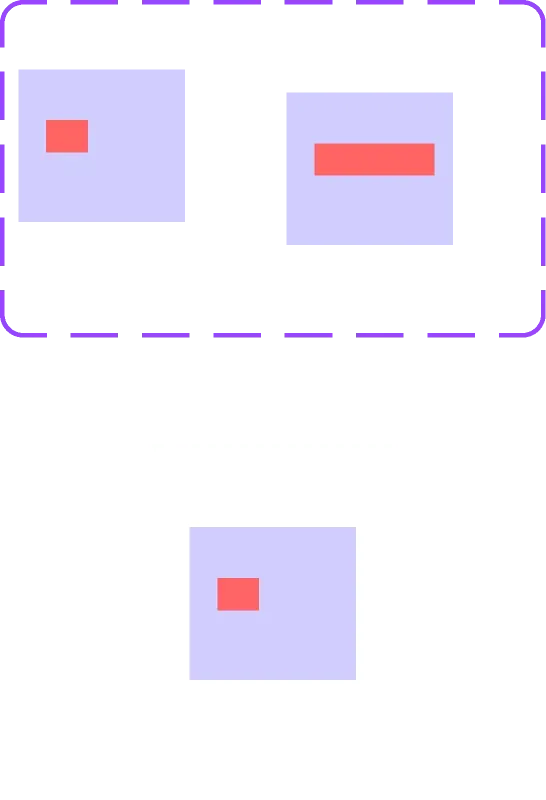
you can see that there are two variants in a purple box

scarlet shadow
#

how do you do that?

hard turtle
#

basically its one component that has 2 versions

#

and the interaction goes between those two versions

scarlet shadow
#

ah

hard turtle
scarlet shadow
#

ok thx

#

done but still not working?

#

when i preview it it jus tstays the same

#

also when i take it out the frame it just removes after delay

hard turtle
#

i dont think u need that connection there

#

all animation interaction should come from the variant

#

i just pasted the variant in here without any additional interaction

#

and u can see it works

scarlet shadow
#

WOW IT WORKED VOOOOOOOOOOOOOOOOOOOOOOOOOOOOOOOO

#

THANK YOU SO MUCH

#

bro once i got some money i will buy you some uber eats

#

but now i got 70 cents on my bank account so yeah

hard turtle
#

i would also suggest you to use component variants for all these hover states

#

that way you dont need to keep making them and it would all be setup in one spot

scarlet shadow
#

got it will do my friend

scarlet shadow
#

hey bro if you dont mind could you tell me how to set the after delay to only pop up when the screen htis the chart? i wasnt able to find out how the whole day. i dont want to bother you anymore once this is over, i just have to complete this project very soon

hard turtle
#

You can try to make the animation set to start later on and kinda “hack” it by guessibg how long it might take for someone to get there

#

Another option is to hack it in a way that instead of scrolling its dragging between different screens. This way you be able to get it started when needed but it wont be correct setup wise realistically - how an actual website would be

scarlet shadow
#

wait so all the hours i have put in this were pretty much useless is that what ur saying. like i cant even do that on the website wtf was the point on doing allat

hard turtle
#

So for example for this one i might would make it so it would start when clicking on it, and i would leave a note for myself or the developer or whoever to make it start when it is in view instead