Heyo!
Could you take a screenshot of the whole project window?
Once you have the screenshot on your clipboard
- Come back to discord
- Right click in the reply text box
- Select paste (or press CTRL + V)
Take a screenshot with the Snipping Tool.
1 messages · Page 1 of 1 (latest)
 fallen meteor
Heyo!
Could you take a screenshot of the whole project window?
Once you have the screenshot on your clipboard
Take a screenshot with the Snipping Tool.
 south ocean
fallen meteor
Heyo!
Could you take a screenshot of the whole project window?
https://support....
south ocean
fallen meteor
Heyo!
Could you take a screenshot of the whole project window?
https://support....
 fallen meteor
Ah ok.
It looks like you've got the wrong Awtter package and unity version.
Here's the tutorial for setting up the vseeface Awtter
https://www.youtube.com/watch?v=h82ROFvOj0o
Make sure to use unity 2019.4.13 (easy to confuse with 2019.4.31)
https://unity.com/releases/editor/whats-new/2019.4.13
Download the package "VSF/LIV - Awtter .vrm v2.9.40" on the website
(Under the "Base: Awtter" section)
https://shadedoes3d.com/purchases/
Shop : https://gumroad.com/shadethebat
Unity : https://unity3d.com/fr/unity/whats-new/2019.4.13
VSF : https://www.vseeface.icu/
LIV is a free game on STEAM
LIV setup : https://youtu.be/g114_0LkU9E?t=78

 south ocean
fallen meteor
Ah ok.
It looks like you've got the wrong Awtter package and unity version.
Her...
south ocean
fallen meteor
Ah ok.
It looks like you've got the wrong Awtter package and unity version.
Her...
Unity is already in 2019. Im sure its the right one because its this version i switched to in order to use my otter during streams
and made 2 other otters
 fallen meteor
The VSeeFace awtter package was tested on 2019.4.13
But later versions might still work
south ocean
fallen meteor
The VSeeFace awtter package was tested on 2019.4.13
But later versions might sti...
so upgrade back?
fallen meteor
south ocean
The main problem here is that the package used in this project is the VRChat version of the Awtter
If you make a new project using the VSeeFace Awtter package, that should work
Easiest thing to do is follow the video
https://www.youtube.com/watch?v=h82ROFvOj0o
Shop : https://gumroad.com/shadethebat
Unity : https://unity3d.com/fr/unity/whats-new/2019.4.13
VSF : https://www.vseeface.icu/
LIV is a free game on STEAM
LIV setup : https://youtu.be/g114_0LkU9E?t=78
south ocean
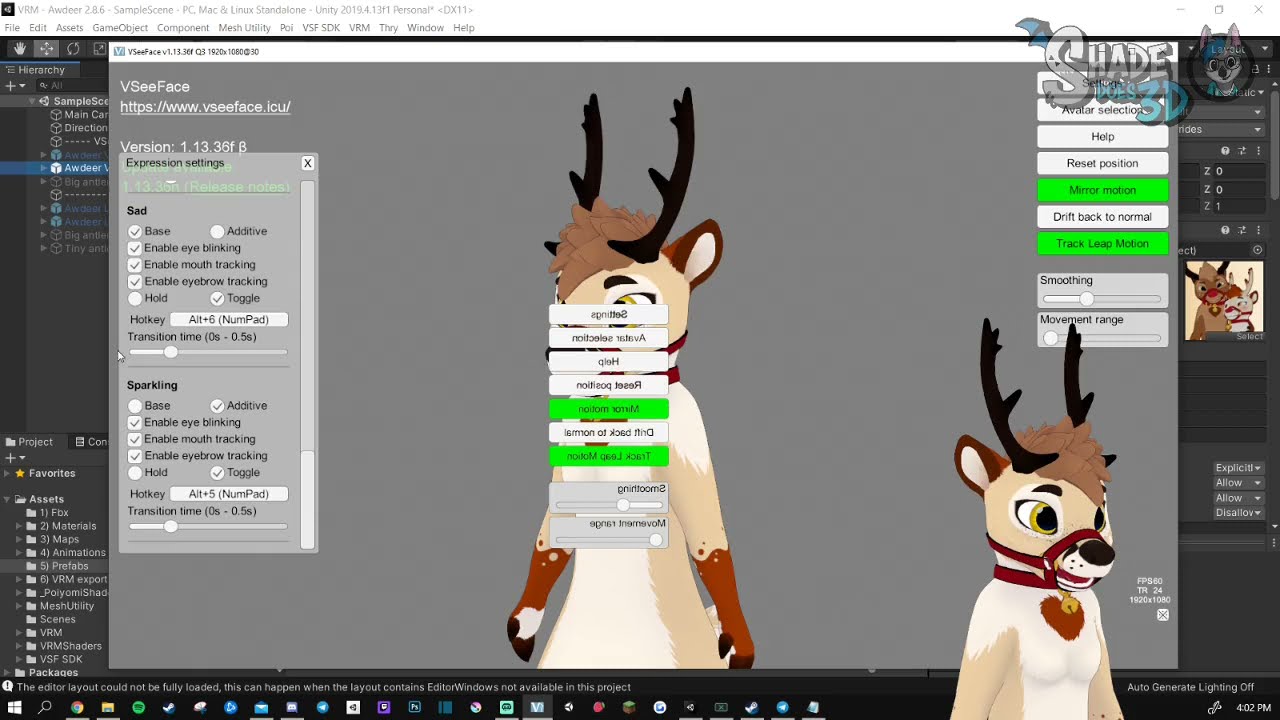
now im back to my original problem
i cant remember how to export and add project to unity from blender. the cat button isnt there for me so i had to play around to get the project in unity
i cant send the screenshot
south ocean
fallen meteor
Easiest thing to do is follow the video
https://www.youtube.com/watch?v=h82ROFvO...
i cannot export from blender
fallen meteor
south ocean
i cannot export from blender
Ah ok.
So you have the vseeface project working with the default awtter
But you want to change the model to your customised model?
south ocean
fallen meteor
Ah ok.
So you have the vseeface project working with the default awtter
But you ...
im trying to add the piercings to my otter
fallen meteor
Ah ok
south ocean
cat blend option isnt there for me so i can export so video isnt helping me
south ocean
fallen meteor
Ah ok
i also dont know where my model avatar is so i can find in file explore
fallen meteor
Hm.
Here are the export settings
#1105372379582046249 message
That might help
fallen meteor
south ocean
i also dont know where my model avatar is so i can find in file explore
The unity project files, or your blender files?
south ocean
fallen meteor
The unity project files, or your blender files?
in the video i watched i have to export the piercings from blender using cat blend and then more it into unity for the next step. I have to export in the otter model file but my unity stuff is different. Otter model isnt under all models the rest
i have to copy and paste the address of the awtter base
into blender, which i guess will auto import into unity

could i have help through a call?
fallen meteor
So exporting the model from blender should be the same
But the unity project will look a bit different.
To find your unity folder, right click on the assets folder and select "Show in explorer"
 fallen meteor
south ocean
fallen meteor
south ocean
Are you using
File > Export > fbx
south ocean
fallen meteor
Are you using
File > Export > fbx
yes
fallen meteor
I have to head off to bed in a minute. Can't stay on much longer
Make sure to export from blender with these settings

I'm not too familiar with swapping out the FBX for the VRM project
I'll need someone else to take a look
<@&768948976447127582>
 craggy meadow
I have to get to bed very soon too, its a bit more involved but easiest when you have a VRChat ready project to convert from: https://www.youtube.com/watch?v=uI5X7dIxF1Q

#vtuber #tutorial
This tutorial is a basic walkthrough of how to turn a working vrchat character into a vrm format avatar for usage in a variety of apps
My intention was to create a careful step by step walkthrough all in one take that is super easy to follow. It does not explore every single aspect of the VRM format or of avatars in unity but...
south ocean
 cunning shard
piercing has its own video
cunning shard
piercing has its own video
i thought i got it but instead broke it. Id really love help through a call

its faster and more helpful for me
cunning shard
I can't vc, I'd suggest starting from scratch on the piercing video
something got off
south ocean
i give up\
fallen meteor
south ocean
i give up\
Did you manage to get the base awtter working with Vseeface?
Without any modifications to the model?
south ocean
fallen meteor
Did you manage to get the base awtter working with Vseeface?
Without any modific...
without piercings, yes
south ocean
fallen meteor
Did you manage to get the base awtter working with Vseeface?
Without any modific...
i made 3 different colors otter for fun and used in streams
fallen meteor
Awesome!
Adding the piercings to the VRChat model is fully shown in the video.
Unfortunately, adding the piercings to the VSeeFace model is a bit more difficult due to how VSeeFace works.
Fooma outlined how to replace the FBX in the other thread, but we don't really have a video for it.
There might be one on youtube somewhere "Set up FBX for vseeface"
The steps are Put your modified fbx into your scene, VRM tools -> export humanoid. It creates a prefab. Drag that prefab into your scene. Pumkin tools from the provided example vrm to copy over the spring bones and things. make sure your materials are on it too. export with the vsf tool
I might have a quick go at another approach
fallen meteor
I have found another way
 south ocean
fallen meteor
I have found another way
south ocean
fallen meteor
I have found another way
EEEEE
fallen meteor
This is an overview of my approach
In terms of customising which piercings appear or not, you can either
I might be able to make a recording, to explain better.
The process is similar to adding the hoodie to the VSF awtter
https://www.youtube.com/watch?v=vKrr4-hX7ec

More information below!
0:00 - Import the T-Shirt DLC
0:23 - Add the hoodie prefab to the scene
0:38 - Add the hoodie to your avatar
1:45 - Fix the hoodie arm positions
2:26 - Check the material shader
2:33 - Rename bones with duplicate names
3:13 - Remove dynamic bones "missing script" components
See this tutorial to set up the project
h...
south ocean
fallen meteor
This is an overview of my approach
1. Import the piercings model and materials i...
0W0 I will try this
fallen meteor
It's a little tricky
Let me know if you want some more details around any of the steps
The steps Fooma mention above, using the VRM tools & Pumpkin tools might be better
But I don't have any experience with them
south ocean
Hello again, im not sure what went wrong. I was following the steps of the video

i took a long break from this uwu
fallen meteor
Heyo!
What have you changed in the project?
Did you export something from blender?
south ocean
Is there anyone that can vc me so i can share my screen and get help. Ive been patient and keep watching a lot of videos and i just keep running into new and more problems.
south ocean
now i cant use the model in vseeface and dont remember how i got it working