
#High CPU Usage
79 messages · Page 1 of 1 (latest)
 hidden cloak
.
 low mountain
Good afternoon
30% CPU usage sounds about what I would expect with your CPU (AMD Ryzen 5 3400G, 4 cores - 8 threads)
I'm comparing it to my CPU which has 12 cores - 24 Threads and VTube Studio still uses 6 to 10% of my CPU
hidden cloak
Ok thank you
hidden cloak
low mountain
I'm comparing it to my CPU which has 12 cores - 24 Threads and VTube Studio stil...
Sorry for replying with another question for you what GPU do you use?
low mountain
hidden cloak
Sorry for replying with another question for you what GPU do you use?
No worries!
I switched to a 2 pc setup. The pc running vtube studio has a rtx 3050 in it
hidden cloak
low mountain
No worries!
I switched to a 2 pc setup. The pc running vtube studio has a rtx 30...
Ok I think the high cpu usage would get lowered by upgrading my CPU if I am not mistaken but I am also worried about my GPU being bottlenecked
I run a single pc setup with a 1060 in it
low mountain
Vtube studio doesnt use allot of gpu usage
The issue I had with a double pc setup is that with very demanding games gpu wise the webcam would freeze (not vtube studio). So there were 2 posibilities for me get an iphone to run the tracking on it or use my old pc as streaming pc/vtube studio pc. I went with the later one since I still had my old pc.
So it will all depend what games you play. For some games what you have is more than enough. For others slowly upgrading is a good idea if you can afford it
hidden cloak
low mountain
The issue I had with a double pc setup is that with very demanding games gpu wis...
Ok so basically if I were to go with the upgrade route my best bet would be to get a better CPU then
beacuse a lot of the games I play are CPU intensive and not GPU intensive
low mountain
If thats the kind of games you play, yes
But if those games run fine now, it might be an idea to buy a 2nd hand iphone (with the right tracking). It will take some load of your pc.
It's a complicated puzzel
When i was with one pc setup I had a i7 13700k and a rtx 3090 and it still froze in some games
hidden cloak
low mountain
But if those games run fine now, it might be an idea to buy a 2nd hand iphone (w...
I already use a 2nd hand iphone for my tracking I never have used webcam
low mountain
hidden cloak
I already use a 2nd hand iphone for my tracking I never have used webcam
Mmm and you have issues right now?
hidden cloak
low mountain
Mmm and you have issues right now?
yeah
the image I sent was using my iphone for tracking
low mountain
Beside vtube studio being at 30% cpu. If you dont open your task manager do you have issues? It's better for your cpu to work than have a beast that stays at 5% 😋
With issues i mean your game or stream lagging
hidden cloak
low mountain
With issues i mean your game or stream lagging
Yes on some games... Not horribly dropping frames (Like 2-3 Every few minutes) and games I have to have on lowest settings
and I can't go above 30fps on stream or else my stream will lag even worse
Also, like the few browser sources I have I have frame capped at 30 fps to try to help it a little
low mountain
Then you indeed might need to start to think about upgrading
You are using nvenc as your encoder in obs, right?
low mountain
Its alright, I believe you
hidden cloak
low mountain
Its alright, I believe you
I didn't think you didn't believe me just was gonna show what I am using with nvenc
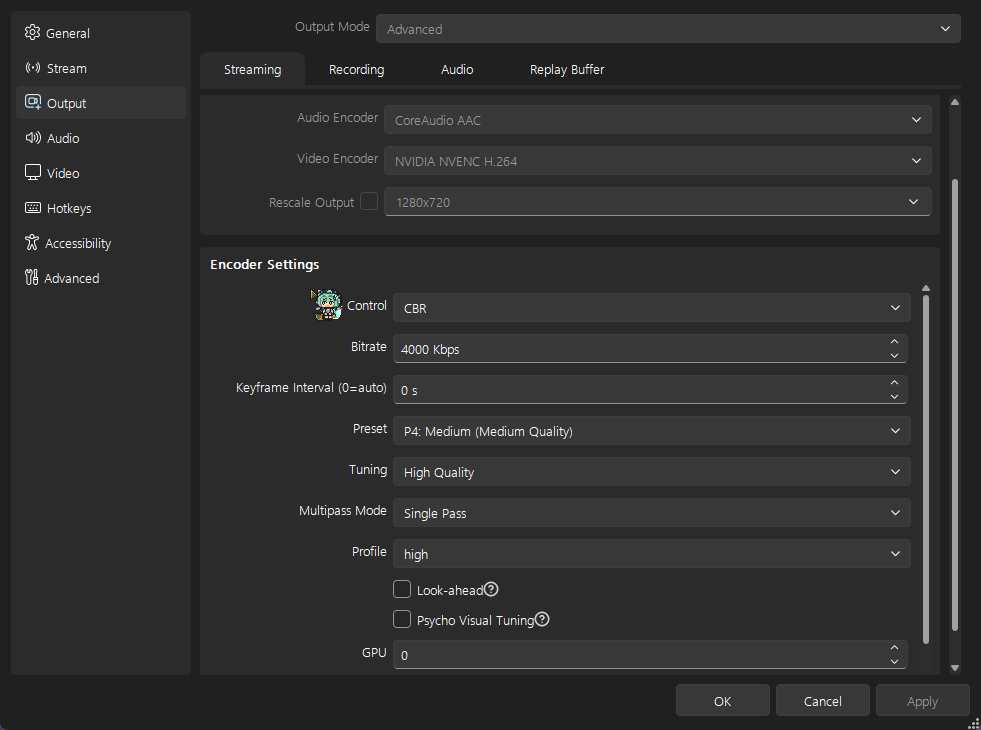

 low mountain
Mmm upgrade time 😁
hidden cloak
Yep...
Like you can see in my settings I am streaming at 720p not cause my internet can't handle it, beacuse my pc is just weak
low mountain
One last thing. Did you checked in the obs logs if the frame drops are from too low cpu resources or from network instabilities?
hidden cloak
low mountain
One last thing. Did you checked in the obs logs if the frame drops are from too ...
I don't drop any frames in the network section its always in rendering and encoding
and they both go up at the exact same time to the same postion when I drop frames
hidden cloak
VTube Studio no OBS yes
low mountain
You should. It allows to ask priority for resources
Still it might help a little but wont help your frame loss in obs
!administrator
hidden cloak
rip bot
low mountain
!admin
 unborn shellBOT

 Akari
Akari
If your hotkeys are not working when you're in another game, it could be because your game is running as admin and VTS is not.
Here's how to start VTS as admin:
https://github.com/DenchiSoft/VTubeStudio/wiki/Starting-as-Admin
low mountain
Hehe
hidden cloak
Ok I enabled Admin on vtube studio it kinda worked for lowering cpu a little
low mountain
I think we checked everything we could. If someone else has an idea I hope they give a reply too
hidden cloak
low mountain
I think we checked everything we could. If someone else has an idea I hope they ...
Same
 bronze rose
gotta point something out
You might have overtuned nvenc
The difference between each preset is going to be about 10% on the actual GPU usage, but it wouldn't really be an issue for the 3050, only the 1060
If you are doing a 2-pc setup, how are you transferring data from one to the other?
At any rate
the iphone should be the better tracker, and using the webcam will peg one CPU core 100%
Can't be avoided
So if you have a quad core, 25% is just going to be OSF runnin
I've run VTS on a 2012 macmini for giggles before, and it works fine there. The problem will always be the nature of the device it's run on. The more you run on a single computer, the more potential pitfalls.
If the CPU usage is a large concern, upgrading the CPU and GPU , in that order
If you are doing just "just chatting" streams, then I'd not worry so much. It's usually the games that will make things fall over.
That's why people with weaker systems, who have a capture card, usually play console games
hidden cloak
bronze rose
You might have overtuned nvenc
what do you mean by overtuned nvenc? and I only have a 1 pc Setup
bronze rose
Hi, I mistook which side of the conversation I was reading, as I usually look at the log file for issues
okay, double-checking, The 1060 3GB is probably on the weaker end, but is fine to use NVEnc on at recommended settings (eg 6Mbit, 720p60/1080p30) That won't impact the CPU in OBS, but if you are re-scaling a layer, that imposes a CPU penalty. If you have your OBS setup with a 1080p canvas, then all the layers should be 1080p sized to avoid additional rescales. If you are streaming 720p, rescale it once on the canvas page
VTS will usually peg 1 CPU core when using webcam/mediapipe, and that is unavoidable
If you're using the iphone, then that should be a non-issue
On my PC (i7-11700k) VTS uses 7% which is equal to slightly more than one thread on the CPU. So if you have a quadcore, 25% would not be unusual, but that CPU has 8 threads, so I'd expect maybe it topping out at 14% at idle.
 hidden cloak
bronze rose
okay, double-checking, The 1060 3GB is probably on the weaker end, but is fine t...
hidden cloak
bronze rose
okay, double-checking, The 1060 3GB is probably on the weaker end, but is fine t...
I just looked at all my sources on my canvas is at 720p since I stream at 720p for twitch and so obs doesn't have to downscale from a 1080p canvas
bronze rose
Hi, please turn "on" the logs in VTS, run the app again with the iphone tracking, and then send that log file. When logs aren't turned on it doesn't show the debugging information about frame rate
hidden cloak
Here you go
bronze rose
It's running at 120fps
do you have a 240hz monitor by chance?
Set it to 30fps, check the CPU, then set it to 60 and check again. It should be around 3-8% CPU, at most
 hidden cloak
bronze rose
do you have a 240hz monitor by chance?
hidden cloak
bronze rose
do you have a 240hz monitor by chance?
I have a 165hz monitor I looked into my quality settings it was on vsync I changed it to 30 fps and it drastically lowered my cpu usage
bronze rose
Yep, then this was it