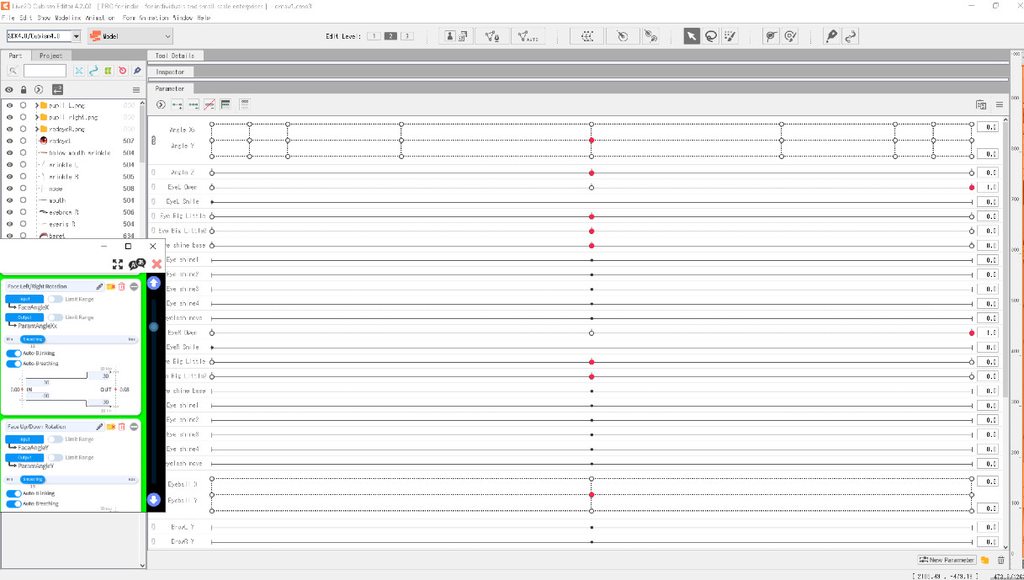
#Body zooms in and out+facial attachments move (eye,p),Head not move left or right (android app cams)
24 messages · Page 1 of 1 (latest)
 vocal lily
 limber granite
Heya, sorry, its hard to understand. Can you describe it instead of list it so we can understand what you are trying to do and whats is happening that shouodnt or is not expected?
Also a video should help too
vocal lily
When I try to use droidcam on android to track model the only parts that work are blinking and eye shifting around, its supposed to hide left or right side of face when I look L or R which it doesnt do currently. I assume the Angle X isnt being recognized but renaming Angle Xx->X didnt work nor did setting model id to 2.0 and prior.
What am I missing to resolve this?
Thanks @limber granite for the assistance
limber granite
heya! in live2d right click the parameter and click edit and check the param id, not the name, thats the importat real name of a param. If you re made the params in vts for some reason you probably didnt edit correctly the ids 
vocal lily
limber granite
heya! in live2d right click the parameter and click edit and check the param id,...
Hi its named Angle X and ParamAngleX below it
Ranges -30-0-30
limber granite
cant give you a screenshot atm and i'm about to go out of the pc for a few hours, but check in vts the params are listed in the tracking correctly if not, try clicking to reimport or reconfigure the params there, cant remember the name of the button atm
vocal lily
limber granite
cant give you a screenshot atm and i'm about to go out of the pc for a few hours...
I assume you mean 3rd top left tab Under face l/r rotation input there is only faceposition xyz face Angle xyz and other less relevant part names and output has angle x paramanglex which is selected
vocal lily
limber granite
cant give you a screenshot atm and i'm about to go out of the pc for a few hours...
I dont see any button options to reimport or reconfigure and i already tried deleting and moving json+folder back in
limber granite
can you show a video scrolling slowly through all your parameters in vts?
vocal lily
limber granite
can you show a video scrolling slowly through all your parameters in vts?
limber granite
mmm its either some misconfiguration or.... check this. Go to live2d, check in this window here if the deformer or folder where the deformer is is disabled

if the deformer or a folder containing it is disabled, it will work in live2d but it wond be exported correctly hence vts wont be able to move it properly
vocal lily
limber granite
if the deformer or a folder containing it is disabled, it will work in live2d bu...
How to tell if deformer is disabled as some parts appear to be greyed out entirely and some are just certain parts eg opacity, and is there a way to re enable or should 1 delete/rename and move to another deformer/folder?
limber granite
do you see the eye on the left column? make sure all deformers affecting the object have the eye there enabled
vocal lily
limber granite
do you see the eye on the left column? make sure all deformers affecting the obj...
All eyes is on and I deleted all the fully greyed out dformers with no results
limber granite
if you want, send me the exported model to dms and i can give it a check myself
limber granite
they are rigging issues, there i sent you how to fix angle x ones, but i will highly reccomend getting some of those teaching models like cillias and use them as a learning tool
lots of problems in keyframing and physics  please also check #live2d theres quite many learning resources and help channels on rigging there
Here are cillia models, they are paid ones but they can give you lots of insights on how phycis work

itch.io
Resource for studying setup of a Live2D full body model, including advanced physics setup.

itch.io
Shows physics and parameter settings for various methods of hair physics