#Nintendo 64
1 messages · Page 150 of 1
 wanton sun
 solemn marlin
It could've sworn it was a higher resolution, what a shame
wanton sun
it appears like that, because the assets are made for 8bit per color, so they look bad without hi color mode
solemn marlin
But it runs better with the turbo core, or did I imagine that as well? Hm
wanton sun
yes it does. Especially with explosions and multiple people on the screen, it drops the framerate below 30 easily
and i wouldn't complain about the high color mode that much. It makes it one of the few games with nice textures, at least in my eyes
solemn marlin
Yea it looks surprisingly good, I've mostly stayed away from it because of the framerate hit.. Tho I don't have the 24 bit mister so I'll have to choose between the bits and the turbo
Unless there's a turbo pwm core. It still looks higher res though despite not running on the pwm core
wanton sun

it's amazing what they did with the hi color textures there. Looks much sharper like higher res but it's still 320x240
 robust cave
Is there a good thread or spreadsheet that has games that have issues with the N64 turbo core?
wanton sun
and as you can see by the fps counter: same speed. (non turbo core)
solemn marlin
Quite the difference. The Rare sauce was contagious back then, even EA made decent bond games, or eurocom
 hasty musk
@wanton sun how to get the 24bit mode? Only analog or also digital. Dual sdram?
Updated core soon? Turbo
 ivory laurel
wanton sun
ivory laurel
wanton sun
This clearly shows the N64 could do ray traced reflections
 atomic stratus
hasty musk
<@640641777610522675> how to get the 24bit mode? Only analog or also digital. D...
atomic stratus
hasty musk
<@640641777610522675> how to get the 24bit mode? Only analog or also digital. D...
Pretty sure 24 bit is fine over digital (someone can correct me if I’m wrong). The new I/O board is just an update so you can get 24bit on CRTs; I believe it used to max out at 18bits. Dual SDRam is not required for this core (or any core except WIP Jaguar core)
robust cave
Better than calling it PiSTer.
but it's because it's like... a MiSTer for a price of a Raspberry Pi, right?
 mortal panther
'Pi', because you're 3.14 times less likely to get laid when they discover it's a knock-off clone.
robust cave
so instead of getting a Raspberry Pi for your DIY project, get a Mister Pi.
atomic stratus
my guess it’s because there’s a large number of people out there that know what a raspberry Pi is, but has never heard of MiSTer
like, plenty of very casual gamers or even people that don’t game know what an RPi is
that said, without the word “raspberry” in front of it, I don’t necessarily think that everyone that’s heard of RPi will connect the dots…plenty might though, I suppose
mortal panther
Like when you try to tell people you have a Ferrari 308, but it's really a Pontiac Mera...
 zinc dew
robust cave
so instead of getting a Raspberry Pi for your DIY project, get a Mister Pi.
zinc dew
robust cave
so instead of getting a Raspberry Pi for your DIY project, get a Mister Pi.
I have both! 
 rich warren
I have all three!
mortal panther
 zinc dew
rich warren
I have all three! <:elmorise:862320827687763989>
zinc dew
rich warren
I have all three! <:elmorise:862320827687763989>
I can’t win with you new people. I get one upped at every turn lmao.
mortal panther
What do you mean 'you new people'? 👀 🤣
zinc dew
Uhhh, I mean the new friends we just made.
rich warren
"The new nerd postures with his material possessions to gain respect and admission into the herd."
solemn marlin
Look guys, I just bought some portable Saturns. Am I cool now?

 little socket
as cool as robby
solemn marlin
Hmm
zinc dew
Wow that’s really cool
solemn marlin
Yes, never felt more cool, I'm positively chilly 🥶😎
zinc dew
solemn marlin
Yes, never felt more cool, I'm positively chilly 🥶😎
I do think those Saturns are awesome! But I’m nosy, why three?
Flexing is a good answer
 turbid warren
pal, jp, na?
mortal panther
Even bigger flex posting it in the N64 channel. 😄
zinc dew
Oh duh, good point
mortal panther
"Suck it, N64-eyes!" 🤓
solemn marlin
zinc dew
I do think those Saturns are awesome! But I’m nosy, why three?
Lol not my pic. I think it's novel at least but frankly not sure about build quality or whether I ever need portable saturn gaming
Maybe if you could hold it but this basically requires you to carry it around like a business man in a case which is arguably kinda funny
 compact depot
You should add a disclaimer or something at your store like “no worker has been harmed during the fabrication of the MiSTer Pi” 🙃
 lament escarp
compact depot
You should add a disclaimer or something at your store like “no worker has been ...
lament escarp
compact depot
You should add a disclaimer or something at your store like “no worker has been ...
Not sure if any country can claim that. I work in europe with strong workers protection laws and my dignity gets harmed at work.
solemn marlin
mortal panther
Even bigger flex posting it in the N64 channel. 😄
I wish I had something to flex, you all guys have some cool hardware.. there's no point in flexing in the saturn channel, they're not as cool
lament escarp
Having a mister setup is the biggest flex imo.
solemn marlin
Yea but you all have that already, I need some old arcade boards to stand out
 mellow terrace
And maple syrup. 😁
 mossy needle
You can buy mine! I'm selling all my arcade stuff
Takes up too much space and the Mister is good enough
solemn marlin
Which board is it? I might actually get one but it'd probably be a game I always come back to or have an interest in mastering
I'd love a monkey ball machine but there are some roadblocks to that dream
 gilded whale
Kevin Sorbo
gilded whale
lament escarp
Having a mister setup is the biggest flex imo.
It comes in handy in the club for sure.
zinc dew
I wear a MiSTer shirt but everyone just thinks I’m reinforcing my pronouns lol
 cerulean elk
zinc dew
I wear a MiSTer shirt but everyone just thinks I’m reinforcing my pronouns lol
cerulean elk
zinc dew
I wear a MiSTer shirt but everyone just thinks I’m reinforcing my pronouns lol
I thought your pronouns were “Texan”
 sullen harbor
gilded whale
Kevin Sorbo
sullen harbor
gilded whale
Kevin Sorbo
uhhhhhhhhhh you might want to amend that
mossy needle
solemn marlin
Which board is it? I might actually get one but it'd probably be a game I always...
@solemn marlin I have a Street Fighter 2 Hyper Fighting dash board, a CPS2 Darksoft, a full Naomi Netdimm set up, a 1 Slot MVS, and Samurai Shodown 2 and 4, and King of Fighters 98 ams 2002 all authentic carts
I play a lot of fighting games lol
gilded whale
sullen harbor
uhhhhhhhhhh you might want to amend that
Why did he come out as a fascist or something?
mossy needle
He's a Christian Nationalist who is outside the scope of this conversation and what I assume people here want to hear/talk about.
solemn marlin
What does the full naomi netdimm set up entail? You can play all naomi games? I'm honestly not very big on fighting games beyond looking at highlights lol
Gotta see some new mortal kombat executions from time to time but too lazy to play it
mossy needle
Naomi has the monkey ball arcade, Crazi Taxi, House of the Dead 2, and a few others but those require specific peripherals
Also all the Atomiswave games are compatible
Which admittedly is mostly fighting games
It's a great system but if you're not really into fighting games it can be sorta limiting
solemn marlin
I can scan and 3d print a banana for that. Honestly I wouldn't be completely uninterested in that, I think all those three games are great just as they are but it depends on how much work it'd be to set up
I guess the banana/wheel/gun could be costly but if there was some budget solution
mossy needle
I have friends who for sure would know. I bought it for the fighting games lol
gilded whale
Oh well thats a shame… I still have fond memories of that show
Honestly I kind of hate how the internet has ruined almost all my childhood heroes lmao
Mr. T is still pure… knocks on wood
That guy sure knows how to treat his mother right
solemn marlin
Fair enough, I'm still a bit intrigued tho, it isn't that far away from a full monkey ball cabinet which I assume is just a stick that looks like a banana tho it might be more involved than that
The full cabinet is like 7000$ but maybe you're paying for that original thing and it's really possible to assemble a budget version..
 proven parcel
For some reason, there is a bug causing a black screen for me on the Taki Clone (Mister Pi) with Conker’s Bad Fur Day.
I haven’t found any other titles it affects, from a quick glance. Is this a known issue?
cerulean elk
solemn marlin
What does the full naomi netdimm set up entail? You can play all naomi games? I'...
Depends. NAOMI or NAOMI 2?
cerulean elk
You need a motherboard, netdimm board (512MB recommended) new pic chip and bios chip, and either the pi boot or Ethernet NetBoot hardware
And a good power supply. Net boot is power hungry
mossy needle
But I have a 512mb with the capcom io and the whole raspberry pi thing
And a Sun power supply
cerulean elk
lol then you have what you need
solemn marlin
No banana tho
mossy needle
Oh I know I was seeing if someone else was interested
I dont have the banana
Too much money
For one game
mossy needle
Yeah
 eternal island
sometimes i play zelda
cerulean elk
How much?
eternal island
its ok
mossy needle
I honestly have no clue
I was thinking $900
I havent really found any others recently to price it against
I bought it in 2018
 paper orchid
I heard arcade stuff
mossy needle
Yeah I got stuff I dont need anymore
mossy needle
Amazing game
My friend and I were trying to get into it so I bought a cart
A long time ago and now I don't need due to mister
paper orchid
I actually still don't own a cart, I had a few other priority MVS games that I wanted to get
(mostly just Blazing Star and Neo Turf)
mossy needle
Also amazing games
solemn marlin
The banana is a Sanwa JLK-GF2-AT. A cold 900$
mossy needle
That sounds about right
paper orchid
Someone in one of the other discords I'm in made a replica of the monkey ball panel IIRC (banana and all)
Actually no, not a replica panel, but they did make a replica of the banana and mounted that all in a banana-shaped controller
solemn marlin
That's what I would do, seems like a fun project. But even the stick is too costly for me and it'd only feel worth it if it was almost like the real thing
mossy needle
I know one of my friends 3d printed a banana for his netdimm set up
Might have been the same guy
paper orchid
Yeah, I already have a bunch of specialty input devices for arcade games
I don't need another rofl
mossy needle
My partner is already nice enough to let me keep the stuff I can fit under the tv
Everything else is in Cosco bins which I'm sure is not super exciting for her
paper orchid
The garage is both my workshop and where I keep most of it
mossy needle
It would have probably been easier to sell my stuff when I still lived in SOCal.
paper orchid
I also have a thing of retro consoles in the living room
paper orchid
Yeah, the MiSTer is what I actually use for everything
mossy needle
But still have a Dreamcast, OG xbox, PS2, PS3, Wii, Gamecube, and PS5
 mellow raft
solemn marlin
The banana is a Sanwa JLK-GF2-AT. A cold 900$
mellow raft
solemn marlin
The banana is a Sanwa JLK-GF2-AT. A cold 900$
Does it come with POTassium?

Size: 8.3 x 3.0 inches (21 cm), Outer diameter x 3.0 inches (75 mm), Capacity: 1.2 x 2.9 inches (1.20 L), Base diameter: 5.1 inches (130 mm); Desktop home pot cooker cooker; Pot size chart (for reference) Country pot 4.7 - 7.1 inches (18 - 2 - 24 cm for 1 - 24 cm). 27 for 3 people. ~11.8 inches (...
$100
 acoustic vortex
mossy needle
But still have a Dreamcast, OG xbox, PS2, PS3, Wii, Gamecube, and PS5
acoustic vortex
mossy needle
But still have a Dreamcast, OG xbox, PS2, PS3, Wii, Gamecube, and PS5
ur livin' my dream
don't you dare speak of your 20l5 pvm or sum crazy
mellow raft
mossy needle
But still have a Dreamcast, OG xbox, PS2, PS3, Wii, Gamecube, and PS5
Dreamcast, SNES, Super Nt, N64, Wii, PS2, PS3, PS4, PS5, Xbox, Xbox 360, GBA, DS Lite, 3DS XL, GCW Zero, MiSTer.
acoustic vortex
dayum
mellow raft
N64 is UltraHDMI and RGB modded. SNES is RGB modded. Wii is case modded. PS2 is HDD'd with a 2TB and FreeHDBoot and fan mod. Dreamcast is fan modded with VGA box and ode mod. Xbox was softmodded but HDD died. PS3 is jailbroken and used to have some hard mods.
paper orchid
Looking across at my retro setup, I've got an AV Fami, SNES, N64, Wii, Wii U, PS1, slim PS2 w/ internal IDE mod, Genesis (+Sega CD and 32X), CDX, Saturn, Dreamcast, Xbox and Xbox 360
mellow raft
- gcompsw (split off to Trinitron) and fed into a RetroTink 5X pro and split to my capture card and TV.
paper orchid
None of it's hooked up, but it used to go to a gscart. Out in the garage I've got a supergun with a couple custom 6-button arcade sticks and a big rhythm game cab
mellow raft
Nice. Honestly I didn't have any 16bit or earlier consoles besides the SNES so I really have no history there.
I was born in 91 but got into gaming late.
mellow raft
Haha. Honestly if people asked me good recommendations in that era, snes is most of what I know.
Genesis I could maybe name a couple interesting ones.
paper orchid
The Genesis was the majority of my life, SNES as well but I was a big Sega person
mellow raft
nods my friend convinced me to invest in this Dreamcast in 2010
Never looked back.
Rez became a huge fav.
paper orchid
I didn't own a Master System and probably never will because for every Phantasy Star I want to play, there also exists an Alex Kidd where he threatens to blow out my TV speakers
mellow raft
I even discovered how to fix the dreaded disc read error when nobody seemed to know in my area.
paper orchid
I was lucky enough to get a Dreamcast around when it launched
mellow raft
Well I say "fix". It's just gonna happen again. But you can calibrate the laser.
It just means the laser is dying
paper orchid
I played a lot of games on it afterwards, but while it was out it was uhhh...phantasy star online
all the time
proven parcel
proven parcel
I haven’t found any other titles it affects, from a quick glance. Is this a know...
I have the same copy of the game running on a DE-10 MiSTer I got a year or two ago from MiSTer Addons - same SD card, just swapped between the two units. This is the version of the software off of Update_All - is it a known issue?
Again, it doesn’t seem to affect any other N64 software, at least as far as I’ve been able to test.
mossy needle
acoustic vortex
don't you dare speak of your 20l5 pvm or sum crazy
I have a 14" RGB Sony PVM and a 14" SD Sony PVM. I used to host tournaments so they were very useful for that
I'm dreading when my modded xbox hard drive dies
 naive briar
proven parcel
Again, it doesn’t seem to affect any other N64 software, at least as far as I’ve...
naive briar
proven parcel
Again, it doesn’t seem to affect any other N64 software, at least as far as I’ve...

No issue here
proven parcel
Weird. Yeah - I'm just getting a black screen, followed by a flash.
 fair stump
@proven parcel any weird glitches with mario 64?
there's another user that is plagued with mario 64 issues kinda like what you're saying
rich warren
Working fine on my MiSTer Pi
 cerulean elk
Saturday is the one year anniversary of my wife finding Pepsiman! @languid dune you better send gifts
(For those of you that don’t know he’s the official rescue street kitten of the N64 core)
solemn marlin
mellow raft
Does it come with POTassium?
Naturally, can't play my authentic Sanwa stick without eating a piping hot bowl of onion soup from my uh Sanwa Miyama Pot
 languid dune
cerulean elk
Saturday is the one year anniversary of my wife finding Pepsiman! <@441269164548...
languid dune
cerulean elk
Saturday is the one year anniversary of my wife finding Pepsiman! <@441269164548...
I'll send Pepsi. 
 stone pilot
cerulean elk
(For those of you that don’t know he’s the official rescue street kitten of the ...
stone pilot
cerulean elk
(For those of you that don’t know he’s the official rescue street kitten of the ...
I thought you meant your wife discovered the game a year ago
which is also something to celebrate, mind you
proven parcel
cerulean elk
Saturday is the one year anniversary of my wife finding Pepsiman! <@441269164548...
 gilded whale
A compilation of Pepsiman and Cokeman!
TikTok: https://www.tiktok.com/@_soggy_nugget...
Instagram: https://www.instagram.com/that_soggy_...
Join the Discord for stream announcements! https://discord.gg/vaYm6ePYbw
 storm vessel
Cokeman sounds like a cokehead
wanton sun
acoustic vortex
I've tried other games and none function
please try this one. It's the same as the savestate you tried. If it works from the savestate but the rom doesn't work, this would give some more hints
 dusk tree
I used the update all script and now I cannot play N64 at all using composite
Even when I use the MikeS core for Y/C
Was there some kind of change that broke Composite?
For n64
I can play using HDMI and I can use other cores using Composite but not for N64
 main dirge
dusk tree
I used the update all script and now I cannot play N64 at all using composite
Ev...
main dirge
dusk tree
I used the update all script and now I cannot play N64 at all using composite
Ev...
Composite is working fine for me on the latest core, 24.08.18
 topaz otter
mossy needle
He's a Christian Nationalist who is outside the scope of this conversation and w...
topaz otter
mossy needle
He's a Christian Nationalist who is outside the scope of this conversation and w...
He had an N64 Hercules game though

And it is peak N64 era Titus craftsmanship
zinc dew
 thorn quiver
Ah, ancient Newyorkus
fair stump
I tried that Hercules game, kinda weird
 marble cargo
"We have The Legend of Zelda Ocarina of Time at home."
rich warren
Xena knows what to do with Titus games (and Sorbo)
 acoustic vortex
wanton sun
please try this one. It's the same as the savestate you tried. If it works from ...
acoustic vortex
wanton sun
please try this one. It's the same as the savestate you tried. If it works from ...
do I need to update the database file?
 vast delta
I dont think so
 silent marten
Shouldn't have to update the database for NICCC as it was the first demo to run on the core back when development begun
topaz otter
fair stump
I tried that Hercules game, kinda weird
The TV show might be one of the corniest things that's ever been made
And Bruce Campbell is a regular guest star
wanton sun
yes, it works fine without database. Database is mostly needed for savetype and CIC protection stuff and this demo cannot save and i'm not aware of any demo that does depend on the CIC version
wanton sun
that's actually a good sign
because if that simple demo doesn't load from sdcard, but with savestate from same sdcard works, there are very few things that could be wrong
let us think: if your write process to sdcard would be wrong, the savestate would also be broken
same for reading from sdcard
so only two possibilities really:
- mister main does mess up the data when "converting" them at load time
- the core is not able to read them from sdram
So if your mister main is at the correct version, i feel like only the sdram can be the issue
Unfortunatly that is the hardest part to find out and try, because it would require to have a different sdram or different base board(pin issue)
Not trying to do a monologue here, mostly posting this if someone else here does have another idea
acoustic vortex
I'm speaking to support, who are aware of this thread. Currently they're testing my SD card image, but it's been 3 different installs of mr fusion so I doubt that it's the issue.
lament escarp
wanton sun
Not trying to do a monologue here, mostly posting this if someone else here does...
Personally I like it when you go all Sherlock Holmes.
acoustic vortex
Also I am extremely thankful for that monologue anyways
wanton sun
to be honest: we haven't had any of such issues in the last year, so the chance for some individual hardware defect is unfortunatly high
given that the clone boards are very new still, it's not all that unlikely
lament escarp
It's weird though that their ram made it through that memtest for several hours just fine innit?
acoustic vortex
it's all weird
wanton sun
yes, that's why i was so cautious blaming the sdram, but with the current situation i don't see what else. But i'm open to other ideas
if sometimes it makes it slightly into mario64, it cannot be the boot rom either
 worn delta
Is it worth trying to run the symtests and see if those run OK?
 jolly turret
I hope you can sort it out eventually, unfortunately the possibility for issues is always present with any new hardware. Huge respect to @wanton sun for doing his best with troubleshooting and trying to narrow down the issue.
 hidden bolt
In case someone wants to test this, here is a patch for Rayman 2 NTSC. This is the same fix as RE2 and polaris snocross. When finishing a level right before the save option it can randomly crash (maybe 1 in 8 chance). Without the patch I was able to crash the game in about 10 minutes by doing the "walk of power" race repeatedly. With the patch I did this for about an hour without any crashes.
Due to the added delays this patch can impact performance of the game a little bit but the N64 Core tends to have better than N64 performance anyway so this might even be more accurate, although I have no way to confirm this. The turbo core can also be used for better performance of course although I did not test the patch on that.
 mossy vector
hidden bolt
In case someone wants to test this, here is a patch for Rayman 2 NTSC. This is t...
mossy vector
hidden bolt
In case someone wants to test this, here is a patch for Rayman 2 NTSC. This is t...
Do you think the Mister64 core is missing or has an incorrectly implemented RDP status flag? I have seen function calls basically like RDPsync that the CPU waits for completion.
topaz otter
wanton sun
given that the clone boards are very new still, it's not all that unlikely
does this clone board use the same sdram as the real de-10?
wanton sun
considering that multiple games depend on the same patch, maybe @hidden bolt can explain more what exactly the patch does. If the games starts a DMA and depends on a certain time for it to finish, we probably can't do much, but if it's reading the status from the RSP, we might can.
In worst case, we can stall the CPU in these situations or don't start the RSP when a DMA is still pending or such things
hidden bolt
wanton sun
considering that multiple games depend on the same patch, maybe <@29271004427177...
The patch just keeps the cpu busy for some cycles right after the RSP is resumed to give the RSP a bit of a head start. So the game will send value 0x0125 to the SP_STATUS register to resume it, and then instead of doing a JR RA, I send it to a loop of x amount of cycles first.
So maybe making the RSP run faster somehow will fix these problems too.
wanton sun
so the cpu expects the RSP to be finished after a while, without checking for it to be really finished/idle?
what does it depend on then? does it start a DMA but the rsp is not ready? does it read from the rsp?
hidden bolt
Well I don't actually know for sure that the RSP needs the head start or something else needs the extra wait. I just assumed it was the RSP since it might do some DMA's which could be delayed by the random ram latency but it could be something else entirely as well.
wanton sun
ok...makes it hard to guess then. For compatibility i could add a optional pause on 0x125 RSP status writes for the cpu by just blocking the register write ready for some time
so the rsp status write would take e.g. 1000 clock cycles, so it should behave the same as the patch?
hidden bolt
so this would resume the rsp and then the cpu would just be stalled for some cycles?
wanton sun
yes
hidden bolt
the big downside of that if enabled for all games is that it would cause slowdown depending on the amount of cycles
wanton sun
that's why i would do it optionally in the debug menu and database could activate it based on the title
hidden bolt
Yeah, that could work, although the japanese puzzle game needed a lot more wait then polaris and RE2, and rugrats needed a delay on PI DMA's as well
wanton sun
what about stalling only for the next CPU<->RSP communication? Assuming it could only crash because of a following access, can't we instead stall the CPU at the next RSP read/write access after a start, but only if the RSP is not idle again? e.g.
- start with 0x125
- RSP runs
- CPU does whatever with the RSP regs
-> stall CPu and don't execute read/write until RSP is idle
that way we have adjusted wait time only for as long as needed
hidden bolt
Yeah maybe but I don't know for sure that the RSP will idle by itself, the game usually sends a command to stop it before doing a RSP DMA and then resuming it.
wanton sun
so it basically depends on the CPU being slower than the RSP, but our CPU is faster on average and RSP is slower on average...
hidden bolt
Maybe but these are just assumptions by me, I would have to investigate more to be sure
wanton sun
well, maybe it's better to keep the core design as is then and have it as patch. As soon as there would be unshared memory on another board, the random timing should be gone
hidden bolt
I guess the easiest way to find out is to add random timings to Ares and see if it breaks in the same way.
wanton sun
but isn't Polaris still broken in Ares?
hidden bolt
I don't know, but I think emulators also simulate random timings right? So maybe they are slow enough for Polaris to crash but not for RE2, might be a edge case
wanton sun
Polaris and RE2 are both mentioned to hang occasionally
at least on the web page, on github they are not mentioned, so i don't know
hidden bolt
I think Ares has had some memory timing fixes over the years, so maybe it is fixed now.
wanton sun
In any case, thanks for the patch. It's the best short term solution we have now.
hidden bolt
Yeah, I might look into it some more at some point.
wanton sun
maybe if you have time for it in the future, you could take a look if it's possible to do that wait on cpu side later, not directly after the start. If you shift it further and further in the program flow, we could find at which spot it breaks, so which action after the start really depends on the wait
(i really have no idea how you manipulate the game code at all , so i can't say how difficult that is...)
hidden bolt
Sure, something like that, I could at least try to do the wait before the rsp resumes instead of after.
hidden bolt
I just tested it and doing the wait before rsp resume at least doesn't work. Trying various spots after resume is possible but it would take some time.
wanton sun
interesting, so it must be something else that happens in between
hidden bolt
it aligns with the RSP isn't fast enough idea. I guess the RSP is supposed to DMA something to memory that just isn't ready when the cpu needs it. but yeah the only way to find out is running through the program after RSP resumes and seeing when it breaks.
solemn marlin
topaz otter
https://preview.redd.it/hercules-the-legendary-journeys-v0-yplb2km9973a1.jpg?wid...
Newyorkus 
 dusty moon
hidden bolt
In case someone wants to test this, here is a patch for Rayman 2 NTSC. This is t...
dusty moon
hidden bolt
In case someone wants to test this, here is a patch for Rayman 2 NTSC. This is t...
Wow did I ever luck out, I just beat the game on Mister a couple months ago, and never experienced this crash. With 21 levels and a 1 in 8 chance, I think there's about a 6% chance of never seeing a crash? The patch will come in handy if I ever replay it, so thank you!
hidden bolt
dusty moon
Wow did I ever luck out, I just beat the game on Mister a couple months ago, and...
did you play it on the turbo core?
dusty moon
No, standard
also possible i'm memory holing a single crash, chances of 0 or 1 crashes after 21 levels is about 24%
i certainly don't remember having to replay any levels due to a crash though
hidden bolt
the chance might be lower then, I didn't test it that much, just know that after doing about 5 to 10 repetitions of the race level it would crash
dusty moon
Interesting, I was just re-reading the level list again, and realized I didn't play either of the race levels (Walk of Life/Walk of Power) since they're optional
So it might be a higher chance on the race levels
Or if it is 1 in 8 on every level, that's only 19 levels beaten, so about an 8% chance of never seeing a crash. unlikely but not impossible
hidden bolt
the bug report also said that it happens more often in later levels, don't know if that is true but that would also decrease the chances for a full play through
 neat sierra
Buy a lotto ticket just in case
 unique coral
wanton sun
yes, that's why i was so cautious blaming the sdram, but with the current situat...
unique coral
wanton sun
yes, that's why i was so cautious blaming the sdram, but with the current situat...
Many years ago, I had a 32mb module from Antonio Villena with a non alliance brand chip on it(cant remember the name anymore) and it would pass memtest up to 140ish mhz but always corrupt when playing one of Jotegos cores. Turned out it didn't like some timing or refresh parameter alliance chips had no problem with. So I wouldn't trust memtest completely as it seems it doesn't test everything.
ah, looking at my old DMs it was a Winbond chip and the core was Jotegos Tiger road. It was fixed by him with relaxed timings on that core.
unique coral
topaz otter
does this clone board use the same sdram as the real de-10?
No, it uses chips from Etrontech. But I read somewhere they are produced in the same factory. If it true or not I don't know.

 magic girder
unique coral
Many years ago, I had a 32mb module from Antonio Villena with a non alliance bra...
magic girder
unique coral
Many years ago, I had a 32mb module from Antonio Villena with a non alliance bra...
misterfpga.co.uk tests their RAM using memtest, and then two of Jotego’s test cores. I guess that suggests that there might have been issues at one point or another
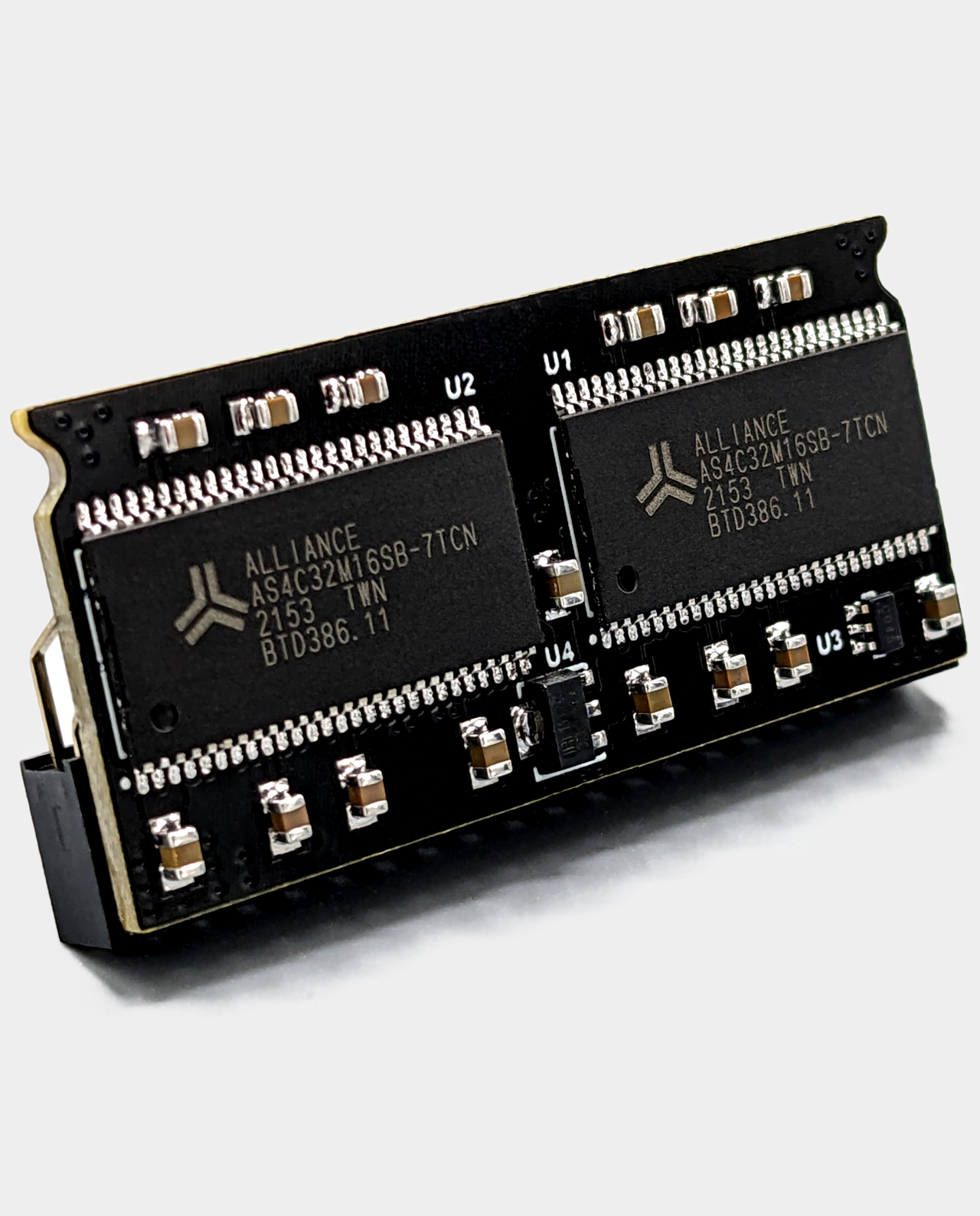
Fully assembled and tested official MiSTer SDRAM XS-DS v3.0 128MB memory addon board built with Alliance Memory for the DE10-Nano and MiSTer Pi.
 lean spruce
If I remember correctly it was Jotegos findings with the memory issue that propted the v.3.0 of SDRAM. Maybe the difference between 2.5 and 3.0 also explained why Saturn core in the beginning only was stable on 3.0
acoustic vortex
yeah I think there’s just a level of variance in these Etrontech chips, and its controller or something is simply getting confused with the N64 instructions.
Or the clone boards are just stupid heads and don’t like different cores for little apparent reason and I’m gonna have a much more annoying time. Who knows. Really did get this with the push that I could play some Sin & Punishment.
Or this is baseless and something on my end is straight up messed
compact depot
@acoustic vortex did you try the DDR3 RAM test core already?
 glass walrus
acoustic vortex
yeah I think there’s just a level of variance in these Etrontech chips, and its ...
glass walrus
acoustic vortex
yeah I think there’s just a level of variance in these Etrontech chips, and its ...
have you tried a different power supply?
acoustic vortex
compact depot
<@282270324781744130> did you try the DDR3 RAM test core already?
Not sure I was made aware of it. I’ll give it a shot.
acoustic vortex
glass walrus
have you tried a different power supply?
I’ll give this a shot, too
rich warren
Make sure it's rated for at least 5v 3a
compact depot
Better make it 4A just in case
I use a 6A with two of my MiSTers (they have a SSD connected to them)
naive briar
acoustic vortex
I’ll give this a shot, too
I fixed the image you sent. Maybe the same thing will work for you.
 acoustic vortex
naive briar
I fixed the image you sent. Maybe the same thing will work for you.
acoustic vortex
naive briar
I fixed the image you sent. Maybe the same thing will work for you.
I hoped it was that simple. I applied that change, however, it's still a blank screen on my end.
naive briar
I flashed your image 3 times and just renaming them makes it go from black screen to loading correctly
compact depot
Bad micro sd?
acoustic vortex
I had proper boot.rom/boot1.rom files on my other sd, and on this one
doesn't seem to be the issue.
 naive briar
It's very strange that doing that one change makes your image work for me. If it still doesn't work for you, it has to be some issue with this SD.
acoustic vortex
Should I return the SD card I initially and continue to have this same issue with? I mean, it's happening on both. The point of failure isn't likely to be the SanDisk 512GB Extreme AND my other 16GB SD card, is it?
naive briar
I don't know. When I fixed your issue by renaming those files on the image you created, I thought that would be it for you. The physical hardware shouldn't be the cause for games not loading for you right now, especially with all of the other testing you've passed.
mossy vector
acoustic vortex
Should I return the SD card I initially and continue to have this same issue wit...
What device are you using to write files to your two SD cards?
acoustic vortex
I doubt this’d be the issue if the image is working on other sd cards
 acoustic vortex
mossy vector
What device are you using to write files to your two SD cards?
acoustic vortex
mossy vector
What device are you using to write files to your two SD cards?
idk the product name
atomic stratus
compact depot
I use a 6A with two of my MiSTers (they have a SSD connected to them)
Any chance you’ve got a link for that PSU? I’m thinking of upgrading mine to suss out some intermittent SSD detection issues
mossy vector
So you are using Windows? And could you be yanking the device without ejecting after writing Zelda or whatever game to it?
acoustic vortex
I’m using Windows and not once have I removed the sd card without ejecting
compact depot
atomic stratus
Any chance you’ve got a link for that PSU? I’m thinking of upgrading mine to sus...
It says unavailable from exactly the shop I bought it, but you can look for the model elsewhere:
https://a.aliexpress.com/_mqUpKZO
acoustic vortex
https://www.walmart.ca/en/ip/desktop-usb-card-reader/PRD2BD49Y3IRCIX
found the product itself

Walmart.ca
Buy Desktop USB CARD READER, Multiple 5 in 1 USB Card reader from Walmart Canada. Shop for more USB Flash Drives available online at Walmart.ca
it's getting a working image onto and off of itself as proven by taki
mossy vector
There's more to it, hard to explain. Multiple partitions on SD cards aren't standard. Whole disk images are reliable.
compact depot
@atomic stratus just found it at Digikey with a reasonable price: https://www.digikey.com/en/products/detail/mean-well-usa-inc/GST60A05-P1J/7703709

DigiKey Electronics
Order today, ships today. GST60A05-P1J – 5V 30 W AC/DC External Desktop (Class I) Adapter Cord (Sold Separately) Input from MEAN WELL USA Inc.. Pricing and Availability on millions of electronic components from Digi-Key Electronics.
Zero SSD detection issues with it so far
atomic stratus
excellent, thanks! I’m actually not sure if power is even my issue, but I could use another PSU anyways so it’s worth a shot
power seems to be the most likely culprit, though
 woven jackal
Anyone try the mouse on the core? is it only compatible with Mario Artist?
acoustic vortex
I could try my 3ds's SD card after cloning its image I guess? I'll try it out.
mossy vector
Linux does its weird SD partitioning thing (raspberry pi, mister, etc) after the initial boot. What works for me is to use WinSCP to transfer the games after mister main is setup and running.
While it should work, Windows and bad device drivers can mess up the SD file system. It is not common, but it can happen.
woven jackal
Using the mouse myself right now. It is just really slow
Oh I know remember, the mouse was for FPS game, not actually replicating the N64 mouse. Would love to hear from people who actually play Goldeneye and stuff this way
@wanton sun , what exactly is the use case for Mouse for P1?
wanton sun
yes, i played 007 TWINE and starcraft with it
you can adjust the sensitivity
it's a parameter in mister.ini: e.g. i use mouse_throttle=1
woven jackal
wanton sun
it's a parameter in mister.ini: e.g. i use mouse_throttle=1
Thank you, I will definitely mess around with that. Just an fyi, I am writing the N64 core highlights for the MiSTer documentation, so I hope you don't mind if I ask some other qustions. I know I lurked and followed the whole development, but honestly there is a lot I've jsut forgotten outside of the basics
rich warren
I use balena etcher with the Mr Fusion img file extracted and never had an issue. The SD card will disappear from windows after writing the image
mossy vector
I don't believe the initial card setup is the issue being faced. Its about adding game files to the fat partition that mister creates.
rich warren
Ah - all the more reason to use an FTP client
fair stump
Could try cifs if it's the game loading from the sd
proven parcel
Wondering if it’s a RAM issue - Resident Evil 2 also isn’t booting on my clone board.
I tried KoF 2003 on the NeoGeo, though, which loaded fine.
Going to run a RAM test for a few hours, see if it finds anything.
rich warren
RE2 works on my Taki clone - let N64 run all day and no issues
didn't do anything special either
image SD card with Mr Fusion, 1st boot, setup wifi, copy over update_all, configure and run update_all, configure MiSTer.ini file, copy roms over
proven parcel
The SD card and USB drive the games are loading off of are directly from a DE-10 setup, so I don’t suspect it’s a configuration issue. These ROMs all work on a DE-10 board with the same card & drive.
silent marten
Does the official RAM board work on a clone? And is someone willing to test it to see if that fixes the issue, I don't have a clone or I would test it when I am not at work
vast delta
silent marten
Does the official RAM board work on a clone? And is someone willing to test it t...
It should, yes. The clone RAM can't even be called clone, it's built to the same exact specs afaik
silent marten
vast delta
It should, yes. The clone RAM can't even be called clone, it's built to the same...
That is good then, it is just odd that now at least 2 people are having issues with the clone boards and think it is a RAM issue
compact depot
2 people having issues is actually great from 2K people who got a MiSTer Pi
acoustic vortex
proven parcel
Going to run a RAM test for a few hours, see if it finds anything.
ran memtest on mine for north of 12 hours and was apparently stable at 145
proven parcel
Seems stable at 147 MHz for mine so far.
acoustic vortex
n64 core still decides to not load games whatsoever
except once with sin & punishment's treasure logo, and a few times with the sm64 title screen
tried another sd card, no dice. I'm suspecting it's something about the sdram. tempted to grab some from misteraddons but I don't want it to be in vain
also, money.
proven parcel
compact depot
My bet is on DDR3 failure than SDRAM
Do you know of another core that intensively uses the DDR3 RAM? If so, I’ll test it.
wanton sun
if the NICCC demo ran fine for one hour, i doubt it's ddr3. This demo uses DDR3 all the time
wanton sun
proven parcel
Wondering if it’s a RAM issue - Resident Evil 2 also isn’t booting on my clone b...
do only large roms not work? maybe test different sizes. If only large ones don't work, it could be the second chip or some address pin
mossy vector
Crappy socket connection? Seat the SDRAM module almost all the way down with like a folded piece of paper gap?
compact depot
I would be very surprised if memtest don’t get that kind of errors
wanton sun
did they post a screenshot? I'm not sure if everyone will look at the 3 in the second line being there, telling it really detected a 128mbyte module
but sure, it's only a theory. Still strange other games work, but two 64mbyte sized ones do not
(64mbyte game in the core means you need more than 64 mbyte, due to other stuff being in the low Mbytes)
compact depot
@acoustic vortex please post a screenshot of memtest after running it for at least 15 minutes
 remote hatch
use C key to switch between chips
GitHub
Contribute to MiSTer-devel/MemTest_MiSTer development by creating an account on GitHub.
fair stump
This was the last memtest screen they posted
#1096015979055697940 message
topaz otter
acoustic vortex
https://www.walmart.ca/en/ip/desktop-usb-card-reader/PRD2BD49Y3IRCIX
found the ...
isn't there a way you can just ftp files to the mister
that would rule out transferring files to the sd card
proven parcel
wanton sun
do only large roms not work? maybe test different sizes. If only large ones don'...
Yeah, so far only Conker and Resident Evil 2 don’t work.
acoustic vortex
proven parcel
Yeah, so far only Conker and Resident Evil 2 don’t work.
dont they need patches?
I'm not up to date with what needs patches
remote hatch
they do not need patches to run
proven parcel
Running through the titles of largest file size. I just tried Perfect Dark - it runs.
acoustic vortex
topaz otter
isn't there a way you can just ftp files to the mister
sure? I have 3 sd cards with mister on it, and other games are fine, as well as my 16gb card's image working on taki's mister
proven parcel
Aidyn Chronicles, WWF Attitude, ECW Hardcore Revolution, Banjo-Tooie, Ogre Battle 64, and Pokémon Stadium 2 all work. It’s just RE2 and Conker’s Bad Fur Day which give me a black screen.
zinc dew
proven parcel
Aidyn Chronicles, WWF Attitude, ECW Hardcore Revolution, Banjo-Tooie, Ogre Battl...
Maybe someone’s mentioned this already but try grabbing a different rom of those?
proven parcel
I’ve tried the European ROM of Conker with no change, and the same ROM works on the DE-10 board. Debug ROM has the same issue, and currently refuses to load on the clone board.
compact depot
Can you kill the MiSTer process and start it from a ssh session and see if the logs show something about the rom loading?
 hushed nova
it really sounds like an sdram issue if rom size is a factor
compact depot
We need a core that loads big rom files and show their crc32
proven parcel
compact depot
Can you kill the MiSTer process and start it from a ssh session and see if the l...
Sure, I can do that in a few hours.
Will need some help with that, though - I’m not super familiar with logging into the MiSTer remotely.
hushed nova
does the mem test switch chips automatically?
proven parcel
I don’t think so - I’m running the test specifically on the second chip now. I went for an hour with the settings as default with a similar result.
 hushed nova
oh hmm. does the n64 use ddr3 rom loading?
wtf if I run mem test on my mister it brings up bt pairing
rich warren
Must have downloaded more ram to pair with in the cloud
lament escarp
Maybe a pin is bent so the ram connected via bt
topaz otter
rich warren
Must have downloaded more ram to pair with in the cloud
Cloudram powered by crypto
 ripe cargo
Any ideas on why the Memtest wont run? All cores load fine but when I load the memtest, the tv goes blank and says no signal detected and I have to reboot the Mister to get back to the menu.
 green epoch
Do you have direct video enabled?
ripe cargo
green epoch
Do you have direct video enabled?
No. Direct video is off and I'm using HDMI
video mode is 2560x1440 60hz
green epoch
Hrm. All other cores work?
ripe cargo
yep. tested Neo Geo, N64, PSX, and Dual RAM Saturn
Also tried redownloading the Memtest .rbf file.
Got it working. I guess it doesnt like 1440 resolution. Switched to 1080 and its working now.
acoustic vortex
isn’t 1440 a bit hacky?
uses horiz line doubling or sum
it’s only actually supported with 4:3
otherwise you might have issues
 latent dagger
yes. the most the MiSTer outputs properly is 1920x1440.
Going 16:9 requires a bit of hackyness
you can also specify the main menu to be a different resolution than what the system outputs the rest of the time you aren't in that main menu, so you can still have that widescreen look with the wallpapers when on the main menu but the moment you load into anything else it'll be 4:3
@acoustic vortex can you explain what "Titronimo" is in your BIO?

acoustic vortex
latent dagger
<@282270324781744130> can you explain what "Titronimo" is in your BIO?
My old Roblox username
It’s my old Roblox bio verbatim
acoustic vortex
latent dagger
you can also specify the main menu to be a different resolution than what the sy...
does this mess with the low lag vsync option?
latent dagger
I don't think so?
zinc dew
It doesn’t
latent dagger
pretty sure Low Latency is happening regardless
it's just telling the system to push and update the frames as they come without a buffer
normally VSync uses a double or triple buffer just in case a frame doesn't make it in time correclty to be synced, it has a couple fallbacks
acoustic vortex
I mean in terms of a blanking screen upon the res switch
or is that already happening
latent dagger
still sends the frames as it's supposed to. again, it just tells things not to buffer frames. so if you get weird frame pacing during the black screen transitioning into a core, doesn't matter cuz it's a black screen.
and you woudn't know it's happening
acoustic vortex
I understand now
latent dagger
vsync still tries to sync the framerate with the refresh for pacing so that there's no screen tearing.
low latency tells the vsync not to buffer extra copies of frames
acoustic vortex
the osd in the core isn’t doing the res switching actively
the res switches for the core and the osd while in the core
latent dagger
in regards to cores themselves doing res switching while in games it's irrelevent because the system is scaling that internal resolution to a final output before it gets sent to the display
acoustic vortex
yeah
zinc dew
The ability for the MiSTer to do above 1080p resolutions without issue is silicon lottery on the HDMI chip.
So generally recommended to just do 1080p and utilize an upscaler if you want a higher res.
Or let your TV upscale it.
vast delta
Didnt Jotego have a different sdram testing core?
Perhaps give that a shot?
GitHub
Checks the sanity of the SDRAM module on MiST and MiSTer systems - jotego/jtsdram
 polar raft
latent dagger
yes. the most the MiSTer outputs properly is 1920x1440.
Going 16:9 requires a bi...
polar raft
latent dagger
yes. the most the MiSTer outputs properly is 1920x1440.
Going 16:9 requires a bi...
Actually 2048x1536 works fine as well, there's even a built-in mode for it (mode 13)
I believe Sorg himself added support, as it's the resolution everyone is using for the popular iPad-based displays
latent dagger
polar raft
Actually 2048x1536 works fine as well, there's even a built-in mode for it (mode...
it's just a different aspect ratio. it's less pixels than 2560x1440 so it makes sense the MiSTer can output it using the same hacky methods for 1440p

I'm sure the MiSTer on a technical level outputs properly something more than 1920x1440 but the res would be super oddball with the numbers kind of like how that iPad retina res looks all non standard and the closest standard was 1920x1440 so that's what was supported and said is "the most it can do without hacks"
wanton sun
always keep in mind that timing closure is calculated for 1920x1080. Everything above is driving the FPGA out of spec and might work or might not. Full 2560x1440 would be 77% above spec. Compared against that, the n64 turbo core is slow 🙃
(there might be some tricks to push the pixel clock down a bit in the high res modes, but the main message is the same)
ripe cargo
Thanks to all for the info. I will switch back to 1080p until I can get a Retrotink 4k and ill use that to bump it up to 4k.
zinc dew
So I’ve got a morph4k and it’s a well crafted device and does an amazing job. But honestly you won’t really see much of a difference on upscaling 1080p content with the MiSTer. The HDMI video on the MiSTer is ultra sharp as it is and the built-in shadow masks and filters already make the games look authentically retro.
Spend your money however you like but unless your HDTV suck at upscaling, has insane lag when upscaling, or have other old consoles to use it on; I’d save your money for something else.
Works great with the Switch though. I force it to 720p (since most games do that and not 1080) and upscaling it to 4K makes everything razor sharp instead of relying on the Switch’s internal upscaler.
 zenith notch
zinc dew
So I’ve got a morph4k and it’s a well crafted device and does an amazing job. Bu...
zenith notch
zinc dew
So I’ve got a morph4k and it’s a well crafted device and does an amazing job. Bu...
How does the Morph deal with 480i content and resolution switches? Having better deinterlacing options is the reason I'm thinking about getting one, would benefit lots of PS1 & Saturn games if its good.
zinc dew
Oh that’s a great point!
I don’t know. I’ll have to check. My morph is used in the family room where my kids dominate the TV lol.
zenith notch
Would be great if you could give some impressions, I'm sure the motion adaptive options will be great but res swithing being slow would be a bit of a deal breaker.
zinc dew
Important to note I was given a free morph4k so I am going to be biased. Also I’m no expert haha.
 random bloom
zenith notch
How does the Morph deal with 480i content and resolution switches? Having better...
random bloom
zenith notch
How does the Morph deal with 480i content and resolution switches? Having better...
I have an RT4k, not a morph, but it's very good with deinterlacing. The motion adaptive deinterlace has far fewer artefacts than the bob or weave used in the core. Res switching is also instantaneous if you use the frame buffer mode which only adds a single frame of latency. Very much acceptable for most games that frequently switch. Having said that, the ps1 core can have the 480i and 240p timings be matched to one another for the sake of not losing sync. Looks good over HDMI as it still applies the deinterlace as it should. Looks bad over analogue because the 480i becomes a wobbly 240p. Could send a 480p or 1080p image to a scaler if that's what you're about though. N64 and Saturn cores don't have this feature though. The only issue I've had with the RT4k is that it doesn't play nice with my HDMI switch with consoles that output LPCM surround sound, but that's a very specifically me problem. From what I've seen though, the morph is quite similar in its abilities to RT4k.
zinc dew
 there’s an expert!
zenith notch
random bloom
I have an RT4k, not a morph, but it's very good with deinterlacing. The motion a...
A frame of latency to manage the switch is fine, and I'm only going to be usingit over HDMI so thats all good too. Thanks for the response, sounds like it's does what I would want from it!
wanton sun
n64 core doesn't need a sync 240p/480i feature, just use 480p mode instead. Will be highest quality for 480i content and easily beats any deinterlacing method 🙂
cerulean elk
zinc dew
So I’ve got a morph4k and it’s a well crafted device and does an amazing job. Bu...
For a lot of people it is the shit scaling on their tv
My old Samsung was adding a frame plus on the scale which sucked
zinc dew
cerulean elk
My old Samsung was adding a frame plus on the scale which sucked
Ah that sucks
cerulean elk
Thankfully new OLED doesn’t so I may remove the scaler and just let the tv do it 🤷🏻♂️ I get where you are coming from. Scaler feels less essential
For MiSTer
I previewed MiSTer / Tink on the LG C4 OLED vs just MiSTer plugged in and you are right…it’s not some night and day diff
zinc dew
But you do make a good point. I used it in my OLED too lol
I can imagine people with cheap 4K panels can really benefit from an upscaler
Brb grocery shopping
cerulean elk
zinc dew
Brb grocery shopping
Ten gallon hat and a side of beef?
thorn quiver
Hatful of beans
wanton sun
zinc dew
I can imagine people with cheap 4K panels can really benefit from an upscaler
using a bad tv for all content and buying a scaler the price of a good tv to improve some content slightly sounds strange, but probably that's just me 🙂
zinc dew
wanton sun
using a bad tv for all content and buying a scaler the price of a good tv to imp...
Haha I agree.
robust cave
how do you turn on 480p mode for the n64 core?
ivory laurel
wanton sun
n64 core doesn't need a sync 240p/480i feature, just use 480p mode instead. Will...
Some games lose the aspect ratio and end up too stretched with Clean HDMI. Jet Force Gemini without the VI is super stretched vertically
The intro shows it clearly
neat sierra
Robert hits Robby with 200 points of psychic damage
thorn quiver
You dont have to be psychic to do damage with all those beans
He's like a propane tank
Sorry, nonsense levels are high
 thorn quiver
Most Texan item I have seen
wanton sun
robust cave
how do you turn on 480p mode for the n64 core?
clean hdmi mode in OSD
wanton sun
ivory laurel
Some games lose the aspect ratio and end up too stretched with Clean HDMI. Jet F...
true, for 240p or mixed games it's not the best choice
we could have arbitrary correct aspect ratio, the code for that exists, but i think it must be done on core side, so it has significant ressource cost
ivory laurel
No need, the core is in pretty good shape
It delivers original visuals and many optional tweaks
The bilinear off for integer VI scaling could be a neat addition 😊
wanton sun
yes, i need to change the last testbuilds deblur implementation to that instead, it makes more sense
ivory laurel
Many game devs abused that bilinear filtering feature
 random girder
I tested both Conker's Bad Fur Day and Resident Evil 2 with Taki's clone, no problems running them. Both USA versions if that matters.
I set up my MiSTer following @cerulean elk's advice in a recent video. Pretty standard setup I think. Mr Fusion, update_all, and the default MiSTer.ini except for turning on direct video.
Haven't had any issues with any cores or any N64 games.
compact depot
User error and hardware failures are perfectly possible. Pretty sure Taki’s support will be able to address both cases!
So far, great experience here with MiSTer Pi
zinc dew
Hell yes where’s the handheld. I want a handheld N64.
compact depot
zinc dew
Hell yes where’s the handheld. I want a handheld N64.
Myioo Mini is what you need 🙃
zinc dew
Man really, but I want a Taki handheld
random girder
Is it weird that I want the handheld, mainstream, and flagship?
zinc dew
random girder
Is it weird that I want the handheld, mainstream, and flagship?
it’s not weird if you give me one
random girder
I guess it's weird then.
zinc dew

remote hatch
I am waiting for the console version
 zinc dew
If it wasn’t PS1 themed I wouldn’t be interested but I got hit right in the nostalgia
compact depot
I will probably get each of anything Taki launches
zinc dew
How’s import and custom fees
compact depot
Will try to get a second MiSTer Pi though 🤭
zinc dew
I know you guys get hit by that so I’m hoping it’s better with Taki clones
compact depot
I’m currently living in the US so you know the drill
Customs in Brazil sucks big time yes 😔
A friend of mine has actually been hit very lightly by Brazilian customs
zinc dew
Oh nice, you’re in the US! Did you get your welcome gun yet?
compact depot
zinc dew
Oh nice, you’re in the US! Did you get your welcome gun yet?
My visa doesn’t allow it 😔
random girder
The customs agent hands you a gun along with your passport after stamping it.
 glossy lake
And firework mortars, cant forget them
 iron dove
Horses do like to run
ripe cargo
zinc dew
So I’ve got a morph4k and it’s a well crafted device and does an amazing job. Bu...
Yeah the Retrotink would mostly be for my older original consoles and the Switch. My Sony tv upscales pretty well, but it had about 70 ms of lag (in game mode) so I figured the 4k might help reduce that.
lament escarp
zinc dew
So I’ve got a morph4k and it’s a well crafted device and does an amazing job. Bu...
Are you upscaling the 1080p output from the mister? That's not recommended, that's what direct video is for.
zinc dew
lament escarp
Are you upscaling the 1080p output from the mister? That's not recommended, that...
What really?
I just do HDMI
lament escarp
Dv is via HDMI
The tink sends the original res and meta data on how to crop the picture and the scaler does all the scaling and deinterlacing and such.
The rt4k can even auto load profiles for individual cores, dunno bout morph.
zinc dew
Ohhhhhhhhh
I will have to annoy you later about when I rebook my MiSTer back up lol
Thanks for teaching me!
lament escarp
You know how old people are with technology 🙃 no problem.
rich warren
zinc dew
How’s import and custom fees
I just had to pay $13 shipping to Ohio. It went right through customs
No extra fees
 kind mountain
For what it’s worth I loaded conkers on my mister pi the other day and played for 15-20 mins no problem. Will try RE2 tonight
topaz otter
whats the deal with the mister pi
turbid warren
cheaper mister boards 🙂
topaz otter
interesting
turbid warren
sounds like the de-10 nano clone board works just as well as the real thing
topaz otter
is it true that the chips for these are pulls from recycled units?
compact depot
topaz otter
is it true that the chips for these are pulls from recycled units?
Where did you hear that?
topaz otter
saw it in a thread on misterfpga.org
compact depot
topaz otter
saw it in a thread on misterfpga.org
Care to share a link please?
topaz otter
remote hatch
I wonder if anyone has evidence to support this claim? Haha
topaz otter
that would have to be a lot of chips pulled to support each batch, its probably bullshit
topaz otter
also why is it called Pi
compact depot
topaz otter
https://misterfpga.org/viewtopic.php?t=8340
Taki didn’t say anything about the chips being recycled pullups so I think they are confusing MiSTer Pi with another board
zinc dew
topaz otter
also why is it called Pi
SEO probably. Pi is a popular shorthand for “single board retro game device” in the casual market.
 deft matrix
Heya, just thought I'd come and report some visual glitching with Pokémon models in Pokémon Stadium 2. I've also had the core seemingly crash a few times. I've had no problems with Stadium 1 or SSB so I think my Taki Udon setup is working okay with the core
 chrome quest
What kind of model glitches? Are they repeatable?
deft matrix
I managed to capture a crash, although it hasn't happened since. The models in this menu behave the same (repeatable) and I also noticed similar behaviour from Pokémon models during a battle
chrome quest
Nice capture of it! Hmm, not seen that before. I think I'll have to leave it to more experts here as to how to test, might be something with your hardware.
At least, as far as I know, that is not the regular experience of Stadium 2. Not personally either.
Do you have a new build?
deft matrix
its definitely not the regular experience. core provided by update_all as of a few days ago. 24.08.18
compact depot
deft matrix
I managed to capture a crash, although it hasn't happened since. The models in t...
Is this on the de10 nano or a clone?
deft matrix
clone
compact depot
deft matrix
clone
Turbo or normal core?
deft matrix
normal as far as i'm aware
 rare relic
ivory laurel
The bilinear off for integer VI scaling could be a neat addition 😊
rare relic
ivory laurel
The bilinear off for integer VI scaling could be a neat addition 😊
Core will have the best "deblur" then compared to hardware mods. Will be zero loss in text clarity. I've been eagerly awaiting 🥹
zinc dew
rare relic
Core will have the best "deblur" then compared to hardware mods. Will be zero lo...
Yeah, some users here have commented that the core outputs a much cleaner signal than hardware mods. Great stuff!
solemn marlin
A friend asked if all games for the core worked and I said basically everything except for conker and resident evil 2 which you might have to patch
Is that a somewhat correct assessment?
neat sierra
solemn marlin
Is that a somewhat correct assessment?
You don’t have to patch, the games that need patching it does it automagically
solemn marlin
Okay so that's not a test build but the actual build now? I guess that's all then, not sure how the n64dd titles should be counted
jolly turret
solemn marlin
Is that a somewhat correct assessment?
Conker and RE2 work just fine with the most recent core, there is no more patching required.
solemn marlin
That only leaves like some of the features in patched n64dd games missing but I don't think that's a core issue
Not even sure there are any emulators that can play the clean dumps
 weary perch
i've been testing the Rayman 2 patch Ruleset posted. i haven't had any crashes, but i have heard a few weird audio things. some "pops" i hadn't heard previously, but only during the intro. i made sure i was using the latest core with all the audio fixes
not confident about it, though. gonna try and test it some more
 quick otter
maybe to debug if crashes is due ddr3 latency we can do a build removing ascal. Ofc, it should be tested on a crt (more comfortable than killing main)
sullen harbor
Was there a core update today?
 zenith orchid
So what doesn't work with the latest build?
I'm guessing update-all updates the database and what have you?
sullen harbor
So there was a new build?
ripe cargo
lament escarp
Are you upscaling the 1080p output from the mister? That's not recommended, that...
So if Im using Mister straight to my 4k tv should I be using Direct video or select 1080p on the Mister? My lag is pretty high when set to 1080p. Maybe direct video would help?
green epoch
ripe cargo
So if Im using Mister straight to my 4k tv should I be using Direct video or sel...
Unless you have a dac, direct video won’t work
ripe cargo
green epoch
Unless you have a dac, direct video won’t work
Oh ok. Thank you!
green epoch
Some tvs have trouble up scaling from 1080p > 4k, which can introduce latency, unfortunately
lament escarp
ripe cargo
So if Im using Mister straight to my 4k tv should I be using Direct video or sel...
Lag should be about the same. The rt4k shouldn't introduce much anyway. The reason why you should use direct video is that the rt4k does a way better job at scaling than the mister itself does. A good example are the pokemon games on gameboy. If you're using 1080p and fullscreen on mister you'll see that the eyes of the characters are not the same size. If you use the rt4k and scale fullscreen they're perfectly the same.
lament escarp
green epoch
Unless you have a dac, direct video won’t work
How? Why? Direct video is just via hdmi.
hushed nova
it's not going to 'work' fed directly into a TV is what they meant
green epoch
Yes, sorry, that’s what I meant
green epoch
Yeah
neat sierra
It’s for DACs
lament escarp
My reading comprehension isn't the best at 3:30am 🥲
 storm vessel
So the autopatcher requires the current mister unstable and the n64-database.txt in the n64 games folder, yes?
rich warren
I like to use the 1080p 5x option to crop a little off the screen for cores that support it. "Interpolation Only" video filter preset evens out the pixels to prevent shimmering and googly eyes. Makes it a little blurry, but still pretty sharp
storm vessel
hushed nova
it is in released main
So then have the new n64-database.txt and ruleset's patches in the games folder and that's all?
My main mister is on 20240912 just updated
rich warren
You don't need to download the patches. They are built into the db (corrected)
storm vessel
rich warren
You don't need to download the patches. They are built into the db (corrected)
Wow I didn't realize that. Thx
hushed nova
they're built into the database, actually
jolly turret
@solemn marlin I tested the Sim City 64 DD conversion rom today and indeed there is an issue with it. It seems like one of the instruments, likely the tambourine, does not get played back correctly and is instead replaced by some kind of blip sound.
I can not tell if this is caused by the core of maybe how the rom was patched. I did however check a conversion rom for F-Zero X Expansion Kit, which was running without any issues at all. Maybe @wanton sun is interested in looking into it.
@weary perch I also checked on Flying Dragon for you. The audio quality sometimes is a bit garbled, in a similar way like Battlezone, but other than an occasional clicking sound or audio dropout, which could be happening with the real console as well, I couldn't detect anything unusual. I'll message you a download like to the file I recorded so that you can compare them.
solemn marlin
jolly turret
<@1132006679093977108> I tested the Sim City 64 DD conversion rom today and inde...
Thanks for checking it out, does the same patched rom fare well with hardware/emulator? I could only compare with a youtube video
hidden bolt
weary perch
i've been testing the Rayman 2 patch Ruleset posted. i haven't had any crashes, ...
I didn't test with audio enabled so that is very possible, I can make a patch with less delay but I will have to verify that it still fixes the crash. Which means doing the same race like 30 times in a row unfortunately.
 tropic cypress
Hi. I think that I'm doing something wrong, but I can not understand what.
First, I have run update_all before I wrote this message 😄
It looks like if I run the games from the SD card, they work, but If I run them from a network mount (cifs), even if they are not compressed, they do not work.
is this a well-known issue or I'm doing something wrong?
As a not, the cifs mount works with Megadrive and Sega Saturn, and it gets the N64 files and uncompress them, but the games refused to load
Solved, boot.rom was not on the network mount ;D
wanton sun
hidden bolt
I didn't test with audio enabled so that is very possible, I can make a patch wi...
if the hang only happens with the saving, the pause is probably not required for every rsp/pi/dma activation. No idea if it's possible to find out which and if you could even distinguish at runtime 😅
hidden bolt
wanton sun
if the hang only happens with the saving, the pause is probably not required for...
Yeah, I am sure it is possible to find an indicator of what screen the game is currently on and enable the delay only for that, but that would require some more time looking for that. If there really are audio pops then that might be worth looking into. Although just decreasing the delay a bit would be easier if it fixes the pops.
kind mountain
tropic cypress
Solved, boot.rom was not on the network mount ;D
Yeah update_all downloads to the fat/games folder, it should probably check if fat/cifs exists. I’ve considered mounting most of media/fat to the network share so I can just use the regular games folder but I like being able to unplug it and take it somewhere now and still have a usable SD card
tropic cypress
kind mountain
Yeah update_all downloads to the fat/games folder, it should probably check if f...
Its what I'm trying to do. From home all the catalogue, on the go with a selection of games to play with my friends ^^
fair stump
kind mountain
Yeah update_all downloads to the fat/games folder, it should probably check if f...
I use cifs for n64/ps1/saturn and it works perfect
 thorn flax
hey, what n64 romhacks work on the core and are good?
magic girder
thorn flax
hey, what n64 romhacks work on the core and are good?
Our boy VGE just put out a video on this 🙂
thorn flax
looks like most of kaze’s don’t
kind mountain
fair stump
I use cifs for n64/ps1/saturn and it works perfect
Same. Just had to move the bios files from the SD to the share since update_all only goes to SD
kind mountain
tropic cypress
Its what I'm trying to do. From home all the catalogue, on the go with a selecti...
I think I am going to write a small script to rsync fat/cifs to fat/games for when I want to take it on the go
Hummmm. So RE2 gets to the graphic warning screen then goes black for me. Conkers works tho.
I've tried multiple rom versions with the same results. Any ideas? The other auto patched games like Jetforce function just fine
zinc dew
Tons of rom hacks work on the core. If you’re interested in Mario 64 rom hacks then the site https://romhacking.com conveniently has a hardware compatibility column.
kind mountain
deft matrix
I managed to capture a crash, although it hasn't happened since. The models in t...
Found the same menu, mister pi here as well
hidden bolt
weary perch
i've been testing the Rayman 2 patch Ruleset posted. i haven't had any crashes, ...
I just made a patch that only enables a delay when the save yes/no option is displayed (which is when the game crashes) and the game crashed after about an hour of retrying the race level. So I think the crash is just too rare for me to try and find a fix for it. Maybe it would not crash with a longer delay but there are too many variables considering how hard it is to trigger the crash. If someone can find a more consistent crash I can try and look at it again.
weary perch
thank you Ruleset. i've not seen a crash with the first patch yet, and i wasn't entirely confident about the audio popping because my volume was set too low when i was testing to be really sure. it seems more stable than unpatched, at least
i'll let you know if i find a reliable way to crash it
weary perch
@hidden bolt do you mind sharing that second patch you made? i just want to see if i can confirm or deny the audio issues i thought i heard the other day - basically i just want to see if a) the first patch actually has audio issues and b) if the second one helps with that (even if it still crashes)
hidden bolt
weary perch
<@292710044271771648> do you mind sharing that second patch you made? i just wan...
the delay in the second patch is only enabled when the save option is shown, so it will behave the same as unpatched rayman 2 otherwise
weary perch
presumably this means the first patch will eventually crash if you play long enough, yeah?
just by the odds
hidden bolt
yes, I think so, maybe the delay should be enabled even before the save option is displayed, but I think I just got (un)lucky when testing the first patch
weary perch
thank you
i've got some time today, i'll try to see if i can make patch-1 crash, and also see if i can confirm/deny the audio issues i was hearing
i've not seen the first patch crash yet, but i've not been spamming one level, just playing thru the game normally
hidden bolt
I though it was about 1 in 8 chance at first, but maybe it is much rarer, like 1 in 30 or something
deft matrix
kind mountain
Found the same menu, mister pi here as well
Interesting. USA ROM?
kind mountain
deft matrix
Interesting. USA ROM?
Yeah, sent you a message
deft matrix
I'm guessing the core shouldn't be doing this on boot too
 rich warren
@deft matrix turn on "Fixed Video Blanks" in the Video & Audio settings
deft matrix
ah, thanks
deft matrix
I'm getting E00000040 when trying to boot Conker and RE2, Stadium 2 eventually crashed to the same code... Feels like something is off with my Taki Udon Mister :s
mellow raft
deft matrix
I'm getting E00000040 when trying to boot Conker and RE2, Stadium 2 eventually c...
Turbo core?
(80MHz)
deft matrix
no, regular
mellow raft
you have the latest N64 database from update_all?
deft matrix
yes
mellow raft
deft matrix
yes
Using the latest unstable mister main from #unstable-nightlies ?
The N64 auto patch feature hasn't released to stable yet I think
kind mountain
going to load pokemon stadium 2 on my taki board and let it run for a bit.
I still can't get RE2 to load
mellow raft
hushed nova
it has been
Thanks. Guess I'm a bit behind
mellow raft
deft matrix
yes
Can you share the hashes of the game roms you're using?
Md5 or sha1 or crc or something to that effect.
deft matrix
Conker CRC32: CE8CC172
Stadium 2: A9998E09
RE2: 832EA1DA
mellow raft
Looks to be correct.
kind mountain
MD5: 1add2c0217662b307cdfd876b35fbf7a
SHA1: 62ec19bead748c12d38f6c5a7ab0831edbd3d44b
SHA256: 71f3f779613bf1f0e2050bfa600425385d2c257a647d2e40f63be1a7986e9aac
SHA512: 3020c734a75677efea73883b15b236ebad05a13b8964fc2b657ce28e7bed561389c58313d7fbdc7331f3a372d3d5a4b4c1c0f9d0bc93a08bb2da8a503a88fcb7```Can you try clearing out the "Consoles" folder and run uodate_all for me?
Then try again.
mellow raft
kind mountain
```Resident Evil 2 (USA) (Rev 1).z64 - 67108864 bytes
MD5: 1add2c0217662b307cdfd...
Doesn't have the crc32
kind mountain
deft matrix
Conker CRC32: CE8CC172
Stadium 2: A9998E09
RE2: 832EA1DA
How long does pokemon stadium take to crash for you? I've had demo mode running for a while
deft matrix
I quoted the rev 0 RE2 rom above
deft matrix
kind mountain
How long does pokemon stadium take to crash for you? I've had demo mode running...
not long when it does, although sometimes it doesn't either
kind mountain
848FBC0D for RE2 Rev1
thorn flax
magic girder
Our boy VGE just put out a video on this 🙂
so do you have any recommendations
deft matrix
mellow raft
Then try again.
No change 😞
 mellow raft
deft matrix
No change 😞
mellow raft
deft matrix
No change 😞
what is the date of your MiSTer binary?
And can you upload your n64 database file?
deft matrix
240912, I think?
deft matrix
mellow raft
Download this file (MiSTer) and overwrite the one in your root of the SD card. If you're doing it over ethernet, I highly recommend waiting a minute before rebooting the MiSTer after transfer
kind mountain
would that not pull in via update_all yet?
mellow raft
IIRC sometimes manually replacing the file prevents it from updating. I would check to see if the hashes match
they should
kind mountain
humm yeah updater tells me distribution_mister, nothing new to download from given sources. I'll replace the binary
hushed nova
240912 is the latest release
kind mountain
replaced and still says MiSTer v240912 lol. I don't see a newer release
and N64 is 24.08.18
mellow raft
Why are you taking my advice? I'm talking to speedlolita
I didn't know you were having trouble as well.
kind mountain
also having issues on a taki board so I'm just following along LOL
😉
Less issues... but still issues
mellow raft
I see lol
deft matrix
mine has stopped booting 🤡 guess i'm getting onto taki udon...
kind mountain
creeping the creep
tropic cypress
Off topic, what controller are you using?
kind mountain
This is what RE2 is doing for me. Gets past the first couple of splash screens then black.
However it seems Pokémon stadium and conkers is fine and other autopatcher games like jet force Gemini are fine too
green epoch
I have a mister pi. What games are having folks with? RE2? I can run some tests too
neat sierra
deft matrix
mine has stopped booting 🤡 guess i'm getting onto taki udon...
Maybe try reseating the boards into each other and the ram as well?
Or did it stop booting because you got too aggressive deleting from the sdcard? Could Mr fusion and try from scratch
deft matrix
I only replaced two files, I guess I'll try that though. Nothing to lose
oh, lol
it posted, I shouldn't have replaced the menu rbf I guess!
kind mountain
have you done a memtest out of curiosity?
 plush summit
neat sierra
creeper!
plush summit
neat sierra
creeper!
aw man
green epoch
I can confirm that the mister pi doesn't load RE2. Same rom loaded in to a retrocastle mister and a taki mister pi. Loads fine on the mister. Black screen on the mister pi
kind mountain
F
green epoch
what was the other game?
kind mountain
speed was having issues with conkers and pokemon stadium 2 but those seem fine on my mister pi
deft matrix
kind mountain
have you done a memtest out of curiosity?
i did 40 mins and it stayed at 150MHz
kind mountain
I was at 147 after like 3 hours. so that rules that out
neat sierra
green epoch
I can confirm that the mister pi doesn't load RE2. Same rom loaded in to a retro...
Did you try swapping the sdcard wholesale from the working system?
Rather than just the rom
green epoch
neat sierra
Did you try swapping the sdcard wholesale from the working system?
They are both loading the rom from a NAS
neat sierra
green epoch
They are both loading the rom from a NAS
Couldn’t hurt to swap though, then guaranteed same linux env, mister binary etc
green epoch
kind mountain
Found the same menu, mister pi here as well
where is this menu
deft matrix
mini-games
green epoch
neat sierra
Couldn’t hurt to swap though, then guaranteed same linux env, mister binary etc
yup, true enough, I'll do that in a sec
kind mountain
its the middle option on the main menu then mini games at top of the map
kind mountain
green epoch
I can confirm that the mister pi doesn't load RE2. Same rom loaded in to a retro...
Did yours do the same as mine? Black out after the first couple of splash screens?
green epoch
kind mountain
Did yours do the same as mine? Black out after the first couple of splash scree...
no, black immediately
kind mountain
oof
deft matrix
there's some error reporting thing you can enable in the core. what does it show if you enable that?
green epoch
deft matrix
No change 😞
I get the same error
 green epoch
three's company
luuuuckeee, you get the splash screens
I get a quick white flash and then nothing
checking conker for poops and grins
kind mountain
green epoch
conker just sits at a black screen with no error code
no sound or anything
Is there an unstable I should be trying? update_unstable doesn't pull the n64 core
kind mountain
This is weird. Mine seems ok? so I have a mostly working board and you guys have a partially working? :X
deft matrix
hooray!
green epoch
since it's reproducible, I'm sure it will get sorted out
mellow raft
Make sure everything is updated I'd say
@deft matrix you're saying you got it fixed?
kind mountain
maybe just happy there was someone else to share the misery lol
green epoch
no I think they were happy that they weren't the only ones with issues :p
deft matrix
oh no, that was sarcasm
mellow raft
Can you post a screenshot of your N64 core folder?
deft matrix
I'm still running update_all rn lol
mellow raft
It should look like this

along with whatever roms
(N64-database_user.txt is optional to add yourself (you can add your own entries) and may not be there)
 mellow raft
looks correct
kind mountain
what is mister-boot.z64
mellow raft
however your database is outdated @green epoch
kind mountain
I don't have that from update alll
green epoch
kind mountain
I don't have that from update alll
it's optional
green epoch
mellow raft
however your database is outdated <@225003633668915201>
is there a way to get update all to update a Cifs folder?
mellow raft
I believe it's one of the updates in Update_all
mellow raft
green epoch
is there a way to get update all to update a Cifs folder?
it will update whatever is present or mounted to the games/ folder
 mellow raft
If you have a USB drive or cifs, the MiSTer will dynamically update whatever is present depending on the priorities set in your MiSTer.ini
So if you have it mounting the games folders over the one in your SD card, then yes
green epoch
oh let me see
solemn marlin
Is there a list of recommended brands/sd cards? Or is it always a lottery
kind mountain
humm my update_all downloads bios to /media/fat/games over the cifs folder
green epoch
mellow raft
If you have a USB drive or cifs, the MiSTer will dynamically update whatever is ...
Can you point me to where that is in the ini?
mellow raft
SHARE="MiSTer/games"
SHARE_DIRECTORY=""
USERNAME="MiSTer"
PASSWORD="blablahstupiddog@#!"
LOCAL_DIR="*"
ADDITIONAL_MOUNT_OPTIONS=""
WAIT_FOR_SERVER="false"
MOUNT_AT_BOOT="false"
BASE_PATH="/media/fat/games"```I use this cifs_mount.ini for the cifs_mount script.
kind mountain
ah you're replacing the games folder with the mountpoint
mellow raft
no
I'm mounting each individual folder from the MiSTer/games share over each individual folder in the /media/fat/games/ folder
so if they don't exist in my cifs mount, it uses whatever is in the SD card
green epoch
mellow raft
```SERVER="10.0.0.152"
SHARE="MiSTer/games"
SHARE_DIRECTORY=""
USERNAME="MiSTer"...
I don't have a cifs.mount.ini - just the script
kind mountain
makes sense. I have it mounted in /media/fat/cifs since mister now uses that over games if it exists. This lets me rsync stuff down to the SD card for offline playing
green epoch
in the script I have wait for server and mount at boot set to true
kind mountain
just the update script still goes to /games
mellow raft
green epoch
I don't have a cifs.mount.ini - just the script
you can create it and copy your variables from the script you have. So if the script gets updated you don't lose your settings
it automatically loads the variables from the ini
green epoch
mellow raft
you can create it and copy your variables from the script you have. So if the sc...
Ok, do I just need the text in your snippet there?
(obviously filling in my own info)
mellow raft
kind mountain
makes sense. I have it mounted in /media/fat/cifs since mister now uses that ov...
you can mount in linux over a folder and it won't overwrite it. It just virtually mounts in-place until it's unmounted
mellow raft
green epoch
Ok, do I just need the text in your snippet there?
yeah
green epoch
and that will cause update_all to update the cifs mount, not the sd card?
kind mountain
mellow raft
you can mount in linux over a folder and it won't overwrite it. It just virtuall...
yeah, just if I want to access both at the same time to be able to copy files from the share to the sd card its better to have it mounted somewhere else
for my usecase atleast
mellow raft
tbh though... I see that the /media/fat/cifs folder is something they look at manually first .. hmm
I'm not sure if update_all updates that folder yet. @whole tulip can you give some insight maybe?
mellow raft
kind mountain
yeah, just if I want to access both at the same time to be able to copy files fr...
then yeah /media/fat/cifs makes more sense in your case
kind mountain
I put a sync.sh script in the scripts folder and can run it before I disconnect it from the network
DESTINATION="/media/fat/games/"

rsync -avh --progress --exclude '#recycle' "$SOURCE" "$DESTINATION"
sometimes I will take it to the office for playing with coworkers
but otherwise not often
mellow raft
nods
kind mountain
I was going to submit a feature request to the downloader/update_all repo that if cifs folder is present to download bios there first but then I got distracted with work
then got distracted trying to get RE2 to work
deft matrix
no change to my situation at all
green epoch
yeah, same
deft matrix
both RE2 roms and conker don't load at all. stadium 2 crashes in the mini game select menu eventually
kind mountain
just crashes sitting in that menu?
deft matrix
correct
green epoch
deteled the boot roms and database file, redownloaded them, same result
sitting at the pokemon menu
deft matrix
to be more accurate, I was moving the cursor around. also the models appeared glitchy
#1096015979055697940 message
green epoch
yeah, I can't get it to crash. I sometimes see a glitch in delibird's right foot when I select them
but that's it
kind mountain
To update the standings... speedlolita has a partially working board, thejesusfish has a sorta working board and I have a mostly working board
we need more taki owners
random girder
I posted yesterday. Mine works without any issues.
kind mountain
you can load RE2?
random girder
Yup. Played to the first save point.
hushed nova
is there an rbf floating around of the ddr3 test Robert made?
wanton sun
it's in the github
hushed nova
I think at some point that might not be a bad thing to have people run
wanton sun
wait, i never uploaded the rbf?
sorry for that, will upload the rbf into the github of the ddr3test asap
hushed nova
and if it turns out to be useful might potentially be worth putting in the default dist as a utility core
random girder
I would just like to thank everyone that worked on this core. It's super impressive. And thanks for it being "done" by the time I got a MiSTer haha.
green epoch
wanton sun
https://github.com/RobertPeip/MiSTerDDR3Test/tree/main/releases
just toss this in utilities?
wanton sun
keep in mind that the ddr3 test only tests for bandwidth and latency, not for correct data!
it wouldn't be that much effort to add that, but the purpose was only to see if mister ddr3 is fast enough for n64
kind mountain
 wanton sun
looks normal (for default settings)
deft matrix
 hushed nova
does the n64 core push ddr3 more than this?
also I guess there's also a possibility the roms are being corrupted on upload? but that would be...interesting
wanton sun
again, it seems that if people have issues, it mostly hits 64mbyte games which still makes me think it's the sdram module
I know it's asked much, but i would say the best bet would be if anyone with failing clone board would get a "known-good" 128mbyte sdram module
hushed nova
oh hmm yeah forgot about that detail. one of those fun 'the sdram test is fine but...' situations
wanton sun
i could be totally wrong, so i don't want to trick anyone in buying a 50$ module. Just my best guess 😦
deft matrix
TheJesusFish said he had a regular mister, perhaps he could try his other ram module for us
wanton sun
that would be super helpful to switch the sdram modules between them. Would do the community a big favor to either prove it or rule it out 👍
kind mountain
is RE2 the biggest of the 64mbyte games? just strange on my setup that the other 64mbyte games are fine and RE2 gets through the first couple splash screens and crashes... but I guess bad ram could present itself in different ways
wanton sun
we currently don't know at which point the 64mbyte games access the area. It's only the last 16mbyte that are on the second sdram chip
kind mountain
humm cant find a sdram module to quickly "rent" from amazon :P. Hopefully jesusfish can swap those
green epoch
I may have time to do it tonight. Assuming the retrocastle case is easy to disassemble
random girder
Just drop it.
deft matrix
found a comment on reddit from 6 days ago with a similar situation
 kind mountain
curious if other cores that require the ram function for you guys
playing die hard arcade on saturn now
deft matrix
i played sotn to the first save point just fine
kind mountain
ah I think I saw that post
random girder
That user has been posting here about it too. Assuming it's the same user, willuigi.
kind mountain
so far fwwwn won the lottery
deft matrix
sucks you can't run a random test with memtest, or maybe i'm reading this wrong
green epoch
I have a dual sdram mister. does it matter which stick a pull?
rich warren
My MiSTer Pi runs N64, Conker, RE2, and Pokemon Stadium with no problems
deft matrix
it shouldn't do
kind mountain
2nd lottery winner has joined the chat
rich warren
hopefully the issues are just edge cases, and just the SDRAM since that can be easily swapped.
random girder
Yeah, I'm hoping it's an easy fix like that too. Taki should at least have spare memory to mail out.
green epoch
I hope someone can develop some sort of test for it
rich warren
They are still available on the site for $20
deft matrix
well, that is what memtest is for. the fact it (seemingly) is passing here but having issues with the core is troubling
rich warren
PSUs are good? I've tested out a few I have that are rated at least 5v 3a and no issues
kind mountain
rich warren
They are still available on the site for $20
running an Apple USBC 20w
deft matrix
tested with my 30w google charger and 65w pinepower charger
magic girder
thorn flax
so do *you* have any recommendations
I’m not an expert by any means. I enjoy Mario Kart Amped up, and Smash Bros Remix. I read Mario 64 Star Road is good, but I never tried it nor do I know if it works on the core. I was mentioning VGE’s vid just in case you hadn’t seen it, and because I don’t know much myself 🙂
green epoch
My memtest ran over night with no issues at 150. I'm using an anker 5v3a - same model as on my mister
kind mountain
Seeing [email protected] running conkers
rich warren
What are the 5v ratings? Max wattage could be other voltages (5,9,12, etc)
hushed nova
green epoch
I have a dual sdram mister. does it matter which stick a pull?
the biggest one
deft matrix
Output: 5V-3A or 9V-3A or 15V-2A 30W
rich warren
ok that looks good
kind mountain
just swapped to my macbook usbc charger and getting [email protected] but no change, was hoping it wasn't that volt sensitive although I think it's just being stepped down to 5v anyway
green epoch
I have a raspberry pi 5 charger that is 5v5a - dunno if that would make a difference
wanton sun
the memtest doesn't run with the same sdram controller as the other cores. It's mostly for highest frequency, not for low latency or optimized strategies like keeping the banks open, using bursts or whatever
magic girder
green epoch
someone said jotego had a memtest too, but it needed a core?
There are two, I think
wanton sun
no idea, but even that would still not be the same sdram controller as n64, psx or whatever
hushed nova
I remember he had a bunch of different sdram test cores that tested different things
but that was back in the old sdram days when he was having problems pushing some ram, so I don't know what it specifically tested
rich warren
some PSU testing if interested: https://youtu.be/cbppuWmukw0?t=797
wanton sun
the n64 core isn't even special in sdram requirements. It uses low clock and short bursts, no banks kept open
gba is nearly the same, but 50% higher clock
(but not using the second chip)
hushed nova
oh, it only tested the first 32MB anyways
deft matrix
 kind mountain
f
deft matrix
https://www.patreon.com/posts/sdram-test-core-45967856 fails on the 48MHz parallel read test
hushed nova
oh, there are the builds!
kind mountain
 deft matrix
🫡
kind mountain
96mhz still green
deft matrix
i only ran it for about 30 seconds but mine was green too
kind mountain
First failure comes pretty quick
deft matrix
yep, mine too
plush summit
last I heard, the Taki SDRAMs aren't sourced from the same supplier
magic girder
I guess the “good” news is that if you have confirmation it’s faulty, at least you can go to the vendor and seek a replacement
deft matrix
regular memtest only goes down to 70MHz, but that is showing okay. (or not failing immediately at least)
wanton sun
would be strange if those modules would only fail when running at low clock. Then it should get more stable with the n64 turbo core 🤡
deft matrix
😅 i haven't tried that yet
kind mountain
hummm lemme find that and try lol
wanton sun
wait, the turbo core fixed it?
deft matrix
yes
hushed nova
lol. lmao even
deft matrix
no sound, but those two loaded. checking stadium 2 now
 finite quest
 wanton sun
it's getting weird now, i better leave for today and watch for even crazier results tomorrow
wanton sun
one further difference: turbo core runs the sdram at 80mhz instead of 62.5mhz, but the refresh cycle count is the same(leading to refreshes happening more often). Maybe the refresh time is not long enough with the low clock?
if anyone wants to try a build: you can change this 500 to 300 or so
 simple oliveBOT
localparam cycles_per_refresh = 14'd500; // (64000*64)/8192-1 Calc'd as (64ms @ 64MHz)/8192 rose
probably resolution switch
rich warren
@roro what is your vsync set to?
finite quest
wanton sun
probably resolution switch
I see, is it possible to make it more stable?
wanton sun
in mister.ini set vsync_adjust to 1. If that is not enough, set it to 0
kind mountain
this board is being super weird. My bluetooth adapter doesnt find anything if the ethernet cable is disconnected, as soon as I plug it in it finds the controller. wtaf lol
random girder
Are you using the included combo WiFi/BT adapter?
deft matrix
wanton sun
https://github.com/MiSTer-devel/N64_MiSTer/blob/main/rtl/sdram.sv#L80
sorry, where would this be located? or would i need to compile something


 rich warren
maybe ethernet port detection supersedes the combo dongle
random girder
I had issues with the combo adapter. Using a separate WiFi adapter and an 8BitDo adapter.
wanton sun
deft matrix
sorry, where would this be located? or would i need to compile something
yes, core needs to be compiled/build. Don't have that much time anymore today, sorry. Maybe someone else does or i can do tomorrow
green epoch
So wait the ram chip is bad, but the turbo core fixes it?
rich warren
green epoch
So wait the ram chip is bad, but the turbo core fixes it?
#1096015979055697940 message
green epoch
Yeah, I saw that. But it works with some of taki’s ram chips. But it seems like others are more sensitive/ bad?
kind mountain
random girder
I had issues with the combo adapter. Using a separate WiFi adapter and an 8BitDo...
ahh.. yeah its being super weird. It's mostly on ethernet at home but I do want to be able to take it out of the house and bluetooth not functioning with ethernet unplugged is less than ideal lol
rich warren
maybe not so much bad, as quirky?
kind mountain
green epoch
Yeah, I saw that. But it works with some of taki’s ram chips. But it seems like ...
you are still the saving grace here if you swap your working ram over 😛
finite quest
wanton sun
in mister.ini set vsync_adjust to 1. If that is not enough, set it to 0
it turns out I played with 1
finite quest
it's still blinking with vsync_adjust=0 but only in 480p mode
green epoch
With known good ram… @wanton sun
 deft matrix
oooh
kind mountain
so confirmed its a ram problem
deft matrix
seems like!
kind mountain
I think Taki offered to ship new ram to someone with the acrylic case that is supposed to be offered to us soon
I emailed the shop
green epoch
@naive briar Just FYI, it seems like some SDRAM modules are not able to support all games in the N64 core
man, I feel bad
that's gonna be a mess for them to deal with :/
kind mountain
I mean luckily known good SDRAM modules are $40 away.... but I hope it doesn't get to that.
 elfin depot
deft matrix
TheJesusFish said he had a regular mister, perhaps he could try his other ram mo...
elfin depot
deft matrix
TheJesusFish said he had a regular mister, perhaps he could try his other ram mo...
I have a few I could test tonight if nobody else does
deft matrix
thanks for the offer but the above photo shows that the known good ram works with the mister pi
elfin depot
deft matrix
thanks for the offer but the above photo shows that the known good ram works wit...
Yeah sorry, I was reading downwards and didn't reaslize I hadn't scrolled to the bottom yet.
green epoch
I think I may just order one from @graceful radish and call it a day
random girder
I wonder if it's worth trying the Mister Pi memory on the DE-10?
deft matrix
i'm in no hurry, and i'm cheap 😅
random girder
While you have the case open.
green epoch
 random girder
Haha nvm.
green epoch
I'm glad it is the ram and not the board
oh this is trouble. mister addons is running a sale
acoustic vortex
LMAO
neat sierra
The remake part is referring to the ram 😜 I kid I kid
acoustic vortex
too soon...
green epoch
bought a chip from mister addons. I hope this doesn't fuck taki up too much.
rich warren
I know there was a mistake with Taki's first run of SDRAM, in that they used Sorg's design instead of his and he needed to put a credit sticker on each module. Guessing when he's out of them, the SDRAM will be different
https://x.com/TakiUdon_/status/1830172720237052120


the green one is his (and should be included with an upcoming batch) - the first run batch looks like the black
maybe this will clear up any issues in the future
deft matrix
emailed taki udon 
zinc dew
deft matrix
emailed taki udon <:flushedshy:1099094718375264428>
I hope it all gets figured out, amigo. 🍻
green epoch
same! I'll just use the mister addon chip. total cost is still well under a mister, and I'd rather folks who don't have a spare mister have access to any replacement chips first
acoustic vortex
green epoch
same! I'll just use the mister addon chip. total cost is still well under a mist...
I'll try out the turbo core to see if my luck changes. Play a bunch of stuff for long periods and if I see no issues, mraddon module will be the next step
uh. how do I try out the turbo core?
mortal panther
All we can really do at this point is give Taki enough information to make an informed decision as to what, if any, changes need to be made and how to make things better for everyone involved.
deft matrix
I had no sound with the turbo core fwiw, I'm not sure if that is normal or what but visually it was working fine
kind mountain
acoustic vortex
I'll try out the turbo core to see if my luck changes. Play a bunch of stuff for...
I mean I think the turbo core working isn’t a great alternative forever as it should work with the main
green epoch
acoustic vortex
uh. how do I try out the turbo core?
I was actually going to ask the same thing...TO GOOGLE!
acoustic vortex
mortal panther
All we can really do at this point is give Taki enough information to make an in...
that's why I gotta try the core, zone in on the ram
kind mountain
Turbo core is in the pins in this channel
acoustic vortex
kind mountain
I mean I think the turbo core working isn’t a great alternative forever as it sh...
mraddon module will be the next step
kind mountain
Drop it in /media/fat/_Consoles
Don’t worry it took me way too long to find it earlier 😂
acoustic vortex
kind mountain
Drop it in /media/fat/_Consoles
that's what I thought, I just don't like muckin' around when stuff aint workin'
 nova pasture
Im getting a black screen at boot when trying to load Conker. Any idea why?
deft matrix
mister pi? possible bad sdram
nova pasture
yes, mister pi. ram test seems fine and basically everything else works
deft matrix
same for me, just trouble in the 64 core
green epoch
nova pasture
yes, mister pi. ram test seems fine and basically everything else works
yeah, we discovered today that some mister pi ram modules are not 100% with the n64 core. Some folks have contacted Taki about it. In the meantime, if you use the turbo core, everything should work fine. #1096015979055697940 message
if you want to read the whole saga, you can scroll up
deft matrix
okay, I realised why I had no sound. I'd turned my TV's sound all the way down to 1 after the jotego sram test screeched at me when it failed 
kind mountain
nova pasture
yes, mister pi. ram test seems fine and basically everything else works
Run this ram test. The 48mhz
nova pasture
kind mountain
Run this ram test. The 48mhz
https://www.patreon.com/posts/sdram-test-core-459...
I just took both of the mem tests and it passed. Running on the turbo core also works
kind mountain
Interesting. The 48mhz one failed completely for me within 30 seconds
nova pasture
Conker loads on turbo core 🙂
green epoch
yeah, the 48mhz test went real quick for me
nova pasture
After running for a longer period. It did fail the 48mhz.
kind mountain
@tropic cypress Has regular N64 core working with RE2 and failed the 48mhz test
Weird.
You can see our days worth of troubleshooting here 😂
rich warren
N64 Turbo core continues to be the MiSTer's secret weapon
kind mountain
Btw theres a chat open for all of us taki owners to commiserate lol
https://discord.com/channels/647909397477195803/1287682359658807317
acoustic vortex
Oh nice
jolly turret
If you can get by with the turbo core until the issue is fully understood and a suitable solution is offered, it's at least not such a bad situation. Since I plan on purchasing some of Taki's future portable products I appreciate you all getting to understand the issue, as it will surely only help to improve the products.
jolly turret
solemn marlin
Thanks for checking it out, does the same patched rom fare well with hardware/em...
Unfortunately my PC is not strong enough to run Ares. I can test the game on the console the next time I find the time to hook the system up. Can you actually re-send it as I already deleted the rom from the SD card and apparently didn't keep a copy on my hard drive?
solemn marlin
jolly turret
Unfortunately my PC is not strong enough to run Ares. I can test the game on the...
Sure I'll send tomorrow. It makes sense just googling n64dd rom sim city 64 translated tho, either you get the same rom or a different, it's not a core issue if the problem isn't there anymore
Also, deleting roms, smh, I'd never
I need that specific release of NFL from 94 on me, at all times
green epoch
Yeah, wild
acoustic vortex
Ok I’m fairly certain it’s to do with the SDRAM
I wasn’t even getting into OoT at all
 lyric sequoia
Sounds like a speed issue. If you thought it was memory above 64mb causing problems you could try running large neo geo games. But it sounds like a speed issue so....
kind mountain
Yeah 48mhz ram tests fails and 96mhz passes just fine
jolly turret
solemn marlin
Sure I'll send tomorrow. It makes sense just googling n64dd rom sim city 64 tran...
Good point. Unfortunately my sd card was quite messy with different test cores and test roms, so I had to clean it out a bit. I'll see if I can also find some other translation hacks of the same rom and see if the issue still persists.
 vapid hawk
finite quest
my issue is that the screen sometimes goes black
vapid hawk
finite quest
my issue is that the screen sometimes goes black
turn the expansion pak off for this game and it'll stay 240p all the time
the backgrounds are only 240p anyway so its really no loss
worn delta
Worth checking these big SNES ROM hacks that we just got support for or is that different ram?
hushed nova
it moved one type of ram to sdram to make room for those roms