#Sony PlayStation
1 messages · Page 8 of 1
 visual depot
 simple otter
I have 3 as per mister's recommendation
502224B6 - boot.rom
502224B6 - boot1.rom
318178BF - boot2.rom
visual depot
Ok so neverminnd
simple otter
502224B6 is referenced as scph7001.bin here https://retropie.org.uk/docs/Playstation-1/
RetroPie Project Documentation
visual depot
I didn't think converting to CHD would change anything, but CHD works fine. Direct BIN/CUE doesn't
I've reproduced the issue with the single image BIN/CUE
@tropic stratus Can you take a look at Twisted Metal 4 (OG release)
Not sure but it seems it has some music issues, but converting to CHD fixes it.... I know CHD transcodes the audio
simple otter
I started out doing chd but changed my mind when I reconsidered that hashes and the integrity of the media were important to me
visual depot
nah CHD actually is lossless
But it losslessly reencodes the audio to FLAC
which saves a LOT of space
there's no loss of audio frequencies
FLAC is a lossless compression, just actually can detect null audio frequencies. Archive formats can't do that
 oblique frost
and as a result, can be unchded back into your original redump worthy bin/cue
visual depot
Fyi I did use the wrong word. It doesn't resample. Just transcodes to flac to my knowledge.
simple otter
Can confirm that my .img converted to .chd functions exactly as expected
 tropic stratus
Twisted Metal 4 is a multitrack game, you cannot play it with single track bin/img, only chd
the reason is that the single track bin code in mister main is broken. It was implemented halfway by Caldor(?), then left without finishing it
it should probably either be finished or the HPS could warn you that the cue contains multiple tracks in a single file and that is unsupported
i honestly won't touch it. Duckstation contains a hint about single bin - multi track images and does a lot of guessing to try to get it right. But I don't like guessing, it will only lead to random issues
So officially, multitrack disk support is only there for multi bin/cue. CHDs seems to be fine as far as i know. But multitrack-singlebin is known to be broken
visual depot
Oh I didn't get that was the reason why. My mistake.
I thought multitrack bins didn't work either though. @tropic stratus
People here have said you need single bin.
 wanton crown
If more people could try to reproduce this issue (so far I'm the only one on two different brand new mister fpga setups)
 ivory verge
visual depot
People here have said you need single bin.
ivory verge
visual depot
People here have said you need single bin.
Nope , only at the very beginning, core did not have multi track support
visual depot
LOL
@simple otter have you tried multibins like the og rip?
I will try myself tomorrow
ivory verge
If the game has CDA music, each track must be separate ( bin)
ivory verge
wanton crown
If more people could try to reproduce this issue (so far I'm the only one on two...
You just have too new de10 nano , it needs to mature 😉
Just kidding ofc
wanton crown
Ahah I'm just worried if different de 10 nano revisions could cause issues... terrasic's revision document was not update since 2019 but that was before covid and component shortage...
I love the mister project mainly for preservation but if we start getting glitches like this because of revisions it's a bit annoying
visual depot
The core is new mate. Cores need work too just like emulators. It's not possible to be perfect with such a new core 😛
wanton crown
The thing is I'm the only one so far with this issue. Simular but more random issue also occurred in cps2 core.
visual depot
Things can happen as a result of a revision without any understanding that it would cause an issue.... It's not done out of oversight or hurriedness. This isn't a simple language.
wanton crown
But I was also the only one who tried with a fpga bought at least 4 months ago
visual depot
Well I'm about to head to bed. Someone will test it I'm sure but it's like 4:30AM in the east coast and 1:30AM on the west coast of the US.. Might not see as much activity until a lot later.
wanton crown
I'm not critizing anyone or anything, just that if developers start to have to deal with different de 10 nano boards revisions that have different ddr3 speed or whatever, it complicates everything
visual depot
The de10 nano has a standard design. It doesn't change
wanton crown
At least 4 people have tried reproducing to no avail so far.
I did on two different mister fpga setups, changed sd cards also
visual depot
Lot of people with new de10's without issue.
wanton crown
Given how little and finicky the issues we are talking about are, I wouldnt be surprised
As most people with new misters dont play games in japanese and dont play sf2x on cps2
visual depot
Now if you used the same sdram I'd start having questions about that. But let's see if it's reproducible. Sometimes it's something requiring a savestate with specific factors to reproduce, which can help troubleshoot
That's why we ask for savestate
ivory verge
We checked the save , also started the game from the beginning, with no result
wanton crown
If I can reproduce 100% this issue on two brand new misters bought from terassic, from nothing but a fresh mister on the sd card that came with the de10 nano, the update script and copy pasting redump verified bin/cue of the game, I dont see how it can be setup specific
wanton crown
Yeq i think Kuba used the same sd ram as I did , mem test showed nothi g
ivory verge
We can't reproduce it, I've checked every possible option in core
wanton crown
visual depot
Did you get new addons too?
Yes, from reputable sourxes such qs your shop.
Analog io board, clock and 2.9 sd ram
visual depot
Huh? Do you live nearby kuba to give him the sdram stick you have?
wanton crown
Reproduced with two different 2.9 sd ram stick
That both pass memtest at 150mhz
Also just using the usual usb board
visual depot
And does it happen on a different tv?
wanton crown
Happens on crt and hdmi screen
Doesnt happen on real hardware at all.
I have my ps1 hooked and tried right away before reporting.
tropic stratus
will try it now
tropic stratus
if the issue really started for you with 10 21, it's most likely sdram related
wanton crown
Interesting
tropic stratus
the other changes in this build are very unlikely to be a reason
visual depot
We don't actually own a shop.. people in the community do. There's like 4+ shops we generally see that people buy from. Which one was it?
wanton crown
Is there any recommendation besides using those specific sd ram stick ? Kuba reproducded with exactly the same. Unless I got 2 bad sticks... that happen to still pass memtest
tropic stratus
let us try a few things, but first i want to test myself
wanton crown
visual depot
We don't actually own a shop.. people in the community do. There's like 4+ shops...
Got one from misterfpga.co.uk , and the other from misteraddons iirc. But never bought anything outside these 2 sites
visual depot
Alrighty
wanton crown
tropic stratus
let us try a few things, but first i want to test myself
Thanks for looking into it. I feel sorry to report things that no other people can reproduce, I've rarely seen such a thing
tropic stratus
anything i have to do after loading the savestate?
wanton crown
No. The glitch occurs right away for me
tropic stratus
but it's not in the exact frame that is loaded...
so only every second frame, therefore the flicker
visual depot
The fact that it happens in CRT and HDMI boggles me... But it looks like something that could be hidden by the interlacing. Not sure.
tropic stratus
please activate the vramviewer : l3+r3+select when not in osd, then go in osd -> debug ->ddr3 framebuffer + vramviewer
only works with hdmi
wanton crown
Looking into it, let me get out of bdd first LOL
tropic stratus
sorry 🙂
tropic stratus
would be curious if it only happens in the upper/lower framebuffer consistently
tropic stratus
in this situation, i would play around with turbo and see if it changes
hmm, turbo high already breaks the game
ivory verge
 tropic stratus
that is a different room the savestate i'm trying? i'm confused
tropic stratus
if the issue is already there instantly after loading the savestate and it still behaves different, this means the data must be in the sdram already
the flickering is like either a additional triangle is drawn, or it's some effect when clearing the image. In either case it doesn't make sense with a faulty sdram, as this would rather mess up the GPU completly or randomly
wanton crown
tropic stratus
so it's always in the upper image?
wanton crown
Yea
quality is shitty sorry, but indeed the triangle doesn't flicker and just stays there on the upper part
I've not seen such behavior in any other game on the core tbh, everything has always played fine.
btw, mouse hovering the elements that interactable makes the flickering go away totally
tropic stratus
to debug this further it would require simulating the frame, then comparing the single gpu commands from signaltap against the simulation, then dig where the data comes from in ram, see how it was written there, ...
one trick we might have is to crash the cpu, so the ram content is 100% static and compare such a crashed savestate against your mister
scratch that, the image would not get rendered....
 empty yacht
For it being a power supply issue would be too convenient and reproducible, right?
tropic stratus
yes
wanton crown
I'm using a very good supper supplies on both mister fpga also
tropic stratus
i'm running a simulation now, trying to find if this triangle should be even there and if yes, at which point in the image rendering
 tacit fox
Tried swapping RAM modules ?
wanton crown
I only have those two 128 mb sd ram sticks
tacit fox
I mean, you have two misters right?
wanton crown
yes, both show the behavior
wanton crown
yea same thing when turning textures off
tacit fox
Send your de10 nano to Roberto for debugging
wanton crown
If he wants, I can provide it to him no problem.
Now, I'm pretty sure he's busy enough and since I'm the only one impacted...
tropic stratus
well yes ... honestly, this seems a bit much work for a minor thing in one game only happening for 1 user 😕
tacit fox
@wanton crown can you please send savestate and steps to reproduce? I wanna give it a try
tacit fox
Thank you
wanton crown
game is Clock Tower Ghost Head, japanese version
tropic stratus
you don't even need the game, no cd access at this spot 😅
tacit fox
😱
ivory verge
wanton crown
game is Clock Tower Ghost Head, japanese version
Have you checked the US version ?
Does behave the same way? Maybe it's worth checking
tropic stratus
the game does some strange quad drawing as the very last action before the image is done....a stretched untextured black quad with very strange coordinates(-23/27, 3/162,-157/26,-116/168)
but this still doesn't explain the effect
only if 1 of these dots would be more inside the image
ivory verge
This is said to be happening in other locations as well,
@wanton crown It always looks the same?
wanton crown
yes, in almost every room I can see it pop. In this one and particular spot it was just more easy to see
hmm the flickers are always in the form of triangles, and they are usually on the left side of the screen
they are no always at the same place
tacit fox
No flickering artifacts here
What video mode and sync mode are you using @wanton crown ?
 full nimbus
Is it a pure line from the Mister to the Display Device or do you have switches capture cards between the Mister and Display Device
ivory verge
tacit fox
What video mode and sync mode are you using <@187687726420590592> ?
We have already checked it, the ini file as well
wanton crown
Stock mister.ini with just composite_sync set to 1, but Kuba had no issues with it
wanton crown
Yes
empty yacht
Tried stock mister+ram only?
wanton crown
Yes just did right now
Forgot who asked but here is a pic of the mister
I mean de 10 nano board
empty yacht
different room in the house?
wanton crown
@scenic reef here is a pic of the de 10 nano board
 tacit fox
wanton crown
Forgot who asked but here is a pic of the mister
tacit fox
wanton crown
Forgot who asked but here is a pic of the mister
Birdybro
wanton crown
Some rooms show the same behavior unfortunately
tropic stratus
the problem is already in the framebuffer in vram, so video mode or output device is don't care
cd image also
ivory verge
 tropic stratus
so it boils down to core timing or internal fpga damage(very unlikely) or sdram/ddr3 issue
 tropic stratus
what do these switches even do?
ivory verge
Should looks like this
wanton crown
is it normal that if I plug the sd ram on the other port, it is not recognized by the board 🤔 ?
full nimbus
set up the FPGA
tacit fox
Good catch @ivory verge
tropic stratus
wanton crown
is it normal that if I plug the sd ram on the other port, it is not recognized b...
yes, FPGA expects sdram in slot1, slot2 has totally different logic, it's not like in a PC
wanton crown
ah I see thanks
tacit fox
ivory verge
@wanton crown please ajust dip switches like this
ivory verge
Set dip correctly, and try again
full nimbus
the dips muist match what Kuba posted
wanton crown
trying right now !
 ivory verge
 wanton crown
they are actually set like in that picture just above.
full nimbus
in your photo they dont look like that
wanton crown
yea because it's a side view, so unfortunately everything was ok ...
full nimbus
 ivory verge
Ok then maybe it looks different in the picture, back to the beginning 🙂
wanton crown
 tacit fox
Great optical illusion
wanton crown
1 UP
2 DOWN
3 UP
4 DOWN
5 UP
6 UP
ivory verge
Yeah looks good
wanton crown
yea lol
ivory verge
I apologize for the confusion
wanton crown
no worries. Too bad I thought we finally had a clue 😂
tacit fox
Any chances you having a 32mb ram module lying around?
ivory verge
Nope
tacit fox
Nope
ivory verge
Even with 4mb haha
tacit fox
32mb are very cheap
wanton crown
I have two of these https://misterfpga.co.uk/product/mister-sdram-128mb-module/
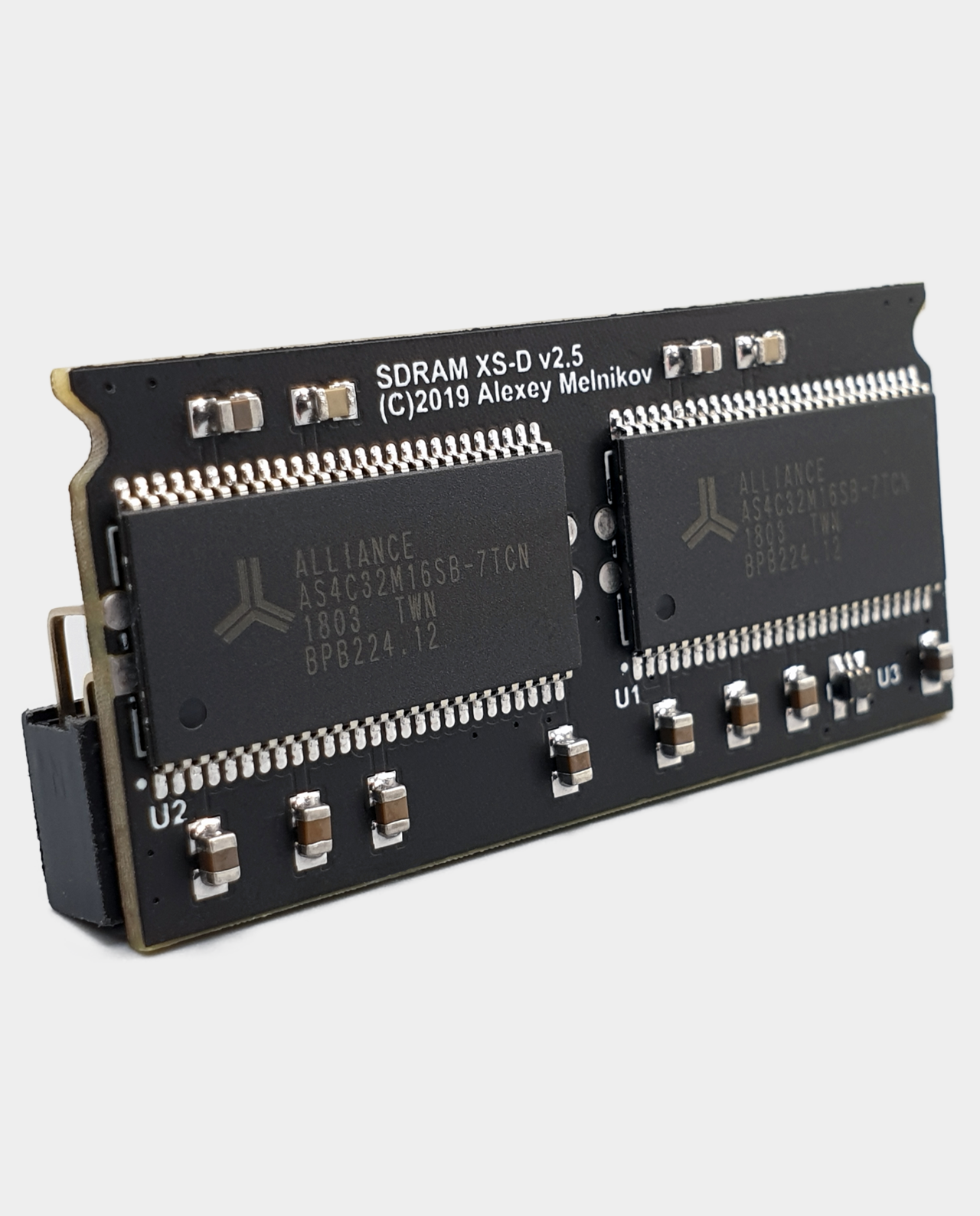
Fully assembled and tested MiSTer SDRAM XS-DS v2.9 128MB memory addon board with Alliance memory chips for the DE10-Nano.
tacit fox
Maybe it’s worth it giving it a try?
wanton crown
wait so what's the purpose of 128mb ?
wanton crown
those only work with 128 mb ? interesting
full nimbus
NeoGeo has very big games
wanton crown
I thought people played cps2 with 32mb
wanton crown
I've played a lot of metal slug 3 (which requires 128 mb If I understand) on the neo geo core and never had a single issue
I think Kuba tested this very same ram as well and he still couldn't reproduce 😦
full nimbus
mr Fpga.co.uk does very good work its highly unlikely to be his ram
I have ram from him and dont have your issues
ivory verge
I checked on several versions 2.2, 2.4, 2.9, even the old 1.1 with modification
full nimbus
From Jotego GitHub about CPS 2
All CPS1 and CPS1.5 operate correctly on a 32MB SDRAM system. Some CPS2 games may require a 64MB module. Those games are listed as having a GFX ROM of 16MB or more below. Please check the CPS2 ROM size section.
ivory verge
@wanton crown where you live?
ivory verge
If you want I can send you sdram for testing
wanton crown
I bought the two sd ram some days apart, seems highly unlikely that I could end up with a bad batch
don't know if it's worth the hassle 🙂
full nimbus
They pass the Ram test so unlikely to be the culprit
tacit fox
32MB ram modules are more tolerant to higher timings
Anyone remember FF bug on SNES core? 🙃
I was one of the affected
wanton crown
do you use this board as well ? https://misterfpga.co.uk/product/usb-hub-for-mister-fpga/
I could try and remove it from the equation, it's the last thing plugged to the de 10 nano board atm

The USB hub add-on board allows for easy connection of up to seven USB devices to the MiSTer FPGA. Connect a keyboard, mouse, WiFi dongles, joysticks, gamepads and more, all while fitting neatly under the DE10 Nano.
full nimbus
you may want to hit B on a conroller when running the test to switch to the Other Ram chip
full nimbus
wanton crown
do you use this board as well ? https://misterfpga.co.uk/product/usb-hub-for-mis...
Keyboard and Controller shortcuts for the Memory Tester Core
Keyboard
Up - increase frequency
Down - decrease frequency
Enter - reset the test
C - on 128MB module switches between chips.
A - auto mode, detecting the maximum frequency for module being tested. Test starts from maximum frequency. With every error frequency will be decreased.
Controls (gamepad)
Up - increase frequency
Down - decrease frequency
Start - reset the test
B - on 128MB module switches between chips.
A - auto mode, detecting the maximum frequency for module being tested. Test starts from maximum frequency. With every error frequency will be decreased.
ah, so I only tested a single chip ?
full nimbus
so it seems you can switch between the chips on ram test of 128 mb
from
GitHub
Contribute to MiSTer-devel/MemTest_MiSTer development by creating an account on GitHub.
tropic stratus
if 10 20 works and 10 21 does not: the only thing changed is how data is fetched from sdram for DMA: the sdram is no longer read in address set + long burst, but instead bank is kept open for the whole DMA transfer, unless a bank is switched. The only other effect of timing being slightly different doesn't explain it, since this would hit everyone else, too
wanton crown
:/
wanton crown
full nimbus
so it seems you can switch between the chips on ram test of 128 mb
testing a single chip at a time. But from the UI I understand that you can test both at the same time, don't remember if that's what I tested yesterday
tropic stratus
on the other hand sdram seems very unlikely, seeing how reproducible it is
full nimbus
The docs may be out of date
wanton crown
huh on first chip I'm getting errors at 150mhz 🤔
full nimbus
150 is very fast
tacit fox
It’s normal
full nimbus
140 is fine
wanton crown
hm ok, going to 140mhz then
ivory verge
Please try us version
tacit fox
There’s also a jap demo
wanton crown
trying us version
so memtest passed on both chips with no issues at 140mhz
tried the US version of the game, the same bug occurs
ivory verge
Ok thanks for testing
 ivory verge
Yes
 lost summit
Is your PSU is good enough ?
wanton crown
I bought this one https://misterfpga.co.uk/product/mister-fpga-power-supply/
 abstract drift
did you say you're using the sd card that came with the de10?
ivory verge
Yeah is very good psu
wanton crown
abstract drift
did you say you're using the sd card that came with the de10?
I did as a test, reproduced it, and went back to my 512gb sd card or whatever
it's by using that old card (mister fpga ready) that I realized it was the PSX core version triggering the issue for me
 timber veldt
Can someone link me to the problem @wanton crown has?
wanton crown
it would be cool if someone who bought a de 10 nano after me and a little before could try to reproduce
timber veldt
TL;DR
abstract drift
@wooden rose when did you buy your most recent de10?
wanton crown
timber veldt
Can someone link me to the problem <@187687726420590592> has?
it basically starts here : #1046940919607345272 message
there's a savestate just below
On the game Clock Tower - Ghost Head (japanese version, US version is simply called Clock Tower 2), I have black triangle artifacts, that I double checked on real hardware to make sure it was not the game. People have tried the savestates themselves and nobody can reproduce the problem, but I can on two separate mister fpga setups (that both have a de 10 nano board bought less than 4 months ago)
wanton crown
redump, everyone was using the same one (we double checked the hash)
wanton crown
and we went as far as checking the hash directly on the mister
ivory verge
Bin
wanton crown
no, bin/cue
wanton crown
of course using latest release of the core, and I can't reproduce the issue with anything (strictly) before the 2022.10.21 unstable release
but again, that's only me
timber veldt
Since you tried other SD cards, deleting cfg files will probably not help
tropic stratus
you don't need the game, just rename the savestate to some game you have and load that other game 🙃
of course it's unplayable, you cannot change rooms, but for the bug it doesn't matter
wanton crown
ah well I think I've tried everything I could 🥲 I will continue my clock tower frenzy on real hardware, and hopefully someone with a more recent board could try a reproduction
tropic stratus
unfortunatly we all ran out of ideas 😦
abstract drift
what controller are you using?
tacit fox
Do you use a fan?
wanton crown
yes with the IO board, and it changes nothing
wanton crown
abstract drift
what controller are you using?
PS5 controller, but I tried a keyboard and it changed nothing
abstract drift
you don't have any cheats on or anything do you?
wanton crown
no always disabled
tacit fox
No MGL files right?
wanton crown
no, I only use bin/cue files
all other games work perfectly fine, this is the first bug I encounter on the psx core
 rugged loom
Hi chat 1st time writing here. Just to try to help w this isue.
I think noone has asked about BIOS file. Check ur using a jap BIOS or the recomended one or chechsum.
gl
full nimbus
there are 3 bios files you need one for each region
if you use Update all with the Bios Getter script enabled it will get the correct ones and name them correctly
wanton crown
I used update all when installing both sd card :/
full nimbus
Update all isnt your issue though you just have an unique set up
boot.rom => US BIOS
boot1.rom => JP BIOS
boot2.rom => EU BIOS
wanton crown
just did a fresh install on a new sd card, just ran the update script, setup the bios by myself this time, and still shows the behavior.
At this point it seems to rule out a different revision or defective de 10 nano, I don't know
full nimbus
There is nothing left we can suggest. We have tried to reproduce the issue and no one else has it. Please dont derail other peoples questions with a restatement of your issues
 eternal vapor
Whose question did he derail? 🤔
full nimbus
Hectics
eternal vapor
No, hectic was suggesting that he check his bios setup. He was only responding to the suggestion
eternal vapor
Yeah, I can see the misunderstanding. Just wanted to clear it up
full nimbus
Thank you as I say my apologies for misreading the statements
 gilded trellis
I tried but savestate doesn't work for me
Anyway i'm not saying any artifact playing
eternal vapor
Just tried it on my setup too (bought December 2021) - couldn't reproduce it.
ivory verge
gilded trellis
I tried but savestate doesn't work for me
You need to change the name to that of the game
They need to match
gilded trellis
Yes..but doesn't work
First i saved state for match filename
Only works my own save files
Maybe crc isn't matching
 tacit fox
@wanton crown did you try with another game image, like a CHD one?
wanton crown
yea, I've done everything I and we could.
I'll just wait for someone with a recently bought fpga to try to reproduce at this point
gilded trellis
I bought this september
(i reserved it 1 year ago)
I tested on a stable psx core
wanton crown
didn't know terrasic allowed reservations 🤔
so you don't get artifacts like those I've shown at all ?
gilded trellis
nops..i only played 5 minuts..
wanton crown
well thanks for trying
ivory verge
wanton crown
yea, I've done everything I and we could.
I'll just wait for someone with a rece...
I'm sure this matter will be clarified someday
I understand that it is very annoying when you have a issue and nobody can reproduce it
wanton crown
I noticed the DDR3 chips reference on the de 10 nano board has changed a lot over the years, I see some ISSI 1532, ISSI 160B, ISSI 1603, ...
they do have different specs (max clock frequeny can range from 666MHz up to 800MHz) but I have no idea if they could matter here
wanton crown
if someone who can't reproduce the issue can communicate his de10 nano DDR3 reference, I could buy the same chips and desolder mines off the de 10 nano board and solder the new ones just to confirm
 wooden rose
wanton crown
yea, I've done everything I and we could.
I'll just wait for someone with a rece...
wooden rose
wanton crown
yea, I've done everything I and we could.
I'll just wait for someone with a rece...
I can try soon on the DE10 I got a month ago
wanton crown
my savior
I'll be going to workplace on tuesday where I have a third mister (yes I know...), I'll try on that one as well tuesday in the evening
wooden rose
you have tested your memory right?
 hard laurel
Best thing to do. I think he is HORRIFCLY bad YouTuber.... Poor content, doesn't know what he is talking about half the time. Should just stick to playing Metal Music with his friends in their band.
wanton crown
wooden rose
you have tested your memory right?
the 128 sd ram stick yes, the DDR3 I don't know if you can test it.
But we've already gone through everything so I won't spam this channel anymore
ivory verge
Each game must have its own folder
full nimbus
and there is nothing wrong with CHD. Its an entirely lossless reversible format
simple otter
full nimbus
and there is nothing wrong with CHD. Its an entirely lossless reversible format
that's not the point
MiSTer touts CUE+BIN and CHD support, no caveat or asterisk listed
visual depot
full nimbus
Keyboard
Up - increase frequency
Down - decrease frequency
Enter - rese...
@dry drift can this be pinned somewhere. I can never find this info.
full nimbus
its on the Github page for the Memory test core
 dry drift
visual depot
<@477476882837667842> can this be pinned somewhere. I can never find this info.
dry drift
visual depot
<@477476882837667842> can this be pinned somewhere. I can never find this info.
Can it be labeled?
Pins lack context so they really need a label describing what’s in it
full nimbus
changed the original post
full nimbus
yes
dry drift
Label it as such within the same post
full nimbus
It is
dry drift
It isn’t
visual depot
It's memtest.
full nimbus
I edited it to say Memtest
visual depot
The same post that's linked.
full nimbus
Keyboard and Controller shortcuts for the Memory Tester Core (edited)
[10:44]
Keyboard
Up - increase frequency
Down - decrease frequency
Enter - reset the test
C - on 128MB module switches between chips.
A - auto mode, detecting the maximum frequency for module being tested. Test starts from maximum frequency. With every error frequency will be decreased.
Controls (gamepad)
Up - increase frequency
Down - decrease frequency
Start - reset the test
B - on 128MB module switches between chips.
A - auto mode, detecting the maximum frequency for module being tested. Test starts from maximum frequency. With every error frequency will be decreased. (edited)
You edited the one above it.
dry drift
You didn’t
I hate these arguments
Memtest
Keyboard
Up - increase frequency
Down - decrease frequency
Enter - reset the test
C - on 128MB module switches between chips.
A - auto mode, detecting the maximum frequency for module being tested. Test starts from maximum frequency. With every error frequency will be decreased.
Controls (gamepad)
Up - increase frequency
Down - decrease frequency
Start - reset the test
B - on 128MB module switches between chips.
A - auto mode, detecting the maximum frequency for module being tested. Test starts from maximum frequency. With every error frequency will be decreased.
thats the edited post above
visual depot
You you want everything in the same post, with a label at the top of it.
You edited the post prior to it so it wouldn't show in the pins 😛
I'm not trying to be a prick. Sorry.
dry drift
I should just copy paste to start with no one knows how to edit a comment
visual depot
I was gonna say if you were going to do that just post it in #help
Lol
Or #mister-hardware
dry drift
I’m not sure why it’s in psx but unlabeled in psx really makes people think it’s about psx
visual depot
It was fitting the conversation but the info isn't pinned anywhere. Which is why I requested it. Somewhere is better than nowhere.
I've tried to find that info many times and never can. I always have to ask.
rugged loom
Info alredy here https://github.com/MiSTer-devel/MemTest_MiSTer i think GitHub wiki is the better place. Or r we gonna ping every cores readme in this discord?
GitHub
Contribute to MiSTer-devel/MemTest_MiSTer development by creating an account on GitHub.
wooden rose
i think we should just have a general troubleshooting page with "think you've found an issue? first, use the memtest core to check if your hardware is functioning correctly - then, identify the reproduction steps"
 mystic violet
- redump bug reports only
 summer sage
why are you making people memtest? has anyone's memory ever failed to pass it and that was the root of the problem?
it seems uncommon
 scenic reef
More commonly associated with arcade cores.
But rare
You are confused. Multi track single bin is not anything that matches redump verified dumps. People should use the redump ones instead of merged bins.
Chd multitrack works fine afaict
summer sage
on nes the #1 problem is that people have bad roms and the #2 problem is that people mistake original behavior for a bug
im not actually sure there's been a real bug reported in years
scenic reef
On NES? Yeah it's probably been over a year at least lol
summer sage
several bug reports, but none of them real
anyway it'll probably be similar here
cd's are just as bad as nes headers in terms of bad rips and things
scenic reef
If it isn't redump then I wouldn't trust it. Merged bins are known to be iffy on lots of CD system emulators.
summer sage
im not even sure how they work, where do they store the index
scenic reef
It's just the cue pointing to each index within the same file instead.
summer sage
oh
scenic reef
They just concatenate them together
summer sage
I mean in theory that's okay but in practice it's harder to find out if they screwed up doing it
scenic reef
Exactly
summer sage
i'm a fan of chds now anyway
scenic reef
They work fine for me.
summer sage
nice tidy compressed single file bundle
lightly seasoned with metadata and drizzled with data delivery optimizations
scenic reef
Just needs a couple upgrades to the format in the future. There are faster and more efficient compression methods than it uses and the subchannel data apparently isn't carried with it.
summer sage
the longer they wait the harder it will be to change
as everything integrates support
subchannel data is good, but imho they shouldn't ever touch compression
the die is cast there
having a situation where a device can handle some but not all chd files with no way to tell the difference is not worth it
visual depot
summer sage
I mean in theory that's okay but in practice it's harder to find out if they scr...
Using proper tools, it's generally the correct data. The conversions are usually issue-less (hell it's the main way to convert them to PSP or use them with Android emulators and also the PS2 POPS emulator), as long as you use the correct tools. But there's mainly 2, I think, and both do it right as long as everything was good dumps to begin with: CDMage and MPF (the official redump app: http://wiki.redump.org/index.php?title=Disc_Dumping_Guide_(MPF))
The likelihood of the single bin/cue being bad is non-existent if the original bins were correct, as the cue points to the tracks in the same way it would point to the separate tracks. It just references them in-line in one file instead of separate files.
The issue Robert has explained is the MiSTer main's implementation of singletrack bin code is broken
#1046940919607345272 message
visual depot
tropic stratus
the reason is that the single track bin code in mister main is broken. It was im...
the reason is that the single track bin code in mister main is broken. It was implemented halfway by Caldor(?), then left without finishing it
it should probably either be finished or the HPS could warn you that the cue contains multiple tracks in a single file and that is unsupported
-Robert
Surprising to me that this was never finished. I'd never known that was a MiSTer main limitation
summer sage
eh that's just sloppy then
I would have just assumed it worked with the same code as regular bin cues
visual depot
the .cue layout is slightly different, so it would require a slight change to how File I/O works
but the bit-for-bit data is the same
Joined bin
Separate bins
To give you an idea
there's always only one data track, which is always the first bin to my knowledge
normally it just lists them all with 0 index, because it can just set it to index 0 of every file
when it's one file, it just has the specific index (which is always in time for these) for offsets to each track
my guess is the code to load specific "indexes" this way was non-existent
I assume the broken music in games is because anything in the data track probably works just fine with the joined bin/cue..... because it's always track 1, and the offsets are 100% the same. But if you try to load track 3, 4, etc for music, it probably is trying to access the tracks assuming they are attached to the first bin file. Unfortunately, since the reference is unreachable, I assume the game just gets null data returned or the last bits in memory possibly
so it could be anything from looped audio junk or even nonsense bits that produce ear-piercing sounds
These are all educated guesses by the way, but I'm pretty certain this is what it comes down to
CHD isn't a zip, contrary to popular belief. It has its own standard reference file for the data structure.... so it bypasses the cue/bin limitation because the resulting chd of a multi-bin is the same of a single bin. In fact, if you un-chd a file, it only ever outputs a single bin/cue because the data is technically one track after the other, bit for bit, on a CD
Honestly, think of it this way: Idk if you've ever seen a single-flac/cue music CD rip. But the same thing can apply. The tracks are just referenced with their offsets instead of separate files. Any CD, music or data, is all one big bitstream, realistically, and it's indexed by time offsets. So both single image and multi-track rips are 100% accurately representing the data, minus removed gaps, which are often accounted for in the cue file's gap index if you are using the right software to create the rip and cue file.
 forest trench
There's a bit of game preservation history where audio gaps were quite a contentious issue (albeit for a different disc format)
See the years of drama between Redump & TOSEC re: Dreamcast GD-ROM backup standards
Good summation here for anyone interested:
https://www.reddit.com/r/emulation/comments/d1sl6b/20_years_of_dreamcast_a_report_on_redump_tosec/
reddit
109 votes and 12 comments so far on Reddit
tropic stratus
the problem with (merged)single-bin multi-track is the guesswork for the pregap. Does it have 2 second pregap or not? Some images have them build in, some force it over the cue. For multi track it's easy, as there is a standard. For merged single bin there is no real standard and that's why people get 2 seconds cut off, first 2 seconds looping forever, ...
just look at the comment duckstation has for merged bins:

"Two seconds pregap for track 1 is assumed if not specified.
Some people have broken (older) dumps where a two second pregap was implicit but not specified in the cuesheet.
The problem is we can't tell between a missing implicit two second pregap and a zero second pregap. Most of
these seem to be a single bin file for all tracks. So if this is the case, we add the two seconds in if it's
not specified. If this is an audio CD (likely when track 1 is not data), we don't add these pregaps, and rely
on the cuesheet. If we did add them, it causes issues in some games (e.g. Dancing Stage featuring DREAMS COME
TRUE)."
It just doesn't sound like a good idea to run into the same problems with the mister core. That's why i personally only test unmerged bin/cues and if that works, i'm fine with it. Anyone can help and write a better heuristic for merged bins, but i will skip on that as it only sounds like trouble for basically no real win
 hidden prism
How many issues do they get filed about when the logic doesn’t work?
I think Robert is (very correctly) thinking about support load
visual depot
forest trench
Good summation here for anyone interested:
https://www.reddit.com/r/emulation/co...
Very interesting read. Thanks.
visual depot
tropic stratus
the problem with (merged)single-bin multi-track is the guesswork for the pregap....
I'd really like to know what tool is making merged bin cue sheets without pregaps, because the recommended method we've had (with a tool released 20 years ago) is CDMage, and it spits out a cue sheet with 2 second pregaps
I've used this myself for over 10 years, so I'm curious what other people are doing. My personal belief is that people are sharing the bin files without the cue.... and/or generating new .cue sheets. Obviously you can't just read a bin file and see the pregaps. It needs the cue sheet made during the conversion process.
And I can prove why I'm hesitant to think this is an issue with the bin file
Here's why
I took a bin file from a bin/cue I converted USING CDMAGE from a redump-verified rip. I then CRC hashed it.
I then took all 23 bins and manually copied them bit for bit after each other... no conversion

It's the exact same... AND matches the Redump total CRC32 on Redump.org.
The issues aren't the bin files. The issue is people are using wrong/corrupted .cue sheets, is my best guess.
Will fixing this in MiSTer main add another variable for the team: yes. Is that variable controllable? Yes. Tell people to use the right tools: CDMage (and not change settings, as that can be an issue) and it's as simple as opening the cue sheet in CDMage, then clicking save, choose a name and clicking ok. Done. Bin matches redump, and the cue files is properly formatted.
I suspect this website (https://www.duckstation.org/cue-maker/) is the main cause of bad cue files. It's been around for a long time, and is spread all over all kinds of Discords, without explaining that you're supposed to use them with the original bin's. It really should have clarified that.
That's why
simple otter
visual depot
It's the exact same... AND matches the Redump total CRC32 on Redump.org.
The is...
Redump - disc images information
visual depot
Oh.... I had mine labeled wrong. lol. I've had it dumped for so long (I edited my original post to put my original thoughts back)
it won't
The cue sheet already has pregaps

It should if you use CDMage
This is a cue from CDMage
those are the 2 second pregap offsets
index 00 for the pregap
index 01 for the track
The indexes are absolute times relative to the total time on the CD
The implementation of merged single bins on MiSTer main is broken
no amount of changing the game data will fix the issue
someone needs to fix it on the MiSTer end for MiSTer.
I was trying to state that if people use the right software, and have redump-verified dumps, the results should always 100% be the same
My guess is that 20 years of PS1 dumping has just created a lot of bad dumps, and lost/improper cue files with them
15 years ago, it wasn't common for a lot of people entering the scene to know they needed both files. They just think "Rom always one file...derp"
And probably trash the cue file. I've done it
Then years later they find that fancy cue file generator website on google:
You have bins, but no cue.
It just outputs a single-track cue file
it can't tell where the actual tracks are
It only makes a 100% accurate cue sheet if the original game only had one track
Fun fact... it's intended to be used with multiple bin files
yeah THAT is probably a large part of the issue
And also if you drag/drop files from windows, it may not drop them in the correct order
THIS WEBSITE is most likely the major cause of all the cue file woes imo
And it IS popular
very popular
Spread all over emulator discords
visual depot
Well, the issue won't affect duckstation. As Robert stated in his quote above, duckstation will manually add pregaps at runtime if it doesn't see them in the cue sheet
and a lot of other emulators do this I imagine
They don't actually read them..... because a lot of people have them formatted wrong I expect
Duckstation's website I linked will produce the correct cue if the bins are in the correct order, but only for multi-bin setups.
But the problem is, there's no verification being done. the webpage doesn't know your files are in the right order. It doesn't know if you have all the tracks.
THAT website (and any other tool that doesn't generate them properly or expect the user to know what they're doing) is making the extra variables of user error become a problem
Not the actual bin/cue itself
If we'd continue to fix the multi-track single bin in MiSTer main, I think it shouldn't take too much work of the support team here, when people have problems, to have them take the separate redump-verified multi-bins, and convert with CDMage
They can use redumpVerifier python script to verify the bins, then just open the cue file in CDMage, click save, use default settings and click ok, and name the file... done.
Duckstation cue:
  TRACK 01 MODE2/2352
    INDEX 01 00:00:00
FILE "Twisted Metal 4 (USA) (Track 02).bin" BINARY
  TRACK 02 AUDIO
    INDEX 00 00:00:00
    INDEX 01 00:02:00
FILE "Twisted Metal 4 (USA) (Track 03).bin" BINARY
  TRACK 03 AUDIO
    INDEX 00 00:00:00
    INDEX 01 00:02:00```
Original cue:
```FILE "Twisted Metal 4 (USA) (Track 01).bin" BINARY
  TRACK 01 MODE2/2352
    INDEX 01 00:00:00
FILE "Twisted Metal 4 (USA) (Track 02).bin" BINARY
  TRACK 02 AUDIO
    INDEX 00 00:00:00
    INDEX 01 00:02:00
FILE "Twisted Metal 4 (USA) (Track 03).bin" BINARY
  TRACK 03 AUDIO
    INDEX 00 00:00:00
INDEX 01 00:02:00```Yeah that's my point
It creates a proper cue for multi-bins, if the order is correct and it has all the files (it doesn't verify that)
But watch what happens if I put a merged bin in there
  TRACK 01 MODE2/2352
    INDEX 01 00:00:00
That's it
it doesn't match because imgburn is most likely cutting out the pregaps
Which would change the hash and it would also product different audio
That changing most likely means that whoever was working on it in MiSTer main most likely ended the work with the pregap issue, not sure how to continue since the cue formatting seems to be non-standard...
But it's not non-standard... the issue is a lot of people aren't FOLLOWING the standard
AFAIK CDMage has been the recommended tool for it well into the PSP days
so mid-00's
detecting gaps is tough business
It is very tough to do it and capture them correctly
I deal with this doing secure music CD rips, which i've been archiving for like 10 years lol
you basically need the right software with a good CD driver
A lot of software do not have this
(yes CD ripping software have a driver it installs)
nope. Imgburn actually does very inaccurate ripping
It just usually doesn't matter for most things, especially audio-based discs like PS1 and music CD's
For music, there are a few recommendations, but the most used is Exact Audio Copy, and it needs a very specific set of instructions to dump it perfectly
RIP What
I will go out on a limb and say imgburn is like the least recommended to do accurate rips if you want it to turn out like redump
lol
Redump requires you to use their software afaik
yeah MPF is probably fine
But the bin has to match
you can't just use that cue with another bin
Basically, to explain WHY it's an issue is simply this: error correction. CD drives have a little feature called error correction that can tell the drive to "correct" a detected wrongfully dumped bit off the disc.
And essentially, for a majority of drives it actually fails to do this right, and sets the wrong bit.
For audio, this actually generally doesn't make the file unplayable, as the only part that would corrupt the file is the header, which is very small. Any part of the audio might even be imperceivable as it could only affect a frequency for a fraction of a millisecond.
The correct way to accurately dump is to disable this feature, and to dump while verifying the data against the original disc, and pulling the data again if it doesn't match, until it's 100% accurate. No software like imgburn even supports doing this kind of dumping.
the time would not be affected by wrongly-ripped bits
but a bad bit changes the hash
and they are very common
The result is the same, it's still a 2 second gap
What matters is the index 01 points to the same data
oblique frost
as an aside, isn't this kind of the point of DIC (what MPF uses underneath for dumps) and using ancient and dying plextor drives for redumping, avoiding the error correction errors?
visual depot
Well, it could also be that it's one of the drives that doesn't have bad error correction
hmmm.... you're right... weird. not entirely sure
but redump doesn't actually store the cue's in merged format
oblique frost
yeah I don't doubt it still works. I've been throwing a lot of yennies into the wind lately trying to get a working, approved plextor, so I can actually submit and it bothers me that most of the time is probably won't matter
visual depot
where can I download one
Yeah, exactly
redump verifies against the bins, then uploads the hashes, but it only uploads the split bin cue
simple otter
Redump requires dumpers to submit log zips as part of their verification process
simple otter
visual depot
redump verifies against the bins, then uploads the hashes, but it only uploads t...
*mpf
visual depot
I'd expect that considering the bin is matching the verified hash, and the cue sheet is generated from CDMage reading the separate bins, I'm more inclined to believe this is just something MPF is not designed to be used for
I've never seen a "PREGAP" option in any PS1 cue file
ever
And I've seen a lot of PS1 cue files on redump sets
Oh. lol then yeah don't trust imgburn
I've said that
It can't detect pregaps properly
I'm going to bed
simple otter
side note: MPF's .img cuesheet is identical to the one generated by converting an MPF multi-bin+cue to a single bin+cue with CDMage
It is safe to say that the .img file and _img.cue(found inside _logs.zip) from MPF are equivalent to .bin and .cue files resulting from merging multi-bins with CDMage
Unfortunately does not much improve the fact that MiSTer does not handle multi-track single-file bins without converting them to CHD first
visual depot
simple otter
It is safe to say that the .img file and _img.cue(found inside _logs.zip) from M...
If you want to compare you are welcome to but I thought of something while resting my eyes. CDMage is the recommended method for POPStarter, the official PS1 emulator for PS2. Perhaps that'll say something. POPStarter requires a single bin/cue.
CDMage released in 2001. Lol
simple otter
I am only comparing insomuch as there is no point in me joining bin files and creating cues when the bins and cues are already joined and generated
visual depot
If the bin matches the redump hash and the cue file looks like the one from CDMage they are 100% the same, bit for bit.
When dumping yes. But you can't use mpf to verify dumps you already have can you?
Yeah...
Mpf is only designed to dump and verify at the same time.
Let's face it: we can't expect to lord over everyone using MiSTer to pull out their discs and dump using the very concluded dumping instructions of MPF. Not everyone has the attention span.
Verifying with the redump verifier script and the multibins, and then using CDMage to convert is both easy and 100% same result every time, and accurate to redump's "total hash".
Not sure why the python script doesn't include totals in the checks. Maybe it's not in the dat
I looked at the mpf dumping guide page and immediately feel overwhelmed
Doesn't matter how little steps there are. People will look at that and avoid it
Anyway bed. Night
tropic stratus
this was like 4 screens of technical discussion to do it right and honestly i couldn't follow everything...How do you suppose the typical user having dumps from either 5 different 20 year old tools or 5 different shady websites be able to follow the rules?
In any case: feel free to improve the singlebin code in mister main. The current one is more broken than it should be so it can at least follow the general case. But sorry, i will not debug any CD DA issue due to merged bins. It's not worth the time if the multi bins work
tropic stratus
i would guess that 99% here in the channel rely on redump verified multibin/cue or chd. This is the first big discussion about this topic in the last 1.5 years
but i don't see the problem: it's open source and i'm very happy if you improve the merged bin/cue HPS code
the problem is that the original author of the merged bin code is no longer there
the multi bin code is from sorgelig, the chd from Zakk
i don't complain that you report the issue. It's known that merged bin HPS code is not good. I just tried to explain why it is the way it is and why there was no big interest in improving it
There are also a ton of other formats that are usually supported by many emulators, but it was decided against it....to some degree this also happened with merged bins
you wouldn't even find it inside the core, as it's in mister main 😅
 dusky martenBOT
static int load_cue(const char* filename, toc_t *table)
GitHub
Main MiSTer binary and Wiki. Contribute to MiSTer-devel/Main_MiSTer development by creating an account on GitHub.
tropic stratus
yes it's c
 hasty jay
something slightly related: I have a patch for mame's chdman tool to convert chd to multi bin instead of single bin. I wonder what the chance is to get that merged (I'm not sure what the benefit would be for anyone but us)
oblique frost
you can see the full diff for how it was added in this PR https://github.com/MiSTer-devel/Main_MiSTer/pull/547/files
tropic stratus
also 280-314
simple otter
I deal with perl mostly so this isn't too far off from what I'm used to, it's fairly legible
oblique frost
simple otter
I deal with perl mostly so this isn't too far off from what I'm used to, it's fa...
I'm so, so sorry
sympathetic for your dealing with of perl :p
tropic stratus
i guess that's what we all share here. While some(many?) will inevitable have a technical day job, we are mostly here for hobby 🙂
wanton crown
so a de 10 nano bought one month ago apparently did not show the behavior I was having with Clock Tower - Ghost Head.
Tomorrow I'll be able to test on a third de 10 nano board (one that I have at work and is quite recent), if it works it'll mean there was a "bad" batch of de 10 nano around last october/november
and I'll just buy a new de 10 nano board once again ....
 quick gyro
are you building a MiSTer House? 😅
wanton crown
well, I tend to sometimes be at my parents and sometimes at my place, and I have two CRT setups with one mister each
and finally, one at work so we can play some multiplayers games, especially on the PSX core during breaks
if I can prove it's the de 10 nano board (which by now I'm 99% sure it is) somehow, I'll just get rid of it and give it for free to a workmate or something, or better, someone who really needs one
quick gyro
wanton crown
and finally, one at work so we can play some multiplayers games, especially on t...
oh thats great! i remember when the Wii was brand new and my former Boss went on a Holiday we put up a Beamer in the Office Supply Storage and played 4 player Wii Sports all day and one co-worker was guarding the Door and the Telephone 😅
 iron abyss
wanton crown
if I can prove it's the de 10 nano board (which by now I'm 99% sure it is) someh...
iron abyss
wanton crown
if I can prove it's the de 10 nano board (which by now I'm 99% sure it is) someh...
Do you have a pic of the issue, just curious to see what it looks like. The DE10s definitely aren’t flawless, I had one of the GPIO pins get stuck on one of mine despite being in a case and no ESD. I simply used the button wired to that pin once after months of it working flawlessly and then it was forever stuck low. Having two fail seems pretty unusual though, we’re you able to try swapping the ram? You could do diode check on both GPIO headers with a multimeter (skipping power/gnd) and see if some pins are sad/borderline like what happened to mine.
 lilac scaffold
@iron abyss #1046940919607345272 message
wanton crown
@iron abyss it all started here
#1046940919607345272 message
Tl;dr artifacts in a single game, all others work flawlessly and never had a single issue with the psx core. Started with the 2022.10.21 update (everything before that doesnt exhibit the issue), but that is only for me on TWO different mister fpga setup, all bought 1 month apart last october up to november.
I'm not going to annoy this channel anymore with this matter, but at this point there has to be a very weird edge case or something with one of the de 10 nano board revision around that time.
iron abyss
That’s wild, just scrolled through it
Did you try removing the IO and just doing bare DE10 + ram with hdmi out
wanton crown
What annoys me is that if we start getting "bad" batches, it makes me lose a bit of faith in the whole mister project. I had encountered such issue with the cps 2 core a while ago, nobody cared or even tried to reproduce, so as I was the only one the core developer didnt bother as well. Can't blame any developer at all, we're just leechers anyway. If terasic is doing such revisions without maintaining a proper revision log (can't see any recent one on their website), it just seems to become a chip lottery. If that's what it is we're all at lost, developers aren't going to invest every single new impossible to reproduce report because of a board revision they can't even easily have access too
wanton crown
iron abyss
Did you try removing the IO and just doing bare DE10 + ram with hdmi out
Yes, everything was tried, literally.
On two completely separate mister fpga setups. It can't be helped at this point
summer sage
it's actually pretty unlikely it's the hardware at all
more likely to be some setting you don't realize
 random gust
Let's get photos of the settings then.
summer sage
I'd be frankly shocked if you had two pieces of hardware defective in the same way twice in a row.
wanton crown
Photos were posted, settings shared, sd cards changed, fresh mister setup through update script, every single time the issue was there.
summer sage
stuff to check for:
- Make sure you're using fast enough data delivery, whether it be network or sdcard
- Make sure you aren't running any third party things on the HPS that might interfere
- Make sure you aren't overclocking HPS or doing anything else that might compromise it
- Make sure your disc image is valid, matches everyone elses sha1's, etc
- Check your settings and core version against everyone elses
wanton crown
Tbh I don't think it's worth polluting this channel more with this matter, I and people here already wasted a lot of time trying a lot of things while it seems obvious it's related to the de 10 nano board
Disc images were verified, dip switches on the de 10 were verified, sd ram was verified (everytime on both setups), made the de 10 nano board naked with the bare minimum for the core to work, took 3 different sd cards and made a fresh install everytime, power supply was checked...
summer sage
Okay well then don't go dropping "I'm going to lose faith in the mister hardware because im getting 6 bad de10's in a row" when it's almost definitely not that.
wanton crown
Well it's simply my opinion based on a very rational reasoning
summer sage
getting deterministic results from one defective fpga are rare, two in a row would be astronomically unlikely
wanton crown
If a bad batch happened for me over the span of a month, it surely can happen to anyone. Not everyone has the chance to be able a ton of de 10 nano
summer sage
they test fpgas as well before they determine their grade
these are the highest grade of them, rated for higher temperatures
wanton crown
I agree with you, hence why I had "" to "bad" batch, to me it could boil down to ddr3 revisions, all the board I see have different ddr3 chips
I'm not saying both my de 10 nano operates bad, I'm just saying they obviously differ from all the testers so far.
wanton crown
It will be ruled out tomorrow night once I bring my most recent de 10 nano board from work, if it shows the same behavior then I would tend to go back to the "exteral factor" theory
summer sage
vauge accusations of "bad batches" without definitely determining what your problem actually is just starts annoying rumors that linger forever
wanton crown
I will employ "batches that cause unwanted behavior on the psx core for a single damn game" then
summer sage
it's much more likely, by a large margin, that it's something local to your setup than anything to do with the de10
wanton crown
I'd be willing to bet several thousands of $ and have someone check for us that indeed my boards differ while running the core with a bare de 10 nano board and all the sd ram sticks they want
visual depot
tropic stratus
In any case: feel free to improve the singlebin code in mister main. The current...
Sorry there was a lot of discussion. Basically, the two major tools people should be using (MPF or CDMage) to create the merged bins do a bit for bit merge. There is no processing. The files are 100% just copied one after the other. The issue that emulators have had reading the files, I expect, is the cue file. Not the bin.

This is the only part that I think matters to read
TL;DR the hash matches the "total" hash on redump after merging with CDMage OR just bit for bit joining all files together manually
abstract drift
for a long time xstation recommended merged bins for performance reasons
and psio still needs them
visual depot
my point is it's the exact same data. The issue people have with the files, I expect, is improper cue files
abstract drift
yeah
this tool, afaik, generates the cue files the right way:
https://github.com/putnam/binmerge
GitHub
Tool to merge multiple bin/cue tracks into one. Great for redump. - GitHub - putnam/binmerge: Tool to merge multiple bin/cue tracks into one. Great for redump.
visual depot
So does CDMage. Looks like this tool may create the correct bin/cue too
My question is if the bin turns out with the correct hash though
abstract drift
the bin should be really hard to get wrong afaik
its just the tracks written one after the other to a big file
that binmerge tool has a split mode so you could merge/split and recheck hashes
visual depot
Not asking you to add the code @tropic stratus. Haha. Never meant to imply that, but it really shouldn't be adding any extra work on your front. If people report issues, then having them collect a verified redump dump as normal and converting with CDMage or binmerge above should net them a perfect merged bin that is identical to the hash on redump
summer sage
abstract drift
the bin should be really hard to get wrong afaik
you would think, and i'm sure stuff has gotten a lot better in recent years, but you'd be shocked how much bad stuff circulates forever
abstract drift
its the people trying to convert like, psp images i think they are? to run on psx that always gets me
scenic reef
summer sage
having a situation where a device can handle some but not all chd files with no ...
right, the amount of adoption has really limited their ability to fix the compression. And any new format that would use the compression would never get adopted at this rate
summer sage
"fix" is the wrong word
scenic reef
sure
improve
it's something like only a couple percent more cpu usage, not even something that would mess with a very slow ARM processor, slower than the de10-nano's
summer sage
the gains are there, but the difference between no compression and old compression, vs old compression and new compression is large
scenic reef
sure
summer sage
the new stuff wouldn't really be that big a deal, relatively speaking
not worth breaking it
scenic reef
it would make a significant difference... if storage was still expensive per TB 😛
but it's not so it kinda depends on the consumer of it
summer sage
even if it was a 25% reduction it's still not a big deal
and it's probably not that much
basic old compression is around a 50% reduction
chances are you'd get maybe 60% instead of 50%
is that worth having tons of devices not work anymore? not to me at least
much better to focus on widespread adoption which means stable reliable format
but you know what, it's their format, but personally, I hope they dont change the compression
scenic reef
currently libchdr uses huffman and it's not using any standard one like zlib or lzma, etc... right?
summer sage
the de-facto compression method for windows is still zip
summer sage
if that tells you anything
scenic reef
yeah zip is lame lol
simple otter
wanton crown
Well it's simply my opinion based on a very rational reasoning
Unless it's a problem with mister main or the psx core like I've found with my multi-track single-bin issue
wanton crown
Mister main is updated to latest, like the psx core. I would assume everyone who try to reproduce the issue went with a similar setup.
summer sage
I've seen problems like this caused by bad power switches
scenic reef
if main can be improved to handle the multiple track single bin non-redump ones, it would probably have to have a bunch of complicated logic to essentially make up for the shortcomings of bad conversion tools
so it's not much of an improvement
simple otter
wanton crown
Mister main is updated to latest, like the psx core. I would assume everyone who...
Being updated does not mean there are not issues to be hashed out
scenic reef
simple otter
Unless it's a problem with mister main or the psx core like I've found with my m...
what's the problem you found?
simple otter
scenic reef
what's the problem you found?
Multi-track single-bin games are not supported. Audio glitches
scenic reef
ah yeah
they may be supported one day if the combined bin was done correctly in a way that the core might accidentally support, but i assume it's on purpose to not support it since there are like 2 decades of rips that have been merged by different tools and different versions of the same tools floating out there, so it causes false positives in issues
emulators supporting bad rom dumps and mangled roms is bad practice
wanton crown
simple otter
Multi-track single-bin games are not supported. Audio glitches
Sending you all of it now
visual depot
scenic reef
they may be supported one day if the combined bin was done correctly in a way th...
Yeah the code for it was started in MiSTer main but was never finished. The conversion to single mult-track bin is still a verified Redump hash. It's just that the MiSTer itself cannot load them
abstract drift
i tested merged bins when it first went in and it does at least work somewhat
visual depot
games boot
but when it tries to access the other tracks, it will generally fail with loops
abstract drift
ridge racer and wipeout play cdda
visual depot
which is generally just the music
visual depot
From what Robert said, it's due to the pregaps not being read properly. They are supposed to be defined in the cue, but a lot of bad software or bad cues don't have them defined, and thus the dilemma of how it should be handled on MiSTer was born
visual depot
summer sage
you would think, and i'm sure stuff has gotten a lot better in recent years, but...
yes but this also applies to separated bins. I don't see how a merged bin changes this fact. Merged bins are the format supported by POPStarter and PSIO on real PS1 and PS2 hardware
They are just bit for bit joined from the separated bins
So they have the same redump verification process
as long as the dump is redump verified, there should be no qualms when using CDMage or Binmerge
period
The hash for the merged bin is even on redump.org's database
It is calculated during upload alongside the separated files
abstract drift
makes sense, when they're done correctly they work, when they're not they don't
summer sage
visual depot
yes but this also applies to separated bins. I don't see how a merged bin change...
I don't disagree with you that there should be support
they aren't fundamentally different
just slightly harder to debug
I dont know if any official groups release verified merged sets
visual depot
I've seen them before
I understand the concerns are extra workload being placed on Robert and the team. But I don't see it being anything past what is already asked of users: using a verified redump bin (you can calculate the crc32 of the merged bin and compare to the "total" hash on redump.org)
If it isn't, then the user should get a proper verified dump and merge with binmerge or CDMage
that's all there really is
I mean, you guys normally ask if the dump is verified anyway, so that part doesn't change
summer sage
no, it's not that
it should really definitively work or not, and honestly it's no so different that there's an excuse for why it shouldn't work
visual depot
I guess the only thing is the cue file, which a very easy look at would show if it's bad
summer sage
I just don't think it's especially a desireable format
of the three typically dealt with, it's the least so
visual depot
I think the only reason why it would be desirable is that a lot of people store them in that format for PSIO and other tools and emulators that require it
summer sage
usually I hate splitting files up, but cd images are historically quite error prone
visual depot
merged bins, thankfully, are 100% the same data as whatever is put into them
summer sage
yes, I get it
abstract drift
xstation recommended merged bins because they found seeking inbetween different files was slower than inside the same file
summer sage
they are just catted
abstract drift
i kinda don't expect mister has the same concern though
visual depot
but no I totally understand your concerns Kitrinx
summer sage
I feel like chd is the future
visual depot
I agree. CHD seems like a good format to base off of... the thing is CHD isn't able to reverse back into split bins I believe
It will spit out to a merged bin if you un-chd the file
summer sage
why not?
just because nobody has made the tool? there's isn't any reason it shouldn't be able to
abstract drift
you can unmerge that bin at that point with binmerge
summer sage
it's a shame it doesn't support subtrack stuff, but im not sure how much that really matters
visual depot
It's just lining the data up and using lzma (I think) compression
summer sage
I guess the 12 or so CD+G fans are sad
abstract drift
chd is storing the whole datastructure in a completely different way
abstract drift
its got like ... stuff in it to aid random seeking
summer sage
yes, it sets them up for more efficient data access
abstract drift
like i think it might be a b-tree or something
summer sage
what things require subchannel data?
i've heard about it for years and years and never really figured out why we need it
abstract drift
mainly that copy protection thing isn't it?
summer sage
I genuinely don't know
abstract drift
libcrypt?
visual depot
 summer sage
which games don't work then?
abstract drift
spyros the classic
summer sage
why does it work on mister?
visual depot
summer sage
ah so it just side loads the subchannel data
abstract drift
a pack of all of them is only like 100kb or something so i think its bios getter just gets them all
visual depot
Apparently mainly affected PAL and NTSC-J
summer sage
I guess it's not that huge a concern then, but it would be nice to have them stored in there somewhere
abstract drift
xstation do the same trick - all the .sub files are baked into the firmware
yeah would be nice if chd supported them
visual depot
FF9 seems to be a popular example for the Japanese region
hasty jay
visual depot
It will spit out to a merged bin if you un-chd the file
I patched chdman to split CHD files in into multiple bin files. It was a bit stale, so rebasing now.
abstract drift
have you tried an MR for that? sounds generally good
idk how fussy the chd team is though, part of mame right
hasty jay
I have a branch, I can make an MR, but don't really know how to justify the change
abstract drift
makes the chd process 100% reversible
hasty jay
what if you make a CHD file from a merged bin 😉
abstract drift
then don't use the split option 😛
hasty jay
then the reverse would be broken
well, with my patch it's not optional, but we could extend it to optionally split or merge
compiling mame right now (which takes forever) to see if it still works
why can't they just let me do "make chdman" :/
visual depot
Honestly I don't think making a chd from a merged bin is a good idea anyway. Does it pick up the tracks properly from that?
abstract drift
it'd just read the cue anyway wouldn't it?
visual depot
I mean it's totally possible for the resulting CHD to be 100% identical if it reads the CUE
I'm just not sure if it does
hasty jay
visual depot
Honestly I don't think making a chd from a merged bin is a good idea anyway. Doe...
We could have a look at the code to see how it would deal with edge case files that Duckstation was talking about.
visual depot
honestly I find Duckstation to not handle it well
abstract drift
only one data track is only a feature of psx discs in specific afaik
cd's can do all sorts of weird stuff
visual depot
If people use correct rips, cue files should be a non-issue, and Duckstation allowing you to generate a cue file on their "generator" site without even verifying the rips (order, file count, etc) is a large part of this issue honestly
I really think making that website without a disclaimer to be sure you have good rips (and especially not to use merged bins) was a horrible oversight
it doesn't even tell people that putting a merged bin on that site will always generate a wrong cue file
like, seriously. That needs to be mentioned
hasty jay
During the implementation of libcrypt support for the PSX core I found out that all this subchannel data in the end just contains 16 bits of information
 dark mountain
summer sage
I guess it's not that huge a concern then, but it would be nice to have them sto...
dark mountain
summer sage
I guess it's not that huge a concern then, but it would be nice to have them sto...
I remember some discussions between cuavas and David Haywood about the subchannel informations for the LibCrypt protected games during late 2020.
To potentially update the CHD revision with a header or a specific area inside the files for containing these informations.
But I think that idea is at least stalled for now.
summer sage
it seems like everything about them is stalled
hasty jay
The game can just see that the subchannel data is valid or invalid and there are fixed positions where it checks. In fact we only transfer these 16 bits to the core.
hasty jay
yes, possible
summer sage
it doesnt seem that it matters to sega cd or tg16 cd
abstract drift
psx is the only one i've heard of caring
summer sage
not sure of saturn
abstract drift
oh maybe xbox360 actually
summer sage
I guess it probably is not very significant and this is why it was an oversight in the format
hasty jay
I guess the reason it's not stored is that it's completely deterministic what you should get back. Unless you have a scratch on your disk or someone messes up the data on purpose as a copy protection 🙂
summer sage
in theory
couldn't it just be added as an extra cd track that software was aware of?
abstract drift
yeah i think so...
summer sage
since chd can contain any type of file, it seems like it can just get tacked on
abstract drift
not sure if games might puke on the extra track existing though
like if they ever seek to last track
summer sage
it's a matter of how you deliver data
if it's flagged correctly the data delivery can do it properly
with chd there will always be an interpretive layer between the data and the thing that needs the data
I dont know the format well enough to know how it stores discs vs files
but can't it also be used for like, mame roms?
maybe you can literally just mix a file in there with the disc
summer sage
then mister's thing can yoink the file out and deliver it
@manic citrus do you know?
abstract drift
doesn't that end up creating chds that only work on mister though?
summer sage
im not sure what something else would do, but possibly just ignore the file it's not looking for?
 manic citrus
is this some subchannel data stuff?
(sorry, that's a lot of scrollback)
if so, chd already can store that
it's how CD+G works for megacd
abstract drift
An implementation of the MAME CHD (Compressed Hunks of Data) format in pure Safe Rust, with support for CHD V1-5.
sounds pretty extensible
mystic violet
god you guys chat a lot
wanton crown
passion and obsession is the way to improvement
manic citrus
note: most of the common psx dumps are unlikely to contain subchannel data
abstract drift
apparently chds support inheritance too, for multidisc games. not sure if thats hooked up on msiter though
abstract drift
couldn't you just assume it'll be like, foldername.chd ?
manic citrus
which one is the parent?
also it's not for multi disc, it's for discs with shared data. which may or may not be multidisc
more likely it's for different regions that share 99% of the same data
also no dumps use that feature
abstract drift
oh i didn't think of regions
i was just thinking of multidisc games
also you'd only be saving like, a few GBs really
manic citrus
you could potentially use it for patches, too
abstract drift
you could design a convention for it i guess but it might not fit in well with peoples already existing folder structures
manic citrus
but yeah, subchannel stuff is doable. but I think the psx scene just needed it for that weird EU copy protection and they did it via those separate files which mister already handles
I don't even think redump has them? although to be fair I skipped the entire EU set
abstract drift
redump is where they come from
how does it work on megacd?
like how do you actually embed the data into the chd? maybe it already works on psx core and no-one ever tried it 🙂
manic citrus
megacd has a way to send that data
in a chd they are just globbed onto the end of each sector
visual depot
summer sage
maybe some other systems care more about subchannel data?
The subchannel data is kind of a legal grey area, so the psio firmware bakes all of them into the firmware. They're so tiny so it doesn't really use much
So even tips without them work since it just reads them from the firmware
abstract drift
i thought xstation did that but psio actually doesn't
abstract drift
you have to get patches for psio
visual depot
My point is, they are tiny and not really copyright controlled I'd say
abstract drift
they're just on redump.org, like the cue files
visual depot
But doing that on mister would be weird.... Not sure that could be done without saving a db on the SD card which seems a bit.... Weird
abstract drift
like here's one for example: http://redump.org/disc/28260/sbi/
manic citrus
it's already done on the mister
visual depot
Wait it is?
abstract drift
yeah embedding them in the chds would just be neat
yeah bios getter downloads them all i think
visual depot
Oh lol I misunderstood that part in the conversation
manic citrus
I have no idea if the redump converted to chds on archive even have the sbi data re-embedded into them
manic citrus
as god as my witness, I thought turkeys could fly?
summer sage
anything can fly if you throw it hard enough
mystic violet
"I believe I can fly!!"
full nimbus
Shoot a turkey with a big enough projectile and it flies
summer sage
wild turkeys can certainly fly
manic citrus
Yeah, because chdman handles single bin correctly
summer sage
@manic citrus can someone make a chd with the subchannel or does our main code not know how to deal with it?
visual depot
You can convert to chd from multibin directly lol
summer sage
im pretty sure once it's a chd the original format of the data is meaningless
visual depot
Yeah pretty much. It translates the data losslessly either way. It's the same data whether it's multi or merged.
How are we not.
I've converted multibin to chd directly.
Have you tried it.
Lol
dark mountain
summer sage
<@126134158304083968> can someone make a chd with the subchannel or does our mai...
Not a this time, version 5 of the CHD nomenclature can't support it directly.
visual depot
You literally just point chdman to the cue file regardless.
full nimbus
I think after 2 days this should be taken to #offtopic its only tangentially relevent to PSX and its drowning the channel
summer sage
dark mountain
Not a this time, version 5 of the CHD nomenclature can't support it directly.
it's supported on sega cd on mister already, apparently
visual depot
Yeah honestly I think it's pointless to keep bringing it up at this point. kitrinx already said she feels it'd be good to finish the feature.
dark mountain
Okay, probably a fix since when I'm retired of the scene, I've seen some move too on the Saturn and DC sides.
visual depot
Just have to wait for someone to fix it. In the meantime use multibin or chd
They meant us.
Lol
summer sage
im not really sure why you're even still talking about it
in summery
-yes combined bins are broken
-yes it'll eventually get fixed
-chd doesn't give a flying fuck where it's data came from and will spit out whatever you want if converting back
visual depot
I think there's no reason to discuss it anymore lol
full nimbus
And no reason to do it in PSX. Create a New thread about CHD and leave it there
simple otter
full nimbus
And no reason to do it in PSX. Create a New thread about CHD and leave it there
This is not CHD related, it is a mister main problem apparently
dark mountain
I've done the whole set back then, most probably 3-4 years ago and never had a problem with it nor other users who taken those files from other sources.
summer sage
im more interested in getting the subchannel data into chd's for the handful of copy protected things
dark mountain
Same.
summer sage
not that it seems like much of a concern for mister
it would still be nice, especially since it's already possible
dark mountain
The most knowledgeable person on those subjects could be claunia, the creator of Aaru which is the heart of the whole Redump/MPF system since years.
Or RibShark, maybe.
But they should probably have better things to do right now, like supporting exotic filesystems and integrating laserdisc dumps in the (near ?) future.
visual depot
Would adding that to chd be possible without requiring all software to update to support it?
Like would it break current chd's from working.
dark mountain
That was part of the discussion.
Maybe something like with iNES headers, the 2.0 revision ROMs are compatible with older emulators.
visual depot
dark mountain
Not a this time, version 5 of the CHD nomenclature can't support it directly.
I wasn't sure if this answered that directly.
I gotcha.
Headers sounded like something that would work but I asked because idk if the chd format can add a header like that.
Obviously implementing an addition that doesn't break references to other things would be ideal.
dark mountain
One of the first ideas when creating/updating file formats for preservation, don't break back compatibility.
But sometimes you will have and probably add also technological debt.
visual depot
Yeah... It depends on if the structure itself was designed to be updated.
I understand
Just wasn't sure if chd was that way, was all
tropic stratus
summer sage
im more interested in getting the subchannel data into chd's for the handful of ...
what would you do with the subchannel data? the psx core doesn't support it. It only supports the .sbi "hack" the emulated defective subchannel data on certain fixed sectors of the CD, enough for all PSX libcrypt copyprotection
summer sage
oh I see
tropic stratus
or was it for other CD cores?
summer sage
the others already have what they need, unsure of saturn
probably a waste of time to think about, not many people play pal games anyway
and none of the existing rips include this
tropic stratus
as markun said: the "subchannel" is currently downloaded from mister main to the psx core in 16 bit together with the CD "header" information 🙂
that's all that is really needed. So far no game has been found to have a problem with it. I played several of them
i found this quite important and i'm very grateful markun found this nice and tiny solution. Before i planned to download way more .sbi data to the core
ivory verge
Yes , I only play PAL versions of games and I haven't had a problem with any of them
wanton crown
same
hasty jay
@wanton crown I was curious what your nick means until I converted it to decimal 😄
ivory verge
elite 🙂
visual depot
Only select PAL and Japanese games seem to be reported to use it for copy protection
Final Fantasy 9 Japanese version seems to be one of the major noticeable ones
dark mountain
FF IX Japan isn't protected.
visual depot
I'm going by statements here
Sub channel reading basicly allows you to get around many protections without getting a PPF file to patch the emulator. This is mostly interresting for NTSC J (japan) and PAL (europe, asia) users, as these versions of the game often come with such a copy protection (the most popular example would be Final Fantasy 9 here).
dark mountain
Only the PAL versions of Final Fantasy IX are protected.
dark mountain
And no game in Japan have the LibCrypt protection, that's an error in the documentation.
In Europe, it was common to see people very rapidly with modchips and games on CD-R, there was even ads on major video game magazines for modding systems just after a PS1 game review.
Officially, for removing region lock.
dark mountain
Everyone in my middle school had their burned PS1 games binder into the schoolbag during recess.
And it was time for exchanges, so cracktro'ed games were easy to find too.
ivory verge
I had a nice Japanese edition of Parasite Eve II , the discs were pressed
I am not a supporter of piracy, but that's how it was at the time
dark mountain
Just a reminder of those times.
quick gyro
Also Bleem was in stores super fast. I remember some friends who had a pc telling me that the psx will fail because the games can just be played on Bleem.
 bright yacht
Trying to see what's on my memory card... using snax and a multitap... Bios does not detect it. But ingame it works. Any clue?
 still palm
bright yacht
still palm
bright yacht
Ok. I will try tomorrow and report back. Thanks.
ivory verge
Yes , mem cards work well with the latest release , your fix is there, thanks @still palm 🙂
random gust
Wasn't there someone who recently got a DE10 Nano? @wooden rose was it? Might just have to see the results from tests on that.
wanton crown
He couldnt reproducr
This is really insane
Thats yet a third buid with another 128 mb sd ram etc
ivory verge
So I don't think it's de10 nano's fault 🤷🏻♂️
forest trench
When trying a stock install from scratch, are you using a 100% untouched .ini?
Or are you changing display options for your setup?
timber veldt
wanton crown
Thats yet a third buid with another 128 mb sd ram etc
I think I know the reason
Well, reasons
iron abyss
wanton crown
Just reproduced the bug on a third mister fpga...
Are you always using the same save state to restore?
timber veldt
You have to replay the game
iron abyss
Yeah was going to suggest that, play through to that point again, or restore someone else’s normal save game near there and then go see if you can get the issue
ivory verge
Ok so to summarise, on three de10 nano you have the same error and no one else can reproduce it....
wanton crown
Yea
Buy they were all bought between september and november
All setups ate completely separate, i.e difgerent ram, power supply etc
iron abyss
How much of a sample size has there been for reproducing it? Just a couple other people? Maybe it’s like CPS where it’s tough to get into the bad state
Though I guess it’s everytime for 0x539
ivory verge
Many people have tried to reproduce this, it only occur for 0x539 at the moment
If I needed a third de10 nano I would gladly buy one back from 0x539 🙂
iron abyss
I’ll trade mine with GPIO1 pin 13 stuck low 😉
ivory verge
Repairable😉
iron abyss
“For parts or repair” or “untested” I guess is the better modern listing for “this is absolutely broken”
ivory verge
Haha sure 😎
ivory verge
Don't do it...
iron abyss
Isn’t there some kind of hw diagnostics tool from Terasic, maybe try that to further rule out hw differences. Really is a mystery if settings are stock and everything’s mentioned has been tried. But given Natrox couldn’t rep it seems less likely the hw theory has any merit
Where’d you get your sdram? Maybe try to buy or borrow an older revision or from someone else?
wanton crown
Havent found someone who bought one from terasic in september and october
wooden rose
You need to get rid of any factors that could influence the result, aka try an absolutely barebones setup preferably at someone else's home
If you can't reproduce it then I'm sorry to say, but your home is cursed by the glitchy games ghost
 shut escarp
dibs on one of the 'broken' ones
wanton crown
This is at work
So yet again a brand new setup, different power supplies, sd ram etc
They should all be good. I do not reuse a single damn thing between all these setups but the issue is always there
And yes each time the de 10 nano board is naked, with just the sd ram plugged in and just the necessary things to boot the psx core
abstract drift
maybe your cd image has some bits flipped in a way that is generating a hash match despite being flawed?
its incredibly rare - hash collisions, but we've ruled out most likely things
iron abyss
It turns out 0x539 issue is more interesting than majority PSX games 😉
oblique frost
0x5 lives under constant solar flares
wanton crown
I'm so disgusted