#🤝support
1 messages · Page 259 of 1
 steel osprey
 jaunty perch
Hello I have got a question if I would want to make a exit alert on a long position would I need to do this: https://Supreme.big-pp.club/D3uhqN9I or this: https://Supreme.big-pp.club/X7lqb72t
The King V2

The King V2

 viscid hill
hi haze i was literally typing out the same question. spooky
jaunty perch
I think we are connected in some way. Very spooky
viscid hill
although you're one step ahead of me. i can;t work out how to bot the exit function. i tend to have a bot for longs and controls on longs and another for shorts. so with the exit function i don;t know how my bot would work out whether to exit a long or a short
 indigo cradle
You'd want to use the all in one alerts to specify
So at the bottom of Lux algo settings
Select exit buy
Then create the any alert
jaunty perch
there is only exit
indigo cradle
There are 2 👍🤝
jaunty perch
The King V2
 viscid hill
oh so you'd have to tick it in settings and then use the any alert function condition?
indigo cradle
viscid hill
oh so you'd have to tick it in settings and then use the any alert function cond...
Correct yep 🙂
jaunty perch
Oh my bad.
indigo cradle
 viscid hill
fair enough, i can;t use it then as my bot site needs a password in the alert message to connect to the bot so i need to be able to have the message field
indigo cradle
 jaunty perch
Thanks.
indigo cradle
Yeah the message field for this isn't avail sadly
viscid hill
ok fair enough i understand
oh and also.... i am collecting data manually to work out some good strategies and i am using the autopilot mode. if i backtest with autopilot on, are the historic signals accurate or are they showing me what they are based on the autopilot settings for the current trade?
not sure if that makes sense....hard to describe that question
jaunty perch
The signals are ok, some of them are break evens others are losses, I mainly do high votility coins, and only buy signals.
viscid hill
yeah i set up bots in order of volatility of futures. i'm new to lux algo but i am trying to get a god strategy for lina
jaunty perch
me too xD
viscid hill
haha fair enough
i've started with 30 min autopilot with the short term and mid term. although it's weak against consolidation the losses seem to be very minimal as the settings are very sensitive
i'll send you some results if you like once i typed them up. i'd be happy to get feedback and get any recommendations
viscid hill
automatic = autopilot?
jaunty perch
yeah
jaunty perch
https://Supreme.big-pp.club/jwflaPEc Is it normal that I can`t insert a message for the webhook?
The King V2
 indigo cradle
It is; sadly with any alert there won't be a message field
jaunty perch
You know any other way I can automate the exit?
indigo cradle
They should do 😄
viscid hill
considering you're using 3 commas it should work fine
jaunty perch
So it automatically knows if it is a long / short position?
viscid hill
in any alert function yes
jaunty perch
I mean in the normal alert function.
indigo cradle
jaunty perch
So it automatically knows if it is a long / short position?
It won't do
It'd just be an alert for either exit long or short
But if you have a position open and an exit is sent
It'd close the current pos
jaunty perch
So I would need to do it manually.
indigo cradle
Or programmatically yep
viscid hill
could it potentially be in the pipeline for lux algo to make an exit long alert and an exit short alert seperately?
jaunty perch
Exactly.
indigo cradle
It would be 😉
The small blip is the plot limit
So differenting those in pinescript requires another plot
We have 0 plots left to use
So we pray for tradingview to raise this limit
viscid hill
ok cool
to be honest i have just thought of a way around it, although it means i have to use up an extra 2 tradingview alerts but it's not the end of the world
thanks for your help guys, much appreciated
jaunty perch
ok have it done
GitHub
This is used to bypass on trade view when using a function such as Any Alert() you can`t enter a message which is needed for many trading bots to start a deal. - GitHub - mrgrupprr/Trade-View-Alert...
Its open source
 wanton wyvern
On which time frame lux algo premium give most accurate signals? I’m trying on 5 minutes but Lot’s of time it shows false signals.
jaunty perch
I think 15 Minutes are good
wanton wyvern
jaunty perch
I think 15 Minutes are good
On default settings?
wanton wyvern
Thanks
indigo cradle
wanton wyvern
On which time frame lux algo premium give most accurate signals? I’m trying on 5...
Please do not trade the 5m 🙂 It's very very tricky
frictional costs
overtrading
15m ideally
wanton wyvern
indigo cradle
Please do not trade the 5m 🙂 It's very very tricky
Which time frame you recommend for high accuracy
viscid hill
i'm still collecting data on crypto's to get the best settings but if you're using a bot then by eye it's looking like 30m or 1h on autopilot and short term or mid term settings are looking very reliable
but all depends on whether you are swing trading or scalping - also depends if your bot has controls to move your stop loss to breakeven or trail
wanton wyvern
viscid hill
i'm still collecting data on crypto's to get the best settings but if you're usi...
Am doing scalping
viscid hill
any idea what profit you want to scalp too?
wanton wyvern
10% is enough from one trade
Actually it’s my first time to use lux algo. Today i made 5 trades. 3 were successful but 2 hit stoploss and all profit gone.
viscid hill
if you want to scalp to 10% then you'll be better with long term settings. something that triggers less frequently
wanton wyvern
So am looking for good settings
indigo cradle
wanton wyvern
Which time frame you recommend for high accuracy
This isn't really how timeframes work; but I'd recommend 30m and above
viscid hill
you defo don;t want to be on a 5min timeframe for scalping to 10%. more like 2 hour or more.
viscid hill
@indigo cradle when i create alert i would typically use once per candle close, but would it still work if i used once per bar?
indigo cradle
viscid hill
<@!456590452703887373> when i create alert i would typically use once per candle...
It would still work 🙂
viscid hill
as in does the indicator only enter you in at candle close regardless or would it enter me within the candle if i use once per bar?
indigo cradle
Well; the confirmation signals aren't really for entries
So it's 100% up to you there
If you want once per bar you can do so
For an earlier alert
Risks fakeout alerts
viscid hill
fakeout alerts that would not show up on the chart?
viscid hill
ah ok so it would enter me in the trade in the moment but once the candle closes it may not show on the chart as a confirmation because it came back down
indigo cradle
They aren't really meant for entries but roughly speaking yes 👍
viscid hill
ok best stay clear of that then. i expected that would be the case. thanks
 zealous badger
the lux algo shows near rsi indicator ..its was up on the left before how i can put same as before
zealous badger
 indigo cradle
I see what's gone on
Right click your chart, remove all indicators
Then add them back
 rancid nest
Can anybody explain what is the difference between trend catcher and tracer?
indigo cradle
Trend tracer is classical trend following
Trend catcher can be predictive and predict a trend change before it occurs
rancid nest
is it mandatory to use both for taking entry?
jaunty perch
hey standard auto bot setting is 19 26 or 12 26 ???
zealous badger
yes its work now thx buddy
indigo cradle
jaunty perch
hey standard auto bot setting is 19 26 or 12 26 ???
Auto bot?
jaunty perch
i mean the normal settings
jaunty perch
Find our full trading strategies playlist on YouTube: https://www.youtube.com/watch?v=xezy6WGpZ8Y&list=PLbqCXsOfrM3MjO7q7uIiwoVq3evI4neQr

New: How to find the best settings: https://www.youtube.com/watch?v=wkruvBBeXn8&t
Usability Tips: https://www.youtube.com/watch?v=5wtdY51crnc
Get instant access to use on any chart: https://luxalgo.com
indigo cradle
Lots of ways shown above ^
 shut gull
Hi guys.. I'm having trouble getting lux alerts to fire on tradingview.. I'd really like to get alerts when there is a strong buy/sell.. but not figuring out how to make that work.. is there a tutorial there?
indigo cradle
!alerts
jaunty perch
How to set up your own custom alerts in TradingView: https://docs.luxalgo.com/lux-algo-premium-indicators/setting-up-alerts-on-tradingview
Follow this guide for setting up your own custom alerts on TradingView.
shut gull
Thank you.
rancid nest
why bot scanner give late signals i mean look at Eos its already pump and than it is saying buy signal...it should be early so we can take entry
 sullen tree
why bot scanner give late signals i mean look at Eos its already pump and than it is saying buy signal...it should be early so we can take entry
sullen tree
rancid nest
why bot scanner give late signals i mean look at Eos its already pump and than i...
Your right bro
indigo cradle
Bot scanners are not for entries, they are confirmation signal alerts
They are a "hey, this asset did something, look at the chart, see what you think, if you like it go to a lower timeframe and find a nice entry"
Their purpose absolutely is not to be early
rancid nest
@indigo cradle i have a confusion why 24/7 demo video have sensitivity 6 and agility 32, but in vip setting it is different from that
for 15min
indigo cradle
Just because we decided 6 and 23 was nice for a zoomed in short term trading perspective
!settings
jaunty perch
Everything you need to know on optimizing signal settings: https://docs.luxalgo.com/lux-algo-premium-indicators/lux-algo/signal-settings
This page showcases every way users can adjust settings along with full explanations of how they differentiate from each other.
rancid nest
@indigo cradle for the new trader what should u recommend higher time or short time frame?
 haughty parcel
How much high? 15 m enough?
indigo cradle
or higher ideally
haughty parcel
🌹
 steel geyser
can someone maybe explain me how the backtest on the server works?
indigo cradle
Which backtest? 🙂
steel geyser
for example is there a possibility to backtest lux algo thing for certain time spans?
indigo cradle
We provide indicators; strategies are the only thing that can be backtested 🙂
So you'd need to make a strat
and then manually backtest for now
steel geyser
ah ok
i was just confused because when i put a / there were many backtest commands
but thank you
indigo cradle
yeah those are for pre-existing little strats 🙂
indigo cradle
You can 🙂
 drowsy wyvern
😃
drowsy wyvern
awesome 😇
I will in sec
For ex.: Mana, Sand, Avax, Enjin, Blz, Ankr, Chz, Gala, Alice, Aave, Bat 😊 😇 😅
indigo cradle
gotcha 😄
drowsy wyvern
Thank you very much, really appriciate 🤟🏻 🤸🏻♀️
 undone kernel
Can someone point the irregular cloud and the live supply demand zone with the breakout zones? I don't know what is what
 woeful bluff
Hi admin
Could u tell me what r best sittings for bitcoin 15m plz
indigo cradle
!settings
jaunty perch
Everything you need to know on optimizing signal settings: https://docs.luxalgo.com/lux-algo-premium-indicators/lux-algo/signal-settings
This page showcases every way users can adjust settings along with full explanations of how they differentiate from each other.
undone kernel
Can someone point the irregular cloud and the live supply demand zone with the breakout zones? I don't know what is what
 rapid hollow
Is there a vpvr indicator in Lux algo?
sullen tree
woeful bluff
Hi admin
Could u tell me what r best sittings for bitcoin 15m plz
Sensitivity : 10
Agility : 20
15 minutes frame chart
 rare atlas
Good morning why in oscilator premume there is a false entry signal sometimes 2 or 3 how can this be overcome. I'm in a time frame of a minute
Good morning why in oscilator premume there is a false entry signal sometimes 2 or 3 how can this be overcome. I'm in a time frame of a minute
indigo cradle
rapid hollow
Is there a vpvr indicator in Lux algo?
What exactly do you mean by this?
rapid hollow
indigo cradle
What exactly do you mean by this?
What I meant is that does Lux algo has any indicator that is similar to vpvr indicator in trading view? (Volume profile visible range)
drowsy wyvern
Abdllh Atn kişisinden fotoğraf

Yesterday I was not sure but today I am pretty sure LuX Algo is the Best 💯 💯 💯
indigo cradle
rapid hollow
What I meant is that does Lux algo has any indicator that is similar to vpvr ind...
We have an institutional profile if that helps?
 brave edge
drowsy wyvern
Abdllh Atn kişisinden fotoğraf
brave edge
drowsy wyvern
Abdllh Atn kişisinden fotoğraf
how do you set that? like the rsi and mfi together in a circle thing
 lime fulcrum
@indigo cradle i went through setting but couldn't get much there.. M looking for signals for ROSE.. can you help me.. for 5min and 15min
jaunty perch
Everything you need to know on optimizing signal settings: https://docs.luxalgo.com/lux-algo-premium-indicators/lux-algo/signal-settings
This page showcases every way users can adjust settings along with full explanations of how they differentiate from each other.
indigo cradle
However this page explains the options avail to you
You have autopilot
you have manual adjustments
Or optimal sens on the dashboard
lime fulcrum
where can we find the dashboard??
jaunty perch
Learn about every aspect of Lux Algo at: https://docs.luxalgo.com
Learn how every aspect of our product suite works & get useful information about technical analysis.
indigo cradle
Our docs cover every feature 🙂
lime fulcrum
Also could you plz explain difference between strong / buy .. does it mean we will can buy during atrong aswell??
@indigo cradle sure
indigo cradle
Strong means the signal is going with the trend 🙂
But yep those docs are great to read ^
Will give a rundown of everything
lime fulcrum
sure
rancid nest
@indigo cradle what is the best strategy is recommended by you to take a entry in btc im 15m time frame
indigo cradle

YouTube
Sharing trading strategies that I've developed using Lux Algo + more.
(Not actually a gecko.)
Really you can take your pick from here and see which you find the most convinient 🙂
 gleaming plinth
Does Lux Algo have an API
indigo cradle
gleaming plinth
Does Lux Algo have an API
We do not sadly since we are within tradingview
indigo cradle
What exactly are you trading to access?
If it's Lux values those get sent out via webhooks only
gleaming plinth
yeah ok that's what I was looking for
 rustic basalt
Hi can any one help me where can I find the ( Lux Top Signals BOT
indigo cradle
rustic basalt
Hi can any one help me where can I find the ( Lux Top Signals BOT
Hi there; these are just alerts set on the 5m / 15m timeframe 🙂
These are just alerts set on the 5m 🙂
You can set these:
!alerts
jaunty perch
How to set up your own custom alerts in TradingView: https://docs.luxalgo.com/lux-algo-premium-indicators/setting-up-alerts-on-tradingview
Follow this guide for setting up your own custom alerts on TradingView.
 gaunt sedge
@indigo cradle Hi again. Is probably not about lux algo but is there any website which indicates which coin is trendy right now? I check already Twitter and CoinMarketCap but these are in the most of the times too late
indigo cradle
gaunt sedge
<@!456590452703887373> Hi again. Is probably not about lux algo but is there any...
That's sadly how this tends to work; things trend after the price moves. Very very rarely before. For things like this you'd need to adopt a contrarian approach to your investing/trading
Things like contrarian signals
Institutional activity
Advanced oscillator signals
etc
Things that predict things before they occur
rancid nest
@indigo cradle just a quick question did trend catcher repaint or it be there once it changes color until the trend change?
indigo cradle
No repaint 🙂
 jovial thunder
@indigo cradle Hello, any plans to have OGN/USD optibot 5m in the near future ?
 tranquil warren
gaunt sedge
<@!456590452703887373> Hi again. Is probably not about lux algo but is there any...
tranquil warren
gaunt sedge
<@!456590452703887373> Hi again. Is probably not about lux algo but is there any...
Trading view will tell you which coins are in a trend if you use crypto screener.
indigo cradle
jovial thunder
<@!456590452703887373> Hello, any plans to have OGN/USD optibot 5m in the near f...
Can add it now 🙂
added @jovial thunder
We have a new great optibot system so adding / removing is now a simple command for us
gaunt sedge
@tranquil warren https://www.tradingview.com/crypto-screener/ ?

TradingView
Crypto Screener lets you scan the Cryptocurrency market to find best trading opportunities.
indigo cradle
So feel free to request
indigo cradle
gaunt sedge
<@!814594948594532383> https://www.tradingview.com/crypto-screener/ ?
^ It's all still lagging of course
 fluid kelp
What would be the correct settings to get alerts when the Lux Osc. changes color? Thanks!

 night beaconBOT
fluid kelp
night beaconBOT
fluid kelp
I do not see the Legacy option anymore under the condition, These are all I am getting
 indigo cradle
If you select crossing first it'll appear 🙂
fluid kelp
Wow 
 spice canopy
Hello, i just bought my first subscription, but on my tradingview account lux algo premium is locked still. May you help me somehow ? Id like to use it as soon as possible.
Hergx is my tv account.
 bronze meteor
spice canopy
Hello, i just bought my first subscription, but on my tradingview account lux al...
bronze meteor
spice canopy
Hello, i just bought my first subscription, but on my tradingview account lux al...
You gotta send mail to support with your trading view username and they will help you.
indigo cradle
spice canopy
Hergx is my tv account.
Try refreshing the page too 👍
 prime swallow
How accurate is the Trend Projection ?
.
indigo cradle
It depends what you mean by accurate? We don't really have a fixed figure on this
rancid nest
@indigo cradle what should trader do when he receive live bot scanner sell signals on 2hr? directly take a entry ?
indigo cradle
Absolutely not 😉
They should go look at the chart
Then; if they like the look of it, they should go to a lower timeframe
For 2h maybe look at the 15m chart
And target a retracement or better entry
viscid hill
Hi @indigo cradle , hope you're keeping well, would you be able to help me with a query please?
I've made some alerts that aren't triggering. Many of my alerts are triggering fine but a recent one I have set up is not triggering at all which makes me wonder if it is linked to the setting I have chosen. I have set up any confirmation buy and any confirmation sell and exit alerts for aliceusdtperp on 1 hour on the settings of sensistivity 8 and agility 0. They are all on bar close. I set them up last night so I should have had 3 of 4 alerts come through by now
strangely enough i see a strong buy on the current candle - but i assumed i wouldn;t be able to see that strong buy yet as the candle is still live. I thought it would display once candle closes
 indigo cradle
Have you tried remaking the alerts?
viscid hill
i have to admit i haven't - i'll give that a go. i doubted that would be the issue as the others i've made have worked fine
i'll remake them and get back to you in a few hours
indigo cradle
Sometimes that fixed things 😎
indigo cradle
Not all all really. Alert conditions are identical to signal conditions
So if a signal is shown
That means an alert condition was met
viscid hill
ok will try then
what about the buy showing on the live candle? i don;t understand why it's showing as the candle hasn;t closed yet
indigo cradle
They can appear or disappear during the candles life
viscid hill
ok thanks!
rancid nest
@indigo cradle i have a serious issue why the bot scanner giving so late signals like it just gave strong sell signal on Atom 4hr chart when i open the 4hr chart the the strong sell signal was appeared 4 candles before..4 candle (4hr each) ..this is so late it will be not usable if that comes that much late :-(
 indigo cradle
One set are for contrarian signals
The ones next to contrarian
Are for contrarian
The ones next to confirmation
Are for confirmation
rancid nest
how to set timeframes? in which it will give alerts?
indigo cradle
It will alert on the timeframe you have open when it's set
rancid nest
thanks
@indigo cradle whats the best tool you recommend to use with the trend catcher?
indigo cradle
It really does depend on how you trade; trend tracer is a nice pairing
rancid nest
can u guide me i dont know how to use trend tracer and how it works?
indigo cradle
Have you seen our docs on it?
rancid nest
yeah but i will look into again if i have any question i will ask
jaunty perch
hey guys
i got a big problem
i normally get signals after like 30min-1hr of it actaully happening

so when i enter i am entering at top of candle
indigo cradle
!confirmed
jaunty perch
A signal is confirmed only once the candle is closed. Meaning a signal could appear on your chart but is not confirmed until that candle is closed and the next candle has started.
Our automated Discord bots will never notify you on any signal until the candle has closed and confirmed it. If you're adding alerts for Lux signals in TradingView - make sure to select "Once per bar close".
anyway to get singals earlier
jaunty perch
Everything you need to know on optimizing signal settings: https://docs.luxalgo.com/lux-algo-premium-indicators/lux-algo/signal-settings
This page showcases every way users can adjust settings along with full explanations of how they differentiate from each other.
jaunty perch
indigo cradle
You could reduce sens 🙂
is that the only way bro
can i not change it from "once per bar close" to something else
and how does reducing sensitivtiy solve the issue brother
@indigo cradle
indigo cradle
You could yep
Reducing sens makes signals earlier
And you could use once per bar for example
jaunty perch
indigo cradle
And you could use once per bar for example
once per bar is different from oncer per bar close in the sense I can get false signals right
jaunty perch
Everything you need to know on optimizing signal settings: https://docs.luxalgo.com/lux-algo-premium-indicators/lux-algo/signal-settings
This page showcases every way users can adjust settings along with full explanations of how they differentiate from each other.
jaunty perch

 serene geyser
hello
indigo cradle
hello 🙂
serene geyser
indigo cradle
hello 🙂
this is vip channel
indigo cradle
This is a VIP channel?
indigo cradle
serene geyser
this is vip channel
jovial thunder
Hi @indigo cradle , is there a way to use the StrongBuy / Strong Sell Signals as an input into my Pine Editor Script ? Any documentation on that ? I'm sorry if this was already asked here .
jovial thunder
OK. Thanks
 mystic pulsar
hello, can you add other token on the optibot like avax, atom?
indigo cradle
mystic pulsar
hello, can you add other token on the optibot like avax, atom?
We can indeed 🙂
AVAX is already there
Just added Atom
mystic pulsar
ok tx
 timid robin
any alt coins to buy in to right now?
 crimson fable
Can i pay indicators with crypto?
indigo cradle
@left hemlock Those won't repaint 👍🙂
indigo cradle
crimson fable
Can i pay indicators with crypto?
You can for yearly or lifetime plans 👍
viscid hill
hi @indigo cradle sorry i know this is a bit of a tradingview related question instead of something directly with your indicator - i'm interested in setting up an exit alert but to use that alert to close 30% of a trade (for example), have you got any idea what the tradingview message would need to say in order to close a specified percentage?
indigo cradle
viscid hill
hi <@!456590452703887373> sorry i know this is a bit of a tradingview related qu...
That'd really depend on your automation platform here and what arguements they require
viscid hill
the bot site i use has a close function which would enable me to put the following message in a tradingview alert
i'm wondering if there is a command on the tradingvew side that will specify a close of 30%
to be honest if you're not too sure then that's fine - it's a tricky one and i can;t find the answer anywhere. My bot site bounced it back at me when i asked the question and said it'll depend on what is added to the tradingview alert message
indigo cradle
That means they probably have an input for the %
So you'd need to check their docs to see how to pass that into the JSON
TradingView just sends the message out
It's your platform that handles that data
 indigo cradle
If you click on it
It will tell you the error
It could be an access issue
Have you connected your account?
 dense hatch
Are the optimal settings for trading gold and oil?
indigo cradle
!settings
jaunty perch
Everything you need to know on optimizing signal settings: https://docs.luxalgo.com/lux-algo-premium-indicators/lux-algo/signal-settings
This page showcases every way users can adjust settings along with full explanations of how they differentiate from each other.
 green cloud
indigo cradle
Have you connected your account?
green cloud
indigo cradle
Have you connected your account?
Yup. Let me check when I get to the office
 arctic magnet
If I setup a chart for FB for example on a 15 min and I use the optibot settings and I update them daily. Do you have to remove and recreate your alerts daily? I have found that I get alerts that don't align with my current settings
indigo cradle
arctic magnet
If I setup a chart for FB for example on a 15 min and I use the optibot settings...
You would need to remake the alert
Alerts use the settings at the time of setting
arctic magnet
I wonder if most people just use the Autopilot on their alerts as a result...?
arctic magnet
I did create a script to update all of my charts. Time to add alert tear down and creation to it
Thanks for the info
drowsy wyvern
Hi, OGN has falling wedge, is that mean OGN is about to dump?
Lux says falling wedge pattern detected
 void shadow
drowsy wyvern
Hi, OGN has falling wedge, is that mean OGN is about to dump?
void shadow
drowsy wyvern
Hi, OGN has falling wedge, is that mean OGN is about to dump?

Investopedia
A wedge occurs in trading technical analysis when trend lines drawn above and below a price series chart converge into an arrow shape.
 quasi remnant
Anyone going in on OGN?
void shadow
All in longing Rose and Gala at the mo
quasi remnant
think Eth will hit 4 before the launch?
 quasi remnant
What crypto is that
void shadow
For me at the moment, more or less anything is a long. Short squ or BTC bullish breakout to 50k... not sure. But favor the run to 50k and not looking back to previous lows. Longing with tight SL, not shorting anything at the mo
quasi remnant
Looking at monthly, it looks like it would go
 crystal bane
what is the recommended settings for a day trader using the lux algo indicator for both buy and sell.
indigo cradle
!settings
jaunty perch
Everything you need to know on optimizing signal settings: https://docs.luxalgo.com/lux-algo-premium-indicators/lux-algo/signal-settings
This page showcases every way users can adjust settings along with full explanations of how they differentiate from each other.
 real osprey
Good day my subscription renews on the 25th of each month. What can i do to change my payment subscription to be the 1st of each month?
indigo cradle
real osprey
Good day my subscription renews on the 25th of each month. What can i do to chan...
You could pause it via your account and then renew it on the 1st 🙂 You would of course lose access for 6 days
real osprey
Okay I'll do that. Thanks👍
 dark dune
can we get 5 min opti bot on TQQQ ,lot of traders trade it daily and has high volume.Thanks
indigo cradle
dark dune
can we get 5 min opti bot on TQQQ ,lot of traders trade it daily and has high vo...
Added 😄
 hazy badger
Hi guys/gals I really would like to backtest two features of Luxalgo but I can't figure out how. The pine coders are asking if I have the source code and the only way to backtest the strategy is to use the source code. Do we have access to this code? I am just tired of manually backtesting in on the chart. I would like to jsut automate it. Please any kind of help is appreacieted
indigo cradle
Sadly you do not have access to our source code 😦
Backtests need to be manually done without source
Tis a bit of a headache but there's really no better way
indigo cradle
Because we make indicators
Not strategies
If we made strategy scripts for sure
But we don't; we only make indicators for now
hazy badger
Is there a way to automate a bot using the Trend Tracer, it's what I most interested in, just simple stuff like buy when it turns green and sell when it turns red.
hazy badger
Oh ok great that's something at least, that's awesome
How do I go about doing that kind sir
indigo cradle
So you'd make an alert for trend tracer up and in the webhook field you'd use 3commas to automate 🙂
3commas is the go to
hazy badger
Ok awesome I will look into it, if I get stuck can I reach out at a later point?
Is there a resource that maybe you can point me towards?
indigo cradle
For sure 🙂 Well 3commas is very simple, never used it but from what I understand its a few clicks
they'd provide all those resources
hazy badger
I'm pretty sure Luna/USDT on 15 minsm works great with Trend Tracer I ahve been backtesting and it appears to be profitable
Thanks Admin, I will get on it
jaunty perch
Hi
Quick question

is this from you guys ?
if I click to login, takes me to luxalgo.chargebeeportal.com
legit or phishing ?
indigo cradle
It's legit 🙂
jaunty perch
thnx
indigo cradle
sullen tree
Witch coin is best for daily trade please help me 🙏 ???
Bitcoin 🙂
ADA
SOL
Any major one really
sullen tree
Ok thanks
hazy badger
Hi I am setting up these alerts and got this message, does it repaint?:
 indigo cradle
It does not 🙂
This just shows case certain things can update and shift e.g. dashboard or trendlines can sometimes
sullen tree
indigo cradle
ADA
At what time frame sorry 🙏??
 orchid briar
Didn’t there used to be a crypto chat?
 shy relic
orchid briar
Didn’t there used to be a crypto chat?
shy relic
orchid briar
Didn’t there used to be a crypto chat?
#🚀crypto-chat
 lapis reef
Hello, how do i change the colors of the candles on “confirmation gradient” mode
shy relic
lapis reef
Hello, how do i change the colors of the candles on “confirmation gradient” mod...
Hi, not possible at the moment
orchid briar
shy relic
<#820503399232700436>
I couldn’t see the drop down on my phone, thanks
rancid nest
@indigo cradle how do I get red green and purple candles just like in 24/7 demo..what's that setting for this feature
 feral lava
rancid nest
<@456590452703887373> how do I get red green and purple candles just like in 24...
feral lava
rancid nest
<@456590452703887373> how do I get red green and purple candles just like in 24...
it’s ‘confirmation gradient’ candle color mode on stream
 lament kindle
Hi! I deposited funds to Gemini and linked to tradingview. Will it Automatically send signals or do i need to set up more
indigo cradle
It depends on how you set it up 😊
lament kindle
Where can I see the guide how to set up auto trade based on your indicators?
indigo cradle
lament kindle
Where can I see the guide how to set up auto trade based on your indicators?
We don't really have an official guide; this is provided by your automation platform of choice really
E.g 3commas provide their guide
 dim holly
Hi, I find colour of buy/sell exit diff in my desktop view and mobile view
desktop view got colour of blue and orange but in mobile both just black colour
is that odd?
indigo cradle
It's a weird tradingview bug 🙂
dim holly
so it is an existing bug?
indigo cradle
It is; just a weird tradingview color bug
dim holly
no wonder I see ok tq
rancid nest
@indigo cradle if i set autopilot short-term signals setting will it means the signals will be less reliable?
indigo cradle
It just means they come more frequently 🙂
rancid nest
@indigo cradle when will the life time offer ends? any specific date?
 shut briar
@indigo cradle please explain what is ticker?
And why I don't see tickets added to #optibot in which channels are tickets added?
indigo cradle
rancid nest
<@456590452703887373> when will the life time offer ends? any specific date?
Currently no specific date; but of course everything is subject to change
indigo cradle
shut briar
<@456590452703887373> please explain what is ticker?
I explained the other day but a ticker is just an abbreviation
Bitcoin = BTC
Ether = ETH
shut briar
Yes but where is it added?
indigo cradle
shut briar
And why I don't see tickets added to #optibot in which channels are tickets adde...
And you will do 🙂
In optibot
shut briar
In discord?
indigo cradle
Indeed
indigo cradle
In the optibot channels
shut briar
But i only see few crypto tickets in #797529919499272224
indigo cradle

New video with all methods explained: https://www.youtube.com/watch?v=wkruvBBeXn8&t
Here's a quick video on the multiple ways you can adjust signal settings within Lux Algo on TradingView and use Optibot within our Discord. Optibot is backtesting private data with our algorithm, while the auto-confirmation signal settings toggle is just an esti...
indigo cradle
shut briar
But i only see few crypto tickets in <#797529919499272224>
Yep
It's not every ticker
shut briar
indigo cradle
It's not every ticker
How to see all tickers?
indigo cradle
shut briar
How to see all tickers?
You cannot; it's just for the given 🙂
shut briar
indigo cradle
You cannot; it's just for the given 🙂
Ok thanks.. 👍
Didn't want to miss any updates hence so many questions 🙃
indigo cradle
shut briar
Didn't want to miss any updates hence so many questions 🙃
It's all good 🙂
!settings
jaunty perch
Everything you need to know on optimizing signal settings: https://docs.luxalgo.com/lux-algo-premium-indicators/lux-algo/signal-settings
This page showcases every way users can adjust settings along with full explanations of how they differentiate from each other.
indigo cradle
Here are other approaches to optimisation too
night beaconBOT
Hi @jovial crescent,
Please email support@luxalgo.com for any order enquiries and they will assist on the same day.
 indigo cradle
The Advanced Oscillator type aims to return various actionable information to the trader, including adaptive trend/cycle estimation, automatic and real-time divergences detection, as well as institutional activity estimation.
Institution activity ^ 🙂
 karmic creek
Thank you! Can this work with other indicators to guess where they will be sending the price to?
Guess i can use cycle
indigo cradle
Yep it's a nice pairing for sure 🙂
 warm elm
For day trading does the lux algo have a recommendation in terms of using confirmation or contrarian or do they both have their own benefits that can be used for day trading
 errant crown
Hi guys 🙂 Is there a way to create alerts when the price enters the reversal zones?
shy relic
warm elm
For day trading does the lux algo have a recommendation in terms of using confir...
they both have their benefits and downsides, confirmation signals allows you to follow trends, while contrarian signals go against them, as such they differ in term in timing, see https://docs.luxalgo.com/lux-algo-premium-indicators/lux-algo/signals
Type Of Signals - Confirmation - Contrarian - Display
shy relic
errant crown
Hi guys 🙂 Is there a way to create alerts when the price enters the reversal zo...
use the entering channel condition, this example alerts you when the price enter the highest upper zone of the reversal zone
 errant crown
shy relic
use the entering channel condition, this example alerts you when the price enter...
errant crown
shy relic
use the entering channel condition, this example alerts you when the price enter...
Thank you very very much 🙂
jaunty perch
Can we create ticket somewhere ?
 neon steppe
hi do we have to have tradeview premium to use lux algo?
rancid nest
shy relic
use the entering channel condition, this example alerts you when the price enter...
What about trend catcher alert when it changes color how to set that?
 lucid rock
Hello, only two of my premiun indicators are active (subscription is active) and I cannot add alerts. Any idea how to fix this? Tx
indigo cradle
lucid rock
Hello, only two of my premiun indicators are active (subscription is active) and...
Try refresh the page 😌
indigo cradle
rancid nest
What about trend catcher alert when it changes color how to set that?
Trend catcher up and down are built in
lucid rock
indigo cradle
Try refresh the page 😌
I did, but that didn't work (tried hard refresh, open in private session and other browser)
 lucid rock
indigo cradle
That's very odd
lucid rock
indigo cradle
That's very odd
Since today
indigo cradle
Hmmmm give support@luxalgo.com an email and they can solve this quickly for you
Very odd
lucid rock
indigo cradle
Hmmmm give support@luxalgo.com an email and they can solve this quickly for you
Just noticed that it works if I immediately after adding the indicator add an alert. So seems to be something from my end. Will check and otherwise ask support. Thanks for your help!
indigo cradle
It's odd that you have a red lock
If you go to invite only scripts folder
Do you see all 3?
lucid rock
The red lock is gone now. Some strange glitch but seems to work again.
 normal briar
how to setup Alerts for Buy/Sell signals?
indigo cradle
!alerts
jaunty perch
How to set up your own custom alerts in TradingView: https://docs.luxalgo.com/lux-algo-premium-indicators/setting-up-alerts-on-tradingview
Follow this guide for setting up your own custom alerts on TradingView.
normal briar
Thanks
 wise minnow
 abstract notch
Hello, I'm new here. I need help getting started with the strategy, how to use the strategy, what to look at and how to read it, and how to properly set parameters and pointers. I speak Polish, but write in other languages using a translator. Would someone be so nice and help me at the beginning? I will be very grateful
jaunty perch
Learn about every aspect of Lux Algo at: https://docs.luxalgo.com
Learn how every aspect of our product suite works & get useful information about technical analysis.
indigo cradle
abstract notch
Hello, I'm new here. I need help getting started with the strategy, how to use t...
!strategies
jaunty perch
Find our full trading strategies playlist on YouTube: https://www.youtube.com/watch?v=xezy6WGpZ8Y&list=PLbqCXsOfrM3MjO7q7uIiwoVq3evI4neQr
New: How to find the best settings: https://www.youtube.com/watch?v=wkruvBBeXn8&t
Usability Tips: https://www.youtube.com/watch?v=5wtdY51crnc
Get instant access to use on any chart: https://luxalgo.com
abstract notch
indigo cradle
Do you understand spoken English?
unfortunately i don't understand english from video
indigo cradle
powinieneś być w stanie przetłumaczyć nasze dokumenty za pomocą przeglądarki
 rose dawn
abstract notch
rose dawn
abstract notch
Dokumenty tak , lecz film na YT niestety nie
lament kindle
Hey all, is there an option to add a message when using alert from Lux Algo Premium via webhook url? In order to link to Binance
Nevermind i just need to not use the any()
rancid nest
@indigo cradle see the screenshot so many wrong signals i am using autopilot shortterm in 15 mint time frames
 indigo cradle
Of course 😉
It's basically a flat line ranging market
The dashboard almost 100% will be warning you there
"State: Ranging"
Using trend based signals in a ranging market is a mess
rancid nest
alright, i was not taking entries on these but just curious is there anything wrong with my setting...
so in ranging market like trend catcher flat....we should not take entry right?
wanton wyvern
How to use market scanner? What’s purpose of that
indigo cradle
They are a "hey, this asset did something, look at the chart, see what you think, if you like it go to a lower timeframe and find a nice entry"
wanton wyvern
Oh oh I thought maybe it gives signal to buy or sale
wanton wyvern
You mean when it gives signal we open chart and analyze then decide
indigo cradle
Absolutely 🙂
 uncut zinc
Hi
indigo cradle
Hi 🙂
uncut zinc
I want to change my Trading Review account
uncut zinc
Thx
rancid nest
indigo cradle
It does 🙂
i think it needs to be improved signals are delayed
@indigo cradle market scanner bot gave 4hr sell signal on ADA but I dont see sell in the chart
 indigo cradle
!visible
jaunty perch
Our Discord Market Scanner alerts all use the following:
- Default Lux Algo (V4 inputs).
- Normal trading hours (no extended hours)
- Main exchanges / brokers such as NASDAQ / TVC / FXCM / OANDA / COINBASE / BINANCE
If you have created your own, custom TradingView alerts, be aware they are set per the exact settings you had at the time you set those alert(s).
indigo cradle
rancid nest
i think it needs to be improved signals are delayed
I'd really really suggest reading our docs before using Lux 🙂
!docs
jaunty perch
Learn about every aspect of Lux Algo at: https://docs.luxalgo.com
Learn how every aspect of our product suite works & get useful information about technical analysis.
indigo cradle
It'll really help understand features
Confirmation signals are not good in ranging markets
Which is why we a) warn about market condition in dash
b) provide tonnes of features for ranging trading
Contrarians, RZs, S/R
etc
 dim fulcrum
Hello how do i install the optibot
indigo cradle
Tis not really an install
New video with all methods explained: https://www.youtube.com/watch?v=wkruvBBeXn8&t
Here's a quick video on the multiple ways you can adjust signal settings within Lux Algo on TradingView and use Optibot within our Discord. Optibot is backtesting private data with our algorithm, while the auto-confirmation signal settings toggle is just an esti...
This is how you'd use it ^ 🙂
dim fulcrum
Thank you
 stiff remnant
sorry for the somewhat silly question.... what is the Optibot? is it part of the subscription? can an end user use it or is it a piece of software for the admins and developers?
indigo cradle
The above video explains how to use it 🙂
stiff remnant
yes. I see now. do you have to tune it every single day?
indigo cradle
You would do for lower timeframes
but for the 4h or 1h not really
Maybe once every few days
stiff remnant
Thank you.
 hot plover
Hi i am a newbie to luxalgo
 fervent raven
Anyone know if it's possible to create a lux algo alert based on candle color (red, green, or purple (ranging)
lament kindle
signals are appearing and dissapearing all the time is that normal
fervent raven
trading view alert I mean
indigo cradle
fervent raven
Anyone know if it's possible to create a lux algo alert based on candle color (r...
Sadly not for now
indigo cradle
lament kindle
signals are appearing and dissapearing all the time is that normal
!confirmed
jaunty perch
A signal is confirmed only once the candle is closed. Meaning a signal could appear on your chart but is not confirmed until that candle is closed and the next candle has started.
Our automated Discord bots will never notify you on any signal until the candle has closed and confirmed it. If you're adding alerts for Lux signals in TradingView - make sure to select "Once per bar close".
fervent raven
Dang I need to find to a way to send me lux candle color alerts lol
 long elbow
Hi
indigo cradle
fervent raven
Dang I need to find to a way to send me lux candle color alerts lol
It's a plot limit issue for now 😦
indigo cradle
long elbow
Hi
Hi 🙂
long elbow
How do we get when new version released?
indigo cradle
When there is a new version will will put it in announcements channel in discord / if you have liked Lux Premium on TradingView you'd be emailed
long elbow
I’m new and still confused
indigo cradle
What are you confused about? 🙂
long elbow
Do i have to all settings on default or any mannual settings
indigo cradle
!settings
jaunty perch
Everything you need to know on optimizing signal settings: https://docs.luxalgo.com/lux-algo-premium-indicators/lux-algo/signal-settings
This page showcases every way users can adjust settings along with full explanations of how they differentiate from each other.
indigo cradle
^ This page will help 🙂
You can leave it on default if you wish
However the above page explains the options you have there
long elbow
Ok thanks bro
viscid hill
Hi @indigo cradle sorry this will seem like a basic question. I’m about to start collecting data from historic signals. Just wanted to be 100% sure that historic signals when autopilot is enabled aren’t repainted?
viscid hill
Wonderful
I have to say visually cryptos on a 20 - 30 min timeframe with autopilot and long term frequency appear too good to be true. Great work coding that !
 amber knoll
Hi, can you add APE and WAVES in crypto?
 hearty echo
Is it possible to add MINA/USDT?
indigo cradle
Indeed 🙂
dark dune
what number to use for S/R mode in 5 min chart ??
shy relic
dark dune
what number to use for S/R mode in 5 min chart ??
depends on the selected method and the trends you want to trade, for longer term trend use an higher SR significance 🙂
 frail lynx
How to use Lux indicators on FTX ?
 junior ruin
Is there any way to set an alert every time Lux display a “strong” signal to buy or sell?
 shrewd silo
Hi I can’t access to lux algo premium ?!
indigo cradle
junior ruin
Is there any way to set an alert every time Lux display a “strong” signal to bu...
!alerts
jaunty perch
How to set up your own custom alerts in TradingView: https://docs.luxalgo.com/lux-algo-premium-indicators/setting-up-alerts-on-tradingview
Follow this guide for setting up your own custom alerts on TradingView.
indigo cradle
shrewd silo
Hi I can’t access to lux algo premium ?!
Hi there, have you connected your Account?
rancid nest
@indigo cradle why sometime lux algo dont give exit signal sometime is there anything wrong with my setting i am using autopilot
 indigo cradle
Because conditions are not always right for an exit
It's an algorithm
If a condition is not met it won't appear
 vapid jay
indigo cradle
Because conditions are not always right for an exit
vapid jay
indigo cradle
Because conditions are not always right for an exit
I just paid for lux algo premium subscription and added my trading view username but I can’t find the invite only scripts in my indicators.
indigo cradle
Have you tried refreshing the page?
vapid jay
Yes. It’s working fine now.
 dry escarp
I would like to set alerts for Lux algo legacy oscillator whenever it touches the upper (red) and lower (green) zone , how do I do that?
indigo cradle

Here is a detailed tutorial on how to setup custom alerts on specific plots within TradingView & Lux Algo. Learn more: https://docs.luxalgo.com/lux-algo-premium-indicators/setting-up-alerts-on-tradingview
Get instant access: https://luxalgo.com
Free indicators by us: https://www.tradingview.com/u/LuxAlgo/#published-scripts
This video should help 😊
dry escarp
Indeed😁
 hollow nova
Where is the best place to because right now I’m trading on Coinbase but every transaction it’s taking .5% to 1% per buy and sell and it’s adding up, any better options?
shy relic
hollow nova
Where is the best place to because right now I’m trading on Coinbase but every t...
you can see the list of supported brokers on tradingview here https://www.tradingview.com/brokers/, fees and minimum deposits are highlighted 🙂
TradingView
Top brokers & relevant stats in one place — verified reviews, ranking score, account terms and social activity.
hollow nova
Thank you!
 oak hound
Hello, pardon me but why is the optibot changing the settings optimizer when the market isn't open?
indigo cradle
oak hound
Hello, pardon me but why is the optibot changing the settings optimizer when the...
It's because of the method used; it's an estimate of sorts for optimisation purposes
oak hound
According to the docs, this is actually the best method 👌
 light moth
Is there a way to select two S/R Modes such as Breakout Zones and Pattern Detection together?
indigo cradle
I replied earlier 🙂 #💬hangout message
light moth
Thank you, i could not find any response back
indigo cradle
light moth
Thank you, i could not find any response back
"You'd need to load up 2 Lux algo and on one of them disable everything except one of those modes"
light moth
Thank you
indigo cradle
3commas tends to be popular
uncut zinc
Do you have a video to adjust the settings with Lux algo
indigo cradle
!settings
jaunty perch
Everything you need to know on optimizing signal settings: https://docs.luxalgo.com/lux-algo-premium-indicators/lux-algo/signal-settings
This page showcases every way users can adjust settings along with full explanations of how they differentiate from each other.
indigo cradle
We do 🙂
uncut zinc
Thanks I'll wait
indigo cradle
wait for what? 🙂
uncut zinc
I will wait for the video
jaunty perch
Everything you need to know on optimizing signal settings: https://docs.luxalgo.com/lux-algo-premium-indicators/lux-algo/signal-settings
This page showcases every way users can adjust settings along with full explanations of how they differentiate from each other.
uncut zinc
Ok thx
oak hound
indigo cradle
Not necessarily the "best", best depends what you want
Can u give me an explanation of this statement?
indigo cradle
oak hound
Can u give me an explanation of this statement?
Best depends how you use the signals, does the trader use them as macro trend identification, does the trader need more signals, does the trader want fewer signals to trade between them ect
oak hound
Thank u 💓
junior ruin
jaunty perch
How to set up your own custom alerts in TradingView: https://docs.luxalgo.com/lu...
Thank you.
 indigo cradle
Have you connected your account? 🙂
indigo cradle
Try refreshing 🙂
So close and reopen the app
Or log out / in
Yes that's fine 🙂
Try refreshing 🙂
So close and reopen the app
Or log out / in
 quasi sparrow
Thanks work can u delete images above?
indigo cradle
Give support@luxalgo.com an email and they can swap those over 🙂
 cinder sedge
Ok
 tepid sigil
Hi, is there any way to change the color of the breakout zone? @indigo cradle
indigo cradle
tepid sigil
Hi, is there any way to change the color of the breakout zone? <@!45659045270388...
You can change the color of the center line of them
That's from within the style settings under SR
tepid sigil
indigo cradle
That's from within the style settings under SR
So the color settings of SR1-5 apply to all SR modes?
indigo cradle
tepid sigil
So the color settings of SR1-5 apply to all SR modes?
They do yep 🙂 Saves plots that way
junior ruin
jaunty perch
How to set up your own custom alerts in TradingView: https://docs.luxalgo.com/lu...
This alert will work only in the time frame it was created or will notify every sign of sell or buy of every timeframe?
 serene shadow
how do I change my candle sicks to the purple, red, green pattern

these instructions say to uncheck the borders as well and this option isnt there to uncheck the border
Candle Coloring
indigo cradle
serene shadow
these instructions say to uncheck the borders as well and this option isnt there...
Right click chart
Settings
Then turn borders off in symbol
indigo cradle
junior ruin
This alert will work only in the time frame it was created or will notify every ...
Just the given timeframe
junior ruin
indigo cradle
Just the given timeframe
Thank you 😎🤘
indigo cradle
How can I help?
 pliant fox
I want pay my sub use crypto
In email send me link for this
But when i open, i see only yearly subs for crypto pay
indigo cradle
Correct only yearly/lifetime are crypto
indigo cradle
Sadly not 😦
pliant fox
Oh, ok, thx
 barren lava
BUY signal on 2hr ETH chart from the discord bot, but signal not showing up on my 2hr ETH chart...
indigo cradle
!visible
jaunty perch
Our Discord Market Scanner alerts all use the following:
- Default Lux Algo (V4 inputs).
- Normal trading hours (no extended hours)
- Main exchanges / brokers such as NASDAQ / TVC / FXCM / OANDA / COINBASE / BINANCE
If you have created your own, custom TradingView alerts, be aware they are set per the exact settings you had at the time you set those alert(s).
barren lava
Thanks
night beaconBOT
Hi @fossil herald,
Please email support@luxalgo.com for any order enquiries and they will assist on the same day.
indigo cradle
!settings
jaunty perch
Everything you need to know on optimizing signal settings: https://docs.luxalgo.com/lux-algo-premium-indicators/lux-algo/signal-settings
This page showcases every way users can adjust settings along with full explanations of how they differentiate from each other.
jaunty perch
Hi, does lux algo provide crypto trading signals?
indigo cradle
The algo itself provides confirmation signals
You can set alerts on these 🙂
Or use our screeners for major asset/timeframes
tepid sigil
Does the thickness of the breakout cloud mean anything? I saw some are more bulky and some more like a rectangle. @indigo cradle thank you
indigo cradle
tepid sigil
Does the thickness of the breakout cloud mean anything? I saw some are more bulk...
Thicker would mean it's a little trickier for the price to break through
More major
tepid sigil
indigo cradle
Thicker would mean it's a little trickier for the price to break through
So the thicker it is the harder the resistance?
indigo cradle
Indeed 🙂
serene shadow
indigo cradle
Right click chart
Thanks that worked
junior ruin
@indigo cradle hey… how are you? How does the reversal zone works?
indigo cradle
 flat fiber
I tried but I didn’t received any alert
flat fiber
I tried but I didn’t received any alert
!alerts
jaunty perch
How to set up your own custom alerts in TradingView: https://docs.luxalgo.com/lux-algo-premium-indicators/setting-up-alerts-on-tradingview
Follow this guide for setting up your own custom alerts on TradingView.
indigo cradle
junior ruin
<@!456590452703887373> hey… how are you? How does the reversal zone works?
When price is in a reversal zone it is likely to reverse
!docs
jaunty perch
Learn about every aspect of Lux Algo at: https://docs.luxalgo.com
Learn how every aspect of our product suite works & get useful information about technical analysis.
 indigo cradle
And what options did you select?
flat fiber
This was my alert configuration
indigo cradle
In the Lux settings
flat fiber
Any alert function call
I have subscribed today
I liked the indicator
But if I can’t get alert properly then what’s the use
Can you help me
Am I configuring in wrong way??
indigo cradle
You are indeed
We provide step by step videos but...
- Go to Lux settings scroll down
- Tick the alerts you want
- Go to alerts menu and select any alert function
- Make alert
You didn't tick any of the condition
flat fiber
Ok

So what dose this mean
Any alert functional call
Sir can you explain me how to set alert for buy call and strong buy call

Tell me about this one
Is this right for buy alert
indigo cradle
Any confirmation buy is for any confirmation buy signal both strong and normal
It is yep
indigo cradle
Correct
 indigo cradle
It's perfect 😎
 stable comet
Hi, i just paid for premium after a months break....when i try to put the indicator on the chart it shows study error.....pls help
indigo cradle
Hi there @stable comet
Try refreshing
If not give support@luxalgo.com an email and they can check and add you back quickly
stable comet
Thanks
indigo cradle
@wicked mortar I've DMd you for help
rancid nest
@indigo cradle i see confirmed buy signal on 1 hr on btc if i use autopilot if i keep default i see no buy signal only old sell signal, which should i follow i am confused
indigo cradle
!settings
jaunty perch
Everything you need to know on optimizing signal settings: https://docs.luxalgo.com/lux-algo-premium-indicators/lux-algo/signal-settings
This page showcases every way users can adjust settings along with full explanations of how they differentiate from each other.
rancid nest
i still dont get because according to the guide optibot and autopilot both are correct so when they give different results who should we follow.
what about using default setting, crypto jebb use default setting on high time frame thats why i was usinh default setiing hourly
indigo cradle
There is never a correct
They guide would never say one is better than the other. It's all about you as a trader
 lime charm
Hi just joined
rancid nest
alright
indigo cradle
lime charm
Hi just joined
Welcome 😊
lime charm
I'm getting study error on tradingview when click on indicator
lime charm
indigo cradle
If yes, try refreshing the page 😊
After refreshing all the indications added is not there anymore
I know you add like 3 indicators, please if you can add it again to my TradingView
indigo cradle
lime charm
After refreshing all the indications added is not there anymore
Wait; so they were there?
And now they are not there?
lime charm
Yes
indigo cradle
Probably cache related. Log out of your account, close browser, log back in 😊
lime charm
Okay
indigo cradle
Or just search for Lux
 cunning heart
Weird question but is there any option to use confirmation buy signals with contrarian sell signals?
indigo cradle
Currently not; you'd need to load up 2 Lux algos to do this 😊
cunning heart
sounds good, I feel like confirmation has god entry points, where contrarian gets me out at peak value
good*
 jaunty perch
How to set up your own custom alerts in TradingView: https://docs.luxalgo.com/lux-algo-premium-indicators/setting-up-alerts-on-tradingview
Follow this guide for setting up your own custom alerts on TradingView.
rustic basalt
Thank you for answering my question
rancid nest
cunning heart
sounds good, I feel like confirmation has god entry points, where contrarian get...
i tried to backrest ur strategy what i found u may got out early but u will always be in profit 90%
cunning heart
You risk getting out early but in this market there is so many convictionless rallies so contrarian has been getting out at the peaks
rancid nest
yeah but in my opinion best mind relax strategy is to take longer time frame trades like 1 hr 2hr or 4hr
and let the trades open for 1 or 2 days
 arctic oasis
Should luxalgo have signalled a buy on BTC daily? Seems like it's been going up but no signal from the algo (I'm using the auto settings)
 worthy lantern
yes they should bring one signal daily on 30min or 1h chart
arctic oasis
I mean there has been no buy signal when looking at the daily chart
cunning heart
rancid nest
yeah but in my opinion best mind relax strategy is to take longer time frame tra...
i usually trade on the daily chart
indigo cradle
There's been buys for a long time 🙂
arctic oasis
Some other indicators I use have been screaming buy for the last few days
using LuxAlgo trades are missed

 indigo cradle
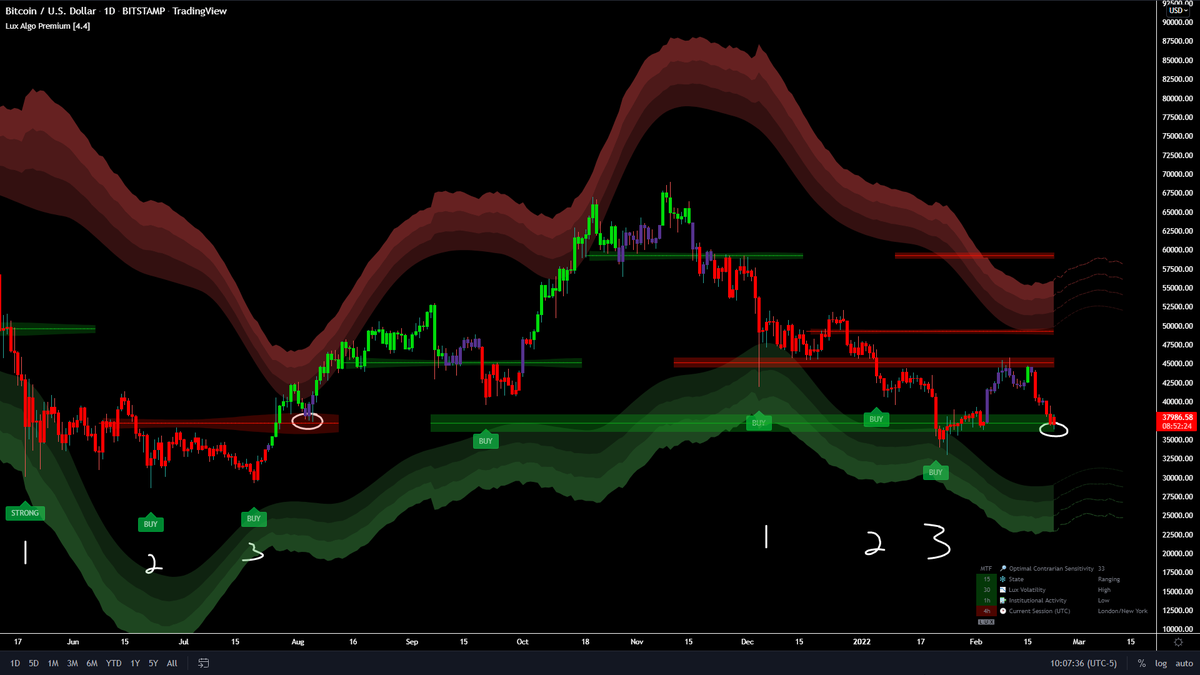 arctic oasis
that's on the week
indigo cradle
If you're using a long term autopilot maybe maybe confirmation signals haven't signalled buy
But every other setting, mode, indicator has really been shouting buy 😉
arctic oasis
 indigo cradle
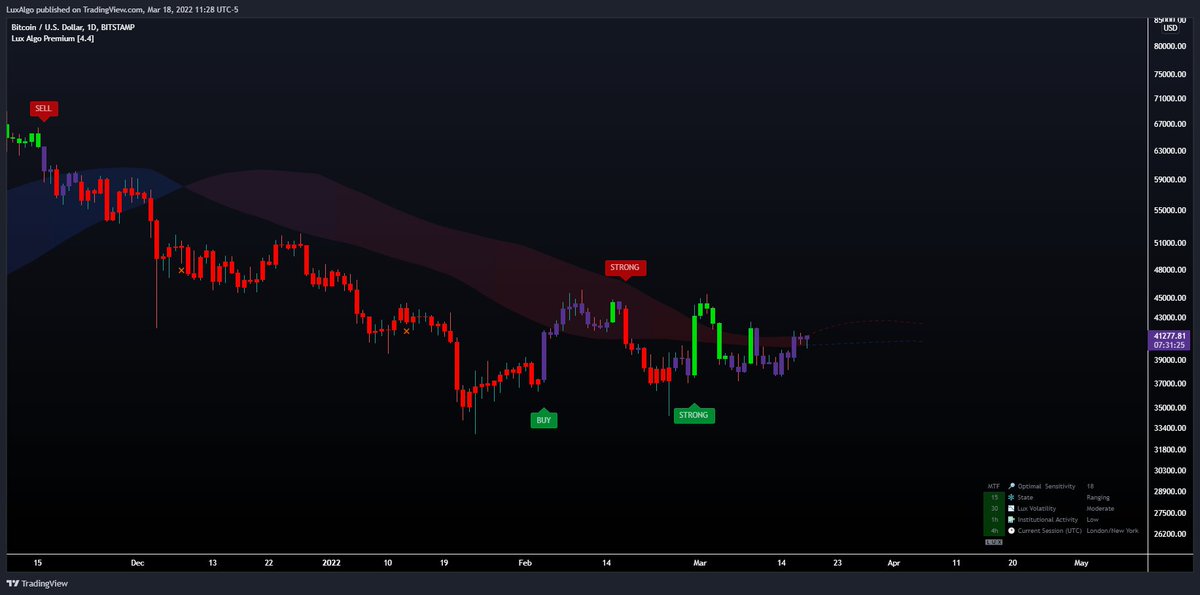
#btc is on an unconfirmed uptrend (notice how candles are now purple on Lux Algo)
attempting to make it above the EQ Cloud, if we get a clean break above $43k & green candles, bullish af
 Twitter
·
Twitter
·
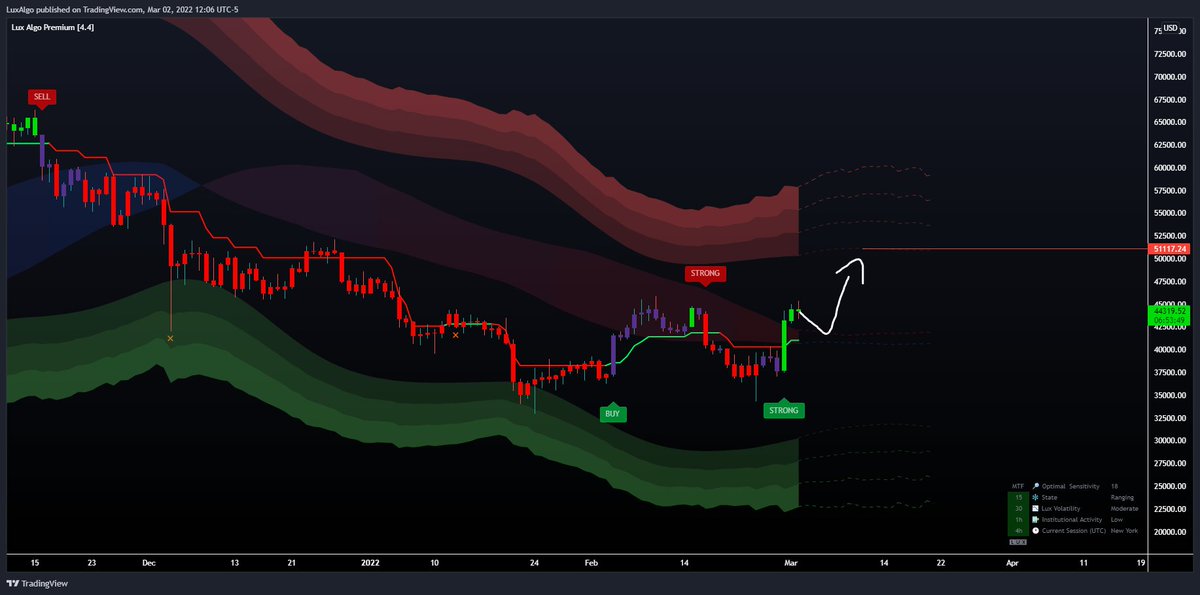
March 18th 🙂
Strong buy
Looks like you're using long term AP
Long term AP isn't really ideal here. We actually next update are changing it to default to mid-term as long term is just a little impractical for most use cases
arctic oasis
which settings should I change pls?
indigo cradle
Judging by the application I'd suggest default settings; they are a nice middle ground
Nice and classic
Not too laggy
Not too much noise
indigo cradle
The screenshot you shared doesn't look like it
arctic oasis

 arctic oasis
 arctic oasis
OK thanks
indigo cradle
🙂
Also our twitter is good for outlooks on BTC daily especially ^
Smack does some very nice analysis and has nailed the bottom here nicely; probably will nail the top too 😉
indigo cradle
Just the long-term aspect
Tends to be slower
Laggier
Not as practical
Next update we are just defaulting that to mid-term
arctic oasis
thanks, I missed a lot of trades because of this so good plan
is short term too trigger happy?
arctic oasis
thanks
 dense geyser
Hiii! I have the signals on contrary, shall I change to confirmation?
indigo cradle
dense geyser
Hiii! I have the signals on contrary, shall I change to confirmation?
It depends what you're looking for 🙂
They are different things
Used in by different traders
You should use what you prefer and find more useful for your trading
dense geyser
I’m new at this so I don’t really know… I’m using the rsi and the algo lux to start tradings so I’m looking for something that gives me accurate signs to when enter a trade
indigo cradle
Have you watched any of our strategy videos? 🙂
dense geyser
I just discover this today 😦
indigo cradle
!strategies
jaunty perch
Find our full trading strategies playlist on YouTube: https://www.youtube.com/watch?v=xezy6WGpZ8Y&list=PLbqCXsOfrM3MjO7q7uIiwoVq3evI4neQr
New: How to find the best settings: https://www.youtube.com/watch?v=wkruvBBeXn8&t
Usability Tips: https://www.youtube.com/watch?v=5wtdY51crnc
Get instant access to use on any chart: https://luxalgo.com
dense geyser
THANK YOU!!!
indigo cradle
It really will help
dense geyser
Is there any way I can pin this message so I don’t lose it?
indigo cradle
YouTube
Sharing trading strategies that I've developed using Lux Algo + more.
(Not actually a gecko.)
Subscribe to the channel 😉
indigo cradle
Which messages? 🙂
dense geyser
Sorry I’m trying to send you the pic
Is buy recommended or shall we go and the chart and just watch?
The strong buy messages
indigo cradle
They are displayed when there is a confirmed signal 🙂
indigo cradle
dense geyser
Is buy recommended or shall we go and the chart and just watch?
You should definately see before entering
analyse first
quasi sparrow
@indigo cradle
dense geyser
Perfect!
quasi sparrow
what is the #695668653869236433 bot settings? possible to post it since is BOT? 😄
indigo cradle
!visible
jaunty perch
Our Discord Market Scanner alerts all use the following:
- Default Lux Algo (V4 inputs).
- Normal trading hours (no extended hours)
- Main exchanges / brokers such as NASDAQ / TVC / FXCM / OANDA / COINBASE / BINANCE
If you have created your own, custom TradingView alerts, be aware they are set per the exact settings you had at the time you set those alert(s).
quasi sparrow
Thank you very much.
tbh is the bot know there is a gap down ?
or is just drop the settings algorithm to suggest for newbie's that dosen't know settings ;D?
indigo cradle
It's just confirmation signals with default settings 🙂 It's a generic setup 😄
 harsh warren
Honestly maybe a dumb question, but here it goes can you use the same usd settings on the Usdt charting for the crypto pairs
This has me super confused
harsh warren
Much appreciated
 azure island
Was checking out the LuxAlgo tweets, lots of interesting posts there. Was surprised by this one: https://twitter.com/LuxAlgo/status/1496596784814120964?s=20&t=uDK1INsb4foTK-1skEcJng
How does Lux give 3 buy signals in a row? AFAIK Lux always needs a counter signal before another signal in the same direction 🤔
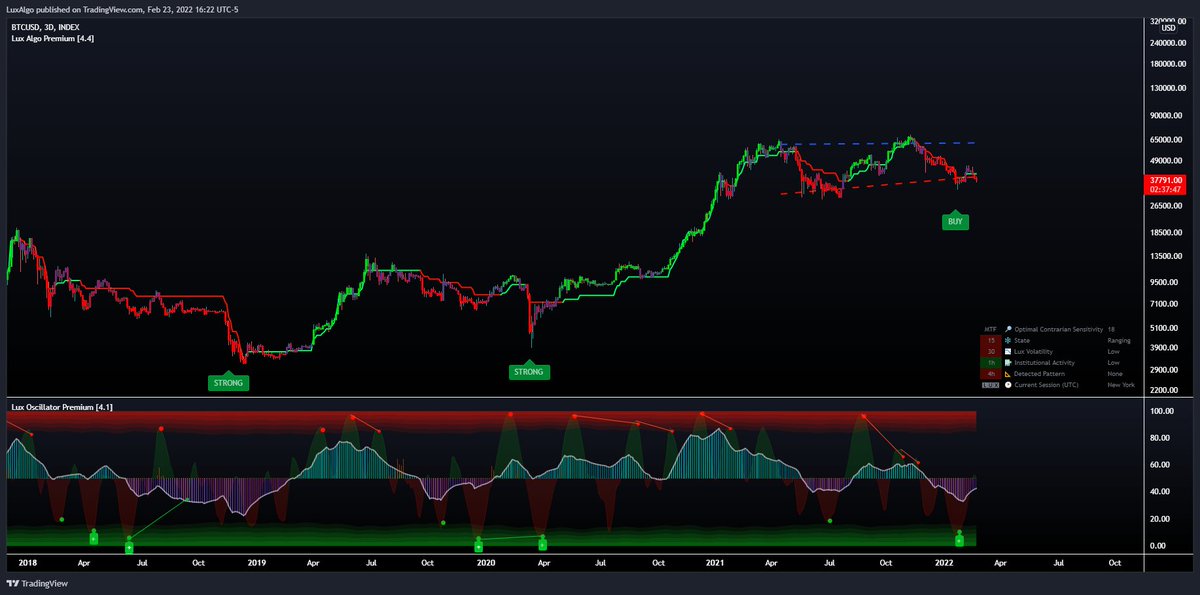 shy relic
 steady gorge
On discord
steady gorge
On discord
You can access them from #🔔scanners-premium :)
 tiny temple
I just subscribed but i entered a random username thinking it was a account set up, not realising it was to enter my trading view username instead.
now i cant allow access to lux premium indicators to my trading view acc
indigo cradle
tiny temple
I just subscribed but i entered a random username thinking it was a account set ...
Once you've made your Tradingview account give support@luxalgo.com an email and they can swap those
tiny temple
i have sent my username to the support email, now waiting for a response
@indigo cradle
 plain dagger
is it possible to backtest lux algo premium signals on luxbot-commands?
indigo cradle
It's not as the confirmation signals haven't been integrated into a strategy yet
plain dagger
cool thanks!
quasi sparrow
when we can know its best time to go inside ?
indigo cradle
Go inside where? 😳
indigo cradle
You can indeed:)
gaunt sedge
@indigo cradle Why I can't add alerts on the lux algo anymore? I still can add 4 more alerts...
 brittle dirge
Because you dont have a tradingview subscription
With free version of tradingview you can only use 4
or three i dont remember
 indigo cradle
Refresh page 🙂
gaunt sedge
Thanks. Had to restart the app version
 errant cloak
indigo cradle
errant cloak
indigo cradle
Here is a detailed tutorial on how to setup custom alerts on specific plots within TradingView & Lux Algo. Learn more: https://docs.luxalgo.com/lux-algo-premium-indicators/setting-up-alerts-on-tradingview
Get instant access: https://luxalgo.com
Free indicators by us: https://www.tradingview.com/u/LuxAlgo/#published-scripts
This will help 🙂
 acoustic lark
QUESTION/CURIOSITY: What should one do when a "Buy" and downtrend signal appear at the same time? Thanks!
 azure island
indigo cradle
Tis contrarian signals
azure island
indigo cradle
Tis contrarian signals
(Sorry for the slow reply, and thanks!) Ah, interesting! I had no idea that Contrarian signals could repeat like that. Really wish Confirmation could do the same...
I'm unable to replicate this chart though. Using Lux 4.4 and same sensitivity (18) I see a lot of Sell signals...

 ebon vine
Hi
Please tell me about candle colors
What indications they are giving according to color
@indigo cradle
indigo cradle
acoustic lark
QUESTION/CURIOSITY: What should one do when a "Buy" and downtrend signal appear ...
This is a contrarian buy 🙂 it's a different signal mode designed to do this. You've turned that on
indigo cradle
azure island
(Sorry for the slow reply, and thanks!) Ah, interesting! I had no idea that Cont...
We hid the sell signals in style settings 🙂 it's based on my buy the dip strategy
indigo cradle
ebon vine
<@456590452703887373>
Green is up
Purple is sideways
Red is down
!docs
jaunty perch
Learn about every aspect of Lux Algo at: https://docs.luxalgo.com
Learn how every aspect of our product suite works & get useful information about technical analysis.
 brittle nexus
can anyone suggest lux algo ideal settings for 5m chart ...for intraday scalping
indigo cradle
!settings
jaunty perch
Everything you need to know on optimizing signal settings: https://docs.luxalgo.com/lux-algo-premium-indicators/lux-algo/signal-settings
This page showcases every way users can adjust settings along with full explanations of how they differentiate from each other.
indigo cradle
In general we recommend against that timeframe however
brittle nexus
so what is ur preferred time frame for intraday
indigo cradle
!strategies
jaunty perch
Find our full trading strategies playlist on YouTube: https://www.youtube.com/watch?v=xezy6WGpZ8Y&list=PLbqCXsOfrM3MjO7q7uIiwoVq3evI4neQr
New: How to find the best settings: https://www.youtube.com/watch?v=wkruvBBeXn8&t
Usability Tips: https://www.youtube.com/watch?v=5wtdY51crnc
Get instant access to use on any chart: https://luxalgo.com
indigo cradle
I show a lot of nice ones in this playlist 🙂
 cunning ferry
indigo cradle
I show a lot of nice ones in this playlist 🙂
cunning ferry
indigo cradle
I show a lot of nice ones in this playlist 🙂
are you guys planning to apply the Order Block Finder as next indicator?
indigo cradle
cunning ferry
are you guys planning to apply the Order Block Finder as next indicator?
Order book data sadly isn't available through Tradingview
But you can use the book command in this server
jaunty perch
@indigo cradle

 LuxBot
Coinbase BTC-USD Order Book
Mid Market Price
47150.135
Spread
0.01

Made with ❤ by LuxAlgo.com