#🤝support
1 messages · Page 257 of 1
 crisp meteor
 jolly quarry
crisp meteor
+1 sounds perfect if happen , especially 1h and 15m signals would be perfect for...
jolly quarry
crisp meteor
+1 sounds perfect if happen , especially 1h and 15m signals would be perfect for...
Yeah its better , before 4-5 days i lost 2000$ cause i used algo for 1 min and 50-100x , I didn't read about algo , but its like 2 days i watch in altcoin and btc and eth when its say buy will make long sale short , and i had only 150$ after lose money now 200$ its like only in 2 days thats why i want 15m and 1 h
 verbal marten
@indigo cradle
 acoustic flicker
My first day trading on 1m and 5m scalping on gold, nas100 and US30... Appreciate any help, my settings on auto mode

 cunning ferry
is there any indicator in lux built in to indicate bullish/bearish divergence?
verbal marten
acoustic flicker
My first day trading on 1m and 5m scalping on gold, nas100 and US30... Appreciat...
How long have you been trading for? You cannot rely on the signals alone. If you have to combine them with other technicals most of the time when playing on lower timeframes. If you just want to use the signals I would try the 30Min to 1Hour and not use very much margin. They also have the OptiBot settings that you can set.
@indigo cradle Still would like a little more info on this if you could.
 shy relic
cunning ferry
is there any indicator in lux built in to indicate bullish/bearish divergence?
shy relic
cunning ferry
is there any indicator in lux built in to indicate bullish/bearish divergence?
The lux oscillator toolkits has the advanced oscillator with automatic divergences detections
shy relic
verbal marten
<@!456590452703887373> Still would like a little more info on this if you could.
We rely on Shalens hypothesis and the concept of activity asymmetry for giving an estimate of potential institutional activity, we cannot really describe the calculations involved but it is not purely based on volume.
shy relic
acoustic flicker
My first day trading on 1m and 5m scalping on gold, nas100 and US30... Appreciat...
As said before you should use additional features alongside the signals, i would personally recommend finding a strategy you are comfortable using and paper trade it first. Avoid excessively low timeframe, most gains made on low price variations will be greatly affected by frictional costs such as spread.
cunning ferry
shy relic
The lux oscillator toolkits has the advanced oscillator with automatic divergenc...
thank you
 indigo cradle
verbal marten
How long have you been trading for? You cannot rely on the signals alone. If yo...
indigo cradle
verbal marten
How long have you been trading for? You cannot rely on the signals alone. If yo...
The advanced oscillator 👍
 vale dust
I bought the lux algo premium indicator, however I can't connect it to my trading view platform
Can anyone assist
indigo cradle
Hi there; have you connected your account?
vale dust
I used my discord username not my tradevieq username I think that's the problem
indigo cradle
Ah ok give support@luxalgo.com an email and they can swap those over 🙂
vale dust
How long will it take, cause I Already emailed them 4hrs ago
indigo cradle
Not much longer then 🙂
 shut briar
How to use alerts with discord webhook on trading view for lux algo
It's not sending any alerts on my private discord channel
 bold compass
Hi. Question about setting an alert on the multi-length stochastic average. I see the line switch from red to green and from green to red. How can we set up an alert when they switch?
indigo cradle
bold compass
Hi. Question about setting an alert on the multi-length stochastic average. I se...
You'd need to implement that programmatically
bold compass
ok no settings in the alert doesn't exist
shut briar
indigo cradle
https://anchorchau.medium.com/configure-tradingview-alert-to-discord-channel-in-...
Only problem is that these settings work for normal alerts but not for lux algo alerts
indigo cradle
shut briar
Only problem is that these settings work for normal alerts but not for lux algo ...
They work for Lux Algo alert too 😉
We use them ourselves
Just not all in one alerts
shut briar
indigo cradle
They work for Lux Algo alert too 😉
Please help lol I use Any alert conditions
indigo cradle
shut briar
Please help lol I use Any alert conditions
You just need to use the built in alerts 🙂
Those have msg fields
shut briar
 indigo cradle
You cannot use Any Alert
You need to use the built in alerts
Click where it says "Any Alert()"
and change this for a built in
 faint dragon
what is the criteria of getting a sell signal (cross sign) after a buy signal
I'm very much confused and looks like my money is getting wasted
😦 😦
indigo cradle
faint dragon
what is the criteria of getting a sell signal (cross sign) after a buy signal
It's based off prop algorithms
faint dragon
as there are times when the buy and sell signals are not accurate
 jaunty perch
Find our full trading strategies playlist on YouTube: https://www.youtube.com/watch?v=xezy6WGpZ8Y&list=PLbqCXsOfrM3MjO7q7uIiwoVq3evI4neQr

New: How to find the best settings: https://www.youtube.com/watch?v=wkruvBBeXn8&t
Usability Tips: https://www.youtube.com/watch?v=5wtdY51crnc
Get instant access to use on any chart: https://luxalgo.com
faint dragon
and moreover in optibot i cannot find for prices with AUD
indigo cradle
I'd suggest giving some of our example strats a watch 🙂 They will help
indigo cradle
faint dragon
and moreover in optibot i cannot find for prices with AUD
Tis not supported with AUD
faint dragon
does this mean lux algo is of no use to me?
jaunty perch
Everything you need to know on optimizing signal settings: https://docs.luxalgo.com/lux-algo-premium-indicators/lux-algo/signal-settings
This page showcases every way users can adjust settings along with full explanations of how they differentiate from each other.
indigo cradle
I'd really suggest watching example strats and reading some of our docs to learn some nice usecases, strategies and understanding optimisation approaches for yourself
faint dragon
okay sure. I hope I havent wasted my money in getting this
indigo cradle
It just takes a little time to watch some content / read - it's a brand new system for yourself you just like getting a new car, or building something you need to study a little
 sharp wind
faint dragon
okay sure. I hope I havent wasted my money in getting this
sharp wind
faint dragon
okay sure. I hope I havent wasted my money in getting this
It’s a great package just take time to learn a few things with it. I’m still discovering new ways of using it all the time.
It’s been so good during this market crash as well
faint dragon
is it? Yeah i can see the past results that it was helpful in the crash as well.
 honest linden
@indigo cradle what if i decide to go Lifetime lux. Can i get some credits from current subscriptions?
indigo cradle
@honest linden You can be prorated 🙂
It automatically pro-rates when you upgrade
!upgrade
jaunty perch
You can upgrade your subscription by logging in to your customer account at: https://luxalgo.chargebeeportal.com/
Once logged in, click your account, click on your membership, and select 'Edit Subscription'.
From here you can select your upgraded plan of choice from the blue drop down menu, see the prorated charge, and click 'Update Subscription' to complete the process.
honest linden
It still show me it will charge me full amount of money…
indigo cradle
honest linden
It still show me it will charge me full amount of money…
I'll DM to handle 🙂
jaunty perch
what is better to use, trend catcher or tracer??
indigo cradle
One isn't really better than the other otherwise both wouldn't exist
Trend tracer is more classical
Classic trend following
Trend catcher is preditctive and can be quite powerful
It depends on the purpose and the trader
 indigo cradle
Looks reasonable 🙂
shut briar
indigo cradle
I'd suggest checking your webhooks perms/setup
there is no perms for webhooks, it just under integrations with name and channcel settings, then copy webhooke and paste it in alerts
idk what im doing wrong
shut briar
shut briar
pls recheck if it is setup right?
shy relic
shut briar
pls recheck if it is setup right?
its right, you should get alerted for any confirmation signal, however your webhook wont send a discord message with the content in the message field, to do that see https://www.tradingview.com/?solution=43000529625

TradingView
Where the world charts, chats and trades markets. We're a supercharged super-charting platform and social network for traders and investors. Free to sign up.
shut briar
shy relic
its right, you should get alerted for any confirmation signal, however your webh...
{"content":"{{ticker}} {{close}}"}
add this in content box
message field
is it correct?
shy relic
shut briar
is it correct?
It should be yeah
now the webhook you have set will send messages to the server/channel where it is set
shut briar
now it only shows BTCUSDT 39023
shut briar
shy relic
now the webhook you have set will send messages to the server/channel where it i...
so im guessing , i have to add buy sell text for every alert
shy relic
shut briar
so im guessing , i have to add buy sell text for every alert
Correct, see https://docs.luxalgo.com/lux-algo-premium-indicators/lux-algo/alerts#using-placeholders-with-confirmation-contrarian-alerts for the signal placeholders :)
Options for setting alerts on Lux Algo in TradingView.
 worn void
On trend catcher, does the path the trend takes act as support or resistance? For e.g. If price is above the trend, does it act as support when price comes down to meet the trend path?
indigo cradle
It can do for sure 🙂
worn void
But is that by design? Is the trend line a moving average of some kind or does it just randomly act as S/R sometimes. I’d like to know because I could place orders at that point. I only want to do that if I know that the trend line is designed as as an S/R tool. Sorry to be a pain
worn void
indigo cradle
It can do for sure 🙂
But is that by design? Is the trend line a moving average of some kind or does it just randomly act as S/R sometimes. I’d like to know because I could place orders at that point. I only want to do that if I know that the trend line is designed as as an S/R tool. Sorry to be a pain
indigo cradle
It's not specifically by design but logically it checks out as an SR 🙂
So can for sure be used as one
 restive matrix
Can you please tell me what's the difference between the Pivot Points and the McDonald
pattern? If I put them both up..they line up except McDonald's shows more signals
Or at least it looks that way

 tired tinsel
Unlucky
jolly quarry
Yeah it will be 2500 in this week lost 😦
 austere terrace
I need help. I want to reactivate my subscription
verbal marten
Could you explain further how the Institutional movement indicator in the advance oscillator is calculated? Is it only based on volume or is there other factors being taken into account?
 steel epoch
Hello. What is the best way to back test a strategy from a day to months back using Lux Algo on Tradeview?
 icy ridge
this showed up when I was trying to set up alerts , I am pretty sure that you guys claim that the indicator is non repainting.
 indigo cradle
icy ridge
this showed up when I was trying to set up alerts , I am pretty sure that you g...
indigo cradle
icy ridge
this showed up when I was trying to set up alerts , I am pretty sure that you g...
You can just ignore this 👍
It's because certain features need to be updated e.g. trendlines and they shift around
indigo cradle
steel epoch
Hello. What is the best way to back test a strategy from a day to months back us...
It'd have to be done manually really 👍
indigo cradle
austere terrace
I need help. I want to reactivate my subscription
Hi there, is this solved?
indigo cradle
restive matrix
pattern? If I put them both up..they line up except McDonald's shows more signal...
There isn't a big difference at all 👍
 cinder sedge
Hello.
 distant abyss
Is there a moving average indicator?
indigo cradle
distant abyss
Is there a moving average indicator?
If you're looking for moving averages TradingView has a tonne built in
SMA, EMA, WMA etc etc
shy relic
@vagrant venture Hi, Banknifty is available on optibot as the NSEI ticker name
 mental fiber
For the setting optimizer channel, if i take the sensitivity and agility for ADA, will it work well with Adaup or they are not really compatible?
mental fiber
Ahm. So it's better to use the optimal sensitivity given in the right bottom corner right?
jaunty perch
Everything you need to know on optimizing signal settings: https://docs.luxalgo.com/lux-algo-premium-indicators/lux-algo/signal-settings
This page showcases every way users can adjust settings along with full explanations of how they differentiate from each other.
indigo cradle
^ there are other optimisation approaches
icy ridge
hey, I have noticed that as you go backward on the chart the signals get worse, is that because the auto pilot mode keeps changing settings dynamically as time goes on ? , and if thats the case then shouldn't it show different signals on replay mode.
 trim kelp
Question. On tradingview alerts. Is “Any confirmation Buy” alerts designed to give alerts for buy AND strong buy?
indigo cradle
That's not the case they won't repaint the signals @icy ridge 🙂
That'll be by coincidence
indigo cradle
trim kelp
Question. On tradingview alerts. Is “Any confirmation Buy” alerts designed to ...
Correct 🙂
trim kelp
Cool. Thanks
 sharp cypress
@indigo cradle Hello, I just subscribe a new membership, but the indicators a still blocked on tradingview, could you help me out please ?
indigo cradle
sharp cypress
<@!456590452703887373> Hello, I just subscribe a new membership, but the indicat...
Hi there; have you connected your account? 🙂
crisp meteor
what mean contrarian buy signal while strong sell signal. i really can't understand . so it mean it may return from here ?
indigo cradle
Contrians are a little more advanced in nature. So they go against the trend
They try to predict perfect reversals
Confirmation are classical
So a strong confirmation sell with a contrarian buy might mean it's not the best time to enter a short
!docs
jaunty perch
Learn about every aspect of Lux Algo at: https://docs.luxalgo.com
Learn how every aspect of our product suite works & get useful information about technical analysis.
indigo cradle
You can read about signals in our docs and their difference 🙂
crisp meteor
indigo cradle
So a strong confirmation sell with a contrarian buy might mean it's not the best...
thank you clearly answer, however i got this notification via alerts, can't see any icon on the chart, so whats mean ? got alarm then reverted this signal when i look the chart
jaunty perch
my sub expires tomorrow but i have just rebought another 3 months, will my sub that expires tomorrow remove access to discord and tradingview and relinking is necessary or will it stay?
indigo cradle
@jaunty perch It should stay 🙂
jaunty perch
Good morning, when will shiba for cryptocurrencies in the 4-hour period?
It gives good results if we also protect the position.
Thank you
verbal marten
steel epoch
Hello. What is the best way to back test a strategy from a day to months back us...
I would like to know as well. @indigo cradle
restive matrix
do you have any indicator on the Lux that acts like an anchored vwap? if not, what indicator would you suggest as anchored vwap for day trading? thanks
verbal marten
Could you explain how the buy and sell singles are generated? So we now how to apply them to our strategy? They seem kind of random at times.
indigo cradle
verbal marten
I would like to know as well. <@!456590452703887373>
It'd be manually as it totally depends on the strategy
indigo cradle
restive matrix
do you have any indicator on the Lux that acts like an anchored vwap? if not, wh...
The TRAMA 😊
indigo cradle
verbal marten
Could you explain how the buy and sell singles are generated? So we now how to a...
Confirmation signals are based off trend calculations, they shouldn't appear too random if set correctly
restive matrix
Sorry but what does TRAMA stand for?
indigo cradle
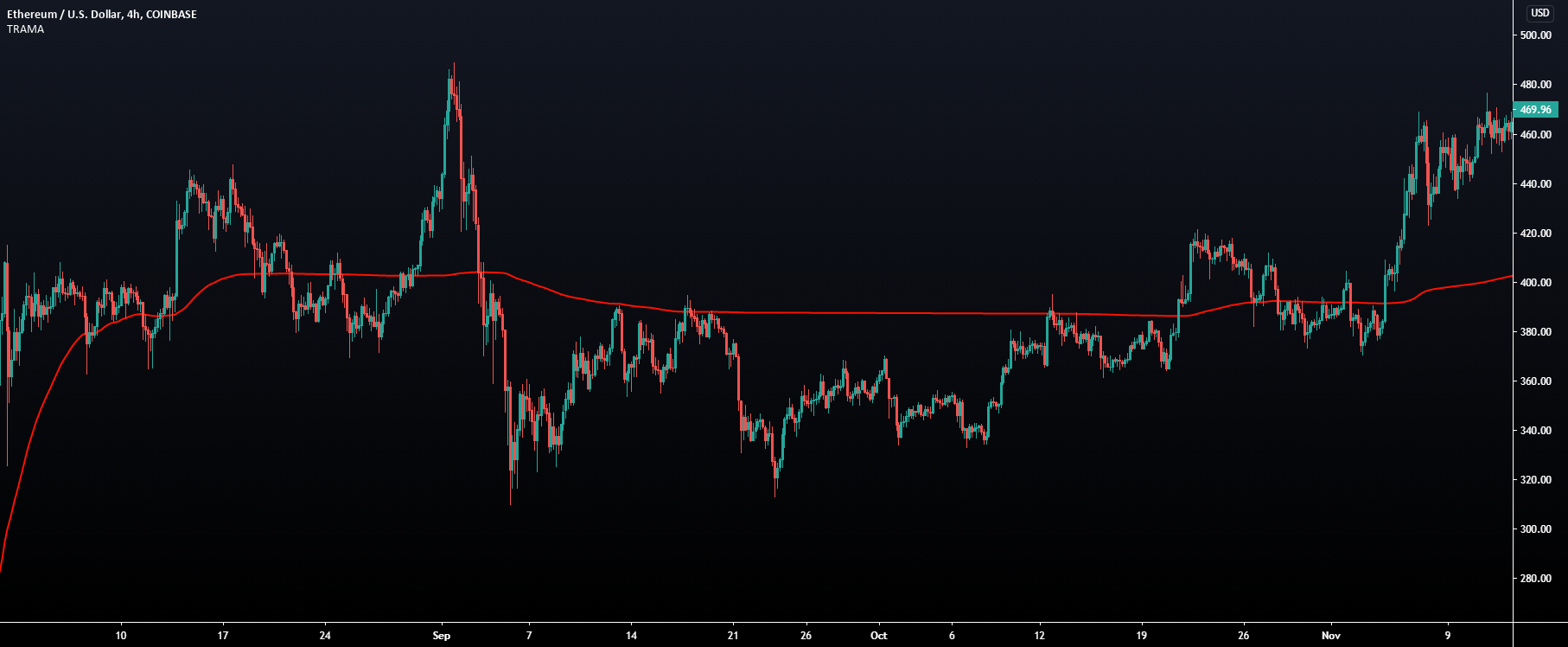
TradingView
The following moving average adapt to the average number of highest high/lowest low made over a specific period, thus adapting to trend strength. Interesting results can be obtained when using the moving average in a MA crossover system or as a trailing support/resistance.
Settings
Length : Period of the indicator, with higher values returnin...
A legendary MA 😎
It has nothing to do with VWAP really but it's a great tool that people use in a very similar manor

TradingView
This indicator returns VWAP bands with a degree of smoothness resetting based on various user-selected events. The bands are constructed using a VWAP based naive standard deviation.
The indicator can be anchored or start from the first bar and can be used as trailing support/resistance, in a moving average crossover system, or as source for ext...
Or we have VWAP bands
 brave edge
Do you have videos for all of them?
 half torrent
hello, can I DM any support?
indigo cradle
You can indeed
 slender latch
Can we use 15 min tf for day trading? If yes how do I confirm that this signal is good or a trap ?
 errant cloak
Hello Support
Is there a way to connect Lux Algo confirmation alerts on Trading View with a brokerage or crypto exchange? I heard that FTX offers this service? Can you provide more clarifications on this one?
indigo cradle
3commas tends to be the go-to
 real osprey
How does one get access to the lux top signals????
indigo cradle
Those are just signals that you have access to yourself
If you load the indicators
you have access to those signals 🙂
 loud frigate
Been using autopilot confirmation signals but find they give different outputs compared to manual settings. Which is more accurate, auto or manual?
indigo cradle
!settings
jaunty perch
Everything you need to know on optimizing signal settings: https://docs.luxalgo.com/lux-algo-premium-indicators/lux-algo/signal-settings
This page showcases every way users can adjust settings along with full explanations of how they differentiate from each other.
indigo cradle
^ This should answer 🙂 It's never really the case of more accurate
it's what fits your trading style that is important
loud frigate
Thanks Gecko
jaunty perch
Hi I can t put the lid Algo tool on my trading view account please
jaunty perch
How can I connect my account I followed all the steps
indigo cradle
If you've connected your accounts try refreshing tradingview 🙂
indigo cradle
When you signed up you got a confirmation email
jaunty perch
Yes
indigo cradle
In the email there's a big button saying "Connect accounts"
Click this
and enter your tradingview username
jaunty perch
Don’t work
When I enter my username
With my luxalgo password
It doesn’t work
On TradingView
indigo cradle
Do you have a screenshot?
It shouldn't ask for a password
If you entered your TradingView username
In our connect accounts page
You'll have access
Try refreshing TV
If possible share screenshot of your connect accounts page?
jaunty perch
I sent it privately
indigo cradle
Yep ^ that wasn't your connect accounts page
you were trying to login to your tradingview
Your connect accounts link is in your email
 pearl sigil
Hi, which signal sensitivity and agility should I use for nasdaq 100 ?
indigo cradle
!settings
jaunty perch
Everything you need to know on optimizing signal settings: https://docs.luxalgo.com/lux-algo-premium-indicators/lux-algo/signal-settings
This page showcases every way users can adjust settings along with full explanations of how they differentiate from each other.
indigo cradle
^ see above for information 🙂
pearl sigil
There is a setting optimizer tab, here for all the markets, I wanted to know which one is relevant to Nasdaq 100
 plain shale
this anywhere closer after a month?
indigo cradle
plain shale
this anywhere closer after a month?
Of course 😊
The "to-do" is approaching this 🤝
 errant sand
just curious if we're close to a new release in early March
 wide crag
Hello, I still am unable to see the invite only scripts on my tradingview
I have tried restarting my systems, but still no luck unfortunately
jaunty perch
does the autopilot comfirmation settings
change the sensitivity and agility
or just sensitivity
 ocean escarp
#🗯twitter message what indicator is this
 feral lava
jaunty perch
change the sensitivity and agility
feral lava
jaunty perch
change the sensitivity and agility
it adapts all the settings for the algorithm dynamically, it will be a different experience than using sens/agility
feral lava
ocean escarp
https://discord.com/channels/641770286638694402/946502760491278406/9479048091372...
Lux Algo Premium ---> SR Mode ---> Predictive Ranges
 candid mauve
Hello. Lux Algo just post a tweet that BTC up 15% on the weekly time frame , and I asked for the seating and they said its 9/26, any way , on that chart it show the X for exit sell, so if it say exit sell meaning sell not buy, or im missing something here. Please explain, thanks.
 twilit lantern
hi, have you guys removed the live bot scanners on the disc? or is it a subscription?
feral lava
twilit lantern
hi, have you guys removed the live bot scanners on the disc? or is it a subscrip...
you can view them by using #🔔scanners-premium
feral lava
candid mauve
Hello. Lux Algo just post a tweet that BTC up 15% on the weekly time frame , and...
It's an exit for a sell signal, so it can be a good indication them move down has come to an end (based on previous exit-sell signals)
usually used for trading the move down with a short position, an exit during a sell signal can help with taking profits on a short position
in this case, just looked good as an indication for the downtrend to come to an end (based on previous exit sell signals)
candid mauve
Never heard before to buy on exit/sell signal. Any way thank you.
shy relic
 oak hound
Hello, why is it that some buy and sell signals don't have exits signals.
oak hound
Hello, why is it that some buy and sell signals don't have exits signals.
Sometimes a move might have been significant enough to result in the generation of an exit signal, also exit signals always exit on a gain, so they wont be generated on a loss.
oak hound
So how do I exit signals that doesn't have exit signal?
They should be an option to toggle it off and on.
shy relic
oak hound
So how do I exit signals that doesn't have exit signal?
- Using the integrated take profits/stop losses
- Using other features such as breakout zones, predictive range, reversal zones
- Using contrarian signals
You can also use the lux oscillators and lux volatility, or exit a signal based on your money management strategy 🙂
oak hound
Hello, how do I set alerts for the legacy oscillator?
 night beaconBOT
oak hound
night beaconBOT
oak hound
I'm talking of just the legacy oscillator, not advance or normal thanks
indigo cradle
Trigger will be the slower plot, you can confirm this visually by going into the style settings toggle each plot 👍
 vernal hawk
HI - i want to shift my subscription from one Trading view ID to another. What is the procedure for this.
@indigo cradle
shy relic
vernal hawk
HI - i want to shift my subscription from one Trading view ID to another. What i...
Send your new username as well as the old username to support@luxalgo.com and it will get switched 🙂 https://docs.luxalgo.com/faq/#can-i-switch-access-to-a-different-tradingview-account
Get answers to frequently asked questions.
vernal hawk
how long the process will take?
indigo cradle
It'll take a few hours 👍
vernal hawk
ok
indigo cradle
Support will get to that 🙂
indigo cradle
They will do 🤝
crisp meteor
that "purple x" which indicating the trend may change, it calculates based on candle patterns or what ?
indigo cradle
It's all built from the ground up algos 🙂
Won't be based on mainstream things at all
crisp meteor
and do you have an indicator which shows the candle patterns separately
indigo cradle
That's built into TradingView 🙂
crisp meteor
yes i know but your indicators better 😄
crisp meteor
for example, i got contrarian sell alert on avaxusdt binance 15m but when i look the chart, i can't see "purple x" icon ? so it was uncorfirmed and removed ? need follow the next candle then
cunning ferry
indigo cradle
An x is an exit
how to hide this?
 errant cloak
Hello Support
Is there a way to connect Lux Algo confirmation alerts on Trading View with a brokerage or crypto exchange? I heard that FTX offers this service? Can you provide more clarifications on this one?
indigo cradle
Most users use 3commas to automate 🙂
errant cloak
can you trade stocks as well with 3commas?
indigo cradle
That's crypto specific
errant cloak
Yeah, is there something that can auto trade based on Trading view indicators?
indigo cradle
For stocks I'm not really sure on many services that do this
For crypto there's far more options
errant cloak
I see, apart from 3commas what are other apps that seem to do the job well?
 north dirge
how to use Any Alert() Function Call?
indigo cradle
north dirge
how to use Any Alert() Function Call?

This is a tutorial on how to use our brand new all-in-one alerts system within the main Lux Algo Premium indicator on TradingView. This makes it easier for users with the free TradingView membership to get multiple specific conditions in one alert.
See the guide on our docs: https://docs.luxalgo.com/lux-algo-premium-indicators/lux-algo/alerts#...
indigo cradle
errant cloak
I see, apart from 3commas what are other apps that seem to do the job well?
3commas really is the biggest one, there are a few other smaller ones however I'm not 100% on their names
errant cloak
Great, thanks. Have you heard any feedback? Is it positive or natural?
indigo cradle
Generally quite positive 🙂
errant cloak
Great, thanks very much. Last question for now, will there be any optibot for the daily chart?
indigo cradle
errant cloak
Great, thanks very much. Last question for now, will there be any optibot for th...
Most likely not if I'm honest. Optibot runs over a lot of bars. Even if optibot only ran its analysis over 1000 bars it'd update itself and change maybe a few times a year
The updates would be so so unfrequent
restive matrix
Just want to say that was a great video on the breakout zones! It would be great for everyone if there are more videos like that...definitely helps with the usage of the Lux Algo and for trading! 👍
indigo cradle
Much appreciated will be working on more content 🙂
restive matrix
🙂
crisp meteor
would be perfect if you talk with 3commans to a get a special discount for Lux users 🙂
feral lava
🤔 interesting idea @crisp meteor
jaunty perch
Everything you need to know on optimizing signal settings: https://docs.luxalgo.com/lux-algo-premium-indicators/lux-algo/signal-settings
This page showcases every way users can adjust settings along with full explanations of how they differentiate from each other.
north dirge
indigo cradle
https://www.youtube.com/watch?v=E2Bb0ly2hEw&t=5s
thanks a lot
 spice palm
Loving Lux Algo
is there anything in Lux Algo that mimics the ichimoku cloud lines of Tenkan and Kijun?
I was thinking that maybe i could use Trend Tracer and Trend Catcher to mimic T and K but then figured that you have probably considered this already. So ... anything that mimics Tenkan and Kijun?
indigo cradle
We tend to try an not mimic stuff really however maybe if you enjoy ichi you'll like our SuperIchi 😉
It's a ichi with a bit of spice
crisp meteor
feral lava
🤔 interesting idea <@!634754153381625886>
yes waiting good news, you can gain affilate earnings while we get discount 😄
spice palm
indigo cradle
It's a ichi with a bit of spice
thanks! I'll dig into it right now...
I like SuperIchi! Now, how do I set an alert based on the lines crossing? ... Buy when cross up and Sell when cross down ...? still playing around with it....
nevermind! I"m figuring it out....
 drowsy wyvern
Cross up / down
pearl sigil
indigo cradle
You can find these in optibot ☺️
I can't find a setting optimizer for usd100 in optibot
indigo cradle
NDX 🙂
pearl sigil
indigo cradle
NDX 🙂
Tnx👌🏼
One more thing, why I dont get any notification for signals? Buy or sell ?
In setting, input, at the bottom, alert function call, mostly all of them has been ticked, but I dont get any notification
jaunty perch
How to set up your own custom alerts in TradingView: https://docs.luxalgo.com/lux-algo-premium-indicators/setting-up-alerts-on-tradingview
Follow this guide for setting up your own custom alerts on TradingView.
pearl sigil
Then I will get notification on my mobile ?
pearl sigil
jaunty perch
How to set up your own custom alerts in TradingView: https://docs.luxalgo.com/lu...
Tnx
So I cant set to receive the alarm, when the buy or sell signal appear ?
indigo cradle
You can 🙂
The guide is above 🙂
This is a tutorial on how to use our brand new all-in-one alerts system within the main Lux Algo Premium indicator on TradingView. This makes it easier for users with the free TradingView membership to get multiple specific conditions in one alert.
See the guide on our docs: https://docs.luxalgo.com/lux-algo-premium-indicators/lux-algo/alerts#...
Or a step by step video
pearl sigil
Tnx 👍🏻
 dapper ginkgo
Hi, when selecting Breakout Zones, next to it, we get the option of selecting a number from 1 to 10, how can we know which one is the best option???
 tough finch
My card is being declined for the renewal transaction. Is there another way to make the payment
indigo cradle
tough finch
My card is being declined for the renewal transaction. Is there another way to m...
We accept crypto for yearly or lifetime 🙂
indigo cradle
dapper ginkgo
Hi, when selecting Breakout Zones, next to it, we get the option of selecting a ...
It's a personal choice it'll totally depend on which you prefer for your trading
One isn't really better than the other
 mint nacelle
what's this mean?
 indigo cradle
mint nacelle
what's this mean?
indigo cradle
mint nacelle
what's this mean?
Which part in particular? ☺️
 dapper belfry
Hello! In Oscillator Premium, how do i can decide which length must i chose? What is the parameter?
indigo cradle
The default is 17 ☺️
It's a personal choice and depends on how you use the oscillator however default tends to be a nice middle ground
 bronze garden
hello
i have newly joind and don't how to use LUX Algo?
shy relic
bronze garden
hello
i have newly joind and don't how to use LUX Algo?
Welcome 🙂 Our documentation page will help you getting started the best way possible https://docs.luxalgo.com/getting-started/what-is-lux-algo let us know if you have any questions 🙂
Use the side panel (left) or the search bar (right) to navigate our docs.---
crisp meteor
indigo cradle
Which part in particular? ☺️
what mean MTF 🙂
indigo cradle
crisp meteor
what mean MTF 🙂
Multi time frame 👍
It shows the current signal in that timeframe
Red being a sell signal
And green being a buy
 tough umbra
Hi am new here where do i see the manual on how to use luxalgo ?
indigo cradle
tough umbra
Hi am new here where do i see the manual on how to use luxalgo ?
!docs
jaunty perch
Learn about every aspect of Lux Algo at: https://docs.luxalgo.com
Learn how every aspect of our product suite works & get useful information about technical analysis.
jaunty perch
Find our full trading strategies playlist on YouTube: https://www.youtube.com/watch?v=xezy6WGpZ8Y&list=PLbqCXsOfrM3MjO7q7uIiwoVq3evI4neQr
New: How to find the best settings: https://www.youtube.com/watch?v=wkruvBBeXn8&t
Usability Tips: https://www.youtube.com/watch?v=5wtdY51crnc
Get instant access to use on any chart: https://luxalgo.com
drowsy wyvern
Hi in 1 hour which settings iş the beş for advace oscilator, 17?
indigo cradle
And example stats here 👍
indigo cradle
drowsy wyvern
Hi in 1 hour which settings iş the beş for advace oscilator, 17?
It's a personal choice and depends on how you use the oscillator however default tends to be a nice middle ground
drowsy wyvern
Oky thank you 😊 🙏
dapper belfry
indigo cradle
It's a personal choice and depends on how you use the oscillator however default...
For all TF or specific one?
indigo cradle
dapper belfry
For all TF or specific one?
Timeframes don't really impact that
It's your trading style
How you use the oscillator
dapper belfry
I see, thank you!
crisp meteor
what is best condition for scalping to use the signals on 3commas ? which effective as your experiences like 5min or 15min or 1h signals ?
actually if you put a strategy test feature to Lux premium, we can define it easily and would be perfect mate
indigo cradle
If automating anything I'd recommend my DCA strategy
Automating anything else is far far more specific
 undone kernel
How do set alerts when price crosses or breakouts from the breakout zone?
indigo cradle
You'd set an alert on crossing SR2 And SR3 for example
undone kernel
So SR2 or sr3 are for the breakout zones to clarify? I see alerts for clouds 1 and 2 and also alerts for rz support and resistance bands.
 bold compass
Hi support. In the lux oscillator premium legacy how do we set up an alert when the oscillator switch from red to green and from green to red. thanks
night beaconBOT
 halcyon plank
Hi everyone, i have a question about the Alerts:
Do the alerts with the individual sensitivity/agility settings of the individual currency pairs also work when the charts are closed, i.e. in the background?
indigo cradle
They will indeed 🙂
 somber gust
how do we see the live trading?
indigo cradle
@somber gust What exactly do you mean by this?
somber gust
Dillon is supposed to be doing some live trading today for people to watch
somber gust
I thought he was the one doing the videos on your YouTube channel?
indigo cradle
I have never ever heard of a Dillon 😅
halcyon plank
indigo cradle
They will indeed 🙂
Cool. thanks 👍 How does it work...? 🤔
indigo cradle
halcyon plank
Cool. thanks 👍 How does it work...? 🤔
The alert will save and use the settings/timeframe open at the time of setting 🙂
drowsy wyvern
Hi I would want to use "Circular Barplot - Oscillators Sentiment [LUX]" yet I am not quite certain how to do that. For e xampla below 20 sentiment overal means strat to buy and above 80 means sell?
 indigo cradle
It would mean the oscillators are technically oversold and therefore the market may be due a little bounce 🙂
indigo cradle
You can chose; 30 and 70 tend to be more common
drowsy wyvern
ok, at the end I would want to thank you sir
for this graet indikator
It s awesome
🤟🏻 🙏🏻
indigo cradle
❤️ Your support is much appreciated 😄
 little agate
Hey guys, is it possible to set different signals sensitivity/confirmation agility on the same chart for different symbols?
indigo cradle
little agate
Hey guys, is it possible to set different signals sensitivity/confirmation agili...
What exactly do you mean by this? So have pre-set configs?
little agate
I made a chart layout for every timeframe I use and switch the symbols with the watchlist but the Settings for Lux are the same on the symbols
 indigo cradle
Yep you'd need to use indicator templates to save those settings sadly
little agate
okay, no problem. Thanks for your quick answers 💯
halcyon plank
little agate
I made a chart layout for every timeframe I use and switch the symbols with the ...
There is a lot of stuff on your chart 😯 Do you need that all ?
little agate
halcyon plank
There is a lot of stuff on your chart 😯 Do you need that all ?
I was just trying something out haha, normally I mainly use dividers, avwap and RSI
verbal marten
Quick question, is the Optibot settings optimized for the Long-Term frequency or one of the other ones? Just want to make sure I have it set at the right one.
indigo cradle
verbal marten
Quick question, is the Optibot settings optimized for the Long-Term frequency o...
What exactly do you mean by that? So Optibot and autopilot are 2 seperate systems 🙂
Optibot is a type of "backtest"
Autopilot is dynamic settings adjustment
!settings
jaunty perch
Everything you need to know on optimizing signal settings: https://docs.luxalgo.com/lux-algo-premium-indicators/lux-algo/signal-settings
This page showcases every way users can adjust settings along with full explanations of how they differentiate from each other.
 ebon vine
What is this Alert - Any contrarian
means
indigo cradle
You sadly cannot
ebon vine
oh ok i see
verbal marten
indigo cradle
What exactly do you mean by that? So Optibot and autopilot are 2 seperate system...
So autopilot frequency has not effect on Optibot settings?
indigo cradle
verbal marten
So autopilot frequency has not effect on Optibot settings?
Well optibot is posted in discord
Autopilot is all within tradingview
two totally different independant systems
One won't impact the other
!settings
jaunty perch
Everything you need to know on optimizing signal settings: https://docs.luxalgo.com/lux-algo-premium-indicators/lux-algo/signal-settings
This page showcases every way users can adjust settings along with full explanations of how they differentiate from each other.
indigo cradle
The above link does a nice walkthough ^ 😄
 woven herald
If I understand correctly, contrary signals use the same settings as confirmation, but only use the sensitivity. Is this correct?
indigo cradle
Correct 🙂
woven herald
Thank you for confirming! I've also noticed that there are typically a lot more signals with confirmation vs contrarian. Is this normal or is my sample size just too small?
north dirge
how to use TP and SL send the alerts?
indigo cradle
!alerts
jaunty perch
How to set up your own custom alerts in TradingView: https://docs.luxalgo.com/lux-algo-premium-indicators/setting-up-alerts-on-tradingview
Follow this guide for setting up your own custom alerts on TradingView.
indigo cradle
this is how to set alerts 🙂
north dirge
I can't find the TP and SL
indigo cradle
You want those in alerts?
north dirge
I mean this
 indigo cradle
You want those in alerts?
north dirge
yes
indigo cradle
Ah those cannot be alerted sadly
north dirge
okay
thank a lot
any auto bot recommend?
Suit Lux
can you recommend trade bot for Lux signal?
 dim folio
where do I find the lux algo signals chat for forex that only posts signals
indigo cradle
dim folio
where do I find the lux algo signals chat for forex that only posts signals
 cosmic imp
In the dashboard there is a column with red or green color flags, does every colored flag mean bullish or bearish?
 cosmic imp
indigo cradle
Correct 🙂
cosmic imp
indigo cradle
Correct 🙂
I thought so, nice to have it verified. I keep watching Gecko Trading on youtube and find it very helpful too
indigo cradle
Much appreciated 😄
 pallid junco
Can someone tell the name of this application?
 mint nacelle
when I create alert, and select Any Confirmation, how to make the msg as Confirmation Sell | timeframe: 15 | BTCUSDT, which argument should I use to get the Confirmation Sell?
mint nacelle
is it {{plot("Name")}}?
 tranquil holly
indigo cradle
Green = buy
tranquil holly
indigo cradle
Green = buy
Is it possible to adjust the colors in the future? I have a red green weakness and have a hard time distinguishing the colors
tranquil holly
pallid junco
Can someone tell the name of this application?
Metatrader 4
 copper locust
Hi support team in this case for example, where should I entry BUY or Sell? because almost one month I still confused how to use this Buy or Sell Signal, please explain accordingly, thanks

 harsh warren
Through tradingview is there a way to turn on alerts for the signals that come through from lux
north dirge
Exit buy and exit sell can Use Placeholders With Confirmation Alerts?
indigo cradle
north dirge
Exit buy and exit sell can Use Placeholders With Confirmation Alerts?
They can yep 👍
!placeholders
night beaconBOT
Placeholders For TradingView are shown below:
Placeholders for TradingView
"ticker":"{{ticker}}"
"exchange":"{{exchange}}"
"interval":"{{interval}}"
"timenow":"{{timenow}}"
"buy":"{{plot("Buy")}}"
"strong_buy":"{{plot("Strong Buy")}}"
"sell":"{{plot("Sell")}}"
"strong_sell":"{{plot("Strong Sell")}}"
"exit_buy":"{{plot("Exit Buy")}}"
"exit_sell":"{{plot("Exit Sell")}}"
These can be used in the message field of TradingView however cannot be used in all in one alerts.
north dirge
I mean any confirmation message?
indigo cradle
What exactly do you mean there?
north dirge
I mean The condition selects any confirmation, whether the message content can be filled in with exit buy and exit sell
is that right?
 indigo cradle
Correct it will be if there's an exit
north dirge
okay,thank you

 north dirge
you mean I can't Send exit signal with any confirmation message?
I need add exit signal?
indigo cradle
You can
You just need to understand that the value of an exit signal is null if there isn't an exit signal
So if you alert with a confirmation signal; chances are its a null value because there isn't an exit at the same time as the alert
What you'd want is to set a new alert just for exits
north dirge
I set the exit in any confirmation, and the status is null all the time, but I confirmed that there is an exit signal, but the result is still null
indigo cradle
That exit signal is not there at the time of the alert
It's a different candle
If the exit was on the same candle as the confirmation signal sure
It'd show something
If the exit is not on the candle value is null
north dirge
is that right?
 indigo cradle
Is what right?
north dirge
Exit buy
north dirge
but I get the result is null
 gray condor
what is better signal - buy or strong? 😕
indigo cradle
gray condor
what is better signal - buy or strong? 😕
Neither is really better; a strong signal just means it's going with the macro trend
gray condor
indigo cradle
Neither is really better; a strong signal just means it's going with the macro t...
thx
north dirge
indigo cradle
The alert was not on the candle
okay,by the way, under what circumstances will Exit buy or Exit sell signals appear?
indigo cradle
north dirge
okay,by the way, under what circumstances will Exit buy or Exit sell signals app...
When our algorithm suggests it's the end of a trend 🙂
Or time for a reversal / a good time to TP
night beaconBOT
Hi @subtle cargo! Click Manage Account here: https://luxalgo.com/
Or email support@luxalgo.com and our team will assist you with any request the same day.

Enhance your trading experience with our premium technical indicator suite + bots for stocks, forex, futures, currencies & commodities markets.
 left canopy
I keep getting a study error on Trading View when I run Lux, this has only just started today. Not sure if this just a bug on my side?
indigo cradle
left canopy
I keep getting a study error on Trading View when I run Lux, this has only just ...
Which features are you using?
indigo cradle
 inner stream
now how should i start using Luxalgo?
inner stream
now how should i start using Luxalgo?
!guide
jaunty perch
How to setup the indicators on TradingView: https://docs.luxalgo.com/getting-started/setup-tradingview
TradingView.com --> Chart --> Indicators --> Invite-only scripts
Once you've signed up on our website and entered your active TradingView username within the "Connect Accounts" portal from your email, you will have instant access to use our indicators on the platform.
indigo cradle
^ 🙂
left canopy
indigo cradle
Which features are you using?
Im using auto pilot, breakout zones and the oscillator
indigo cradle
left canopy
Im using auto pilot, breakout zones and the oscillator
Breakoutzones may be causing that; if left open SR modes can sometimes study error
left canopy
Ok cool breakout zones are 🥵🔥, hence ill refresh and keep them active
Thanks for you help @indigo cradle 👊🏽
 drowsy iron
Wilco
which site is it on
My cred card cycle ends on the 13th
i will purchase lifetime and promote after that
indigo cradle
I Dmd 🙂
drowsy iron
To, Beyond,...
Oh, and what is the normal discount, for my customers
20% code, and which site is it found on
indigo cradle
If you're an affiliate you'll have a link they can use 🙂
 vast nimbus
How do you use optibot?
indigo cradle

New video with all methods explained: https://www.youtube.com/watch?v=wkruvBBeXn8&t
Here's a quick video on the multiple ways you can adjust signal settings within Lux Algo on TradingView and use Optibot within our Discord. Optibot is backtesting private data with our algorithm, while the auto-confirmation signal settings toggle is just an esti...
north dirge
Does the alert Any Confirmation Buy include strong buy?
 fresh glen
Hello
 mossy torrent
@indigo cradle any update on shib for the optibot @feral lava
vast nimbus
Do you have alerts for crossing/around predictive ranges?
slender latch
what is optibot?
jaunty perch
Hey all, I am having signal appearing in the past. For exemple, there is now a sell signal on BTC 4H at 12PM but that wasn't there yesterday. Is there configuration to fine tune or this is an expected behavior?
 sour wagon
All that gives me a sell signal is in selling the candles turn into buying why what is the problem
It gives me a correct reading
The indicators are not responding to me
indigo cradle
jaunty perch
Hey all, I am having signal appearing in the past. For exemple, there is now a s...
You most likely changed the settings there 👍
indigo cradle
sour wagon
The indicators are not responding to me
!strategies
jaunty perch
Find our full trading strategies playlist on YouTube: https://www.youtube.com/watch?v=xezy6WGpZ8Y&list=PLbqCXsOfrM3MjO7q7uIiwoVq3evI4neQr
New: How to find the best settings: https://www.youtube.com/watch?v=wkruvBBeXn8&t
Usability Tips: https://www.youtube.com/watch?v=5wtdY51crnc
Get instant access to use on any chart: https://luxalgo.com
indigo cradle
See this playlist 👍🤝
 opal skiff
Hello, I’m still getting error messages on lux algo, I just started using it! Any ideas?
Here’s the errors
 indigo cradle
These aren't errors 😳
You just have 5 of them loaded 😅
You can delete 4 of them
Click on the text and a X will appear
jaunty perch
indigo cradle
You most likely changed the settings there 👍
that's something I have noticed with default settings. Btw, I only have changed the sensitivity and the agility but not in between
indigo cradle
It really shouldn't occur again 🤝
jaunty perch
indigo cradle
It really shouldn't occur again 🤝
So, I'd better to reset to default setting, re-adapt the sensitivity and the agility with the optibot settings and should be all good, right?
indigo cradle
It will be yep 👍
jaunty perch
thanks! 👊
 strange mountain
Hello, i clicked on Lux Algo Premium 4.4 settings to create a all in one allert, but i dont see a Frequenzy (once per bar close) option
i followed step by step the tut video Setup All-in-one Alerts on TradingView using Lux Algo
strange mountain
oh thats great 🙂 Thank you 🙂
 bleak mica
Hi, i couldnt find anything about the “precision” setting in the output section of the indicator. Is it explained somewhere?
 cunning ferry
indigo cradle
This isn't available
cunning ferry
indigo cradle
This isn't available
what is institutional activity?
indigo cradle
cunning ferry
what is institutional activity?
https://docs.luxalgo.com/lux-algo-premium-indicators/lux-statistics-premium/institutional-activity 🙂
The Institutional Activity metric aims to measure the level of activity of institutions in the market, with higher values indicating higher institutional activity.
shy relic
bleak mica
Hi, i couldnt find anything about the “precision” setting in the output section ...
Precision is a Tradingview style settings that determines the number of digits after the decimal point in the plot value.
ocean escarp
what does bear wick means
indigo cradle
ocean escarp
what does bear wick means
A wick that implies a lot of bearish pressure
 wind vector
I have a request. settings optimizer is being updated in the evening for India. IST (Indian Standard Time). Markets are close. Indice - NSEI
Would it be possible to give it NSEI separately
indigo cradle
We could look into this. It'll be totally fine to use the prior day of course 🙂
bleak mica
shy relic
Precision is a Tradingview style settings that determines the number of digits a...
Ok, thank you. Also, is there a way to have th indicator show both contrarian and confirmation signals at the same time? If I remember, that’s how it was at first 🙂
Or, asking the question in some other way: can I have two alerts set up at the same time, one for contrarian signals, one for confirmation ones?
indigo cradle
bleak mica
Ok, thank you. Also, is there a way to have th indicator show both contrarian an...
So currently you'd need to load up 2 versions of Lux to do this 🙂 Back in the day we used to have that yep.
However when it comes to alerts you can set alerts that mix the two
using the all in one alerts
bleak mica
indigo cradle
However when it comes to alerts you can set alerts that mix the two
Yeah, I know what you mean, but I would need it to be specific, as it would trigger a position exit. So I basically just set up the indicator on contrarian in another teamviewer tab, and set another alert, right?
indigo cradle
If I understand correctly, yep 🙂
jaunty perch
Does trend tracer and trend catcher change with respect to signal settings and agility ?
shy relic
jaunty perch
Does trend tracer and trend catcher change with respect to signal settings and a...
no, they are not affected by these settings
oak hound
Hello, does "any confirmation buy alert" covers both "confirmation buy" and " strong buy"?
Because I got a strong sell and I wasn't alerted about it
indigo cradle
It will indeed on the candle close 🙂
 vapid river
Is there a reason why this error is popping up?
 indigo cradle
Which features were you using? 🙂
If for example you leave breakoutzones open for a long time it can crash
 mossy imp
Any way to get a notification on the change from Green to Purple candle? or any other LA tool that could show something similar?
 oak hound
Because I got a strong sell and I wasn't alerted about it
oak hound
oak hound
Because I got a strong sell and I wasn't alerted about it
Pardon me, so it does include both? I don't have to set alerts for both of them individually?
Also, why do I have to reset my alerts when I change the agility or sensitivity?? Is it compulsory??
indigo cradle
mossy imp
Any way to get a notification on the change from Green to Purple candle? or any...
Sadly not; only from purple to green
indigo cradle
oak hound
Pardon me, so it does include both? I don't have to set alerts for both of them ...
It does include both 🙂
indigo cradle
oak hound
Also, why do I have to reset my alerts when I change the agility or sensitivity?...
It is as the alert uses the settings open at the time of setting
oak hound
It is, as the alert uses the settings open at the time of the setting?
Is this what u mean ?
So it's compulsory?
indigo cradle
Indeed 🙂
 karmic fable
Pls is there a way to see Stoploss?
indigo cradle
You can use our TPSL tool or use any other indicator to calculate this 🙂
karmic fable
indigo cradle
You can use our TPSL tool or use any other indicator to calculate this 🙂
Tp and SL i have to change every time when the signal gives buy or sell call
 night beaconBOT
karmic fable
night beaconBOT
karmic fable
 karmic fable
karmic fable
karmic fable
@indigo cradle this is a AVAX 1hr chart the signal given for buy below the oscillator is showing green but the trend catcher and another trend signal is showing red
I am confused now here
indigo cradle
karmic fable
<@456590452703887373> this is a AVAX 1hr chart the signal given for buy below th...
So this is a basic confluence scenario
If you do not feel enough indicators are lining up
You shouldn't take a trade
Are you aware of what confluence is?
It's about technical indicators lining up with each other
All pointing in a given direction
karmic fable
indigo cradle
Are you aware of what confluence is?
Yes
indigo cradle
Ok
So
This is just about confleunce
Different indicators are saying different things
karmic fable
Ok so i shouldnt be taking this trade
indigo cradle
Now that is up to you and your strat and risk management 🙂 But I would wait
karmic fable
Cool thanks for the help
 narrow kettle
What indicator can we combine with trench chaser and trend catcher
indigo cradle
narrow kettle
What indicator can we combine with trench chaser and trend catcher
!strategies
jaunty perch
Find our full trading strategies playlist on YouTube: https://www.youtube.com/watch?v=xezy6WGpZ8Y&list=PLbqCXsOfrM3MjO7q7uIiwoVq3evI4neQr
New: How to find the best settings: https://www.youtube.com/watch?v=wkruvBBeXn8&t
Usability Tips: https://www.youtube.com/watch?v=5wtdY51crnc
Get instant access to use on any chart: https://luxalgo.com
 forest halo
Hey guys I think I was removed from posting profits. I am not sure why apologies if I said something inappropriate. I would really appreciate another chance. I love being in your community. It just feels special to post your progress and compare with other traders. It really motivates you to do better and helps to learn from each other that way as well. No pressure either way. Thanks again. @jaunty perch ❤️🤗🙏
 bitter dune
@jaunty perch hello all hope trading is going well. Not sure if this is the area to do so, but I wanted to request an indicator solely for the eq cloud: to expand on it with appearance options and ideally timeframe overlays. . There are independent features I like from the algo and I end up muting some of the main features. Might it be a lighter load to have pattern identifier and eq loud on it own? Thank you team 🙏
indigo cradle
bitter dune
<@456226577798135808> hello all hope trading is going well. Not sure if this is ...
There's an issue with account management sadly to deploy this many indicators for now
restive matrix
I have a question regarding your Pivot Points High Low & Missed Reversal Levels. I would assume that this will give a false signal when it believes a top/bottom is happening only to get erased upon a trend continuation and repainted later (similar to other pivot point indicators.) Is that a fair assumption? Thanks
indigo cradle
restive matrix
I have a question regarding your Pivot Points High Low & Missed Reversal Levels....
Yep exactly 🙂
strange mountain
Hello, is someone able to tell me a good setting for a 1 Minute Timeframe please ? I try to trade UPI/ USD @ Coinbase. When i use automatic i miss all good 10+% up´s & downs. 5 Sensi & 8 Agility seems okay, but now i dont get Sound Alerts anymore
restive matrix
ok. Thanks 👍
indigo cradle
strange mountain
Hello, is someone able to tell me a good setting for a 1 Minute Timeframe please...
I would never ever recommend that timeframe really
Unless you're previously very successful on it
Anything <15m is not ideal
strange mountain
in gerneral or with algo lux ? I am a beginner, but i hear people saying 1> minute is "high risk"
indigo cradle
strange mountain
in gerneral or with algo lux ? I am a beginner, but i hear people saying 1> minu...
In general really
Anything below 15m is asking for trouble
and if you're a beginner
You 100000% should not be below the 15m
It's actually beyond high risk I'd say as a beginner; it's almost guaranteed account blow out
honest linden
I personally wish lux can do 1 or 3 mins. Specially under this market condition… 15 mins time frame for day-trade/scalper is a little bit too long . #
strange mountain
ha ..thats a clear answer. I like that xD Your answer is for any coin ? Okay, so 15 Minute Timeframe. But what settings you think will work ? The optibot isnst listing the unknown coin ( UPI) - automatic ?
indigo cradle
honest linden
I personally wish lux can do 1 or 3 mins. Specially under this market condition...
It's not really a lux limitation
We provide indicators which can be used on any timeframe
It's just in general people should not be trading those
Trading can be hard enough
But throw in frictional costs + overtrading + emotions for beginners + possibly a little leverage
It's a disaster waiting to occur
indigo cradle
strange mountain
ha ..thats a clear answer. I like that xD Your answer is for any coin ? Okay, ...
Have you seen any of our strats? 🙂
strange mountain
i am completly new. I watched view videos about setting alarms and first steps. But def. will do that tomorrow ofc 🙂
indigo cradle
!strategies
jaunty perch
Find our full trading strategies playlist on YouTube: https://www.youtube.com/watch?v=xezy6WGpZ8Y&list=PLbqCXsOfrM3MjO7q7uIiwoVq3evI4neQr
New: How to find the best settings: https://www.youtube.com/watch?v=wkruvBBeXn8&t
Usability Tips: https://www.youtube.com/watch?v=5wtdY51crnc
Get instant access to use on any chart: https://luxalgo.com
indigo cradle
Here is the strat playlist for tmmoz 🙂
strange mountain
Thanks 🙂 But just to be sure - you think 15m timeframe should be the best - no matter if BTC or a little & high voilatile coin ? Because on coinbase i can swap coin a to b for no costs..and some swings seems to juice to miss..but youre right. I should go save first 🙂
indigo cradle
For sure 🙂 Higher is better
 median rivet
hmmm, so which one is better? and which one is the best coin with lux?
strange mountain
ok, thats clear and loud xD Than i say thank you and everyone a good night 🙂
indigo cradle
Nothing is really "better". Make Lux fit you, pick your coins/stocks (ideally liquid), pick a nice high timeframe and use a lower one for entries
indigo cradle
strange mountain
ok, thats clear and loud xD Than i say thank you and everyone a good night 🙂
Have a GN 🙂
restive matrix
Hi. Sorry I forgot to also ask regarding Pivot Points High Low & Missed Reversal Levels I see that it's more for intraday trading...is it primarily for timeframes of 15 mins and less? May be a dumb question but I usually trade the 5 min timeframe and so the pivot points are pretty spot on. When I do anything 15 mins or above those pivot points don't occur daily. Thanks
restive matrix
Also with that ….does the signal become confirmed once say the 5min candle is closed if using a 5 min timeframe? Thanks
 ionic knoll
Hello guys, firstly thank you for the great tool you have put together. I have a question, mine seems to be giving weird buy signals? Have i done something wrong? In the screen shot you can see its saying to buy in this large down trend?
 drowsy wyvern
are you using contrarian or confirmation signals?
which optimization settings for this timeframe are you using?
!docs
jaunty perch
Learn about every aspect of Lux Algo at: https://docs.luxalgo.com
Learn how every aspect of our product suite works & get useful information about technical analysis.
ionic knoll
drowsy wyvern
are you using contrarian or confirmation signals?
I am using the contarian on the 5 min chart with the SOL opti settings.
indigo cradle
Ah
- Contrarians are not classical
- Opti only applies to confirmation signals
I'd suggest confirmation signals here
ionic knoll
Oh right, ill flick over and check it out. Is this algo ok to tweak / use for shorts /long leverage trading? And thank you for the response 🙂
indigo cradle
That'll depend on the trader and your style 🤝 at the end of the day we provide the indicators and it's all down to how the user wants to use them 👍
!strategies
jaunty perch
Find our full trading strategies playlist on YouTube: https://www.youtube.com/watch?v=xezy6WGpZ8Y&list=PLbqCXsOfrM3MjO7q7uIiwoVq3evI4neQr
New: How to find the best settings: https://www.youtube.com/watch?v=wkruvBBeXn8&t
Usability Tips: https://www.youtube.com/watch?v=5wtdY51crnc
Get instant access to use on any chart: https://luxalgo.com
indigo cradle
Here are some example strategies that you may like 👍
ionic knoll
thank you, i will take a look now 🙂
 lucid ice
Hi, for the Lux Oscillator, do you recommend using a larger length , e.g. 50 , or the default of 17?
indigo cradle
lucid ice
Hi, for the Lux Oscillator, do you recommend using a larger length , e.g. 50 , o...
That'll totally depend on how you like to use it. If as a filter a high length may be nicer
lucid ice
great thanks!
wind vector
Hi @indigo cradle

I'm trying to setup signals in trading view and need help in understanding how to setup the alerts
I have highlighted the areas when its downtrend and uptrend
drowsy wyvern
!alerts
jaunty perch
How to set up your own custom alerts in TradingView: https://docs.luxalgo.com/lux-algo-premium-indicators/setting-up-alerts-on-tradingview
Follow this guide for setting up your own custom alerts on TradingView.
indigo cradle
Above link shows how to set alerts 🤝
@drowsy wyvern Nice one 😎
Or if you're talking about the osci that's a little different
wind vector
oscillator please
indigo cradle

Here is a detailed tutorial on how to setup custom alerts on specific plots within TradingView & Lux Algo. Learn more: https://docs.luxalgo.com/lux-algo-premium-indicators/setting-up-alerts-on-tradingview
Get instant access: https://luxalgo.com
Free indicators by us: https://www.tradingview.com/u/LuxAlgo/#published-scripts
Try his video will show you how to set alerts on anything 👍
 fast orchid
!strategies
jaunty perch
Find our full trading strategies playlist on YouTube: https://www.youtube.com/watch?v=xezy6WGpZ8Y&list=PLbqCXsOfrM3MjO7q7uIiwoVq3evI4neQr
New: How to find the best settings: https://www.youtube.com/watch?v=wkruvBBeXn8&t
Usability Tips: https://www.youtube.com/watch?v=5wtdY51crnc
Get instant access to use on any chart: https://luxalgo.com
strange mountain
Hello, i have two questions which i would be happy if you would answer them:
- Setting: 15M timeframe, Automatic sensity
Behavior: Buy signal just before it went up - perfect!
But this was yesterday morning and until now, the coin i am tracking went up and down by a lot. For example @ 2pm it starts to go down - till 7pm - until there it lost 20% - but no sell signal on the chart (with the above settings).
So i may should use the 5 Minute timeframe with automatic settings - or manual ? Its the Coin UPI
 shy relic
strange mountain
Hello, i have two questions which i would be happy if you would answer them:
1) ...
shy relic
strange mountain
Hello, i have two questions which i would be happy if you would answer them:
1) ...
By automatic sensitivity I assume you mean Autopilot, autopilot will by default catch long term price variations (this can be changed in advanced settings). You can always exit a position when an exit signal (blue/orange cross) appear on your chart.
We dont recommend using 5min tf if you want to trade short term trend due to frictional costs.
If you want to choose between manual adjustments and automatic settings adjustment I would recommend reading or docs about this topic https://docs.luxalgo.com/lux-algo-premium-indicators/lux-algo/signal-settings#choosing-the-right-method, hope this helps 🙂
This page showcases every way users can adjust settings along with full explanations of how they differentiate from each other.
strange mountain
Aah i see, i can change the frequenzy. Thats great 🙂 Yes, i mean the autopilot. So i stay on 15m timeframe, thats good for me. And the second questions would be -
- I set up several alarms and noticed that they also save the timeframe from the moment i createt the alarm. So when i create a alarm on a 1m timeframe and than scroll back to 15m (automatic settings) i will get a sound alarm for sell / buy, but i dont see the alarm on the chart - is there a way to just change the alarm or do i need to create a new one for each timeframe ?
(the 1m is a example, i regulary dont use it 🙂
shy relic
strange mountain
2) I set up several alarms and noticed that they also save the timeframe from th...
The alert will be based on the timeframe used for its creation, so you would need to create another alert for the 15min timeframe or edit the one you have set on the 1min tf 🙂
strange mountain
You are not talking for the all in one lux algo alert i guess - you are talking for the individuall alerts on the top right site of traiding view ? There i dont see any settings for 1m / 15m ... i only can change the text ..but this is not what i need or ? Lux Algo Premium [4.4] (Confirmation, 12, None, 5, Off, 3, Confirmation Simple, None, 26, Long-Term, Bottom Right, Small): Any alert() function call
drowsy wyvern
Hi, is there any suggestion while using ECHO [LUX],
shy relic
strange mountain
You are not talking for the all in one lux algo alert i guess - you are talking ...
both all in one alerts and regular alerts will be based on the timeframe used during their creation, when you edit the alert after changing yr chart tf and click on the first condition drop down menu you might be able to see two instances of "Lux Algo Premium", one is used for the alert condition, and the other one is the one currently on your chart.
drowsy wyvern
more importantly for those settings

I am confused for its usegae
I changed it 100 from 50-default by the way
ı am trying best one but I am not able to do it
on which TF I shoyld use which settings, for example
🙏🏻
thank you in advance
shy relic
drowsy wyvern
more importantly for those settings
The forecast window will determine the number of prices to forecast in the future, there isn't a way to determine which settings can be better, its up to the user to experiment with those I am afraid. I would recommend reading the indicator post, most of the information is there 🙂
drowsy wyvern
I see
well what is the main differrence from trend trajection ?+
in Lux Algo Premium
If I dont use this and prefer trend trejection
Would I miss smth important
😃
 tepid sigil
Hi, what are the reasons why I am getting calculation errors on TradingView when I set up alerts on luxalgo? And the app always crash @shy relic
indigo cradle
tepid sigil
Hi, what are the reasons why I am getting calculation errors on TradingView when...
Which features are you using?
 indigo cradle
Do you have SR modes enabled when setting the alert?
If you do
Disable them
Set the alerts
then re-add 🙂
tepid sigil
indigo cradle
Set the alerts
Yes I do, so every time I set the alerts I disable all those?
 wicked mortar
hello, inviteonly script not shown in my trading view , and if i select lux algo from search it shows Auth error.
ok got it now.
opal skiff
How come the 4hr Btc chart and the 1 day chart is expanded like crazy. All the other charts are fine. How do I fix, it just started like 15 mins ago
 wicked mortar
why signal pin shows after many candles passed? it might be possible price pump hard before signal pin shows up.
steel epoch
Is VWAP apart of the Ocillator? If not, can it be added?
indigo cradle
tepid sigil
Yes I do, so every time I set the alerts I disable all those?
Yep 👍
indigo cradle
opal skiff
How come the 4hr Btc chart and the 1 day chart is expanded like crazy. All the o...
Zoom out 👍
indigo cradle
steel epoch
Is VWAP apart of the Ocillator? If not, can it be added?
It's not and we don't really add things that are mainstream. We like to build things from the ground up. VWAP is a totally free indi
wicked mortar
wicked mortar
why signal pin shows after many candles passed? it might be possible price pump...
@indigo cradle
indigo cradle
wicked mortar
<@!456590452703887373>
Signals will show real time, if you have a screenshot of what you mean by this I can try to help 👍
Most likely case is the settings were changed
 remote hawk
Hello Admin. Just subscribed with your services last night and it just paid off today. Just a quick question, what does the x mean beside the candle? Time to take the profit?
wicked mortar
indigo cradle
Signals will show real time, if you have a screenshot of what you mean by this I...
ok i will make record once detected.
indigo cradle
remote hawk
Hello Admin. Just subscribed with your services last night and it just paid off ...
Welcome 👍 it's an exit signal yep
!docs
jaunty perch
Learn about every aspect of Lux Algo at: https://docs.luxalgo.com
Learn how every aspect of our product suite works & get useful information about technical analysis.
indigo cradle
Full docs here 🤝
remote hawk
indigo cradle
Welcome 👍 it's an exit signal yep
Thanks!
wicked mortar
is it possible to get data like ${price} ${signal} type ,${timestamp} , ${symbol} on webhook?
when luxalgo fire signal we need this data on backend to process trade.
also can we get buy/sell signal in sequence by some setting ? i see multiple buy signal without sell signal.
 indigo cradle
wicked mortar
when luxalgo fire signal we need this data on backend to process trade.
indigo cradle
wicked mortar
when luxalgo fire signal we need this data on backend to process trade.
It is indeed in the message field
indigo cradle
wicked mortar
also can we get buy/sell signal in sequence by some setting ? i see multiple buy...
You're on contrarian signals
You want confirmation signals for that
!docs
jaunty perch
Learn about every aspect of Lux Algo at: https://docs.luxalgo.com
Learn how every aspect of our product suite works & get useful information about technical analysis.
wicked mortar
indigo cradle
You're on contrarian signals
setting shows confirmation signal mode.
 wicked mortar
sure
indigo cradle
The full chart
wicked mortar
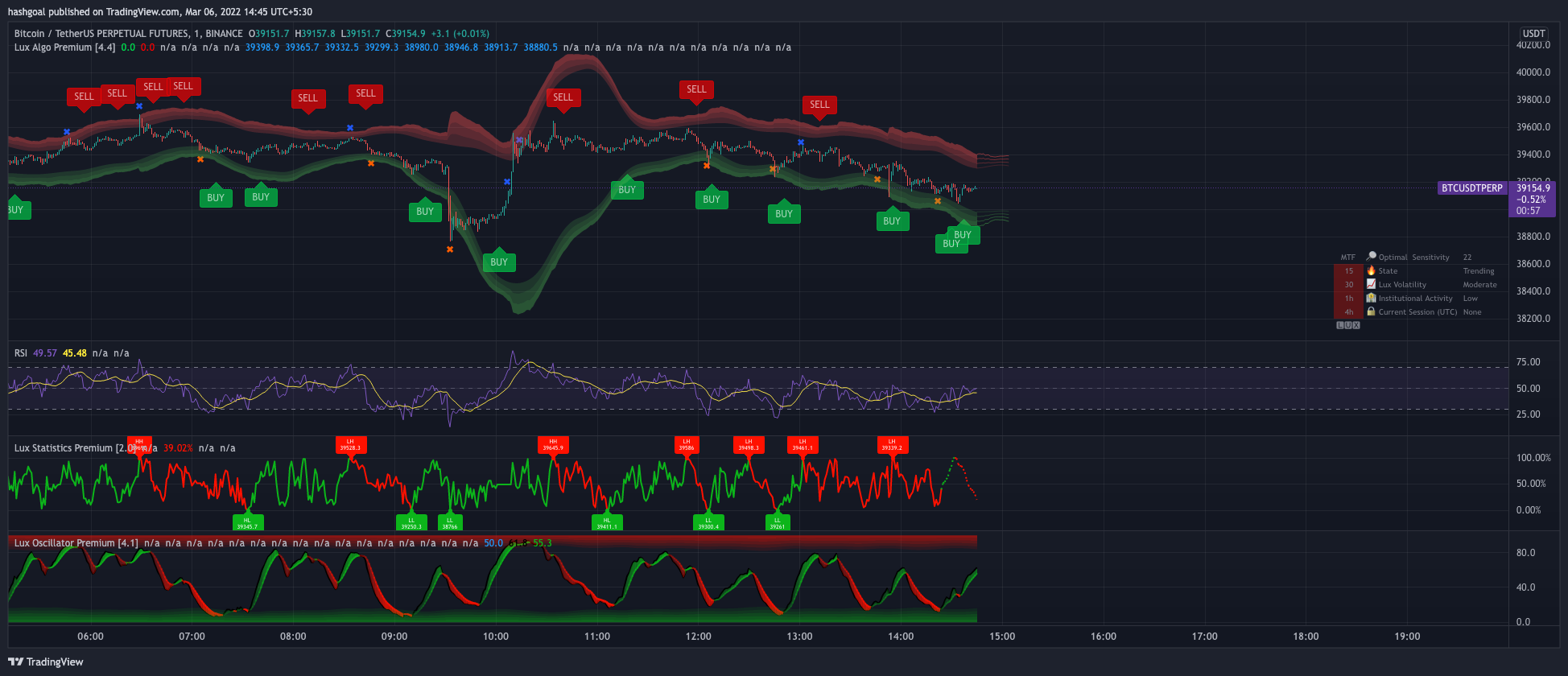
TradingView
wicked mortar
yeah
indigo cradle
Never ever seen this in my entire life 😅 Remove Lux and readd
And it should go back to normal
wicked mortar
its lux 4.4
 indigo cradle
Oh
I have an idea
Go to style
In the settings
I have a feeling you've turned off strong signals
wicked mortar
yeah i did, i only need buy sell signal to close of position.
indigo cradle
Strong signals are also buy sell
When you hide them this will happen
They are just buy sells that go with the macro trend
wicked mortar
indigo cradle
It is indeed in the message field
regarding this , lux algo provide some kind of variables for signals . ex. ${signalType}, ${price}
indigo cradle
wicked mortar
regarding this , lux algo provide some kind of variables for signals . ex. ${sig...
!alerts
jaunty perch
How to set up your own custom alerts in TradingView: https://docs.luxalgo.com/lux-algo-premium-indicators/setting-up-alerts-on-tradingview
Follow this guide for setting up your own custom alerts on TradingView.
wicked mortar
indigo cradle
They are just buy sells that go with the macro trend
ahh ok
wicked mortar
ok got it , thanks
steel epoch
indigo cradle
It's not and we don't really add things that are mainstream. We like to build th...
Ok. Thanks
 outer elm
I can't find live bot scanner. Is it not available now?
outer elm
Got it. Thanks!
cunning ferry
indigo cradle
<#780585592911560734>
this predictive range setting, is it based on S/R history of different timeframes?
shy relic
cunning ferry
this predictive range setting, is it based on S/R history of different timeframe...
the SR significance is not timeframe related, it controls various components within each SR feature, such as lookback window...etc 🙂
oak hound
Hello guys, can I backtest with previous optibot settings? Will I get correct results?
Let's say I want to know how usdjpy performed for the month of January and I decided to use January settings from optibot, will I get results 100 accurate to what the bot got in the month of January??
indigo cradle
You won't do no as it's calculated on each period. You would need to test each settings pair for a given window
oak hound
Maybe I'm confusing you lol, let me come again
Let's say I scroll all the way to January 3rd and collect optibot setting for that period and backtest it with tradingview. Won't I be getting signals similar to what happened in the market January 3rd?
indigo cradle
If the optibot settings line up with that time window yep 🙂
so if you're using the 3rd jan optibot settings on the 3rd jan data
that's fine
oak hound
indigo cradle
so if you're using the 3rd jan optibot settings on the 3rd jan data
Yes yes, correct. This is it
So it will bring similar results, as long as I'm using settings from that particular time period?
indigo cradle
Correct yep 😄
 raw yoke
opti setting for btc 5 min alerts arent that great compared for auto pilot short term which has a better alert wierd
 viscid saffron
is it ok if no purple colored candles appear on my Lux Algo Symbols charts?
 slender pilot
Hey guys! optibot 15m settings for BTC is usable for BTCUP in Binance?
slender pilot
Any one? 😔
 proud locust
hi what time zone are the scanner alerts posted ? thanks
indigo cradle
proud locust
hi what time zone are the scanner alerts posted ? thanks
They are posted UTC but it won't really matter too much there as they alert on a signal
indigo cradle
slender pilot
Hey guys! optibot 15m settings for **BTC** is usable for **BTCUP** in Binance?
It's useable there
indigo cradle
slender pilot
Hey guys! optibot 15m settings for **BTC** is usable for **BTCUP** in Binance?
It can be if the market is not ranging 👍
slender pilot
indigo cradle
It's useable there
The signs that appear in BTC are in BTCUP at the same time!
indigo cradle
slender pilot
The signs that appear in **BTC** are in **BTCUP** at the same time!
They can differ slightly, it's not s perfect fit but sure, you can use opti if you want there
It's close enough
 wanton bay
What range of time is good to compare? for example 15m and 4h or 1h and 1D? for swing entries.
 granite kraken
Do you guys support cornix ? Or can we get alerts on telegram?
For buy selll Signals
 rain oasis
i signed up for membership how do i activate in tradingview?
rain oasis
indigo cradle
Hi there 🙂
yes.
vapid river
indigo cradle
Which features were you using? 🙂
Here are my settings. I keep trying to toggle it on and off but it comes back with the error


 indigo cradle
ah sometimes breakout zones can be a little unstable; this will be patched 🙂
vapid river
ok
shy relic
@vapid river Issue should have been patched, please update to version 4.4 🙂
indigo cradle
^
vapid river
Ok Thanks will do
median rivet
hello there, i want to know if there is a way to open/close (automatically) signals with LUX
indigo cradle
median rivet
hello there, i want to know if there is a way to open/close (automatically) sign...
You can use 3commas
That tends to be the most popular one
median rivet
you guys have a tutorial or something to do that?
indigo cradle
We don't I'm afraid however 3commas would provide resources on that 🙂
median rivet
thanks, let me check it
median rivet
indigo cradle
We don't I'm afraid however 3commas would provide resources on that 🙂
hmmm look what they told me
I apologize for the inconvenience; however, at this time, no, you cannot do so. Although this is not currently available on the 3commas platform,
lol, this is not true
indigo cradle
3Commas is very commonly used to automate tradingview alerts
It's one of the main features they provide
If you asked "can I automate Lux Algo" they may not have understood the request
However yes; their platform integrates with TV webhooks nicely
median rivet
thanks
drowsy wyvern
Hi
Cubic Bézier Curve Extrapolation [LUX]
How can we use this new indicator
I fcould not understand fully from instuctions
sorry
 sick hill
@indigo cradle Hello, the new indicator "cubic" is not added to the indicators. Do you know what happens?
drowsy wyvern
sick hill
<@!456590452703887373> Hello, the new indicator "cubic" is not added to the indi...
I firrued out that we need to select 4 point just Admis said
on the chart
got it
thanks
indigo cradle
🙂
 indigo cradle
💔
drowsy wyvern
his one sounds great, ok
 indigo cradle
That's more like it 😉
 sick hill
drowsy wyvern
shiitt
sick hill
drowsy wyvern
shiitt
thanks!"

 verbal hatch
Hi support need help with the volatility chart, and buy/sell markers add-on you so generously provided
Or have I've fallen behind on new updates and functions?
verbal hatch
It was a function that was with TradingView
Actually, sorry so how do I pull out the nifty chart options you have available?
indigo cradle
Sorry I don't understand 😦 If you have a screenshot of the feature I can advise
And what do you mean by pull out nifty chart? Load it on tradingview?
verbal hatch
indigo cradle
And what do you mean by pull out nifty chart? Load it on tradingview?
That's right
indigo cradle
verbal hatch
That's right
On TradingView you just can search for nifty 🙂
verbal hatch
indigo cradle
On TradingView you just can search for nifty 🙂
It's been a while for me.
indigo cradle
 verbal hatch
indigo cradle
verbal hatch
indigo cradle
Ok I figured out what I'm asking, how do I access LuxAlgo on trading view! That's the question! 🤦♂️
indigo cradle
!guide
jaunty perch
How to setup the indicators on TradingView: https://docs.luxalgo.com/getting-started/setup-tradingview
TradingView.com --> Chart --> Indicators --> Invite-only scripts
Once you've signed up on our website and entered your active TradingView username within the "Connect Accounts" portal from your email, you will have instant access to use our indicators on the platform.
indigo cradle
^ 🙂
verbal hatch
indigo cradle
^ 🙂
THANK YOU THANK YOU!!
verbal hatch
indigo cradle
^ 🙂
It's possible I may need to update my account/subscription. How do I proceed?
indigo cradle
verbal hatch
It's possible I may need to update my account/subscription. How do I proceed?
You won't do 🙂
Do you have a screenshot?
verbal hatch
indigo cradle
Do you have a screenshot?
May I DM you?
indigo cradle
You may indeed
 fleet jetty
Why i am getting wrong signals is that because of wrong settings i have autopilot on short
shy relic
fleet jetty
Why i am getting wrong signals is that because of wrong settings i have autopilo...
What do you mean by wrong signals? They do not match the price variations you want to trade? You my want to try mid/long term for autopilot and see if it's better for you, else you can use optibot in case you need very precise settings or the recommended sensitivity on the dashboard :)
fleet jetty
shy relic
What do you mean by wrong signals? They do not match the price variations you wa...
Like i was getting buy signal and then after i buyed the candle went fully red and it never came green
indigo cradle
fleet jetty
Like i was getting buy signal and then after i buyed the candle went fully red a...
It's important to understand that not every signal will be correct nor are confirmation signals really meant for entries hence the name, they are for confirmation of a trade. Below are some great example strategies you can use
!strategies
jaunty perch
Find our full trading strategies playlist on YouTube: https://www.youtube.com/watch?v=xezy6WGpZ8Y&list=PLbqCXsOfrM3MjO7q7uIiwoVq3evI4neQr
New: How to find the best settings: https://www.youtube.com/watch?v=wkruvBBeXn8&t
Usability Tips: https://www.youtube.com/watch?v=5wtdY51crnc
Get instant access to use on any chart: https://luxalgo.com
fleet jetty
indigo cradle
It's important to understand that not every signal will be correct nor are confi...
Thx bro
jaunty perch
hello team. Can someone tell me why a resistance level would be plottet here (the one with the red circle around it
 indigo cradle
Because that area is most likely one of historical significance
jaunty perch
but what is this based on?
ionic knoll
scroll to the left and you will probably see other touches in a similar area, meaning it is a point in the past that was either a good support or resistance.
indigo cradle
jaunty perch
but what is this based on?
Nothing we make is really ever based on existing indicators or methods it'll be a ground up algorithm designed to detect this stuff based on historical price action👍
karmic fable
@indigo cradle a friend of mine wants to go with 1 year subscription he can't use the promo code while paying from crypto
indigo cradle
karmic fable
<@456590452703887373> a friend of mine wants to go with 1 year subscription he c...
With crypto payments sadly you cannot use a discount
karmic fable
Oh 😣
jaunty perch
Hi guys

Descending triangle normally the lower trend line is horizontal
this can be considered a descending triangle ?
( it is what the pattern recognition is saying )
Please could you tell me how to interpret properly the pattern recognition tool in this kind of situation.
indigo cradle
This is a pretty clear descending triangle yep
The dashboard correctly identified that; we have a basically horizonal support there
Traditionally a bearish pattern best traded on the break
restive matrix
Are you going to be adding more stocks into your optibot settings? Currently the list of stocks that you have been hammered so other stocks that are primed for good set ups given the current environment would be ideal 🙂
indigo cradle
Indeed we have this on the list 🙂 Generally optibot will always support major stocks though
 regal nebula
are there additional sources to learn about Lux Statistic Premium
indigo cradle
Have you seen our docs? 🙂
indigo cradle
Currently not I'm afraid however we plan to make some videos more specifically covering it
wind vector
Hi @indigo cradle is there a setting where we can change the signals to daily based

The strong signal was from 3 days ago
New day new signals?
in the above chart you can see the strong sell signal came 3 days ago
indigo cradle
You'd simply want to change your settings
So for example:
You may be using a very high sersitivity
Or long-term autopilot
Reduce these 🙂
wind vector
it is on short term
indigo cradle
Another thing with this chart is
You don't actually want any more signals
It's a very very very clean chart
any other signals just adds noise
There is no opportunity for a buy in that down trend
indigo cradle
On this chart?
wind vector
Yes
indigo cradle
It's been telling you to sell long long before this morning?
wind vector
yes
indigo cradle
Signals are not for entries remember. So as you can see we got a strong sell signal and a beautiful downtrend. This has lasted a few days. It's down to you, the trader to use other tools, indicators, features to find re-entries on a short/sell position
wind vector
Understood
indigo cradle
For example I see a minor sell on the advanced osci 🙂
Great opportunity to short there
Given the strong sell is still active
wind vector
i still don't understand the bearish and bullish divergence. I have seen the videos but still don't have clarity
Just a month into trading and only a week since using lux algo
indigo cradle
oh so you don't understand what a divergence is?
wind vector
Nope
indigo cradle

Investopedia
Divergence is when the price of an asset and a technical indicator move in opposite directions. Divergence is a warning sign that the price trend is weakening, and in some case may result in price reversals.
 delicate swift
indigo cradle
Or long-term autopilot
delicate swift
indigo cradle
Or long-term autopilot
so autopilot is mostly for long-term ?
indigo cradle
delicate swift
so autopilot is mostly for long-term ?
No no; that'll depend what you have it set to
Long-term
Medium-term
Or short-term
Found in advanced settings
delicate swift
depends on timeframe and the size of the chart right ?
wind vector
@indigo cradle can we change the colors of bullish and bearish divergence dots
indigo cradle
delicate swift
depends on timeframe and the size of the chart right ?
Not really; mainly down to how frequent a trader likes to see signals
And how frequently they want signals to appear
irrespective of timeframe
delicate swift
icic
indigo cradle
wind vector
<@!456590452703887373> can we change the colors of bullish and bearish divergenc...
Sadly not
wind vector
Okay if the dot is on top its bearish?
vast nimbus
I saw sometimes after buy/sell signal you don't get an exit signal, in this case how do you exit?
indigo cradle
!strategies
jaunty perch
Find our full trading strategies playlist on YouTube: https://www.youtube.com/watch?v=xezy6WGpZ8Y&list=PLbqCXsOfrM3MjO7q7uIiwoVq3evI4neQr
New: How to find the best settings: https://www.youtube.com/watch?v=wkruvBBeXn8&t
Usability Tips: https://www.youtube.com/watch?v=5wtdY51crnc
Get instant access to use on any chart: https://luxalgo.com
indigo cradle
In this playlist we show a lot of different methods 🙂
It could be a divergence
It could be at a support/resiistance
vast nimbus
Got it.
wind vector
Fantastic tool. Just need to understand it better
indigo cradle
wind vector
Fantastic tool. Just need to understand it better
You'll get there 🙂 Since you're new there's a bit of a learning curve - especially for a new trader
Happy to help when you have qns 😄
delicate swift
🙏
wind vector
Hey @indigo cradle the above 3 charts are of today. 1 - candles with no color. 2- Simple. 3- Gradient


If i follow confirmation simple color candle then this trade is not yet ranging as there are no green candles
its a 200 point upward move today which is rare since the start of the war
which is better to use 1. None, 2. Simple or 3. Gradient
indigo cradle
That is really down you 🙂 Whichever you prefer / find the most useful
wind vector
Can anyone from the group of awesome people help me understand osciallator and statistics please
indigo cradle
You've seen our docs and videos?