#🤝support
1 messages · Page 253 of 1
 indigo cradle
Can I see a screenshot?
 summer hearth
of what?
 summer hearth
now i get it thankyou

 unkempt edge
Can we switch discord accounts?
indigo cradle
You can; give support@luxalgo.com an email and they can swap those 🙂
 steady topaz
is their a way to get the confirmation to happen when it signals? for example if you are on the 5 minute it signals 5 minutes later it looks like. I am using the autopilot function.
 junior cliff
Does anyone know if its possible to have an alert when price enters the reversal zones? thanks
Nevermind i think i found it
indigo cradle
steady topaz
is their a way to get the confirmation to happen when it signals? for example i...
You could use something other than once per bar close for example once per bar
 bold egret
Hello , Hope everyone is doing well , just wanted someone to help me out the Detect pattern is not showing and i cant find it
 quasi nacelle
Hi! Why? I love to use the SR with Predictive Ranges in combination with Alerts
indigo cradle
bold egret
Hello , Hope everyone is doing well , just wanted someone to help me out the Det...
This is under SR mode
Pattern detection
indigo cradle
quasi nacelle
Hi! Why? I love to use the SR with Predictive Ranges in combination with Alerts
You have pred range alerts?
bold egret
indigo cradle
This is under SR mode
thank you
 shell sparrow
Hello, what should be sensitivity range for tesla
indigo cradle
shell sparrow
Hello, what should be sensitivity range for tesla
!settings
 jaunty perch
Everything you need to know on optimizing signal settings: https://docs.luxalgo.com/lux-algo-premium-indicators/lux-algo/signal-settings
This page showcases every way users can adjust settings along with full explanations of how they differentiate from each other.
 coral shale
When we set alerts in TV but the optibot changes the sensitivity settings do we have to then adapt the sensitivity settings and re-edit all alerts again?
or will alerts set before IE). Strong Buy / Strong Sell etc still show based on the new settings.
Just want to ensure I am not making more work for myself if it auto adjusts without the need to delete or modify and resave the alerts after adjusting sensitivity settings etc via Optibot.
 shy relic
coral shale
When we set alerts in TV but the optibot changes the sensitivity settings do we ...
shy relic
coral shale
When we set alerts in TV but the optibot changes the sensitivity settings do we ...
yes, alerts are always based on the settings used during their creation, so if you change them you will need to update them.
 lyric spade
what is the difference between green buy and strong?
 feral lava
!signals
jaunty perch
Learn more about our features & Signals: https://docs.luxalgo.com/lux-algo-premium-indicators/lux-algo/signals
Type Of Signals - Confirmation - Contrarian - Display
feral lava
@lyric spade Strong signals are more in accordance with the trend
 plain shale
Why do we have BCH, EOS, YFI, OMG among altcoin bot signals but no top coins like SOL, AVAX, LUNA,…?
quasi nacelle
indigo cradle
You have pred range alerts?
Ha, no I've the alerts triggered on Lux Algo and Exits and Any Confirmation Sell/Buy. In Lux Algo I've set the S/R to Predictive Ranges. That's ok though?
quasi nacelle
shy relic
yes, alerts are always based on the settings used during their creation, so if y...
And updating is done with edit the alert and then Save. Is this correct? Thanks in advance!
 ivory plover
What is the best optimized setting for trading 1 min chart in YM? Do you use the short term autopilot or do you adjust the settings yourself?
 summer herald
Hi everyone, I just joined but I entered my wrong TradingView username. How can fix that?
bold egret
Morning , is it possible to show divergences on the oscillator ?
indigo cradle
summer herald
Hi everyone, I just joined but I entered my wrong TradingView username. How can ...
Email support@luxalgo.com and they can see to this
indigo cradle
bold egret
Morning , is it possible to show divergences on the oscillator ?
The advanced oscillator will show divergences already 👍
bold egret
indigo cradle
The advanced oscillator will show divergences already 👍
I watched videos on youtube showing a box on the right showing activity and if there is a divergence , was that taken off ?
indigo cradle
The dashboard has been removed for now yep
indigo cradle
quasi nacelle
Ha, no I've the alerts triggered on Lux Algo and Exits and Any Confirmation Sell...
If you're settling an alert on signals don't have any SR mode on at the time of setting
 open rock
remember I told you I will be back after some backtesting 🙂 with regards to using EXIT BUY or EXIT SELL but differentiate between them.
well, was fiddling with settings and stuff, and realized it cannot be done. reason is that in order to send an EXIT BUY signal to a 3commas bot (and most likely other similar platforms), I need the custom message to be available (3commas for example needs a formatted JSON string). which is not possible with anyalert() signals (it has no option to add a custom message), the one that can actually differentiate between EXITS (buy or sell). if you guys can think of something else, or can suggest a workaround, let me know.
indigo cradle
open rock
well, was fiddling with settings and stuff, and realized it cannot be done. reas...
The only other way I'd suggest (which is long winded) is send an exit alert with the exit type in the message field to your own server. There parse that information and send it off to 3commas in the desired format
open rock
yes, I do think coding separately would be the only solution. because I trade on higher timeframes, it shouldn't be such a big issue. I do not rely on sending signals by milliseconds. would've been nice though to avoid that.
 cosmic meteor
How do I set alerts on when to buy/sell?
indigo cradle
!alerts
jaunty perch
How to set up your own custom alerts in TradingView: https://docs.luxalgo.com/lux-algo-premium-indicators/setting-up-alerts-on-tradingview
Follow this guide for setting up your own custom alerts on TradingView.
 acoustic moon
- How do I keep my settings on a given indicator after updating? I keep having to go through and figure out / change every setting back to my preferences with updates. I don't understand why it cannot keep my settings.
- The new "autopilot" controls (low, med, high time frames) - can you give us some guidance on those vague terms? How many bars are we talking for each option?
- Do you provide any guidance on use of your occilator? I've watched every video you have on the occilator (that I can find) and they are void of any actual information. They basically just name objects and show you where to click them on/off within the settings panel,,,, but zero guidance on what the features do, how to use them, strategies, etc.
indigo cradle
- We don't update very frequently, maybe once per 2 months to avoid this. This is a tradingview limitation and not something we can control sadly so maybe writing down settings somewhere is a good solution.
- It's not so much of a bars thing it's the max bounds of the sensitivity. So low will bound the sensitivity in a low range and high in a higher range. So a user who wants a few longer term signals would want long term naturally and someone who wants more uses short term
- Our docs cover these in detail:https://docs.luxalgo.com/lux-algo-premium-indicators/lux-oscillator-premium if you're looking for strategies that use these with example usecases see: https://www.youtube.com/c/GeckoTrading
Features

YouTube
Sharing trading strategies that I've developed using Lux Algo + more.
(Not actually a gecko.)
acoustic moon
When I'm backtesting to see how specific settings faired.... How does this work when using "auto pilot"? Since auto pilot is dynamic based on current trending/action does that mean that signals "in the past" are not representative of how they would have actually displayed at that time?
indigo cradle
They would all be correct and not repainted 🙂
acoustic moon
How far back (bars) does the autopilot analyse when making decisions? (and can that be adjusted).
indigo cradle
That'll be adjusted by the frequency setting with long/med/short
acoustic moon
ok, but how far back does it analyze on each of those different settings?
The link you provided on the occilator " https://docs.luxalgo.com/lux-algo-premium-indicators/lux-oscillator-premium/ " does not work... none of the drop downs work
Features
indigo cradle
For me they seem to work; do you have a SS of the area they don't work?
 late inlet
@indigo cradle : Can you suggest me a good Sensitivity and Agility level for Bank Nifty Index chart (INDIA) on a 15 minute timeframe?
indigo cradle
!settings
jaunty perch
Everything you need to know on optimizing signal settings: https://docs.luxalgo.com/lux-algo-premium-indicators/lux-algo/signal-settings
This page showcases every way users can adjust settings along with full explanations of how they differentiate from each other.
indigo cradle
This is our settings suggestions page 👍
late inlet
What is the best time to enter or exit on a Nadaraya-Watson Envelope indicator?
 tough finch
Should we choose crossing or entering channel in the trading view alert settings.
tough finch
let's assume I am trying to get the buy and sell signal in the BTC 15 min chart
indigo cradle
!alerts
jaunty perch
How to set up your own custom alerts in TradingView: https://docs.luxalgo.com/lux-algo-premium-indicators/setting-up-alerts-on-tradingview
Follow this guide for setting up your own custom alerts on TradingView.
plain shale
plain shale
Why do we have BCH, EOS, YFI, OMG among altcoin bot signals but no top coins lik...
??
indigo cradle
Since the creation of the scanners these are newer coins that appeared so we can add those in
acoustic moon
In studying the "Pivot Occilator" I'm having issues determining the meaning/how to read the information. The Lux Documentation has almost nothing about this tool. Examples of missing information: 1) The meaning of the color on the occilator. Usually this would indicate and up/down trend but it diverges so much from any of the other trend lines (and prcie itself) that I'm assuming it means something else. 2) The numbers within the "labels" are not defined - what are they / how to use them. 3) The specific difference between the solid line area and the dotted line area. Final comment (text within the labels is so small as to be unreadable - no way to adjust it).
Please point me toward more detailed information (or let mek now here in discord), thanks.
indigo cradle
Naturally in the docs there's a limit since we need to be concise so certain information is assumed. So:
- It's a pivot oscillator so if a pivot is higher than the previous one you'll see a green line else you'll see a red line
- Those numbers are simply the close price of the given pivot
- The dotted area is covered in the docs a bit so it's a forecast. It's there to predict the location of a pivot point
Example of the forecast below; I drew on the green line but as more candle appear the forecast may look like this and start to turn up and become green suggesting a new pivot was created
 plain shale
indigo cradle
Since the creation of the scanners these are newer coins that appeared so we can...
plain shale
indigo cradle
Since the creation of the scanners these are newer coins that appeared so we can...
When?
indigo cradle
They can be worked on and added shortly
 inland bane
This is my 4H chart for BTC. Ive noticed with this app that it'll tell me to buy and then I will. Then shortly after it tells me to sell at a loss. are there any settings that I can use to not have this happen?

happens quite frequently with other cryptos as well
Or perhaps any suggestions to read into these charts more on whether it really is a good time to buy or sell?
indigo cradle
A few things:
So firstly those signals aren't really telling you to buy or sell on a close or be followed blindly. They are confirmation signals to be used to confirm a trend or trade. So if you had an entry using another indicator you'd confirm your trade was on the right track using those signals. You should absolutely not buy/sell on them blindly
Secondly you'll want to employ a strategy as demo'd:
!strategies
jaunty perch
Find our full trading strategies playlist on YouTube: https://www.youtube.com/watch?v=xezy6WGpZ8Y&list=PLbqCXsOfrM3MjO7q7uIiwoVq3evI4neQr

New: How to find the best settings: https://www.youtube.com/watch?v=wkruvBBeXn8&t
Usability Tips: https://www.youtube.com/watch?v=5wtdY51crnc
Get instant access to use on any chart: https://luxalgo.com
inland bane
Thanks! I will look into this

 teal marlin
For example, some green candles have red border around them, some red candles have green border around them. How can I remove it
inland bane
inland bane
This is my 4H chart for BTC. Ive noticed with this app that it'll tell me to buy...
Back to this topic, What are the best setting for the lazy man with not much time and doesnt want to think? In the video you linked was quite useful, but it requires me to think more after the Lux Algo gives the confirmation. Is there another setting I can tick that will give me another confirmation after the first confirmation? For example, for BTC 4h chart, I get a buy signal. Then later on it says Extremely strong, buy now stupid! Is this what these options are for?
 indigo cradle
Those options are for the alert so yes this is exactly what those mean so you'd have a buy signal then it becomes stronger 🙂
!settings
jaunty perch
Everything you need to know on optimizing signal settings: https://docs.luxalgo.com/lux-algo-premium-indicators/lux-algo/signal-settings
This page showcases every way users can adjust settings along with full explanations of how they differentiate from each other.
indigo cradle
Here are the options on the settings and someone of those may allow you to set and forget
It's really really a personal thing
inland bane
Legend thanks

 indigo cradle
You can find them in the video description on youtube 🙂
 inner wadi
Thanks 🙂
 true veldt
 thin geyser
indigo cradle
Anything really over the 15m timeframe is best
thin geyser
indigo cradle
Anything really over the 15m timeframe is best
anything >= 15M is good?
indigo cradle
In general indeed
acoustic moon
"AutoPilot" vs "Optimal Sensitivity" : Can someone detail the difference between these two settings. They are both supposidely and optimized setting based on recent history of a specific timeframe. Yet they produce different results... So specifically what is one doing that the other is not?
indigo cradle
AP dynamically adjusted settings with market conditions whereas optimal sensitivity is basically a classic backtest
acoustic moon
can you elaborate a bit more? I'm still unclear how that differs.
indigo cradle
AP analyzes the market conditions and for each bar will re-evaluate the settings used dynamically
A classical backtest tries to overfit one setting through a dataset
feral lava
acoustic moon
"AutoPilot" vs "Optimal Sensitivity" : Can someone detail the difference betwe...
The use case for autopilot is so you don't have to worry about inputting any sensitivity value like you would with other optimization methods like Optimal Sensitivity
acoustic moon
I see,,, So when I'm backtesting "autopilot" those signals won't necessarily be the same as they were at that point in time (repainted) (as they are being dynamically created)...
indigo cradle
They won't be repainted
So it won't re-evalutate itself
However the "Optimal sens" would be hard/impossible to backtest really
Because that does re-eval itself
acoustic moon
Ahhh,,, good to know... thanks... are there any other settings that repaint that I should know about..... I'm backtesting a lot of options in an attempt to see what best suites my trading preferences.
indigo cradle
Just any form of backtest optimisation or overfit is very hard. Only "Optimised Sens" or Optibot will do this in theory
Everything else you're all good to test
acoustic moon
thank you.
indigo cradle
Mmmm well
It depends what you mean by the same effect; you can use all modes to identify Overbought/Sold areas and find divergences 🙂
 woven coyote
Yes, that's what I mean, overbought/sold areas. Thanks
inner wadi
how to avoid false signal ?
 willow heron
indigo cradle
So firstly those signals aren't really telling you to buy or sell on a close or ...
willow heron
indigo cradle
So firstly those signals aren't really telling you to buy or sell on a close or ...
If we have to do analysis even after using the indicator so then what is the use of theis indicator?
indigo cradle
inner wadi
how to avoid false signal ?
!strategies
jaunty perch
Find our full trading strategies playlist on YouTube: https://www.youtube.com/watch?v=xezy6WGpZ8Y&list=PLbqCXsOfrM3MjO7q7uIiwoVq3evI4neQr
New: How to find the best settings: https://www.youtube.com/watch?v=wkruvBBeXn8&t
Usability Tips: https://www.youtube.com/watch?v=5wtdY51crnc
Get instant access to use on any chart: https://luxalgo.com
indigo cradle
See some example filtering methods here ^
indigo cradle
willow heron
If we have to do analysis even after using the indicator so then what is the use...
No one will ever give you something you can follow blindly and make money. Money printers don't exist unless you're the FED. These are technical indicators for you to use to analyse charts
inner wadi
👍
indigo cradle
Use the side panel (left) or the search bar (right) to navigate our docs.---
 spice rampart
Hello- just curious, is there any such space on the website where we can read 'coming soon' features/improvements ?
indigo cradle
There isn't currently as the space is so rapidly evolving. If TV added custom screeners tommorow it'd throw road maps out the window
Or whenever pine adds new functionality
It's not very classical software development
open rock
can you explain to me in a few words the difference between Confirmation Buy, Strong Buy and Confirmation Buy Turn Strong? there is no clear explanation in a video or in the docs
and I'm pretty sure I need your guidance, cause the choice of wording for naming those signals can differ in meaning from person to person lol
thanks
indigo cradle
Confirmation Buy = normal buy signal small uptrend possibly
Strong Buy = a buy signal that's going with a macro trend mostly
Confirmation buy turn strong is a normal buy that ended up becoming a macro uptrend
 lapis snow
I'm curious what's the difference between the two Strong Buy/Strong Sell alerts?

 cosmic iris
Think this was asked right before you posted this comment @lapis snow
Strong is following the overall trend
Buy and sell are signals where the trend isn't in favor of the signal
lapis snow
lol I did see that after posting but I meant what's the difference between these two Strong Buy & Strong Sell alerts @cosmic iris
 cosmic iris
Didn't even notice that lol
indigo cradle
lapis snow
lol I did see that after posting but I meant what's the difference between these...
The first set are for confirmation signals the second for contrarian
 dim grove
When setting the alerts using the Any alert () function call, does it only trigger at bar close by default?
indigo cradle
It will do 👍
dim grove
I don't see the option to have it trigger when it first appears?
 final hearth
where can i get an explanation on the indicators? how they work? what can i analyze from them?
indigo cradle
!docs
jaunty perch
Learn about every aspect of Lux Algo at: https://docs.luxalgo.com
Learn how every aspect of our product suite works & get useful information about technical analysis.
acoustic moon
STANDARD CANDLES vs HEIKIN ASHI CANDLES: So I noticed that when using Heikin AShi candles (via Trading View settings) - the LUX results (signals, trend catcher & trend tracer) give VERY different results verses "standard candles". 1) Are you aware if Heikin vs Standard give better results? 2) If "better" is not applicable, can you describe how the results would differ (eg: maybe one catches trends better while one is better in "range" movement). 3) If Lux is not aware of this situation at all, then is this something you could look into (maybe pass it by the programers and/or do some statistical back testing and see what the effects are)?
indigo cradle
HA candles are just smoothed data. It's comparable to just having a moving average in a way. It just means data is smoother but lags a bit
Better is definately not applicable as it depends on the trader really here
It's not really a metric that can be quantified. These are indicators not strategies so a config for one user may be bad for another
It just comes down to a preference there
 dim holly
may I know what is the diff between pivot oscillator and pivot high/low alert?
 indigo cradle
Pivot oscillator is the plot itself
The pivot high and low are just the dots at the pivot
dim holly
i know pivot high/low will get alerted once they are formed
what abt pivot osicllator, when will it alert?
indigo cradle
These are just plots
They aren't really alerts
So selecting them isn't selecting an alert
 jagged adder
Hello i have the following switched on but not getting any alerts. Do I need to do anything to activate these?
 indigo cradle
!alerts
jaunty perch
How to set up your own custom alerts in TradingView: https://docs.luxalgo.com/lux-algo-premium-indicators/setting-up-alerts-on-tradingview
Follow this guide for setting up your own custom alerts on TradingView.
indigo cradle
You need to follow through and actually create the alert
In the alert menu

This is a tutorial on how to use our brand new all-in-one alerts system within the main Lux Algo Premium indicator on TradingView. This makes it easier for users with the free TradingView membership to get multiple specific conditions in one alert.
See the guide on our docs: https://docs.luxalgo.com/lux-algo-premium-indicators/lux-algo/alerts#...
 hardy kraken
On the Discord channel, you have the 'Settings Optimizer' with different timeframes. Why is the info here? Its it recommended settings, or if you have 'autopilot', will these be the settings per the stock symbol? Thanks!
indigo cradle
!settings
jaunty perch
Everything you need to know on optimizing signal settings: https://docs.luxalgo.com/lux-algo-premium-indicators/lux-algo/signal-settings
This page showcases every way users can adjust settings along with full explanations of how they differentiate from each other.
indigo cradle
This explains the options and their perks ^
jagged adder
indigo cradle
You need to follow through and actually create the alert
Hello, so for example if i wanted to set alerts for GOLD on the 5mins and 30mins I would need to create 2 separate alerts i.e. one for each time frame?
indigo cradle
Correct 🙂
jaunty perch
Hello, any moderator or admin here?
indigo cradle
DMd
 neat burrow
I keep getting script errors, new user, can't figure out what I'm doing wrong, everything is on autopilot. Very annoying, any suggestions? thanks
 indigo cradle
Which features do you have enabled?
willow heron
Please anyone suggest me strategy please
indigo cradle
!strategies
jaunty perch
Find our full trading strategies playlist on YouTube: https://www.youtube.com/watch?v=xezy6WGpZ8Y&list=PLbqCXsOfrM3MjO7q7uIiwoVq3evI4neQr
New: How to find the best settings: https://www.youtube.com/watch?v=wkruvBBeXn8&t
Usability Tips: https://www.youtube.com/watch?v=5wtdY51crnc
Get instant access to use on any chart: https://luxalgo.com
willow heron
Already watched it many a times. Not working perfectly
indigo cradle
It's a playlist
There are about 10 videos there 🙂
And nothing works perfectly of course
neat burrow
features enabled while getting repeat script errors:


 indigo cradle
You have breakout zones enabled which can timeout if left open for a little while we will be releasing update soon to patch 🙂
neat burrow
ohh... okay, yes, if I turn script on/off, it'll temp fix it .. okay, so you guys are "on it" ... no problem, thank you !!
willow heron
indigo cradle
It's a playlist
Oh okay
 quaint flame

 willow heron
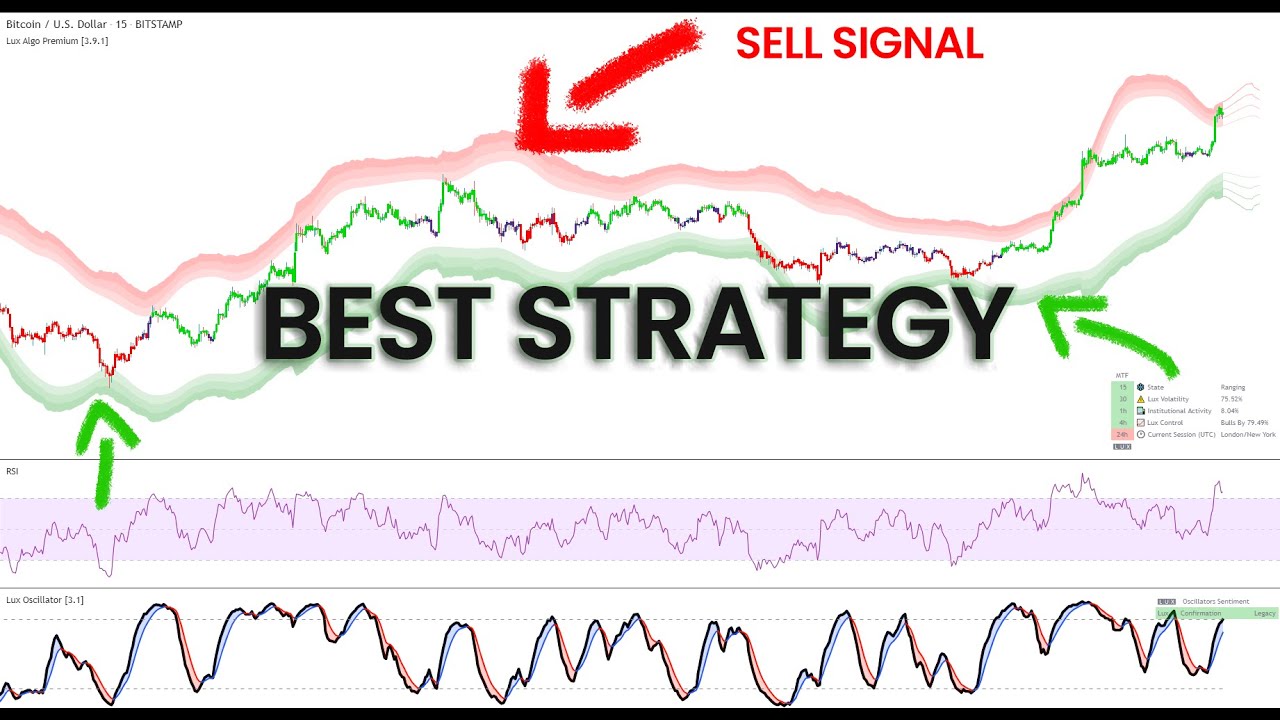
This video showcases a simple BTCUSD 15m strategy using RSI, Reversal Zones and the Lux Oscillator (Legacy Mode). It's a simple to follow and implement strategy that can be taken, developed and used. Make sure to leave a like & subscribe for more trading strategy videos!
Get access to Lux Algo indicators: https://luxalgo.com/
Lux Algo features...
is this strategy only applicable on BTC or we can implement it on any coin?
 dry merlin
Luna Crypto. Crazy climb. 🙂
 faint verge
Hi! is there a way to save presets on the algo configurations so I dont need to keep changing the settings every time I change timeframes or tickers?

 night beaconBOT
How to save settings for a trading pair on TradingView:
 harsh burrow
Hi I just purchased the lifetime premium and when I'm in trading view and attempt to turn the indicators it gives me a red ! and when I hover over the ! it reads "Study Error Study_not_auth" When I selected the indicator in the menu it said I am granted access. any help would be great
indigo cradle
Hi there 🙂 If you've connected your account try refreshing your TradingView 🙂
harsh burrow
BAM!!! Thank you lol
indigo cradle
Welcome 😄
dim holly
indigo cradle
The pivot high and low are just the dots at the pivot
I see then I would only need to choose pivot high/low as my alert
 sterile relic
Will the pattern detection alert trigger if I am not using the pattern detection mode. I am currently using the breakout zones mode on the chart but would still like to be alert to patterns if possible.
 ionic rampart
 jaunty perch
How to setup the indicators on TradingView: https://docs.luxalgo.com/getting-started/setup-tradingview
TradingView.com --> Chart --> Indicators --> Invite-only scripts
Once you've signed up on our website and entered your active TradingView username within the "Connect Accounts" portal from your email, you will have instant access to use our indicators on the platform.
feral lava
if not, email support@luxalgo.com to change your username
inner wadi
i have a doubt is it possiable to change Tradingview username ?
 grizzled raft
doesnt work
I dont have access to the charts and paid too
Once you've signed up on our website and entered your active TradingView username within the "Connect Accounts" portal from your email, you will have instant access to use our indicators on the platform.
feral lava
grizzled raft
doesnt work
try a refresh & then go through same guide, should work! but let us know if not
feral lava
inner wadi
i have a doubt is it possiable to change Tradingview username ?
Get answers to frequently asked questions.
 limpid zodiac
Hi, I just renewed my subscription but I still don’t have the access, can u help please?
feral lava
Hi @limpid zodiac try refreshing TradingView & then it should be there, if not request access to support@luxalgo.com
limpid zodiac
Ok
 stuck narwhal
Hi. I subscribed to the indicator 3 months ago. Used a little. About a month. Didn't use it anymore. And naturally I forgot to cancel my subscription. Yesterday, money was debited from me for another 3 months. Help me please return the money and cancel the subscription.
indigo cradle
 unkempt needle
i have a question
unkempt needle
i have a question
How can I help? 🙂
indigo cradle
stuck narwhal
Hi. I subscribed to the indicator 3 months ago. Used a little. About a month. Di...
You'll need to email support@luxalgo.com for all order enquiries
unkempt needle
How much i put signal sensitivity on purfect buy and sell signal generat and which time frame
indigo cradle
!settings
jaunty perch
Everything you need to know on optimizing signal settings: https://docs.luxalgo.com/lux-algo-premium-indicators/lux-algo/signal-settings
This page showcases every way users can adjust settings along with full explanations of how they differentiate from each other.
jaunty perch
Hello everybody, what it means de blue circle inside of the candle? couldn't find the anwser before
sterile relic
Will the pattern detection alert trigger if I am not using the pattern detection mode. I am currently using the breakout zones mode on the chart but would still like to be alert to patterns if possible. Also, I know this may be a dumb questions but if using a pattern detection alert does the chart need to be open or will the algo run even if the chart is not open?
indigo cradle
jaunty perch
Hello everybody, what it means de blue circle inside of the candle? couldn't fin...
Blue circle in the candle? Do you have a Ss?
jaunty perch
 indigo cradle
sterile relic
Will the pattern detection alert trigger if I am not using the pattern detection...
indigo cradle
sterile relic
Will the pattern detection alert trigger if I am not using the pattern detection...
You'll want it enabled when you set the alert and you don't need to leave anything open 👍
jaunty perch
ok thanks
sterile relic
indigo cradle
You'll want it enabled when you set the alert and you don't need to leave anythi...
Yes I have it activated, I just was not sure if chart needed to be open. Obviously if I set a price or trend alert the chart does not need to be open. But I was not sure if the pattern detection required the chart to actually be open. And if I want pattern detection on multiple times frames I just need to set the alert on each time frame correct?
indigo cradle
The chart doesn't need to be open 👍 and yep just set on multiple tfs
sterile relic
Thank you very much! Happy New Year.
indigo cradle
Happy new year 🎉
grizzled raft
Its been 9 hours
my account has not been added or changed
I drroped an email
if not can you refund /
grizzled raft
feral lava
try a refresh & then go through same guide, should work! but let us know if not
I did send an email
indigo cradle
Please DM me a screenshot of the email you sent
grizzled raft
is this correct?
 indigo cradle
Is what correct?
This is a screenshot of your TradingView window
I'd just need to see a screenshot of your email, if you private message reply to me I can take a look 👍
unkempt needle
Yes
lapis snow
I was wondering, if I set my notifications/alerts for Buy, will I still get notified if a Strong Buy occurs?
(essentially a are all rectangles boxes type question.)
indigo cradle
If you just select buy nope it'll just be for normal buys
If you want both you'd need to select both 🙂
lapis snow
Thanks for that!
willow heron
Hey admin. I need videos related lux algo oscillator. Thanks
indigo cradle

In this video we walkthrough the new Lux Oscillator Premium v4.0 which is our 2nd most popular indicator toolkit on TradingView.
FULL GUIDE: https://docs.luxalgo.com/lux-algo-premium-indicators/lux-oscillator-premium
Get instant access: https://luxalgo.com
Trading strategies playlist: https://www.youtube.com/watch?v=xezy6WGpZ8Y&list=PLbqCXsO...
 tight tundra
hello. Whats the recommend setting for the lux statistics? For an example I heard the oscillator length should be set for 50... On what time frames would I want to adjust these settings..
Also does anyone use any other indicators to help with finding entries\exit... Kinda new to trading... so any help would be appreciated .
indigo cradle
tight tundra
hello. Whats the recommend setting for the lux statistics? For an example I hear...
Default is always nice 🙂
tight tundra
indigo cradle
Default is always nice 🙂
nice... lol ty
 thick valve
Hello, any optimised settings to apply to 4H LUNA-USDT?
indigo cradle
!settings
jaunty perch
Everything you need to know on optimizing signal settings: https://docs.luxalgo.com/lux-algo-premium-indicators/lux-algo/signal-settings
This page showcases every way users can adjust settings along with full explanations of how they differentiate from each other.
dim holly
Hi @indigo cradle , does pivot low/high repaint or real time?
dim holly
I see ok. Thx for the clarification 👌🏻
 north oxide
indigo cradle
The forecast is real time
north oxide
indigo cradle
The forecast is real time
Forecast??
indigo cradle
Correct the pivot oscillators main realtime usercase is the forecast
hardy kraken
Trying to connect TradingView alerts to Discord, but when I select the condition 'Lux Algo Premium', the message box disappears (which I need to send the JSON content to Discord). The box is there for 'Lux Oscillator' and 'Lux Statistics', but not the 'Premium'. Is this intentional or just a bug that can be fixed? Thanks
indigo cradle
If you're using the all in one alerts this field isn't avail
Only for the built in alerts
e.g. this will work
 hardy kraken
Apologies, I just saw I had to select that as well and then the message box comes up.
jaunty perch
hi, i send a support request about my account. I got the lifetime membership and they amended my trading view username, but I am still unable to see anything while connecting the account button
ok i can see the invite scripts, but as per your email i did not see the following:
 jaunty perch
So I understand what the sensitivity is in the indicator and how to change it to what you want BUT can someone explain to me the agility %? I’m having hard time understanding how it affects the indicator
Or if anyone knows of a video that covers that
 sour pumice
Can someone please help, I’m having problems with setting the alarms on TradingView. It says Stopped, calculator error.
 indigo cradle
@mossy torrent will take a look 👍 it is very very overfitted
indigo cradle
sour pumice
Can someone please help, I’m having problems with setting the alarms on TradingV...
When you set the alert ensure you have SR modes disabled
indigo cradle
jaunty perch
So I understand what the sensitivity is in the indicator and how to change it to...
You don't really need to touch it unless using optibot
indigo cradle
jaunty perch
ok i can see the invite scripts, but as per your email i did not see the followi...
Is this resolved?
jaunty perch
indigo cradle
Is this resolved?
l can actually see the indicators now, but not as per the original screenshot i sent out where i could see LuxAlgo on the right side of the page
as it says once you click on connect it will direct you to tradingview from the confirmation email sent by the team
indigo cradle
Ah ok but you've got access now? 👍
jaunty perch
is that what is required, just the access to the indicators?
indigo cradle
Yep just access
 indigo cradle
Yep you are all good to go 👍
 pine mortar
Hello, I just bought the lifetime, but now I have two accounts on my LuxAlgo account.
How can I handle this? Sorry, I did not upgrade my first account, instead I bought the lifetime, using the same email and the same credit card.
Help appreciated. @indigo cradle Thanks.
indigo cradle
pine mortar
Hello, I just bought the lifetime, but now I have two accounts on my LuxAlgo acc...
Hi there. If you other membership is active you can login to your account and cancel that one; else you can email support@luxalgo.com and they can get that sorted 👍
pine mortar
indigo cradle
Hi there. If you other membership is active you can login to your account and ca...
Thanks. I have just managed accounts and cancelled the quarterly plan. It would still be active until March 2022. I have requested access/connected the new one both to TradingView and Discord. Hope I am all set now.
By the way, happy new year!
indigo cradle
Happy new year and you should be all good 👍🤝
 frigid epoch
Hey @indigo cradle happy new year to you as well
I have seen your live Lux channel on youtube showing live chart. How do you show the chart following the newest candles beign painted without having you to move the mouse or scooting over using the trackpad?? Thanks beforehand!
Would be useful to have that in my room displayed 24/7 using lux algo indicator
indigo cradle
If auto is selected on the scaling it should automatically follow ☺️
frigid epoch
@indigo cradle thanks and how does one find that option?
indigo cradle
Hahahaha it's all good 😉 it's pretty small and hidden to be fair
 barren rune
Is there a list of all trading pairs and/or ways to pull in additional feeds? for example Rubic only has an eth trading pair..
indigo cradle
Sadly you can't full additional data feeds into TV really
barren rune
tracking.. thanks
 cinder epoch
indigo cradle
cinder epoch
indigo cradle
Hi there, give support@luxalgo.com an email and they can swap those over for you 👌
sour pumice
indigo cradle
When you set the alert ensure you have SR modes disabled
I’m still getting the same message, I did turned off S/R.
indigo cradle
Did you remake the alerts?
 vagrant night
@indigo cradle hey can u tell me how to use the auto trend lines....how do they work ?
do they forecast ?
shy relic
vagrant night
<@456590452703887373> hey can u tell me how to use the auto trend lines....how ...
The auto trendlines can be used as support and resistances, you can learn more about them here https://docs.luxalgo.com/lux-algo-premium-indicators/lux-algo/support-and-resistance-and-trendlines#auto-trendlines
Predictive Range - Predictive S/R - Trendlines
vagrant night
shy relic
The auto trendlines can be used as support and resistances, you can learn more a...
is there a way to set an alert for when an auto trendline begins ?
@shy relic i dnt fully understand them....but backtesting them i can see that they are powerful and can be powerful with a strategy
 short lynx
hi there i have paid for algo but it doesnt seem to be in my invite scripts
sour pumice
indigo cradle
Did you remake the alerts?
Nop, I’ll try that.
 frail kraken
Hi.. every time I change the crypto in the trading view, I have to change the bot settings manually.. what is the other option to make it simple..
feral lava
short lynx
hi there i have paid for algo but it doesnt seem to be in my invite scripts
try refreshing TV
frail kraken
frail kraken
Hi.. every time I change the crypto in the trading view, I have to change the bo...
????
 mossy torrent
indigo cradle
<@710903696468213850> will take a look 👍 it is very very overfitted
mossy torrent
indigo cradle
<@710903696468213850> will take a look 👍 it is very very overfitted
Please do thanks! Also is there a place in here where people post their strategies. Just curious. Thanks!
feral lava
frail kraken
????
Hi! Settings on the indicator aren’t per ticker
If you want specific settings on specific tickers you will have to change. You can make & save TradingView chart layouts though which will keep settings on specific tickers when you switch to them 🙂
 lethal rover
Hey I’m trading with BitsGap and curious if anyone else utilizes BitsGap and LuxAlgo ? On their charts it’s TradeView but not linked to my TV acccount which has LuxAlgo?
Any advice on how LuxAlgo can help me with coin pairs etc
lethal rover
mossy torrent
Please do thanks! Also is there a place in here where people post their strateg...
Would like to know also
feral lava
Hi @lethal rover Lux Algo only works on TradingView.com as of now! Just the direct platform’s charts, integrations are coming soon though
feral lava
mossy torrent
Please do thanks! Also is there a place in here where people post their strateg...
You can share in #💬hangout or #🔍feature-requests 🙂
night beaconBOT
Hi @agile grotto! Click Manage Account here: https://luxalgo.com/
Or email support@luxalgo.com and our team will assist you with any request the same day.

Enhance your trading experience with our premium technical indicator suite + bots for stocks, forex, futures, currencies & commodities markets.
 wanton tree
Hi.. What is lux algo bot.. And how can i get it
And i have issue with the indicator alert
Sometimes indicator show up.. But no buy/sell signal on chart
jaunty perch
How to setup the indicators on TradingView: https://docs.luxalgo.com/getting-started/setup-tradingview
TradingView.com --> Chart --> Indicators --> Invite-only scripts
Once you've signed up on our website and entered your active TradingView username within the "Connect Accounts" portal from your email, you will have instant access to use our indicators on the platform.
wanton tree
I have the indicator..
I mean.. Are there other than indicator?
Bot..??
Lux algo
Advance trading view tools + bot
*how can i get the bot
indigo cradle
We have discord bots which that'd refer to
But you're in the discord so have access to our discord bots
Such as news, scanners, luxbot
 dreamy phoenix
Hi all happy new year. I'm new to lux and wanted to check that the buy and sell signals are just zones correct?
indigo cradle
Happy new year 🤝 what exactly do you mean by zones?
dreamy phoenix
Basically where the strong buy or sell signal shows on top or bottom of an area you would still need to conduct your analysis for entry and exit correct? The algo doesn't provide specific entries
indigo cradle
dreamy phoenix
Basically where the strong buy or sell signal shows on top or bottom of an area ...
Yep exactly they are rough areas 🙂
 obtuse dew
Hi, I have been trying to load Lux Algo Premium indicator and it doesnt load, can someon help me with that
 eager cypress
same here
indigo cradle
Have you connected your accounts?
obtuse dew
Yes I did, It was working yday all day
obtuse dew
 indigo cradle
ah yes
remove and re-add
when you leave it open with breakout zones for a while it will do this
is being patched soon
 near jackal
Hello I am new, I purchase Lux yesterday, and it's not working I have an error study
near jackal
Yes I did
indigo cradle
Which features do you have enabled? Breakout zones?
near jackal
Default
indigo cradle
Could I see a screenshot?
obtuse dew
Yes I did enable breakout zone
near jackal
No None
indigo cradle
near jackal
No None
Could I get a SS?
near jackal
 near jackal
Study error
indigo cradle
Try removing and re-adding the indicator
near jackal
All Lux study removed it and add it again
obtuse dew
for me its not working on any chart
indigo cradle
Even without breakoutzones?
obtuse dew
yes
indigo cradle
um maybe tradingview is under some load at the moment
Give it 15/20m and return to tradingview and try reloading
obtuse dew
its taking time to load and throws red exclamatation
indigo cradle
Yeah give it 15/20m I think and try again
near jackal
Yes the same here
indigo cradle
^
 vocal surge
Same, I'm assuming tradingview is wayyyy overloaded since its the first trading day of the year.
obtuse dew
other indicators seems to be working
indigo cradle
Other indicators aren't as chunky
When their servers need to compile a large script they are probably struggling. This happens a few times a quarter really
But should be back to normal shortly
obtuse dew
so this isnt an issue with breakout zones option selected
indigo cradle
Not at the moment nope

 olive apex
Same here.
And a 9:50 alert (on the 5 minute timeframe) just triggered
Something odd happening.
vocal surge
 olive apex
Ahh, good to know, didn't realize there was a status page.
vocal surge
Their working on it, Lux algo is just algorithim, the service is delivered by tradingview.
near jackal
Still keep loading LUX premium
eager cypress
yea me too its still struggling to load the lux indicator
but for me its not just lux indicator, other indicator as well so maybe its Tradingview issue 😢
 zinc cypress
Is Lux Algo down? I'm also struggling
indigo cradle
It's TradingViews end
 vapid river
 indigo cradle

 unkempt oyster
Lux not loading
indigo cradle
^ See above; tradingview is having issues currently
Hopefully should be resolved shortly
vocal surge
Only been mentioned a few times
eager cypress
Yea hopefully gets solved soon 🙂 might as well use this as an excuse to take a day off from charts
eager cypress
oh its fixed 🙂
coral shale
I may have missed this in the documentation and videos but how come sometimes Strong signals come up when the trend tracer and catcher show the trend is still moving in the opposite direction of the signal?
indigo cradle
This is just really about confluence and different indicators pick up different details in the data so may not always align
coral shale
Ah ok but as per the video ideally smart to wait for at least multiple ones to align to confirm a better entry point. IE). Higher risk if just acting on one.
indigo cradle
Absolutely finding confluence is always a good move
coral shale
Thanks mate
 mental grove
why can't I find a new indicator anywhere even when I give an update@indigo cradle
indigo cradle
@mental grove What exactly do you mean by "Find a new indicator"?
Are you referring to our #🆕new-indicators not appearing in your invite only?
mental grove
yes dont work
indigo cradle
These aren't invite only scripts
You can click on them; find the add to favourites button

Then they appear under your faves
mental grove
found thanks for the help
short lynx
Hi there ive enabled pattern detection but im hardly seeing any patterns
indigo cradle
This could be just simply down to the fact patterns in trading aren't extremely common
They occur from time to time
So it's due to the fact there just simply isn't a detected clear pattern
 coral shale
short lynx
but isnt this classed as a triangle
coral shale
short lynx
but isnt this classed as a triangle
Not 100% sure where the yellow line is going herem as you have a higher low then a lower low towards the top right.
What we're you connecting with that yellow line?
indigo cradle
^
short lynx
forgive me im a newb
indigo cradle
It's a little bit of a forced triangle and of course what a human sees and what code sees can vary naturally
short lynx
but isnt this a double top https://gyazo.com/9120f0d2e13316b2ee555bd51cf87423
 indigo cradle
Not really
short lynx
indigo cradle
It's a little bit of a forced triangle and of course what a human sees and what ...
yh got you mate
indigo cradle
A double top occurs at the top of a trend classically
And is a reversal pattern traditionally
short lynx
ok let me go away and learn my patterns some more maybe im forcing things on the chart thats not there
near jackal
For Day trade, what sensitivity is recommended or shall I leave it on autopilot
indigo cradle
!settings
jaunty perch
Everything you need to know on optimizing signal settings: https://docs.luxalgo.com/lux-algo-premium-indicators/lux-algo/signal-settings
This page showcases every way users can adjust settings along with full explanations of how they differentiate from each other.
dreamy phoenix
Hi how do I get the new indicator which has moon phases strategy?
indigo cradle
You click on the script
add to favourites
Then you can add it from there on your chart 🙂
Or just go to indicators in tradingview and search moon
and it'll appear
sterile relic
I setup the pattern detection alert under Any Alert section, created alerts on the specific tickers but I am not receiving alerts. I saw a few messages previous it was mentioned alerts are not that common but when I change from breakout zones to pattern detection I am seeing a pattern. Am I missing a step somewhere in order to trigger the alert?
indigo cradle
Did you create the alert in the alert menu?
sterile relic
Yes
sterile relic
Nope, sorry... I just looked backed and all of my pattern detection alerts now shows calculation error. This was not the case earlier, any reason why this happened?
 indigo cradle
Ah
Calculation errors
This can happen when TV is underload which it was earlier today
and they had some issues
that may have made these break
So i'd suggest remaking them ideally
Pattern detection is quite heavy
sterile relic
Is it not recommended to have multiple pattern detection alerts set?
indigo cradle
That should be ok 🙂
sterile relic
Okay, I will remake them. Thank you for your help.
Sorry to flood the chat. This is an example of one that did not get the calc error and I did not receive an alert but when I switch over from breakout mode the dashboard shows there is a descending broadening wedge on BABA.

That in theory should trigger an alert right?
indigo cradle
On the bar close yep; quite odd; will have a look for you
sterile relic
Thank you. I appreciate your help.
near jackal
The Algo doesn't work AH and PM
It shows the current setting Sydney
How to get exchange sessions
jaunty perch
I have using this producto for 2 months and seems to me that it does not provide the benefit advertised. I’ve tried several configurations and nooo work.
 tough gale
indigo cradle
e.g. this will work
tough gale
indigo cradle
e.g. this will work
On a related topic, would it be possible to request in a future update the ability to have separate built-in alerts for 'exit buy' v.s. 'exit sell' ?
sterile relic
near jackal
It shows the current setting Sydney
How would I change that? I do not see a setting for it and my Tradingview is set to New York time
near jackal
My trading view is set to New York time, but the still the dashboard algo shows Tokyo/ Sydney
feral lava
near jackal
My trading view is set to New York time, but the still the dashboard algo shows ...
dashboard shows current trading session 👍
feral lava
jaunty perch
I have using this producto for 2 months and seems to me that it does not provide...
sorry to hear - important to understand indicators themselves won’t make you profitable on their own, we do not advertise as such https://docs.luxalgo.com/getting-started/what-is-lux-algo#why-it-can-work
if you’d like a refund please let me know via DM.
Use the side panel (left) or the search bar (right) to navigate our docs.---
near jackal
feral lava
dashboard shows current trading session 👍
This is what it shown in my trading view

Your algo is a powerful indicator, but if you update your Youtube to the new version of LUX Algo, still the old version,
feral lava
near jackal
Your algo is a powerful indicator, but if you update your Youtube to the new ver...
the youtube 24/7 stream?
near jackal
It's about crypto won't help, if you please update your videos for who is bought your algo and need extra information, for stocks too. Tnx
And how do we change the session to New York time
feral lava
The current session doesn’t affect your charts @near jackal it’s just displaying the trading session that’s currently happening at the time as some useful info
near jackal
On thank you, a lot of information and details to learn, well done its amazing Algo.
 halcyon zephyr
near jackal
halcyon zephyr
near jackal
What that you Trading
near jackal
halcyon zephyr
What that you Trading
Stocks and ETF
 fringe crescent
When will the lifetime deal expire?
halcyon zephyr
What do you trade ETF MT4 are some other platform
What platform is best to trade bitcoin only I just it trade it and withdraw
I have what I can buy my bitcoin through I just need a platform for just trading bitcoin are just say stocks it self
near jackal
Binance us platform for buy and sell crypto
 still saffron
Gm Guys .... I have a study error at my algo , but it happens only at the Gold chart ... any body here has an idea how to fix it ?
Same problem i have when set up an alert for gold ..
indigo cradle
still saffron
Gm Guys .... I have a study error at my algo , but it happens only at the Gold c...
Yesterday TV was under load and went down so try remove and readd to gold
still saffron
Already did and also renewed the alert but issue is the same
indigo cradle
Do you have breakout zones enabled?
still saffron
Yes ☝️😌😍
still saffron
K …. All other assets running stable
indigo cradle
Yeah it's a little inconsistent
 summer dragon
Hey there, how can I update LuxAlgo if there is an update :)?
indigo cradle
!update
jaunty perch
To update Lux Algo Premium indicators, refresh your browser/app, remove the indicator from your chart, and then add it back to your chart + save your chart layout on TradingView.
Full guide: https://docs.luxalgo.com/lux-algo-premium-indicators/how-to-update
Included in this section is the best steps to receive & install updates for Lux Algo on TradingView.
indigo cradle
However there hasn't been up update in over a month
summer dragon
Ah thank you!!
 leaden plover
newbie q : how do I get access to updated Signals Sensitivity of different Cryptos?
indigo cradle
leaden plover
newbie q : how do I get access to updated Signals Sensitivity of different Crypt...
This is via optibot channels you'll see on the left of your screen ☺️
 stable barn
Even after adding the LuxAlgo indicator in trading view,it doesn't load up
Yet while purchasing it said that it works on Free tradingview accounts!
 mossy dome
Somehow this text changed back to a darker color, does anyone know how I can get it back to white?
 indigo cradle
@mossy dome I have absolutely 0 idea how you did this. Try opening the settings and in the bottom left corner click restore defaults
mossy dome
That worked, thanks
 strong otter
I used to get crypto alerts on my phone but they are gone! how to reactivate them please
thank you
indigo cradle
strong otter
yeah just picked 4, do I need to do anything else?
indigo cradle
That's all good 🙂
strong otter
nice one mate, thank ypu
 surreal laurel
Hi, I wanted to use Trend Catcher as the main alert. However, in most of the cases, alerts do not work and even they are stopped due to calculation error, for which you can find the example below. Is there any solution for this error?
 shy relic
surreal laurel
Hi, I wanted to use Trend Catcher as the main alert. However, in most of the cas...
shy relic
surreal laurel
Hi, I wanted to use Trend Catcher as the main alert. However, in most of the cas...
Sorry about that, try disabling the breakout zones before re-creating the alert. This should fix the issue.
surreal laurel
shy relic
Sorry about that, try disabling the breakout zones before re-creating the alert....
Thanks, I will try.
 smoky sail
Hey guys a news from TV about the custom indicator screeners?
 half quarry
what does blue X mean?
surreal laurel
shy relic
Sorry about that, try disabling the breakout zones before re-creating the alert....
I did it but, apparently it did not fix the issue.
 surreal laurel
I reactivated the alerts (for ADA and SUSHI for which alerts were stopped due to calculation error, see the above screen shot). After couple of minutes, one of them (ADA) has stopped due to the same error. It is really annoying. My bots did not run due to this error. I hope that there is a permanent and reliable solution. Otherwise, I do not see any reason to continue to use this unreliable indicator.
 marble saffron
Getting calculation errors when using an alert with breakout zones here too 🙋♀️
surreal laurel
 surreal laurel
marble saffron
Getting calculation errors when using an alert with breakout zones here too 🙋♀...
surreal laurel
marble saffron
Getting calculation errors when using an alert with breakout zones here too 🙋♀...
Well, yes, I've been told to disable the breakout zones as they most probably the cause for the issue.
marble saffron
surreal laurel
Well, yes, I've been told to disable the breakout zones as they most probably th...
Will do that, thanks 🙂
 cosmic folio
Can u please add alerts option when it changes color "NADARAYA WATSON ESTIMATOR"
half quarry
!alerts
jaunty perch
How to set up your own custom alerts in TradingView: https://docs.luxalgo.com/lux-algo-premium-indicators/setting-up-alerts-on-tradingview
Follow this guide for setting up your own custom alerts on TradingView.
indigo cradle
smoky sail
Hey guys a news from TV about the custom indicator screeners?
Apparently first half this year now ☺️
indigo cradle
half quarry
what does blue X mean?
It's an exit signal
indigo cradle
surreal laurel
I did it but, apparently it did not fix the issue.
If you have alerts set on just signals and only signals were turned on no other features it really should work
 flint agate
Im just watching the video tutorials and it mentions 'Predictive Channels' however, this option doesnt appear in my menu?
flint agate
Ok thanks
surreal laurel
indigo cradle
If you have alerts set on just signals and only signals were turned on no other ...
Sorry but, I could not understand. I have set the alert based on Trend Catcher Up and Downs for 5 different instruments (ADA, SUSHI, FTM, AVAX and SAND). 3 of them are still working while the other 2 have been repetitively giving the calculation error and stops TV alerts. Each time whenever I saw them as stopped, I restarted the respective alerts in TV which were reactivated but then gave the same error after a while. I am sharing with you one example for the alert setup. You then please tell me what is wrong with it.
 indigo cradle
So it's only for 2 assets? Which assets are these? It's off that it keeps breaking on the same 2
surreal laurel
indigo cradle
So it's only for 2 assets? Which assets are these? It's off that it keeps breaki...
ADAUSDTPERP and SUSHIUSDTPERP
indigo cradle
Very odd and what are the 3 assets that are working correctly?
surreal laurel
indigo cradle
Very odd and what are the 3 assets that are working correctly?
FTMUSDTPERP, AVAXUSDTPERP and SANDUSDTPERP. But, just to clarify; the above mentioned 2 assets are also currently working since this morning whereas they had failed already 3 times earlier.
indigo cradle
Very odd; and when you're settings the alerts just to be clear the only only feature you have enabled is the catcher?
half quarry
@indigo cradle what settings are being used here - https://www.luxalgo.com/24-7-live-demo ?
See a demonstration of our Confirmation Signals and see real users sharing profits live 24/7 via Twitch & Discord.
 heavy cradle
whats better between market and limit orders?
half quarry
i think market has a bigger fee compare to limit orders.
heavy cradle
ah ok thx
heavy cradle
anyone knows why when I transfer funds from fiat and spot to my usd futures it doesn’t show up?
 faint glade
Hi I want to know why my chart showing study error on my chart using lux algo premium ? especialy in 15 minute time frame
shy relic
faint glade
Hi I want to know why my chart showing study error on my chart using lux algo p...
Enabling breakouts zones can return this error, which features have you enabled?
faint glade
shy relic
Enabling breakouts zones can return this error, which features have you enabled?
 shy relic
faint glade
shy relic
faint glade
its caused by the breakout zones, this will be fixed in the next update. In the mean time when it happen, try to hide/unhide the indicator.
dreamy phoenix
Hi I installed the harmonics but it is asking me to assign an X value? thanks for your help
faint glade
shy relic
its caused by the breakout zones, this will be fixed in the next update. In the...
Alright thanks for the help
shy relic
dreamy phoenix
Hi I installed the harmonics but it is asking me to assign an X value? thanks fo...
set the X value by clicking on the chart
dreamy phoenix
Do you have a tutorial on harmonics?
 silver ridge
Hello! My first question here. How can i get the Clean look in tradingview you have in your videos?
shy relic
dreamy phoenix
Do you have a tutorial on harmonics?
on harmonic pattern? not a full tutorial, but we have a post regarding one of them https://www.tradingview.com/chart/BTCUSD/HmKK8nvf-Bat-Harmonic-Pattern-Advanced-Analysis/
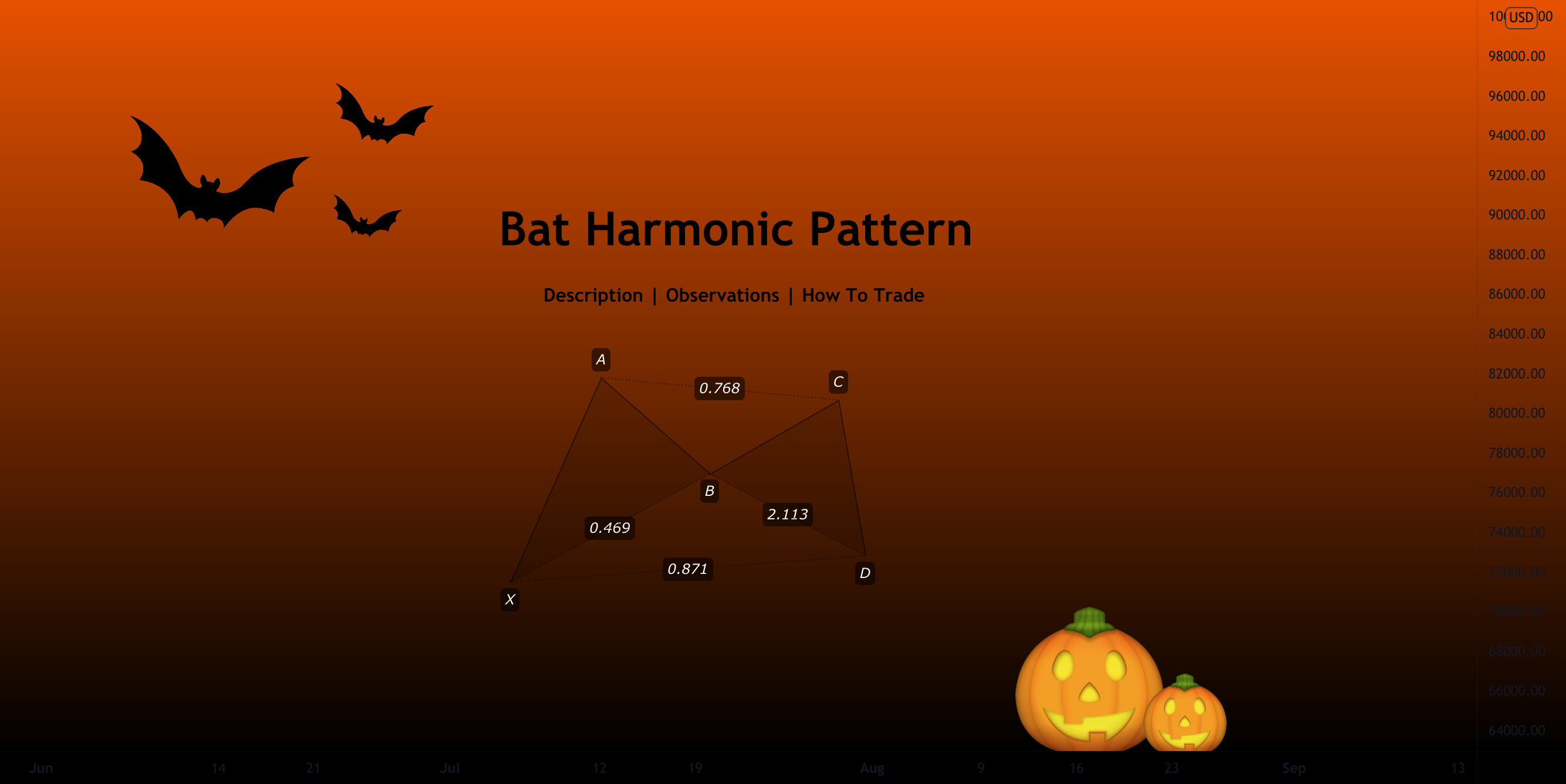
TradingView
In this series of chart patterns, we have taken a look at the more traditional ones. However, we have not yet discussed harmonic patterns.
Harmonic patterns form a part of the numerous chart patterns available for the identification of reversal points. The practice of trading using harmonic patterns is often defined as "Harmonic Trading".
We ...
half quarry
is there a trading bot that we can connect lux algo?
 vapid mulch
How to interpret that part of the oscillator turning red before it even drops below the 50 midline?

 outer rivet
Does anyone know how to change the colors of the EQ Cloud to become brighter...I have been up and down the setting style section and cant seem which ones to change to make it more full.
indigo cradle
vapid mulch
How to interpret that part of the oscillator turning red before it even drops be...
This is just a pinescript thing that it goes red before below 0 it's a visual artifact
indigo cradle
outer rivet
Does anyone know how to change the colors of the EQ Cloud to become brighter...I...
Go into style and change the colour of cloud 1 and cloud 2 ☺️
indigo cradle
May I see your alert settings?
outer rivet
indigo cradle
Go into style and change the colour of cloud 1 and cloud 2 ☺️
I saw that they were lines and didnt know they also associated with the color brightness....thank you
jaunty perch
indigo cradle
May I see your alert settings?
Every alert setting is on 🙂
jaunty perch
How to set up your own custom alerts in TradingView: https://docs.luxalgo.com/lux-algo-premium-indicators/setting-up-alerts-on-tradingview
Follow this guide for setting up your own custom alerts on TradingView.
jaunty perch
indigo cradle
However have you actually made the alert?
i just ticked the option
thank a lot
i will update it
 woeful dew
Buy : {{plot("Buy")}} | Sell : {{plot("Sell")}} | Strong Buy: {{plot("Strong Buy")}} | Strong Sell : {{plot("Strong Sell")}}
This will work for "Any confirmation"
Confirmation Signal --- Buy : 0 | Sell : 1 | Strong Buy: 0 | Strong Sell : 0
But for "Any contrarian", it shows up as zero:
Contrarian Signal --- Buy : 0 | Sell : 0 | Strong Buy: 0 | Strong Sell : 0
Can you please help? Thank you.
indigo cradle
!placeholders
night beaconBOT
Placeholders For TradingView are shown below:
Placeholders for TradingView
"ticker":"{{ticker}}"
"exchange":"{{exchange}}"
"interval":"{{interval}}"
"timenow":"{{timenow}}"
"buy":"{{plot("Buy")}}"
"strong_buy":"{{plot("Strong Buy")}}"
"sell":"{{plot("Sell")}}"
"strong_sell":"{{plot("Strong Sell")}}"
"exit_buy":"{{plot("Exit Buy")}}"
"exit_sell":"{{plot("Exit Sell")}}"
These can be used in the message field of TradingView however cannot be used in all in one alerts.
indigo cradle
These should work in theory
jaunty perch
thanks a lot it works 🙂
jaunty perch
which boxes i have to tick, to get those alerts if a "buy" "sell" or "strong" appears?
indigo cradle
 jaunty perch
I have those on.. thanks
 hollow bough
Quick question. What are the orange x's on the bottom of the chart represent?
indigo cradle
Those are exit signals
hollow bough
indigo cradle
Those are exit signals
Thank you
 twilit spade
I want to use the Lux Statistics Premium for setting alerts in Tradingview. I want the LL and HL for Long and LH and HH for short. How do I do this correctly in Tradingview?
indigo cradle
These are pivot points so won't be real time alerts
But if you want to do this
You'd select pivot oscillator crossing 99 for a high
And 1 for a low
twilit spade
You mean like this for a Short then?
 twilit spade
Okay thanks! Will try it.
 quaint geyser
hello, I'm a beginner in using this indicator, I'm probably coming up with a stupid question. What does this indicator work best on? can i rely on 5 minute tf?
 waxen barn
quaint geyser
hello, I'm a beginner in using this indicator, I'm probably coming up with a stu...
waxen barn
quaint geyser
hello, I'm a beginner in using this indicator, I'm probably coming up with a stu...
hell im using it on the 1 min on autopilot, been grinding all day 😄
 raven pivot
What “x” about the last candle mean? Sorry to bother you guys but I’m new to Lux.

*on
inner wadi
X = Exit Signal
raven pivot
So let’s say if I was buying I should close my trade? Once again sorry to be a pain.
feral lava
The exit signals can help with finding spots to take profits @raven pivot - you could consider it with these, depending on how you’re trading of course
raven pivot
Thank you for your help guys.
 grizzled lagoon
hi there, is there a way to see the next in the future new moon and full moon on the chart in the "Moon Phases Strategy" indicator?
if not, where I can make a feature request to show the next in the future new moon and full moon?
 half brook
Does algo signals work on 1 minute
indigo cradle
grizzled lagoon
hi there, is there a way to see the next in the future new moon and full moon on...
You want forecasted cycles?
 last jay
How do you stratagie test the indicator in Tradingview?
indigo cradle
You can't really strategy test indicators
You can only strategy test strategies
and we don't really make any strategies
You'd need to manually backtest a strategy you've created
 mortal rose
Hey good day I payed for my subscription but it’s not working I should pay again January 21,
 indigo cradle
Hi Sean, if you're having payment issues give support@luxalgo.com an email and they can try and assist 🙂
 idle light
hello, how do i setup an alert when a pattern is detected?
shy relic
idle light
hello, how do i setup an alert when a pattern is detected?
Go to the indicator settings, scroll down to any alert() function call conditions, toggle "detected pattern", then create an alert using "any alert() function call" as condition
shy relic
Try refreshing the page and adding it again, if you still get the error then it means you did not activated your TradingView account, see https://docs.luxalgo.com/faq#how-do-i-get-access or send a mail to support@luxalgo.com
Get answers to frequently asked questions.
woeful dew
indigo cradle
!placeholders
I just dumped all of your placeholders for my "Any Contrarian" Call and this is what appeared:
CONTRARIAN: ticker:SOLUSD | exchange:FTX | interval:D | timenow:2022-01-07T04:30:07Z | buy:0 | strong_buy:0 | sell:0 | strong_sell:0 | exit_buy:null | exit_sell:null
It still doesn't indicate what type of contrarian signal it is. Could you please help ?
 brisk silo
I keep getting this error.

 spice orbit
brisk silo
I keep getting this error.
spice orbit
brisk silo
I keep getting this error.
try to close and reopen tradingview. worked for me
 cursive iron
Hello, can u give the 1h optibots for Fantom atom one and near ?
indigo cradle
woeful dew
I just dumped all of your placeholders for my "Any Contrarian" Call and this is ...
I'll have a look into this for you 👍
indigo cradle
brisk silo
I keep getting this error.
Hide and unhide the indicator 👍
indigo cradle
cursive iron
Hello, can u give the 1h optibots for Fantom atom one and near ?
We can add those to the list 👌
quaint geyser
PDOTN/USD is dot?
indigo cradle
It is 👌
quaint geyser
thnx 👍
where can i find more information about the luxury oscillator premium indicator advanced version?
indigo cradle
quaint geyser
where can i find more information about the luxury oscillator premium indicator ...

A new & powerful oscillator mode within our Lux Oscillator Premium indicator, the 2nd indicator out of our premium indicator suite.
Discord: https://discord.gg/LUX
Get access: https://luxalgo.com/products/lux-algo
Or in our docs
!docs
jaunty perch
Learn about every aspect of Lux Algo at: https://docs.luxalgo.com
Learn how every aspect of our product suite works & get useful information about technical analysis.
quaint geyser
thnx
 quiet crow
hi guys - trying to automate my manual trading strategy where I want to use additional confluence using other two indicators on top of Buy and Sell signals I print on the plot from Lux before opening a position. So I only enter a trade if Lux and other two open source indicators point in the same direction, i.e. all if all 3 of them say BUY at the same candle.. Now, I understand that Lux is closed source and I have been trying to find out if it's even possible to build a strategy like this around a closed source indicators? The other two I can merge but hitting the wall here with Lux.. Any suggestions/help would be appreciated...
indigo cradle
So certain plots in Lux; yes you can get values of
But not the signals
You'd need to configure this externally
On a server maintain a state variable that holds the value of the current signal from alerts
And each new alert update that variable
quiet crow
Yeah I have thought about that too but not sure if alertatron can do that.. may be using conditional statements and variables like you pointed out
Still have to get my get around it
indigo cradle
Yeah then from your server you'd need to use a hook and send it off to aleratron again
quiet crow
Ah so it would be a mid tier alert server between tradingview and alertatron..
indigo cradle
Yep exactly just a middle connection
quiet crow
Ok cool thanks gecko
lyric spade
when I check matic for 4h with your suggested setting I can see this, does it mean that for 3 months there was no buy sell opportunity?
 open rock
with those settings (check bottom right)
lyric spade
yes, I do not know where to find the definition and how to read this...? I am just starting sorry for some basic questions
indigo cradle
!settings
jaunty perch
Everything you need to know on optimizing signal settings: https://docs.luxalgo.com/lux-algo-premium-indicators/lux-algo/signal-settings
This page showcases every way users can adjust settings along with full explanations of how they differentiate from each other.
indigo cradle
This page goes over settings optimisation ☺️
open rock
hi again, Admin. now that I can see you're around, question. look at my image below. can you give me an example of combination between Exit Buy and anything else that will trigger when the Exit Buy shows? anything. from your tests I mean. also, if it ever works in a combination like this lol

didn't notice until yesterday a combination like this still keeps the custom message available and even more, you can differentiate between Exit Buy and Exit Sell 🙂
the one I need to use the webhook
lyric spade
@open rock this looks great
open rock
in theory yes, need some confirmation lol 🙂
indigo cradle
open rock
hi again, Admin. now that I can see you're around, question. look at my image be...
You're looking for a good confluence method?
open rock
what I try to accomplish is the Exit Buy, which I now can choose in this construct, to trigger an alert
it's the only construct I have found where I can pick Exit Buy and Exit Sell
so I don't even care what the combination and the second parameter are, honestly. crossing something, moving something else, greater than anything else, etc, etc. as long as the alert triggers when or after the Exit Buy appears
p.s. tried that condition in the image because I assumed Exit Buy and Trend Tracer are values, and because an Exit Buy will always be above the trend tracer, the value of the condition will be true, thus triggering the alert
will come back anyway to confirm or not, hard to receive Exit Buy signals in this bearish market 😛
lyric spade
any suggestion and settings for ATOM in Lux Algo Premium
indigo cradle
!settings
jaunty perch
Everything you need to know on optimizing signal settings: https://docs.luxalgo.com/lux-algo-premium-indicators/lux-algo/signal-settings
This page showcases every way users can adjust settings along with full explanations of how they differentiate from each other.
frail kraken
Hi.. if I set an alert to "Any Confirmation Buy", it means TV shall get an alerts to both Buy and Strong.. Right?
indigo cradle
It will do 👍
twilit spade
Perhaps a bit dumb question, but I need a bit clarification. If I create an alert in Tradingview with Lux Algo settings and save the alert. Later I change some Lux Algo settings for example the sensitivity, does it apply it to the alert I've created earlier in that chart or does it not get overwritten?
indigo cradle
The alert will use the old settings and the time of setting👍
grizzled lagoon
indigo cradle
You want forecasted cycles?
I want the next full moon and next new moon marked on the chart, nothing forecasted, just the next two dates marked on the chart so I can see how far they are
twilit spade
indigo cradle
The alert will use the old settings and the time of setting👍
Thank you very clearing that up for me. Is it also possible in Tradingview what settings you have set in Lux Algo for certain alerts?
indigo cradle
Sadly not currently supported within TV
quaint geyser
Is it normal for a buy signal to appear, after which another candle appears and the signal disappears?
dry merlin
quaint geyser
Is it normal for a buy signal to appear, after which another candle appears and ...
Could be. Depends on the time frame. Lux Algo averages data per the time frame you are looking at.
quaint geyser
where can i find this information What time frame should I stop this from happening again?
dry merlin
Not sure. Try the links above that take to you to the FAQ on lux algo.
quaint geyser
so I can't trust the buy or sell signal?
 late gulch
quaint geyser
so I can't trust the buy or sell signal?
late gulch
quaint geyser
so I can't trust the buy or sell signal?
trust your own TA
dry merlin
You can. But use it with price action or any other trend that you follow.
I use it for confirmation. I scan for uptrend channel stocks on finviz and then use lux algo to confirm it the stock is on the move.
quaint geyser
Thank you for the explanation! a beautiful day
 arctic oasis
How can I make TradingView alert me when there's a buy, strong buy, sell or strong sell on LA pls?
indigo cradle
!alerts
jaunty perch
How to set up your own custom alerts in TradingView: https://docs.luxalgo.com/lux-algo-premium-indicators/setting-up-alerts-on-tradingview
Follow this guide for setting up your own custom alerts on TradingView.
arctic oasis
Thank you, I will check it out now
jaunty perch
Hi there! Short question... should i use autopilot or should i use the settings from optibot?
indigo cradle
!settings
jaunty perch
Everything you need to know on optimizing signal settings: https://docs.luxalgo.com/lux-algo-premium-indicators/lux-algo/signal-settings
This page showcases every way users can adjust settings along with full explanations of how they differentiate from each other.
indigo cradle
^ see above regarding this 🙂
cursive iron
News about link fantom near one settings ? Quite urgent request 🥸
indigo cradle
It won't take too long however for the meantime you have a few other optimisation approaches:
!settings
jaunty perch
Everything you need to know on optimizing signal settings: https://docs.luxalgo.com/lux-algo-premium-indicators/lux-algo/signal-settings
This page showcases every way users can adjust settings along with full explanations of how they differentiate from each other.
half brook
what sens and agility of XAUUSD 1 minute
jaunty perch
Hello guys
i just buy my sub
and i want to set up Lux Algo like this
https://gyazo.com/dc429baea616b24bfcd6e3c8747d88d9

is there something i can read up about it
got it
 rapid nest
Hello all could anyone tell me, I’d the pivot oscillator delayed? Or in real time, I emailed someone from support and they said real time but in testing im seeing it’s delayed
 errant sand
how close are we to the next update? I kind of wanted to wipe everything and start over for one of my trading setups
would rather get an update for Lux first
shy relic
jaunty perch
is there something i can read up about it
This chart has the trend tracer and reversal zones enabled, you can enable them from the lux Algo premium settings in "overlay indicators". See our documentation for more information https://docs.luxalgo.com/
Learn how every aspect of our product suite works & get useful information about technical analysis.
shy relic
rapid nest
Hello all could anyone tell me, I’d the pivot oscillator delayed? Or in real tim...
The solid line is offset, the main interpretation comes from it's forecast highlighted by the dashed line, which can forecast potential pivot points.
shy relic
errant sand
how close are we to the next update? I kind of wanted to wipe everything and sta...
The update will be this month. Note that alerts does not need to be remade after an update except if we changed the underlying algorithm.
frail kraken
Can I add 3 lux premium indicator in one layout for BTC , ETH and ADA for different optibot settings??
 young salmon
Hi there, i was wondering when is the lifetime plan available until?
young salmon
Another question i have is, i'm noticing the x indications below and above my candlesticks show better buy and sell positions than the actual green buy and red sell signals that appear after them, which are a better indicator to follow?
 frozen marsh
Hey does lux still show the strong “sell or buy” section on the main menu ?
indigo cradle
frozen marsh
Hey does lux still show the strong “sell or buy” section on the main menu ?
Which main menu? ☺️
 scarlet mauve
Hi there! Tried to set up alerts in TV with the «any alert function call». I want the Strong Buy signal, but it did not send me an alert. I ticked the Strong buy in the settings for function calls. Should i set it up differently? 🙂

 scarlet mauve
ok, thanks for a quick answer. Can I also do it like this?
 indigo cradle
Absolutely yes 😊
scarlet mauve
nice, I will set the alerts again. Thx 🙂
frozen marsh
indigo cradle
Which main menu? ☺️
Yes the main menu
indigo cradle
frozen marsh
Yes the main menu
I'm a little confused which main menu you're referring to?
The settings?
indigo cradle
You can only add 3 at a given time
Right click your chart, remove indicators and try again 🙂
jaunty perch
thank you it works👍
frozen marsh
indigo cradle
The settings?
The menus that shows updated. We’re you choose the chats etc.
frozen marsh
There was a section on the menu with signal updates. Ex strong sell or buy whatever


 stable shore
@north dirge was it working before? I'm trying to figure out how to set it up with no luck
shy relic
 north dirge
the error is caused by the breakout zones, next update will fix that, in the mean time try recreating the alert while having the breakout zones disabled
indigo cradle
frozen marsh
There was a section on the menu with signal updates. Ex strong sell or buy whate...
jaunty perch
Hello guys
I m looking for short long liquidation level with liquidation amount, someone could help me please?
thin geyser
how to cancel membership
thin geyser
how to stop the auto pay ?
shy relic
thin geyser
how to cancel membership
Get answers to frequently asked questions.
north dirge
shy relic
the error is caused by the breakout zones, next update will fix that, in the mea...
Since now the alerts will disappear from the alert list and keep sending false alerts, is there anything else I can do now besides wait? And is there a specific time for the next update?
north dirge
stable shore
<@800672944463282186> was it working before? I'm trying to figure out how to set...
It was normal before, sometimes the alarm disappears from the alarm list, and then continues to send false alarm information
shy relic
north dirge
Since now the alerts will disappear from the alert list and keep sending false a...
You can re recreate the alert, make sure to disable breakout zones when creating it. The alert should no longer have any issue after that :)
heavy cradle
I used swift to deposit some funds into my binace acc and it still hasn’t arrived
or they don’t operate on weekends
 thorny lark
heavy cradle
or they don’t operate on weekends
thorny lark
heavy cradle
or they don’t operate on weekends
yeah I think so, probably need to wait until monday morning
heavy cradle
thorny lark
yeah I think so, probably need to wait until monday morning
aight thanks
north dirge
shy relic
You can re recreate the alert, make sure to disable breakout zones when creating...
how to make sure to disable breakout zones?
 vocal jay
Can I use the algo with a free tradingview account only?
Disregard my message above. It was due to existing indicators I already selected before.
north dirge
shy relic
You can re recreate the alert, make sure to disable breakout zones when creating...
you mean I just disable show pop-up?
 north dirge
shy relic
You can re recreate the alert, make sure to disable breakout zones when creating...
north dirge
shy relic
You can re recreate the alert, make sure to disable breakout zones when creating...
or disable Reversal zones?
 frozen marsh
indigo cradle
<#780585592911560734>
frozen marsh
indigo cradle
<#780585592911560734>
Don’t see that option
frozen marsh
indigo cradle
<#780585592911560734>
I see it now thanks
vocal jay
In creating alerts, I do not see the "Any Confirmation Buy" option. I'm following this page https://docs.luxalgo.com/lux-algo-premium-indicators/setting-up-alerts-on-tradingview

Follow this guide for setting up your own custom alerts on TradingView.
indigo cradle
vocal jay
In creating alerts, I do not see the "Any Confirmation Buy" option. I'm followin...
You need to select Lux Algo as the condition
vocal jay
indigo cradle
You need to select Lux Algo as the condition
Hmm, I think I already selected it as shown on the photo.
indigo cradle
vocal jay
Hmm, I think I already selected it as shown on the photo.
The top box is the condition 😊
You've selected BTCUSDt
vocal jay
indigo cradle
The top box is the condition 😊
Ohh, right. My bad. Thanks!
 full plinth
Can we make an optibot for FARMUSD please?
 vital oriole
Any third-party platforms , which can help automated strategies with Lux Algo indicators.
shy relic
vital oriole
Any third-party platforms , which can help automated strategies with Lux Algo in...
3commas, cornix, amongst others
 lime bear
GM, Is there already support or planned support for Indicator and Trends for cryptohopper bot?
indigo cradle
Not currently their platoforms would have their own respective support
We don't really plan to make our own bots we aren't the biggest fans in general of EAs
lime bear
ok, i was hoping for something better than webook alerts, but if thats the currently only way,i appreciate the response
indigo cradle
Currently yep; webhooks will be by far the best way to go
 celest plover
Hi - hopefully someone can help me - lifetime member & -I’m trying to login to “manage my account” to make a referral and it says “seems your account does not exist” I’ve double checked my inbox and have emails from Lux Algo to that email - don’t see a options to get In ie, forgot user/password etc
 feral lava
celest plover
Hi - hopefully someone can help me - lifetime member & -I’m trying to login to “...
feral lava
celest plover
Hi - hopefully someone can help me - lifetime member & -I’m trying to login to “...
hi @celest plover make sure you’re using the email you signed up to Lux Algo with
to make a referral, you can login by entering your email at https://luxalgo.com/affiliates
Create an income sharing the best tools.
celest plover
Yup I did
Verified it in my inbox
hence have emails from Lux only in that inbox
And… says no account
celest plover
ok thanks
feral lava
it should send you a one-time-password to enter & login 🙂 let me know if the problem persists, works ok for me right now
celest plover
Got it thkk u! I’m in
 amber meadow
Newbie here. Can I access Discord directly from Trading View?
thin geyser
why
amber meadow
uhmm...because
 chrome coyote
Hello can someone show me how to set up correctly the new indicator from luxalgo ?
shy relic
chrome coyote
Hello can someone show me how to set up correctly the new indicator from luxalgo...
Once you've signed up on our website and entered your active TradingView username within the "Connect Accounts" portal from your email, you will have instant access to use our indicators on the platform.

 leaden schooner
Is it possible to get an alert when the Legacy Lux Oscillator changes from green to red or red to green?
 torn lodge
Hi
feral lava
hey @vale sundial @twin hollow email support@luxalgo.com for help with orders, our team will assist within 3-4 hrs 👍
jaunty perch
Click Manage Account here: https://luxalgo.com
Or email support@luxalgo.com and our team will assist you with any request the same day.
Enhance your trading experience with our premium technical indicator suite + bots for stocks, forex, futures, currencies & commodities markets.
night beaconBOT
tough finch
I just reinstalled trading view. I cannot see the invite only indicators section now
indigo cradle
tough finch
I just reinstalled trading view. I cannot see the invite only indicators section...
Ensure you're logged into your account 😊
 junior tide
Any one else’s Lux not working this morning?
indigo cradle
What the issue you're having?
 fossil hornet
@indigo cradle I have been noticing that charts are being frozen or with a very delayed response in a 3 chart format (1,15,1h) with all 3 LuxAlgo indicators, however it is fine with (15,30,1h)....any ideas why?
twilit spade
@indigo cradle I was wondering if the following is possible. When I enable Predictive Ranges I see these beautiful red and blue lines. Could I set a alert when the chart reaches the red or blue line?
indigo cradle
You can by using SR1, SR2 as the plots 🙂
lime bear
so that free new indicator that was released this morning, i installed it, and works for all the cryptos if clicked on so far outside of BTC, its not rendering. Ive also restarted TW,, any thoughts?
 brisk socket
Having trouble with the algo not loading
dry merlin
brisk socket
Having trouble with the algo not loading
Same
indigo cradle
If it's a study error it'll be due to TradingView being under load
So give it a little bit and it'll resolve 🙂
Happened last week for a little
near jackal
What session should I use with LUX Algo, regular or extended trading
The new RSI indicator not working
indigo cradle
near jackal
What session should I use with LUX Algo, regular or extended trading
If you trade extended hours you'll want it else you wont need it on
 wheat coral
 scarlet yarrow
Good evening... I'm just joined the Group today, and is totally green when it comes to Crypto... In regards to TradingView/LuxAlgo, does anyone know how to display the Buy/Sell indicators on the charts? I purchased the LuxAlgo Yearly, but I only have the TradingView Basic... I didn't know whether there was something that I wasn't doing correctly, or if I needed to purchase one of the TradingView Plans in addition to the LuxAlgo?
dry merlin
scarlet yarrow
Good evening... I'm just joined the Group today, and is totally green when it co...
Hey there. Install the script onto your Trading View. Do that first and get used to it. If you have done that, the buy/sell indicators should show up.
scarlet yarrow
Thank you for your reply... How do I install the script?
dry merlin
scarlet yarrow
Thank you for your reply... How do I install the script?
Features - Main Settings - Adjusting Settings - Style Settings
scarlet yarrow
Okay, got it! Thanks again, Surfer Jeff...
 faint crescent
What does the red x mean on trading view
 hasty wharf
Could someone tell me what might be optimized settings for BTC on the daily timeframe?
 sleek perch
faint crescent
What does the red x mean on trading view
sleek perch
faint crescent
What does the red x mean on trading view
Suggest to some Take profits for your short.. but not obligated
 tired wind
Anyone know why the lux premium dashboard has green font or how to change it?
faint crescent
Ok so it's almost like a reversal signal
 plain junco
Hi, Is there a place were i can read on the Advanced Oscillator. Ive read threw the forum but its very limiting and watched the vid aswell. The tool seems to work great but dont full understand it so it hard to trust. If you can it would be great if you can update your forum with new info on Advanced Oscillator and the uses and what everything means on the Advanced Oscillator.
shy relic
hasty wharf
Could someone tell me what might be optimized settings for BTC on the daily time...
See the recommended sensitivity on the dashboard :) optibot does not currently support the daily timeframe.
shy relic
tired wind
Anyone know why the lux premium dashboard has green font or how to change it?
The text font? That's a Tradingview bug, try hiding and unhidding the indicator.
shy relic
faint crescent
Ok so it's almost like a reversal signal
Crosses are exit signals, but can eventually announce a reversal, altho the contrarian signals or reversal zones would be preferred alternatives.
faint crescent
Ok thank you
shy relic
plain junco
Hi, Is there a place were i can read on the Advanced Oscillator. Ive read threw ...
See https://docs.luxalgo.com/lux-algo-premium-indicators/lux-oscillator-premium/advanced for more info on the advanced oscillator mode :)
The Advanced Oscillator type aims to return various actionable information to the trader, including adaptive trend/cycle estimation, automatic and real-time divergences detection, as well as institutional activity estimation.
tired wind
Tried hiding and unhiding and reloading but no luck with the font color. Green is tough to read, but it hasnt always been that way
shy relic
tired wind
Tried hiding and unhiding and reloading but no luck with the font color. Green i...
We'll investigate, eventually try to remove/re-add it or try on a different browser.
 rocky anvil
Why can't I put message in Any alert function call ???
indigo cradle
rocky anvil
Why can't I put message in Any alert function call ???
This is just a weird pinescript limitation
 tidal kelp
Hi
I have a problem with the alarms and lux algo. When I try to set the alarms, in the overview it says stopped - calculation error. How do I fix this?
indigo cradle
@tidal kelp when you set the alarm ensure SR modes are not active
 potent hearth
hello Admin i just joined with the yearly sub but the Lux algo is not active on my trading view after connect my username .. any support
indigo cradle
Hi @potent hearth try refreshing your Tradingview
If you've connected your account
 spark light
No doubt a silly question, but what is this app people keep posting in the 'share profits' group? Lookslike a goodway to track trades
 indigo cradle
 cinder zenith
I dont see the ,,invites only scipt" :/
cinder zenith
I dont see the ,,invites only scipt" :/
If you've connected your account try refreshing 🙂
dry merlin
spark light
No doubt a silly question, but what is this app people keep posting in the 'shar...
Oanda trading account. It is good. That is their forex account.
indigo cradle
^ ah there
cinder zenith
indigo cradle
If you've connected your account try refreshing 🙂
thanks
How can i change the color like how it should be ?
candle sticks
 indigo cradle
This all looks correct 🙂
But you may want to:
Right click chart
settings
and hide the candle border
cinder zenith
can you send me a screenshot how it should like ?
would be very helpful
look*
Can someone else help me ?
Ahh i found it
sry


when i zoom out it look like this... is it normal?
like crypted


 serene garden
hi i want the optibot1h for other currency there is more but u did only 10
cinder zenith
maybe because i use it on my surface?
indigo cradle
serene garden
hi i want the optibot1h for other currency there is more but u did only 10
If your asset isn't supported by optibot:
!settings
jaunty perch
Everything you need to know on optimizing signal settings: https://docs.luxalgo.com/lux-algo-premium-indicators/lux-algo/signal-settings
This page showcases every way users can adjust settings along with full explanations of how they differentiate from each other.
maybe the change the timeframe
indigo cradle
cinder zenith
maybe because i use it on my surface?
It could be a graphical thing; ^ if you change tf or zoom in is it ok?
indigo cradle
Then i'd assume yes it's some sort of graphical issue on your tablet; still totally useable just a little odd
cinder zenith
hmm how can i fix it ?
indigo cradle
Try on another device maybe 🙂
Or if you like Heikin Ashi candles
you can maybe use them
indigo cradle
Very very odd
cinder zenith
Thank you for your help
indigo cradle
I'll have a look why this happens in the meantime maybe try another device and see if it also occurs
spark light
dry merlin
Oanda trading account. It is good. That is their forex account.
Thanks Jeff!
serene garden
Hi u can give me TP1 always the signals take it.. I mean how many pips 50 or 100 or what? And for trailing stop how many points should I put ? 🙄
 winged valley
Hi is there a pattern detection screener for crypto or just stocks?
indigo cradle
Currently just stocks but you can of course set alerts on patterns for assets you want
 sly plover
I got an alert for TSLA as strong buy at 11:30 on 2H. When I used the same timeframe then I do see buy much earlier and it doesn’t show strong buy.
Am I missing something ?
indigo cradle
Is this an alert you set yourself?
sly plover
No it was from your stocks bot scanner
I am just finding discrepancies from what bot scanner is telling me and what Lux Algo indicators are telling me so don’t know which one to trust
indigo cradle
!visible
jaunty perch
Our Discord Market Scanner alerts all use the following:
- Default Lux Algo (V4 inputs).
- Normal trading hours (no extended hours)
- Main exchanges / brokers such as NASDAQ / TVC / FXCM / OANDA / COINBASE / BINANCE
If you have created your own, custom TradingView alerts, be aware they are set per the exact settings you had at the time you set those alert(s).
 random bronze
I cant see my my Life time on the trading View no indications ...help
indigo cradle
Hi there; if you lost access give support@luxalgo.com an email and they'll fix this 🙂
sly plover
jaunty perch
Our Discord Market Scanner alerts all use the following:
- Default Lux Algo (V4...
Ok got it. I will try to match your settings and then notice in future if there is any mismatch.
Thanks for clarification.
night beaconBOT
Hi @fast flume! Click Manage Account here: https://luxalgo.com/
Or email support@luxalgo.com and our team will assist you with any request the same day.
Enhance your trading experience with our premium technical indicator suite + bots for stocks, forex, futures, currencies & commodities markets.
 sacred axle
Thanks
 marsh vale
Hi, when I turn on the alerts for buy/ sell. Do I need to turn them ON, on each stock separately?
indigo cradle
You will need to do it for every stock you want
marsh vale
Another question, so when using the TradingView on mobile I set the Sensitivity and Agility for MATIC taken from optibot.
When going to DOT and entering a different Sensitivity and Agility value. It also changes on MATIC. Is there a way of avoiding that ?
shy relic
marsh vale
Another question, so when using the TradingView on mobile I set the Sensitivity ...
not directly, but you can eventually save indicator templates for that. See https://www.tradingview.com/support/solutions/43000543048-what-are-indicator-templates-for/

TradingView
marsh vale
Thank you
 safe otter
Hi i tried to do notification from trading view about xau usd but seems no alert trigerred but settings alrdy all alert tried to check the chart theres new indicator but its not triggering can anyone help?

try delete recreate not helping
shy relic
safe otter
using 'any alert() function call' requires toggling on the conditions you want to be alerted for, see https://docs.luxalgo.com/lux-algo-premium-indicators/lux-algo/alerts/#all-in-one-alert-setup
Options for setting alerts on Lux Algo in TradingView.
safe otter
i dont see the toggling in the trading view
@shy relic

where can i find this toggle
safe otter
ok i find it
 cloud delta
Hi There, Could you pls. let me know how could I apply Lux Algo in trading view stock screener ....if you have any link to refer then pls let me know...Thanks in Advance
 rich quiver
@indigo cradle for some reason I keep getting emails saying my card can't be charged but there's money on the card, and it hasn't been taken out, who would I email about this?
 icy apex
@indigo cradle How can I cancel and get a refund please?
night beaconBOT
Hi @icy apex! Click Manage Account here: https://luxalgo.com/
Or email support@luxalgo.com and our team will assist you with any request the same day.
Enhance your trading experience with our premium technical indicator suite + bots for stocks, forex, futures, currencies & commodities markets.
 rotund stratus
@indigo cradle how to set an alert on the oscillator when it changes from green to red and vice versa ??

for this settings !!
 dry merlin
rotund stratus
for this settings !!
dry merlin
rotund stratus
for this settings !!
You should have Lux Algo 4.3 running. It seems.
rotund stratus
ya
rotund stratus
dry merlin
You should have Lux Algo 4.3 running. It seems.
can you help me out with it?
dry merlin
Sure. I;ll attached a tick tock link to how to.
rotund stratus
yess plzz
dry merlin
rotund stratus
yess plzz

TikTok
#luxalgo #optionstrading #stockmarket #optionstrader #stocks #investing #daytrader #money
rotund stratus
it is not working bro 😫