#🤝support
1 messages · Page 248 of 1
 cosmic imp
Maybe I am asking a stupid question, but is Lux Oscilator an momentum indicator or an indicator for overbought/oversold? I ask spesifically about the Legacy oscilator.
When the Oscilator becomes red, the price goes down. I think this is momentum. please correct me
But what does the shadow do in the Legacy oscilator?
 indigo cradle
A momentum indicator can also be used for OB OS
The shadow is just a style thing. It's just the plot
So yes they will show momentum but can be used as OBOS
cosmic imp
indigo cradle
So yes they will show momentum but can be used as OBOS
What is OBOS? I know it also means Oslo Bollig og Sparelag, but not sure what it means in Lux Algo ?
 rigid wind
Where can i see the settings behind this alert? Optibot only showing till 4h tiem frame
 indigo cradle
cosmic imp
What is OBOS? I know it also means Oslo Bollig og Sparelag, but not sure what it...
indigo cradle
cosmic imp
What is OBOS? I know it also means Oslo Bollig og Sparelag, but not sure what it...
It's over bough and over sold 🙂
indigo cradle
rigid wind
Where can i see the settings behind this alert? Optibot only showing till 4h tie...
!visible
 jaunty perch
Our Discord Market Scanner alerts all use the following:
- Default Lux Algo (V4 inputs).
- Normal trading hours (no extended hours)
- Main exchanges / brokers such as NASDAQ / TVC / FXCM / OANDA / COINBASE / BINANCE
If you have created your own, custom TradingView alerts, be aware they are set per the exact settings you had at the time you set those alert(s).
 tame nacelle
hello, I signed for the forex bot, there's a signal on USD/JPY daily, but I can't see it on my trading view
it appears only if I turn off autopilot and adjust the settings manually
indigo cradle
!visible
jaunty perch
Our Discord Market Scanner alerts all use the following:
- Default Lux Algo (V4 inputs).
- Normal trading hours (no extended hours)
- Main exchanges / brokers such as NASDAQ / TVC / FXCM / OANDA / COINBASE / BINANCE
If you have created your own, custom TradingView alerts, be aware they are set per the exact settings you had at the time you set those alert(s).
tame nacelle
ty, now it works
 burnt glacier
I am trying to create an alert and when I click settings on the Algo Lux bar, it places a lot of "n/a" next to it. How do I know if the alert is setup correctly?
I wwould like to be alerted to both buy and sell
jaunty perch
How to set up your own custom alerts in TradingView: https://docs.luxalgo.com/lux-algo-premium-indicators/setting-up-alerts-on-tradingview
Follow this guide for setting up your own custom alerts on TradingView.
indigo cradle
Here is how to set the alerts in case ^
 fluid crag
hello gecko, Do you know if the lux signals can be connected with cornix?
indigo cradle
I believe so 🙂
burnt glacier
https://youtu.be/E2Bb0ly2hEw i followed this video

This is a tutorial on how to use our brand new all-in-one alerts system within the main Lux Algo Premium indicator on TradingView. This makes it easier for users with the free TradingView membership to get multiple specific conditions in one alert.
See the guide on our docs: https://docs.luxalgo.com/lux-algo-premium-indicators/lux-algo/alerts#...
 indigo cradle
oh that's totally ok
Those are just indicator arguements
If you want to hide these you can
But they aren't issues
burnt glacier
should I have those n/a that I have circled in the picture?
indigo cradle
Yep this is totally ok
 glacial owl
When I hide it, my volume is also hidden.
burnt glacier
ok, I just wanted to make sure they wouldn't interfere with the alerts
indigo cradle
glacial owl
When I hide it, my volume is also hidden.
When you hide the arguments?
burnt glacier
also, what are the blue "X"s in teh picture on the candle?
indigo cradle
Those are exits
glacial owl
indigo cradle
When you hide the arguments?
Those are not arguments, they are values. @indigo cradle
indigo cradle
glacial owl
Those are not arguments, they are values. <@!456590452703887373>
I'm a little confused what you're refering to / what the issue is 😦
 tender wing
does luxalgo has any bots?
glacial owl
I need to hide the Indicator Values in order to hide those n/a, and when I do, my volume value is also hidden.
indigo cradle
tender wing
does luxalgo has any bots?
EAs? No we don't make those at the moment
glacial owl
Because those indicator arguments does not include those n/a, but the indicator values. @indigo cradle
tender wing
thanks Lux, are your Algos are base in AI ?
indigo cradle
glacial owl
Because those indicator arguments does not include those n/a, but the indicator ...
Hiding those should not hide volume
The volume is a different indicator
So i'm not sure why hiding them would interfere there
indigo cradle
tender wing
thanks Lux, are your Algos are base in AI ?
We don't use AI in the indicators, pinescript isn't really capable of any serious AI
Just math
tender wing
thanks
fluid crag
indigo cradle
I believe so 🙂
but my question is whether "luxalgo" actually sends additional signals such as: altcoin, buy or sell and stop loss. Since in the signals of "altcoins" I see that not in all the occasions luxalgo does not give a signal to sell the currency when previously it gave a signal to buy the same currency and vice versa, I mean, it does not follow up from the beginning to the end of the trade . or am I wrong?
glacial owl
@indigo cradle
 indigo cradle
fluid crag
but my question is whether "luxalgo" actually sends additional signals such as: ...
indigo cradle
fluid crag
but my question is whether "luxalgo" actually sends additional signals such as: ...
Correct we just make the indicators. We don't have a direct strategy
indigo cradle
glacial owl
<@!456590452703887373>
I understand
But when you untick it
It hides your volume?
glacial owl
@indigo cradle

 dire jolt
Does lux give after hours buy / sell signals?
indigo cradle
glacial owl
<@!456590452703887373>
Ohhhhhh I understand now
Yes this is an annoyance I understand
indigo cradle
dire jolt
Does lux give after hours buy / sell signals?
It can indeed 🙂
glacial owl
indigo cradle
Ohhhhhh I understand now
It's just my OCD. But it would be very nice to see those fixes coming.
indigo cradle
This is a tradingview thing sadly, we can't have a toggle for those within the settings. They are auto generated for all scripts 😦
But i agree
Seeing a long list of N/As is annoying
indigo cradle
Glad to hear it and thank you for the nice words 🙂 As soon as we can remove those NAs we'll be on it 😉
fluid crag
indigo cradle
Correct we just make the indicators. We don't have a direct strategy
Consequently, I imagine that there is no benefit to using cornix with luxalgo.
glacial owl
indigo cradle
Glad to hear it and thank you for the nice words 🙂 As soon as we can remove tho...
Well, I found a fix for that but I need you to double-check to see if it might mess up the Algo.
Simply untick SR1, SR2, SR3, SR4, SR5 in the Style Setting.
indigo cradle
fluid crag
Consequently, I imagine that there is no benefit to using cornix with luxalgo.
I'm not too familiar with cornix but other users use 3commas to create automated strats
indigo cradle
glacial owl
Well, I found a fix for that but I need you to double-check to see if it might m...
Oh wow today I learned something new if that works
But yes it won't mess anything up
Unless you're using the S/R methods
Those plots are used for SR modes
And I can see by your charts you're not using any of those
glacial owl
Good to know! there are only 4 n/a's left after that.
fluid crag
indigo cradle
I'm not too familiar with cornix but other users use 3commas to create automated...
All right and Lux can be connected to 3commas directly?
indigo cradle
fluid crag
All right and Lux can be connected to 3commas directly?
It can be used normally with 3commas yes 🙂
fluid crag
indigo cradle
It can be used normally with 3commas yes 🙂
Thank you very much Gecko, I will review what you tell me since I try to get more out of the good service of Luxalgo if it is possible!!! 😁
fluid crag
indigo cradle
It can be used normally with 3commas yes 🙂
By the way, I congratulate you for the great service you provide. Actually you give a good fight to the rain of attacks that you receive with our questions ... you are quite a hacker bro.
😁🙌👏👏👏🤝🤝🤝
indigo cradle
fluid crag
Thank you very much Gecko, I will review what you tell me since I try to get mor...
Much appreciated 😄
indigo cradle
fluid crag
By the way, I congratulate you for the great service you provide. Actually you g...
hahahahaha I love it 😉
Keeps me on my toes
Every day something new
indigo cradle
You too @fluid crag 😄
 summer crow
in crypto currency BOt can you guys add SHIBA INU
indigo cradle
We very well may, just waiting for it to settle down a bit 🙂
summer crow
excellent thank you
 still cargo
Do you guys prefer normal candles or heiken?
glacial owl
still cargo
Do you guys prefer normal candles or heiken?
Heiken any day of the week.
still cargo
Do you scalp with it?
 still cargo
thank you lol
glacial owl
still cargo
thank you lol
I ran into the same problem with Heiken before. Not knowing the real price is very bad.
still cargo
Yeah that was one of my concerns
Entry being another but what you showed will really help!
Thank you
glacial owl
still cargo
Entry being another but what you showed will really help!
Hey, Lux Algo will give you so much info to validate your entry or exit.
still cargo
Yeah its just I was debating between heiken and normal candles
I've also looked at kantan ashi but it was a little odd
glacial owl
still cargo
Yeah its just I was debating between heiken and normal candles
Use Normal candles for charting + pattern.
Use Heiken for swingtrade.
I would never recommend using heiken with anything less than 1hour timeframe.
 hybrid halo
indigo cradle
Ohhhhhh I understand now
hybrid halo
indigo cradle
Ohhhhhh I understand now
It appreciated if you provided the hourly buy/sell signals for stocks? Thanks.
 vale sundial
Hey what’s the difference between contrarian buy and conformation buy
 feral lava
Hey @vale sundial Contrarian signals go against the trend, and Confirmation signals go with the trend https://docs.luxalgo.com/lux-algo-premium-indicators/lux-algo/signals#confirmation--exits
Type Of Signals - Confirmation - Contrarian - Display
vale sundial
Thanks
 cloud delta
Hi Team, Is there a way to apply luxAlgo to make stock scanner?
 dusk sky
do colored candles imply or include momentum indicators?
 spice scaffold
is there a way to set alert for any time when the trend tracer goes green or red?
feral lava
cloud delta
Hi Team, Is there a way to apply luxAlgo to make stock scanner?
Not at the moment, it is likely going to be available by end of the year though
feral lava
dusk sky
do colored candles imply or include momentum indicators?
Confirmation Simple is it’s own unique calculation not related to momentum
Confirmation Gradient i don’t believe so but it does have a smoother trend following feel
cloud delta
feral lava
Not at the moment, it is likely going to be available by end of the year though
is there any stock scanner recommendation?
feral lava
spice scaffold
is there a way to set alert for any time when the trend tracer goes green or red...
Options for setting alerts on Lux Algo in TradingView.
feral lava
cloud delta
is there any stock scanner recommendation?
Not any that we recommend here besides #🔔scanners-premium which gives confirmation signals alerts on default settings
Custom screeners when available in TradingView will be a big feature for our indicators - we have word it should be avail before end of year
cloud delta
👍
dusk sky
feral lava
Confirmation Simple is it’s own unique calculation not related to momentum
Con...
Thanks
cloud delta
cloud delta
👍
Also could you pls. let me know how could I make the use of optibot5m or 15m or 30m ...
feral lava

In this video we cover every method for how to properly optimize your signals within Lux Algo to fit your trading style. We cover the best way to manually adjust sensitivity, how to use optimal sensitivity, auto-pilot, and Optibot.
Instant access to Lux Algo: https://luxalgo.com
Join our Discord: https://discord.gg/Lux
Follow us on TradingVie...
Check out from 9:20 - end
vale sundial
What timeframe is good for day trading stocks?
cloud delta
feral lava
https://youtu.be/wkruvBBeXn8
cool ...thanks
cosmic imp
How can I set alarm when the Lux Algo Premium Yumi-Ashi candels are switching color?
 late peak
Hi there, do I need a paid account from TradingView to get realtime data from crypto?
 vapid wing
Is there any way to get alarm for a list of signals? I can set only one on tradingview. Thanks
indigo cradle
late peak
Hi there, do I need a paid account from TradingView to get realtime data from cr...
You don't no
indigo cradle
vapid wing
Is there any way to get alarm for a list of signals? I can set only one on tradi...
Sadly not only one at a time
rigid wind
!visible
jaunty perch
Our Discord Market Scanner alerts all use the following:
- Default Lux Algo (V4 inputs).
- Normal trading hours (no extended hours)
- Main exchanges / brokers such as NASDAQ / TVC / FXCM / OANDA / COINBASE / BINANCE
If you have created your own, custom TradingView alerts, be aware they are set per the exact settings you had at the time you set those alert(s).
 shut solar

 tawny merlin
What happened to the Crypto-Chat?
late peak
Do I need to have a paid account at TradingView to be able to create alert for Lux Algo?
late peak
ok thanks
 vale dust
Hi
burnt glacier
Do you have a link I can look at talking about the information in the Lux box on the bottom right of the chart in tradingview?
indigo cradle
burnt glacier
Do you have a link I can look at talking about the information in the Lux box on...
The dashboard displays the most relevant metrics from our premium features. This feature is extremely useful to easily obtain pertinent information about the market and can be used in confluence with confirmation or contrarian signals.
You can search for any feature in our docs and have a full rundown 👍
burnt glacier
Thank you
late peak
hi there, how can I get optibot settings for other stocks?
indigo cradle
If you stock isn't listed you'll need to use another method of optimisation
tender wing
Hi lux, how can you backtest with Lux ?
indigo cradle
It will depend on your strategy 🙂
But whatever the strategy you'll need to do it manually
late peak
indigo cradle
If you stock isn't listed you'll need to use another method of optimisation
What's other method of optimisation? Does LUX provide any instruction about this?
indigo cradle
late peak
What's other method of optimisation? Does LUX provide any instruction about this...
!settings
jaunty perch
Everything you need to know on optimizing signal settings: https://docs.luxalgo.com/lux-algo-premium-indicators/lux-algo/signal-settings
This page showcases every way users can adjust settings along with full explanations of how they differentiate from each other.
 potent knot
@indigo cradle has any method proven more accurate than others to filter buy/sell signals?
indigo cradle
Proven is always hard to say as markets change but it really does depend on how you trade and how you personally like to filter
potent knot
indigo cradle
Proven is always hard to say as markets change but it really does depend on how ...
Thanks - I trade Futures on 30 min chart and I'd like to filter for accuracy. Any suggestions?
indigo cradle
Really from a moving average, any of the trend based oscillators we provide / any in general 🙂
Those would be my go tos
potent knot
indigo cradle
Really from a moving average, any of the trend based oscillators we provide / an...
Thank you!
cosmic imp
I have a question about signals in Lux Algo Premium and the alerts in TradingView:
In the documentation I read "Signals are confirmed on the opening of the next candle"
When should the alarm be triggered, as I want the alarm to be triggered as soon as the
signal is confirmed.
I am hoping that "Once Per Bar Close", means when the candle closes, but before the next candle is opened
Then it would be more logical to confirm the signal on bar close, but the doc didnt say that. So I guess "Once Per Bar Close" will trigger alarm on close of the next candle....
I only want the alarm to be triggered when the signal is confirmed.
Is it:
- Only Once
- Once Per Minute
- Once Per Bar
indigo cradle
Once per bar close will alert when the signal is confirmed
cosmic imp
ok
cosmic imp
Earlier this evening the Lux Algo Premium dashboard said that my optimal sensitivity setting was 34, but now it is 15... In settings it is set to 34. What causes this change in optimal senstivity?
How can set Lux Algo Premium to only display Strong buy/sell signals?
indigo cradle
cosmic imp
Earlier this evening the Lux Algo Premium dashboard said that my optimal sensiti...
That's due to new data and candles appearing to it can shift 🙂
indigo cradle
cosmic imp
How can set Lux Algo Premium to only display Strong buy/sell signals?
You can go into the style tab and hide the normal ones 🙂
cosmic imp
indigo cradle
You can go into the style tab and hide the normal ones 🙂
thank you
indigo cradle
You can decide how you use it, that's a valid option 🙂
 digital widget
Hi , can someone please explain to me why there is a difference in signals between the discord alerts and my TradingView indicator when set to AutoPilot? Thanks!
indigo cradle
!visible
jaunty perch
Our Discord Market Scanner alerts all use the following:
- Default Lux Algo (V4 inputs).
- Normal trading hours (no extended hours)
- Main exchanges / brokers such as NASDAQ / TVC / FXCM / OANDA / COINBASE / BINANCE
If you have created your own, custom TradingView alerts, be aware they are set per the exact settings you had at the time you set those alert(s).
 tepid sigil
Hi, the new alerts look weird...the information after the timeframe seem redundant isn't it? @indigo cradle

 azure island
You're looking at SPY 10/1/2021, 3min candles. Default Lux Oscillator. Chart on the left is the standard chart from TV. Chart on the right is from TV but using the replay function to step through candle by candle. Huge difference. Why?

 shy relic
azure island
You're looking at SPY 10/1/2021, 3min candles. Default Lux Oscillator. Chart on ...
shy relic
azure island
You're looking at SPY 10/1/2021, 3min candles. Default Lux Oscillator. Chart on ...
Possibly different settings, we will look into it.
 candid crag
Hi, what is the difference between trend tracer and trend catcher? as the name suggests does the trend catcher try to predict a trend?'
shy relic
tepid sigil
Hi, the new alerts look weird...the information after the timeframe seem redunda...
Normally, it's only supposed to return the exchange name + the ticker name, seems like it returns more information after we released the update, we will look into it.
 shrewd fjord
Hi Admin, would like to check .. example when I set 1H optibot for btc/usd following the settings on discord And then I move to Ada/usd and follow the settings on discord .. will it change the settings for btc/usd to the new sensitivity or will that remain ? I mean each time I change the sensitivity following each asset will it remain or do I need to keep changing it when viewing
indigo cradle
shrewd fjord
Hi Admin, would like to check .. example when I set 1H optibot for btc/usd follo...
Are you setting alerts?
 edgy briar
i just re signed up to Lux premium but in tradingview it's still saying not authorized?
edgy briar
i tried that, the weird thing is i also don't see "Invite only scripts" option?
indigo cradle
I'll DM to assist 🙂
burnt glacier
I am able to see the lux algo premium settings on the chart but not the oscillator. How do I get them both to appear?
indigo cradle
You want them open at the same time?
burnt glacier
yes
indigo cradle
Sadly you cannot do this in TV
 indigo cradle
You can have both the scripts running at the same time
You just can't open the settings tabs for both at the same time
edgy briar
i sent an email to support but they haven't responded, when should i expect them to get back to me?
indigo cradle
Support normally reply quite quickly; no more than a few hours
edgy briar
ok
i also have a question for tradingview. i can't see "invite only scripts" when I click on indicators. do you know the best way to reach tradingview support?
indigo cradle
Those will appear only when you have access 🙂
edgy briar
got it so i will just wait to hear back from lux support
burnt glacier
indigo cradle
You just can't open the settings tabs for both at the same time
I get that, I don't see how I can open the settings for the oscillator though
indigo cradle
You need to load the oscillator first 🙂
burnt glacier
I thought that was the problem. I've gone to indicators and selected it just like I did the other lux algo but it doesn't show on the chart
indigo cradle
May I see a SS?
azure island
shy relic
Possibly different settings, we will look into it.
Thanks. No difference in settings on my side. Literally taking the same chart and just using replay

 indigo cradle
This is very odd; so nothing loads at all?
burnt glacier
no
burnt glacier
web
indigo cradle
That is very strange; have you tried logging out then in and restart?
 indigo cradle
Are you able to try re-adding?
burnt glacier
 indigo cradle
And when you click them?
 cinder sierra
What is the recommended stop loss for 5m strategy? Currently I’m using 3% and it’s done quite well for me overnight with crypto. I’m new here, so I apologize if this was laid out clearly in the docs and missed it.
cinder sierra
I’m having issues with false BUY signals being sent out. For some reason, some of these buys aren’t being painted on the chart.


 feral lava
Make sure alerts are set to Once Per Bar Close
cinder sierra
They are actually
Everything is once per bar, and it’s any buy or sell condition set as the criteria
feral lava
It's most likely alerts are setup with a different sensitivity setting than what's on your chart
cinder sierra
Perhaps I should be using strong?
I loaded up the strategy and set those alerts up pretty much, that’s all I did. Everything is 5m and once per bar with any buy or sell condition. Maybe I’m missing something important here..going to re-check
feral lava
Ah, I think "Any Confirmation" would be what you're looking for
 shy relic
cinder sierra
Here is the alert for that buy
shy relic
cinder sierra
Here is the alert for that buy
use "Once per bar close", not once per bar.
this should fix your problem
 fast flume
Do I have to use optibot5m settings optimizer? What are they for?
shy relic
fast flume
Do I have to use optibot5m settings optimizer? What are they for?
Optibot returns the best settings for a given ticker and timeframe by using optimization, and can be a nice way to get settings without having to manually adjust them. You can find more information here https://docs.luxalgo.com/lux-algo-premium-indicators/lux-algo/signal-settings/#choosing-the-right-method
This page showcases every way users can adjust settings along with full explanations of how they differentiate from each other.
 little vigil
can someone help me understand in how am i supposed to use these indicators for buying and selling. they appear to be conflicting a bit. Whats the difference between the exit indicators and buy/sell indicators? they do not correlate the same. In addition, i see on statistics indicator buy and sell triggers that do seem to correlate better with the price movement. Maybe i set some settings wrong? Still cannot figure out how exactly to use your algo for my advantage, and i have viewed the setup tutorial video.
indigo cradle
Have you seen any of our example strategies?
little vigil
indigo cradle
Have you seen any of our example strategies?
i read them on the documents, but its not clear explanation of it. is there a video for the strategies? sensitivity of 6 seems to follow my personal trading strategies better, i just switched to manual of 6 instea dof autopilot.
indigo cradle
!strategies
jaunty perch
Find our full trading strategies playlist on YouTube: https://www.youtube.com/watch?v=xezy6WGpZ8Y&list=PLbqCXsOfrM3MjO7q7uIiwoVq3evI4neQr

Join our Discord: https://discord.gg/LUX
Get access to Lux Algo: https://luxalgo.com/products/lux-algo
Get the best settings: https://www.youtube.com/watch?v=OmvxpTE9tlw&t
Usability Tips: https://www.youtube.com/watch?v=5wtdY51crnc
indigo cradle
Here is our playlist 🙂
little vigil
i found this to be the most useful video. will try this strategy - https://www.youtube.com/watch?v=ra7LBiSBCKI&list=PLbqCXsOfrM3MjO7q7uIiwoVq3evI4neQr&index=6
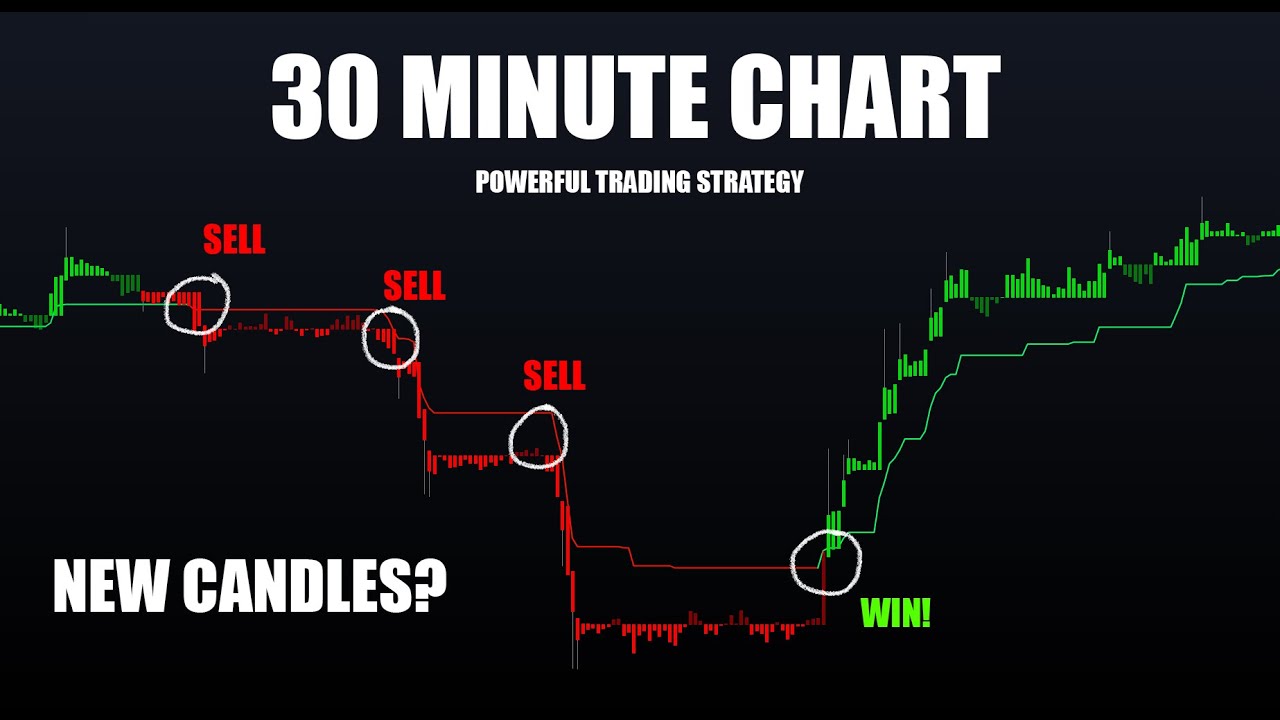
In this video I show a nice method to cleanly identify trends on the 30m timeframe on cryptocurrencies. This can of course be applied to any asset and timeframe. This uses the new Taki Ashi candles within Lux Algo Premium, the Trend Tracer and Lux Oscillator [Classic].
Get instant access to Lux Algo indicators: https://luxalgo.com/
Lux Algo fe...
is there a way to change the colors of the exits indicators? red for buy and blue for sell does not work for me 😄 it is the opposite of what it should be. I wanna swap them
 tepid nest
How can I figure out what email I used to buy Lux? The site is saying that it doesn't recognize my info
disregard my previous msg
 obtuse citrus
Hey guys when im using the auto pilot do i also need to do anything with confirmation agility
 gray lance
little vigil
is there a way to change the colors of the exits indicators? red for buy and blu...
gray lance
little vigil
is there a way to change the colors of the exits indicators? red for buy and blu...
Try looking at the "style" settings
gray lance
obtuse citrus
Hey guys when im using the auto pilot do i also need to do anything with confirm...
no
Unless you plan on playing around with all the settings to see but generally the default setting if you don't know what you are doing is the best
little vigil
gray lance
Try looking at the "style" settings
i did, you can change the color of the transparent box around the "x" but not of the "x" itself. its fine, i just made the box opaque and added appropriate colors. I was confused by the wording, SELL EXIT implies buy action, as we are leaving the period for selling the asset and BUY EXIT implies a selling notion as we are exiting the period for buying the asset. Just this wording was throwing me off. This sort of cvlarification would be very useful.
indigo cradle
little vigil
i did, you can change the color of the transparent box around the "x" but not of...
Yeah understood. An exit of a sell is a short exit
gray lance
anyone know how to get rid of the tags?

 gray lance
indigo cradle
Right click the side bar, labels and remove the ones that are ticked
gray lance
indigo cradle
Right click the side bar, labels and remove the ones that are ticked
right on worked perfectly much appreciated ✌🏿
obtuse citrus
IS there a way to set the algo to give me support and resistance
indigo cradle
@obtuse citrus Absolutely
We have 5 different excellent SR options
Predictive Range - Predictive S/R - Trendlines
gray lance
When I set up alerts I can set up take profit and stop loss levels?
My goal is to automate the alerts to send to telegram in a format My telegram bot can read
indigo cradle
You can set alerts for exits from within the alert menu
gray lance
i see thank you
dire jolt
Is there a way to be notified by Lux issues a buy for a certain stock based off like a 30min graph?
like via text message or email?
indigo cradle
dire jolt
Is there a way to be notified by Lux issues a buy for a certain stock based off ...
There is 🙂 You can set custom alerts:
!alerts
jaunty perch
How to set up your own custom alerts in TradingView: https://docs.luxalgo.com/lux-algo-premium-indicators/setting-up-alerts-on-tradingview
Follow this guide for setting up your own custom alerts on TradingView.
dire jolt
perfect!
fast flume
Can i enter all stocks settings for optibot5m? So when i go to nflx and it will automatically go to right setting that I set up? Or do I have to do it every ticker i enter and set it manually?
indigo cradle
Sadly it all needs to be done manually
indigo cradle
Every Monday and Wednesday for 15,30 and 1h
Every day for 5m
And 4h just mondays
fast flume
Okay. To keep up with the market?
indigo cradle
Yep 🙂 Just to stay fresh
fast flume
Thank you
little vigil
so the exit indicator pretty much nails the tops, but not so much on the bottoms. What indicators do yall use for more accurate entry positions?
thanks to indicator nailed 2 good exits on entries i had yesterday after market dumpage. Trying to understand how to read your indicator for best entries now
indigo cradle
Nailing tops and bottoms is always tricky, i'd also suggest precitive ranges and reversal zones (2 of my personal faves for precision)
little vigil
indigo cradle
Nailing tops and bottoms is always tricky, i'd also suggest precitive ranges and...
i usually use RSI and MACD for that, does oscilliator do a better job than MACD? RSI + MACD + BOLLINGER bands is my go-to entry marker. Thinking if i need to change that, since i cant figure out your indicator buy triggers. some say buy others dont.
cinder sierra
Why is Lux greyed out now when I try to add an alert?
little vigil
for instance here we had a strong buy confirmation, but oscilliator ahd 2 red marks for trend reversal, neither of which actually happened. https://www.tradingview.com/x/VFY34h8x/

TradingView
cinder sierra
Yeah, something is weird… I can’t create alerts now with Lux as a condition
 raw yoke
Which is best time frame for weekly swing trading ??
indigo cradle
cinder sierra
Why is Lux greyed out now when I try to add an alert?
Refresh the page 🙂
cinder sierra
It’s fixed thanks 🙏
indigo cradle
little vigil
for instance here we had a strong buy confirmation, but oscilliator ahd 2 red ma...
Oh you wouldn't really want to use those dots for entries or exits
cinder sierra
Is there a list of what is actually outputted for each of the alerts();? I’m writing some code and need to know what they say verbatim so I can route the alert properly
Is it just buy/sell/strong sell/strong buy?
indigo cradle
cinder sierra
Is there a list of what is actually outputted for each of the alerts();? I’m wri...
For the alertany() function?
cinder sierra
Yeah
indigo cradle
If you send out a test alert you'll get the exact format there
vale sundial
I don’t see the option for once per bar close
indigo cradle
If you're using the all in 1 alert it'll automatically use once per bar close
vale sundial
Ok thanks
So when you see a buy it’s purple then you wait until green how can I set it up to where when it turns green I get signaled
Instead of waiting until it turns green
indigo cradle
That's a normal buy turn strong alert
shrewd fjord
indigo cradle
Are you setting alerts?
Yes I am
spice scaffold
IS THERE ANY WAY TO GET REFUNDED WHEN THE PAYMENT IS DONE BY COINBASE WALLET?
feral lava
Hi @spice scaffold sorry but unfortunately our 30 day refund policy doesn't apply for crypto payments https://www.luxalgo.com/policies/refund-policy
Email support@luxalgo.com for any other help relating to orders
 jaunty perch
hello, i just signed up. i added the lux algo premium on trading view, but i have a study error- study_not_auth
oop i got it
the desktop app didnt have invite only scripts, and i tried getting it from the community scrips
when i used the web browser version it had the invite only scripts and it was there and that one worked
feral lava
Make sure you're logged in on the same TradingView account on desktop and it should be there too 🙂
& do a refresh on the desktop app
jaunty perch
ah ok, i closed and opened the desktop app and its all there now, thank you!
feral lava
👍 no prob! let us know if you need any more help
 glossy storm
Hello I just sighned up how do I add lux algo to trading view it dosent show new indicators?
@worldly cliff @feral lava
feral lava
!guide
jaunty perch
How to setup the indicators on TradingView: https://docs.luxalgo.com/getting-started/setup-tradingview
TradingView.com --> Chart --> Indicators --> Invite-only scripts
Once you've signed up on our website and entered your active TradingView username within the "Connect Accounts" portal from your email, you will have instant access to use our indicators on the platform.
feral lava
@glossy storm ^ try refreshing & then the above
glossy storm
thank you
spice scaffold
feral lava
Hi <@!878984128211591169> sorry but unfortunately our 30 day refund policy doesn...
yes i reached out by email. I'm just trying to know if there is any way. because the package supported by crypto payment was 1 year package. Bought that one. Now I'm.... 😐
 vital oriole
Keep getting error on Algo Premium .. Have removed and added again as well
 indigo cradle
vital oriole
Keep getting error on Algo Premium .. Have removed and added again as well
indigo cradle
vital oriole
Keep getting error on Algo Premium .. Have removed and added again as well
Hi there, what features are you using?
vital oriole
 indigo cradle
For which asset and timeframe?
vital oriole
NZDUSD and 15M
 hasty orchid
Hi, what is the setup for the marked section to get the alert?
 gray lance
lux algo would be perfect if we could edit alert messages for each alert signal in the dashboard. Add textbox for custom messages so we can easily use automated trading.
im sending alerts to telegram and from there to mt5 only issue is message format. i can edit exit message etc but not the multi signal option.
I see i can set one at a time. Ok near perfection. lol but the textbox would streamline this process
shy relic
gray lance
lux algo would be perfect if we could edit alert messages for each alert signal ...
For the any alert() function call? It's not an impossible thing to add, but it's slightly impractical, we can't add a alert message field like in the alert creation menu, we can still look into it tho.
indigo cradle
vital oriole
NZDUSD and 15M
Does this happen for any other asset?
shrewd fjord
Hi Admin, would like to check .. example when I set 1H optibot for btc/usd following the settings on discord And then I move to Ada/usd and follow the settings on discord .. will it change the settings for btc/usd to the new sensitivity or will that remain ? I mean each time I change the sensitivity following each asset will it remain or do I need to keep changing it when viewing.. and yes I am setting alerts
indigo cradle
vital oriole
FYI, its been OK for a while..
Very strange, it should correct itself in a few candles there
indigo cradle
shrewd fjord
Hi Admin, would like to check .. example when I set 1H optibot for btc/usd follo...
Sadly you'll need to change them
vital oriole
Its back.. Alert stops
 indigo cradle
vital oriole
Its back.. Alert stops
indigo cradle
vital oriole
Its back.. Alert stops
When you set the alert turn off all features except signals
Then set the alert
 wheat narwhal
Question: Will you ever add an alert (TradingView) for the Trendlines? Please do, since this would be very helpful! 🙂
indigo cradle
We currently have a big limit on the number of alerts
candid crag
Do the signals ever get removed? I got a signal for XPEV today a few minutes ago for strong sell but now it is not on the chart anymore
indigo cradle
!confirmed
jaunty perch
A signal is confirmed only once the candle is closed. Meaning a signal could appear on your chart but is not confirmed until that candle is closed and the next candle has started.
Our automated Discord bots will never notify you on any signal until the candle has closed and confirmed it. If you're adding alerts for Lux signals in TradingView - make sure to select "Once per bar close".
indigo cradle
Did you change the settings?
candid crag
I don't believe I did. Maybe a one off thing - will wait for another signal and see how it goes.
indigo cradle
Yep it really shouldn't occur; I don't think it'll occur again
candid crag
it happened again. Got this signal on chart
 candid crag
the alert is set on the 5m chart and I am looking at the 5m chart
indigo cradle
As it's most likely using different settings
candid crag
okay
 winged ice
Morning, do you guys suggest auto pilot confirmation?
I struggle to find a setup usually always late to get in ? Any suggestions
indigo cradle
Have you seen any of our strategies? 🙂
winged ice
No 😞
indigo cradle
!strategies
jaunty perch
Find our full trading strategies playlist on YouTube: https://www.youtube.com/watch?v=xezy6WGpZ8Y&list=PLbqCXsOfrM3MjO7q7uIiwoVq3evI4neQr
Join our Discord: https://discord.gg/LUX
Get access to Lux Algo: https://luxalgo.com/products/lux-algo
Get the best settings: https://www.youtube.com/watch?v=OmvxpTE9tlw&t
Usability Tips: https://www.youtube.com/watch?v=5wtdY51crnc
winged ice
Thank you
potent knot
@indigo cradle per the video on adjusting settings with either optibot, autopilot or dashboard, it appears that the difference is only one of convenience or preference. Is there any information on how the three methods are diffferent in how they calculate signals? This would help many of us select a method on something other than convenience of updating vs autopilot, etc.
jaunty perch
@shy relic can i use python to automate singnal buys for majors? how d i get started in lux wiki?
 stable cedar
hello, can i change my tradingview?
shy relic
jaunty perch
<@!225316751410331649> can i use python to automate singnal buys for majors? how...
it might be possible using the alert webhooks.
stable cedar
hello @shy relic can i change my tradingview account?
shy relic
stable cedar
hello <@!225316751410331649> can i change my tradingview account?
yes, you can change yr access username from the the access page or by sending a mail to support@luxalgo.com with your new username 🙂
stable cedar
thank u
 brazen geyser
Why do all my tabs have a locked symbol right beside the hashtag? Also, when do you guys update the optibot?
indigo cradle
Do you have a screenshot?
 acoustic granite
Hi… just bought the package and can’t figure out how to get dark mode on the chart. All my other charts are still in dark mode though. Thx
Nevermind. I just needed to toggle it
glossy storm
It still dosent show new indicators for some reason is there anything else I could try
Also how should I login into trading view I tried with my gmail from my lux algo account but theres still no indicators is there supposed to be a option to sighn up with lux algo?
sorry @indigo cradle @feral lavafor pinning
brazen geyser
indigo cradle
Do you have a screenshot?
 feral lava
glossy storm
sorry <@!456590452703887373> <@!393235362107097089>for pinning
feral lava
glossy storm
sorry <@!456590452703887373> <@!393235362107097089>for pinning
no worries! Create a free TradingView account and then input the username into the Connect Accounts portal from your Subscription Confirmation email and you'll have instant access
TradingView account is separate - we just need your TradingView profile username in that portal to get the instant access applied
jaunty perch
How to setup the indicators on TradingView: https://docs.luxalgo.com/getting-started/setup-tradingview
TradingView.com --> Chart --> Indicators --> Invite-only scripts
Once you've signed up on our website and entered your active TradingView username within the "Connect Accounts" portal from your email, you will have instant access to use our indicators on the platform.
feral lava
Then you can follow this ^
glossy storm
thank yoou appreciate you and your team you guys are awesome
feral lava
always happy to help:))
glossy storm
I registered with my discord and username on the confirmation email still dosent show for some reason
and i made a trading view account
Oh never I have 0 brain cells hahaha I figured it out I think thank you
indigo cradle
brazen geyser
Those are unlocked for you 🙂
glossy storm
I put my lux algo name as my connect account name and my trading view account had a diffrent username so I switched my trading view account to match with the username I connect will it still work?
and do my words make any sense?
indigo cradle
It should do, take a look in your invite only scripts 👍
fast flume
Is tp2 a target? How accurate is it?
 indigo cradle
Accuracy especially for TPs are well, impossible to define. Technically speaking if the TPs are hit they are accurate 100% of the time since you've profited
fast flume
If i hit it, is it recommended to get out?
fast flume
Thank you sir
late peak
is it possible to get Tradingview alert via mobile message?
indigo cradle
There should be an option for mobile alerts when you set the alert 🙂
 indigo cradle
Any confirmation
vale sundial
Ok thanks for the quick response 👍
 meager salmon
Hello together, im a new member of luxalgo and i must say this is the one of the best invest i did… i have one question , with my ipad pro the tradingview app with lux go freezen, does it work better with a pc/notebook?
cosmic imp
I have 2 different charts visible in my browser. Both charts is for the same asset. I use both charts as I want to test some features in Lux Algo and be more familiar with it.
But why can Optimal Sensitivity be different on those charts, when it is the same asset, same timeframe (30 minute), both Hekin Ashi candels?
indigo cradle
meager salmon
Hello together, im a new member of luxalgo and i must say this is the one of the...
It should work equally however a few iPad users experience lag
indigo cradle
cosmic imp
I have 2 different charts visible in my browser. Both charts is for the same ass...
May I see a SS?
cinder sierra
where can i send a private msg outside of vip support, its support related... just dont want it being seen everywhere
indigo cradle
cinder sierra
where can i send a private msg outside of vip support, its support related... ju...
You can PM me ☺️
cosmic imp
indigo cradle
May I see a SS?
Here you see my screen shots.

screenshot, see them have different sensitivity..
 indigo cradle
Is your agility the same?
cosmic imp
No, 5 and 24. I guess that explains the difference then
fast flume
If you want to swing 1 month out, do you use 30m or 1h?
 potent knot
vale sundial
potent knot
vale sundial
Probably should wait until you get a green confirmation candle close or see how Support/Resistance looks at that price level
wheat narwhal
indigo cradle
We currently have a big limit on the number of alerts
What does that mean? There won't be an alert for the Trendlines? If you could, then you really should. That would add another way to trade using bigger trend-trades!
indigo cradle
So basically in Pinescript you can only create a certain amount of alerts in a script
We've used up all possible major alerts at the moment
So until TradingView allow for more we are slightly stuck
You can set alerts on some of the SR modes
Such as predictive ranges
raw yoke
I’m trying to see if they do or does it go based on volume and patterns
 digital wraith
No not news specific, more technicals
But when news causes a stock to fall or to sell, then it can go through key levels and give you buy or sell
raw yoke
Just wondering how accurate luxalgo is with its predictions
digital wraith
What is also nice, I got here on discord via market updates channels a push message from Lux Algo news about oil, made big bugs on the crash because of it
 lilac onyx
oh man!! I am so frustrated! i dont know how to use this Indicator 😫
can someone to help me please
meager salmon
I need to adjust sensitivity like this is that right?

 jaunty perch
Yeah change it to like 4
meager salmon
jaunty perch
Yeah change it to like 4
Don't these two numbers have to be identical?
indigo cradle
lilac onyx
oh man!! I am so frustrated! i dont know how to use this Indicator 😫
What's up? 🙂
lilac onyx
Thank you! question for every ticker I need to change the signals??
indigo cradle
That's up to you, it depends what you prefer to do. Some users will optimise based on tickers, you may prefer a blanket set of settings
E.g. using default for all tickers
lilac onyx
and how is default? check the auto pilot confirmation??
gray lance
when I change the sensitivity settings do I have to update every alert?
indigo cradle
lilac onyx
and how is default? check the auto pilot confirmation??
Default is just the standard settings without AP enabled
indigo cradle
gray lance
when I change the sensitivity settings do I have to update every alert?
You will need to if you want the alert to use the new settings
 twin birch
indigo cradle
Default is just the standard settings without AP enabled
twin birch
indigo cradle
Default is just the standard settings without AP enabled
What is the default? Mine is 30, I think because I set it 30 before. If not, how to reset sensitivity to default without AP?
indigo cradle
In the bottom left of the settings panel theres a drop down where you can reset to defaults
lilac onyx
i reset the setting the default is : SS: 12 and CSA: 26 ???
indigo cradle
It is yep 🙂
lilac onyx
So with default can I apply it to many ticker and it will be accurate?
indigo cradle
Have you watched any of our strategy videos? They may help you get the most out of the indicators
lilac onyx
No, please can you share with me, Thank you
indigo cradle
!strategies
jaunty perch
Find our full trading strategies playlist on YouTube: https://www.youtube.com/watch?v=xezy6WGpZ8Y&list=PLbqCXsOfrM3MjO7q7uIiwoVq3evI4neQr
Join our Discord: https://discord.gg/LUX
Get access to Lux Algo: https://luxalgo.com/products/lux-algo
Get the best settings: https://www.youtube.com/watch?v=OmvxpTE9tlw&t
Usability Tips: https://www.youtube.com/watch?v=5wtdY51crnc
vale sundial
My question basically is when you get a buy it is purple then when it’s green when it’s green you take the trade can I make it where I get the alert when it turns green?
meager salmon
meager salmon
I need to adjust sensitivity like this is that right?
Can someone give me an answer for that question pls, are these two numbers need to be same, Like in this picture, is that correct?
vale sundial
I mean thats optimal it doesn’t have to be the same
I just put it on autopilot so I don’t worry about it
meager salmon
vale sundial
I mean thats optimal it doesn’t have to be the same
Okey thx, but look with autopilot the sell signal is not showing, and with manual adjust is there

 vale sundial
Yeah that’s true I’m having the same problem I just got mine yesterday
feral lava
meager salmon
I need to adjust sensitivity like this is that right?
That is "Optimal Sensitivity" it can give you a good setting, however, is not required
feral lava
meager salmon
Okey thx, but look with autopilot the sell signal is not showing, and with manua...
Yes since these are two different settings, there will be different signals -- it's all about choosing a method that fits your trading style, or just using default as 12 sensitivity. Definitely check this out: https://www.youtube.com/watch?v=wkruvBBeXn8&t
In this video we cover every method for how to properly optimize your signals within Lux Algo to fit your trading style. We cover the best way to manually adjust sensitivity, how to use optimal sensitivity, auto-pilot, and Optibot.
Instant access to Lux Algo: https://luxalgo.com
Join our Discord: https://discord.gg/Lux
Follow us on TradingVie...
@vale sundial @meager salmon ^
meager salmon
feral lava
<@!533526935259709454> <@!652154277707513868> ^
Thx🙌🏼
potent knot
feral lava
Yes since these are two different settings, there will be different signals -- i...
@feral lava per the video on adjusting settings with either optibot, autopilot or dashboard, it appears that the difference is only one of convenience or preference. Is there any information on how the three methods are diffferent in how they calculate signals? This would help many of us select a method on something other than convenience of updating vs autopilot, etc.
feral lava
potent knot
<@!393235362107097089> per the video on adjusting settings with either optibot, ...
Yeah it's convenience / preference - the actual calculations for the most part are proprietary & don't give much information as to how they would actually be useful
Optibot: Backtesting private data with both sens + agility
Dashboard Optimal Sensitivity: Backtesting sensitivity in TV
Auto-Pilot: Using dominant cycle period to allow signals to adjust dynamically to trends
wheat narwhal
indigo cradle
So basically in Pinescript you can only create a certain amount of alerts in a s...
That's terrible news. I think you should get rid of something else to make room for the Trendlines alerts. That is a hidden gem of all the premium indicators I have tried and would be a whole new added dimension to the Lux Algo trading experience with the alerts. Getting in on a trend at the beginning of a trend line, then out at the beginning of the next, would be next level!🙏
potent knot
feral lava
Yeah it's convenience / preference - the actual calculations for the most part a...
thats very helpful - thank you! it would be great to be able to active each one with toggle as is done for Auto Pilot. Doesn't appear to be a big programming adjustment....just a thought
 wet ore
What time chart does the pattern detection channel use?
wheat narwhal
indigo cradle
We currently have a big limit on the number of alerts
Then how about making the Trendlines a separate plugin altogether so the Trend Up/Trend Down alerts can be set for it!🙏
feral lava
wet ore
What time chart does the pattern detection channel use?
It uses the daily chart
feral lava
potent knot
thats very helpful - thank you! it would be great to be able to active each one...
Thanks for the feedback, yes definitely have considered - I think there’s limitations there for enabling both of them since they update overtime, it’s not like Auto-Pilot which is a completely different calculation than Sensitivity
 glossy idol
so im trying to set my alerts, and when i get to my second ticker a pop up apears and says i need to upgrade from the free tradeview platform in order to be able set alerts for more than one ticker.ive asked support and all they did was send me a video to watch which i have followed to the tee from what i can tell. So my question is do we really have to upgrade tradeview from free to receive more than one ticker signal at a time through lux algo?
wet ore
Was this video outdated, don't see it online anymore.
 glossy idol
is there any way you can just please answer my question?ive contacted support several times and i cant seem to get a straight answer.Ive got my 3 indicators and im happy with that but the alerts have me really fustrated. If only 1 alert is all you get then that is really disappointing.I just paid for a full year for lux algo and it says on the site it works with the free tradeview software which it does.But only one ticker alert is all it allows without having to upgrade tradeview.So can you please tell me is this truly the case or is there a way to bypass this
 restive minnow
Good day, may i know if the optibot for crypto can be copied to other coins that are not listed in the optibot?
stable cedar
shy relic
yes, you can change yr access username from the the access page or by sending a ...
I have sent it
shy relic
restive minnow
Good day, may i know if the optibot for crypto can be copied to other coins tha...
That might not be a good option since optibot optimize the settings specifically for a specific coin at a time. I would suggest using the optimal sensitivity on the dashboard instead if a coin is not available on optibot.
indigo cradle
glossy idol
is there any way you can just please answer my question?ive contacted support se...
This is truly the case and most users use Lux on the free plan of tradingview
So yes; you can only set an alert for a single ticker
restive minnow
shy relic
That might not be a good option since optibot optimize the settings specifically...
Thank you. question, how can i know the right optimal sensitivity in a certain coin in crypto?
indigo cradle
You could use the dashboard recommended sensitivity or you can use autopilot to adjust settings dynamically
jaunty perch
Good morning, is it possible to configure tradingview so that I receive a 4h buy / sell alert to my email?
shy relic
jaunty perch
Good morning, is it possible to configure tradingview so that I receive a 4h buy...
sure, go to the 4h chart of the ticker of your choice, create an alert by clicking on the alarm icon (or use alt + A), and set the alert as per the image above, make sure to select "send email" to have an email sent. See https://docs.luxalgo.com/lux-algo-premium-indicators/lux-algo/alerts for more info.

Options for setting alerts on Lux Algo in TradingView.
jaunty perch
shy relic
sure, go to the 4h chart of the ticker of your choice, create an alert by clicki...
Many thanks...
raw yoke
Do you guys have a indicator for PT and SL ?
indigo cradle
We have a TPSL feature 🙂
raw yoke
Mind linking me to it
indigo cradle
The TP/SL Points feature displays 4 points (2 take profits in blue, and 2 stop losses in red), and aims to help the user set stop losses and take profits by estimating points of potential support/resistance. When the price significantly deviates from the take profits or stop losses, each point will update.
raw yoke
@indigo cradle what’s the alert time frame for a day swing usually ?
indigo cradle
raw yoke
<@!456590452703887373> what’s the alert time frame for a day swing usually ?
For daily swings maybe you'd want the 15m
fast flume
fast flume
If you want to swing 1 month out, do you use 30m or 1h?
Anyone?
indigo cradle
There isn't really set timeframes for this stuff, maybe you could use a mixture of the two
little vigil
I am still trying to understand how I am supposed to properly use this algo. Please correct me if I am wrong. So the buy and sell confirmations are basically saying where the buy and sell zones begin? In which case it would mean we buy in a sell zone and sell in a buy zone? Or am I missing something here. I watched several videos, configured the indicator properly but i cant figure out which parts of this algo tells you when to buy or sell.
because if i buy right when the buy confirmation appears, and i wait for sell confirmation to appear before i sell, i will incur a loss.
case in point: https://www.tradingview.com/x/JoTHvWfv/

TradingView
 vernal stratus
little vigil
I am still trying to understand how I am supposed to properly use this algo. Ple...
vernal stratus
little vigil
I am still trying to understand how I am supposed to properly use this algo. Ple...
buy means open a long position and sell means open a short position or sell what your holding. I personally use Lux as a conformation opinion
I wouldn't recommend to buy when a buy signal appears. Do your own analysis and use Lux as a confirmation
little vigil
another case in point, if i followed confirmations here i would have sold lower and bought higher... https://www.tradingview.com/x/DbDhwFrD/
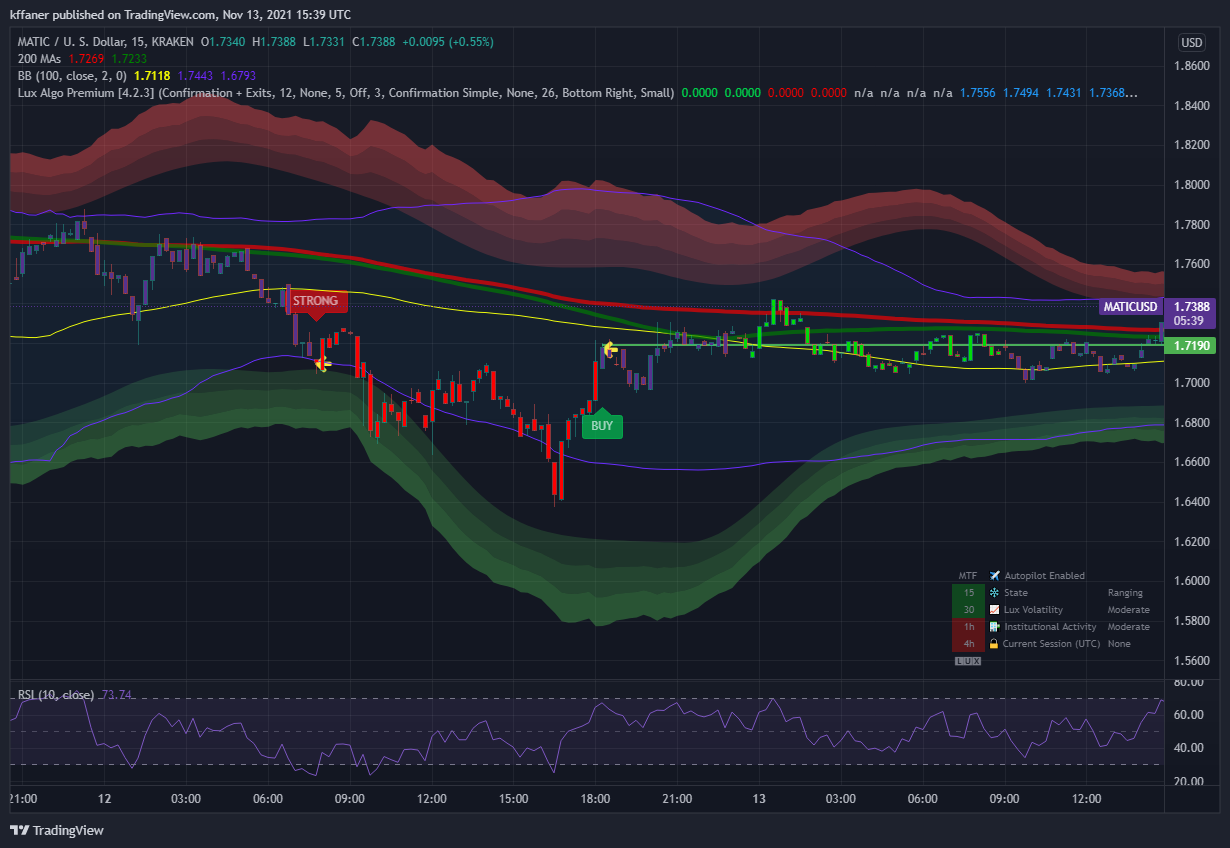
TradingView
little vigil
vernal stratus
I wouldn't recommend to buy when a buy signal appears. Do your own analysis and ...
thats what i figured. just trying to understand how to use this and if it is worth 70$/month. if i still gotta use all of my own analysis then this is just a pat on a shoulder so to speak
vernal stratus
I would also recommend you to turn off auto pilot and use the settings that suit your strategy
indigo cradle
little vigil
another case in point, if i followed confirmations here i would have sold lower ...
Oh this is not at alllll how it should be used
We don't make strategies

You have a system packed with features in order to deduce entires or exits
There isn't a correct way to use anything in it really. There isn't a strategy that you can follow to generate money with it. The features are there to help you do analysis. As you can see that strong signal went into significant profit and as the trader it's up to you where you take that
As did the buy signal
!strategies
jaunty perch
Find our full trading strategies playlist on YouTube: https://www.youtube.com/watch?v=xezy6WGpZ8Y&list=PLbqCXsOfrM3MjO7q7uIiwoVq3evI4neQr
Join our Discord: https://discord.gg/LUX
Get access to Lux Algo: https://luxalgo.com/products/lux-algo
Get the best settings: https://www.youtube.com/watch?v=OmvxpTE9tlw&t
Usability Tips: https://www.youtube.com/watch?v=5wtdY51crnc
indigo cradle
Example strategies are listed above ^ Hopefully these help explain confluence and how you may want to use features
little vigil
jaunty perch
Find our full trading strategies playlist on YouTube: https://www.youtube.com/wa...
i watched the videos, they just explain the indicator, does not explain how a trader can use it to set entry or exit points specifically, unless i missed something. can i get some examples how someone used your indicator to find specific entry and exit pricepoints?
indigo cradle
little vigil
i watched the videos, they just explain the indicator, does not explain how a tr...
This playlist is filled with example of how to set these points
I can link the specific videos

YouTube
Sharing trading strategies that I've developed using Lux Algo + more.
(Not actually a gecko.)
little vigil
indigo cradle
I can link the specific videos
ill view them all. and come back if i have more questions, thanks for the help
tender wing
indigo cradle
Well actually the vast majority there do 🙂
Then you guys should do more videos.... as many setting of the indicators are not explained well in the documentation
indigo cradle
Do you have an example of where you believe this to be the case?
 thick atlas
@indigo cradle every day 0ptibot alerts we get , or any specific timings???
indigo cradle
Not every day; mondays and wednesdays
 rare dune
Thanks
little vigil
you guys definitely need to invest more into videos on that playlist. its extremely short and very limited. explains few details and does not get into it significantly. I watched all the videos, have a better understanding on how to use this algo but still a lot of unclarities on to which indicators to have on. Different strategies with different indicators were quickly mentioned. Need videos with greater details into strategies with maybe proof of concept? What indicators to use for a swing trader vs day trader, or for which timeframes which indicators are better? I like to trade using 15min chart, after watching the videos i still dont know if having convergence zones is good for 15min chart or not. These zones were mentioned in the 5min chart and 30min i think so i assume it is fine to use it on a 15min. Pls make longer videos with more thorough walkthroughs through different indicators and different combinations of indicators and how to use them. I wanna set a specific strategy and use specific indicators without changing them too much while trading on a 15min chart.
indigo cradle
little vigil
you guys definitely need to invest more into videos on that playlist. its extrem...
Questions like: "What indicators to use for a swing trader vs day trader" really don't appear frequently . An indicator can be used and applied on any timeframe. They simply analyse data and display an output. A moving average can be used on any timeframe, RSI can be used on any timeframe as can Lux indicators.
Only you know how you like to trade, you know how long you like to be in trader, you know what S/R setups you enjoy. There are a lot of things only you will know. You may enjoy one feature, another trader may not. We provide the indicators and normally users have a look through and see what fits their style 🙂
Also regarding "convergence zones" what are you referring to here?
If you're looking for a strategy you can set and forget this will be something you'll need to work on really
little vigil
correction - reversal zones. I am bad with names 😄
indigo cradle
Yes they'll work with any timeframe 🙂 Everything in there can be applied to any asset and any timeframe
They just analyse candles data
little vigil
indigo cradle
Yes they'll work with any timeframe 🙂 Everything in there can be applied to any...
what goes into reversal zones? is that more than just bollinger bands?
indigo cradle
Absolutely, everything in the main script is built from the ground up mathematically
Nothing is built off existing indicators
Nothing is a mixture of existing indicators, all from the ground up inhouse 🙂
We try to give our indicators a familiar feel so sometimes people draw parrallels but they won't really resemble each other at all
 calm cedar
I can see why you would say that, some people either don't know shit or just don't have a strategy and blame the indicators they don't even know how to use
little vigil
got it. So let me see if I am reading these indicators right, according to this chart, I see the price action entering reversal zone, but volatility is low, so that means it may stay in the reversal zone, it is also testing SR of 236 and seems to sustain it, which makes me think it may pump for SR of 243. I have a limit order at 242, but that is high in the reversal zone, the trend tracer is still green indicating we are still on an uptrend. RSI is normalizing as volatility is low, this might give opportunity for price action to pump towards 242 limit. Am I reading this right, or is this just wishful thinking? 😄 https://www.tradingview.com/x/iucKMEEE/
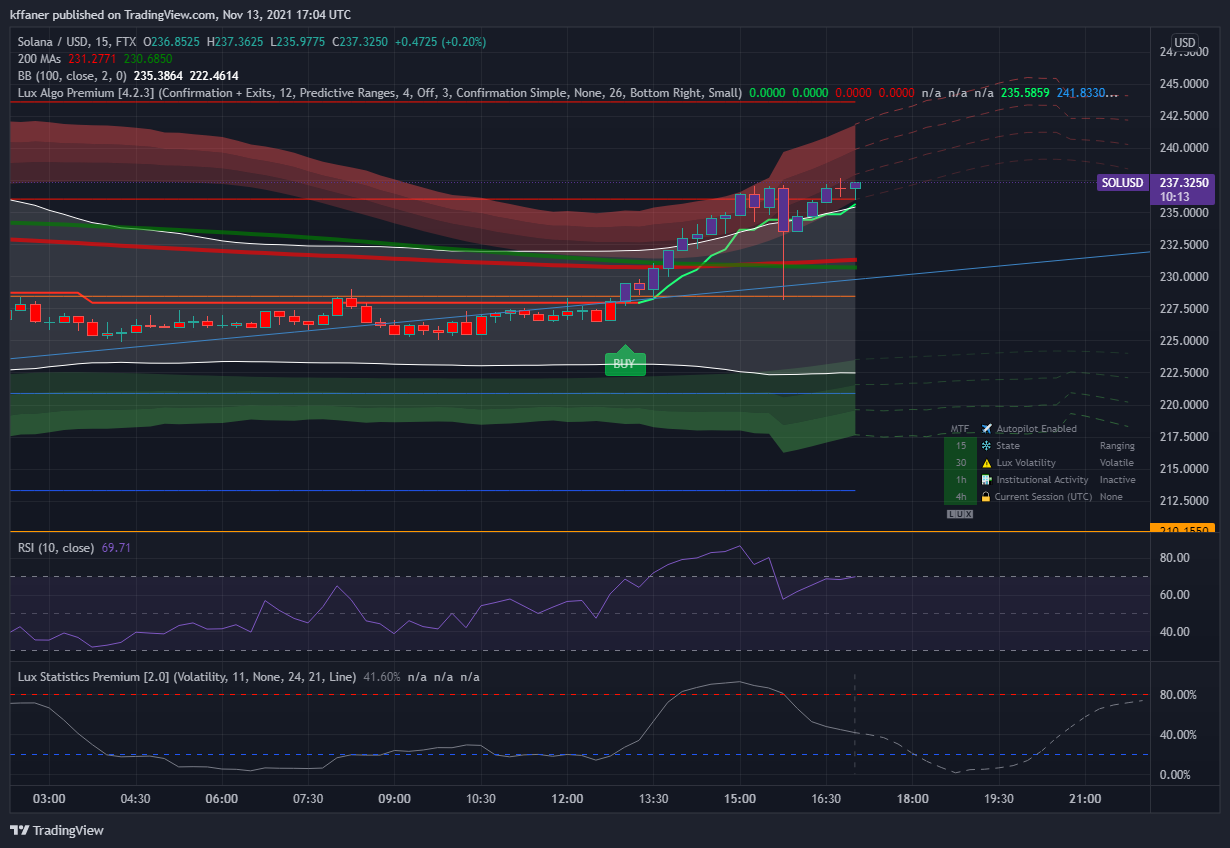
TradingView
indigo cradle
little vigil
got it. So let me see if I am reading these indicators right, according to this ...
There isn't really a right or wrong way; indicators are mostly down to interpretation however, yes these are all valid things to say, what I see there is potentially bearish div forming on the the RSI, paired with the fact it's in the reversal zones making it a slightly riskier trade
little vigil
indigo cradle
There isn't really a right or wrong way; indicators are mostly down to interpret...
if there is no right or wrong way to read indicators, that would make them irrelevant. I dont understand this.
indigo cradle
little vigil
if there is no right or wrong way to read indicators, that would make them irrel...
It's down to interpretation very frequently. See above as an example
You mentioned some valid cases why the trend may continue up
I presented arguements why this not be the case
So as a trader it's your job to see whether there are more arguements for an uptrend or downtrend
little vigil
indigo cradle
So as a trader it's your job to see whether there are more arguements for an upt...
ah i see, so basically look at a bunch of indicators, zoom in and out of timeframes, put arguments for bear or bull together, and see which one comes out on top?
indigo cradle
little vigil
ah i see, so basically look at a bunch of indicators, zoom in and out of timefra...
Absolutely a perfect example of how to trade 😄
Opening a trade, any trade exposes you to risk so it's a traders job to evaluate that
little vigil
your ALGO certainly simplifies it a bit, coloring and zoning makes it easy to see which indicator indicates a bull or bear signal. I will continue to use it and experiment on it. Putting it to a test for a month to see. I think sometimes i get drowned in too much detail and need to remind myself to zoom out and check long term trends and SR lines.
indigo cradle
For sure, sometimes keeping things simple is the best bet
little vigil
on the dashboard, the coloring under different time intervals (green and red) are those also bullish/bearish signals? Is that based on a combination of indicators or a general trend in that time period?
indigo cradle
 glacial owl
I have a question on the Alert. Let's say I would like to set an alert letting me know anytime there is a crossing above the Trend Tracer, or below the Trend Tracer, how would I do it?
vapid wing
I am pretty new and testing Lux Algo for the first time. On the 4h I think that Enj is retesting the bottom of the predictive channel and it's on the eq cloud. Plus there is a lot of institutional movement. I am buying now with sl at 2.98 (under the eq cloud) and tp at 3.36 (almost at the top of the predictive channel.

Just tell me if I am using it in the right way or I am missing something
Thanks 🙏
indigo cradle
glacial owl
I have a question on the Alert. Let's say I would like to set an alert letting m...

Do crossing up *
indigo cradle
vapid wing
I am pretty new and testing Lux Algo for the first time. On the 4h I think that ...
Seems like a valid setup 🙂
vapid wing
Thanks 🤞
glacial owl
glacial owl
I have a question on the Alert. Let's say I would like to set an alert letting m...
I figured it out.
little vigil
@indigo cradlethanks for the explanations. When using your indicators in conjunction with my standard practice, it seems to be working. First successful trade of the day, entered earlier shortly after buy signal and trend tracer reversal. Drew a trend line to follow upward momentum. exited today after it bounced off of reversal zone and trend tracer reversed to red and it crossed my trend line. 🍻 https://www.tradingview.com/x/qQriN3xj/

TradingView
 patent stratus
hi
indigo cradle
Hi 🙂
indigo cradle
Have you connect your accounts? 🙂
patent stratus
ok
indigo cradle
and it should work 🙂
 misty falcon
I'm just using a simple set up. Looking for confirmation of direction and will look for reasonable risk entries on lower timeframe.
 cinder sierra
So I'm using 5m candles, autopilot, and any buy/sell condition which feed into my trading platform via webhook. My trades for the most part aren't going anywhere, 49 profited, 80 losses.
indigo cradle
This isn't too suprising if you're using them as entries and exits. You need to build a strategy
misty falcon
I don't want the Algo to trade for me, I really don't think that is the purpose of it. I think many come to a place like this thinking the indicator is a magic bullet that will churn out 1k bills for them.. If Lux can keep a trader on the right side of the trade that's pretty big imo..
cinder sierra
I mean, I get the idea of using the indicators to make informed decisions..... but why is the option there for autopilot if it's not the purpose?
indigo cradle
The purpose of AP is to dynamically adjust the confirmation signals
cinder sierra
How can I layer that with market conditions?
I mean, I have my trading platform and I can code it in, but if i could keep the decision making on the TV side that would be highly preferred.
Maybe that's not even the right question - but what I'm gathering is that I'm missing something. How can I improve upon this setup then? Happy to write whatever code is required, I just need to know what that is... happy to pay for a consult if that's offered.
misty falcon
I found my trading improved when I stripped my platform down to a very basic setup. I chose just a couple and I mean like 2 tickers to watch, ones that have a flow to them (I generally watch AMD or MSFT) and ones that I know are generally going to go up most of the time. Trying to watch 10 tickers is more than I can handle.. I only use candles with a 50 ema and a ob/os indicator (part of a slow stoch on the bottom.) But it really doesn't matter about the bottom indicator as long as you use the same one all the time and just watch it and the price and ma with S/R & Trendlines. Trade off just that for a while .. I trade call options mostly. It is simple but it is also the tools thousands of traders are looking at at the same time.. The Lux is just reinforcing to me" hey trade on the long side right now stupid".. lol sometimes that's all the help one might need..
 charred kernel
hi i got a little question i have about 20 coins that i am folowing and have alert on all of them but it makes too many of them i would like to know if its possible to filter the alerts with another indicator so for exemple i set up btcusdt with the optimal settings and lux gives me a buy signal but doesnt trigger the alert until the trend catcher turns bullish is it possible to combine 2 indicators into 1 alert ? ! would be really helpfull ! plz help
shy relic
charred kernel
hi i got a little question i have about 20 coins that i am folowing and have ale...
That's currently not possible unfortunately, you can always return the value of the trend catcher in the alert message to check it out but filtering alerts mist be done internally within the code
 turbid axle
indigo cradle
The purpose of AP is to dynamically adjust the confirmation signals
turbid axle
indigo cradle
The purpose of AP is to dynamically adjust the confirmation signals
Hi, im new, im experiencing these indicators are slowing down my trading view when I want to select the charts and scroll around to look at different parts of a chart. Im sure this has come across and is there a solution to the slowdown? Is there a better browser than Chrome for this?
feral lava
Hey @turbid axle i'd try refreshing your browser / making sure there isn't too much running, it shouldn't slow down TradingView or Chrome significantly -- have you just started experiencing it since you first enabled the indicators?
turbid axle
feral lava
Hey <@!737467598115176488> i'd try refreshing your browser / making sure there i...
I've experience this since the beggining yes, and I have 4 indicators on it
And yes if I close and re-apply the indicators everything works but leaving it on for more than 1 hour will start the slowdown process
But yes refresh helps alot. any solution if not then I guess refresh is the temporary solution
feral lava
yea should do! let us know if it's consistent
turbid axle
feral lava
yea should do! let us know if it's consistent
Thanks will do
little vigil
turbid axle
Hi, im new, im experiencing these indicators are slowing down my trading view wh...
you might be running low on RAM. its pretty quick for me so either your GPUs or RAM is running out of memory. Browser such as Chrome by default consumes around 4gb ram, when you add tradingview with many indicators it further puts a load on your system. Just checked my system and my chrome browser with all the tabs and tradingview is consuming over 9gb of system ram.
check your task manager for current consumption of ram and available allocation.
turbid axle
little vigil
you might be running low on RAM. its pretty quick for me so either your GPUs or ...
I have 32gb of ram and so far it says i've used 50% of it. You are right that it does use alot of memory, I can see my chrome in the task manager displaying just one of my chrome windows is using 130mb and I have multiple tabs open. I do run it from a laptop connected to 2x 5k monitors. So my guess could be this laptop is struggling but when I have my desktop up and running I will run it again.
charred kernel
shy relic
That's currently not possible unfortunately, you can always return the value of ...
ahh 😦 got it , would be nice to have that feature in the future , thnx
shrewd fjord
Hi Admin,
Let’s say I create an alert on btc/usd on which is on autopilot and then on Ada/usd I set sensitivity at 22 and created an alert.. when it alerts me it follows the sensitivity setting that I set during alert creations right ?
shy relic
shrewd fjord
Hi Admin,
Let’s say I create an alert on btc/usd on which is on autopilot and ...
Yes correct, alerts are always based on the settings used when they are created.
shrewd fjord
shy relic
Yes correct, alerts are always based on the settings used when they are created.
Thank You 🙏🏻
 granite saffron
When will the alert system for the pattern detection be included in the algo? Setting alerts when there is a pattern formed would be very useful.
indigo cradle
We are looking into what we can do with this for the next update
Which isn't too far away
indigo cradle
It has to be manual sadly
 storm relic
I have a question
Can I also convert LUX Algo to tradingview in the EU
would it still work or do you have to do that in USD
storm relic
indigo cradle
What exactly do you mean by this?
can I run Tradingwiev on BTC / EU with LUX
or does it have to be in dollars
the LUX Algo works better
 torn gate
Hello,
I tried to set up an alert which tells me if there's a buy or sell signal following this video : https://www.youtube.com/watch?v=E2Bb0ly2hEw but It didn't alert me today when the 15min algorithm announced a buy signal.
This is a tutorial on how to use our brand new all-in-one alerts system within the main Lux Algo Premium indicator on TradingView. This makes it easier for users with the free TradingView membership to get multiple specific conditions in one alert.
See the guide on our docs: https://docs.luxalgo.com/lux-algo-premium-indicators/lux-algo/alerts#...
indigo cradle
May I see your alert settings
torn gate
yes sure :

 indigo cradle
Seems to be perfect; I'd suggest remaking the alert to ensure its using the current chart settings 👍
 tranquil warren
Any date for the next update? I’m struggling without the use of alerts with autopilot. Thanks.
indigo cradle
tranquil warren
Any date for the next update? I’m struggling without the use of alerts with auto...
No more than a week
torn gate
indigo cradle
Seems to be perfect; I'd suggest remaking the alert to ensure its using the curr...
I hope it will work. will check for the next signal
 fiery mica
Hi, I am a new user, I am reading the guide, but it is not clear to me what the purple candles mean, can someone explain it to me?
indigo cradle
fiery mica
Hi, I am a new user, I am reading the guide, but it is not clear to me what the ...
Welcome, a ranging market or unconfirmed trend 😊
fiery mica
Thanks!
 lyric cedar
How can I create a buy and sell notificaor in a coin using trading view? Is this possible for multiple coins?
indigo cradle
!alerts
jaunty perch
How to set up your own custom alerts in TradingView: https://docs.luxalgo.com/lux-algo-premium-indicators/setting-up-alerts-on-tradingview
Follow this guide for setting up your own custom alerts on TradingView.
lyric cedar
Are my setting correct? Will I receive both buy and sell signals?
 indigo cradle
You would want to use any confirmation rather than any signal
lyric cedar
I selected any signal
lyric cedar
Okay will xhange to confirmation… that covers both buy and sell right?
indigo cradle
Yep 👍
lyric cedar
thank you
 jaunty perch
ik
indigo cradle
Will ban 🤝
jaunty perch

not sure if DM advertising is also bannable here but Ideal#1539 https://gyazo.com/c12c7e6c3ab6c9bbf5e38f6c0cdac68d

 copper anvil

Still get this in Alert when using HelkinAshi as source
^ it’s the returning placeholder text for Any Alert when using HelkinAshi
 grizzled jungle
How do i get rid of all this extra stuff circled??
 indigo cradle
copper anvil
^ it’s the returning placeholder text for Any Alert when using HelkinAshi
indigo cradle
copper anvil
^ it’s the returning placeholder text for Any Alert when using HelkinAshi
This is very very strange will try figure out why this occurs
 grizzled jungle
indigo cradle
grizzled jungle
indigo cradle
Thank you. Also quick question when I'm trying to use the optibot for the different times can i use only one setting at a time??
grizzled jungle
indigo cradle
Sadly yes, one at a time
okay just making sure i wasnt doing something wrong and thank you again ive already learned a lot being here
 grizzled magnet
Morning just joined and the invite only scripts not appearing on TV I have found it on list but has a lock symbol on it and I cant use it can you help me out ,many thanks
 void steeple
Can you please present Optibot on 1day display ?
indigo cradle
Optibot doesn't support 1 day currently as it's very unpopular for trading and would update itself around one a month
 wooden geode
I’m knew first day dose trading view not do pre market live timing ?
indigo cradle
It will do 👍
grizzled magnet
indigo cradle
Have you connected your accounts?
Yes as far as I am aware
wooden geode
What’s the best time frame. ?
wheat narwhal
SUGGESTION: Buys/Sells calculated from the "Nadaraya-Watson Envelope [LUX]" indicator swing-point data as a guide-line. Please!🙏 Those would be very optimal entry/exits.
indigo cradle
grizzled magnet
Yes as far as I am aware
Try refreshing your tradingview 🙂
indigo cradle
wooden geode
What’s the best time frame. ?
We recommend anything >15m
 stiff urchin
@indigo cradle what updates are coming?
indigo cradle
stiff urchin
<@!456590452703887373> what updates are coming?
We prefer to say when they drop 🙂 😉
indigo cradle
What can I say 😉 We just don't want to say anything because things can change last minute
You never know
stiff urchin
its a nice marketing play
as long as you guys don't take away the institutional profile i'm happy
wheat narwhal
indigo cradle
What can I say 😉 We just don't want to say anything because things can change l...
OPTIMIZED & better Buys/Sells, with less noise signals (better agility settings?)PLEASE!
indigo cradle
You can reduce noise by increasing sensitivity 🙂
wheat narwhal
indigo cradle
You can reduce noise by increasing sensitivity 🙂
I know that (I have been a premium user for about 6 months). The Buys/Sells can/should be scripted much better though. It's good, but definitely can be much better. You really notice how off some of them are when you throw on the Nadaraya-Watson Envelope.
indigo cradle
The nadarya watson repaints though
Comparing a repainting indicator to a real time one will always make the real time one look iffy
wheat narwhal
The Envelope (not the Estimator). The channel gives a VERY good indication of the current trend price action. Especially when used with the Rainbow Adaptive RSI (LUX). (Green=good sells & Red/orange= good buys.)
wheat narwhal
indigo cradle
The nadarya watson repaints though
Example of how the Buys/Sells align according to the Envelope. (Sensitivity=12 | Agility=10)
 indigo cradle
wheat narwhal
Example of how the Buys/Sells align according to the Envelope. (Sensitivity=12 |...
indigo cradle
wheat narwhal
Example of how the Buys/Sells align according to the Envelope. (Sensitivity=12 |...
But you're comparing it to a repainting indicator there
wheat narwhal
indigo cradle
But you're comparing it to a repainting indicator there
The Envelope?
wheat narwhal
But I have found it an excellent guide for placing long & short test trades this weekend very successfully. The Estimator definitely I would not go by, but I use it for a 'median" line that the Envelope doesn't have (that should imho).
wheat narwhal
indigo cradle
Yep
When the price action is at the bottom or top of the Envelope channel, and with a green/sell or Red/buy, the test results have been extremely good.
wheat narwhal
indigo cradle
Yep
Please don't stop moving forward with your R&D though for getting the Buy/Sell indicator even better.
wheat narwhal
indigo cradle
But you're comparing it to a repainting indicator there
Another suggestion; then would be a non-repainting Linear Regression Channel (trend based).
wheat narwhal
indigo cradle
Yep
SUGGESTION: Maybe the option of a "% controller" on the Buy/Sells. Example; Have a "% controller" so that if we didn't want any signals before the price action hits a percentage of the last B/S signal, it would only trigger the next one after that % criteria. I.E., A Buy signal would only be triggered after the desired % up from the last Buy signal, and any signal less than that % would be left out and not triggered.
void steeple
indigo cradle
Optibot doesn't support 1 day currently as it's very unpopular for trading and w...
Thank you
indigo cradle
wheat narwhal
**SUGGESTION:** Maybe the option of a "% controller" on the Buy/Sells. Example; ...
Will take all of these into consideration 🙂
 runic herald
When do you start Black Friday Sale?
feral lava
runic herald
When do you start Black Friday Sale?
about a week! we'll have something for everyone
vale sundial
When will the updates come out this month?
indigo cradle
About a week 🙂
 latent kite
vale sundial
latent kite
vale sundial
I got a alert I checked it and it doesn’t show anything
gray lance
is there a way to change sensitivity of exits?
feral lava
Sensitivity adjusts the exits at the same time as it adjusts signals @gray lance
feral lava
vale sundial
I got a alert I checked it and it doesn’t show anything
Likely you changed your settings after creating the alert
gray lance
feral lava
Sensitivity adjusts the exits at the same time as it adjusts signals <@!37259121...
OK and if I set the strategy to auto pilot and set up alert alerts does that mean that Whenever I set up the alert it freezes the auto pilot settings to those exact settings and does not update automatically is that correct? Let's say sensitivity on auto pilot is 13 at the time I set up my alert and then later the sensitivity is 20 The alert I set up will not know that right?
grizzled jungle
can anyone explain how to set up rsi please
 candid mauve
Hello , just wondering if you going to add settings optimize for SHIB? Thank you
 unique bronze
Please, can anyone explain to integrate Lux premium with Lux Oscillator in advance option with BTC/USDT? I am getting little opposite signal from premium to Oscillator. Is there any best ratio of signal to combine?
shy relic
unique bronze
Please, can anyone explain to integrate Lux premium with Lux Oscillator in advan...
note that the confirmation signals are trend following in nature, while the ones in the oscillator are contrarian, and as such can go again the trend. Combining trend following and contrarian signals is possible, for example one could enter trades based on trend following signals and exit them based on contrarian ones.
unique bronze
shy relic
note that the confirmation signals are trend following in nature, while the ones...
Thank you for the response, is there any detail document or video available? i watched Lux channel and Geko channel and try to understand multiple times but with all range of sensitivity, i can not adjust to buy low and sell high as mentioned in the youtube video. Is there any thing available to study and use the oscillator in advance?
indigo cradle
There isn't really a specific resource on this as it's quite specific using these two together in a trade. Alex mentioned a nice application of the two where you use the oscillator as exits.
Do you have an example screenshot of your setup?
unique bronze
Please can you check this file and let me know, all settings are under default. Premium and Oscillator advance
 unique bronze
indigo cradle
There isn't really a specific resource on this as it's quite specific using thes...
unique bronze
indigo cradle
There isn't really a specific resource on this as it's quite specific using thes...
Thank you for quick reply. you can check my screenshot and let me know what i may doing wrong
indigo cradle
So this looks like it was a ranging market. In a ranging market confirmation signals aren't really what you would want to use. As you'll see the oscillator signals which are contrarian in nature will perform better as entries or exits
So if the market is going sideways this is a better idea
unique bronze
indigo cradle
So this looks like it was a ranging market. In a ranging market confirmation sig...
Thank you, i will include as part of my strategies.
 sly plover
Is it possible to get the support and resistance values from indicator automatically via webhook ?
indigo cradle
It is yes using the message field 👍
sly plover
Can you please share an example or any doc link explaining it ?
indigo cradle
!placeholders
 night beaconBOT
Placeholders For TradingView are shown below:
Placeholders for TradingView
"ticker":"{{ticker}}"
"exchange":"{{exchange}}"
"interval":"{{interval}}"
"timenow":"{{timenow}}"
"buy":"{{plot("Buy")}}"
"strong_buy":"{{plot("Strong Buy")}}"
"sell":"{{plot("Sell")}}"
"strong_sell":"{{plot("Strong Sell")}}"
"exit_buy":"{{plot("Exit Buy")}}"
"exit_sell":"{{plot("Exit Sell")}}"
These can be used in the message field of TradingView however cannot be used in all in one alerts.
indigo cradle
So in the message field replace something with the name of the plot
These are examples of signals
But you would want to replace those with the name of the SR plots
sly plover
I see. Let me try and get back if I face any issues.
 fast bear
Hello i need help i made a Mistale with my Trading View Name so i cant use my Inticators
candid mauve
Hello , just wondering if you going to add settings optimize for SHIB? Thank you
indigo cradle
We may when the market settles for it 🙂
candid mauve
Thank you
digital wraith
Is there a tool(or on trading view or somewhere else), that you can see how a stock normally goes on a daily move and compare it with weekly, monthly and yearly.
Seeing a lot of stocks for example sell off in the morning, than move on same ways up towards lunch and then sell off again. Lot's of familair daily patterns.
To check out what the avarage run of the day is
 short inlet
What´s the best sensitivity for long term investments?
indigo cradle
Generally one that's higher to avoid market noise
short inlet
Something like 50?
indigo cradle
what i'd suggest is adjust it until it appears to fit the market in question on a higher timeframe
cloud delta
is there way to scan stocks using Lux algo ...having a scanner using lux algo for small time frame like 30m or 10 min would be awesome
indigo cradle
We believe custom screeners will be supported by TV before the EOY 🙂
 terse swan
Just subscribed for the first time how to I get this off my graph?

 paper dragon
terse swan
Just subscribed for the first time how to I get this off my graph?
paper dragon
terse swan
Just subscribed for the first time how to I get this off my graph?
Features - Main Settings - Adjusting Settings - Style Settings
terse swan
Yeah he never says how to get rid of it lol but that video is usful though
terse swan
indigo cradle
Go into Lux settings
Thank you
cloud delta
I have a question... I see following signal on Live Stocks Scanner CMG 📉 SELL Signal (2H Chart) but when on chart I do not see this sell signal ...what am I missing here....My setting is in Auto pilot mode
indigo cradle
!visible
jaunty perch
Our Discord Market Scanner alerts all use the following:
- Default Lux Algo (V4 inputs).
- Normal trading hours (no extended hours)
- Main exchanges / brokers such as NASDAQ / TVC / FXCM / OANDA / COINBASE / BINANCE
If you have created your own, custom TradingView alerts, be aware they are set per the exact settings you had at the time you set those alert(s).
cloud delta
I mean I do not see any sell signal for CMG chart for any time frame
 fossil crest
what i would like to see at some point is an expansion of the Alt scanner to include more coins
looking forward for all those updates to come!
glossy idol
I am having a hard time with these alerts. They don’t say buy or sell. I got a sqiqqly line one time and another it said BATS. I though it was simple as buy or sell. Where can I learn these signals?
Is there a support number to call I’ve? I’ve messaged support several times on email and can’t get an answer
shy relic
glossy idol
I am having a hard time with these alerts. They don’t say buy or sell. I got a s...
When you set an alert it should include the type of trigger condition in the title, you can also customize the alert message field in order to better keep track of alerts.
You can learn more about alerts here https://docs.luxalgo.com/lux-algo-premium-indicators/setting-up-alerts-on-tradingview
Follow this guide for setting up your own custom alerts on TradingView.
glossy idol
Still can’t find what BATS means. Do you know? And how bout the customer service number
indigo cradle
BATS is a data stream provider. Do you have a screenshot of the issue?
glossy idol
It says BATS and then there’s a squiggly line all I have set is confirmation buy or sell. As well as the same on my oiscillator
 indigo cradle
Using bats it's totally fine
The alerts will work with this
So your alerts aren't firing?
glossy idol
Yea they I got several of them that look just like this. But it doesn’t say buy or sell and I see nothing on the charts
And what is that squiggly line where it says type? I couldn’t find it in the link
night beaconBOT
Placeholders For TradingView are shown below:
Placeholders for TradingView
"ticker":"{{ticker}}"
"exchange":"{{exchange}}"
"interval":"{{interval}}"
"timenow":"{{timenow}}"
"buy":"{{plot("Buy")}}"
"strong_buy":"{{plot("Strong Buy")}}"
"sell":"{{plot("Sell")}}"
"strong_sell":"{{plot("Strong Sell")}}"
"exit_buy":"{{plot("Exit Buy")}}"
"exit_sell":"{{plot("Exit Sell")}}"
These can be used in the message field of TradingView however cannot be used in all in one alerts.
indigo cradle
so when you create the alert you enter this
feral lava
!visible
jaunty perch
Our Discord Market Scanner alerts all use the following:
- Default Lux Algo (V4 inputs).
- Normal trading hours (no extended hours)
- Main exchanges / brokers such as NASDAQ / TVC / FXCM / OANDA / COINBASE / BINANCE
If you have created your own, custom TradingView alerts, be aware they are set per the exact settings you had at the time you set those alert(s).
feral lava
@zinc spoke ^
restive minnow
Good day, newbie here, can anyone tell me what the meaning of the x mark here? Also, any recommendation for combination of indicators for daytrading? thank you!
 feral lava
Hi @restive minnow those are exit signals, they can help with taking profits 🙂
restive minnow
feral lava
Hi <@!757925750551740487> those are exit signals, they can help with taking prof...
copy. thank you. 🙂
void steeple
Hi there,
Why do you offer to sell a currency when it is down?
i am Trying to learn how to work with ALGO For example:
Dogecoin
BTT
BTC
ETH
Do we not collect goods downstairs and sell upstairs?
copper anvil
@indigo cradle have you considered adding OI/Liquidation to the indicator suite? Think coinalyze has an api. Getting alerts on TV would be amazing though.
void steeple
Thank you so much I would love to learn, is there an instructional video on this?
vital oriole
Once I have setup the Alert, say for NZDUSD, 15M. Will the alert setup be impacted, if i go and change the timeframe on the chart to 30M and save it ?
 cloud otter
I'll be getting a new tradingview account next week, will I be able to get with support to switch my registration to the new TV username?
feral lava
cloud otter
I'll be getting a new tradingview account next week, will I be able to get with ...
Yep not a problem, you can email us with the request: support@luxalgo.com
feral lava
vital oriole
Once I have setup the Alert, say for NZDUSD, 15M. Will the alert setup be impact...
alert will stay the same & trigger based on the 30m chart
if you update that specific alert and re-save it while on 30m chart, then yes it would update to 30m timeframe
vital oriole
sorry, let me reframe the Q, can i change the timeframe on the chart and save it after I have setup a alert. i.e alert is for 15 mins, but the change now is 30 mins
indigo cradle
Your alert will not change there, it'll still use the 15
vital oriole
Thank you
 grizzled maple
How can I handle a trading with LUX in real time.
indigo cradle
What do you mean by handle?
grizzled maple
I want to reflect signals such as Strong BUY and Strong SELL in real time. I wonder if it can be auto trading. Based on the alert.
I am currently in hold without stopping loss. lol
indigo cradle
The signals are always real time however 🙂 you can automate using third parties such as 3commas
tranquil warren
Does Lux Algo have a Money Flow Index indicator. I’m currently using a free one on trading view.
paper dragon
Is there an easy way of changing sensitivity when looking at different altcoins on the same time frame since for every altcoin it requires to change the sensitivity ? Except for the manual way , any other suggestions ?
indigo cradle
tranquil warren
Does Lux Algo have a Money Flow Index indicator. I’m currently using a free one ...
We wouldn't add something in that's available for free 👍
indigo cradle
paper dragon
Is there an easy way of changing sensitivity when looking at different altcoins ...
Autopilot would be an option
paper dragon
indigo cradle
Autopilot would be an option
Do you find good entry and exit points with AutoPilot because I don't see it as a good option
indigo cradle
You don't see the exits?
paper dragon
Well if I use the Auto function there are a lot less exits and also buy and sell signals. Maybe the optimal is setting manually.
paper dragon
I will keep testing and share feedback. After all , it's been just two days with Lux Algo 🙂
I have a question regarding the Optibot settings ? They seem to be more refined , but since they do not update everyday, does this mean that when new settings be posted, you stick with them until another new settings have been posted ?
indigo cradle
Correct you should stick the the current until new ones are posted
paper dragon
Thank you 🙂
indigo cradle
It's not a built in thing to Lux since it's open source
 formal knoll
Ok
 rapid pagoda
may i ask what the pointed lines at the end is telling me?
 indigo cradle
That's the forecast 🙂
The pivot oscillator is a pivot-related indicator that displays the percentage of prices lower or equal to a price of reference over a fixed window length. Pivot-highs occur when the indicator is equal to 100%, while pivot-lows occur when the indicator is equal to 0%.
rapid pagoda
like a prediction to the future?
indigo cradle
Correct it's a live prediction of where the next pivot may be located
paper dragon
On the legacy oscillator , what kind of Smoothing method is preferred ? By default I see Hull, but is the best one to use ?
indigo cradle
A smoothing method really depends on the trader. It's very rare one is better. Hull is just very reactive
paper dragon
Thanks 🙂
 mortal loom
hi guy >
any help please for best setting on Lux Statistics Premium
for trading on 15 meinit frame?
indigo cradle
Defaults are a good place to start 🙂
fossil crest
how do i make the bot room in discord to show more coins or other time frams
frames
i see mostly h2 and h4
i want h12
indigo cradle
Sadly it's not supported currently
 lost swan
Why does the LUX status at the bottom right say I have Autopilot disabled when it shows enabled in the indicator settings? Feel like I'm not understanding something here.
 indigo cradle
You're running an older version of lux
In 4.2.2 that's confusing; what it means is autopilot is enabled; and the off is for the optimised sensitivity since AP is enabled
In 4.2.3 we patched that
 icy apex
Could you please explain IF should I change the Sensitivity/Agility Daily from #797529919499272224 for example... they can be pretty different day to day...
Also where I can read/watch about this and how to manage this for different tickers on different TW charts... it's pretty complex to remember what timeframe and ticker I currently set the indicator...
Sorry this question probably asked each day here 😦
Thank you in advance!
indigo cradle
You should try to use the most recent settings provided 🙂 Most traders trade a handful of assets so you can save indicator templates: https://www.tradingview.com/support/solutions/43000543048-what-are-indicator-templates-for/

TradingView
jaunty perch
Is it possible to get alerts for any strong buy/sells for crypto ?
or any other event
 waxen rivet
What are the blue and orange crosses ? I can't find information on the symbols in the online documentation.
 storm mural
why do the buy/sell signals disappear 30 seconds after appearing on the screen, that is very misleading.
indigo cradle
storm mural
why do the buy/sell signals disappear 30 seconds after appearing on the screen, ...
!confirmed
jaunty perch
A signal is confirmed only once the candle is closed. Meaning a signal could appear on your chart but is not confirmed until that candle is closed and the next candle has started.
Our automated Discord bots will never notify you on any signal until the candle has closed and confirmed it. If you're adding alerts for Lux signals in TradingView - make sure to select "Once per bar close".
indigo cradle
waxen rivet
What are the blue and orange crosses ? I can't find information on the symbols i...
Those are exit signals
indigo cradle
jaunty perch
Is it possible to get alerts for any strong buy/sells for crypto ?
!alerts
jaunty perch
How to set up your own custom alerts in TradingView: https://docs.luxalgo.com/lux-algo-premium-indicators/setting-up-alerts-on-tradingview
Follow this guide for setting up your own custom alerts on TradingView.
storm mural
oh got it thanks!
 wind ocean
Quick question. New user here
Does Lux produce signals that disappear ? Or are all the signals permanent record
Never mind. I read up a few posts. Once confirmed its permanent record
 grand raptor
i just brought lux algo seems great - is it possible to use lux algo alerts in my own pinescript strategy?
indigo cradle
Welcome 🙂 Sadly you cannot access that in a custom script
indigo cradle
It's not because the confirmation signals aren't made into a strategy by default. No SL, No TPs and no filtering is applied. You'd need to manually do tests of a strategy
 strong cairn
Hey guys, i am unable to trade next couple months due to training event. How can i Pause Lux for timebeing?
indigo cradle
You can pause by logging into your account and editing your subscription 🙂
It'll be an option there
glossy idol
I just got a buy signal on Ethereum so I pulled up the chart and the the buy signal isn’t there. Does it take a while to show up?
 summer cedar
strong cairn
indigo cradle
You can pause by logging into your account and editing your subscription 🙂
summer cedar
strong cairn
indigo cradle
You can pause by logging into your account and editing your subscription 🙂
Thanks for quick response as always. How do i log in? I m not getting an option to log in. Any chance you could send me a link to it??
feral lava
!login
jaunty perch
You can login by clicking 'Manage Account' on https://luxalgo.com
Or email support@luxalgo.com and our team will assist you with any request the same day.

Enhance your trading experience with our premium technical indicator suite + bots for stocks, forex, futures, currencies & commodities markets.
feral lava
@strong cairn ^
jaunty perch
clano#9870
 grand raptor
how do i know if an exit signal is a red or blue cross - if i am in a long i dont want the short exit signal to exit my long position?
 gritty dove
Why you use on TV signal fired when bar closed and not open on 4H.?

When closed signal comes later
indigo cradle
grand raptor
how do i know if an exit signal is a red or blue cross - if i am in a long i don...
Red is always for short and blue is for long
indigo cradle
gritty dove
It's just down to filtering false price action
grand raptor
Yes but im using the exit to trigger a sell on a trading bot - the exit just exited my long in a loss - how can i just send exit signals for shorts for example?
night beaconBOT
Placeholders For TradingView are shown below:
Placeholders for TradingView
"ticker":"{{ticker}}"
"exchange":"{{exchange}}"
"interval":"{{interval}}"
"timenow":"{{timenow}}"
"buy":"{{plot("Buy")}}"
"strong_buy":"{{plot("Strong Buy")}}"
"sell":"{{plot("Sell")}}"
"strong_sell":"{{plot("Strong Sell")}}"
"exit_buy":"{{plot("Exit Buy")}}"
"exit_sell":"{{plot("Exit Sell")}}"
These can be used in the message field of TradingView however cannot be used in all in one alerts.
grand raptor
ok great thanks
but there is still no way to only send exit_buy signals because on the alerts they are together:

can you put logic in the message?
indigo cradle
Correct they will fire as a single alert. Just as a note this will be available as separate alerts within the week
grand raptor
indigo cradle
Correct they will fire as a single alert. Just as a note this will be available ...
ok cool
 lime otter
How can i get alerts from trading view with LUX ?
I set up my alerts and none of them triggered
🙋
indigo cradle
!alerts
jaunty perch
How to set up your own custom alerts in TradingView: https://docs.luxalgo.com/lux-algo-premium-indicators/setting-up-alerts-on-tradingview
Follow this guide for setting up your own custom alerts on TradingView.
lime otter
Should my alerts but set like so ? ^
 indigo cradle
They seem set correctly; are you using the all in one alerts?
lime otter

Or should i check these off at the bottom
So i have to go in a set up each alert custom 1 by 1 for every time frame i want for ever pair
lime otter
 indigo cradle
Yes tick the ones you want then set the alert ☺️
indigo cradle
Just in general so the alert knows what conditions to use
 indigo cradle
This is a tutorial on how to use our brand new all-in-one alerts system within the main Lux Algo Premium indicator on TradingView. This makes it easier for users with the free TradingView membership to get multiple specific conditions in one alert.
See the guide on our docs: https://docs.luxalgo.com/lux-algo-premium-indicators/lux-algo/alerts#...
Here's a video walkthrough 👍☺️
lime otter
I was hardly able to understand him w/ his accent but i think i got it
One thing still was not answered to my understanding
I don’t want the alerts going off for every single time frame now that I’ve clicked the settings on the luxALGO and I selected the alerts I want I have to create a alert on the time frames that I choose?
indigo cradle
The alert will only go off for the timeframe you had open on your chart when you set the alert
lime otter
PERFECT!

Now that i have checked off what i want to be alerted for can i leave the condition on (ANY ALERT)
indigo cradle
You can yes 👍
lime otter
🙋
How do i make sure that the alert is true ? I want to be notified after the close of the alert
Im getting alerts but their fake outs because it jus showing the buy/sell then it disappears
I need to be alerted after bar close not for just the alert triggering
indigo cradle
Using alert any will always use once per bar close so will alert on the close of the bar
azure island
One Alert to Rule Them All 🙂
I want to be alerted on Confirmations and Exits. Currently, I either need to create two separate alerts or choose "Any Signal" and ignore the contrarian alerts that show up. Unless I missed something and there's already a way to do this, can you please add a "Confirmations and Exits" option in the drop down? 🙏
FYI, in case others want to do the same, I current insert the following in my alerts, so if everything's 0 / Null I know it's a contrarian signal and I can ignore it.
Buy : {{plot("Buy")}} | Sell : {{plot("Sell")}} | Strong Buy: {{plot("Strong Buy")}} | Strong Sell : {{plot("Strong Sell")}} | Exit Buy: {{plot("Exit Buy")}} | Exit Sell: {{plot("Exit Sell")}}
azure island
That's awesome! Now that I'm on a roll, I'm gonna keep asking for things 😉
AFAIK (and I would love to be wrong) it is not possible to use Lux signals in TV Strategies. If that's the case, can you please please please address this? Enabling people to back test using Lux would unlock a whole new level of utility.
Hoping for 2 for 2 here 😆 🙏
indigo cradle
It's not I'm afraid that's mainly a plot limit limitation within TradingView so we can really enable this for now 😞
1/2 😕😢😂
azure island
Damn. That's such a pain. What if you created subversions of Lux that nuke, say, contrarian signals? Would that free up plots for the useful stuff? 🤣
(I know, potential maintenance challenge but trying to be creative)
indigo cradle
Yeah but subversions are a nightmare to manage access we are just waiting for plot limit increase
azure island
indigo cradle
Yeah but subversions are a nightmare to manage access we are just waiting for pl...
Understood. Is TV actually working on this?
indigo cradle
I don't have exact information but I would imagine they'd want to increase this
azure island
OK, haven't lost hope for 2 out 3 🙂
This is SPY 1min after/pre market. Top is Squeeze Momentum indicator. Bottom is Lux Oscillator Classic. They are very similar... except in the pre/post market. Look at how ugly LOC is. Can you clean this up? Or is there a different setting I should be using?
 azure island
2 / 3 🚀
Sorry, missed that update! You're right, fixed!!
vital oriole
Does the trend tracer and catcher depend on the Auto Pilot or if not enabled, the signal sensitivity ?
indigo cradle
They wont be impacted 👍
vital oriole
Thanks
 manic warren
Is there any way to use Tradingviews stock screener to find stocks that have gotten a buy or sell signal from the algo?
 brazen elk
I can’t access VIP channel. Can support help me?
indigo cradle
brazen elk
I can’t access VIP channel. Can support help me?
You're in VIP channels ☺️
indigo cradle
manic warren
Is there any way to use Tradingviews stock screener to find stocks that have got...
Not currently however we are expecting this to be possible before EOY
manic warren
indigo cradle
Not currently however we are expecting this to be possible before EOY
That would be great, thanks for the answer 🙂
fossil crest
why the bot mostly uses h2 ?
indigo cradle
Which bot?
fossil crest
live crypto bot scanner
indigo cradle
It just so happens there were a lot of 2h signals recently
fossil crest
it does seem that h2 is the most preferred time
wish i could set up the times i am more interested with
 steady topaz
Any idea why I keep getting contrarian signals when they are unchecked?
indigo cradle
You most likely made the alert when it was checked; i'd suggest remaking it 🙂
indigo cradle
fossil crest
wish i could set up the times i am more interested with
For that you'll need to make custom alerts currently 😦
steady topaz
I have remade the alerts three times. I am not using auto I update off your suggested settings. Should I not have checked the alert conditions when not using auto mode?
indigo cradle
Ensure you're selecting this
 steady topaz
yes any alert function()
indigo cradle
Then it's most likely an old alert
steady topaz
of sorry I an selecting on condition any confirmation damn aghh so I should select aly alert() when creating the alert even though I am not using auto
correct
indigo cradle
Correct 😄
steady topaz
damn that has been a headache for a year, got it~ Thanks!!!!!
sorry, after relooking if I use under condition any alert () I can not set the alerts I want. So i need to set say 4 individual alerts buy sell strong buy sell if i just want those alerts?
no?
I think I got it
 twilit breach
I have my alerts set at "only once" on a 2 hour chart and every time a signal is generated, the alert is stopped. What is the setting to have it not stop, but only show me the signal for the day?
indigo cradle
There should be a box to select open ended when you set the alert
twilit breach
It's checked. That's why i am asking.
indigo cradle
That should be the one; may I see your settings?
twilit breach
 indigo cradle
You'd ideally want once per bar close
The rest looks fine 🤝
How do you know the alert was stopped?
twilit breach
But then I get the same signal every time a bar closes. I just want it once. I enter the trade and on to the next one.
indigo cradle
Once per bar close only alerts once though
twilit breach
Once an alert is triggered, then I go to the Alerts screen and it shows stopped. Next time I get a signal I'll send it.
I previously had it set to only once, and i still got multiple alerts, so i tried once per bar. Same thing happens.
indigo cradle
Yep if it happens against share a SS 🤝
winged ice
Question just noticed when I change my chart type to candle sticks doesn’t give me a signal but when I switch it to heikin ashi it shows a signal why is that ?
indigo cradle
HA have different data
The closes are different
So you'll see different signals there
winged ice
So which one do you suggest