#🤝support
1 messages · Page 244 of 1
 indigo cradle
 karmic crag
Thanks....
 cursive stump
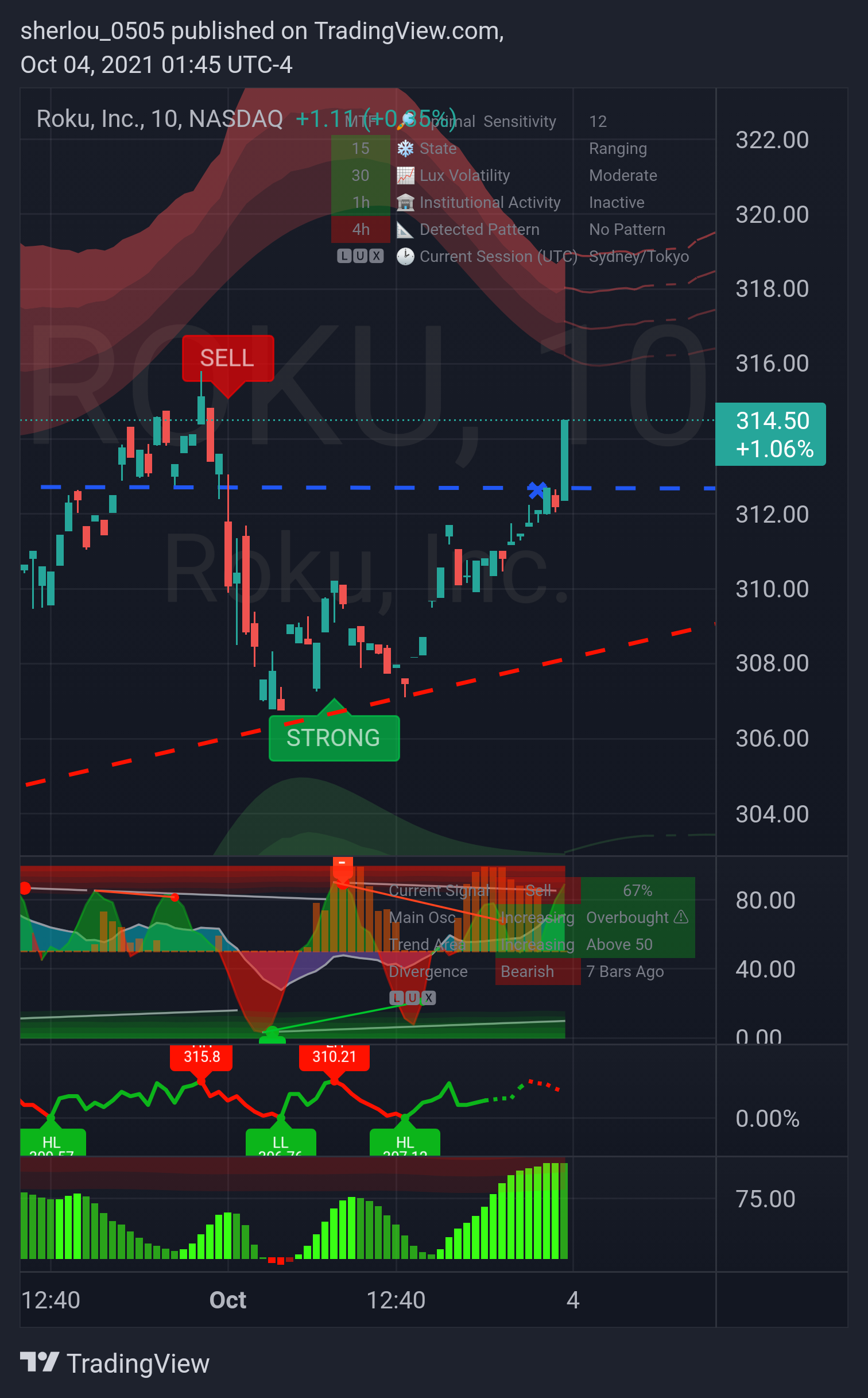
Question regarding setting up alerts - in this screenshot a sell signal turned into a strong sell signal. My alerts are set to notify me when any strong confirmation occurs and uses placeholders (ex: {{plot("Strong Sell")}} ). Is there a placeholder that I could use to specify a regular sell turning into a strong sell/buy turning into a strong buy in my alerts?
 indigo cradle
There isn't a specific placeholder however there are specific alerts that can trigger "Normal Turn Strong"
So those would point to this instance
cursive stump
You're referring to these, correct?
 indigo cradle
Correct the bottom 2 🙂
cursive stump
And how would I specify which ticker & timeframe the turn strong alerts apply to?
indigo cradle
That will be the timeframe + ticker you have open on your chart at the time of setting
cursive stump
Any idea whether a normal turn strong placeholder may be available in the future?
indigo cradle
Due to a plot limit it's unlikely for the foreseeable future unless TradingView decide to up this
cursive stump
Gotcha, thanks
 undone bane
Hey Gecko, is there any setting optimization specifically for SPX? or should we use something similar as SPY?
indigo cradle
undone bane
Hey Gecko, is there any setting optimization specifically for SPX? or should we ...
For now use something similar but very very very soon you'll have the SPX
undone bane
Thanks 🙏
 strong cairn
does the stockbot makes errors sometimes?
today, at 401 pm EST, it gave a signal for strong sell on AMD , 1D. but upon opening the chart, the actual signal on 1d is a strong buy signal..
 jaunty perch
Anyone scalping gold If so what settings? Cant find the best spot
Our Discord Market Scanner alerts all use the following:
- Default Lux Algo (V4 inputs).
- Normal trading hours (no extended hours)
- Main exchanges / brokers such as NASDAQ / TVC / FXCM / OANDA / COINBASE / BINANCE
If you have created your own, custom TradingView alerts, be aware they are set per the exact settings you had at the time you set those alert(s).
strong cairn
This was the signal given in the stockbot
 indigo cradle
!visible
jaunty perch
Our Discord Market Scanner alerts all use the following:
- Default Lux Algo (V4 inputs).
- Normal trading hours (no extended hours)
- Main exchanges / brokers such as NASDAQ / TVC / FXCM / OANDA / COINBASE / BINANCE
If you have created your own, custom TradingView alerts, be aware they are set per the exact settings you had at the time you set those alert(s).
indigo cradle
Ensure this ^
strong cairn

So i hadnt created any alerts, i just went to look at AMD chart based off this alert.. so got a bit confused
But i could have made some basic mistake.. so trying to understand
indigo cradle
Hmmmm odd; I'll have a look 🙂
 crimson quartz
Hello how do I update to the Version 4.4 of the LUX algo premium
or 4.2? whatever the most recent update is
indigo cradle
!update
jaunty perch
To update Lux Algo Premium indicators, refresh your browser/app, remove the indicator from your chart, and then add it back to your chart + save your chart layout on TradingView.
Full guide: https://docs.luxalgo.com/lux-algo-premium-indicators/how-to-update

Included in this section is the best steps to receive & install updates for Lux Algo on TradingView.
jaunty perch
I have a question, lets say I am in the 30m candles and I see a buy signal. Was that buy signal placed once that candle opens or closes? (Referring to the candle that the signal is pointing)? Thanks in advance
indigo cradle
!confirmed
jaunty perch
A signal is confirmed only once the candle is closed. Meaning a signal could appear on your chart but is not confirmed until that candle is closed and the next candle has started.
Our automated Discord bots will never notify you on any signal until the candle has closed and confirmed it. If you're adding alerts for Lux signals in TradingView - make sure to select "Once per bar close".
 sinful wave
Does signals work better with heikin Ashi or is it same
indigo cradle
They will appear different, use the candle type you prefer and the signals will adapt 🙂
 rich quiver
honestly surprised its free, i use volume profile a lot and i think this is the first script ive seen that does something like this, it's great
one of my new favorites for sure
indigo cradle
rich quiver
honestly surprised its free, i use volume profile a lot and i think this is the ...
We'll take that as a compliment 😉
 solar spear
What is the best sensitivity to use for day trading stocks in lux algo? How can filter out the false signals? Thank you.
 shy relic
solar spear
What is the best sensitivity to use for day trading stocks in lux algo? How can ...
shy relic
solar spear
What is the best sensitivity to use for day trading stocks in lux algo? How can ...
You can select the best sensitivity from the optimal sensitivity in the dashboard, see https://docs.luxalgo.com/lux-algo-premium-indicators/lux-algo/signal-settings for more info about signals settings.
You can filter out false signals using additional conditions, such as only taking into account signals occuring during trending markets for example.
This page showcases every way users can adjust settings along with full explanations of how they differentiate from each other.
 sharp wind
indigo cradle
Hmmmm odd; I'll have a look 🙂
sharp wind
indigo cradle
Hmmmm odd; I'll have a look 🙂
I think I encountered a similar problem. Linkusd scanner showed a strong sell on 4h today but looking at my chart I don’t see any such signal. I’ve got standard settings running on my chart.
 faint marsh
Guys, could you tell me which one of the pictures I have to select? I receive notifications about tickets against or reverse. And I only want buy, sell or strong buy or strong sell entries.

I think that having it in Spanish, the pictures are mis-referenced. Can you give me the correct map so that I only get buy or sell signals? No cons or reverse.
 toxic kiln
Hi, I still am not receiving notifications
indigo cradle
sharp wind
I think I encountered a similar problem. Linkusd scanner showed a strong sell on...
I'll have a look too 👍
indigo cradle
faint marsh
Guys, could you tell me which one of the pictures I have to select? I receive no...
You need to create the alert in the alert menu
See part 2:
!alerts
jaunty perch
How to set up your own custom alerts in TradingView: https://docs.luxalgo.com/lux-algo-premium-indicators/setting-up-alerts-on-tradingview
Follow this guide for setting up your own custom alerts on TradingView.
faint marsh
indigo cradle
You need to create the alert in the alert menu
I receive notifications. That's no problem. What I'm asking is what checkboxes I have to check to receive my notifications correctly. There are notifications I get of cons or setbacks and I don't want that. I just want notifications of sell, buy and the strong variants. Could you tell me which boxes are the right ones to check it?
 faint marsh
indigo cradle
faint marsh
indigo cradle
I guess these four are the right ones.
Buy and strong buy
Sell and strong sell
 indigo cradle
Correct 👍😊
jaunty perch
Hey. I've got a question regarding Tradeview that I think some of you could answer quickly.
I am very limited in which cryptos I can track on Tradeview. I just assumed that it isn't possible to have "degen" tokens available.
I just saw on kek.tools that they use Tradeview for their charts and they have most tokens under the sun.
What am I missing here?
 bitter dune
!optibot
jaunty perch
Learn more about how OptiBot works here: https://docs.luxalgo.com/getting-started/discord/bots
Our Discord server contains a wide variety of bots that will return useful information to the user.
bitter dune
Is optibot ticker request something that might be possible in the future?
indigo cradle
You can request it here 😊
faint marsh
@indigo cradle I keep getting notifications of "contrarian strong buy/sell"... I don't get it. In the indicator already check the correct boxes or boxes.
indigo cradle
You need to remake the alert after you change the tick boxes
Otherwise it will still be using the old settings
bitter dune
indigo cradle
You can request it here 😊
I see the list of optimized assets, but how might i request my own ticker?
indigo cradle
Oh like a custom command for any ticker?
That's not possible
It's quite computationally heavy
The dashboard will give a light weight alternative
 steel osprey
@indigo cradle Hi bro is there to scan the stock using lux indiator but or sell for intraday or swing trade
To select stock for the day or week
bitter dune
Thank you
indigo cradle
steel osprey
<@456590452703887373> Hi bro is there to scan the stock using lux indiator but o...
Custom screeners aren't yet available in TV so the best alternative is our #695668653869236433 channel
steel osprey
@indigo cradle unfortunately that helps for india market and derivative as well😫
Not helps
indigo cradle
Sorry about that, it's just not supported on TradingView for now
Hopefully in the near future it will be ☺️
steel osprey
@indigo cradle no worries latest if you add banknifty and nifty indices or stock. That more helpful in the list
I'm waiting from long
Appropriate if done asap
indigo cradle
I can tell you the nifty index will be added very very very soon 👍
steel osprey
Thanks a lot and plz banknifty as well. Both are main index for us. Eagerly waiting for this.
jaunty perch
indigo cradle
So have added more assets there
And this isn't possible to do inside of Tradeview so I can see more tokens with your algorithm?
indigo cradle
jaunty perch
And this isn't possible to do inside of Tradeview so I can see more tokens with ...
It's not I'm afraid for now
jaunty perch
indigo cradle
It's not I'm afraid for now
too bad...
Wish lux algo was available on kek.tools then, although I understand why that can be difficult.
Tradeview only has maybe 100 of 100 000 tokens in crypto.
indigo cradle
Yeah TradingView tends to only list major-ish tokens on major-ish exchanges
faint marsh
indigo cradle
You need to remake the alert after you change the tick boxes
Oh, thank you for your support.
jaunty perch
indigo cradle
Yeah TradingView tends to only list major-ish tokens on major-ish exchanges
Is it worth asking for this to be expanded to Tradeview?
indigo cradle
jaunty perch
Is it worth asking for this to be expanded to Tradeview?
You could give them a message asking for a certain exchange and their tokens to be added, it's worth a shot 👍

 golden flower
 trail grove
Red=Bearish. Green=Bullish
trail grove
golden flower
Red=Bearish. Green=Bullish
Thank You!
jaunty perch
pretty sure someone is trying to scam Lux Algo followers on Facebook. Impersonating you guys.
 indigo cradle
jaunty perch
pretty sure someone is trying to scam Lux Algo followers on Facebook. Impersonat...
indigo cradle
jaunty perch
pretty sure someone is trying to scam Lux Algo followers on Facebook. Impersonat...
Ah yes
We shall report that
jaunty perch
I did too just because it annoyed me so much.
 feral lava
Thanks @jaunty perch we're handling it now 👍
 static flicker
@feral lava @indigo cradle any chance you guys have custom alerts set up on TV where tickers will appear with like "Strong sell 1 hour or strong buy 15 minute" on ticker symbols in alert logs?.. might be asking for much, but just curious ❤️ thank you

found the info, thank you guys ❤️
 feral lava
 solar pebble
I need my a username changed it got linked to the wrong account
solar pebble
I need my a username changed it got linked to the wrong account
Hi - no problem, let support@luxalgo.com know and they can change it for you within 6 hrs! https://docs.luxalgo.com/faq#can-i-switch-access-to-a-different-tradingview-account
solar pebble
Thank u
 velvet sage
I will pay someone to help me set up the settings to work the best for what I want to do. I have autism and I can't figure this out alone
please
jaunty perch
Hey plase I need your help how can to setung to ricive up trend or down trend în Discord?

 quiet grove
hi
indigo cradle
quiet grove
algo lux not working now
This is Tradingview 👍 It mentions it's down on the exchange end
Hopefully will be back soon
quiet grove
ah the tradingview.com
indigo cradle
quiet grove
ah the tradingview.com
Yep it seems the exchange that you're trying to use is undergoing maintenance
quiet grove
thanks
 vital oriole
how can we find the ideal value for stats premium
 indigo cradle
There isn't really an ideal value for this as this a statistical collection of tools
You'd need to manually adjust to find what fits your trading the best and the style you like 👍
vital oriole
tks
 rich wing
 indigo cradle
You've added 2 versions of Lux to your tradingview 🙂
So you'll need to remove one of the insantances
In the top left corner of your screen there should be a cross that you can click to remove one
rich quiver
is it possible to have lux alert when a predictive channel line is being touched? besides just setting it manually in TV?
indigo cradle
rich quiver
is it possible to have lux alert when a predictive channel line is being touched...
Sadly it all needs to be done manually in TV
 earnest portal
I used lux on different time frames and on each time frame the mtf was different
indigo cradle
It can change due to the nature of the security function and MTF
Also the candle is needed to close for the MTF to change color
 limpid zodiac
How can we leverage lux algorithm for trading in stock options? Is there a video or a read out ti guide?
*to guide
jaunty perch
Find our full trading strategies playlist on YouTube: https://www.youtube.com/watch?v=xezy6WGpZ8Y&list=PLbqCXsOfrM3MjO7q7uIiwoVq3evI4neQr

Join our Discord: https://discord.gg/LUX
Get access to Lux Algo: https://luxalgo.com/products/lux-algo
Get the best settings: https://www.youtube.com/watch?v=OmvxpTE9tlw&t
Usability Tips: https://www.youtube.com/watch?v=5wtdY51crnc
 indigo cradle
That's an exit signal ☺️
trail grove
Is there a 2 hour Optibot Optimizer? Since many of the scanner signals mention (2H charts)
sinful wave
How to make 1 min signals more reliable
shy relic
sinful wave
How to make 1 min signals more reliable
Try changing the settings, you can use the recommended sensitivity in the dashboard. We also encourage users to use the signals in conjunction with another indicator, such as reversal zones/predictive range
 hollow cloak
hi admin, where do i check my subscription left how long?
feral lava
hollow cloak
hi admin, where do i check my subscription left how long?
!login
jaunty perch
You can enter your email on our website to manage your account here: https://luxalgo.com/tools/recurring/get-subscription-access
Or email support@luxalgo.com and our team will assist you with any request the same day.
hollow cloak
!login
jaunty perch
You can enter your email on our website to manage your account here: https://luxalgo.com/tools/recurring/get-subscription-access
Or email support@luxalgo.com and our team will assist you with any request the same day.
hollow cloak
jaunty perch
You can enter your email on our website to manage your account here: https://lux...
tq. one last question, i have checked, my subscription will end on 8 october. can i straight subscribe to 1 year instead of 3 months like i did? if i do it now, will it extend from today's date or 8 october plus 1 year? TQ
indigo cradle
hollow cloak
tq. one last question, i have checked, my subscription will end on 8 october. ca...
If you do that now it will extend from the 8th October
faint marsh
@indigo cradle I was looking to program oscillator warnings. I understand that "major" would be a signal or warning about the most extreme zone wouldn't it? And divergence I guess I will send you notification on any level.
 indigo cradle
That's correct the major tends to be more significant 🙂
bitter dune
Good morning everybody! Given some of the insane volume that takes place pre-market, could we expect the indicators to work similarly to market hours? Should we also have extended session hours left on or off during regular hours?
indigo cradle
bitter dune
Good morning everybody! Given some of the insane volume that takes place pre-mar...
You can absolutely use them premarket, as long as your aware of that volume (which you are) it's totally ok to trade it 👍
 stoic compass
great video,it helps a lot,thank you soooo much
 dry torrent
Hey guys, the optibot5m ETFs section is missing today.
faint marsh
indigo cradle
That's correct the major tends to be more significant 🙂
I think you didn't get my question right. I wanted to say that "major" I suppose that within the drawing is the most extreme peak to the delimited areas.
indigo cradle
dry torrent
Hey guys, the optibot5m ETFs section is missing today.
Optibot was updated 😊 It now will directly do Indicies
indigo cradle
faint marsh
I think you didn't get my question right. I wanted to say that "major" I suppose...
It would be yep 👍
dry torrent
indigo cradle
Optibot was updated 😊 It now will directly do Indicies
Thanks, whats about trading the SPY?
indigo cradle
dry torrent
Thanks, whats about trading the SPY?
You have the SPX 😊
bitter dune
Are there any resources to further understand institutional movement or Shalen’s hypothesis.? Also Is there a way to scan for institutional movement?
Great tool
indigo cradle
It's an implementation of Shalen's hypothesis; there isn't really too many resources out there on it as it's very unique 🙂
Currently custom scanners aren't possible in TV however hopefully in the near future 🙂
 azure island
Question about Confirmation Buy / Sell / Exit signals...
Say I have a Buy then an Exit signal, it may be followed by another Exit, or a Sell, but a Buy + Exit will never be followed by another Buy. (And vice versa for Sell + Exit)
Why is this? And, if the answer is "because that's the way it's coded", could you change this behavior so that the Exit signal resets Lux to neutral, open both another Buy or Sell signal?
shy relic
azure island
Question about Confirmation Buy / Sell / Exit signals...
Say I have a Buy then a...
We tend to not force our signals to trigger after specific conditions since not all users use exit signals, in this scenario successive buys/sells might be confusing. Exits could instead be taken partially when the trend is strong (higher chances of successive exits).
Exits are often followed by retracement, you would need to buy near the low of that retracement, this can be done using reversal zones or predictive ranges or the oscillators.
Additionally an exit might be followed by purple candles (indicating a retracement), in which case you can wait for the candles to become green again, an alert can be set for this scenario (normal buy/sell turn strong).
azure island
shy relic
We tend to not force our signals to trigger after specific conditions since not ...
Thanks for your comprehensive answer!
I beg to differ though... Exits, at least in my limited experience, are not often followed by a retracement. They're either followed by a continuation or the opposite signal. Buying on a retracement that becomes the opposite signal is risky.
Your purple candles comment is interesting because I feel like I've just been noticing them recently. They seem to appear on extreme moves, not retracements though

^^^ A recent example on ETHUSD 30min
To close: I would love an "Exits reset to neutral" option for those of us who do take exits. And, while I'm at it... I really like Lux, not just the core product but the documentation, support, etc. You guys really do a great job! 👏 🙏
indigo cradle
azure island
To close: I would love an "Exits reset to neutral" option for those of us who do...
Much appreciated 🙂 Exiting at the top/bottom of the move of course is one of the hardest things in trading + for any indicator. If an opposite signal appears after an exit signal that would suggest that exit was a decent location. The idea of resetting signals is a an interesting idea however 😄
So you'd get an exit in an uptrend, and if the trend continues another buy signal would follow
It's an interesting idea
azure island
Yes! That's it exactly!
And, based mostly on analysis of BTC, I think it would help and not be too confusing because those events would be rare. Multiple exits in a row don't happen that often but when they do it's usually in a profitable up/down trend. So the chance of getting a second buy/sell signal to tell you to go back in would be great
 wide oar
I would like to see this option as well
faint marsh
@indigo cradle When an alert is triggered on the oscillator it is pause alert. The same is not true when I schedule signal alerts.
What do we have to select when we program an alert on the oscillator so that it remains active once it notifies us?

I don't know which would be the correct option.
The first one is clear that it is not .. the alert is activated and it is deactivated later (pauses)
faint marsh
indigo cradle
You'd want to select the once per bar closed option
Does that mean that once the alert is activated it will still be active for the next time?
I understand that the system waits for the candle to close with the condition of the oscillator. And once you get the push notification, is it still active for the next scenario?
indigo cradle
So it will alert on the bar close, and should trigger for the future too
So yes
It should remain active
strong cairn
I have a trading related question.
On Etrade, i sold a Put Credit spread on SPY 431/430 expiring today.
Its at 433 right now, with 22 mins to go. What happens if i let it expire?
 rotund lodge
hi guys can you please make it so that you could have multiple buy in a row (or sells for that matter) and not require a reverse signal first thanks I could see one right now in btc thanks so much
bitter dune
Something else to possibly consider is:
with auto pilot disabled, we get a sensitivity suggestion.
Perhaps an option to leave auto pilot off, but allow a automatic mode transition between "Reversion/Trending"
So that as we dial in sensitivity, our signal mode is already matching.
indigo cradle
So a self adaption to market conditions?
bitter dune
Is that what the autopilot is already doing?
indigo cradle
It does yep 🙂
bitter dune
And to toggle on and off would be just to have control of the agility?
 wheat barn
What’s that mean?
 indigo cradle
bitter dune
And to toggle on and off would be just to have control of the agility?
indigo cradle
bitter dune
And to toggle on and off would be just to have control of the agility?
It will self adjust everything 🙂
indigo cradle
wheat barn
What’s that mean?
What does what mean? The dashboard? 🙂
wheat barn
Sometimes red
indigo cradle
The MTF red box on the 4h?
wheat barn
Yes what’s mean?
indigo cradle
It means on the 4h there is a sell signal 🙂
 twin birch
what is the difference between optibot and autopilot settings?
feral lava
twin birch
what is the difference between optibot and autopilot settings?
This page showcases every way users can adjust settings along with full explanations of how they differentiate from each other.
twin birch
feral lava
See here: https://docs.luxalgo.com/lux-algo-premium-indicators/lux-algo/signal-s...
Thanks. As I randomly check any pairs to look for opportunities, autopilot should be suitable isn't it?
feral lava
Yep definitely, if you prefer to avoid adjusting settings & want a dynamic optimization, this would be good
 thick atlas
For short term trading like for 1 week , which time frame you suggest 15 mins, 1 hour , 30 min..?@lu@Smack#8@indigo cradle
indigo cradle
thick atlas
For short term trading like for 1 week , which time frame you suggest 15 mins, 1...
30m is a nice timeframe 😊
thick atlas
thanks @indigo cradle
 dry escarp
Hello , What is the optimal settings for legacy oscillator ?
indigo cradle
Optimal settings are very subjective and there aren't really optimal, it depends on the usecase. Default is normally a nice mid ground 😊
dry escarp
Im thinking to pay for 1 year but already paid for a month?
indigo cradle
dry escarp
Im thinking to pay for 1 year but already paid for a month?
You're looking to upgrade? 😊
If so; your remaining time on your monthly gets added on and your plan will be changed over
 whole wren
This is more of a TV question, but I keep several tabs open, each with a different asset. But when I close TV and open it again, all tabs are set to the asset in my first tab. How do I save my settings so my tabs reopen to the asset they were set to?
indigo cradle
What plan do you have on tradingview? 🙂
 magic adder
free version because i kept my money for lux
i want to ask, does statistic premium tool repaint?
indigo cradle
Hi @magic adder it's offset so the labels aren't real time
bitter dune
indigo cradle
It will self adjust everything 🙂
Thanks for being here, love the support from LUX.
I asked about the autopilot settings yesterday and am now wondering why when i have it engaged, if i adjust the sensitivity it will impact the chart. I was under the impression that autopilot overrode whatever sensitivity i adjusted. Is there a difference between having the autopilot on/off while nudging the sensitivity and how does agility figure into this? Thank you!
magic adder
thanks
whole wren
indigo cradle
What plan do you have on tradingview? 🙂
Pro+
jaunty perch
Anyone Who trades gold If so what settings? Im getting way to many false signals and have been playing with it for a week now
indigo cradle
bitter dune
Thanks for being here, love the support from LUX.
I asked about the autopilot se...
So when you have AP enabled all the settings (Sensitivity and Agility become disabled)
So AP will take control of those settings; you won't need to touch either + can't touch either when it's on
indigo cradle
whole wren
Pro+
There may be a limit to the number of charts you can have open and when you return it removes some
indigo cradle
jaunty perch
Anyone Who trades gold If so what settings? Im getting way to many false signals...
I'd suggest setting up a filtering method:
!strategies
jaunty perch
Find our full trading strategies playlist on YouTube: https://www.youtube.com/watch?v=xezy6WGpZ8Y&list=PLbqCXsOfrM3MjO7q7uIiwoVq3evI4neQr
Join our Discord: https://discord.gg/LUX
Get access to Lux Algo: https://luxalgo.com/products/lux-algo
Get the best settings: https://www.youtube.com/watch?v=OmvxpTE9tlw&t
Usability Tips: https://www.youtube.com/watch?v=5wtdY51crnc
indigo cradle
In some of these some filtering approaches are shown 🙂
 wicked quiver
👍
bitter dune
indigo cradle
So AP will take control of those settings; you won't need to touch either + can'...
I see, perhaps the change im seeing isnt in the strength behind the candle coloring but the amount of buy/sell signals on my chart
indigo cradle
bitter dune
I see, perhaps the change im seeing isnt in the strength behind the candle color...
It will impact that absolutely 🙂
bitter dune
ah ha
 covert arch
How can I get a text alert when a Strong buy or Strong sell is printing?
indigo cradle
!alerts
jaunty perch
How to set up your own custom alerts in TradingView: https://docs.luxalgo.com/lux-algo-premium-indicators/setting-up-alerts-on-tradingview
Follow this guide for setting up your own custom alerts on TradingView.
covert arch
Thank you!
magic adder
How to send you profit ss?
indigo cradle
magic adder
How to send you profit ss?
You want to send a screenshot of your profits? 😊
magic adder
Yes
indigo cradle
You can post in share profits 😊
magic adder
Thanks 😍
 lethal jungle
What does the x stand for on the chart
indigo cradle
that's an exit signal 🙂
covert arch
lethal jungle
What does the x stand for on the chart
take profit
lethal jungle
thanks
covert arch
partial or full close
trail grove
For the stocks in optibot. Does the 'Autopilot' automatically update the signal and agility based on the time index? Or is that something we do manually each day when it is released?
 lilac helm
how to turn on notification for buy signal?
indigo cradle
!alerts
jaunty perch
How to set up your own custom alerts in TradingView: https://docs.luxalgo.com/lux-algo-premium-indicators/setting-up-alerts-on-tradingview
Follow this guide for setting up your own custom alerts on TradingView.
indigo cradle
trail grove
For the stocks in optibot. Does the 'Autopilot' automatically update the signal ...
It doesn't; optibot is a different method of optimisation 🙂
This page showcases every way users can adjust settings along with full explanations of how they differentiate from each other.
covert arch
What does the purple candle color mean?
 summer cedar
Change in direction
covert arch
Do you recommend jumping in after the candle changes to green/red or as soon as a confirmation buy/sell is printed?
 buoyant zodiac
#🤝support Hey Guys, I have someone who has been asking about my indicators and is interesting in signing up. Is there a discount or refferal code I can send them?>
jaunty perch
Sign up to be an affiliate for Lux Algo & get your own custom referral link: https://www.luxalgo.com/affiliates
Create an income sharing the best tools.
buoyant zodiac
Thanks!
 terse thunder
good day.
i have been trying to cancel i am being billed monthly and when i try to log in it wont let me in.
ive tried several email addresses.
indigo cradle
Give support@luxalgo.com and they can help @terse thunder
bitter dune
Any reason i might see institutional buying histograms show up differently on various time frames for the same ticker? (lux OSC) for the same time of day
indigo cradle
Because different timeframes have different data 🙂
So the data on the other timeframes varies
terse thunder
ok. thsnks
bitter dune
indigo cradle
So the data on the other timeframes varies
So it doesnt behave like regular volume? is there a better way to think of it?
indigo cradle
Oh no; not like volume 🙂
It's an analysis of trading activity
So on the oscillator it's displayed as bars
Which happen to look like volume bars
But they don't really have the same application
bitter dune
I see, Im trying to understand what im actually looking at rather than just simply noticing a rumblin
indigo cradle
That's really what it is; it is a rumblin identifier 🙂
bitter dune
Its groundbreaking
 prime rapids
if there is no optimized setting signal from optibot should we use previous day signal or auto pilot
prime rapids
For 5 mins
indigo cradle
That will still be useable 😊
prime rapids
thanks
 waxen flicker
Does anyone happen to know if there is an alert for when the legacy oscillator changes color? Idk if I just can’t find it . Thanks in advance
dry escarp
how to identify ranging market using lux algo?
indigo cradle
waxen flicker
Does anyone happen to know if there is an alert for when the legacy oscillator c...
It is possible 😊 For that in the alert menu you'll want to select legacy main crossing legacy trigger
indigo cradle
dry escarp
how to identify ranging market using lux algo?
You could use the dashboard state or Lux volatility 😊
 frozen heart
@indigo cradle hey, do you have a link for some strategies to use with LUX
jaunty perch
Find our full trading strategies playlist on YouTube: https://www.youtube.com/watch?v=xezy6WGpZ8Y&list=PLbqCXsOfrM3MjO7q7uIiwoVq3evI4neQr
Join our Discord: https://discord.gg/LUX
Get access to Lux Algo: https://luxalgo.com/products/lux-algo
Get the best settings: https://www.youtube.com/watch?v=OmvxpTE9tlw&t
Usability Tips: https://www.youtube.com/watch?v=5wtdY51crnc
frozen heart
@indigo cradle thanx bro
waxen flicker
indigo cradle
It is possible 😊 For that in the alert menu you'll want to select legacy main c...
Thanks!
I’ve been testing a scalping strategy for 10 pips a pop and so far it’s looking really nice. Once I’m done back testing it I’ll share with anyone who may be interested
The legacy oscillator mixed with the trend catcher is 🔥
frozen heart
@waxen flicker I would love to see
 alpine kernel
same here 🙂
 cosmic imp
I have a question about setting alerts. I know I can set alert in tradingview using Lux Algo Premium. But what I dont understand is the alarm setting I can specify inside the Lux Algo Premium settings. There I can select multiple parameters. What I dont understand is that when I check a coin a have never visited, I see the alarm settings are like I set for the previous coin.
Does that mean when the alarm is set here it is for all coins? I doubt that for then the alarm would go off constantly.
indigo cradle
Your settings on the indicator just stay between charts, it doesn't mean that chart is using those settings for alerts 😊
cosmic imp
I want switching between charts, I was using same chart. But with different asset (BTC, ETH etc)
indigo cradle
You want settings saved for each asset?
cosmic imp
I am just trying to understand how lux algo works. More like what is best practice.
jaunty perch
Find our full trading strategies playlist on YouTube: https://www.youtube.com/watch?v=xezy6WGpZ8Y&list=PLbqCXsOfrM3MjO7q7uIiwoVq3evI4neQr
Join our Discord: https://discord.gg/LUX
Get access to Lux Algo: https://luxalgo.com/products/lux-algo
Get the best settings: https://www.youtube.com/watch?v=OmvxpTE9tlw&t
Usability Tips: https://www.youtube.com/watch?v=5wtdY51crnc
 ionic rampart
hi, if I change my settings or turn on auto pilot how will it be saved in tradingview?
I mean if I set an alert
indigo cradle
You'll need to remake the alert 👍
ionic rampart
the alert will always stay in the mode that I set it up in?
also if I copy it?
I cannot change and not even see it afterwards?
cosmic imp
Where can I find info that explain "current signal" and other info displayed the Lux Oscillator?
feral lava
cosmic imp
Where can I find info that explain "current signal" and other info displayed the...
https://docs.luxalgo.com/lux-algo-premium-indicators/lux-oscillator-premium/lux this page on our docs would be it 🙂
feral lava
cosmic imp
Where can I find info that explain "current signal" and other info displayed the...
cosmic imp
Thanks, but still bit confused. Maybe it is just me. But lets say "Current Signal" is set to "Sell, 33%", I assume it would mean the strength of the current signal is 33%. And not Buy 67% ?
feral lava
The percentage is how bullish the market is based on all of the features of this oscillator mode
Current signal is the most recent signal, which means a sell is technically active
 vapid panther
Hi there, i have an issue with the alerts, sometimes I have an alert that doesn't match the charts, example, it alerts for a sell signal while on the chart it doesn't show...
thanks for your help
 modest spire
Hello I resumed my account
But why did I pay extra?
I just paused my subscription until I was going to use it again but I paid
feral lava
Hi @modest spire looking into this now.
For resuming a paused (not cancelled) subscription past your original billing date it charges you for another term https://docs.luxalgo.com/faq#how-do-i-pause-my-subscription
I’m personally working with our team & platform to adjust this as it should charge you only for the time with the product. Thanks for bringing it up, can you DM me your email so we can adjust your billing date & refund?
ACCESS
cosmic imp
feral lava
The percentage is how bullish the market is based on all of the features of this...
I have 2 folllowup questions:
If Trend Signal is "Sell, 33%" then 33% tells the strength of the Sell trend, right?
But why can "Sell" and the percentage have different background color. I have seen "Sell" in red and the percentage in green... what is that telling us?
indigo cradle
The percentage is the number of components of the oscillator that suggest the price is bearish.
A sell on the dashboard and the percentage in green means the oscillator has produced a sell signal however the other components do not agree
jaunty perch
Click Manage Account here: https://luxalgo.com
Or email support@luxalgo.com and our team will assist you with any request the same day.

Enhance your trading experience with our premium technical indicator suite + bots for stocks, forex, futures, currencies & commodities markets.
 prisma summit
quick question for the optimization aka optibot if you change the settings for lets say GBPUSD and then have a different settings for BTCUSD, does it save the settings or do you have to change it when going through charts?
indigo cradle
If you set an alert it will keep the settings you used
But if you're just switching between charts; it won't change, you'd need to keep changing
indigo cradle
Go to cloud 1 and 2 in the style settings 🙂
 modest spire
Thanks!
prisma summit
indigo cradle
But if you're just switching between charts; it won't change, you'd need to keep...
how do i set an alert
indigo cradle
!alerts
jaunty perch
How to set up your own custom alerts in TradingView: https://docs.luxalgo.com/lux-algo-premium-indicators/setting-up-alerts-on-tradingview
Follow this guide for setting up your own custom alerts on TradingView.
 feral lava
All those timeframes have a buy signal @modest spire
modest spire
Ohhh cool. Thanks
 dusk sky
It looks like purple candles stronger than those red ones, but the implications suggest the other way, doesn't they?
 indigo cradle
Correct; red candles are indicative of a downtrend
Purple candles can indicate a change of market direction potentially/ ranging market
dusk sky
I was thinking that the red ones appeared to show uptrend
dusk sky
indigo cradle
Correct; red candles are indicative of a downtrend
Further to my query on the chart, do the red candles indicate strong downwards in response to the sell signal?
indigo cradle
They do yep 🙂
dusk sky
OK thanks
 pure cove
indigo cradle
pure cove
indigo cradle
It will work the same as on desktop; are you looking to set up on mobile?
cosmic imp
Can I filter the crypto screener based on current signal in Lux Oscilator?.. for example give me all coins where current signal is "BUY" and percetage is above 60%?
indigo cradle
You cannot sadly within TradingView
we are hoping to see the ability to create custom screeners in the near future 🙂
 plain shale
How do I set up alerts for multiple time frames and multiple coins? I followed your guide but is't only for 1 currency and 1 timeframe, and I can't set more with trading view free version...
indigo cradle
Correct; with the free version of TV sadly you can only set a single alert
dusk sky
Can we set alerts on watchlist in trading view ?
 shy relic
dusk sky
Can we set alerts on watchlist in trading view ?
shy relic
dusk sky
Can we set alerts on watchlist in trading view ?
you can set alerts only for individual symbols, not possible to create one alert that will trigger for multiple symbols in a watchlist.
shy relic
dusk sky
How can a green "strong" signal appear without a buy signal?
If a significant move started then the following signal will most likely be a strong one, a strong signal with a green label is considered a strong buy signal. You can learn more about them here https://docs.luxalgo.com/lux-algo-premium-indicators/lux-algo/signals#confirmation
Type Of Signals - Confirmation - Contrarian - Display
dusk sky
Thanks Alex
jaunty perch
Is there a way to use predictive patterns and auto trendline together?
indigo cradle
jaunty perch
Is there a way to use predictive patterns and auto trendline together?
The only way is to load up two versions of Lux
On one of them disable everything except the pattern detection
jaunty perch
Could you implement a toggle Button or add one more option to select two different at the same time would be so much smoother
indigo cradle
jaunty perch
Could you implement a toggle Button or add one more option to select two differe...
Possibly in the future however currently there are a few limitations in pine
 terse scroll
Getting spammed again
indigo cradle
Sometimes one or two bots make it through
 silk bloom
how to set alert on buy signal if am following one coin
indigo cradle
!alerts
jaunty perch
How to set up your own custom alerts in TradingView: https://docs.luxalgo.com/lux-algo-premium-indicators/setting-up-alerts-on-tradingview
Follow this guide for setting up your own custom alerts on TradingView.
terse scroll
@toxic driftihcarter is the spam account
indigo cradle
Banned 🤝
modest spire
What does contrarian mean?
indigo cradle
modest spire
What does contrarian mean?
It means it will appear against the trend
Type Of Signals - Confirmation - Contrarian - Display
 night sky
HI, IS THERE A GUIDE ON HOW TO SET ALERTS IN TV WITH LUX. MY ALREARTS DONT SHOW UP WITH BELOW SETTINGS
indigo cradle
!alerts
jaunty perch
How to set up your own custom alerts in TradingView: https://docs.luxalgo.com/lux-algo-premium-indicators/setting-up-alerts-on-tradingview
Follow this guide for setting up your own custom alerts on TradingView.
night sky
 jaunty perch
How to set up your own custom alerts in TradingView: https://docs.luxalgo.com/lux-algo-premium-indicators/setting-up-alerts-on-tradingview
Follow this guide for setting up your own custom alerts on TradingView.
indigo cradle
You need to complete the second step
There's a video there that you can follow 😊

This is a tutorial on how to use our brand new all-in-one alerts system within the main Lux Algo Premium indicator on TradingView. This makes it easier for users with the free TradingView membership to get multiple specific conditions in one alert.
See the guide on our docs: https://docs.luxalgo.com/lux-algo-premium-indicators/lux-algo/alerts#...
night sky
YES I DO DO THE 2ND STEP OF SETTING THE ALERT IN TV. STILL IT DOESNT.
indigo cradle
May I see a screenshot of the second step where you create the alert? :)
night sky

 indigo cradle
However I see alerts there?
night sky
OF 1ST OCT
indigo cradle
Where were you expecting to get an alert? And didn't?
night sky
IT DIDNT TRIGGER ANYTHIGN TODAY
night sky

F THE 15M ALEART.
IT DIDNT ALERT TODAY MORNING. YOU CAN FURTHER SEE THIS IN THE ALERT LOG
indigo cradle
I see; please stop with the capitals 🙂
night sky
My appologies. i use an app which uses caps so i keep it on
indigo cradle
What I'd suggest; remake the alerts however turn off all features except the signals
Because you appear to be making the alert correctly
So turn off pattern detection ect when making the signal alerts
strong cairn
i had the same issue with TV last week. i deleted all the alerts, closed the App, and restarted it, reset all the alerts, and it worked fine
night sky
thx
also lets say an alert is triggred when my TV is closed (so i dont see it). it should show on the log when i open it corect?
strong cairn
yes, it should.
indigo cradle
It should yep 👍
strong cairn
also, you can set it to where it sends an email and text when the alert is triggered
night sky
great. thank you!!
indigo cradle
That refers to the current trading session 👍
 shadow breach
When I'm watching SPY, Lux tends to crash a lot... any troubleshooting I can try?
shadow breach
I'll screenshot it next time but i just get like a red exclamation point and all the features disappear
indigo cradle
I see, and what features were you using?
 robust forum
shadow breach
I'll screenshot it next time but i just get like a red exclamation point and all...
robust forum
shadow breach
I'll screenshot it next time but i just get like a red exclamation point and all...
Just hide/unhide
Sometimes TV has issues
shadow breach
Lux algo premium with just reversal zones and strong buy/sell alerts
Well I do the hide/unhide but I am just trying to see if i can stop it from happening altogether
indigo cradle
That is quite strange; which timeframe?
shadow breach
only seems to happen on 5m and specifically with SPY
robust forum
I haven't been able to-it happens sometimes with their loading. It doesn't affect alerts
shadow breach
I'll post next time it does it. Thanks Gecko
robust forum
It has something to do with TV having issues loading a lot of data at once
 vale wharf
indigo cradle
That refers to the current trading session 👍
vale wharf
indigo cradle
That refers to the current trading session 👍
Yes yes.. but what does it mean? Which timezones are most actively trading?
indigo cradle
vale wharf
Yes yes.. but what does it mean? Which timezones are most actively trading?
Correct 🙂
 jagged anchor
How can I cancel lux algo
vale wharf
Thanks buddy
lethal jungle
What does sensitivity and agility mean
jaunty perch
Click Manage Account here: https://luxalgo.com
Or email support@luxalgo.com and our team will assist you with any request the same day.
Enhance your trading experience with our premium technical indicator suite + bots for stocks, forex, futures, currencies & commodities markets.
indigo cradle
lethal jungle
What does sensitivity and agility mean
This page showcases every way users can adjust settings along with full explanations of how they differentiate from each other.
vale wharf
Does the Autopilot setting for sensitivy and agility automatically sync to the optibot settings that are updated here on discord?
indigo cradle
It doesn't no; it's a different form of optimisation 🙂
trail grove
what is the current version of LuxAlgo? 4.2.2?
magic adder
What you guys use for extra confirmation with lux algo?
 regal karma
magic adder
What you guys use for extra confirmation with lux algo?
regal karma
magic adder
What you guys use for extra confirmation with lux algo?
I am going through their training content, so far i have learned to look at other signals in additional to the premium STRONG / sell/buy signals
The types of things I have learned are: look for higher highs, lower lows right after the signals. But i think there are many more things to look at. Like the channel pattern-detection.
magic adder
I think trend is more powerful than supports and resistances , supports and resistances are only from ranging market i guess
regal karma
magic adder
I think trend is more powerful than supports and resistances , supports and resi...
I still dont know what is mean by 'trend'. Is that a metric that is provided or something i can see in one of these channels?
magic adder
Trend means , prices continuously going high or going down
Crypto market is so fucked up right now , lost 20% of my future account 😅
Anyone here into forex ?
cosmic imp
I'm confused by the dashboard of Lux Oscilator Premium. I have asked about it before, but just to re-check.
In the example in the doc, it says "Trend Signal Buy, 50%"
The documentation says:
"The percentage appearing at the top right determines the percentage of bullish information displayed on the dashboard. "
Now lets say it says Buy 0%
Would that mean it is 100% Bearish?
What if it says "Trend Signal Sell 30%", would it be treated as:
a) Trend Signal is Sell, but 30% of the information says it is bullish
b) Trend signal is Sell, but 30% of the information support that sell signal
indigo cradle
It would be option a there
magic adder
This is just statistics of some previous candles , always draw supports and resistances to power up your game ,, you will get more accurate results
cosmic imp
ok
magic adder
Oscillator has dots on it , if dot appears and price bounces back from support or resistance , your short or long using these information
cosmic imp
indigo cradle
It would be option a there
on BTCUSDT now the Trend Signal is Sell, 67%
So if option A still is the rule. Then the Trend Signal is Sell, but 67% of the information support it being Bullish, where is the logic here? I would have understood it if it said Buy, 67%
indigo cradle
It's the % of bullish indications so Sell and 67% means there's a sell signal
and 67% of the indicators there are bullish
 eternal fable
Hello, Should I turn on extended hour or turn it off when using Lux Algo Premium on Stock to have better signal?
indigo cradle
You can pick, if you use extended hours you can keep it on 🙂
eternal fable
thank you
 cosmic hull
how can i easily get 10 pips a day without having big risk can anyone help
 pliant niche
How long will those dots become line and showing LH,LL,HL,HH ?
 indigo cradle
That'll be the length settings @pliant niche
pliant niche
sorry.. what do you mean length settings? I am trying to use LH,LL as another indcators for entry
indigo cradle
So in the settings of the script there is a length input 🙂
So it will be [length] bars later
e.g. if length is 14
it's 14 bars later
pliant niche
I see, if the default is 21. it would be 21 bars
indigo cradle
Correct 🙂
pliant niche
so is the default 21 bars better to get the correct entry?
indigo cradle
It's a nice middle ground length 🙂
pliant niche
thank you
cosmic imp
In Lux Algo Premium settings I specify alert for multiple settings, but after I click "ok", no alert is added to the list of alerts in my dashboard. Is it suppose to be like that?
indigo cradle
Are you creating the alert in the alert menu?
Or just ticking the boxes in the main script settings?
cosmic imp
creating alert from inside main script settings
indigo cradle
You need to actually create the alert 🙂
This is a tutorial on how to use our brand new all-in-one alerts system within the main Lux Algo Premium indicator on TradingView. This makes it easier for users with the free TradingView membership to get multiple specific conditions in one alert.
See the guide on our docs: https://docs.luxalgo.com/lux-algo-premium-indicators/lux-algo/alerts#...
cosmic imp
ok
pliant niche
when will the LL, LH,HL,HH labels appear on the chart ? does it have anything to do with the length ? for example, the length is 21 right now ( 21 bars ) still no labels for those ?
 whole wren
I don't understand what this legend is saying. Can someone translate?
 indigo cradle
pliant niche
when will the LL, LH,HL,HH labels appear on the chart ? does it have anything t...
indigo cradle
pliant niche
when will the LL, LH,HL,HH labels appear on the chart ? does it have anything t...
That'll be because there isn't a pivot detected yet 🙂
indigo cradle
whole wren
I don't understand what this legend is saying. Can someone translate?
Which part in particular? 🙂
pliant niche
indigo cradle
That'll be because there isn't a pivot detected yet 🙂
how do i get the pivot detected?
indigo cradle
pliant niche
how do i get the pivot detected?
That will appear when there is a pivot; you can't really force it to detect a pivot
So when one appears it'll label it
pliant niche
I may refer to use those as the entry

i saw right here there was the LL at 12:30 (PT ), but i am not sure does it appear after or during market hour
indigo cradle
Those are standard pivots so they aren't the best as entries
pliant niche
Oh i mean combine with exit, sell and buy signal
whole wren
indigo cradle
Which part in particular? 🙂
What does Sell 83% mean?
pliant niche
So just want to know will it appear like once the candles close the same as buy&sell signal
indigo cradle
pliant niche
So just want to know will it appear like once the candles close the same as buy&...
Ah no it's not real time
indigo cradle
whole wren
What does Sell 83% mean?
That means there's a sell signal on the oscillator however 83% of the items on the oscillator are bullish
So you may not want to take the sell
whole wren
So it's a % of 6? 5 greens, 1 red, 5/6 = 83%
 tepid sigil
@indigo cradle hi, I would like to know if the signal any confirmation buy includes strong buy?
I want to alert myself when a buy or strong buy comes in
whole wren
What's the difference between the Trend Tracer and Catcher?
feral lava
whole wren
What's the difference between the Trend Tracer and Catcher?
Trend tracer shows longer term trend, catcher aims to catch the start of trends https://docs.luxalgo.com/lux-algo-premium-indicators/lux-algo/indicator-overlay#trend-tracer
EQ Cloud - Reversal Zones - Both
 harsh wharf
@indigo cradle Possible to set tradingview alert for the Lux Oscillator Classic for a Green/Red or a Red/Green move?
 scenic stratus
whats the best agility for forex small time frames such as 1 and 3 minutes??? thank you
stoic compass
I am a little bit confused about the Candle Coloring,which one is better between Confirmation Simple and Gradient?👀
feral lava
stoic compass
I am a little bit confused about the Candle Coloring,which one is better between...
All preference, gradient just shows smoother transitions between trends & more data
stoic compass
get it ! THX
dusk sky
harsh wharf
<@!456590452703887373> Possible to set tradingview alert for the Lux Oscillator ...
yes, in alert setting
magic adder
I’m trying a strategy for sometimes and it is giving me pretty good results
Trend tracer with 200ema
When green trend tracer crosses above 200ema then we take long position and when red trend tracer line crossing below then we short ,
Try it for yourself and observe, does this strategy works for you?
30m TF
Close half of the position on 3% profit and stoploss to breakeven then
dusk sky
harsh wharf
<@!456590452703887373> Possible to set tradingview alert for the Lux Oscillator ...
Trend Catcher Up/Down#
The Trend Catcher Up alert returns an alert when the color of the Trend Catcher switch from red to green (that is once it starts increasing), while the Trend Catcher Down returns an alert when the color of the Trend Catcher switch from green to red (that is once it starts decreasing).
Trend Tracer Up/Down#
The Trend Tracer Up alert returns an alert when the color of the Trend Tracer switch from red to green (that is once it starts increasing), while the Trend Tracer Down returns an alert when the color of the Trend Tracer switch from green to red (that is once it starts decreasing).
 high pivot
Is there any way to automate the Lux signals to enter trades? Under certain conditions
tepid sigil
tepid sigil
<@!456590452703887373> hi, I would like to know if the signal any confirmation b...
@feral lava
feral lava
tepid sigil
<@!393235362107097089>
Yep it included Strong Buy / Strong Sell too 🙂
tepid sigil
feral lava
Yep it included Strong Buy / Strong Sell too 🙂
But it won’t include buy to strong buy right ?
feral lava
tepid sigil
But it won’t include buy to strong buy right ?
Correct, it does not include an alert for the change of buy --> Strong Buy
plain shale
how come I don't have a dashboard in oscilator?
 dusk sky
plain shale
how come I don't have a dashboard in oscilator?
dusk sky
plain shale
how come I don't have a dashboard in oscilator?
Enable in setting
plain shale
dusk sky
Enable in setting
damn I totally missed that location button, thanx 🙂
 steady topaz
Do you recommended extended hours with lux or normal hours...or does it matter?
indigo cradle
It depends of you trade with extended hours, we tend to have them disabled on all our alerts
steady topaz
indigo cradle
It depends of you trade with extended hours, we tend to have them disabled on al...
thanks!
 olive apex
Odd question - I'm using Lux as part of a larger algorithmic investment strategy and want to backtest with once-per-bar rather than once-per-bar-close. Do you know if there's any way in TV to export these, other than replaying and manually noting them?
I'd set an alert and log it somewhere, but replay doesn't trigger alerts.....
indigo cradle
Sadly there's no easy way of doing the currently 😔 Its a nice idea however it's just not something that's supported
olive apex
Can I assume a correlation between intermittent signals and a persistent signal in a shorter timeframe?
Do you know if TV always flashes an intermittent signal in a high-speed replay, even if it's too fast to see? Or does it skip around when this is done. Thinking about a plugin-style listener.
indigo cradle
Regarding the correlation between intermittent and peristant it'd need some more instigation.
In a high speed replay in TradingView that's a very good question. Sometimes with larger scripts it lag a little so I'd suggest using a little slower Replay mode
But if done correctly Replay mode should be fine
dusk sky
Would you mind further explaining the concept of kantan ashi?
indigo cradle
dusk sky
Would you mind further explaining the concept of kantan ashi?
They are a smoother candle so can help identify trends a little easier 😊
dusk sky
indigo cradle
They are a smoother candle so can help identify trends a little easier 😊
top/bottom means open/close?
indigo cradle
dusk sky
top/bottom means open/close?
Of the kantan Ashi, they are smoothed so don't reflect real close/opens
But in the kantan candle itself, yes
It's a classic structure
dusk sky
thank you
jaunty perch
Do we have optibot for us100 nasdaq?
indigo cradle
We have the indicies directly now 👍
rotund lodge
@indigo cradlefor the Lux Algo premium if it flashes a long, then an exit, which just happened yesterday into today, does that mean that the next signal has to be a short, and can't be a long? thanks
indigo cradle
rotund lodge
<@!456590452703887373>for the Lux Algo premium if it flashes a long, then an ex...
It does for confirmation signals 🙂
wide oar
Thank you, and just to be clear, So that means the next signal would need to be a short, per Drmchu's scenario above?
indigo cradle
It would be 🙂
 sacred forum
in regards to the dashboard... does the Lux Prem. signal work best when its trending and less volatile ?
indigo cradle
Confirmation signals are best in trending markets 🙂
Contrarian tend to be nice in ranging markets
sacred forum
thx and what would be recommend for volatility?
indigo cradle
For Lux volatility?
sacred forum
sorry meant do confirmaiton signals work best when volatility is low?
indigo cradle
You'd most likely want a nice middle ground there
sacred forum
which would be stable? whats the range for that ?
indigo cradle
I'd say maybe 30-60%
sacred forum
so if im looking at baba now on the 5min and it says 30 in the red square its the lowest in terms of volatility?
 indigo cradle
The MTF just shows the signal on that timeframe
It won't show the volatility there
Just red for sell
and green for a buy
sacred forum
ahh so even if its in a buy signal the mtf red would mean time to get out ?
indigo cradle
It could be a suggestion yep 🙂
sacred forum
so that lux volatilty that we see where its written stable shouldnt be too focused on
indigo cradle
Well it really does depend what data you like to look at when trading. It's relevant information for some traders 🙂
sacred forum
100% what do you suggest i read to fine tune the indicator and dashboard?
indigo cradle
Have you seen any of our strategies?
sacred forum
not really
indigo cradle
!strategies
jaunty perch
Find our full trading strategies playlist on YouTube: https://www.youtube.com/watch?v=xezy6WGpZ8Y&list=PLbqCXsOfrM3MjO7q7uIiwoVq3evI4neQr
Join our Discord: https://discord.gg/LUX
Get access to Lux Algo: https://luxalgo.com/products/lux-algo
Get the best settings: https://www.youtube.com/watch?v=OmvxpTE9tlw&t
Usability Tips: https://www.youtube.com/watch?v=5wtdY51crnc
indigo cradle
These may help you tune and adjust 🙂
sacred forum
awesome will take a look. for the alerts is there a way to say "any confirmation" and have the state as trending?
indigo cradle
Sadly confluence alerts aren't currently possible within TV
but hopefully in the near future 🙂
 cedar turtle
I keep getting an Study Error - Loops takes to long to execute (200ms)
indigo cradle
@cedar turtle Which ticker + features are you using
cedar turtle
Lux Algo Premium on Nasdaq symbol ANY
cedar turtle
confirmation + exits and Pattern Detection
cedar turtle
Yes
indigo cradle
Odd; what timeframe?
cedar turtle
It seems to pop up when I am not looking at that page
wonder if that's got anything to do with it
Daily
indigo cradle
Yeah when you tab out that can occur
cedar turtle
Roger that
indigo cradle
It's a very weird TV thing, we aren't 100% sure why it occurs when you tab out
 coral blaze
how do i attach dashboard to the chart, i see it your youtube
instead of static place, it goes along with candle
dusk sky
Which indicator would allow us not to buy high?
 ebon fiber
need help pairing with trader view, I dont see " INVITE ONLY CHARTS" on my trading view
dusk sky
ebon fiber
need help pairing with trader view, I dont see " INVITE ONLY CHARTS" on my tradi...
did you refresh browser?
ebon fiber
dusk sky
did you refresh browser?
yes, still a no
feral lava
ebon fiber
yes, still a no
Hey - did you enter your active TradingView username in the Connect Accounts portal? If so, should just be 3 minutes & then a refresh it’ll work
dusk sky
dusk sky
Which indicator would allow us not to buy high?
Hi @feral lava can you help me?
ebon fiber
feral lava
Hey - did you enter your active TradingView username in the Connect Accounts por...
I did all that and still does not appear, I just noticed that I accidently added a period ( . ) a the end of my user name at the portal, that may be the reason way it only gives you a one time
shy relic
ebon fiber
I did all that and still does not appear, I just noticed that I accidently added...
You would need to send your correct username to support@luxalgo.com and you will receive access as soon as possible.
coral blaze
fx news is not updating , last one shows 11.42 yesterday
feral lava
on it thanks @coral blaze
feral lava
dusk sky
Hi <@!393235362107097089> can you help me?
Yep! Would be best to use features such as Reversal Zones, price finding support on EQ Cloud to trade a trend, Trend Catcher can give early indications of a trend, or you can use more advanced features which go against the trend in nature such as our Contrarian Signals Mode, Lux Oscillator Advanced Mode signals, etc
dusk sky
feral lava
Yep! Would be best to use features such as Reversal Zones, price finding support...
thx~
 fossil fossil
Trying to figure out if I should use the optibot settings for crypto. Or click the "Auto Pilot Confirmation Signal Settings" in LUX Algo Premium. Which is better?
magic adder
I checked all the alert boxes but I can’t recieve alert on buy sell signals
indigo cradle
magic adder
I checked all the alert boxes but I can’t recieve alert on buy sell signals
Did you actually create the alert in the alert menu?
Or just tick the boxes
indigo cradle
Ah no, you then need to make the alert 👍🤝
magic adder
Thanks
robust forum
no opti updates since 10/4
indigo cradle
robust forum
no opti updates since 10/4
Will have a check 👍
robust forum
tase it lol
jaunty perch
Do the divergence lines on the oscillator repaint? And do they appear on the candle close of where the line is drawn to or later? Sorry if it's a dumb question I'm new since yesterday.
indigo cradle
jaunty perch
Do the divergence lines on the oscillator repaint? And do they appear on the can...
The oscillator has real time divergences 🙂
 undone sigil
Hi guys I registered the wrong username when linking my membership to my tradingview account, 🤦♂️ is there anyway to undo it & register it to my current account so I can use the services?
indigo cradle
undone sigil
Hi guys I registered the wrong username when linking my membership to my trading...
Hi 🙂 That's ok, give support@luxalgo.com an email and they can swap over the accounts
undone sigil
indigo cradle
Hi 🙂 That's ok, give support@luxalgo.com an email and they can swap over the ac...
Okay thank you!!
 violet lotus
What does MTF stand for 15 , 20, 1h, 4h
indigo cradle
violet lotus
What does MTF stand for 15 , 20, 1h, 4h
That's the multi timeframe section
A red box means that timeframe has a sell signal
A green box means that timeframe has a buy signal
violet lotus
ohh nice
waxen flicker
What’s up everyone! How do I set an alert for price entering the reversal zones?
indigo cradle
Hi 🙂

This will alert for a cross of the inner green band plot
And you'd select RZ R1 for the upper red plot

Or you could use this approach entering the support zone
waxen flicker
Thank you:)
bitter dune
For the Lux Osc, Is any correlation between the institutional activity and the advanced Main or advanced trend area bias? Is there a recommended way to interpret the institutional activity? Is there a way to weigh credence over inst. activity that is shown on bigger/smaller time frames?
Sometimes its showing a lot on the 2H but then none on the 4H. or a lot on the weekly and none on the daily or 4h.
indigo cradle
Timeframes have different data so changing between them can give different institutional activity results yep
bitter dune
Data as in lookback, volume, price action?
Could you help make sense of it?
indigo cradle
The candles data is different so momentum and any calculation based on the candles is different
 lofty tinsel
Hello good, I just bought the indicator, but it does not come out as it says in the tutorial to synchronize the account, I would need help, thank you.
indigo cradle
@lofty tinsel DMd to help 🙂
 fluid crag
Hello Admin one question: With what agility and sensitivity parameters does the altcoin bot run, example (DOT is marked as a strong buy a few moments ago (3pm utc-5) and in my graph with optibot parameters no. the strong purchase optibot mark it at 6am (utc-5)
indigo cradle
!visible
jaunty perch
Our Discord Market Scanner alerts all use the following:
- Default Lux Algo (V4 inputs).
- Normal trading hours (no extended hours)
- Main exchanges / brokers such as NASDAQ / TVC / FXCM / OANDA / COINBASE / BINANCE
If you have created your own, custom TradingView alerts, be aware they are set per the exact settings you had at the time you set those alert(s).
fluid crag
jaunty perch
Our Discord Market Scanner alerts all use the following:
- Default Lux Algo (V4...
If I remove the luxalgo indicator from tradingview and put it back, it will restart with the original parameters and when making this change, would it coincide with the alerts of the altcoins bot?
indigo cradle
fluid crag
If I remove the luxalgo indicator from tradingview and put it back, it will rest...
If you make them align with:
- Default Lux Algo (V4 inputs).
- Normal trading hours (no extended hours)
- Main exchanges / brokers such as NASDAQ / TVC / FXCM / OANDA / COINBASE / BINANCE
Then yes
fluid crag
All right I will do it, thank you so much 👍
jaunty perch
Click Manage Account here: https://luxalgo.com
Or email support@luxalgo.com and our team will assist you with any request the same day.
Enhance your trading experience with our premium technical indicator suite + bots for stocks, forex, futures, currencies & commodities markets.
coral blaze
quick question: How do i enable two signal settings e.g. i want confirmation && contrarian in chart?
indigo cradle
@coral blaze You'd need to load up 2 Lux algos to do this
coral blaze
haaa damn, how dump am i 🙂
 lost swan
Is the Autopilot on Lux Algo going to end up using the same settings as are found under the Settings Optimizer channels?
indigo cradle
@lost swan It won't no, it's a different approach to optimisation that dynicamically adjusts the settings to market conditions
jaunty perch
What settings are the best for trading btc?
lost swan
indigo cradle
<@!191048607791710208> It won't no, it's a different approach to optimisation th...
Would you recommend one over the other at this point in time?
indigo cradle
This page showcases every way users can adjust settings along with full explanations of how they differentiate from each other.
On this page it discusses the perks of both 🙂
lost swan
indigo cradle
https://docs.luxalgo.com/lux-algo-premium-indicators/lux-algo/signal-settings/
Thank you
indigo cradle
They are different in their approaches so one may fit your trading better than the other
 errant sand
Hi, the changelog links are broken now.
feral lava
errant sand
Hi, the changelog links are broken now.
Hey @errant sand - thanks for letting me know, where are you clicking the changelog links from? In Discord, or on our site?
pliant niche
How can i get the alert for the black line crossing up ?
 dusk sky
Can we say that when value cross up taki ashi candles, it is being bullish?
 feral lava
dusk sky
Can we say that when value cross up taki ashi candles, it is being bullish?
feral lava
dusk sky
Can we say that when value cross up taki ashi candles, it is being bullish?
Price going above taki-ashi can be considered as a leading indication
An interesting method is noticing taki-ashi crossing above Trend Tracer as you have displayed 🙂
dusk sky
feral lava
Price going above taki-ashi can be considered as a leading indication
An intere...
It was because I found difficulty in charting with taki-ashi alone
feral lava
Yeah it's essentially an overlay indicator, it's not the exact real price -- it can help with following trends and getting a unique interpretation of it
Best not to use alone
errant sand
feral lava
Hey <@!814170158183481415> - thanks for letting me know, where are you clicking ...
on the main site
feral lava
errant sand
on the main site
fixed! thanks for the heads up 💪
plain shale
I'm not understanding this alerts. I get an alert for example SOL strong sell, 1h timeframe, but when I go to the chats I see no signal for a sell, not even if I use "2" on signal sensitivity...
 dusk sky
you may select "only once" , in which signal would disappear if it is a fakeout

 placid wind
Hello, what does "once per bar" mean please ?
placid wind
Thank you
plain shale
dusk sky
you may select "only once" , in which signal would disappear if it is a fakeout
thank you. are there many fakeout signals?
 hard prairie
@indigo cradle I like how to lux algo on youtube trigger the signal. Do yo have a guide to setup like that? https://www.youtube.com/watch?v=SR0U2FUbCyM Mine is different setting

Make sure to subscribe & 'LIKE' the video to support the stream!
✔️ Chart on left is Bitcoin 15min, chart on right is Ethereum 15min. Signals are permanent on your chart once the candle closes and they help confirm trends!
"STRONG" = Signal more likely going with the current trend. "X" = Exit signal, these can be used for taking profits. (Str...
indigo cradle
hard prairie
<@!456590452703887373> I like how to lux algo on youtube trigger the signal. Do ...
See the video description for the settings used ☺️
twin birch
Is it possible that changing color in trend catcher to be included in all alerts options?
indigo cradle
@twin birch it's already there 😉
Within the alert options you'll find 2 alerts for trend catcher up and down
But you can't use it in the all in one
twin birch
yes, then for every pairs I choose, I have to setup two alerts 🙂 It will be nice if it appears in alert options 😅
indigo cradle
Possibly down the line, the issue is that section would just become absolutely massive
twin birch
Besides sensitivity and agility, alert is the critical section. We rely much on it. Please put lots more efforts there in next updates. Thanks
indigo cradle
twin birch
Besides sensitivity and agility, alert is the critical section. We rely much on ...
We have alerts for most things within Lux, whether a cross of a SR or reversal zone or a signal. The alert any section however has to be kept fairly clean and simple otherwise it'll be very confusing and you'd see a list of 30 check boxes
Absolutely understood it's annoying to set 2 alerts however there's naturally a limit to the number of check boxes we can create there
cosmic imp
I'm struggling with the agility setting. Can someone explain me what it does? I understand what the word "agility" mean, but what is the logic behind it in Lux Algo?
indigo cradle
"Confirmation Signals Agility is specifically designed to filter out signals occurring during ranging markets, increasing this setting will generate more strong signals as a result." - https://docs.luxalgo.com/lux-algo-premium-indicators/lux-algo/signal-settings/
This page showcases every way users can adjust settings along with full explanations of how they differentiate from each other.
 zinc lake
Hello
I recently joined.
When I get access Lux Algo to my Trading View
As invite only scripts shows thier
But not authorised
zinc lake
Yes already done
indigo cradle
Try refreshing the page 🤝
indigo cradle
So you see Lux scripts under your invite only scripts?
zinc lake
Yes
zinc lake
I am using it on my Mobile App
indigo cradle
Close and reopen the app then 🤝
robust forum
feral lava
Price going above taki-ashi can be considered as a leading indication
An intere...
interesting

again on 5

 olive apex
I feel like I'm missing something here. Created a new chart, enabled Lux and the same settings. Same symbol, timeframe, etc. Completely different pattern detection and reversal zones. Any thoughts on what I should be checking?
 indigo cradle
try zooming out
One is very zoomed in
The other is very zoomed out
Which is stretching and distorting your chart
I'd so suggest double checking; one may have extended hours enabled
robust forum
no opti again
indigo cradle
robust forum
no opti again
Time for the defib
robust forum
taser
olive apex
Is the "Autopilot Enabled" in the dashboard the same as the "Auto Pilot Confirmation Signals Settings" option?
robust forum
both and adreneline shot
indigo cradle
olive apex
Is the "Autopilot Enabled" in the dashboard the same as the "Auto Pilot Confirma...
It would be yep 👍
olive apex
Ahhh, I was misreading that as "Autopilot Enabled = Off"
Not "Autopilot enabled, recommended sensitivity is turned off"
indigo cradle
Yeah it is a little confusing 😅
Next update we are going to make that a little more apparent
indigo cradle
One of the worst patients ever
jaunty perch
Click Manage Account here: https://luxalgo.com
Or email support@luxalgo.com and our team will assist you with any request the same day.
Enhance your trading experience with our premium technical indicator suite + bots for stocks, forex, futures, currencies & commodities markets.
 rotund hearth
AMZN 📈 BUY Signal (2H Chart) #695668653869236433
Strong buy is not showing up on my 2h AMZN chart though?
 indigo cradle
!visible
jaunty perch
Our Discord Market Scanner alerts all use the following:
- Default Lux Algo (V4 inputs).
- Normal trading hours (no extended hours)
- Main exchanges / brokers such as NASDAQ / TVC / FXCM / OANDA / COINBASE / BINANCE
If you have created your own, custom TradingView alerts, be aware they are set per the exact settings you had at the time you set those alert(s).
rotund hearth
The alert is from Optibot in #695668653869236433 though, am I missing something here?
I'm using Autopilot in my chart
indigo cradle
"Our Discord Market Scanner alerts all use the following:
- **Default Lux Algo (V4 inputs). **
- Normal trading hours (no extended hours)
- Main exchanges / brokers such as NASDAQ / TVC / FXCM / OANDA / COINBASE / BINANCE
"
You'll want default settings
jaunty perch
Is trend cather/tracer repaint and how do i setup alerts when it turns green/red?
indigo cradle
@jaunty perch No repaint and you'll find alerts in the alert menu for trend tracer/catcher up and down
rotund hearth
indigo cradle
You'll want default settings
Oh yeah, that worked, thanks 🙂
 indigo cradle
Once per bar close 🙂
jaunty perch
Thanks so this Will give me alert as soon as it turns to red or green?
indigo cradle
@acoustic frigate Replied in other channel
lost swan
Do these 2 belong to "contrarian" strong buy / sell?
 indigo cradle
They do yep 🙂
vital oriole
automated market scanner are real time and are they different than the indicator ?
Also, those scanner only for 2h and 4 hrs
indigo cradle
!visible
jaunty perch
Our Discord Market Scanner alerts all use the following:
- Default Lux Algo (V4 inputs).
- Normal trading hours (no extended hours)
- Main exchanges / brokers such as NASDAQ / TVC / FXCM / OANDA / COINBASE / BINANCE
If you have created your own, custom TradingView alerts, be aware they are set per the exact settings you had at the time you set those alert(s).
vital oriole
Tq
jaunty perch
Our Discord Market Scanner alerts all use the following:
- Default Lux Algo (V4 inputs).
- Normal trading hours (no extended hours)
- Main exchanges / brokers such as NASDAQ / TVC / FXCM / OANDA / COINBASE / BINANCE
If you have created your own, custom TradingView alerts, be aware they are set per the exact settings you had at the time you set those alert(s).
coral blaze
what is the formula behind reversal zone? is that 1,2,3 std deviation ?
indigo cradle
coral blaze
what is the formula behind reversal zone? is that 1,2,3 std deviation ?
Oh absolutely not, they aren't Bollingers 😉
We don't give out any premium script calculations however the vast vast majority of features are built from the ground up mathematically
indigo cradle
Well they are just areas where the price may reverse really
coral blaze
so 3 band, what does it depict pls?
indigo cradle
They depict areas of probable/possible reversal of price which is calculated in a proprietary way
coral blaze
all right
indigo cradle
Sorry, even if I told you how they were done, it's still hard to explain
It's all made from the ground up
lost swan
@coral blaze You'd want to have other indications that price might reverse (resistance, etc) of course I would think to go along with the reversal bands. I'm just getting started with LUX, doing some paper trading to try strategies out.
coral blaze
indigo cradle
Sorry, even if I told you how they were done, it's still hard to explain
🙂 try me
indigo cradle
coral blaze
🙂 try me
Sorry if that didn't come out correctly; I meant that we of course won't share how they function
coral blaze
🙂
no worry
you guys are awesome, i dont do anything without proof, so let me watch over few charts and see
indigo cradle
Absolutely, appreciate it 👏🤝😊
twin birch
how to opt-out from view-scanners?
jaunty perch
For the forex scanner what broker you usevom tradeview?
indigo cradle
@twin birch Which ones do you want to opt out from
indigo cradle
jaunty perch
For the forex scanner what broker you usevom tradeview?
!visible
jaunty perch
Our Discord Market Scanner alerts all use the following:
- Default Lux Algo (V4 inputs).
- Normal trading hours (no extended hours)
- Main exchanges / brokers such as NASDAQ / TVC / FXCM / OANDA / COINBASE / BINANCE
If you have created your own, custom TradingView alerts, be aware they are set per the exact settings you had at the time you set those alert(s).
indigo cradle
twin birch
how to opt-out from view-scanners?
I removed you from both
twin birch
ok thanks
jaunty perch
Thanks
 desert stag
Hi, there's anyone who i can talk with about billing?
indigo cradle
desert stag
Hi, there's anyone who i can talk with about billing?
You can DM me and I can point you in the right direction 🙂
twin birch
indigo cradle
I removed you from both
I wan't to opt-out futures, but not crypto and alt. Try to opt-in again for crypto and alt
indigo cradle
I added you back
twin birch
indigo cradle
I added you back
that was quick. Thanks. Great support 👍
indigo cradle
twin birch
that was quick. Thanks. Great support 👍
A pleasure 🙂
hollow cloak
hi admin, i have upgraded my account to next year, but when i logged into 'manage account' in luxalgo.com , i can see 2 billings, how do i make sure luxalgo system wont double charge me again? do i need to cancel subscription first?
 gray pebble
anyone know what the red X indicator means?
feral lava
gray pebble
anyone know what the red X indicator means?
Exit signal on a sell, can help with taking profits
feral lava
hollow cloak
hi admin, i have upgraded my account to next year, but when i logged into 'manag...
Hey @hollow cloak - I can handle this for you and make sure it's just one subscription, DM'ing you now 🙂
 jolly knoll
Where can I read up on your Lux Statistics Premium?
feral lava
The pivot oscillator is a pivot-related indicator that displays the percentage of prices lower or equal to a price of reference over a fixed window length. Pivot-highs occur when the indicator is equal to 100%, while pivot-lows occur when the indicator is equal to 0%.
zinc lake
Admin if I set alert With Lux Algo On one chart can I get also for other chart also or only for single chart
indigo cradle
zinc lake
Admin if I set alert With Lux Algo On one chart can I get also for other chart a...
It depends on your Tradingview plan, with free you can only make one alert
zinc lake
I have pro plan.
indigo cradle
Then you can set for multiple charts 😊
 light sluice
How can I confirm if my TradingView connected account is the correct one
On lux dashboard username looks different than the one in trading view dashboard
feral lava
@light sluice on the bottom of the Connect Accounts portal it shows you how to find your TradingView username. Make sure you enter that exact username, if it’s not registered to the correct one — email your correct one to support@luxalgo.com and let them know the issue
light sluice
It’s already connected @feral lava but the username on lux dashboard is different than trading view
Is it normal they show different ? I mean I don’t remember that I have another trading view account
indigo cradle
They should show the same username, if you don't have script access give support@luxalgo.com an email with your TradingView account username and they'll swap them over 👍
light sluice
I just emailed them hope they get it sorted ASAP, havent used it yet
 austere estuary
Hello Guys i am new to this indicator can anyone pls tell me should i use optibot optimizer settings or normal one ?
shy relic
austere estuary
Hello Guys i am new to this indicator can anyone pls tell me should i use optibo...
Optibot will be more precise, as it optimize both sensitivity and agility 🙂
austere estuary
Also for other crypto pairs which is not mentioned in optibot , which settings are useful ?
indigo cradle
austere estuary
Also for other crypto pairs which is not mentioned in optibot , which settings ...
You could use Autopilot or optimised sensitivity on the dashboard 🙂
 gentle forge
I noticed the optibot only goes up to 4H. Are there generic settings for D and W for say crypto and stocks?
austere estuary
indigo cradle
You could use Autopilot or optimised sensitivity on the dashboard 🙂
Sorry i didnt understand , dashoard i mean where ?
indigo cradle
gentle forge
I noticed the optibot only goes up to 4H. Are there generic settings for D and W...
We don't have Optibot for those timeframes so you'd want to use Autopilot or the optimised sensitivity on the dashboard
Alternatively you can manually adjust the settings to your liking
indigo cradle
austere estuary
Sorry i didnt understand , dashoard i mean where ?
The dashboard in the bottom right of your chart window
The dashboard displays the most relevant metrics from our premium features. This feature is extremely useful to easily obtain pertinent information about the market and can be used in confluence with confirmation or contrarian signals.
austere estuary
Oh Okay now i got it , So for other pairs which are not mentioned in optibot i have to use autopilot rather than default settings am i right ?
indigo cradle
That's a valid approach yep 🤝
austere estuary
Okay and does autopilot works on all time frames ?
indigo cradle
austere estuary
Okay and does autopilot works on all time frames ?
It will indeed, it automatically adjusts to market conditions 🙂
 hoary mortar
Hey everyone. I purchased Lux premium but invite only indicators does not show up in tradingview. I also searched and added them manually but they return an error "not_auth". Any ideas?
indigo cradle
hoary mortar
Hey everyone. I purchased Lux premium but invite only indicators does not show u...
Hi there
Have you connected your accounts?
If you have try refreshing your Tradingview ☺️
hoary mortar
I did using my TV username. Restarted tradingview after and still doesn't show up
indigo cradle
Odd; what's your TV username?
hoary mortar
 indigo cradle
I see the_barefootbroker
hoary mortar
 indigo cradle
Yep systems seem to say you were added, try logging out then in again
hoary mortar
k
indigo cradle
And look under invite only scripts
hoary mortar
All set. My man!
indigo cradle
Perfect 🤝🤝🤝
hoary mortar
indigo cradle
Perfect 🤝🤝🤝
My account balance is down about $15k - do you have a magic button for that?
indigo cradle
hoary mortar
My account balance is down about $15k - do you have a magic button for that?
We wish 😉 But hopefully Lux can help with that
hoary mortar
Appreciate the help. Where should I go for questions on adjusting sensitivity for timeframes? I'm only trading BTC. Does it automatically adjust for different timeframes?
Asking because I see the settings optimizer has different settings for timeframe and security
indigo cradle
So we have a few approaches to optimisation
We have Optibot which is a nice approach for Bitcoin
Autopilot will dynamically adjust to market conditions
This page showcases every way users can adjust settings along with full explanations of how they differentiate from each other.
On this page it covers the various methods you can use, Optibot tends to be the most popular
hoary mortar
Got it. Started reading the guide 🙂
robust forum
@indigo cradle
defib time
indigo cradle
robust forum
<@!456590452703887373>
defib time
I'm aware, trying to get him back still
He's alive
vital oriole
I am missing something, even after 45 mins I dont see a buy signal but had the bot alert to buy
 robust forum
diff settings
indigo cradle
!visible
jaunty perch
Our Discord Market Scanner alerts all use the following:
- Default Lux Algo (V4 inputs).
- Normal trading hours (no extended hours)
- Main exchanges / brokers such as NASDAQ / TVC / FXCM / OANDA / COINBASE / BINANCE
If you have created your own, custom TradingView alerts, be aware they are set per the exact settings you had at the time you set those alert(s).
robust forum
the screener is 12/26, you have auto
i have good answers once in a while lol
Opti is aliiivvvveeeeee
vital oriole
so the bot alerts are not based on auto pilot
indigo cradle
vital oriole
so the bot alerts are not based on auto pilot
They are not, no
Defaults
vital oriole
thanks and that explains
 boreal sandal
Real quick. Is there more extended documentation on the plots for placeholders? Working on setting up my alerts.
Looking to setup Contrarian Sell, Strong Sell, Buy and Strong Buy
indigo cradle
You can use the actual name in the placeholder 🙂 Or you can open the data window and you can count the numbers

e.g. buy is plot 0
and strong buy is plot 1
austere estuary
Hello i need help
indigo cradle
@austere estuary How can I help?
austere estuary
I bought on blue arrow candle after the completion of the previous candle which showed STRONG and after few mins i have to sell in Loss , Isnt 15 min optibot accurate ?
 indigo cradle
Accurate is of course dependant however you need to filter signals. You could use the oscillator to filter signals / you can see here the tracer and catcher aren't the same color
You could have waited until both were green
austere estuary
So how to avoid this type of signals ? Strong Buy and all ? Any settings ?
indigo cradle
Have you seen any of my strategies?
austere estuary
Actually i wasn't aware of tracer and catcher both should be in green color
No i havent seen , where it is available ?
indigo cradle
!strategies
jaunty perch
Find our full trading strategies playlist on YouTube: https://www.youtube.com/watch?v=xezy6WGpZ8Y&list=PLbqCXsOfrM3MjO7q7uIiwoVq3evI4neQr
Join our Discord: https://discord.gg/LUX
Get access to Lux Algo: https://luxalgo.com/products/lux-algo
Get the best settings: https://www.youtube.com/watch?v=OmvxpTE9tlw&t
Usability Tips: https://www.youtube.com/watch?v=5wtdY51crnc
boreal sandal
So it would be like {{plot(1)}}?
Or is it WITH the quotations? As in {{plot("1")}}?
indigo cradle
Well you can actually reference the plots as follows:
Buy : {{plot("Buy")}} | Sell : {{plot("Sell")}} | Strong Buy: {{plot("Strong Buy")}} | Strong Sell : {{plot("Strong Sell")}}
austere estuary
indigo cradle
Have you seen any of my strategies?
i have watched all videos but should i have to change all the settings done as per the video while making entries ?
indigo cradle
The videos are purely educational so you can pick what you use from them 🙂
austere estuary
There are some changes made in oscillator and premium indicator, should i have to follow the same ?
austere estuary
As i am beginner so i dont know have that much of knowledge , thats why i am asking sir
austere estuary
Helllo , I dont understand this indicator please explain me in detail when to make entry and when to exit , I watched videos but as compared to charts its not matching.
indigo cradle
There isn't really a "way" to use it. It's a toolkit, there are around 30 built in indicators, you can decide which features you enjoy, which fit your trading style and which you don't want to use
My strategy videos show exact methods to enter and exit in some of the videos
Exactly
austere estuary
I just need a entry and exit point but i am not getting it exactly but somehow can u please correct me i will tell you what u learnt from your videos
As i like to trade in 1 hr chart so firstly i will set optibot 1 hr to indicator , then i will look buy/strong signal from indicator , then i have to filter the oscillator whether its in downtrend or uptreand and at last i have to see both catcher and tracer should be in same color either its green or red but both should in same color for good entry ! is it correct ?
indigo cradle
This is a very valid approach; yes 🙂
 radiant thistle
How do you set the 1hr optibot?
indigo cradle
You'd go to the #797529997731561522 channel
Find the ticker you're trading
and enter those settings 🙂
radiant thistle
Thank you
light sluice
How can I have more than one alert , saying I only got 1 alert to add
indigo cradle
That requires an upgraded TV plan
fluid crag
indigo cradle
<@!776657828366516286> I Dmd you 🙂
Thank you for telling me why I don't like that you have my information, I just wanted to make sure before making any move
indigo cradle
fluid crag
Thank you for telling me why I don't like that you have my information, I just w...
All good, I sent a DM
lost swan
Always tons of scammers when it comes to Crypto, always be skeptical of Direct Messages from random people
fluid crag
Sorry, what DM means?
indigo cradle
fluid crag
Sorry, what DM means?
A private message
See your bar on the left
You'll see a message from me
 fluid kelp
What are the blue and red x's called on lux algo and can you set alerts for them ?
 fluid crag
indigo cradle
A private message
fluid crag
indigo cradle
A private message
Hahahah ok sorry i thought you meant something different😀 👍
indigo cradle
fluid kelp
What are the blue and red x's called on lux algo and can you set alerts for them...
Those are exits
indigo cradle
fluid crag
Hahahah ok sorry i thought you meant something different😀 👍
You can see my message?
indigo cradle
fluid kelp
What are the blue and red x's called on lux algo and can you set alerts for them...
And yep, you can find alerts for them in the alert menu ☺️
fluid kelp
Thanks, I have them set correctly. Thank You!
fluid crag
I got your info but I lost your DM
cosmic hull
where to find signals in discord ?can anyone help please
i mean alerts that tell when to buy or sell something

 cosmic hull
yes
cosmic hull
indigo cradle
after this what to do
cosmic hull
there's user feedback section under vip support
 cosmic hull
 cosmic hull
cosmic hull
cosmic hull
i want that section can you help to find plz
indigo cradle
You want forex?
violet lotus
Great !! 🙂
indigo cradle
So you'll need to go to #🔔scanners-premium
And opt into forex
and opt into indices
cosmic hull
 violet lotus
Can we get these stock signals for other countries?
indigo cradle
violet lotus
Can we get these stock signals for other countries?
For the moment only the listed stocks are supported
cosmic hull
cosmic hull
i am just seeing that screen nothing else am not seeing any alerts
indigo cradle
In the future we may add other options
indigo cradle
cosmic hull
i am just seeing that screen nothing else am not seeing any alerts
^ Click here
Do you see forex signals?
 gentle star
My candles are not reflecting correctly
indigo cradle
gentle star
My candles are not reflecting correctly
What exactly do you mean by this
 cosmic hull
after clicking this appear
 gentle star
also how to enable SR mode effectively for pattern detection
indigo cradle
gentle star
It is not showing red, purple and green
You have another script loaded that is overriding the lux candle coloring; you'll need to remove the other one
indigo cradle
gentle star
also how to enable SR mode effectively for pattern detection
And what exactly do you mean by effectively? You wish to enable it or you're looking for optimal SR significance values?