#🤝support
1 messages · Page 243 of 1
 queen marlin
 feral lava
🙌 no problem!
 indigo cradle
Banned 😄
 craggy sundial
hello, I'm not seeing Lux Metrics can you help me add it?
feral lava
It’s renamed Lux Statistics @craggy sundial
craggy sundial
Thank you
 fiery harness
hi all, is it possible set a Take Profit alerts ?
 thick atlas
@indigo cradle how to add alerts(notifaction) in trading view for strong/sell signals
feral lava
!alerts
 jaunty perch
How to set up your own custom alerts in TradingView: https://docs.luxalgo.com/lux-algo-premium-indicators/setting-up-alerts-on-tradingview

Follow this guide for setting up your own custom alerts on TradingView.
feral lava
@thick atlas
 rotund hearth
What's the difference between ANY CONFIRMATION SELL and CONFIRMATION SELL?
indigo cradle
Any confirmation sell alerts for any confirmation sell. That includes Strong and Normal sells
Confirmation sell only alerts for a normal sell signal
 amber flint
rotund hearth
What time frame works the best for alerts?
amber flint
rotund hearth
What time frame works the best for alerts?
i use 1H TF with sensitive 12 for futures and check the other TF for confirmation. Trend is your friend😀
 chrome osprey
Hi, is there a tutorial video for setting up scalping for indices ?
amber flint
chrome osprey
Hi, is there a tutorial video for setting up scalping for indices ?
yep in you tube channel
chrome osprey
I'll search for it, thank you.
indigo cradle
!strategies
jaunty perch
Find our full trading strategies playlist on YouTube: https://www.youtube.com/watch?v=xezy6WGpZ8Y&list=PLbqCXsOfrM3MjO7q7uIiwoVq3evI4neQr

Join our Discord: https://discord.gg/LUX
Get access to Lux Algo: https://luxalgo.com/products/lux-algo
Get the best settings: https://www.youtube.com/watch?v=OmvxpTE9tlw&t
Usability Tips: https://www.youtube.com/watch?v=5wtdY51crnc
indigo cradle
I have a scalping set up here 🤝
chrome osprey
I'll check it out now
 keen river
How to know when to take profit and stop loss with lux?
indigo cradle
You can take profit using many methods; the TPSL tools can be used to set, reversal zones, predictive ranges, even exit signals
A whole range 😊
keen river
How to see exit signals?
chrome osprey
Does the optibot provide for Indices ? If so, is it updated when the market opens?
keen river
Does webhook alert works with discord webhook?
indigo cradle
It can indeed ☺️
 golden flower
indigo cradle
You can take profit using many methods; the TPSL tools can be used to set, rever...
golden flower
indigo cradle
You can take profit using many methods; the TPSL tools can be used to set, rever...
I watched a video the other day on Geckos channel which I am assuming is you? That using the trend catcher as sort of a trailing stop is a good way to take profit. After looking over a lot of charts I actually really like that idea.
 silk bloom
share the video link if u have it
indigo cradle
golden flower
I watched a video the other day on Geckos channel which I am assuming is you? Th...
Much appreciated ☺️🤝
indigo cradle
silk bloom
share the video link if u have it
All my videos can be found here: https://youtube.com/c/GeckoTrading

YouTube
Sharing trading strategies that I've developed using Lux Algo + more.
(Not actually a gecko.)
silk bloom
many thnx
golden flower
Yeah I liked how simple it was. Can I just ask a quick question. So your trade was all based on the 30. For the normalized oscillator is 100/50 still good or would that need adjusted in your opinion in say a 4hr chart
indigo cradle
It should carry over to other timeframes ☺️
 left plinth
meanz also in 5min
golden flower
Perfect! Many thanks. That video was great because it's super simple but the end results don't lie. I like simple lol
 left plinth
am using 70/30
silk bloom
70/30 for the 5 min timeframe?
golden flower
I wish on that oscillator I could draw a horizontal line right at the 50 mark and it would stay there. Kind of like a POC line for volume profile. Like ok crosses above the 50 we are more bullish and below is bearish
silk bloom
good point , actually i want some guidance in this 5 min frame, as I like to go through this type of trading , let me watch the video and hopefully will try it on some cryptos, then will come up with some questions on it
golden flower
Also think I am gonna try the settings from geckos video on AP(auto pilot). I dont like have to keep figuring out what settings works with what ticker better etc.
left plinth
why not you becktest & customize your on settings
 toxic burrow
Can I set alerts for the Nadaraya-Watson Free Indicator if I am Premium?
 thorn path
I have lux algo 4.0 how do i get the newest version?
 trim gate
Remove and add again
golden flower
left plinth
why not you becktest & customize your on settings
I could but why when others have done it for me? In that video im talking about its back tested on BTC on the 30 minute chart over a year time frame
But if you look at settings each ticker seems to have different response settings and since I trade many tickers I would rather use AP than have to adjust each time.
trim gate
golden flower
But if you look at settings each ticker seems to have different response setting...
try optibot as well
left plinth
not to much greedy
indigo cradle
toxic burrow
Can I set alerts for the Nadaraya-Watson Free Indicator if I am Premium?
You cannot I'm afraid
indigo cradle
thorn path
I have lux algo 4.0 how do i get the newest version?
!update
jaunty perch
To update Lux Algo Premium indicators, refresh your browser/app, remove the indicator from your chart, and then add it back to your chart + save your chart layout on TradingView.
Full guide: https://docs.luxalgo.com/lux-algo-premium-indicators/how-to-update
Included in this section is the best steps to receive & install updates for Lux Algo on TradingView.
 indigo cradle
👑
left plinth
 toxic burrow
I am rather new. I spent half the day looking at the indicator more closely and tried a lot to find out which settings were the best. I came from the Free Indicator Nadaraya. I was very excited about this indicator because it works perfectly for BNB 1H. Now I wanted to ask whether someone has the right settings? Because you can't set alerts on the Nadaraya Indicator
 lean cargo
Hello, What settings are best for swing trading stocks?
indigo cradle
This page showcases every way users can adjust settings along with full explanations of how they differentiate from each other.
See here both regarding the best settings query 😊
lean cargo
indigo cradle
See here both regarding the best settings query 😊
Thanks
toxic burrow
Thx m8
 outer stratus
Hello. Couple questions: 1. Why there is SL1 point above the current price?

- Alert function has 2 pairs of strong buy and sell alerts?
 indigo cradle
Because in the settings you most likely have selected the long position
indigo cradle
outer stratus
2. Alert function has 2 pairs of strong buy and sell alerts?
The first strong buy and sell are for confirmation signals
The second set there are for contrarian signals strongs 😊
indigo cradle
outer stratus
Hello. Couple questions: 1. Why there is SL1 point above the current price?
Oh and regarding this the trade set up isn't finished, so if you were in a long its hitting the SLs
outer stratus
indigo cradle
Because in the settings you most likely have selected the long position
I did not quite catch your answer) These TP/SL points are for the situation if I enter the market in the current time?
indigo cradle
outer stratus
I did not quite catch your answer) These TP/SL points are for the situation if I...
Not necessarily, they behave a bit like the predictive ranges
In that they are not always a new value
So imagine they are similar in method and appraoch to those in their generation
outer stratus
indigo cradle
Not necessarily, they behave a bit like the predictive ranges
As for me, the SL points could not be above the price) They are travelling up and down depends of the setting
 indigo cradle
Yeah I see that, the issue with then constantly changing it that a user sets a trade and then they often get confused by the changing values
They currently a predictive range like
To prevent that confusion however I see. They will change up and down with this settings as they are range like
outer stratus
indigo cradle
To prevent that confusion however I see. They will change up and down with this ...
Ok, thanks)
 strong cairn
hey All, just got my Lux subscription. Have been trading for some time now. some good trades, many bad ones. mostly Even..
how is everyone using this software?
my current settings are signal sensitivity at 15, agility at 24, and predictive s/r mode at 4(3m chart for day trading)
any suggestions on how y'all are using, and what the experience has been like if you dont mind? tia
indigo cradle
Welcome ☺️ Im sure others will give their setups but if you're interested in show a few on my channel 👍
!strategies
jaunty perch
Find our full trading strategies playlist on YouTube: https://www.youtube.com/watch?v=xezy6WGpZ8Y&list=PLbqCXsOfrM3MjO7q7uIiwoVq3evI4neQr
Join our Discord: https://discord.gg/LUX
Get access to Lux Algo: https://luxalgo.com/products/lux-algo
Get the best settings: https://www.youtube.com/watch?v=OmvxpTE9tlw&t
Usability Tips: https://www.youtube.com/watch?v=5wtdY51crnc
strong cairn
indigo cradle
Welcome ☺️ Im sure others will give their setups but if you're interested in sho...
thanks!! everyone said that this place has the most amazing support. i see what they meant 🙂
indigo cradle
strong cairn
thanks!! everyone said that this place has the most amazing support. i see what ...
Hahahaha much appreciated ☺️😉
golden flower
strong cairn
hey All, just got my Lux subscription. Have been trading for some time now. som...
I am pretty new myself so I am messing around with different styles and techniques. I am going to give Auto Pilot a try since I trade on longer time frames and pretty much any ticker that pops I dont want to have to keep going in and adjusting the levels for each ticker, I would rather have AP do it for me and then alert. PLUS it seems that you get less BUY/SELLS but maybe a little more accuracy there but that could just be me. Also working on a better method to filter out the signals using the oscillators. I stated yesterday that Gecko has a nice video on using the AP setting, normalized oscillator with some adjustments and the trend catcher so I am kind of working on that one at the moment. Welcome to the group!
strong cairn
golden flower
I am pretty new myself so I am messing around with different styles and techniqu...
thank you so much. you will be trying that for swing/long term?
golden flower
I trade off the 4hr so yeah. Typically I have found that I make better returns trading less on longer terms than trading more on shorter but that is just me. @strong cairn
Everyone has a style that works best for them but longer time frames for me is better for my mental health lol
strong cairn
golden flower
I trade off the 4hr so yeah. Typically I have found that I make better returns t...
thats a good strategy, so that you avoid over trading and dont give back the profits!
golden flower
Pretty much. Like this morning yeah everything is down and I am obviously going to be down on my longer calls BUT i have 30 days out on most of them so I am not going to be pushing that sell button just yet
Typically and watch the market prove me wrong but when we gap down like this its pretty rare that we keep going down, usually some buyers step in or we get a sympathy bounce. I am just going to be sitting on my hands today and just watching how this plays out
strong cairn
golden flower
Pretty much. Like this morning yeah everything is down and I am obviously going ...
oh definitely! that way the market is, it wont be surprising if you are back in profit by the weekend!
golden flower
Right or at the very least break even. This is why with options trading I always stress to buy time if you can afford it.
 night sky
on point!... thanks
i hope it bounces back. hopefuuly by fri/mon
i wish i had gone slow last week. tempted to buy again.
strong cairn
golden flower
I am pretty new myself so I am messing around with different styles and techniqu...
could you share the YT link for the video? i m looking at the list, but cant seem to find it..
golden flower

This video showcases a simple and easy to follow strategy on BTCUSD 30m using Lux Algo. Just a few simple features are used here however they perform excellently in a backtest.
Make sure to leave a like & subscribe for more trading strategy videos! Get access to Lux Algo indicators: https://luxalgo.com/
Lux Algo features used in this strategy:...
I had to go back and give it a like any way lol
strong cairn
night sky
i hope it bounces back. hopefuuly by fri/mon
i was hoping for it to fall more, as i was sitting on cash, lol
but i hope it recovers soon!
strong cairn
golden flower
https://youtu.be/rZTpPGqt4To
thanks!!
 indigo cradle
Certain aspects are realtime but the labels are not real time, they are pivots
The main realtime usecase is the forecast
outer stratus
Hello, could you advise what are the color horizontal lines?

 rotund hearth
I use predictive trendlines feature in Lux but v4.2.2 removed them, what's up with that?
 stiff urchin
can you define more proficient @feral lava
indigo cradle
rotund hearth
I use predictive trendlines feature in Lux but v4.2.2 removed them, what's up wi...
They were taking up computation time and were really really not popular; were they an integral part of your strategy? You could use the normal trendlines?
indigo cradle
stiff urchin
can you define more proficient <@!393235362107097089>
It's just an efficiency boost to speed up loading times and prevent the loop errors
stiff urchin
thanks sugar
@feral lava now we just need the inst accumulation recoloring on the charts
 rotund hearth
indigo cradle
They were taking up computation time and were really really not popular; were th...
rotund hearth
indigo cradle
They were taking up computation time and were really really not popular; were th...
I'll gvie it a try, is there any way of exporting Lux Premium settings to 4.2.2?
indigo cradle
rotund hearth
I'll gvie it a try, is there any way of exporting Lux Premium settings to 4.2.2?
Sadly not 😦 It has to be done manually
 somber girder
hi, do i have to make a NEW alert after update the lux premium 4.2.2 ?
rotund hearth
indigo cradle
They were taking up computation time and were really really not popular; were th...
Which indicator do you recommend instead for trend lines?
indigo cradle
rotund hearth
Which indicator do you recommend instead for trend lines?
The other trendlines in S/R mode 🙂
indigo cradle
somber girder
hi, do i have to make a NEW alert after update the lux premium 4.2.2 ?
you don't 🙂
somber girder
indigo cradle
you don't 🙂
thanks
rotund hearth
indigo cradle
The other trendlines in S/R mode 🙂
That's the ones I've been using, I though they were removed. Sorry for the confusion and thanks for the help 🙂
 fringe topaz
Did v2.2.2 remove pattern detection?
indigo cradle
@fringe topaz V4.2.2 did not remove pattern detection 🙂
fringe topaz
indigo cradle
<@!853001422374830120> V4.2.2 did not remove pattern detection 🙂
It's missing from the dashboard
indigo cradle
Then you don't have it turned on 🙂 Go into S/R mode and enable it
And it'll appear
fringe topaz
indigo cradle
Then you don't have it turned on 🙂 Go into S/R mode and enable it
THANK YOU 😆
amber flint
How can update alert? 😁
indigo cradle
amber flint
How can update alert? 😁
For premium? You don't need to update the alerts, only for the oscillator 😄
amber flint
indigo cradle
For premium? You don't need to update the alerts, only for the oscillator 😄
Ok thanks 😁
 obtuse relic
can i change the color of pattern detected lines?
indigo cradle
You can't i'm afraid since they are line.new()
strong cairn
which charts are usually most relevant with the signals, for day trade, swing, and long term? (3 min/15 min/ 4 hr, etc)
golden flower
I trade off the 4hr on auto pilot because my alerts are on all kinds of tickers, from banks to tech. I like the longer time frames because you get more data
With that being said when the alerts hit then I filter out the ones I dont want. I had 7 hit at 130PM est and ended up taking 3
Took NUE here
 strong cairn
7 alerts around same time! thats awesome.. i still am to figure out the settings for giving alerts out
golden flower
off the 4hr
This is kind of following what Gecko set up in his video
also took JPM and BAC
 golden flower
strong cairn
7 alerts around same time! thats awesome.. i still am to figure out the settings...
golden flower
strong cairn
7 alerts around same time! thats awesome.. i still am to figure out the settings...
They are all set up to alert off the 4hr so thats why
strong cairn
damn!!! already in profits!
golden flower
Yep and I will use the trend tracker as a trailing stop just like gecko recommends but also I may secure the bag before lol
strong cairn
haha
strong cairn
golden flower
Yep and I will use the trend tracker as a trailing stop just like gecko recommen...
and all this info is in the lux playlist on youtube? like, if i watch those videos a couple times, take notes, set up the charts, and should be a better learning curve?
golden flower
I posted the video from Gecko. I am literally doing the same exact thing he does in that video just on a longer Time frame
and he was trading crypto as well. So its a trial and error thing
strong cairn
makes sense.. so much to learn!! trading view, and Lux algo!!
golden flower
Definitely want to learn as much as you can and you can always paper trade. I plan on holding these over night so I mean I say all this good stuff now but you know the market could come back hard and those trades will be negative. But then it would be my fault also for not securing profit when I could. I just think we have more downside in to the fed minutes wednesday
strong cairn
yea thats true
golden flower
Its hard for me to think buyers are gonna step in before the fed meeting
so that is another reason why I feel ok holding
night sky
i think best to wait till friday for option exp
strong cairn
yea thats true. no one will enter before that
golden flower
I go out 30 days usually on my expirations. give it time for the trades to work and I dont have to battle theta
as much
strong cairn
you close 2 weeks prior if in profit?
night sky
same here but they are super red already.
strong cairn
coz then time decay really comes in
golden flower
Ill close if I am at a certain % gain. I am not greedy and dont need to hit homeruns all the time. Base hits put runs on the board too
night sky
they will buy before closing
 odd totem
Does the new update go in autoecffect ?
golden flower
If you keep trying to hit home runs you will strike out more often than not
indigo cradle
odd totem
Does the new update go in autoecffect ?
!update
jaunty perch
To update Lux Algo Premium indicators, refresh your browser/app, remove the indicator from your chart, and then add it back to your chart + save your chart layout on TradingView.
Full guide: https://docs.luxalgo.com/lux-algo-premium-indicators/how-to-update
Included in this section is the best steps to receive & install updates for Lux Algo on TradingView.
odd totem
ty
 rancid harness
Thank you
golden flower
Over my time as a trader I have learned to trade small and trade often because going to heavy can easily wipe out gains or lead to a 60% loss pretty easily when you have days like today
night sky
i learnt the hard way this time
strong cairn
soo true
strong cairn
night sky
i learnt the hard way this time
we all have, and we all will at some point!
golden flower
Yeah if anyone tells you different they are lying lol
blowing up an account is like paying college tuition
you are learning
rotund hearth
Where can I enable MTF Autopilot?
 indigo cradle
rotund hearth
Where can I enable MTF Autopilot?
indigo cradle
rotund hearth
Where can I enable MTF Autopilot?
When you enable Autopilot in the settings it'll turn on
rotund hearth
indigo cradle
When you enable Autopilot in the settings it'll turn on

I enabled it a few minutes ago, maybe it needs to be used with a specific mode?
I tried refreshing the page as well
indigo cradle
Then it's good to go, it says Autopilot enabled ☺️👍
rotund hearth
indigo cradle
Then it's good to go, it says Autopilot enabled ☺️👍
Huh the dashboard must be bugged then, it still says MTF Autopilot Enabled Off
indigo cradle
I see how that's confusing since it's on the same line
But if it says Autopilot enabled it's on, we can look at ways to maybe make that clear
rotund hearth
indigo cradle
But if it says Autopilot enabled it's on, we can look at ways to maybe make that...
Ah I see, thanks 👍🏽
indigo cradle
The off is there because there's not optimised sensitivity
So it says Autopilot enabled
And off is for the lack of optimised settings
rotund hearth
indigo cradle
The off is there because there's not optimised sensitivity
I've applied agility and sensitivity from #optibot5m for my BTC 1m chart. Perhaps there's more that needs to be done to get optimal settings?
indigo cradle
Applying 5m optibot to 1m chart isn't really the best idea. We don't run optibot for the 1m, maybe autopilot will take your fancy?
rotund hearth
indigo cradle
Applying 5m optibot to 1m chart isn't really the best idea. We don't run optibot...
Yeah that's a good point
I'm running with Autopilot for now 🙂
When it comes to signals, it seems like I only get one every hour for 1 minute chart. Aren't the signals supposed to happen more frequently?

 errant sand
I have a highly configured Lux setup and haven't updated yet. If 4.3 is coming in the next week or so, I'd rather wait for it. Is there. any ETA?
indigo cradle
rotund hearth
When it comes to signals, it seems like I only get one every hour for 1 minute c...
More frequent is not neccessarily a good thing
More signals mean more frictional costs
rotund hearth
errant sand
I have a highly configured Lux setup and haven't updated yet. If 4.3 is coming i...
No way of exporting settings is definitely a major pain 😦
indigo cradle
errant sand
I have a highly configured Lux setup and haven't updated yet. If 4.3 is coming i...
You can relax; we don't give dates but it won't be in the next week no
rotund hearth
indigo cradle
More frequent is not neccessarily a good thing
That's pretty much why I gave up on Origami Algo, the signals were frequent but most were extremely inaccurate 🙂
errant sand
Ok, ty.
indigo cradle
rotund hearth
That's pretty much why I gave up on Origami Algo, the signals were frequent but ...
Frequent is normally a bad thing for most traders 🙂
 azure island
Hi there, is it possible to reference LuxAlgo signals within TradingView strategies? If so, how? Thanks!
indigo cradle
It isn't i'm afraid 😦
 mellow ice
Good evening, I asked this already, but i think it was missed, Can you kindly confirm if these alerts are accurate to let me know when the trend catcher enters and exits the lower reversal zone as shown below? I would like to set up alerts when the candles enter and exit the lower and upper reversal zones to help with my analysis

Does this look good for when it is exiting the reversal zone?
 indigo cradle
The lower reversal zone you'll want S1 and S2 🙂
Rather than using S1 and R1 (as r1 is the upper band)
azure island
indigo cradle
It isn't i'm afraid 😦
Oh, that's too bad. If this is a Lux limitation, please add it to the backlog 🙏 . Just in case: Is there a way to access LuxAlgo signals / statuses / etc. from within another (custom, obviously) indicator?
indigo cradle
azure island
Oh, that's too bad. If this is a Lux limitation, please add it to the backlog 🙏...
It's a plot limit within TradingView 😦 Accessing signal data is v limited currently
azure island
indigo cradle
It's a plot limit within TradingView 😦 Accessing signal data is v limited curre...
Thanks. Last question: My goal was to combine Lux signals with other indicator conditions and be able to back test and/or trigger signals from them. Is there any way to do this?
mellow ice
indigo cradle
The lower reversal zone you'll want S1 and S2 🙂
Thanks so much for the correction. Last question, if i want to set an alert for the candle themselves entering the zone, I just need to choose any of the plotCandle options depending on which part I want to be notified of? Thanks again
indigo cradle
azure island
Thanks. Last question: My goal was to combine Lux signals with other indicator c...
Not within tradingview itself but if you have a server you can combine and add confluence externally, it's sad there's no convinient way
indigo cradle
mellow ice
Thanks so much for the correction. Last question, if i want to set an alert for ...
You'd just select the ticker 🙂 No need to choose a plotcandle
E.g. BTCUSD crossing X
mellow ice
indigo cradle
E.g. BTCUSD crossing X
Oh thanks, even more simple, appreciate all your help. Great product
indigo cradle
A pleasure and much appreciated 😄
strong cairn
Is there a good trading view training video y’all would recommend?
The one where they will show us, how to have multiple alerts set at multiple levels for variety of stocks
@indigo cradle @golden flower
golden flower
Follow this guide for setting up your own custom alerts on TradingView.
@strong cairn
queen marlin
Where are the optimal signal settings for crypto on the daily time frames?
I see the channel for the hourly time frames and stuff, but not the daily.
strong cairn
golden flower
https://docs.luxalgo.com/lux-algo-premium-indicators/setting-up-alerts-on-tradin...
Hey Buddy, you have been really helpful, I really appreciate it
queen marlin
I agree. That was my other question lol. Thanks for that. Just gotta figure out the daily sensitivity settings now. Can’t find where the optimal settings are for the daily time frames on crypto.
golden flower
strong cairn
Hey Buddy, you have been really helpful, I really appreciate it
No problem! We are all here for the same reason.
golden flower
queen marlin
I agree. That was my other question lol. Thanks for that. Just gotta figure out ...
I am messing with auto pilot. I shared a video a few posts up from Gecko where he is trading BTC on the 30 min chart using auto pilot and some other settings he walks through. He explains it all and does some back testing in the video as well
queen marlin
queen marlin
Where are the optimal signal settings for crypto on the daily time frames?
@indigo cradle
Don’t see the optimal settings available for any daily time frames - I’m just assuming it’s 12/26? 🤷♂️
strong cairn
From the video i saw, i gathered that 12/26 is optimal to begin with.
And then depending on what trade you want to do(day, swing etc) you can reduce or increase the sensitivity on a scale of 00-500.
Lower numbers being better for day, and higher, better for swing
!training
 rapid lake
what other indicators should we use with LUX algo to confirm buy/sell signals?
trying to eliminate the bad trades if possible
indigo cradle
queen marlin
Don’t see the optimal settings available for any daily time frames - I’m just as...
You could use the dashboard optimised sensitivity but yep, defaults are a nice middle ground 👍
queen marlin
@indigo cradle thanks!
indigo cradle
rapid lake
trying to eliminate the bad trades if possible
I'm my vidros I show how to use the oscillator and RSI sometimes to filter
!strategies
jaunty perch
Find our full trading strategies playlist on YouTube: https://www.youtube.com/watch?v=xezy6WGpZ8Y&list=PLbqCXsOfrM3MjO7q7uIiwoVq3evI4neQr
Join our Discord: https://discord.gg/LUX
Get access to Lux Algo: https://luxalgo.com/products/lux-algo
Get the best settings: https://www.youtube.com/watch?v=OmvxpTE9tlw&t
Usability Tips: https://www.youtube.com/watch?v=5wtdY51crnc
 midnight dawn
Hi I just subscript but I don’t see a invite only script on my trading view
indigo cradle
midnight dawn
Hi I just subscript but I don’t see a invite only script on my trading view
Welcome 🙂 Have you connected your account?
midnight dawn
Oh I think I need to wait 2-3 hours because my username is still unknown
indigo cradle
Ahhh yes, if it's a new account I can take up to a few hours 👍
midnight dawn
Alright thank you !
 brazen elk
Hi!!
I have a bit problem to adjust EQ cloud color, prefer more vivid.
New version doesn't provide to adjust color ?

My bad, found it
jaunty perch
Is luxalgo signals work with ranging markets as well or only the trending markets?
indigo cradle
Confirmation signals only will work on trending markets. This is why we have contrarian signals and specific features to deal with ranging markets. See our strategies for examples of how to trade ranging markets:
!strategies
jaunty perch
Find our full trading strategies playlist on YouTube: https://www.youtube.com/watch?v=xezy6WGpZ8Y&list=PLbqCXsOfrM3MjO7q7uIiwoVq3evI4neQr
Join our Discord: https://discord.gg/LUX
Get access to Lux Algo: https://luxalgo.com/products/lux-algo
Get the best settings: https://www.youtube.com/watch?v=OmvxpTE9tlw&t
Usability Tips: https://www.youtube.com/watch?v=5wtdY51crnc
indigo cradle
Give support@luxalgo.com an email if you're having issues 🙂
golden flower
Log in to your account. You can do it from the home page
If you haven't done that already
 azure folio
None of my emails are working says no account
golden flower
Ohh ok. Yeah then gecko has you covered
indigo cradle
You need to email support@luxalgo.com an email if you're having issues then 🙂
azure folio
Just did thank you.
indigo cradle
No worries 😄
azure folio
And even had the email already saved in there so that email should work
From last time I used for a few months.
indigo cradle
Not too sure why it wouldn't, but support shall assist
azure folio
Itll@work out. Thanks.
 frozen heart
Hey, how do I upgrade to the 4.2 version
indigo cradle
!update
jaunty perch
To update Lux Algo Premium indicators, refresh your browser/app, remove the indicator from your chart, and then add it back to your chart + save your chart layout on TradingView.
Full guide: https://docs.luxalgo.com/lux-algo-premium-indicators/how-to-update
Included in this section is the best steps to receive & install updates for Lux Algo on TradingView.
night sky
anyone know how to get VOLUME bar to be red and green instead of just red or just green?
indigo cradle
The built in TV volume bars?
indigo cradle
I'm sadly not too sure by what you mean by red and green rather than red/green, do you have screenshots of what you're looking for?
golden flower
You know how volume profile is 2 different colors? gold and blue usually? I think that is what they mean.
night sky
golden flower
You know how volume profile is 2 different colors? gold and blue usually? I thin...
yes
but i want it in the main volume bar. not on the side
indigo cradle
ohhhh I see I see
I'm personally not familiar with one that's alternative to the profiles however they may be some somewhere
golden flower
Yeah I just have the standard on mine
strong cairn
try going to built ins, and volume
indigo cradle
night sky
wuld be nice to see how many sellers and how many buyers
Profiles such as the institutional profile do this however sadly they aren't like volume bars at the bottom
strong cairn
built-ins
type volume in search bar, select 3rd option.
golden flower
Honestly if you watch most videos on Volume Profiles most of the guys/gals turn off the colors because that isnt what the care about. They watch S/R levels and then see how it corresponds to the last/current volume bar
thats why VPVR is so popular because it shows POC and they use the POC with to volume to determine direction
night sky
makes sense. let me see that path
golden flower
I watched one video where the guy just made the bars gray lol
night sky
makes sense
night sky
indigo cradle
Profiles such as the institutional profile do this however sadly they aren't lik...
you mean the ADVACES INSTITUTIONAL MOVEMENT IN THE SETTING?
indigo cradle
night sky
you mean the ADVACES INSTITUTIONAL MOVEMENT IN THE SETTING?
Just under S/R mode the institutional profile 🙂
 bleak pendant
@indigo cradle what is the most effective time frame for the Watson estimator
 cursive stump
How do I download optibot's settings as a CSV?
indigo cradle
cursive stump
How do I download optibot's settings as a CSV?
You cannot I'm afraid
indigo cradle
bleak pendant
<@456590452703887373> what is the most effective time frame for the Watson estim...
Timeframes are always similar and it's never really the case that one TF is better than another
bleak pendant
@indigo cradle thx loving the Watson line, way better than the trend tracer
cursive stump
indigo cradle
You cannot I'm afraid
Appears that it used to be a feature in the past, any reason why it was removed?
 indigo cradle
cursive stump
Appears that it used to be a feature in the past, any reason why it was removed?
indigo cradle
cursive stump
Appears that it used to be a feature in the past, any reason why it was removed?
Due to an issue with the API and no one really used it at all 😦 People were mainly interested in the best settings
indigo cradle
bleak pendant
<@456590452703887373> thx loving the Watson line, way better than the trend trac...
This isn't really the case
It does repaint
So what you see is a repainted line
cursive stump
indigo cradle
Due to an issue with the API and no one really used it at all 😦 People were mai...
Gotcha, was hoping to be able to download the best settings as a CSV rather than switching back and forth between discord and tradingview
indigo cradle
I understand; it may be added back at some point 🙂
 glass herald
Hey man i just saw there is lag between my tradezero candles and tradiing view i dnt know why?
My tradezero shows candles for 13.36 and my lux algo shows candle for 13.33
indigo cradle
It'll be because your tradingview is using a different brokers data
so they may not line up perfectly
glass herald
Yeah but it effects the entry and exits of trade
I didnt subscribe to trading view yet …
I just use only for lux algo
indigo cradle
For which timeframe?
glass herald
3min
indigo cradle
For which stock?
indigo cradle

 lament wigeon
indigo cradle
It does repaint
lament wigeon
indigo cradle
It does repaint
MAIN indicator also repaints....tradingview alert is fired but arrow comes n then goes away
indigo cradle
lament wigeon
MAIN indicator also repaints....tradingview alert is fired but arrow comes n the...
It doesn't 🙂 This isn't a repaint. A signal is confirmed on the candle close
indigo cradle
glass herald
You can see on every
On Tradingview you need to spend a little to get this data
lament wigeon
i have posted from my different id but was not aware that i need to login with same id i have purchased indicator
indigo cradle
lament wigeon
no i will show it .....
It's not repainting 🙂 It's just on the current bar
A repaint is after a bar closes
Otherwise by that logic moving averages, RSI and MACD also repaint as their values change during the current bar
lament wigeon
indigo cradle
A repaint is after a bar closes
in any case it should not go once it is given
glass herald
Ok so i need to buy trading view platform to get most real time data
indigo cradle
It doesn't on the close @lament wigeon
Once the bar is closed, it's fixed.
No changing
lament wigeon
then why the alert is fired?
indigo cradle
glass herald
Ok so i need to buy trading view platform to get most real time data
Sadly yes for the lower timeframes 🙂
indigo cradle
lament wigeon
then why the alert is fired?
You most likely did not select once per bar close
lament wigeon
i have set once per bar still it is the case
glass herald
Thanks man my strategy works 90% but due to this lag i miss my good entries
indigo cradle
glass herald
Thanks man my strategy works 90% but due to this lag i miss my good entries
If you're onto a winner I'd suggest investing in live data from TV then 🙂
lament wigeon
one more thing i would like to know.....if i select "confirmation buy" when it will be "confirmation strong buy" it will be notified or i need to create another alert for strong buy n strong sell?
 indigo cradle
You could use any confirmation buy if you want alerts for both 🙂
Or you can make 2 seperate
lament wigeon
one will solve the thing?
confirmation buy will give alert for confirmation strong buy?
glass herald
This video show 13.48
lament wigeon
for strong buy need to create another alert?
indigo cradle
lament wigeon
for strong buy need to create another alert?
If you want 2 alerts sure, buy you can use any confirmation buy
glass herald
This show 13.51
 indigo cradle
glass herald
This show 13.51
indigo cradle
glass herald
This show 13.51
Yep; as I mentioned this will be the issue on free plan on low timeframes 😦
glass herald
Ok i hope it resolve after i buy
indigo cradle

TradingView
Additional features and capabilities of upgraded accounts on TradingView. Enhanced functionality to improve your trading.
If you scroll to the bottom you'll see live data
lament wigeon
indigo cradle
If you want 2 alerts sure, buy you can use any confirmation buy
i have checked i have selected any confirmation buy n that gives both alert normal n strong ...thanks
my both issue resolved...thanks a lot
strong cairn
@golden flower @indigo cradle how often do you all utilize stocks bot signals to trade? any videos on how may i be able to use it?
indigo cradle
I treat the scanners as a "hey, check this chart out, see what you think, if you agree, find a lower timeframe reentry" 🤝
golden flower
strong cairn
<@!576426404753702913> <@!456590452703887373> how often do you all utilize stoc...
I actually dont use it BUT if a ticker comes up that I am already in and its going in the same direction that gives me more confirmation or on the opposite side ill watch that trade a little more close if it came in alerting opposite to what I am holding
golden flower
indigo cradle
I treat the scanners as a "hey, check this chart out, see what you think, if you...
Pretty much
Just another tool to get your eyes on a ticker really
strong cairn
indigo cradle
I treat the scanners as a "hey, check this chart out, see what you think, if you...
How does it decide which ones to give alerts for.
As in, for today, it had 3 alerts, but I’d imagine there to be many more alerts across all the stocks. So what is the criteria for it to alert? And are the auto pilot confirmations?
jaunty perch
Our Discord Market Scanner alerts all use the following:
- Default Lux Algo (V4 inputs).
- Normal trading hours (no extended hours)
- Main exchanges / brokers such as NASDAQ / TVC / FXCM / OANDA / COINBASE / BINANCE
If you have created your own, custom TradingView alerts, be aware they are set per the exact settings you had at the time you set those alert(s).
indigo cradle
Did you purchase the live data?
glass herald
Yess pro+
indigo cradle
But the live data?
TradingView
Additional features and capabilities of upgraded accounts on TradingView. Enhanced functionality to improve your trading.
You scrolled to the bottom of the page?
and purchased the live data?
Pro+ doesn't automatically give you the data feed
glass herald
Prices are working fine …judt tagging of those candle aren’t working well
Its just issue of those time tag …other price are moving same in both platforms
 steady rock
You guys should start a chat within the discord where users could share their strategies using lux. I think that’ll be a pretty cool idea lol 😅
indigo cradle
glass herald
Its just issue of those time tag …other price are moving same in both platforms
The times don't match?
glass herald
Yess
indigo cradle
steady rock
You guys should start a chat within the discord where users could share their st...
Issue is structure; in the server it's frequent that conversations happen randomly across channels
indigo cradle
I don't think so; are you using the same timezone?
glass herald
I am in canada ,alberta
indigo cradle
But your timezone on tradingview, is it also that?
golden flower
In the lower right hand corner of the charts you can set your time zone. @glass herald
 pale temple
um is there a way for me to get an invite to this discord on my actual account? it created one for me when i tried to connect from lux algo and i cant "Claim account" because i have account using my email already and id prefer to not make a new email and sign in/out to just come here
indigo cradle
pale temple
um is there a way for me to get an invite to this discord on my actual account? ...
You'd like to swap discord accounts?
pale temple
Yeah, this isnt really an account if i close it i cant sign back in with this because i cant make a password or anything without adding my email, that already is used for my existing discord account
indigo cradle
That's ok 🙂 Give support@luxalgo.com an email with your other account and they can swap those over
pale temple
so this i just a username i guess till i add an email but i want it on my normal account and idk how to reset it on lux algo itself
oh alright thank you
glass herald
Okk
I cant see Edmonton time zone
Nearest is Vancouver and then Toronto for me in timezone list
golden flower
Well how far are you behind EST. So like where I am its 647pm
You could just go on one closest to that if there is nothing exact
 young nacelle
does the program automatically update?
feral lava
!update
jaunty perch
To update Lux Algo Premium indicators, refresh your browser/app, remove the indicator from your chart, and then add it back to your chart + save your chart layout on TradingView.
Full guide: https://docs.luxalgo.com/lux-algo-premium-indicators/how-to-update
feral lava
@young nacelle
 glacial shell
@indigo cradle Please advice DENTUSD setting for 15 min and 1h...
I Wil wait for your response...
feral lava
!settings
jaunty perch
Everything you need to know on optimizing signal settings: https://docs.luxalgo.com/lux-algo-premium-indicators/lux-algo/signal-settings
This page showcases every way users can adjust settings along with full explanations of how they differentiate from each other.
feral lava
@glacial shell - try optimal sensitivity on dashboard
 cedar quarry
Can someone help me. Every time I go to settings now it default to this !!! It never did that before it always went to “Inputs” now it goes to “Styles” it’s extremely annoying. Did I changed a setting or something??
 golden flower
So you're upset that when you go to settings it opens to styles? And not inputs?
cedar quarry
Yeah. Since I’m constantly changing Optimal sensitivity on different ticker. Too many steps
It never did it before. It’s an extra step too much
golden flower
I dont think mine does that. Let me check
cedar quarry
I don’t know if I by mistaken changed a setting and if I did how do I get it back to Norma
golden flower
Oh mine does too. Hmmm
feral lava
cedar quarry
That’s not cool. Too many steps
it's a new thing TV has been doing where it opens Style automatically instead of inputs
Not on you -- seems to be a new TradingView thing, we'll look into it though!
golden flower
That is 100% true
I just opened another script and clicked the gear box and it took me to style
cedar quarry
Thank you. It’s a unnecessary extra step I don’t want to take.
golden flower
 cedar quarry
I’ll reach out to tradingview also. Thank you
golden flower
so its a TV thing
 shy relic
cedar quarry
Can someone help me. Every time I go to settings now it default to this !!! ...
shy relic
cedar quarry
Can someone help me. Every time I go to settings now it default to this !!! ...
it will do that if you click on "Ok" when the style settings are opened, go back in the inputs and click on "Ok", should get you to the input settings next time you open the settings.

 sacred forum
is there a way to test how the lux prem performed for a certain stock on a certain time frame with my desired settings?
 acoustic meadow
Hello! When I activate autopilot on 4.2.2, it shows “Autopilot enabled Off” on chart. Is that ok?
indigo cradle
acoustic meadow
Hello! When I activate autopilot on 4.2.2, it shows “Autopilot enabled Off” on c...
There isn't currently I'm afraid without manual testing
indigo cradle
acoustic meadow
Hello! When I activate autopilot on 4.2.2, it shows “Autopilot enabled Off” on c...
That's all ok, that just means autopilot is enabled and therefore optimised sensitivity is off
cedar quarry
shy relic
it will do that if you click on "Ok" when the style settings are opened, go back...
I tried that it doesn’t work. I contacted TV a support. Waiting for a response
I’m not the only having this issue
 left hemlock
If I want to enter the "buy position" on the orange X signal and enter the "sell position" on the blue X signal, how can I set up the allert message?
My Lux Algo version is [4.2.1]
 indigo cradle
Those X are exit signals so you'd want to use the exit alert in your alert menu ☺️
If you want to differentiate which is which; in the message field reference the plots: exit buy is plot number 4 and exit sell is plot number 5
sacred forum
is there a way to test how the lux prem performed for a certain stock on a certain time frame with my desired settings?
indigo cradle
sacred forum
is there a way to test how the lux prem performed for a certain stock on a cert...
There isn't unless you do a manual backtest with your exit and stop loss strategy
sacred forum
Ok thanks !
left hemlock
indigo cradle
If you want to differentiate which is which; in the message field reference the ...
Thank you. I'll try it.
strong cairn
wassup all!! good morning
indigo cradle
GM ☺️
 tropic bolt
 undone bane
I'm new to Lux Algo 🙂
undone bane
I'm new to Lux Algo 🙂
welcome to the Fam 😉
undone bane
Thanks!
 tawdry granite
hi, how do i get all buy and sell alerts to popup on desktop?
indigo cradle
!alerts
jaunty perch
How to set up your own custom alerts in TradingView: https://docs.luxalgo.com/lux-algo-premium-indicators/setting-up-alerts-on-tradingview
Follow this guide for setting up your own custom alerts on TradingView.

 crystal crater
Sent an email to support. I did purchase the annual Lux Algo but did not give the full name for Trade View. Are you able to correct here if given?
indigo cradle
A pleasure and welcome 😄
outer stratus
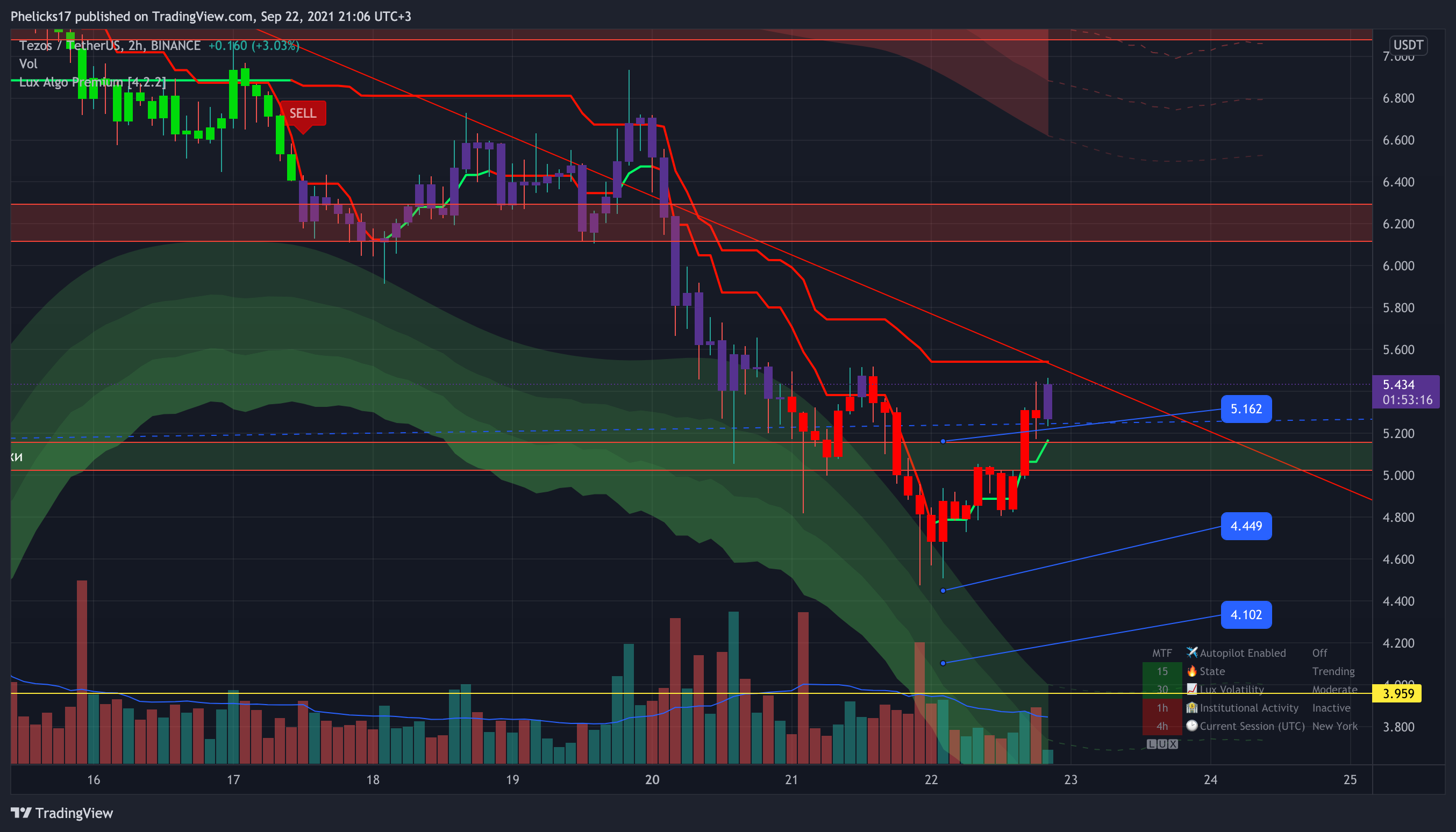
How are BUY signals for XTZUSDT are displayed in the bot here, but I could not get this(? https://www.tradingview.com/x/DF5vYoEW/
TradingView
indigo cradle
!visible
jaunty perch
Our Discord Market Scanner alerts all use the following:
- Default Lux Algo (V4 inputs).
- Normal trading hours (no extended hours)
- Main exchanges / brokers such as NASDAQ / TVC / FXCM / OANDA / COINBASE / BINANCE
If you have created your own, custom TradingView alerts, be aware they are set per the exact settings you had at the time you set those alert(s).
outer stratus
jaunty perch
Our Discord Market Scanner alerts all use the following:
- Default Lux Algo (V4...
I have standard settings 12/26. And get no indication of BUY signal - and no alarm in TV
 indigo cradle
I see in your sensitivity you have 20
And you also have autopilot enabled 🙂
Disable AP
And set sensitivity to 12
outer stratus
indigo cradle
And set sensitivity to 12
Disabled autopilot, set 12/26. No BUY indication in the bottom(
Sorry it was 4h timeframe. On the 2h i've got the sign
outer stratus
How to convert alarms from Luxalgo into the strategy, to buy/sell via webhooks?
indigo cradle
What exactly do you mean by convert the alarms into the strategy?
You wish to learn how to use webhooks?
 short bobcat
I’m not getting any alerts on buy/sell signals sent to to the tradingview app
indigo cradle
May I see your alert settings?
short bobcat
I actually just changed them to “any signal” so hopefully that works. If not, I’ll let you know. Thanks.
 steel osprey
@jaunty perch thanks looking for add nifty and banknifty in the list soon.
Any video how to add market scanner.
 fierce carbon
which settings are best for 2 hourly charts?
indigo cradle
fierce carbon
which settings are best for 2 hourly charts?
This page showcases every way users can adjust settings along with full explanations of how they differentiate from each other.
Regarding best settings
 granite dune
Hi I'm new in Lux Algo, what's the difference between trend catcher and tracer? What do you recommend to use best?
indigo cradle
@granite dune Welcome 🙂
Trend catcher is slightly predicitive so aims to catch a trend earlier and sometimes before it changes
Trend tracer is more classical in its trend following approach
My recommendation is to have a look and see which you prefer and which fits your trading the best 🙂
granite dune
Thanks! 🙂
golden flower
fierce carbon
which settings are best for 2 hourly charts?
I don't know about "the best" but the VIP Alerts for stocks that I get usually hit for the 2hr and 4hr time frame and those run in the default settings of 12/26. So you could start with that and then tweak as you see fit
 potent knot
@indigo cradle for the Pivot Low/High Analysis & Forecast free indicator, what is the meaning of red vs. green forecasted vertical pivot lines?
indigo cradle
potent knot
<@!456590452703887373> for the Pivot Low/High Analysis & Forecast free indicator...
They are the location of the forecasted pivots 👍
potent knot
indigo cradle
They are the location of the forecasted pivots 👍
Thank you but some are red and some are green. Is the red forecasting a high pivot that could lead to lower price movement and vice versa?
indigo cradle
A red pivot would be a potential pivot low and visa versa ☺️
 subtle pewter
hi guys, can someone help me how to add the dasdaq of futures new york and tokyo to tradingview data
indigo cradle
TradingView
Additional features and capabilities of upgraded accounts on TradingView. Enhanced functionality to improve your trading.
If you scroll to the bottom here you'll see all the live data options 👍
Select the one you require and you'll be good to go!
young nacelle
any1 know an fix for this

 steady topaz
Quick question, why does contrarian alert go off when it is not selected in any alert using auto pilot settings?
golden flower
young nacelle
any1 know an fix for this
You have the chart turned off
young nacelle
just noticed it lol >_<
 indigo cradle
steady topaz
Quick question, why does contrarian alert go off when it is not selected in any ...
indigo cradle
steady topaz
Quick question, why does contrarian alert go off when it is not selected in any ...
It shouldn't - try recreating your alert there 🙂
steady topaz
I have but I will do it again and see. Thanks
 idle lava
How to get the alarm for lux osciĺlator? Bottom Green dot or top red dot
indigo cradle
You can use classic buy/sell 🙂

 wheat barn
I’m new anyone can help setting for big move 7sep&20sep BTCUSD to off my bots
idle lava
Thx
fierce carbon
when will next bot scanner come out of btc and eth and alts
indigo cradle
When there are new signals 🙂
fierce carbon
oh ok so currently there are none?
indigo cradle
I see there are signals there

I see 3 signals today and 4 yesterday in the BTC/ETH channel
indigo cradle
They are on the given timeframe charts 🙂
So I see some 4h and 2h charts there
The scanners don't do lower timeframes
fierce carbon
thanks so much
 craggy token
Does the scanner only monitor top 20 coins?
indigo cradle
!list
jaunty perch
Below you'll find a list of assets our Discord Market Scanners cover.
(Timeframes include: 2H, 4H, 1D, 1W on each asset with standard Lux Algo V4 settings)
STOCKS:
FB, AMZN, AAPL, NFLX, GOOGL, TSLA, BA, DAL, AAL, LUV, UAL, ROKU, AMD, NVDA, CMG, SHOP, RCL, CCL, NCLH, SQ, ZM, MA, V, SPCE, SNAP, MSFT, BABA, QQQ
FOREX:
GBP/USD, EUR/USD, USD/JPY, USD/CHF, AUD/USD,
USD/CAD, NZD/USD GBP/CAD, GBP/JPY, GBP/CHF,
EUR/GBP, EUR/JPY, EUR/AUD, AUD/CAD, AUD/JPY, AUD/CHF
NZD/CAD, EUR/NZD, USD/ZAR, EUR/ZAR, GBP/ZAR
CRYPTO:
BTC/USD, ETH/USD, XRP/USD, BCH/USD, LTC/USD, BNB/USD, EOS/USD, XTZ/USD, LINK/USD, UNI/USD, YFI/USDT, DOT/USD, ATOM/USD, ADA/USD, OMG/USD, ETH/BTC
INDEX:
SPX, DJI, IXIC, E100, CAC40, DAX
FUTURES
ES1!, NQ1!, GC1!, BANKNIFTY1!, BTC1!, NIFTY1!. YM1!, SI1!, ZN1!, CL1!, ZF1!, 6E1!, ZB1!, 6J1!, RTY1!
COMMODITIES:
XAUUSD, XAGUSD, XPTUSD, USOIL, SUGARUSD, ZR1!, ZW1!
wheat barn
indigo cradle
I see there are signals there
How I can get this
indigo cradle
strong cairn
i am having issues with TV alerts. i have 10 active alerts right now. i set them up during pre-market.
1 min and 3 min charts. LUX ALGO PREMIUM, ANY ALERT() FUNCTION.
I dint get alerts for any of these stocks, but when i individually open each chart and check, there are multipla BUY-SELL signals on them since market open. Did i do some mistake while setting the alert? with the mode, or function...
strong cairn
i created the alert, using the alarm sign on the right side grid.
condition:lux algo premium
any alert() function call
notify on app
show pop-up
send email
and then i hit the blue create at the bottom.
and then the corresponding alert appeared in the log. as a matter of fact, its still there with green active below it
indigo cradle
However you need to select the options you want to use in alert any first 🙂
At the bottom of the lux algo settings you'll see checkboxes
Select the conditions you want to be used by Any Alert() function call
Then go to the alert menu and create it again 🙂
Options for setting alerts on Lux Algo in TradingView.
strong cairn
this has to be the god damn best support ever!!!!
indigo cradle
😉 We try our best 😄
strong cairn
your best is enough!! 🙂 🍻
golden flower
We have already established that Gecko doesnt sleep
strong cairn
hahahahah i was thinking the same!! he probably takes 15-20 mins naps here or there between my stupid queries!!! haha
indigo cradle
strong cairn
hahahahah i was thinking the same!! he probably takes 15-20 mins naps here or th...
No such thing as a stupid question 😉

 fierce carbon
gecko a question so on one of my charts on trading view it shows a falling wedge usding the luxalgo premium but on the dash board it doesnt show its in a down trend
indigo cradle
Do you have a screenshot @fierce carbon ?
 indigo cradle
A pleasure, you too! 😄
crystal crater
How can I find my referral code to send to a friend who is wanting to sign up?
indigo cradle
Create an income sharing the best tools.
You can login and access your affiliate code here 😄
crystal crater
Thank you G2G!
 harsh token
need to cancel membership
jaunty perch
Click Manage Account here: https://luxalgo.com
Or email support@luxalgo.com and our team will assist you with any request the same day.

Enhance your trading experience with our premium technical indicator suite + bots for stocks, forex, futures, currencies & commodities markets.
indigo cradle
If you're having billing issues please email support@luxalgo.com an email 🙂
They shall resolve
harsh token
thanks
keen river
Is it possible to set an allert that triggers every time it appears any signal (buy, strongbuy,sell,strongsell) without doing seperated alert for each one??
keen river
Okay
keen river
indigo cradle
You can select any confirmation signal in the alerts menu
Can u put in message what type of signall it is, for example:
ADA/USDT
{{type}} (For example: Strong Buy)
 indigo cradle
Buy : {{plot("Buy")}} | Sell : {{plot("Sell")}} | Strong Buy: {{plot("Strong Buy")}} | Strong Sell : {{plot("Strong Sell")}}
You can use this 🙂

 indigo cradle
Any confirmation 🙂
glacial shell
@indigo cradle Please help me what is this?
 indigo cradle
These are just some discord cool little satellites
Our Discord server contains a wide variety of bots that will return useful information to the user.
glacial shell
Do Lux algo have any auto bot trading tool?
indigo cradle
It does not I'm afraid
 glacial shell
golden flower
https://tenor.com/view/transformers-prime-optimus-roll-out-gif-20344420
glacial shell
golden flower
https://tenor.com/view/transformers-prime-optimus-roll-out-gif-20344420
Nice one.
 keen river
If I set an alert on for example buy signal ada to send on ma If i turn of my computer or close the tab will it deactivate itself and will not send me email. Or will it?
keen river
And where can u edit/delete alerts
indigo cradle
In the alert menu on the right of your screen by clicking the alarm clock 🙂
 pliant niche
hi, i just became vip member, i didn't see the indicators on my TV
pliant niche
yes, i did
indigo cradle
Refresh TradingView and it should appear under invite only 🙂
pliant niche
okay saw it now. thank you
keen river
indigo cradle
Your PC can be off 🙂
So it saves the sensivity agility and time frame and do it in cloud and when get signals send to me?
indigo cradle
keen river
So it saves the sensivity agility and time frame and do it in cloud and when get...
It does indeed 😄
keen river
Okay
Okay so i've set sensitivity to 1 and got into 1m time frame and set the alert, got an alert, got an email but didnt get a webhook message I set. It was a discord webhook
indigo cradle
That'll be to do with your webhook config then if it triggered
jaunty perch
I am the only one having issues finding the invite only scripts section? For some reason its not for me in there 😦 Any help would be highly apricated.
indigo cradle
Have you connected your TradingView account? 🙂
jaunty perch
indigo cradle
Have you connected your TradingView account? 🙂
Yes I did, I think I figured it out. I am on the es.tradingview site as im a spanish speaker. Just tried to go to the english based version and it suddenly popped up. So I guess its solved.
Thanks for the support. Also one little question, usually the stuff posted in #💰share-profits its traded solely looking into the Lux algo´s buy and sell signals? Or some people use custom stuff or w/e?
indigo cradle
jaunty perch
Thanks for the support. Also one little question, usually the stuff posted in <#...
We ensure they are using Lux components in their trades, could be reversal zones, could be oscillator 🙂
jaunty perch
indigo cradle
We ensure they are using Lux components in their trades, could be reversal zones...
Okay thanks, is there any kind of guide on how to understand the 3 scripts in a better way?
jaunty perch
Learn about every aspect of Lux Algo at: https://docs.luxalgo.com
jaunty perch
Find our full trading strategies playlist on YouTube: https://www.youtube.com/watch?v=xezy6WGpZ8Y&list=PLbqCXsOfrM3MjO7q7uIiwoVq3evI4neQr
Join our Discord: https://discord.gg/LUX
Get access to Lux Algo: https://luxalgo.com/products/lux-algo
Get the best settings: https://www.youtube.com/watch?v=OmvxpTE9tlw&t
Usability Tips: https://www.youtube.com/watch?v=5wtdY51crnc
indigo cradle
Here is a strategy playlist covering some examples
jaunty perch
Thanks a lot!
 dusky spear
Can I use Lux Algo signals with 3commas?
golden flower
dusky spear
Can I use Lux Algo signals with 3commas?
If you use the search feature you can find all kinds of info on how people here use it with 3commas
 fierce carbon
why is there a strong signal using auto pilot mode nut then when i use the 4h bot its a buy what??
indigo cradle
!visible
jaunty perch
Our Discord Market Scanner alerts all use the following:
- Default Lux Algo (V4 inputs).
- Normal trading hours (no extended hours)
- Main exchanges / brokers such as NASDAQ / TVC / FXCM / OANDA / COINBASE / BINANCE
If you have created your own, custom TradingView alerts, be aware they are set per the exact settings you had at the time you set those alert(s).
 warped crystal
thanks @indigo cradle !
indigo cradle
@warped crystal No worries 🤝☺️ Sorry about that
pliant niche
Hi Admin, how did you get the correct pattern detection ? All of stocks are showing on my end which are just rising wedges and falling wedges
pliant niche
For example, on the pattern detection room, jmia is supposed to make double bottom, i only see falling wedges
 indigo cradle
pliant niche
For example, on the pattern detection room, jmia is supposed to make double bott...
indigo cradle
pliant niche
For example, on the pattern detection room, jmia is supposed to make double bott...
^
- The pattern detection channel uses a different method so may not always line up
golden flower

 indigo cradle
A nice falling wedge 🙂
What exactly do you mean by "supposed to show a double bottom"?
 indigo cradle
Patterns are a highly highly compelex things
golden flower
I see what they means because even finviz is showing a DB on the daily
 indigo cradle
Multiple patterns can exist
There can be a double bottom on a large scale
And a falling wedge on a small scale
pliant niche
That’s why im confused lol
indigo cradle
In my opinion it's a falling wedge
More than a double bottom
It's down to scale, interpretation and the algorithm
golden flower
Personally I dont even use the pattern dectection but hell double bottom/falling wedge both are bullish lol
pliant niche
Yeah that’s true. Just want to make sure though
 jagged adder
Hi there, looking at the MTF on luxAlgo it is shows the MTF as bearish for 15,30,1h,4h but when I look at the chart for that timeframe it is showing bullish.
golden flower
pliant niche
Yeah that’s true. Just want to make sure though
Oh I understand and I am not trying to down play your question by any means.
pliant niche
Thank you
golden flower
jagged adder
Hi there, looking at the MTF on luxAlgo it is shows the MTF as bearish for 15,3...
I think someone else noticed that as well. I think this is something that the team is looking in to
indigo cradle
jagged adder
Hi there, looking at the MTF on luxAlgo it is shows the MTF as bearish for 15,3...
Which asset and timeframe; the security function in tradingview is a funny one
golden flower
indigo cradle
Which asset and timeframe; the security function in tradingview is a funny one
Yeah thats weird because if i got to AAPL and I am on the 4hr its all green but I know AAPL is down today.

and then when I go to the 15 min it changes
 glacial shell
golden flower
glacial shell
golden flower
dear what Sensitivity you use accourding to Dashboard or custom
golden flower
Mines on default
glacial shell
means 12/26
golden flower
glacial shell
means 12/26
yes
glacial shell
on which time farms it works
indigo cradle
golden flower
Signal was not closed there 🙂
 jagged adder
indigo cradle
Which asset and timeframe; the security function in tradingview is a funny one
jagged adder
indigo cradle
Which asset and timeframe; the security function in tradingview is a funny one
GOLD 4hr very bullish but MTF showing it as red
indigo cradle
jagged adder
GOLD 4hr very bullish but MTF showing it as red
Was the candle closed?
Very bullish depends on the timeframe
It can be very very uptrending on the 5m
But on the 4h it can be down trending
jagged adder
indigo cradle
Was the candle closed?
4HR is open with 43mins left
strong cairn
when does Algo send out a signal? i had an alert set on SHOP and SQ on the 2 hr candle. i got the alert at 1130 for the 2hr candle. when i opened the chart, the alert is showing corresponding to 930 am 2hr candle. does it send signal real time, as it is happening? or after the candle period ends?
jagged adder
indigo cradle
It needs to close
so MTF is showing previous candles state not the current one
indigo cradle
jagged adder
so MTF is showing previous candles state not the current one
It will show the current confirmed signal
indigo cradle
strong cairn
when does Algo send out a signal? i had an alert set on SHOP and SQ on the 2 hr ...
It will send on the bar close
If you have it set this way
jagged adder
indigo cradle
It will send on the bar close
how can i check?
indigo cradle
jagged adder
how can i check?
You cannot; it's the way it's set 🙂
The alert will send out on the close of the bar if that's how you set it 🙂
strong cairn
indigo cradle
If you have it set this way
can i set it to where it sends at bar opening itself?
indigo cradle
strong cairn
can i set it to where it sends at bar opening itself?
You can set it to where it appears and hasn't yet closed; higher risk
You need to use a built in alert (not use all in one alerts) and don't use once per bar close
jagged adder
indigo cradle
The alert will send out on the close of the bar if that's how you set it 🙂
how do i know what is set? can i look somewhere?
indigo cradle
jagged adder
how do i know what is set? can i look somewhere?
In your alerts menu you can see the alerts you made
When you made the alert this is something you would have selected. If you're using all in one alerts then it's using once per bar close
jaunty perch
Click Manage Account here: https://luxalgo.com
Or email support@luxalgo.com and our team will assist you with any request the same day.
Enhance your trading experience with our premium technical indicator suite + bots for stocks, forex, futures, currencies & commodities markets.
indigo cradle
!alerts
jaunty perch
How to set up your own custom alerts in TradingView: https://docs.luxalgo.com/lux-algo-premium-indicators/setting-up-alerts-on-tradingview
Follow this guide for setting up your own custom alerts on TradingView.
indigo cradle
Here is our alert setup guide where you'll see the options regarding alerts
jagged adder
indigo cradle
In your alerts menu you can see the alerts you made
nope no alerts set
indigo cradle
Then you didn't make any alerts
So there's nothing to check since you didn't make any
 fluid crag
Hello there, question: I've been comparing my tradingview to the Lux 15M stream from btc / eth and I can't calibrate the same signals. 1.-The stream uses version 4.2.1 ... my tradingview uses version 4.2.2, why doesn't the stream update the version? 2.- Optibot has not updated sensitivity / agility since 09/22 with information from 08/30 3.- Probe calibrate with the options a) "auto pilot" b) "optibot15M" Sens15 Agil34 c) MTF Optimal Sens 30 Agil34 In none of the 3 previous cases could I get the same graph as the stream. can you help me please
jagged adder
indigo cradle
Then you didn't make any alerts
ok, so what is the MTF table showing me? currently for GOLD all the MTF are showing bearish
indigo cradle
fluid crag
Hello there, question: I've been comparing my tradingview to the Lux 15M stream ...
The versions are very similar (same signals) so we haven't updated. You can find the settings in the Youtube livestream video description.
Optibot doesn't update daily for all timeframes. For the 5m it's daily for the other it's monday and wednesday.
indigo cradle
jagged adder
ok, so what is the MTF table showing me? currently for GOLD all the MTF are show...
It shows you the last confirmed signal on a given timeframe 🙂
fluid crag

 indigo cradle
fluid crag
indigo cradle
fluid crag
See my previous reply
strong cairn
@indigo cradle so what i am seeing is,
condition:lux algo premium
any confirmation buy(previously, i used to use any alert)
then the 4 options..
which 1 will i select to get alert as it is happening? and i cant use it on any alert, right? i have to put individual buy, or sell alerts, right?
indigo cradle
strong cairn
<@!456590452703887373> so what i am seeing is,
condition:lux algo premium
any c...
You can select once per bar or any option that does not mention close
For example once per minute will alert every minute the signal shows
fluid crag
indigo cradle
The versions are very similar (same signals) so we haven't updated. You can find...
Ok give me a sec I'll double check
indigo cradle
You can use any confirmation to have an alert on all 4
left plinth
good going
strong cairn
ohh gotcha!! man Geclo you are awesome dont know why people are canceling this subscription. i havent made any money with it yet, but i can see, if i dont make any money, i am stupid. the system is good where it needs to be!!
gecko*
indigo cradle
strong cairn
ohh gotcha!! man Geclo you are awesome dont know why people are canceling this s...
Appreciate it 😉
golden flower
It will work better in a not so range bound market
 summer cedar
I love Lux 😂
 indigo cradle
golden flower
It will work better in a not so range bound market
indigo cradle
golden flower
It will work better in a not so range bound market
But there are specific tools in place for this 😄
golden flower
Contrarian signals?
strong cairn
golden flower
It will work better in a not so range bound market
yea, that makes sense.
how do you all use this system in up and down markets? soo much to learn!!
indigo cradle
In fact; I'd go as far as saying; ranging markets are one of the best times with Lux

In this video I showcase how to trade the 5m with Lux Algo and increase your profits and chances of identifying reversals. Make sure to leave a like & subscribe for more trading strategy videos!
Get access to Lux Algo indicators: https://luxalgo.com
Lux Algo features used in this strategy:
Reversal Zones: https://docs.luxalgo.com/lux-algo-pre...
Ranging markets made easy 😉
strong cairn
ohh awesome. i was about to ask any strategy?! you responded with support before i asked hahah
golden flower
Ohh I watched that video already lol. I have already been trading using that method just on the 4hr
In fact I got in to X off the 4hr because of that even though an alert to buy hasnt hit yet.
indigo cradle
Contrarians, Reversal zones, predictive ranges/patterns = ranging market fun 🙂
fluid crag
indigo cradle
The versions are very similar (same signals) so we haven't updated. You can find...
ready I have it, thanks for your help * gecko One more question: for better results, should I change the sensitivity of optibot for the optimal sensitivity shown in the graph using the same agility?
indigo cradle
fluid crag
ready I have it, thanks for your help * gecko One more question: for better resu...
Optimal is a little subjective to your trading style however using the optibot provided pair is a nice idea
fluid crag
indigo cradle
Optimal is a little subjective to your trading style however using the optibot p...
All righ then gois suggest...
I appreciate your support thanks a lot
Sometimes I feel that due to lack of knowledge, lux is not used to the maximum but it is an excellent app, I also understand why you would cancel it at the end is an affordable cost
indigo cradle
fluid crag
All righ then gois suggest...
I appreciate your support thanks a lot
A pleasure 😄
golden flower
fluid crag
Sometimes I feel that due to lack of knowledge, lux is not used to the maximum b...
Ive said this before and I am sure you agree that Lux is supposed to be use just like any other tool. Its a whole suite of TA tools to use to help you decide to either enter a trade based on what you are seeing or not. I have had buy alerts come up and use the other tools to filter out the trades. Either the alert comes in when its already near a reversal zone, in an overbought, oversold position or may right in the middle of support and resistance. The tools are only as good as the person using them
You cant just see a buy signal and go all in lol
 kindred pivot
Hi there. Technical question here, which I am sure you get a lot: What sensitivity setting am I supposed to use? Lux Algo default sensitivity setting is 12. But then there is an "Auto Pilot Confirmations Signal Settings". And then there are those like Cypto Jebb who talks about entering different numbers into the sensitivity setting depending on the timeframe. Which one is the most reliable?
indigo cradle
kindred pivot
Hi there. Technical question here, which I am sure you get a lot: What sensitivi...
Regarding best settings: https://docs.luxalgo.com/lux-algo-premium-indicators/lux-algo/signal-settings#choosing-the-right-method
This page showcases every way users can adjust settings along with full explanations of how they differentiate from each other.
Hope that helps ☺️
kindred pivot
Thank you Admin Gecko
 red silo
HI, How to set alert for Lux Statistics, I want the alert when the Pivot High appears
 red silo
I keep the the condition as the pic, or I choose pivot high from the dropdown menu?
indigo cradle
You use the condition I have selected 🙂
red silo
Thanks a lot!
 sinful wave
If there were 1 min and 5 min alerts on dashboard along with others ones that would really help
indigo cradle
Those are timeframes we don't aim to encourage + there's a very limited amount of space on the dashboard, the MTF is there to give a larger market overview. You can always set alerts on lower timeframes if needed 🙂
sinful wave
Overall it’s good product I like it I’m new .still learning
So if it’s green on 4 hrs under MTF does it mean it’s bullish on longer term
indigo cradle
It means the last seen signal on the 4h was a buy signal ☺️
fluid crag
Another question: What are the criteria for calculating sensitivity and agility based on ... in price, volume, time, orders, volatility etc?
indigo cradle
calculating where? Optibot?
fluid crag
Yep
indigo cradle
That's a vanilla "backtest" of the given settings assuming buying on a buy and selling on a sell
Which is not recommended at all
But assuming it was followed blindly
fluid crag
indigo cradle
That's a vanilla "backtest" of the given settings assuming buying on a buy and s...
Let me explain ... in other words, I must understand when the sensitivity index increases starting from the 12 index, let's say 30, on which this increase is based with respect to the behavior of the market. the same question would be for the agility index
indigo cradle
I'm sorry I don't understand fully 😦
With Optibot it's a test of all the permutations of sensitivity and agility. So in a trending market you may see higher values for sensitivity and agility and holding a position for longer may be more profitable
So at the start of the day optibot runs
It looks through 2000 bars and tests every combo of sensitivity and agility
Then it returns the most profitable pair
fluid crag
indigo cradle
I'm sorry I don't understand fully 😦
With Optibot it's a test of all the permu...
I am very sorry not to be able to explain myself better ... I understand your point, however I want to know why it increases or decreases sensitivity and agility, that is, on what data the app is based or under what criteria are these values increased or decreased since I am interested in operating them manually according to my strategy but I want to understand what happens if I move the sensitivity ... wide or decrease the time window of an operation, let's say buy ... the same question would be with the sensitivity?
fluid crag
indigo cradle
It looks through 2000 bars and tests every combo of sensitivity and agility
ok then if I understand well from what you tell me they are based on time, price and volume of the last 2000 bars regardless of the time period 15m 30m 1h 2h 4h
ok then if I understand well from what you tell me they are based on time, price and volume of the last 2000 bars regardless of the time period 15m 30m 1h 2h 4h
indigo cradle
I'm still not super clear but I'll try and cover a few things that may cover it:
Optibot doesn't decide to increase or decrease sensitivity and agility. It loops through all combinations and finds the best. So it starts with 10,10 for example, then tests 10,11 and 10,12 ect and generates a profit value. The best pair wins and is posted.
If you're interested in what sensitivity and agility actually do this page explains what each does and how it impacts signals if you wish to adjust manually: https://docs.luxalgo.com/lux-algo-premium-indicators/lux-algo/signal-settings
This page showcases every way users can adjust settings along with full explanations of how they differentiate from each other.
fluid crag
indigo cradle
I'm still not super clear but I'll try and cover a few things that may cover it:...
Excellent, thank you very much, I will study the information you provide me to clarify my doubts or establish my question diferent manner😅 👌
indigo cradle
fluid crag
Excellent, thank you very much, I will study the information you provide me to c...
Hopefully it answers the question; if not I'll do my best to help 😄
fluid crag
You got it... hahaha tnks 😎
strong cairn
@golden flower hey buddy, you said you have a diverse list of stocks. Any chance you could share it? Also, do you set up alerts on all of those? And 2 hr and 4 hr charts?
golden flower
Honestly its not really a list just like 80 tickers I could think of and set alerts for all of them in thr 4hr.
Some ove gotten from finviz when scanning for overbought/oversold
Its usually the main ones that trade or you hear about. @strong cairn
But like MCFE popped up for me today. I found it off finviz and its very oversold so it popped as a buy on the 4hr. Alot of them are also the ones that alert on the VIP Stocks Alert
strong cairn
Hey thanks!
What time do you scan for oversold/overbot stocks? Do you usually do it premarket?
golden flower
Finviz uses the daily charts so it really can be done whenever
strong cairn
Ohh nice
strong cairn
How are you able to set 80 alerts though? Mine just lets me set 20 🤦♂️🤷♂️
shy relic
strong cairn
How are you able to set 80 alerts though? Mine just lets me set 20 🤦♂️🤷♂️
Higher tier tradingview plans allows setting more alerts.
strong cairn
shy relic
Higher tier tradingview plans allows setting more alerts.
Oh gotcha. Thanks. Just realized i had pro. Need to get pro +
 lethal knot
hello! could you please tell me what is the X means on the chart? Im not sure if its a SELL signal ....
shy relic
lethal knot
hello! could you please tell me what is the X means on the chart? Im not sure if...
X are exits signals, orange X means exit sell, blue X means exit buy
 alpine kernel
hello,
i was just looking around and ive found optibots should i change my settings ?
shy relic
alpine kernel
hello,
i was just looking around and i`ve found optibot`s should i change my set...
yep you can change your settings according to optibot you can learn more about it there https://docs.luxalgo.com/lux-algo-premium-indicators/lux-algo/signal-settings#optibot-from-vip-discord-server. If you created an alert prior to changing the settings make sure to update it, as it will still be based on the settings used during its creation.
This page showcases every way users can adjust settings along with full explanations of how they differentiate from each other.
 smoky sail
Is it possible to set up conditional alerts based on 2 of lux Indicators?
Looking to use the trend catcher as well as the oscillator (legacy mode)
Basically an alert that gets trigger when the trend catcher is up and the legacy oscillator is below 20 and is turning blue?
Any support is greatly appreciated 🙏
indigo cradle
smoky sail
Is it possible to set up conditional alerts based on 2 of lux Indicators?
Looki...
Sadly within TradingView that's not possible. You'd need to set up your own implementation
golden flower
doesnt seem to be a way to alert on legacy. I was going to do the same thing
 indigo cradle
golden flower
doesnt seem to be a way to alert on legacy. I was going to do the same thing
indigo cradle
golden flower
doesnt seem to be a way to alert on legacy. I was going to do the same thing
You can set alerts on legacy
You just can't make confluence alerts
For legacy alerts you select legacy main crossing legacy trigger 👍
golden flower
Oh found it. Thanks!
 whole wren
What do the dots on the Oscillator chart mean?
golden flower
I highly recommend reading the guides ans watching the tutorials. It really helps especially the videos seeing it unfold in real time
whole wren
Yes, I am doing that now.
golden flower
I'm a visual learner so the videos really helped
I can read the guides all day ans ill still be like
 whole wren
How do I get candle shading that correlates to the Lux Oscillator, like in this video: https://www.youtube.com/watch?v=pMfC1yoImtE ?

In this video we walkthrough the new Lux Oscillator Premium v4.0 which is our 2nd most popular indicator toolkit on TradingView.
FULL GUIDE: https://docs.luxalgo.com/lux-algo-premium-indicators/lux-oscillator-premium
Get instant access: https://luxalgo.com
Trading strategies playlist: https://www.youtube.com/watch?v=xezy6WGpZ8Y&list=PLbqCXsO...
indigo cradle
That's confirmation gradient colouring on the candles 👍☺️
whole wren
I don't see where I can set confirmation gradient coloring
whole wren
Each mode can be enabled from the settings in the candle color mode dropdown menu.
I don't see such a dropdown menu. I don't have any "dropdown" menus at all. I'm using TV 1.0.0-beta.12 on Mac.
indigo cradle
Double click on a signal tag to open the settings menu ☺️
rotund hearth
How can we test Buy/Sell signal settings with Tradingview's Backtester?
indigo cradle
rotund hearth
How can we test Buy/Sell signal settings with Tradingview's Backtester?
You cannot since we don't provide any strategies I'm afraid
 frosty sundial
Hello, just purchased lux algo for the first time, linked my discord and trading view, but i am still not being given access to the lux algo premium indicators.
indigo cradle
@frosty sundial Hi there 🙂
Try refreshing your TradingView page
then check under invite-only scripts
rotund hearth
indigo cradle
You cannot since we don't provide any strategies I'm afraid
Ah that sucks. Backtester support for Optibot would be a amazing feature! This way we could tune Optibot sensitivity and agility ourselfs and to find good settings for cryptos+timeframes that aren't listed in 'settings optimizer' 🙂
indigo cradle
rotund hearth
Ah that sucks. Backtester support for Optibot would be a amazing feature! This w...
We are always working on optimisation approaches 😄
rotund hearth
I'll leave it as a feature-suggestion in the right channel then 🙂
 noble furnace
Hey guys I have one question for the developers, as I'm loving this indicator so much
Is there a way to create a visual signal for certain coins to see if they are a buy in the one hour? It's hard to explain I've seen it done before and I can pay for it I would just really like a visual that looks like this with your algo
indigo cradle
Hi Don! Are you referring to screeners?
 indigo cradle
Ah yes a MTF screener of sorts 🙂
When tradingview provides a nice custom screener solution we will be on it 😉
noble furnace
can we host it on telegram, it could be a side project as I said i can pay to get it built
as long as it's resonable, I think it could be a big plus to your suite
indigo cradle
We are just waiting on custom screeners in TradingView; then we will have a great screener 🙂
Hopefully with pinev5 custom screeners will follow v soon
noble furnace
is this something that is happening soon? or a nice way to say no?
indigo cradle
Oh I'm sure it's in the works; it's 100% something that will be done at some point in the near future in some way shape or form
We will build a screener for signals/MTF/Patterns ect
It's highly requested
noble furnace
So now besides alerts is there anything else I can use?
indigo cradle
Currently alerts are the way to go 👍
noble furnace

also is this the same as the setting optimizer or do I have to come back to the channel every time you guys update?
indigo cradle
This page showcases every way users can adjust settings along with full explanations of how they differentiate from each other.
This isn't the same as optibot it's a different method of optimisation 🙂
noble furnace
thanks I'll check it out
 pearl jetty
hi, is there a way to separate long exits from short exit alerts? I am trying to run long and shorts on different sub accounts...thanks!
indigo cradle
Hi you can use the message field to differentiate using plots 4 and 5 🙂
pearl jetty
so {{plot_4}} is for long exits and {{plot_5}} is for short exits?
indigo cradle
Correct 🙂
pearl jetty
nice, appreciate it
one more thing...when are trend catcher and trend tracer alerts suppose to trigger?
indigo cradle
They will alert on a color change 🙂
pearl jetty
got it!
 tropic kraken
Do you have a backtest script for tradingview
outer stratus
Strange that enabled auto pilot causes "autopilot enabled - off" in the dashboard

 velvet sage
Can you please add Matic to optibot. It has its own network, it should be in there with the others and i trade that more than anything
indigo cradle
tropic kraken
Do you have a backtest script for tradingview
We don't I'm afraid as we don't make strategies
indigo cradle
outer stratus
Strange that enabled auto pilot causes "autopilot enabled - off" in the dashboar...
It says off as the optimized sensitivity is off due to AP
indigo cradle
velvet sage
Can you please add Matic to optibot. It has its own network, it should be in the...
Absolutely it's a popular one 👍
silk bloom
does anyone know a good crypto screener where u can apply different filters to see custom results?
indigo cradle
Sadly we don't have a screener ourselves currently however tradingview has some inbuilt screeners
silk bloom
not enough though
how u know one crypto will hit up or move up, cant go through all the coins out there to find the right movement
 hardy fable
silk bloom
how u know one crypto will hit up or move up, cant go through all the coins out ...
hardy fable
silk bloom
how u know one crypto will hit up or move up, cant go through all the coins out ...
Market structure
indigo cradle
You can use our discord scanners maybe to get a heads up
silk bloom
doing that
indigo cradle
However most traders trade a few assets and they keep an eye on those
indigo cradle
As soon as we have the ability to make a screener we will make one 🙂
Then you'll be able to scan through every asset
silk bloom
hope soon
hardy fable
Only trade BtC as rest follows it anyway
hardy fable
Can Lux make an alert for SFPs?
jaunty perch
How to set up your own custom alerts in TradingView: https://docs.luxalgo.com/lux-algo-premium-indicators/setting-up-alerts-on-tradingview
Follow this guide for setting up your own custom alerts on TradingView.
 digital mango
Hello
 feral lava
Hey @quiet grove you need a free TradingView.com account
Then enter the username and it’ll show you guides
 quiet grove
ok thanks
cursive stump
Quick question, will the alerts I have set on TradingView automatically adjust if I change the sensitivity/agility?
Or is it based on the sensitivity/agility at the time of creating the alerts?
feral lava
cursive stump
Quick question, will the alerts I have set on TradingView automatically adjust i...
It's based on the sensitivity/agility at the time of creating the alerts -- to update them, you can adjust your settings, and then click "Edit" on the alert, select Lux Algo Premium (on the bottom of the list) and then click save
cursive stump
feral lava
It's based on the sensitivity/agility at the time of creating the alerts -- to u...
Thanks, appreciate it!
feral lava
no prob 🙂
sinful wave
What’s better as support and resistance predictive ranges or channels
feral lava
sinful wave
What’s better as support and resistance predictive ranges or channels
both are for different trading styles, all up to you which one you find works best!
sinful wave
Ok thanks
cursive stump
Do you guys happen to have this link for the Placeholders section in the lux docs?
 shy relic
cursive stump
Do you guys happen to have this link for the Placeholders section in the lux doc...
shy relic
cursive stump
Do you guys happen to have this link for the Placeholders section in the lux doc...
Sorry about that, here you go https://docs.luxalgo.com/lux-algo-premium-indicators/lux-algo/alerts#using-placeholders-with-confirmation-contrarian-alerts
Options for setting alerts on Lux Algo in TradingView.
cursive stump
shy relic
Sorry about that, here you go https://docs.luxalgo.com/lux-algo-premium-indicato...
Thanks boss
 wise rapids
I have a question where can I find the settings for Indices
jaunty perch
does anyone know a reliable optibot setting for 1m chart for eth
shy relic
wise rapids
I have a question where can I find the settings for Indices
indices are tracked by ETF's, so look at the ETF's in optibot, DIA for dow30, QQQ for nas100 and SPY for SPX
shy relic
jaunty perch
does anyone know a reliable optibot setting for 1m chart for eth
optibot does not run on 1min tf, you would need to use either autopilot or the recommended sensitivity in the dashboard.
wise rapids
Ok awesome thanks
jaunty perch
how come the algo doesnt show x marks sometimes
jaunty perch
Do i need tradingview pro to put alerts?
 stable nymph
Hi, I can't manage to get the notifications running. This is what I've tried so far.
1)Double click on the signals,
2)toggle to the bottom where it says MyAlert
3)Clicked on Strong Sell, strong buy etc.
I checked today and it's showing a strong buy signal but I haven't received anything. Can anyone help please? Thanks

 maiden spindle
how to make the indicator to give us the alert
 faint marsh
Hi guys, I've been tinkering with the indicator options. Do you have a formula to calibrate the sensitivity of the signal in each specific pair? I have played with different values manually (between 12 and 100) but it is not clear to me. The "auto" option seems to me the most correct at first glance.
indigo cradle
jaunty perch
I get this message trying to setup alerts, is it repaint?
You can ignore this message, it's due to other features
indigo cradle
stable nymph
Hi, I can't manage to get the notifications running. This is what I've tried so ...
You need to create the alert in the alerts menu:
!alerts
jaunty perch
How to set up your own custom alerts in TradingView: https://docs.luxalgo.com/lux-algo-premium-indicators/setting-up-alerts-on-tradingview
Follow this guide for setting up your own custom alerts on TradingView.
indigo cradle
Follow the second step here
indigo cradle
maiden spindle
how to make the indicator to give us the alert
!alerts
jaunty perch
How to set up your own custom alerts in TradingView: https://docs.luxalgo.com/lux-algo-premium-indicators/setting-up-alerts-on-tradingview
Follow this guide for setting up your own custom alerts on TradingView.
silk bloom
Altcoin alert for XRP-4hours chart send strong buy yet the trend was going down - till now did not rise !!! How is that working ?
amber flint
silk bloom
Altcoin alert for XRP-4hours chart send strong buy yet the trend was going down ...
like link yesterday
silk bloom
Exactly
amber flint
silk bloom
Exactly
i have touch the sl it's ok but...
indigo cradle
There a bullish engulfing on the 4h
It's not the worst alert, just because on one timeframe it's down trending it can be a totally different story on another
This is precisely why alerts are there for you to analyse and use as a tool, check out the chart and see what you think ☺️
silk bloom
Thought will element the think part on this tool by using algo!
Emotions come cross when we think specially we are not specialized in chart reading
So I bought it to eliminate the think part
 fair mica
it's on a 4h chart if you don think at least wait 🙂
silk bloom
Till now did not make a single profit out of algo following all signals but nothing worked out
indigo cradle
silk bloom
Till now did not make a single profit out of algo following all signals but noth...
Please please please do not follow all signals, this is on page one of our docs as a large warning
I'd suggest watching some of my strategy videos
!strategies
silk bloom
It’s already passed the 4 hour that’s why I start writing and asking what’s going wrong
jaunty perch
Find our full trading strategies playlist on YouTube: https://www.youtube.com/watch?v=xezy6WGpZ8Y&list=PLbqCXsOfrM3MjO7q7uIiwoVq3evI4neQr
Join our Discord: https://discord.gg/LUX
Get access to Lux Algo: https://luxalgo.com/products/lux-algo
Get the best settings: https://www.youtube.com/watch?v=OmvxpTE9tlw&t
Usability Tips: https://www.youtube.com/watch?v=5wtdY51crnc
indigo cradle
silk bloom
It’s already passed the 4 hour that’s why I start writing and asking what’s goin...
The signal can take a week to play out
silk bloom
Yesterday link was the same story
amber flint
silk bloom
Followed all strategies
i have try lux algo on various crypto and work...sometimes the signal isn't correct but sometimes depend by the market
indigo cradle
silk bloom
Yesterday link was the same story
They are 4h alerts
A 4h alert does not play out over a day
amber flint
in high timeframes the indicator work on a day
indigo cradle
A 4h alert plays out over a few days or weeks
silk bloom
It’s works on past signals but nothing work on real live signals
indigo cradle
Patience is needed
For example the XRP 4h alert came 6 hours ago
That's only one and half candles
That's nothing at all, it needs time
silk bloom
Ok so if it’s a 4 hrs what’s the time frame we should expect to see result and follow up from there !
Is it 12 hr or a full day !
indigo cradle
More than that
It's the 4h chart
A move can take a week
There are 6 candles each day
That's very very few
golden flower
The longer the time frame the longer it can take to for the alerts to pan out. Which is why for swing traders or people who work 9-5 its ideal to trade on longer times because you dont have to watch the screen all day long. Sometimes the ticker could pop and run and you can get in and out in 24hrs but typically im in a trade about a week off the 4hr
faint marsh
I have just programmed the alerts by taking any symbol with the XAUSUD (1H). I understand that it will send you alerts only in that time frame. If you want to change at 15M, would you have to program another clock around 15M?
golden flower
Yes you would havr to create a separate alert on that time frame
strong cairn
@indigo cradle @golden flower what exactly does an EQ Cloud show? how do y'all use if to decide if its a good trade or not?
indigo cradle
EQ Cloud - Reversal Zones - Both
golden flower
strong cairn
<@!456590452703887373> <@!576426404753702913> what exactly does an EQ Cloud show...
Above the cloud, up trend. Below the cloud, down trend. Just another tool for confirmation
 strong cairn
golden flower
Above the cloud, up trend. Below the cloud, down trend. Just another tool for co...
strong cairn
golden flower
Above the cloud, up trend. Below the cloud, down trend. Just another tool for co...
this is awesome explaination! thanks buddy
quiet grove
hi do you have signals for good coin for long or short trade?
stiff urchin
@feral lava peak activity levels indicator based off of the lux institutional profile levels?
indigo cradle
hahahahah do not fear 😉
indigo cradle
quiet grove
hi do you have signals for good coin for long or short trade?
You could use our scanners #🔔scanners-premium 🙂
jaunty perch
Anyone have good gold settings for 5 min?
quiet grove
indigo cradle
You could use our scanners <#780585592911560734> 🙂
how to use it
quiet grove
indigo cradle
<#695668800044925009>
i scan already and i will wait for message right?
indigo cradle
You will need to wait for new signals 🙂
quiet grove
indigo cradle
You will need to wait for new signals 🙂
thanks
 rich quiver
on the new volume levels indicator, when the lines go blue or red, what does that mean? i noticed they change colors, it is based on trend?
like right now i noticed they are all red, but sometimes it will be red and blue or just all blue
indigo cradle
The description covers the meaning of those bars 🙂
rich quiver
ok ill take a look
jaunty perch
whats an optimal stop loss % for crypto?
 delicate bloom
Peak Activity Levels Will there be a tutorial on YouTube?
indigo cradle
We don't tend to make tutorials for our free scripts
We only tend to cover premium features 🙂
 sharp wind
Hi do you recommend heiken ashi candles when setting up a chart for the algo? It seems to be a little weird with normal candles. Sorry if I’ve missed some info just trying to get to grips with it all lol
indigo cradle
You can use the candle type you prefer; if you're familiar with the perks/drawbacks of HA then it's up to you 🙂
 karmic crag
Hello everyone. New here. How do you opt into a scanner?

 karmic crag
Thanks....then how do I "react with 3" if I want to opt in to futures scanner alerts?
