#🤝support
1 messages · Page 242 of 1
 tardy talon
 shy relic
Have you tried to reconnect your Tradingview account?
You can email your username at support@luxalgo.com and they will grant you access, sorry about that :(
tardy talon
any chance you know what it means alex? thanks
shy relic
tardy talon
first hour having this system, does anyone know what that x means by chance? tha...
The crosses are exit points, blue crosses are exit buys while orange ones are exits sell :)
tardy talon
thank you!! love the system so far
 wooden hawk
do i need tradingview premium for the lux algo premium? @shy relic
 dry herald
Good eve,
Followed the steps to refresh, removing and re-adding the Lux Algo 4.2.1 updated version. However I still don't seem to be getting the Detected Pattern added to the Lux Algo 4.2.1.
Thoughts?

 indigo cradle
dry herald
Good eve,
Followed the steps to refresh, removing and re-adding the Lux Algo 4....
indigo cradle
dry herald
Good eve,
Followed the steps to refresh, removing and re-adding the Lux Algo 4....
You need to turn it on under SR mode 🙂
indigo cradle
wooden hawk
do i need tradingview premium for the lux algo premium? <@!225316751410331649>
TV free works perfectly fine 👍
dry herald
indigo cradle
You need to turn it on under SR mode 🙂
Nailed it, ty very much.
 balmy wren
hey any admin here?
indigo cradle
Hi there
balmy wren
quick question in regards to the patterns.
do i need to change anything for patterns to be found better? or does it just find whatver with stock standard settings?
indigo cradle
Stock should be ok but if you want to search through varying degrees of pattern sizes you can change the settings and look through
balmy wren
what setting is that? to change things?
indigo cradle
the value next to the SR mode ☺️
wooden hawk
Thank you. All set up and ready to go, looking forward to it. 👍 thanks for your work guys
balmy wren
indigo cradle
the value next to the SR mode ☺️
legend thankyou!
 left hemlock
Which should I trust more, optibot 15m sensitivity number or dashboard sensitivity number on 15m chart ?
 shy relic
left hemlock
Which should I trust more, optibot 15m sensitivity number or dashboard sensitivi...
shy relic
left hemlock
Which should I trust more, optibot 15m sensitivity number or dashboard sensitivi...
Both are different, optibot optimize both sensitivity and agility, while the recommend sensitivity on the dashboard depends on your current agility setting. Optibot is more precise but is limited to certain assets/tf.
 prisma blade
are allowed to ask questions in shareprofit room? I asked a question about one of the posts couple of days ago and my question was deleted
indigo cradle
prisma blade
are allowed to ask questions in shareprofit room? I asked a question about one o...
Any questions in there are deleted yep 👍
Just for profits
You can ask them anywhere else
prisma blade
ok cool
 somber pagoda
dry herald
Good eve,
Followed the steps to refresh, removing and re-adding the Lux Algo 4....
somber pagoda
dry herald
Good eve,
Followed the steps to refresh, removing and re-adding the Lux Algo 4....
How did you get those graph bars on the right side of your chart?
What does It mean when the market is trending
Sorry what does It mean when the lux chart says “ranging”
indigo cradle
somber pagoda
Sorry what does It mean when the lux chart says “ranging”
It means the market is going sideways so you may wish to use tools that specialise at this
 wooden ginkgo
i cant connect my tradeview account with the service
shy relic
wooden ginkgo
i cant connect my tradeview account with the service
Sorry to hear that, have you recently created a Tradingview account? If you can't connect it might be caused by a Tradingview username not being indexed in the Tradingview userbase. You might need to wait 4/5 minutes, if the problem perssist please contact support@luxalgo.com
 stiff urchin
will we be able to change the colors of the lux osc in the future?
or just have the inst accumulation show on the main chart like the normal volume indicator provided by tradingview
 willow lintel
Hey guys, I've just purchased Luxalgo, but when trying to use it on Tradingview I have an error message: Study Error 'Study_not_auth' any thoughts ?
wooden ginkgo
shy relic
Sorry to hear that, have you recently created a Tradingview account? If you can'...
i sent an email i got no response, also it has been 4 hours since i created the tradingview account.
shy relic
wooden ginkgo
i sent an email i got no response, also it has been 4 hours since i created the ...
Make sure you are connecting your correct Tradingview username, you can give it to me and I'll forward it to the staff
shy relic
willow lintel
Hey guys, I've just purchased Luxalgo, but when trying to use it on Tradingview ...
Welcome, you should have been sent a mail to connect your Tradingview username to our products, see https://docs.luxalgo.com/faq#how-do-i-get-access :)
shy relic
stiff urchin
will we be able to change the colors of the lux osc in the future?
We hope so, at the moment certain features disable the usage of color settings, but as soon as we see an opportunity to have them back we will work on it, sorry about that.
stiff urchin
pine script limitations?
shy relic
stiff urchin
pine script limitations?
Yep
stiff urchin
cheers
wooden ginkgo
shy relic
Make sure you are connecting your correct Tradingview username, you can give it ...
its Mohammed0026
i also emailed that but its been 2 hours no feedback
shy relic
wooden ginkgo
its Mohammed0026
I will be forwarding that to the staff, it can take up to 6 hours to get access, really sorry about that, in the mean time make sure to check our docs and videos to learn everything about the indicators.
 thorny lark
wooden ginkgo
i also emailed that but its been 2 hours no feedback
thorny lark
wooden ginkgo
i also emailed that but its been 2 hours no feedback
sorry about that, there's nothing we can do, it's Tradingview's fault taking a long time to propagate new users. You can check it here:
https://www.tradingview.com/username_hint/?s=Mohammed0026
If it's other than "[]" in the next hours - you're good to go
balmy wren
Hey does lux have a divergence finder?
- are they in real time if there is?
Thanks heaps!
indigo cradle
On the advanced Oscillator there are realtime divergences
balmy wren
Holy shit. That's awesome. I've really gotta read more about what it has. Been missing out on half of it
left hemlock
Is there a place where I can see a more than 15 things(crypto optibot4h)?
 indigo cradle
Currently this is the list of supported tickets; if you'd like to see some added you can request👍
somber pagoda
Hi I’m curious what is the best time chart to utilize the supply and demand zone strategy?
indigo cradle
I would say anything on the 15m chart or higher. Anything less becomes trickier
somber pagoda
Ok perfect thank you
Another question
Could you recommend any videos that best show how to screen for stocks on daily basis using trading view
indigo cradle
Sorry, I don't really have any videos for this currently 😔
somber pagoda
Ok thanks
How can i edit this? This is the way it’s displayed on the tutorial

And this is how mine looks
 indigo cradle
somber pagoda
How can i edit this? This is the way it’s displayed on the tutorial
indigo cradle
somber pagoda
How can i edit this? This is the way it’s displayed on the tutorial
This is a very very old version of Lux from a good few months ago
somber pagoda
How can I update mine?
indigo cradle
You're already updated
indigo cradle
That means you have the newest version 👍🙂
somber pagoda
Perfect thank you for being so helpful and patient
indigo cradle
No worries at all 🙂 always happy to help 👍
somber pagoda
Back with another question 🤦🏽♀️
I don’t seem to have access to the lux metrics premium
I’m watching your videos and trying to set that up but it’s not showing up when i look up the indicators
Ahhh disregard it’s called lux statistics now
 cold venture
Hi, How to change synced trading view account?mistakenly synced a wrong account.
 feral epoch
Any support team here? I would like to clarify something. Originally there was a Strong buy signal for BTC around 29K in July. I was tweaking some settings and now it is showing a Strong Buy signal in August instead of the July one. I did Auto Pilot and tried to reset the setting, but still no luck. May I know if the Strong Buy signal could change like that from time to time. I believe, the historical data / signal should not be changed like that.
 rancid harness
Helllo... I just bought LUX premium but can't see it in my tradingview indicator? Please help.
indigo cradle
cold venture
Hi, How to change synced trading view account?mistakenly synced a wrong account.
Give support@luxalgo.com an email and they can change it
cold venture
tyvm
indigo cradle
feral epoch
Any support team here? I would like to clarify something. Originally there was a...
If you have the same settings it should be in the exact same location 👍
indigo cradle
rancid harness
Helllo... I just bought LUX premium but can't see it in my tradingview indicator...
If you've connected your account refresh the page and it should appear
rancid harness
I see it.. thanks!
 dapper marten
if you change the sensitivity for lux prem do i have to redo my trading view alerts on the exits?
indigo cradle
You will do I'm afraid yes
 unique silo
Hi, is there a way to setup alerts on reversal zones.
 outer iron
Hey guys, I bought Lux algo a few weeks ago and before my month got over I cancelled it. I have the subscription until the 9th. I've changed my mind once again (sorry) and I want to continue subscribing to Lux. But I dont see any option to do that...
shy relic
unique silo
Hi, is there a way to setup alerts on reversal zones.
yes, it is possible to set alerts based on the reversal zones, all you need is to create an alert and select the conditions, above you have the conditions that would alert you when price exits the first upper/lower zones of the reversal zones 🙂

 feral lava
outer iron
Hey guys, I bought Lux algo a few weeks ago and before my month got over I cance...
feral lava
outer iron
Hey guys, I bought Lux algo a few weeks ago and before my month got over I cance...
See here ^ @outer iron
unique silo
shy relic
yes, it is possible to set alerts based on the reversal zones, all you need is t...
Thanks
outer iron
feral lava
https://docs.luxalgo.com/faq#how-do-i-reactivate-my-subscription
That's the thing, my subscription has not yet ended. So Im unable to re-activate

Should I wait until the date to re-activate?
feral lava
outer iron
That's the thing, my subscription has not yet ended. So Im unable to re-activate
1 moment -- I'll see if I can help here, DMing you 🙂
 dapper shell
I'm very confused... when I get strong buy signal , trend catcher is still red.. and oscillator says sell which one I should go with?
shy relic
dapper shell
I'm very confused... when I get strong buy signal , trend catcher is still red.....
Some indicators can be adjusted to catch trends of longer/shorter term variations, which is why you can see them giving different indications, which one to choose depends on your plan, but for example it can be common to use long term signals, and go with the trend catcher when its in accordance with the current signal. This channel will help you a lot when it comes to use various indicators tgt and will give you various strategies to use https://www.youtube.com/channel/UCDM5XcH0ogAPkNMGE8zK_og hope this helps.

YouTube
Sharing trading strategies that I've developed using Lux Algo + more.
(Not actually a gecko.)
dapper shell
I see.. one hour ago gav QTUM 4H trend catcher upp signal from TV but when I looked chart QTUM was already upp 10%
Can I adjust trend catcher sihnals for 4H? I tried to change 5 to 7 but nothing happened
shy relic
dapper shell
Can I adjust trend catcher sihnals for 4H? I tried to change 5 to 7 but nothing ...
the trend catcher and all overlay indicators are not based on any settings, for longer indications given by these indicators you can change the timeframe 🙂
somber pagoda
Are there any recommendations for signals sensitivity and signals agility for the different time charts? Or any videos on how to best understand them and what they do so I can determine how to adjust them. I was watching a the lux tutorial that said you have to adjust these for exits and entry’s. I’m very new to trading with algos so I’m trying to figure out the best approach. I watched Geckos video on trading with the 5 min chart and his sensitivity was set to 12 and the agility was set to 26 (awesome video)
shy relic
somber pagoda
Are there any recommendations for signals sensitivity and signals agility for th...
We have various tools helping you choose signal settings, optibot will give you the best sensitivity and agility settings, you can see these settings in the optibot channels, the recommended sensitivity in the dashboard will give you the best sensitivity setting given the current agility setting you are using, you finally have autopilot which will make the signal generation algorithm adaptive to market dynamics so that you dont need to adjust anything, to learn more abt settings see https://docs.luxalgo.com/lux-algo-premium-indicators/lux-algo/signal-settings 🙂

This page showcases every way users can adjust settings along with full explanations of how they differentiate from each other.
somber pagoda
Thank you I’m going to look into this now
 idle light
Can lux alert if a pattern is detected? Sorry if this was asked previous. Thanks in advanced.
shy relic
idle light
Can lux alert if a pattern is detected? Sorry if this was asked previous. Thanks...
not yet, maybe in the future 🙂 Sorry about that.
idle light
shy relic
not yet, maybe in the future 🙂 Sorry about that.
I was watching GM last week. lux detected a rising wedge. Along with other indicators and price action I got in some nice puts. Anyway keep up the good work!
 young nacelle
is they're an way for the program to display RSI and Vwap? says i need to sign up for trial on trading view
shy relic
young nacelle
is they're an way for the program to display RSI and Vwap? says i need to sign ...
you are trying to add other indicators on the free? in tradingview, free plans allow up to 3 indicators on the chart, remove indicators if you want to add others. You can use the anchored vwap trading tool to, which should not be affected by the limit.

 inner gulch
Anyone can help me setup Lux Algo on TradingView? I tried to use the connect account page but after I clicked to the Save button. It does not works for me.
shy relic
inner gulch
Anyone can help me setup Lux Algo on TradingView? I tried to use the connect acc...
Hi, what error was appearing? make sure you entered your correct username, if you recently made a tradingview account you might need to wait a bit, you can also send your username to support@luxalgo.com, it ill take up to 6hrs to get you access this way. See https://docs.luxalgo.com/faq#how-do-i-get-access for more info 🙂
inner gulch
Yes I just created a tradingview account 3 hours ago. Do I need to wait more than 3hrs.
shy relic
inner gulch
Yes I just created a tradingview account 3 hours ago. Do I need to wait more tha...
Could you share your tradingview username?
inner gulch
This is my username: pdesignvn
shy relic
inner gulch
This is my username: pdesignvn
so your tradingview username is the same as the one in Discord? I can't see your tradingview profile at the moment.
inner gulch

TradingView
Charts, forecasts and trading ideas from trader pdesignvn. Get unique market insights from the largest community of active traders and investors.
Can you see it?
shy relic
inner gulch
Can you see it?
Yes but your username is not indexed at the moment, so you might need to wait before activating the account, you can also send the username to support@luxalgo.com and they will take care of it as soon as possible.
Sorry about that, tradingview is not helping when it comes to usernames. In the mean time you can check our documentation here https://docs.luxalgo.com or our videos 🙂
inner gulch
OK thank you very much!
somber pagoda
Hi there, is there a way to enable optibot on trading view? I see It here in discord, also I see Optibot preselects a few stocks on the given times Frame charts, is It safe to say that those stocks could and or should be considered for the daily watch list?
shy relic
somber pagoda
Hi there, is there a way to enable optibot on trading view? I see It here in dis...
optibot can't be seen from or integrated in tradingview, only Discord. The best option for Tradingview is either the recommended sensitivity or autopilot. It can be a good idea to add the optibot tickers of interest in a watchlist, altho indicator templates can be more handy.
somber pagoda
Gotcha thank you 😊
somber pagoda
Any info available on trading level 2 with Lux?
indigo cradle
somber pagoda
Any info available on trading level 2 with Lux?
It can only access base information through TradingView no real ability to read books efficiently. It attempts to deduce this information through some features
 calm quest
Hi Admin, just want to know if the settings optimizer optibot are now back to normal. Last setting optimizer received was on Sept 2 and nothing since then.
dapper shell
How can I get alerts with Malfx strategy with TV?
indigo cradle
calm quest
Hi Admin, just want to know if the settings optimizer optibot are now back to no...
Should all be good now, was just the date on the embed that was wrong
calm quest
tnx
 merry widget
Hi, I have question regard to the oscillator. Is this normal because it only happens to some stickers like GOOGL, ROKU, AMZN
 shy relic
merry widget
Hi, I have question regard to the oscillator. Is this normal because it only hap...
shy relic
merry widget
Hi, I have question regard to the oscillator. Is this normal because it only hap...
Thanks for reporting, most likely caused by candles with no bodies, use heikin ashi for the moment.
merry widget
shy relic
Thanks for reporting, most likely caused by candles with no bodies, use heikin a...
oh yeah, you are right. I changed the candle type to test something earlier and totally forgot. Thank you for your help. It works perfect now.
 rotund stratus
Hey quick question , can we put alert on katanashi candle
Like whenever it goes from green to red and vice versa ?
shy relic
rotund stratus
Like whenever it goes from green to red and vice versa ?
for Kantan ashi try the following alert setup, note however that this is from its native colors, not from the confirmation simple candle coloring.
 rotund stratus
shy relic
for Kantan ashi try the following alert setup, note however that this is from it...
rotund stratus
shy relic
for Kantan ashi try the following alert setup, note however that this is from it...
Oki cool thanks 😊
rotund stratus
shy relic
for Kantan ashi try the following alert setup, note however that this is from it...
This one is for getting an alert for green to red or red to green ?
shy relic
rotund stratus
This one is for getting an alert for green to red or red to green ?
for any color change, for red to green use "Crossing Up", use "Crossing Down" for green to red
 shy relic
rotund stratus
Am I right?
shy relic
rotund stratus
Am I right?
yep should be correct, make sure to have the Kantan ashi enabled and you are good to go 🙂
rotund stratus
Fine gg
 idle palm
Hi, Do we have to change the sensitivity and agility based on tickers mentioned in settings optimizer chats?
shy relic
idle palm
Hi, Do we have to change the sensitivity and agility based on tickers mentioned ...
If you don't want to manually readjust signal settings then yes, you can use optibot, other options include the recommended sensitivity and autopilot, you can learn more about it here https://docs.luxalgo.com/lux-algo-premium-indicators/lux-algo/signal-settings
This page showcases every way users can adjust settings along with full explanations of how they differentiate from each other.
 rare cove
can you help me with settings lux alerts for 3commas? maybe you have faq or something?
shy relic
rare cove
can you help me with settings lux alerts for 3commas? maybe you have faq or some...
Unfortunately you would have to see with 3commas, they have a documentation explaining how to set alerts that triger trades https://3commas.io/trading_view

Сonnect the bot to one or more indicators of your choice, and the bot starts to receive alerts and open trades.
 scarlet breach
Hi, can I use lux algo outside of tradingview?
shy relic
scarlet breach
Hi, can I use lux algo outside of tradingview?
Hi, not at the moment I am afraid, right now we are only available on tradingview.
scarlet breach
I missed the tradingview discount, and now I can't watch lux algo's indicators simultaneously.
do they have a discount for lux algo users?
shy relic
scarlet breach
do they have a discount for lux algo users?
Not at the moment, could happen in the future, but its possible to try a premium tradingview plan for free during 30 month, this can help you decide if its really worth it. But you should be able to use our three indicators together on a free plan 🙂
 coarse gate
Just signed up, I cannot access the indicator? Any suggestions?
It refreshed, never mind.
 glacial cedar
Hi new member here-
Which is the right group/room to view the stock alerts provided by Luxalgo team? Thx
Yikes, nevermind found it!😋
indigo cradle
👋👋👋
balmy wren
hey brother
im trying to set alerts for buy and sell signals on the 4hr chart. but i want to set them for different cryptos etc.
just wondering if i set them for different ones and i use the recommended optibot settings for one then change for the next does it still give the right notification or does it change because ive changed my sensitivity agility?
indigo cradle
When you set the alert it will keep using the settings you had open when you created it
So let's say you create and alert with sensitivity at 30 and then change sensitivity to 20 on your chart
It'll still use 30
 jaunty perch
Hello
 pearl shuttle
Hi Lux Algo is not showing in Alert Condition in Tradinview... Please help
shy relic
jaunty perch
Hello
Hi
shy relic
pearl shuttle
Hi Lux Algo is not showing in Alert Condition in Tradinview... Please help
Refresh the page, should work 🙂
pearl shuttle
I am using Desktop version
and I did reset the Chart
other indicators are coming in the alert dropdown list
pearl shuttle
shy relic
Refresh the page, should work 🙂
Still its not working and I am using Desktop version. Please help
shy relic
pearl shuttle
Still its not working and I am using Desktop version. Please help
you might want to restart the app, or see in the browser version, you could also try reapplying the indicator to the chart, in general this issue is fixed with refreshing the page
pearl shuttle
shy relic
you might want to restart the app, or see in the browser version, you could also...
It worked. Thanks very much.
young nacelle
does premarket not show in trading view?
shy relic
young nacelle
does premarket not show in trading view?
You can show extended hours by enabling them in the chart settings https://www.tradingview.com/support/solutions/43000502023-i-want-to-access-extended-hours-data/
young nacelle
i'm on ext but it's not display the right price
 rare cove
which alert should I choose to notify me BUY and STRONG alert?
indigo cradle
rare cove
which alert should I choose to notify me BUY and STRONG alert?
any confirmation buy 👌
 earnest bluff
I subscribed without knowing what is tradingview and yes, stupidly put in a username in luxalgo site. Have emailed support providing tradingview username. Zzzzz
This is sooooo complicated for retards like me
indigo cradle
If you emailed support they'll swap that over for you ☺️ We have full setup guides available if you need:
!guide
jaunty perch
How to setup the indicators on TradingView: https://docs.luxalgo.com/getting-started/setup-tradingview
TradingView.com --> Chart --> Indicators --> Invite-only scripts
rare cove
indigo cradle
any confirmation buy 👌
thanks!!
earnest bluff
Thank you
left hemlock
Is that right? I guess 2021.08.31 data is uploaded on 2021.09.06. Would you give me a latest data?
 shy relic
left hemlock
Is that right? I guess 2021.08.31 data is uploaded on 2021.09.06. Would you giv...
shy relic
left hemlock
Is that right? I guess 2021.08.31 data is uploaded on 2021.09.06. Would you giv...
the optibot dates have an issue at the moment, see the message date instead.
earnest bluff
hi, i've just rcv the email from support, i've refreshed, off the browser and i sitll don't see 'invites-only scripts'. however thru the search i see this screen. what can i do?
 feral lava
earnest bluff
hi, i've just rcv the email from support, i've refreshed, off the browser and i ...
feral lava
earnest bluff
hi, i've just rcv the email from support, i've refreshed, off the browser and i ...
Try refreshing again
If they’re still red you likely provided the wrong TradingView username to them
rare cove
Help, do I understand Lux alerts correctly then I set up sensitivity and then set alert. I switch to another coin, change sensitivity and set new alert. It turns out there will be two alerts from different coins and different sensitivity?
shy relic
rare cove
Help, do I understand Lux alerts correctly then I set up sensitivity and then se...
yes, you will have two alerts using different sensitivity values, an alert is based on the settings used during its creation.
rare cove
shy relic
yes, you will have two alerts using different sensitivity values, an alert is ba...
thanks. amazing.
 autumn ember
Quick question. Is there a reason to explain why the institutional activity indicator changes depending on timeframe? even going from the 5 to 15 min timeframe can change from lots of activity showing on the 5minute to none at all on the 15.
indigo cradle
The data on different timeframes is different so produces different results. Take RSI for example, will be a different value on different timeframes
autumn ember
indigo cradle
The data on different timeframes is different so produces different results. Tak...
yes absolutely, but it should still register something right? the scaling is different but if IA is in one then it should be in another. Having to flick between timeframes all the time to try and pick up something.
5 min

15 MIN
 indigo cradle
autumn ember
yes absolutely, but it should still register something right? the scaling is dif...
indigo cradle
autumn ember
yes absolutely, but it should still register something right? the scaling is dif...
If you open Lux statistics and select Insitutional activity you can see how it varies between timeframes. It's quite a sensitive metric
So really can vary
 uneven zephyr
What is the best way to get notified of new confirmation signals across different tickers? e.g. strong buy just printed on ticket X, etc.
indigo cradle
!alerts
jaunty perch
How to set up your own custom alerts in TradingView: https://docs.luxalgo.com/lux-algo-premium-indicators/setting-up-alerts-on-tradingview
Follow this guide for setting up your own custom alerts on TradingView.
indigo cradle
You can set alerts 🙂
autumn ember
indigo cradle
If you open Lux statistics and select Insitutional activity you can see how it v...
no worries, just trying to find a setup that works for me
thanks
 odd totem
Is any1 else lagging alot becouse lux not opening in td ?
 amber flint
odd totem
Is any1 else lagging alot becouse lux not opening in td ?
amber flint
odd totem
Is any1 else lagging alot becouse lux not opening in td ?
some lags 5 minutes ago
 lean cargo
Lux is not working for me?
 shy relic
lean cargo
Lux is not working for me?
shy relic
lean cargo
Lux is not working for me?
working there, the indicator might just be loading. Else try to exit the app and re enter. You can also try adding the indicator again to the chart
 lean cargo
shy relic
working there, the indicator might just be loading. Else try to exit the app and...
lean cargo
shy relic
working there, the indicator might just be loading. Else try to exit the app and...
What settings is that? I like your setup
shy relic
lean cargo
What settings is that? I like your setup
Autopilot enabled 🙂
 crude stone
Hi team LuxAlgo,
I've been posting in the crypto chat about an issue with tradingview alerts triggering 5 candles behind the signal,
Consistently after each signal, 5 bars later (30 mins) so 2.5 hours the TV alert triggers,
I opened a support ticket with TV and they inform me that it is related to repainting,
left hemlock
shy relic
the optibot dates have an issue at the moment, see the message date instead.
Thanks a lot.
crude stone
Can you help troubleshoot this problem?

Example of a delayed alert,
I've set-up the alerts and have not changed anything afterwards..
in the chart
indigo cradle
Sorry if I'm asking things that you've already been asked but you're trying to set an exit alert?
9/10 when this occurs it's due to the settings the alert is using being different to the ones on the chart
They conditions for an alert are identical to the conditions for the labels to be printed
crude stone
indigo cradle
Sorry if I'm asking things that you've already been asked but you're trying to s...
Yes,
crude stone
indigo cradle
9/10 when this occurs it's due to the settings the alert is using being differen...
Yeah, I heard this but they should be the same, since I haven't touched the chart after creating the alert,
indigo cradle
And have you tried remaking the alert?
crude stone
Yes,
on a new chart,
I use the FTX BTC-PERP Chart
I haven't tried another chart - which was suggested earlier,
indigo cradle
May I see your alert log?
You'll find your alert log on the right of your screen which shows the exact times it was triggered
 fast dust
HI is the lux metrics premium not available anymore? It was suggested in the 5 min scalping strategy, but i cannot find it
shy relic
fast dust
HI is the lux metrics premium not available anymore? It was suggested in the 5 m...
The lux metrics has been renamed "Lux Statistics",it has most of the same core features 🙂
fast dust
ok thank you
 neat schooner
Recently been having issues with alerts not firing until a full 10 mins after signal was called. What can I do? I’ve tried using different call signs “after bar close” “once per bar” nothing seems to help it.
shy relic
neat schooner
Recently been having issues with alerts not firing until a full 10 mins after si...
once per bar close is the one that should always be used. Note that alert are based on the settings used during their creation, so if you changed settings after creating the alert this might be the reason you are confused.
Try recreating the alert, and wait for an alert to trigger, see the date it trigered in the alert log, if you see a delay then it can mean tradingview is having an hard time, but its unlikely.
dapper shell
Is it possible to change lux legacy oscillator colors? I need to see when main legacy cross up and down trigger
shy relic
dapper shell
Is it possible to change lux legacy oscillator colors? I need to see when main ...
When the main legacy is over the signal line the color of the fill between the two line will be blue, else red :) These colors can't be changed currently
dapper shell
sometimes is very close red and blue and difficult to set alert for right time because tv close and open deal again which is to lose money. I tried to adjust but different coins need to different setting so i can not set alert on TV when template is chosen
shy relic
dapper shell
sometimes is very close red and blue and difficult to set alert for right time b...
Do you want the oscillator to return less crosses ? For that you can either change the length setting, or use a different source setting instead of the closing price, like hl2 or an external indicator like a moving average :)
dapper shell
 shy relic
dapper shell
shy relic
dapper shell
Yes, and you can use a smoother Source input to avoid that :) Like hl2 for example, if it's not enough you can use an external smooth indicator as input, like the trend tracer/catcher or a moving average for example
 neat schooner
@shy relic much appreciated! I’ll try that.
Could this also become an issue when using auto settings because it’s dynamic and changing? I could see that being an issue as settings are not set to a fixed point
 frozen wagon
how can i backtest Lux Buy / Sell Signal ?
tardy talon
frozen wagon
how can i backtest Lux Buy / Sell Signal ?
once purchased, replay mode via tradingview
indigo cradle
frozen wagon
how can i backtest Lux Buy / Sell Signal ?
You cannot I'm afraid unless it's manual
indigo cradle
neat schooner
Could this also become an issue when using auto settings because it’s dynamic an...
Autopilot won't change the location so once it's printed it's fixed
 eager cypress
Hello Gecko, have you managed to find anything on the study error on disappearance of Lux Algo on D1 chart?
its still happening 😢
indigo cradle
Next update we are tweaking a few little things so hopefully it'll fix it 👍
eager cypress
Perfect 🙂
indigo cradle
But despite hours and hours of testing, none of us could recreate it so we are hoping this will do it 👍🤝
eager cypress
Have you tried on the desktop version?
indigo cradle
Indeed
eager cypress
I really don't know whats the problem 😢 I am using premium trading view account so number of indicators nor number of history bars should not be the issue.
indigo cradle
Tried on D timeframes
Tried on 1s timeframes
Tried on every asset and still nothing but of course it happens to some users so hopefully it'll be fixed next update
eager cypress
Good part is that if I turn it off and on again, I can use it for about 30mins 🤣
Thank you so much. No rush though, just extra clicking is needed anyway
 sour kettle
Where can i find the bot that gives me access to running backtest commands etc?
i'm also looking for a guide to set up a bot using 3commas 🙂 Thanks!
frozen wagon
Hi I have a few questions. THX What difference between otpibot and auto settings ? Why you change otpibot setting in fee days ? Do you backtest otpibot buy and sell signal ? 15m to 1h optibot which one is most profitable in crypto THX
indigo cradle
sour kettle
Where can i find the bot that gives me access to running backtest commands etc?
...
That's LuxBot which can be found in our docs ☺️ https://docs.luxalgo.com/getting-started/discord/luxbot
indigo cradle
frozen wagon
Hi I have a few questions. THX What difference between otpibot and auto settings...
Optibot is a backtest over 2000 bars whereas auto attempts to dynamically adjust signals. Optibot therefore updates most days due to new bars forming.
This page showcases every way users can adjust settings along with full explanations of how they differentiate from each other.
Regarding the best settings see above ☺️
rare cove
are you planning to add a color change alert for legacy oscillator? this will be great
 indigo cradle
😉
 night sky
Hi
The pattern detection is published 10am or 2pm?
 potent knot
@indigo cradle in the Lux Pivot High/Low Analysis w Forecast indicator, when do the pivot markers appear? How many bars into the future?
 fast dust
hey guys, when setting alerts in trading view for the reversal zones, how are they labled?
indigo cradle
night sky
Hi
The pattern detection is published 10am or 2pm?
For the tool in Lux or the scanner channel?
indigo cradle
potent knot
<@!456590452703887373> in the Lux Pivot High/Low Analysis w Forecast indicator, ...
That'll be length bars later (the length setting)
indigo cradle
fast dust
hey guys, when setting alerts in trading view for the reversal zones, how are th...
RZ SX for the supports
fast dust
tool in lux algo premimum on trading view
indigo cradle
RS RX for the resistances
indigo cradle
Resistance is red
So RZ R1 is the plot for the inner most red area (the plot itself)
RZ S1 is the inner most green plot
And then RZ R2 is the second outer most plot
So if you want to set an alert on reversal zone entry you'd want crossing up/down RZ R/S 1
fast dust
ok, and R is red and S is is green?
indigo cradle
R is red 👍
potent knot
indigo cradle
That'll be length bars later (the length setting)
Thank you. So in this image, there was a low pivot (far left side). Is it sound or mistaken thinking to expect the next low pivot to at least match (or surpass) the prior low pivot?

 rich quiver
how long does it usually take for it to be reactivated on TV?
 fading void
The indicator to buy and sell is not showing up on my graph anymore what should I do?
shy relic
fading void
The indicator to buy and sell is not showing up on my graph anymore what should ...
what caused it to disappear? can you share a screenshot? you can eventually hide/unhide it, remove it from the chart and add it again, or refresh the page.
shy relic
rich quiver
how long does it usually take for it to be reactivated on TV?
Should not me long at all as long as you kept the same tv username 🙂
fading void
 shy relic
fading void
shy relic
fading void
Can you tap on the exclamation mark and see what it says? Just hiding/unhiding the indicator will fix this issue
shy relic
fading void
I said study not auth.
But it was working before right? Try to remove it and add it again.
fading void
Ya it worked yesterday
rich quiver
shy relic
Should not me long at all as long as you kept the same tv username 🙂
do i need to re-add lux once its done or will it just work? i forget how that part works
fast dust
hi, i went ahead and back tested this strategy you posted inside of trading view on the 30 min time frame for multiple futures symbols. There was not a single confirmed entry due to the ocilator being on the opposite side. I copied the settings exactly. Can you advise on if there is anything wrong?

This video showcases a simple and easy to follow strategy on BTCUSD 30m using Lux Algo. Just a few simple features are used here however they perform excellently in a backtest.
Make sure to leave a like & subscribe for more trading strategy videos! Get access to Lux Algo indicators: https://luxalgo.com/
Lux Algo features used in this strategy:...
shy relic
rich quiver
do i need to re-add lux once its done or will it just work? i forget how that pa...
if you had it applied on a saved chart layout and you got access again then it will work, else you can just add it again
fast dust
so put it on a fresh chart?
rich quiver
shy relic
if you had it applied on a saved chart layout and you got access again then it w...
ok
indigo cradle
fast dust
so put it on a fresh chart?
You most likely didn't see a lot as the market was probably quite choppy. It's best for cryptos
fast dust
ok, is there a strategy that works best with futures?
indigo cradle
Most likely one of my ranging videos e.g. the 5m one
fast dust
I did that one too and went 0-5
indigo cradle
GOLD on the 5m is a little too low. As you can see on the 30m it's quite perfect

I'd suggest moving up timeframes
indigo cradle
You could use exit signals possibly and entries can be done on many criteria e.g. entry of RZ zone
fast dust
what about stop loss ?
indigo cradle
GOLD 30m reversal zones are v v good
 indigo cradle
fast dust
what about stop loss ?
indigo cradle
fast dust
what about stop loss ?
That's up to yourself and how you like your RR
But you could use fixed SL
fast dust
i like to do 2-1 risk reward
is there a suggested way to accomplish this with your suggested exits?
 placid wind
Hello Admin, could you please advise, from Lux Stats Premium indicator, whether the HL/LL signals appear in real time ?
Can we set alert from these signals ?
fading void
What indicator do I add to my graph?
indigo cradle
placid wind
Hello Admin, could you please advise, from Lux Stats Premium indicator, whether ...
They aren't real time I'm afraid and appear length bars later
placid wind
What a pity
indigo cradle
fast dust
is there a suggested way to accomplish this with your suggested exits?
Exits don't really target a specific RR they appear at areas that appear logical
indigo cradle
placid wind
What a pity
Otherwise it'd be 100% accurate 😦
indigo cradle
fading void
What indicator do I add to my graph?
You can add any of the 3 in your invite only; Lux Algo premium is the main script though 🙂
fading void
Ok
placid wind
indigo cradle
Otherwise it'd be 100% accurate 😦
Is there any alternative that we can anticipate ?
fading void
 indigo cradle
fading void
indigo cradle
fading void
Have you connected your Tradingview account?
fading void
Ya I’ll try it agin
indigo cradle
placid wind
Is there any alternative that we can anticipate ?
Reversal Zones, real time divergence on Lux Advanced Oscillator maybe even predictive ranges can help there
placid wind
" Lux Advanced oscillator"is Lux oscillator Premium ?
indigo cradle
placid wind
" Lux Advanced oscillator"is Lux oscillator Premium ?
It is accessed via the settings of Lux Oscillator Premium yes 👍
fading void
How do I connect my TradingView account? Sorry
indigo cradle
fading void
How do I connect my TradingView account? Sorry
On purchase you would have received an email to connect your accounts
 fading void
Ok I’ll look for it.
indigo cradle
Under type you can change oscillator type 👍
placid wind
Thanks Gecko, the Advanced Lux Oscillator is more accurate than the classic one ? I currently have both on my chart
indigo cradle
It's not really a matter of accuracy but it provides some extra insight 👍
placid wind
It would be great if you could add, on the chart, filter of false signals (ADX filter), Support & Resistance lines, Day low & high levels, previous day/week/month high/low lines ... they would be very helpful
indigo cradle
We have featured for SR; in fact an entire dedicated section in settings 👍 regarding the filter we can look into ideas
jaunty perch
Where us adx filter?
indigo cradle
There isn't currently
 tropic bolt
luxalgo works better on lower timeframes like 5min or 15min as from my experience
placid wind
We cannot fully rely on the signals Buy/Sell on the chart. Human analysis is imperatively required. Indicators are just a tool to help us.
 fossil crest
I get signals in the bot in discord but when I see the chart I can't see the BUY Signal printed. Any advice?
feral lava
!visible
jaunty perch
Our Discord Market Scanner alerts all use the following:
- Default Lux Algo (V4 inputs).
- Normal trading hours (no extended hours)
- Main exchanges / brokers such as NASDAQ / TVC / FXCM / OANDA / COINBASE / BINANCE
If you have created your own, custom TradingView alerts, be aware they are set per the exact settings you had at the time you set those alert(s).
feral lava
@fossil crest
fossil crest
How can I see more details on the bot in discord? The bot says for example H4 BUY but I head to the chart same time frame and can't see the update
That's what I mean bro
shy relic
fossil crest
How can I see more details on the bot in discord? The bot says for example H4 BU...
The scanners utilize the default Lux Algo Premium input settings for Confirmation Signals, see https://docs.luxalgo.com/getting-started/discord/market-scanners for more info :)
Our Discord server also includes 7 channels set up for market scanner alerts across every market including stocks, indices, forex, cryptocurrency, futures and commodities.
 desert oar
Where can i find some trading bitcoin signals
feral lava
ask away!
feral lava
desert oar
Where can i find some trading bitcoin signals
Hi - you can use #🔔scanners-premium to find bitcoin signals on default Lux Algo settings
and of course you can use our Confirmation Signals on TradingView with our toolkits for BTCUSD 🙂 https://docs.luxalgo.com/lux-algo-premium-indicators/lux-algo
Features - Main Settings - Adjusting Settings - Style Settings
 tepid ravine
Hi Guys, is there a setting to use the indicators for HFX?
indigo cradle
tepid ravine
Hi Guys, is there a setting to use the indicators for HFX?
It's only on TradingView so HFX may be an issue with speed there
tepid ravine
indigo cradle
It's only on TradingView so HFX may be an issue with speed there
But do you have opti settings for 1 minute TF?
indigo cradle
We don't I'm afraid, autopilot will work/optimised sensitivity on the dashboard 👍
 strange siren
Hello fellas, just signed for Lux Algo, any recommended setting for the script or just use the default?
shy relic
strange siren
Hello fellas, just signed for Lux Algo, any recommended setting for the script o...
Hi and welcome, to know more about settings see https://docs.luxalgo.com/lux-algo-premium-indicators/lux-algo/signal-settings, but in short you can use autopilot to get the best settings, use the optimal sensitivity on the dashboard, or use autopilot.
strange siren
Will go thru it and if any extra help will revert back. Thankee
 fiery vigil
Hey guys is it possible to have 1 indicator signal that is based on 2 charts?
for example strong buy on both BTC/ETH
trying to create an aggregated strong buy/sell signal?
shy relic
fiery vigil
Hey guys is it possible to have 1 indicator signal that is based on 2 charts?
fo...
Do you want to set one alert for signal on both BTCUSD and ETHUSD ? this is not possible at the moment, you would need to create one alert for both, you can see the Discord scanners tho, who support BTCUSD and ETHUSD #🔔scanners-premium
fiery vigil
shy relic
Do you want to set one alert for signal on both BTCUSD and ETHUSD ? this is not ...
Yeah both on BTC and ETH but I want the strong signal to only give an alert if they are both strong buy for example.
 narrow nymph
Good morning, just curious how the opt in to stock scanner alert works?
shy relic
narrow nymph
Good morning, just curious how the opt in to stock scanner alert works?
You need to react in #🔔scanners-premium , depending on the reaction a new channel will appear below #🤝support , and will contain signals that triggered on specific tickers. The signals are based on default settings.
narrow nymph
shy relic
You need to react in <#780585592911560734> , depending on the reaction a new cha...
Thank you very much.
earnest bluff
Hi, I see strong in green and red. Does it means strong buy when it’s green and strong sell when it’s red?
feral lava
earnest bluff
Hi, I see strong in green and red. Does it means strong buy when it’s green and ...
Type Of Signals - Confirmation - Contrarian - Display
 gentle star
I am a little confused on how to get the best alerts for the correct sensitivity and agility - should I use the AUTO PILOT CONFIRMATION SIGNAL SETTING parameter ON and then set the alert
OR should use the OPTIMAL SENSITIVITY suggested , manually change that in the Inputs setting and then set the alert
OR should I use the bot channel for the specific time frame I choose, set the sensitivity and agility accordingly and then set the alert?
feral lava
gentle star
I am a little confused on how to get the best alerts for the correct sensitivity...
Here's an article on choosing the right method for you: https://docs.luxalgo.com/lux-algo-premium-indicators/lux-algo/signal-settings#choosing-the-right-method
This page showcases every way users can adjust settings along with full explanations of how they differentiate from each other.
stiff urchin
lux algo premium has been crashing quite often as of late
shy relic
stiff urchin
lux algo premium has been crashing quite often as of late
Sorry to hear that, do you mean by crashing that it wasn't showing on the chart? was there some kind of error? If yes what error was it? what did you have anabled before the problem?
stiff urchin
volume profile might be the issue, i use it on lower time frames to see the levels
i just need to refresh it and it works again but it crashes 5 times a day ish
shy relic
stiff urchin
i just need to refresh it and it works again but it crashes 5 times a day ish
the institutional profile? We will be looking into it, when if it crashes please report what the error is saying (there should be an exclamation mark, click on it to see the error details)
 outer jetty
you guys on TOS by chance?
shy relic
outer jetty
you guys on TOS by chance?
Not at the moment, only tradingview is supported. Sorry about that.
 mellow ice
Good evening, I have a question on the Lux Statistics Premium, I like the Pivot Oscillator which tries to predict the movement between the lows and highs. I have read the guide but not sure still, does the end of the dotted line currently show where it is when I look at it and the solid line catches up later?
shy relic
mellow ice
Good evening, I have a question on the Lux Statistics Premium, I like the Pivot ...
the solid line is offset in the past, while the dotted one represent a forecast, the solid line do not catch up with the dotted line (in the sense that the distance do not becomes lower over time), they will be separated with the same distance, always.
mellow ice
shy relic
the solid line is offset in the past, while the dotted one represent a forecast,...
Oh I see, damn that was a quick response! I finally understand how it works now! Thanks again
 frigid siren
Hi there, just wondering if there's any way to have multiple S/R Mode inputs on a single chart? At the moment it is a drop down field allowing you to just select a single S/R mode value...
shy relic
frigid siren
Hi there, just wondering if there's any way to have multiple S/R Mode inputs on ...
Not at the moment, you can only add multiple instances of the Lux Algo premium indicator, each one using a different SR Mode.
frigid siren
shy relic
Not at the moment, you can only add multiple instances of the Lux Algo premium i...
Thank you so much for such a quick response! That will do! Thanks again!
fiery vigil
Hello, is it possible to have multi time frame signals aggregated? like enter if H1 AND H4 are long?
something like this? https://www.tradingview.com/script/PhmFwq6A-How-to-consolidate-multiple-alerts-into-one/
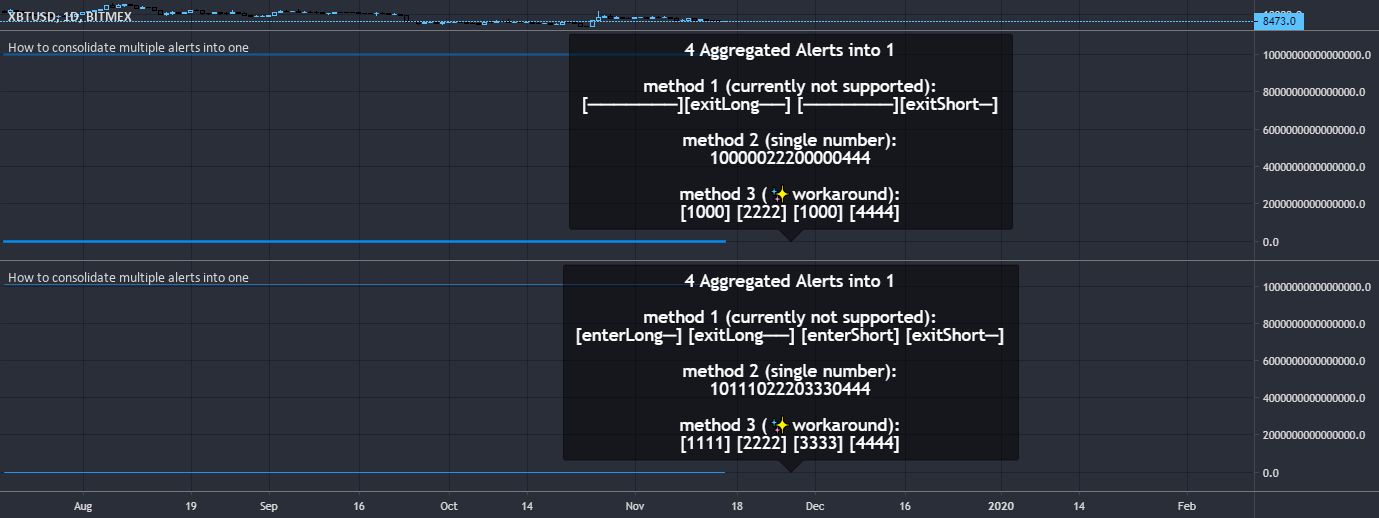
TradingView
How to consolidate multiple alerts into a single alertcondition().
The solution consists of two parts:
1 - consolidate the alert conditions
2 - consolidate the alert types used in the alert message
Part two is harder to accomplish because the message to display when the alert fires must be const string.
However, we can use numbers.
The struct...
dapper marten
hey is there a way to seperate the exits alert as only a sell or buy instead of both triggering the same alert? thanks
fading void
Do anyone know the best settings for TQQQ 4HR
feral lava
fading void
Do anyone know the best settings for TQQQ 4HR
!settings
jaunty perch
Everything you need to know on optimizing signal settings: https://docs.luxalgo.com/lux-algo-premium-indicators/lux-algo/signal-settings
This page showcases every way users can adjust settings along with full explanations of how they differentiate from each other.
indigo cradle
dapper marten
hey is there a way to seperate the exits alert as only a sell or buy instead of ...
Sadly not but you can use the message field to differentiate
 toxic kiln
Hi there. I don't receive allerts. Need help with this
shy relic
toxic kiln
Hi there. I don't receive allerts. Need help with this
Sorry to hear that, can you show how you have set the alert please?
 shy relic
toxic kiln
shy relic
toxic kiln
the any() alert function call requires you to select the conditions you want to be alerted for in the indicator settings
 stiff urchin
which line is more important and how low should i go on timeframes would you suggest for me to go before i stop looking at it for confluence? i did read the entirety of the lux algo document and this is the only one i don't understand
 shy relic
stiff urchin
which line is more important and how low should i go on timeframes would you sug...
shy relic
stiff urchin
which line is more important and how low should i go on timeframes would you sug...
The dotted line represent the price with the highest estimated institutional activity, other solid lines however are based on the concentration of institutional activity, so there can be a spike of institutional activity at a certain price point but low concentration.
As such solid lines can highlights price areas where institutions where present. And can be interpreted similarly to the volume profile.
 solar dirge
Do the signals paint at the point or do they repaint at bar close?
indigo cradle
solar dirge
Do the signals paint at the point or do they repaint at bar close?
!confirmed
jaunty perch
A signal is confirmed only once the candle is closed. Meaning a signal could appear on your chart but is not confirmed until that candle is closed and the next candle has started.
Our automated Discord bots will never notify you on any signal until the candle has closed and confirmed it. If you're adding alerts for Lux signals in TradingView - make sure to select "Once per bar close".
stiff urchin
shy relic
the institutional profile? We will be looking into it, when if it crashes please...
 indigo cradle
Ahhhh a loop error ok
It's a little bit of a chunky feature so that can be worked on 👍
stiff urchin
indigo cradle
Ahhhh a loop error ok
 earnest bluff
here shows the Strong buy signal

next min the strong buy signal goes missing. wow.. whats happening
 indigo cradle
earnest bluff
next min the strong buy signal goes missing. wow.. whats happening
indigo cradle
earnest bluff
next min the strong buy signal goes missing. wow.. whats happening
!confirmed
jaunty perch
A signal is confirmed only once the candle is closed. Meaning a signal could appear on your chart but is not confirmed until that candle is closed and the next candle has started.
Our automated Discord bots will never notify you on any signal until the candle has closed and confirmed it. If you're adding alerts for Lux signals in TradingView - make sure to select "Once per bar close".
earnest bluff
Thank you. Does lux work with tradingview app?
indigo cradle
earnest bluff
Thank you. Does lux work with tradingview app?
It does indeed 👍☺️
indigo cradle
 still trellis
What do the colors on the predictive ranges represent?
still trellis
What do the colors on the predictive ranges represent?
Blue are supports and red are resistances
still trellis
indigo cradle
Blue are supports and red are resistances
Thank you
 glass crater
Hey there I have a question. How many candles do the trend tracer and trend catcher use for their calculation/analysis? Is it related to the signal sensitivity? I notice they behave a little strange when I look at larger time frames or when there are new recently added trading pairs/listings.
shy relic
glass crater
Hey there I have a question. How many candles do the trend tracer and trend catc...
The trend tracer/catcher are not based on sensitivity or any other settings :)
 near tartan
Just signed up but it is not allowing me into the website after I enter the one time password
shy relic
near tartan
Just signed up but it is not allowing me into the website after I enter the one ...
Did you enter the password that was sent to you via email? Make sure it is correct and it should work 🙂
near tartan
Yes, four different times. Maybe I will try again with a fresh browser?
shy relic
near tartan
Yes, four different times. Maybe I will try again with a fresh browser?
yes this might help, or there might be an extension preventing you to get access, note that one time passwords are only available 5 minutes.
near tartan
It takes me to the Manage Subscription box but that is it.
shy relic
near tartan
It takes me to the Manage Subscription box but that is it.
it doesn't let you select an account?
near tartan
No, there is a receipt for my payment and the ability to update my account. Can we take this to a private discord channel and I can share my screen?
 shy relic
near tartan
shy relic
near tartan
seems like everything is showing up, what are you trying to do precisely?
near tartan
Log in to the platform
Is everything done through TradingView?
Once you've signed up on our website and entered your active TradingView username within the "Connect Accounts" portal from your email, you will have instant access to use our indicators on the platform.
It looks like my accounts are connected, I will follow the guide to add your indicators to TV
shy relic
near tartan
Once you've signed up on our website and entered your active TradingView usernam...
once you sign up for any plan you should receive a mail that allows you to connect your Discord and Tradingview account, are you trying to connect your tradingview account? See https://docs.luxalgo.com/faq#how-do-i-get-access
near tartan
Thanks for the assitance
 jovial urchin
Hello, I'm having issues getting the Lux Buy/Sell flags to show on Tradingview, any help would be appreciated
shy relic
jovial urchin
Hello, I'm having issues getting the Lux Buy/Sell flags to show on Tradingview, ...
you can't see the labels? Try to zoom out maybe, can you send a screenshot?
jovial urchin
ya tried that, zoomed way out, still nothing
I activated it under fx indicators
it shows that its on
shy relic
jovial urchin
it shows that its on
you can see it added to your chart? Do you see the colored candles?
 jovial urchin
Nope, just red and green as per default TV, it says Lux Algo Premium 4.2.1 and I can edit the settings and stuff
but no buy/sell flags, no line color changes
shy relic
jovial urchin
but no buy/sell flags, no line color changes
it might be hidden, in which case you would need to unhide it, if its not hidden try adding it to the chart again. A screenshot of the chart would be helpful to see what could be the problem 🙂


 shy relic
jovial urchin
shy relic
jovial urchin
from that image I can see there is a red exclamation mark
shy relic
jovial urchin
now its showing an ! saying Study Error
only study error?
shy relic
do you also see something like "study not auth" ?
shy relic
jovial urchin
ya if i click on it
something like that. Ok, and you were able to see the indicator before correct?
 shy relic
jovial urchin
and yes, that is what I see
shy relic
jovial urchin
and yes, that is what I see
Then its possible you might have connected the wrong tradingview username
Try emailing support@luxalgo.com with your tradingview username so that they can rectify that. Sorry for the inconvenience
jovial urchin
Where do I find the username, under Account in trading view it shows the one I put in
Yea, the one I put in is the correct name
shy relic
jovial urchin
Where do I find the username, under Account in trading view it shows the one I p...
your username can be found in your user profile.
 jovial urchin
Yep, it is correct
shy relic
jovial urchin
Yep, it is correct
ok try refreshing the page and try adding the indicator again
shy relic
jovial urchin
yep, just did that, had to close every window on the machine, now it works
very glad to hear it, let us know if you have other questions 🙂
 molten ridge
hello how would I go about canceling the subscription? Incase I dont make my money back lol
shy relic
molten ridge
hello how would I go about canceling the subscription? Incase I dont make my mon...
Hi, you can cancel anytime, see https://docs.luxalgo.com/faq#how-do-i-cancel
molten ridge
Thanks!
 bright pendant
welcome
 edgy storm
How/where do I download a CSV of the optimizers?
indigo cradle
edgy storm
How/where do I download a CSV of the optimizers?
This isn't currently available I'm afraid
indigo cradle
 cyan bear
i am new 🙂
cyan bear
i am new 🙂
Welcome ☺️☺️☺️
edgy storm
indigo cradle
This isn't currently available I'm afraid
Thanks. How often are they updated on Discord? I see the 5m is updated daily. What about the other time frames?
indigo cradle
edgy storm
Thanks. How often are they updated on Discord? I see the 5m is updated daily. Wh...
Monday and Wednesday for the others
Except 4h which is just Monday
 orchid wyvern
indigo cradle
This isn't currently available I'm afraid
orchid wyvern
indigo cradle
This isn't currently available I'm afraid
I cannot find this
 shy relic
orchid wyvern
I cannot find this
shy relic
orchid wyvern
I cannot find this
The ability to download csv's of ranked settings is unavailable at the moment. Sorry for the inconvenience.
orchid wyvern
Ok, will it become available at a later stage?
shy relic
orchid wyvern
Ok, will it become available at a later stage?
yep we will try to get it back as soon as possible 🙂
orchid wyvern
Ahh. thanks 🙂
left hemlock
I can't find a reversal zones plot in alert window.
If I make a enter(exit) alert of reversal zones, what shall I do?
 shy relic
left hemlock
I can't find a reversal zones plot in alert window.
If I make a enter(exit) aler...
shy relic
left hemlock
I can't find a reversal zones plot in alert window.
If I make a enter(exit) aler...
Thats because you have selected the LuxAlgo indicator in the alert condition drop down menu, what alert are you trying to create?
orchid wyvern
Do I need to make 1 chart per alert if I'm going to have different sensitivity settings?
shy relic
orchid wyvern
Do I need to make 1 chart per alert if I'm going to have different sensitivity s...
not necessarily, you can create the alert, then change sensitivity, and create another alert. Make sure to remember the sensitivity setting used by each alert in order to avoid confusion.
orchid wyvern
Okay, thanks. So settings is stored to one and one alert. Changing the chart and saving it will not impact the alerts.. Thanks I did not know that
 quartz heart
Hello guys im new and trying to understand this alerts. today at 11:00am EST i received an alert for SHIBBUSD on the 30m chart of "Normal Sell Turn Strong" but when looking at the chart in real-time i dont see any sell or strong signals signs? can u please help understand this alert. thank you
 shy relic
quartz heart
Hello guys im new and trying to understand this alerts. today at 11:00am EST i r...
shy relic
quartz heart
Hello guys im new and trying to understand this alerts. today at 11:00am EST i r...
the normal sell turn strong is a different kind of alert, precisely, the candles turn red while being previously purple while a normal sell signal was active. You can see the exact description of this alert here https://docs.luxalgo.com/lux-algo-premium-indicators/lux-algo/alerts#normal-sell-turn-strong 🙂
Options for setting alerts on Lux Algo in TradingView.
quartz heart
shy relic
the normal sell turn strong is a different kind of alert, precisely, the candles...
oh ok got it. the reason why it didnt put a strong red signal sign on the 10:30m candle close is because there was already strong signal sign previously at sep 10th 10:00am candle close?
shy relic
quartz heart
oh ok got it. the reason why it didnt put a strong red signal sign on the 10:30m...
Correct, there can't be successive same signal labels, however the candle colors controls when to trigger a normal buy/sell turn strong
quartz heart
Ok thank you
 trim kelp
Is there a way to get alerts when the HL indicators pop on the oscillator?
 wide narwhal
new here. is there any kind of legend for lux indicators?
feral lava
wide narwhal
new here. is there any kind of legend for lux indicators?
!docs
jaunty perch
Learn about every aspect of Lux Algo at: https://docs.luxalgo.com
feral lava
Welcome! ^ check out our docs here for full guides
wide narwhal
ok thank you
shy relic
trim kelp
Is there a way to get alerts when the HL indicators pop on the oscillator?
In the lux statistics? In theory yes but note that these labels are offset in the past, as such they would normally lag.
trim kelp
Ah. Gotcha. I hadn’t seen one trigger yet so I wasn’t sure when they pop.
 uncut nacelle
Does the optibot provides data for dax30 index?
shy relic
uncut nacelle
Does the optibot provides data for dax30 index?
Only us ETF's are supported for the moment, in the future non us stocks/indices will be supported tho, stay tuned
quartz heart
Hello, can you change the colors of the Lux Oscillator Premium bands? i have 4 of them in one pane and would like to distinguished them better if possible. like for example instead of been blue and red i would like to change it to another color. thank you
its for the legacy oscillator version. thank you
shy relic
quartz heart
its for the legacy oscillator version. thank you
at the moment color style settings for the oscillator are unavailable, we are working on having them back as soon as permitted by tradingview, will definitely happen 🙂
quartz heart
Ok thank you Alex.
left hemlock
shy relic
Thats because you have selected the LuxAlgo indicator in the alert condition dro...
I want to take profile at point X in long position. Please tell me about it.
 orchid wyvern
Are there any good tool for creating tradingview alerts in batches? I've tried add-tradingview-alerts-tool it works good, but I can only use the same chart with the same config on multiple coins.
shy relic
You would need to check for a blue cross, you can eventually set an alert when an exit is triggered
left hemlock
Is this right alert set up?
 left hemlock
I want to take profile at point X in long position. Please tell me about it.
 shy relic
orchid wyvern
Are there any good tool for creating tradingview alerts in batches? I've tried a...
shy relic
orchid wyvern
Are there any good tool for creating tradingview alerts in batches? I've tried a...
For multiple conditions you can use the "Any alert() function" feature in the indicator, but batch alerts are not possible for multiple tickers/tf at the moment.
shy relic
left hemlock
Is this right alert set up?
For exits this is the correct one, to learn more about alerts in the main indicator see https://docs.luxalgo.com/lux-algo-premium-indicators/lux-algo/alerts

Options for setting alerts on Lux Algo in TradingView.
left hemlock
shy relic
For exits this is the correct one, to learn more about alerts in the main indica...
If you follow your instructions, both long and short positions will be settled?
When the blue X signal occurs, I want to take profit only the long position.
On the contrary, When the yellow X signal occurs, I want to take profit only the short position.
 left hemlock
I wanted to take profile on signal blue signal, but I am worried that I will take profit on signal yellow signal because of the setting of the your image.
orchid wyvern
This signal did not fire today. Any reason why? (ETH 1H with auto pilot) I cannot find it in the signal logs
 unique silo
Hi, Is it possible to get the values of Predictive Ranges in an alarm
indigo cradle
unique silo
Hi, Is it possible to get the values of Predictive Ranges in an alarm
You could reference the plots in the message field 👍
indigo cradle
orchid wyvern
This signal did not fire today. Any reason why? (ETH 1H with auto pilot) I canno...
The alert is most likely using different settings; the once per bar may also cause issues there. Once per bar close is recommended
indigo cradle
left hemlock
I wanted to take profile on signal blue signal, but I am worried that I will tak...
It should be all ok I believe
unique silo
indigo cradle
You could reference the plots in the message field 👍
What would be the plot numbers for predictive ranges...
or is it possible to use a variable to reference the plots for predictive ranges
 indigo cradle
Yep correct 👍 But of course prefixed with plot
unique silo
{{plot_SR1}}, {{plot_SR2}}. Like this. Right ?
indigo cradle
{{plot("SRx")}}
unique silo
Thanks a lot
I will test it out
I have tested it out. I get the following in the alert.
{ "SR1" : "{{plot_22}}", "SR1" : "{{plot_23}}", "SR1" : "{{plot_24}}", "SR1" : "{{plot_25}}", "SR1" : "{{plot_26}}" }
This is the output from the mail.
calm quest
Hi Admin, just a clarification. Last ptibot setting optimizer for 15m, 30m, 1 hour and 4 hour were received on Sept 8 and 6 respectively. Only the setting optimizer for 5m was received yesterday and today. Am I missing something here?
indigo cradle
5m posts daily the others only post Monday and Wednesday ☺️
calm quest
not sure what you mean
indigo cradle
The 5m optibot posts every day since there are a lot of new candles
The others just post Monday and Wednesday
 jovial sundial
What are the circles in the bars?
 shy relic
 wicked pebble
Any info on eta indicator reactivations after payment?
wicked pebble
Any info on eta indicator reactivations after payment?
if its a reactivation it should be instantaneous. Refresh the page and see in your invite only scripts 🙂
wicked pebble
Got it!! 👍 👍
shy relic
jovial sundial
What are the circles in the bars?
I think they just highlight a plot/candles you clicked on, they dont hold any actionable information.
 jagged anchor
Im not getting signals
shy relic
jagged anchor
Im not getting signals
Hi, signals are enabled by default and shows buy/sell labels on the chart, can you see them? try zooming out
 signal radish
I have this set up on one coin but using exactly the same settings, same TF, I do not get the Pattern Detection. Any suggestions?
 shy relic
jagged anchor
I mean discord bot signals
shy relic
jagged anchor
I mean discord bot signals
ah you have to enable them, see #🔔scanners-premium , you can also create tradingview alerts.
shy relic
signal radish
I have this set up on one coin but using exactly the same settings, same TF, I d...
make to have it enabled, you can find it in the SR Mode drop down menu 🙂
signal radish
shy relic
make to have it enabled, you can find it in the SR Mode drop down menu 🙂
This has exactly the same settings.
 shy relic
signal radish
This has exactly the same settings.
shy relic
signal radish
This has exactly the same settings.
A double top is detected here, also the ticker seems to be different, the one in the other image is Luna/Euro
signal radish
shy relic
A double top is detected here, also the ticker seems to be different, the one in...
Well, yes, the ticker is different.... Should that make a difference to the basic indicators with the same settings?
shy relic
signal radish
Well, yes, the ticker is different.... Should that make a difference to the basi...
If the price data is different then of course you will have different results, I don't understand what you are trying to achieve here. See our documentation if you need more specific information on the pattern detection method https://docs.luxalgo.com/lux-algo-premium-indicators/lux-algo/support-and-resistance-and-trendlines#pattern-detection
Predictive Range - Predictive S/R - Trendlines
signal radish
shy relic
If the price data is different then of course you will have different results, I...
Yes sure.... different data will give different results. The issue is that on the second chart I am not seeing any results, using the same settings, no matter the TF or any other metric. Maybe the question should be... Why do I not see Predictive S/R, pattern detection, on the second chart? Anywhere?
shy relic
signal radish
Yes sure.... different data will give different results. The issue is that on th...
the detected pattern on your second chart is a double top, when pattern detection is selected in SR Mode you will have a new cell in the dashboard telling which pattern is detected (if any). Double tops are highlighted by a blue line connecting the tops.
When no patterns are detected dashed lines are displayed and the dashboard will say "No Pattern".
Using the same settings across various tickers is not necessarily a good thing, for signals you can eventually use the optimal sensitivity displayed on the dashboard or use autopilot, regarding the pattern detection a SR significance of 1 is very low, and we often recommend 5/6.
Hope this helps.


 shy relic
 crimson fable
The account was created a long time ago.
crimson fable
The account was created a long time ago.
Sorry about that, I am not sure what could be wrong here if its an old account. Send a mail to support@luxalgo.com and give them your username, they will give you access as quickly as possible. Sorry for the inconvenience.
 junior olive
hello, can you assist in cancelling my membership before my next charge?
feral lava
junior olive
hello, can you assist in cancelling my membership before my next charge?
DMd 👍

 shy relic
crimson fable
how i can use this candles style?
shy relic
crimson fable
how i can use this candles style?
you are currently using it 🙂 Its the confirmation candle color mode, make sure to disable candle borders from the chart settings tho. Also note that this candle color mode depends on the settings you using.
shy relic
crimson fable
cant find where i can disable border 😊
chart settings -> symbol -> borders 🙂
 shy relic
crimson fable
and disable gardient
shy relic
crimson fable
and disable gardient
if you are using confirmation gradient just go in the candle coloring settings and select confirmation simple from "candle coloring"
 orchid wyvern
Which settings are you using on your live youtube channel on btc and etc (15m)?
shy relic
orchid wyvern
Which settings are you using on your live youtube channel on btc and etc (15m)?
default settings 🙂
orchid wyvern
Cool! I'm trading with bot, are there any other indicator I should use with your indicator? Do you have any recommendations?
shy relic
orchid wyvern
Cool! I'm trading with bot, are there any other indicator I should use with your...
each features are designed to work in confluence, you can as such pretty much everything, good ideas can include predictive ranges and signals, or signals and lux oscillator for trend confirmation, there are many 🙂
orchid wyvern
It did not look like it is the standard settings
 shy relic
orchid wyvern
It did not look like it is the standard settings
shy relic
orchid wyvern
It did not look like it is the standard settings
My apologies, in general we used default settings for the stream, but seems we have switched to : 6 Sensitivity and 32 Agility, sorry about that
crimson fable
What is the principle to manage Agiliti? Or what kind of sensibility statement? Does it depend on timeframes and so on.
orchid wyvern
shy relic
My apologies, in general we used default settings for the stream, but seems we h...
Thanks. Now they look the same 🙂
crimson fable
mb where i can read about this
 keen cliff
Which cloud script is this?
 shy relic
crimson fable
What is the principle to manage Agiliti? Or what kind of sensibility statement? ...
shy relic
crimson fable
What is the principle to manage Agiliti? Or what kind of sensibility statement? ...
Sensitivity control the overall sensitivity of the signal generation algorithm, however agility controls the sensitivity of the algorithm to sideways market 🙂
shy relic
crimson fable
mb where i can read about this
You can learn everything about settings here https://docs.luxalgo.com/lux-algo-premium-indicators/lux-algo/signal-settings
This page showcases every way users can adjust settings along with full explanations of how they differentiate from each other.
shy relic
keen cliff
Which cloud script is this?
Are you talking about the blue cloud? Its the EQ cloud and can be enabled from the indicator overlay section of the lux algo premium indicator
 shy relic
crimson fable
Where u find this?
shy relic
crimson fable
Where u find this?
oscillator settings, Advanced settings -> Classic dashboard location -> select top right or bottom right
 orchid wyvern
If I want to combine your indicator with some of mine I need a variable that could expose all signals inside 1 variable. Is this something you could do?
Example:
signal = -2 => strong sell
signal = -1 => sell
signal =  1 => buy
signal =  2 => strong buy
closest thing we have to this are placeholders in alerts, see https://docs.luxalgo.com/lux-algo-premium-indicators/lux-algo/alerts#using-placeholders-with-confirmation-contrarian-alerts 🙂
Options for setting alerts on Lux Algo in TradingView.
keen cliff
crimson fable
It’s mine, i couldn’t remember how to find it and toggle it on and off.
 heady lynx
Question, can use EA auto trade by receive the buy/sell signal from trading view?
shy relic
heady lynx
Question, can use EA auto trade by receive the buy/sell signal from trading view...
yes using third party services such as 3commas or cornix, they can trigger trades from tradingview alerts.
keen cliff
Trading view is overwhelming. So many features it’s unbelievable.
shy relic
keen cliff
Trading view is overwhelming. So many features it’s unbelievable.
let us know if you need help with anything regarding tradingview features 🙂
heady lynx
3commas or cornix is easy to use ? I am not good in coding
shy relic
heady lynx
3commas or cornix is easy to use ? I am not good in coding
they dont really involve programming as far as I am aware, but will require a specific setup, they have documentation regarding this and you can ask for support https://3commas.io/trading_view, https://cornix.zendesk.com/hc/en-us/articles/360048404714-TradingView-Integration, both works with webhooks.
heady lynx
Thx , I will study it and try to build it, if Luxalgo have auto trade product is good for us, no need more time to manual trade , can enjoy our life
orchid wyvern
shy relic
closest thing we have to this are placeholders in alerts, see https://docs.luxal...
Problem is that alerts cannot be exposed in the data window and then I cannot export signals to my own indicator. This is actually a really easy implementations. Pinescript just allows you to export 1 variable at the time.
shy relic
keen cliff
What does the blue cloud mean
The EQ cloud can show the direction of the underlying trend in the price (blue = uptrend, red = downtrend), and can eventually act as support and resistance, see https://docs.luxalgo.com/lux-algo-premium-indicators/lux-algo/indicator-overlay#eq-cloud for more info 🙂
EQ Cloud - Reversal Zones - Both
shy relic
orchid wyvern
Problem is that alerts cannot be exposed in the data window and then I cannot ex...
You cant use signals as input for external indicators, we would need to add a plot translating signals into numerical values, we currently can't add anymore plot, and it is unlikely we would do that if we have some available in the future, since it would sacrifice potential future futures. Sorry about that.
orchid wyvern
Ok, thanks for your answer. That was a pity.
 pallid plinth
Howto adjust candle colors to these used on youtube? Currently I see only green, red and purple candles but no light green etc pp? #beginner
shy relic
pallid plinth
Howto adjust candle colors to these used on youtube? Currently I see only green,...
Go into the main indicator setting : candle settings -> candle coloring -> confirmation gradient
wide narwhal
been looking through the lux guide and cant seem to find explaination for the red and blue X
indigo cradle
They are exit signals
wide narwhal
Ok so the BUY/SELL are simply for buying and shorting not for entry and exit
indigo cradle
The confirmation signals are just there to assist in the identification of trends; the exit signals are just there to suggest areas to exit a position 🙂
wide narwhal
ok thank you that clears it up
 gentle iron
Hi guys. I am new here. I would like to ask what is the blue & red X in the chart?
 fervent ivy
Hi, what is the difference between the 4 buy alert function call conditions under the alert section settings? I'm confused, I see two Strong Buy, a Confirmation Buy and Confirmation Buy Turn Strong.

 lapis reef

Can a Lux support please tell me how on earth is this “ranging”??
This is the problem i see with the dashboard and why i dont like to use it.
indigo cradle
gentle iron
Hi guys. I am new here. I would like to ask what is the blue & red X in the char...
Those are exit signals
indigo cradle
fervent ivy
Hi, what is the difference between the 4 buy alert function call conditions unde...
One set of the strongs are for contrarians; the other for confirmation signals ☺️
indigo cradle
lapis reef
Can a Lux support please tell me how on earth is this “ranging”??
Market looks like it's going sideways; it depends on what level you're looking. Very short term past few candles it's moving down but over the past 100 it's going sideways
 wispy orchid
Since the last Lux Algo Premium update I keep losing my Kantan-Ashi candles. Not to happy in the middle of a trade?
indigo cradle
What exactly do you mean by lose them?
The script times out?
Or they just disable themselves?
wispy orchid
They disappear on my screen? No candles whatsoever?
I have to clidk on a different symbol and then go back to my symbol I am trading with to make them come back.
indigo cradle
Ah so most likely the script is timing out; which features do you have enabled?
 wispy orchid
Trend Catcher, Instiutional Profile, auto pilot, Kantan- ashi , auto pilot confirmation signal, signal mode: confirmation and EQ cloud.
 indigo cradle
lapis reef
<@!456590452703887373> sideways????
indigo cradle
lapis reef
<@!456590452703887373> sideways????
Yes over the past 50ish candles the market appears choppy. You're focused on the past 10 bars there. It's all about scale
Also testing if something is ranging is a very very hard thing to do quickly
lapis reef
So it takes the past 50
indigo cradle
wispy orchid
Trend Catcher, Instiutional Profile, auto pilot, Kantan- ashi , auto pilot confi...
Ah yes; next update should fix this 👍
lapis reef
I thought it was based on the timeframe
GJ moves quick… the dashboard should be suited to fix gj’s style
Suited to gj’s style*
wispy orchid
When is the next update ?
indigo cradle
wispy orchid
When is the next update ?
Not too long 🙂
indigo cradle
lapis reef
I thought it was based on the timeframe
It's all relative to the scale. If you're very zoomed in an asset could be trending. Zoom out and it's ranging
It's extremely dependant on scale
lapis reef
No worries. I guess its not a good fit for this pair. Because time and time again ive seen it say ranging but GJ would drop 30-70 pips in 1-3 hours and it will still say ranging
indigo cradle
You could use Lux Volatility as a better alternative for your style
I'd suggest this
lapis reef
Link so i can read up about it?
indigo cradle
fervent ivy
indigo cradle
One set of the strongs are for contrarians; the other for confirmation signals ☺...
What about the Confirmation Buy/Sell Turn Strong? How do you distinguish from other alerts?
indigo cradle
fervent ivy
What about the Confirmation Buy/Sell Turn Strong? How do you distinguish from ot...
Which alerts are you trying to set?
fervent ivy
indigo cradle
Which alerts are you trying to set?
Regular buy and strong buy, using signal mode confirmation + exit
 fervent ivy
indigo cradle
And for exits you need to set those via the alert menu
fervent ivy
indigo cradle
And for exits you need to set those via the alert menu
Understood now. Thanks!
lapis reef
Is there any way to have confirmation and contrary signals running at the same time
indigo cradle
lapis reef
Is there any way to have confirmation and contrary signals running at the same t...
You can load up 2 versions of the script; that's a nice work around 🙂
lapis reef
Oh alright thanks
 keen river
Is it possible to set it for 6.5?
 indigo cradle
It's not i'm afraid
indigo cradle
The next update is coming very soon and should fix that
What features did you have enabled?
The macro trend there is still upwards according to the Oscillator
gentle star
Hi Admin, Is there an alert setting to identify when both the trend tracer/trend catcher both turn green or red?
indigo cradle
Default is always nice
gentle star
120
indigo cradle
gentle star
What is the alert setting?
Within the alert menu you'll find trend tracer bullish and bearish

 keen river
How to find altcoin that have strong buy or normal buy signal, bc i dont want to wait on for example eth to get buy signal
 tropic bolt
Why i am not getting the alerts

 indigo cradle
So where I have alert any selected select trend tracer or the alert you wish to use
indigo cradle
keen river
How to find altcoin that have strong buy or normal buy signal, bc i dont want to...
You could use our altcoin signals in the discord? Or set alerts on various assets
indigo cradle
tropic bolt
Why i am not getting the alerts
Which alerts did you select?
tropic bolt
indigo cradle
Which alerts did you select?
Any alert function call
indigo cradle
tropic bolt
Any alert function call
But which check boxes did you select?
For the alert any to use
keen river
indigo cradle
You could use our altcoin signals in the discord? Or set alerts on various asset...
But those signals are rare, like 4 times a day or sth
tropic bolt
indigo cradle
But which check boxes did you select?
Oh i see i have to select certain alerts
indigo cradle
tropic bolt
Oh i see i have to select certain alerts
Correct, alert any will use the alerts you have selected ☺️
indigo cradle
keen river
But those signals are rare, like 4 times a day or sth
If you prefer to trade on lower timeframes you could set alerts on the assets you wish to trade 👍
gentle star
indigo cradle
THANK YOU!
One last question- can the trend catcher alert be part of the ALL alert function call bundle
or it has to be treated as a separate alert?
stiff urchin
indigo cradle
What features did you have enabled?
volume profile and the signals
indigo cradle
gentle star
or it has to be treated as a separate alert?
It has to be separated for now
indigo cradle
stiff urchin
volume profile and the signals
Ah yes this will be fixed 👍
stiff urchin
cheers
 cold mango
Is there a referral program?
indigo cradle
cold mango
Is there a referral program?
Absolutely: https://www.luxalgo.com/affiliates
Create an income sharing the best tools.
cold mango
Thank you!
 junior bronze
@indigo cradle what does the “x” means on top or on bottom of a candle?
feral lava
They are exit signals and can help with taking profits 🙂 @junior bronze
keen river
How to set webhook signal notification?
indigo cradle
keen river
How to set webhook signal notification?
In the alert menu there should be a field to enter the webhook 🙂
keen river
Thanks
 cobalt ore
For DXY there’s a recommendation of sell position

How do I know when to close this sell position?!
I just subscribed to the service and don’t know how to use use it
Do you provide Tutorials ?
indigo cradle
On my channel I have some videos yes 🙂
YouTube
Sharing trading strategies that I've developed using Lux Algo + more.
(Not actually a gecko.)
cobalt ore
Thanks
 austere kelp
hi,the settings from discord need to be added manually in the chart or is any chance to do it automatically?
i am asking about these
 indigo cradle
It needs to be done manually for now 🙂
austere kelp
👍
and one more question.....were i finish to set-up the chart as i want , all the transactions can be done automatically , using the signals ?
"when"
mellow ice
Hi, Can you kindly confirm if these alerts are accurate to let me know when the trend catcher enters and exits the lower reversal zone? I would like to set up alerts for entering and exiting the lower and upper reversal zones to help with my analysis


 terse scroll
 shy relic
austere kelp
and one more question.....were i finish to set-up the chart as i want , all the ...
shy relic
austere kelp
and one more question.....were i finish to set-up the chart as i want , all the ...
It is by using third party services such as 3commas or cornix
shy relic
mellow ice
Hi, Can you kindly confirm if these alerts are accurate to let me know when the ...
Can depends on which zones you want to set the alert, but here you need to switch the upper and lower bound, the upper one should be RZ R1 band and lower one be RZ S10 band
 finite cobalt
Hello Team, if i'm doing scalping in 1 min in crypto. May i know what setting should i done?
@shy relic @indigo cradle
shy relic
finite cobalt
Hello Team, if i'm doing scalping in 1 min in crypto. May i know what setting sh...
We don't recommend trading such timeframes due to frictional costs. But for sensitivity you can look at the optimal sensitivity on the dashboard or use autopilot.
https://docs.luxalgo.com/lux-algo-premium-indicators/lux-algo/signal-settings for more info :)
This page showcases every way users can adjust settings along with full explanations of how they differentiate from each other.
 grim vine
How do I use optibot? It never changes when I click on 5 30min 1 or 4 hour
shy relic
grim vine
How do I use optibot? It never changes when I click on 5 30min 1 or 4 hour
All you need is to enter the optibot channel based on the tf of your choice, find the ticker you want to get optimized settings from in the most recent message, and look at the settings, see https://docs.luxalgo.com/getting-started/discord/bots#optibot for more info
Our Discord server contains a wide variety of bots that will return useful information to the user.
 rapid lake
Hello....I got a buy signal from 22:00 UTC +8 last night on BTC/USD, but then when I look back on the chart today, I don't see any buy signal at all.....and I was using "once per bar close" option.....what could cause this false buy alerts? Thanks
 late garnet
I'm using the lux oscillator in legacy mode. How do i get an alert when the red line changes to the blue and vice versa?
shy relic
rapid lake
Hello....I got a buy signal from 22:00 UTC +8 last night on BTC/USD, but then wh...
Changing the settings after creating the alerts can cause the issue.
shy relic
late garnet
I'm using the lux oscillator in legacy mode. How do i get an alert when the red ...
As follows
 late garnet
shy relic
As follows
late garnet
shy relic
As follows
when i select the oscillator as the condition, i'm getting no further options to choose legacy main as shown in the screen capture
below is what I'm getting:
 late garnet
shy relic
As follows
late garnet
shy relic
As follows
got it! thanks!
saw what i was doing incorrectly!
much appreciated!
 trail venture
if i change the signals activity do i have to recreate the alarm?
 fossil halo
Hi, I m new to Lux Algo as paid member and I got the following, whe I click on the script I got this error/debug message on the TV graphic.
Anybody can help on this? Thanks
 indigo cradle
trail venture
if i change the signals activity do i have to recreate the alarm?
indigo cradle
trail venture
if i change the signals activity do i have to recreate the alarm?
You do I'm afraid
indigo cradle
fossil halo
Hi, I m new to Lux Algo as paid member and I got the following, whe I click on t...
These are just the indicator arguements, not errrors ☺️
You can hide them by right clicking your chart, settings and then hide indicator arguements 👍
fossil halo
indigo cradle
These are just the indicator arguements, not errrors ☺️
On the windows app Lux Algo works fine as well right?
rapid lake
Is there anyway to set alert to buy/sell with LUX statistics indicator?
fossil halo
indigo cradle
These are just the indicator arguements, not errrors ☺️
I didn't find where to get support and resistance lines
indigo cradle
fossil halo
On the windows app Lux Algo works fine as well right?
Absolutely
indigo cradle
fossil halo
I didn't find where to get support and resistance lines
In the settings you'll find them under SR mode
A whole host of available options there
indigo cradle
rapid lake
Is there anyway to set alert to buy/sell with LUX statistics indicator?
What exactly do you mean by buy sell, the labels on there are of course offset 👍
 brave robin
can we setup alert for candle color change for yumi-ashi
fossil halo
indigo cradle
You can hide them by right clicking your chart, settings and then hide indicator...
Sorry that doesn't work, still the same after following the processs

 fossil halo
indigo cradle
fossil halo
indigo cradle
what i did
indigo cradle
May I see a screenshot?
fossil halo
indigo cradle
yes and indicator value must be off too
you didnt mention at the begiing
now it's ok
indigo cradle
💪🤝
fossil halo
indigo cradle
In the settings you'll find them under SR mode
Can you tell me the correct name please
indigo cradle
fossil halo
Can you tell me the correct name please
The correct name for what?
fossil halo
indigo cradle
The correct name for what?
For resistance and support line
indigo cradle
fossil halo
For resistance and support line
The most classical are probably the predictive ranges however all the methods in SR mode can help you deduce SR lines.
You may also enjoy trendlines
fossil halo
indigo cradle
The most classical are probably the predictive ranges however all the methods in...
So you don't have it, I was remembering a video on your YT channel showing it
indigo cradle
fossil halo
So you don't have it, I was remembering a video on your YT channel showing it
On my YouTube I show a few strategies using different SR tools in Lux; from predictive ranges to profiles

This is the predictive range showcase
brave robin
brave robin
can we setup alert for candle color change for yumi-ashi
@indigo cradle
indigo cradle
brave robin
<@!456590452703887373>
You cannot I'm afraid 😔
brave robin
indigo cradle
You cannot I'm afraid 😔
so its possible only for kantan ashi?
indigo cradle
It's not possible for kantan either I'm afraid
brave robin
indigo cradle
It's not possible for kantan either I'm afraid
i was asking cause of this message from Alex #🤝support message
indigo cradle
Oh yes, as he mentions that's for the the candle colouring none ✅
brave robin
indigo cradle
Oh yes, as he mentions that's for the the candle colouring none ✅
even i was looking for native candles( not LUX candle colors)
 nimble gazelle
Hi there , can you set up alerts for each coin ? Like let's say buy 5 minutes time frame for ada , and 5 min buy for eth ?
As I have seen that alerts are general for any buy and any sell but not for every coin. Was asking because every coin has different setting for best usage
indigo cradle
You can yes, if you have a paid TV plan you can set alerts for various assets and timeframes 👍☺️
nimble gazelle
What's a TV plan mate ?
indigo cradle
A tradingview plan ☺️ they have paid plans

TradingView
Additional features and capabilities of upgraded accounts on TradingView. Enhanced functionality to improve your trading.
nimble gazelle
Oh , yes mate I do have a professional plan.
Do you have a tutorial somewhere that I can get so see how to set up the alerts ? Thanks.
indigo cradle
!alerts
jaunty perch
How to set up your own custom alerts in TradingView: https://docs.luxalgo.com/lux-algo-premium-indicators/setting-up-alerts-on-tradingview
Follow this guide for setting up your own custom alerts on TradingView.
indigo cradle
👍
nimble gazelle
Spot on mate , thank you.
 next steppe
Does anyone here keep getting the study error constantly too?

That pops up and my lux algo premium indicators disappears all the time
indigo cradle
This will be patched very soon 👍
next steppe
🙏🙏🙏Thank you
jaunty perch
To update Lux Algo Premium indicators, refresh your browser/app, remove the indicator from your chart, and then add it back to your chart + save your chart layout on TradingView.
Full guide: https://docs.luxalgo.com/lux-algo-premium-indicators/how-to-update
Included in this section is the best steps to receive & install updates for Lux Algo on TradingView.
placid wind
Hi admin, please help, when a strong (buy/sell) signal appears on the chart, is it possible to open a trade ?
Thank you
 golden flower
placid wind
Hi admin, please help, when a strong (buy/sell) signal appears on the chart, is ...
golden flower
placid wind
Hi admin, please help, when a strong (buy/sell) signal appears on the chart, is ...
If you watch the videos it tell you that the signals are meerly to get your eyes on the trade. Then if you have then you will want to wait for a green confirmation candle to close on that time frame you are watching. You will see that some have purple candles after the alert and I believe the video and guide say not to enter on those but wait for a green one
or red if its a sell/short confirmation
placid wind
OK, noted with thanks
golden flower
placid wind
OK, noted with thanks
Maybe the Admin can confirm if I am right or wrong but I believe that was my understanding from the video and text
indigo cradle
placid wind
Hi admin, please help, when a strong (buy/sell) signal appears on the chart, is ...
Ideally that's not the way you want to use the signals; they are there as confirmation as a trade. You may wish to use a lower timeframes/other features to find an entry 🙂
golden flower
Just a quick question here. I set up an alert on BILI on the 4hr for any confirmation and set it for once the bar closes. As you can see it alerted at 13:30. I went to the chart and there was a sell signal there. I later went back to look at the chart and the signal is gone? Just confused as to why it would have alerted me with the way I have the alert set. Thanks!
 indigo cradle
I'd suggest remaking the alerts; they could be using different settings. That fixes things 9/10 times 🙂
golden flower
NVM that was user error. I was messing around with the settings and turned on auto pilot by mistake. My apologies
Forgot to go back and take it off. I appreciate the quick response!
indigo cradle
No worries 👍☺️
indigo cradle
If you set sensitivity to 1 you will get a massive amount of signals displayed.
cobalt ore
And should be the best number of agility
cobalt ore
indigo cradle
If you set sensitivity to 1 you will get a massive amount of signals displayed.
That’s better right?
indigo cradle
Regarding agility; it's not something you need to touch really however if you wish to learn about it's usage: https://docs.luxalgo.com/lux-algo-premium-indicators/lux-algo/signal-settings
This page showcases every way users can adjust settings along with full explanations of how they differentiate from each other.
indigo cradle
cobalt ore
That’s better right?
That totally depends on how you like to use the signals but more signals by no means is better
In most cases it's a bad thing; will lead to large frictional costs, overtrading ect.
cobalt ore
If I want short time trading it’s better to set low sensitivity right?!
And how do I know what’s the best time to close a trade?
indigo cradle
cobalt ore
If I want short time trading it’s better to set low sensitivity right?!
That totally depends on how you use the confirmation signals in your trading. Some users prefer higher settings, you may prefer lower. It depends on how you trade. I tend to recommend nothing <6 for sensitivity. Default is a nice middle ground most of the time.
You can close a trade based on many factors. You could use exit signals, you may wish to use predictive ranges, you may want to use the TPSL tools
Really a massive variety of features you can pick from there 🙂
golden flower
I trade on the 4hr for swings and the default seems to work great so far. Seems the default is pretty good on all time frames, I am also new to the whole program so those settings may chanage in time
 blissful goblet
Hey support i made a mistake with my tradeview user accoun. who can i contact for this?
got solved already thanks for the fast support
 short bobcat
Hi I am unable to access the lux algo indicators on my Trading view account i used the one time username change on trading view.
feral lava
short bobcat
Hi I am unable to access the lux algo indicators on my Trading view account i us...
If you changed your username, you have to email support@luxalgo.com to have them switch your accounts on our end to gain access again https://docs.luxalgo.com/faq#can-i-switch-access-to-a-different-tradingview-account
short bobcat
feral lava
If you changed your username, you have to email support@luxalgo.com to have them...
cool, i sent an email few days ago no response yet. I'll try resending one again.
austere kelp
Hi ,i was reading chart sensitivity and agility set-up for different crypto coin pairs but i noticed are different set-up for different days...how i make this set-up? thank you...it is about optibot setting optimizer 5m,15min...
feral lava
short bobcat
cool, i sent an email few days ago no response yet. I'll try resending one again...
Few days ago? Response should always be within 6 hours, try checking spam folder for the response? If you follow up now it should be answered within 3 hours.
short bobcat
feral lava
Few days ago? Response should always be within 6 hours, try checking spam folder...
checked spam there is no response. i've sent another email 2 hours ago. I'll follow up here again tomorrow if there still no response later Thanks!
feral lava
sounds good!
shy relic
austere kelp
Hi ,i was reading chart sensitivity and agility set-up for different crypto coin...
The market is dynamic, as such optimal settings can change. You would need to change the settings every-time new ones are posted, and remake the alerts as well. If you dont want to go through this process you can use autopilot, which allow you to not have to change settings or recreate alerts.
austere kelp
Thanks
 delicate bloom
Hi i set up the indicator as on YouTube, shows signals in a different sry my English im Russian
indigo cradle
delicate bloom
Hi i set up the indicator as on YouTube, shows signals in a different sry my Eng...
Hi ☺️ The settings for the indicators on the livestream can be found on the description, did you copy these?
delicate bloom
indigo cradle
Hi ☺️ The settings for the indicators on the livestream can be found on the desc...
yes i copy . but indicators show me different information

Ada-Usdt - Binance 15m time frame
 indigo cradle
You have autopilot check box selected, you need to uncheck this ☺️
delicate bloom
oh snx)
 vital oriole
Hi.. The Risk Management Tool [LUX] released an option for entry from Cross . Which Lux Oscillator Premium option can we use with it
 indigo cradle
It's a cross of the price over a plot
So you'd need something like a moving average as an input
Or a plot that's on your chart that the price can cross eg trend tracer
golden flower
delicate bloom
oh snx)
Haha I had that same issue yesterday too
 humble fern
Is the Advanced Lux Oscillator Premium "Trend area" just a cyclical RSI that is heavily smoothed? (light blue and purple)
 indigo cradle
humble fern
Is the Advanced Lux Oscillator Premium "Trend area" just a cyclical RSI that is ...
indigo cradle
humble fern
Is the Advanced Lux Oscillator Premium "Trend area" just a cyclical RSI that is ...
It is not; 99.9% of things in Lux are built from the ground up and are not based on existing indicators
golden flower
Random question but is there a way to retrieve the refferal code you get sent when you sign up? I have friends that may wanna join
indigo cradle
golden flower
Random question but is there a way to retrieve the refferal code you get sent wh...
I'll DM to assist you there in recovering it ☺️
wispy orchid
To let you know your (MTF) Multiple Time Frame feature is not accurate in Lux Algo Premium.
indigo cradle
What exactly do you mean by not accurate?
wispy orchid
I use another MTF indicator and notice this. I have went to the time frames and see yours is not accurate.
indigo cradle
But what exactly do you mean by not accurate? It's not working correctly?
wispy orchid
For example they show red while they should be showing green.
in the 15 min and 30 min specifically. It also varies using auto pilot or not.
indigo cradle
I see so you're saying they are showing the wrong signals?
They will change with Autopilot enabled
indigo cradle
So they show the wrong signals? i will look into this
wispy orchid
OK ...thanks.
 buoyant zodiac
#🤝support Am I doing something wrong? I am getting signals way late.

you can see the actual sell triggered at 3:10 and the alert did not push until 5:40.
also, I looked on your guides online first and didn't see the answer this this next question.
Can you explain how to use the function call properly and what everything means?

@indigo cradle do you mind explaining these?

not sure what these are
indigo cradle
Ensure the alert is using the same settings as your chart layout so try remaking the alert. This fixed things 9/10 😊
buoyant zodiac
indigo cradle
Ensure the alert is using the same settings as your chart layout so try remaking...
Ok, anything to look for on chart settings specifically? I should be able to have alerts set for different time frames right? Like I have some set for 1hr candle close and some for the 15m…
indigo cradle
That's all totally ok 👍 The ones not triggering I'd suggest remaking those
buoyant zodiac
Thanks! That's helpful. Can you provide any insight on the turn strong signals?
indigo cradle
This is when the candles go from purple to red/green ☺️
buoyant zodiac
Ohhhhh. Thanks!
indigo cradle
You'd want to use confirmation signals
wispy orchid
Thanks!
lapis reef
Is there a way to get push notifications when optibot releases a new update for settings??
indigo cradle
lapis reef
Is there a way to get push notifications when optibot releases a new update for ...
They will post at the same time everyday 😊
 lunar bronze
If I use a signal sensitivity of 26 what should the confirmation signal agility be?
 knotty nexus
@LuxAlgo, so if I bought lux algo i also need to go from basic plan to premium to see the other charts like oscillator
 manic comet
The optibot settings are on the left for each time frame... though you'll want to personalize the settings to fit your trading style.
@lunar bronze
feral lava
knotty nexus
@LuxAlgo, so if I bought lux algo i also need to go from basic plan to premium t...
You can use everything on the free plan of TradingView - you are just only limited to 3 indicators at once on your chart
knotty nexus
Oh my TradingView is pro
 timber badge
Hey, i want trade ETHBTC and Iam looking this pair in optibot bu I seen't it, its posible obtain the best setup for ethbtc with optibot?
indigo cradle
Currently not in afraid, at the moment there's a limit to the number we can have
timber badge
mmm, and how I can obtain the best setup for the indicator if i dont have backtest and the optibot havent this pair? any idea?
manic comet
@timber badge just tweak the settings until lux is giving the signals you like. simply review the past history of the asset and where lux would have signaled.
 fiery harness
Hello, I’m new here. where can i learn different strategies and basic use of lux ? I’m interested in crypto trading and scalping
feral lava
!docs
jaunty perch
Learn about every aspect of Lux Algo at: https://docs.luxalgo.com
feral lava
YouTube
Sharing trading strategies that I've developed using Lux Algo + more.
(Not actually a gecko.)
@fiery harness
Our YouTube channel will be back up soon, which has a lot of great content
lunar bronze
manic comet
The optibot settings are on the left for each time frame... though you'll want t...
could you elaborate on personalizing the settings to fit my trading style? I don't think the coin I'm trading is on the optibot settings to the left but I did find setting the signal setting to 26 for that coin and leaving it is very accurate but I would like to know if I also need to adjust the confirmation signal agility because if it was another coin like in the optibot section then I probably do need to adjust it
fiery harness
feral lava
https://youtube.com/c/GeckoTrading
thnx
manic comet
@lunar bronze yes you just adjust the sensitivity and agility until the signals are appearing how you would like them. I’m actually not a fan of the optibot settings usually. If you’re new to trading I would highly recommend using lux to assist you with trading on higher time frames, placing only a couple trades per week and always trading with the trend.
 jagged adder
Hello, are there any optibot settings for US30 - Dow Jones? thanks
shy relic
jagged adder
Hello, are there any optibot settings for US30 - Dow Jones? thanks
see DIA in optibot ETF's
 raw anchor
thanks sorry if this wasnt the place 🙂
jaunty perch
Hello
golden flower
Ive been making money off them and so have others that are posting their profits. 🤷♂️
indigo cradle
The confirmation signals are for trending markets so this is totally normal and expected
They are not to be used alone, for entries, exits ect
!strategies
jaunty perch
Find our full trading strategies playlist on YouTube: https://www.youtube.com/watch?v=xezy6WGpZ8Y&list=PLbqCXsOfrM3MjO7q7uIiwoVq3evI4neQr

Join our Discord: https://discord.gg/LUX
Get access to Lux Algo: https://luxalgo.com/products/lux-algo
Get the best settings: https://www.youtube.com/watch?v=OmvxpTE9tlw&t
Usability Tips: https://www.youtube.com/watch?v=5wtdY51crnc
golden flower
indigo cradle
The confirmation signals are for trending markets so this is totally normal and ...
YES cannot just use the BUY/SELL tag. Gotta use all the other tools there also. Which is why When the tags pop I look at the oscillators, trend tracer/tracker etc. Another reason why I trade off longer time frames
jaunty perch
Which time frame is best for luxalgo signals?
golden flower
jaunty perch
Which time frame is best for luxalgo signals?
Depends on your trading style. I am a swing trader since its better for my sanity lol. So I trade off the 4hr mainly which also allows for more data and conviction of trade since you have 4hrs of data in the candle.
I have personally seen better returns taking less trades on longer time frames then trying to take more on a shorter one.
jaunty perch
Thank you
 harsh blaze
Hello ,
is the patter-detection channel for all markets ?
indigo cradle
Only stocks I'm afraid, you'll probably want to use the inbuilt pattern detection in Lux for other markets 🙂
 steel osprey
@indigo cradle how to change trading view username
indigo cradle
Give support@luxalgo.com an email and request it. They'll swap it over ☺️
steel osprey
@indigo cradle thanks a lot
 strong mirage
Please help me a bit:
gettin this mark and don´t know what it means.
would be grateful for bit of explanation
thanks in advance
 golden flower
I was about to say that. Make sure you dont have another indicator turned on. Boring day for me today lol
Ive never seen that RSiLE +2
strong mirage
thank you for reply's, I use LUX, EMA ribbon, volume...curious
dont want to have this^^
thanks helped me out, was from RSI strategy. thanks^^
 white solar
Hi LUX Premium can backtest?
indigo cradle
You cannot unless you have a strategy that you wish to backtest manually
white solar
Do you have result?
jaunty perch
Information regarding back-testing data and % accuracy: https://docs.luxalgo.com/faq#whats-the-accuracy-of-the-signals
indigo cradle
What exactly do you mean by can't read it?
quartz heart
Hello, i'm trying to figure out what sensitivity and agility i should use for DXY and US10Y in the 4HR and 2HR chart. Is there guide that gives the formula in order to come with the best sensitivity and agility settings per chart? i look at the optibot's settings but there is no settings for dxy or us10y. any help will appreciated. thank you
golden flower
quartz heart
Hello, i'm trying to figure out what sensitivity and agility i should use for DX...
I dont think there is a specific guide on certain things. 12/26 is the default for catching medium to longer trends.
You can tighten things up by pulling up a chart on the default settings and then manually going in and messing with the settings so it tightens up finding the top and the bottom but just remember that you set if for that specific ticker so its not always going to align with the others. So if you trade ABC alot then I would set up the Lux on ABC ticker for the 2hr or 4hr then tweak it to how you want it, save that template in trading view as ABC 2hr or whatever time frame you choose. so then when you go back in those settings are saved and when you load that chart you can just click on the template and it will pull those saved settings up
quartz heart
ok Thank you VanillaGorilla. ill give that a try.
 queen marlin
I finally pulled the trigger and bought lux!! Love it. That being said, can anyone point me in the direction of a guide? And where can I find optimum sensitivity ranges on here?
Nevermind. Found it 🤦♂️
 silk bloom
let me know where you found it as am newbie here 🤦♂️
can anyone tell me how to find the right crypto to enter .. short term (5 min to 30 min) !
manic comet
@silk bloom haha you could prob enter long on literally anything right now and make money
silk bloom
am stack in 18 coin for long, i need short term trade
manic comet
@silk bloom long doesn't mean holding it long... just that you're buying and expecting the price to rise as opposed to shorting and expecting the price to fall.
silk bloom
ok so what the long mean in term of days or hours ! yet how to find these !
manic comet
@silk bloom ummm idk man. I'm not sure what you're asking. You hold an asset for however long the trend is profitable, ideally.
@silk bloom crypto price tends to pop off on saturday and sundays. it's been doing so since 8pm CST today. You may think that would put you at a bad entry and you may be correct. But it tends to trend upwards after friday. Hit highs on saturday and/or sunday. Crash on monday, spike again monday evening. I like to use a 10 period EMA and 200 period EMA to follow the trend. The 10 period crossing the 200 gives great entry signals.
silk bloom
appreciate the advise, will try to work it out
manic comet
@silk bloom Lux has a youtube channel with some good content. Tradeciety on youtube really helped me out a lot.
 scarlet coral
I put a promo code that gave 20% was that only for the first month?
indigo cradle
@scarlet coral It's for the first interval of any plan 🙂
scarlet coral
Oh ok
 young fossil
Question for Lux developers: the best tutorials for learning Pine Script?
indigo cradle
young fossil
Question for Lux developers: the best tutorials for learning Pine Script?
https://www.tradingview.com/pine-script-docs/en/v4/index.html The docs are a good place to start 🙂
young fossil
indigo cradle
https://www.tradingview.com/pine-script-docs/en/v4/index.html The docs are a goo...
Thanks! 😉
jaunty perch
Hello, can you point me to the instructions on how to use the scanners? thank you
indigo cradle
Our Discord server also includes 7 channels set up for market scanner alerts across every market including stocks, indices, forex, cryptocurrency, futures and commodities.
Here is the documentation on it 🙂
But they just post some signals for major assets
jaunty perch
thank you, not for crypto?
jaunty perch
thank you!
queen marlin
Is there a guide that shows how to use the little chart on the bottom right hand corner? It shows things like MTF volatility etc. just trying to learn how to use it and what some of that stuff means.