#🤝support
1 messages · Page 223 of 1
 dry idol
 lofty ivy
why don't they share How to setup these time frame and sensitivity all of the stuff by making a video
lofty ivy
exactly
lofty ivy
dry idol
https://discord.com/channels/641770286638694402/797529919499272224
thanks you man
lofty ivy
got it that each trading time i have to adjust the setting accordingly
dry idol
@feral lava can you tell me the difference between autoconfirmation signals and optibot?
Im not sure I understand it fully
lofty ivy
dry idol
<@!393235362107097089> can you tell me the difference between autoconfirmation s...
yeah that's a good question
dry idol
@lofty ivy another suggestion of mine would be to use the oscillator with the signals
lofty ivy
dry idol
https://discord.com/channels/641770286638694402/797529919499272224
@dry idol @feral lava I have question for both of you, in this bot optimizing list majority alt coin is missing.
 feral lava
@lofty ivy we’re adding more tickers soon
lofty ivy
good
lofty ivy
dry idol
<@!814391231013847083> another suggestion of mine would be to use the oscillator...
I just bought on 12 march, and sorry I am asking too many question. But where can I get these to study
dry idol
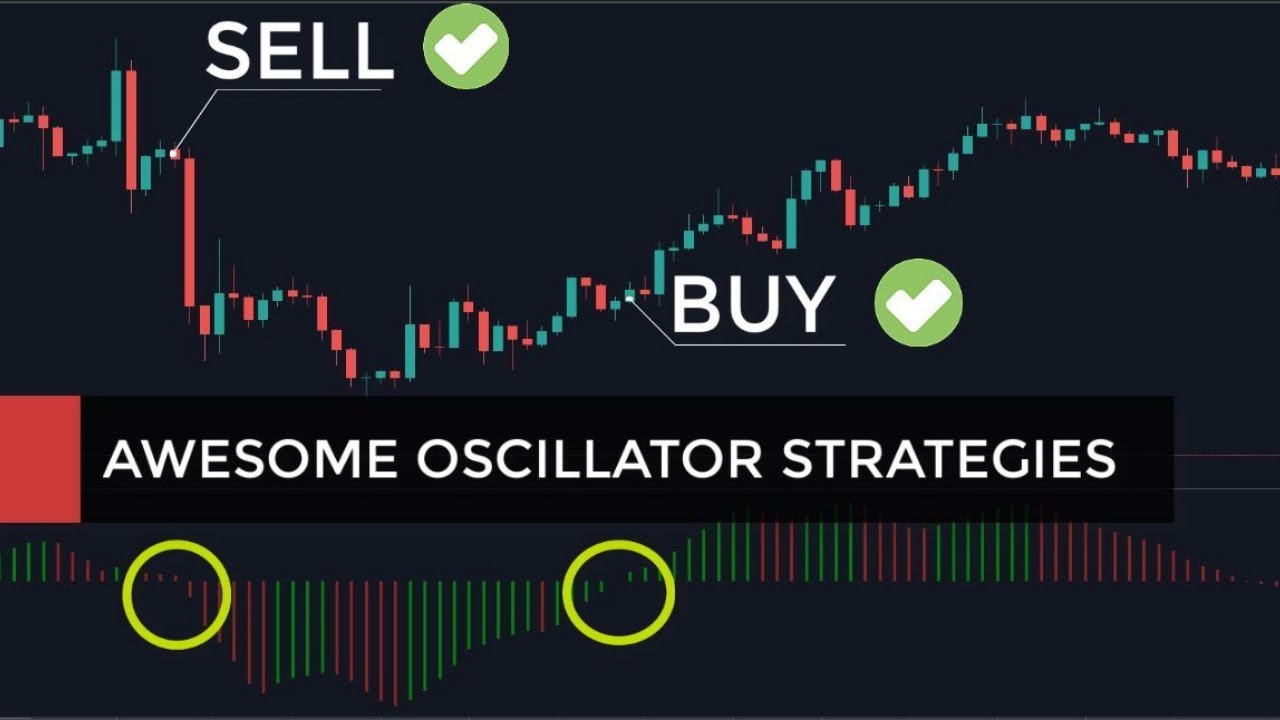
The most successful stock and forex traders are the ones who have developed an edge, and this is where simple market analysis and profitable stock trading techniques and strategies come into play. Awesome indicator mt4 is an underrated oscillator, useful for FX and CFD Trading. Watch our video to learn how to use the Awesome Oscillator (in MT4 o...
lofty ivy
I am trying to learn what it means, I am a chartered accountant, and I think it will be easy for me to understand
@dry idol thank mate you are a gem
 verbal glade
Which candles will Lux then perform better with, or is it down to preference?
feral lava
verbal glade
Which candles will Lux then perform better with, or is it down to preference?
down to preference, some people like HA for smoothing out data better.
 dusky wyvern
what is the “auto-confirmation signal settings“ option for?
feral lava
dusky wyvern
what is the “auto-confirmation signal settings“ option for?
When enabled, it aims to automatically optimize Confirmation signal settings
https://luxalgo.com/apps/help-center#hc-adjusting-input-settings

Lux Algo
We provide truly useful, unique & reliable tools for traders to give them an edge in any market including Stocks, Forex, Currencies & Commodities. Lux Algo aims to become the most widely trusted vendor on the TradingView platform, whereas most indicators, systems, and trading algorithms marketed online are misleading.
 golden lynx
Big day! Let's get it!
 merry ice
More time frame more accurate it goes
 pine sleet
when use optibot setting then dont need turn on "auto-confirmation signal settings"?
dusky wyvern
feral lava
When enabled, it aims to automatically optimize Confirmation signal settings
ht...
Do you recommend using the Optibot settings or "Auto Confirmation Signal Settings"?
 shy relic
dusky wyvern
Do you recommend using the Optibot settings or "Auto Confirmation Signal Setting...
shy relic
dusky wyvern
Do you recommend using the Optibot settings or "Auto Confirmation Signal Setting...
If you heavily use the confirmation signals then you should use optibot, however if they are only the components of a more elaborate strategy then you should try using the auto confirmation settings 🙂
pine sleet
Thanks
dusky wyvern
shy relic
If you heavily use the confirmation signals then you should use optibot, however...
I am primarily a swing trading trader, so do you recommend using automatic settings? Using the automatic settings then maybe I use the lux signals both as inputs but also as an indication of trends, and then maybe I manually enter the clouds for example, do I understand correctly?
shy relic
dusky wyvern
I am primarily a swing trading trader, so do you recommend using automatic setti...
You can do that if you want 🙂 Altho you are still relying a lot on the signals so you might consider using optibot.
dusky wyvern
shy relic
You can do that if you want 🙂 Altho you are still relying a lot on the signals ...
Thanks 🙏🏼
 harsh token
Hello, I just got a new trading view account. Can somone help move my lux membership please?
 fluid roost
how to login to tradingview via luxalgo?
feral lava
harsh token
Hello, I just got a new trading view account. Can somone help move my lux member...
send request to support@luxalgo.com and will be all set within ~3 hrs max
harsh token
awesome
feral lava
fluid roost
how to login to tradingview via luxalgo?
!guide
 jaunty perch
Full Mobile + Desktop YouTube walkthrough for setting up Lux Algo on TradingView: https://www.youtube.com/watch?v=Zw-XBVaIOvI
Link to the setup guide on our website: https://luxalgo.com/apps/help-center#!hc-user-setup-guide

Mobile & Desktop walkthrough for setting up Lux Algo on TradingView after you've been granted access. Join our Discord: https://discord.gg/LUX | You can get access here: https://luxalgo.com/products/lux-algo
Watch the full video walkthrough of Lux Algo features here: https://www.youtube.com/watch?v=c12sF8xb24k&t=214s
Lux Algo
We provide truly useful, unique & reliable tools for traders to give them an edge in any market including Stocks, Forex, Currencies & Commodities. Lux Algo aims to become the most widely trusted vendor on the TradingView platform, whereas most indicators, systems, and trading algorithms marketed online are misleading.
harsh token
thank you
fluid roost
how? not throw me a link
feral lava
Oh well, you don’t login via LuxAlgo ^ that’s the setup guide, whereas you login to your TradingView account and you go to your invite-only scripts sections to get access to our tools
!login
jaunty perch
You can enter your email on our website to manage your account here: https://luxalgo.com/tools/recurring/get-subscription-access
Or email support@luxalgo.com and our team will assist you with any request the same day.
Lux Algo
We provide truly useful, unique & reliable tools for traders to give them an edge in any market including Stocks, Forex, Currencies & Commodities. Lux Algo aims to become the most widely trusted vendor on the TradingView platform, whereas most indicators, systems, and trading algorithms marketed online are misleading.
feral lava
^ if you need to login to our website
fluid roost
thanks. you link never mention it
fluid roost
feral lava
Oh well, you don’t login via LuxAlgo ^ that’s the setup guide, whereas you login...
i am login to trading view. there is no invite to trading script

that all the time i hve for u here.
cancelling my sub
 sterile geode
how to on aleart
shy relic
fluid roost
i am login to trading view. there is no invite to trading script
you really dont have anything showing up? Did you receive a mail confirming you have been given access to the indicators? Or any notification on tradingview?
 fluid roost
Full access granted. still no invite to trading script.
that why i am asking how to link luxlogo with trading view
shy relic
fluid roost
Full access granted. still no invite to trading script.
did you send your correct tradingview username? Can you give it? Then I can forward it to the staff.
fluid roost
u referring to this username?
 shy relic
fluid roost
u referring to this username?
shy relic
fluid roost
u referring to this username?
yes
fluid roost
nope. No one ask for it
shy relic
fluid roost
nope. No one ask for it
you have to enter it when you purchase a plan

 indigo cradle
At the checkout it asks for your username so you may have accidentally entered an email for example; we will pass this onto support for you
@fluid roost I sent you a friend request to get your email addr 🙂
fluid roost
Ok. that maybe the problem lay.
 bold rover
If I have Auto Confirmation Signal Setting on, how does it impact the values I entered within Sensitivity and Agility fields?
indigo cradle
@bold rover If that's enabled the settings you enter have 0 impact on the signals
They are overridden]
bold rover
So if I want to use the values I entered, then I should be turning the auto off?
indigo cradle
Yep it should be off 🙂
bold rover
Thank you
 brazen marsh
Hi, i just want to enquire in regards to Lux Subscription. Currently i took the 1 month membership as a test while using the ANY20 discount code. if i were to sub to the quarterly plan can i use the ANY20 code again or is it 1 time use?
feral lava
brazen marsh
Hi, i just want to enquire in regards to Lux Subscription. Currently i took the ...
discounts are 1st order for your sub only, you could buy the quarterly plan with it now though i believe itd work
!upgrade
jaunty perch
You can upgrade your monthly subscription at anytime during your subscription by purchasing one of our discounted membership plans.
Once purchased, we ensure your monthly subscription is cancelled for you and add on the remaining amount of time left to your new plan so you get exactly what you pay for & are upgraded.
You can find them at the bottom of this page: https://luxalgo.com/products/lux-algo

Lux Algo
Lux Algo was created as an all in one indicator and premium suite to help give traders the truly useful, unique & reliable tools to build their own trading system.
brazen marsh
Didn't know there was upgrade discount available. Thanks for the info cheers! 🙂
 safe marlin
Hey team,
Where can I found out what the states mean? For example fire emoji is trendy, what does snow ranging emoji mean?
 indigo cradle
@safe marlin https://docs.luxalgo.com/lux-algo-premium-indicators/lux-algo/dashboard#dashboard-elements

Current Signal - State - Lux Volatility - Lux Control - Estimated Liquidity Level - Current Session - Directional Matrix - Dashboard Location Setting
Right here 🙂
safe marlin
thank you!@
indigo cradle
So trending basically just means the market is going in a given direction (let's say just upwards)
Ranging is the market is not going in a given direction - just small movements
safe marlin
that makes perfect sense, thanks!
golden lynx
Hey All - On TradingView, i saved my layouts, however if i want to check another chart, i type in the symbol, for some reason my layout defaults to that Ticker when i dont want that to happen.. how do i search a chart and not mess up my existing layouts? And no i didnt hit the save button! THanks in advance
golden lynx
Hi Again - I have gotten like 4 alerts all day but i am following 5 tickers and have "Any COnfirmation" set up and followed the instructions in the alert video properly - Is this normal?
indigo cradle
Do you have a screenshot I could look at @golden lynx ? 🙂
golden lynx
sure of my settings? anything in particular?
indigo cradle
ohhhhh wait I see what you're saying; what timeframe?
golden lynx
For example, GME fired off multiple signals today, but i never received any alerts
ahh.. thats because my alerts are on the 15M
i was just looking @ the 1M chart
indigo cradle
ahhh that'll be why
golden lynx
what timeframe do you guys typically suggest for alerts?
indigo cradle
oh just normally the one you're trading on 🙂
indigo cradle
@polar hollow Gold is on optibot?

 polar hollow
tnx 😛
 strange crag
Hi Guys, the payment was declined from my card, I fixed that. Can you please try again to charge the card, thanks.
indigo cradle
@strange crag I'd suggest repurchasing via the website / emailing support@luxalgo.com for order help 🙂
 civic palm
hi, whats the reason why you nly publish signals on timframes gretar then 1h or 2h? Wht there are no signs in 30 min or 15min?
indigo cradle
@civic palm Since we don't want users to be spammed to frequently so let users set those themselves
golden lynx
Can someone please help me when you have a chance, i am literally not getting any alerts, it's been hours.. total of 4 on the day.. i must be doing something wrong. thanks in advance
i thought it was the timeframes, but that was just on one of the charts, so i only missed one alert
 indigo cradle
Are there any places where you expected an alert but didn't recieve one?
golden lynx
 indigo cradle
Seems all fine 🙂
 indigo cradle
So you may not have necessarily had a strong alert there if it didn't appear
 golden lynx
when you say labels?
 golden lynx
i thought it would have looked like a strong area to buy
the lower the sensitivity, the more alerts? or opposite way?
indigo cradle
The lower the more signals yep
golden lynx
thanks for your help and patience, should get the hang of it soon
strange crag
indigo cradle
<@!776189057536491540> I'd suggest repurchasing via the website / emailing suppo...
it will not try the next day to charge my card again?
indigo cradle
strange crag
it will not try the next day to charge my card again?
It should do 🙂
indigo cradle
golden lynx
thanks for your help and patience, should get the hang of it soon
No worries at all 🙂
 cedar gorge
Hello. Sorry for the basic question, whats the difference between Auto confirmation signal settings and Optibot in discord? Both will help me to find the optimal settings?
shy relic
cedar gorge
Hello. Sorry for the basic question, whats the difference between Auto confirmat...
Optibot will return the settings that yield the highest profits, while the auto confirmation settings are based on detecting the dominant market cycle period, only optibot return optimal settings.
cedar gorge
Got it. Do people usually use both? E.g using agility and sensitivity from optibot and at the same time tick the auto confirmation signal setting box?
 cloud scarab
Will the optibot be expanded to more futures contracts ie CL, NG, YM, etc...
shy relic
cloud scarab
Will the optibot be expanded to more futures contracts ie CL, NG, YM, etc...
We can eventually add more tickers to optibot, as long as they are requested by more peoples and are provided by the exchanges we are using 🙂
cloud scarab
Great, first day trying out Lux, just interested in new things, been trading futures for 24 years, on the floor and now off the floor. Always learning, keep up the good work.
indigo cradle
Welcome @cloud scarab and glad to hear it 😄
indigo cradle
@raven wolf any20 🙂
 rich quiver
question @indigo cradle what is the "mid" point on the S2/S1/R1/R2? is that plotting out where a 50% retracement from the high would be? is that how it works?
 shy relic
rich quiver
question <@!456590452703887373> what is the "mid" point on the S2/S1/R1/R2? is t...
shy relic
rich quiver
question <@!456590452703887373> what is the "mid" point on the S2/S1/R1/R2? is t...
the mid point is the average between the support and resistance, hence mid point 🙂 This level can act both as a support or resistance, even tho it wouldn't be recommended to use it that way.
 vagrant totem
Can the bot tell us when an alert comes, which price it's at?
 vale dock
What is the difference between "Any Confirmation Buy" and "Confirmation Buy" ?
Lux documentation doesn't define these.

Ill take a guess.
Any confirmation buy includes buy and strong buys signals?
Confirmation buy includes only buy signals?
Am I correct?
shy relic
vale dock
Ill take a guess.
Any confirmation buy includes buy and strong buys signals?
Co...
Yep thats correct 🙂 Confirmation buy = normal buy
vale dock
The alert conditions in Lux settings seems to not work well. I notice it causes alerts to arrive sporadically (on time, hours late, mins late), but when I tried setting up alerts individually they come in right on time.
shy relic
vale dock
The alert conditions in Lux settings seems to not work well. I notice it causes ...
are you sure? This should not be the case, will check but it might be on tv's end, note that this is a new feature tv implemented.
vale dock
shy relic
are you sure? This should not be the case, will check but it might be on tv's en...
Yes, I had it that way for over 24hours. I just switched to setting up each alerts individually today and noticed that it was coming in right on time. Please test it there to confirm though.
 errant cloak
Hello i have a few questions regarding optibot
What are the best settings for 1d timeframe? There are only a few stocks listed. What about the rest? You just stick with the standard settings of 12/26?
In general, is there anything wrong using the 1d time frame? I don't have much time to perform regular trades often...what do you think?
shy relic
errant cloak
What are the best settings for 1d timeframe? There are only a few stocks listed....
Optibot dont support the one day timeframe yet, you can use the 'auto-confirmation settings' to make the confirmation signals based on the dominant cycle period.
shy relic
errant cloak
In general, is there anything wrong using the 1d time frame? I don't have much t...
nothing wrong with the 1d timeframe 🙂 Choose the timeframe that correspond to your trader profile, in general low ones such as 1/3 minutes are the one you want to avoid
errant cloak
haha i am not looking at these at all, i am a swing-mid term investor
i try to do the least trades possible, that is why i am looking at the 1d chart..
but i see here that most people do not look beyond 4h...what are the downsides of using the 1d timeframe?
jaunty perch
I would ask decryal, what are the downsides of using a naked chart at 1D TF? The advantage of Lux Algo, is that it will give you a strong/regular signal based on the parameters in their algorythym, don't you think?
Just today I did a video with top down analysis, and showed how to confirme at lowe timeframes to minimize risk. UNLESS, an investor can afford 100 point/everal points/or hundreds of pips, depending of instrument traded...
thoughts?
errant cloak
Hi Joe, thanks for your response.
I mostly trade stocks and from crypto only bitcoin.
I did some statistics, and since i do perform all the trades manually by myself, not using a bot etc., i have come into the (early) conclusion that 1d time frame using the standard lux algo settings (12,26) may not be the best optimal in terms of capital gains, but is very close to the top and minimizes your trades.
jaunty perch
I own several autotraders, and honestly, I don't trust them
errant cloak
however i am open to hear thoughts of other members on that, i am not sure if this is the right #tab though
jaunty perch
I still confirm. Like we say in the military: trust, BUT verify
jaunty perch
errant cloak
however i am open to hear thoughts of other members on that, i am not sure if th...
VIP Hangouts
errant cloak
allright..i will post there to see what others have to say if any
 sage yoke
hey guys i dont know if its the right place to ask this question but , im canadian and im looking to trade stocks as i am already trading crypto , what broker/platform would you guys recommend ? any information is appreciated 🙂
bold rover
When I set auto confirmation signal on, does it automatically set sensitivity values based on the symbols and timeframe we see in Discord that published under optimizer section?
indigo cradle
Nope optibot is always best, what the setting does it try to optimise based on other factors
bold rover
I am trying to scalp BTC, do you still think the auto setting is the best?
@sage yoke I use Interactive Brokers in Canada
indigo cradle
Optibot is always best @bold rover
feral lava
Yes @jovial leaf
 jovial leaf
Can we change subscription method from auto debit to manually?
sage yoke
bold rover
I am trying to scalp BTC, do you still think the auto setting is the best?
thanks
feral lava
jovial leaf
Can we change subscription method from auto debit to manually?
Only automatic, you can login to manage here
!login
jaunty perch
You can enter your email on our website to manage your account here: https://luxalgo.com/tools/recurring/get-subscription-access
Or email support@luxalgo.com and our team will assist you with any request the same day.
Lux Algo
We provide truly useful, unique & reliable tools for traders to give them an edge in any market including Stocks, Forex, Currencies & Commodities. Lux Algo aims to become the most widely trusted vendor on the TradingView platform, whereas most indicators, systems, and trading algorithms marketed online are misleading.
 split tide
 feral lava
Hey @split tide appears you don't have access on TradingView, send an email with your TradingVIew username to support@luxalgo.com so they can update it and give you access on the right account. This likely happened because you gave us the wrong username, will be fixed within just a few hours
feral lava
for TradingView? ah yea not a direct way to pull it up with a keyboard shortcut (yet)
i recommend double clicking on a signal, or double clicking the dashboard to pull up the settings faster
 solid cobalt
Would it be possible to add the State to my alert? To know whether the chart is trending or ranging?
polar hollow
hi someone know best setting 15m for crudeOIL?
 broken spindle
Hi Everyone. Hello Mack
 cosmic night
Is there a possibility to find the optimised sensitivity and agility for the 2h BTC chart?
dusky wyvern
Lux algo works the same way with both candles. now what heikin ashi?
fluid roost
This strong buy or sell😆
 feral lava
 misty vortex
I mean signal
misty vortex
I mean signal
we do 2h+ for alerts, we don’t want to overcrowd notifications or show irrelevant signals
feral lava
fluid roost
This strong buy or sell😆
that’s strong buy lol
feral lava
solid cobalt
Would it be possible to add the State to my alert? To know whether the chart is ...
not yet, will ask devs tho
feral lava
dusky wyvern
Lux algo works the same way with both candles. now what heikin ashi?
you can use it on both, personal preference but the signals will change slightly
fluid roost
your directional matrix say other wise if i am correct
feral lava
those are timeframes
signals on those timeframes
which timeframe is the chart screenshot on?
fluid roost
5min
15min
sorry it on 15min chart
I see overlapping table when i enable the TP/SL

how to bypass?
feral lava
refresh should fix
or you have two on your chart at once, click top left of your screen to make sure Lux Algo Premium is only there 1x
fluid roost
refresh cant fix.
feral lava
i think you have two on your chart
just remove the other Lux Algo Premium from your chart, see top left corner
or click one, and then press delete on keyboard
fluid roost
I can only use 1 chart as this is a unpaid version
feral lava
yes, but you have two Lux Algo Premium indicators on top of each other, just delete one from your chart and it’s fixed
feral lava
cosmic night
Is there a possibility to find the optimised sensitivity and agility for the 2h ...
not currently, just 1h, 4h — may add this timeframe soon though as we’re expanding Optibot
fluid roost
Ya. it fixed.
polar hollow
Hi mack you know best setting for OIL? because not is on optibot
fluid roost
I removed all indicators and reinstall
 dense estuary
 meager compass
Can I have the best settings for nasdaq 100
meager compass
Can I have the best settings for nasdaq 100
I also trade nas,looking for good settings too.Joined yetsterday
 compact vortex
I trade nas from time to time but I rarely have good days with it
meager compass
 compact vortex
That’s cool good gains bro
meager compass
Thanks buddy
golden lynx
@zinc kite team - Do we have optimal sensitivity and agility for GME? TIA
indigo cradle
Nothing for GME currently that's a very hmmm volatile asset
compact vortex
@meager compass what strat you use for nas??
polar hollow
NAS 100 is NQ1 on optibot i think


 jaunty perch
Hello, why there is no optibot for indice ? I’m on Germany 30
indigo cradle
@golden lynx The candle hasn't closed yet
 worn mulch
I see that optibot settings for Sensitivity and Agility changes for a given ticker, say BA, in a given time of 4h for each update as posted on Settings Optimizer category. Am thinking of creating alerts in tradingview but since they are changed, am not sure how to setup alerts? Any suggestions?
indigo cradle
@worn mulch For large timeframes it shouldn't really change too much
If however you're trading the 5m it will frequently change
So i'd suggest settings alerts at the start of each day
bold rover
I wish you can incorporate and automate these daily updated values in your Algo, my 2 cents.
jaunty perch
hi guys, just a quick question. will this alert trigger if it's crosses both rsi levels ? 25 and 75? otherwise I'll need to create 2 different alerts for the same
 indigo cradle
The alert you made basically says "I'd Nzdcad crosses the rsi"
Which doesn't really make sense, what's youd need;
In the condition RSI
Then crossing
Value 75
jaunty perch
you mean like this right?

so basically I need to create two alerts one for mininum rsi and maximum rsi, ex: 25 and 75 levels?
jaunty perch
ooh got it, thanks 🙂
civic palm
Hi, these is automatic renewall or it has to ba manually?
feral lava
automatic @civic palm
civic palm
how can I cancel the automatic proces and avoid getign charge automatically?
jaunty perch
You can enter your email on our website to manage your account here: https://luxalgo.com/tools/recurring/get-subscription-access
Or email support@luxalgo.com and our team will assist you with any request the same day.
Lux Algo
We provide truly useful, unique & reliable tools for traders to give them an edge in any market including Stocks, Forex, Currencies & Commodities. Lux Algo aims to become the most widely trusted vendor on the TradingView platform, whereas most indicators, systems, and trading algorithms marketed online are misleading.
civic palm
where can I cancel the automatic renewall?
 feral lava
Hey @civic palm - that's a weird area in our site, not sure how you got on there, but if you enter your email here: https://luxalgo.com/tools/recurring/get-subscription-access - you should get a direct login link that'll show more
Lux Algo
We provide truly useful, unique & reliable tools for traders to give them an edge in any market including Stocks, Forex, Currencies & Commodities. Lux Algo aims to become the most widely trusted vendor on the TradingView platform, whereas most indicators, systems, and trading algorithms marketed online are misleading.
civic palm
I did it


 feral lava
hmm, that's odd - what is your email ill help you out directly @civic palm do you wish to cancel?
civic palm
No is not odd.... is not working
I want to keep it untill it expires and do not get a automatically renewa
feral lava
Ok, send me your email via DM - I will make sure that's done on your account
civic palm
What is DM?
cedar gorge
Hello. I saw in optibot that there is settings ranking csv, how exactly do we use this? Since there is rank 0-2xx for each pair?
indigo cradle
@cedar gorge So 0 is the best settings combo and it's listing best to worst

So best is rank 0
Worst is rank 2xx
cedar gorge
Gotcha

I was looking at this csv for crypto. It seems that the rank 0 for all pairings are the same? 38 and 26

But different with this one in optibot chat
indigo cradle
Ahhh yes we are aware of this bug and fixing it now
For now optibot posted in discord is correct
cedar gorge
Ah okok no worries. Just checking. Thank you for the clarification!
 wheat girder
Hello. Assuming I wanted to set alerts and only buy and sell based on signals, what time frame is the most lucrative signal to buy / sell based off (assuming all of them are using the auto-optimizer for settings) when you take the last 3 years or so into consideration?
indigo cradle
Normally higher timeframes e.g. 4h are my personal fave
wheat girder
I see. But have you ever done back testing to figure which time frame is most lucrative assuming you were always available to buy/ sell
indigo cradle
Oh well that'd very between timeframes; it's something we can do in theory but not something many people care about since they will trade specific timeframes and won't really want to trade higher timeframes
But it most likely would lean for higher timeframes
wheat girder
Ok great, thanks!
 sage cape
Hello everyone. I'm trying to set up an alarm but I'm not getting the Lux Algo Premium as a condition. What should I do?
indigo cradle
@sage cape Refresh the page and it'll appear 🙂
sage cape
It still isn't
indigo cradle
Is it added to your chart?
sage cape
Oh I was "resetting" the tradingview chart. Did refresh on chrome and it worked. Thank you!
jaunty perch
indigo cradle
<@!771736375052861461> So 0 is the best settings combo and it's listing best to ...
And for the Dax, Germany 30, do you have great setting ? I saw nothing
shy relic
jaunty perch
And for the Dax, Germany 30, do you have great setting ? I saw nothing
Sorry but non US indices are not support by optibot yet
jaunty perch
shy relic
Sorry but non US indices are not support by optibot yet
Ok thanx
golden lynx
Hey Guys - Anyone know of a good trading journal that you can automatically link your brokerage account to so it can track trades, stats, P&L, etc?
I have tried a few but none have auto import, and when you make a lot of trades it frustrating to re-import, or manually enter the trade in.. thanks!
 jade panther
Hey guys, I'm trying to find a solution to scan through my short list of 30-40 coins everyday and see what signals where generated. However, since each coin should it's own settings for Sensitivity/Agility, I can't scale the process... I end up using the same settings for all coins which is super ineffective. Is there a way to improve this, and set custom values for each coin?
shy relic
jade panther
Hey guys, I'm trying to find a solution to scan through my short list of 30-40 c...
currently not at the moment unfortunately, best you can do is either have multicharts layouts or have one layout per coin, this is pretty inefficient. We will see if tradingview implement ways to save different input settings as default for multiple tickers
civic palm
shy relic
currently not at the moment unfortunately, best you can do is either have multic...
Hi, what doest it mean in a trending market going down a confirmation signal: strong sell and contrarian: Sell? It should not be contrarian strong buy or buy?
 indigo cradle
civic palm
Hi, what doest it mean in a trending market going down a confirmation signal: s...
indigo cradle
civic palm
Hi, what doest it mean in a trending market going down a confirmation signal: s...
The last seen contrarian signal was a sell
It doesn't have to be a buy
 grizzled gulch
Hi. O sign lux today and some hours Ago the indicators were assigned to me. Altough the oscillator still blocked.
indigo cradle
try to log out then in; if not DM me your username and i'll ask support for you 🙂
 magic mountain
Hey do u have a video on the directional matrix
worn mulch
I see different signals with Heikin Ashi vs candles., Is optibot uses Heikin Ashi or Normal Candles. I want to backtest the bot .
indigo cradle
It uses normal candles
shy relic
magic mountain
Hey do u have a video on the directional matrix
not yet, but see https://docs.luxalgo.com/lux-algo-premium-indicators/lux-algo/dashboard 🙂
Current Signal - State - Lux Volatility - Lux Control - Estimated Liquidity Level - Current Session - Directional Matrix - Dashboard Location Setting
broken spindle
@indigo cradle Hi Gecko I am looking for a broker i can use to trade
using my Trading View and LUX other than Binance. I cannot accept the slippage Binance takes. I am a scalper and Binance makes more than i do on my trades!!! and i cannot use trading view to trade on Binance. What can you recommend is a broker offering the most n that allows me to use Trading View?
feral lava
Hey @broken spindle im pretty familiar with crypto, i'd recommend trying FTX.com or ByBit
broken spindle
Thank you Mack. I cannot deal with the delays in executions ion Biance! thieves!
But Mack i cant trade these exchanges using Trading View can I?
feral lava
I think FTX might be possible
not entirely sure, i usually just use FTX directly on the exchange'
broken spindle
So FTX has a decent Platform with acceptable execution and minimal slippage>
broken spindle
@feral lavaThank you so muck!
feral lava
no prob!
broken spindle
will i need to to get data subscription from 3rd party or does FTX supply it all?
feral lava
i don't think so
broken spindle
@feral lava Mate i don't see FTX on the trading view broker panel?
feral lava
hmmm
yea might notbe possible directly on TV :/ im not sure which crypto exchange you can do that with tbh
broken spindle
👍
shy relic
@broken spindle see https://www.tradingview.com/support/solutions/43000479307-what-brokers-can-i-trade-through-on-tradingview/ for the list of supported brokers, Gemini is the main crypto exchange that you can trade directly from tradingview.
 feral lava
Hey @dry orbit - try refreshing, you should have access
 dry orbit
kindly assist please . refreshing what?
feral lava
refresh your browser on TradingView
dry orbit
nothing. i purchased it yesterday. is there some kind of time frame to get it..
feral lava
since you're in the vip chat, you should have access
can you let me know your email + TradingView username?
jaunty perch
Full Mobile + Desktop YouTube walkthrough for setting up Lux Algo on TradingView: https://www.youtube.com/watch?v=Zw-XBVaIOvI
Link to the setup guide on our website: https://luxalgo.com/apps/help-center#!hc-user-setup-guide
Mobile & Desktop walkthrough for setting up Lux Algo on TradingView after you've been granted access. Join our Discord: https://discord.gg/LUX | You can get access here: https://luxalgo.com/products/lux-algo
Watch the full video walkthrough of Lux Algo features here: https://www.youtube.com/watch?v=c12sF8xb24k&t=214s
Lux Algo
We provide truly useful, unique & reliable tools for traders to give them an edge in any market including Stocks, Forex, Currencies & Commodities. Lux Algo aims to become the most widely trusted vendor on the TradingView platform, whereas most indicators, systems, and trading algorithms marketed online are misleading.
feral lava
can you send a screenshot of your TradingView username, so we can be sure?
broken spindle
Hi Mack. I am not seeing any predictive S/R lines on my charts. Have rebooted and removed then re-installed LUX but still not joy? help please.
feral lava
gotta zoom out first sometimes, or lower the S/R significance at bottom of settings menu to 1
 feral lava
is it a new listing? the ticker
feral lava
yea it needs more data first

if you go to an asset with more data, they should work
broken spindle
lol, i should have known that. sorry
feral lava

all good!
that can be confusing, since i think it takes around 500 bars, not sure will have to ask devs
but if you go on a lower timeframe, like 1min it should appear actually
broken spindle
found them on 30 second chart... feels like i'm on speed!
broken spindle
😆
solid cobalt
Do the "Auto Confirmation Signal Settings" adjust themselves over time somehow similar to the optibot or are they rather some kind of internally static default settings?
solid cobalt
I understand, I was just wondering if it behind the scenes just applies 12/26 or does it take some other factors into account by making itself better too :)
feral lava
yea it generally cleans up some noise, it’s a calculation based on the dominant cycle period (in technical terms) — can help if you don’t want to manually adjust or use optibot and want to clear up some noise
errant cloak
Hello Support. Regarding Alerts, what is the difference between once per bar close and once per bar? My time-frame is 1d. Is it too high? Should i aim to once per bar given the time-frame i am using?
Also, i have read that the confirmation signals work better in trending market conditions and not ranging. Can you explain a bit more about that?
feral lava
errant cloak
Hello Support. Regarding Alerts, what is the difference between once per bar clo...
always needs to be once per bar close because:
!confirmed
jaunty perch
A signal is confirmed only once the candle is closed. Meaning a signal could appear on your chart but is not confirmed until that candle is closed and the next candle has started.
Our automated Discord bots will never notify you on any signal until the candle has closed and confirmed it. If you're adding alerts for Lux signals in TradingView - make sure to select "Once per bar close".
golden lynx
Got a great alert on TSLA yesterday. Issued a buy signal, was quick to purchase a few 3/19 Calls. About 10 minutes later I am +70%. Thanks Lux!
jaunty perch
Hi support..I need to cancel my account but when I put my email in the request to get login info I never get an email
feral lava
Hey @jaunty perch - email support@luxalgo.com
 granite merlin
@feral lava Sorry if this was already answered but i did. not find it in the docs.luxalgo.com. How do auto confirmation signals setting work?
I saw that if you clic it, it will ignore the sensitive, agility that you put from optibot for example
golden lynx
i set all of mine on auto and it seems to be working pretty well so far.. not sure exactly how it works though..
grizzled gulch
Hello. I am trying to set alerts to show any buy, buy strong, sell and sell strong. Should i use the Any confirmation option or Any alert () funcion call?
indigo cradle
@grizzled gulch Both work but alert any lets you do it all in a singal alert
 drowsy zenith
Hi will there be Optibot settings for Daily Chart?
shy relic
granite merlin
<@!393235362107097089> Sorry if this was already answered but i did. not find it...
https://docs.luxalgo.com/lux-algo-premium-indicators/lux-algo#auto-confirmation-signal-settings, the 'auto confirmation settings' allows for the signal generation algorithm to be based on the dominant market cycle period, having this setting enabled will indeed make the sensitivity and agility setting unable to affect the confirmation signals.
Features - Main Settings - Adjusting Settings - Style Settings
 lean cargo
Hey guys, how do I get Lux AlGO Premium 3.4 on mine it shows 3.3.2
 timber moss
refresh browser, remove it and add it back
lean cargo
Did that and still have the same version
indigo cradle
@lean cargo :
- Remove Lux from chart
- Log out TV
- Clear cache
- Close browser
- Log in to TV
- Open fresh chart
- Re-add lux
That should do it 🙂
drowsy zenith
feral lava
https://www.tradingview.com/x/z92jwgwI/
Hi Mack! what are the candle settings for this chart?
 grizzled eagle
When choosing one of the optibot settings, do we have to make any other changes to TV apart from changing sensitivity and agility?
indigo cradle
@grizzled eagle Nope that'll be it
errant cloak
Hi will there be Optibot settings for Daily Chart?
feral lava
possibly as we expand yeah
 tepid crater
Hello, is there any optibot settings for Nasdaq. S&p and US30 ?
shy relic
tepid crater
Hello, is there any optibot settings for Nasdaq. S&p and US30 ?
yes all of them are supported, see the ETF section in the optibot channels, Nasdaq = QQQ (Invesco ETF), S&P = SPY, and US30 (dow) = DIA
tepid crater
Oh got it. Thank yo so much
jaunty perch
Any admin? I need help
indigo cradle
How can I help? If it's order related I can DM you?
jaunty perch
My friend bought LuxAlgo with my referral code, but my refersion site shows 0 earnings
indigo cradle
Ah; email support@luxalgo.com and they'll look at it for you and fix it 🙂
jaunty perch
Ok, have emailed like 4-5 days ago and no reply
indigo cradle
Oh odd; let me follow up with support, could you DM you email to me?
 vagrant eagle
on which sensitivity and agility does bot scanner gives buy/sell signals?
jaunty perch
Our Discord Market Scanner alerts all use the following:
- Default Lux Algo (V3 inputs).
- Normal trading hours (no extended hours)
- Main exchanges / brokers such as NASDAQ / TVC / FXCM / OANDA / COINBASE / BINANCE
If you have created your own, custom TradingView alerts, be aware they are set per the exact settings you had at the time you set those alert(s).
 wraith bone
Hi!
I just started with premium version 3.3, and I'm trying to adjust the sensitivity and agility,
But I can only find the sensitivity when I open the settings.
How do I adjust the agility?
feral lava
Agility is at the bottom now, in advanced settings @wraith bone
wraith bone
I can't find the advanced settings

 wraith bone
Got it!
THANK YOU!
feral lava
no problem!
wraith bone
COFFE IS STILL KICKING IN haha
feral lava
we moved it to advanced because settings can be simpler when just adjusting sensitivity, and Agility is best used if utilizing OptiBot
but of course if you're experienced, you can adjust both manually
feral lava
wraith bone
*COFFE IS STILL KICKING IN* haha
how many sugars in the coffee
wraith bone
Never enough 😅😅😅
wraith bone
Macks the MAN
jaunty perch
Do we like confirmation or contrarian? And how do I update how fast it updates for buy and sell
@feral lava
 ripe root
Is there a possibility to choose between different Versions/Updates of the Lux Algorithm? Because i set up Signals and every time a major Update happens, i have to recallibrate/configure the settings to get the same Signals as before. But because the algorithm is analysing the market in a slightly changed manner (i dont know exactly, because i cant look into the code or change nodes where the variables/indicators/parameters (which are responsible for the singals) are described.
indigo cradle
@ripe root Updates haven't changed signals for a long long time
What specifically has changed for you?
 hidden tinsel
So I added the updated version to my charts but noticed the agility settings aren't in there, just sensitivity did I forget to turn something on?
indigo cradle
Type Of Signals - Confirmation - Contrarian - Display
ripe root
@indigo cradle I use the algorithm for a long time (before the agility setting was even a thing :D) and due to the discribed circumstances i often waited long times to Update the Algorithm because it worked perfectly for me. But i know you guys are working really hard on improving the algorithm. Therefore I am now on the most current version playing with the settings :). But a option to revert to the older Versions would be incredible. Because now my Signals still use the old Version of the Algorithm with Setting even though i cant View them anymore. So i just try to recreate older signals 🙂
wraith bone
Mack's the MAN
feral lava
ayo
wraith bone
Hey Mark I'm having a little bit of an issue with the algo on the BTC USD 1 minute chart
It looks like the algo is putting the buy and sell signals after a couple of bars closed, not predictively
Mack*
wraith bone
I just got it yesterday
indigo cradle
@wraith bone The signal should print on the current bar
and be confirmed on close
Do you have a picture?
wraith bone

Both of these buy and sell indicators appeared after the closing of the following bar
indigo cradle
This really shouldn't be possible and they can only appear on the current bar; you're saying the appeared after closing?
wraith bone
Yes it looks like after the following bar closes
I'm on the BTC usdt one minute chart on default settings
to be completely Fair there is a whole bunch of weird market activity right now
It looks like the market might change directions, stand by I'll check to see if it does it again
I switched to the 32nd chart, let me monitor it for a minute to confirm the behavior
30 second*
To be completely fair, bitcoins movement is absolutely unpredictable right now
But I was wondering if there was some settings that would have a little bit more price action accuracy.
Did you guys have any links or anything to people who experiment with one minute time frame charts with Bitcoin
indigo cradle
We have no official resources on that currently
1m on any asset is very very niche
and we really try to avoid drawing new traders into it
wraith bone


Oooh ok I see what's going on with it.
It will put in a sell signal, then it will remove it based on price action, and then put it back if the price action continues the trend.
Got it
indigo cradle
Yep exactly 🙂
wraith bone
Okay I want to increase the sensitivity on this function.
Using EMA indicators I identified a changing trend, but the algo did not identify that direction change.
I want to increase the sensitivity to catch more of the micro swings, but I don't know what I'm doing when I'm playing around with the sensitivities.
do you amazing guys have any suggestions to increase the sensitivity a little bit
indigo cradle
If you want faster detection lower sensitivity will do so
wraith bone
 indigo cradle
Higher will lag but be less subject to false signals
wraith bone

Yes I want to increase it a little bit because I've noticed that the sell signals quite often leads you to a trend that reverses, but the buy signals seem to be accurate
If I decrease the sensitivity will it back test it?
indigo cradle
Backtest it?
wraith bone

Yeah I meant will it go back in time and put in the signals according to those parameters.
Yes it looks like it went back and put those in
indigo cradle
It will do yep
wraith bone
You guys are great thank you so much
indigo cradle
No worries at all 🙂
wraith bone
Okay it looks like it's a lot better at calling the price action on a sensitivity of eight for the one minute chart.
The sell signals still seem to be a little off, but the buy signals look very accurate
Thanks guys I appreciate you. We're tuning the Ferrari right here
Man this is great. If you combine this with some EMA price action and macd tick price action, this thing looks like a fucking powerhouse.
Very cool
feral lava

wraith bone
Okay I got it a little more accurate messing with the sensitivity
Do you guys know what the agility is all about? What happens when I start playing with that one
indigo cradle
That will filter out ranging markets 🙂
wraith bone
Okay so if I make it higher it's better for longer time positions?
I want it really short to catch micro trends
Okay less agility is more signals, more agility is less signals. Got it
ripe root
@indigo cradle I honestly don´t know the Version i was on 😅 . And the Signals don´t show that info. But a Feature where you can switch between differnt Versions would be incredible :). Because it seems like the old Versions are also still running (Signals still act uppon old Algorithm with old settings).
ripe root
would be possible.
But i dont want to revert back permantly. I would just want to compare different settings on different Versions to see the performance and then decide which Version with wich Settings I will use for my Signals

 tired quail
Is there a way to offset this in a different area on the screen?

The main box widget. Its very helpful just blocking some other indicators sometimes
tired quail
Ahh okay np. Can toggle on/off
 wide cliff
An issue setting alert in trading view. I have the alerts I want setup on 3 charts but this one will not give me the option for alert from Lux
 wide cliff
Thank you that worked
wraith bone
Mac and gecko
My main guys with the action plan
Do you guys have the link to the YouTube 24hr live indication for Bitcoin??
indigo cradle
For our channel?
If you just go on the Lux algo channel you'll see it being streamed 🙂

YouTube
We provide truly useful, unique & reliable tools for traders to give them an edge in any market including Stocks, Forex, Crypto & Commodities. Lux Algo aims to become the most widely trusted vendor on the TradingView platform, whereas most indicators, systems, and trading algorithms marketed online are misleading.
 wary light
ok so I paid for the subscription about a couple hours ago and I know there's a wait time but since I am in the VIP i'm assuming that it worked but I don't have access on trading view as yet, I will wait I just wanted to make sure there isn't anything I should've done that I missed
indigo cradle
@wary light If you're in here you should have access
Did support email confirmation access?
wary light
no only the purchase confirmation
indigo cradle
Hmmm odd ; DM me your email and i'll ask support
 mellow elk
hello I don't have access to the LIVE bot scanner
mellow elk
4
mellow elk
indigo cradle
^ opt in here
4
 brazen elk
Hi support,
i have a problem when open in Ipad and PC. TP/Sl feature signals different price, even same setting. please see below

PC

 round wagon
Hey I have a question.
 feral lava
round wagon
Hey I have a question.
feral lava
round wagon
Hey I have a question.
what's up!
round wagon
So I’m trying to set my agility and sensitivity for the different time frames but it doesn’t seem to save. It only shows the last one I did.
 round wagon
I’ll try that, thanks.
feral lava
no prob!
round wagon
Can I only use one at a time for the sensitivity and agility? The 30 mins one shows the 15 min. And when I do the 1 hr it shows 30 mins
Like I just did the 4hr confirm, and when I went to check the 15 min confirmation, it shows what I just did for the 4 hr.
@feral lava
feral lava
if u switch between tickers, it'll show your current sensitivity / agility settings carried over
unless you are setting different sens/agility for different chart layouts you switch between
round wagon
Ahh I see, so a different layout would help. Ok cool.
feral lava
yep!
 viscid kernel
is there a lux algo bot that will trade for u ?
 ivory wing
Why did it stop working?

 midnight mauve
When you export the chart data from the lux indicator, there are two buy columns. The second buy column is the "Strong Buy" column but it's named incorrectly
 feral lava
ivory wing
Why did it stop working?
feral lava
ivory wing
Why did it stop working?
hey - make sure you’re logged in, otherwise, email support@luxalgo.com your username to make sure you get access
feral lava
midnight mauve
When you export the chart data from the lux indicator, there are two buy columns...
we are fixing that soon, thx for letting us know
 trim breach
how can i set open those red and blue arrows on tva ?

 low grotto
hello can support help me
ivory wing
feral lava
hey - make sure you’re logged in, otherwise, email support@luxalgo.com your user...
I wrote, but still haven’t answer
jaunty perch
trim breach
how can i set open those red and blue arrows on tva ?
good question, I don't see a setting for them...
ivory wing
feral lava
hey - make sure you’re logged in, otherwise, email support@luxalgo.com your user...
Can you help me ???
indigo cradle
@ivory wing DM me your information and I can pass it to support
polar hollow
hi is possible use strategies terster on tradingview with luxalgo?
indigo cradle
@polar hollow Not with the signals but with the oscillator there are ways to do so
shy relic
trim breach
how can i set open those red and blue arrows on tva ?
these arrows where manually put there for the indicator post and are not part of the indicators. Srry abt that.
polar hollow
you have some guide for oscillator and tester?
ivory wing
indigo cradle
<@601691620445782027> DM me your information and I can pass it to support
invited you
indigo cradle
accepted 🙂
dusky wyvern
Hi everyone, after trying the indicator for a couple of days, unfortunately I realized that it is not good for my trading style at all, can I get a refund?
indigo cradle
You can email support@luxalgo.com and they can do that for you 🙂
dusky wyvern
indigo cradle
You can email support@luxalgo.com and they can do that for you 🙂
already done
 frosty stag
In the new version, the “market control” element is super useful. I just want to know what metrics/sources are used to calculate it?
shy relic
frosty stag
In the new version, the “market control” element is super useful. I just want to...
Our methods are closed source, but the metric is based on Shalen’s hypothesis about the inability of uninformed traders to differentiate liquidity from fundamental value.
frosty stag
shy relic
Our methods are closed source, but the metric is based on Shalen’s hypothesis ab...
I’m not asking you to reveal anything, of course. I just want to know how reliable it is
shy relic
frosty stag
I’m not asking you to reveal anything, of course. I just want to know how reliab...
From our research the metric seems to be working nicely, and align with other information such as the COT. This is why we where confident on introducing it 🙂 Altho it is still an estimate, we are proud of it.
 urban prism
If I change settings then do I have to redo alarms?
feral lava
yes @urban prism see here: https://docs.luxalgo.com/getting-started-with-luxalgo/setting-up-alerts-on-tradingview#updating-alerts
Follow this guide for setting up your own custom alerts on TradingView.
urban prism
Thank you, I assumed so just wanted to confirm that 👍
feral lava
no prob!
jaunty perch
I liked the signals on the last version of lux better since I used 1 as sens for my scalping, is there any way for me to go back to that version of lux
indigo cradle
@jaunty perch The signals haven't changed for a good 6 months
jaunty perch
Oh, I used to use 1 sens, this update doesn't have that, hmm
indigo cradle
You still should be able to use this no?
jaunty perch
How do I set it to be quicker on buy and strong signals? @indigo cradle
indigo cradle
Reduce sensitivity @jaunty perch
jaunty perch
When I set the sens to 1 all the signals disappear
jaunty perch
indigo cradle
Reduce sensitivity <@456226577798135808>
How
indigo cradle
@jaunty perch I noticed this too when testing, let me talk with Alex; but nothing should have changed at all
jaunty perch
Ok thank you
jaunty perch
Do I want to go higher or lower?
there's a youtube video on it
Any recommended settings for swing trading?
indigo cradle
@jaunty perch I really highly recommend reading our documentation: https://docs.luxalgo.com/lux-algo-premium-indicators/lux-algo/signals
Type Of Signals - Confirmation - Contrarian - Display
will explain everything you need
@jaunty perch 2 should now just be the minval
So it will have the same impact as having 1
jaunty perch
so the 1 and 2 are the same?
indigo cradle
yep 🙂
jaunty perch

 gusty roost
So im trying to setting the trend volume indicator and for some reason its showing me only one straight line.

 royal lake
Guys the Shart on trading view looks frozen on 15 minutes chart with the bot is that normal ? I'm don't risk to loose opportunities?
feral lava
chart is frozen?
royal lake
Yes the number does not change at all the count down of the candle it's frozen some times maybe something not relates to the bot it self
royal lake
I'm on btc/usdt
feral lava
you may be on a weird exchange that's broken data
try BTC/USDT on Binance?
royal lake
On btc us dt on binance it works fine but on tradingview therefore is no count down of the candle maybe safari is not friendly
feral lava
 royal lake
No even the application tradingview is the same
royal lake
Ohh yes I think wait
feral lava
this should work
 earnest portal
anyone know why trading view is so laggy all the sudden?
feral lava
hmmm
maybe there is a problem directly with them, considering @royal lake is reporting it as well
with their data
royal lake
Yes exactly it's their problem I will switch to the other wait
feral lava
it'll be fixed soon
they are good with getting it back up, have seen it happen sometimes
earnest portal
feral lava
it'll be fixed soon
Do you know why trading view is laggy all the sudden?
royal lake
earnest portal
Do you know why trading view is laggy all the sudden?
It's resolved just select btx/tether us on binance
earnest portal
I trade stocks did they fix it with stocks?
earnest portal
are you having problems with it mack?
I updated windows yesterday and everything got laggy all the sudden so I reset my whole pc and nothing has helped
feral lava
not right now
cloud scarab
earnest portal
Is alot of other people having problems like this?
it has been bad for awhile, I am just using charts on Tradestation and Ninja today
earnest portal
oh ok when did it start to get laggy for you @cloud scarab ?
cloud scarab
earnest portal
oh ok when did it start to get laggy for you <@!693895598507819028> ?
couple hours ago, probably 10:00CST maybe a bit earlier, I trade with multiple platforms open so I just turned it off until they figure it out
earnest portal
oh ok thanks just glad to know it wasnt just me and my computer isnt having problems its tradingview
thank you I appreciate it
 clear cliff
Hello I have been having issue with the app tradingview. Any help be great thank you
 feral lava
hey @clear cliff i recommend removing indicators from ur chart
and then saving chart layout
refreshing app
and itll fix
clear cliff
feral lava
hey <@!730895914750705748> i recommend removing indicators from ur chart
Ok cheer fella
royal lake
Guys oscillators sentiment :56% what does that mean? Please
 tropic ferry
The confirmation signals differ when you have extended hours activated or not. Which option is more accurate in your experience, and does the optibot take extended hours into consideration or not?
magic mountain
Hey how much my alert tells me a strong buy when it's clearly a strong sell
royal lake
Guys on tradingview I have the right at 1 alert every day? Because it's written 1
magic mountain
Yes it said us30 confirmation strong buy and I clicked on the notification and it was showing a strong sell over the correct candle
indigo cradle
May I see your alert settings?
magic mountain
 indigo cradle
Ok yes you've selected the alert to alert for confirmation buy, sell and strong buy and sell
shy relic
magic mountain
But the notification said strong buy when it was a strong sell
you are currently using 'once_per_bar' in frequency, which explains why you received a wrong alert, we recommend using once per bar close.
magic mountain
Ok ty
royal lake
Talking about alert guys, do I have to pay to get alerts from tradingview? Because they say that I have the right to only one
feral lava
!alerts
jaunty perch
How to set up your own custom alerts in TradingView: https://luxalgo.com/apps/help-center#hc-creating-alerts-on-tradingview
Lux Algo
We provide truly useful, unique & reliable tools for traders to give them an edge in any market including Stocks, Forex, Currencies & Commodities. Lux Algo aims to become the most widely trusted vendor on the TradingView platform, whereas most indicators, systems, and trading algorithms marketed online are misleading.
royal lake
1 alert a day? Or 1 alert life time?
Because in this way I have to stay in front of the computer all day long
shy relic
royal lake
1 alert a day? Or 1 alert life time?
no, it means that you can only set one alert conditions, there is no limit at how many alerts you can receive, the limits is just the alerts you can set.
royal lake
shy relic
no, it means that you can only set one alert conditions, there is no limit at ho...
Yes now I can't set any alert if any kind it asks for subscription
I can send you a screen record
shy relic
royal lake
Yes now I can't set any alert if any kind it asks for subscription
see all in one alerts, https://docs.luxalgo.com/lux-algo-premium-indicators/lux-algo/alerts#all-in-one-alert-setup these are the most useful for free users 🙂
Options for setting alerts on Lux Algo in TradingView.
royal lake
shy relic
see all in one alerts, https://docs.luxalgo.com/lux-algo-premium-indicators/lux-...
I'm going crazy even with this way it asks for subscription sorry
shy relic
royal lake
I'm going crazy even with this way it asks for subscription sorry
can you show your alerts menu?
If you already have one created remove it, then create an all in one alert
royal lake
 shy relic
@royal lake sorry I meant this menu
 royal lake
Bravo 👏 I don't know how to thank you
Really great Thank You 💯 times
If I close my computer I will not get any notification right?
shy relic
royal lake
If I close my computer I will not get any notification right?
tradingview will still alert you even if you are off the computer 🙂
royal lake
Perfect and it will work only for one pair like eur/usd nothing more if I want signaler forum another one I have to pay?
shy relic
royal lake
Perfect and it will work only for one pair like eur/usd nothing more if I want s...
unfortunately you would need to have paid tradingview plans for setting more alerts 😦
royal lake
👌🏻
 pallid solstice
Hi, I signed on too this service yesterday and i got V.I.P. on Discord but I don't have access on TradingView. What Username am i supposed to log onto?
indigo cradle
@pallid solstice Did you provide support with the correct username?
pallid solstice
My discord username, yes
indigo cradle
But what about your tradingview username?
Did you not provide the correct one at checkout?
pallid solstice
Oh i must have not. I didn't have a trading view account at the time
is it too late?
indigo cradle
No not at all 🙂 Just email support@luxalgo.com with your TV username
pallid solstice
I created one afterwards
indigo cradle
and they'll fix
safe marlin
Hey Team I have a question -
I'm using the following:
1 day
5 min chart
optibot recommendations
Is the 5 minute lux Algo meant to trade for that entire session you enter in buy/sell?
You can explain it to me like I'm 5, totally cool with it lol. My question is for the newbies 😋
shy relic
safe marlin
Hey Team I have a question -
I'm using the following:
1 day
5 min chart
opti...
you can eventually follow a signal and keep holding it after the session close, altho it is common for certain traders to close their position before a session end in order to avoid potential gaps. Note that optibot is updated everyday for the 5 min tf.
safe marlin
shy relic
you can eventually follow a signal and keep holding it after the session close, ...
To risky for my blood to hold but thank you for information! I did see the new settings this morning 🙂
 lusty viper
I got email saying my trading view granted access to lux indicator but I am still getting auth error
indigo cradle
@lusty viper Try to log out then into TV
lusty viper
Hi Still the same error study_not_auth
 shy relic
lusty viper
Hi Still the same error study_not_auth
shy relic
lusty viper
Hi Still the same error study_not_auth
try removing it and adding it back, else make sure you sent your correct tradingview username during checkout.
shy relic
lusty viper
I never sent my trading view user name during checkout
send your tradingview username to support@luxalgo.com with your order number 🙂
lusty viper
I sent the email
 radiant dagger
ANY Optimized Settings FOR OPTIBOT on DOGECOIN by chance?
feral lava
not yet, looking to add doge though 👍
solid cobalt
feral lava
not yet, will ask devs tho
Hey! Any updates on that by any chance?
 forest bluff
Hi support team, can we have optibot settings for indian market nifty 50 stocks ? For lux algo I believe you have multiple subscriber's from india. Please consider this request.
lusty viper
Hi, How do I change the timezone on the panel?
 indigo cradle
@lusty viper This is the current trading session
It doesn't matter where you are in the world :)
lusty viper
can it show as local time
indigo cradle
What do you mean by this?
But this is the current trading session
As in what trading session is currently open
lusty viper
where do i see that info as what trading session is open?
indigo cradle
It's the thing you highlighted in the dashboard, this is the current session
forest bluff
forest bluff
Hi support team, can we have optibot settings for indian market nifty 50 stocks...
@indigo cradle can please check my query ?
indigo cradle
@forest bluff we are always looking into adding more assets :)
@lusty viper that label cannot be changed currently
forest bluff
indigo cradle
<@789532744929640510> we are always looking into adding more assets :)
Glad to know, please share ETA as well if possible.
 clear valley
Can an admin DM about a billing issue. Thanks!
urban prism
Is it possible to change the color of the text in the buy sell callout/text boxes
indigo cradle
@clear valley Added as friend 🙂
@urban prism Sadly not currently 😦
@forest bluff As soon as it's there we will let everyone know
jaunty perch
@indigo cradle Hello. I have some problems with Lux Algo.
Let't take an example:
So, I set an alert with lux algo, ANY CONFIRMATION BUY, on a 5m or 15m chart (doesn't matter). I get the alert on my Trading View App but when I go to the chart the stock is still in SELL CONFIRMATION.
The SELL CONFIRMATION is in both Automatic Settings and on Manual Settings.
 broken spindle
@indigo cradle Hi Gecko. I need to ask, is it possible to trade the Premium coins ((LUNAUSDT) for example? if the scanner shows me anything with (premium) on it i cannot find it to trade. Is there a special exchange or something im missing?
indigo cradle
@jaunty perch May I see your alert settings?
@broken spindle It should be possible; won't the asset load on TV?
 indigo cradle
You've selected only once on options
As standard using once per bar close is the way to go
broken spindle
indigo cradle
<@!442745013030354944> It should be possible; won't the asset load on TV?
Sorry Gecko, i was called into a meeting. I follow the exchange for example (Binance) but cannot find the Premium coin. I can only find the USDT or BNB or BCT. I can't it doesn't offer the Premium
jaunty perch
@indigo cradle One question. The alerts are with the selected settings (Auto confirmation or manual), or are they sent by default with one of them?
indigo cradle
@broken spindle Ahhh then im not too sure if TV support that
@jaunty perch Discord alerts?
!visible
jaunty perch
Our Discord Market Scanner alerts all use the following:
- Default Lux Algo (V3 inputs).
- Normal trading hours (no extended hours)
- Main exchanges / brokers such as NASDAQ / TVC / FXCM / OANDA / COINBASE / BINANCE
If you have created your own, custom TradingView alerts, be aware they are set per the exact settings you had at the time you set those alert(s).
jaunty perch
indigo cradle
<@456226577798135808> Discord alerts?
No no, sorry. Let me make it clearer.
Let's say I usually keep my Lux Algo with Auto Confirmation Setting and I set an Any Confirmation Alert while on auto confirmation.
Will the alert give me the alert using the auto confirmation setting?
The same question if I keep my Lux Algo with Manual Setting.
P.S. I noticed that the SELL and BUY confirmations are different depending on what setting I am using.
 shy relic
jaunty perch
No no, sorry. Let me make it clearer.
Let's say I usually keep my Lux Algo with...
shy relic
jaunty perch
No no, sorry. Let me make it clearer.
Let's say I usually keep my Lux Algo with...
yes, an alert will only be based on the settings used during its creation.
jaunty perch
shy relic
yes, an alert will only be based on the settings used during its creation.
I see, thanks
 surreal garnet
WHY LINE CHART IS NOT SUPPORT
indigo cradle
@surreal garnet What do you mean by this?
errant cloak
I added an alert on trading view for a stock but did not get back any alert signal. Is it because the market is ranging or is it beacuae the candle has not been closed? It is for Visa stock, on the 1d chart

Although the alert has been added, trading view never alerted me for the sell signal
indigo cradle
The candle isn't closed yet
errant cloak
Yeah, however until the candle is closed the stock might be 20% down...can you provide some insight with this?
The higher the time frame the longer are the candles? How does this work exactly?
indigo cradle
So a few things:
- So this is an extreme move; most likely driven by some news so very hard to predict using indicators. If some news appears and the market goes down and you see a sell signal appear on a non-closed bar you may decide to enter.
- These big sharp moves are basically rare/unrealistic to enter on unless predicated by some technical price action
- What you could do is now look for a re-entry, after such a sharp move I'd personally expect the stock to bounce back a little where you can re-enter a position

 fringe valve
hi i cant get vip why??
indigo cradle
@fringe valve You are in VIP
You should be able to see all the VIP channels you need on the left of your screen
fringe valve
it says support
indigo cradle
This is VIP support channel

But on the left of your screen you should see every other VIP channel
jaunty perch
Hi. Where can I see the most optimised settings for the USOIL 5m, 15m and 1h chart?
shy relic
jaunty perch
Hi. Where can I see the most optimised settings for the USOIL 5m, 15m and 1h cha...
USOIL is currently not supported by optibot, sorry about this, we are looking to add more tickers.
jaunty perch
shy relic
USOIL is currently not supported by optibot, sorry about this, we are looking to...
Ok. Thanks. But is there a recommended amount? What does the sensitivity and agility means?
NVM, I found the documentation section on your website. Gonna read it 🙂
shy relic
jaunty perch
Ok. Thanks. But is there a recommended amount? What does the sensitivity and agi...
the settings is a personal choice and should depend on your trader profile, since these will define what variations you will trade 🙂 see https://docs.luxalgo.com/lux-algo-premium-indicators/lux-algo/signals for more info, but in short sensitivity is the sensitivity of the indicator to price variations, while agility determine the sensitivity of the indicator to ranging markets.
Type Of Signals - Confirmation - Contrarian - Display
fringe valve
i had vip and now its gone and i cant see it
indigo cradle
@fringe valve You are still in VIP 🙂
You can still access every VIP channel
See on the left of your screen all the rooms
fringe valve
ok thank you..i got it
 west tree
Is there any API? So that you can take some indicator data to write your strategy?
royal lake
!auto
jaunty perch
Will it trade for me automatically? https://luxalgo.com/apps/help-center#!hc-will-it-trade-for-me-automatically
royal lake
Guys can you please help me automate putting the web hook into the alert? But I have to create entry and close alert and I have to pay for that , I have activated all in one alert with lux
When I tick the web hook optional it ass for subscription
royal lake
Guys bitcoins tetherus and btc usd is the shame thing?
royal lake
Hi guys the algo is giving all signals late for bitcoin usdt, very late, I'm loosing money's on this way.
I'm not taking the position at the right time and taken when it finished the settings are good

Change the sensitivity to 10 for better results the optibot is missing settings in this case
 jaunty patrol
is there any video which explain how to fillter wrong singal coz even after using optibot settings it give wrong signals and somthing to help when to take profit for max gain
royal lake
jaunty patrol
is there any video which explain how to fillter wrong singal coz even after usin...
I changed the settings to 10 and it's way more accurate try it and let me know what do you think
indigo cradle
jaunty patrol
is there any video which explain how to fillter wrong singal coz even after usin...
There are a whole collection of methods, using the oscillator, moving averages etc. It really can be any approach
royal lake
Admin I paid for the service 24 hours ago can I get a refund?
indigo cradle
If you wish you can email support@luxalgo.com
gusty roost
royal lake
Hi guys the algo is giving all signals late for bitcoin usdt, very late, I'm loo...
Nah you just dont have the right setting yet.
royal lake
gusty roost
Nah you just dont have the right setting yet.
It took it from the bot it self
gusty roost
royal lake
It took it from the bot it self
I wouldn’t take it from the bot. Try your own and back test it.
indigo cradle
^ yep the signals aren't for entries or exits at all
royal lake
gusty roost
I wouldn’t take it from the bot. Try your own and back test it.
Is what I understood lately but they give you the best settings with a bot, it's a service that you pay for
royal lake
indigo cradle
^ yep the signals aren't for entries or exits at all
Yes I know it gives you a confirmation, but the confirmation arrive too late, so what's the point of having a late confirmation?
indigo cradle
@royal lake in order to confirm a market direction
And that'll be down to the settings if it's too late. You are able to change this to make them earlier at the expense of noise
 soft kelp
royal lake
Is what I understood lately but they give you the best settings with a bot, it's...
soft kelp
royal lake
Is what I understood lately but they give you the best settings with a bot, it's...
lower the sensitivity to 20 , use the agility to 24 , put confirm MTF . and change the signal candle confirmation contrarian that will give you some entry but u need to know how to trade
indigo cradle
Taking optibot settings may not suit your trading style, if you prefer earlier signals use lower settings
royal lake
soft kelp
lower the sensitivity to 20 , use the agility to 24 , put confirm MTF . and chan...
I put sensitivity to 10 and looks say better than the settings given by the bot
soft kelp
optibot settings are for big investment that has no problem to have drawdowns but the bot knows the overall direction many times
jaunty patrol
indigo cradle
There are a whole collection of methods, using the oscillator, moving averages e...
Can i get this link of that video
indigo cradle
royal lake
I put sensitivity to 10 and looks say better than the settings given by the bot
Then stick with 10 :) no harm at all if you prefer this
indigo cradle
jaunty patrol
Can i get this link of that video
We don't currently have a video on this I'm afraid, we will make one soon
soft kelp
royal lake
I put sensitivity to 10 and looks say better than the settings given by the bot
use the settings that i gave you, draw your support and resistance zones not lines, use the EMA 50 in 15 min or 5 min chart and you should be profitable in no time..
jaunty patrol
soft kelp
use the settings that i gave you, draw your support and resistance zones not lin...
Wat is this 50 ema formula?
 latent path
verbal glade
Is it possible to run a backtesting strategy in tradview with loualgo?
latent path
verbal glade
Is it possible to run a backtesting strategy in tradview with loualgo?
It worked for me
royal lake
soft kelp
use the settings that i gave you, draw your support and resistance zones not lin...
Thank You the settings you gave to me was already in, I changed the sensitivity to 10 to be more accurate, the contrarian mode gives wrong signal as well I used confirmation, my ema is 20 and time frame is 15
verbal glade
latent path
It worked for me
how did you do it ?
soft kelp
 latent path
verbal glade
how did you do it ?
latent path
verbal glade
how did you do it ?
I used the bar replay but if you dont have tradingview premium it doesnt work but the first month is free
verbal glade
latent path
I used the bar replay but if you dont have tradingview premium it doesnt work bu...
I was talkung about using the built in strategy tester.
latent path
verbal glade
I was talkung about using the built in strategy tester.
Ah okay then I cant help you sorry but I recommend using the bar replay so you can see if your strategy would have worked in the live markets
royal lake
Guys I have got a refund very fast. Thank You for your kindness ♥️ best of luck
indigo cradle
verbal glade
Is it possible to run a backtesting strategy in tradview with loualgo?
Nope we don't provide this; nothing we produce has been turned into a strategy
The signals don't have any associated SL/TP etc so we don't make strats
wraith bone
I got a sick Chinese broker if you guys need a Chinese broker :-)
You can deposit in like 30 minutes, the kyc is done within like 2-4 hours
latent path
Does anyone know which settings are used in the demo stream on btc ?
verbal glade
indigo cradle
The signals don't have any associated SL/TP etc so we don't make strats
Ok, thanks
indigo cradle
@latent path Defaults
latent path
indigo cradle
<@!252872833070268416> Defaults
AH okay thank you
verbal glade
indigo cradle
The signals don't have any associated SL/TP etc so we don't make strats
Would it be possible for me to create one of I learned to use pinescript. Don't want to spend time on pinescript only to find out it's not possible.
indigo cradle
It's not possible to use the signals as part of one
There are some ways to use the other feature e.g. oscillator / volatility / zones in one
But not signals
verbal glade
Thanks.
 old escarp
Anyone got any settings for BTCUSDT Perpetual Contract? Is there an OptiBot setting? 15 mins timeframe ?
indigo cradle
jaunty patrol
what time frame u recommend for better result for forex
soft kelp
jaunty patrol
what time frame u recommend for better result for forex
if its for intraday perspective use 1h timeframe as your directional bias structure and for your entry en confirmation use 5 min or 15 min chart
wraith bone
Hey Mac and gekko the dream
I'm looking for the indicator that automatically puts in trend lines, do you guys know what that indicator is called?
feral lava
wraith bone
Hey Mac and gekko the dream
I'm looking for the indicator that automatically p...
in development but we have this free one currently

TradingView
Oscillators are widely used in technical analysis and can return a large amount of information to the trader depending on their design. It is common to use oscillators to detect divergences with the price, divergences occur when the tops/bottoms made by the oscillator and price are negatively correlated.
The following oscillator is based on the...
 ashen wasp
So, just a question - am I right to assume that in a ranging market it would be best to switch to contrarian signal mode?
shy relic
ashen wasp
So, just a question - am I right to assume that in a ranging market it would be ...
yes, contrarian methodologies works best during ranging markets 🙂
ashen wasp
shy relic
yes, contrarian methodologies works best during ranging markets 🙂
Awesome, thanks.
 quiet crag
how often does the settings optimizer update?
shy relic
quiet crag
how often does the settings optimizer update?
once per day for 5 min, twice per week for 15/30, and once per week for 1/4 h
shy relic
@jaunty perch do you need help with something? 🙂
ashen wasp
Not a support request but this is the most profitable algorithm I've ever seen and the most profitable I've ever been so far.
Developers are genius and thank you very much.
feral lava
♥️ thank you @ashen wasp means a lot
quiet crag
shy relic
once per day for 5 min, twice per week for 15/30, and once per week for 1/4 h
wow! I trade on the 5m so once per day that is amazing! What time should I look would you say just a ball park? before market open or couple hours after market open trading es and nq futures
shy relic
quiet crag
wow! I trade on the 5m so once per day that is amazing! What time should I look ...
optibot always returns settings before the market opens 🙂
should be 1h before it opens.
quiet crag
awesome thanks!
 red dawn
Hopefully not a silly question... 🙂 When i create a notification with the lux algo multiple selections, the webhook option doesn't allow me to send a message as well together with the webhook, making it hard to send the variables i need. is that a bug, do i need to do something? or what? thank you! 🙂
shy relic
red dawn
Hopefully not a silly question... 🙂 When i create a notification with the lux a...
custom messages for 'any alert() function call' are currently not supported by tradingview, sorry about that 😦
red dawn
darn, will this change soon ?
indigo cradle
If you don't use alert any there are individual alerts you should see
And you can use those with variables :)
red dawn
but it will have to quadruple the alerts i send : buy , strong buy, sell , strong sell 😦 and the plans on trading view work with alerts 😦
indigo cradle
Yep 😟 The alert feature in tradingview is brand new so adding variables to the alert any condition isn't currently supported :)
red dawn
so just putting the url of the server that waits for the post , won't send a message when triggered without any message on it, or will it send some info ?
like having it on webhook : http://xxx.xxx.xxx.xxx/api/test-post do you know what the alert will send?
the alert name or ?
shy relic
red dawn
the alert name or ?
the all in one alerts have already set alerts message, including the type of signals that trigerred + the chart timeframe the alert is set
red dawn
perfect! thank you very much 🙂
 uncut crown
can you help me? how can i cancel the next subscription ?
feral lava
uncut crown
can you help me? how can i cancel the next subscription ?
!login
jaunty perch
You can enter your email on our website to manage your account here: https://luxalgo.com/tools/recurring/get-subscription-access
Or email support@luxalgo.com and our team will assist you with any request the same day.
Lux Algo
We provide truly useful, unique & reliable tools for traders to give them an edge in any market including Stocks, Forex, Currencies & Commodities. Lux Algo aims to become the most widely trusted vendor on the TradingView platform, whereas most indicators, systems, and trading algorithms marketed online are misleading.
red dawn
shy relic
the all in one alerts have already set alerts message, including the type of sig...
if i use the any confirmation it lets me write a message 🙂 So i am adding for example:
{
"exchange": "{{exchange}}",
"ticker": "{{ticker}}",
"price": "{{close}}",
"volume": "{{volume}}",
"time": "{{time}}",
"interval": "{{interval}}"
}
and get in return when it's triggered:
{
"exchange": "BINANCE",
"ticker": "CAKEUSD",
"price": "10.019858755",
"volume": "1.51820807",
"time": "2021-03-21T07:43:00Z",
"interval": "1"
}
Is there a way for me to be able to pass as a variable the type of any confirmation it is? for example Buy, Strong Buy, Sell, Strong Sell etc 🙂
 stoic spruce
NASDAQ is NQ1?
 broken spindle
@indigo cradle Hi Gecko. Is there anyway to still see the actual buy/sell signals on the charts while in Auto configuration mode?
broken spindle
Hi, Is there anyway to still see the actual buy/sell signals on the charts while in Auto configuration mode?
grizzled gulch
Guys, is there a way to set an alert using the oscillator legacy to alert me when it become blue (bull)?
indigo cradle
broken spindle
<@!456590452703887373> Hi Gecko. Is there anyway to still see the actual buy/se...
You still should when it's turned on?
indigo cradle
grizzled gulch
Guys, is there a way to set an alert using the oscillator legacy to alert me whe...
Yep there is, will fetch that shortly :)
tired quail
What does the retail vs institution actually define?
For example if i spent 1k in bitcoin but used a bunch of leverage. Is the leverage counted as institutional? and my 1k counted as retail? Or what is it?
grizzled gulch
indigo cradle
Yep there is, will fetch that shortly :)
Thanks
broken spindle
indigo cradle
You still should when it's turned on?
I have tried it all, my sigs are gone as i turn on the auto config 😫
indigo cradle
Have you tried zooming out?
broken spindle
LOL Gecko, i was on a huge chart and couldn't see any. LMAO! thank you.
indigo cradle
hahahaha all good 😄
 jovial sigil
is it possible to get these support/resistance lines for all the other timeframes than 1h?
 indigo cradle
They don't currently support MTF as it's a little funky 😦
shy relic
red dawn
if i use the any confirmation it lets me write a message 🙂 So i am adding for e...
I think its good, if it doesnt send a JSON try removing the curly brackets and only keep the body. For using variables in alert messages see https://docs.luxalgo.com/lux-algo-premium-indicators/lux-algo/alerts#using-placeholders-with-confirmation-contrarian-alerts 🙂
Options for setting alerts on Lux Algo in TradingView.
jovial sigil
indigo cradle
They don't currently support MTF as it's a little funky 😦
its such a sick function dude, will it come?
 unique blaze
Lux Algo doing big things 🏆. Y’all seen the free indicators channel? Bunch of new free indicators released since the last time I checked
red dawn
shy relic
I think its good, if it doesnt send a JSON try removing the curly brackets and o...
A legend!
red dawn
red dawn
A legend!
So with this Buy : {{plot_2}} | Sell : {{plot_0}} | Strong Buy: {{plot_3}} | Strong Sell : {{plot_1}} plot 2 will never be something else than buy and as the other ones will always stay the same right? Those are hard coded variables?
shy relic
red dawn
So with this Buy : {{plot_2}} | Sell : {{plot_0}} | Strong Buy: {{plot_3}} | Str...
yep, it will show 'Buy : 1' if there was a normal buy signal, 0 if not, the same applies for Sell, Strong Buy, and Strong sell.
red dawn
Is there a posibility that plot 2 will stop being the buy?
And it becomes let’s say plot1
shy relic
red dawn
Is there a posibility that plot 2 will stop being the buy?
not, it should always be associated with the plot of the buy label, only way this can change is if we update the whole script with new plots.
red dawn
Perfect 🙂
grizzled gulch
hi guys, how should i setup the alert in trading view to alert me when the oscillator legacy pass from red to blue?
 indigo cradle
@grizzled gulch You were basically there 🙂
So the top row is perfect
I'll fetch a screenshot

So this will alert whenever the 2 cross
grizzled gulch
great, thank you!
grizzled gulch
very good, thanks for the help
 forest halo
Hey guys quick question. The optibot5min updates the morning before each trading day is this the setting you recommend we put on before Trading?
indigo cradle
It is indeed 🙂
red dawn
passed everything with json, through the server and into telegram msg 🙂 Thank you @shy relic !! Now when it comes to updating alerts, if i want to update one alert and just change the webhook message, do i have to have the proper agi/sensitivity or it won't update with just the new notification info?
so what i'm saying is, that if i want to change the webhook, i need to find the exact agi/sens i had for that pair, and then go to edit the webhook parameters right?
cheers!
 radiant dagger
does lux work with 3Commas trading bot?
errant cloak
Hello what happens when the market is ranging? It means that the confirmation signals might be false? Or ranging is a very volatile market that cannot produce clear trend signals and depending your investment style(i.e if you are a mid or long term investor) might be better to stay out for a while or find other trades trading in trending market conditions?
feral lava
errant cloak
Hello what happens when the market is ranging? It means that the confirmation si...
It means to use some caution for confirmation signals, maybe pay more attention to other features such as reversal zones, contrarian signals, etc
jaunty perch
Hi

Just got Lux
This appears to me
There is not other charts ??
I wanted more crypto currency’s charts
Plz help
This might not be the way to use it so i need help setting it up
@feral lava

feral lava
!guide
jaunty perch
Full Mobile + Desktop YouTube walkthrough for setting up Lux Algo on TradingView: https://www.youtube.com/watch?v=Zw-XBVaIOvI
Link to the setup guide on our website: https://luxalgo.com/apps/help-center#!hc-user-setup-guide
Mobile & Desktop walkthrough for setting up Lux Algo on TradingView after you've been granted access. Join our Discord: https://discord.gg/LUX | You can get access here: https://luxalgo.com/products/lux-algo
Watch the full video walkthrough of Lux Algo features here: https://www.youtube.com/watch?v=c12sF8xb24k&t=214s
Lux Algo
We provide truly useful, unique & reliable tools for traders to give them an edge in any market including Stocks, Forex, Currencies & Commodities. Lux Algo aims to become the most widely trusted vendor on the TradingView platform, whereas most indicators, systems, and trading algorithms marketed online are misleading.
feral lava
@jaunty perch ^
feral lava
awesome!:)
stoic spruce
is it right to turn on notifications?

 lofty ivy
How I will get the update version of Oscilator or any other update for Lux Algo
does these will update by them self in trading-view website indicator or do I have to do somethign
 barren helm
@indigo cradle How can I get the confirmatin signal is strong or normal in the alert message? Thanks

 stoic spruce
Nothing.. I don't get anything
 soft kelp
jaunty perch
2h chart,etc, what aexactly means?
soft kelp
jaunty perch
2h chart,etc, what aexactly means?
That the signals have the alert on a 2h chart
Don’t enter blindly you need to confirm your entry in a lower time frame but first mark up support and resistance in lower time frames buy on support and sell at resistance
jaunty perch
thank you
stoic spruce
someone help me figure out how to put notifications for alerts?
indigo cradle
@jaunty perch email support@luxalgo.com and they'll fix
@twin plank email support@luxalgo.com
indigo cradle
@stoic spruce https://docs.luxalgo.com/getting-started-with-luxalgo/setting-up-alerts-on-tradingview#setting-up-an-alert
Follow this guide for setting up your own custom alerts on TradingView.
You can see how to add variables here ^
jaunty perch
good morning traders, Admins, how do I cancel my service, what is the email? thank you in advance
You can enter your email on our website to manage your account here: https://luxalgo.com/tools/recurring/get-subscription-access
Or email support@luxalgo.com and our team will assist you with any request the same day.
Lux Algo
We provide truly useful, unique & reliable tools for traders to give them an edge in any market including Stocks, Forex, Currencies & Commodities. Lux Algo aims to become the most widely trusted vendor on the TradingView platform, whereas most indicators, systems, and trading algorithms marketed online are misleading.
got this link
 stoic spruce
indigo cradle
<@822913235770015794> https://docs.luxalgo.com/getting-started-with-luxalgo/sett...
stoic spruce
indigo cradle
<@822913235770015794> https://docs.luxalgo.com/getting-started-with-luxalgo/sett...
Active right?

 indigo cradle
What type of alert are you trying to set exactly?
jaunty perch
indigo cradle
and they can sort that out for you🙂
cheers Lux Algo!!! thank you for the winnings...
 frank crystal
I sent an email to Support requesting cancellation. Thanks
stoic spruce
indigo cradle
What type of alert are you trying to set exactly?
I would like notifications at every buy or sell
indigo cradle
Then yep this is all correct 😄
stoic spruce
indigo cradle
Then yep this is all correct 😄
Ok 👍🏻👍🏻
 indigo cradle
The market was ranging as mentioned in the dash 😉
jaunty perch
indigo cradle
The market was ranging as mentioned in the dash 😉
didn't quite understand what you said here
indigo cradle
You see in the dashboard it says "state:ranging"?
jaunty perch
yes
indigo cradle
This means the market is ranging or just moving sideways
indigo cradle
https://docs.luxalgo.com/ covers everything 😄
Welcome to our full documentation! Here you will find information about technical analysis, trading, and our products.
jaunty perch
nice
or maybe i have settings to reverse or something?
to be honest, i clicked alot of things in settings tab :))
nvm, reseted settings
indigo cradle

So as you can see for OMGUSD when ranging you'd want to use other tools
But when trending confirmation signals work best
jaunty perch
other tools from here?
indigo cradle
Yep 🙂

 indigo cradle
It's within inputs 🙂
Welcome to our full documentation! Here you will find information about technical analysis, trading, and our products.
Take a look through the docs and each feature is explained
and how to turn it on
indigo cradle
hahah it's ok 🙂 Gotta start somewhere of course
jaunty perch
are the updates available on trading view already
jaunty perch
To update Lux Algo Premium indicators, refresh your browser/app, remove the indicator from your chart, and then add it back to your chart + save your chart layout on TradingView.
Full guide: https://luxalgo.com/apps/help-center#hc-how-to-update
Lux Algo
We provide truly useful, unique & reliable tools for traders to give them an edge in any market including Stocks, Forex, Currencies & Commodities. Lux Algo aims to become the most widely trusted vendor on the TradingView platform, whereas most indicators, systems, and trading algorithms marketed online are misleading.
i already made 15$ with the help of lux algo
so i am on my way up there 😄
latent path
jaunty perch
i already made 15$ with the help of lux algo
Congrats ! Keep going 💯
jaunty perch
jaunty perch
To update Lux Algo Premium indicators, refresh your browser/app, remove the indi...
I just did that, it's on 3.4 for me not 3.5

 hidden gyro
When I click the three "dots" to add an Alert, the option in my menu is inactive. Should I remove and put back on chart ?
indigo cradle
Try:
- Remove Lux from your chart
- Log out TradingView
- Clear cache
- Close browser
- Reload a fresh chart
- Add lux
That should 100% work
@hidden gyro Refresh the page 🙂
lofty ivy
How can i get the updated Oscillator 3.4 in trading view? anyone