
#🤝support
1 messages · Page 30 of 1
 jaunty loom
 plucky bone
Are EQH & EQL for PAC delayed or repainted?
 worldly cliff
jaunty loom
This is what can I see when I am trying to set the alert.
I don't see any Premiu...
worldly cliff
jaunty loom
This is what can I see when I am trying to set the alert.
I don't see any Premiu...
If you want the price crossing into them use this
 worldly cliff
plucky bone
Are EQH & EQL for PAC delayed or repainted?
worldly cliff
plucky bone
Are EQH & EQL for PAC delayed or repainted?
They require swing points which naturally are not real time, so can be delayed, yep
https://docs.luxalgo.com/lux-algo-premium-indicators/lux-pa/market-structures#equal-highs--lows

Market structures allows traders to know the direction of an underlying market trend. These are automatically detected within the LuxAlgo Premium Price Action Concepts toolkit.
jaunty loom
worldly cliff
If you want the price crossing into them use this
Thanks a lot!
 humble wave
@worldly cliff any discount code for meta platforms? I use MT50 but it invalid
worldly cliff
MT50 has now expired, there's no current discount, sorry 😦
humble wave
worldly cliff
MT50 has now expired, there's no current discount, sorry 😦
I purchase key for metatrader 5 but now I change my exness standard account to pro account. Can supporter can move key to my new metatrader ID?
worldly cliff
humble wave
I purchase key for metatrader 5 but now I change my exness standard account to p...
Yep, email support with a screenshot of your account and you can get it changed over 🙂
humble wave
worldly cliff
Yep, email support with a screenshot of your account and you can get it changed ...
thanks
 stable karma
If I cancel my subscription will I get refunded my money if I refund before the 30 days
 night beaconBOT
Hi @stable karma,
Please email support@luxalgo.com for any order enquiries and they will assist on the same day.
stable karma
?
 feral lava
stable karma
If I cancel my subscription will I get refunded my money if I refund before the ...
feral lava
stable karma
If I cancel my subscription will I get refunded my money if I refund before the ...
you can request & yes you'll be good if it's within 30 days of first purchase
stable karma
Thanks
 modern mirage
I can't get the OB Metrics to show up on my chart. I've tried removing and re-adding the indicator several times but its still not working. Please advise
worldly cliff
modern mirage
I can't get the OB Metrics to show up on my chart. I've tried removing and re-ad...
Try switching to a different exchange, it's likely your asset has no volume data
 viral coral
Some day it will be possible to alert when those points mark, for example, 99%?
modern mirage
worldly cliff
Try switching to a different exchange, it's likely your asset has no volume data
That was exactly it! Thanks so much! 😃
 ruby cairn
Hello all! For some reason my LUX ALGO indicators aren't showing up on my desktop but are showing up on my mobile app....
I just connected tradestation to my desktop, would that be why?
 molten nova
ruby cairn
Hello all! For some reason my LUX ALGO indicators aren't showing up on my deskto...
molten nova
ruby cairn
Hello all! For some reason my LUX ALGO indicators aren't showing up on my deskto...
make sure you are signed into the same TradingView account that you provided us with during your setup process👍
Can send me a dm if you would like for me to look into it aswell
 meager escarp
Hi! I have a lifetime membership but Lux Algo Signal and Overlay is not activated in my tradingview. Username Erw12258
 river hinge
Good evening, how should we interpret the table please?

 brisk pike
how long does it take for the tradingview indicator to show up on your tradingview account? I just bought the annual plan
nvm I see it now
worldly cliff
meager escarp
Hi! I have a lifetime membership but Lux Algo Signal and Overlay is not activat...
Give an email to support@luxalgo.com 🙂
worldly cliff
river hinge
Good evening, how should we interpret the table please?
The dashboard displays the most relevant metrics from within our premium features. This feature is extremely useful to easily obtain pertinent information regarding the market and can be used in confluence with LuxAlgo Premium indicators.
 pastel sandal
This didn’t work I don’t think this was the issue, I came to find out after seeing the different signals and overlays setting that I have loaded up on my chart. I don’t know which is the correct one to have loaded / the most updated one. Can you guys help me select the correct one?


Which is the latest updated one so I can know which to go about leaving on my chart.
the top one only has 3 color options for bar color as to the lower one has close to 10
 inland goblet
Hello Team, i have bought the subscription, how long does it take to get activated?
 quaint prawn
inland goblet
Hello Team, i have bought the subscription, how long does it take to get activat...
quaint prawn
inland goblet
Hello Team, i have bought the subscription, how long does it take to get activat...
Should be pretty quick, check back in a few hours, if you don’t get in contact support@luxalgo.com
inland goblet
quaint prawn
Should be pretty quick, check back in a few hours, if you don’t get in contact s...
Excellent many thanks , access received!
quaint prawn
inland goblet
Excellent many thanks , access received!
Awesome, and welcome. If you need anything let us know
 gritty marsh
Hello people i just subscribed and tried to connect accounts and when i did i didnt get the indicators may some one help me?
 stray dagger
gritty marsh
Hello people i just subscribed and tried to connect accounts and when i did i di...
stray dagger
gritty marsh
Hello people i just subscribed and tried to connect accounts and when i did i di...
How long ago did you purchase?
gritty marsh
5 mins?
stray dagger
make sure you restart tradingview
gritty marsh
I did😁
stray dagger
Did you try logging out and in of tradinview?
brisk pike
the confirmation gradient doesn't work even though I disabled borders in my chart
actually nvm, deleting and readding the indicator worked
am i colorblind or is there also gray candles
 shy relic
brisk pike
am i colorblind or is there also gray candles
shy relic
brisk pike
am i colorblind or is there also gray candles
all colors should be green/purple/red except in the case where the candle coloring is disabled. If there is another indicator that affect candle colors above the lux toolkit in term of visual order then candle colors will be colored based on that one and not the toolkit.
brisk pike
that is the case in the normal mode but I was using the gradient mode
does that look kinda gray to you or am I color blind 😂

the one in between the purple and green

 shy relic
brisk pike
does that look kinda gray to you or am I color blind 😂
shy relic
brisk pike
does that look kinda gray to you or am I color blind 😂
its not too gray to me, could possibly be a difference in term of screens tho, you can change the colors in the style setting when it comes to the normal candle color mode however
pastel sandal
Bar color... is the most recent update for 5.3 supposed to have 3 or 9 colors???
shy relic
pastel sandal
Bar color... is the most recent update for 5.3 supposed to have 3 or 9 colors???
3, this is a previous bug fixed by tradingview where more colors would appear
brisk pike
shy relic
its not too gray to me, could possibly be a difference in term of screens tho, y...
I see, thanks, it’s prob my screen
river hinge
worldly cliff
https://docs.luxalgo.com/lux-algo-premium-indicators/lux-algo/dashboard 🤝
Thanks
 night bluff
How can I do that
molten nova
night bluff
How can I do that
Send an email over to support@luxalgo.com
They'll get back to you in a few hours at most 🙂
 cobalt mountain
Hi All, I am trying to find the way to use the new function on PAC to have the orderblocks of another TF> I am trading in 15mn TF and would like feedback/advices about how I can use that function in my 15TF trading. Tks
 lean rock
Does anyone know if you can get the old version of price action concepts 1.1 version
it works better for candle colouring on my strategy
 spice nexus
How can get optibot buy sell alert and market scanner alert
worldly cliff
cobalt mountain
Hi All, I am trying to find the way to use the new function on PAC to have the o...
Seen here?
https://docs.luxalgo.com/lux-algo-premium-indicators/lux-pa/order-blocks#mtf-order-blocks
Order blocks highlight price areas where more informed market participants placed orders. these are automatically detected within the LuxAlgo Premium Price Action Concepts toolkit.
worldly cliff
lean rock
Does anyone know if you can get the old version of price action concepts 1.1 ver...
Unfortunately we don't offer previous versions 😦
worldly cliff
spice nexus
How can get optibot buy sell alert and market scanner alert
#🔔scanners-premium 🤝
Opt in using the numbers
 jaunty perch
Hi guys! how are u determinining for intraday-2 days operations if its more probable to go in Long or short?
 languid scaffold
Hey lux support, still having the issue that in the latest version for the premium indicator the candle color for gradient and contraian are just not working.
Are there any news on this bug? Is there a fix coming soon?
Thanks
worldly cliff
languid scaffold
Hey lux support, still having the issue that in the latest version for the premi...
We are looking into this, it's just tough for us to replicate it 😦
 snow tendon
@worldly cliff is the yearly payment with crypto without 20 % off?
overr fiat it work with 20% off#
worldly cliff
Unfortunately there's no discount for crypto payments, sorry
 next lion
Hi, has anyone done sensitivity backtesting for JPN225 on Premium Indicator ?
I'm struggling !!!
 astral hornet
which one ?
next lion
The one OG LuxAlgo Premium [5,3]
 tepid mauve
@molten nova what are the blue numbers representing?

 radiant yew
Hi, i have question about the trend catcher!
Why happen that once the cacher follow the price very close and another time not follow close the price?
Depends on what?
See the pictures!

 languid scaffold
worldly cliff
We are looking into this, it's just tough for us to replicate it 😦
languid scaffold
worldly cliff
We are looking into this, it's just tough for us to replicate it 😦
Ok...I read that quite a few people have that issue, right?
Let me know if I can provide more info so you can replicate the issue.
 cosmic iron
Is backtesting available?
worldly cliff
radiant yew
Hi, i have question about the trend catcher!
Why happen that once the cacher fol...
It aims to detect early trends, so depending on your settings and TF this can be different
https://docs.luxalgo.com/lux-algo-premium-indicators/lux-algo/indicator-overlay#trend-catcher
Indicator overlays are available from within the settings menu of the LuxAlgo Premium indicator toolkit. They display various technical indicators on your charts to be used in confluence with Confirmation or Contrarian signals or as standalone features.
worldly cliff
cosmic iron
Is backtesting available?
!backtesting
night beaconBOT
The backtester is currently in a closed beta and was available with the lifetime plan during November 2022. It's future and possible wider release will be determined during this beta phase.
worldly cliff
tepid mauve
<@221320871602683904> what are the blue numbers representing?
It's a TradingView functionality, it can be disabled right clicking on the chart, Labels, and unticking 'Indicators and financials labels' 🤝
tepid mauve
worldly cliff
It's a TradingView functionality, it can be disabled right clicking on the chart...
Yes i know it is a functionality but what does it represent?
worldly cliff
tepid mauve
Yes i know it is a functionality but what does it represent?
They're there to show the current value of indicator plots
https://www.tradingview.com/support/solutions/43000659666-i-want-to-hide-the-values-of-individual-indicators/

 oak hound
Hello, how do I set alert for when price exits the reserval bands?
Which is r1 r2 r3 and which is s1 s2 s3?
night beaconBOT
worldly cliff
R1 is the upper band that's the closest to the price 🙂
oak hound
Thanks
snow tendon
@worldly cliff a friend buy the indicator yearly over my link but I dont see it over my affiliate?
worldly cliff
snow tendon
<@266618371737518081> a friend buy the indicator yearly over my link but I dont ...
Would shoot an email over to team@luxalgo.com, get that checked out 🤝
 placid dock
What is the difference between choch and choch+ ?
worldly cliff
Market structures allows traders to know the direction of an underlying market trend. These are automatically detected within the LuxAlgo Premium Price Action Concepts toolkit.
placid dock
worldly cliff
https://docs.luxalgo.com/lux-algo-premium-indicators/lux-pa/market-structures#ch...
Thanks
 scarlet grove
I cant use oscillator premium in Pine editor, anyone that can help me?
 agile pawn
chatGPT
scarlet grove
agile pawn
chatGPT
That bot doesnt know anything.. It always miss 10 lines of codes
 worthy hound
Hey guys how I do access the premium indicators on TradingView mobile???
scarlet grove
worthy hound
Hey guys how I do access the premium indicators on TradingView mobile???

Mobile & Desktop walkthrough for setting up Lux Algo on TradingView after you've been granted access. Join our Discord: https://discord.gg/LUX | You can get access here: https://luxalgo.com
All of the content on our channel is for educational purposes only. No data, content, or information provided by Lux Algo, the Site, or the other products a...
worthy hound
@scarlet grove thanks bro. Still can’t get in smh
worldly cliff
worthy hound
I need help guys
How can I help? 🙂
worthy hound
worldly cliff
How can I help? 🙂
How do I access the Lux indicators on TradingView (mobile)? Thank u
worldly cliff
You'll need the mobile app, then locate indicators and strategies, then LuxAlgo will be there under invite-only scripts 🙂
 quartz vector
What coins do you guys reccomend to use the lux algo backtester on
quartz vector
some perform really good but im scared any alt coin can just do what it wants
same with btc but less?
worthy hound
worldly cliff
You'll need the mobile app, then locate indicators and strategies, then LuxAlgo ...
Thanks I got it. I still don’t have access to the Lux Algo Premium 5.2
worldly cliff
5.3*
It will be there in your invite only scripts, tap to add 🙂
 worldly cliff
It's Signals and Overlays, just renamed 🙂
Looks as though you also don't have access - send an email to support@luxalgo.com 🙂
 hexed root
!backtesting
night beaconBOT
The backtester is currently in a closed beta and was available with the lifetime plan during November 2022. It's future and possible wider release will be determined during this beta phase.
worldly cliff
worthy hound
What are the premium channels on here?
As a LuxAlgo member, you get access to the VIP section of our Discord server which includes various channels & bots exclusive to our active users.
 modern surge
radiant yew
Hi, i have question about the trend catcher!
Why happen that once the cacher fol...
modern surge
radiant yew
Hi, i have question about the trend catcher!
Why happen that once the cacher fol...
if the price moves really fast the catcher will follow the candle closely if the price starts to range it will not
 slim root
Hi my subscription just got renewed
Resumed
I want to change from 1 month to 3 months
How do I do that pls help
 brazen elk
Hi, can you please confirm how much price for lifetime subscription.
 languid siren
Hi, Is there any indicator for support and resistant?
molten nova
brazen elk
Hi, can you please confirm how much price for lifetime subscription.
Lifetime memberships are no longer available for purchase 🙂
molten nova
slim root
I want to change from 1 month to 3 months
You should be able to upgrade via your account management page here: https://www.luxalgo.com/manage-account

Manage your Lux Algo account and get useful resources. For issues with your account or help logging in - email support@luxalgo.com. Join discord.gg/lux for community & core team support.
molten nova
slim root
I want to change from 1 month to 3 months
If you are still having trouble, feel free to send an email over to: support@luxalgo.com
They would be happy to help 😎 👍
brazen elk
molten nova
Lifetime memberships are no longer available for purchase 🙂
The how can I get backtesting indicator
 thorny dove
What’s need alert for this in indicator the strat?

 true trout
I.dont.have OB on my Pac with seller and buyer numbers
 violet spoke
Why does my Premium Backtesting strategy don’t show me the best settings anymore?
worldly cliff
brazen elk
The how can I get backtesting indicator
You unfortunately cannot 😦
worldly cliff
thorny dove
What’s need alert for this in indicator the strat?
Are you asking how to set an alert for that?
worldly cliff
true trout
I.dont.have OB on my Pac with seller and buyer numbers
The volume data? Try changing exchange 🙂
worldly cliff
violet spoke
Why does my Premium Backtesting strategy don’t show me the best settings anymore...
Could you elaborate on this?
violet spoke
worldly cliff
Could you elaborate on this?
I don’t get the data for the best settings in the dashboard anymore and the strategy tells be „no data“

 worldly cliff
violet spoke
I don’t get the data for the best settings in the dashboard anymore and the stra...
worldly cliff
violet spoke
I don’t get the data for the best settings in the dashboard anymore and the stra...
You could have too large a backtest window
 green dune
Hello i would like to ask if there is any chance to change my tradingview account and send the indicators on the new account ?
violet spoke
Used the same like the last months. Changed it to only 100 candles and still not working
worldly cliff
green dune
Hello i would like to ask if there is any chance to change my tradingview accoun...
Email support@luxalgo.com 🙂
worldly cliff
violet spoke
Used the same like the last months. Changed it to only 100 candles and still not...
If the chart has less bars than the selected backtest window then you'll run into errors
https://docs.luxalgo.com/backtesting-system/optimization
The LuxAlgo backtesting system allows to return the settings that maximised net profits/winrates, allowing to choose the best signal settings.
violet spoke
worldly cliff
If the chart has less bars than the selected backtest window then you'll run int...
It already worked for months now. Just not working since a couple of days now. And I also zoomed out as much as possible. The coin which I use does not matter. Even on BTCUSD on Bitstamp where I got charts back to 2012
worldly cliff
violet spoke
It already worked for months now. Just not working since a couple of days now. A...
Could you send me a DM? We can continue there 🙂
 pearl viper
@worldly cliffCan we get optibot analyze to our dashboard into a tradingview?
In order not to constantly watch the bot in the discord
worldly cliff
pearl viper
<@266618371737518081>Can we get optibot analyze to our dashboard into a tradingv...
Will pass on 🙂
pearl viper
worldly cliff
Will pass on 🙂
what do u mean?
pearl viper
worldly cliff
Will pass on 🙂
Do you want to do this in the future so that on each timeframe and coin I can get information from the dashboard with Agility and Sensetivity?
Optibot does not have certain coins that I need and constantly watching Discord is not very convenient
worldly cliff
pearl viper
what do u mean?
I mean I'll pass it on, it seems convenient 🤝
 valid shadow
what indicators are right to see TP and SL?
pearl viper
worldly cliff
I mean I'll pass it on, it seems convenient 🤝
ye, it's will be gread
worldly cliff
valid shadow
what indicators are right to see TP and SL?
Signals and Overlays 🙂
 still ice
What time zone are the scanner bots using?
worldly cliff
still ice
What time zone are the scanner bots using?
UTC, but this doesn't really matter as they alert on a signal
still ice
worldly cliff
UTC, but this doesn't really matter as they alert on a signal
Thanks. It matters if you're trying to backtest. Anyway to change it on my end?
worldly cliff
Unfortunately not 😦
still ice
All good. Thanks
valid shadow
worldly cliff
Signals and Overlays 🙂
is this setting right?

because for example a buy signal comes out, I don't know where the right point is to put the TP
 worldly cliff
valid shadow
because for example a buy signal comes out, I don't know where the right point i...
worldly cliff
valid shadow
because for example a buy signal comes out, I don't know where the right point i...
The TP/SL Points feature displays 4 take profits/stop losses levels and aims to help the user set stop losses and take profits by estimating points of potential support/resistance. You can enable it from within the settings of Lux Algo Premium.
valid shadow
worldly cliff
https://docs.luxalgo.com/lux-algo-premium-indicators/lux-algo/tp-sl-points 🙂
thank you
 sturdy gust
Are the backtester's settings applied universally? I'm not exactly sure how to save different strategies to backtest separately.
Like, for instance, one for Trend Tracer as bullish, and another when bearish?
 thorny dove
Why don’t working combo alerts in indicator the strat?
 radiant lynx
I am still battling my alerts issues when adding 2 rules . Just won't work , been weeks
Using Premium
I am on verge of smashing lol
quaint prawn
radiant lynx
I am still battling my alerts issues when adding 2 rules . Just won't work , bee...
What are you trying to do ?
radiant lynx
Set 2 rules and filtered alerts

Can you look at this
Trend catcher trend tracer set tonup
Set to up
Filtered alert close one per bar
quaint prawn
I don’t really do alerts but I have someone that might be able to help. @solar blade can you help this person with their alert
radiant lynx


Can someone help me please as trial will end soon . Looks fantastic on screen
Used macos windows android all same
Spent hrs watching reading
One goes of now and again but not consistent over 2 months
 solar blade
@radiant lynx #📈stocks-futures-chat message
radiant lynx
What am I looking at
Oh
Are you saying the videos are incorrect on YouTube re the filter alerts creator
solar blade
That is how to setup an alert for tracer or catcher moving up or down
radiant lynx
Wow
I have been watching instruction video on YouTube
Official says to set differently for 2
Set both to up
Wow
quaint prawn
@radiant lynx you got it figured out now?
quaint prawn
radiant lynx
Just about to have supper but I will be back no doubt lol
Told you I had the right guy for the job
radiant lynx
👍
quaint prawn
If you need any other alert stuff message air360
modern mirage
is there any way we can set an alert for when price reaches a discount or premium price?
solar blade
 modern mirage
I keep getting "Stopped- Calculation Error"

 royal vault
 astral jolt
Hi there, What does this mean on the premium oscillator?
astral jolt
Hi there, What does this mean on the premium oscillator?
Reversals potential
 split ember
Can you explain why sometimes the same alerts don't show up on my TV as on the market scanner? I have exactly the same values (12, 26) and I also use the same time frame
Thanks
worldly cliff
Through your account on the website or by emailing support@luxalgo.com @round slate
worldly cliff
split ember
Can you explain why sometimes the same alerts don't show up on my TV as on the m...
These should show, you’ll need to have the exact settings of the scanner to see the signals
 dire breach
Im using "the strat". Its paired with a broadening wedge. What else in the lux toolkit other than pattern detection can I use
 dull cypress
worldly cliff
Are you asking how to set an alert for that?
dull cypress
worldly cliff
Are you asking how to set an alert for that?
Yes, I have the same question. How to triger bullish and bearish combos?
worldly cliff
dull cypress
Yes, I have the same question. How to triger bullish and bearish combos?
Using the in-built alerts
 radiant lynx
Is there anyone who can voice call for help with simple buying rules alerts please ? My trial runs out soon and want to use but can't use any rules so pointless
Filtered alerts with 2 rules
jaunty perch
/imagine cat
radiant lynx
If you tick up for conditions and then use mulicall for buy and sell conf does it work
For buying
Using that method creates noise
False signals
Can't get alerted with 2 simple buy rules and manual and videos incorrect
I have paid for
What filters can be used with function call please ?
Can someone then clarify if a strong buy singal is for single candle or a trend ?

Get instant access to use LuxAlgo on any chart: https://luxalgo.com
In this video we cover the best ways to setup TradingView alerts with LuxAlgo Premium, including the standard method, Any Alert Function Call, as well as the new v5.1 'Filtered Alert Creator' system. All of these methods also work exactly the same on the TradingView mobile app....
Can someone than clarify if this video is correct
For rules
 harsh plume
New guy stupid question. When I closed up Friday the oscillator was at the bottom now it is overlayed. How do I put it back at the bottom?
worldly cliff
Shoot me a DM @radiant lynx I'll give you a hand - keep the channel tidy 🤝
worldly cliff
harsh plume
New guy stupid question. When I closed up Friday the oscillator was at the botto...
You can right click and reset the chart view 🙂
 vagrant burrow
I’m new how do I get my bot signals on discord it’s locked
harsh plume
worldly cliff
You can right click and reset the chart view 🙂
Thanks I removed and readded its fixed now.
worldly cliff
#🔔scanners-premium , opt in 🙂 @vagrant burrow
vagrant burrow
worldly cliff
<#780585592911560734> , opt in 🙂 <@977167594895335445>
Ok I want # 4 & # 6…so where do I request or opt in?
worldly cliff
vagrant burrow
Ok I want # 4 & # 6…so where do I request or opt in?
Click the numbers
vagrant burrow
worldly cliff
Click the numbers
Ok I did click the #…and it said it’s added to favorites…I don’t see a tab for that…so now where do I find it
worldly cliff
vagrant burrow
Ok I did click the #…and it said it’s added to favorites…I don’t see a tab for t...
What do you mean? Clicking a number from 1-6 in the view scanners channel will opt you in for scanner alerts in Discord
vagrant burrow
worldly cliff
What do you mean? Clicking a number from 1-6 in the view scanners channel will o...
Ok once I click the #…where do I find the alert signals?
worldly cliff
vagrant burrow
Ok once I click the #…where do I find the alert signals?
They'll come up as channels 🙂
 split ember
worldly cliff
These should show, you’ll need to have the exact settings of the scanner to see ...
split ember
worldly cliff
These should show, you’ll need to have the exact settings of the scanner to see ...
What are the exact settings? I am already using 12 and 26 as values
There are more?
next lion
Hi, can I change bot scanner from forex to commodities?
vagrant burrow
worldly cliff
They'll come up as channels 🙂
Unfortunately I can’t find it in the search it did not pop up
 worldly cliff
split ember
There are more?
worldly cliff
split ember
There are more?
No these settings are fine
Are you seeing no signals at all? Or just missing some
worldly cliff
next lion
Hi, can I change bot scanner from forex to commodities?
Yep, in #🔔scanners-premium
next lion
Got it 👍🏻, but can I change time frame from 1D to 15 min or 5 min ?
worldly cliff
vagrant burrow
Unfortunately I can’t find it in the search it did not pop up
From looking at your roles, you've not yet opted in
You'll need to click the number you want
 split ember
worldly cliff
No these settings are fine
Are you seeing no signals at all? Or just missing som...
split ember
worldly cliff
No these settings are fine
Are you seeing no signals at all? Or just missing som...
Missing some, for example, EOS
worldly cliff
next lion
Got it 👍🏻, but can I change time frame from 1D to 15 min or 5 min ?
No, you can't change the timeframe of the scanners
worldly cliff
split ember
Missing some, for example, EOS
You'll only receive alerts for tickers that the scanner supports
https://docs.luxalgo.com/lux-algo-premium-indicators/Discord Features/market-scanners
If you've received an alert from the scanner but it's not on the chart, it's likely caused by you having different settings
Our Discord server includes 7 channels with thousands of alerts set up with Lux Algo signals across every market including stocks, indices, forex, cryptocurrency, futures and commodities.
vagrant burrow
worldly cliff
From looking at your roles, you've not yet opted in
You'll need to click the num...

Thank you so much I got it
 unreal swallow
question is the optibot indicators works in usdt or is it only for USD?
worldly cliff
Learn about Optibot for how to optimize your LuxAlgo signal settings with backtested data, as well as other bots included within our Discord server.
split ember
worldly cliff
You'll only receive alerts for tickers that the scanner supports
https://docs.lu...
I found the difference - I am using bybit and usdt. if I change to spot and usd is exactly the same, all the market scanners appears also in my TV graph
unreal swallow
thanks mate
split ember
split ember
I found the difference - I am using bybit and usdt. if I change to spot and usd ...
One more thing. What are the best values to put in the sensitivity when I create my alerts inside the trading view - to put in autopilot or to use the same values that luxalgo uses for the market scanner (12,26
dull cypress
worldly cliff
Using the in-built alerts
Of course, but how to specify bullish and bearish signals for the Detected Combo? Or it's better to use +2 / -2 Directional Bar for Bearish and Bullish respectively?
 little coral
Anyone did an autotrade here? How did you do it?
worldly cliff
split ember
One more thing. What are the best values to put in the sensitivity when I create...
Well when using OptiBot you want the settings it gives you
Would recommend reading here: https://docs.luxalgo.com/lux-algo-premium-indicators/lux-algo/signal-settings#choosing-the-right-method
This page showcases every way users can adjust settings along with full explanations of how they differentiate from each other.
split ember
I already read everything
My question is, if I created a TV alert today with the optibot value, in the end of this week problably the settings are different, right?
dull cypress
@worldly cliff How should I set the alert to trigger up/down smart trail ? Is it Crossing Down/Up "Smart Trail Extremity"?

 worldly cliff
split ember
My question is, if I created a TV alert today with the optibot value, in the end...
worldly cliff
split ember
My question is, if I created a TV alert today with the optibot value, in the end...
Yep, OptiBot settings need to be manually changed when there is new data
worldly cliff
dull cypress
<@266618371737518081> How should I set the alert to trigger up/down smart trail ...
Smart Trail crossing Smart Trail Extremity
split ember
So it’s better to never use the optibot settings if we want to create an alert for 2 months, for example
And in these case it’s best to enable the autopilot settings
dull cypress
worldly cliff
Smart Trail crossing Smart Trail Extremity
Can you please specify bullish and bearish configuration? "Crossing" only or maybe "Crossing Up" and "Crossing Down"? Thanks
dull cypress
worldly cliff
Smart Trail crossing Smart Trail Extremity
Got it here, thanks anyway: #🤝support message
 stuck furnace
worldly cliff
You can right click and reset the chart view 🙂
stuck furnace
worldly cliff
You can right click and reset the chart view 🙂
You can also hover over the oscillator then over to the right you can click on the "move panel down" arrow.
 molten girder
@worldly cliff Hi good day I have reactivated my account but I still don't have access to the discord or Indicators on Trading view. Some assistance please.
worldly cliff
molten girder
<@266618371737518081> Hi good day I have reactivated my account but I still don'...
Try relogging 🙂
quartz vector
quartz vector
same with btc but less?
because eth gets better results than btc
brisk pike
when autopilot mode is enabled, does that automatically change the agility too or no?
 wary fractal
Does buy/sell signal by LuxAlgo Signals & Overlays indicator utilized data from LuxAlgo Price Action Concepts indicator as well?
 exotic latch
I have a question regarding "segmented polyreg" indicator related with timeframe. Who can support me?
night beaconBOT
Hi @hidden lion! Click Manage Account here: https://luxalgo.com/
Or email support@luxalgo.com and our team will assist you with any request the same day.
Enhance your trading experience. World's largest provider of trading indicators for every market, including stocks, crypto, and forex. Advanced TradingView signals + bots for all traders & investors.
 final flare
Not trying to spam and already asked in #💬hangout but found this channel so throwing it out here... I'm using the Price Action indicator and for some reason my MTF scanner/dashboard was stuck with the same green outputs all day although the bias changed quite a few times intraday on ES. I tried removing the indicator and re-adding but that did not seem to have any effect. Any thoughts would be appreciated!

 delicate laurel
Hello, is there a way I could receive an alert as soon as price enters an imbalance instead of when the imbalance is broken? Thank you@feral lava @molten nova @worldly cliff
split ember
Whats the use for the autopilot frequency field, in luxalgo premium?
feral lava
split ember
Whats the use for the autopilot frequency field, in luxalgo premium?
to adjust the frequency of the autopilot optimization basically
short term = more frequent signals & best optimized if you're someone who is zoomed in a lot on charts
delicate laurel
Hello, is there a way I could receive an alert as soon as price enters an imbalance instead of when the imbalance is broken? @feral lava @molten nova @worldly cliff
brisk pike
feral lava
to adjust the frequency of the autopilot optimization basically
short term = mo...
does autopilot mode also automatically adjust the agility?
 steady cypress
Are the signals in the #695668827937177660 auto adjusted to the optibot settings? I noticed a buy signal in the 4hr in #695668827937177660 and don’t see it on the chart.
 unborn rampart
Hello Guys, Good day! I'm trading on EURUSD 15 minutes chart I would like to know what sensitivity settings shall i apply on the lux algo indicator , your quick response is highly appreciated.
feral lava
steady cypress
Are the signals in the <#695668827937177660> auto adjusted to the optibot settin...
!visible
jaunty perch
Our Discord Market Scanner alerts all use the following:
- Default Lux Algo (V5 inputs of 12,26).
- Normal trading hours (no extended hours)
- Main exchanges / brokers such as NASDAQ / TVC / FXCM / OANDA / COINBASE / BINANCE
If you have created your own, custom TradingView alerts, be aware they are set per the exact settings you had at the time you set those alert(s).
feral lava
unborn rampart
Hello Guys, Good day! I'm trading on EURUSD 15 minutes chart I would like to kn...
!settings
jaunty perch
Everything you need to know on optimizing signal settings: https://docs.luxalgo.com/lux-algo-premium-indicators/lux-algo/signal-settings
This page showcases every way users can adjust settings along with full explanations of how they differentiate from each other.
molten nova
brisk pike
does autopilot mode also automatically adjust the agility?
This page showcases every way users can adjust settings along with full explanations of how they differentiate from each other.
brisk pike
molten nova
https://docs.luxalgo.com/lux-algo-premium-indicators/lux-algo/signal-settings#au...
Autopilot Signal Settings is a feature that allows the user to avoid adjusting signal settings completely. Instead, the currently selected signal generation algorithm (Confirmation or Contrarian) adjusts dynamically to the market conditions in order to provide the best signals possible.
so does this include agility? I understand that it changes the sensitivity
Optibot will be the most precise optimization method as it uses both Sensitivity & Agility by backtesting private data, however, Optibot will be limited in terms of tickers & timeframes, while the Optimal Sensitivity works on any ticker/timeframe.
this sort of implies that autopilot does not use agility automatically but it wasn't 100% clear
 wide solar
Is there a way that I can get alert when the Neo Cloud turns to blue and visa versa when it turns to red? Thanks 🙏
dull cypress
worldly cliff
Smart Trail crossing Smart Trail Extremity
@worldly cliff Please note it's repainting in situations like this one. Is it known? Can we expect to be fixed?
 shy relic
dull cypress
<@266618371737518081> Please note it's repainting in situations like this one. ...
shy relic
dull cypress
<@266618371737518081> Please note it's repainting in situations like this one. ...
the smart trail is not subject to repainting, are you referring to something else?
dull cypress
shy relic
the smart trail is not subject to repainting, are you referring to something els...
I'm referring to a condition: Smart Trail crossing Smart Trail Extremity. Alert is triggered, even though the cross didn't occur. Of course, the trigger is set to Once Per Bar Close. Time frame is 1m. Please try.
 shy relic
dull cypress
I'm referring to a condition: Smart Trail crossing Smart Trail Extremity. Alert ...
shy relic
dull cypress
I'm referring to a condition: Smart Trail crossing Smart Trail Extremity. Alert ...
here the alert is set to trigger when the smart trail cross over the extremity, my guess is that it would trigger if the smart trail cross the price as well, whats the alert you are trying to set? can you describe it?
dull cypress
dull cypress
<@266618371737518081> How should I set the alert to trigger up/down smart trail ...
@shy relic This one 🙂 Start/End of Smart Trail Up/Down
wide solar
@night beacon Is there a way that I can get alert when the Neo Cloud turns to blue and visa versa when it turns to red? Thanks 🙏
shy relic
dull cypress
<@225316751410331649> This one 🙂 Start/End of Smart Trail Up/Down
as follows
 shy relic
wide solar
<@470723667303727125> Is there a way that I can get alert when the Neo Cloud tu...
shy relic
wide solar
<@470723667303727125> Is there a way that I can get alert when the Neo Cloud tu...
 shy relic
wide solar
Thank you, so lead crossing lag is when it turns blue?
shy relic
wide solar
Thank you, so lead crossing lag is when it turns blue?
blue or red
 void basin
?Hi @jaunty perch is it possible to have signals sent to email, browser or here?
worldly cliff
void basin
?Hi <@456226577798135808> is it possible to have signals sent to email, browser...
Yep, you can use webhooks 🤝
dull cypress
shy relic
as follows
Thanks. Referring to Gecko’s strategy based on Smart Trail, what’s the best condition to trigger opening of the position, i.e. short in this case? I’ve tried both “Crossing Up/Down Smart Trail Extremity” and “Entering Channel” but getting wierd results (both long and short are triggered at the same time). Thanks again
 shy relic
dull cypress
Thanks. Referring to Gecko’s strategy based on Smart Trail, what’s the best cond...
shy relic
dull cypress
Thanks. Referring to Gecko’s strategy based on Smart Trail, what’s the best cond...
well, entering channel is definitely what I would use here, how did you set it the first time?
dull cypress
shy relic
well, entering channel is definitely what I would use here, how did you set it t...
Here it is


 fresh gazelle
Hello can someone help me and explain how I set the template scalping correctly? for example for NAS100
What exactly do you set under the Scalping template here? Or give a video about it
 worldly cliff
fresh gazelle
Hello can someone help me and explain how I set the template scalping correctly?...
worldly cliff
fresh gazelle
Hello can someone help me and explain how I set the template scalping correctly?...
Are you referring to the presets we offer?
https://docs.luxalgo.com/lux-algo-premium-indicators/lux-algo/#presets--filter
LuxAlgo Signals & Overlays is the main indicator toolkit which contains a variety of signal modes, indicator overlays, optimization methods, and advanced features to help users make improved decisions when trading.
dull cypress
dull cypress
Here it is
@shy relic Any feedback?
thorny dove
dull cypress
Here it is
What’s timeframe?
dull cypress
thorny dove
What’s timeframe?
1m
 light mesa
Guys i need a way to recieve luxalgo indicator buy/sell signals on phone without the need to open the chart from a time to time, Thanks.
worldly cliff
Yep, you can set alerts to send you texts 🙂
https://docs.luxalgo.com/lux-algo-premium-indicators/setting-up-alerts-on-tradingview#create-an-alert
Also through webhooks 🤝 @light mesa
Learn how to setup your own custom alerts on TradingView step by step.
thorny dove
dull cypress
1m
Thanks,candles Heiken ashi?
dull cypress
thorny dove
Thanks,candles Heiken ashi?
No, regular candles
quartz vector
Is it safe to use other coins for the bot apart from btc?
 jade estuary
Hi, is there any way you can label the Fibonacci zones with the correct numbers on the new Elliott Wave indicator?
 radiant light
quartz vector
Is it safe to use other coins for the bot apart from btc?
radiant light
quartz vector
Is it safe to use other coins for the bot apart from btc?
What exactly do you mean?
quartz vector
radiant light
What exactly do you mean?
idk i feel a little scared allowing the bot to use alt coins since anything could happen to those so i was wondering the backtesting indicator can it be used on alt coins
 opaque wolf
hey guys, can anyone recommend me the best swing trade strategy?
 inland patrol
Hi my pac indicator is not working giving me this error symbol for the few days now
molten nova
inland patrol
Hi my pac indicator is not working giving me this error symbol for the few days...
Shoot me a dm I can help you out 🙂 👍
brisk pike
actually looks like autopilot also changes the agility
 radiant comet
the x on the candles what does that mean?
molten nova
radiant comet
the x on the candles what does that mean?
The Confirmation signal mode includes exit signals (represented by colored crosses). An exit buy signal is displayed as a blue cross, while an exit sell is displayed as an orange cross.
molten nova
radiant comet
the x on the candles what does that mean?
The LuxAlgo Signals & Overlays indicator displays buy/sell signals that aim to support the analysis of the trader. There are two main signal methodologies available, each one fits a different trading style; Confirmation signals and Contrarian signals.
 molten nova
radiant comet
?
molten nova
radiant comet
?
exit sell signal
radiant comet
Thank you
 vague kayak
Is there a way to set up alerts when unclaimed OBs get touched?
 terse crag
Bonjour j’aimerais savoir ce que veut dire : sensitivity / agility ? Dans le sens où faut acheter ? Vendre ?
 slate hornet
I don't have access for some reason
No access to price action and signals.. Only oscillators is working
slate hornet
It's also not allowing me access to price action concepts
 solemn fulcrum
can you please suggest the best settings for BANKNIFTY?
 wind vale
Hi, I am trying to create an alert from luxalgo signals & overlays indicators. I am looking to pass the information dynamically into alert message. 1 option is I create separate alert for confirmation strong buy, confirmation strong sell, confirmation buy, confirmation sell, exit buy, exit sell, which results in 6 alerts per chart per symbol. But there is also an option to send signal for any confirmation which would be 1 alert for all the confirmations. But then I need to send dynamically the alert is for which direction using curly brackets {{}}. Does anyone know What is the variable name for confirmation type?
 lament crow
How to increase the line thickness of the indicator - Nadaraya-Watson estimator ?
 tepid mauve
what indicator is best to show Support & Resistance? Used to be in main LUX but has been removed.
dull cypress
dull cypress
Here it is
@shy relic Can you please provide me a feedback on this?
 lone dove
hi
shy relic
dull cypress
<@225316751410331649> Can you please provide me a feedback on this?
I think this should work, let me know when it gives an alerts where it shouldnt
 tacit shale
Hello i have switch my TV.
Need to buy another lifetime access?
dull cypress
shy relic
I think this should work, let me know when it gives an alerts where it shouldnt
But it’s not working. Both Long and Short are triggered at the same time. That’s why I raised a question 🙂
shy relic
dull cypress
But it’s not working. Both Long and Short are triggered at the same time. That’s...
maybe that tradingview does not differentiate the upper from lower bound, which is strange
 zealous kite
Hi I am new here, my apologies if this question has been answered previously. My question is, Can we scan for a list of stocks which have triggered any recommendations on the price actions indicator as well as the oscillators indicator?
 dense forge
Hello, is ist possible to set an alert what is triggered when price krosses the Smart trail extremely and contrarian sell/buy == True?
worldly cliff
terse crag
Bonjour j’aimerais savoir ce que veut dire : sensitivity / agility ? Dans le sen...
Regarder ici: https://docs.luxalgo.com/lux-algo-premium-indicators/lux-algo/signal-settings#confirmation-signals
This page showcases every way users can adjust settings along with full explanations of how they differentiate from each other.
worldly cliff
slate hornet
It's also not allowing me access to price action concepts
Have you tried relogging on TV?
worldly cliff
lament crow
How to increase the line thickness of the indicator - Nadaraya-Watson estimator...
You unfortunately cannot 😦
radiant comet
in the opti bot settings which is the dxy ticker cannot seem to find it @worldly cliff
worldly cliff
radiant comet
in the opti bot settings which is the dxy ticker cannot seem to find it <@266618...
If it's not listed it's unfortunately not supported
 brisk cipher

What I can see XRP/USD looks really healthy 4h "BUY"

But bot say "strong sell" ? how thta come what are I´m missing here
Also need some support to get right prices at the right bar, it's so many prices now so I get confused
Who can help me out? :)=
shy relic
brisk cipher
But bot say "strong sell" ? how thta come what are I´m missing here
LuxAlgo Bot sentiment command is not related to the signal we provide, it provide a contrarian sentiment based off multiple indicators, here a strong sell would indicate an overbought market potentially subject to a reversal
 trail pine
Any video instruction on premium and discount strategy?
brisk cipher
Thank for support
Do you have any clue how to get right prices on the right side as well? 🙂
Now its to many and I get really confused where to look and the real prices is dosen´t show up
brisk cipher
@shy relic Could you please help me explain

For example BTC is now at 22 136 but my indicator show 22820
trail pine
@shy relic Any video instruction on premium and discount strategy?
shy relic
brisk cipher
For example BTC is now at 22 136 but my indicator show 22820
this red label indicate the current value of the red plot (could be the trend catcher/tracer) on your chart, not the BTC price
worldly cliff
trail pine
<@225316751410331649> Any video instruction on premium and discount strategy?

In this video I show how to use the Premium and discount zones in price action concepts to get the best entries and simplify your entries, longs and shorts.
Get LuxAlgo PAC here: https://www.luxalgo.com
trail pine
@worldly cliff Thank you. Will take a look and follow up with any question.
 elder plover
Can anyone confirm that the Breakout Levels indicators that used to be in "LuxAlgo SR & Patterns Premium" are now in "Support and Resistance Levels with Breaks"?
worldly cliff
elder plover
Can anyone confirm that the Breakout Levels indicators that *used* to be in "Lux...
Anything in SR & Patterns that wasn't moved to PAC is now in #👴legacy-indicators 🤝
elder plover
Ohhh, hidden indicators. Thanks for pointing me in the right direction.
 drowsy ravine
How do I get the price action indi to alert me when a choch has occurred on a variety of pairs? I've select it, but it doesn't alert me. I also have TV on my mobile.
feral lava
Alerts are based on the ticker you set them on only @drowsy ravine
drowsy ravine
Thank you
 woeful verge
drowsy ravine
How do I get the price action indi to alert me when a choch has occurred on a va...
woeful verge
drowsy ravine
How do I get the price action indi to alert me when a choch has occurred on a va...
I have the same issue, I’ve set them on before.. but still no notifications
is this correct?

 placid vapor
not able to get indicators to work in trading view. showing as not invited
lone dove
ya same question i have how to get notification
placid vapor
same
 still mist
I am using the backtester to emit alerts to an automated execution system. I am noticing that some alerts are not sent. Any explaination why? For example with the NVDA chart below. The only alerts I received today was the 8:36 to 8:51 trade, and I did not get any alert for the trade before that or 2 trades after that

 thorny trout
Hello can I know what it means weak low % and strong high %
molten nova
@slate steeple contact: support@luxalgo.com
molten nova
thorny trout
Hello can I know what it means weak low % and strong high %
Market Structure allows traders to know the direction of an underlying market trend based on price action. These are automatically detected within the LuxAlgo Price Action Concepts indicator.
molten nova
placid vapor
not able to get indicators to work in trading view. showing as not invited
!access
jaunty perch
After signing up at https://luxalgo.com - please check your "Subscription Confirmation" email to connect your accounts and get instant access to Lux Algo on TradingView & Discord.
If you are having trouble, please reply to the email with your username(s) and our support team will ensure you have full access within 6-8 hours.
Enhance your trading experience. World's largest provider of trading indicators for every market, including stocks, crypto, and forex. Advanced TradingView signals + bots for all traders & investors.
brazen elk
Hello, How can I ignore whipsaw with Lux algo premium indicator. Any suggestions?
 umbral pier
Is there a way to connect the signals with python/nodejs? As an example I want to console.log a new signal or exit signal.
 tropic sphinx
!settings
jaunty perch
Everything you need to know on optimizing signal settings: https://docs.luxalgo.com/lux-algo-premium-indicators/lux-algo/signal-settings
This page showcases every way users can adjust settings along with full explanations of how they differentiate from each other.
tropic sphinx
Hi, looks like this is a reversal signal.. i do not see any specific setting for it.. How can i set alert for this reversal signal? Thanks for quick support

@worldly cliff @shy relic
inland patrol
@molten nova not possible to send you dm bro the indicator still keep giving me this error where it just disappears from the chart have to re add it and then it works for some time and after it does the same again
worldly cliff
tropic sphinx
Hi, looks like this is a reversal signal.. i do not see any specific setting for...
For exits? Using the built in conditions 🙂
 thorny dove
Why haven’t I reversal signals?may be I have incorrect settings?

It’s my settings now

 worldly cliff
Are you referring to exit signals? These don't appear for every signal, they only appear once triggered in profit 🤝
thorny dove
I refreshed and I have it,thank you.please,screen for alerts build for this alerts?crossing up-down?what’s kind crossing?
worldly cliff
You'll need to elaborate 😅
What do you want to set an alert for?
thorny dove
Yes,alerts for reversal
night beaconBOT
Hi @proper willow,
Please email support@luxalgo.com for any order enquiries and they will assist on the same day.
worldly cliff
worldly cliff
For exits? Using the built in conditions 🙂
@thorny dove
tropic sphinx
worldly cliff
For exits? Using the built in conditions 🙂
oh these are exits.. as market always reverses from this cross... 🙂
 rustic dagger
Hello
Can anyone help me
Got a few questions
Just a few questions on lux ALGO premium
Mainly about support and resistance overlays
Can’t find it on lux ALGO premium
Like the free one on TradingView by lux
worldly cliff
Hi 🙂
What are you specifically referring to?
rustic dagger
Like I can’t find support and resistance as lines
Like the general one
In TradingView
The premium one has only the trend cloud, we cloud reversal zones etc
 crystal gust
Hello ,my lux algo price action concept continuesly giving study error message,since this morning
Any problems in servers?
worldly cliff
rustic dagger
The premium one has only the trend cloud, we cloud reversal zones etc
https://www.tradingview.com/script/JDFoWQbL-Support-and-Resistance-Levels-with-Breaks-LuxAlgo/
This?
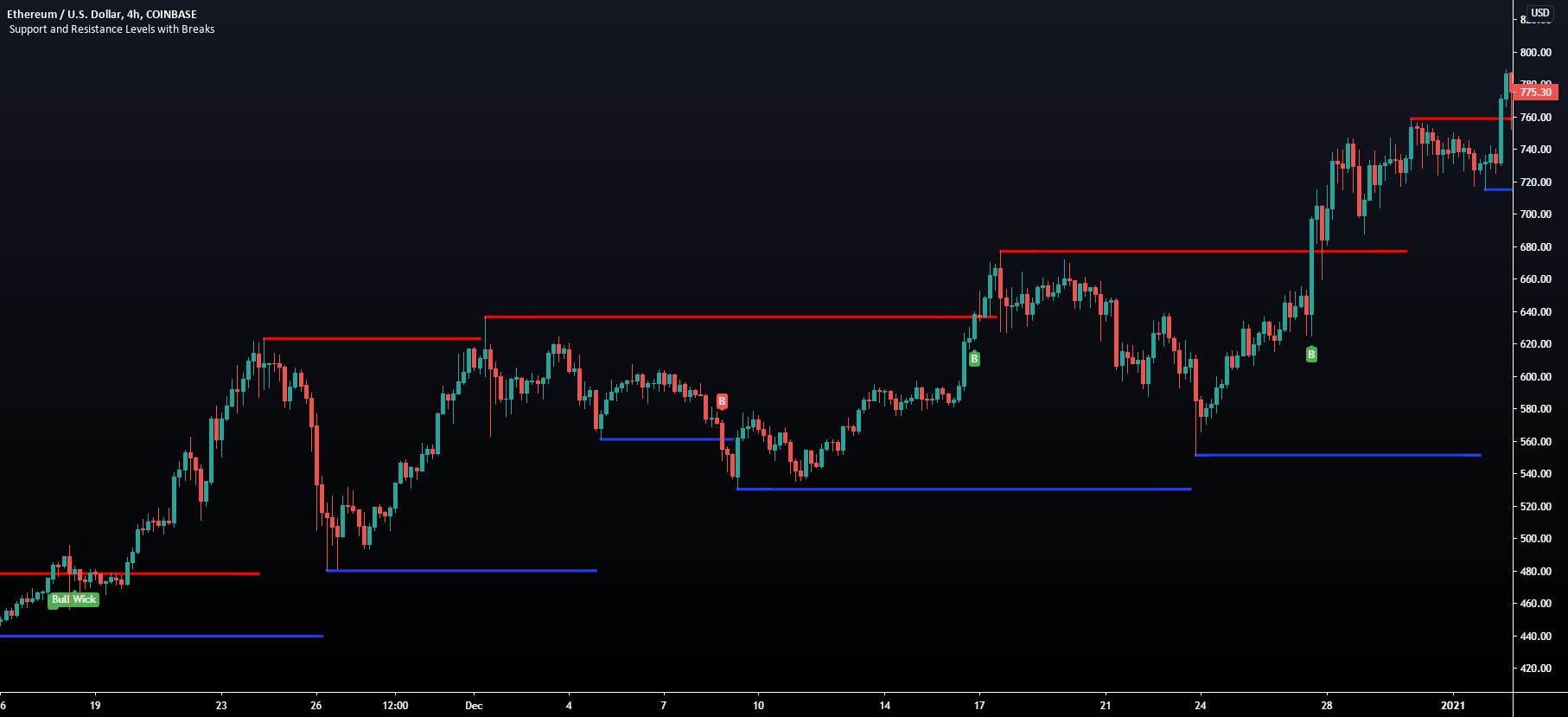
TradingView
This script provides basic pivot point Support and Resistance Levels to the user whilst displaying Break signal tags. It also has the ability to let the user display more significant breaks by filtering using the Volume Oscillator.
Only more significant breaks of these basic levels are displayed to the user when optimized which avoids noise and...
worldly cliff
crystal gust
Hello ,my lux algo price action concept continuesly giving study error message,...
What's the error you're seeing?
 rustic dagger
Logan what I am trying to ask is in the lux ALGO premium are there support resistance levels ?
Because I don’t see any option like that in premium
worldly cliff
Yes, plenty of features that act as this, Reversal Zones, Smart Trail etc., all can act as SRs
Would also check out #👴legacy-indicators for SR features that were removed
worldly cliff
crystal gust
Will look into this for you 🤝
crystal gust
Thanks ,still giving the same problem
rustic dagger
Thanks Logan appreciate it
thorny dove
I want it’s alert exit(reversal),what’s settings for alert?


 torn wadi
Hey lux team why you interested for free indicators ??
Add the dreak block in smart money
feral lava
hey @torn wadi free indicators we release for the community consistently, while we save the best work for LuxAlgo Premium indicators 🙂
torn wadi
feral lava
hey <@1038410196822790214> free indicators we release for the community consiste...
Ok 👍 nice work keep going
 spare otter
Hi guys can I just subscribed but no invite yet on trading view
I’m returning customer 🥹
worldly cliff
spare otter
I’m returning customer 🥹
Try relogging 🙂
spare otter
worldly cliff
Try relogging 🙂
I’m in thanks
drowsy ravine
feral lava
Alerts are based on the ticker you set them on only <@335122926628110338>
I been on gold all morning. Since then two choch have occurred and 0 alerts. Was on gold when the choch occurred.
placid vapor
molten nova
!access
premium back testing beta - showing not invited
worldly cliff
drowsy ravine
I been on gold all morning. Since then two choch have occurred and 0 alerts. Was...
Try relogging on TV 🙂
worldly cliff
placid vapor
premium back testing beta - showing not invited
!backtesting
night beaconBOT
The backtester is currently in a closed beta and was available with the lifetime plan during November 2022. It's future and possible wider release will be determined during this beta phase.
worldly cliff
placid vapor
can i get in beta for a trail
Unfortunately not, sorry 😦
 jade estuary
Is it the higher the signal sensitivity & accuracy the more accurate the trades will be?
Agility* not accuracy😵💫
feral lava
jade estuary
Is it the higher the signal sensitivity & accuracy the more accurate the trades ...
not higher accuracy, just longer term signals
feral lava
 teal patrol
cut in half? can u send a full screenshot?
 tribal solar
Quick question. Whats the recommended timeframe for the LuxAlgo Indicators? I am using 1 Day/2M
 split ember
what's the diference between these groups of alerts, inside the Lux Algo Signals Premium? Thanks

 prisma hollow
split ember
what's the diference between these groups of alerts, inside the Lux Algo Signals...
prisma hollow
split ember
what's the diference between these groups of alerts, inside the Lux Algo Signals...
The red Box are strong confirmation Signal Alerts, The green Box are strong contrarian signal alerts
 autumn sable
What is the purple and blue color Liquidity Grabs mean and how can it be used for trading? Appreciate any help.
@
@feral lava @worldly cliff could you provide an answer to the above question regarding Liquidating grabs?
feral lava
autumn sable
What is the purple and blue color Liquidity Grabs mean and how can it be used fo...
https://www.youtube.com/shorts/LavuBOxCTiA
Hey @autumn sable 🙂 this video here we made explains the 2 different ways you can use Liquidity Grabs in LuxAlgo 👍

 hidden atlas
hello, please tell me how to start trading on the machine, I'm interested in scalping, btc/usdt please show the settings are good
 fringe bluff
Hello. I seem to be missing MarketCipher_A, anyone able to help?
molten nova
hidden atlas
hello, please tell me how to start trading on the machine, I'm interested in sca...
Setting can be very subjective, best to come to your own conclusions with the resources we've provided in our docs 🙂
fringe bluff
Nm Found it
molten nova
hidden atlas
hello, please tell me how to start trading on the machine, I'm interested in sca...
!settings
jaunty perch
Everything you need to know on optimizing signal settings: https://docs.luxalgo.com/lux-algo-premium-indicators/lux-algo/signal-settings
This page showcases every way users can adjust settings along with full explanations of how they differentiate from each other.
hidden atlas
@molten nova thanks, but I want to enable it so that it automatically works by sending a buy and sell signal
autumn sable
@jaunty perch Thanks. But the video doesn’t says the difference between the purple and blue colors. Any idea?
quaint prawn
autumn sable
<@456226577798135808> Thanks. But the video doesn’t says the difference between ...
What are you trying to figure out?
autumn sable
@quaint prawn The different colors shown on the chart for liquidity grabs. Purple and the blue lines
quaint prawn
autumn sable
<@887719005673111624> The different colors shown on the chart for liquidity grab...
Can you show me
autumn sable
If you look at the video @jaunty perch attached above you will see them on the wicks. Sorry I don’t know how to paste vids.
@quaint prawn please see above
quaint prawn
autumn sable
If you look at the video <@456226577798135808> attached above you will see them ...
Im driving right now but I can take a look when I get home
hidden atlas
@molten nova give please strategy for scalping please 🙏
autumn sable
@quaint prawn Appreciate it
night beaconBOT
Hi @flat shard! Click Manage Account here: https://luxalgo.com/
Or email support@luxalgo.com and our team will assist you with any request the same day.
Enhance your trading experience. World's largest provider of trading indicators for every market, including stocks, crypto, and forex. Advanced TradingView signals + bots for all traders & investors.
quaint prawn
Why do you want to cancel? Something we could help you figure out? Are you not finding a strat you like?
Ok, just though maybe we could help, see the link above to do so
 flat shard
Thank you
quaint prawn
flat shard
Thank you
Good luck, if you ever need any help please reach out, im always happy to help
still mist
still mist
I am using the backtester to emit alerts to an automated execution system. I am...
Hi there, has my question been covered?
feral lava
still mist
I am using the backtester to emit alerts to an automated execution system. I am...
it's likely you adjusted settings of the indicator after setting the alert
 torpid ridge
is there a way to get any buy or sell signal into an alert? like a strong/regular buy/sell. right now i see that we can use {{'STRONG BUY'}} but is there a way to combine ANY signal into 1 alert?
autumn sable
@quaint prawn Have you had a chance to take a look at the liquidity grab?
feral lava
night beacon
Hi <@725471587402383410>! Click Manage Account here: https://luxalgo.com/
Or ema...
see here @umbral robin
Email support@luxalgo.com
 merry parrot
My alerts are working, it pops up but gives no sound. Been searching for settings to turn sound on but cant seem to find them. Help please?
still mist
feral lava
it's likely you adjusted settings of the indicator after setting the alert
that is very low possibility but not zero. Given that trade #2 showed alert, btu 1,3,4 are missing. so i should stop and start the alert ? Does Lux Algo repaint? It was suggested that is one possible reason
molten nova
merry parrot
My alerts are working, it pops up but gives no sound. Been searching for setting...
!alerts
jaunty perch
How to set up your own custom alerts in TradingView: https://docs.luxalgo.com/lux-algo-premium-indicators/setting-up-alerts-on-tradingview
Learn how to setup your own custom alerts on TradingView step by step.
 signal magnet
Hey can you please tell me what these percentages (seen in pic) mean in terms of strength? From the documents its based on the voulume for market swing. But does that weak high signal therefore mean there is likelihood that there will be another higher high? or does it mean that its a higher high, and it was the volume of swing that it required to reach that point was weak (percentage-wise) so therefore, its likely that we will continue now to downtrend

 chrome sphinx
What is volume sentiment in minus and plus reflect (minus = sell?) (plus=buy?)
tribal solar
tribal solar
Quick question. Whats the recommended timeframe for the LuxAlgo Indicators? I ...
Anyone?
teal patrol
can somone tell me how to fix my screener for pac

i cant see
what pattern is detected
molten nova
tribal solar
Anyone?
There is no "best timeframe" as it really all depends on the current market conditions and your trading style.
teal patrol
like i cant read the pattern on the screener
autumn sable
@signal magnet How did you get that signal to show on the chart?
 dim mist
Hello I purchased but the indicator is not working, can you give permission for aslamshaikh04 in TradingView
worldly cliff
dim mist
Hello I purchased but the indicator is not working, can you give permission for ...
Try relogging on TV 🙂
dim mist
Ok
worldly cliff
dim mist
Still not there
You might have connected the wrong account, give an email to support@luxalgo.com 🤝
 subtle lava
Hi support, I had just subscribed today and realized that my credit card had been deducted 2 times of US $47.59 from my account.
What i think is either i get a refund from your side or from my bank, or to save the trouble.. just take it that i paid for 2 months of subscription.
Kindly advise, thanks.
night beaconBOT
Hi @subtle lava,
Please email support@luxalgo.com for any order enquiries and they will assist on the same day.
drowsy ravine
worldly cliff
Try relogging on TV 🙂
I did this and it fixed 1 issue I was having. Later in the day I remembered something. I had to go into alerts, create alert and change to indicator.
This morning I woke up to 2 alerts. So for the other folks who might not know, definitely suggest looking at your alerts and change to indicator > luxalgo indicators and set it to max time allotted.
 stark depot
Is there a way to fix the alerts that come to the TV? All other alerts I have come through expect for lux
worldly cliff
Could you elaborate a little? 🙂
stark depot
None of my buy or sell alerts from Lux get notified.
worldly cliff
Could you send a screenshot of your alert settings? I'll see if they're all good 🙂
stark depot


 worldly cliff
Sorry, could you also send a few screenshots of where this alert should have triggered?
I'd suggest remaking the alert, as any settings changed once you've made them will invalidate them and cause them to not fire
jade estuary
signal magnet
Hey can you please tell me what these percentages (seen in pic) mean in terms o...
Any news on this?
worldly cliff
signal magnet
Hey can you please tell me what these percentages (seen in pic) mean in terms o...
The lower the number on the weak high, the easier it can be for the price to break through
Would recommend seeing here: https://www.youtube.com/watch?v=ZqWG01jj68Q @jade estuary

Get access to LuxAlgo Premium indicators: https://luxalgo.com
The new multi-timeframe order blocks feature in the LuxAlgo Price Action Concepts indicator is highly useful for trading higher timeframe order blocks.
This indicator is the premium version of our LuxAlgo Smart Money Concepts indicator. For active premium users, to update to versio...
jade estuary
I’ve seen price break through higher/lower when the percent mage is over 80% as advised in the videos and then the percentage gets weaker as price moves
stark depot
worldly cliff
Sorry, could you also send a few screenshots of where this alert should have tri...
I took the alerts off and on and took it off too and I set it on a 1m chart and 5 to see if it alerts

 jade estuary
Percentage*
stark depot
stark depot
I took the alerts off and on and took it off too and I set it on a 1m chart and ...
I tried on multiple symbols as well
worldly cliff
stark depot
I took the alerts off and on and took it off too and I set it on a 1m chart and ...
So does it? I'd suggest remaking and making sure you don't change any settings
Email support@luxalgo.com @brittle pendant
 terse salmon
I checked the box to get alerts from all signals. How will I receive these alerts?
 narrow heath
Does the Elliot Wave indicator continue indicting the waves or just once?
Im asking because I see the 1,2,3,4,5 move only once
Got my Answer. Thank you.
feral lava
terse salmon
I checked the box to get alerts from all signals. How will I receive these alert...
within the scanner channels 🙂
 slate hornet
When I load price action concept it's not working
feral lava
whats the error message? @slate hornet did u try refreshing?
slate hornet
It doesn't give any info on the blocks... Just a blank order block... Yes I refreshed
Ok it's working now
Thank u
It doesn't work on dxy
Weird

Works on everything else
Now it doesn't on anything
 pallid zodiac
Just sharing a typo on the site...

 broken acorn
Hello
feral lava
slate hornet
It doesn't work on dxy
market needs to be open/have volume 🙂
feral lava
pallid zodiac
Just sharing a typo on the site...
thanks! fixing
feral lava
broken acorn
Hello
👋
broken acorn
when putting the alerts it generates repainting?
dire breach
@shy relic I'm using "the strat" what's in the lux toolkit other than pattern detection that can assist with broadening wedges
molten nova
broken acorn
when putting the alerts it generates repainting?
!repaint
night beaconBOT
LuxAlgo Signals and Overlays do not repaint. A signal may appear or disappear during a current bar however this is not repainting. A signal is confirmed on the close of a candle. Any warnings seen in alerts may refer to other features e.g. the TPSL that readjust when a TP or SL is hit.
 half adder
hi, please send your Indicator settings screenshot because your Dscord alert signals and my own setup signals - buy/sell not matching.
 split idol
Why is my permanent members see LuxAlgo Premium?
brazen elk
Hello, i m new in this indicator. I have some questions. I m using 5 min timeframe and sensitivity as per dashboard recommended. Yesterday I take trade and that time sensitivity was recomend by dashboard is 15. But after some time sensitivity showing 34 . When I have change sensitivity in indicator earlier buy signal gone. I think I m doing something wrong. Can you please help me out
 blazing jasper
How to get fib levels auto with lux indicator
worldly cliff
split idol
Why is my permanent members see LuxAlgo Premium?
Could you elaborate?
worldly cliff
blazing jasper
How to get fib levels auto with lux indicator
This toolkit aims to display multiple Fibonacci drawing tools including retracements, arcs, circles, fans, timezones and spirals.
Usage
Upon adding the indicator to the chart, users will be prompted to choose a starting point and an ending point for the calculation of the drawing tools.
Users can then navigate to the settings of the toolkit a...
worldly cliff
brazen elk
Hello, i m new in this indicator. I have some questions. I m using 5 min timefra...
Dashboard Optimal Sensitivity shows an estimate of the optimal sensitivity when using either signal mode (confirmation or contrarian)
https://docs.luxalgo.com/lux-algo-premium-indicators/lux-algo/signal-settings#dashboard-optimal-sensitivity
This page showcases every way users can adjust settings along with full explanations of how they differentiate from each other.
brazen elk
Optibot for Natural Gas and Crudeoil in 5 min? Where I can find
worldly cliff
brazen elk
Optibot for Natural Gas and Crudeoil in 5 min? Where I can find
Everything OptiBot covers can be found here: https://docs.luxalgo.com/lux-algo-premium-indicators/Discord Features/bots
Learn about Optibot for how to optimize your LuxAlgo signal settings with backtested data, as well as other bots included within our Discord server.
brazen elk
But there is not mentioned all commodities
worldly cliff
Yes it only covers certain ones, if the asset isn't on the page, it's not supported
brazen elk
It means indicator not working in Natural Gas and Crudeoil?
worldly cliff
The indicators themselves will, just if OptiBot doesn't support the asset you won't be able to see settings for it on Discord
Would recommend seeing here: https://docs.luxalgo.com/lux-algo-premium-indicators/lux-algo/signal-settings#choosing-the-right-method
This page showcases every way users can adjust settings along with full explanations of how they differentiate from each other.
 weary echo
how come the box i highlight got shrunk? it use to be the same size as the one at the bottom right ...
 weary echo
how come the box i highlight got shrunk? it use to be the same size as the one a...
weary echo
weary echo
how come the box i highlight got shrunk? it use to be the same size as the one a...
would like to see what pattern it detects but not able too now
worldly cliff
What version of TV is this on? iOS, browser etc.
 unique grotto
cant get my price action to work like urs luxalgo
how do i add so i can see orderblocks etc
oak hound
Can we have an alert to detect when price is entering the fairvalue gaps?
worldly cliff
unique grotto
how do i add so i can see orderblocks etc

In this video, I take you through all the features of the Price Action Concepts indicator by Lux Algo.
You can get instant access here: https://www.luxalgo.com
Read more about it here: https://docs.luxalgo.com/lux-algo-premium-indicators/lux-pa/
For alerting generally of FVGs you can use the built in Imbalance alerts @oak hound
Though currently you can't do price entering 😦
unique grotto
worldly cliff
https://www.youtube.com/watch?v=gKyn7dbHhEo 🤝
Nice! but i still dont get the percentage and numbers of how the orderblocks look. The metrics
worldly cliff
Could you elaborate? Are you not seeing them or do you not understand them?
 worldly cliff
Try a different exchange 🙂
unique grotto
hehe
sucess my dear friend!
so basically this shows us how big the orderblocks by the banks are?
 fresh nacelle
Hi, I can't connect
worldly cliff
It's explained here: https://docs.luxalgo.com/lux-algo-premium-indicators/lux-pa/order-blocks
The analogy in the video above is also pretty good 🙂
Order blocks highlight price areas where more informed market participants placed orders. these are automatically detected within the LuxAlgo Premium Price Action Concepts toolkit.
worldly cliff
Sure 🙂
What's the issue you're having?
Have you connected your account, just don't have access?
fresh nacelle
worldly cliff
Sure 🙂
What's the issue you're having?
I open private
blazing jasper
Hi again need to add one more indicator , and also need to define the time , can you add this SMC indicator for the latest high low so that we know the fib values I see this in other smc indicator
oak hound
worldly cliff
For alerting generally of FVGs you can use the built in Imbalance alerts <@83193...
It will be very nice, if the next update comes with this feature. Please relay my feedback to the development team 🙏
 quick wind
What’s the best strategy for yawing the indicator on Forex and what pairs work best
molten nova
quick wind
What’s the best strategy for yawing the indicator on Forex and what pairs work b...
This page covers some of the more basic and simple to follow strategies popular among LuxAlgo users. Get the full potential out of Lux Algo Premium by using combinations of our different features together in your analysis.
 plain pawn
like to have my lux algo turn on in my trading view please!
 drifting tapir
Can you please tell me what should have been done here for the signals to be filtered below 200 ema?
 inland goblet
Hello , please can someone share me video on how to use the LuxAlgo PAC and also if there are strategies with tht
Also id there is LuxAlgo Fibb tool
 shut walrus
guys is there any way we could have a setting on the premium to have HH LL printed at candle closure rather than wicks. or the BOS and CHOCH doing this. i guess if the HHLL option happened the BOS and CHOCH would follow suit to that anyway?
 tepid forge
Hi all
Is there a waiting period to get lux algo displayed in tradingview
Okay it's up now
 round slate
i had canceled the subscription and still got billed,
hidden atlas
hello how to access the backtest indicator
worldly cliff
hidden atlas
hello how to access the backtest indicator
!backtesting
night beaconBOT
The backtester is currently in a closed beta and was available with the lifetime plan during November 2022. It's future and possible wider release will be determined during this beta phase.
 cinder ore
I am trying to understand better if when you turn on the Strong/Weak High/Lows on Price Action Concepts does for example a Strong High 97% mean that when price hits it the chance is greater that it doesn’t get through it? Or if it says Strong Low 97% is that a strong support? Does a Weak High say 19% mean it would be easy to break through? I can’t find any answers in the user guides.
 dire breach
@shy relic @worldly cliff I'm getting closer. A few days ago I asked about broadening wedges other than pattern detection. Donchian zig zag ? Trying to pair it with the strat
thorny dove
What’s good indicator for divergence?
worldly cliff
thorny dove
What’s good indicator for divergence?

Hi all! So normal divergence indicators are laggy and not real time. The Advanced Oscillator made by Lux Algo shows you 100% real time divergences so you don't need to wait for the market to reverse before entering a trade.
Hopefully this video helps & don't forget to like and subscribe!
The Advanced Oscillator: https://docs.luxalgo.com/lux-al...
 late dawn
How is the prior swing low or high determined for the PAC CHOCH?
 hard hamlet
Hi 👋🏼 please can someone check my indicator access. It has been removed even though I paid for 3 months that doesn’t expire until 12/05/2023. Tradingview name: mikepayneuktrading. Thanks 🙏🏼
 feral lava
Hi @hard hamlet --> best thing to do is email support@luxalgo.com so our team can make sure this is fixed!
likely within 2-6 hrs
hard hamlet
Thanks @feral lava much appreciated.
 runic hazel
Can I find anything to watch volume in Lux?
violet spoke
hard hamlet
Hi 👋🏼 please can someone check my indicator access. It has been removed even t...
Had the same issue. Just remove the script and install it again. Plus refresh the page
hard hamlet
@violet spoke I tried that but came up with the same problem 🫤
feral lava
runic hazel
Can I find anything to watch volume in Lux?
on dashboard you have Volume Sentiment https://docs.luxalgo.com/lux-algo-premium-indicators/lux-algo/dashboard#volume-sentiment
The dashboard displays the most relevant metrics from within our premium features. This feature is extremely useful to easily obtain pertinent information regarding the market and can be used in confluence with the LuxAlgo Premium indicators.
hard hamlet
@feral lava all sorted. So quickly! Great service 😁
feral lava
❤️ ayyy glad to hear:)
molten nova
spare otter
I can’t get my view scanners to get notifications
make sure you're notification settings are set properly for the channel 👍
spare otter
molten nova
make sure you're notification settings are set properly for the channel 👍
How I do that please
pearl viper
feral lava
<#780585592911560734>
What will be new and interesting in version 6? Can you please give to us this information?
spare otter
feral lava
<#780585592911560734>
I have clicked still nothing , where is the main notification for it
molten nova
pearl viper
What will be new and interesting in version 6? Can you please give to us this in...
More news in the near future 🧙♂️
 solemn mauve
cinder ore
I am trying to understand better if when you turn on the Strong/Weak High/Lows o...
solemn mauve
cinder ore
I am trying to understand better if when you turn on the Strong/Weak High/Lows o...
Your assumptions are on the right track, however factors that affects it adversely are the time of the day, has it been in the run earlier(40-5mins), volume, catalyst. It’s a good indicator but we have to be super cautious in these markets, my 2c
inland patrol
@worldly cliff check your dm bro it’s getting worse
modern surge
Yo
 scenic charm
Is it possible to make a strategy based on LUXALGO premium BUY signals in pinescript?
narrow heath
Im getting "any confirmation buys and sells" alerts sent to my email but the signals do not show on my charts - luxalgo premium on tradingview
in the image you see the alert but not the signal on the chart. Please help
 molten nova
narrow heath
molten nova
narrow heath
Is it possible that you may have changed your alert settings?
Your alert may have been created with different settings, as alerts will remain with the settings at the time they were created 👍
 severe wharf
Is there any option to change the color of the confirmation gradient candle in the upcoming update?
late dawn
late dawn
How is the prior swing low or high determined for the PAC CHOCH?
@worldly cliff is this something you can answer for me?
 quartz stream
Just got access. Where is VIP signals here ?
 fallow panther
Hi there
I have a question regarding luxalgo premium + filtered alert creator.
Sorry if I missed the answer in the documentation.
I would like to setup two filtered alerts simultaneously:
- Any confirmation sell + Trend catcher down
- Any confirmation buy + Trend catcher up
I tried to set it up but I'm not sure if the alerts are linked to the settings of the indicator when the alert was created or if the settings are applied even after the alert is saved.
worldly cliff
late dawn
<@266618371737518081> is this something you can answer for me?
BOS and CHoCH are there to highlight breaks from prior swing points.
Would recommend seeing here: https://www.youtube.com/watch?v=WuEaLfeiz20
Also the docs: https://docs.luxalgo.com/lux-algo-premium-indicators/lux-pa/market-structures#change-of-character-choch
This new all-in-one indicator includes first of its kind price action concepts including Order Blocks w/ volume data, real-time market structure (BOS, CHoCH, EQH/L) w/ 'CHoCH+' being a more confirmed reversal signal, a MTF dashboard, Trend Line Liquidity Zones (real-time), Chart Pattern Liquidity Zones, Liquidity Grabs, and much more detailed cu...
Market Structure allows traders to know the direction of an underlying market trend based on price action. These are automatically detected within the LuxAlgo Price Action Concepts indicator.
worldly cliff
quartz stream
Just got access. Where is VIP signals here ?
Opt in through #🔔scanners-premium 🙂
oak hound
Hello my access to luxalgo has been removed. I just renewed monthly. How can I get it back
?
I renewed monthly and luxalgo still removed me.
worldly cliff
Try relogging 🙂
oak hound
What do u mean?
On the website ?
I'm currently in a trade, I need access ASAP. Can u help ?
worldly cliff
Yes, try loggging out and back in again on TradingView
If still no access, DM me the email address you used while purchasing
 covert lark
Im really at a loss here, trying to learn to use the PAC indicator. I always feel like 2 things show bullish bias, and 2 thing show bearish bias, and never know what to do - Even after browsing through countless videos, im still clueless on how to put it all together
All videos just seems to be showing 1 or 2 features, but no one shows how to make it into a working strategy. I want to get it working with only PAC indicator, as i dont have good experiences with the rest of them. Any ideas? Welcome to DM, or respond here
worldly cliff
Sorry to hear this @covert lark
Have you seen here? 🙂
https://www.youtube.com/watch?v=XOxjYX5MqR4
Very useful vids 🤝
In this video I show you how you can use PAC toolkit - LuxAlgo to trade. I show some nice strategies you can immediately deploy in your analysis.
Get LuxAlgo: https://www.luxalgo.com
covert lark
worldly cliff
Sorry to hear this <@225566016409829376>
Have you seen here? 🙂
https://www.you...
Thanks, yea i have seen almost all of them, but still i can never really get it working well. Its just so annoying, because i want it to work so bad, and i know its possible, just never found that one single video showing okay this is how to do it
oak hound
Hello, I have logged out and logged in and yet I don't have access.
Pls check ur dm @worldly cliff
fallow panther
covert lark
Thanks, yea i have seen almost all of them, but still i can never really get it ...
Imo as a semi beginner the PAC indic is spamming too much conflicting stuff for me.
I like to follow the classic luxalgo premium label indic and then confirm my sentiment with some pac (not all of it it's overwhelming)
covert lark
fallow panther
Imo as a semi beginner the PAC indic is spamming too much conflicting stuff for ...
Thing is i have traded for several years, with naked charts, and also with trend following indicators, and i want to learn to succeed with SMC trading
 velvet hinge
Greetings. question on the LuxAlgo 5.3 indicator. I notice the fancy "AutoPilot Signal Settings". Does this indicator work when usingTrading View Alerts, or is it only useful when one is examining the charts manually?
If it does work for Trading View; If I have an existing Trading View Indicator that was created before usingthe AutoPilot Signal Settings and then I switch to AutoPilot Signal Settings for my view, do I need to recreate the Trading View indicators that previously weren't using that setting, for them to use that function?
Thanks!
signal magnet
how are we able to get different timeframes (preferably lower ones for scalping ) in the "live crypto bot scanner" for #alts and BTC/ETH?
worldly cliff
velvet hinge
Greetings. question on the LuxAlgo 5.3 indicator. I notice the fancy "AutoPilo...
You don't need to update alerts when using autopilot - it adjusts to the signal confirmation algorithm and doesn't change settings
worldly cliff
signal magnet
how are we able to get different timeframes (preferably lower ones for scalping ...
You can't unfortunately, what's there is what's supported
quartz vector
Will the new update effect the backresting indicator
 runic geyser
why donot show the percentage sometimes?
 narrow heath
molten nova
Is it possible that you may have changed your alert settings?
narrow heath
molten nova
Is it possible that you may have changed your alert settings?
No changes were made
 near anvil
Hello,could you check my subscription please. I canceled quartrly and bought yearly ,now I don't have it any more
 hushed night
Just i got it ! i hope it help me
shy relic
runic geyser
why donot show the percentage sometimes?
the ticker might not have volume
runic geyser
how to solve it?
worldly cliff
runic geyser
how to solve it?
Switch exchange 🙂
runic geyser
which broker will be best?
worldly cliff
For which asset?
runic geyser
forex
worldly cliff
There isn't really one I can recommend to be honest
https://docs.luxalgo.com/trading-best-practices/recommended-brokers
There are numerous brokers, certain specialising on stock trading, others on forex or crypto, while there exist brokers proposing a wide variety of markets to their user. Below is a list of brokers we recommend to our users.
runic geyser
thank ypu
terse salmon
How far back (in time) do the stock OPTIBOTS go ...each time they refigure?
 junior lance
does the DR/IDR indicator by Lux Algo account for Daylight saving hours shift? 🤔
 onyx summit
Hi, I recently changed from monthly to quarterly and indicators are locked.
fallow panther
I allow myself to bump my question back
#🤝support message
modern surge
covert lark
Thing is i have traded for several years, with naked charts, and also with trend...
here is the first piece of advice most of the time when u see a "ChoCH" the price will usually go the opposite way for a little and then continue in the intended direction
junior lance
junior lance
does the DR/IDR indicator by Lux Algo account for Daylight saving hours shift? �...
never mind I found the UTC offset 👀
worldly cliff
fallow panther
Hi there
I have a question regarding luxalgo premium + filtered alert creator.
S...
It will save to the settings at the time, changing them will invalidate the alert
worldly cliff
onyx summit
Hi, I recently changed from monthly to quarterly and indicators are locked.
Try relogging on TradingView 🙂
If you still don't have access, shoot me your account details and I'll check for you
covert lark
modern surge
here is the first piece of advice most of the time when u see a "ChoCH" the pric...
Is that not what BOS should do, and CHoCH is changing the trend direction? Correct me if im wrong
 prime grove
Hey guys my LuxAlgo Action Concepts indicator changed my little pattern chart and I can't get it to stay bigger anymore. Does anyone know how I can fix this? I tried removing it and reinstalling it, I tried ticking the pattern ticker in the settings but it only turns back big for a little bit and then it changes back to tiny.


 solemn marsh
hi there sorry to ask a noob questions, but what is this red square on the luxalgo, price action indicator?
 covert lark
prime grove
Hey guys my LuxAlgo Action Concepts indicator changed my little pattern chart an...
covert lark
prime grove
Hey guys my LuxAlgo Action Concepts indicator changed my little pattern chart an...
Same
feral lava
prime grove
Hey guys my LuxAlgo Action Concepts indicator changed my little pattern chart an...
we're looking into it! @covert lark @prime grove
we have a minor update that will fix this @covert lark @prime grove
covert lark
Awesome👌🏻
covert lark
feral lava
we have a minor update that will fix this <@225566016409829376> <@74765604265315...
When will that be pushed?
prime grove
@covert lark Thanks
feral lava
covert lark
When will that be pushed?
thinking couple days!
terse salmon
So you can only correctly set alerts on only ONE of the OptBot selections at a time....since each one has a different figure for sensitivity and agility???
When the OptiBots backtest to get the figures...how far back do they go?
 patent salmon
worldly cliff
Switch exchange 🙂
patent salmon
worldly cliff
Switch exchange 🙂
What is v6 indicator from lux algo?
 restive marsh
Hey I'm having an Issue that PAC just don't show on some time frames or at all or it takes a lot of time for it to show up on the chart, what is the reason for that?
I'm using the desktop app
molten nova
restive marsh
Hey I'm having an Issue that PAC just don't show on some time frames or at all o...
Get access to LuxAlgo Premium indicators: https://luxalgo.com
The new multi-timeframe order blocks feature in the LuxAlgo Price Action Concepts indicator is highly useful for trading higher timeframe order blocks.
This indicator is the premium version of our LuxAlgo Smart Money Concepts indicator. For active premium users, to update to versio...
restive marsh
molten nova
https://www.youtube.com/watch?v=ZqWG01jj68Q
why are you showing me this?
molten nova
restive marsh
why are you showing me this?
Were you referencing multi timeframe orderblocks?
restive marsh
molten nova
Were you referencing multi timeframe orderblocks?
No I mean the indicator not working at all
molten nova
restive marsh
No I mean the indicator not working at all
Oh, send me a dm with your account info and I can make sure you have full access 🙂 👍
restive marsh
like it's working on the 15m but not on the 5m
sometimes it's different timeframes
something weird
I think this issue is happening only on the windows app
it's started happening only recently
molten nova
restive marsh
I think this issue is happening only on the windows app
Strange, do you run into the same issue when you use a different platform to access TradingView?
Or only the windows app
restive marsh
molten nova
Strange, do you run into the same issue when you use a different platform to acc...
I personally use only the windows app, and sometimes on my phone and it worked fine there
also it's only PAC, the other lux indicators work fine all the time
so no idea what could cause it, maybe because I use PAC on multiple pairs that each have their profile or something?
molten nova
restive marsh
so no idea what could cause it, maybe because I use PAC on multiple pairs that e...
going to look into this, generally the desktop app is very stable though and haven't seen this issue noted anywhere else.
restive marsh
molten nova
going to look into this, generally the desktop app is very stable though and hav...
Thanks, ping me if you find anything causing this
scenic charm
will v6 contain backtesting ?
worldly cliff
scenic charm
will v6 contain backtesting ?
Likely not, still in beta 😦
scenic charm
worldly cliff
Likely not, still in beta 😦
do you think it will be released soon or will it take really long time
 versed veldt
i have this message all the time

 orchid sand
Hi, do the alerts always trigger on candle close? is there a way to trigger them during the candle?
worldly cliff
scenic charm
do you think it will be released soon or will it take really long time
Depends, we're hopefully aiming for 5-6 months
worldly cliff
versed veldt
i have this message all the time
Remove and re-add 🙂
worldly cliff
orchid sand
Hi, do the alerts always trigger on candle close? is there a way to trigger them...
Yep, on candle close - you can change the conditions, though you risk losing the signal as they're confirmed on candle close.
orchid sand
Where can I find more info on this? I read the help docs but I don't see anything on triggering options by condition. I already have conditions selected
 chilly inlet
Do we have an indicator for identifying trends (up/down) with 50 and 200 MA on HTF?
 ocean wing
I sent a refund request ticket to: support@luxalgo.com, then a confirmation email, but now it's been over 24 hours and no one has responded to me. Who can help me with this?
 faint glacier
what is the best strategy for the xau/usd ?
 willow basin
I get Study Error always. I remove the Price Action indicator and set it again. I do it many times and still get Study Error. Can you fix this?
 feral lava
ocean wing
I sent a refund request ticket to: support@luxalgo.com, then a confirmation emai...
feral lava
ocean wing
I sent a refund request ticket to: support@luxalgo.com, then a confirmation emai...
hmm @ocean wing i would suggest emailing again - our team gets to all inquiries so that’s a bit odd. Feel free to DM me as well
feral lava
willow basin
I get Study Error always. I remove the Price Action indicator and set it again. ...
Let’s solve this - which ticker are you on?
willow basin
I closed some open trading windows. Instead 6 open TradingView charts I use only 2. Now it works well.
worldly cliff
Hi @lean atlas - sorry to hear this, could you DM me the email you used to contact us? I’ll get this followed up on for you
 kindred elbow
worldly cliff
Hi <@992822809233469502> - sorry to hear this, could you DM me the email you use...
kindred elbow
worldly cliff
Hi <@992822809233469502> - sorry to hear this, could you DM me the email you use...
@worldly cliff I get the same error occasionally but up on a refresh or 2, it fixes itself
 dense edge
Guys, how can i see btc-eth and alts buy and sell alerts?
dense edge
worldly cliff
<#780585592911560734> 🙂
Nice 🙂 thx buddy
worldly cliff
Email support@luxalgo.com for order inquiries @slate gale
dense edge
Guys, why when I activate the price action, does lux something premium not show me the colors of the candles?
Only in Scalper Mode
worldly cliff
Each indicator has the ability to colour candles, you can turn them off in the settings 🙂
spare otter
What’s any confirmation alert covers if I set up ? Strong buy and sell or everything that change or continue to change
worldly cliff
spare otter
What’s any confirmation alert covers if I set up ? Strong buy and sell or everyt...
Will cover any confirmation, including strongs 🙂
spare otter
Ok thanks
blazing jasper
Are you planning to add fib levels and volume in PAC indicator
Pls do add it will help
I mean volume profile
willow basin
Again. EURUSD chart. It doesn't matter what I do. Delete it and load it again.
 worldly cliff
Is this for all tickers or just EURUSD?
willow basin
worldly cliff
Is this for all tickers or just EURUSD?
just EURUSD
worldly cliff
Give an email to support@luxalgo.com for subscription inquiries @lone dove 🙂
worldly cliff
willow basin
just EURUSD
Ok, I’ll look into it for you 🤝
willow basin
worldly cliff
Ok, I’ll look into it for you 🤝
OK. Thank you
pallid zodiac
Hello Support, just a generic question please.
I know Buy and Sell signals on LuxAlgo should not be taken as sole entry points, however, if our analysis confirms them and we plan to enter a trade when a signal paints... should we wait for the bar to close or just enter as soon as the signal paints...
Also, would you recommend a specific stop loss like the previous bar's low or so?
 snow glade
sometimes the signal gets removed by following candles or the when the bar closes
so i would atleast wait for the candle to close
pallid zodiac
I see, I thought LuxAlgo's are non-repainting signals
terse salmon
orchid sand
Hi, do the alerts always trigger on candle close? is there a way to trigger them...
only after candle closes
pallid zodiac
Okay, thanks folks, really appreciate the feedbacj
worldly cliff
Give an email to support@luxalgo.com for subscription inquiries @urban siren
worldly cliff
willow basin
OK. Thank you
It's being looked into 🙂
Would suggest resetting to default settings and continuing, or disabling some features
terse salmon
when discord sends me this signal for a strong buy on FB 4hr. chart at 1:30 pm today . and I don't see the strong signal on my chart even when putting in the new sensitivity and agility numbers........What is wrong? THANKS
 grim zealot
Hello! I was using one indicator from lux algo that displayed orizontal ranges. It was called predicative ranges or something like that. I can't find It anymore. Can you help?
willow basin
worldly cliff
It's being looked into 🙂
Would suggest resetting to default settings and contin...
I enabled the Color Candles, and it worked. I Disabled the Color Candles and it stopped working.
Sorry but I think there is a bug here. Can you ask the developers to take a look on it?
I also disabled the Swing Order Blocks and it worked
I enabled the the Swing Order Blocks and it didn't work
 vapid jasper
wait 2 minutes
 civic skiff
tks
worldly cliff
terse salmon
when discord sends me this signal for a strong buy on FB 4hr. chart at 1:30 pm t...
!visible
jaunty perch
Our Discord Market Scanner alerts all use the following:
- Default Lux Algo (V5 inputs of 12,26).
- Normal trading hours (no extended hours)
- Main exchanges / brokers such as NASDAQ / TVC / FXCM / OANDA / COINBASE / BINANCE
If you have created your own, custom TradingView alerts, be aware they are set per the exact settings you had at the time you set those alert(s).
worldly cliff
Have passed on @willow basin 🙂
terse salmon
worldly cliff
!visible
what do you mean?
worldly cliff
#👴legacy-indicators @grim zealot
worldly cliff
terse salmon
what do you mean?
You'll need to make sure you're using the same settings as the scanners 🤝
https://docs.luxalgo.com/lux-algo-premium-indicators/Discord Features/market-scanners
Our Discord server includes 7 channels with thousands of alerts set up with Lux Algo signals across every market including stocks, indices, forex, cryptocurrency, futures and commodities.
terse salmon
worldly cliff
You'll need to make sure you're using the same settings as the scanners 🤝
http...
OK thanks
The scanners utilize the default Lux Algo Premium input settings for Confirmation Signals at 12 sensitivity & 26 agility---------I had mine set there.......Oh well
I tried it again--4 hr chart-set on 12 and 26--auto pilot on. Still not showing.....I'm doing something wrong
 formal crater
worldly cliff
Depends, we're hopefully aiming for 5-6 months
formal crater
worldly cliff
Depends, we're hopefully aiming for 5-6 months
@worldly cliff 5-6 months from now or from the release date??
 winged hollow
Is Lux Algo best used with regular candles or Heikin Ashi? Does it make a difference?
worldly cliff
terse salmon
I tried it again--4 hr chart-set on 12 and 26--auto pilot on. Still not showing...
Try loading a different exchange
worldly cliff
winged hollow
Is Lux Algo best used with regular candles or Heikin Ashi? Does it make a differ...
In this video, I show what Heikin Ashi candles actually are; the perks and drawbacks of them and how you can use them in your trading.
Get Lux Algo premium: https://www.luxalgo.com
terse salmon
worldly cliff
Try loading a different exchange
Huh?
worldly cliff
terse salmon
Huh?

'- Main exchanges / brokers such as NASDAQ / TVC / FXCM / OANDA / COINBASE / BINANCE'
terse salmon
I am so sorry I am so freakin' dumb. I just don't understand. I use Trading View........??
worldly cliff
terse salmon
I am so sorry I am so freakin' dumb. I just don't understand. I use T...
Yes, on TradingView, use the same ticker as the market scanner, and make sure you're using one of the main exchanges.
Your settings will need to be the same as the scanner or you won't see the signal
terse salmon
Thanks --don't know where I boo-booed......I appreciate such effort from you
just in: SHOP Buy signal 4 hr. chart......................I show nothing. Do you?
narrow heath
Is the NAS100 indice on the scanner? under what suffix?
terse salmon
everything for SHOP I have is RED except oscillator? Where is my BUY signal...seriously...do you have one on your charts?
 warm swift
I keep getting this error or many of my charts, I use 8 windows panels in a tradingview layout and its not always sloved when I remove and add back the indicator

 harsh hull
I have a question on the Neo cloud. The change of trend comes when it changes colors or when the price is above/below? Thank you.
 undone kernel
Gecko doesn't do support anymore?
 dire bloom
Hey there, had the premium indicators for the past few days, loving them. I have 1 quick question. On the Oscillators > Advanced, what does the Red dot indicate, and the green person/blob at the bottom, I have been on the docs.LuxAlgo.com, can’t seem to make head nor tail of it. thanks in advance
 dire bloom
dire bloom
dire bloom
Sorry, I have re read it again, major and minor buys, sells 👍🏻
 dusk field
Does anyone know the difference between I-BOS and S-BOS, please

 edgy pasture
Internal Break of Structure and Swing Break of Structure
From the docs, Internal structure are constructed from shorter term swing high/low points, while swing structure are constructed from longer term ones.
dusk field
Excuse me: What do I-CHOCH and I-CHOCH+ mean? Thanks!
 untold harbor
Why my tradingview looking like this after using LuxAlgo indicators anyone knows ?

and volume doesn't work everything seems bug

If i log out from the account the charts look normal again, anyone can help please ?
untold harbor
i mean everything is bugged guys anyone please can help ? Thank you !!
 feral lava
untold harbor
i mean everything is bugged guys anyone please can help ? Thank you !!
feral lava
untold harbor
i mean everything is bugged guys anyone please can help ? Thank you !!
Hey @untold harbor what seems to be the bug?
you turn off our indicators then it's all blue candles?
suggest checking your Chart Settings on TV
edgy pasture
Hi Folks, I have a question regarding alerts with the backtesting system and would like some clarification. My goal is to get one alert for a buy with the open, close high low ticker timeframe info etc., of a bar in the message.
In the alert settings for buy entry, I have the following setup as the message "Buy-{{open}}-{{close}}-{{high}}-{{low}}-{{ticker}}". When the strategy alert fires, I notice two things
- I get the exact same message with the placeholders instead of the values of the placeholders;
- Additionally, I get an extra alert with the default message.
I want to get one single alert message with the custom alerts set in the Alert Section of the settings(instead of 2 messages, one custom and one default message) and with the placeholders' values instead of the placeholders themselves. Any suggestions on how I go about it? @feral lava @worldly cliff
 slow kelp
Hello trading view doesn't let me access to premium
feral lava
edgy pasture
Hi Folks, I have a question regarding alerts with the backtesting system and wou...
it's possible these placeholders may not work on the backtester, however, let me double check
there's an extra alert appearing each time?
feral lava
slow kelp
Hello trading view doesn't let me access to premium
hi @slow kelp simply try refreshing, should fix it.
if not, please email us at support@luxalgo.com so our team can fix
edgy pasture
I get two alerts, one with the message that has been set in the alerts section of the backtest indicator settings, and one with the default message from the alert itself (when the alert is created) and blank if nothing is there
edgy pasture
feral lava
it's possible these placeholders may not work on the backtester, however, let me...
and thanks for checking on the placeholders. Can you let me know what placeholders will work there?
feral lava
hmm, could you share the ticker & timeframe this is occuring on, along with a screenshot of the alert + settings?
i'll be sure we investigate, thanks for making us aware.
edgy pasture
feral lava
i'll be sure we investigate, thanks for making us aware.
ok give me a few.
feral lava
no problem 🙂
edgy pasture
feral lava
no problem 🙂
@feral lava Here you go. I set it up on a 1 min chart just to trigger an alert rightaway. The strategy sold an existing buy and got into a short at the same time, but you see four alerts on the right side at the same time, 2 for each (exit buy and sell entry). One with what's configured in the indicator settings and one with the default blank message from the alert settings itself. This is regardless of timeframe and ticker; I had this happen earlier during the day on a 5-minute chart with Aapl.
 feral lava
thanks ill report this to the team & follow back up as soona s i can
edgy pasture
feral lava
thanks ill report this to the team & follow back up as soona s i can
@feral lava sounds good. I would also appreciate it if you can let me know what placeholders I can use in the alert setting message (I couldn't find it in the docs if I missed it can you point me to the area). Thanks.
undone kernel
Does gecko still do support?
 bright juniper
can someone help me
untold harbor
hEY @feral lava no that's just my color settings even if i change them into red and green there are these huge gaps and the chart doesn't shows up correctly, if i switch back to a different account without luxalgo charts are normal again.
Can you help please :c
 nova mirage
Hi, I'm a newbie and I have a question. I can't get the signals that come from the forex bot with the standard settings. What am I doing wrong at this point. Example EURJPY
the signal come at 10.00 pm

what is changed by the presets. Which settings or filters does this affect. If I choose None, I can then determine everything myself. Because the ads don't change. Many thanks for your help
 jagged tendon
Hi,
Hi, I have a LuxAlgo Premium license, can add to charts but can't add altets, it not in the conditions drop down so can't select it. Do I need to set any setting - Anyone know what to do? Thanks.
worldly cliff
bright juniper
can someone help me
Hi 🙂
worldly cliff
nova mirage
Hi, I'm a newbie and I have a question. I can't get the signals that come from t...
!visible
jaunty perch
Our Discord Market Scanner alerts all use the following:
- Default Lux Algo (V5 inputs of 12,26).
- Normal trading hours (no extended hours)
- Main exchanges / brokers such as NASDAQ / TVC / FXCM / OANDA / COINBASE / BINANCE
If you have created your own, custom TradingView alerts, be aware they are set per the exact settings you had at the time you set those alert(s).
worldly cliff
nova mirage
Hi, I'm a newbie and I have a question. I can't get the signals that come from t...
You’ll need to make sure your settings are the same as the scanner
worldly cliff
jagged tendon
Hi, I have a LuxAlgo Premium license, can add to charts but can't add altets, it...
Refresh the page:)
Email support@luxalgo.com for subscription inquiries @cerulean widget
 kind comet
Guys - if i want to set an alert for a buy signal and the trend catcher is green and the neo cloud is green for the whole of the SP500 do I have to set this up individually for each ticker. Can I also set this up with premium stochastic on green as well? thanks. Steve
nova mirage
Please can you tell me the settings with the scanner
was in the instructions
The scanners utilize the default Lux Algo Premium input settings for Confirmation Signals at 12 sensitivity & 26 agility.
terse salmon
yesterday stock scanner showed this at 4 pm--"SHOP BUY Signal (4H Chart) @VIP" Can you verify this? All my signals were RED & I did not show a BUY on my charts.


 modern violet
hi, i just started using luxalgo and i dont know how to fix this but i cant see the whole label of the detected pattern, i already made the dashboard larger. But if there's no pattern then it fits in the dashboard
 jagged tendon
worldly cliff
Email support@luxalgo.com for subscription inquiries <@711270316743065600>
jagged tendon
worldly cliff
Email support@luxalgo.com for subscription inquiries <@711270316743065600>
It worked, Thanks.
 tropic bolt
What does this ”X” marks mean in elliott wave indicator?

 south sand
Hi i'm currently unable to access any of the indicators
I've closed trading view down and restarted
I've closed the indicators and tried to open back up on the indicators tab (easy to find a I've saved as favourites)
However I cannot open them / reload them any assistance would be greatly appreciated.
worldly cliff
kind comet
Guys - if i want to set an alert for a buy signal and the trend catcher is green...
You could use filtered alerts 🙂
https://docs.luxalgo.com/lux-algo-premium-indicators/lux-algo/alerts#alerts-with-filtered-conditions
The LuxAlgo Signals & Overlays indicator has various alert conditions based on each signal mode included in the indicator, see examples of how you can set these up on TradingView on this page.
worldly cliff
modern violet
hi, i just started using luxalgo and i dont know how to fix this but i cant see ...
Try turning off auto fit on your chart, in the bottom right 🙂
worldly cliff
south sand
Hi i'm currently unable to access any of the indicators
I've closed trading view...
Give an email to support@luxalgo.com 🙂
kind comet
worldly cliff
You could use filtered alerts 🙂
https://docs.luxalgo.com/lux-algo-premium-indic...
 Excellent - thanks Logan
modern violet
worldly cliff
Try turning off auto fit on your chart, in the bottom right 🙂
i dont have it turned on
if i turn off and turn on a feature in the indicator settings then it will show it but then after few seconds it goes back
 daring wind
i have 2 different alert notifications set on TradingView as per the instructions, but only 1 of them ever notifies me. any idea why this is?
untold harbor
yo guys how can i solve this ?
 terse salmon
If I go to ZM 2 hour chart- why doesn't it show a BUY signal if the stock scanner gave a BUY signal at 11:30 am today???????????????????????
😵💫
Could one of you check that on your chart if Support is busy.Thanks
edgy pasture
edgy pasture
<@393235362107097089> Here you go. I set it up on a 1 min chart just to trigger ...
@feral lava @worldly cliff Hi -following up The duplication of the alert can be solved by setting hte alert configuration to only alert on alerts instead of both "Order fills and alert() function calls" to "Only Alert() function calls".But the order fill messages can have placeholders like the close price etc, but the alert section messages of the Backtest solution dont replace the placeholder values. How do we set placeholders in the messages in the alert section? Thx
feral lava
terse salmon
Could one of you check that on your chart if Support is busy.Thanks
will be checking, we're looking to revamp the scanners entirely actually 🙂
 crimson oasis
@feral lava if I want to create an alert when the candle touch the upper resist bend (red one) in tradingview, How should I choose from the alert? Here is what I do, Condition: Lux Algo Premium, then 'crossing', change the 'value' to 'Lux Algo premium' and 'RZ R1 bend'. is it correct ? or by what else I can do? Thanks
molten nova
crimson oasis
<@393235362107097089> if I want to create an alert when the candle touch the upp...
Yup, you would set for when price is crossing up into the band

 unkempt citrus
Hello guys! Can anyone explain why the SMC and PAC indicators draw the orderblocks differently? For example, the SMC only and SMC and PAC together


And, i think that the free-to-use SMC is more correct 🙂
 rare marsh
Hi, I just paid for 1 month subscription, how do I activate premium indicators on tradingview without subscription?
 neon blade

why all alerts fail?

and is there a way to set an alarm when trendcatcher turns green and another one for one it turns red? thanks in advance.
molten nova
 spiral widget
but its not showing in my invite only scripts
spiral widget
but its not showing in my invite only scripts
!access
jaunty perch
After signing up at https://luxalgo.com - please check your "Subscription Confirmation" email to connect your accounts and get instant access to Lux Algo on TradingView & Discord.
If you are having trouble, please reply to the email with your username(s) and our support team will ensure you have full access within 6-8 hours.
Enhance your trading experience. World's largest provider of trading indicators for every market, including stocks, crypto, and forex. Advanced TradingView signals + bots for all traders & investors.
molten nova
Send an email over to support@luxalgo.com
They'll get back to you within a few hour to help you out 🙂
 weary pecan
Hey im wondering why confirmation gradient wont work if PAC is on the same chart.
molten nova
 void talon
Hello Halo, could you check my liberation on trading view indicator ?
void talon
Hello Halo, could you check my liberation on trading view indicator ?
Just checked your TradingView account for you, you should have access now 👍
signal magnet
@molten nova Hey, Im not able to figure out how to change the color of the Neo Cloud. Can we make this an option please? ANy help with this is appreciated!
molten nova
signal magnet
<@221320871602683904> Hey, Im not able to figure out how to change the color of ...
As far as im aware, you can't change the color of the neo cloud at this time.
 burnt niche
neon blade
burnt niche
neon blade
Did you get an answer to this? I’m having trouble creating alerts as well.
unkempt citrus
unkempt citrus
Hello guys! Can anyone explain why the SMC and PAC indicators draw the orderbloc...
Maybe i should ask in different channel?
 eternal nova
how do i get the lifetime plan?
 lucid portal
worldly cliff
unkempt citrus
Hello guys! Can anyone explain why the SMC and PAC indicators draw the orderbloc...
lucid portal
worldly cliff
unkempt citrus
Hello guys! Can anyone explain why the SMC and PAC indicators draw the orderbloc...
There’s a slight difference in the two - PAC is more precise 🤝
worldly cliff
neon blade
why all alerts fail?
Calculation errors can happen when TV is struggling to calculate the entire indicator - would recommend removing some features, then recreating the alert
worldly cliff
neon blade
and is there a way to set an alarm when trendcatcher turns green and another one...
Yep, there’s built in alerts 🙂
worldly cliff
weary pecan
Hey im wondering why confirmation gradient wont work if PAC is on the same chart...
Both indicators have the ability to colour candles, you’ll need to disable PAC’s for it to work
worldly cliff
eternal nova
how do i get the lifetime plan?
Unfortunately no longer available 😦
unkempt citrus
Hm... I just play with bar replay and found the opposite... The PAC in some times build the OB in the candle wick, that is not correct, o think.
dire breach
When using the strat combo detention alert, can we run the string of 3 different sets of the 3 numbers, or do we have to set 3 different alerts? OR are all the combos on the dashboard automatic defaults for the combo detection alert, and theres no need to enter conbos at all? @worldly cliff
terse salmon
Do the EXIT symbols ( "X" ) only come at candle close?
weary pecan
I turned off PACs bar color yet confirmation gradient still wont work
 rare skiff
Hello, i am new and i just bought the indicator and i was trying to figure it out how to use for crypto futures. Is there a place where i can see some applied strategies or where i can talk to someone? Thanks
worldly cliff
rare skiff
Hello, i am new and i just bought the indicator and i was trying to figure it ou...
Ask around in the chats, people are friendly and will help 🙂
 lofty viper
My price action app has a red exclamation point and is not working correctly on TV
terse salmon
lofty viper
My price action app has a red exclamation point and is not working correctly on...
Try restarting your browser
worldly cliff
terse salmon
Do the EXIT symbols ( "X" ) only come at candle close?
Yep, on candle close - they only appear once triggered in profit, and suggest a suitable close 🤝
worldly cliff
lofty viper
My price action app has a red exclamation point and is not working correctly on...
What’s the error?
worldly cliff
weary pecan
I turned off PACs bar color yet confirmation gradient still wont work
Only for confirmation gradient? There was a bug for this that we’re currently working to fix, sorry for any inconvenience
 icy mural
worldly cliff
Only for confirmation gradient? There was a bug for this that we’re currently wo...
icy mural
worldly cliff
Only for confirmation gradient? There was a bug for this that we’re currently wo...
how do you make it so the signal and overlay sends you alerts on trading view
lofty viper
Just remove and reinstalled working now
weary pecan
Yes only for confirmation gradient, thanks for the response
worldly cliff
icy mural
how do you make it so the signal and overlay sends you alerts on trading view
!alerts
jaunty perch
How to set up your own custom alerts in TradingView: https://docs.luxalgo.com/lux-algo-premium-indicators/setting-up-alerts-on-tradingview
Learn how to setup your own custom alerts on TradingView step by step.
worldly cliff
Email support@luxalgo.com for order inquiries @upbeat snow
dire breach
Is there any on the LUX staff in here that can answer my questions?
feral lava
sure yes @dire breach 🙂
dire breach
When using the strat combo detention alert, can we run the string of 3 different sets of the 3 numbers, or do we have to set 3 different alerts? OR are all the combos on the dashboard automatic defaults for the combo detection alert, and theres no need to enter conbos at all?
 kind glade
i am new join in how to use this indicator give me complete tutorial video give any suggetion
worldly cliff
kind glade
i am new join in how to use this indicator give me complete tutorial video give ...
 astral forum
how do i optimize the lux 5.3 sensitivity/agility settings using the backtesting system? In other words, whats the default settings I should use to get best settings for main indicator
 uncut walrus
astral forum
how do i optimize the lux 5.3 sensitivity/agility settings using the backtesting...
uncut walrus
astral forum
how do i optimize the lux 5.3 sensitivity/agility settings using the backtesting...
Use the indicator settings bot
 delicate pewter
Hello, Quick Q on Price Action Concepts. I seem to have lost the Volume info & percentages in the bar. The Doc says "requires volume data". I know I had the info when I initially used the Indicator on Basic Trading View, but now it is gone. Anything I could check?
Is the volume data thing set in the PAC or tradingview, was my question there.
worldly cliff
delicate pewter
Hello, Quick Q on Price Action Concepts. I seem to have lost the Volume info & p...
It’s something the broker provides, if you can’t see any data, try switching exchange on TV 🙂
delicate pewter
Copy that. Put in your notes that forex.com does not then provide the volume data to tradingview. Since I probably won't trade through tradingview, I changed the chart to read from Oanda and the volume appears. Thank you very much for the quick answer. Cheers,
 tranquil heart
Is this normal i have to reinstall the indicators several times per day?
 supple arrow
Hello, I have problems with alerts
I didn't receive any


ping me when someone from the support will be here thanks
worldly cliff
tranquil heart
Is this normal i have to reinstall the indicators several times per day?
No, why are you having to do this?
Are you changing settings after setting the alert? This will invalidate them
Would suggest remaking the alert 🤝 @supple arrow
tranquil heart
worldly cliff
Are you changing settings after setting the alert? This will invalidate them
Wou...
ic, didn't know that. Tnx!
icy mural
when I get an alert like lets say a strong buy for META in the 5m timeframe i wont see the signal when I go to the chart why is that
oh nvm i see it now i was on the 15 min time frame LMAO
 winter grail
Anyone know how to fix my PAC order blocks or if I just don’t have this set up correctly
 supple arrow
worldly cliff
Are you changing settings after setting the alert? This will invalidate them
Wou...
supple arrow
worldly cliff
Are you changing settings after setting the alert? This will invalidate them
Wou...
can I get the data in json format ?
terse salmon
3 days in a row asking support on discord and 3 days in a row emailing asking why the stock sreener gets signals and my MATCHING chart does not?🔵 This will be my last effort before freakin' asking for a refund. This is not right.
I knew it would be edited
feral lava
terse salmon
3 days in a row asking support on discord and 3 days in a row emailing asking wh...
Hi @terse salmon -- the screeners are using specific settings
!visible
jaunty perch
Our Discord Market Scanner alerts all use the following:
- Default Lux Algo (V5 inputs of 12,26).
- Normal trading hours (no extended hours)
- Main exchanges / brokers such as NASDAQ / TVC / FXCM / OANDA / COINBASE / BINANCE
If you have created your own, custom TradingView alerts, be aware they are set per the exact settings you had at the time you set those alert(s).
feral lava
terse salmon
3 days in a row asking support on discord and 3 days in a row emailing asking wh...
it's very possible you are not using 12/26 sensitivity/agility which would cause this
feral lava
winter grail
Anyone know how to fix my PAC order blocks or if I just don’t have this set up c...
this is a ticker w/ no volume data
try a different broker's data on TV
terse salmon
feral lava
it's very possible you are not using 12/26 sensitivity/agility which would cause...
I PROMISE you I am using 12/26 My God--thanks for answering
feral lava
By chance a different ticker / exchange being used?
It's possible data can vary slightly across different exchanges / data providers
but, if not, let me know the ticker/timeframe & alert
we are revamping our #🔔scanners-premium ASAP! So it's possible this one is just not working sadly, sorry for any inconvenience
terse salmon
No-this happens a lot---strong buys are non existent. Buys are strong Buys.......I wish I knew what I am doing wrong. Please. I even sent screen shots of charts and Settings
Smack, I want this to work so bad
I WANT you to make me feel so stupid. I am not even getting TV signals when they do work
feral lava
I wish I could help, i think this is right though @terse salmon
it's possible this one is just not working sadly & when we revamp our scanners within 2w it will be fully functional
terse salmon
feral lava
By chance a different ticker / exchange being used?
Tickers galore. It is hard to find a right one.... OK Here goes. Trying to find recent one. NFLIX BUY signal 4 hr. chart. Stock scanner shows NTFX BUY 4 hour chart at 1:30 pm
supple arrow
Buy : {{plot("Buy")}} TP1: {{plot("TP1"}} SL1: {{plot("SL1"}} | Sell : {{plot("Sell")}} TP1: {{plot("TP1"}} SL1: {{plot("SL1"}} | Strong Buy: {{plot("Strong Buy")}} TP1: {{plot("TP1"}} SL1: {{plot("SL1"}} | Strong Sell : {{plot("Strong Sell")}} TP1: {{plot("TP1"}} SL1: {{plot("SL1"}}
terse salmon
 supple arrow
is this kind of message supported?
terse salmon
Forget the 23/20
supple arrow
I mean if i want for example to send an alert with buy tp and sl
how should I do?
to automatethe entry in the trading system
terse salmon
 supple arrow
noone can help me?
neon blade
give it a bit
terse salmon
feral lava
I wish I could help, i think this is right though <@662280298557341716>
Thank you so very, very much for everything
feral lava
supple arrow
noone can help me?
Yep this is possible, see our guide here: https://docs.luxalgo.com/lux-algo-premium-indicators/lux-algo/alerts#using-placeholders-with-confirmation-contrarian-alerts
The LuxAlgo Signals & Overlays indicator has various alert conditions based on each signal mode included in the indicator, see examples of how you can set these up on TradingView on this page.
supple arrow
feral lava
Yep this is possible, see our guide here: https://docs.luxalgo.com/lux-algo-prem...
i followed that one
placid vapor
supple arrow
i dont get alerts either
supple arrow
Buy : 0 TP1: {{plot("TP1"}} SL1: {{plot("SL1"}} | Sell : 0 TP1: {{plot("TP1"}} SL1: {{plot("SL1"}} | Strong Buy: 0 TP1: {{plot("TP1"}} SL1: {{plot("SL1"}} | Strong Sell : 0 TP1: {{plot("TP1"}} SL1: {{plot("SL1"}}
this is what i receive from the alert
i want the numbers not the name of the variables
pallid zodiac
Hey Support, just wondering if someone could tell me how I should read "Squeeze" and what it means... really no clue what it is.

 marsh minnow
pallid zodiac
Hey Support, just wondering if someone could tell me how I should read "Squeeze"...
marsh minnow
pallid zodiac
Hey Support, just wondering if someone could tell me how I should read "Squeeze"...
Same question
pallid zodiac
Went through the entire indicator notes and it didn't mention what it meant... Is this what used to be called explosivity? Even so, what is it really? thanks
molten nova
@sturdy fiber send an email over to support@luxalgo.com they would be happy to help 🙂
 spring bluff
Hello @feral lava I just opened a new fresh chart, and added the premium indicator, and I see long description of the settings
