#💬hangout
1 messages · Page 280 of 1
 empty solar
 raw trout
A OneTIme Fee of 1k, isn't a bad idea
 warped nova
@empty solarsee see, the customers are demanding a lifetime license
empty solar
we will see what we can do 😉
raw trout
lol, I wouldn't pay 8 years worth
maybe 4
Hey, what I logged in for was to make the exit position X's a little brighter and bigger
 raw trout
Think you guys can add Optibot for AMC? or too risky for reputation...
empty solar
It's an interesting one for sure; we'd consider it however it's a slighly less established stock of course
raw trout
better to deny, newbs will overload and blindly trust
empty solar
It could be quite painful for sure haha
raw trout
Is there a tutorial to further explain the S/R and TP/SL points? the i icon doesn't popup on mouse hover (ticket worthy)
does now 4.0, nvm
 west silo
hey what does x represent
empty solar
An exit
raw trout
Change the background color to see it better. Scroll up a bit to see the pic
west silo
got this message on doji uptrend
however other technicals says to hold
wait.. i like this x
 shut crown
do we really need to delete the old alerts to create new one from optibot
i remember seeing lux video on YT just by editing the alert
raw trout
Yup. im on pc and had to save, close tab, reopen, add indicator for the first update
gives you a chance to set a new default style for when you apply this to all your other saved tabs
 gaunt sinew
shut crown
i remember seeing lux video on YT just by editing the alert
gaunt sinew
shut crown
i remember seeing lux video on YT just by editing the alert
don't know if it works, but you could try to change the condition and save it, then change it back to lux and save it again
it might take the updated settings then, but I'm not sure
 summer zealot
Just bought the Lux Algo this afternoon and if I had bought it sooner, even this trade might have come together. But there is always a next week and a next day, can't wait!

 analog onyx
@copper pulsar you are doing great, keep up 👍
shut crown
gaunt sinew
don't know if it works, but you could try to change the condition and save it, t...
i will try it on 1 second time frame
 south lichen
@empty solar waiting for a new strategy for so long 👀
 grizzled merlin
Anyone has experience feed back on Funding Talent?
 hidden moss
Have a nice weekend guys!!
 low glen
Hi guys finally bought the Lux Algo, heard great things. Is it best to just use the auto pilot for the moment whilst getting use to it, or is there a best sensitivity level?
 viscid wing
Hi. I'm trying to do the same thing. Did you manage any way to do this?
 alpine bloom
 stable dagger
@low glen hey there partner, this town ain't big enough for the two of us
empty solar
@alpine bloom have you connected your accounts? ☺️
low glen
stable dagger
<@368416245693022209> hey there partner, this town ain't big enough for the two ...
Haha, hey man. Thought I would give this a blast after your recommendation
 mint flower
my trading view chart froze up how do I fix it?
empty solar
What exactly do you mean by froze? Data won't appear or the entire thing crashed?
mint flower
eth 5 min
empty solar
Which exchange?
mint flower
bitstamp
empty solar
If possible could you send a screenshot?
mint flower
 empty solar
When I load it; seems fine. Do you trade on bitstamp?
mint flower
yes
empty solar
It's updating for me and looks fine, it looks like your chart is also totally fine
All the candles are there
mint flower
it was a bit delayed then
empty solar
The only thing is the rate of the data flow from bitstamp. I see the current candle update about once every 30s
mint flower
alright thanks
 astral current
if I am using a 30s or 1m time frame with the normalized oscillator spider chart would I want to change any of the original settings?
empty solar
It should all still work fine 🙂
 crisp thicket

If most stocks have a fat-tailed yield? How can I take advantage of this?
How to adjust the indicator
 abstract lichen
Hi, I've just seen this cool exit signal and would like to use it with my bot. Is there a way to distinguish between long and short exits?e.g.: a comment in strategy.order.comment built in tradingview variable?
empty solar
abstract lichen
Hi, I've just seen this cool exit signal and would like to use it with my bot. I...
You can send an alert using the exit condition in tradingview and in the message field you can distinguish using the plot value
astral current
does the any confirmation buy signal send an alert for both the strong buy and buy?
empty solar
It does indeed
astral current
Most excellent. Is any confirmation both buy/sell and strong buy/sell?
empty solar
Exactly yep 🙂
astral current
I like.
astral current
empty solar
Exactly yep 🙂
That will cut down on a lot of alerts as I look for confluence. Would it ever be possible to have signals set when their trend tracer and trend catcher both change to green or red at the same time? I think that could make an accurate strategy.
abstract lichen
empty solar
You can send an alert using the exit condition in tradingview and in the message...
cool, thanks
empty solar
astral current
That will cut down on a lot of alerts as I look for confluence. Would it ever b...
Ah not currently within TradingView sadly, hopefully one day we can layer alerts
astral current
empty solar
Ah not currently within TradingView sadly, hopefully one day we can layer alerts
that would be peic
that stands for epic
abstract lichen
empty solar
You can send an alert using the exit condition in tradingview and in the message...
by the way, is it documented somewhere what kind of messages can we expect in the {{plot_n}} messages?
empty solar
abstract lichen
by the way, is it documented somewhere what kind of messages can we expect in th...
You can actually use the actual name of the plot in that rather than a Val. However you can go to the data window and use that to identify the number
astral current
do the buy/sell and strong buy/sell signals repaint? Should I use once per bar or once per bar close when setting the alert?
astral current
@empty solar is there a safe take profit you aim for when trading 5m, 1h, 4h, or 1D time frames
 thin trail
@jade smelt - what’s up? let me know how we can help!
summer zealot
Reversal Zones kinda helpful 💯 thanks Lux!
 hidden moss
summer zealot
Reversal Zones kinda helpful 💯 thanks Lux!
hidden moss
summer zealot
Reversal Zones kinda helpful 💯 thanks Lux!
They work super smooth!
empty solar
One of my absolute favourites 💪
astral current
the Lux oscillator is still showing as version 3.1 and lux statistics is 1.0. I removed the old ones. Saved then refreshed it.
empty solar
- Remove old oscillator from your chart
- Save chart layout
- Close browser
- Clear cache
- Open TradingView
- Readd Oscillator
astral current
still showing as the old version
empty solar
What I'd suggest is trying a little later, in an hour or so
astral current
empty solar
What I'd suggest is trying a little later, in an hour or so
what difference will that make?
empty solar
astral current
what difference will that make?
Propagate the changes through to you, but the steps above really should have worked. Do you have another device you can try?
hidden moss
Ayyy lux the new update is on point!!
empty solar
🤝
thin trail

stable dagger
Not really seing the forecast part of the metrics indicator
empty solar
The forecast part of which mode?
stable dagger
Of the new statistics indicator
shut crown
with automation the only thing im having with lux is losing
i used my own setting and even optibot but still the same
empty solar
stable dagger
Of the new statistics indicator
That'll be the dashed line
shut crown
what else left to try? any tips?
shut crown
warped nova
is the system trading based on teh signals?
buy, sell and exist signals
stable dagger
The dotted looking lines?
 empty solar
Signals are not even meant for manual trading entries
shut crown
any help its been two weeks here
empty solar
stable dagger
The dotted looking lines?
Indeed yep
So a pivot has just been indicated
shut crown
maybe reversal zone signals?
empty solar
shut crown
any help its been two weeks here
I would really really suggest not automatically trading. It's very hmmm mythical to a degree. Making a money printer is not easy. Maybe some form of reversal zone strategy may be ok for a little bit
Reversal zones are very powerful so may help
shut crown
reversal zone maybe good for automation>? how to get this signal out from lux
gaunt sinew
what Gecko said and even then, mostly on the higher timeframes, + your exit strategy will probably make a huge difference on the profitability
shut crown
should i stick with 30m and higher
warped nova
I don’t know what you are trading or your strategy but sometimes when price gets into a reversal zone it will run for a while especially in the morning. See TSLA as an example
I use 1m though to scalp
shut crown
should i combine reversal zone with any other indcator so i can get signal? 🙏
warped nova
I’m a big fan of the predictive ranges
shut crown
 shut crown
warped nova
I’m a big fan of the predictive ranges
shut crown
warped nova
I’m a big fan of the predictive ranges
yes love it
shut crown
gaunt sinew
what Gecko said and even then, mostly on the higher timeframes, + your exit stra...
do you mean exit marks ? cant use it with reversal zone its for buy sell signals right?
gaunt sinew
shut crown
do you mean exit marks ? cant use it with reversal zone its for buy sell signals...
was referring to exit strategy in it's general form
shut crown
is it possible to get signal from reversal zone
empty solar
You can set alerts on crosses yes
In the alert menu you select ASSET crossing RZR1 or RZS1 depending on whether it's the upper or lower zones
 lucid portal
how can i set my lux algo on trading view?
empty solar
!guide
hidden moss
How to setup the indicators on TradingView: https://docs.luxalgo.com/getting-started/setup-tradingview
TradingView.com --> Chart --> Indicators --> Invite-only scripts

Included in this section are simple instructions on how to setup Lux Algo on TradingView.
 south forge
 lucid portal
i dont have invite-only script on my indicator, what should in do
empty solar
Try refreshing the page
lucid portal
i have done that several times
empty solar
Have you linked your TV account with Lux?
lucid portal
yes i have and i received an email from lux
empty solar
But did you connect your account via your account management dashboard?
2️⃣ Please check your confirmation email for a "Connect Accounts" button that brings you to a page to get instant access on TradingView & Discord after signing up.
3️⃣ If you are having trouble with step 2: Please reply to the confirmation email (or email support@luxalgo.com) with your active TradingView/Discord username and our support team will grant you full access within 6 hours.
lucid portal
i have done that too
empty solar
Have you emailed support?
lucid portal
yes i have
 fallen shuttle
please bring the lux oscillator "Legacy 3.1" back. The new sucks and the blue and red color are very strong and I cannot see the lines crossing like the 3.1 version.
thin trail
Hey @fallen shuttle you can definitely style it to look the same via style settings -- it is the exact same, just more bold colors
fallen shuttle
I cannot removed the bold colors
thin trail
I will ask our developers to make sure, and if not we can implement a styling update 👍
fallen shuttle
thats the thing I dont like about it
thin trail
thx for the feedback, will definitely look into this!
fallen shuttle
thanks
thats the indicator I used the most and I really like seeing when the main line crosses the trigger line more easier with the original version
thin trail
For sure, just pinged our devs - it's possible we can change it very quickly -- I'll update you!
fallen shuttle
great!
 ripe flame
I am looking at BTC and ETH on a 1hr timeframe for swing trading and struglling a bit with the sensitivity settings... Can you please explain why the Buy/Sell confirmations with Auto Pilot are different to when using the Optimal Sensitivity settings? Surely, AP is using the Optimal Sensitivity number? Thanks.
astral current
for the lux statistics premium and the pivot high/low alert would it send the alert when the label shows on the indicator or at a certain value?
thin trail
ripe flame
I am looking at BTC and ETH on a 1hr timeframe for swing trading and struglling ...
!settings
hidden moss
Everything you need to know on optimizing signal settings: https://docs.luxalgo.com/lux-algo-premium-indicators/lux-algo/signal-settings
This page showcases every way users can adjust settings along with full explanations of how they differentiate from each other.
thin trail
Auto-Pilot is it’s own thing, not using the Optimal number
ripe flame
thin trail
Auto-Pilot is it’s own thing, not using the Optimal number
Thanks I've read the user guide, it was not clear that 'AP is it's own thing'. Surely if Optimal Sensitivity is optimal, then this should be used otherwise AP is sub-optimal? There are times when switching AP on/off compared to OS gives vastly different Buy/Sell confirmations, so it lowers my confidence in the confirmations - which ones should I trust?
thin trail
This section of that article explains how to choose the right method for you: https://docs.luxalgo.com/lux-algo-premium-indicators/lux-algo/signal-settings#choosing-the-right-method
This page showcases every way users can adjust settings along with full explanations of how they differentiate from each other.
The benefit of Auto-Pilot is that it doesn’t use settings at all. The downside of any other method (although they may likely be more accurate) is that you have to manually input values into the indicator and they change overtime since market conditions change
Hope that helps 🙂
ripe flame
Hi. I understand how they operate, ie AP does not have settings and manual allows entry of your own settings. However, I am still not understanding why using manual with Optimal Settings is so different from AP... and this is not explained in the user guide? Just seems like a lottery which one to trust...
thin trail
This section explains it exactly because it’s depending on your style of trading which option to choose: https://docs.luxalgo.com/lux-algo-premium-indicators/lux-algo/signal-settings#choosing-the-right-method
This page showcases every way users can adjust settings along with full explanations of how they differentiate from each other.
ripe flame
Sorry, to keep asking... I've reviewed again and under "ChoosingThe Right Method" and there is no mention of using Optional Sensitivity. Are AP and OS designed for shorter, medium or longer trends, I assume more likely medium? In which case I am still not understanding why AP and OS give such different confirmations (for the same asset and timeframe)?
thin trail
Ah, still has to be updated
It is on that doc “Recommended Sensitivity”
Thanks for pointing that out
ripe flame
So can you still explain why the Buy/Sell confirmations with AP are so different to when using manual with OS settings (for the same asset and timeframe)?
thin trail
The answer is because it’s a different method that allows the signals to adjust dynamically rather than using settings. @ripe flame
 bronze wedge
Newbie here. Got the optibot15m (10 & 36) sensitivity and agility settings yesterday August 2 at 5pm. **It gave 3 successive buy signal closing same or even lower. **
 thin trail
It's best to look for Strong buys
especially good sign it's not a uptrend when it's below EQ cloud/ finding resistance on it
Only Strong Sells there
bronze wedge
thanks
ripe flame
thin trail
The answer is because it’s a different method that allows the signals to adjust ...
Going around in circles here, with no real answer! I understand that you may not want to share HOW you calculate AP and OS, but WHAT is each designed to achieve or WHAT type of market conditions are they designed to highlight - there must be some philosophy behind them? What is AP and OS each designed for - shorter, medium or longer trends?
thin trail
Auto-Pilot is simply designed for a user experience without settings. If you don’t want to put much emphasis on the signals in your trading but still want to see them for basic trend confirmations, auto-pilot is good for that
If you want to use the signals more closely with your trading and you put a lot of emphasis on them, you can consider using more hands on methods like manual adjustments, optimal sensitivity, or optibot.
They all have their pros and cons, the section of the docs i linked describes exactly why you should choose one method over the other
This page showcases every way users can adjust settings along with full explanations of how they differentiate from each other.
They both generally find more medium/longer term trends though
warped nova
Thank you Lux
 astral current
for the lux statistics premium and the pivot high/low alert would it send the alert when the label shows on the indicator or at a certain value?
 hidden oasis
Does the optisettings change daily?
empty solar
It depends how you set the alert but it's configured so you can set at values
empty solar
hidden oasis
Does the optisettings change daily?
Depends on the timeframe, 5m yes daily
Others twice a week
4h once a week
hidden oasis
Great thank you
astral current
empty solar
It depends how you set the alert but it's configured so you can set at values
Could you explain further? On tradingview it looks like a condition must be added like crossing, less with a value so I don't want to receive a false signal but I would like to know when there is a new HL or HH. Would it be possible that on a future update an alert could be created when a HL, HH, LL, or LH is created on the statistics premium indicator?
empty solar
astral current
Could you explain further? On tradingview it looks like a condition must be adde...
Ah well they are of course created retrospectively
lucid portal
i have followed all the instructions but i still cant log in lux on my trading view
empty solar
You can't log in Lux? Have you connected your accounts?
lucid portal
and i cant locate invite only script on indicators
empty solar
Did you connect your account
lucid portal
i have
empty solar
Try refreshing you TradingView and it should appear
empty solar
Do you have a screenshot?
lucid portal
yes
 wicked hazel
Just got a snap 2 hour sell notification but when I click on the chart it’s doesn’t line up.
empty solar
!visible
hidden moss
Our Discord Market Scanner alerts all use the following:
- Default Lux Algo (V4 inputs).
- Normal trading hours (no extended hours)
- Main exchanges / brokers such as NASDAQ / TVC / FXCM / OANDA / COINBASE / BINANCE
If you have created your own, custom TradingView alerts, be aware they are set per the exact settings you had at the time you set those alert(s).
wicked hazel
 hidden moss
Our Discord Market Scanner alerts all use the following:
- Default Lux Algo (V4 inputs).
- Normal trading hours (no extended hours)
- Main exchanges / brokers such as NASDAQ / TVC / FXCM / OANDA / COINBASE / BINANCE
If you have created your own, custom TradingView alerts, be aware they are set per the exact settings you had at the time you set those alert(s).
warped nova
Good chart to show why you should study price action and not rely on Lux alone.

you could tell that price wasn't going to break down at the reversal zone and predictive range
and sometimes when price gets in a reversal zone it will ride it like bollinger bands
hidden oasis
@warped nova i agree always smart to develop strong trading skills. No start works 100%
lucid portal
am unable to find the sell and buy signal
 empty solar
Odd; may I see your settings


 indigo plank
You mean x-its. haha. Yeah they are to help you know when to take profits. The blue ones typically appear at the apex right before a dip like your picture shows.
 manic kettle
this might be a stupid question but i can't find a clear write up in docs. what the difference between contrarian and confirmation signals?
is confirmation "Strong" and contrarian "Sell"?
empty solar
A confirmation signal goes with the trend
A contrarian signal is contrary to the trend
So it will goes against the trend to predict a reversal
Whereas confirmation is classical trend following
manic kettle
will confirmations always show as only "Strong"
empty solar
No, only if it's with the trend
manic kettle
gotcha. I have alerts set for all confirmations and contrarians, but sometimes the alert hits way before the marker in TV is that common?
 fiery fulcrum
i don't get all the x for my exits ,anyone noticed that?
empty solar
manic kettle
gotcha. I have alerts set for all confirmations and contrarians, but sometimes ...
This is not common, just ensure you're using once per bar close and itll work
manic kettle
fiery fulcrum
i don't get all the x for my exits ,anyone noticed that?
i have them. they work great. they don't always show and you might have a couple with every move it's not 100% to accure with every move
empty solar
fiery fulcrum
i don't get all the x for my exits ,anyone noticed that?
They don't always appear on every signal; only if conditions are correct
manic kettle
empty solar
This is not common, just ensure you're using once per bar close and itll work
I was on once per bar. Hopefully that will help. Thanks!
One more. The dots at the top and the bottom of the new oscillator at the sell and buy confirmations for that indicator?
empty solar
manic kettle
One more. The dots at the top and the bottom of the new oscillator at the sell ...
Well they are more reversal spotting things
Good for spotting potential momentum reversals
 tranquil tiger
Hello all. Noob here.
thin trail
Welcome! @tranquil tiger
 calm terrace
manic kettle
gotcha. I have alerts set for all confirmations and contrarians, but sometimes ...
calm terrace
manic kettle
gotcha. I have alerts set for all confirmations and contrarians, but sometimes ...
I have this happen too
 blissful spindle
I have my alerts set for -any alert- which I thought includes everything including the exits but they don't seem to work. Is this not the case? The buy/sell signals work, just not the exits
 fleet glacier
any good settings for us30? (for the buy/sell indiciator)
analog onyx
fleet glacier
any good settings for us30? (for the buy/sell indiciator)
You can take a look at DIA in the optibot channels 🙂
 mint linden
Hello All I am extremely new, like less than 10 mins new!!
empty solar
Welcome ☺️🤗
 jade star
Quick question to anybody who might know. Why this alarm won't trigger when it is supposed to?
 warped nova
Love you Lux

 rugged shale
empty solar
rugged shale
empty solar
Welcome aboard ☺️
warped nova
empty solar
Welcome aboard ☺️
When I post a chart and say "Love you Lux" and you don't respond it makes me feel like you don't appreciate me, that you are mad at me? Have I done something wrong?
empty solar
warped nova
When I post a chart and say "Love you Lux" and you don't respond it makes me fee...
hahahahaha you give a constant stream of love; sometimes take it forgranted, truth be told I've been recording a new video so been slighly distracted 😉
thin trail
Gecko is working on some 🔥
empty solar
I'm not a natural at making videos so takes a lot of time hahahah 😉
thin trail

thin trail
warped nova
When I post a chart and say "Love you Lux" and you don't respond it makes me fee...
i appreciate u
we believe predictive ranges are the most slept on feature, few understand
 naive blade
i love the predictive ranges, its amazing
warped nova
I feel better now, thanks
empty solar
My apologies 🥰
 stray plover
When there's a signal, does it refer to the start of the candle?
empty solar
It's valid on the close but can appear at any point during the candle
stray plover
empty solar
It's valid on the close but can appear at any point during the candle
Thanks, and is there any way to find out at which price level it appeared?
empty solar
There isn't currently I'm afraid; in theory you could set an alert to do this however. Just alert and don't use once per bar close
stray plover
empty solar
There isn't currently I'm afraid; in theory you could set an alert to do this ho...
ok, thanks, Since I'm new to Lux it's all new for me.
empty solar
That's all ok 🙂 Happy to help where I can
stray plover
empty solar
That's all ok 🙂 Happy to help where I can
Now with the new Auto Pilot Confirmation Signal Settings there is no need to use the optibot?
empty solar
stray plover
Now with the new Auto Pilot Confirmation Signal Settings there is no need to use...
This article explains the difference between the 2 methods: https://docs.luxalgo.com/lux-algo-premium-indicators/lux-algo/signal-settings#choosing-the-right-method 🙂
This page showcases every way users can adjust settings along with full explanations of how they differentiate from each other.
They are different approaches to optimisation
stray plover
For each currency or crypto pair alerts must be set up separately?
empty solar
Currently yes I'm afraid
stray plover
empty solar
Currently yes I'm afraid
Thanks
 empty solar
Thank you thank you 😎 they are really really good at what they do most of the time and quite frequently nail it
We are quite proud of them for sure
 elfin breach
Hello guys, quick question! What lux oscillator would be similar to the Stochastic rsi? Also any link to video or help would be appreciated. Thanks
empty solar
elfin breach
Hello guys, quick question! What lux oscillator would be similar to the Stochast...
I would say the legacy mode is most similar in appearance I guess, momentum based.
elfin breach
Thanks 😊
empty solar
Because the confirmation signals are trend based and don't aim to catch the peak of the price or bottoms
the exits aim to give maximum profit
indigo plank
They indicate a possible swing in the opposite direction of the current trend. As said above they let you gain the max out of your trade
 hardy shell
thank you, so essentially blue "x" sell or price target has been hit...., red "x' enter position?
hardy shell
nice ok, ill start comparing to my own TA and it'll probably make more sense after that....thanks gusy
empty solar
No worries at all; happy to help if you have anymore question 😄
south lichen
@empty solar when will be the video be out really excited !!
empty solar
@south lichen Tommorow hopefully 🙂 Glad to hear you like my stuff 😄
south lichen
empty solar
<@!548118697257205801> Tommorow hopefully 🙂 Glad to hear you like my stuff 😄
damn nice 😋
tbh u guys are doing a gr8 job 
the video really helps a lot man 
empty solar
Thank you @south lichen 🥰
 brisk dragon
hiya, thanks for the latest update of the oscillator. gotta ask tho, why there are less information compared to v3?
empty solar
There should be the exact same info availible 🙂
You still have advanced mode + the dashboard
brisk dragon
how do you pop up the tables on the right hand side like v3 used to show on default
oh hey what do you know, you could change its Type Setting. My bad for not tinkering w/ it beforehand. Thanks.
empty solar
brisk dragon
how do you pop up the tables on the right hand side like v3 used to show on defa...
You turn on the dashboard in the settings 🙂
All good 😄
blissful spindle
Are we supposed to get an alert for the exit if we have an any alert () function call? It doesn't seem to be happening on my alerts.
thin trail
Exit signals aren’t included in the settings menu any alert () function call ones.
you can set an exit signal alerts from the alert conditions menu though 🙂 it’ll alert you for any time any exit signal appears
blissful spindle
thin trail
Exit signals aren’t included in the settings menu any alert () function call one...
Can you do that and also include the buy/sell alerts at the same time?
thin trail
They’re separate conditions currently
blissful spindle
Ok - thanks for your help
thin trail
no problem 🙂
hidden moss
Anyone finding any success from the lux statictics?
I feel like that's the harder one for me out of the new ones
thin trail
The most simple part of that toolkit to use in real time is likely Volatility - the forecasts are definitely advanced & the pivot oscillator forecast aims to help you spot future pivots + look at past pivots
https://docs.luxalgo.com/lux-algo-premium-indicators/lux-statistics-premium
fiery fulcrum
is the luxbot for backtest live?if itis-where to access it?
stable dagger
There is a back testing option for lux?
empty solar
There isn't and I don't think there will ever be one unless we develop strategies. There's nothing really to backtest, the signals are of course there to confirm trends and add into a strategy, they have no associated SL or TP that hits frequently and nothing to filter them out ☺️
I think @fiery fulcrum was referring to LuxBot testing other stuff like so:
!backtest GOOG 15 macross SMA(14) T3(14)
hidden moss
@empty solar

 LuxBot
GOOG15 Backtest | 105 Trades
Equity Final [$]
107.525
Equity Peak [$]
296.952
Max. Drawdown [%]
-0.022
Win Rate [%]
40.0
Worst Trade [%]
-2.212
Profit Factor
1.15
Made with ❤ by LuxAlgo.com
warped nova
How come sometimes the X shows up and sometimes it doesn't?
empty solar
They'll only appear if the conditions are correct 🙂 As you'll notice they tend to be very accurate
So they won't print liberally on the chart
astral current
is there an update guide for the lux oscillator and what the alerts represent on the indicator?
 iron geyser
Any general tips for people that just started using Lux?
empty solar

YouTube
Sharing trading strategies that I've developed using Lux Algo + more.
(Not actually a gecko.)
Some nice video ideas here 🙂
iron geyser
@empty solar your voice...should start a podcast 😂 . Very helpful ty
 spice jacinth
Amazing video, level of detail and explanation is perfect @empty solar !
thin trail
🏴
empty solar
Thank you again 🙂 I try my best; not a natural by any means
hidden moss
@empty solar doing the most!!👌👌👌
warped nova
empty solar
They'll only appear if the conditions are correct 🙂 As you'll notice they tend ...
thank you. I remember you answering that already. Most of your day is spent answering the same questions isn't it?
empty solar
warped nova
thank you. I remember you answering that already. Most of your day is spent answ...
Hahahaha it is but I don't mind. At the end of the day people don't want to have to read through a whole chat log to find an answer 😅
I also like doing it 🙂
stable dagger
gecko i like to thank you for providing us with such a great tool
yesterday's gains
 empty solar
@stable dagger Is a pleasure as always 🙂 Seeing stuff like this definitely is very motivating
stable dagger
soo god damn simple
stable dagger
been using lux since August, came a long way
thin trail

 slim crystal
I need to make another half of it @stable dagger
stable dagger
eyeing axsusdt right now
slim crystal
I’m hoping AXS pulls SLP as well
stable dagger
for record institutional activity is cracked, at least it was extremely useful to identify the alts that were gonna pump like ape shit since the beginning of the year
if you guys could improve that it would be much appreciated
empty solar
We like to put some focus on that absolutely
 sonic turtle
Hello there. I open a position of a coin pair LTCUSDT which is right now having a strong signal in 2hr timeframe. Can you pls recommend me what is the correct tyming to close the position and earn profit. ?
astral current
empty solar
Which alerts in specific?
I was wondering what would show up on the oscillator indicator during the advanced bullish/bearish divergence or the major buy/sell, minor buy/sell and buy/sell
empty solar
The buy/sell are the big labels, the minor are the small dots 🙂
fleet glacier
Hi, i was just wondering since supertrend and lux algo buy/sell indicator produce similar signals when their settings are fine-tuned to suit the graph, what edge does lux algo have? (curious :))
thin trail
fleet glacier
Hi, i was just wondering since supertrend and lux algo buy/sell indicator produc...
Hey great question! Any trend following indicator can essentially line up in a somewhat similar fashion to one another with the right parameters if you really try of course.
Our signals are more adaptable, and the optimization experience is what really makes them stand out. Take a read through our signal settings page and you’ll see 🙂 https://docs.luxalgo.com/lux-algo-premium-indicators/lux-algo/signal-settings
This page showcases every way users can adjust settings along with full explanations of how they differentiate from each other.
 left marten
@stable dagger
Care to share the chart to show the setup for the huge gain..greatly apperciated
hidden moss
Nfp today boys! Be careful out there
 fleet stream
Hey 🙂 I have a question about the Exit Signals . How i have to Handle it is it better to do a complete Exit or take partials and move rest to BE ?
 fleet stream
hidden moss
Nfp today boys! Be careful out there
fleet stream
hidden moss
Nfp today boys! Be careful out there
Best Day of the Month 🙂
hidden moss
What is the eth sens and agility on youtube demo?
fleet stream
I think its default
analog onyx
fleet stream
Hey 🙂 I have a question about the Exit Signals . How i have to Handle it is it ...
when we have a strong trend, and no sign of it decelerating, a partial exit might be the best since we could expect another one.
stable dagger
left marten
<@263212585984327682>
Care to share the chart to show the setup for the huge ga...
thats a 1.8% gain for me, its because of cap size that it looks huge
 untold merlin
hey, anyone know how to get the Taki Ashi candles to show without showing the traditional bars too? at the moment it keeps overlaying for me
iron geyser
@untold merlin I think you have to hide the normal candle first and then toggle the taki ashi
untold merlin
iron geyser
<@!796480600243437608> I think you have to hide the normal candle first and then...
ah not automatic, cool, thanks!!
 copper pulsar
US30 plan for today : https://www.tradingview.com/x/EPPY62N3/
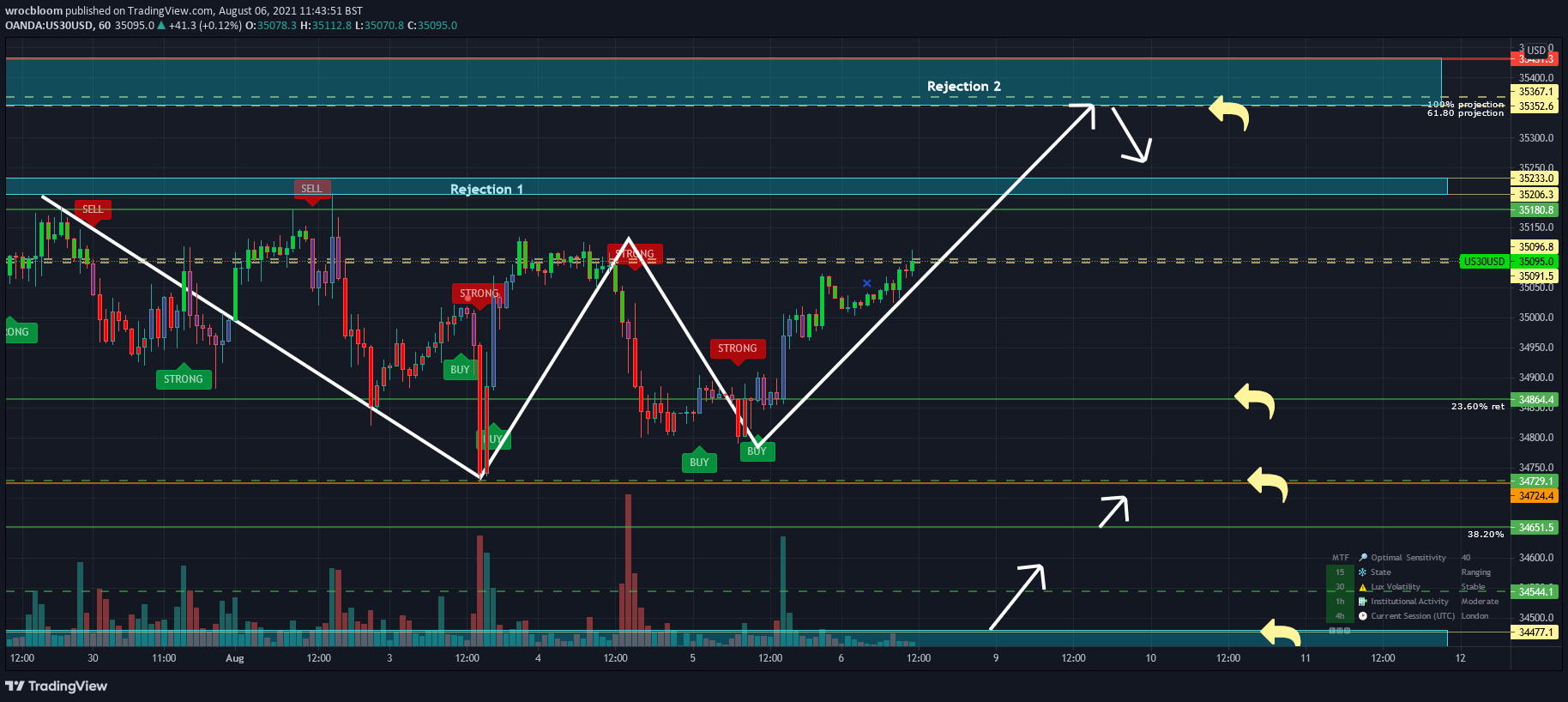
TradingView
and this is micro analysis on 5min time frame - https://www.tradingview.com/x/bRKCz0u3/
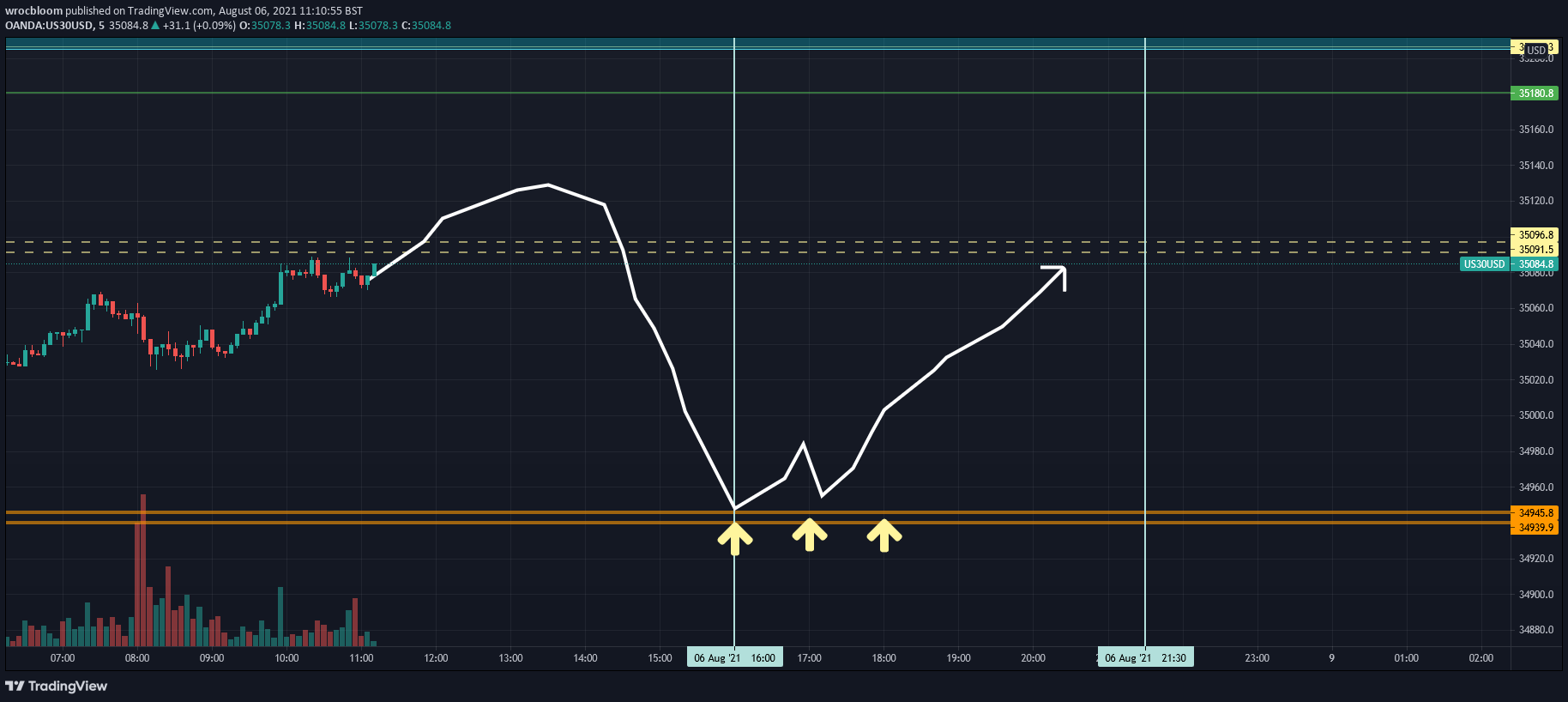
TradingView
fleet stream
Same idea here .... hopefully we se a good drop a NY open 🤘
fleet glacier
Whats the optimal settings for US30, which category in the opibot do i find it? cheers 🙂
empty solar
Optibot can do it 🙂 it's tracked under the ETF category
jade star
@hidden moss man your killing it! Congrats!
 empty solar
So so clean 😌😌😌
warped nova
Easy peasy man
empty solar
The king of Predictive ranges and RZs 🤝
 hollow pecan
@empty solar When looking at RSI for intraday trading, what time frame do u normally use/recommend?
empty solar
For intraday maybe 5m / 15 maximum are the most common
 woven shoal
i mostly trade options. its my plan to build equity to be able to equity trade. smaller account.. about 1k. But im thinking this isnt that helpful for options, right? more for buying and selling whole shares.
empty solar
Absolutely can be used; at the end of the day their job is to predict a chart's movements, no matter the asset / chart
 minor tapir
@empty solar does your reversal zone and predictive ranges strategy work on forex pairs?
empty solar
minor tapir
<@!456590452703887373> does your reversal zone and predictive ranges strategy wo...
Absoutely can be applied on anything really
minor tapir
Thanks!
 next wedge
Hi there! Quick question, on Algo Premium what does Strong stand for? Stronger buy/sell than usual?
Thanks!
thin trail
!signals
hidden moss
Learn more about our features & Signals: https://docs.luxalgo.com/lux-algo-premium-indicators/lux-algo/signals
Type Of Signals - Confirmation - Contrarian - Display
thin trail
Strong means a signal is more likely going with the trend @next wedge 🙂
 fresh grove
Question re back testing.
If today I’m looking back to April and may to see the buy and sell signals, are those signals somewhat invalid because the sensitivity settings are for today august 7?
empty solar
fresh grove
Question re back testing.
If today I’m looking back to April and may to see th...
If you're using Optibot or Optimised Dashboard settings absolutely. If you're using AP however it'll be valid
mint linden
fresh grove
Question re back testing.
If today I’m looking back to April and may to see th...
yea now that you mention i also like to know
empty solar
mint linden
or any strategy?
Have you seen any of my videos?
mint linden
yea seen some of it
empty solar
Some nice filtering ideas there 🤝
empty solar
mint linden
coz i saw most of them for crypto
They'll apply to anything 👌
fresh grove
If you're using Optibot or Optimised Dashboard settings absolutely. If you're using AP however it'll be valid
@empty solar if this is to me, thanks, but I’m not sure what you mean.
empty solar
I just use crypto as an example most of the time
empty solar
fresh grove
> If you're using Optibot or Optimised Dashboard settings absolutely. If you're ...
So you're trying to backtest optibot settings correct?
So if you're using Optibot settings that are changing daily the signals prior would not be the same as let's say; a week ago different settings would have been used there
fresh grove
empty solar
So if you're using Optibot settings that are changing daily the signals prior wo...
right, that's what I thought. thanks. ohhh, by "optibot", you mean the check box for "Auto Pilot Confirmation Signal Settings" ?
mint linden
if i on autopilot and a do a replay to 1st May, what value of sensitivity will Lux Algo be using? current sensitivty for now or sensitivity for 1st May?
empty solar
fresh grove
right, that's what I thought. thanks. ohhh, by "optibot", you mean the check b...
What I was trying to say is Autopilot can be tested in the past because that isn't calculated retrospectively
Optibot however cannot since it is calculated on past data at set intervals
empty solar
mint linden
if i on autopilot and a do a replay to 1st May, what value of sensitivity will L...
Autopilot will auto adjust your sensitivity
This page showcases every way users can adjust settings along with full explanations of how they differentiate from each other.
fresh grove
okay, that's what I was wondering. thanks.
empty solar
It's absolutely an option however read here for the difference:
This page showcases every way users can adjust settings along with full explanations of how they differentiate from each other.
fresh grove
yeah, I need to use autopilot cuz otherwise, the options are too numerous and too volatile
mint linden
okie thanks gecko
fresh grove
taht page is super helpful
 verbal yew
Hi guys, I noticed there is a small blue (x) mark next to certain candles. Can someone explain what it's used for?

 cerulean magnet
That should tell you where you can take profit, like an exit point
verbal yew
aaah I see, thanks 🙂
hidden moss
Hey everyone. Is it possible to set an alert when the price is entering the overbought or oversold cloud? I don't really understand the "enterin/exiting/I side/outside channel" options... Thanks
empty solar
Which cloud? In the oscillator?

In the alerts for the oscillator you can set for when the oscillator leaves the bands
Which are the dots
empty solar
You can use indicator templates to save layouts: https://www.tradingview.com/support/solutions/43000543048-what-are-indicator-templates-for/

TradingView
 outer plinth
Is there a way to set separate ticker signals? When I set it to one ticker it seems like it’s applying those same settings to every ticker.
empty solar
You can set alerts using different settings 🙂
They alert will use the settings open at the time of setting
outer plinth
I thought I had it set up like that at one time. I notice if I change it up on crypto then go over to my derivatives it keeps the same settings.
empty solar
Yep switching between charts will do this sadly
outer plinth
Once I set it for one it should be ok? Then go to the next a set that one? Both will stay set to its own Sensitivity and agility?
empty solar
For alerts?
outer plinth
Yes.
empty solar
Yes when you set an alert it will use the settings on your chart. You can then move to another chart and change your settings totally
It will stay set to it's original settings
outer plinth
OK thank you! I’m noticing that now. I was just flipping through charts and it stayed like the previous setting.If I have it set on one signal and go back-and-forth between charts it will keep the same. I think I wasn’t going back into my original alert. Because now everything is back to normal. Well…Not me.😂The normal is overrated! LOL!
fresh grove
WHY would signals vanish from one day to the next day?
looking at BTC and tracking the confirmation buys and sells. i went back to may and up to august 6, manually recorded the spread from a buy signal to a sell signal ... I used the "price range" tool to indicate the move from one to the other. I shared the chart with a buddy by privately publishing it.
now I have downloaded data from the chart and noticed that many of the signals that I recorded yesterday ... are not on the chart today. For example, from May 12 to May 20, I had recorded something like 8 signals (buys and sells). Now, there are 2.
and the published chart, frozen in time, confirms this ... the signals are there but are not on the live chart that I"m looking at now.
Why would that happen? It casts doubt on the ability to backtest lux algo signals if what was there yesterday is not there today. Kinda like revisionist history. Please advise....
Oh, I am using the auto feature for the settings
thin trail
!confirmed
hidden moss
A signal is confirmed only once the candle is closed. Meaning a signal could appear on your chart but is not confirmed until that candle is closed and the next candle has started.
Our automated Discord bots will never notify you on any signal until the candle has closed and confirmed it. If you're adding alerts for Lux signals in TradingView - make sure to select "Once per bar close".
fresh grove
no, I used the same settings from yesterday to today ... and the signals in question are months ago so the candles were well closed
thin trail
Once a signal is confirmed (on candle close) they don’t change. If you are on the same settings (auto-pilot is different than any other setting) & the same ticker/timeframe — it should be the same @fresh grove
fresh grove
thin trail
Once a signal is confirmed (on candle close) they don’t change. If you are on th...
that is what I expected but it is not
I have to sign off for a while ... talk with you tomorrow ... thanks for the assistance
thin trail
fresh grove
that is what I expected but it is not
Would help if you could provide the screenshots. It is 100% impossible for this to occur, so i assume you are using Auto-Pilot currently, and previously you were using a different settings parameter.
fresh grove
well .... I am not infallible and it's entirely possible that I didn't use autopilot yesterday ... but I'm 100% certain that I did ... and today, I did use autopilot .... tell you what, in a DM, I'll give you the link to the private published chart and maybe you can see something that I can't. Is a DM okay?
fresh grove
I do not want to publicly share this chart
but I'll take this conversation over to vip-support, if you prefer
 fierce orbit
Thanks @hidden moss for the newer versions, I have been a VIP for a few months and was starting to move away from using Lux as it seemed very hit and miss. But since your newer versions, I am really enjoying the system, back testing seems to have improved and it is much easier to get a good picture of markets. Keep up the good work.
thin trail
🙌 love to hear it @fierce orbit thank you!!
 halcyon crane
Got a quick question please. Do you receive alerts for confirmation buy/sell signals?
empty solar
@halcyon crane You can set your own alert on a custom asset and timeframe or use our scanners
!alerts
hidden moss
How to set up your own custom alerts in TradingView: https://docs.luxalgo.com/lux-algo-premium-indicators/setting-up-alerts-on-tradingview
Follow this guide for setting up your own custom alerts on TradingView.
 flint rose
Is it possible to create an alert when a new predictive range is formed?
empty solar
flint rose
Is it possible to create an alert when a new predictive range is formed?
It's not built in but there may be work around such as:

This may work
flint rose
empty solar
Will give that a try. Thank you!💯
 clear sigil
!alerts
hidden moss
How to set up your own custom alerts in TradingView: https://docs.luxalgo.com/lux-algo-premium-indicators/setting-up-alerts-on-tradingview
Follow this guide for setting up your own custom alerts on TradingView.
 deep axle
Hi if I need be Day Trader Make daily trades What is required to avoid account freeze
What is required to avoid account freeze 90 day
Someone said the account must be margin and the minimum amount in the account is 25000 Is this true to not freeze the account
 plain epoch
 craggy vortex
I'd only use margin on Forex, or low amounts and tight risk management on other assets. Crypto, especially bigger coins like BTC and ETH can blow your account in seconds if you're not careful
hidden moss
I use margin on Ku Coin and utilize trade view and lux to find my stop loss and take profit levels. At the tightest resistance levels. If you margin no more than the amount of liquidity that you put in, it’s a pretty safe way to do it in crypto. But you should know what your doing and how to read BtC trends.
Where you get into trouble is maxing out your margin to 10/90 of your liquidity. I’ve done that with a few hundred dollars to play around in the market and end up liquidated. But my main account I never go above 75% margin and I take profits every few days.
 earnest cove
empty solar
earnest cove
empty solar
This is just Lux Algo Premium
With reversal zones / eq cloud / trend tracer / kantan - ashi / confirmation gradient
warped nova
flash crash
 hardy knot
Hello how I can change the candle colors on kantan ashi
I can't see green and red clearly 😩
analog onyx
hardy knot
Hello how I can change the candle colors on kantan ashi
when using the confirmation simple candle color mode, candle colors can be changed from the style settings in the Bar Color section.

 tender estuary
Would to hear from successful traders whether they think the most accurate settings are autopilot, optimal sensitivity from the dashboard or from optibot. I have used all 3 and often get conflicting results. Thank you.
I’m mostly looking at 1 h tf for longer term trades.
empty solar
I'll drop this link here, I assume you want to hear from users though: https://docs.luxalgo.com/lux-algo-premium-indicators/lux-algo/signal-settings#choosing-the-right-method
This page showcases every way users can adjust settings along with full explanations of how they differentiate from each other.
 magic topaz
tender estuary
Would to hear from successful traders whether they think the most accurate setti...
magic topaz
tender estuary
Would to hear from successful traders whether they think the most accurate setti...
I tend to use optibot sensitivity on 4h TF and have pretty great results. Trading mostly on BTC, ETH, ADA.
That being said the signals are not my entries just my confluence
tender estuary
magic topaz
I tend to use optibot sensitivity on 4h TF and have pretty great results. Tradin...
Thank you. I noticed w autopilot that the signals are very sluggish meaning slow to change even when they should.
empty solar
Normally the reason for this is AP adjusts itself to the market. If a market is ranging the sensitivity will be pumped up to avoid a lot of false signals in a ranging market. Then because the sens is higher a breakout of this ranging market can mean it takes longer to signal
tender estuary
empty solar
Normally the reason for this is AP adjusts itself to the market. If a market is ...
Thank you. In fact I was referring to a ranging market environment so what you are saying makes sense.
empty solar
👌 and of course they struggle in a ranging market as it is
tender estuary
Then how does the dashboard setting work, ie what is its basis?
empty solar
The optimised sensitivity is basically a mini optibot but won't test for agility and tests over a lower range of candles
tender estuary
Optibot >autopilot >optimized. Would you agree w this assessment of reliability?
empty solar
It's not too easy to compare AP and the other methods since they differ wildly however over 2000 bars Optibot is better than optimized dashboard
tender estuary
Would be nice if there was an auto-optibot setting. Currently very cumbersome interface but that is what I will use.
empty solar
Sadly it's not possible to integrate into TradingView since it's quite intensive
tender estuary
Would still like to hear from other successful traders which settings they prefer and what strategies they use. Thank you to any who reply.
Will post in crypto chat as well.
 tough fog
Hey guys, first time using lux algo and I'm very excited to (hopefully make some money)!
I'm very active and can stare at charts for hours, normally I trade on the 15min chart, scalping alts 2-10% profits at a time. Should I be changing the settings on lux algo or leave as is?
empty solar
tough fog
Hey guys, first time using lux algo and I'm very excited to (hopefully make some...
Welcome ☺️ Heres our page explaining the approaches to optimisation: https://docs.luxalgo.com/lux-algo-premium-indicators/lux-algo/signal-settings#choosing-the-right-method
This page showcases every way users can adjust settings along with full explanations of how they differentiate from each other.
tough fog
@empty solar thank you! ☺️
 wraith locust
Is there a settings that allow lux algo to automatically change sensitivity to recommended?
empty solar
There isn't currently I'm afraid, it's not possible to integrate at the moment
AutoPilot will give an estimate and try to self adapt
wraith locust
Where can i set autopilot?
empty solar
In the settings its one of the first inputs
This page showcases every way users can adjust settings along with full explanations of how they differentiate from each other.
 empty solar
🥰🥰🥰 Lux loves you too @warped nova
hidden moss
warped nova
Do I still need to say it after all this time?
💯💯💯
spice jacinth
@hidden moss whats timeframe do you generally trade with?
hidden moss
spice jacinth
<@456226577798135808> whats timeframe do you generally trade with?
Heyy! I usually do multi timeframe I don’t really stick to one timeframe to be honest
warped nova
Same here, my screen has 1 min, 5 min, and 15 min
but I'm a scalper
so very quick trades
spice jacinth
hidden moss
Heyy! I usually do multi timeframe I don’t really stick to one timeframe to be h...
for spotting trends?
spice jacinth
warped nova
so very quick trades
Yea I try to stay away from 1 or even 5 min
hidden moss
spice jacinth
for spotting trends?
Yep
hidden moss
My thoughts on today: some people made millions today on gold and some lost millions 😅😅
 wild siren
Stock Market was a little slow today but still manage to make some $GNOG and $WORX thanks LUX
warped nova
wild siren
Stock Market was a little slow today but still manage to make some $GNOG and $WO...
They prefer it when you tell them you Love them
 vale dragon
When they start making me decent money, I might get affectionate with them. Might.
However, the love of money is the root of all evil.🤓
warped nova
True dat
slim crystal
wild siren
Stock Market was a little slow today but still manage to make some $GNOG and $WO...
I wish someone send me alert on those two lol
 spice yoke
wow managed to sent buy / sell order from trading View to CryptoHopper 🙂
warped nova
Can't win them all, once you see rejection after rejection in the reversal zone and predictive range good chance downward action going to continue so take the loss
 warped nova
@empty solarI am becoming more and more of a fan on the Xs

they got me back in green for the day
I think the signals are my least favorite thing
empty solar
The exits are very nice 😉
 white marten
iron geyser
white marten
iron geyser

warped nova
@empty solarDoes the sensitivity and agility settings on the signals affect the Xs? I'm assuming so
since the Xs are based on the signals right?
empty solar
It will yep 👌
 scarlet plover
where can i get a minute by minute strat? or its almost imposible to profit there?
empty solar
A minute by minute strat?
Really low times are very hard to trade due to frictional costs
scarlet plover
@empty solar yeah i guess what i meant is if its posible to find the best entry point at the 1 min based on the 15 or 5 min
clear sigil
you can certainly. some people trade those time frames using those charts. also need to know if its an uptrend/downtrend in the 4h and daily ect, called knowing your environment
you can try to catch bottoms or tops, or somewhere between, looking at things like levels the price has bounced at before. one thing that sucks is price can reverse, so even if your right, it can start to look like your wrong. and you might take a loss, only to see you just had to wait to be in profit
^^using lux algo, one of my favorite things is the auto resistance lines. goto setting, s/r mode, predictive ranges. makes it quicker to see places the price is likely to bounce. ive only had lux for a few days
 solar mist
what is the settting in live demo 15 min time frame
empty solar
solar mist
what is the settting in live demo 15 min time frame
You'll find this in the description
empty solar
Of a YouTube video?
 unkempt bridge
Yes
empty solar
It's underneath the video
unkempt bridge
All Lux Algo features enabled: Kantan-Ashi candles, Reversal Zones, EQ Cloud, Candle Coloring = None, Signal Mode = Default, and 5 Sensitivity + 32 Agility.
Ah..Sorry about that
Thanks
 distant hatch
How can I get accuracy
empty solar
Accuracy of what?
Those would be the work of Mr Grover mainly with us pitching in ideas and proof reads
You like our ideas?
Much appreciated, we will definitely be working on more ideas in the near future. Once we've made a little library I think that's a great idea 🤝
Will 100% be doing something along these lines in the future, very happy they were good reads for you ☺️
Will do 😉
 rich hamlet
Seems like a bit of support was found. Waiting for a more clear picture before I hop back into my MATIC trade
warped nova
Good times
 warped nova
yep, took a small position at open, closed it at the bounce, took a larger position at the 2nd rejection, closed it at predictive range
empty solar
The ol' one two 🤝
warped nova
and three, went long at predictive range, when I see the reversal zones start to turn down or up like the green zone is doing now I tend to think it isn't going to go to the predictive range so take profit
 astral current
What settings should I use with the lux premium statistics and lux oscillator premium when using the 5m chart
are the optibot settings more accurate than autopilot?
empty solar
You can use any settings you wish for statistics there's not really guidelines there. Regarding the best settings: https://docs.luxalgo.com/lux-algo-premium-indicators/lux-algo/signal-settings#choosing-the-right-method
This page showcases every way users can adjust settings along with full explanations of how they differentiate from each other.
astral current
empty solar
You can use any settings you wish for statistics there's not really guidelines t...
what about the agility settings?
empty solar
You can leave that if you're not using Optibot 🙂
astral current
Sounds good. Thank you. How can I set up the candlesticks to look like in this video of yours? I can't seem to find it as an option on the indicator
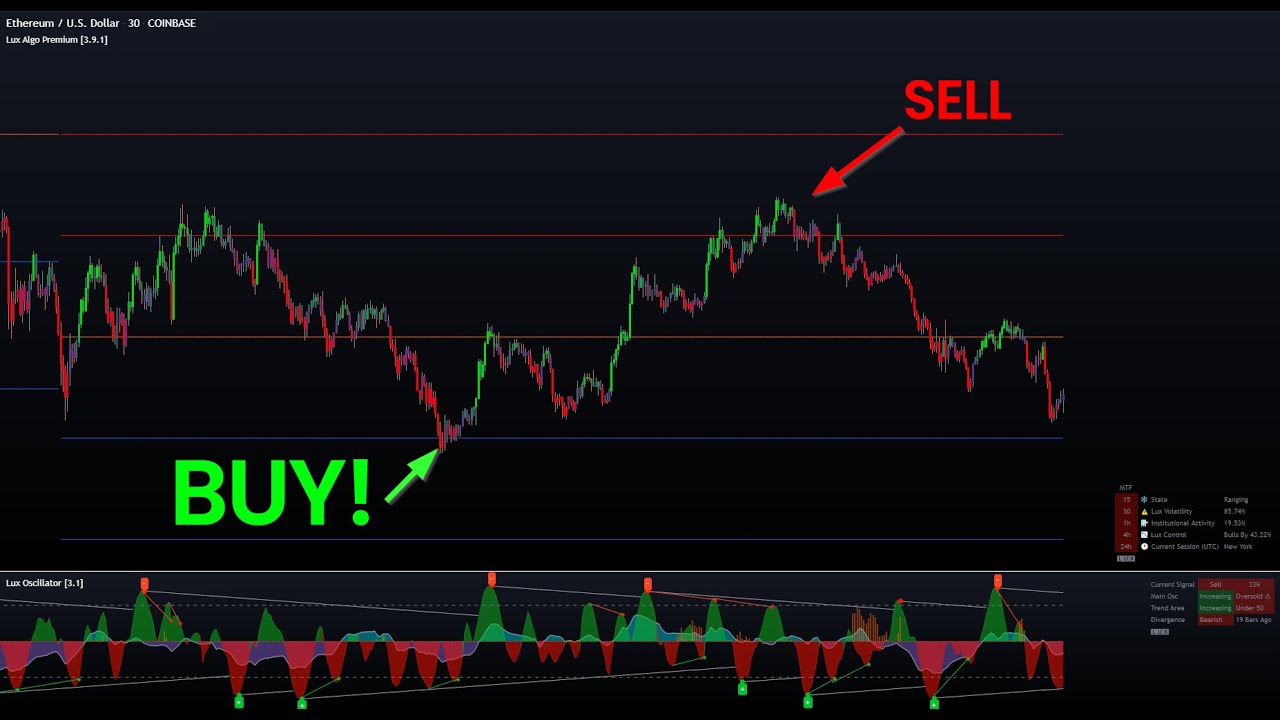
This video focuses on 2 of my personal favourite features within Lux, the predictive ranges and oscillator. I cover why they are important and a strategy whereby the user can identify potential reversals and retracements in the market. This can apply to any asset.
Get access to Lux Algo indicators: https://luxalgo.com/
Lux Algo features used i...
thin trail
astral current
Sounds good. Thank you. How can I set up the candlesticks to look like in this v...
This is the default Confirmation Simple, just has the borders disabled
Go to chart settings —> Symbol —> Turn off “borders”
astral current
thin trail
This is the default Confirmation Simple, just has the borders disabled
Thanks. It's definitely looking better and removes any false looking candles.
warped nova
@thin trailHey how come Optibot updated settings came out yesterday around 11 and today around 12?
manic kettle
Can we change the kantan-ashi candles to what we desire?
empty solar
What do you mean by this?
 spring moon
Has anyone changed the forecast horizon settings of the Statistics Premium at all?
 marsh ruin
Hello
manic kettle
empty solar
What do you mean by this?
Changing the colors. I’d like to see both but I’d like to have the regular candles completely different color
marsh ruin
Hello everyone
hidden moss
Hi
empty solar
marsh ruin
Hello everyone
You want to see 2 candle types?
vale dragon
Using yesterday's Optibot for NASDAQ-not too shabby.

 lyric valley
Hi guys are there any scans we can use? To find potential trades,
empty solar
lyric valley
Hi guys are there any scans we can use? To find potential trades,
There are scanner channels ☺️ I see you're opted into all of those
lyric valley
Like the strong buys on the daily?
empty solar
Yep the scanner channels should show that 👍
lyric valley
empty solar
There are scanner channels ☺️ I see you're opted into all of those
Oh wow thank you haha
empty solar
 empty solar
lyric valley
Oh wow thank you haha
empty solar
lyric valley
Oh wow thank you haha
No worries 🤝
lyric valley
Hi. Is there anyway to have the scanners that to the daily time frame? Or are they all preset to those time frames only?
empty solar
They will be preset to all the major timeframes currently so you can't filter
But you can set your own custom alerts:
!alerts
hidden moss
How to set up your own custom alerts in TradingView: https://docs.luxalgo.com/lux-algo-premium-indicators/setting-up-alerts-on-tradingview
Follow this guide for setting up your own custom alerts on TradingView.
hidden moss
hidden moss
Like this X
Ok guys I asked a few days ago about the x here. What about an X on the underside of a wick?
Same thing? Exit? or if it's on the bottom of a wick is isn't saying get on board before it goes up?
empty solar
That's still an exit signal 🙂
hidden moss
Ok thanks Gecko
Saw an X on ETH 4h yesterday and managed to move to USDC
before any of this crashing

wanted to make sure this next X on the 1h im seeing isn't telling me to get back in
empty solar
Ah you got out just in time 😉
warped nova
TSLA beautiful buy on the touch of 15 min predictive range, yellow line, took some patience to get there

also had 5 minute sell signal with X
 vale dragon
@empty solar
All you have to do is make every day look like this and we're good. 🤓
That was from yesterday's Opti but I noticed today's was close to the same.
 empty solar
Clean ☺️☺️☺️
 frosty briar
HOW DO I ACTIVATE THESE INDICATORS ON MY TRADING VIEW?????????!!!!!!!!
 empty solar
Heart break.
vale dragon
too bad that was fake money
vale dragon
So I just watched the latest video with the 5/26 settins and put it on my 5 min NASDAQ and....
Wait...whuuutttt t ffffff

10 min

30 mins?
Is there a max time frame its effective?

have to be cautious where you measure as it's not on these bars

leave both and change colors on the default candles to measure better


 empty solar
😄
It's basically a classic oscillator "sell"
Means the momentum has left the red zone
and is on the way down
empty solar
A pleasure 🙂
 merry beacon
@empty solar thx for the New Video! Super Good ! 1 Question - My candles are lila... your candles are in 2 different Greens of Reds - Settings ?
empty solar
If you go to candle coloring and select none it should look the same 🙂
(when using taki ashi)
merry beacon
Thx... too Easy 😂. Autopilot ? Or manuel Sensibility ?
empty solar
Now that is up to you 🙂 You can read more here regarding that decision: https://docs.luxalgo.com/lux-algo-premium-indicators/lux-algo/signal-settings#choosing-the-right-method 😄
This page showcases every way users can adjust settings along with full explanations of how they differentiate from each other.
merry beacon
From My Perspektive a higher sensibility Looks better- i will Try - Last question - where can i change the Colour of Taki ashi candles?
Big thx for Support
empty solar
Ah so you cannot change the color except by using the candle color mode found within the settings 🙂
So you can use none, confirmation simple or gradient
merry beacon
👍🏻
vale dragon
Look at that bounce 2x

 analog chasm
hey all, newbie here, how do I know what are the supported tokens?
thin trail
!markets
hidden moss
Lux Algo works on any market & timeframe internationally including stocks, crypto, indices, forex, futures and commodities on all timeframes including 1m, 5m, 30m, 1H, 4H, 1D, 1W, etc. You can utilize our system & signals for scalping, swing trading, or even trading options as well.
vale dragon
I'm testing the 5/26 KA candles today that was shown on the latest video. Let's see what happens.

Will the Optibot behave today? Or be lazy again? Stay tuned. 🤣
vale dragon
well the settings I use don't need him anyway for now
Do you know what timeframes that strat is based on?
5-10 looks good
empty solar
Which strategy the KA one?
vale dragon
yeah the 5 min scalp on the latest video
empty solar
Yeah was made for the 5m but really should adapt to anything 👍
vale dragon
Well this is typical.
The day I start not testing it, it posts in time.
Coinspiracy
 empty solar
Hahahahaha it was force run 😎
vale dragon
Trying something new for me.
Trade on 5, watch 10,15 to see if I really need to exit or if the trend is holding, ignore the 5 min exit until I need to exit.
Looks like the oscillator may help as well.

or maybe enter on 5, exit on 10 or 15?
but that could be tricky
actually the entry prices on all 3 are about the same

 empty solar
Easy as 🥧🍰
warped nova
easy as pie as long as you have discipline and control emotions. That's what trading is all about EQ not IQ. I let Lux handle the IQ part
spice jacinth
warped nova
TSLA top one, AAPL bottom one
what timeframe are those screens?
 vale dragon
This is interesting. I traded on the 5, but not sure what's next.
However, I just now saw an exit on 15 with 13 min left.

If the 5 goes back up, there won't be a buy signal on 5
actually on any. Maybe this is where the oscillator comes in handy
vale dragon
Almost a double confirmation. The oscillators are red also.
Apologies for the spam, but just sharing ideas of how to use this and hoping others have advice. Good advice, that is. 🤓

So far 15 mins looks like the better time
Then again, 3 mins looks sweet. That Buy was about 195 pips to exit
 merry beacon
@empty solar - is it a Good idea - your Taki strategy in combonation with Inst. Activity ? 🚀
 empty solar
Oh yes that's a nice idea to add 🙂
vale dragon
Did someone say Teriyaki? 😋
empty solar
vale dragon
Did someone say Teriyaki? 😋
hahahahah I think you need to go and eat 😉
thin trail
Teriyaki Candles, coming soon
vale dragon
Works for me
vale dragon
Here Lux shows exit, but the oscillator is still widening so I'm ignoring the exit

 fluid hornet
Boys
What's a good strategy to place alerts on exits
Because it's been recurring that I enter a trade and miss out selling on the peak and end up with scraps for profits
 haughty magnet
awesome!
 jade smelt
vale dragon
Here Lux shows exit, but the oscillator is still widening so I'm ignoring the ex...
jade smelt
vale dragon
Here Lux shows exit, but the oscillator is still widening so I'm ignoring the ex...
You have the settings shap on the 5m, scalping perfection 👌
vale dragon
Its 5/26 from the recent video
 pseudo isle
What’s up guys! Would any of you know the best settings for 5m n 15m on indices US30 and Nas100 etc.. thanks in advance!!
hidden moss
Everything you need to know on optimizing signal settings: https://docs.luxalgo.com/lux-algo-premium-indicators/lux-algo/signal-settings
This page showcases every way users can adjust settings along with full explanations of how they differentiate from each other.
pseudo isle
thin trail
Hey <@!818948035115089962> see here
Thanks!!
 wild cedar
What time zone is this server on?
vale dragon
Its Lux
 hard anvil
But I have 3 indicators from lux which is not like that?
 empty solar
His oscillator is legacy mode 👍
 dawn oak
What are these indicators called

 marsh viper
That's a VPVR (visible price range)
But that's not part of lux. You can add that in the indicator list of trading view
dawn oak
@marsh viper thank you😀
hidden moss
Can anyone guide me settings for US30?
empty solar
You can find optibot settings for this 👍 (if you've not already tried them).
hidden moss
I checked before and i just checked again. I cant find US30 there. May be you can forward me
empty solar
It's tracked using the ETF ☺️
hidden moss
empty solar
It's tracked using the ETF ☺️
Please link or date. I checked ETF but there is no US30 😦
Sorry to bother you in advance
empty solar
hidden moss
Please link or date. I checked ETF but there is no US30 😦
Sorry to bother you ...
DIA 👌☺️
 harsh oyster
hello guys, i am just new here ,can anybody guide me how you guys uses this indicator effectively, what are the strategeis you guys follow for good resutls with this indicator
empty solar
harsh oyster
hello guys, i am just new here ,can anybody guide me how you guys uses this indi...
Welcome ☺️
YouTube
Sharing trading strategies that I've developed using Lux Algo + more.
(Not actually a gecko.)
On my channel I show some nice strategies you can take and include in your trading 🤝
harsh oyster
empty solar
On my channel I show some nice strategies you can take and include in your tradi...
thnx man
 undone glen
hey guys, new to trading. is there a reason why I can't trade futures in Australia on binance??
 silk dew
Probably due to legal reasons
Binance is facing a lot of scrutiny from governments right now
undone glen
ahhh ok well so its probably a ban on Australia entirely. Should I be looking to find a way around it or its not worth it? lol
hardy knot
vale dragon
Here Lux shows exit, but the oscillator is still widening so I'm ignoring the ex...
That look great I try to trade nas with algo can you share how you work with it
vale dragon
Its in the latest video.
 rare wing
undone glen
ahhh ok well so its probably a ban on Australia entirely. Should I be looking to...
rare wing
undone glen
ahhh ok well so its probably a ban on Australia entirely. Should I be looking to...
i’d be careful with it
just avoid imo
hidden moss
undone glen
hey guys, new to trading. is there a reason why I can't trade futures in Austral...
I live in Canada and it also got banned (in part of Canada) because of margin trading. Moved everything into crypto.com for now.
 magic topaz
undone glen
hey guys, new to trading. is there a reason why I can't trade futures in Austral...
magic topaz
undone glen
hey guys, new to trading. is there a reason why I can't trade futures in Austral...
Not sure what you mean? I regularly trade futures on Binance here? Are you in desktop or mobile version
undone glen
@magic topaz Desktop - I get this message. "you cannot use futures trading in the country your IP is located."
magic topaz
Are you using a VPN?
@undone glen
Also when are you getting that message? As you try to buy or when you open the futures tab @undone glen
undone glen
magic topaz
Also when are you getting that message? As you try to buy or when you open the f...
When clicking to open a futures account, I get that message.
magic topaz
thats super weird man, i would contact them asap. or just use phemex or bybit
but i have no problem trading futures so it should be the same for you
undone glen
ahhh weird. where are you located? sydney?
magic topaz
yep
 blazing magnet
anyone know how this pivot indicator works? can’t get the jist of it
empty solar
It will attempt to forecast the location of the next pivot 🤝

For example here (the polarity is switched) you see the green turn to red meaning a new pivot may occur
And indeed it appears to be a pivot
blazing magnet
sorry i was on about the free indicator one hahaha, the pivot high/low analysis &forecast one
 kind slate
Hi! What are the Best settings for BTC/ Usdt?
empty solar
blazing magnet
sorry i was on about the free indicator one hahaha, the pivot high/low analysis ...
Oh that just will label pivot points, very generic stuff
empty solar
kind slate
Hi! What are the Best settings for BTC/ Usdt?
Optibot supports that but read here for more info: https://docs.luxalgo.com/lux-algo-premium-indicators/lux-algo/signal-settings#choosing-the-right-method 🤝
This page showcases every way users can adjust settings along with full explanations of how they differentiate from each other.
 vale dragon
At $200 now-I don't wanna see that exit yet BUT I'll let it do what its supposed to. 👍


 woeful falcon
Tf of your ETH bro?
vale dragon
1 hr
Optibot setting
@empty solar
Based on the Oscillator should I exit/ enter again or let the exit be the end until later?
thin trail
vale dragon
<@456590452703887373>
Based on the Oscillator should I exit/ enter again or le...
Depends - it’s best to find confluence for exits, or use oscillator to help spotting trends & then reversal zones for example to take profit
vale dragon
Its automated so I can't do all of that anyway. I'll just let it do what it does. 🤓
Just took $196 profit in a few hours. 👍
Not much but i want to keep my hands off. When I touch it, its not good.
 unique nacelle
How do you get the red and green cloud on the top screen with the candles
unique nacelle
Perfect ! I just added it thanks ! Today is my first day
 agile yarrow
you wont be dissapointed
unique nacelle
Really ?
agile yarrow
i reccomend using it with the fake cipher b by vumanchu so u can dicpiher the false posts lux does
not false per say but as if it posted a strong by by cipher b showed a momentum wave waiving it out
it really helps picking the right signals it posts
unique nacelle
??
 agile yarrow
lololol
search
cipher b
itll be listed as cipher b with divergence
by vumanchu
as the creator

Here an example
Lux posted a sell. But cipher b underneath shows a bullish trigger wave which I would use to cancel out the lux sell and wait for lux to post a buy
unique nacelle
Oooh this right here ?
 agile yarrow
Yup
unique nacelle
Ahhh and lux did post a buy shortly after
agile yarrow
Go to market cipher trading . Com and watch there tutorial on how to use the indicator it's nor the true indicator by market cipher but it the same damn shit and not trying to shill market cipher but together with lux you'll be un stopable
Correct my friend
unique nacelle
Yeah that was going to be my next question ! I had no idea on how to read that but I’ll be looking at that tonight ! I’m pretty excited now !
agile yarrow
There are both SUPER technical indicators , lux by far is more powerful , I use cipher b strictly as confluence to correct lux theory
watch the basic strategy yes
the only thing u need to know really is the anchor wave to trigger wave and the green money flow wave in the middle
noi
not that one
thats dbsi
thats dual band strength indec

Dbsi is the numbers above and below when numbers abive are stronger its bearish and when the numbers on the bottom are higher then the top its bullish
unique nacelle
Nice!! I’ll be watching it … can’t wait to take my first trade using this !
agile yarrow
just keep it cool, dont chase the trades, let the trades come to you, there will alwatys be one either later that day or the next, its best to sit on the sidelines and be correct then to be in a trade and not know, if you ever need help with lux set up feel free to @ me on here and ill help in anyway i can my man, happy trading
unique nacelle
Thanh you !! I definitely will !
 deft swift
thin trail
deft swift
thin trail
Hey @deft swift Welcome!
Full guides here: https://docs.luxalgo.com/lux-algo-premium-indicators/lux-algo
Features - Main Settings - Adjusting Settings - Style Settings
 silver hound
agile yarrow
Lux posted a sell. But cipher b underneath shows a bullish trigger wave which I ...
silver hound
agile yarrow
Lux posted a sell. But cipher b underneath shows a bullish trigger wave which I ...
Where can I get the indicator
harsh oyster
since 2 days I have purchased this indicator, I am unable to use this indicator effectively definitely my fault, anyone can share a strategy for scalping or any type of trading which have a good win rate, will be really helpful for me, as I am a new trader so sorry for any silly question
empty solar
harsh oyster
since 2 days I have purchased this indicator, I am unable to use this indicator ...
YouTube
Sharing trading strategies that I've developed using Lux Algo + more.
(Not actually a gecko.)
Here is my channel with strategy ideas 🙂
hidden moss
I hope we all have a great week🤞
 west citrus
just started out, i wish everyone a great start into the week and successful trading
 vale dragon
@empty solar
Dude! Optibot was updated 30 mins ago!! Game on. 🥳
empty solar
😎😎😎
vale dragon
ok---the 5 min was. 1 HR just did. 👍
vale dragon
@empty solar
As soon as I changed to the new Optibot settings, I placed a short as that alert popped up from before. I wasn't sure if that was the right ting to do, but it was about the same price anyway.
 empty solar
Seems reasonable ☺️👏
vale dragon
I've been screwing up too comparing the HA candle alerts to the standard thinking HA looked better.
If I update the optibot settings, everything prior won't be as it was at the time it used the previous settings-duh. So I switched back to standard, automated and see what happens.
I was looking backwards with current settings and seeing a mess-dummy me
 tawdry moat
vale dragon
<@!456590452703887373>
As soon as I changed to the new Optibot settings, I pla...
tawdry moat
vale dragon
<@!456590452703887373>
As soon as I changed to the new Optibot settings, I pla...
What is the value of those MA?
vale dragon
Just a 9/21 ema, but I don't trade off them. Just visual, maybe a type of confirmation
maybe used for a re entry after a TP
then again it's safer just to stick with Lux than and ignore fomo-a powerful emotion
 vale dragon
That's why I like automated-but my biggest enemy is me, as I keep touching crap and guessing on re-entry
vale dragon
empty solar
Seems reasonable ☺️👏
👍
 vale dragon
NASDAQ, both at the same time

still hasn't made up its mind yet lol

Ok...now we're cooking with gas
 vale dragon
 empty solar
He's in the 🟩🟩
vale dragon
Optibot settings really come in hand when they POST ON TIME 🤣
vale dragon
empty solar
He's in the 🟩🟩
Fake $$$
Looking at this, ETH is going to drop more-in theory


 manic kettle
Question: @empty solar I want to automate some trades based on conditions with the lux alto indicator. What is the best service used for this?
empty solar
I'm really not too familiar with automation platforms and their perks; I've heard a lot about 3commas / alertatron
vale dragon
3Commas, Alertatron, Cornix are a few.
 small plaza
empty solar
https://docs.luxalgo.com/lux-algo-premium-indicators/lux-algo/signals#type-of-si...
small plaza
empty solar
https://docs.luxalgo.com/lux-algo-premium-indicators/lux-algo/signals#type-of-si...
thank you! just bought this today!
empty solar
Welcome 😄
 cursive ember
hello
I just joined lux algo 😄
from your guys trading experience what do u guys think of lux ?
empty solar
Welcome 🙂
 loud fog
cursive ember
hello
loud fog
cursive ember
hello
signals does not make sense
empty solar
What's confusing?
loud fog
empty solar
What's confusing?
I want the signals to catch the very bottom and th very top. What settings should i use for that on btcusd 5 min?
empty solar
Then you absolutely do not want to use Confirmation signals; they are trend based
I made a specific video on btcusd 5m
Have you seen this? It catches tops and bottoms very nicely

In this video I showcase how to trade the 5m with Lux Algo and increase your profits and chances of identifying reversals. Make sure to leave a like & subscribe for more trading strategy videos!
Get access to Lux Algo indicators: https://luxalgo.com
Lux Algo features used in this strategy:
Reversal Zones: https://docs.luxalgo.com/lux-algo-pre...
loud fog
empty solar
Then you absolutely do not want to use Confirmation signals; they are trend base...
So when should I use confirmation signals?
empty solar
To confirm a trend direction
That is their purpose 🙂
Reversal zones, Predictive ranges, contrarian signals all specialise in TOP/Bottom pinpointing
Maybe some Pivot Oscillator action too with one of the classic classic/advanced oscillator
I'd suggest giving my vid a watch 🙂
loud fog
Cant find predictive ranges
loud fog
and what are the perfect settings for predicted ranges
empty solar
Perfect settings are not really a thing in trading because that depends on what you're using them for. In the video I show what I recommend using and what I like
But you may like something totally different
It's similar to asking for the perfect Moving Average, as you know there are hundreds of different responses 🙂


 safe harbor
What does it mean when the algo shows the highlighted purple candles?
vale dragon
Now if the opti settings keep coming in ON TIME (lol), I'll stick with this the entire week to see what happens. If it's mostly good, I'll go live next week.
exit showing now
safe harbor
Great trade!!!
vale dragon
its a demo trade but stilll
Also, don't trade until just before/after 10 am.est
And on this buy, I went with the legacy below-it got in a little earlier
safe harbor
What’s the red and green zone setting?
vale dragon
I noticed how the exit shows as the oscillator has maxxed-in sync

Closed

Now...can we make every day like this please?
 empty solar
safe harbor
What’s the red and green zone setting?
empty solar
safe harbor
What’s the red and green zone setting?
The reversal zones 🙂
id suggest reading over our docs to see everything we offer 😄
!docs
hidden moss
Lux Algo Full Documentation & educational resources: https://docs.luxalgo.com
safe harbor
vale dragon
What indicators do you have on?
vale dragon
If I were new, I would watch every video 1st-98.237% of what is asked is located there.
empty solar
vale dragon
If I were new, I would watch every video 1st-98.237% of what is asked is located...
^ 😄
kind slate
vale dragon
Now...can we make every day like this please?
The bogdanoff brothers won’t let u

warped nova
man, this market. 1% dip is quickly bought up to ATHs
insane
if you short be real real quick
vale dragon
NASDAQ 5 min chart Demo $$$
 warped nova
vale dragon
NASDAQ 5 min chart Demo $$$
warped nova
vale dragon
NASDAQ 5 min chart Demo $$$
when you going to do real money"
vale dragon
If I can get multiple consecutive days in profit-next week.
This morning the optibot settings posted early, so that helped
silver hound
@hidden moss hey mate what tf are you trading?
west citrus
vale dragon
If I can get multiple consecutive days in profit-next week.
This morning the op...
don't hurry and take your time, looks very good so far, good luck
vale dragon
I know some days are nowhere close to that and it has nothing to do with the setup. Just a sucky day
 golden lotus
Does optibot sent daily?
vale dragon
For those trading currencies, is this considered a good profit? I'm not sure how currencies work yet.
 tawdry moat
vale dragon
For those trading currencies, is this considered a good profit? I'm not sure how...
tawdry moat
vale dragon
For those trading currencies, is this considered a good profit? I'm not sure how...
Are you using the optibot settings for lux?
dawn oak
@empty solar can we get optibot on 1week
thin trail
 kind mantle
is there any swing trading focused chat?
kind mantle
is there any swing trading focused chat?
Welcome!
Just market specific channels @kind mantle
kind mantle
thin trail
Just market specific channels <@814343266195210240>
ok thanks 😎 👍
silver hound
Is ha candles better than normal candles to use with lux?
empty solar
You can use both to equal effect ☺️ HA of course can be smoother for trend trading
vale dragon
Won't they alert at different prices? I thought standard was better with Lux.
I do know with HA sometimes there's fewer quick flips. I also like to watch HA candles to see if price is going to continue or if its about to reverse.
vale dragon
So would you say standard is recommended?
I've also seen scripts out where the HA caculations are done in the script somehow.
empty solar
No real recommended ones, really down to preferred taste. If a user understands HA then it's up to them 👌
Just a lot of folk are mislead believing it's truly the close
vale dragon
Well, looking at this, this seems pretty safe.

Instead of 2nd guessing exits or the possibility of missing out on a 2nd exit, maybe play it safe and take what it gives
hidden moss
silver hound
<@456226577798135808> hey mate what tf are you trading?
5m most of the times
silver hound
hidden moss
5m most of the times
Thanks mate any tips?
hidden moss
silver hound
Thanks mate any tips?
Be careful of news
silver hound
hidden moss
Be careful of news
Do you change settings?
hidden moss
silver hound
Do you change settings?
When I have lux on the charts I don’t modify the settings, I keep them at default
silver hound
hidden moss
When I have lux on the charts I don’t modify the settings, I keep them at defaul...
Ah so you don’t always use lux?
silver hound
hidden moss
When I have lux on the charts I don’t modify the settings, I keep them at defaul...
I’ve been using lux for nearly 2 months but can’t seem to get consistent. I’ve tried to add you on here so I could message you
vale dragon
@empty solar
Optimizer disappointing me this morning. After I bragged about it yesterday.☹️
empty solar
vale dragon
<@!456590452703887373>
Optimizer disappointing me this morning. After I bragge...
Ahhhhhh
On it 😔
vale dragon
ohh so it's YOUR fault lol....or not your fault but you have to kick it in the butt when it doesn't want to work.
empty solar
It's like whacking an old TV
vale dragon
lol rabbit ears and aluminum foil. Showing your age now. The youngest in the family was designated channel changer-me.
vale dragon
We got 3 channels on a B&W and 4 if it rained. 🤣
safe harbor
What’s your next move on the NQ Master?
safe harbor
Hell yes! Let’s ride!
vale dragon
never trade before 10 am-all the overnight orders clear between 9:30 and 10. That's why you see insanity lol
Using yesterday's settings until the new ones post
safe harbor
You waiting for a buy or going to ape in short?
vale dragon
its not 10 am yet
looks like it may be a buy but I've learned to wait

Since the new optibot isn't in yet, I may go based on the legacy on the bottom
I left my demo trade open overnight and lost a fake $1200-ooops lol
vale dragon
so far legacy is wrong-it alerted buy and immediately dropped
But I'll leave it-it's only demo and I suspect it will go back up
safe harbor
Waiting for a buy confirm
safe harbor
Waiting for a buy down 165 already
vale dragon
I'm seeing a sell exit so maybe soon
safe harbor
Nice! Mine doesn’t have a sell exit yet but it looks bottomish
safe harbor
What’s the exit at?