#bl touch
160 messages · Page 1 of 1 (latest)
 molten furnace
 hard wasp
yes i did
molten furnace
Hmm you saved the z offset ?
hard wasp
Yes
hard wasp
how ? 😄 i am sorry i am new in this
molten furnace
do you have Zplus a number above 0 behind M420 S1? then it is on
 honest haven
by what means did you set the z offset? how did you determine the number?
hard wasp
honest haven
by what means did you set the z offset? how did you determine the number?
I changed Z then i put numbers to off set and then i home it and i put Z to 0 find out if its on bed
hard wasp
hard wasp
I changed Z then i put numbers to off set and then i home it and i put Z to 0 fi...
Now i tried wizzard off set didnt help
honest haven
Attach gcode for a print that isn't working.
hard wasp
No it prints but it prints bad like somewhere is too high and somewhere is too low
honest haven
yeah, please attach some gcode that does this
 crimson bramble
There is an issue related to slighty twisted rails on the x-axis and probes with offset in the x-axis which could explain this. But I dont know if that applies to your printer
crimson bramble
Could you share please your configuration for M851?
hard wasp
crimson bramble
Could you share please your configuration for M851?
you mean this files ?
 hard wasp
I uploaded this filmware that have fix for buggy screen with bltouch

and in info it says marlin so i think yes
crimson bramble
Can you send the Link for the firmeware?
hard wasp
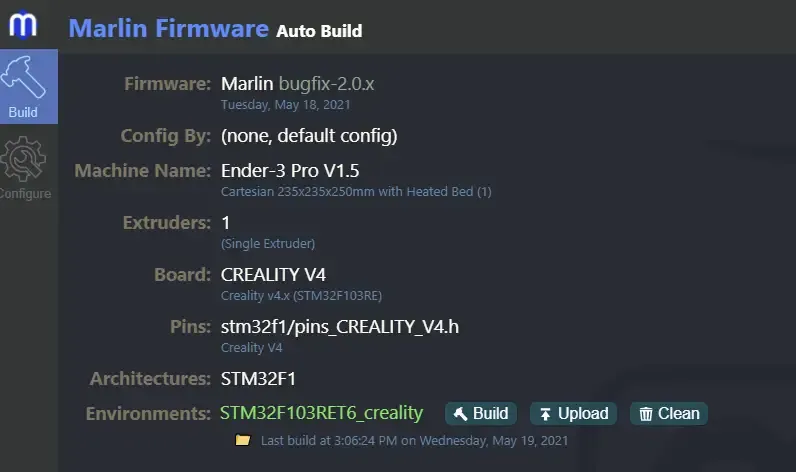
Here are builds of the Marlin firmware for specified printers. I plan on upgrading these as new version of Marlin are released. If you guys…
crimson bramble
You have access to a terminal to enter GCode?
hard wasp
Sorry i feel stupid 😄 how u mean it ?
crimson bramble
Dont feel stupid please 😉
Like you have running Octoprint or Pronterface on it?
A connected Computer, like a PC or a SBC
hard wasp
No i have not
crimson bramble
Ok
hard wasp
I have seen something that Octoprint can make mesh of my bed
crimson bramble
Can you link me the Holder for the Probe?
hard wasp
Holder for the Probe?
crimson bramble
Yes, the mount
Sorry english isnt my mothertongue 😅
I want to Check if that issue is related to my guess. And for that I need to know if the probe is parallel on the Y-Axis with your Nozzle
hard wasp
But i dont get the link u know 😄
crimson bramble
Actually I cant check if your Problem is related to that issue. But it seems like your BL-Touch is parallel in Y to you nozzle so I doubt its related to that specific mechanical issue.
As far as I can see things on YouTube and googleing
hard wasp
For what should i look for ?
crimson bramble
Easiest way is to Connect a Computer via USB ans using a Software like Pronterface to send GCode. Then send M503 and look for the value for M851. Then we can make shure its that Problem or not.
hard wasp
What software should i use what u recommend?
crimson bramble
Pronterface
hard wasp
crimson bramble
Easiest way is to Connect a Computer via USB ans using a Software like Pronterfa...
I tried this and not working and here its M851
https://www.youtube.com/watch?v=y_1Kg45APko&ab_channel=3DMakerNoob

The first 1000 people to use the link will get a free trial of Skillshare Premium Membership: https://skl.sh/3dmn03211
ANTCLABS BLTouch aliexpress store: http://bit.ly/2zfNxT8
Matterhackers Orbit: http://bit.ly/2zpD7Q0
BLTouch:
Amazon UK: http://amzn.to/2ieTBQz
Amazon US: https://geni.us/BLTouch1
For the latest discounts and codes on 3D Pri...
still somewhere its too hight or too low
crimson bramble
Okay there is a similar issue with the Anycubic i3 Mega. The two rods that lead the Toolhead are a little twisted. So on one side your measurements are Ok and on the other side they are too low.
This issue is adressed here:
https://habitoti.de/wordpress/bltouch-frustration/
I'm not shure if your issue is related to that but there are basically two ways to proceed:
-- Mechanical ---
If you have a digital inclinometer you can take measurements on both sides of your X-Axis and see is there are diffrent values. Then adjust, I dont know if that is possible and how because I dont know your printer.
--- Software ---
Thats an easier way but it dont solve the mechanical issue. Sometimes that isnt possible, AI3M for example. You can edit the mesh via Pronterface by entering corrections for the mesh.
Its a guide for the Anycubic i3 Mega but because its running on Marlin too the values should be the same. Check for a similar Echo from you printer after entering m503 via Pronterface
Recv: echo: M420 S1 Z0.00 ; Leveling ON
Recv: echo: G29 W I0 J0 Z0.07000
Recv: echo: G29 W I1 J0 Z0.02250
Recv: echo: G29 W I2 J0 Z0.03750
Recv: echo: G29 W I3 J0 Z0.01250
Recv: echo: G29 W I4 J0 Z0.06000
Recv: echo: G29 W I0 J1 Z0.16000
Recv: echo: G29 W I1 J1 Z0.11250
Recv: echo: G29 W I2 J1 Z0.12500
Recv: echo: G29 W I3 J1 Z0.13000
Recv: echo: G29 W I4 J1 Z0.19500
Recv: echo: G29 W I0 J2 Z0.21500
Recv: echo: G29 W I1 J2 Z0.17500
Recv: echo: G29 W I2 J2 Z0.18500
Recv: echo: G29 W I3 J2 Z0.21500
Recv: echo: G29 W I4 J2 Z0.20500
Recv: echo: G29 W I0 J3 Z0.21750
Recv: echo: G29 W I1 J3 Z0.13500
Recv: echo: G29 W I2 J3 Z0.12250
Recv: echo: G29 W I3 J3 Z0.13250
Recv: echo: G29 W I4 J3 Z0.11500
Recv: echo: G29 W I0 J4 Z0.20000
Recv: echo: G29 W I1 J4 Z0.09250
Recv: echo: G29 W I2 J4 Z0.07750
Recv: echo: G29 W I3 J4 Z0.06250
Recv: echo: G29 W I4 J4 Z0.02000
These are my values and I also need to correct them because my BL-Touch has an offset on the Y-Axis as well.
hard wasp
Maybe stupid idea but what if i buy cr touch insted bl touch u think its better ?
crimson bramble
No
Im not completly shure If your issue is related to that but there are a few clues that let me come to the conclusion its worth a try
crimson bramble
I have the Hypothesis your issue is following: 1. Your Probe is Not parallel to you nozzle (Y-7.00)
2. Your X-Rail is slighty inclided vertical
So your probe got readings which are Not correlating with the physical position of the nozzle . Because the Probe activated higher then the nozzle physical is. Its slighty, like 1.xx degree. But enough to make issues appear.
If my hypothesis is correct you should be able to get an even first layer after correcting the values with manualy entered corrections.
If that is the issue we can proceed with an reliable and easy workaround
But still, I dont know your machine so maybe Im wrong. But its the best advise I have so far and there are a few clues that correlate with that mechanical issue.
hard wasp
So idk if its right but my Probe is 4,5 cm / 1.77 inch from nozzle
and my x-rail is bad i would say.
 crimson bramble
Your Z-Axis is driven by one Stepper?
crimson bramble
Okay but actually that should be fine because its lead with wheels
crimson bramble
Thats Not an issue because its correct noted in the firmware
crimson bramble
hard wasp
Level would be better but as long as buildplate and x-axis are parallel things should be fine
crimson bramble
No
I explained my supposition above, I think its a mechanical issue because one side is inconsistent with the other Side but reproduceable
If your bl-touch would be broken your readings would be inconsistent all along all points and not reproduceable
 graceful dew
a skewed gantry shouldn't matter as long as the bltouch is parallel to Z.
I think the gantry is just binding and adjusting the rollers should solve that.
I didn't read the whole thing but your printer knows how many mm your probe is to the left?
hard wasp
To left ?
graceful dew
hard wasp
To left ?
To the left from your nozzle.
hard wasp
4,5 CM so 45 mm
graceful dew
Your printer knows that too?
crimson bramble
Dont Change that in firmeware! This can lead to damage of your printer!
graceful dew
lol
crimson bramble
Its cruxial you dont change that values in x and y when your probe is still mounted like at the Moment, otherwise your printer May breaks your endstops while probing because It thinks the probe is at a different position
graceful dew
It won't break your endstops. Why would it do that? Also i am talking about a different offset. Yours is where it's homing, mine is offset from nozzle to probe.
hard wasp
crimson bramble
Dont Change that in firmeware! This can lead to damage of your printer!
Should i leave IT in 44
graceful dew
I think that's negligible anyway. Your problem is your gantry is binding i think, so it doesn't always end up at the same height when commanded to the same height.
hard wasp
Yea.
crimson bramble
graceful dew
It won't break your endstops. Why would it do that? Also i am talking about a di...
When you enter different Offsets that not correlating with your actuall Offsets its possible to break them. Mine did, it drove far to right and tried to probe at a point off the bed. I was lucky hitting the switch faster then the steppers could pull so mine were just bended. I had a critical failure because my firmware reseted to Defaults with wrong offsets and me Not noticing it until I try to autolevel
crimson bramble
graceful dew
I think that's negligible anyway. Your problem is your gantry is binding i think...
Yes, correct
graceful dew
crimson bramble
When you enter different Offsets that not correlating with your actuall Offsets ...
But that wouldn't break your endstop as it runs off in the opposite direction. Also have your finger ready on emergency stop when first trying new machine parameters.
crimson bramble
Right, but I should Stop telling stories about my issues and try to solve the presented one
graceful dew
Adjust rollers until it's no longer binding.
hard wasp
How u mean its binding u mean nozzle with bed ?
graceful dew
I mean the rollers that are guiding the gantry up and down are too tight.
Take out the Z-screw(s), rest the gantry on two softdrink cans, loosen all adjustable rollers, tighten and adjust rollers until they are aligned but not tight.
When you are done there should be no motion in X and Y but basically freefall in Z.
hard wasp
U mean this sorry but i am new in this
 graceful dew
Yes, them wheels. The inner one on each side is adjustable
hard wasp
yea bolt ?in between construction
graceful dew
?
 graceful dew
yes. you turn that and the wheel moves side to side
hard wasp
yes
graceful dew
you need to adjust that so it's just close enough to guide but not tight. gantry should freefall when there is no screw
hard wasp
I think i got it
graceful dew
It has to be either software or hardware.
In software there is only probe offset that matters, but you set xy close enough and z wouldn't make it inconsistent.
In hardware there is only one symptom, when the nozzle isn't at the height the printer believes it to be.
Nozzleheight is always gantryheight - thatmuch mm, so the only way i think the nozzle could end up at a different height than commanded is a gantry that fights the screw or a dodgy screw.
btw the ender3 gets like 100 times better when you add a 2nd Z-screw
hard wasp
Sorry, thats possible ? never seen that
graceful dew
 hard wasp
Oh u mean this
graceful dew
What did you think i mean?
hard wasp
Idk 😄 but yea i have seen this
graceful dew
There are kits on amazon for about 50€. highly recommended upgrade.
Anyway. You adjusted those wheels? First layer better now?
graceful dew
wdym?
hard wasp
That i have seen some people adjust bed with wheels like normally when u dont have bltouch
they set bltouch offset then wheels too
graceful dew
Oh, you should do adjust the bed even when you have bltouch. BLtouch is to compensate what you can't adjust with the bedscrews. The less it needs to compensate the better.
hard wasp
ok i will
honest haven
You should also enable acceleration control in your slicer
500mm/s/s is a good starting point for the initial layer and visible features
hard wasp
Idk guys i tried to babystep Z but still somewhere is too hight and it wont stick and somewhere its perfect and on onther end its too low
I dont think its problem in a device but still thinking about cr touch
crimson bramble
Is it consistent wrong? Like its always too Low at one side or do the sides Change?
hard wasp
Its like one side IS too low and other side IS on even sticking to bed
Is not even sticking*
honest haven
show pics/vids
hard wasp
Sorry cant rn i Can tommorow
hard wasp
Little bit late sorry didnt have time just question what is fade height
hard wasp
Somewhere its perfect but still
Like now its perfect but somewhere its still bad
but gimme second maybe i got it
If i edit babysteps i need to add that Value to off set right ?
hard wasp
In the middle its perfect but for some reason on sides its falling off
hard wasp
hard wasp
I made a test print exactly like in this video and then i tried to print test boat but this happen
That test print was perfectly balanced 😄 but boat nothing
molten furnace
clean the bed with water and soap maybe you have finger grease on it now that you fingerd it 😄
hard wasp
ok i can try 😄
If i am not wrong i should clean it everytime after print with alcohol ?
Bro its doing it like i am trying to make bltouch work for week and maybe more
molten furnace
Not every time but ipa leaves some residue
hard wasp
I am printing test boat and it looks awesome for now i will send some picture for your opinion
molten furnace


 molten furnace
id say so
hard wasp
I need to thanks everyone who helped and join this conversation 