#Keyboard completely unresponsive
193 messages · Page 1 of 1 (latest)
 lapis ore
 stoic coral
No, the keyboard in the laptop, not a second one
lapis ore
Ok, so we don't care the wireless keyboard
stoic coral
Yeah sorry for the confusion. No other keyboard, just the one in the laptop.
lapis ore
do you have wireless keyrboard plugged on that computer ?
stoic coral
No
lapis ore
ok... are you next your computer (right now) ?
stoic coral
I have it yeah
lapis ore
do you use it to communicate via discord ?
stoic coral
I’m on my phone for discord because I can’t type there
But I can access discord on my computer if I want
lapis ore
no, it's perfect, so you can operate your computer while discussing here
you want to boot the Mint Live USB, right ? that's why you want to access BIOS ? (I don't know the tutorial you watched)
stoic coral
Yes, that’s what I tried to do. But when I installed the USB, my keyboard suddenly stopped working. I want to access BIOS
lapis ore
wait... you mean, even under Windows you don't have working keyboard ?
stoic coral
No
lapis ore
!!
stoic coral
It doesn’t work at all, that’s why I’m confused
stoic coral
Yup, it’s on. I can type using the on screen digital keyboard on my laptop only
lapis ore
That should be a fast boot disorder... something like that...
stoic coral
Is it fixable? At least I want the keyboard to work on windows
lapis ore
you will try that : In your Windows menu, you choose to restart computer (not shutdown)... and once you see windows closed (your computer is restarting), you immediately spam the F2 key, pressing it repeatedly.
lapis ore
okay...
stoic coral
I had tried spamming F2 and other FN keys I read on the internet, but none of them work
The keys just don’t register at all, which has never been an issue before
stoic coral
Ok
stoic coral
Is it recovery or recovery options?

 lapis ore
ok, once restart your computer should show you a blue screen witg square buttons
stoic coral
I see it
lapis ore
Troubleshoot
stoic coral
Ok
lapis ore
then Advanced options
stoic coral
Ok
 lapis ore
right... first question : is your keyboard working ?
stoic coral
I don’t think so. The lights aren’t turned on when I press the buttons
stoic coral
I can open it in a new tab
stoic coral
So make no changes ?
lapis ore
nop
stoic coral
Ok
lapis ore
You cannot stay without keyboard, this is a too stupid situation
Either your keyboard work and we back it working, or it is broken and you use your waranty
stoic coral
It’s not working…
stoic coral
Yes
stoic coral
Ok
lapis ore
is your keyboard working now ?
stoic coral
No..
lapis ore
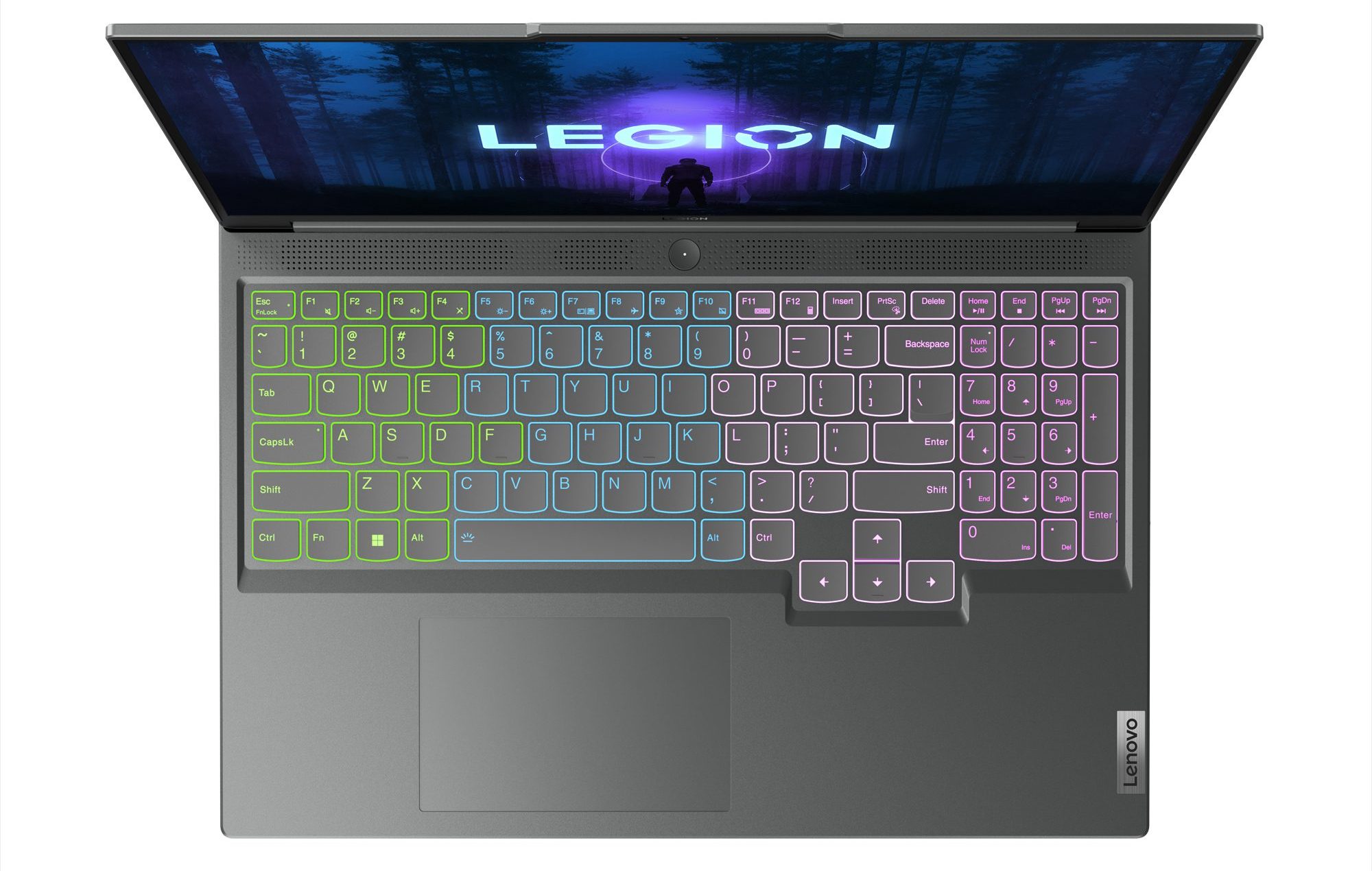
can you take a photo of your keyboard please ?
stoic coral
 lapis ore
the backligtht is working right ?
stoic coral
Backlight?
lapis ore
keyboard back lighting
stoic coral
No
lapis ore
Do you have a spare keyboard to plug on that computer ?
stoic coral
Yes
lapis ore
ok, so redo the process to go in BIOS
stoic coral
By spam?
lapis ore
Settings > System > Recovery > Advanced Startup > Restart now
stoic coral
Ok
lapis ore
Then Troubleshoot > Advanced Options > UEFI Firmware Settings
stoic coral
Ok
lapis ore
Once in BIOS setup, click "More settings" and take photo
stoic coral
stoic coral
This screen?
I am in this screen again
lapis ore
yes, "More Settings" button, bottom right corner


 lapis ore
Boot and take photo
stoic coral
 lapis ore
At bottom, change Boot order, set USB above Windows Boot Manager
stoic coral
How? The key does not work
lapis ore
I think you need to scroll down
stoic coral
I don’t understand
stoic coral
No the arrow key does not work
lapis ore
man, i am afraid your keyboard is dead... as simple as this
stoic coral
Lenovo said that they won’t cover warranty for it..
stoic coral
They said it’s a “customer issue” so it won’t be covered
lapis ore
no your keyboard is dead, it is not working even on BIOS
stoic coral
Did Linux cause it ? Did I do something wrong ?
lapis ore
no chance for that, impossible
pure coincidence that this happened at this time
do not mention Linux to Lenovo
there is no Linux on your computer
you only flashed an USB
stoic coral
Well it didn’t exactly install..
lapis ore
I tell you, you only flashed an USB, is not "installing" Linux
Lenovo must accept warranty
stoic coral
They said if the keyboard doesn’t work on BIOS then it’s considered a “customer caused issue” so it isn’t covered
lapis ore
WHAT ?
stoic coral
That’s what they told me 😭 😭
stoic coral
Hold on… I went on their website and it looks like there’s a new BIOS utility update driver I have to install. That wasn’t there earlier today
Anyways, that’s what Lenovo told me. Maybe I can negotiate
My last resort at this point is factory reset …
lapis ore
there is no negotiation man, your keyboard is not locked, there is not "lock" key, and it does not work, even in BIOS.
Either they explain you How to restore/unlock keyboard, or they replace it
No negotiation...
How do I unlock my laptop keyboard using keys?
If your keyboard is locked and you can't type, the quickest and simplest way to unlock it is by pressing certain keys. Start by pressing the 'Fn' key (which is typically located at the bottom left of the keyboard) while simultaneously pressing any other key. Depending on the type of laptop you have, this should reset your lock allowing you to use your device again. If this doesn't work, then check for a physical lock on the laptop itself; some devices have built-in locks that may be blocking some of your keys from working. Make sure that this lock is open and not restricting access in any way. You may also need to pair the device with your computer once again - this is usually done by pressing a button on both devices at the same time until they connect. Once connected, you should be able to use your keyboard as normal.
If none of that work, they must take your computer, repair it, or give you a new one
“customer caused issue” my ass
Also try that :
- Shutdown computer, unplug power cable
- Hold the Fn + Ctrl keys (don't release it)
- Press power Button
- Let computer starting, check whether keyboard work again
IF Fn + Ctrl does not work, try Fn + Cpaslock
stoic coral
Okay… my computer is still doing the BIOS utility update. It is finishing up, I will try that next
lapis ore
stoic coral
Okay… my computer is still doing the BIOS utility update. It is finishing up, I ...
You updated your BIOS ?
stoic coral
It’s doing a system update
lapis ore
it started that automatically ?
stoic coral
Lenovo’s website could scan for driver updates and it said it was missing
lapis ore
what was missing ? keyboard drivers ?
lapis ore
We don't care BIOS utility update... unless their BIOS is so shitty that it lock keyboard for no reason
lapis ore
stoic coral
Anyways… it doesn’t look like anything changed.
not surprised
Try all the "unlock" method mentioned above, but I am pretty sure this is hardware issue
stoic coral
Okay, going to try
stoic coral
Yea. It’s not working.
lapis ore
When you called Lenovo, you tell them about Linux thing ?
stoic coral
No
I just said it was not working
I had to talk to their chatbot though because the phone is offline, so maybe it was incorrect
The only thing I have not done is factory reset
At this point I think it might just be broke
lapis ore
stoic coral
I had to talk to their chatbot though because the phone is offline, so maybe it ...
Wait to be able to talk an human, because this is clearly not a "customer caused issue" unless you poured coffee on your keyboard...
stoic coral
I didn’t do anything, it was working perfectly fine
Man…
I have such bad luck with laptops ..😭 😭
lapis ore
Use warranty... they must accept
lapis ore
Tomorrow it's sunday... wait monday
stoic coral
Oh.. yeah 😭
lapis ore
Once you have Lenovo support, don't mention Linux, at all
this is not related at all at this stage, as i said, it's impossible
And tell them that even within the BIOS setup, the keyboard does not work at all
this is clear sign of hardware failure
explain that you managed to go to BIOS setup via Windows Settings
etc...
stoic coral
I will see next time I can talk to a person
stoic coral
Hello. Sorry to bother again, but do you know this issue?

@lapis ore
(I am going to sleep now but if you have an idea I can read it tomorrow)
lapis ore
you tried a repair ?
stoic coral
I tried to hold power button for one minute. Someone on Reddit suggested it and I got this pop up
I don’t know if it is related , I will still try to contact Lenovo about it
lapis ore
anyway you should yes
try simply reboot for now
As I said, you problem is not software related to me, it's hardware, since keyboard should at least work from BIOS setup
stoic coral
Ah I still can’t repair or because of the keyboard issue