#everytime i try start a vm i getKernel driver not installed (rc=-1908) how do i fix this
147 messages · Page 1 of 1 (latest)
 near yacht
 desert mulch
near yacht
Using virtualbox from the repos?
desert mulch
near yacht
Using virtualbox from the repos?
no
near yacht
I don't see oracle VM in Software manager
desert mulch
just time virtual machine
and its the second one when u launch it it says oracle vm
near yacht
What kernel? Result from terminal for uname -r
desert mulch
6.17.0-19-generic
near yacht
mokutil --sb
near yacht
What did it respond with?
desert mulch
xxx@xxxx-Aspire-A314-22:~$ mokutil --sb
SecureBoot enabled
near yacht
Reboot, go into BIOS and disable Secure Boot, that should allow the kernel drivers to load
desert mulch
near yacht
Reboot, go into BIOS and disable Secure Boot, that should allow the kernel drive...
i get stuck on this part

and can’t go upwards to secure boot
near yacht
What result from terminal for dkms status
desert mulch
virtualbox/7.0.16, 6.17.0-19-generic, x86_64: installed
near yacht
apt policy virtualbox-dkms
desert mulch
virtualbox-dkms:
Installed: 7.0.16-dfsg-2ubuntu1.3
Candidate: 7.0.16-dfsg-2ubuntu1.3
Version table:
*** 7.0.16-dfsg-2ubuntu1.3 500 (phased 70%)
500 http://archive.ubuntu.com/ubuntu noble-updates/multiverse amd64 Packages
100 /var/lib/dpkg/status
7.0.16-dfsg-2 500
500 http://archive.ubuntu.com/ubuntu noble/multiverse amd64 Packages
near yacht
See https://forums.linuxmint.com/viewtopic.php?t=424779 and go to Nvidia Graphics Troubleshooting Tips
Click this line to expand or contract the Nvidia Graphics Troubleshooting Tips. And see if using mokutil to sign things makes it work
desert mulch
i dont have nvidia
near yacht
It is the enrolling the Mint signing key into MOK that is important, it should bypass Secure Boot
desert mulch
i have no clue what to do here lol
near yacht
Secure Boot prevents unsigned modules from loading, but using mokutil use can enroll the Mint key and bypass Secure Boot and it is the same for any module, whether nvidia or something for virtualbox
desert mulch
so what exactly do i do here then
near yacht
Do sudo update-secureboot-policy --enroll-key
you will be prompted for a password. You will need to use that password the next time you boot so the key is enrolled, but that will be the only time you need the password.
When you boot the next time, make sure to select to Enroll Key (so you can enter your password) and do not select Continue Booting.
If you are on a screen with an <Ok> button and you cannot click it and pressing Enter does not work, press the tab key to access the <Ok> button.
desert mulch
i did that
now what
sudo update-secureboot-policy --enroll-key
[sudo] password for xxxx:
Adding '/var/lib/shim-signed/mok/MOK.der' to shim:
xxxx@xxxx-Aspire-A314-22:~$
near yacht
The internet says you need to set a supervisor password in BIOS to disable Secure Boot so that is an option
near yacht
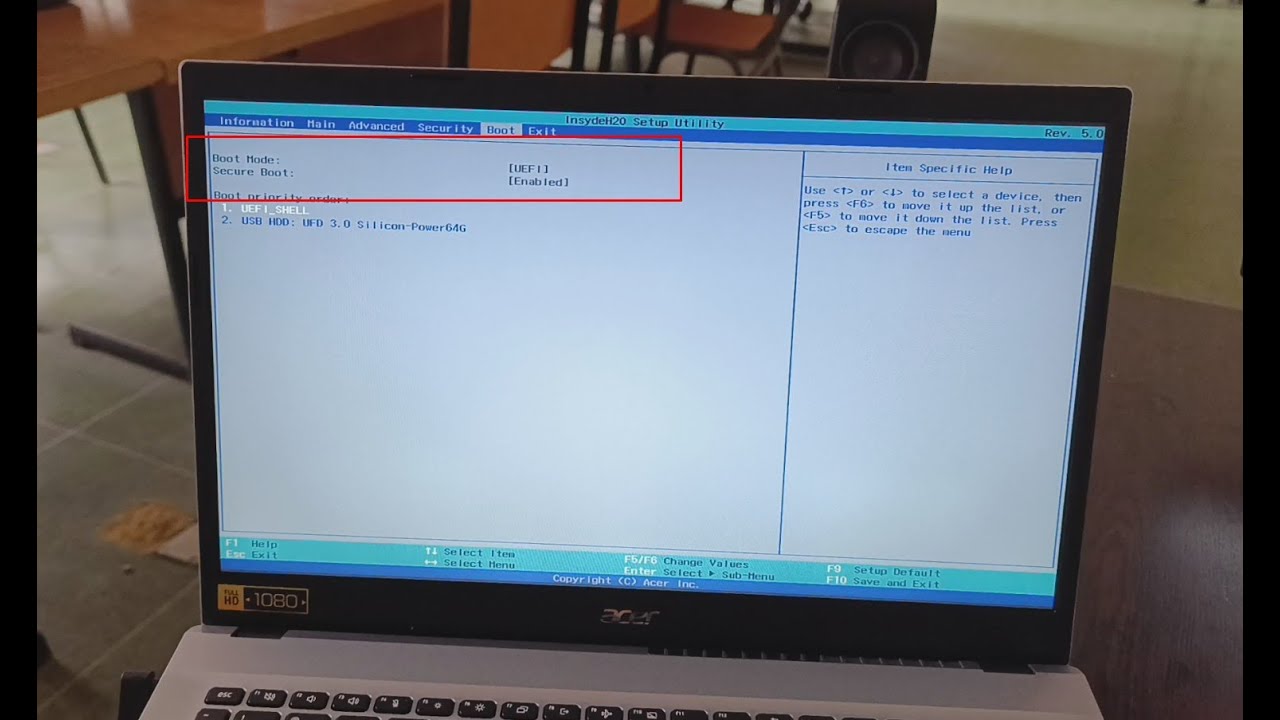
This laptop does not allow booting in Legacy mode, it only supports UEFI mode, but the same settings will allow some users to change the UEFI mode to Legacy boot mode on other laptops.
The BIOS password can be disabled and the secure boot option will stay disabled, but again greyed out.
Thanks for watching!
near yacht
See if VM works now
desert mulch
near yacht
See if VM works now
how long should a vm take to power up
near yacht
It can take some time depending on your system
desert mulch
M Name: arch vm
VirtualBox can't enable the AMD-V extension. Please disable the KVM kernel extension, recompile your kernel and reboot (VERR_SVM_IN_USE).
Result Code:
NS_ERROR_FAILURE (0X80004005)
Component:
ConsoleWrap
Interface:
IConsole {6ac83d89-6ee7-4e33-8ae6-b257b2e81be8}
 frank furnace
did ubuntu update the virtualbox-dkms package? on many other systems the driver doesn't even compile on version 6.17
desert mulch
frank furnace
did ubuntu update the virtualbox-dkms package? on many other systems the driver ...
idk what this means
xxxx@xxxx-Aspire-A314-22:~$ sudo apt upgrade virtualbox-dkms
[sudo] password for xxxx:
Reading package lists... Done
Building dependency tree... Done
Reading state information... Done
virtualbox-dkms is already the newest version (7.0.16-dfsg-2ubuntu1.3).
Calculating upgrade... Done
The following upgrades have been deferred due to phasing:
libigdgmm12
0 to upgrade, 0 to newly install, 0 to remove and 1 not to upgrade.
xxxx@xxxx-Aspire-A314-22:~
also i have to go pls dont close this i will wake up and copy any avice u tell me to do
thanks guys
near yacht
frank furnace
did ubuntu update the virtualbox-dkms package? on many other systems the driver ...
Seems this version works on my computer
near yacht
desert mulch
xxxx@xxxx-Aspire-A314-22:~$ sudo apt upgrade virtualbox-dkms
[sudo] password for...
Any result for lsmod|grep -i kvm
desert mulch
near yacht
Any result for `lsmod|grep -i kvm`
will try it in around 1-2 hours
desert mulch
near yacht
Any result for `lsmod|grep -i kvm`
kvm_amd 241664 0
kvm 1445888 2 kvm_amd,vboxdrv
irqbypass 16384 1 kvm
ccp 159744 4 kvm_amd
 plush drum
desert mulch
kvm_amd 241664 0
kvm 1445888 2 kvm_amd,vboxdrv
...
plush drum
desert mulch
kvm_amd 241664 0
kvm 1445888 2 kvm_amd,vboxdrv
...
just use virt manager
desert mulch
plush drum
just use virt manager
what is this
plush drum
desert mulch
what is this
plush drum
desert mulch
i’m on mint
apt-get install virt-manager
desert mulch
plush drum
apt-get install virt-manager
ok what now it’s finished
Unable to connect to libvirt qemu:///system.
Verify that the 'libvirtd' daemon is running.
Libvirt URI is: qemu:///system
plush drum
sudo apt install qemu-system libvirt-daemon-system libvirt-clients bridge-utils virtinst
desert mulch
installing
desert mulch
$ sudo adduser $USER_HERE libvirt
fatal: The group `libvirt' already exists.
desert mulch
plush drum
installed?
still doesnt work
nable to connect to libvirt qemu:///system.
Verify that the 'libvirtd' daemon is running.
Libvirt URI is: qemu:///system
plush drum
desert mulch
still doesnt work
did u click on virt manager instead of virtualbox
idk man
thats all i know
oh wait
plush drum
wait try sudo systemctl enable --now libvirtd
plush drum
desert mulch
nable to connect to libvirt qemu:///system.
Verify that the 'libvirtd' daemon i...
Verify that the 'libvirtd' daemon is running. = "sudo systemctl enable --now libvirtd" (this enables the libvirtd daemon)
desert mulch
wait
desert mulch
plush drum
Verify that the 'libvirtd' daemon is running. = "**sudo systemctl enable --now l...
<pre><font color="#8AE234"><b>xxxx@xxxx-Aspire-A314-22</b></font>:<font color="#729FCF"><b>~</b></font>$ sudo systemctl enable --now libvirtd
<font color="#8AE234"><b>xxxx@xxxx-Aspire-A314-22</b></font>:<font color="#729FCF"><b>~</b></font>$
</pre>
plush drum
desert mulch
<pre><font color="#8AE234"><b>xxxx@xxxx-Aspire-A314-22</b></font>:<font color="#...
what
desert mulch
it does nothing just starts a new line
 plush drum
desert mulch
plush drum
desert mulch
you dont add a connection
is there a button with a monitor and plus sign?
desert mulch
uyes
plush drum
click on that and close the add connection window
desert mulch
 desert mulch

wait
wrong thing thats my wallpepr

i click yes it doesnt connect
do u wanna see the connection offers
plush drum
desert mulch
do u wanna see the connection offers
ok
desert mulch
 plush drum
do you have Intel VT-x or AMD-V enabled in bios?
desert mulch
plush drum
do you have Intel VT-x or AMD-V enabled in bios?
uhhhhhhhhhhhhhhhhhhhhhhhhhhhh
should i go check?
plush drum
desert mulch
should i go check?
probably
desert mulch
give me like 5 mins then rq
plush drum
also run "groups" when youre in linux again and make sure it says "libvirt"
desert mulch
plush drum
also run "**groups**" when youre in linux again and make sure it says "**libvirt...
so i just type groups into terminal
desert mulch
xxxx adm cdrom sudo dip plugdev users lpadmin sambashare libvirt
desert mulch
is that vad
desert mulch
plush drum
hmm
i didnt see that sttuff in BIOS btw
plush drum
desert mulch
i didnt see that sttuff in BIOS btw
check where Intel VT-x or AMD-V is in ur motherboard's bios and make sure its running
BUT BEFORE THAT
desert mulch
plush drum
check where Intel VT-x or AMD-V is in ur motherboard's bios and make sure its ru...
how do i do that
plush drum
plush drum
check where Intel VT-x or AMD-V is in ur motherboard's bios and make sure its ru...
try sudo systemctl restart libvirtd FIRST
plush drum
desert mulch
how do i do that
check where it is in ur bios on google
desert mulch
plush drum
try **sudo systemctl restart libvirtd** FIRST
xxx@xxxx-Aspire-A314-22:~$ sudo systemctl restart libvirtd
[sudo] password for xxxx:
xxxx@xxxx-Aspire-A314-22:~$
did nothing so thats good i think
desert mulch
plush drum
check where it is in ur bios on google
what wouldi search
plush drum
desert mulch
I YHINK IT WORKED
YOOOOOOOOOOO
plush drum
desert mulch
ily bro
ily2 bro
desert mulch
so can i use oracle vm now? or just manager
plush drum
desert mulch
so can i use oracle vm now? or just manager
virt manager
oracle vm doesnt work for me either and virt manager is better imo
desert mulch
plush drum
oracle vm doesnt work for me either and virt manager is better imo
so can i install tails os now in a vm?
plush drum
desert mulch
so can i install tails os now in a vm?
yeah
you also dont need to make a virtual hard drive because tails is meant to be booted from a usb without installation
desert mulch
plush drum
you also dont need to make a virtual hard drive because tails is meant to be boo...
idk what this means should i js watch a guide on how to install tails in a vm?
plush drum
desert mulch
idk what this means should i js watch a guide on how to install tails in a vm?
you cant install tails, you have to boot from the iso. thats a part of why its so secure in the first place
so you only need the iso
no virtual hard disk or anything along those lines
plush drum
desert mulch
so should i install th
yeah just put the iso in, no other setup needed
other os'es will need a virtual disk but tails is the only one i know that doesnt