
#Suddenly the Laptop speakers sound output has become extremely low
227 messages · Page 1 of 1 (latest)
 frail falcon
this is how the alsamixer looks^
sound in settings:

sound 150 from applet:

also in system sound setting:


 unborn yew
did you tried to put "Speaker" volume to max in alsamixer ?
frail falcon
unborn yew
did you tried to put "Speaker" volume to max in alsamixer ?
Yes, thats basically making the volume 100% right?
unborn yew
It should
frail falcon
unborn yew
It should
Even at 100%, the sound is almost half of what it previously was
unborn yew
put headphone to 100% too
frail falcon
unborn yew
put headphone to 100% too
okay, 1sec
frail falcon
unborn yew
put headphone to 100% too
Zero improvement
unborn yew
The issue is the same with any software ?
browser, video player, music player, etc...
frail falcon
unborn yew
The issue is the same with any software ?
all browsers yes
music and videos lemme check, 1sec
yea its the same
But when connected to earphones, everything works fine
On laptop speaker, the issue exists
unborn yew
One thing surprise me, in alsa you have some Realtek chip, while in inxi you have only Intel Meteor... which appear to be the internal GPU HDMI device...
frail falcon
unborn yew
One thing surprise me, in alsa you have some Realtek chip, while in inxi you hav...
No idea about this  , like is this a good thing or a bad thing?
unborn yew
a bad/strange thing...
frail falcon
😭
frail falcon
 frail falcon
unborn yew
what are your choices ?
frail falcon
unborn yew
what are your choices ?
only 1
unborn yew
ok, we will assume this is Intel Meteor thing...
frail falcon
Okay
unborn yew
If you have proper sound from headphone I suspect this is hardware level issue
frail falcon
unborn yew
If you have proper sound from headphone I suspect this is hardware level issue
I see, how do we pin point this issue tho
unborn yew
this is a laptop yes ?
frail falcon
unborn yew
this is a laptop yes ?
Yea
unborn yew
hard...
frail falcon
unborn yew
hard...
 unborn yew
Try to boot on Mint USB Live sessions, and check if issue is the same
if it is, I am afraid this is hardware related
frail falcon
unborn yew
if it is, I am afraid this is hardware related
i see, so i should consult a technician ?
unborn yew
In that case... yes, or buy external speaker to plug on your laptop
unborn yew
Try the live sessions first
frail falcon
Okay will do
frail falcon
unborn yew
Try to boot on Mint USB Live sessions, and check if issue is the same
One ques, will booting on mint usb cause any issue with the files/data stored on my device?
unborn yew
no
unborn yew
open firefox, try to play some video...
play with volume, check if you have same result
frail falcon
got it
unborn yew
wait
frail falcon
Ye
unborn yew
I think I found the issue...
frail falcon
Woah!
unborn yew
go there : #1483025796292677815 message
frail falcon
Yes
unborn yew
What do you have in Outpu Profile ?
frail falcon
frail falcon
also in system sound setting:
This is the output tab right?
frail falcon
Only a single option
frail falcon
unborn yew
click here, what options do you have ?
Only : play hifi quality music
unborn yew
Ok, so try the Live USB, and check if in that specific screen you have the same option in Live USB
and play some sound, video to check if something change
frail falcon
unborn yew
Ok, so try the Live USB, and check if in that specific screen you have the same ...
I actually did restart with the live usb, but it directly opened my current mint home, instead of showing me any boot options
unborn yew
frail falcon
I actually did restart with the live usb, but it directly opened my current mint...
I think you should use tjhe BIOS boot menu to select the USB key to boot
frail falcon
unborn yew
I think you should use tjhe BIOS boot menu to select the USB key to boot
Got it
frail falcon
unborn yew
I think you should use tjhe BIOS boot menu to select the USB key to boot
Okay i did, the sound is pretty loud, unlike rn, also the option was same: play HiFi quality music
unborn yew
ok, so the good news is that hardware is ok
frail falcon
Niceee
unborn yew
What you should do, is returning in the Live USB session, and take photos of alsamixer and inxi -Axx so we can compare with your installed session
frail falcon
unborn yew
What you should do, is returning in the Live USB session, and take photos of als...
Okay, also one more thing i didn't run on compatibility mode, i ran on the first option available that was 22.3 cinnamon
unborn yew
frail falcon
Okay, also one more thing i didn't run on compatibility mode, i ran on the first...
that's what you should do.. the compatibility mode is a text-mode installer, you can do almost nothing
frail falcon
I see
Okay, rn am again playing the yt vids, the sound is slightly worse than previous
unborn yew
frail falcon
Okay, rn am again playing the yt vids, the sound is slightly worse than previous
beacause alsamixer have reset its parameters, so your speaker volume back to 50%
frail falcon
unborn yew
beacause alsamixer have reset its parameters, so your speaker volume back to 50%
I see
unborn yew
if required we can save alsamixer parameter, but we are not here for now


 unborn yew
ok, so this is exactly the same, except the kernel version
frail falcon
I see
unborn yew
go back to your installed sessions
frail falcon
https://forums.linuxmint.com/viewtopic.php?t=445461
Is this a possible fix?
Or its a new kernel issue?
frail falcon
unborn yew
go back to your installed sessions
Yep am there
unborn yew
frail falcon
https://forums.linuxmint.com/viewtopic.php?t=445461
Is this a possible fix?
Or ...
maybe
what cat /etc/modprobe.d/alsa-base.conf tells you ?
maybe nothing relevant after reflexion
try the proposed fix :
sudo nano /etc/modprobe.d/alsa-base.conf
Add this line at the end:
options snd-hda-intel model=generic
 frail falcon
unborn yew
`sudo nano /etc/modprobe.d/alsa-base.conf`
Add this line at the end:
`options s...
frail falcon
unborn yew
`sudo nano /etc/modprobe.d/alsa-base.conf`
Add this line at the end:
`options s...
okayy
unborn yew
It seem to can also try model=hp or model=auto in case model=generic change nothing
I think you must restart each time you change value
frail falcon
unborn yew
`sudo nano /etc/modprobe.d/alsa-base.conf`
Add this line at the end:
`options s...
pasted this line at the end, how do i save it tho?
 unborn yew
yes, Ctrl+X and confirm save
frail falcon
okay
okay generic didnt work after restart, will try hp now
same result with hp
now auto
Same as others
Didn't really fix the audio issue🥲
One thing changed tho
Rn at 90% sound
Its similar to previously 50%
Instead of 100/110%
unborn yew
Try boot on previous kernel
frail falcon
frail falcon
One thing changed tho
Rn at 90% sound
Its similar to previously 50%
Instead of ...
One issue
Now my external hdd is throwing an error when connected
Error mounting
unborn yew
Doubt it is related
frail falcon
It never threw any error before today...
unborn yew
Boot on older kernel
frail falcon
How do i do that?
unborn yew
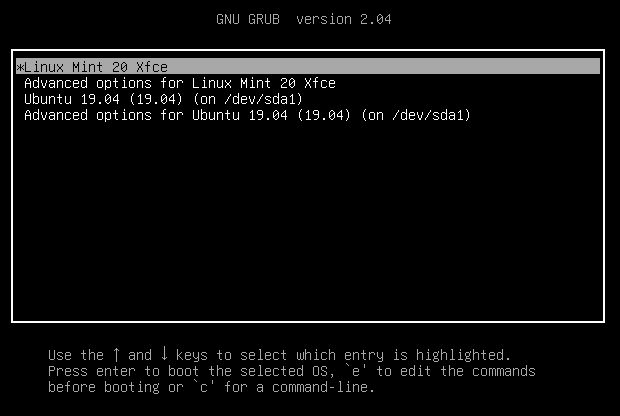
In grub menu, choose "advanced option for Linux Mint", and select another kernel version
frail falcon
unborn yew
In grub menu, choose "advanced option for Linux Mint", and select another kernel...
um am a newbie, may i ask whats grub menu?
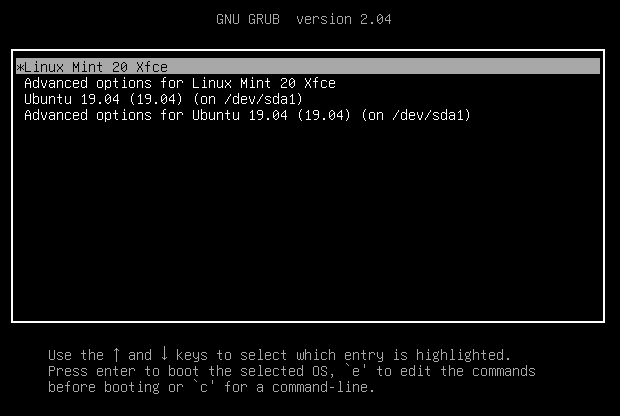 frail falcon
unborn yew
https://linuxmint-user-guide.readthedocs.io/en/latest/_images/grub.png
frail falcon
unborn yew
https://linuxmint-user-guide.readthedocs.io/en/latest/_images/grub.png
I dont really see this menu tho
unborn yew
... ok
frail falcon
also how do i fix this
 unborn yew
one thing at a time
frail falcon
unborn yew
... ok
When i dual booted windows on my old laptop i had this
In this new one, its only linux mint
unborn yew
ok, open terminal and type sudo nano /etc/default/grub
what is the value of GRUB_TIMEOUT ?
frail falcon
0
unborn yew
set it to 5
frail falcon
Okk
unborn yew
then Ctrl+X confirm save
frail falcon
Done
unborn yew
then type sudo update-grub
frail falcon
Done
unborn yew
reboot, you will see the menu now, with 5 second timeout
frail falcon
Restart?
unborn yew
yes, and select a previous kernel
frail falcon
Okay 1sec
unborn yew
check numbers and select one with a lower number
frail falcon
Tf grub menu didn't show up again
unborn yew
ok
frail falcon
Even the mint logo didn't show up
frail falcon
Lenovo->mint>log in
But its lenovo->log in rn
 frail falcon
Okk
unborn yew
and restart
frail falcon
Advanced options?
unborn yew
yes
frail falcon
 unborn yew
choose the 6.17.0-14-generic ... without the recovery mod
unborn yew
ok
frail falcon
~70%
unborn yew
go to alsamixer and increase speaker volume to max
frail falcon
Perfect
unborn yew
exit alsa and type sudo alsactl store
frail falcon
Thanks a lot
Its fixed
frail falcon
unborn yew
exit alsa and type `sudo alsactl store`
Okayy
unborn yew
wait it's only partially fixed, since the problem seem to be the newer kernel, and you'll automatically boot on this one
frail falcon
unborn yew
exit alsa and type `sudo alsactl store`
Done
frail falcon
unborn yew
wait it's only partially fixed, since the problem seem to be the newer kernel, a...
Got it
How do i fix that
unborn yew
I think the easiest way is to set the 6.17.0-14-generic as default one, and avoid updating untile a better kernel than the -19 come
frail falcon
unborn yew
I think the easiest way is to set the 6.17.0-14-generic as default one, and avoi...
got it, how do i set 6.17.0-14-generic as default tho?
unborn yew
I don't know, I check, wait
frail falcon
sure sure
frail falcon
okk
unborn yew
then add a line with GRUB_SAVEDEFAULT=true
frail falcon
done
frail falcon
unborn yew
then add a line with `GRUB_SAVEDEFAULT=true`
just below the 6 lines in white?
frail falcon
frail falcon
here
unborn yew
Or after the GRUB_DEFAULT one, this is ok
unborn yew
It don't matter, it's only matter of readability
frail falcon
unborn yew
It don't matter, it's only matter of readability
got it
unborn yew
Ctrl+X save
frail falcon
done
unborn yew
Then your Restart, and you redo the same process as before, selecting the 0-17 one
this will become the new default
frail falcon
1sec lemme restart
frail falcon
unborn yew
this will become the new default
Done
Thanks a lot!!
Even my hdd is opening now
The new kernel has some bugs ig
unborn yew
In suggest you open a new thread in #1170387178577207348 explaining your case, that since kernel 6.17.0-19, you have sound volume problems, and you had to back to previous kernel to fix it.
unborn yew
frail falcon
Even my hdd is opening now
Specify that too, in the new thread
frail falcon
unborn yew
In suggest you open a new thread in <#1170387178577207348> explaining your case,...
Okkk
frail falcon
unborn yew
Specify that too, in the new thread
Got it
Thanks a lot man
unborn yew
I suggest you avoid updates for a while
don't panic, you can avoid update for 6 mouth, this is not a problem
frail falcon
unborn yew
I suggest you avoid updates for a while
Yea absolutely
How do i avoid kernel updates tho? Just avoid sudo apt update?
unborn yew
you can apt update
and install new things
but avoid installing updates via update-manager, and yes avoid installing new kernels
If you really need to update Firebox or Brave, you can
you can select what to update in Update manager
frail falcon
I do use update manager to update firefox/brave
unborn yew
but as I said, you can run without updating without problem
frail falcon
Like how do i know its a kernel update not an application update?
unborn yew
frail falcon
I do use update manager to update firefox/brave
So, if you want, use this, but unselect any kernel

 unborn yew
wait
frail falcon
Yee
unborn yew
 frail falcon
unborn yew
frail falcon
unborn yew
I see, i'll keep an eye for updates with keyword kernel in them
Made the post in #1170387178577207348
frail falcon
unborn yew
I will not participate since it's now beyond my skills

also last ques, this is a safe update right?
 unborn yew
frail falcon
also last ques, this is a safe update right?
unborn yew
frail falcon
also last ques, this is a safe update right?
I guess, yes...
frail falcon
Thanks!!
frail falcon
Hey @unborn yew sorry for the ping
I just checked, its default loading the new kernel 6.17.0-19 today out of nowhere
I redid the steps for setting 0-17 as my kernel, that is setting GRUB_DEFAULT = saved
And GRUB_SAVEDEFAULT = true
But these were already set as saved and true, still its not loading into last selected option
Any idea why🥲
Should i delete 0-19 from update manager?
 unborn yew
frail falcon
Should i delete 0-19 from update manager?
unborn yew
frail falcon
Should i delete 0-19 from update manager?
Do you have re-selected the 0-14 from the "Advanced Options for Linux Mint" grub menu ?
frail falcon
unborn yew
Do you have re-selected the 0-14 from the "Advanced Options for Linux Mint" grub...
I did that
But when i shutdown and open/restart
Its loading in 0-19
Instead of 0-14
frail falcon
um sorry for the ping but any idea why? @unborn yew
unborn yew
frail falcon
um sorry for the ping but any idea why? <@306006018930900992>
nop... you should open a new thread