#sober reduced performace compared to windows
1765 messages · Page 2 of 2 (latest)

 robust swift
totally nowhere on the page that makes this clear, the conventional is having a BIOS recovery file, which it specifies is the .rcv file
.rcv-> This file format consists of a BIOS Recovery image file. This file is used for the System BIOS Recovery process to recover a system from a corrupted BIOS.
 cyan vale
or just a bootable .img
robust swift
cyan vale
or just a bootable .img
most cases not bootable but a direct image (.img) binary dump of the bios
cyan vale
let it do its thing
robust swift
reboot
cyan vale
it'll reboot a couple of times probably
robust swift
yeah wait until it finishes
 cyan vale
we made it no way
robust swift
confirm with inxi
 tardy storm
Now what
cyan vale
inxi -Mxxx
 cyan vale
w update
tardy storm
So I forgot why did we do that 🥀 😭
cyan vale
cuz stability fixes for your cpu generation were listed
tardy storm
Now what
robust swift
run cpufreq-info
cyan vale
perhaps speedstep now works as intended
robust swift
it's most likely enabled by default now
 robust swift
check BIOS and enable both speedstep and speedshift
tardy storm
K
cyan vale
yeah
robust swift
there might be a kernel module or parameter that needs to be set additionally
tardy storm
Enabled
robust swift
was it enabled?
tardy storm
No now it is
Well that aint good
Booted into mint and frozen on the login screen

 worldly canyon
robust swift
it's most likely enabled by default now
worldly canyon
robust swift
it's most likely enabled by default now
as may secure boot
robust swift
worldly canyon
as may secure boot
perhaps yeah
worldly canyon
so double check the SB settings in bios
turn quickboot off too if that option there
robust swift
unlikely
tardy storm
I tried it 2 times freezes at log in in mint
robust swift
disable only speedstep if possible and boot again

 robust swift
back to BIOS disable speedshift this time and enable speedstep
if still issues, revert back to disabling both
robust swift
only speedshift?
tardy storm
 worldly canyon
it should still list the 590 or 580 driver whatever u did
robust swift
well BIOS update didn't work that's for sure, so either this is undocumented instability or well.. it didn't work for your machine
robust swift
you can disable it, it's most stable without it (speedstep/speedshift)
@tardy storm what does whatis wrmsr result in?
tardy storm
 robust swift
go into superuser mode su
tardy storm
k now what
robust swift
rdmsr 0x1FC
robust swift
sudo su
tardy storm
k
robust swift
robust swift
`rdmsr 0x1FC`
^
tardy storm
 robust swift
ok, this command will either help or freeze your system but it's worth the try
robust swift
wrmsr 0xFC1 200
 robust swift
hmmm
tardy storm
whats that mean
robust swift
that it couldn't write the value to the CPU register, I use it on a Xeon E5 to disable PROCHOT because the BIOS doesn't allow it
it's essentially talking to the Intel CPU firmware
tardy storm
so what can we do about this
worldly canyon
i just remembered, idk if u guys already looked at this, but Mint Cinnamon latest comes with some 'performance mode' thing for power profiles
robust swift
it's worth the try
 robust swift
check sudo i7z
tardy storm
 worldly canyon
and inxi -C also
robust swift
yeah we need to manually set a Vcore at this point
worldly canyon
should show it
robust swift
it's still voltage scaling
tardy storm
 worldly canyon
it seems clock rate is high now cuz of that performance thing in the power settings GUI
robust swift
worldly canyon
it seems clock rate is high now cuz of that performance thing in the power setti...
not really, Core 0 is still operating at 1 GHz ish
worldly canyon
min/max "N/A" hmmmmm
tardy storm
big or minor ?
robust swift
with speedshift disable I expect bigger because it's now shifting less often
cpufreq-info showcases the latency
tardy storm
is that bad

 robust swift
yours is in milliseconds
cyan vale
can we see a dmesg
robust swift
I also have lower C-states so that also plays a role but the thing we're aiming at is stable clocks
 robust swift
it won't highlight the issue, since this is at CPU level
for the Linux kernel the CPU scaling is absolutely fine
cyan vale
we can still see any ACPI/Firmware stuff it might be complaining about
robust swift
we can't do anything about it because like I said, it's the Linux kernel module which interfaces with Intel's firmware
if it's disabled in firmware, then the Linux kernel can't do anything through that module
tardy storm
cyan vale
send all of it
....
robust swift
I've tried one step that's more bare metal than a kernel module, writing to the CPU registers
which also failed
tardy storm
robust swift
then the only option left is to do it in the chipset's firmware, which is the BIOS
robust swift
tardy storm
this showcases the Linux kernel can't interface with the CPU's firmware because it can't load the cpufreq driver
(for p / performance states)
tardy storm
so whats the plan now
robust swift
Manual Vcore value and cap on it
tardy storm
sonic how big is this performance impact like is it worth it
like give me a example if you can
cyan vale
hmm what if we boot with passive intel_pstate?
robust swift
BIOS takes precedence over intel's module AFAIK, unless there's code in it which just like I did not only checks CPU flags but also tries to enable them, if it does it might turn on some features but obviously you need to run through the the intel_pstate source code for that
you might try, but again at this point I would just go for manual Vcore
tardy storm
how do i do manual vcore
 robust swift
no
tardy storm
how do i know what to use then ?
robust swift
because I'm checking that for you
tardy storm
okay
robust swift
can you screenshot that what you're seeing?
tardy storm
oh do you want me to go to my bios
robust swift
yes
 robust swift
choose OC LV1 and then screenshot that
tardy storm
 robust swift
ok choose customization
tardy storm
 robust swift
need to look things up
tardy storm
K
robust swift
@tardy storm is there a setting in the BIOS that either states atom cores or E-cores?
 robust swift
disable multiple Atom cores
tardy storm
K
robust swift
this disables the effeciency cores, only allowing performance cores, this should increase stability futher as atom/e-cores can't scale up to same frequency as P-cores. Also less overall power draw on the CPU
you can btw disable atom cores and enable speedstep to test
without any OC
robust swift
set Core OC to disabled, set Multi Atom to disabled, enable Speedstep and test with boot
tardy storm
K I am
robust swift
setting a custom OC can be very tricky, that's why I'm looking into it
Alienware (Dell) doesn't provide a whole lot of options
 robust swift
it doesn't go towards the login screen?
robust swift
ok well back to BIOS
robust swift
full hard shutdown 5 sec power button
tardy storm
I dont got a switch
 tardy storm
So what do we do
tardy storm
So if it dosent work
robust swift
we have to do a CMOS reset
tardy storm
How do I do that
robust swift
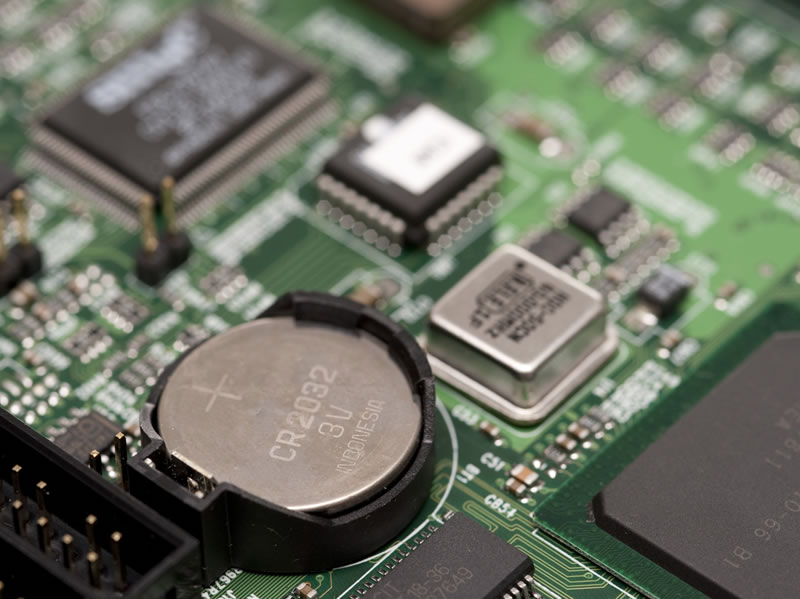
you know that circular silver battery on your motherboard?
tardy storm
Dude I cant access my pc needs special tool to even open
Alienware makes almost all there pcs like that
robust swift
you've never opened your case?
tardy storm
No ...
robust swift
 tardy storm
Yeah my pc is a inf die and restart
robust swift
it's the i9
tardy storm
What's that mean my i9 is fucked or sm
robust swift
yes
tardy storm
So what's that mean
robust swift
as in it likely has experienced silicon degradation where it can't attain the same max speeds under same voltage
which is common among Intel i9s
that's why you have been crashing, that's why disabling speedstep helps
and that's why even with e-cores being disabled it now isn't willing to boot
the only remedy to that is resetting CMOS and try and enter BIOS
robust swift
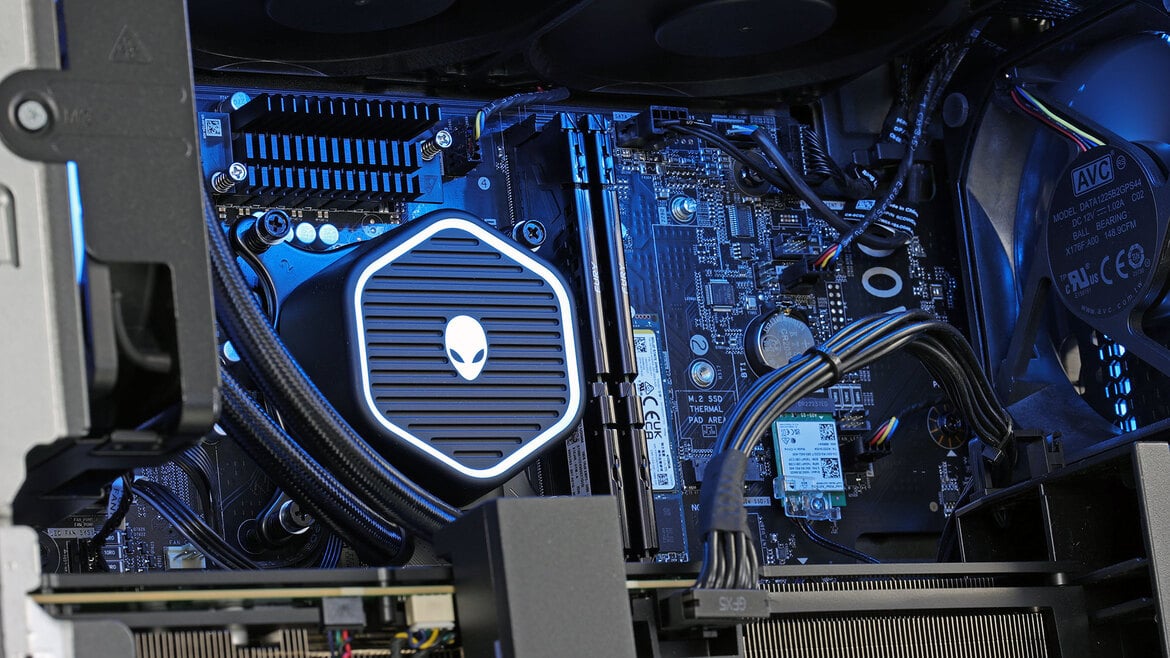
"Getting under the hood of this alien spacecraft is as easy as pulling a lever on the back side of the machine and releasing that perforated plexiglass side panel..."
tardy storm
Dude......

 robust swift
it's an Alienware Aurora R15 right
cyan vale
this poor computer has suffered way too long
tardy storm
Well what do I do now 🥀
 robust swift
well you get that one off
cyan vale
robust swift
because waiting for it to drain is not an option
10 years
or whatever lol
robust swift
5 years sometimes, but in any case (pun intended) no CMOS reset, no dice
 cyan vale
a generic screw?
 robust swift
try a flathead
 robust swift
decades of technological innovation stopped by a single effing screw
 robust swift
left side should say CR
tardy storm
Wym
robust swift
make sure the machine is off
tardy storm
 robust swift
left side should say CR
robust swift
robust swift
left side should say CR
the CMOS battery
robust swift
tardy storm
it's that circular silver thingy at the bottom

 robust swift
you see that it has a lip on one side right
tardy storm
Yeah
robust swift
you need to press against that, then slightly beneath it
use plastic or wood, not metal to do it
tardy storm
K
robust swift
you wedge against it and should pop up
the goal is to get it out as it's just a loose battery
tardy storm
K
robust swift
you might not have a new one at hand have you?
robust swift
 robust swift
tardy storm
Do I need 1
robust swift
tardy storm
Do I need 1
nah but in time you will
 robust swift
nice, leave it out make sure power cable is connected to the machine
then hold the power button for 30 seconds
and don't touch anything inside of it while it's on
that's the CMOS reset, then you can shut down the machine again, plug back in the battery and boot up
then hope for the best
robust swift
yeah with an air can spray
robust swift
try enter BIOS
cyan vale
tardy storm
Um if I dont have that
if the fans are the dirtiest you can just blow them
robust swift
you shut down the machine before putting in the battery yeah
tardy storm
K
robust swift
CMOS battery is for retaining BIOS settings and clock
even when pulling the power cable
I hope you can enter BIOS because the other option is something you're not going to like
and you would likely not be able to do it
@cyan vale can you guess what it is?
robust swift
CPU replacement
which is already potentially on the table because it's highly likely been degraded, not damaged but yeah
robust swift
that the processor and its material has been degraded, internal components most likely relating to transistor quality
tardy storm
Nope dosent work
robust swift
there's the off change it's the VRMs, those the components on the motherboard reponsible for supplying the CPU with power however... i9s because of their tremendous overclocking and power draw and heat are known to degrade more easily
robust swift
My honest opinion? Something that can last much much longer
tardy storm
YESA
robust swift
I wouldn't use this machine for gaming that's for sure, the CPU can likely fail at any moment
it already has partially but if you depending on budget need a more solid gaming machine then AMD Ryzen 7 or 9
tardy storm
could i make this pc run mint ? and do you think it would run better

 robust swift
tardy storm
could i make this pc run mint ? and do you think it would run better
robust swift
tardy storm
could i make this pc run mint ? and do you think it would run better
Intel i5 vs i9 no it won't
tardy storm
so keep it on windows
robust swift
it's Intel i3 / i5 /i7 / i9, i9 is highest
robust swift
tardy storm
so keep it on windows
it can run Mint but it won't be better regarding performance
RTX 3080 is still a contender, meaning it requires quite a relatively strong CPU either Intel or AMD
then you're looking at either another i7 or i9 (which I don't recommend as what you've just witnessed) or Ryzen 7 or Ryzen 9 prefferably X3D versions
you're not going to retrofit another motherboard in there easily (in the alienware) because it's all custom
so you're looking for an entire prebuilt that doesn't have a dedicated GPU
robust swift
that's a good enough CPU for your GPU
tardy storm
isnt that the best they got ?
robust swift
it competes with the Intel Core i9-14900K
robust swift
AMD Ryzen™ 9 9950X3D is the top
but way more expensive
if you have the budget, go for a new 9800X3D build without a dedicated GPU
 tardy storm
ive been thinking about getting a new pc for a while it might be the time
yk any good websites ?
robust swift
I see you're specifying in USD, assuming you're from the US....plenty.
tardy storm
yes
robust swift
you want to right now look at options?
robust swift
overall budget?
robust swift

CORSAIR
Step up your game with a CORSAIR VENGEANCE a7500 Series Gaming PC, built with a full range of award-winning CORSAIR components.
they have 400 USD off atm
tardy storm
mh
lowk i was going to look in facebook marketplace first
i live around a lot of old people sometimes they have stuff they dont know the vlaue of
but if i don't find anything i will prob buy that THXS
robust swift
I wouldn't go for second hand, go for new quality and especially with warranty
that also ensures it's Windows 11 certified and compatible
you want a system where the components are tested with/against each other, don't have any bottlenecks, good cooling
tardy storm
alr
robust swift
I say this as a Linux enthusiast but for solid gaming, stick to Windows 11 if you want the least fuss
either that or a gaming console but with PC games a high end premium built with enough horsepower both in CPU/GPU is still the goto
if you want more customization and still premium quality: https://www.pcmag.com/reviews/lenovo-legion-tower-5-gen-10

PCMAG
If you don’t plan to upgrade, the Legion Tower 5 Gen 10 is a fantastic midrange gaming desktop. But if you want to tinker, this gaming rig's non-standard setup doesn't make it easy.
it's specified as mid-range but because you can customize you can put high end hardware in there
Lenovo as any Linux person also knows is a solid brand as well
there are the prebuilt brands that offer that, if you want a totally custom built then you have to create one with pcpartpicker
more affordable option due to it having a slight cheaper CPU, but still packs a punch regarding performance and more importantly... no bottleneck for the RTX 5070
tardy storm
Oh
I just came back and see so many options
robust swift
Corsair, Lenovo and HP for upper mid-range to high end gaming machines. Dell is sometimes also mentioned with higher end models, but then you come back to Alienware which I personally think for the machines are overpriced
tardy storm
Is there 1 you can find that works with mint linux greatly
robust swift
Lenovo is the most known Linux compatible out of all of them
tardy storm
Like can you find me a really good performance one that works perfect with mint linux
robust swift
and if you want absolute best Linux graphical compatibility go with a AMD GPU
tardy storm
I want a system that has almost no problem reforming hardware
robust swift
reforming?
robust swift
could you specify why you want to game on Linux Mint and not go with a Windows machine?
tardy storm
Tired of it feels clanky dosent give me a lot of freedom with my hardware and preferences
robust swift
ok then go for higher end AMD CPU + AMD GPU with a big enough NVME storage and just like you're now doing potentially dualboot
tardy storm
Alr
robust swift
that way you have good Linux compability and still have the option in time to boot Windows 11, and it ensures that the hardware is compable with both
then the Lenovo gaming PC would be the most logical choice
tardy storm
Alr thanks a lot man
robust swift
cyan vale
wow so bricked system?
I think the i9 is on its last legs yeah
didn't retain turbo clocks, even with disabling all e-cores
cyan vale
so cpu replacement to get it working again? Maybe an i7 12th gen
robust swift
I wouldn't bother
robust swift
choices are very limited with Alienware, and he already wanted a new machine
cyan vale
how do 13th and 14th gen chips still sell?
robust swift
because Intel is good at marketing 🙂
both AMD and Intel have been pleagued with higher end CPU issues, it's because they're hitting the walls with squeezing everything out of nanometer chip design/microprocessor technology
sub 7 nm design regarding to transistor technology is very hard
due to in part because of the quantum mechanical phenomenon -> electron tunneling
worldly canyon
1426 messages.
tardy storm
worldly canyon
1426 messages.
all to just brick a pc LOL 🥀
still trying to deside laptop or desktop mhhh
robust swift
@tardy storm is it possible for you to put the Alienware you have somewhere very cold?
robust swift
it's a theory I have where cold could decrease transistor instability, perhaps it will boot just enough for you to enter BIOS
robust swift
it has worked for some electronics, as heat increases transistor instability
is it cold outside?
another thing we haven't tried but could potentially work is booting with only 1 RAM stick
that's the RAM slot closest to the CPU (DIMM 1)
 robust swift
it boots but it's even more unstable with speedstep enabled than previously, evident by not being able to enter the BIOS
tardy storm
robust swift
it boots but it's even more unstable with speedstep enabled than previously, evi...
yeah we disabled all the eco stuff its donzo
tardy storm
robust swift
is it cold outside?
it is like 50 degree out
tardy storm
robust swift
another thing we haven't tried but could potentially work is booting with only 1...
there is 2 but i would not really want to mess with that yk
robust swift
then there isn't much we can do atm for the Alienware
robust swift
chances are slim
tardy storm
why would ram fix it isnt it a cpu issue >
robust swift
it wouldn't fix it, it would potentially allow for enough stability to get into BIOS and disable speedstep
we're essentially fighting against a failing CPU
tardy storm
To fix a PC stuck in an infinite boot/restart loop, force shutdown 2-3 times during the startup screen to trigger Automatic Repair, then select Troubleshoot > Advanced Options for remedies like Startup Repair, System Restore, or Safe Mode. If that fails, remove all peripherals, reset the BIOS/CMOS, re-seat the RAM, or use a bootable Windows USB to perform a repair.
would that work ??
robust swift
won't help in this case
tardy storm
all we have to do is reset the bios to the prevoius settings no ?
is there a way to do that ?
robust swift
that's what I recommend with booting with 1 RAM stick
robust swift
there are notches to the sides holding it, you have to press them down on both sides
 robust swift
the most right (slot 2)
so top and bottom they have clips sorta that keep them in place
 tardy storm
Nothing is showing up at all
Turns on and turns off
I did it
It froze th9

Its froze on that should I just leave it or
robust swift
unless you pressed F10 it's not going to save it
tardy storm
Fuck
Nah its close and its getting far away
More I do it faster it crashes
But we got close
Any other things we can try
robust swift
yeah the cold method, it would require it to be in a cold envirnment/room to let it cool off, then try and boot it
it has worked or some people
tardy storm
Alr let me try
robust swift
but it will take a bit of time until it cools down
depending on the outside/room temp
best to leave it there with the case open
that's the absolute last method to potentially gain back some stabilty, after that all out of options and it needs a CPU replacement
tardy storm
How long it got to be cold for
robust swift
until the motherboard feels the same temp as the walls of your room (takes at least an hour)
the case if metal will feel colder but doesn't mean the PC inside is cold
the point of this is that the motherboard + CPU drops in temp
and then when it's coldest, try to quickly boot it
I have to go atm, but I think you know what to do, again last option
tardy storm
Not workibg
robust swift
it takes time or a machine and components to cool off
if you have one, a fan against it will help drop temp

 robust swift
tardy storm
Im getting a laptop
robust swift
tardy storm
Im getting a laptop
be aware that a laptop has very restrive cooling, it will downclock when it's heated
if you want stable fps, that's one of the worst options
tardy storm
I mean its recommended everywhere
Im only going to be running roblox
Cant be that bad @robust swift m
???
robust swift
If you're not constantly moving with it and you want stable gaming it's a lousy investment imo (I woudn't buy it)
cyan vale
tardy storm
Im only going to be running roblox
integrated graphics will suffice
laptops are terrible
the battery becomes useless after 2/3 years
and like sonic said they downclock whenever they feel like it
 long mulch
I wonder what would happen if he installed a arch distro... sonic said Wayland being bad with nvidia (though it was weird since I'm using it) but the last 30/40 drivers where ok, mainly the open source ones.
robust swift
long mulch
I wonder what would happen if he installed a arch distro... sonic said Wayland b...
I have several Intel/Nvidia machines here, Ubuntu based, Wayland issues on all of them, different drivers (some Quadro)
worldly canyon
tardy storm
no performance differents its run everything good
you already received a new computer?
tardy storm
yep
worldly canyon
running Mint on it now with nvidia (or no nvidia card?)?
just out of curiosity, does your Alienware computer work at all? As in, does it boot and run Windows fine on it?
tardy storm
worldly canyon
just out of curiosity, does your Alienware computer work at all? As in, does it ...
it boots thats it tho
dosent do anything after that its in a loop start restart
worldly canyon
tardy storm
wym
I meant are you running Mint on the new laptop?
tardy storm
worldly canyon
I meant are you running Mint on the new laptop?
nah
its intel with nvidia again
they say intel and NVidia is the worst combo for linux
worldly canyon
shrugs
worldly canyon
it's a matter of putting nvidia fulltime mode
in the settings in this little tray app , i believe it's called the "Prime" applet
tardy storm
why didnt we do that with my old desktop
worldly canyon
cuz that one only had Nvidia, so naturally games would use it
tardy storm
mh
worldly canyon
except for its supposed frequency scaling issues
tardy storm
my pc rn is good but i want to marco this game but with linux they don't support it
worldly canyon
u mean 'play this game' ?
tardy storm
and if i did vitural machine on linux or dual boot (which i dont want to do) the vitural machine would run it very poorly
tardy storm
worldly canyon
u mean 'play this game' ?
question is there a way you can test the fps before and after linux without installing
like a website to compare or sm ?
worldly canyon
idk on Windows . goverlay?
and same for linux, or mangohud
u can also do the web aquarium 3D render test
add the same number of fish in both cases
tardy storm
i mean is there a way to see if my pc specs will see a increase for linux than windows
worldly canyon
eh idk much about this
worldly canyon
mhm
tardy storm
but how can i be sure this will not happen again
cause i don't want to go through the entire process just for windows to get more fps
tardy storm
wym
worldly canyon
just to test
worldly canyon
or just use Rufus or UUI for that, it's easier to set up
google "live persistence - linux"
 worldly canyon

How to create a bootable USB drive containing Linux Mint, so that you can try out Linux without installing it on your computer.
Linux Mint is available from: https://www.linuxmint.com/
You can find out how I got on in my Linux Mint week experiment in my video diary here: https://www.youtube.com/watch?v=4EAes8DDWQE
The Universal USB Installer ...
shows here how to easily make a persistent live USB. all info still valid in 2026
cyan vale
tardy storm
cause i have nothing open and look at this
holy shit windows can't be this bad
lord
tardy storm
worldly canyon
https://www.youtube.com/watch?v=3Vq_v0oGPH8
alr
cyan vale
discord idling at 700MB RAM is crazy lol
tardy storm
cyan vale
holy shit windows can't be this bad
im getting 60 to 120 fps ON ROBLOX
but for rainbow six seige easy 180 fps
IT DONT MAKE SINCE
cyan vale
roblox might be using OpenGL instead of DirectX or Vulkan
tardy storm
is that bad
cyan vale
or it just sucks


 cyan vale
tardy storm
is that bad
cyan vale
tardy storm
is that bad
well openGL is the no. 1 choice for compatibility as almost any GPU has atleast a driver for it but it is an ancient graphics API and suffers from lower performance
tardy storm
ah
cyan vale
tardy storm
or it may be using the intel iGPU
tardy storm
check im forceing it to use my 4050

im pretty sure it is but not to its full amount
very werid if you ask me
worldly canyon
this is the laptop u just got yesterday?
cyan vale
tardy storm
im pretty sure it is but not to its full amount
the usage?
tardy storm
cyan vale
the usage?
10 - 20 %
tardy storm
worldly canyon
this is the laptop u just got yesterday?
yes
worldly canyon
i wouldnt expect roblox to be super demanding
cyan vale
sounds reasonable for a game like roblox
tardy storm
why doesent it use more tho ?
cyan vale
the gpu could be sleeping and it'd still run at 60
cyan vale
tardy storm
why doesent it use more tho ?
simply because it doesn't need to
tardy storm
how do i trick it into "needing to"
cyan vale
you should worry when usage is 0%
cyan vale
tardy storm
how do i trick it into "needing to"
you.. don't. Usage means how much work the GPU is doing. More == bad
tardy storm
but first of all how does ROBLOX get less fps than a triple A game makes zero since
cyan vale
well there are many possibilities
worldly canyon
it's not running smoothly even on Windows now?
tardy storm
ehhhhhhh
cyan vale
is your power plan set to performance and is the laptop plugged in?
tardy storm
 worldly canyon
are u having the laptop plugged in , to AC power?
worldly canyon
aight
cyan vale
well makes sense
cyan vale
gaming on battery is not a thing
worldly canyon
play Duke Nukem 3D - 25th anniversary tour. it's great fun
tardy storm
duke nukem thats older than me ...
cyan vale
what's the screen's refresh rate?
tardy storm
144hz
cyan vale
oh
tardy storm
?
cyan vale
well now it makes more sense
tardy storm
wym
cyan vale
game might be capping at the refresh rate
that's why you're not seeing 500+ or some shit like that
cyan vale
hold on
cyan vale
looked up some stuff
tardy storm
also changing the grpahics level dosent do much of anything maybe a 5 fps boost from max to lowest
very werid
cyan vale
a lot of people seem to be getting less-than-expected FPS
so it is pretty normal
how's temps?
tardy storm

50 to 60 C for gpu
the gpu is now at 30 max to 20 for % of use
maybe its just a roblox thing ig idk at this point
 waxen helm
Roblox is CPU bound so graphics card won't make all that much of a difference
I believe it defaults to DirectX on Windows but you might be able to change the rendering with some fast flags or a bootstrapper (I don't know which ones though nor do I know if they're in Roblox's fflag allowlist)
robust swift
@tardy storm do you still have a return policy?
tardy storm
robust swift
<@1456601214501257417> do you still have a return policy?
yes why ?
30 day return policy
@robust swift
robust swift
You're running into issues that are very common on a gaming laptop, remember they try to emulate a gaming desktop...but aren't. It's essentially a desktop with a mobile processor squeezed into a far smaller form factor, which by definition will result in lesser performance and higher temps when going to its max, meaning setting everything to maximum performance and heavy workloads
You can't expect the same gaming performance as a desktop gaming machine, no matter how it's advertised
tardy storm
ah
tardy storm
robust swift
You're running into issues that are very common on a gaming laptop, remember the...
if i install mint os do you think ill see a boost in fps ?
robust swift
unlikely, there are very few Windows native games that run better on Linux, if they even run
tardy storm
i saw someone who only got 90 fps on windows and when they switched to mint linux on the sober (which is roblox) they got 240+ fps
is that unlikely for me
@robust swift
robust swift
tardy storm
i saw someone who only got 90 fps on windows and when they switched to mint linu...
that gap is way too big, at most I would expect a 15% performance boost
robust swift
then there's something wrong with his Windows installation/configuration. Because Roblox uses DirectX and at full GPU utilization (close to 100%) they should be about the same then
or if Vulkan, slightly more optimized on Linux isn't unheard of
tardy storm
@robust swift im getting 160 to 180 fps now
so werid >?????
im still on windows and didnt change any settings
robust swift
Windows shenanigans, trying to ask for stability or reproducible results on Windows is like asking a bird to swim
 robust swift
network receive at 144??
tardy storm
fps = network
robust swift
is it usually tied to the fps?
waxen helm
tardy storm
i saw someone who only got 90 fps on windows and when they switched to mint linu...
Sober runs the Android client and changes the runtime a little bit so it runs essentially natively
It also has slightly lower graphics than the Windows version of Roblox but there's no compatibility layer to make it run so there's no performance sacrifice in that regard
tardy storm
so (sober good cuz CAN CHANGE POWER, lower graphics overall)
em i correct ?
@waxen helm
waxen helm
idk what you mean by that
i just brought that up because you used that as a comparison while discussing windows games running on linux
and thought i'd point it out
tardy storm
ah alr
 cyan vale
update
tardy storm
k its opening but when i click into a game it crashes


 tardy storm
cyan vale
tardy storm
cyan vale
what about mokutil --sb-state?
tardy storm
mokutil --sb-state
SecureBoot disabled
AI Overview
Sober (Roblox on Linux) crashes upon joining games
due to VRAM limitations, high texture settings, or specific FFlag configurations
cyan vale
iGPU driver crashed
tardy storm
whats that mean
tardy storm
580 wym
tardy storm
oh in the driver manager
cyan vale
yes my bad
cyan vale
go to 570
cyan vale
tardy storm
is that going to make a difference ?
we can check
cyan vale
tardy storm
isnt lower badder ?
if it's still maintained no
cyan vale
go back to 580
tardy storm
why not the open source one
cyan vale
and check nvidia-smi
cyan vale
tardy storm
why not the open source one
while it sounds amazing it unfortunately does not perform well at all due to the devs not having access to nvidia's architecture docs
and therefore can't optimize it
tardy storm
Fri Feb 27 17:12:56 2026
+-----------------------------------------------------------------------------------------+
| NVIDIA-SMI 580.126.09 Driver Version: 580.126.09 CUDA Version: 13.0 |
+-----------------------------------------+------------------------+----------------------+
| GPU Name Persistence-M | Bus-Id Disp.A | Volatile Uncorr. ECC |
| Fan Temp Perf Pwr:Usage/Cap | Memory-Usage | GPU-Util Compute M. |
| | | MIG M. |
|=========================================+========================+======================|
| 0 NVIDIA GeForce RTX 4050 ... Off | 00000000:01:00.0 Off | N/A |
| N/A 46C P3 8W / 40W | 15MiB / 6141MiB | 24% Default |
| | | N/A |
+-----------------------------------------+------------------------+----------------------+
+-----------------------------------------------------------------------------------------+
| Processes: |
| GPU GI CI PID Type Process name GPU Memory |
| ID ID Usage |
|=========================================================================================|
| 0 N/A N/A 1040 G /usr/lib/xorg/Xorg 4MiB |
+-----------------------------------------------------------------------------------------+
@cyan vale
tardy storm
its fine ill just switch back to windows for now
this is hurting my brain
thxs for trying tho @cyan vale
cyan vale
oh well
were you launching sober with DRI_PRIME=1?
cuz it might have been using the iGPU
 median pulsar
try linux mint debian edition