#why is it lagging
61 messages · Page 1 of 1 (latest)
 glass comet
 limber plume
glass comet
i installed linux mint some hours ago and it's lagging so much, and specially wi...
limber plume
glass comet
i installed linux mint some hours ago and it's lagging so much, and specially wi...
paste the output of inxi -Fmxxz
-# more specifically run this command in the terminal
glass comet
limber plume
paste the output of `inxi -Fmxxz`
did
limber plume
glass comet
did
you have to send it here you know
if it doesn't fit in discords limit just paste it into a .txt file and then send that file here
glass comet
limber plume
if it doesn't fit in discords limit just paste it into a .txt file and then send...
i used linux for a few hours and it's working fine now, anyway i tried to copy from the terminal but it isn't letting me
limber plume
glass comet
i used linux for a few hours and it's working fine now, anyway i tried to copy f...
you need to use ctrl + c + shift to copy from the terminal
or just right click
 strange cedar
- ctrl+shift+c to copy selected text in a terminal
ctrl+c to cancel a running terminal process
 boreal saffron
glass comet
i installed linux mint some hours ago and it's lagging so much, and specially wi...
boreal saffron
glass comet
i installed linux mint some hours ago and it's lagging so much, and specially wi...
Maybe Nvidia gpu?
glass comet
limber plume
you need to use ctrl + c + shift to copy from the terminal
i have to have linux booted up for some minutes for it to work fine, and the apps don't even open for like 2 minutes, and they kinda open at the same time after that & my pc makes weird cricket noises during that
glass comet
boreal saffron
Maybe Nvidia gpu?
elaborate
limber plume
glass comet
elaborate
you have a nvidia GPU
which can cause issues
turn off your computer, enter the BIOS and turn off secure boot
boreal saffron
glass comet
elaborate
Well nvidia gpu needs extra steps for installing the drivers
Not home yet, can't help, freezing to death rn xD
glass comet
boreal saffron
Not home yet, can't help, freezing to death rn xD
understandable
glass comet
limber plume
turn off your computer, enter the BIOS and turn off secure boot
Did it
it definately helped it a bit
but it's still taking like half a minute to open apps, the only app that opens without a wait is terminal, but when i use linux for like 10-15 minutes, all the apps run fine
limber plume
glass comet
but it's still taking like half a minute to open apps, the only app that opens w...
that's like very normal
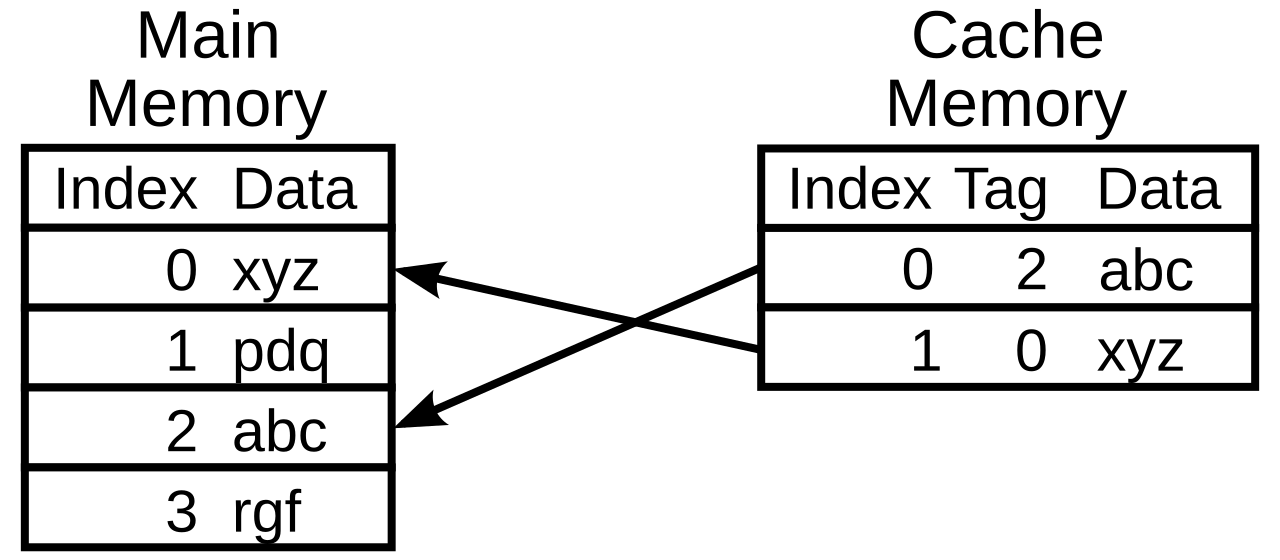
In computing, a cache ( KASH) is a hardware or software component that stores data so that future requests for that data can be served faster; the data stored in a cache might be the result of an earlier computation or a copy of data stored elsewhere. A cache hit occurs when the requested data can be found in a cache, while a cache miss occurs ...
glass comet
limber plume
that's like very normal
so if i keep using linux for like a week, it'll be faster?
limber plume
when you boot linux fresh it has to do every single expensive computation from scratch, but over time, it saves the result of that computation so that it doesn't have to do it again, speeding it up over time
windows does this too and it is standard
glass comet
limber plume
when you boot linux fresh it has to do every single expensive computation from s...
like in a week or a month or?
 fickle fable
your CPU is running at 800 MHz
set power options to performance and in nvidia settings as well
also to do a quick disk latency test: install and do a ioping /tmp
let it run for like 20 sec then cancel out with Ctrl+c
with a nvme it needs to sustain below 1 ms
limber plume
/tmp is a tmpfs, it is in RAM afaik
it does not live in the SSD
so ofc it'll be fast
fickle fable
some systems will mount it as a tmpfs but not LM
but you can also simply use current home directory ioping .
on my LM system that has a HDD, the average disk latency difference between a real tmpfs (/dev/shm) and /tmp is about a factor of 50
don't ask for the max through 😄 it's much slower (70 ms) but generally expected with a HDD to have some spikes
@glass comet check the above mentioned remarks
(CPU running slow -> install cpupower/set powerplan to performance) and check disk (nvme) latency
for the heck of it, also do a ioping /dev/shm since that will test RAM latency just in case
also giving us the CPU temperature readings which might help sensors
limber plume
fickle fable
(CPU running slow -> install cpupower/set powerplan to performance) and check d...
setting performance mode is okay on a desktop but not on a laptop. My system crashed 2 times due to the power draw that performance mode took on battery because i forgot to put it on Balanced. Plus firmware can always force-limit it, etc.
So while it is fine if plugged it it should be used with care
fickle fable
limber plume
setting performance mode is okay on a desktop but not on a laptop. My system cra...
a system doesn't generally crash due to shifting Intel Performance states, so whatever it is you should look into it. On-demand might be the in between considering switching constantly is more effort, although it's not exactly clear where the lagging is coming from, ruling out the CPU is often the first goto with it frequency scaling
and putting it on power and setting it to performance will give a better clue as it could be multifactoral
limber plume
fickle fable
a system doesn't generally crash due to shifting Intel Performance states, so wh...
it can because the more the power draw the more the stress on the battery, and eventually it won't be able to keep up. mine is a crappy 38Wh one.
fickle fable
limber plume
it can because the more the power draw the more the stress on the battery, and e...
then likely the PSU's / battery firmware engaged the safety switch
limber plume
yeah which is why i only set performance mode while plugged in
or let the kernel manage it
which is very stable
fickle fable
technically not a crash but instantly shutdown, but still it generally doesn't happen if the battery is in good health
anyways beside frequency scaling, local disk issues (possible with nvme might need firmware upgrade), kernel incompatibility or general hardware incompatibility and driver related come to mind. Needs stability testing to first rule that out
fickle fable
ventoy doesn't play well with some linux distros
limber plume
oh, no it's just drive failure. No device mounts the usb stick