#need help installing mint
146 messages · Page 1 of 1 (latest)
 quiet anchor
 topaz sand
quiet anchor
so i got a bootable usb and shit i tried to enter my pcs bio settings and it won...
topaz sand
quiet anchor
so i got a bootable usb and shit i tried to enter my pcs bio settings and it won...
you probably have a bootable usb in UEFI mode and your BIOS as legacy or vice versa. So try to switch your BIOS to UEFI or Legacy, depending on what is currently set
quiet anchor
i actually think its in uefi mode problem is
it wont let me change shit
idk how to change it
what type of bios do you have
im kinda noob im winging it how do ik
asus, megatrends?
what branding is on your bios menu
the pc is an acer aspire
topaz sand
search for UEFI, Legacy or CSM in your BIOS
quiet anchor
just the words
sure brb

so in your bios menu there should be a Boot submenu, go over to it and switch the boot mode to UEFI
if its already set to uefi and dosent work, try legacy boot
only thing i saw was uefi
for some reason i dont see most of those settings tho n it wont let me change it it only let me disable secure boot
topaz sand
can you send a picture
quiet anchor
how do i do that i cant screenshot it right
best i can do is my digital camera hooked up
topaz sand
don't you have discord on your phone?
quiet anchor
quiet anchor
dont got a smartphone
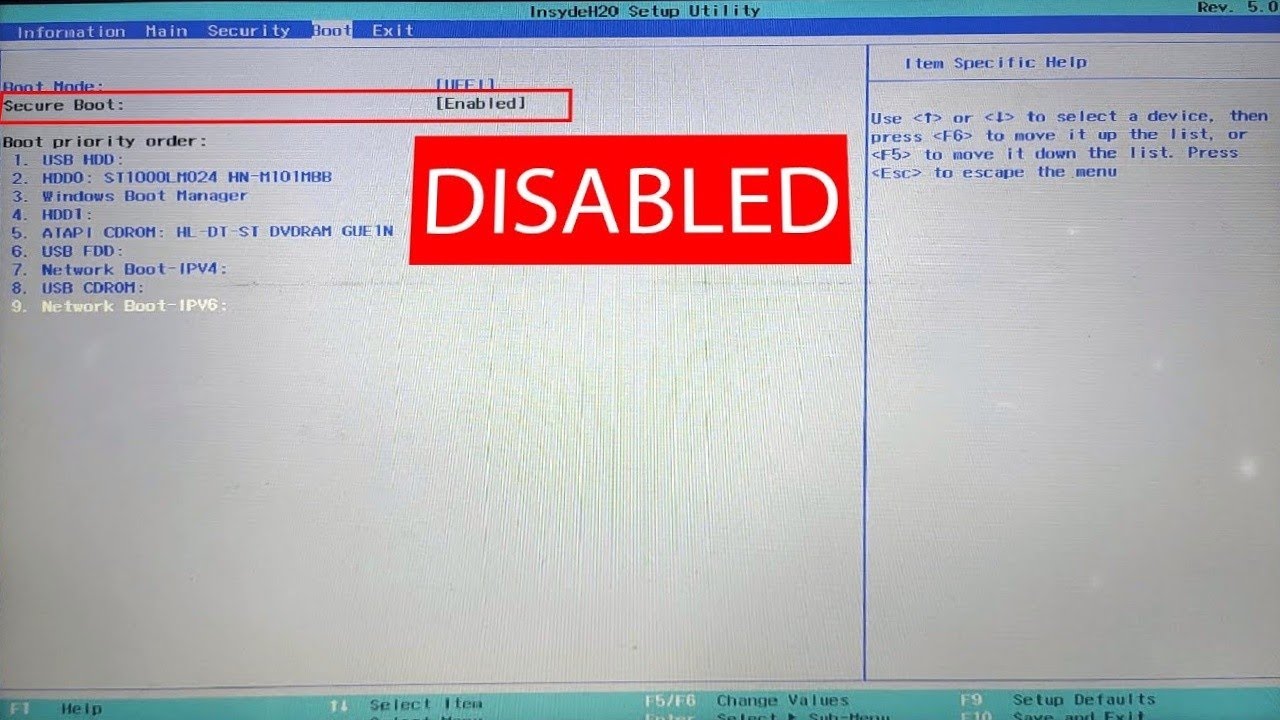
This is a quick video on disabling secure boot in acer laptops.
Now, like most of the mid range laptops this laptop has inside h2o bios but unlike others, the option of secure boot cannot be toggled.
When secure boot is enabled we cannot boot any OS from external device so in case you want to switch to Linux or want to reinstall windows you ...
this vid should help you
thanks
basicly, in order to see the secure boot option you need to go over to the security tab and make a supervisor password
by default its locked behind a "Supervisor" feature
type the password in and it should allow you to see the secure boot option in the boot submenu
ive already done this its off
another thing that could be happeneing and this is more of a microsoft fault is WBM (Windows Boot Manager) is somehow interfearing with the boot

prob yeah sux
wait
why is the usb at the lowest priority? just chang the boot order
i did it overrides it
saved it n it reverted it
it might be windows boot manger then
n idk if that usb is even the right one n not the mouse or smth
topaz sand
yes it's probably not the right one
topaz sand
or simply create a USB in UEFI mode, if you can't change boot mode
quiet anchor
how do i do that
here
Rufus: Create bootable USB drives the easy way
do u guys think thatll fix it?
topaz sand
yes
quiet anchor
make a usb using rufus and make sure to set it to UEFI in the Rufus menu
does balena not do that
balena is a bit touch and go
i mean etcher woops
tired
i perfer rufus because it allows more options
and works 100 percent of the time.
i did the usb on etcher tho wouldnt it be weird if i did it again how do i wipe it
no?
it will just ask you to format the usb
then overwrite the data to install a new image of Linux mint
okay so it can do it again? awesome tysm
ill try that rn
just make sure to have it set to UEFI in the rufus menu
uefi:NTFS
right?
is this all good
 topaz sand
yes
quiet anchor
swagg thx
WAIT
wat
no you havew to select the Disk image with the select option
it should open the file explorer
i just did that
we good muaha i was gonna do that dw
didnt mean to give u a heart attack

How to create a Linux Mint install/live USB stick in Windows using Rufus
topaz sand
you can't start it without an image anyway
topaz sand
rufus automatically changes this to FAT32
quiet anchor
quiet anchor
is this all good
just read this, making sure
when i do that it overrides the uefi setting did it still take it into account?
 quiet anchor
when i do that it overrides the uefi setting did it still take it into account?
quiet anchor
quiet anchor
when i do that it overrides the uefi setting did it still take it into account?
yes that looks right
awesome
show me the entire thing
sure
or come into live support rq, streaming this would be a lot easier

all set
can my mic be muted
nah looks like your good
swagggg
just hit start and go.
ill do da thing then
should ask you to format it, just accept
boo it changed the name
dw
it really dosent matter.
the og name was cooler
topaz sand
change the volume label then
 quiet anchor
???
no no its fine
wts that do just curious
were trying to get a bootable system, not make it fancy
go ahead and start it
i did dw
topaz sand
quiet anchor
wts that do just curious
this just changes the name of the stick
quiet anchor
its been going
quiet anchor
topaz sand
this just changes the name of the stick
ohhh LOL
now we wait
i rlly appreciate the help honestly guys
its chill
is this a common issue or nah
WBM in general is annoying
wt is it again
Windows boot manager
but i think this might just be a UEFI issue
is it just wt windows made to boot their shit
this should solve that
tis done

do i just try to do wt i did earlier
update i tried it it didnt display in the list
is secure boot disabled?
n also the carder reader sometimes displays n sometimes doesnt
ya
quiet anchor
but yeah its disabled rip
how in the fuck
idkkk
ok lets try somthign else
is fast start disabled on windows?
noope
ill disable it
heres a good video on how to

Fast Startup is enabled by default in Windows. Learn how to disable Fast Startup and give yourself some extra time to grab your morning coffee while you PC boots.
Read more here: https://www.pdq.com/blog/how-to-disable-fast-startup/
PowerShell command: Set-ItemProperty -Path 'HKLM:\SYSTEM\CurrentControlSet\Control\Session Manager\Power' -Name ...
off topic when installing linux when u can choose both can u ever just like go to just linux or is it a pain
i noticed fast start up was in the bios
i disabled fast boot in the bios ill also do this
i disabled both
rip
didnt fix it
quiet anchor
Good! Sorry we couldn’t help with the install. Sometimes some things are just so stupidly simple it makes no sense