#Dual disk, dual boot for Mint, but system boots straight into Windows.
1 messages · Page 2 of 1
 remote smelt
i wanna see it too
 fringe tangle
"command not found"
 ancient spade
it's not a command bro
fringe tangle
oh
fringe tangle
opened
ancient spade
find etc folder
fringe tangle
found it
fringe tangle
it isn't a folder, but a txt file
ancient spade
i said that. white file
fringe tangle
 ancient spade
good they match
what is not good, is that cd adapter

so install linux to the available 11.8 GB space remaining on sda
fringe tangle
 ancient spade
show it
fringe tangle
just gimme a second
ancient spade
the sizer window popup
 fringe tangle
 ancient spade
drag the right edge to the left
JUST the right edge
dont drag anything but that
then show it
fringe tangle
I think I'll record it
ancient spade
no i cant see the video good
fringe tangle
fringe tangle
fringe tangle
I need to know when stop it
ancient spade
click in the free space 'following' field, put 12,000 then press Tab
then click resize button
fringe tangle
now there are 3 unallocated partitions
ancient spade
show pic
fringe tangle
 ancient spade
u did it wrong. cancel no changes
i said put 12000 in the space following
supposed to show big grey on the right
fringe tangle
where?
fringe tangle
yeah
ancient spade
ok close gparted. open installer
do 'something else' option like before
tag me when ur here.

@fringe tangle
ancient spade
i said tag me.. what happened?
@fringe tangle dont keep me in suspense.. what happened?
fringe tangle
"unmount partitions that are in use?"
fringe tangle
WHAT?
ancient spade
what exact step are u at
fringe tangle
fringe tangle
WHAT?
ah shit-
fringe tangle
ok, I'm in installation part
fringe tangle
ancient spade
i fogot to tell u but delete sdb2 from sdb
really?
ancient spade
can just restart installer
fringe tangle
ok
ancient spade
yes because otherwise it will get confused, too many linux mints! 😛
fringe tangle
deleted
now is everything unmounted, so I think that advice will not appear anymore
@ancient spade pls remember me what are we doing
fringe tangle
ancient spade
tag me when ur here.
and I'm here too
ancient spade
ok
find sda, find the free space u just made, 12 GB
hit the plus sing, make like last time, ext4 mount at: /
and change bottom box for boot loader to say sda
then show pic.
🕥 💀
fringe tangle
I'm back
fringe tangle
 fringe tangle
"no EFI system partition was found"
ancient spade
skip
fringe tangle
Continue?
ancient spade
ya
fringe tangle
That's the last thing I'll do for today, because I'll sleep
ancient spade
k
fringe tangle
will it fix my Windows?
ancient spade
should
then again u have infinite bad luck
if ur wifi was on today or u got mx iso last night this could have been fixed way sooner
i think the cd tray chip is no good for booting
only for storage.
in which case, you'd have to rearrange ur sda anyway
should be done now, @fringe tangle
fringe tangle
almost there
ancient spade
if doesnt boot, then tomorrow send me the exact "Boot Information Summary" text,
and do boot repair
because this is legacy old bios, such a pain the ass for 2025
ancient spade
yayyyyyyyyy
fringe tangle
thank God
ancient spade
see it was the stupid cd tray or hdd
now in the install,
open terminal
do sudo os-prober
what is result?
fringe tangle
/dev/sda1:Windows 10 :Windows :chain
ancient spade
and linux too right?
ancient spade
k np. timer
ok next,
sudo mousepad /etc/default/grub
what's it show for grub timeout , and grub timeout style?
sorry
wrong
fringe tangle
no problem
fringe tangle
"command not found"
fringe tangle
it worked
ancient spade
what it say
fringe tangle
it seems that is a text file that I can edit
fringe tangle
"GRUB_DEFAULT=0
GRUB TIMEOUT_STYLE = hidden
GRUB_TIMEOUT = 10"
ancient spade
change the word "hidden" to say menu
remote smelt
is there any progress?
remote smelt
Sorry i had a nap.
ancient spade
booted linux mint off ssd no problem!
fringe tangle
Okay, how I save it?
fringe tangle
remote smelt
Sorry i had a nap.
I need some sleep too
remote smelt
oh thats good! what was the problem with it?
ancient spade
fringe tangle
Okay, how I save it?
u put menu right after the equal sign, yes?
...
fringe tangle
yeah
fringe tangle
like this?

 ancient spade
both?
fringe tangle
FINALLY
fringe tangle
ancient spade
both?
YEAH
ancient spade
I told u Plan 2 would have good chance of working
fringe tangle
tomorrow I'll try to install on the HDD
ancient spade
fringe tangle
tomorrow I'll try to install on the HDD
forget that shit. it's not going to work
use that drive for all storage
fringe tangle
can I use it as Linux storage?
ancient spade
make 50 GB space on ssd, then stretch linux bigger
and u can put all ur shit on the 500 gb drive
ancient spade
fringe tangle
can I use it as Linux storage?
windows and linux
fringe tangle
ancient spade
windows and linux
ok, just asking
ancient spade
but right now u have only 12 GB linux. that's almost zero room for programs and other cache
u will need to stretch it
fringe tangle
if I delete all partitions of the HDD, I'll be able to save all the things?
fringe tangle
ancient spade
but right now u have only 12 GB linux. that's almost zero room for programs and ...
for me, it is ok
my goal is use Linux for coding and internet browsing
ancient spade
fringe tangle
if I delete all partitions of the HDD, I'll be able to save all the things?
dude it's not enough. it will crash
proably in a week
u HAVE to make room.
go in windows now, delete the ISO
and delete more garbage
use ccleaner
ancient spade
u can also delete the windows hiberfil.sys from C:\ since u never hibernate
hibefil is sleep file for hibernation and wastes like many gigabytes of space
and make 1,000,000% sure that fast-startup is off/disabled in Windows.
and also in windows cmd (admin) do chkdisk /f to scan n repair filesystem
ancient spade
mhm
fringe tangle
ancient spade
and also in windows cmd (admin) do `chkdisk /f` to scan n repair filesystem
I need to do this?
fringe tangle
I'm afraid to mess with chkdsk again
ancient spade
or at least just chkdsk (no /f) to only scan to examine for errors
ancient spade
yes did u remove hiberfil.sys?
fringe tangle
I prefer not remove this for a while
fringe tangle
yes
ancient spade
ok
fringe tangle
I only have a Tiny Core ISO that I'm using in a Virtual Machine
ancient spade
do u want to leave for tomorrow?
fringe tangle
ancient spade
do u want to leave for tomorrow?
It will take a long time?
ancient spade
ok tomorrow, sure
fringe tangle
we will make this new storage be used by Linux, correct?
ancient spade
yes and make better DATA partition
ancient spade
yw. it was tough but all good
ancient spade
i need to relax too
ancient spade
😒
 ancient spade
what OS were u using last?
is there a fastboot setting in the bios? if so, turn off
fringe tangle
ancient spade
what OS were u using last?
Windows 10
ancient spade
ok leave it for today
 karmic furnace
The only way is to force reinstall grub in chroot manually. At least to see why it fails.
Assuming /dev/sda is mint drive and /dev/sda2 is the root partition. Switch the user to root to don't lock yourself in chroot.
mkdir -p /mnt/a
mount /dev/sda2 /mnt/a
mount --rbind /sys /mnt/a/sys
mount --rbind /dev /mnt/a/dev
mount -t proc /proc /mnt/a/proc
chroot /mnt/a
grub-install /dev/sda
cp /boot/grub/grub.cfg /boot/grub/grub.cfg.bk
update-grub
exit
Hi guys, I'm back
I guess I'll try to recover my PC, or start doing it
So, I need help
This was the last screen that I've saw, after rebooting my PC

I was using Windows 10 and it was ok, until I reboot to test if it really worked
@ancient spade @remote smelt
ancient spade
fringe tangle
I was using Windows 10 and it was ok, until I reboot to test if it really worked
hello
try typing normal at that prompt
n then enter
ancient spade
ok. i would try the Linux Mint Boot repair tool
fringe tangle
Live ISO?
fringe tangle
ok, it is booting up
ancient spade
then u should be able to boot back into Windows after.. and u will have to do powercfg /h off from admin cmd prompt.
I think that is what caused the messup last time.
fast start was still on
that or a Windows update did something
ancient spade
mkay
ancient spade
reboot
ancient spade
which OS u went into?
fringe tangle
Win 10
ancient spade
ok immediately do that thing
fringe tangle
CMD command?
ancient spade
open cmd admin
ancient spade
no
fringe tangle
so it worked
ancient spade
if no errors it is done
ancient spade
ok next thing, i think you should get rid of any signatures on the storage disk
yeah reboot to Linux on SSD from grub
ancient spade
hm?
ancient spade
u mean as u were attempting a shutdown?
fringe tangle
at least it is repairing itself automatically
fringe tangle
ancient spade
u mean as u were attempting a shutdown?
I rebooted my PC, and when my PC turned on, it happened
ancient spade
you should go in BIOS, and take that CD/DVD completely off the boot order.
100% off
because maybe it has some bootloader on it which is interfering
fringe tangle
ancient spade
put it to very bottom of list then
done
Windows it just taking more time to boot, but it is working, so, it's enough
ancient spade
i would still wipe that other disk. the HDD
in a special way
once u make sure anything u moved to that DATA partition is still available on the Windows system
do FULL wipe. (with gparted) then parition exactly half of it from Windows Disk Management to be NTFS
and other half using DISKS application in Linux Mint (installed version) make it to ext4. and put good labels.
eg: one of them (NTFS) WINDATA. The other one (ext4) LIN_DATA
fringe tangle
ok, I'm back
ancient spade
where did u go?
fringe tangle
drinking water
fringe tangle
ancient spade
and other half using DISKS application in Linux Mint (installed version) make it...
well, I can't access Mint
GRUB isn't appearing anymore
fringe tangle
what's your plan?
ancient spade
looks like Windows undid the boot repair from before
plan 1 is to make SURE everything u put on the DATA drive, u already have it exactly wherever that data came from
then delete it 100% using new partition table
to erase any possible MBR signatures
fringe tangle
lemme test something first
ancient spade
after that, from live system, do sudo os-prober and after, sudo update-grub
fringe tangle
ancient spade
plan 1 is to make SURE everything u put on the DATA drive, u already have it exa...
I just can access "DATA" files on Linux
ancient spade
using what?
fringe tangle
it is obvious, because it has ext4 filesystem, I guess
fringe tangle
ancient spade
using what?
Thunar
fringe tangle
ancient spade
then delete it 100% using new partition table
delete what?
ancient spade
ha
fringe tangle
I will just backup some things before doing something
ancient spade
so u just boot to windows?
fringe tangle
enjoy while Windows is running properly
fringe tangle
ancient spade
so u just boot to windows?
yeah
ancient spade
just leave it then. if u want to use Linux, buy a usb to SATA cable and use the hdd externally
and when u go to install to external, TAKE THE WINDOWS DRIVE OFF THE MOTHERBOARD/ DISCONNECT.
put back when finished
fringe tangle
hm, ok so
maybe I'll erase Windows and download Linux some time
just asking something
I don't want to waste this HDD, how can I active it to use with Windows?
fringe tangle
ancient spade
just wipe off
It will not work on CD tray?
ancient spade
not for booting
if u want to boot whatever OS from that drive, get sata to usb bridge cable
remote smelt
even if it was possible, using only disk is way too slow
fringe tangle
ancient spade
not for booting
no, just for storage
ancient spade
hdd isnt that slow on linux anyway
remote smelt
ancient spade
hdd isnt that slow on linux anyway
was he talking like a laser disk or HDD? i thought he meant the first one
fringe tangle
ancient spade
I'm stepping out of this.
thank you for all your help bro, you saved me
and thank you all guys
@ancient spade so, I can erase the partition that Linux was installed, right?
fringe tangle
hm, okay
I don't want to break the boot again
at least I have storage to play some games
fringe tangle
@ancient spade hello bro, just another question
would another distro work on that HDD or not?
fringe tangle
I literally bought this CD adapter because I thought it wouldn't work
karmic furnace
I think you can make an USB drive with live persistence. When you want to use linux, just boot of the USB drive and that is it. All your files will be saved on the USB drive. Also dont need to mess with grub.
Read-write speed may not be so great but it will work.
fringe tangle
karmic furnace
I think you can make an USB drive with live persistence. When you want to use li...
actually, it doesn't save my work after I reboot my PC, unfortunately
I think I'll try to install it on another external HDD that I have
If everything works correctly, I'll tell you here.
fringe tangle
(only showing that I finally installed Linux without any problems)

(running from an external HDD)
ancient spade
fringe tangle
(only showing that I finally installed Linux without any problems)
nice.
fringe tangle
now I can have fun with my OS
ancient spade
fringe tangle
now I can have fun with my OS
one warning. you should make a bootable usb using Ventoy, and keep Supergrub2 img on it, and Mint ISO too on it. In case something stops booting right (like Windows) you can use supergrub to start it.
Ventoy guide: #1295816480256163892 message
(6 steps)
Supergrub: #1200928716415566005 message
@fringe tangle ^
both Mint iso, and supergrub can fit on one 4 GB usb, prepared with ventoy.
then you will be all set in case something goes wrong.
ancient spade
fringe tangle
I've already used Ventoy, only didn't know about Supergrub
it's good to get familiar with it, and its orang screen menu
fringe tangle
orange screen?
the last time I used Ventoy, it was a white screen with a list of the OS that were on the USB stick
ancient spade
yes, you still use that to launch supergrub
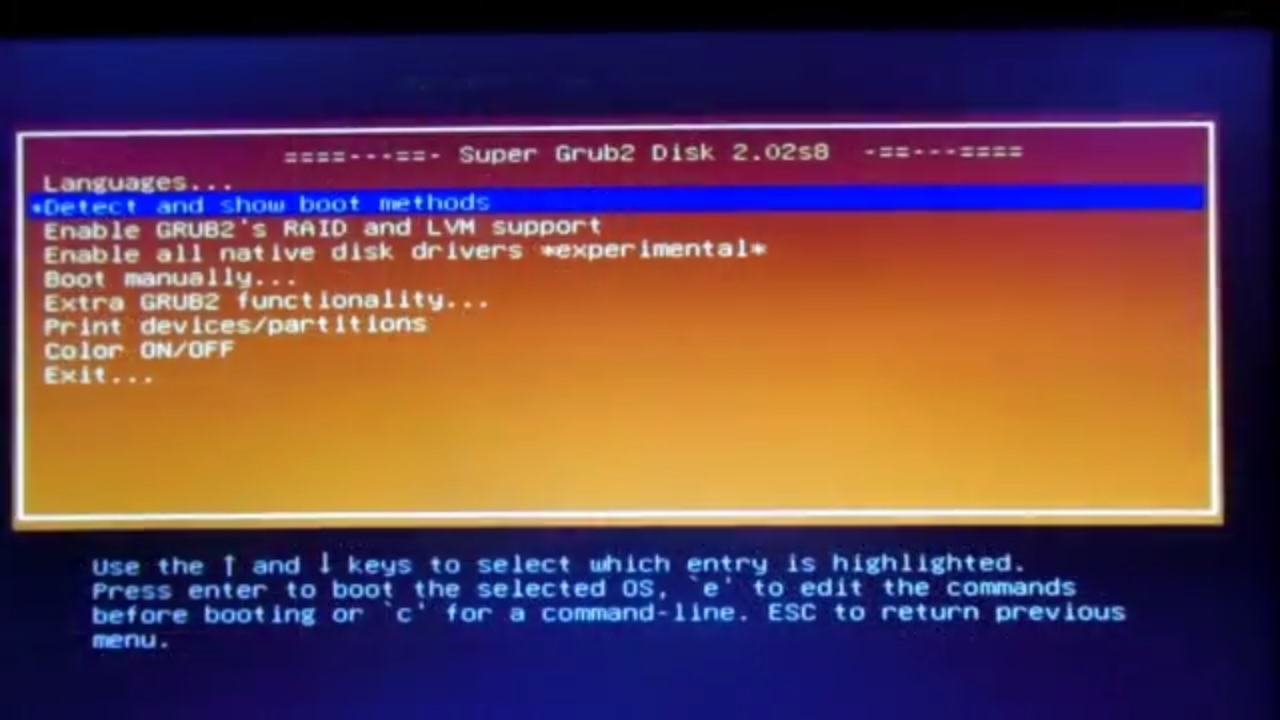
Super GRUB2 helps in booting into most any Operating System, If you cannot boot into it by normal means.The live CD of Super Grub can be used to repair grub by fixing the boot of GNU Linux.
Learn online IT and software courses.
For more info visit - http://bit.ly/2OEEPo2
Source - www.supergrubdisk.org
just make sure you extract it. (makes one big IMG file, which u then copy that to ventoy.)
fringe tangle
when I install it, I'll be here to ask for help
fringe tangle
@ancient spade When I open a app, it shows 2 sentences on taskbar, can I change it to something that looks like of Windows?
fringe tangle
example : Vivaldi appears 2 times on panel, to show that are 2 instances running

Can I do something to change it?
ancient spade
how many vivaldi windows do you have open?
fringe tangle
2
but that's the point, I don't want them showing on panel
sometimes I click on wrong instance
ancient spade
that pic is in Linux right? with a modified start button?
fringe tangle
ancient spade
that pic is in Linux right? with a modified start button?
yeah
the Mint logo
ancient spade
do you want to see buttons with labels?
fringe tangle
I want something like this if possible (ignore the text pls)

so if there's no way to confusing which instance is the right
ancient spade
install DockbarX
fringe tangle
lemme search for it
ancient spade
and use it to replace the "window buttons" applet that xfce comes with
I presume you're using xfce
fringe tangle
ancient spade
I presume you're using xfce
yeah
I couldn't use CInnamon with HDD lol
I can't install it
ancient spade
dockbar?
fringe tangle
yeah
ancient spade
why not?
fringe tangle
there are some errors with terminal
sudo apt-get install dockbarx
Reading package lists... Done
Building dependency tree... Done
Reading state information... Done
E: Unable to locate package dockbarx
(oh God, finally I can copy the terminal lines)
fringe tangle
it isn't avaliable
fringe tangle
ok, forget what I said, now it installed
or almost
"unable to locate package dockbarxC"
ancient spade
idk what that is
fringe tangle
so I have a problem now
ancient spade
?
fringe tangle
if you don't know
I'll try to fix this tomorrow
I will not search for problems now
ancient spade
fringe tangle
I will not search for problems now
it is in a PPA. sorry I didnt realize it. see this article. shows the simple commands on how to add private package archive (PPA) and install it and some themes for it. https://averagelinuxuser.com/dockbarx-xfce/

Average Linux User
DockBarX is probably the best taskbar for the XFCE desktop. This tutorial shows you how to install DockBarX in XFCE and make basic configurations.
he has his own youtube channel too. good guy.
fringe tangle
ancient spade
it is in a PPA. sorry I didnt realize it. see this article. shows the simple co...
oh, that's great
fringe tangle
@ancient spade update : I couldn't install the dependencies
ancient spade
fringe tangle
<@725510568492138497> update : I couldn't install the dependencies
oh. sorry to hear. do u have synaptic?
if not, get it.
then search "docklike taskbar for xfce"
it may say it is a plugin
once installed, then right click panel> add items
and add 'dock-like taskbar' and move it where you want
and remove the 'window buttons' item
fringe tangle
ancient spade
oh. sorry to hear. do u have synaptic?
what is this? I've never heard about it
and I needed to get rid of my old internet browser, F
ancient spade
fringe tangle
what is this? I've never heard about it
https://youtu.be/qxnM0rvVbDc?t=304 (5:04) how to use Synaptic, thorough and simple. best for searching key components and things the software manager may not find.
fringe tangle
ancient spade
<https://youtu.be/qxnM0rvVbDc?t=304> (5:04) how to use Synaptic, thorough and si...
ok, lemme see
only a question : I know that it isn't the intent of XFCE (actually, it is the opposite, because it was supposed to be more lightweight), but is there any way to set animations to the windows?
fringe tangle
and how do I change the lock screen wallpaper? it only appears when I set some of the standard wallpapers, but not a image that I downloaded
ancient spade
fringe tangle
only a question : I know that it isn't the intent of XFCE (actually, it is the o...
no, the only effects with the windows are in "window manager tweaks" for transparency while moving them. The lock screen wallpaper I think you have to put your image (with root mode file manager) into /usr/share/wallpaper/
fringe tangle
ancient spade
no, the only effects with the windows are in "window manager tweaks" for transpa...
well, I can survive with it
ancient spade
did u find dock-like taskbar in synaptic?
ancient spade
fringe tangle
I found the DockbarX plugin
really?? it was in synaptic, or u had to do via PPA?
fringe tangle
synaptic
ancient spade
oh wow cool. I dont even have it on Debian. but I used to have it once on an old distro
I'll show u a pic of how I had it set up
fringe tangle
okay
ancient spade

I forgot the dockbarX preset, but it's the one that shows like nightlights shining down on the minimized windows, and I changed the colour of the active window to bright green
and when more than one of same task is open, it shows a number of how many
fringe tangle
it is appearing the instances of the apps
but the standard panel is activated at the same time
(the black box is DockbarX)
 ancient spade
ya , remember I said to turn off the "window buttons" ITEM in 'panel preferences'
ancient spade
ancient spade
and remove the 'window buttons' item
.
fringe tangle
Where?
ancient spade
i just said
fringe tangle
I'm on panel preferences already
fringe tangle
hm
ancient spade
window buttons is the item i think
fringe tangle
all of them?
ancient spade
you can also remove launchers or leave them for now, til you learn how to set launchers up in dockbar
no just the window buttons item
ancient spade
no
just window buttons
show me the list of items if you're not sure. scroll it and look good though
 ancient spade
where is dockbar?
fringe tangle
I didn't add it, I was trying to delete the buttons that you've said
ancient spade
i usually put "show desktop" to bottom of list, so it shows on far right of panel, like in Windows
ancient spade
fringe tangle
I didn't add it, I was trying to delete the buttons that you've said
you have to add the dockbarx plugin to that list
fringe tangle
ancient spade
you have to add the dockbarx plugin to that list
added
ancient spade
move it in list below whisker menu, and below first "launcher"
U can drag or click the arrows up/dn
and delete "window buttons"
fringe tangle
ancient spade
move it in list below whisker menu, and below first "launcher"
before window buttons, right?
ancient spade
yep
ancient spade
yes. to re-add if u wish, u press + button
fringe tangle
thank you
ancient spade
and opeen more applications
you can also edit the dockbar config. it has many preset themes to see
i think either right click, edit/prefs or go back to panel prefs> Items: highlight dockbarx plugin, and there's a small settings icon near bottom
or find "dockbarX settings" from start menu
 ancient spade
those are those "launcher" items you saw in the Items list
you may remove them, but i would first set them up in dockbar
before removing any xfce launchers
for example, open vivaldi now
once it appears in dockbar, right click it there
i think u can choose pin from that
ancient spade
then u can right click vivaldi icon in dockbar, and do "open new window/instance"
and it will show a (2) for it
fringe tangle
very nice

now my panel isn't bloated
I'll enjoy this chance and make another question (about customization again)
ancient spade
u can also open terminal, and discord, and use same method to add to dockbar
and get rid of the xfce launchers
fringe tangle
ancient spade
u can also open terminal, and discord, and use same method to add to dockbar
I added them
fringe tangle
can I set my panel like this? (yeah, pretty small)
 ancient spade
yes
fringe tangle
is it compilcated to do?
ancient spade
what you can do is remove too many separators, and just have one, and adjust its own properties to 'expand'
and in panel pref's adjust width
fringe tangle
ancient spade
and in panel pref's adjust width
how do I adjust the width?
ancient spade
show a ss of panel prefs, first tab
fringe tangle
I only put too many separators because my panel was a mess
And I needed to do it do set the icons to the middle
fringe tangle
ancient spade
show a ss of panel prefs, first tab
and now?
 ancient spade
fringe tangle
I only put too many separators because my panel was a mess
ancient spade
fringe tangle
I only put too many separators because my panel was a mess
if you highlight just one of them, then find the 'edit' icon below, then tick the 'expand' (means it will grow dynamically)
Length slider ^^
fringe tangle
ancient spade
Length slider ^^
ok
ancient spade
49 is quite tall, but if u like that, fine
fringe tangle
is there any problem if I remove PulseAudio button and the other ones?
ancient spade
yes there is problem
if u need to see notifs, or check volume level, or middle click it to mute, it wont be there 😦
u can make a top panel tho
with those things
a short panel
or whatever
fringe tangle
ancient spade
u can make a top panel tho
tell me how
actually, wait
I know how to create a new panel
ancient spade
fringe tangle
and now?
hit the green + here at top
fringe tangle
I created
ancient spade
then drag up by its little "handles" at left or right edges
fringe tangle
but I want to make it thinner
fringe tangle
perfect
I'm setting up the buttons, or trying
I can't add status tray plugin
and power manager
ancient spade
make sure u have "panel 2" selected
then go to items tab
in worst case, u have to remove them from panel1 first
fringe tangle
 fringe tangle
yeah, I can't click on it
ancient spade
send a fullscreen screenshot when you're finished, if nothing too personal
 fringe tangle
thanks man, and thanks for all the help you have been given me
ancient spade
btw, when u "lock" each panel, the little side handles disappear
fringe tangle
I use Windows since I was a kid, so switching to a new OS isn't very simple (thank God Linux is user-friendly)
fringe tangle
ancient spade
btw, when u "lock" each panel, the little side handles disappear
I forgot this lol
ancient spade
fringe tangle
and now?
see here tickboxes for "lock"
fringe tangle
locked
tomorrow I'll try to customize some another things
oh, another thing before I leave
fringe tangle
tell me how to open thunar on root again
I want to switch my lock screen wallpaper
fringe tangle
yeah
ancient spade
try it
fringe tangle
"open as root"
ancient spade
then from root thunar
u go where u need to go
u can hit ctrl-L and type path
or click around
fringe tangle
ancient spade
u go where u need to go
backgrounds or the folder that my wallpaper is?
fringe tangle
ok, and now
ancient spade
then go to /usr/share/wallpaper/
n paste
then idk where the setting is but probably in "login window" settings u can choose it
ancient spade
or screeensavr settings
fringe tangle
why I need to be "root" to do it?
I know Linux have this "secure philosophy", but is a photo
ancient spade
because it's dangerous and not permitted to mess around in /usr
usr is universal system resources
fringe tangle
ancient spade
because it's dangerous and not permitted to mess around in /usr
oh, so the folder is the deal
 autumn stump
It's untenable for the OS to analyze the net effect of any singular file operation instead files and folders have permissions
ancient spade
yes anything outside of /home is danger mode
autumn stump
whereas many many machines are basically single owner the OS is designed to be suitable for multiple users some of which may be unprivileged
 fringe tangle
autumn stump
whereas many many machines are basically single owner the OS is designed to be s...
fringe tangle
autumn stump
whereas many many machines are basically single owner the OS is designed to be s...
I guess I understood now
thanks again @ancient spade
always saving my Linux
ancient spade
fringe tangle
thanks again <@725510568492138497>
you're welcome. glad to help set up your new fun thing
ancient spade
no u prob wont
xfce comes with xfwm, that draws the windows, and has transparency effect
you can set up window manager tweak settings for edge-snapping if they aren't already
fringe tangle
ancient spade
you can set up window manager tweak settings for edge-snapping if they aren't al...
edge-snapping?
ancient spade
like when u drag window for example to left edge of screen
it will fill half the screen, top to bottom
it will 'snap' into a position
some people like that, some don't
fringe tangle
oh, I think I know what it is
actually I use it lol
or used on Windows some time ago
I guess I'll sleep and try to use it tomorrow
bye guys and thanks again for the help
fringe tangle
good night, guys
@ancient spade is there a way to make the app windows look like MacOS windows?
I mean, this
 ancient spade
hang on
fringe tangle
okay
ancient spade
fringe tangle
okay

Make your XFCE looks like MacOSCredits goes to my OG go to authors in themingdaniruiz06 - for his Skeuos theme, I just revamp the theme to make it more rounded like macos -...
autumn stump
in the same vein https://github.com/vinceliuice/WhiteSur-gtk-theme

GitHub
MacOS like theme for all gtk based desktops. Contribute to vinceliuice/WhiteSur-gtk-theme development by creating an account on GitHub.
fringe tangle
autumn stump
in the same vein https://github.com/vinceliuice/WhiteSur-gtk-theme
I'll try this one
fringe tangle
ancient spade
https://www.pling.com/p/2080863
this appeared in terminal when I tried to use the command : cp: cannot stat 'Skeuos-Blue-Light-XFWM/': No such file or directory
autumn stump
some stuff is inapplicable for instance mint doesn't use gdm, and you don't gain any utility from gnome tweaks
ancient spade
fringe tangle
this appeared in terminal when I tried to use the command : cp: cannot stat 'Ske...
you have to extract the zip first
then be in that directory at the prompt
fringe tangle
ancient spade
you have to extract the zip first
I extracted
ancient spade
or extract, then cut n paste the two theme folders from there with root file manager
to /usr/share/themes/
one theme is for window body, other one is for window border/titlebar (xfwm)
fringe tangle
autumn stump
in the same vein https://github.com/vinceliuice/WhiteSur-gtk-theme
actually, I installed the theme from this link
how do I do to activate?
(and yes, I installed Git for it)
fringe tangle
fringe tangle
(and yes, I installed Git for it)
(when I tried to download, it says that I need Git, so)
the list ends here
 ancient spade
did u run the install script that the github author mentions?
ancient spade
that github thing may not work for window titlebars
fringe tangle
 ancient spade
it's ugly to mix light and dark
fringe tangle
now I'll search another thing to mod
fringe tangle
ancient spade
it's ugly to mix light and dark
I agree
ancient spade
find dark titlebar theme (known as XFWM theme) from same link i sent
just look more pages

https://www.pling.com/browse?cat=138&page=3&ord=latest
Browse XFCE/XFWM4 Themes Latest | https://www.pling.com/browse?cat=138&page=3&ord=latest | A community for free and open source software and libre content
fringe tangle
lemme see if I can find a good theme
if I install this one, the buttons will keep on the right side, isn't it?

better, I guess
 ancient spade
fringe tangle
if I install this one, the buttons will keep on the right side, isn't it?
ancient spade
fringe tangle
if I install this one, the buttons will keep on the right side, isn't it?
i think win mgr tweaks lets u move butons
how about this one
https://www.pling.com/p/1409915

Dark shiny theme with glowing prelight buttons.GDM theme NetLogin: hereKDE SDDM theme NetLogin: here
fringe tangle
ancient spade
how about this one
https://www.pling.com/p/1409915
sorry but I didn't like it
why all this glow?
ancient spade
fringe tangle
better, I guess
this is nice
fringe tangle
ancient spade
this is nice
thanks
now, I'll search more things to modify (can I call this "ricing"? I don't think so)
 latent oxide
ive had this same issue before
 ancient spade
fringe tangle
<@725510568492138497> WHAAAAAAAAAAT?
ancient spade
fringe tangle
<@725510568492138497> WHAAAAAAAAAAT?
hm?
you had Mint from last time on 12 GB partition at end of your primary hard drive, remember?
I think I said to leave it so it wouldnt ruin the windows bootup
 ancient spade
fringe tangle
ancient spade
fringe tangle
check start menu for it: settings
or panel preferences to make sure it is still an item in the items list
ancient spade
fringe tangle
I mean, the item
maybe all the items got unpinned somehow
open an application and see
once application from start menu opens, it should appear in dockbar
from there just pin it again if you use it often
fringe tangle
I am with my browser opened
and it doesn't appear on dockbar
like it was turned off
ancient spade
can u go on Discord from firefox or the app, on the computer?
then pin the screenshot tool to panel (either top or bottom panel)
then show window of panel preferences> items
for bottom panel
ancient spade
@fringe tangle
fringe tangle
sorry, I was doing other things
fringe tangle
ancient spade
then pin the screenshot tool to panel (either top or bottom panel)
I can open these apps, but they don't appear on the panel
fringe tangle
ancient spade
then pin the screenshot tool to panel (either top or bottom panel)
why?
I updated my system, lemme see if it is the problem
ancient spade
fringe tangle
why?
so u dont have to take crappy pics with a camera, that's why
fringe tangle
and I tried to remove DockbarX and add it again, and didn't work
ancient spade
it's more clear and easy to read a true screenshot , from a helper's point of view (my view)
ancient spade
ancient spade
then show window of panel preferences> items
.
fringe tangle
here
 fringe tangle
man, I'm not using my PC right now, so I think I'll let this for tomorrow (or just later)
ancient spade
fringe tangle
here
good, select dockbarX, then click the gear icon below, to edit its properties. there may be something obvious there to adjust
or hit 'remove' and then 'add' and add it back, then the gear.
fringe tangle
@ancient spade here
 fringe tangle
ancient spade
good, select dockbarX, then click the gear icon below, to edit its properties. ...
fringe tangle
ancient spade
good, select dockbarX, then click the gear icon below, to edit its properties. ...
.
ancient spade
one sec
fringe tangle
k
ancient spade
try put solid colour
like deep black or whatever u like
put max size to 200
just as test
or can even tick the 'expand' tickbox, and set max size to 1000 or close to your usual screen horizontal resolution
@fringe tangle do those ^
u should see a difference right away
fringe tangle
oh, now I could see the Discord icon
ancient spade
so something shrunk the size value
fringe tangle
but it is extremely small
fringe tangle
look at this
 ancient spade
i meant show all the width of whole panel or whole desktop for context
fringe tangle
 ancient spade
fringe tangle
<@725510568492138497> here
ancient spade
fringe tangle
<@725510568492138497> here
can also pick dockbarx settings button probably to change icon sizing
fringe tangle
how?
I think I'll try another distro in a few days, it is slower than the last time I used it
ancient spade
fringe tangle
it's hiding. only 1/3rd discord icon showing. make the bottom panel wider
and also put the 'expand' tickbox on
put max. size bigger like 1000 like I suggested
ancient spade
ok go to panel, right click. panel preferences
fringe tangle
that's the result I got
 ancient spade
put the width bigger
fringe tangle
It is
ancient spade
can u put background colour for dockbar to medium blue, so u can easily see where its extents are
fringe tangle
the maximum too (1366)
ancient spade
fringe tangle
<@725510568492138497> here
tick 'solid color' then pick blue
fringe tangle
did it
ancient spade
just play around with all those settings til u fix it
ancient spade
show the thing now. im curius to see where is blue exactly
ancient spade
fringe tangle
what if I reinstall it?
if u do, do it from synaptic. and choose "mark for complete removal"
fringe tangle
now I just need to find it
ancient spade
has a search button
fringe tangle
fringe tangle
I think I'll try another distro in a few days, it is slower than the last time I...
yeah, it is pretty slow
I'll install Tiny Core
fringe tangle
@ancient spade i'm using window buttons again
ancient spade
fringe tangle
<@725510568492138497> i'm using window buttons again
3 other alternatives are: Plank dock, Latte dock, Cairo dock
ancient spade
they dont reside in the xfce panel, but they are themselves a dock. probably can put app start menu too
fringe tangle
ancient spade
they dont reside in the xfce panel, but they are themselves a dock. probably can...
I installed Cairo Dock, now I just have to delete Panel 1 to make it my standard panel
fringe tangle
hey yo @ancient spade
bro, I installed a modified version of Win11 on my SSD, and now I have a good free space, like, almost 80GBs
can I install Mint on that SSD using 35/40GBs for the OS?
I'll have to use my external HDD on my Xbox
ancient spade
fringe tangle
can I install Mint on that SSD using 35/40GBs for the OS?
idk how u got win11 to install on a legacy BIOS system, but ya. disable its Fast Startup (powercfg /h off) in admin prompt
then set up a dualboot on same drive
fringe tangle
ancient spade
idk how u got win11 to install on a legacy BIOS system, but ya. disable its Fas...
It is a modified version, it is called Tiny11
fringe tangle
ancient spade
then set up a dualboot on same drive
Okay, so it was supposed to appear GRUB, isn't it?
I think I'll use Cinnamon this time, 'cause I'm not using a HDD anymore
ancient spade
remember the latest mint doesnt naturally set the boot flag
so you're best to reboot the live usb, and show me gparted what it did
fringe tangle
ancient spade
idk how u got win11 to install on a legacy BIOS system, but ya. disable its Fas...
it didn't show anything, so I guess it worked
perfect
ancient spade
fringe tangle
perfect
as long as u did it from admin command prompt or admin powershell, it should have worked
fringe tangle
I did it, so, there's no problem
ancient spade
alright see u tomorrow
make sure bitlocker is off
u can check in Windows Disk Management, if this version of windows includes that
ancient spade
fringe tangle
something is wrong
show it
fringe tangle
but Disk Management says that I only can use 20GB to create a partition?
fringe tangle
(it is in Portuguese, but is saying that I only can use 19955MB/19GB on a partition)
 ancient spade
i believe you. just reboot
fringe tangle
ok, just let Cinnamon ISO finish downloading
ancient spade
plus, you dont need to pre-shrink it (usually)
mint gives slider
in the 'alongside' install option
fringe tangle
oh, on G-Parted
ancient spade
well, as a second resort. usually the installer gives size slider
fringe tangle
yes, the live ISO
at least, Linux doesn't have this type of limitations
(I guess)
ancient spade
fringe tangle
at least, Linux doesn't have this type of limitations
in Disk Management, did you see ANY mention of bitlocker?
if not, good.
fringe tangle
nope
fringe tangle
@ancient spade man, what's the filesystem for swap partition? (I'm already organizing my partitions to install it tomorrow)
and it's saying that I cannot make more than 4 primary partitions
ancient spade
dont make one it will make swap file
fringe tangle
hey @ancient spade
I'm here again, already organizing my Mint installation
I want to use this 4GB partition as my swap partition, but it says "unusable" (it is the same partition that GParted said I cannot set as a primary partition)
 fringe tangle
I can't set my swap partition, thanks to this 2MB partition that I didn't create
 fringe tangle
ancient spade
can u please minimize that, and show DISKS app
fringe tangle
ancient spade
can u please minimize that, and show DISKS app
ok, I'll do this
fringe tangle
here
 ancient spade
great
fringe tangle
I think this 2MB partition is what left over from my swap partition, but ok
ancient spade
just hang on
fringe tangle
that's what appears when I try to create my swap partition
 fringe tangle
ancient spade
click the first partition
fringe tangle
ancient spade
click the first partition
the 36GB one?
ancient spade
ancient spade
84 GB in DISKS APP
does it say bootable at bottom in the info text?
fringe tangle
yeah
ancient spade
ok that is MBR
p1 is flagged as BIOS BOOT
what is that silly 3 MB exFAT partition?
fringe tangle
EFI partition
ancient spade
did u make that or windows installer made it?
fringe tangle
ancient spade
did u make that or windows installer made it?
I made it
ancient spade
- not exfat
- dont make an efi partition on a pure legacy computer
does partition 4 contain anything?
fringe tangle
ancient spade
1) not exfat
2) dont make an efi partition on a pure legacy computer
1° - ok, so what's the correct filesystem? I used an EXFAT partition on my HDD and worked well (I thought it was correct)
2° - without an EFI partition, I can't install the OS. and if I install, it can mess everything
ancient spade
u can install the OS
fringe tangle
ancient spade
does partition 4 contain anything?
which one are you talking about?
ancient spade
for example, right now, u booted mint live usb. do efibootmgr in terminal, and what does it result?
the 3MB one
labelled "partition 4"
fringe tangle
ancient spade
for example, right now, u booted mint live usb. do `efibootmgr` in terminal, an...
I cannot (at least that's what terminal's saying)
"EFI variables are not supported on this system"
ancient spade
it's say efi not supported?
fringe tangle
ancient spade
labelled "partition 4"
so, it is my EFI partition, I said
ancient spade
good. that means ur in pure legacy environment. which is true, for this non-uefi old computer
ancient spade
fringe tangle
so, it is my EFI partition, I said
click it in Disks. click play button, click blue link text after
fringe tangle
done
ancient spade
what it show in file manager? any files in it
fringe tangle
no, it didn't show anything
ancient spade
when u clicked thee blue link
good
close file manager, go back to DISKS hit stop for p4
fringe tangle
stopped
ancient spade
delete p4
(red - button)
then open gparted, right click the 4.1 GB free space, and do "new" and make extended partition
then within extended partition, you can make swap partition
ancient spade
show pic of gparted, to confirm where u are
 fringe tangle
yeah, and an EFI partition
ancient spade
u dont need efi partition, trust me
fringe tangle
and what if my OS wouldn't be able to boot anymore?
ancient spade
ancient spade
then within extended partition, you can make swap partition
now this
fringe tangle
man, I really want to make an EFI partition
ancient spade
fringe tangle
and what if my OS wouldn't be able to boot anymore?
efi partition wouldnt help. this is not a uefi computer. u could use supergrub from ventoy if having issues
ancient spade
extended partition
---4 GB swap
--100 MB esp
swap format is linux-swap
esp format is fat32
fringe tangle
ancient spade
extended partition
---4 GB swap
--100 MB esp
what if I told ya that I can't change my extended partition anymore?
ancient spade
u can, u r-click in the free space under it and do "new"
fringe tangle
fringe tangle
ancient spade
u can, u r-click in the free space under it and do "new"
so...
 ancient spade
i said under
fringe tangle
again
 fringe tangle
done
ancient spade
Then r-click the remaining .1 GB and do new
fringe tangle
what's the file system to ESP partition?
ancient spade
ancient spade
esp format is fat32
.
fringe tangle
ancient spade
Then r-click the remaining .1 GB and do new
resize the swap partition again?
ancient spade
no there should be space under it
fringe tangle
ancient spade
Then r-click the remaining .1 GB and do new
ok, where I have to make this partition with 1GB?
ancient spade
i said .1
fringe tangle
what is ".1"??
ancient spade
which is approx. 100 MB
ancient spade
show final pic of gparted once ready, but before checkmark
 ancient spade
ok then nvm, just resize ur swap bigger, to eat up that 101 MB
I didnt know u made the 99 MiB one already
fringe tangle
okay, done
ancient spade
show WIDE pic of all window
 ancient spade
good hit the checkmark
fringe tangle
ancient spade
u mean it fully crashed and vanished?
yeah, exactly
ancient spade
yeah maybe was messed because u ran installer earlier. just reboot, and do again, from gparted. dont run installer.
fringe tangle
it vanished when was saving