#first time dualbooting linux
1075 messages · Page 2 of 2 (latest)
 brisk rock
 sage relic
is this needed or not?
brisk rock
yeah let it run til finished. it will save the timeshift in a folder
brisk rock
the folder is in the base of filesystem (aka /timeshift )
it will be equal GB to install.. maybe 8
in case u screw it up bad, then u can restore from it
sage relic
is this done?
 brisk rock
see and it has date.
the file name. u can also edit comments, and put something like eg: "my very first fresh save"
sage relic
brisk rock
the file name. u can also edit comments, and put something like eg: "my very f...
ohh ok

:))))
brisk rock
check settings icon
sage relic
what?
brisk rock
there at top
 brisk rock
click schedule
sage relic
 brisk rock
uncheck daily


 brisk rock
keep 1 on weekly
sage relic
then ok?
sage relic
yay
sage relic
brisk rock
so it will autosave once a week.
oh nice
brisk rock
if u get too many, and it takes up space, you can delete them from this program from the home screen of it
sage relic
ah ok
brisk rock
just keep maybe 2 around.. from the time u know the system works perfect
sage relic
btw everytime i take a screenshot it always goes to this first
 brisk rock
yes
sage relic
how to like copy to clipboard straight away
brisk rock
u dont want to click on "copy to clipboard" ?
sage relic
yeah
brisk rock
im not sure.
sage relic
i want it copied to clipobard straight away
brisk rock
i dont think it will
sage relic
brisk rock
im not sure.
ah ok its fine
brisk rock
now u can go back to welcome screen, and do the colours how u like or whatever. Firewall u dont really need if u are behind home router ,but if u go out on public WiFi, u can turn it on
also, software manager is ur first stop for popular apps. read this sign

ok. i g2g. close this ticket by dots menu. put tags: solved.
sage relic
brisk rock
ok. i g2g. close this ticket by dots menu. put tags: solved.
ill do tmrw
brisk rock
which way?
sage relic
install desktop and also

i wanna change the crypt-hp-probook thing
we will do tmrw tho as i gtg
thanks for everything broski 💯
sage relic
@brisk rock i have this annoying watermark https://overdue.rent/09ltP
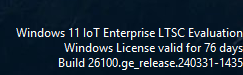
and i researched and it says i need to upgrade my windows 11
would that affect the dualboot or not?

 placid vine
sage relic
i want it copied to clipobard straight away
placid vine
sage relic
i want it copied to clipobard straight away
Iirc theres a keyboard shortcut when taking a screenshot. For example instead of just pressing the PrintScreen, it may be Shift + PrintScreen. Check the keyboard settings for the shortcut
sage relic
brisk rock
oh hey bro
sage relic
placid vine
Iirc theres a keyboard shortcut when taking a screenshot. For example instead of...
uh yeah ok
@brisk rock https://overdue.rent/OybSZ

this is what they said
@brisk rock https://overdue.rent/vVSV9

