#Manual Description, Discussion, Suggestions and Dakila!
1717 messages · Page 2 of 2 (latest)
 sonic bison
 forest acorn
Feel free to add that as your answer. 
sonic bison
yaya
 blissful remnant
not related to linuxmint but to the support forums, maybe a guide to mark thread as solved? people rarely know how to do it
forest acorn
sonic bison
Super important:
how do I set up a VPN/ client in Mint?
blissful remnant
sonic bison
Super important:
how do I set up a VPN/ client in Mint?
can't they just look up a guide specific to their VPN vendor?
I haven't seen anyone asking about installing VPN in the help channels, only if something wouldnt work
 jagged gazelle
sonic bison
Super important:
how do I set up a VPN/ client in Mint?
jagged gazelle
sonic bison
Super important:
how do I set up a VPN/ client in Mint?
VPNS are useless
All they do is change your endpoint which is only useful if you want to access location restricted content on apps like Netflix, prime etc
 shut acorn
VPNS are awesome, but I have my own. I don't buy them.
Anyway, OpenVPN is pretty straightforward to get going.
I wouldn't feel comfortable writing a guide for it though since on the server side it depends on a lot of what you would want from it. Client side is basically just an install and an import of the configuration file.
 spare kestrel
Vpns are really kewl
forest acorn
blissful remnant
not related to linuxmint but to the support forums, maybe a guide to mark thread...
I can write the desktop guide, can you do the phone one?
Maybe we can have "Meta" tag for things like this.
Also I check and update things once a day, it is not a big issue, maybe we can wait until we have too much work or something.
Remembered that after 
 manic magnet
jagged gazelle
VPNS are useless
manic magnet
jagged gazelle
VPNS are useless
Don't just write them off as useless!
VPNs do serve important purposes
just because they're improperly advertised and misunderstood doesn't mean they all suck and no one should use them ever
there is nuance to this
But yeah, the VPN provider can just give you the client and it works
no need to write a common guide since they'll all have their own custom ones
and if you use a VPS you don't really need the manual to teach you the clients
 outer spindle
manic magnet
just because they're improperly advertised and misunderstood doesn't mean they a...
outer spindle
manic magnet
just because they're improperly advertised and misunderstood doesn't mean they a...
exactly
spare kestrel
Essential software for linux
blissful remnant
spare kestrel
Essential software for linux
what does essential mean? everyone will have different needs.
for me essential is rivalcfg for my mouse and wayland for my monitors
spare kestrel
blissful remnant
for me essential is rivalcfg for my mouse and wayland for my monitors
Stuff like timeshift in which you dont find in every distro
blissful remnant
spare kestrel
Stuff like timeshift in which you dont find in every distro
you can't access timeshift in most distros except ubuntu or debian really
so this is a terrible example
jagged gazelle
blissful remnant
you can't access timeshift in most distros except ubuntu or debian really
You can?
I've used timeshift on both gentoo and arch
jagged gazelle
manic magnet
and if you use a VPS you don't really need the manual to teach you the clients
Aight, I'll look into it and make a guide
Give me a few hours
manic magnet
jagged gazelle
Aight, I'll look into it and make a guide
no no no
my point was "DON'T make a guide"
the types of people to rent and use a VPS don't need our manual to teach them
their provider or software documentation can teach them
jagged gazelle
Ah i see
Mb
jagged gazelle
@forest acorn #1298656876476502026 is done. You can close it :D
EDIT- pls dont close it as of now,i have to add some stuff to it
blissful remnant
@jagged gazelle you can also add rclone-browser (gui for rclone)
jagged gazelle
blissful remnant
<@895699982265511976> you can also add rclone-browser (gui for rclone)
o
blissful remnant
otherwise looks amazing
jagged gazelle
ive never used rclone-browser so i''ll have to look into it
will do it by tomorrow
Also, you guys should consider adding a thread on how to switch to zram
blissful remnant
jagged gazelle
Also, you guys should consider adding a thread on how to switch to zram
imo it's not commonly asked, nor people know what it even is. if someone does then they'll know how to. I say stick with the default swap mint makes. you can write it though
jagged gazelle
alr
forest acorn
jagged gazelle
will do it by tomorrow
Sure thing, no hurry, if it is closed for any reason, just let me know when you are ready to open it again.
jagged gazelle
@blissful remnant added rclone browser
forest acorn
jagged gazelle
<@611474490265960458> added rclone browser
Done?
Seems reactions can not be used when threads are locked, even to add when there is already one (which works when permissions are disabled), no point is keeping them around I guess, just visual noise. 
jagged gazelle
forest acorn
Done? <:mint_girl_blanket:932277817520033892>
Yeah
spare kestrel
jagged gazelle
Maybe a themeing guide?
Basic ricing guide
forest acorn
Check the ones that already exist, and see if you want to add an answer to them. 
blissful remnant
i wanted to write a guide about fixing ntfs partitions not mounting properly with linux 6.8 but i can't replicate it in my VM or find a screenshot. can someone source it for me?
@slate holly
forest acorn
blissful remnant
i wanted to write a guide about fixing ntfs partitions not mounting properly wit...
no experience dealing with ntfs stuff
well, not recently, I used them when I used windows I suppose.
 slate holly
hi @blissful remnant
blissful remnant
slate holly
hi <@611474490265960458>
hello stunner
blissful remnant
slate holly
btw it may say already the error in Wilma release notes
yeah, but I wanted a screenshot if you had one
slate holly
blissful remnant
yeah, but I wanted a screenshot if you had one
@forest acorn for the "Manual" channel, I was thinking there should be one master message PINNED to the top of the channel. the master message will be titled "Table of Contents"
in that message, it will contain a list (in chronological order from things such as deciding on mint, ways to install, installing Mint, using Mint, getting to know apps, etc
the list will be hotlinks to the other messages, put in order
and perhaps separated by text subsection with a graphic
like a pendrive for the install part
blissful remnant
slate holly
https://discord.com/channels/628978428019736619/1299881008811741184/129988842027...
well, idk if I should post it with this pic, I meant a screenshot so that it's readable
forest acorn
slate holly
<@223223601120149515> for the "Manual" channel, I was thinking there should be o...
Oh, that seems like a great idea, we can do that, sure. 
And thank you Stunner for being stunning as usual!
blissful remnant
@forest acorn can I request a new thread about an issue with opening windows partitions?
forest acorn
blissful remnant
<@223223601120149515> can I request a new thread about an issue with opening win...
You can, you do not have to ask for that,
So the question is like accessing windows partition from Linux Mint?
And the can the answer be generic for most new peeps?
blissful remnant
forest acorn
You can, you do not have to ask for that,
So the question is like accessing win...
yes, an error occurs when you try to do it by default
"Error mounting /dev/(disk) at /media/(username): wrong fs type, bad superblock on /dev/(disk), missing codepage or helper program, or other error"
forest acorn
Okay we can have that too, will be ready tomorrow, Monday, you will get a ping when it is ready.
slate holly
blissful remnant
well, idk if I should post it with this pic, I meant a screenshot so that it's r...
 forest acorn
For peeps who might not be super familiar with Discord but want to have nice organized answers; #1300140205902135367
blissful remnant
I want to edit my answer to be more clear in
https://discord.com/channels/628978428019736619/1295785554251874414
forest acorn
blissful remnant
I want to edit my answer to be more clear in
https://discord.com/channels/62897...
Unlocked
Let me know when you are done.
forest acorn
No, I am on the channel (discord calls it following the channel I think) so it is visible when there is a new message.
sonic bison
i just realized, do any of the manuals talk about GRUB?
ok just checked the relevant threads, they dont but eh i think people can figure out what grub is
jagged gazelle
sonic bison
i just realized, do any of the manuals talk about GRUB?
#1297237111728111666
ive explained it in the first few lines
sonic bison
tysm, marked it in my follow
jagged gazelle
slate holly
<@223223601120149515> for the "Manual" channel, I was thinking there should be o...
Oh alr ill try making one
Should i make the list alphabetical?
slate holly
jagged gazelle
Should i make the list alphabetical?
no, in chronological order (inception, conception, birth, life, death) of topics related to Mint
jagged gazelle
Oh ok
forest acorn
We will discuss more about it, it is the type of thing that will need constant maintenance and updating for any new and edited questions.
blissful remnant
@forest acorn I didn't ask for that
forest acorn
blissful remnant
yes, an error occurs when you try to do it by default
"Error mounting /dev/(dis...
Oh, what do you want instead?
blissful remnant
here's the issue
https://discord.com/channels/628978428019736619/1283864906814197871
forest acorn
So accessing usually works well, just wanted something specific to this error?
blissful remnant
forest acorn
So accessing usually works well, just wanted something specific to this error?
usually doesn't work due to the bug
was meant to just be a fix to the issue
forest acorn
forest acorn
You can, you do not have to ask for that,
So the question is like accessing win...
So the question works then?
I put what I asked before, you can just mention currently there is bug that prevent access, and here is how to do it!?
I can make a different question if you want, but this would be generic and helpful too, not just for one limited time issue
blissful remnant
but it's specifically about the issue, nothing else at all
forest acorn
If you think this would not fit in the current question at all, the exact error seems to be specific to just the latest Mint, should we even have a manual entry for that? it is just a recent bug, we have a lot of them.
blissful remnant
Ok
forest acorn
Also, marked the thread you mentioned as frequently asked just in case that would help others.
forest acorn
blissful remnant
Ok
So, opinion on if we should keep the new question at all? like if it is something obvious, and you do not want to answer it and stuff, we might not need to.
General question for others too.
Also for future, if possible just directly give me an exact question, I am not familiar with windows stuff, so there is going to be misunderstandings.
 sage haven
hillo
forest acorn
@slate holly there seems to be generic ones and ones that can change for desktop, do you want one specific to Mint or even Cinnamon, Xfce, etc for example? 
slate holly
forest acorn
<@725510568492138497> there seems to be generic ones and ones that can change fo...
i know that ctrl-alt-backspace works for sure on Mint Cinnamon, and since that's the main flagship distro this server deals with, then it should be under that.
forest acorn
We can have many things in the manual, just generic enough, like simple question and answers, not a lot of if, else, if that makes sense, more custom things in other channels. Just want to specify clearly where this would work.
I think I am sure some would not work on GNOME by default, which I mostly use, for an example.
So, the question should be common shortcuts with Linux Mint Cinnamon?
slate holly
forest acorn
We can have many things in the manual, just generic enough, like simple question...
precisely
forest acorn
Got it, give me a bit.
forest acorn
slate holly
precisely
Keyboard shortcuts one may use everyday on Linux Mint Cinnamon?
Shortcuts with other desktops are welcome too, please specify.
Question, description, seems good?
forest acorn
Yeah, the first line is searchable, second is partly visible extra thing, but not searchable.
slate holly
yeah that's fine by me
forest acorn
like additional question
slate holly
btw, a short paragraph I think should be added is:
"To see all of the preset shortcuts that are already set up, go to the Keyboard item in System Settings, and choose its Shortcuts tab. You may add custom shortcuts or modify existing ones there. You may also use its search to discover by function or keybinding and see what corresponds."
@forest acorn ^
forest acorn
In the question? Maybe would be better fitting in an answer?
I just put the question, you and others put the answers, I am not very good for the answers. 
 slate holly
oh i didnt know could just add. thought it gets locked
forest acorn
slate holly
oh i didnt know could just add. thought it gets locked
No, here is the process currently.
- I make a question, when suggested usually.
- others answer, after a while it is closed and locked to make sure people do not add random things.
If you need to edit or add something in your answer in any thread, you just let me know to open it again for a bit.
slate holly
forest acorn
No, here is the process currently.
- I make a question, when suggested usually.
...
ok done. thanks
 desert vector
@outer spindle think you can edit your message to include the common "Get out of jail" shortcuts for trying to fix an error that happens to your system?
Ctrl + Alt + Backspace - Logout
Ctrl + Alt + F5 for the desktop and F2 for tty
outer spindle
desert vector
<@910611107608137778> think you can edit your message to include the common "Get...
I think these are already in the document Stunner linked above my message #1308145211255292004 message
 gleaming fulcrum
Hello
Iam installing Linux mint xfce and i have done everything expect one thing....i can't open the bios
Oh wait nah i opened it
outer spindle
gleaming fulcrum
Iam installing Linux mint xfce and i have done everything expect one thing....i ...
help guide
it doesn't work here it seems.
anyway, check 
sonic bison
hey @forest acorn ! im curious if this link could be shared in the guide or multiple articles that are like:
"I installed linux mint, now what?"
https://easylinuxtipsproject.blogspot.com/p/first-mint-cinnamon.html

Easy tips, tweaks and tricks for Linux Mint and Ubuntu, both for beginners and for advanced users. Complete starter's guide with simple how-to's.
outer spindle
@forest acorn what about adding a thread in the manual about avoiding running dangerous commands, or something?
-# not sure what would the best title and content so if anyone wants to suggests, be welcome for it.
forest acorn
Fusion has a section for that (#1296472894024454174 message), personally I would just keep it even more minimal, like add a line of reminder to not use commands one does not understand, but if more people want it sure, why not
outer spindle
forest acorn
Fusion has a section for that (https://discord.com/channels/628978428019736619/1...
oh i see, thanks for pointing out. i only looked for the title so didn't found that thread.
btw the search on these kinds of channels can't search for matchs in the content? instead of only the title?
forest acorn
Yeah, only title from my experience, that title could be better I think,
 brittle turtle
XFCE user on laptop, to make the thing actually lookable and not zooming at microscopic level with x2 scaling settings. Use font DPI settings instead.
idk where else to post this
forest acorn
brittle turtle
XFCE user on laptop, to make the thing actually lookable and not zooming at micr...
This is for suggestion for the manual.
If you have a solution to some issue, you can just make a question in appropriate support channel, answer it yourself and mark it as solved, that way it will be easy to find when others have the same question.
If Mint #1170387126123253932
other Linux #1170387178577207348
sonic bison
while reading back, i notice that while theres a manual on synaptic and stuff, should there be a manual when either a major or minor release of Mint happens?
on one hand #📌announcements already covers it really well
on the other hand if it's been a while, could some users find it useful in a manual?
forest acorn
You mean how to upgrade?
They usually put instructions when it is available, but if it is same and does not change often we can have it if others want it too I suppose.
desert vector
@forest acorn something I noticed is there seems to be a new problem with Windows 11
Ventoy and Widows 11 apparently work only if it's formatted as NTFS
after I am done zeroing my USB I will tell you if that fixed it
desert vector
Okay after some brainstorming it seems to be a problem with Intel RST or something
https://discord.com/channels/628978428019736619/1315280230012944478
https://www.youtube.com/watch?v=50x-AB9v5ac
Driver install for Acer:
https://answers.microsoft.com/en-us/windows/forum/all/intel-rapid-storage-installation-problems/631a47af-53c2-45bc-9d3e-5d4715a89c5d
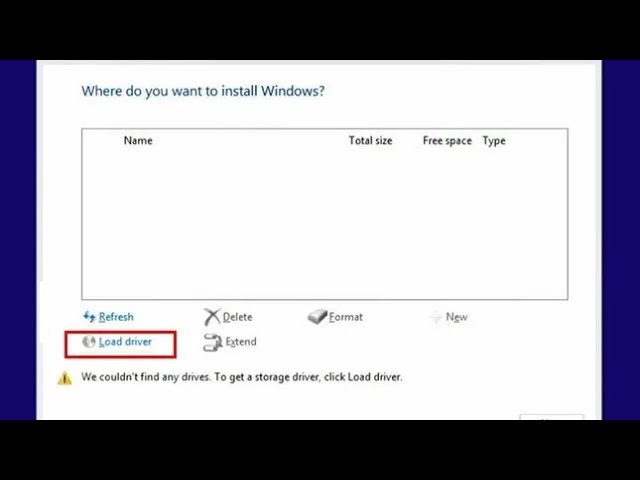
SSD Not detected during Windows 10 / 11 install Acer Nitro 5 AN515 Gaming Notebook
If you found this solution useful, consider subscribing for more helpful content. Thank you!
Download driver
1_IRST_Intel_19.2.zip https://www.andtech.ro/utile
Indiferent dacă gestionați o afacere mică, medie sau mare, AndTech Solution este partenerul vostru d...
forest acorn
blissful remnant
not related to linuxmint but to the support forums, maybe a guide to mark thread...
Two new entries, how to make threads on desktop and mobile, and another on how to edit tags on desktop and mobile, seems good?
I can do the desktop answer with pictures and stuff.
blissful remnant
forest acorn
Dictionary of Linux terms, nice, maybe we can have an entry with various links like this if other want it too. The web version cited in the document is https://tldp.org/LDP/Linux-Dictionary/html/index.html, if anyone wants it to bookmark and stuff.
Not sure how to scope a thread with links yet though, what to include and what not to,
manic magnet
This is a good idea
blissful remnant
installing software on linux: https://forums.linuxmint.com/viewtopic.php?t=395310
forest acorn
Do you want to add anything specific with your answer?
Let me know if you do, https://discord.com/channels/628978428019736619/1296124196082155531
forest acorn
I can pin it in #1016819659703590972 if that would be helpful, just put it there.
blissful remnant
forest acorn
I can pin it in <#1016819659703590972> if that would be helpful, just put it the...
so do that
forest acorn
from @tight turret
Seems like a good idea at a glance, can you do a video for DE you are using?
 tight turret
Probably will do tomorrow if I remember, rn it's kde
forest acorn
tight turret
Probably will do tomorrow if I remember, rn it's kde
That is fine, no hurry, just need enough answers for this kind of thing to be most useful I think. At least want Cinnamon, Mate, Xfce, because Mint, you got KDE covered.
Probably everyone should do same ish set of actions too, like, not sure, see list of programs installed, launch a program, etc. Or at least cover some basics.
I will let you know after making a question.
You can make a video though, so others know what things to cover and stuff, can work as a reference.
Try to stay focused, want to show the DE for this, not do everything from installing the Os to programs or whatever.
Maybe maximum ~1 minute, not sure, just seems "small" enough, and still can cover a bunch of things!?
tight turret
forest acorn
That is fine, no hurry, just need enough answers for this kind of thing to be mo...
 No, no. I can't make a video of such sorts anyway because my pc doesn't handle vms well, despite being apparently good enough for it.
So any video I do would be on bare metal
forest acorn
Yeah you do not have to worry about all DEs, just one is good enough. someone else hopefully can do another, and we cover at least a few overall.
And since your idea, I asked if you can do first so we have a reference.
tight turret
Yeah, got it. The main thing would be to make a video covering most of the basics and some more in-depth tweaking of the DE. Or we could just use some videos from yt and credit them on the message 
Since it's a new topic to talk about kinda (DE demonstrations), I'm not sure on how it's supposed to be, but the idea is what I already mentioned. Basic behavior, if modified changing back to defaults briefly, moving stuff around, going back to our personal rice, and a small overview with the config files and scripting if possible.
forest acorn
I would not include ricing and customizing and stuff, that is a lot of things, they can be separate text questions.
Your initial suggestions from my understanding is for giving people an idea of look and feel of different DEs, so maybe show the desktop, open the launcher, launch a program, maybe change volume (thing you can do from the desktop basically) and stuff like that, show the logout, shut down, etc option in the end. Not much more.
tight turret
That's why I said a "small overview". And yeah, that was initially it before I thought to myself rn "Wait, I don't think there are videos about ricing DEs through scripts yet, are there?" Because I'm also in that border between normie and Linux enthusiast
And it'd be an enormous help for dummies like me who can't quite place where to start with ricing
(Aside from tweaking spaces and such, I mean squeezing the juice out of the DE, basically)
forest acorn
Sure we can have ricing questions, but that is a different question, lets think about specifics of that after this one.
tight turret
Okay then, so we settle on just showing overall DE behavior?
forest acorn
For this question, yes.
Make video, does not have to be final, everyone has a reference, maybe no audio or music, just screen, your choice.
Then I make a question, anyone can reply with their video about a DE.
Wait, can the answer be just be set of images too, might be easier for more peeps to contribute?
Also, I will let you know the exact question and stuff before.
tight turret
forest acorn
For this question, yes.
Make video, does not have to be final, everyone has a re...
I mean, I personally will add a voiceover and maybe some very simple soundtrack like the mii central (iirc), others can do as they wish I believe
forest acorn
@hollow sand if you want to add an answer; #1322148509570564167
 hollow sand
forest acorn
<@325331229903945729> if you want to add an answer; <#1322148509570564167>
hollow sand
forest acorn
<@325331229903945729> if you want to add an answer; <#1322148509570564167>
🐊
forest acorn
Thank you
blissful remnant
hollow sand
🐊
you can also add dpkg --configure -a to fix when dpkg was interrupted (not sure it will help, every now and then someone comes in and asks what to do when they get error dpkg was interrupted, to fix open a terminal and run dpkg --configure -a)
you can also add | nc termbin.com 9999 which uploads the output (e.g of inxi) to termbin, useful if the person as an internet connection and you want to have high quality logs
hollow sand
blissful remnant
you can also add `dpkg --configure -a` to fix when dpkg was interrupted (not sur...
idk if nc termbin is needed since i already said you can pipe the output to a txt file
forest acorn
Fixes and stuff should go elsewhere, lets stick to how to get details, we can link it when someone asks how.
blissful remnant
forest acorn
Fixes and stuff should go elsewhere, lets stick to how to get details, we can li...
ah well i suggested because he already said apt fix-broken
forest acorn
Still not super sure how to have and maintain an index of all things Stunner suggested. it has to be updated every time a new things is added or removed, one answer can not have everything unless the person has nitro, and a few other issues I can not remember right now.
blissful remnant
forest acorn
Still not super sure how to have and maintain an index of all things Stunner sug...
you can just send it in multiple messages, if that's what you mean
forest acorn
Yeah, maybe multiple members can be in charge, different sections, so less work to update and stuff for each person, but that would need more communciation, boring. Have to think more
tight turret
tight turret
I mean, I personally will add a voiceover and maybe some very simple soundtrack ...
Man I actually forgot with christmas and the birthdays
forest acorn
No worries and you have no deadlines, nor are required to do anything, holidays too,
forest acorn
forest acorn
forest acorn
@blissful remnant We have already talked about it, and yes I know the question is not what you wanted. You wanted an entry just for the bug on current version.
For this entry being chaotic, there is a question, helpful members tried to answer it. I do not see anything misleading or obviously wrong there, Stunner adding solution to the related issue fits well too.
Changing question of already answered thread seems like a horrible idea.
About making a new thread just about the issue, if you want it, the new beta is already out, let see if the issue persists in the new final release first, then we can make an entry if needed.
Personally not in favor of having manual entries for new bugs, okay with more long term ones.
blissful remnant
it still uses the same kernel so yes the issue will persist for all releases of 22
forest acorn
hmm, did you check to be sure? though still beta.
If it exists still we can just add an entry
blissful remnant
there is just conflicting and unclear information, "gparted" and what does one do there? the text from @jagged gazelle is right, I'd just link their auto-mount guide because what they said there is not very self explainatory. and the last message is random and conflicting with what fusion said.
forest acorn
there is just conflicting and unclear information, "gparted" and what does one do there?
... I'd just link their auto-mount guide because what they said there is not very self explainatory.
and the last message is random and conflicting with what fusion said.
It was open a for a while, you chose to not discuss about it then, still just ping the people who wrote that to discuss.
If they want to change their answers, they can let me know to unlock it for a bit.
It is a community thing, it is not going to perfect, if you want better things, talk with each other.
And whether me or someone else maintains this, one person is not going to be experienced in everything.
blissful remnant
forest acorn
It is a community thing, it is not going to perfect, if you want better things, ...
that's why I gave my feedback here 👍
jagged gazelle
blissful remnant
there is just conflicting and unclear information, "gparted" and what does one d...
Alr I'll fix it
Just give me a day pls I don't have access to a proper laptop rn
forest acorn
jagged gazelle
Just give me a day pls I don't have access to a proper laptop rn
No worries, and you are not required to do things in a certain time or whatever, just let me know whenever you are ready.
(have to unlock the thread, so)
sonic bison
https://linuxmint-user-guide.readthedocs.io/en/latest/index.html should this be linked somewhere? i see from github that clem updated it last 4 months ago so idk
hollow sand
sonic bison
https://linuxmint-user-guide.readthedocs.io/en/latest/index.html should this be ...
It shouldn't be any different
sonic bison
wdym?
forest acorn
I linked to it for making USB with Etcher, but yeah we do no have any place with just helpful links and stuff.
sonic bison
ah ok! looking further, the last 4 month edit was to add mintupdate 22 so prob leave it lone for now?
hollow sand
sonic bison
wdym?
the installation process shouldnt be any different to what it was 4 months ago
sonic bison
oh this link isnt the installation guide
hollow sand
oh im dumb
sonic bison
it is edited by clem but its different
forest acorn
It is basically a collection of guides with a lot of things, from making usb to installing some stuff and a bunch of other things.
sonic bison
i was stupid and fucked up grub with it though 😔 (i installed both packages and didnt know how to uninstall a more complicated one)
(but luckily timeshift saved the day yayyy)
sonic bison
suggestion: #1296472894024454174 message
add the bash fork bomb into commands that should not be run
||:(){ :|:& };: ||
forest acorn
Reminder that if it is not about fixing some small things, but adding answer, you can do it yourself, just let me know to unlock a thread for a bit.
sonic bison
ah ok!
@jagged gazelle i think it would fit more under your section on "dangerous linux commands do not run!"if possible?
jagged gazelle
sonic bison
<@895699982265511976> i think it would fit more under your section on "dangerou...
iirc I had covered fork bombs and other stuff but the list got lengthy quickly.
And so we had decided at that time to only cover the basic dangerous commands.
If you want I can add that though,no worries
sonic bison
oh yeayea if its already in the pdf then i understand
ive been seeing it passed around on reddit so im a bit 😰
but it might just be an overreaction
sonic bison
Alr
sonic bison
oh shoot, was this site ever added to the manual / any other stuff? https://cinnamon-spices.linuxmint.com
jagged gazelle
sonic bison
oh yeayea if its already in the pdf then i understand
Yea it is
The PDFs basically contain everything I could about for that particular topic
outer spindle
Isn't there any thread in the #1295728709306683482 regarding battery/energy/power or stuff? if not I would suggest something related (I'm not sure what would the best title though). I think it could be useful for mentioning things like tlp and power-profiles-daemon there.
-# I did a fast check on the search bar, but couldn't find it. I will check more deeply again later if there's already an appropiate thread.
forest acorn
I think there is not one related to battery, yeah not sure what someone would ask about that, maybe, how to make battery last longer? or something along the line.
outer spindle
yeah, sounds good
blissful remnant
@lone fulcrum #1329317520032927775 message
are these an answer or a complaint?
forest acorn
Seems fine to me, I will read again in more details a bit later, different peeps write differently and stuff
@brittle turtle the post is usually locked after a bit, if you want to add something after, for any post in manual, just ask here for it to be unlocked for a bit.
brittle turtle
forest acorn
<@456226577798135808> the post is usually locked after a bit, if you want to add...
Okay, thank you
Idk if you guys do deletions... this (first) message isnt very helpful
#1300460100695363624 message
blissful remnant
@slate holly your Ventoy guide doesn't tell to extract the files first and it seems to cause a bit of trouble sometimes, can you correct that?
https://discord.com/channels/628978428019736619/1329889857014861834
slate holly
blissful remnant
<@725510568492138497> your Ventoy guide doesn't tell to extract the files first ...
I did mention to unzip it to a folder in the opening line.
I'll change it if mods open it up.
forest acorn
It is open now, do be sure what you want to change, we know how well people read when they have some issues
blissful remnant
slate holly
I did mention to unzip it to a folder in the opening line.
oh right, I missed it too
forest acorn
slate holly
I'll change it if mods open it up.
Let me know when you are done, have a lot of children like Lot 
.
Having the posts locked but open might help with #unknown thing 
but everyone has to leave each post manually unless you do not mind your channel list having a couple to few dozen extra things

slate holly
forest acorn
Let me know when you are done, have a lot of children like Lot <:hehecat:1301984...
ok it's all done now. yeh delete his last suhfhd... prayer
forest acorn
For peeps suddenly seeing bunch of posts in your channel list, just right click > Unfollow Post, on each post you do not want in your channel list.
Having them open seems to help with Discord not showing just #unknown when mentioned.
If you do follow a post though, you can just write # and start typing the title to search and mention it anywhere on the server. The post has to be open for this too.
slate holly
forest acorn
For peeps suddenly seeing bunch of posts in your channel list, just right click ...
hi Lokait. The other day I was trying to find the manual post about filesystem (one word) hierarchy and took me forever cuz I kept searching "file" and it wouldnt find. Can you perhaps change the title to "What is the File Structure / Filesystem hierarchy like on Linux?"
forest acorn
Sure thing,
yeah I noticed discord search is a bit wonky too, I tried just adding "| FAQ" to end of some faq posts and it was not searchable with "faq", but "/ FAQ" works
slate holly
ty
forest acorn
Thank you
forest acorn
forest acorn
hmm, did you check to be sure? though still beta.
If it exists still we can just...
@blissful remnant 21.1 is out, if the issue still happens, let me know exactly what you want as a question title.
Alternatively make a post in a support channel, answer it yourself, mark it as solved, react with ⁉️ or let me know for faq tag.
blissful remnant
forest acorn
<@611474490265960458> 21.1 is out, if the issue still happens, let me know exact...
well you added the one from some other guy to FAQ already so I'm not sure we need it now. I think it's described well there
blissful remnant
exactly
forest acorn
It would be great if you could just quote the text with the link too, so less jumping around, people can still visit the link if they want to verify.
Kernel 6.8 introduced a regression with NTFS volumes:
https://bugs.launchpad.net/ubuntu/+source/ntfs-3g/+bug/2062972
https://github.com/tuxera/ntfs-3g/issues/108If you're unable to mount an NTFS volume and see 'volume is dirty and "force" flag is not set!' in the dmesg output, launch Disks from the application menu, select your NTFS device, click the cog menu and choose "Repair Filesystem...".
It is smol.
Index soon™
slate holly
@forest acorn Can you please unlock the post "Remove 'Download Etcher' Immediately" ? I wish to add the simple 2 fixes that will restore a usable state to any USB drive that seems all read-only and useless after Etcher.
or you may add the fixes:
Solution 1) Windows diskpart method
https://youtu.be/F6dKHuFiQcQ?t=472 (7:51) Restore a USB from being Etchered/read-only. (explaining computers Youtube channel)
Solution 2) Download and use ventoy from www.ventoy.net and apply it to the USB drive. It will completely make the USB stick usable again for any file, as well as make it bootable for ISOs. Ventoy can also easily be removed from the USB by running the ventoy installer program, going to its Option menu, then clicking "Clear Ventoy".
slate holly
- as a matter of fact, those two fixes should be at the bottom of the #1295728709306683482 article 'how to make a bootable usb for Mint" as well, as an addendum to the Etcher method, and explain that Etcher WILL make ur usb appear to have only 5 MB space remaining and read only.
brittle turtle
I want to add instructions for dealing with the conflict between power-profiles-daemon and tlp in LM 22.1 in https://discord.com/channels/628978428019736619/1329317520032927775
If you want tlp on LM 22.1, should you remove power-profiles-daemon or do
sudo systemctl stop power-profiles-daemon.service

sudo systemctl mask power-profiles-daemon.service
Or something else?
Here's the tlp doc regarding conflicts with power-profiles-daemon
https://linrunner.de/tlp/faq/ppd.html#does-power-profiles-daemon-conflict-with-tlp
forest acorn
slate holly
<@223223601120149515> Can you please unlock the post "Remove 'Download Etcher' I...
Unlocked.
It was just not a support question, more of a frustrated feedback it seemed like, so off topic.
forest acorn
slate holly
- as a matter of fact, those two fixes should be at the bottom of the <#12957287...
I will add that 
forest acorn
brittle turtle
I want to add instructions for dealing with the conflict between power-profiles-...
Unlocked.
Let me know when you peeps are done.
brittle turtle
forest acorn
Unlocked.
wait i dont know what to write yet 😅
forest acorn
Take your time, its fine
brittle turtle
brittle turtle
I want to add instructions for dealing with the conflict between power-profiles-...
As soon as someone responds. Or i since i dont know i can avoid saying anything in the thread and leave it to someone else to explain
forest acorn
slate holly
- as a matter of fact, those two fixes should be at the bottom of the <#12957287...
Done, #1295816480256163892 message
slate holly
forest acorn
Done, https://discord.com/channels/628978428019736619/1295816480256163892/129627...
just saw. Bless you.
blissful remnant
forest acorn
Done, https://discord.com/channels/628978428019736619/1295816480256163892/129627...
should it be crossed out though?
forest acorn
I wanted it that way, so yes.
blissful remnant
well I thought it was a bit misleading but sure
forest acorn
How would you do it instead, not crossed out? or just remove it completely?
Also how is it misleading? could have just said that from beginning, because do not want that of course.
forest acorn
brittle turtle
I want to add instructions for dealing with the conflict between power-profiles-...
Also if anyone can to help Coby here ☝️
forest acorn
forest acorn
For peeps suddenly seeing bunch of posts in your channel list, just right click ...
blissful remnant
brittle turtle
I want to add instructions for dealing with the conflict between power-profiles-...
some nice info here also: https://discord.com/channels/628978428019736619/1330927216325820527
brittle turtle
Done. You can relock the thread now
blissful remnant
blissful remnant
<@135932920756961281> https://discord.com/channels/628978428019736619/132931752...
@forest acorn ?
forest acorn
I did check them again, to me just look like answers in any other post, not like complains.
 rose terrace
Thought of writing something. How does this look?
Repositories and PPA
When installing software in Linux systems, you're likely to stumble upon the terms repositories and PPA. So what are they?
Repositories (often called repos) are storage places where software provided for a distribution are stored. Package management software or app stores in Linux refer to these to look for an app you need. Linux Mint comes with two repositories by default, the Main and the Base. The Main repository comes from Linux Mint directly for its own components, and sometimes, replacement for the Ubuntu packages from the Base.
Personal Package Archives (PPA) are software repositories designed specifically for Ubuntu-based systems, used by developers to distribute their software. These software are often not included in above distribution repositories or pre-release (bleeding-edge) versions of already included ones. Additional or third-party repositories, on the other hand, are external repositories that are not included in the system, nor hosted on Launchpad like PPAs. This is another way for developers to distribute their software, typically in cases where they have their own servers to host it on.
Adding repositories to your system
When installing software outside of already existing sources, it is suggested to add their repositories to your system, which would make it relatively easier to manage and update these software. This can be easily done through the Software Sources (mintsources) app, under PPA or Additional Repositories sections. Only add software repositories from sources that you trust! Additional repositories, including PPAs are not checked for security or reliability by Linux Mint or Ubuntu members, and may contain software which is harmful to your computer.
forest acorn
Looks good to me. If you want to add a question, just let me know a question title and description, answer can be give by anyone.
Alternatively, you do not have to ask me or anyone at all, make a question and answer it yourself in any fitting support thread. Example, https://discord.com/channels/628978428019736619/1297237111728111666
react with ⁉️ or let me know to add the FAQ tag.
For others, feedback? are we moving a bit into advanced stuff, or is this usually needed for some drivers and stuff?
Do not want a manual with "everything", also not too many posts, just stuff to get started with and close.
rose terrace
I'd probs leave it at that, no idea whether that's FAQ or needed to begin with. I'd wait for others' feedback too.
forest acorn
As you think it would be better, no pressure on anything.
forest acorn
If we do not get any feedback, I would recommend putting it at least in the Mint support channel, so it can be seen by peeps searching for that, instead of not doing anything with it, which would be kind of waste of your time and effort writing that.
We can always move that when needed.
rose terrace
Oh yeah, wait... lemme do that.
Sure do wish people would use Discord's search feature for forums-like channels.
Reminds me of this one time back in this other server, I suddenly got a ping from a ticket I closed for about three months already.
They were thankful they've stumbled upon that after searching, which apparently worked well for them. Much to my pleasure and surprise that day.
forest acorn
Many seem to not see most things at all when they have some issue, like tunel vision or something, but many do seem to use it, because I see things like what you mentioned relatively frequently, though less "thank yous" and more, "hey I have this problem too", from memory.
blissful remnant
rose terrace
Sure do wish people would use Discord's search feature for forums-like channels.
doesn't work on my end
threads older than a few days don't show up. same with selecting a tag like FAQ
forest acorn
With search everything is visible on desktop,
Tag is just for recently active posts still unfortunately, yes.
Well, with search can see super old posts from 2023 too, but discord may have a limit on max number of posts it shows, difficult to guess about that, will try to look at some official posts, might have a line about post count.
Could not find official detail, from trials,
Search shows maximum ~25 posts, but not restricted to active or open posts.
Tags show recently active or open posts only, but no noticeable limit.
rose terrace
I fucked up on this one but it apparently seems to be a common issue after doing some search. What do y'all think?
https://discord.com/channels/628978428019736619/1332712538487521373
forest acorn
Seems too super specific question for manual in my view
rose terrace
Yeah, can say so as well. Just found it very quirky...
Also, I realized I opened that on the wrong channel..
forest acorn
realized I could either put "too" or "super", both read weird
rose terrace
Oh also, what about phased upgrades? https://discord.com/channels/628978428019736619/1333196909799538871
Maybe a subsection somewhere, though I can hardly remember what thread covers such.
forest acorn
Can not remember seeing that question often, but we can have that if people ask about it more, sure.
rose terrace
Okay, thanksss :3
blissful remnant
rose terrace
I fucked up on this one but it apparently seems to be a common issue after doing...
is it fucked up if resolved by you?
rose terrace
blissful remnant
is it fucked up if resolved by you?
Already solved ✅
blissful remnant
rose terrace
Already solved ✅
yes so how is it fucked up?
rose terrace
I mean, that's on my end. My personal assessment on my responses.
blissful remnant
well i dont know how to explain it better, really. maybe lokait can
rose terrace
Cinnamon has this weird quirk before where some random memory leak would kick in outta nowhere.
It's pretty damn difficult to document since it's hella random. Might be with the JS stuff and all that, but I'm honestly clueless either.
So Mint team decided to pull off the usual 'band-aid' solution I dare say; introduce memory cap and restart when it exceeds that.
That's under Settings >> General in Cinnamon, if my memory serves me right.
I think that's enabled by default? The last time I checked Cinnm in LMDE. Can't rember much.
But yeah, probs just like screenshot of navigating to that, which is like two clicks?
outer spindle
Yep, basically what Keiaa said. There are some info, clem explaining this at:
https://www.linuxmint.com/rel_uma_cinnamon_whatsnew.php
https://blog.linuxmint.com/?p=4037
Linux Mint is an elegant, easy to use, up to date and comfortable desktop operating system.
rose terrace
Wait, if I got that right... it has to do with the screensaver daemon? Is it still the same?
Linux randomness sometimes, really...
outer spindle
The screensaver was just an additional point I believe, regarding on the ram usage it uses diminishing by having it running only on demand.
Cinnamon itself relies a lot of your GPU drivers. It can use anywhere between 80MB to 1GB RAM depending on your system and what you ask it to do. It’s particularly small on Intel and open-source drivers and particularly big on 64-bit proprietary NVIDIA ones. It also starts small and uses more memory as you activate more of its features. It typically grows over time and up to a certain point. That point depends on how many applets you’re using, whether you’re using all of its features and the system you’re on. Passed that point, if Cinnamon continues to grow indefinitely, you’re looking at a memory leak.
We know there still are a few leaks out there because we hear of people who come back to their computer after days of it being idle to find their Cinnamon process using 2GB, 4GB, 6GB of RAM. We don’t know what cause these leaks yet but we’ll have a workaround in Cinnamon 5.0.
The workaround is that option to set a RAM limit, though
If that maximum amount is reached Cinnamon will restart itself. You won’t lose your session or your windows, it will just be unresponsive for about a second while it restarts itself internally. It will keep a log of such events so that you can see if this happens often and help us troubleshoot the issue.
(using the two links i sent above as reference)
Now I think that might explain why I've had a freeze (rarely though) when using it for long.
forest acorn
Couple questions for me.
- We are confirm that this limiter is on by default?
- How would a new user encounter this? what would the question be? could the question be like "How to solve Linux Mint Cinnamon freezing every now and then"? something else?
@rose spindle come here when you are around.
forest acorn
forest acorn
start from here.
rose terrace
forest acorn
Couple questions for me.
1. We are confirm that this limiter is on by default?
...
They'd probably ask something around the lines as to why Cinnamon uses up like more than 2GB of RAM. That's what I often noticed.
I can't confirm rn though if that is on by default, I'm on Xfce... sadly.
outer spindle
Maybe a question regarding 'how to troubleshoot cinnamon?' or something. We could talk of the reports app, the cinnamon debug logs app, etc
and also mention that increasing (or reducing) the limit could be an option in case of freezing, maybe
rose terrace
What do you guys think the cap should be at?
outer spindle
rose terrace
I can't confirm rn though if that is on by default, I'm on Xfce... sadly.
it is
on a 2048 MB limit
rose terrace
Nice, that sounds just right.
...or idk. Haven't checked out Cinnm in a while, should be just gobbling at around 1.5 at a good day.
forest acorn
Wait, if 2048 is the limit, then "Cinnamon uses up like more than 2GB of RAM." would not be a thing?
"how to troubleshoot cinnamon" feels very broad, but if no better question we can go with that I suppose.
I was thinking how the user would notice the issue in the first place, freezing?
rose terrace
Freezing probs, then going to the Task Manager and seeing that Cinnm gobbled up stuff.
outer spindle
forest acorn
Wait, if 2048 is the limit, then "Cinnamon uses up like more than 2GB of RAM." w...
Something regarding freezing would be good then, "Cinnamon uses up like more than 2GB of RAM." yeah, that's not the case here since the thing that already exists was made for checking that, and restarting cinnamon if the limit is passed (you can also increase and decrease the limit), and maybe that's what's causing some freeze issues.
rose terrace
Is it still really much of an issue though?
Because if it is, that tells me my experience from LMDE Faye still persists.
The freezing though, I'm not sure. My memory cap before was a bit higher but it still goes past that, with no restarts.
Might as well leave it at that, I have to check out Cinnamon some time for me to say.
 rose spindle
forest acorn
<@497962196261797946> come here when you are around.
rose spindle
forest acorn
<@497962196261797946> come here when you are around.
I'm here
rose terrace
outer spindle
Maybe a question regarding 'how to troubleshoot cinnamon?' or something. We coul...
Going back to this, yep. It'd be nice if we tell them where to look and provide us the logs, so we can forward it to Github or relevant bug/issue report places.
Usually, it should be focused on ~/.xsession-errors or the Crash Reports section of System Reports.
Might be relevant. Idk if that cap should address this, but considering that this is still open... I'm kind of confused.
https://github.com/linuxmint/Cinnamon/issues/6850
rose spindle
forest acorn
Couple questions for me.
1. We are confirm that this limiter is on by default?
...
1; The limiter is on on every Mint 22 and forward
2; He would open settings, and then go into general, and then he can change or leave alone the RAM limiter of Cinnamon, I normally would be careful when putting high values, so memory leaks does not happens and be more fatal, if you have 6 GB, 3 GB on the limiter, if you have 8 GB, 4 GB on the limiter, and if you have 16 GB, 6 GB on the limiter
rose terrace
What do you think about the default cap?
rose spindle
rose terrace
What do you think about the default cap?
I think it should vary depending on how the system detects the default RAM that is in the machine
People with 16 GB of RAM would think that's way too less, and would just cap the real potential of Cinnamon, so leaving 4 or 6 GB for those who have 16 GB
Honestly, all the other DEs that aren't XFCE, Mate, Cinnamon, do an better job at making the desktop perfomatic
My best experience in a desktop-oriented system was ZorinOS Core, which seems to have Wayland by default
rose terrace
I don't see any relevant problem with Xfce and Mate regarding this one.
rose spindle
rose terrace
I don't see any relevant problem with Xfce and Mate regarding this one.
Mhm
rose terrace
Probably closest I can remember was some memory leak in Xfce involving the desktop background before, though I think that's addressed already.
rose spindle
So it seems to be an Cinnamon-only problem
rose terrace
rose spindle
So it seems to be an Cinnamon-only problem
Might be inherited from Gnome 3.x
rose spindle
Yeah, ZorinOS 17 uses GNOME 40+
ZorinOS 16 was also less perfomatic, it used Gnome 3.x
forest acorn
rose spindle
1; The limiter is on on every Mint 22 and forward
2; He would open settings, and...
Got it,
For 2. I need a question first to make a post, the answer comes later, so how did you come across this issue, freezing and noticed CInnamon using a lot of memory? anything else?
rose spindle
forest acorn
Got it,
For 2. I need a question first to make a post, the answer comes later, ...
- Cinnamon was acting way less perfomatic on the deskop, I felt lots of stutters and the desktop was not comparable to other DEs in relation to the desktop perfomance and smoothness
rose spindle
rose spindle
1. Cinnamon was acting way less perfomatic on the deskop, I felt lots of stutter...
I found the ''solution'' by a guy on a Diolinux video about Mint 22.1, and he seemed to say that ''If you have 16 GB of RAM or more, you should increase the RAM limiter'', but I believe that if you have an low spec hardware and RAM, you should not change the limiter incase of an memory leak extension or applet
rose spindle
rose spindle
I found the ''solution'' by a guy on a Diolinux video about Mint 22.1, and he se...
This RAM Limiter was introduced on Mint 22, and seems to be the default forward the 22
outer spindle
it was introduced before
rose spindle
Yeah, but I've never seen a so laggy Cinnamon experience on 22
outer spindle
which might mean, it might not be the reason for your issues
rose spindle
I used 21.3 before when it was around, and it had more perfomance compared to 22
outer spindle
outer spindle
Yep, basically what Keiaa said. There are some info, clem explaining this at:
ht...
rose spindle
outer spindle
which might mean, it might not be the reason for your issues
Yeah, I think
outer spindle
20.2 is the version of it's inclusion
rose spindle
I still dont get how Cinnamon is really less perfomance than other DEs
Even GNOME 40X had an better perfomance in relation to desktop smoothness (Zorin, PopOS, Ubuntu, Fedora)
And XFCE (BigLinux, Zorin Lite) also is perfomance and smooth
While Cinnamon even on non-Mint distros was also slow
outer spindle
it's difficult to tell, some people have the contrary experience, the thing for software issues is that they can happen from many fronts
rose spindle
outer spindle
it's difficult to tell, some people have the contrary experience, the thing for ...
Yeah
I think I will probably stay on Zorin, since I think Mint till Wayland gets improved will not be suitable for me
outer spindle
will you? 
rose terrace
outer spindle
it's difficult to tell, some people have the contrary experience, the thing for ...
inb4 the immutable/atomic peeps come over
rose spindle
outer spindle
will you? <:u_sure:968601680650309703>
Maybe
I am distro hopping less and less
rose terrace
A dawn of an era fam
rose spindle
Its losing the fun distro hopping, and I need to be careful with my SSD now
It usually takes me 2 or 4 days to distrohop when the distro does not fuck with me
If the distro does not gets in my way, 1 week or 2 weeks for me to distro hop
And I have a major preference for Zorin, which is my ''just works''
I usually disable the animations and call it perfomance mode
sonic bison
I’m paranoid about my ssd health but looking. . . Maybe I’mparanoid
rose terrace
When in doubt, run a S.M.A.R.T. diagnostic 
rose terrace
Do you guys think this is fairly common? https://discord.com/channels/628978428019736619/1339224589279957102
I'm not sure if the manual already has a portion discussing above matter.
forest acorn
Can not remember seeing something like that in support, likely not in manual either.
Others may have, not sure 
Or at least often enough to remember.
forest acorn
Off topic, make a post in #1170387489542901851
tight turret
Is there yet a thread for the different filesystems? (Distrohopping again and I kinda want to know the differences in detail)
tight turret
ext4 vs btrfs vs xfs vs zfs... 
forest acorn
oh, I think no,
tight turret
Lol, cause it'd save some time personally
forest acorn
Noted, it just not something new user have to worry about so probably why we do not have it yet/suggested yet, etc
tight turret
All I know btrfs is complex (narrow description) but works better on ssds, ext4 is the ol' reliable but kinda "outdated", and xfs seemingly "immutable system" based
tight turret
forest acorn
Noted, it just not something new user have to worry about so probably why we do ...
I mean, maybe that new user could sometime turn into a linux enthusiast and want to know 
forest acorn
Arch wiki or something, we have a scope, or we would just be trying to duplicate the entire web or something 
tight turret
We could as well just simplify what's there 
Arch wiki but easier
Cause I have read some sites but most of it is too detailed, I'm a tech enthusiast but I've got no idea about half of what they describe
forest acorn
Noted, but likely not happening, in a wiki type of thing they try to cover everything, if you check all the details ideally you would not have questions that are not covered, at least how I see it.
Here we get some basics covered, for everything else peeps just go ask it themselves for an answer specific to them, their issue, etc.
basically nothing too complex, read only (for most people) web page and chat platform, of course things are handled and expected different.
You do not come to a chat place to just access a mostly ready only thing and to just read..
People see this and ask for help. so.. less read only stuff, for the ones who want, good enough.
#🔬technology message
tight turret
forest acorn
Noted, but likely not happening, in a wiki type of thing they try to cover every...
Thing is, even when they try to simplify it, they still manage to make it seem more complicated than needed . As if it were some kind of magic apparently (which is probably not far from what the average mint user would think of it)
And well, the last thing I wanna do is ask 70 times cause the response gets lost in chat
outer spindle
Manual Description, Discussion, Suggestions and Dakila!
If there are more you want to suggest we can unlock the thread for you to add suggestions @desert vector
I did the unlock, tell me when you're finished
desert vector
Done
rose terrace
Have wrote this up this afternoon, I'm asking for some opinions because I may have explained the concepts wrong or I have worded it wrongly.
https://discord.com/channels/628978428019736619/1367031929999986698
rose terrace
rose terrace
Have wrote this up this afternoon, I'm asking for some opinions because I may ha...
I forgot to mention, thank you Stunner!
slate holly
rose terrace
Have wrote this up this afternoon, I'm asking for some opinions because I may ha...
i think it's a bit way to wordy. the wax analogy was good, but should just be shaped more like
GPG key: does this. analogy.
--- how to do it
ISO Checksum: does this. analogy
----how to do it on windows platform, on linux platform
-end-
rose terrace
I'm a bit dumb this time of the day, it doesn't sink in to my mind... I'll get back to it later. Thanks!
outer spindle
Do you think it's worth it to add a chapter on how to install newer kernel versions in LMDE and Mint?
rose terrace
I think yes
forest acorn
Seems like a good idea to me. I think we do not even have one specifically about kernel update for Mint either, we can make a question for how to install/update on both.
rose terrace
If we have no one assigned to that, I could work on it later.
Anything we could also add on our manuals/faq?
forest acorn
Manual entries are pretty simple, a question is posted, anyone can answer, so even if there are other answers, you can add yours
For posts you make yourself in regular support channels, you can choose to lock it and only have your answer, upto you.
rose terrace
Maybe it'd be also nice if we add a thread in #1295728709306683482 for our FAQs? I think considering the recent growth of the server, these information need to be more prominent.
outer spindle
forest acorn
Seems like a good idea to me. I think we do not even have one specifically about...
Sure, we'll make it in the weekend
slate holly
I believe this: #1366203122938019912 message would be a fine addition to the manual here
outer spindle
Yeah, we could add a thread for "How to theme/customize Linux Mint?"
outer spindle
Ok, we are considering adding two new chapters/threads to our #1295728709306683482 currently:
-
- "How can I update or install a new kernel version in Linux Mint or LMDE?"
-
- "How can I customize/theme/rice my Desktop in Linux Mint?"
outer spindle
Done. Now we have two new threads for those and are open for contribution:
outer spindle
Closed these two threads for now, if you can think of new things to add to these threads ask me or another adm to unlock temporarily so you add it there.
rose terrace
May I add this later? My bad. Thanks.
https://github.com/nozomi-75/ColorCursor
GitHub
A collection of scripts to download and convert Windows cursor assets into Linux-compatible themes. - nozomi-75/ColorCursor
outer spindle
While I think it's an interesting tool, I have mixed feelings regarding adding it 
I'll get others opinions on this, and then return with a decision.
brittle turtle
Thread suggestion: "How do I create a virtual machine for Windows within Linux Mint?"
I can try to provide info for the KVM/QEMU method, at least for Windows 10, although I can't keep the information up-to-date long-term
outer spindle
rose terrace
May I add this later? My bad. Thanks.
https://github.com/nozomi-75/ColorCursor
@rose terrace good news, you can. I'll unlock the thread, tell me when you're finished, so i can lock it back. https://discord.com/channels/628978428019736619/1370807950557577247
rose terrace
outer spindle
<@1220716851890356296> good news, you can. I'll unlock the thread, tell me when ...
Sorry, I was out yesterday. I'm done, thanks!
rose terrace
outer spindle
While I think it's an interesting tool, I have mixed feelings regarding adding i...
I wonder why, and how it went 😄
outer spindle
rose terrace
I wonder why, and how it went 😄
I think we rarely (if even) have repos in other threads of the manual, so I wasn't sure if it would be ok to add it. However it seems to be ok, on this context. Anyway, thank you for your contrib to our #1295728709306683482 .
rose terrace
Thank you too!
brittle turtle
Hey, I have wrote a guide on how to create a Timeshift back up and how to restore it. I can see that there is already a post on it. Can I add to it on how to create and restore the snapshots as well.
blissful remnant
brittle turtle
Hey, I have wrote a guide on how to create a Timeshift back up and how to restor...
(the thread he meant - https://discord.com/channels/628978428019736619/1295789117166194778)
brittle turtle
blissful remnant
(the thread he meant - https://discord.com/channels/628978428019736619/129578911...
Yea this one 
outer spindle
brittle turtle
Hey, I have wrote a guide on how to create a Timeshift back up and how to restor...
I've opened it, tell me once you're finished
brittle turtle
outer spindle
I've opened it, tell me once you're finished
Ok thanks
brittle turtle
outer spindle
I've opened it, tell me once you're finished
Ok it's done. It would be great if anyone could double check if I made any mistakes.
@blissful remnant
outer spindle
brittle turtle
Ok it's done. It would be great if anyone could double check if I made any mista...
Thanks for your contribution to our #1295728709306683482
rose terrace
For #1370807950557577247
May I add a link to With Some Splash of Paint, and Beyond the Defaults from here?
https://nozomi-75.github.io/categories/xfce/
outer spindle
rose terrace
For <#1370807950557577247>
May I add a link to With Some Splash of Paint, and Be...
Sure
Tell me once you're finished
rose terrace
outer spindle
Tell me once you're finished
I'm done, thank you!
 spiral totem
Hey
Can you tell me a website that has all the helping tool for Linux Mint?
blissful remnant
can perhaps add the sober launcher for roblox in https://discord.com/channels/628978428019736619/1295736999969554442
https://flathub.org/apps/org.vinegarhq.Sober
 outer spindle
blissful remnant
can perhaps add the sober launcher for roblox in https://discord.com/channels/62...
outer spindle
blissful remnant
can perhaps add the sober launcher for roblox in https://discord.com/channels/62...
Yeah, you can put it there. Tell me once you've done that.
 fading quiver
blissful remnant
can perhaps add the sober launcher for roblox in https://discord.com/channels/62...
fading quiver
blissful remnant
can perhaps add the sober launcher for roblox in https://discord.com/channels/62...
So you can play Roblox entirely on flatpacks?
Does it run well not laggy at all?
blissful remnant
fading quiver
Does it run well not laggy at all?
for me, it runs really the same as on windows. I haven't touched windows in a few months because sober does everything good enough.
try it and see if it works as you'd expect
fading quiver
Alright I will
slate holly
hello @forest acorn I was looking like crazy for this one #1295816480256163892 message today. it used to be third or 4th from the top, now it got shot to the extreme bottom. Being that it's so often referenced, can it be put at the top?
rose terrace
I'm thinking of working on a Jekyll static site for our manuals sometime, maybe that'd help arranging them and encouraging others to write and join. What do you guys think?
And of course it will be on Github. I'm considering whether to continue using Chirpy or Just the Docs.
rose terrace
rose terrace
I'm thinking of working on a Jekyll static site for our manuals sometime, maybe ...
Maybe we could set up a Github Organization and an associated page for that, if you guys are in
forest acorn
slate holly
hello <@223223601120149515> I was looking like crazy for this one https://disco...
Done. Discord automatically closes posts after a bit, that was doing that, no way to keep them open forever it seems, so I just open them manually when they get closed and move down, this time you noticed it before that
Its around once a month I think.
forest acorn
rose terrace
I'm thinking of working on a Jekyll static site for our manuals sometime, maybe ...
Members who put an answer here, did not agree for it to be put elsewhere, so I would not do that without asking if I can copy answer of each contributor and share it elsewhere.
If you want to make a private copy, feel free to.
If you make a public copy of some parts with consent, it will be a different thing, it will not be associated with the manual here.
Contributing to the manual is quite straightforward here, and we have no problem with lack of contribution.
If we do make a public copy and make it available on Github at some point, it will likely be in the official page; https://github.com/UtopicUnicorns/mint_server
We are limited by discord stuff, but could always organize it a bit better, yes.
rose spindle
Heya, I wanted to help Realtek folks that suffer everytime
https://github.com/morrownr/8821cu-20210916}
https://github.com/morrownr/rtl8852bu-20240418
https://github.com/morrownr/rtl8852cu-20240510
https://github.com/morrownr/rtw89

Basically, they work virtually on any distro these install driver guides, so it should help the realtek folks that give up on Linux since Realtek sucks
This guide that I will be doing basically teaches how to use DKMS, using make or installing/compiling drivers in a saf way
Do I have the permit of doing it?
forest acorn
rose spindle
This guide that I will be doing basically teaches how to use DKMS, using make or...
Consider posting a question in #1170387178577207348
Then answer it yourself, mark it as solved, lock it if you do not want others taking in there.
Kind of getting into relatively complex stuff at a glance, but if it something new people have to deal with frequently (this is kind of the scope of the manual), we can add it to manual too.
slate holly
@rocky prairie Would you be kind enough to contribute a guide regarding Secure Boot in two specific aspects (same guide post is fine):
- Installing Linux Mint in Secure Boot fashion and registering it upon first reboot after live environment in that cryptic blue screen that no one knows how to deal with correctly.
- Exactly how to install Nvidia (or other drivers) and get it registered with Secure Boot UEFI so it actually works.
- would be very much appreciated so this can be passed to an official manual article.
the official Mint readthedocs manual has zero help on these two things.
 rocky prairie
https://forums.linuxmint.com/viewtopic.php?p=2496739#p2496739 SMG has some info there about using mok and it is simpler than my instructions
slate holly
rocky prairie
https://forums.linuxmint.com/viewtopic.php?p=2496739#p2496739 SMG has some info ...
I read it and some of its links and it's WAY too much mumbo-jumbo
if you could write a 4-line simple way to register nvidia driver after it's installed. and a simple 4-line guide how to register Mint after its installed, that would be a much-needed blessing for people here.
rocky prairie
sudo mokutil -i /var/lib/shim-signed/mok/MOK.der mokutil --list-enrolled sudo mokutil --test-key /var/lib/shim-signed/mok/MOK.der
sudo mokutil --enable-validation at some point it will ask you to create a password, remember it and when you reboot and enable Secure Boot, you will likely need to choose enroll MOK option and enter the same password
slate holly
rocky prairie
`sudo mokutil -i /var/lib/shim-signed/mok/MOK.der
mokutil --list-enrolled
sudo m...
thanks. Is what you just wrote for the Nvidia drivers thing or is it for right after you installed Mint in secure-boot mode?
rocky prairie
It is what I did to run in Secure Boot on Mint with some of my dkms packages. I think you need a different method if dkms isn't used
rose spindle
@outer spindle @forest acorn
https://discord.com/channels/628978428019736619/1383558252423282838
I tested it on Mint 22.1, it worked with the method I taught
I would reccomend deleting the messages so the user can find it
forest acorn
rose spindle
<@910611107608137778> <@223223601120149515>
https://discord.com/channels/628978...
Great, would you like to add it as answers in https://discord.com/channels/628978428019736619/1295817876464467978?
rose spindle
forest acorn
Great, would you like to add it as answers in https://discord.com/channels/62897...
Sure, but hope the Terminal part does not trigger people
And remember that it will be lot of text, so I will try to enshortn it
forest acorn
Sure, your answer, is on topic, does not matter if some people like it or not.
rose spindle
@forest acorn Do you approve the guide?
forest acorn
The post is unlocked, anyone can put an answer, just has to be on topic, i am not supposed to approve or not approve it.
rose spindle
forest acorn
The post is unlocked, anyone can put an answer, just has to be on topic, i am no...
Alright
forest acorn
rose spindle
Alright
Just let me know when you are done, if I do notice some mistakes and stuff, I will of course let you know.
and thank you
rose spindle
forest acorn
Just let me know when you are done, if I do notice some mistakes and stuff, I wi...
Sent it rn
I tried to make it general and making the user know where to head incase it's not the right usb adapter
@forest acorn A question, how can a guy get a helper role in this server?
Like if he helps a lot the new guys with support things?
forest acorn
rose spindle
Like if he helps a lot the new guys with support things?
Basically yes, It is given to members who have been consistently helping in support channel for a relatively long period of time. Not given on request.
rose spindle
forest acorn
Basically yes, It is given to members who have been consistently helping in supp...
Got it, so basically a ''help everyone else''
My help with an few folks have been less frequent but effective, like an guy needed help to use Tekki's Blur but the Linux port was so badly done that FFMPEG was more effective than everything
Should stay attention at the help requests after I am done with these exams
slate holly
@blissful remnant can you edit this #1296130276514332742 message to include (in the part before 'press create new partition table') to click the Device menu item because people will not know to look there to find how to make a partition table.
blissful remnant
slate holly
<@611474490265960458> can you edit this https://discord.com/channels/62897842801...
where's the device menu item?
ah
maybe could include screenshots as well
I will once staff unlock it
slate holly
as in " click DEVICE ITEM in the gparted menu bar, then click 'create partition table' from it
this but 'msdos/MBR' not GPT if u want to alter the red text.
 outer spindle
locked again
slate holly
I believe thi #1367031929999986698 message should be in the #1295728709306683482 . and indexed right after 'how to make bootable usb' in the "preparing to try yourself" index part
though keiaa's part is tremendously over-wordy. should be whittled down to bare simplicity
rose terrace
If it will be included, please do tell me how can I improve it, thanks!
rose spindle
@outer spindle @forest acorn The 8821cu driver works on both ZorinOS 17.3 and PopOS 22.04, which are both Ubuntu-Based
I've heard a news that Kernel 6.15 and upwards is developing a solution to 8821cu and realtek related
I've used OpenSUSE Tumbleweed on Kernel 6.15, and it has really a big difference without the driver that I use on every distro
rose spindle
rose spindle
<@910611107608137778> <@223223601120149515> The 8821cu driver works on both Zori...
Both instructions work aswell
blissful remnant
rose spindle
I've heard a news that Kernel 6.15 and upwards is developing a solution to 8821c...
have you tried 6.16?
 opal basin
Some apps that supports linux
Photoshop:
Premiere:
Gmail / Outlook:
VSCode (Available on Linux also):
Visual Studio:
AutoCAD / SketchUP:
Office 356:
rose terrace
opal basin
Some apps that supports linux
# Photoshop:
- [Photopea](https://www.photopea.co...
For which manual entry should this be?
opal basin
rose terrace
For which manual entry should this be?
Idk, I wanted to post it on the manual channel but the admins told me to post it in here
outer spindle
opal basin
Some apps that supports linux
# Photoshop:
- [Photopea](https://www.photopea.co...
I notice some are already there so avoid being repetitive for those that are there already
opal basin
outer spindle
https://discord.com/channels/628978428019736619/1295736999969554442
Yeah, I wanted to help and also I am searching everyday on alternatives cuz I love linux and I am interested in making ppl love linux and switching to it if they want to
opal basin
outer spindle
I notice some are already there so avoid being repetitive for those that are the...
Yeah, of course I will come with some new ones
rose terrace
I think we kind of need to improve on the consistency and formatting of our manual entries
opal basin
rose terrace
I think we kind of need to improve on the consistency and formatting of our manu...
Wdym?
opal basin
rose terrace
I think we kind of need to improve on the consistency and formatting of our manu...
I made my post in Obsidian first to make it look better and then post it on many servers
rose terrace
No, not you.
outer spindle
opal basin
Yeah, I wanted to help and also I am searching everyday on alternatives cuz I lo...
take a look in what the others have there, if you find one that isn't mentioned yet, tell me, and I'll unlock.
opal basin
outer spindle
take a look in what the others have there, if you find one that isn't mentioned ...
Alright, thanks (I love helping others)
opal basin
outer spindle
https://discord.com/channels/628978428019736619/1295736999969554442
Yeah, I've seen some amazing ppls are making posts on it and it's so amazing
rose terrace
Haven't seen Rclone Browser. It's pretty handy for cloud syncing across multiple providers that rclone supports, largely because the webui is insufficient.
Also, Lunacy. Penpot is nice, but may require some setup I believe. Lunacy is pretty much install and go, and has pretty damn well compatibility with Figma files.
outer spindle
rose terrace
Also, Lunacy. Penpot is nice, but may require some setup I believe. Lunacy is pr...
oh, yeah, these don't seem to be there, tell me once you've finished adding them.
rose terrace
outer spindle
oh, yeah, these don't seem to be there, tell me once you've finished adding them...
I'm done, thank you!
opal basin
@outer spindle only ppl who have Regular role or any special role can post in #1295728709306683482?
rose terrace
I can't help but wonder, do our users find the #1295728709306683482 helpful? Most people I've seen referring to it before are mostly support volunteers.
rose terrace
opal basin
<@910611107608137778> only ppl who have Regular role or any special role can pos...
I don't think so. From what I know, anyone can as long as the thread is open.
opal basin
rose terrace
I don't think so. From what I know, anyone can as long as the thread is open.
Yeah, alright thanks
outer spindle
opal basin
<@910611107608137778> only ppl who have Regular role or any special role can pos...
No, as I said, I'll unlock you to post there if you find alternatives that aren't already mentioned there. This to avoid redundancy.
opal basin
outer spindle
No, as I said, I'll unlock you to post there if you find alternatives that aren'...
Yeah, ok I forgot 🙂
outer spindle
rose terrace
Also, Lunacy. Penpot is nice, but may require some setup I believe. Lunacy is pr...
liked lunacy btw, nice recommendation
rose terrace
outer spindle
liked lunacy btw, nice recommendation
Nice to hear that, thank you!
opal basin
Adobe Illustrator / Affinity Designer:
- Inkscape (https://inkscape.org)
FL Studio:
- LMMS.io (https://lmms.io)
- Reaper (https://www.reaper.fm)
Adobe After Effects:
- Natron (https://natrongithub.github.io/)
Camatasia Studio:
- OBS Studio (https://obsproject.com)
Bluestacks:
Waydroid (https://waydro.id)
outer spindle
opal basin
# Adobe Illustrator / Affinity Designer:
- Inkscape (https://inkscape.org)
# FL...
use ### instead of #
for the titles
and you can add there: https://discord.com/channels/628978428019736619/1295736999969554442
tell me once you've finished
opal basin
outer spindle
tell me once you've finished
Ok thank you very much, I love you bro
opal basin
outer spindle
tell me once you've finished
I add the programs I have post in here to the other channel?
outer spindle
outer spindle
and you can add there: https://discord.com/channels/628978428019736619/129573699...
yes, add in this thread
opal basin
outer spindle
yes, add in this thread
I am finished
#1295736999969554442 message
outer spindle
opal basin
I am finished
https://discord.com/channels/628978428019736619/12957369999695544...
ok, thanks for your contribution!
opal basin
outer spindle
ok, thanks for your contribution!
Ok, alright thanks for letting me post in the thread
desert vector
opal basin
I am finished
https://discord.com/channels/628978428019736619/12957369999695544...
@outer spindle there are a lot of repeated software, I've told him from #⛑triage to find those ehich he has repeated and remove em
opal basin
desert vector
<@910611107608137778> there are a lot of repeated software, I've told him from <...
I posted what I wrote in my file and then copied and pasted
I can send you the file
desert vector
In fact even I would have to edit my message cus it seems I somehow duplicated the office packages
desert vector
opal basin
I posted what I wrote in my file and then copied and pasted
We still must make sure to not repeat any software.
opal basin
Yeah you can take a look in the channel anyway
rose terrace
Let's chill fam.
Might be better we talk about that matter sometime, so we could rewrite it then separate it by sections based on what types of programs they are.
desert vector
rose terrace
Might be better we talk about that matter sometime, so we could rewrite it then ...
We'd still need to rewrite the whole thread since there are plenty of messages from different users. For now we should just stick to mentioning software without duplication.
blissful remnant
rose terrace
I think we kind of need to improve on the consistency and formatting of our manu...
I will usually refer people to threads relating installation and configuration. I do think they find it helpful. there are no statistics or feedback when someone views or uses it.
I think a few threads like https://discord.com/channels/628978428019736619/1295736999969554442
are a good idea, but they are basically impossible to understand. if the same thing is duplicated three times then it becomes a mess.
I think with the messages being able to be added by other / random users like that creates clutter
desert vector
We really need a wiki website huh ...
blissful remnant
desert vector
We really need a wiki website huh ...
+1
I was skeptical about it if done independently of linuxmint project itself, but I think it's worth, maybe if the maintainers find it good, it will become more thingy
fading quiver
desert vector
I'll take a look into making something with MediaWiki
MediaWiki?
opal basin
desert vector
We really need a wiki website huh ...
Lets make a Wiki that contains the alternatives of apps, And I will contribute in designing as an expert in HTML and CSS, if we made a wiki we should make sections for types of programs they are
I will be the first one to contribute
(if my internet is well I will contribute if it's not I am sorry guys, my internet is bad so I don't know if I can contribute or not but I will if I can)
rose terrace
fading quiver
MediaWiki?
Would be nice, though the infra is pretty more complex, overkill for our use (and we have the Arch Wiki)... I suggest we work on a Jekyll site instead (JustTheDocs).
That's four votes for making a wiki. We could start working on it sometime together as a team.
Port some articles over if we secure approval from contributors and such.
Which would also be nice since we take things out of Discord, we're targeting a pretty sweet spot at the market rn too...
Now that many non-technical people are looking to switch to Linux.
rose terrace
rose terrace
Would be nice, though the infra is pretty more complex, overkill for our use (an...
desert vector
rose terrace
Would be nice, though the infra is pretty more complex, overkill for our use (an...
From my little experience doing a couple of small changes with the Terraria wiki I'd say having the ability to just have users edit the wiki directly from the website is the most optimal choice
desert vector
rose terrace
Would be nice, though the infra is pretty more complex, overkill for our use (an...
Also setting up MediaWiki shouldn't be that hard
nowadays anything can be done with just a Docker Compose and call it a day
desert vector
rose terrace
When's your uni exams gonna be done Mr. Bones?
turns out I was panicking for a bit
rose terrace
I'm excited for this lol
desert vector
the actual exam is at the end of the month
I will be having a quickie one instead
altho that doesn't mean I still won't be losing several nights without sleep just grinding the textbook
rose terrace
We're already four proponents... you'd be setting up the MW instance, right?
desert vector
rose terrace
We're already four proponents... you'd be setting up the MW instance, right?
I will mostly take a look into looking at what it would take
as for who will be responsible for the actual management of the instance I have 0 idea
someone will have to pay in the first place too for the VPS and domain too
I know budget VPS-es for like 5 euro (same price as Mullvad 😎)
rose terrace
This were my concerns why I opted for a Github Organization setup, which also requires wannabe-contributors to do a PR.
rose terrace
desert vector
I know budget VPS-es for like 5 euro (same price as Mullvad 😎)
But if we ever get that settled, that'd be lovely.
desert vector
rose terrace
This were my concerns why I opted for a Github Organization setup, which also re...
tbh the PRs would still work
the server can be setup to work with GitOps so that it regularly pulls similarly to Kubernetes from the GH repo and self updates itself
rose terrace
No, I mean my point for the PRs is that we could easily sift what goes through
If I can still remember, MW has got its own historical record of edits anyway
desert vector
rose terrace
No, I mean my point for the PRs is that we could easily sift what goes through
realistically the infratructure follows this
A VPS is responsible for hosting Docker containers (or an K8S cluster) which contain the Database for the MediaWiki software and also the wiki itself
GitHub is used for storing the initial setup for the infrastructure and wiki and for any visual changes to the wiki done through MediaWIki (not the actual contents of the wiki)
the DB containing the users, edits, pages is backed up both on the VPS but also to a 2nd site, could be my PC, could be someone elses, could be a cloud service we pay for
rose terrace
If we got a consensus on things or you guys need help on something, I'll be here 🩷
desert vector
rose terrace
If we got a consensus on things or you guys need help on something, I'll be here...
I assume the monthly upkeep is between 5-10 euro a month minimum
growing to 20-40 depending on how big it is
@rose terrace linuxmintcommunity.wiki is $20 a year with it being $2 a year for the first year
$1.66 a month basically
rose terrace
That's the domain? I think we need to ask permission from Clem before going with that.
desert vector
rose terrace
That's the domain? I think we need to ask permission from Clem before going with...
I mean it is linuxmint__community__ not just linuxmint so I don't really see it as a problem but def won't hurt
desert vector
rose terrace
Would be nice if some more people would weigh on this
for now I would stick to just testing some setups locally on my PC
see if anything works
but I am 100% not gonna deal with moderation, not my problem
Ama let you guys figure it out if I do end up making the wiki setup
rose terrace
Seems like Jeremy's online, do we talk to him about it?
desert vector
Sure we can ask him
rose terrace
@rocky prairie I hope we're not much of a bother right now, what do you think of this?
desert vector
There has been gaining interest into making our own version of a wiki for the Linux Mint Commuity Discord as #1295728709306683482 has proven to be very successful but suffers from the format of it being a Discord channel.
blissful remnant
i would also like to see if Lokait has an opinion on this
rose terrace
forest acorn
Members who put an answer here, did not agree for it to be put elsewhere, so I w...
@blissful remnant this is what Lokait has to say before on my suggestion before.
blissful remnant
ah okay
rose terrace
So, I think from that, we would have to ask permissions from each contributor. If not allowed, perhaps we could rephrase it, or use that as a basis without taking their work vis-a-vis.
desert vector
rose terrace
So, I think from that, we would have to ask permissions from each contributor. I...
I assume it should be easy for most and they will probably be 👍 for it
And for those we can't contact we can always rephrase it
We could add a lil contribution page to the wiki which mentions the original contributors from Discord
rose terrace
Now that I have thought of it, we'd most likely have to rework stuff anyways
desert vector
rose terrace
Now that I have thought of it, we'd most likely have to rework stuff anyways
We will be doing it anyways
stuff is too chaotic on a post per post basis
Also I assume we should separate the wiki into 2 major sections
Community Information and Linux Mint information
Stuff like the alternative software that can be downloaded would go into the "Other" section and the Linux Mint section can be solely dedicated to explaining stuff about Mint only
Dual booting, theme customization, etc...
desert vector
rose terrace
Now that I have thought of it, we'd most likely have to rework stuff anyways
Should we do a poll in #🗳feedback
rose terrace
For? I think that would be nice though, just to gauge general community feedback.
desert vector
rose terrace
For? I think that would be nice though, just to gauge general community feedback...
yeah just asking what they would think about a community wiki
desert vector
rose terrace
For? I think that would be nice though, just to gauge general community feedback...
Should I mention that we will copy over a lot of the info from #1295728709306683482 into it if one is made?
desert vector
rose terrace
For? I think that would be nice though, just to gauge general community feedback...
Here is how it would prob look structure wise
.
└── Linux Mint Community Wiki/
    ├── MediaWiki/
    │   ├── ... src code ...
    │   ├── Dockerfile.template
    │   └── update.py
    ├── Portainer/
    │   └── Dockerfile
    └── docker-compose.yaml
Btw the environmental variables should be able to be stored in GitHub Secrets I believe, where Portainer would handle applying them
forest acorn
opal basin
I am finished
https://discord.com/channels/628978428019736619/12957369999695544...
Do not see your message.
This one got blocked and was in logs, changing LMMS.io to LMMS would work (we do not allow masked links where the text looks like an url, same or not),
but why all the links? people get most of them from repositories, and external links are a maintenance issue long term. Could you put the message without links?
### Photoshop:
- [Photopea](https://www.photopea.com)
- [Gimp](https://www.gimp.org)
- [Krita](https://krita.org)
### Premiere:
- [Davinici Resolve](https://www.blackmagicdesign.com/products/davinciresolve)
- [KdenLive](https://kdenlive.org)
### Gmail / Outlook:
- [Thunderbird](https://www.thunderbird.net)
### VSCode (Available on Linux also):
- [Vscodium](https://vscodium.com)
### Visual Studio:
- [IntelliJ IDEA](https://www.jetbrains.com)
### AutoCAD / SketchUP:
- [OpenSCAD](https://openscad.org)
- [Blender](https://www.blender.org)
### Office 356:
- [OnlyOffice](https://www.onlyoffice.com)
- [Libreoffice](https://www.libreoffice.org)
### Adobe Illustrator / Affinity Designer:
- [Inkscape](https://inkscape.org)
### FL Studio:
- [LMMS.io](https://lmms.io)
- [Reaper](https://www.reaper.fm)
### Adobe After Effects:
- [Natron](https://natrongithub.github.io/)
### Camatasia Studio:
- [OBS Studio](https://obsproject.com)
### Bluestacks:
[Waydroid](https://waydro.id)
Package names would be a lot more helpful I would think.
outer spindle
@opal basin consider the improvements recommended above , we'll unlock the thread for you to improve these points, as it might make it easier for consistency with other content there.
opal basin
forest acorn
Do not see your message. <:sweatcat:1301984929088933979>
This one got blocked a...
Yeah of course
slate holly
opal basin
Idk, I wanted to post it on the manual channel but the admins told me to post it...
a lot of if not all what u wrote is duplicated already in link Lax posted right after you
openSCAD, libreCAD are valid additions
as for Sketchup, idk it, doesn't Libreoffice Draw do the same thing?
opal basin
slate holly
as for Sketchup, idk it, doesn't Libreoffice Draw do the same thing?
Sketchup is a 3D modeling app
rose terrace
May I ask, why is this still open? https://discord.com/channels/628978428019736619/1295736999969554442
outer spindle
rose terrace
May I ask, why is this still open? https://discord.com/channels/6289784280197366...
Probably was open for @opal basin to add the alternatives following the recommendations above, but the user doesn't seem to be interested anymore perhaps.
opal basin
outer spindle
Probably was open for <@592414443321688110> to add the alternatives following th...
Yeah, Sorry my internet wasn't working and couldn't open discord , When my internet work properly I will post it
forest acorn
The old faq channel does not exist, no, Dakila still has the account, and has not left, but no activity from a whileee.
slate holly
I'd like to say what fabulous job you've done with the manual index; and also prompting for users to fill it with content.
rose terrace
forest acorn
The old faq channel does not exist, no, Dakila still has the account, and has no...
I've heard Dakila's pretty busy
Speaking of Dakila, do you guys know the meaning of his name?
I think it's very nice, it's from the Filipino language... not sure if it exists similarly in other Austronesian languages
It can be translated as 'great' or 'noble', but not really in an aristocratic sense... I'd say it's more of like humanist, and has that great sense of humility into it
If you're gonna use the word, it goes can go like, "Dakila ka" or "Ikaw ay dakila" (You're noble)
It can also go like "Dakilang hari" (Noble king)
Dakila + ng, where dakila acts as an adjective and ng is a linking particle to the following noun
My intrusive thoughts tell me to refer to this manual as "Dakilang Manual" or "Ang Dakilang Manual"
Both in honor of Dakila (the original proponent from what I know) and of course, the noble admirations of our community
Also, 'Ang' is another particle, which has a little bit more flair to it. Without it, it's just 'Noble Manual'. With Ang, it goes like "The Noble Manual."
Oh, by the way, sorry for the little linguistic yapping... got carried away.
Though, for the sake of clarity... it really would come off confusing for others.
rose terrace
slate holly
thought this channel vanished
I was looking for this too, I thought it went to the #archive and was superseded by the triage when I was gone for a while
 upper mountain
POTATO